
Annex A Header Layouts (Normative)
A.1 General
The header content and message layouts for both NetworkMessages and DataSetMessages in different message mappings were designed to be flexible and to support different use cases by enabling or disabling individual fields within the headers. The header layouts only apply to NetworkMessages with DataSetMessages.
While this flexibility makes it possible to support many different use cases with PubSub, the number of possible header field combinations also increases the effort needed for the implementation and verification. On the other hand, within a given application domain or for different use cases some configurations might be more appropriate than others. The header layouts described in this section intend to find a reasonable set of header options to provide a compromise between flexibility, interoperability and optimized support for different use cases.
Custom configurations for the possible header field combinations can be used but they should be limited to applications that do not fall into the use cases described for the following layouts.
A.2 UADP Header Layouts
A.2.1 Message headers for periodic data with fixed layout
A.2.1.1 Motivation
One of the use cases for PubSub is the cyclic exchange of real-time data. In such a use case, the layout of the data that needs to be transferred is the same in every PublishingInterval. When the message layout is the same in every PublishingInterval, and the Subscriber knows this in advance, several optimizations are possible:
Both Publisher and the Subscriber can be optimized for sending and receiving messages with a fixed layout, therefore offsets of send/receive fields can be pre-calculated based on the configuration.
Certain encodings may result in varying size of DataSetMessages, which requires extra fields in the messages to allow the Subscriber to parse these messages. These extra fields can be omitted when the size of the DataSetMessages is constant.
The header layout described in this section is optimized for this use case.
A.2.1.2 Overview
The basic assumption for these header layouts is that the data layout in the published messages is static. This implies the following:
Each NetworkMessage contains the same number of DataSetMessages
The sequence of the DataSetMessages within a NetworkMessage is the same in every PublishingInterval
The layout of the fields within every DataSetMessage is the same in every PublishingInterval
Note: These assumptions have to be fulfilled by appropriate configuration of the Publisher.
Subscribers have to know the static message layout in advance. This means all fields in the headers which would be required for ad-hoc parsing of messages with dynamic layout can be omitted (e.g. PayloadHeader or Sizes).
Finally, a Subscriber needs an easy way to verify that a received message matches the expected message layout. Fields of the NetworkMessage header and the GroupHeader will be used for this purpose.
PublisherId and WriterGroupId identify the WriterGroup. The NetworkMessageNumber is important for WriterGroups which distribute their DataSets over more than one NetworkMessage, and the GroupVersion allows the Subscriber to verify the expected layout of the DataSetMessages and their DataSet fields.
A.2.1.3 Header layout URI
The header layout URI for the fixed layout for periodic data as specified in A.2.1.4, A.2.1.5, A.2.1.6 and A.2.1.7 is
A.2.1.4 Header layout for NetworkMessages
A UADP NetworkMessage header shall contain the following fields according to this header layout:
Version/Flags
ExtendedFlags1
PublisherId
GroupFlags
WriterGroupId
GroupVersion
NetworkMessageNumber
SequenceNumber
Additional restrictions:
The datatype for the PublisherId shall be UInt16 or UInt64
The NetworkMessage header layout is shown in Figure A.1.

Table A.1 shows the configuration for the NetworkMessage header.
| Name | Type | Restrictions |
| UADPVersion | Bit[0-3] | The version shall be 1 |
| UADPFlags | Bit[4-7] | Bit 4: PublisherId enabled = 1 Bit 5: GroupHeader enabled = 1 Bit 6: PayloadHeader enabled = 0 Bit 7: ExtendedFlags1 enabled = 1 |
| ExtendedFlags1 | Byte | Bit range 0-2: PublisherId Type with one of the two following options 001 The PublisherId is of DataType UInt16 011 The PublisherId is of DataType UInt64 Bit 3: DataSetClassId enabled = 0 Bit 4: SecurityHeader enabled = 0 Bit 5: Timestamp enabled = 0 Bit 6: PicoSeconds enabled = 0 Bit 7: ExtendedFlags2 enabled = 0 |
| PublisherId | UInt16 or UInt64 | Configured value for the PubSubConnection. The datatype shall be UInt16 or UInt64. |
| GroupHeader | ||
GroupFlags | Byte | Bit 0: WriterGroupId enabled = 1 Bit 1: GroupVersion enabled = 1 Bit 2: NetworkMessageNumber enabled = 1 Bit 3: SequenceNumber enabled = 1 Bits 4-6: 0 Bit 7: 0 |
WriterGroupId | UInt16 | Configured value for the WriterGroup. |
GroupVersion | VersionTime | Configured value for the WriterGroup. |
NetworkMessage Number | UInt16 | Configured value for the WriterGroup. |
SequenceNumber | UInt16 | Defined by Table 154. |
Table A.2 defines the values for the configuration parameters representing this layout.
| Parameter | Value |
| UadpNetworkMessageContentMask | 0x0000003F This value results of the following options: Bit 0: PublisherId enabled = 1 Bit 1: GroupHeader enabled = 1 Bit 2: WriterGroupId enabled = 1 Bit 3: GroupVersion enabled = 1 Bit 4: NetworkMessageNumber enabled = 1 Bit 5: SequenceNumber enabled = 1 |
When a PubSubConnection is created by using the Method AddConnection() the element PublisherId contained in the argument PubSubConnectionDataType shall be of the datatype UInt16 or UInt64.
A.2.1.5 Header layout for NetworkMessages with integrity (signing)
UADP messages may be signed to ensure integrity. In this case the SecurityHeader and the Signature have to be added to the message. See clause 7.2.4.4.3 for a complete description of the signing mechanism.
This header layout is basically the same as the header layout defined in A.2.1.4 but with additional security level 'signing but no encryption'.
The NetworkMessage header layout with signing is shown in Figure A.2.

Table A.3 shows the configuration for the NetworkMessage header with signing. The table contains only the added or modified rows from Table A.1.
| Name | Type | Restrictions |
| ExtendedFlags1 | Byte | Bit 4: SecurityHeader enabled = 1 |
| SecurityHeader | ||
SecurityFlags | Byte | Bit 0: NetworkMessage Signed enabled = 1 Bit 1: NetworkMessage Encryption enabled = 0 Bit 2: SecurityFooter enabled = 0 Bit 3: Force key reset enabled = 0 Bit range 4-7: Reserved |
SecurityTokenId | IntegerId | The ID of the security token that identifies the security key in a SecurityGroup. |
NonceLength | Byte | 8 |
MessageNonce | Byte[8] | A number used exactly once for a given security key. |
A.2.1.6 Header layout for NetworkMessages with integrity and confidentiality (signing and encryption)
UADP messages may be signed and encrypted. In this case the SecurityHeader and the Signature have to be added to the message. See clause 7.2.4.4.3 for a complete description of the security mechanisms.
This header layout is basically the same as the header layout defined in A.2.1.4 but with additional security level 'signing and encryption'.
The NetworkMessage header layout with signing is shown in Figure A.3.
Table A.4 shows the configuration for the NetworkMessage header with signing and encryption. The table contains only the added or modified rows from Table A.1.
| Name | Type | Restrictions |
| ExtendedFlags1 | Byte | Bit 4: SecurityHeader enabled = 1 |
| SecurityHeader | ||
SecurityFlags | Byte | Bit 0: NetworkMessage Signed enabled = 1 Bit 1: NetworkMessage Encryption enabled = 1 Bit 2: SecurityFooter enabled = 0 Bit 3: Force key reset enabled = 0 Bit range 4-7: Reserved |
SecurityTokenId | IntegerId | The ID of the security token that identifies the security key in a SecurityGroup. |
NonceLength | Byte | 8 |
MessageNonce | Byte[8] | A number used exactly once for a given security key. |
A.2.1.7 Header layout for DataSetMessages
A UADP DataSetMessage header shall consist of the following fields according to this header layout:
DataSetFlags1
DataSetMessageSequenceNumber
Status
Additional restrictions:
Fields within the payload use RawData Field Encoding
Only data key frame DataSetMessages are supported
The DataSetMessage header layout is shown in Figure A.4.
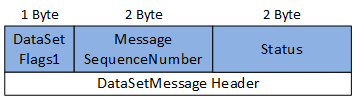
Table A.5 shows the configuration for the DataSetMessage header.
| Name | Type | Restrictions |
| DataSetFlags1 | Byte | Bit 0: Indicates whether this DataSetMessage is valid Bit range 1-2: Field Encoding 01 RawData Field Encoding Bit 3: DataSetMessageSequenceNumber enabled = 1 Bit 4: Status enabled Bit 5: ConfigurationVersionMajorVersion enabled = 0 Bit 6: ConfigurationVersionMinorVersion enabled = 0 Bit 7: DataSetFlags2 enabled = 0 |
| DataSetMessageSequenceNumber | UInt16 | Defined by Table 162. |
| StatusCode | UInt16 | Defined by Table 162. |
Table A.6 defines the values for the configuration parameters representing this layout.
| Parameter | Value |
| KeyFrameCount | 1 |
| UadpDataSetMessageContentMask | 0x00000024 This value results of the following options: Bit 2: StatusCode enabled = 1 Bit 5: SequenceNumber enabled = 1 |
| DataSetFieldContentMask | 0x00000020 This value results of the following options: Bit 5: RawData |
| DataSetOrdering | AscendingWriterId or AscendingWriterIdSingle |
A.2.1.8 Example fixed message layout without security
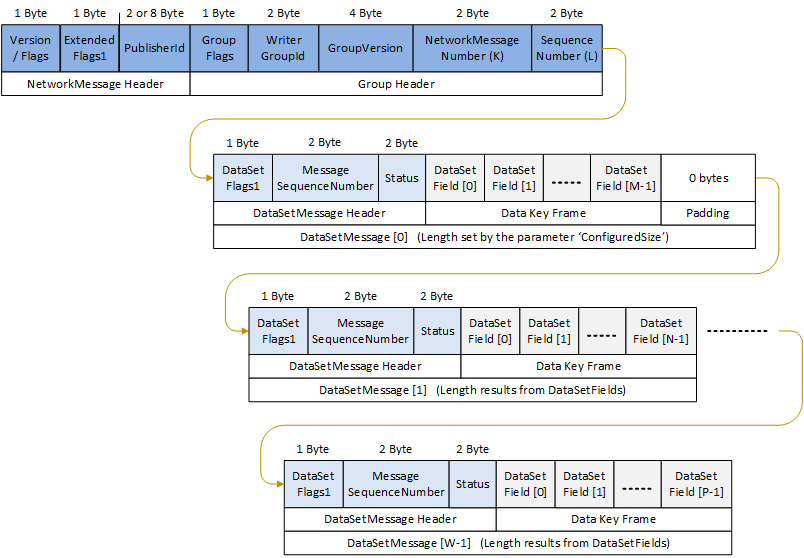
Figure A.5 shows an example for a UADP NetworkMessage with fixed layout as defined in A.2.1.3 and A.2.1.7.
The configuration ensures that every NetworkMessage sent has the same layout of header fields and also the same layout of DataSet fields. This allows a highly efficient encoding and decoding of the message because the offset of all fields is constant and can be pre-calculated. The Payload Header (Count and Sizes for the DataSetMessages and DataSetWriterIds) is deactivated and the Subscriber has to retrieve this information through the DataSetMetaData, DataSetWriter and WriterGroup settings.
The configuration has to ensure that the size of each DataSetMessage is constant. This can be achieved by avoiding DataSet fields of types with variable size, or by using the parameter ConfiguredSize. In this example it is assumed that DataSetMessage[1] and DataSetMessage[W-1] are using RawData field encoding and all DataSet fields are from constant size, so the total length of theses DataSetMessages can be calculated from the DataSetMetaData. For DataSetMessage[0] in this example the Subscriber does not have to calculate the total length but it should take it from the parameter ConfiguredSize. This allows to provide spare bytes for future extension of DataSetMessage[0] without effect on the size of the complete NetworkMessage or the position of other DataSetMessages in this NetworkMessage.
By setting-specific values for KeyFrameCount and DataSetOrdering (see Table A.6) it is guaranteed that the number of DataSetMessages and their order inside the NetworkMessage is the same in every NetworkMessage that is sent.
A.2.1.9 Example fixed message layout with integrity
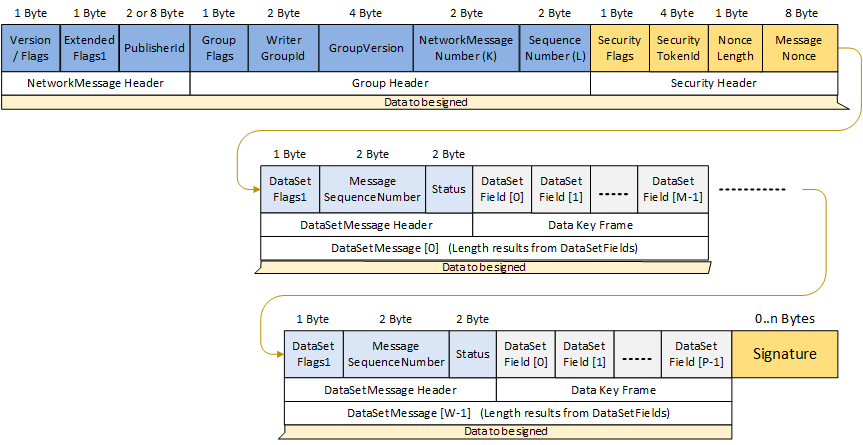
Figure A.6 shows an example for a UADP NetworkMessage with fixed layout and security activated (signing, no encryption) as defined in A.2.1.5 and A.2.1.7.
The layout of all header fields and DataSet fields is constant like described in A.2.1.8. Additional to this the SecurityHeader is activated for signing (but no encryption).
A.2.2 Message headers for Events and Data with dynamic layout
A.2.2.1 Motivation
In PubSub use cases with dynamically changing message layouts or Event based DataSetMessages, the number and ordering of DataSetMessages within different NetworkMessages can change arbitrarily. The header layouts described in this section are intended for use cases with dynamic DataSets and ad-hoc identification of DataSetMessages.
A.2.2.2 Overview
With the header layout described in this section, the NetworkMessage header only identifies the Publisher and the contained DataSetMessages. In contrast to the fixed layout, more header fields are enabled in the DataSetMessage header with this header layout but the GroupHeader is deactivated.
A.2.2.3 Header layout URI
The header layout URI for the dynamic layout as specified in A.2.2.4, A.2.2.5, A.2.2.6 and A.2.2.7 is
A.2.2.4 Header layout for NetworkMessages
A UADP NetworkMessage header shall consist of the following fields according to this header layout:
Version/Flags
ExtendedFlags1
PublisherId
PayloadHeader
Additional restrictions:
The datatype for the PublisherId shall be UInt64
The NetworkMessage header layout is shown in Figure A.7.

Table A.7 shows the configuration for the NetworkMessage header.
| Name | Type | Restrictions |
| UADPVersion | Bit[0-3] | The version shall be 1 |
| UADPFlags | Bit[4-7] | Bit 4: PublisherId enabled = 1 Bit 5: GroupHeader enabled = 0 Bit 6: PayloadHeader enabled = 1 Bit 7: ExtendedFlags1 enabled = 1 |
| ExtendedFlags1 | Byte | Bit range 0-2: PublisherId Type 011 The PublisherId is of DataType UInt64 Bit 3: DataSetClassId enabled = 0 Bit 4: SecurityHeader enabled = 0 Bit 5: Timestamp enabled = 0 Bit 6: PicoSeconds enabled = 0 Bit 7: ExtendedFlags2 enabled = 0 |
| PublisherId | UInt64 | Configured value for the PubSubConnection. The datatype shall be UInt64. |
| PayloadHeader | Byte[*] | Defined by Table 160. |
Table A.8 defines the values for the configuration parameters representing this layout.
| Parameter | Value |
| UadpNetworkMessageContentMask | 0x00000041 This value results of the following options: Bit 0: PublisherId enabled = 1 Bit 6: PayloadHeader enabled = 1 |
When a PubSubConnection is created by using the Method AddConnection() the element PublisherId contained in the argument PubSubConnectionDataType shall be of the DataType UInt64.
A.2.2.5 Header layout for NetworkMessages with integrity (signing)
UADP messages may be signed to ensure integrity. In this case a security header and a signature have to be added to the message. See clause 7.2.4.4.3 for a complete description of the signing mechanism.
This header layout is basically the same as the header layout defined in A.2.2.4 but with additional security level 'Signing but no encryption'. The NetworkMessage header layout with signing is shown in Figure A.8.

Table A.9 shows the configuration for the NetworkMessage header with signing. The table contains only the added or modified rows from Table A.7.
| Name | Type | Restrictions |
| ExtendedFlags1 | Byte | Bit 4: SecurityHeader enabled = 1 |
| SecurityHeader | ||
SecurityFlags | Byte | Bit 0: NetworkMessage Signed enabled = 1 Bit 1: NetworkMessage Encryption enabled = 0 Bit 2: SecurityFooter enabled = 0 Bit 3: Force key reset enabled = 0 Bit range 4-7: Reserved |
SecurityTokenId | IntegerId | The ID of the security token that identifies the security key in a SecurityGroup. |
NonceLength | Byte | The length of the Nonce used to initialize the encryption algorithm. |
MessageNonce | Byte[NonceLength] | A number used exactly once for a given security key. |
A.2.2.6 Header layout for NetworkMessages with integrity and confidentiality (signing and encryption)
UADP messages may be signed and encrypted. In this case the SecurityHeader and the Signature have to be added to the message. See clause 7.2.4.4.3 for a complete description of the security mechanisms.
This header layout is basically the same as the header layout defined in A.2.2.4 but with additional security level 'Signing and encryption'. The NetworkMessage header layout with signing and encryption is shown in Figure A.9.

Table A.10 shows the configuration for the NetworkMessage header with signing and encryption. The table contains only the added or modified rows from Table A.7.
| Name | Type | Restrictions |
| ExtendedFlags1 | Byte | Bit 4: SecurityHeader enabled = 1 |
| SecurityHeader | ||
SecurityFlags | Byte | Bit 0: NetworkMessage Signed enabled = 1 Bit 1: NetworkMessage Encryption enabled = 1 Bit 2: SecurityFooter enabled = 0 Bit 3: Force key reset enabled = 0 Bit range 4-7: Reserved |
SecurityTokenId | IntegerId | The ID of the security token that identifies the security key in a SecurityGroup. |
NonceLength | Byte | The length of the Nonce used to initialize the encryption algorithm. |
MessageNonce | Byte[NonceLength] | A number used exactly once for a given security key. |
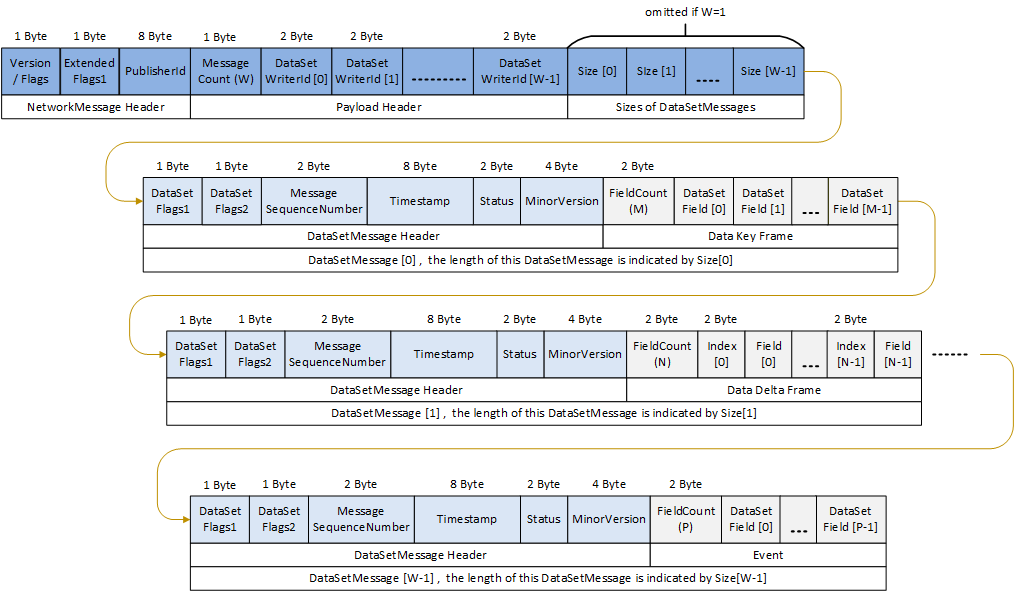
A.2.2.7 Header layout for DataSetMessages
A UADP DataSetMessage header shall consist of the following fields according to this header layout:
DataSetFlags1
DataSetFlags2
DataSetMessageSequenceNumber
Timestamp
Status
MinorVersion
Additional remarks:
Fields can use any encoding
All types of DataSetMessages (Data Key Frame, Data Delta Frame, Event, etc.) are supported
The DataSetMessage header layout is shown in Figure A.10

Table A.11 shows the configuration for the DataSetMessage header.
| Name | Type | Description |
| DataSetFlags1 | Byte | Bit 0: Indicates whether this DataSetMessage is valid Bit range 1-2: Field Encoding <anything> Bit 4: Status enabled = 1 Bit 5: ConfigurationVersionMajorVersion enabled = 0 Bit 6: ConfigurationVersionMinorVersion enabled = 1 Bit 7: DataSetFlags2 enabled = 1 |
| DataSetFlags2 | Byte | Bit range 0-3: UADP DataSetMessage type <anything> Bit 4: Timestamp enabled = 1 Bit 5: PicoSeconds enabled = 0 (not included in the DataSetMessage header) |
| DataSetMessageSequenceNumber | UInt16 | Defined by Table 162. |
| Timestamp | UtcTime | Defined by Table 162. |
| StatusCode | UInt16 | Defined by Table 162. |
| MinorVersion | VersionTime | Defined by Table 162. |
Table A.12 defines the values for the configuration parameters representing this layout.
| Parameter | Value |
| UadpDataSetMessageContentMask | 0x00000035 This value results of the following options: Bit 0: Timestamp enabled = 1 Bit 2: Status enabled = 1 Bit 4: MinorVersion enabled = 1 Bit 5: SequenceNumber enabled = 1 |
| DataSetFieldContentMask | <anything> |
A.2.2.8 Example dynamic message layout with different DataSetMessage types
Figure A.11 shows an example for a UADP NetworkMessage with dynamic layout. As defined in A.2.2.3 and A.2.2.7 only the layout of the NetworkMessage header and the DataSetMessage header is fixed. The number, the type, the length, and the order of DataSetMessages can vary from one NetworkMessage to the next.
A.3 JSON Header Layouts
A.3.1 DataSets for examples
The following DataSets are used for the following JSON message examples.
Table A.13 shows the field for example DataSet1.
| Field Name | DataType | ValueRank |
| Active | Boolean | Scalar |
| Temperature | Double | Scalar |
| Counter | UInt32 | Scalar |
| AdditionalInfo | String | Scalar |
Table A.14 shows the field for example DataSet2.
| Field Name | DataType | ValueRank |
| LocationName | String | Scalar |
| Coordinate | MyStruct | Scalar |
X | Float | Scalar |
Y | Float | Scalar |
| Measurements | Int32 | Array |
Table A.15 shows the field for example DataSet3.
| Field Name | DataType | ValueRank |
| BooleanValue | Boolean | Scalar |
| Int32Value | Int32 | Scalar |
| Int64Value | Int64 | Scalar |
| UInt32Value | UInt32 | Scalar |
| UInt64Value | UInt64 | Scalar |
| DoubleValue | Double | Scalar |
| DateTimeValue | DateTime | Scalar |
| StringValue | String | Scalar |
| GuidValue | Guid | Scalar |
| StatusCodeValue | StatusCode | Scalar |
| LocalizedTextValue | LocalizedText | Scalar |
| ByteStringValue | ByteString | Scalar |
| NodeIdValue | NodeId | Scalar |
| QualifiedNameValue | QualifiedName | Scalar |
The following example shows the DataSetMetaData message for DataSet1.
{
  "MessageId": "66D65CA4-92EE-4195-9867-E6E27794B692",
  "MessageType": "ua-metadata",
  "PublisherId": "MyPublisher",
  "DataSetWriterId": 101,
  "MetaData": {
    "Name": "DataSet1",
    "Fields": [
      {
        "Name": "Active",
        "FieldFlags": 0,
        "BuiltInType": 1,
        "DataType": "i=1",
        "ValueRank": -1,
        "MaxStringLength": 0,
        "DataSetFieldId": "f355bfe8-d5c0-4073-aa89-c8d9d9f8c0c4"
      },
      {
        "Name": "Temperature",
        "FieldFlags": 0,
        "BuiltInType": 11,
        "DataType": "i=11",
        "ValueRank": -1,
        "MaxStringLength": 0,
        "DataSetFieldId": "4b91e1cc-61f5-411a-9fb3-ea9087d2154c"
      },
      {
        "Name": "Counter",
        "FieldFlags": 0,
        "BuiltInType": 7,
        "DataType": "i=7",
        "ValueRank": -1,
        "MaxStringLength": 0,
        "DataSetFieldId": "885d0b3b-8a83-41ae-882a-3a528041140f"
      },
      {
        "Name": "AdditionalInfo",
        "FieldFlags": 0,
        "BuiltInType": 12,
        "DataType": "i=12",
        "ValueRank": -1,
        "MaxStringLength": 0,
        "DataSetFieldId": "b020c4a8-c427-4d33-83ea-b0f437a9c6ea"
      }
    ],
    "DataSetClassId": "e95258a4-0b50-41b0-9f37-505e90565584",
    "ConfigurationVersion": {"MajorVersion": 672338910, "MinorVersion": 672341762}
  },
  "DataSetWriterName": "Writer101"
}
The following example shows the DataSetMetaData message for DataSet2.
{
  "MessageId": "66D65CA4-92EE-4195-9867-E6E27794B692",
  "MessageType": "ua-metadata",
  "PublisherId": "MyPublisher",
  "DataSetWriterId": 102,
  "MetaData": {
    "StructureDataTypes": [
      {
        "DataTypeId": "nsu=http://test.org/UA/Data/;s=CoordinateDataType",
        "Name": "nsu=http://test.org/UA/Data/;CoordinateDataType",
        "StructureDefinition": {
          "DefaultEncodingId": "nsu=http://test.org/UA/Data/;i=24351",
          "BaseDataType": "i=22",
          "StructureType": 0,
          "Fields": [
            {
              "Name": "X",
              "Description": {"Text": "The X coordinate."},
              "DataType": "i=10",
              "ValueRank": -1,
              "MaxStringLength": 0,
              "IsOptional": false
            },
            {
              "Name": "Y",
              "Description": {"Text": "The Y coordinate."},
              "DataType": "i=10",
              "ValueRank": -1,
              "MaxStringLength": 0,
              "IsOptional": false
            }
          ]
        }
      }
    ],
    "Name": "DataSet2",
    "Fields": [
      {
        "Name": "LocationName",
        "FieldFlags": 0,
        "BuiltInType": 12,
        "DataType": "i=12",
        "ValueRank": -1,
        "MaxStringLength": 0,
        "DataSetFieldId": "8968e376-e281-47bf-b621-e1fb710c8954"
      },
      {
        "Name": "Coordinate",
        "FieldFlags": 0,
        "BuiltInType": 22,
        "DataType": "nsu=http://test.org/UA/Data/;s=CoordinateDataType",
        "ValueRank": -1,
        "MaxStringLength": 0,
        "DataSetFieldId": "4a1a1f3c-76c0-46ac-92bd-b02bfbe59dcf"
      },
      {
        "Name": "Measurements",
        "FieldFlags": 0,
        "BuiltInType": 6,
        "DataType": "i=6",
        "ValueRank": 1,
        "MaxStringLength": 0,
        "DataSetFieldId": "7d177014-32de-421e-a0a3-bc48ede8ac9d"
      }
    ],
    "DataSetClassId": "4f457b18-32f8-48a5-a6f0-18ae5ebdc7f4",
    "ConfigurationVersion": {"MajorVersion": 672338910, "MinorVersion": 672341762}
  },
  "DataSetWriterName": "Writer102"
}
A.3.2 JSON message headers for minimal messages
A.3.2.1 Motivation
One of the use cases for PubSub is the publication of data to IT applications through a topic or message queue where the IT application does not have any knowledge about OPC UA. In such a use case, the messages that are sent to the message queue can only contain one DataSetMessage and there should be no OPC UA specific information or header.
The header layout described in this section is optimized for this use case.
This header layout cannot be used for Actions.
A.3.2.2 Overview
A minimal message has the following settings:
Each NetworkMessage contains one DataSetMessage
The NetworkMessage header is not included
The DataSetMessage header is not included
The DataSet field encoding is set to VerboseEncoding with RawData.
A.3.2.3 Header layout URI
The header layout URI for the mimimal layout as specified in A.3.2.4 is
A.3.2.4 Configuration parameters
Table A.16 defines the values for the WriterGroup configuration parameters representing this layout.
| Parameter | Value |
| JsonNetworkMessageContentMask | 0x4 This value results of the following options: Bit 0: NetworkMessageHeader = 0 Bit 1: DataSetMessageHeader = 0 Bit 2: SingleDataSetMessage = 1 Bit 3: PublisherId = 0 Bit 4: DataSetClassId = 0 Bit 5: ReplyTo = 0 Bit 6: WriterGroupName = 0 |
Table A.17 defines the values for the DataSetWriter configuration parameters representing this layout.
| Parameter | Value |
| JsonDataSetMessageContentMask | 0x800 This value results of the following options: Bit 0: DataSetWriterId = 0 Bit 1: MetaDataVersion = 0 Bit 2: SequenceNumber = 0 Bit 3: Timestamp = 0 Bit 4: Status = 0 Bit 5: MessageType = 0 Bit 6: DataSetWriterName = 0 Bit 7: FieldEncoding1 = 0 Bit 8: PublisherId = 0 Bit 9: WriterGroupName = 0 Bit 10: MinorVersion = 0 Bit 11: FieldEncoding2 = 1 |
| DataSetFieldContentMask | 0x20 Bit 0: StatusCode = 0 Bit 1: SourceTimestamp = 0 Bit 2: ServerTimestamp = 0 Bit 3: SourcePicoSeconds = 0 Bit 4: ServerPicoSeconds = 0 Bit 5: RawData = 1 |
| KeyFrameCount | configurable |
A.3.2.5 Examples
Example for DataSet1.
{
  "Active":true,
  "Temperature":25.5,
  "Counter":0,
  "AdditionalInfo":"The system is running normally (1)"
}
Example for DataSet2.
{
  "LocationName":"Building A",
  "Coordinate":
  {
    "X":0,
    "Y":0.2
  },
  "Measurements":
  [
    20030,
    20020,
    20010
  ]
}
Example for DataSet3.
{
  "BooleanValue":false,
  "Int32Value":0,
  "Int64Value":"1",
  "UInt32Value":1,
  "UInt64Value":"1",
  "DoubleValue":0.5,
  "DateTimeValue":"2021-09-14T07:14:30Z",
  "StringValue":"String 1",
  "GuidValue":"ebfc352a-3142-4b99-9bbe-89a517d6a77e",
  "StatusCodeValue":
  {
    "Code":2147483648,
    "Symbol":"Bad"
  },
  "LocalizedTextValue":
  {
    "Locale":"en"
    "Text":"Localized text 1"
  },
  "ByteStringValue":"AAEC",
  "NodeIdValue":"nsu=http://test.org/UA/Data/Instance;s=Pipe001.Valve001.Input",
  "QualifiedNameValue":"nsu=http://test.org/UA/Data/;PipeX001"
}
A.3.3 JSON message headers for single DataSetMessage
A.3.3.1 Motivation
One of the use cases for PubSub is the publication of data to IT applications through a message queue where one DataSet is related to one message queue.
The IT application does not need to have knowledge about OPC UA but OPC UA specific header may be used for the message processing.
In such a use cases, the messages sent to a message queue can only contain one DataSetMessage but a OPC UA specific header is provided.
The header layout described in this section is optimized for this use case.
This header layout cannot be used for Actions.
A.3.3.2 Overview
A single DataSet message has the following settings:
Each NetworkMessage contains one DataSetMessage
The NetworkMessage header is not included
The DataSetMessage header is included, the header fields can be configured
The DataSet field encoding can be configured
A.3.3.3 Header layout URI
The header layout URI for the single DataSetMessage layout as specified in A.3.3.4 is
A.3.3.4 Configuration parameters
Table A.18 defines the values for the WriterGroup configuration parameters representing this layout.
| Parameter | Value |
| JsonNetworkMessageContentMask | 0x6 This value results of the following options: Bit 0: NetworkMessageHeader = 0 Bit 1: DataSetMessageHeader = 1 Bit 2: SingleDataSetMessage = 1 Bit 3: PublisherId = 0 Bit 4: DataSetClassId = 0 Bit 5: ReplyTo = 0 Bit 6: WriterGroupName = 0 |
Table A.19 defines the values for the DataSetWriter configuration parameters representing this layout.
| Parameter | Value |
| JsonDataSetMessageContentMask | The mask allows the following options: Bit 0: DataSetWriterId = 1 Bit 1: MetaDataVersion = 0 Bit 2: SequenceNumber = 1 Bit 3: Timestamp = 1 Bit 4: Status = 1 Bit 5: MessageType configurable (default is 0) Bit 6: DataSetWriterName configurable (default is 0) Bit 7: FieldEncoding1 = 0 Bit 8: PublisherId = 1 Bit 9: WriterGroupName configurable (default is 0) Bit 10: MinorVersion = 1 Bit 11: FieldEncoding2 = 1 |
| DataSetFieldContentMask | Configurable (default is 0) The value shall be 0 or 0x20 if the MessageType is "ua-event". |
| KeyFrameCount | Configurable If the KeyFrameCount is not 1, the MessageType bit shall be true. |
A.3.3.5 Examples
Example for DataSet1 with all configurable JsonDataSetMessageContentMask flags set to false and no flags set for DataSetFieldContentMask.
{
  "PublisherId":"MyPublisher",
  "DataSetWriterId":101,
  "SequenceNumber":68468,
  "MinorVersion":672341762,
  "Timestamp":"2021-09-27T18:45:19.555Z",
  "Payload":
  {
    "Active":true,
    "Temperature":25.5,
    "Counter":0,
    "AdditionalInfo":"The system is running normally (1)"
  }
}
Example for DataSet2 with all configurable JsonDataSetMessageContentMask flags set to true and no flags set for DataSetFieldContentMask.
{
  "PublisherId":"MyPublisher",
  "DataSetWriterId":102,
  "SequenceNumber":25460,
  "MinorVersion":672341762,
  "Timestamp":"2021-09-27T18:45:19.555Z",
  "Status":{"Code":1073741824},
  "MessageType":"ua-keyframe",
  "WriterGroupName":"WriterGroup1",
  "DataSetWriterName":"Writer102",
  "Payload":
  {
    "LocationName":"Building A",
    "Coordinate":
    {
      "X":1,
      "Y":0.2
    },
    "Measurements":
    [
      20030,
      20020,
      20010
    ]
  }
}
Example for DataSet1 with all configurable JsonDataSetMessageContentMask flags set to false and with SourceTimestamp and StatusCode flags set in the DataSetFieldContentMask. The Status is omitted if the Code is 0.
{
  "PublisherId":"MyPublisher",
  "DataSetWriterId":101,
  "SequenceNumber":68468,
  "MinorVersion":672341762,
  "Timestamp":"2021-09-27T18:45:19.555Z",
  "Payload":
  {
    "Active":
    {
      "Value":true,
      "Status":{"Code":1073741824,"Symbol":"Uncertain"},
      "SourceTimestamp":"2021-09-27T11:32:38.349925Z"
    },
    "Temperature":
    {
      "Value":25.5,
      "SourceTimestamp":"2021-09-27T11:32:38.349925Z"
    },
    "Counter":
    {
      "Value":0,
      "SourceTimestamp":"2021-09-27T11:32:38.349925Z"
    },
    "AdditionalInfo":
    {
      "Value":"The system is running normally (1)",
      "SourceTimestamp":"2021-09-27T11:32:38.349925Z"
    }
  }
}
A.3.4 JSON message headers for multiple DataSetMessages
A.3.4.1 Motivation
One of the use cases is streaming of multiple different data and event DataSets through a single message queue for further processing in cloud applications.
Another use case is the execution of Actions.
The header layout described in this section is optimized for this use case.
In general this header layout is the most flexible option and should be used if only one header layout is preferred.
A.3.4.2 Overview
A minimal message has the following settings:
Each NetworkMessage contains an array of DataSetMessages
The NetworkMessage header is included, the header fields can be configured
The DataSetMessage header is included, the header fields can be configured
The DataSet field encoding can be configured
A.3.4.3 Header layout URI
The header layout URI for the multiple DataSetMessages layout as specified in A.3.4.4 is
A.3.4.4 Configuration parameters
Table A.20 defines the values for the WriterGroup configuration parameters representing this layout.
| Parameter | Value |
| JsonNetworkMessageContentMask | The mask allows the following options: Bit 0: NetworkMessageHeader = 1 Bit 1: DataSetMessageHeader = 1 Bit 2: SingleDataSetMessage = 0 Bit 3: PublisherId = 1 Bit 4: DataSetClassId configurable (default is 0) Bit 5: ReplyTo configurable (default is 0) Bit 6: WriterGroupName configurable (default is 0) |
Table A.21 defines the values for the DataSetWriter configuration parameters representing this layout.
| Parameter | Value |
| JsonDataSetMessageContentMask | The mask allows the following options: Bit 0: DataSetWriterId = 1 Bit 1: MetaDataVersion = 0 Bit 2: SequenceNumber = 1 The SequenceNumber is always omitted for Action messages. Bit 3: Timestamp = 1 Bit 4: Status = 1 The Status is omitted for ActionRequest messages. Bit 5: MessageType configurable (default is 0) Bit 6: DataSetWriterName configurable (default is 0) Bit 7: FieldEncoding1 = 0 Bit 8: PublisherId = 0 Bit 9: WriterGroupName configurable (default is 0) Bit 10: MinorVersion = 1 Bit 11: FieldEncoding2 = 1 |
| DataSetFieldContentMask | Configurable (default is 0) The value shall be 0 or 0x20 if the MesageType is "ua-event". |
| KeyFrameCount | Configurable If the KeyFrameCount is not 1, the MessageType bit shall be true. |
A.3.4.5 Examples
Example for DataSet1, DataSet2 and DataSet3 with all configurable JsonNetworkMessageContentMask and JsonDataSetMessageContentMask flags set to false and no flags set for DataSetFieldContentMask.
{
  "MessageId":"9279c0b3-da88-45a4-af74-451cebf82db0",
  "MessageType":"ua-data",
  "PublisherId":"MyPublisher",
  "Messages":
  [
    {
      "DataSetWriterId":101,
      "SequenceNumber":68468,
      "MinorVersion":672341762,
      "Timestamp":"2021-09-27T18:45:19.555Z",
      "Payload":
      {
        "Active":true,
        "Temperature":25.5,
        "Counter":0,
        "AdditionalInfo":"The system is running normally (1)"
      }
    },
    {
      "DataSetWriterId":102,
      "SequenceNumber":25460,
      "MinorVersion":672341762,
      "Timestamp":"2021-09-27T18:45:19.555Z",
      "Status":{"Code":1073741824},
      "Payload":
      {
        "LocationName":"Building A",
        "Coordinate":{"X":0,"Y":0.2},
        "Measurements":[20030,20020,20010]
      }
    },
    {
      "DataSetWriterId":103,
      "SequenceNumber":66915,
      "MinorVersion":672341762,
      "Timestamp":"2021-09-27T18:45:19.555Z",
      "Payload":
      {
        "BooleanValue":false,
        "Int32Value":0,
        "Int64Value":"1",
        "UInt32Value":1,
        "UInt64Value":"1",
        "DoubleValue":0.5,
        "DateTimeValue":"2021-09-14T07:14:30Z",
        "StringValue":"String 1",
        "GuidValue":"ebfc352a-3142-4b99-9bbe-89a517d6a77e",
        "StatusCodeValue":
        {
          "Code":2147483648,
          "Symbol":"Bad"
        },
        "LocalizedTextValue":
        {
          "Locale":"en"
          "Text":"Localized text 1"
        },
        "ByteStringValue":"AAEC",
        "NodeIdValue":"nsu=http://test.org/UA/Data/Instance;s=Pipe001.Valve001.Input",
        "QualifiedNameValue":"nsu=http://test.org/UA/Data/;PipeX001"
      }
    }
  ]
}