
9.1.4 Published DataSet model
9.1.4.1 Overview
A PublishedDataSet defines the content of a DataSetMessage and the configuration of the information source for a DataSet. See 5.2 for the introduction to DataSets, 5.3 for the introduction to DataSetMessages and 5.4.1.2 for an introduction to the different source options and the parameters for sending of DataSetMessages.
Figure 46 depicts the ObjectTypes of the published DataSet model and their components.
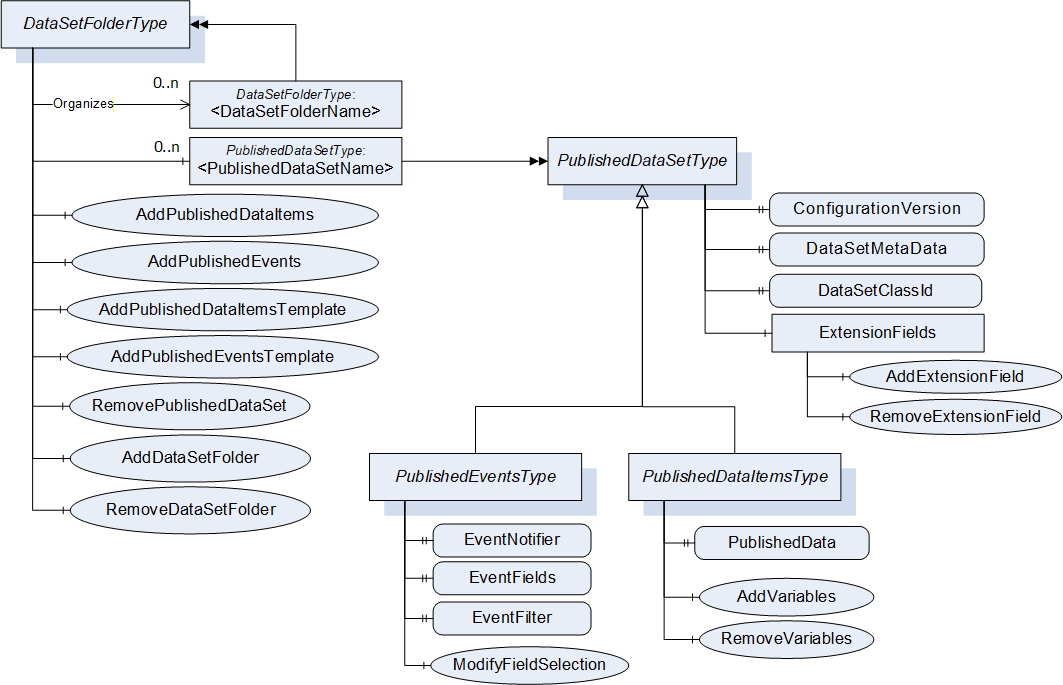
Instances of the DataSetFolderType are used to organize PublishedDataSetType Objects in a tree of DataSetFolders. The configuration can be made through Methods or can be made by product-specific configuration tools.
The PublishedDataSetType defines the information necessary for a Subscriber to understand and decode DataSetMessages received from the Publisher for a DataSet and to detect changes of the DataSet semantic and metadata.
The types derived from the PublishedDataSetType define the source of information for a DataSet in the OPC UA Server AddressSpace like Variables or Events.
9.1.4.2 Published DataSet
9.1.4.2.1 PublishedDataSetType
This ObjectType is the base type for PublishedDataSets. It defines the metadata and the configuration version of the DataSets sent as DataSetMessages through DataSetWriters.
The PublishedDataSetType is the base type for configurable DataSets. Derived types like PublishedDataItemsType and PublishedEventsType define how to collect the DataSet to be published. For PublishedDataItemsType this is a list of monitored Variables used to create cyclic DataSets. For PublishedEventsType this is an Event selection used to create acyclic DataSets. The list of monitored Variables or the list of selected EventFields defines the content and metadata of the PublishedDataSetType Object.
If the content of the DataSet is defined by a product-specific configuration and the source of the DataSet is not known, the PublishedDataSetType can be used directly to expose the custom PublishedDataSet in the AddressSpace of the Publisher. If the Variable CyclicDataSet is not present, the custom PublishedDataSet shall create cyclic DataSets.
The PublishedDataSetType is formally defined in Table 247.
| Attribute | Value | ||||
| BrowseName | PublishedDataSetType | ||||
| IsAbstract | False | ||||
| References | NodeClass | BrowseName | DataType | TypeDefinition | ModellingRule |
|---|---|---|---|---|---|
| Subtype of BaseObjectType defined in OPC 10000-5. | |||||
| DataSetToWriter | Object | <DataSetWriterName> | DataSetWriterType | OptionalPlaceholder | |
| HasProperty | Variable | ConfigurationVersion | ConfigurationVersionDataType | PropertyType | Mandatory |
| HasProperty | Variable | DataSetMetaData | DataSetMetaDataType | PropertyType | Mandatory |
| HasProperty | Variable | DataSetClassId | Guid | PropertyType | Optional |
| HasProperty | Variable | CyclicDataSet | Boolean | PropertyType | Optional |
| HasComponent | Object | ExtensionFields | ExtensionFieldsType | Optional | |
| Conformance Units | |||||
| PubSub Model Base | |||||
The PublishedDataSetType ObjectType is a concrete type and can be used directly. It can be used to expose a PublishedDataSet where the data collection is not visible in the AddressSpace.
The Object has a list of DataSetWriters. A DataSetWriter sends DataSetMessages created from DataSets through a Message Oriented Middleware. The link between the PublishedDataSet Object and a DataSetWriter shall be created when an instance of the DataSetWriterType is created. The DataSetWriterType is defined in 9.1.7.2. If a DataSetWriter is created for the PublishedDataSet, it is added to the list using the ReferenceType DataSetToWriter. The DataSetToWriter ReferenceType is defined in 9.1.4.2.5. If a DataSetWriter for the PublishedDataSet is removed from a group, the Reference to this DataSetWriter shall also be removed from this list. The group model is defined in 9.1.6.
The Property ConfigurationVersion is related to configuration of the DataSet produced by the PublishedDataSet Object. The PublishedDataSet parameters affecting the version are defined in the concrete types derived from this base type. The Property value shall match the ConfigurationVersion in the DataSetMetaData Property. The ConfigurationVersionDataType and the rules for setting the version are defined in 6.2.3.2.6.
The Property DataSetMetaData provides the information necessary to decode DataSetMessages on the Subscriber side if the DataSetMessages are not self-describing. The information in this Property is automatically updated if the ConfigurationVersion is changed based on DataSet configuration change. The DataSetMetaDataType is defined in 6.2.3.2.3. The Name field in the DataSetMetaDataType shall match the name of the PublishedDataSetType Object if the DataSetMetaData is not based on a DataSetClass.
The MajorVersion part of the ConfigurationVersion contained in the DataSetMessage needs to match the ConfigurationVersion of the DataSetMetaData available on the Subscriber side.
The DataSetClassId is the globally unique identifier for a DataSetClass. The optional Property shall be present if the DataSetClassId of the DataSetMetaData is not null. If the DataSetClassId is not null, the Publisher shall reject any configuration changes that change the DataSetMetaData. The Property value shall match the DataSetClassId in the DataSetMetaData Property.
The Property CyclicDataSet provides the information if the DataSets created by the PublishedDataSet are cyclic or acyclic. If the Property is provided by an instance of PublishedDataSetType, the Value shall be true. If the Property is provided by an instance of PublishedEventsType, the Value shall be false.
The ExtensionFields Object allows the configuration of fields with values to be included in the DataSet in case the existing AddressSpace of the Publisher does not provide the necessary information. The extension fields are added as Properties to the ExtensionFields Object. For PublishedDataItemsType base PublishedDataSets, an extension field is included as a Variable in the published DataSet. For PublishedEventsType base PublishedDataSets, an extension field is included into the SelectedFields for the DataSet.
9.1.4.2.2 ExtensionFieldsType
The ExtensionFieldsType is formally defined in Table 248. It allows the configuration of fields with values to be included in the DataSet in case the existing AddressSpace of the Publisher does not provide the necessary information.
| Attribute | Value | |||||
| BrowseName | ExtensionFieldsType | |||||
| IsAbstract | False | |||||
| References | NodeClass | BrowseName | DataType | TypeDefinition | ModellingRule | |
|---|---|---|---|---|---|---|
| Subtype of BaseObjectType defined in OPC 10000-5. | ||||||
| HasProperty | Variable | <ExtensionFieldName> | BaseDataType | PropertyType | OptionalPlaceholder | |
| HasComponent | Method | AddExtensionField | Defined in 9.1.4.2.3. | Mandatory | ||
| HasComponent | Method | RemoveExtensionField | Defined in 9.1.4.2.4. | Mandatory | ||
| Conformance Units | ||||||
| PubSub Model Base | ||||||
The ExtensionFieldsType ObjectType is a concrete type and can be used directly.
The configured list of extension fields is exposed through Properties and managed through the Methods AddExtensionField and RemoveExtensionField. An ExtensionField is not automatically included in the DataSet. The ExtensionField can be added to the DataSet after creation.
Metadata that normally appear in message headers can be included in the body by adding extension fields with well-known QualifiedNames. These well-known QualifiedNames are shown in Table 249. The qualifying namespace is the OPC UA namespace.
| Name | Type | Description |
| PublisherId | BaseDataType | The PublisherId from the Connection Object. |
| DataSetName | String | The Name from the DataSetMetaData. |
| DataSetClassId | Guid | The DataSetClassId from the DataSetMetaData. |
| MajorVersion | UInt32 | The MajorVersion from the ConfigurationVersion |
| MinorVersion | UInt32 | The MinorVersion from the ConfigurationVersion |
| DataSetWriterId | BaseDataType | The DataSetWriterId from the DataSetWriterTransport Object. |
| MessageSequenceNumber | UInt16 | The sequence number from the DataSetMessage. |
If a well-known name is used, the value placed in the message body is dynamically generated from the current settings. The value set in the AddExtensionField Method is ignored. Subtypes of DataSetWriterTransportType may extend this list.
9.1.4.2.3 AddExtensionField Method
This Method is used to add a Property to the Object ExtensionFields.
The Client shall be authorized to modify the configuration for the PubSub functionality when invoking this Method on the Server.
Signature
	AddExtensionField (
		[in]	QualifiedName	FieldName,
		[in]	BaseDataType	FieldValue,
		[out]	NodeId		FieldId
		);
| Argument | Description |
| FieldName | Name of the field to add. |
| FieldValue | The value of the field to add. |
| FieldId | The NodeId of the added field Property. |
Method Result Codes
| ResultCode | Description |
| Bad_NodeIdExists | A field with the name already exists. |
| Bad_InvalidArgument | The Server is not able to apply the Name. The Name may be too long or may contain invalid characters. |
| Bad_UserAccessDenied | The Session user is not allowed to configure the Object. |
Table 250 specifies the AddressSpace representation for the AddExtensionField Method.
| Attribute | Value | ||||
| BrowseName | AddExtensionField | ||||
| References | NodeClass | BrowseName | DataType | TypeDefinition | ModellingRule |
|---|---|---|---|---|---|
| HasProperty | Variable | InputArguments | Argument[] | PropertyType | Mandatory |
| HasProperty | Variable | OutputArguments | Argument[] | PropertyType | Mandatory |
| ConformanceUnits | |||||
|---|---|---|---|---|---|
| PubSub Model Base |
9.1.4.2.4 RemoveExtensionField Method
This Method is used to remove a Property from the Object ExtensionFields.
The Client shall be authorized to modify the configuration for the PubSub functionality when invoking this Method on the Server.
Signature
	RemoveExtensionField (
		[in]	NodeId		FieldId
		);
| Argument | Description |
| FieldId | The NodeId field Property to remove. |
Method Result Codes
| ResultCode | Description |
| Bad_NodeIdUnknown | A field with the NodeId does not exist. |
| Bad_NodeIdInvalid | The FieldId is not a NodeId of a Property of the ExtensionFieldsType Object. |
| Bad_UserAccessDenied | The Session user is not allowed to configure the Object. |
Table 251 specifies the AddressSpace representation for the RemoveExtensionField Method.
| Attribute | Value | ||||
| BrowseName | RemoveExtensionField | ||||
| References | NodeClass | BrowseName | DataType | TypeDefinition | ModellingRule |
|---|---|---|---|---|---|
| HasProperty | Variable | InputArguments | Argument[] | PropertyType | Mandatory |
| ConformanceUnits | |||||
|---|---|---|---|---|---|
| PubSub Model Base |
9.1.4.2.5 DataSetToWriter
The DataSetToWriter ReferenceType is a concrete ReferenceType that can be used directly. It is a subtype of the HierarchicalReferences ReferenceType.
The SourceNode of References of this type shall be an Object of ObjectType PublishedDataSetType or an ObjectType that is a subtype of PublishedDataSetType defined in 9.1.4.2.1.
The TargetNode of this ReferenceType shall be an Object of the ObjectType DataSetWriterType defined in 9.1.7.1.
Each DataSetWriter Object shall be the TargetNode of exactly one DataSetToWriter Reference.
Servers shall provide the inverse Reference that relates a DataSetWriter Object back to a PublishedDataSetType Object.
The representation of the DataSetToWriter ReferenceType in the AddressSpace is specified in Table 252.
| Attributes | Value | ||
| BrowseName | DataSetToWriter | ||
| InverseName | WriterToDataSet | ||
| Symmetric | False | ||
| IsAbstract | False | ||
| References | NodeClass | BrowseName | Comment |
|---|---|---|---|
| Subtype of HierarchicalReferences defined in OPC 10000-5. | |||
| Conformance Units | |||
| PubSub Model Base | |||
9.1.4.3 Published Data Items
9.1.4.3.1 PublishedDataItemsType
The PublishedDataItemsType is used to select a list of OPC UA Variables as the source for the creation of DataSets sent through one or more DataSetWriters.
The PublishedDataItemsType is formally defined Table 253.
| Attribute | Value | ||||
| BrowseName | PublishedDataItemsType | ||||
| IsAbstract | False | ||||
| References | NodeClass | BrowseName | DataType | TypeDefinition | ModellingRule |
|---|---|---|---|---|---|
| Subtype of PublishedDataSetType defined in 9.1.4.2. | |||||
| HasProperty | Variable | PublishedData | PublishedVariableDataType[] | PropertyType | Mandatory |
| HasComponent | Method | AddVariables | Defined in 9.1.4.3.2. | Optional | |
| HasComponent | Method | RemoveVariables | Defined in 9.1.4.3.3. | Optional | |
| Conformance Units | |||||
| PubSub Model PublishedDataSet | |||||
The PublishedDataItemsType ObjectType is a concrete type and can be used directly.
The PublishedData is defined in 6.2.3.7.1. Existing entries in the array can be changed by writing the new settings to the Variable Value. A new Value shall be rejected with Bad_OutOfRange if the array size would be changed. Entries in the array can be added and removed with the Methods AddVariables and RemoveVariables.
The index into the list of entries in the PublishedData has an important role for Subscribers and for configuration tools. It is used as a handle to reference the entry in configuration actions like RemoveVariables or the Value in DataSetMessages received by Subscribers. The index may change after configuration changes. Changes are indicated by the ConfigurationVersion and applications working with the index shall always check the ConfigurationVersion before using the index.
9.1.4.3.2 AddVariables Method
This Method is used to add Variables to the PublishedData Property. The PublishedData contains a list of published Variables of a PublishedDataItemsType Object. The information provided in the input Arguments and information available for the added Variables is also used to create the content of the DataSetMetaData Property. The mapping to the DataSetMetaData is described for the input Arguments.
Variables shall be added at the end of the list in PublishedData. This ensures that Subscribers are only affected by the change if they are interested in the added Variables.
If at least one Variable was added to the PublishedData, the MinorVersion of the ConfigurationVersion shall be updated. The ConfigurationVersionDataType and the rules for setting the version are defined in 6.2.3.2.6.
The Client shall be authorized to modify the configuration for the PubSub functionality when invoking this Method on the Server.
Signature
	AddVariables (
		[in]	ConfigurationVersionDataType		ConfigurationVersion,
		[in]	String[]					FieldNameAliases,
		[in]	Boolean[]					PromotedFields,
		[in]	PublishedVariableDataType[]		VariablesToAdd,
		[out]	ConfigurationVersionDataType		NewConfigurationVersion,
		[out] StatusCode[]				AddResults
		);
| Argument | Description |
| ConfigurationVersion | Configuration version of the DataSet. The configuration version shall match the entire current configuration version of the Object when the Method call is processed. If it does not match, the result Bad_InvalidState shall be returned. The ConfigurationVersionDataType is defined in 6.2.3.2.6. |
| FieldNameAliases | The names assigned to the selected Variables for the fields in the DataSetMetaData and in the DataSetMessages for tagged message encoding. The size and the order of the array shall match the VariablesToAdd. The string shall be used to set the name field in the FieldMetaData that is part of the DataSetMetaData. |
| PromotedFields | The flags indicating if the corresponding field is promoted to the DataSetMessage header. The size and the order of the array shall match the VariablesToAdd. The flag is used to set the PromotedField flag in the fieldFlags parameter in the FieldMetaData. |
| VariablesToAdd | Array of Variables to add to PublishedData and the related configuration settings. Successfully added variables are appended to the end of the list of published variables configured in the PublishedData Property. Failed variables are not added to the list. The PublishedVariableDataType is defined in 6.2.3.7.1. The parameters builtInType, dataType, valueRank and arrayDimensions of the FieldMetaData are filled from corresponding Variable Attributes. |
| NewConfigurationVersion | Returns the new configuration version of the PublishedDataSet. |
| AddResults | The result codes for the variables to add. Variables exceeding the maximum number of items in the Object are rejected with Bad_TooManyVariables. |
Method Result Codes
| ResultCode | Description |
| Bad_NothingToDo | An empty list of variables was provided. |
| Bad_InvalidState | The configuration version did not match the current state of the object. |
| Bad_NotWritable | The DataSet is based on a DataSetClass and the size of the PublishedData array cannot be changed. |
| Bad_UserAccessDenied | The Session user is not allowed to configure the object. |
Operation Result Codes
| ResultCode | Description |
| Bad_NodeIdInvalid | See OPC 10000-4 for the description of this result code. |
| Bad_NodeIdUnknown | See OPC 10000-4 for the description of this result code. |
| Bad_IndexRangeInvalid | See OPC 10000-4 for the description of this result code. |
| Bad_IndexRangeNoData | See OPC 10000-4 for the description of this result code. If the ArrayDimensions have a fixed length that cannot change and no data exists within the range of indexes specified, Bad_IndexRangeNoData is returned in AddVariables. Otherwise, if the length of the array is dynamic, the Publisher shall insert this status in a DataSet if no data exists within the range. |
| Bad_TooManyVariables | The Publisher has reached its maximum number of items for the PublishedDataItemsType object. |
Table 254 specifies the AddressSpace representation for the AddVariables Method.
| Attribute | Value | ||||
| BrowseName | AddVariables | ||||
| References | NodeClass | BrowseName | DataType | TypeDefinition | ModellingRule |
|---|---|---|---|---|---|
| HasProperty | Variable | InputArguments | Argument[] | PropertyType | Mandatory |
| HasProperty | Variable | OutputArguments | Argument[] | PropertyType | Mandatory |
| ConformanceUnits | |||||
|---|---|---|---|---|---|
| PubSub Model PublishedDataSet |
9.1.4.3.3 RemoveVariables Method
This Method is used to remove Variables from the PublishedData list. It contains the list of published Variables of a PublishedDataItemsType Object.
A caller shall read the current Values of PublishedData and ConfigurationVersion prior to calling this Method, to ensure the use of the correct index of the Variables that are being removed.
If at least one Variable was successfully removed from the PublishedData, the MajorVersion of the ConfigurationVersion shall be updated. The ConfigurationVersionDataType and the rules for setting the version are defined in 6.2.3.2.6.
The order of the remaining Variables in the PublishedData shall be preserved.
The Client shall be authorized to modify the configuration for the PubSub functionality when invoking this Method on the Server.
Signature
	RemoveVariables (
		[in]	ConfigurationVersionDataType		ConfigurationVersion,
		[in]	UInt32[]					VariablesToRemove,
		[out]	ConfigurationVersionDataType		NewConfigurationVersion,
		[out] StatusCode[]				RemoveResults
		);
| Argument | Description |
| ConfigurationVersion | Configuration version of the DataSet. The configuration version and the indices passed through VariablesToRemove shall match the entire current configuration version of the Object when the Method call is processed. If it does not match, the result Bad_InvalidState shall be returned. The ConfigurationVersionDataType is defined in 6.2.3.2.6. |
| VariablesToRemove | Array of indices of Variables to remove from the list of Variables configured in PublishedData of the PublishedDataItemsType. This matches the list of fields configured in the DataSetMetaData of the PublishedDataSetType. |
| NewConfigurationVersion | Returns the new configuration version of the DataSet. |
| RemoveResults | The result codes for each of the variables to remove. |
Method Result Codes
| ResultCode | Description |
| Bad_NothingToDo | An empty list of variables was provided. |
| Bad_InvalidState | The configuration version did not match the current state of the Object. |
| Bad_UserAccessDenied | The Session user is not allowed to configure the Object. |
Operation Result Codes
| ResultCode | Description |
| Bad_InvalidArgument | The passed index was invalid. |
Table 255 specifies the AddressSpace representation for the RemoveVariables Method.
| Attribute | Value | ||||
| BrowseName | RemoveVariables | ||||
| References | NodeClass | BrowseName | DataType | TypeDefinition | ModellingRule |
|---|---|---|---|---|---|
| HasProperty | Variable | InputArguments | Argument[] | PropertyType | Mandatory |
| HasProperty | Variable | OutputArguments | Argument[] | PropertyType | Mandatory |
| ConformanceUnits | |||||
|---|---|---|---|---|---|
| PubSub Model PublishedDataSet |
9.1.4.4 Published Events
9.1.4.4.1 PublishedEventsType
This PublishedDataSetType is used to configure the collection of OPC UA Events.
The PublishedEventsType is formally defined in Table 256.
| Attribute | Value | ||||
| BrowseName | PublishedEventsType | ||||
| IsAbstract | False | ||||
| References | NodeClass | BrowseName | DataType | TypeDefinition | ModellingRule |
|---|---|---|---|---|---|
| Subtype of PublishedDataSetType defined in 9.1.4.2.1. | |||||
| HasProperty | Variable | EventNotifier | NodeId | PropertyType | Mandatory |
| HasProperty | Variable | SelectedFields | SimpleAttributeOperand[] | PropertyType | Mandatory |
| HasProperty | Variable | Filter | ContentFilter | PropertyType | Mandatory |
| HasComponent | Method | ModifyFieldSelection | Defined in 9.1.4.4.2. | Optional | |
| Conformance Units | |||||
| PubSub Model PublishedDataSet Events | |||||
The PublishedEventsType ObjectType is a concrete type and can be used directly.
The EventNotifier is defined in 6.2.3.8.1.
The SelectedFields is defined in 6.2.3.8.2.
The index into the list of entries in the SelectedFields has an important role for Subscribers. It is used as handle to reference the Event field in DataSetMessages received by Subscribers. The index may change after configuration changes. Changes are indicated by the ConfigurationVersion and applications working with the index shall always check the ConfigurationVersion before using the index. If a change of the SelectedFields adds additional fields, the MinorVersion of the ConfigurationVersion shall be updated. If a change of the SelectedFields removes fields, the MajorVersion of the ConfigurationVersion shall be updated. The Property ConfigurationVersion is defined in the base ObjectType PublishedDataSetType.
The Filter is defined in 6.2.3.8.3. A change of the Filter does not affect the ConfigurationVersion since the content of the DataSet does not change.
9.1.4.4.2 ModifyFieldSelection Method
This Method is used to modify the event field selection of a PublishedEventsType Object.
The Client shall be authorized to modify the configuration for the PubSub functionality when invoking this Method on the Server.
Signature
	ModifyFieldSelection (
		[in]	ConfigurationVersionDataType		ConfigurationVersion,
		[in]	String[]					FieldNameAliases,
		[in]	Boolean[]					PromotedFields,
		[in]	SimpleAttributeOperand[]		SelectedFields
		[out]	ConfigurationVersionDataType		NewConfigurationVersion
		);
| Argument | Description |
| ConfigurationVersion | Configuration version of the DataSet. The configuration version shall match the entire current configuration version of the Object when the Method call is processed. If it does not match, the result Bad_InvalidState shall be returned. The ConfigurationVersionDataType is defined in 6.2.3.2.6. |
| FieldNameAliases | The names assigned to the selected fields in the DataSetMetaData and in the DataSetMessages for tagged message encoding. The size and the order of the array shall match the SelectedFields. The string is used to set the name field in the FieldMetaData that is part of the DataSetMetaData. |
| PromotedFields | The flags indicating if the corresponding field is promoted to the DataSetMessage header. The size and the order of the array shall match the SelectedFields. The flag is used to set the corresponding field in the FieldMetaData that is part of the DataSetMetaData. |
| SelectedFields | The selection of Event fields contained in the DataSet generated for an Event and sent through the DataSetWriter. The SimpleAttributeOperand DataType is defined in OPC 10000-4. A change to the selected fields requires a change of the ConfigurationVersion. |
| NewConfigurationVersion | Return the new configuration version of the DataSet. |
Method Result Codes
| ResultCode | Description |
| Bad_InvalidState | The configuration version did not match the current state of the Object. |
| Bad_EventFilterInvalid | The event filter is not valid. |
| Bad_UserAccessDenied | The Session user is not allowed to configure the Object. |
Table 257 specifies the AddressSpace representation for the ModifyFieldSelection Method.
| Attribute | Value | ||||
| BrowseName | ModifyFieldSelection | ||||
| References | NodeClass | BrowseName | DataType | TypeDefinition | ModellingRule |
|---|---|---|---|---|---|
| HasProperty | Variable | InputArguments | Argument[] | PropertyType | Mandatory |
| HasProperty | Variable | OutputArguments | Argument[] | PropertyType | Mandatory |
| ConformanceUnits | |||||
|---|---|---|---|---|---|
| PubSub Model PublishedDataSet Events |
9.1.4.5 DataSet Folder
9.1.4.5.1 DataSetFolderType
The DataSetFolderType is formally defined in Table 258.
| Attribute | Value | ||||
| BrowseName | DataSetFolderType | ||||
| IsAbstract | False | ||||
| References | NodeClass | BrowseName | DataType | TypeDefinition | ModellingRule |
|---|---|---|---|---|---|
| Subtype of FolderType defined in OPC 10000-5. | |||||
| Organizes | Object | <DataSetFolderName> | DataSetFolderType | OptionalPlaceholder | |
| HasComponent | Object | <PublishedDataSetName> | PublishedDataSetType | OptionalPlaceholder | |
| HasComponent | Method | AddPublishedDataItems | Defined in 9.1.4.5.2. | Optional | |
| HasComponent | Method | AddPublishedEvents | Defined in 9.1.4.5.3. | Optional | |
| HasComponent | Method | AddPublishedDataItemsTemplate | Defined in 9.1.4.5.4. | Optional | |
| HasComponent | Method | AddPublishedEventsTemplate | Defined in 9.1.4.5.5. | Optional | |
| HasComponent | Method | RemovePublishedDataSet | Defined in 9.1.4.5.6. | Optional | |
| HasComponent | Method | AddDataSetFolder | Defined in 9.1.4.5.7. | Optional | |
| HasComponent | Method | RemoveDataSetFolder | Defined in 9.1.4.5.8. | Optional | |
| Conformance Units | |||||
| PubSub Model Base | |||||
The DataSetFolderType ObjectType is a concrete type and can be used directly.
Instances of the DataSetFolderType can contain PublishedDataSets or other instances of the DataSetFolderType. This can be used to build a tree of Folder Objects used to group the configured PublishedDataSets.
The PublishedDataSetType Objects are added as components to the instance of the DataSetFolderType. An instance of a PublishedDataSetType is referenced only from one DataSetFolder. If the DataSetFolder is deleted, all referenced PublishedDataSetType Objects are deleted with the folder.
PublishedDataSetType Objects may be configured with product-specific configuration tools or added and removed through the Methods AddPublishedDataItems, AddPublishedEvents and RemovePublishedDataSet. The PublishedDataSetType is defined in 9.1.4.2.1.
9.1.4.5.2 AddPublishedDataItems Method
This Method is used to create a PublishedDataSets Object of type PublishedDataItemsType and to add it to the DataSetFolderType Object. The configuration parameters provided with this Method are further described in the PublishedDataItemsType defined in 9.1.4.3.1 and the PublishedDataSetType defined in 9.1.4.2.
The settings in the VariablesToAdd are used to configure the data acquisition for the DataSet and are used to initialize the PublishedData Property of the PublishedDataItemsType.
The DataSetMetaData of the PublishedDataSetType is created from meta-data of the Variables referenced in VariablesToAdd and the settings in FieldNameAliases and FieldFlags.
The Client shall be authorized to modify the configuration for the PubSub functionality when invoking this Method on the Server.
Signature
	AddPublishedDataItems (
		[in]	String					Name,
		[in]	String[]					FieldNameAliases,
		[in]	DataSetFieldFlags[]			FieldFlags,
		[in]	PublishedVariableDataType[]		VariablesToAdd,
		[out] NodeId					DataSetNodeId,
		[out]	ConfigurationVersionDataType		ConfigurationVersion,
	[out] StatusCode[]				AddResults
		);
| Argument | Description |
| Name | Name of the Object to create. |
| FieldNameAliases | The names assigned to the selected Variables for the fields in the DataSetMetaData and in the DataSetMessages for tagged message encoding. The size and the order of the array shall match the VariablesToAdd. The string shall be used to set the name field in the FieldMetaData that is part of the DataSetMetaData. The name shall be unique in the DataSet. |
| FieldFlags | The field flags assigned to the selected Variables for the fields in the DataSetMetaData. The size and the order of the array shall match the VariablesToAdd. The flag is used to set the corresponding field in the FieldMetaData that is part of the DataSetMetaData. |
| VariablesToAdd | Array of Variables to add to PublishedData and the related configuration settings. Successfully added variables are appended to the end of the list of published variables configured in the PublishedData Property. Failed variables are not added to the list. The PublishedVariableDataType is defined in 6.2.3.7.1. |
| DataSetNodeId | NodeId of the created PublishedDataSets Object. |
| ConfigurationVersion | Returns the initial configuration version of the DataSet. |
| AddResults | The result codes for the variables to add. Variables exceeding the maximum number of items in the Object are rejected with Bad_TooManyMonitoredItems. |
Method Result Codes
| ResultCode | Description |
| Bad_InvalidState | The current state of the Object does not allow a configuration change. |
| Bad_BrowseNameDuplicated | A data set Object with the name already exists. |
| Bad_UserAccessDenied | The Session user is not allowed to configure the Object. |
| Bad_InvalidArgument | The Server is not able to apply the Name. The Name may be too long or may contain invalid characters. |
Operation Result Codes
| ResultCode | Description |
| Bad_NodeIdInvalid | See OPC 10000-4 for the description of this result code. |
| Bad_NodeIdUnknown | See OPC 10000-4 for the description of this result code. |
| Bad_IndexRangeInvalid | See OPC 10000-4 for the description of this result code. |
| Bad_IndexRangeNoData | See OPC 10000-4 for the description of this result code. If the ArrayDimensions have a fixed length that cannot change and no data exists within the range of indexes specified, Bad_IndexRangeNoData is returned in AddVariables. Otherwise if the length of the array is dynamic, the Publisher shall insert this status in a DataSet if no data exists within the range. |
| Bad_TooManyMonitoredItems | The Server has reached its maximum number of items for the PublishedDataItemsType object. |
| Bad_DuplicateName | The passed field name alias already exists. |
Table 259 specifies the AddressSpace representation for the AddPublishedDataItems Method.
| Attribute | Value | ||||
| BrowseName | AddPublishedDataItems | ||||
| References | NodeClass | BrowseName | DataType | TypeDefinition | ModellingRule |
|---|---|---|---|---|---|
| HasProperty | Variable | InputArguments | Argument[] | PropertyType | Mandatory |
| HasProperty | Variable | OutputArguments | Argument[] | PropertyType | Mandatory |
| ConformanceUnits | |||||
|---|---|---|---|---|---|
| PubSub Model PublishedDataSet |
9.1.4.5.3 AddPublishedEvents Method
This Method is used to add a PublishedEventsType Object to the DataSetFolderType Object. The configuration parameters provided with this Method are further described in the PublishedEventsType defined in 9.1.4.4.1 and the PublishedDataSetType defined in 9.1.4.2.
The settings in the EventNotifier, SelectedFields and Filter are used to configure the data acquisition for the DataSet and are used to initialize the corresponding Properties of the PublishedEventsType.
The DataSetMetaData of the PublishedDataSetType is created from metadata of the selected Event fields and the settings in FieldNameAliases and FieldFlags.
The Client shall be authorized to modify the configuration for the PubSub functionality when invoking this Method on the Server.
Signature
	AddPublishedEvents (
		[in]	String				Name,
		[in]	NodeId				EventNotifier,
		[in]	String[]				FieldNameAliases,
		[in]	DataSetFieldFlags[]		FieldFlags,
		[in]	SimpleAttributeOperand[]	SelectedFields,
		[in]	ContentFilter			Filter,
		[out]	ConfigurationVersionDataType	ConfigurationVersion,
		[out]	NodeId				DataSetNodeId
		);
| Argument | Description |
| Name | Name of the DataSet Object to create. |
| EventNotifier | The NodeId of the Object in the event notifier tree of the OPC UA Server from which Events are collected. |
| FieldNameAliases | The names assigned to the selected fields in the DataSetMetaData and in the DataSetMessages for tagged message encoding. The size and the order of the array shall match the SelectedFields. The string is used to set the name field in the FieldMetaData that is part of the DataSetMetaData. |
| FieldFlags | The field flags assigned to the selected fields in the DataSetMetaData. The size and the order of the array shall match the SelectedFields. The flag is used to set the corresponding field in the FieldMetaData that is part of the DataSetMetaData. |
| SelectedFields | The selection of Event Fields contained in the DataSet generated for an Event and sent through the DataSetWriter. The SimpleAttributeOperand DataType is defined in OPC 10000-4. |
| Filter | The filter applied to the Events. It allows the reduction of the DataSets generated from Events through a filter like filtering for a certain EventType. The ContentFilter DataType is defined in OPC 10000-4. |
| ConfigurationVersion | Returns the initial configuration version of the PublishedDataSets. |
| DataSetNodeId | NodeId of the created PublishedDataSets Object. |
Method Result Codes
| ResultCode | Description |
| Bad_InvalidState | The current state of the Object does not allow a configuration change. |
| Bad_NodeIdExists | A data set Object with the name already exists. |
| Bad_NodeIdUnknown | The Event notifier node is not known in the Server. |
| Bad_EventFilterInvalid | The Event filter is not valid. |
| Bad_UserAccessDenied | The Session user is not allowed to configure the Object. |
| Bad_InvalidArgument | The Server is not able to apply the Name. The Name may be too long or may contain invalid characters. |
Table 260 specifies the AddressSpace representation for the AddPublishedEvents Method.
| Attribute | Value | ||||
| BrowseName | AddPublishedEvents | ||||
| References | NodeClass | BrowseName | DataType | TypeDefinition | ModellingRule |
|---|---|---|---|---|---|
| HasProperty | Variable | InputArguments | Argument[] | PropertyType | Mandatory |
| HasProperty | Variable | OutputArguments | Argument[] | PropertyType | Mandatory |
| ConformanceUnits | |||||
|---|---|---|---|---|---|
| PubSub Model PublishedDataSet Events |
9.1.4.5.4 AddPublishedDataItemsTemplate Method
This Method is used to create a PublishedDataSets Object of type PublishedDataItemsType and to add it to the DataSetFolderType Object. The configuration parameters provided with this Method are further described in the PublishedDataItemsType defined in 9.1.4.3.1 and the PublishedDataSetType defined in 9.1.4.2.
The Client shall be authorized to modify the configuration for the PubSub functionality when invoking this Method on the Server.
Signature
	AddPublishedDataItemsTemplate (
		[in]	String					Name,
		[in]	DataSetMetaDataType			DataSetMetaData,
		[in]	PublishedVariableDataType[]		VariablesToAdd,
		[out]	NodeId					DataSetNodeId,
	[out]	StatusCode[]				AddResults
		);
| Argument | Description |
| Name | Name of the Object to create. |
| DataSetMetaData | The DataSetMetaData predefined by the caller. The initial setting shall not be changed by the Publisher. If the dataSetClassId of the DataSetMetaData is not null, the DataSetClassId Property of the PublishedDataSetType shall be created and initialized with the dataSetClassId value. The name of the PublishedDataSet Object is defined by the name in the DataSetMetaData. |
| VariablesToAdd | Array of variable settings for the data acquisition for the fields in the DataSetMetaData. The size of the array shall match the size of the fields array in the DataSetMetaData. The substituteValue in the VariablesToAdd entries shall be configured. For failed variables the publishedVariable field of entry in the resulting PublishedData Property shall be set to a null NodeId. If there is no Variable available for a field in the DataSetMetaData the publishedVariable field for the entry shall be set to a null NodeId. The PublishedVariableDataType is defined in 6.2.3.7.1. |
| DataSetNodeId | NodeId of the created PublishedDataSets Object. |
| AddResults | The result codes for the variables to add. |
Method Result Codes
| ResultCode | Description |
| Bad_InvalidState | The current state of the Object does not allow a configuration change. |
| Bad_BrowseNameDuplicated | A data set Object with the name already exists. |
| Bad_UserAccessDenied | The Session user is not allowed to configure the Object. |
| Bad_InvalidArgument | The VariablesToAdd parameter does not match the array size of the fields in the DataSetMetaData or the configuration of the VariablesToAdd contains invalid settings. |
| Bad_TooManyMonitoredItems | The Object cannot be created since the number of items in the PublishedDataSet exceeds the capabilities of the Publisher. |
Operation Result Codes
| ResultCode | Description |
| Bad_NodeIdInvalid | See OPC 10000-4 for the description of this result code. |
| Bad_NodeIdUnknown | See OPC 10000-4 for the description of this result code. |
| Bad_IndexRangeInvalid | See OPC 10000-4 for the description of this result code. |
| Bad_IndexRangeNoData | See OPC 10000-4 for the description of this result code. If the ArrayDimensions have a fixed length that cannot change and no data exists within the range of indexes specified, Bad_IndexRangeNoData is returned in AddVariables. Otherwise if the length of the array is dynamic, the Publisher shall insert this status in a DataSet if no data exists within the range. |
| Bad_TooManyMonitoredItems | The Server has reached its maximum number of items for the PublishedDataItemsType Object. |
| Bad_DuplicateName | The passed field name alias already exists. |
Table 261 specifies the AddressSpace representation for the AddPublishedDataItemsTemplate Method.
| Attribute | Value | ||||
| BrowseName | AddPublishedDataItemsTemplate | ||||
| References | NodeClass | BrowseName | DataType | TypeDefinition | ModellingRule |
|---|---|---|---|---|---|
| HasProperty | Variable | InputArguments | Argument[] | PropertyType | Mandatory |
| HasProperty | Variable | OutputArguments | Argument[] | PropertyType | Mandatory |
| ConformanceUnits | |||||
|---|---|---|---|---|---|
| PubSub Model PublishedDataSet |
9.1.4.5.5 AddPublishedEventsTemplate Method
This Method is used to add a PublishedEventsType Object to the DataSetFolderType Object. The configuration parameters provided with this Method are further described in the PublishedEventsType defined in 9.1.4.4.1 and the PublishedDataSetType defined in 9.1.4.2.
The Client shall be authorized to modify the configuration for the PubSub functionality when invoking this Method on the Server.
Signature
	AddPublishedEventsTemplate (
		[in]	String				Name,
		[in]	DataSetMetaDataType		DataSetMetaData,
		[in]	NodeId				EventNotifier,
		[in]	SimpleAttributeOperand[]	SelectedFields,
		[in]	ContentFilter			Filter,
		[out]	NodeId				DataSetNodeId
		);
| Argument | Description |
| Name | Name of the Object to create. |
| DataSetMetaData | The DataSetMetaData predefined by the caller. The initial setting shall not be changed by the Publisher. If the dataSetClassId of the DataSetMetaData is not null, the DataSetClassId Property of the PublishedDataSetType shall be created and initialized with the dataSetClassId value. The name of the PublishedDataSet Object is defined by the name in the DataSetMetaData. |
| EventNotifier | The NodeId of the Object in the event notifier tree of the OPC UA Server from which Events are collected. |
| SelectedFields | The selection of Event Fields contained in the DataSet generated for an Event and sent through the DataSetWriter. The size of the array shall match the size of the fields array in the DataSetMetaData. If there is no Event field available for a field in the DataSetMetaData the browsePath field for the SimpleAttributeOperand entry shall be set to null. The SimpleAttributeOperand DataType is defined in OPC 10000-4. |
| Filter | The filter applied to the Events. It allows the reduction of the DataSets generated from Events through a filter like filtering for a certain EventType. The ContentFilter DataType is defined in OPC 10000-4. |
| DataSetNodeId | NodeId of the created PublishedDataSets Object. |
Method Result Codes
| ResultCode | Description |
| Bad_InvalidState | The current state of the Object does not allow a configuration change. |
| Bad_NodeIdExists | A DataSet Object with the name already exists. |
| Bad_NodeIdUnknown | The Event notifier node is not known in the Server. |
| Bad_EventFilterInvalid | The Event filter is not valid. |
| Bad_UserAccessDenied | The Session user is not allowed to configure the Object. |
| Bad_InvalidArgument | The Server is not able to apply the Name. The Name may be too long or may contain invalid characters. |
Table 262 specifies the AddressSpace representation for the AddPublishedEventsTemplate Method.
| Attribute | Value | ||||
| BrowseName | AddPublishedEventsTemplate | ||||
| References | NodeClass | BrowseName | DataType | TypeDefinition | ModellingRule |
|---|---|---|---|---|---|
| HasProperty | Variable | InputArguments | Argument[] | PropertyType | Mandatory |
| HasProperty | Variable | OutputArguments | Argument[] | PropertyType | Mandatory |
| ConformanceUnits | |||||
|---|---|---|---|---|---|
| PubSub Model PublishedDataSet Events |
9.1.4.5.6 RemovePublishedDataSet Method
This Method is used to remove a PublishedDataSetType Object from the DataSetFolderType Object.
A successful removal of the PublishedDataSetType Object removes all associated DataSetWriter Objects. Before the Objects are removed, their state is changed to Disabled.
The Client shall be authorized to modify the configuration for the PubSub functionality when invoking this Method on the Server.
Signature
	RemovePublishedDataSet (
		[in]	NodeId	DataSetNodeId
		);
| Argument | Description |
| DataSetNodeId | NodeId of the PublishedDataSets Object to remove from the Server. The DataSetId is either returned by the AddPublishedDataItems or AddPublishedEvents Methods or can be discovered by browsing the list of configured PublishedDataSets in the PublishSubscribe Object. |
Method Result Codes
| ResultCode | Description |
| Bad_NodeIdUnknown | The DataSetNodeId is unknown. |
| Bad_NodeIdInvalid | The DataSetNodeId is not a NodeId of a published DataSet. |
| Bad_UserAccessDenied | The Session user is not allowed to delete a PublishedDataSetType. |
Table 263 specifies the AddressSpace representation for the RemovePublishedDataSet Method.
| Attribute | Value | ||||
| BrowseName | RemovePublishedDataSet | ||||
| References | NodeClass | BrowseName | DataType | TypeDefinition | ModellingRule |
|---|---|---|---|---|---|
| HasProperty | Variable | InputArguments | Argument[] | PropertyType | Mandatory |
| ConformanceUnits | |||||
|---|---|---|---|---|---|
| PubSub Model PublishedDataSet |
9.1.4.5.7 AddDataSetFolder Method
This Method is used to add a DataSetFolderType Object to a DataSetFolderType Object.
The Client shall be authorized to modify the configuration for the PubSub functionality when invoking this Method on the Server.
Signature
	AddDataSetFolder (
		[in]	String	Name,
		[out]	NodeId	DataSetFolderNodeId
		);
| Argument | Description |
| Name | Name of the Object to create. |
| DataSetFolderNodeId | NodeId of the created DataSetFolderType Object. |
Method Result Codes
| ResultCode | Description |
| Bad_BrowseNameDuplicated | A folder Object with the name already exists. |
| Bad_InvalidArgument | The Server is not able to apply the Name. The Name may be too long or may contain invalid characters. |
| Bad_UserAccessDenied | The Session user is not allowed to add a folder. |
Table 264 specifies the AddressSpace representation for the AddDataSetFolder Method.
| Attribute | Value | ||||
| BrowseName | AddDataSetFolder | ||||
| References | NodeClass | BrowseName | DataType | TypeDefinition | ModellingRule |
|---|---|---|---|---|---|
| HasProperty | Variable | InputArguments | Argument[] | PropertyType | Mandatory |
| HasProperty | Variable | OutputArguments | Argument[] | PropertyType | Mandatory |
| ConformanceUnits | |||||
|---|---|---|---|---|---|
| PubSub Model PublishedDataSet |
9.1.4.5.8 RemoveDataSetFolder Method
This Method is used to remove a DataSetFolderType Object from the parent DataSetFolderType Object.
A successful removal of the DataSetFolderType Object removes all associated PublishedDataSetType Objects and their associated DataSetWriter Objects. Before the Objects are removed, their state is changed to Disabled.
The Client shall be authorized to modify the configuration for the PubSub functionality when invoking this Method on the Server.
Signature
	RemoveDataSetFolder (
		[in]	NodeId	DataSetFolderNodeId
		);
| Argument | Description |
| DataSetFolderNodeId | NodeId of the DataSetFolderType Object to remove from the Server. |
Method Result Codes
| ResultCode | Description |
| Bad_NodeIdUnknown | The DataSetFolderNodeId is unknown. |
| Bad_UserAccessDenied | The Session user is not allowed to delete a data set. |
Table 265 specifies the AddressSpace representation for the RemoveDataSetFolder Method.
| Attribute | Value | ||||
| BrowseName | RemoveDataSetFolder | ||||
| References | NodeClass | BrowseName | DataType | TypeDefinition | ModellingRule |
|---|---|---|---|---|---|
| HasProperty | Variable | InputArguments | Argument[] | PropertyType | Mandatory |
| ConformanceUnits | |||||
|---|---|---|---|---|---|
| PubSub Model PublishedDataSet |