
8 PubSub Security Key Service model
8.1 Overview
Clause 8 specifies the OPC UA Information Model for a Security Key Service (SKS). The functionality and behaviour of an SKS is described in 5.4.5. It defines the distribution framework for cryptographic keys used for message security. A Publisher or Subscriber can pull the keys from the SKS or the SKS can push the keys to the Publisher or Subscriber. The sequences for pull and push are described in 5.4.5.3.
The SKS can be a network service used to manage keys for all Publishers and Subscribers or it can be part of a Publisher to manage the keys for the NetworkMessages sent by this Publisher.
Figure 41 depicts the ObjectTypes and their components used to represent the SKS functionality in the PublishSubscribe Object.
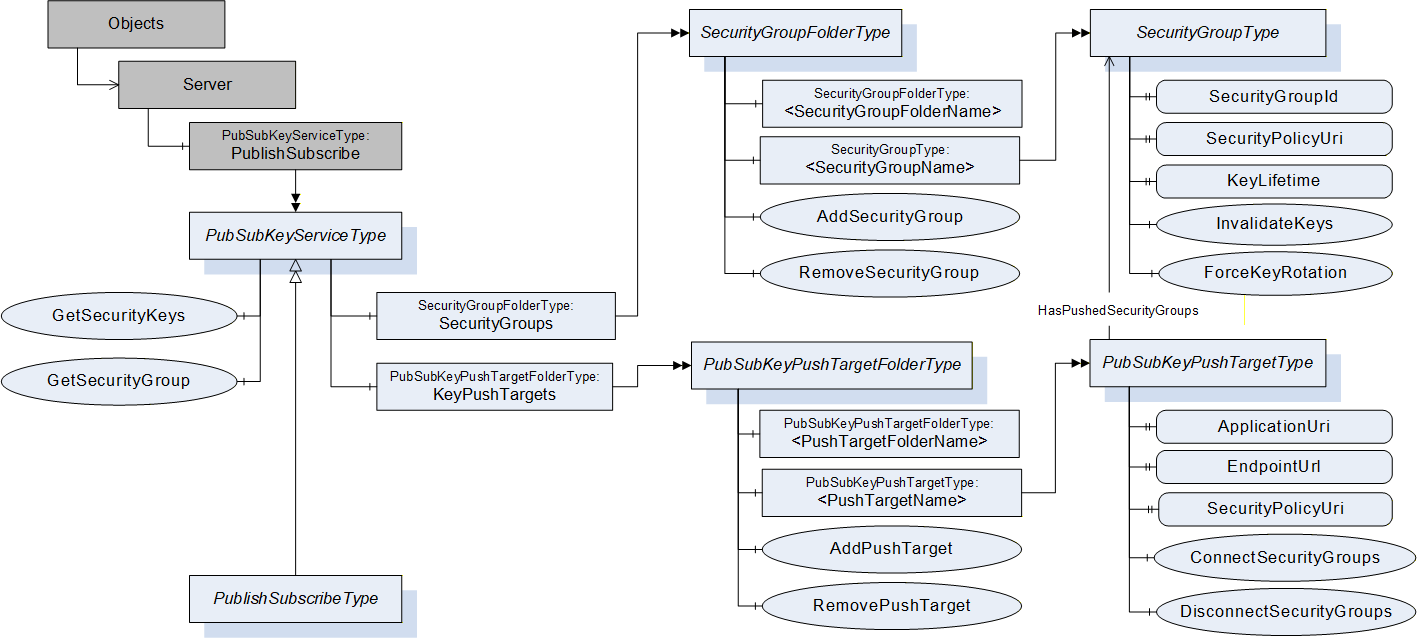
The PublishSubscribe Object is the root node for all PubSub related configuration Objects. It is an instance of the PubSubKeyServiceType or the PublishSubscribeType and a component of the Server Object.
The PubSubKeyServiceType defines the Method for pull access to security keys and the related management of SecurityGroups. This ObjectType is used for the PublishSubscribe Object if only the Security Key Service functionality is provided. If the PubSub configuration functionality is provided, the PublishSubscribeType is used instead.
A SecurityGroup manages keys used for securing PubSub NetworkMessages. The SecurityGroups are organized by the SecurityGroupFolderType and represented by instances of the SecurityGroupType.
A PubSubKeyPushTarget is a Server to which the SKS should push keys. Each push target is related to a list of SecurityGroups.
The push targets are organized by the PubSubKeyPushTargetFolderType and represented by instances of the PubSubKeyPushTargetType. These instances are used by the SKS to push the security keys for related SecurityGroups into the Publisher or Subscriber.
The PublishSubscribeType contains the entry points for the PubSub configuration model defined in clause 9.
8.2 PublishSubscribe Object
To provide interoperability between Publishers, Subscribers, Security Key Services and configuration tools, all PubSub related Objects shall be exposed through an Object called "PublishSubscribe" that is of the type PubSubKeyServiceType or a subtype. This Object shall be a component of the Server Object. It is formally defined in Table 209.
| Attribute | Value | ||||
| BrowseName | PublishSubscribe | ||||
| References | NodeClass | BrowseName | DataType | TypeDefinition | ModellingRule |
|---|---|---|---|---|---|
| ComponentOf the Server Object defined in OPC 10000-5. | |||||
| HasTypeDefinition | ObjectType | PubSubKeyServiceType | |||
| Conformance Units | |||||
| PubSub Model SKS | |||||
8.3 PubSubKeyServiceType
8.3.1 PubSubKeyServiceType definition
The PubSubKeyServiceType is formally defined in Table 210.
| Attribute | Value | ||||
| BrowseName | PubSubKeyServiceType | ||||
| IsAbstract | False | ||||
| References | NodeClass | BrowseName | DataType | TypeDefinition | ModellingRule |
|---|---|---|---|---|---|
| Subtype of BaseObjectType defined in OPC 10000-5. | |||||
| HasComponent | Method | GetSecurityKeys | Defined in 8.3.2. | Optional | |
| HasComponent | Method | GetSecurityGroup | Defined in 8.3.3. | Optional | |
| HasComponent | Object | SecurityGroups | SecurityGroupFolderType | Optional | |
| HasComponent | Object | KeyPushTargets | PubSubKeyPushTargetFolderType | Optional | |
| Conformance Units | |||||
| PubSub Model SKS | |||||
The PubSubKeyServiceType ObjectType is a concrete type and can be used directly.
The SecurityGroups folder organizes the Objects representing the SecurityGroup configuration.
The KeyPushTargets folder organizes the Objects representing the PubSubKeyPushTarget configuration.
8.3.2 GetSecurityKeys Method
This Method is used to retrieve the security keys for a SecurityGroup.
This Method is required to access the security keys of a PubSubGroup where the SecurityGroup manages the security keys for PubSubGroups. The PubSubGroup Object contains the SecurityGroupId that shall be passed to this Method in order to access the keys for the PubSubGroup. Note that multiple PubSubGroups can share a SecurityGroupId.
The configuration parameter RolePermissions contained in the SecurityGroupDataType controls the access to the security keys for the SecurityGroupId. If the user used to call this Method does not have the Call Permission set for the RolePermissions parameter for the related SecurityGroupType Object, the Server shall return Bad_UserAccessDenied for this Method. The SecurityGroupType is defined in 8.4.
Encryption is required for this Method. The Method shall return Bad_SecurityModeInsufficient if the communication is not encrypted.
The information necessary to access the Server that implements the GetSecurityKeys Method for the SecurityGroup is also contained in the SecurityKeyServices setting of WriterGroup, ReaderGroup and DataSetReader.
The GetSecurityKeys Method can be implemented by a Publisher or by a central SKS. In both cases, the well-known NodeIds for the PublishSubscribe Object and the related GetSecurityKeys Method are used to call the GetSecurityKeys Method.
If the Publisher implements the GetSecurityKeys Method and the related SecurityGroup management, the keys are made invalid immediately after a SecurityGroup is removed or keys for a SecurityGroup are revoked.
If a central SKS implements the GetSecurityKeys Method and the related SecurityGroup management, the keys are no longer valid after a SecurityGroup is removed or keys for a SecurityGroup are revoked. However, Subscribers shall be prepared for Publishers using invalid keys until they have called the GetSecurityKeys Method.
Publishers using a central SKS shall call GetSecurityKeys always with StartingTokenId set to 0 and shall call the Method at a period of half the KeyLifetime. They can still request more than one key to bridge longer unavailability time of the SKS.
Subscribers should use a StartingTokenId of 0 the first time they call GetSecurityKeys. Subsequent call to request older or future keys can use specific StartingTokenIds.
Signature
	GetSecurityKeys (
		[in]	String 		SecurityGroupId,
		[in]	IntegerId		StartingTokenId,
		[in]	UInt32 		RequestedKeyCount,
		[out]	String 		SecurityPolicyUri,
	[out]	IntegerId 		FirstTokenId,
	[out]	ByteString[]	Keys,
	 	[out]	Duration 		TimeToNextKey,
		[out]	Duration 		KeyLifetime
		);
| Argument | Description |
| SecurityGroupId | The identifier for the SecurityGroup. It shall be unique within the Security Key Service. |
| StartingTokenId | The current token and the related current key is requested by passing 0. It can be a SecurityTokenId from the past to get a key valid for previously sent messages. If the StartingTokenId is unknown, the oldest available tokens are returned. |
| RequestedKeyCount | The number of requested keys which should be returned in the response. If 0 is requested, no future keys are returned. If the caller requests a number larger than the Security Key Service permits, then the SKS shall return the maximum it allows. |
| SecurityPolicyUri | The URI for the set of algorithms and key lengths used to secure the messages. The SecurityPolicies are defined in OPC 10000-7. |
| FirstTokenId | The SecurityTokenId of the first key in the array of returned keys. The SecurityTokenId appears in the header of messages secured with a Key. It starts at 1 and is incremented by 1 each time the KeyLifetime elapses even if no keys are requested. If the SecurityTokenId increments past the maximum value of UInt32 it restarts at 1. If the caller has key material from previous GetSecurityKeys Method calls, the FirstTokenId is used to match the existing list with the fetched list and to eliminate duplicates. If the FirstTokenId is unknown, the existing list shall be discarded and replaced. |
| Keys | An ordered list of keys that are used when the KeyLifetime elapses. If the current key was requested, the first key in the array is used to secure the messages. This key is used according to the SecurityPolicy identified by the SecurityPolicyUri and the protocol associated with the PubSubGroup(s). Further details are defined in 7.2.4.4.3. The SecurityTokenId associated with the first key in the list is the FirstTokenId. All following keys have a SecurityTokenId that is incremented by 1 for every key returned. |
| TimeToNextKey | The time, in milliseconds, before the current key is expected to expire. The current SecurityTokenId equals the FirstTokenId and the current key is the first one in the returned Keys if the passed StartingTokenId is 0. Therefore the Method shall be called with StartingTokenId set to 0 if there is no previous knowledge about the current key. If a Publisher uses this Method to get the keys from a SKS, the TimeToNextKey and KeyLifetime are used to calculate the time the Publisher shall use the next key. The TimeToNextKey defines the time when to switch from the current key to the next key and the KeyLifetime defines when to switch from one future key to the next future key. For a Subscriber the TimeToNextKey and KeyLifetime are used to calculate the time the Subscriber expects that the Publishers use the next key. Due to network latency, out of order delivery and the use of keys for several Publishers, a Subscriber needs to expect some overlap time where NetworkMessages are received that are using the previous or the next key. TimeToNextKey and KeyLifetime are also used to calculate the time until Publisher and Subscriber shall fetch new keys. |
| KeyLifetime | The lifetime of a key in milliseconds. The returned keys may expire earlier if the keys are discarded for some reason. An unplanned key rotation is indicated in the NetworkMessage header before the next key is used to give the Subscriber some time to fetch new keys. If the CurrentTokenId in the message is not recognized the receiver shall call this Method again to get new keys. |
Method Result Codes
| ResultCode | Description |
| Bad_NotFound | The SecurityGroupId is unknown. |
| Bad_UserAccessDenied | The caller is not allowed to request the keys for the SecurityGroup. |
| Bad_SecurityModeInsufficient | The communication channel is not using encryption. |
Table 211 specifies the AddressSpace representation for the GetSecurityKeys Method.
| Attribute | Value | ||||
| BrowseName | GetSecurityKeys | ||||
| References | NodeClass | BrowseName | DataType | TypeDefinition | ModellingRule |
|---|---|---|---|---|---|
| HasProperty | Variable | InputArguments | Argument[] | PropertyType | Mandatory |
| HasProperty | Variable | OutputArguments | Argument[] | PropertyType | Mandatory |
| ConformanceUnits | |||||
|---|---|---|---|---|---|
| PubSub Model SKS |
8.3.3 GetSecurityGroup Method
This Method provides a direct lookup of the NodeId of a SecurityGroupType Object based on a SecurityGroupId. It is used by a security administration tool to get the SecurityGroup Object for configuration of access permissions for the keys.
The SecurityGroupId is the identifier for the SecurityGroup in Publishers, Subscribers and the key Server. This Method returns the NodeId of the corresponding SecurityGroup Object Node providing the configuration and diagnostic options for a SecurityGroup.
Signature
	GetSecurityGroup (
		[in]	String	SecurityGroupId,
		[out]	NodeId	SecurityGroupNodeId
		);
| Argument | Description |
| SecurityGroupId | The SecurityGroupId of the SecurityGroup to lookup. |
| SecurityGroupNodeId | The NodeId of the SecurityGroupType Object. |
Method Result Codes
| ResultCode | Description |
| Bad_NoMatch | The SecurityGroupId cannot be found in the Server. |
Table 212 specifies the AddressSpace representation for the GetSecurityGroup Method.
| Attribute | Value | ||||
| BrowseName | GetSecurityGroup | ||||
| References | NodeClass | BrowseName | DataType | TypeDefinition | ModellingRule |
|---|---|---|---|---|---|
| HasProperty | Variable | InputArguments | Argument[] | PropertyType | Mandatory |
| HasProperty | Variable | OutputArguments | Argument[] | PropertyType | Mandatory |
| ConformanceUnits | |||||
|---|---|---|---|---|---|
| PubSub Model SKS |
8.4 SecurityGroupType
8.4.1 SecurityGroupType definition
The SecurityGroupType is formally defined in Table 213.
The configuration parameter RolePermissions contained in the SecurityGroupDataType controls the access to the security keys for the SecurityGroup through the Method GetSecurityKeys. The GetSecurityKeys Method is defined in 8.3.2. The Permission to access the keys is different to the Permission necessary to modify the configuration of SecurityGroups.
| Attribute | Value | ||||
| BrowseName | SecurityGroupType | ||||
| IsAbstract | False | ||||
| References | NodeClass | BrowseName | DataType | TypeDefinition | ModellingRule |
|---|---|---|---|---|---|
| Subtype of BaseObjectType defined in OPC 10000-5. | |||||
| HasProperty | Variable | SecurityGroupId | String | PropertyType | Mandatory |
| HasProperty | Variable | KeyLifetime | Duration | PropertyType | Mandatory |
| HasProperty | Variable | SecurityPolicyUri | String | PropertyType | Mandatory |
| HasProperty | Variable | MaxFutureKeyCount | UInt32 | PropertyType | Mandatory |
| HasProperty | Variable | MaxPastKeyCount | UInt32 | PropertyType | Mandatory |
| HasComponent | Method | InvalidateKeys | Defined in 8.4.2. | Optional | |
| HasComponent | Method | ForceKeyRotation | Defined in 8.4.3. | Optional | |
| Conformance Units | |||||
| PubSub Model SKS | |||||
The Property SecurityGroupId contains the identifier for the SecurityGroup used in the key exchange Methods GetSecurityKeys and SetSecurityKeys in the PubSubGroupType.
The Property KeyLifetime defines the lifetime of a key in milliseconds.
The Property SecurityPolicyUri is the identifier for a SecurityPolicy. SecurityPolicies define the set of algorithms and key lengths used to secure the messages exchanged in the context of the SecurityGroup. The SecurityPolicies are defined in OPC 10000-7.
The Property MaxFutureKeyCount defines the maximum number of future keys returned by the Method GetSecurityKeys.
The Property MaxPastKeyCount defines the maximum number of historical keys stored by the SKS. The historical keys are necessary to allow Subscribers to request keys for older NetworkMessages.
8.4.2 InvalidateKeys Method
This Method invalidates the current and all future keys of this SecurityGroup. The keys will be replaced by new keys; indicated by a new current SecurityTokenId. The new current SecurityTokenId shall be incremented beyond the SecurityTokenId of the last invalidated future key.
If the SecurityGroup is related to one or more PubSubKeyPushTargets, the SKS shall push the new set of keys to all related PubSubKeyPushTargets.
The Client shall be authorized to modify the configuration for the SKS functionality and shall use at least a signed communication channel when invoking this Method on the Server.
Signature
InvalidateKeys ();
Method Result Codes
| ResultCode | Description |
| Bad_UserAccessDenied | The Session user is not allowed invalidate the keys on this SecurityGroup. |
| Bad_SecurityModeInsufficient | The communication channel is not using signing. |
Table 214 specifies the AddressSpace representation for the InvalidateKeys Method.
| Attribute | Value |
| BrowseName | InvalidateKeys |
| ConformanceUnits | |
|---|---|
| PubSub Model SKS |
8.4.3 ForceKeyRotation Method
This Method forces a key update prior to expiration of KeyLifetime, i.e. it initiates an unplanned key rotation. The future keys of this SecurityGroup remain valid.
InvalidateKeys makes all keys invalid immediately and most likely this causes communication interruptions. The ForceKeyRotation Method allows faster rotation of keys without breaking communication e.g. for removing applications from a UDP multicast group.
If the SecurityGroup is related to one or more PushTargets, the SKS shall push an updated set of keys to all PushTargets.
The Client shall be authorized to modify the configuration for the SKS functionality and shall use at least a signed communication channel when invoking this Method on the Server.
Signature
ForceKeyRotation ();
Method Result Codes
| ResultCode | Description |
| Bad_UserAccessDenied | The Session user is not allowed force key rotation on this SecurityGroup. |
| Bad_SecurityModeInsufficient | The communication channel is not using signing. |
Table 215 specifies the AddressSpace representation for the ForceKeyRotation Method.
| Attribute | Value |
| BrowseName | ForceKeyRotation |
| ConformanceUnits | |
|---|---|
| PubSub Model SKS |
8.5 SecurityGroupFolderType
8.5.1 SecurityGroupFolderType definition
The SecurityGroupFolderType is formally defined Table 216.
| Attribute | Value | ||||
| BrowseName | SecurityGroupFolderType | ||||
| IsAbstract | False | ||||
| References | NodeClass | BrowseName | DataType | TypeDefinition | ModellingRule |
|---|---|---|---|---|---|
| Subtype of FolderType defined in OPC 10000-5. | |||||
| Organizes | Object | <SecurityGroupFolderName> | SecurityGroup FolderType | OptionalPlaceholder | |
| HasComponent | Object | <SecurityGroupName> | SecurityGroupType | OptionalPlaceholder | |
| HasComponent | Method | AddSecurityGroup | Defined in 8.5.2. | Mandatory | |
| HasComponent | Method | RemoveSecurityGroup | Defined in 8.5.3. | Mandatory | |
| HasComponent | Method | AddSecurityGroupFolder | Defined in 8.5.4. | Optional | |
| HasComponent | Method | RemoveSecurityGroupFolder | Defined in 8.5.5. | Optional | |
| HasProperty | Variable | SupportedSecurityPolicyUris | String[] | PropertyType | Optional |
| Conformance Units | |||||
| PubSub Model SKS | |||||
The SecurityGroupFolderType ObjectType is a concrete type and can be used directly.
Instances of the SecurityGroupFolderType can contain SecurityGroup Objects or other instances of the SecurityGroupFolderType. This can be used to build a tree of folder Objects used to organize the configured SecurityGroups.
The SecurityGroup Objects are added as components to the instance of the SecurityGroupFolderType. A SecurityGroup Object is referenced only from one folder. If the folder is deleted, all referenced SecurityGroup Objects are deleted with the folder.
The SupportedSecurityPolicyUris Property contains a String array with the SecurityPolicyUris supported by the SKS. The Property shall be provided at the root SecurityGroupFolder. The default SecurityPolicyUri is the first array element.
8.5.2 AddSecurityGroup Method
This Method is used to add a SecurityGroupType Object to the SecurityGroupFolderType Object or to return an existing Object if the parameters match the configuration of an existing Object.
The Client shall be authorized to modify the configuration for the SKS functionality and shall use at least a signed communication channel when invoking this Method on the Server.
Signature
	AddSecurityGroup (
		[in]	String	SecurityGroupName,
		[in]	Duration	KeyLifetime,
		[in]	String	SecurityPolicyUri,
		[in]	UInt32	MaxFutureKeyCount,
		[in]	UInt32	MaxPastKeyCount,
		[out]	String	SecurityGroupId,
	[out]	NodeId	SecurityGroupNodeId
		);
| Argument | Description |
| SecurityGroupName | Name of the SecurityGroup to add. |
| KeyLifetime | The lifetime of a key in milliseconds. If 0 is passed in, the SKS sets the default KeyLifetime. If the requested value exceeds the limits defined by the SKS, the value is adjusted by the SKS. The caller should get the revised value by reading the KeyLifetime of the created SecurityGroup. |
| SecurityPolicyUri | The SecurityPolicy used for the SecurityGroup. If a null or empty String is passed in, the SKS sets the default SecurityPolicyUri. If the SecurityPolicyUri is not known to the SKS, Bad_InvalidArgument shall be returned. |
| MaxFutureKeyCount | The maximum number of future keys returned by the Method GetSecurityKeys. If 0 is passed in, the SKS sets the default MaxFutureKeyCount. If the requested value exceeds the limits defined by the SKS, the value is adjusted by the SKS. The caller should get the revised value by reading the MaxFutureKeyCount of the created SecurityGroup. |
| MaxPastKeyCount | The maximum number of historical keys stored by the SKS. If the requested value exceeds the limits defined by the SKS, the value is adjusted by the SKS. The caller should get the revised value by reading the MaxPastKeyCount of the created SecurityGroup. |
| SecurityGroupId | The identifier for the SecurityGroup. The SecurityGroupId shall match the SecurityGroupName. |
| SecurityGroupNodeId | The NodeId of the added SecurityGroupType Object. |
Method Result Codes
| ResultCode | Description |
| Bad_NodeIdExists | A SecurityGroup with the name already exists but the arguments do not match the existing object. |
| Good_DataIgnored | A Object with the configuration already exists and was returned without adding a new Object. |
| Bad_InvalidArgument | The SecurityPolicyUri is not supported by the SKS. |
| Bad_UserAccessDenied | The Session user is not allowed to configure the object. |
| Bad_SecurityModeInsufficient | The communication channel is not using signing. |
Table 217 specifies the AddressSpace representation for the AddSecurityGroup Method.
| Attribute | Value | ||||
| BrowseName | AddSecurityGroup | ||||
| References | NodeClass | BrowseName | DataType | TypeDefinition | ModellingRule |
|---|---|---|---|---|---|
| HasProperty | Variable | InputArguments | Argument[] | PropertyType | Mandatory |
| HasProperty | Variable | OutputArguments | Argument[] | PropertyType | Mandatory |
| ConformanceUnits | |||||
|---|---|---|---|---|---|
| PubSub Model SKS |
8.5.3 RemoveSecurityGroup Method
This Method is used to remove a SecurityGroupType Object from the SecurityGroupFolderType Object.
The Client shall be authorized to modify the configuration for the SKS functionality and shall use at least a signed communication channelwhen invoking this Method on the Server.
See 8.3.2 for details on the lifetime of keys previously issued for this SecurityGroup.
Signature
	RemoveSecurityGroup (
		[in]	NodeId	SecurityGroupNodeId
		);
| Argument | Description |
| SecurityGroupNodeId | NodeId of the SecurityGroupType Object to remove from the Server |
Method Result Codes
| ResultCode | Description |
| Bad_NodeIdUnknown | The SecurityGroupNodeId is unknown. |
| Bad_NodeIdInvalid | The SecurityGroupNodeId is not a NodeId of a SecurityGroupType Object. |
| Bad_UserAccessDenied | The Session user is not allowed to delete the SecurityGroupType Object. |
| Bad_SecurityModeInsufficient | The communication channel is not using signing. |
Table 218 specifies the AddressSpace representation for the RemoveSecurityGroup Method.
| Attribute | Value | ||||
| BrowseName | RemoveSecurityGroup | ||||
| References | NodeClass | BrowseName | DataType | TypeDefinition | ModellingRule |
|---|---|---|---|---|---|
| HasProperty | Variable | InputArguments | Argument[] | PropertyType | Mandatory |
| ConformanceUnits | |||||
|---|---|---|---|---|---|
| PubSub Model SKS |
8.5.4 AddSecurityGroupFolder Method
This Method is used to add a SecurityGroupFolderType Object to a SecurityGroupFolderType Object.
The Client shall be authorized to modify the configuration for the PubSub functionality when invoking this Method on the Server.
Signature
	AddSecurityGroupFolder (
		[in]	String	Name,
		[out]	NodeId	SecurityGroupFolderNodeId
		);
| Argument | Description |
| Name | Name of the Object to create. |
| SecurityGroupFolderNodeId | NodeId of the created SecurityGroupFolderType Object. |
Method Result Codes
| ResultCode | Description |
| Bad_BrowseNameDuplicated | A folder Object with the name already exists. |
| Bad_InvalidArgument | The Server is not able to apply the Name. The Name may be too long or may contain invalid characters. |
| Bad_UserAccessDenied | The Session user is not allowed to add a folder. |
Table 219 specifies the AddressSpace representation for the AddSecurityGroupFolder Method.
| Attribute | Value | ||||
| BrowseName | AddSecurityGroupFolder | ||||
| References | NodeClass | BrowseName | DataType | TypeDefinition | ModellingRule |
|---|---|---|---|---|---|
| HasProperty | Variable | InputArguments | Argument[] | PropertyType | Mandatory |
| HasProperty | Variable | OutputArguments | Argument[] | PropertyType | Mandatory |
| ConformanceUnits | |||||
|---|---|---|---|---|---|
| PubSub Model SKS |
8.5.5 RemoveSecurityGroupFolder Method
This Method is used to remove a SecurityGroupFolderType Object from the parent SecurityGroupFolderType Object.
A successful removal of the SecurityGroupFolderType Object removes recursively all contained SecurityGroupType Objects and all contained SecurityGroupFolderType Objects.
The Client shall be authorized to modify the configuration for the PubSub functionality when invoking this Method on the Server.
Signature
	RemoveSecurityGroupFolder (
		[in]	NodeId	SecurityGroupFolderNodeId
		);
| Argument | Description |
| SecurityGroupFolderNodeId | NodeId of the SecurityGroupFolderType Object to remove from the Server. |
Method Result Codes
| ResultCode | Description |
| Bad_NodeIdUnknown | The SecurityGroupFolderNodeId is unknown. |
| Bad_UserAccessDenied | The Session user is not allowed to delete the folder. |
Table 220 specifies the AddressSpace representation for the RemoveSecurityGroupFolder Method.
| Attribute | Value | ||||
| BrowseName | RemoveSecurityGroupFolder | ||||
| References | NodeClass | BrowseName | DataType | TypeDefinition | ModellingRule |
|---|---|---|---|---|---|
| HasProperty | Variable | InputArguments | Argument[] | PropertyType | Mandatory |
| ConformanceUnits | |||||
|---|---|---|---|---|---|
| PubSub Model SKS |
8.6 PubSubKeyPushTargetType
8.6.1 PubSubKeyPushTargetType definition
The PubSubKeyPushTargetType is formally defined in Table 221.
An instance of this ObjectType includes all information required to establish a secure connection to the Server that is the target of a push operation as described in 5.4.5.3. If any of the connection information changes, the PubSubKeyPushTarget must be removed and a new PubSubKeyPushTarget with updated connection information must be added.
| Attribute | Value | ||||
| BrowseName | PubSubKeyPushTargetType | ||||
| IsAbstract | False | ||||
| References | NodeClass | BrowseName | DataType | TypeDefinition | ModellingRule |
|---|---|---|---|---|---|
| Subtype of BaseObjectType defined in OPC 10000-5. | |||||
| HasPushed SecurityGroup | Object | <SecurityGroupName> | SecurityGroupType | OptionalPlaceholder | |
| HasProperty | Variable | ApplicationUri | String | PropertyType | Mandatory |
| HasProperty | Variable | EndpointUrl | String | PropertyType | Mandatory |
| HasProperty | Variable | SecurityPolicyUri | String | PropertyType | Mandatory |
| HasProperty | Variable | UserTokenType | UserTokenPolicy | PropertyType | Mandatory |
| HasProperty | Variable | RequestedKeyCount | UInt16 | PropertyType | Mandatory |
| HasProperty | Variable | RetryInterval | Duration | PropertyType | Mandatory |
| HasProperty | Variable | LastPushExecutionTime | DateTime | PropertyType | Mandatory |
| HasProperty | Variable | LastPushErrorTime | DateTime | PropertyType | Mandatory |
| HasComponent | Method | ConnectSecurityGroups | Defined in 8.6.3 | Mandatory | |
| HasComponent | Method | DisconnectSecurityGroups | Defined in 8.6.4 | Mandatory | |
| HasComponent | Method | TriggerKeyUpdate | Defined in 8.6.5 | Mandatory | |
| Conformance Units | |||||
| PubSub Model SKS Push | |||||
The Property ApplicationUri is the ApplicationUri of the Server that is the target of a push. The push operation shall fail if the ApplicationUri of the connected target Server does not match this parameter.
The Property EndpointUrl is the URL of the Endpoint of the Server that is the target of a push.
The Property SecurityPolicyUri is a String that contains the security policy the SKS shall use to establish a SecureChannel to the PubSubKeyPushTarget. The MessageSecurityMode shall always be SignAndEncrypt.
The Property UserTokenType contains the type of user toke to be used for the connection to the PubSubKeyPushTarget. The default is Anonymous and authorization is accomplished in this case with the application identity of the SKS.
The Property RequestedKeyCount is the number of keys that are to be pushed on each update. The minimum setting for this is three.
The Property RetryInterval defines the interval the SKS shall use to retry pushing keys after an error appeared.
The Property LastPushExecutionTime indicates the time the last push operation was executed successfully on the PubSubKeyPushTarget. A null DateTime value indicates that no successful push was executed.
The Property LastPushErrorTime indicates the last time a push operation failed on the PubSubKeyPushTarget. A null DateTime value indicates that no error has occurred.
8.6.2 Behaviour
The first push is started at the time a SecurityGroup is assigned to the PubSubKeyPushTarget. The assignment is done with the Method ConnectSecurityGroups or with a successful update of the PubSubKeyPushTargets with PubSubConfigurationType CloseAndUpdate. The sequence for push is described in 5.4.5.3.
In a period of half the KeyLifetime of a SecurityGroup, the SKS shall open a secure communication to each related PubSubKeyPushTargets and shall call SetSecurityKeys to push the security keys for a SecurityGroup into a Publisher or Subscriber. The SKS shall push the previous security key, the current key, and at least one future key to bridge longer unavailability time of the SKS. If it is not possible to push security keys to a PubSubKeyPushTarget due to errors in establishing the communication or due to errors returned from the SetSecurityKeys Method call, the SKS shall retry pushing the security keys in a period of RetryInterval. If multiple future security keys are pushed, it is up to the SKS to define when security keys are pushed, but at a minimum it shall be at the half KeyLifetime of the current key when only one future key is remaining.
Since the SKS is unaware of the state of a PubSubKeyPushTarget, it is recommended for a PubSubKeyPushTarget to persist security keys. This allows the PubSubKeyPushTarget to continue secured PubSub communication after a power cycle, as long as the outage time is smaller than the time covered with currentKey and FutureKeys. If keys are not persisted, it may take up to half the KeyLifetime to get the first set of security keys. The PubSubKeyPushTargets persisting security keys shall have an understanding of time (either synchronized or battery backup) allowing them to determine whether the current key is still valid to use, or whether to use a future key following a power interruption.
8.6.3 ConnectSecurityGroups
This Method connects instances of SecurityGroupType to this PubSubKeyPushTarget. This indicates that the SKS shall use the push model to distribute the keys of the SecurityGroup to the PubSubKeyPushTarget.
The SKS shall push keys following this assignment. If an assignment does already exist, the entry is ignored.
If the assignment for a SecurityGroup already exists, a Good_EntryReplaced should be returned for that SecurityGroup and a new push of the existing keys shall be triggered to the push target.
The Client shall be authorized to modify the configuration for the SKS functionality and shall use at least a signed communication channel when invoking this Method on the Server.
Signature
	ConnectSecurityGroups (
		[in]	NodeId[]		SecurityGroupIds,
		[out]	StatusCode[]	ConnectResults
	);
| Argument | Description |
| SecurityGroupIds | The NodeIds of the SecurityGroups to connect to the PushTarget. |
| ConnectResults | The result codes for the SecurityGroups to connect. |
Method Result Codes
| ResultCode | Description |
| Bad_UserAccessDenied | The Session user is not allowed to connect SecurityGroups to the push target. |
| Bad_SecurityModeInsufficient | The communication channel is not using signing. |
Operation Result Codes
| ResultCode | Description |
| Good_EntryReplaced | The PushTarget was already assigned to the SecurityGroup, a new push was triggered |
| Bad_NodeIdUnknown | A SecurityGroupNodeId is unknown. |
| Bad_NodeIdInvalid | A SecurityGroupNodeId is not a NodeId of a SecurityGroupType Object. |
Table 222 specifies the AddressSpace representation for the ConnectSecurityGroups Method.
| Attribute | Value | ||||
| BrowseName | ConnectSecurityGroups | ||||
| References | NodeClass | BrowseName | DataType | TypeDefinition | ModellingRule |
|---|---|---|---|---|---|
| HasProperty | Variable | InputArguments | Argument[] | PropertyType | Mandatory |
| HasProperty | Variable | OutputArguments | Argument[] | PropertyType | Mandatory |
| ConformanceUnits | |||||
|---|---|---|---|---|---|
| PubSub Model SKS Push |
8.6.4 DisconnectSecurityGroups Method
This Method disconnects instances of SecurityGroupType from this PubSubKeyPushTarget. This indicates that the SKS shall stop using the push model to distribute the keys of those SecurityGroups to the PubSubKeyPushTarget.
The Client shall be authorized to modify the configuration for the SKS functionality and shall use at least a signed communication channel when invoking this Method on the Server.
Signature
	DisconnectSecurityGroups (
		[in]	NodeId[]		SecurityGroupIds,
		[out]	StatusCode[]	DisconnectResults
	);
| Argument | Description |
| SecurityGroupIds | The NodeIds of the SecurityGroups to disconnect. |
| DisconnectResults | The result codes for the SecurityGroups to disconnect. |
Method Result Codes
| ResultCode | Description |
| Bad_UserAccessDenied | The Session user is not allowed to disconnect SecurityGroups from the push target. |
| Bad_SecurityModeInsufficient | The communication channel is not using signing. |
Operation Result Codes
| ResultCode | Description |
| Bad_NodeIdUnknown | A SecurityGroupNodeId is unknown. |
| Bad_NodeIdInvalid | A SecurityGroupNodeId is not a NodeId of a SecurityGroupType Object. |
Table 223 specifies the AddressSpace representation for the DisconnectSecurityGroups Method.
| Attribute | Value | ||||
| BrowseName | DisconnectSecurityGroups | ||||
| References | NodeClass | BrowseName | DataType | TypeDefinition | ModellingRule |
|---|---|---|---|---|---|
| HasProperty | Variable | InputArguments | Argument[] | PropertyType | Mandatory |
| HasProperty | Variable | OutputArguments | Argument[] | PropertyType | Mandatory |
| ConformanceUnits | |||||
|---|---|---|---|---|---|
| PubSub Model SKS Push |
8.6.5 TriggerKeyUpdate Method
This Method triggers a key update of all SecurityGroups related to the PubSubKeyPushTarget. The SKS shall push the new set of keys for all related SecurityGroups, even if not currently scheduled.
The Client shall be authorized to modify the configuration for the SKS functionality and shall use at least a signed communication channel when invoking this Method on the Server.
Signature
TriggerKeyUpdate ();
Method Result Codes
| ResultCode | Description |
| Bad_UserAccessDenied | The Session user is not allowed to trigger a key update on this push target. |
| Bad_SecurityModeInsufficient | The communication channel is not using signing. |
8.6.6 HasPushedSecurityGroup
The HasPushedSecurityGroup ReferenceType is a concrete ReferenceType that can be used directly. It is a subtype of the HierarchicalReferences ReferenceType.
The SourceNode of References of this type shall be an Object of ObjectType PubSubKeyPushTargetType or an ObjectType that is a subtype of PubSubKeyPushTargetType defined in 8.6.1.
The TargetNode of this ReferenceType shall be an Object of the ObjectType SecurityGroupType defined in 8.4.1.
Servers shall provide the inverse Reference that relates a SecurityGroup Object back to a PubSubKeyPushTargetType Object.
The representation of the HasPushedSecurityGroup ReferenceType in the AddressSpace is specified in Table 224.
| Attributes | Value | ||
| BrowseName | HasPushedSecurityGroup | ||
| InverseName | HasPushTarget | ||
| Symmetric | False | ||
| IsAbstract | False | ||
| References | NodeClass | BrowseName | Comment |
|---|---|---|---|
| Subtype of HierarchicalReferences defined in OPC 10000-5. | |||
| Conformance Units | |||
| PubSub Model SKS Push | |||
Table 225 specifies the AddressSpace representation for the TriggerKeyUpdate Method.
| Attribute | Value |
| BrowseName | TriggerKeyUpdate |
| ConformanceUnits | |
|---|---|
| PubSub Model SKS Push |
8.7 PubSubKeyPushTargetFolderType
8.7.1 PubSubKeyPushTargetFolderType definition
The PubSubKeyPushTargetFolderType is formally defined Table 226.
| Attribute | Value | ||||
| BrowseName | PubSubKeyPushTargetFolderType | ||||
| IsAbstract | False | ||||
| References | NodeClass | BrowseName | DataType | TypeDefinition | ModellingRule |
|---|---|---|---|---|---|
| Subtype of FolderType defined in OPC 10000-5. | |||||
| Organizes | Object | <PushTargetFolderName> | PubSubKeyPushTargetFolderType | OptionalPlaceholder | |
| HasComponent | Object | <PushTargetName> | PubSubKeyPushTargetType | OptionalPlaceholder | |
| HasComponent | Method | AddPushTarget | Defined in 8.7.2 | Mandatory | |
| HasComponent | Method | RemovePushTarget | Defined in 8.7.3 | Mandatory | |
| HasComponent | Method | AddPushTargetFolder | Defined in 8.7.4. | Optional | |
| HasComponent | Method | RemovePushTargetFolder | Defined in 8.7.5. | Optional | |
| Conformance Units | |||||
| PubSub Model SKS Push | |||||
Instances of the PubSubKeyPushTargetFolderType can contain PubSubKeyPushTarget Objects or other instances of the PubSubKeyPushTargetFolderType. This can be used to build a tree of folder Objects used to organize the configured PubSubKeyPushTargets.
The PubSubKeyPushTarget Objects are added as components to the instance of the PubSubKeyPushTargetFolderType. A PubSubKeyPushTargets is referenced only from one folder. If the folder is deleted, all referenced PubSubKeyPushTargets are deleted with the folder.
8.7.2 AddPushTarget Method
This Method is used to add a PubSubKeyPushTarget to a PubSubKeyPushTargetFolder or to return an existing Object if the parameters match the configuration of an existing Object.
The Client shall be authorized to modify the configuration for the SKS functionality and shall use at least a signed communication channel when invoking this Method on the Server.
Signature
	AddPushTarget (
		[in]	String		ApplicationUri,
	[in]	String		EndpointUrl,
	[in]	String		SecurityPolicyUri,
	[in]	UserTokenPolicy	UserTokenType,
	[in] 	UInt16		RequestedKeyCount,
	[in]	Duration 		RetryInterval,
	[out] NodeId		PushTargetId
	);
| Argument | Description |
| ApplicationUri | ApplicationUri of the Server that is the target of the key push. The ApplicationUri is used as name of the resulting PubSubKeyPushTarget object. |
| EndpointUrl | URL of the Endpoint of the Server that is the target of the key push |
| SecurityPolicyUri | Security policy the SKS shall use to establish a secure connection to the PushTarget |
| UserTokenType | The user token type used for the push. The default is Anonymous. |
| RequestedKeyCount | The number of keys to push on each call |
| RetryInterval | Interval the SKS shall use to retry pushing keys after an error appeared |
| PushTargetId | The NodeId of the added PubSubKeyPushTarget Object. |
Method Result Codes
| ResultCode | Description |
| Bad_NodeIdExists | A PushTarget with the ApplicationUri already exists but the arguments do not match the existing object. |
| Good_DataIgnored | A Object with the configuration already exists and was returned without adding a new Object. |
| Bad_InvalidArgument | One of the input arguments is invalid. The InputArgumentResult provides further details. |
| Bad_UserAccessDenied | The Session user is not allowed to configure the object. |
| Bad_SecurityModeInsufficient | The communication channel is not using signing. |
Table 227 specifies the AddressSpace representation for the AddPushTarget Method.
| Attribute | Value | ||||
| BrowseName | AddPushTarget | ||||
| References | NodeClass | BrowseName | DataType | TypeDefinition | ModellingRule |
|---|---|---|---|---|---|
| HasProperty | Variable | InputArguments | Argument[] | PropertyType | Mandatory |
| HasProperty | Variable | OutputArguments | Argument[] | PropertyType | Mandatory |
| ConformanceUnits | |||||
|---|---|---|---|---|---|
| PubSub Model SKS Push |
8.7.3 RemovePushTarget Method
This Method is used to remove a PubSubKeyPushTarget from the PushTargetFolder.
The Client shall be authorized to modify the configuration for the SKS functionality and shall use at least a signed communication channel when invoking this Method on the Server.
Signature
	RemovePushTarget (
		[in]	NodeId	PushTargetId
	);
| Argument | Description |
| PushTargetId | NodeId of the PushTargetType Object to remove from the Server |
Method Result Codes
| ResultCode | Description |
| Bad_NodeIdUnknown | The PushTargetId is unknown. |
| Bad_NodeIdInvalid | The PushTargetId is not a NodeId of a PubSubKeyPushTarget Object. |
| Bad_UserAccessDenied | The Session user is not allowed to delete the PushTargetType Object. |
| Bad_SecurityModeInsufficient | The communication channel is not using signing. |
Table 228 specifies the AddressSpace representation for the RemovePushTarget Method.
| Attribute | Value | ||||
| BrowseName | RemovePushTarget | ||||
| References | NodeClass | BrowseName | DataType | TypeDefinition | ModellingRule |
|---|---|---|---|---|---|
| HasProperty | Variable | InputArguments | Argument[] | PropertyType | Mandatory |
| ConformanceUnits | |||||
|---|---|---|---|---|---|
| PubSub Model SKS Push |
8.7.4 AddPushTargetFolder Method
This Method is used to add a PubSubKeyPushTargetFolderType Object to a PubSubKeyPushTargetFolderType Object.
The Client shall be authorized to modify the configuration for the PubSub functionality when invoking this Method on the Server.
Signature
	AddPushTargetFolder (
		[in]	String	Name,
		[out]	NodeId	PushTargetFolderNodeId
		);
| Argument | Description |
| Name | Name of the Object to create. |
| PushTargetFolderNodeId | NodeId of the created PubSubKeyPushTargetFolderType Object. |
Method Result Codes
| ResultCode | Description |
| Bad_BrowseNameDuplicated | A folder Object with the name already exists. |
| Bad_InvalidArgument | The Server is not able to apply the Name. The Name may be too long or may contain invalid characters. |
| Bad_UserAccessDenied | The Session user is not allowed to add a folder. |
Table 229 specifies the AddressSpace representation for the AddPushTargetFolder Method.
| Attribute | Value | ||||
| BrowseName | AddPushTargetFolder | ||||
| References | NodeClass | BrowseName | DataType | TypeDefinition | ModellingRule |
|---|---|---|---|---|---|
| HasProperty | Variable | InputArguments | Argument[] | PropertyType | Mandatory |
| HasProperty | Variable | OutputArguments | Argument[] | PropertyType | Mandatory |
| ConformanceUnits | |||||
|---|---|---|---|---|---|
| PubSub Model SKS Push |
8.7.5 RemovePushTargetFolder Method
This Method is used to remove a PubSubKeyPushTargetFolderType Object from the parent PubSubKeyPushTargetFolderType Object.
A successful removal of the PubSubKeyPushTargetFolderType Object removes recursively all contained PubSubKeyPushTargetType Objects and all contained PubSubKeyPushTargetFolderType Objects.
The Client shall be authorized to modify the configuration for the PubSub functionality when invoking this Method on the Server.
Signature
	RemovePushTargetFolder (
		[in]	NodeId	PushTargetFolderNodeId
		);
| Argument | Description |
| PushTargetFolderNodeId | NodeId of the PubSubKeyPushTargetFolderType Object to remove from the Server. |
Method Result Codes
| ResultCode | Description |
| Bad_NodeIdUnknown | The PushTargetFolderNodeId is unknown. |
| Bad_UserAccessDenied | The Session user is not allowed to delete the folder. |
Table 230 specifies the AddressSpace representation for the RemovePushTargetFolder Method.
| Attribute | Value | ||||
| BrowseName | RemovePushTargetFolder | ||||
| References | NodeClass | BrowseName | DataType | TypeDefinition | ModellingRule |
|---|---|---|---|---|---|
| HasProperty | Variable | InputArguments | Argument[] | PropertyType | Mandatory |
| ConformanceUnits | |||||
|---|---|---|---|---|---|
| PubSub Model SKS Push |
8.8 Security Key Service Roles
A SKS should support the well-known Roles for SKS which are defined in Table 231. The NodeIds for the well-known Roles are defined in OPC 10000-6.
| BrowseName | Suggested Permissions |
|---|---|
| SecurityKeyServerAdmin | This Role allows an administrator to manage SecurityGroups and PushTargets on a SKS. This includes executing methods related to management of SecurityGroups and PushTargets on an SKS. |
| SecurityKeyServerAccess | This Role allows a PubSub Application to access an SKS to pull keys. It is the default Role for pull but it is expected that different custom Roles are used for different SecurityGroups. |
| SecurityKeyServerPush | This Role allows an SKS to push security keys to PubSub Applications. This includes executing methods related to PubSub security. |