
7.12 CatchweigherProductType Definition
7.12.1 Overview
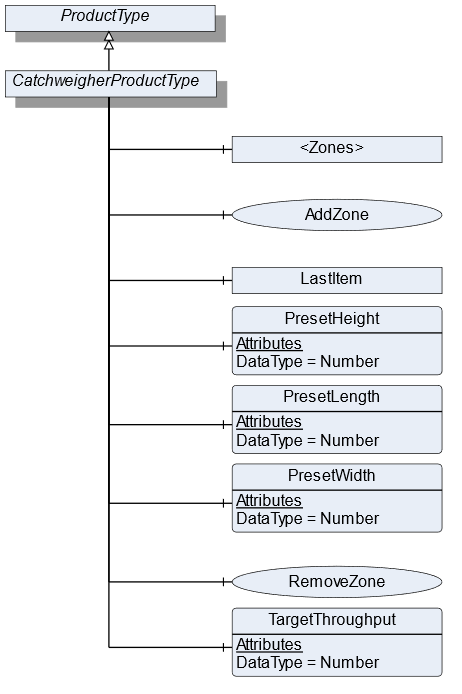
The CatchweigherProductType defines the structure of an Object of the CatchweigherProductType. Figure 24 shows the hierarchical structure and details of the composition. It is formally defined in Table 45.
An Object of the CatchweigherProductType represents a product of a catchweigher. It defines additional methods and properties required for managing the product.
7.12.2 ObjectType Definition
| Attribute | Value | ||||
| BrowseName | CatchweigherProductType | ||||
| IsAbstract | False | ||||
| References | NodeClass | BrowseName | DataType | TypeDefinition | ModellingRule |
|---|---|---|---|---|---|
| Subtype of the ProductType | |||||
| 0:HasComponent | Object | <Zones> | ZoneType | OptionalPlaceholder | |
| 0:HasComponent | Method | AddZone | Optional | ||
| 0:HasComponent | Object | LastItem | WeighingItemType | Optional | |
| 0:HasComponent | Variable | PresetHeight | 0:Number | 0:AnalogUnitType | Optional |
| 0:HasComponent | Variable | PresetLength | 0:Number | 0:AnalogUnitType | Optional |
| 0:HasComponent | Variable | PresetWidth | 0:Number | 0:AnalogUnitType | Optional |
| 0:HasComponent | Method | RemoveZone | Optional | ||
| 0:HasComponent | Variable | TargetThroughput | 0:Number | TargetItemType | Optional |
| Conformance Units | |||||
|---|---|---|---|---|---|
| Scales Catchweigher |
7.12.3 ObjectType Description
<Zones> is an OptionalPlaceholder for the different zones. Each zone defines different weighing ranges a product has to be within.
LastItem contains the measured values of the last item that was processed by the catchweigher.
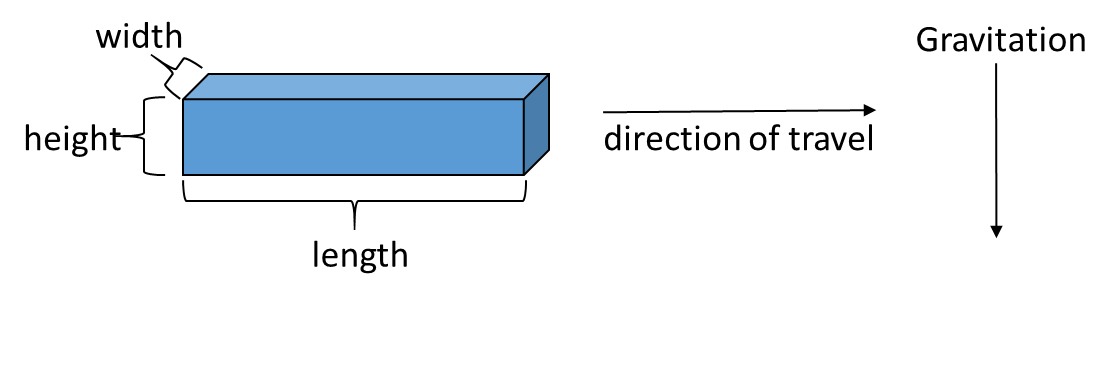
PresetHeight defines the predefined height (in direction of global gravity, see Figure 25) of the measured item. If the PresetHeight value is used, the value must be written before the item is measured.
PresetLength defines the predefined length (in direction of travel, see Figure 25) of the measured item. If the PresetLength value is used, the value must be written before the item is measured.
PresetWidth defines the predefined width (in third possible orthogonal direction to height and length, see Figure 25) of the measured item. If the PresetWidth value is used, the value must be written before the item is measured.
TargetThroughput is the target value for the throughput.
7.12.4 Method AddZone
Adds a zone to the zone array. The signature of this Method is specified below. Table 46 and Table 47 specify the Arguments and AddressSpace representation, respectively.
Signature
	AddZone(
	[in]	LocalizedText		ZoneName
	[in]	Double		LowerLimit
	[in]	Double		UpperLimit
	[in]	EUInformation		EngineeringUnits
[out] NodeId ZoneNodeId);| Argument | Description |
| ZoneName | User-readable name of the zone |
| LowerLimit | Lower weight limit of this zone. The lower limit is prior to the upper limit if two zones are beside each other |
| UpperLimit | Upper weight limit of this zone |
| EngineeringUnits | Unit of the Lower and the UpperLimit. The two Limits must have the same unit |
| ZoneNodeId | NodeId of the created Object |
| Attribute | Value | ||||
| BrowseName | AddZone | ||||
| References | NodeClass | BrowseName | DataType | TypeDefinition | ModellingRule |
|---|---|---|---|---|---|
| 0:HasProperty | Variable | InputArguments | Argument[] | 0:PropertyType | Mandatory |
| 0:HasProperty | Variable | OutputArguments | Argument[] | 0:PropertyType | Mandatory |
7.12.5 Method RemoveZone
Removes a zone from the zone array. The signature of this Method is specified below. Table 48 and Table 49 specify the Arguments and AddressSpace representation, respectively.
Signature
	RemoveZone(
[in] NodeId ZoneNodeId);| Argument | Description |
| ZoneNodeId | NodeId of the Object that should be deleted |
| Attribute | Value | ||||
| BrowseName | RemoveZone | ||||
| References | NodeClass | BrowseName | DataType | TypeDefinition | ModellingRule |
|---|---|---|---|---|---|
| 0:HasProperty | Variable | InputArguments | Argument[] | 0:PropertyType | Mandatory |