
7 OPC UA ObjectTypes
7.1 FeederModuleType Definition
7.1.1 Overview
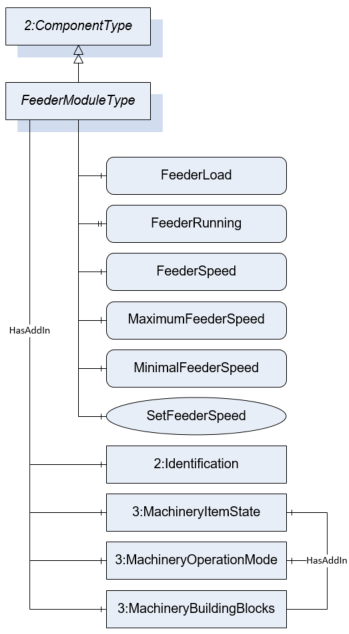
The FeederModuleType defines the structure of an Object of the FeederModuleType. Figure 13 shows the hierarchical structure and details of the composition. It is formally defined in Table 11.
An Object of the FeederModuleType represents a feeder system. A feeder system is a subdevice of an automatic scale for conveying the product (e.g., a belt or a screw conveyor) to or from the WeighingBridge. A feeder must be part of another device (e.g., an Object of the ScaleDeviceType).
The Type defines a general communication interface for a feeder system. It contains only variables and methods.
7.1.2 ObjectType Definition
| Attribute | Value | ||||
| BrowseName | FeederModuleType | ||||
| IsAbstract | False | ||||
| References | NodeClass | BrowseName | DataType | TypeDefinition | ModellingRule |
|---|---|---|---|---|---|
| Subtype of the ComponentType defined in OPC 10000-100 | |||||
| 0:HasComponent | Variable | FeederLoad | 0:Number | MeasuredItemType | Optional |
| 0:HasProperty | Variable | FeederRunning | 0:Boolean | 0:PropertyType | Optional |
| 0:HasComponent | Variable | FeederSpeed | 0:Number | TargetItemType | Optional |
| 0:HasComponent | Method | SetFeederSpeed | Optional | ||
| 0:HasComponent | Variable | MaximumFeederSpeed | 0:Number | 0:AnalogUnitType | Optional |
| 0:HasComponent | Variable | MinimalFeederSpeed | 0:Number | 0:AnalogUnitType | Optional |
| 0:HasAddIn | Object | 2:Identification | 4:MachineryItemIdentificationType | Mandatory | |
| 0:HasAddIn | Object | 4:MachineryItemState | 4:MachineryItemState_StateMachineType | Optional | |
| 0:HasAddIn | Object | 4:MachineryOperationMode | 4:MachineryOperationModeStateMachineType | Optional | |
| 0:HasComponent | Object | 4:Machinery BuildingBlocks | 0:FolderType | Optional | |
| Conformance Units | |||||
|---|---|---|---|---|---|
| Scales FeederModule |
The components of the FeederModuleType have additional references which are defined in Table 12.
| SourceBrowsePath | Reference Type | Is Forward | TargetBrowsePath |
| 4:MachineryBuildingBlocks | 0:HasAddIn | True | 4:MachineryItemState |
| 4:MachineryBuildingBlocks | 0:HasAddIn | True | 4:MachineryOperationMode |
7.1.3 ObjectType Description
FeederLoad defines the current loaded weight on the feeder system.
FeederRunning indicates that the feeder system is running.
FeederSpeed defines the current speed of a feeder system. The unit of the FeederSpeed depends on the construction system. Possible values are velocity or a flow rate (kg/s).
MaximumFeederSpeed defines the maximum possible speed of the feeder.
MinimalFeederSpeed defines the minimal possible speed of the feeder.
The Identification-AddIn contains information about the identification and nameplate of a feeder.
MachineryItemState is used as defined in OPC 40001-1. Shall also be referenced as AddIn in the MachineryBuildingBlocks Folder
MachineryOperationMode is used as defined in OPC 40001-1. Shall also be referenced as AddIn in the MachineryBuildingBlocks Folder
MachineryBuildingBlocks is used as described in OPC 40001-1.
7.1.4 Method SetFeederSpeed
Allows to set a new value for the speed of the feeder system. The OPC UA server must check if the value is between the minimal and maximum allowed speed and if the unit is allowed. The signature of this Method is specified below. Table 13 and Table 14 specify the Arguments and AddressSpace representation, respectively.
Signature
	SetFeederSpeed(
	[in]	Float		FeederSpeed
[in] EUInformation EngineeringUnits);| Argument | Description |
| FeederSpeed | The target speed of a feeder system. |
| EngineeringUnits | The unit of the target feeder speed. The server must check the unit. |
| Attribute | Value | ||||
| BrowseName | SetFeederSpeed | ||||
| References | NodeClass | BrowseName | DataType | TypeDefinition | ModellingRule |
|---|---|---|---|---|---|
| 0:HasProperty | Variable | InputArguments | Argument[] | 0:PropertyType | Mandatory |
7.2 PrinterModuleType Definition
7.2.1 Overview
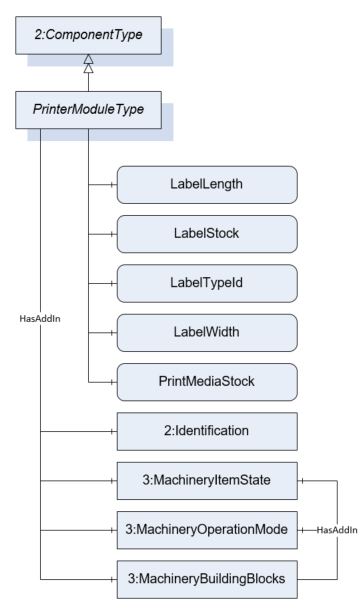
The PrinterModuleType defines the structure of an Object of the PrinterModuleType. Figure 14 shows the hierarchical structure and details of the composition. It is formally defined in Table 15.
An Object of the PrinterModuleType represents a printing device. A printing device is a subdevice of a scale that prints labels or other documents related to the scale or to the measurement results. The variables of the module are only readable. So, the primary use case of the module is to monitor the label and print media status.
7.2.2 ObjectType Definition
| Attribute | Value | ||||
| BrowseName | PrinterModuleType | ||||
| IsAbstract | False | ||||
| References | NodeClass | BrowseName | DataType | TypeDefinition | ModellingRule |
|---|---|---|---|---|---|
| Subtype of the ComponentType defined in OPC 10000-100 | |||||
| 0:HasComponent | Variable | LabelLength | 0:Number | 0:AnalogUnitType | Optional |
| 0:HasComponent | Variable | LabelStock | 0:Number | 0:AnalogItemType | Optional |
| 0:HasComponent | Variable | LabelTypeId | 0:String | BaseDataVariableType | Optional |
| 0:HasComponent | Variable | LabelWidth | 0:Number | 0:AnalogUnitType | Optional |
| 0:HasComponent | Variable | PrintMediaStock | 0:Number | 0:AnalogItemType | Optional |
| 0:HasAddIn | Object | 2:Identification | 4:MachineryItemIdentificationType | Mandatory | |
| 0:HasAddIn | Object | 4:MachineryItemState | 4:MachineryItemState_StateMachineType | Optional | |
| 0:HasAddIn | Object | 4:MachineryOperationMode | 4:MachineryOperationModeStateMachineType | Optional | |
| 0:HasComponent | Object | 4:Machinery BuildingBlocks | 0:FolderType | Optional | |
| Conformance Units | |||||
|---|---|---|---|---|---|
| Scales PrinterModule |
The components of the ObjectType have additional subcomponents which are defined in Table 16
| SourceBrowsePath | Reference Type | Is Forward | TargetBrowsePath |
| 4:MachineryBuildingBlocks | 0:HasAddIn | True | 4:MachineryItemState |
| 4:MachineryBuildingBlocks | 0:HasAddIn | True | 4:MachineryOperationMode |
7.2.3 ObjectType Description
LabelLength defines the length of the labels in stock.
LabelStock indicates the level of labels in stock in percent.
LabelTypeId defines the Id of the label to be printed.
LabelWidth defines the width of the labels in stock.
PrintMediaStock defines the level of the print media in percent (e.g., ink, wear of thermal element, etc.).
The Identification-AddIn contains information about the identification and nameplate of a printer.
MachineryItemState is used as defined in OPC 40001-1. Shall also be referenced as AddIn in the MachineryBuildingBlocks Folder
MachineryOperationMode is used as defined in OPC 40001-1. Shall also be referenced as AddIn in the MachineryBuildingBlocks Folder
MachineryBuildingBlocks is used as described in OPC 40001-1.
7.3 ScaleSystemType Definition
7.3.1 Overview
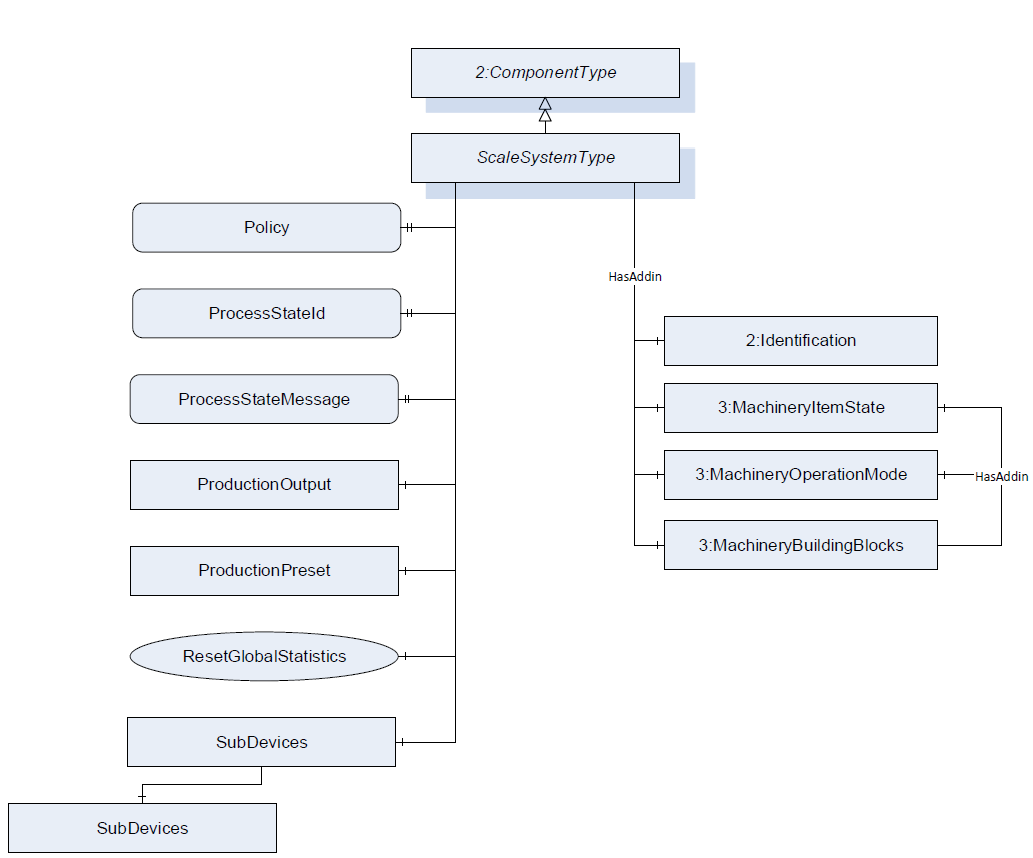
The ScaleSystemType defines the structure of an Object of the ScaleSystemType. Figure 15 shows the hierarchical structure and details of the composition. It is formally defined in Table 17.
An Object of the ScaleSystemType represents a scale system and contains one or more scales. The ScaleSystemType defines a general communication interface for a scale system and is the entry point for clients. This interface makes it possible to interact with this system independent of the knowledge of the internal structure and the underlying processes of the scale system.
The system is modelled with a finite state machine and contains primary information about the state and the status of the system. It optionally can also contain the objects ProductionPreset and ProductionOutput.
7.3.2 ObjectType Definition
| Attribute | Value | ||||
| BrowseName | ScaleSystemType | ||||
| IsAbstract | False | ||||
| References | NodeClass | BrowseName | DataType | TypeDefinition | ModellingRule |
|---|---|---|---|---|---|
| Subtype of the ComponentType defined in OPC 10000-100 | |||||
| 0:HasProperty | Variable | Policy | 0:LocalizedText[] | 0:PropertyType | Optional |
| 0:HasProperty | Variable | ProcessStateId | 0:String | 0:PropertyType | Optional |
| 0:HasProperty | Variable | ProcessStateMessage | 0:LocalizedText | 0:PropertyType | Mandatory |
| 0:HasComponent | Object | ProductionPreset | ProductionPresetType | Optional | |
| 0:HasComponent | Object | ProductionOutput | StatisticType | Optional | |
| 0:HasComponent | Object | SystemState | 5:PackMLBaseStateMachineType | Optional | |
| 0:HasComponent | Object | SubDevices | 2:ConfigurableObjectType | Optional | |
| 0:HasComponent | Method | ResetGlobalStatistics | Optional | ||
| 0:HasAddIn | Object | 4:MachineryItemState | 4:MachineryItemState_StateMachineType | Optional | |
| 0:HasAddIn | Object | 4:MachineryOperationMode | 4:MachineryOperationModeStateMachineType | Optional | |
| 0:HasComponent | Object | 4:Machinery BuildingBlocks | 0:FolderType | Optional | |
| 0:HasAddIn | Object | 2:Identification | 4:MachineIdentificationType | Mandatory | |
| Conformance Units | |||||
|---|---|---|---|---|---|
| Scales ScaleSystemType |
| SourceBrowsePath | Reference Type | Is Forward | TargetBrowsePath |
| 4:MachineryBuildingBlocks | 0:HasAddIn | True | 4:MachineryItemState |
| 4:MachineryBuildingBlocks | 0:HasAddIn | True | 4:MachineryOperationMode |
7.3.3 ObjectType Description
The Identification-AddIn contains information about the identification and nameplate of a machine.
A scale system can contain one or more scales. The scales must be a subtype of the ScaleDeviceType but must not be of the same type. The ScaleDeviceType is described in section 7.4.
Policy defines the legal guidelines that apply for the scale or need to be complied by the scale.
ProcessStateId contains a relating identification for the occurring ProcessStateMessage.
ProcessStateMessage contains the message of the current overall state of the scale.
ProductionPreset contains the production presets. See section 7.7 for the complete definition of the ProductionPresetType.
SystemState provides information about the current state of the scale system and methods for controlling it. PackMLBaseStateMachineType is defined in OPC 30050.
ProductionOutput defines the overall statistic for the scale production.
The modules (subdevices) of a scale system are aggregated in the SubDevices Object (see section 6.3 and OPC 10000-100).
MachineryItemState is used as defined in OPC 40001-1. Shall also be referenced as AddIn in the MachineryBuildingBlocks Folder
MachineryOperationMode is used as defined in OPC 40001-1. Shall also be referenced as AddIn in the MachineryBuildingBlocks Folder
MachineryBuildingBlocks is used as described in OPC 40001-1.
The components of the ScaleSystemType have additional references which are defined in Table 19.
| BrowsePath | References | NodeClass | BrowseName | DataType | TypeDefinition | Others |
| SubDevices | 0:HasComponent | Object | <ScaleDevice> | ScaleDeviceType | OptionalPlaceholder |
7.3.4 Method ResetGlobalStatistics
All statistics relating to the scale system but not to a product are reset.
Signature
	ResetGlobalStatistics(
	);
7.4 ScaleDeviceType Definition
7.4.1 Overview
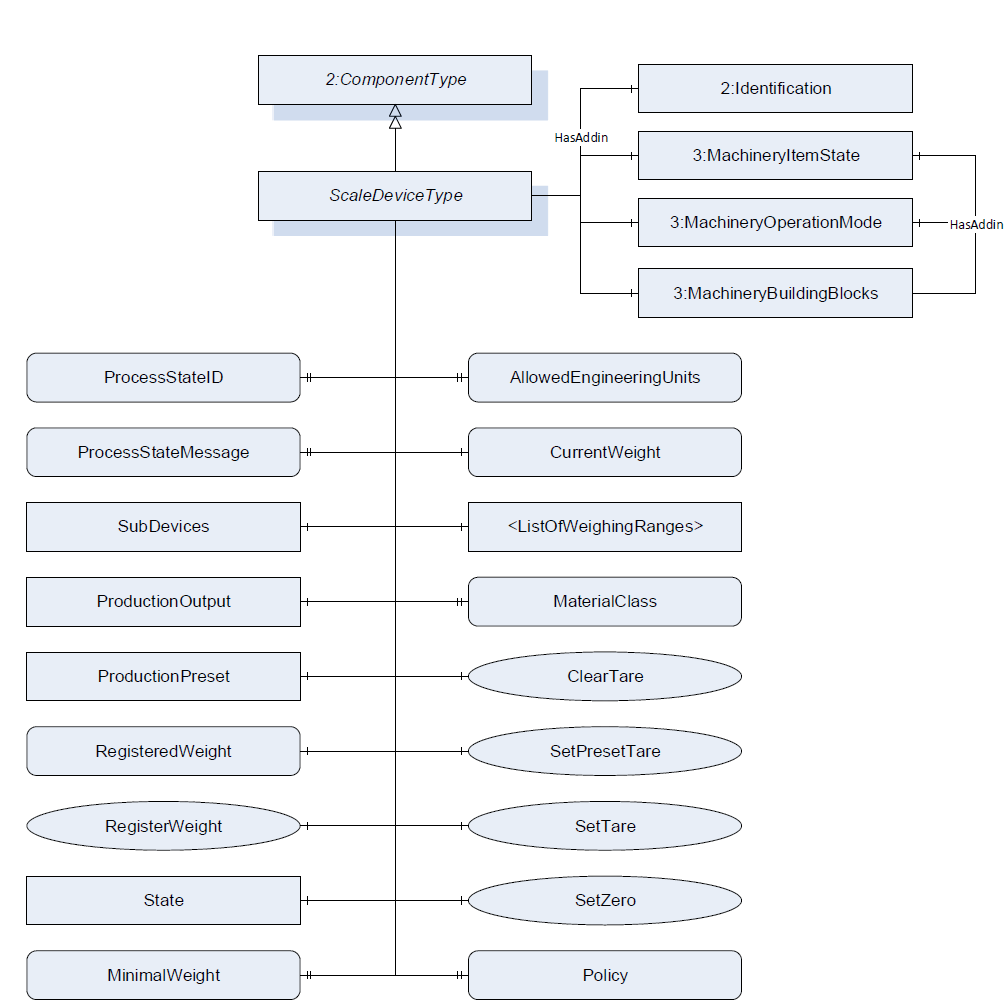
The ScaleDeviceType defines the structure of an Object of the ScaleDeviceType. Figure 16 shows the hierarchical structure and details of the composition. It is formally defined in Table 20.
The ScaleDeviceType is an abstract ObjectType. An Object of a subtype of the ScaleDeviceType represents a scale. The ScaleDeviceType contains all information that is relevant for most of the scale types. The system is modeled with a finite state machine and contains primary information about the state and the status of the system.
7.4.2 ObjectType Definition
| Attribute | Value | ||||
| BrowseName | ScaleDeviceType | ||||
| IsAbstract | True | ||||
| References | NodeClass | BrowseName | DataType | TypeDefinition | ModellingRule |
|---|---|---|---|---|---|
| Subtype of the ComponentType defined in OPC 10000-100 | |||||
| 0:HasProperty | Variable | AllowedEngineeringUnits | 0:EUInformation[] | 0:PropertyType | Optional |
| 0:HasComponent | Method | ClearTare | Optional | ||
| 0:HasComponent | Variable | CurrentWeight | WeightType | WeightItemType | Mandatory |
| 0:HasComponent | Object | <ListOfWeighingRanges> | WeighingRangeElementType | MandatoryPlaceholder | |
| 0:HasProperty | Variable | MaterialClass | 0:LocalizedText | 0:PropertyType | Optional |
| 0:HasComponent | Variable | MinimalWeight | 0:Number | 0:AnalogUnitType | Optional |
| 0:HasProperty | Variable | ProcessStateId | 0:String | 0:PropertyType | Optional |
| 0:HasProperty | Variable | ProcessStateMessage | 0:LocalizedText | 0:PropertyType | Optional |
| 0:HasComponent | Object | ProductionOutput | StatisticType | Optional | |
| 0:HasComponent | Object | ProductionPreset | ProductionPresetType | Optional | |
| 0:HasProperty | Variable | Policy | 0:LocalizedText[] | 0:PropertyType | Optional |
| 0:HasComponent | Variable | RegisteredWeight | WeightType | WeightItemType | Optional |
| 0:HasComponent | Method | RegisterWeight | Optional | ||
| 0:HasComponent | Method | SetPresetTare | Optional | ||
| 0:HasComponent | Method | SetTare | Optional | ||
| 0:HasComponent | Method | SetZero | Optional | ||
| 0:HasComponent | Object | SubDevices | 2:ConfigurableObjectType | Optional | |
| 0:HasComponent | Object | State | 5:PackMLBaseStateMachineType | Optional | |
| 0:HasAddIn | Object | 4:MachineryItemState | 4:MachineryItemState_StateMachineType | Optional | |
| 0:HasAddIn | Object | 4:MachineryOperationMode | 4:MachineryOperationModeStateMachineType | Optional | |
| 0:HasComponent | Object | 4:Machinery BuildingBlocks | 0:FolderType | Optional | |
| 0:HasAddIn | Object | 2:Identification | 4:MachineIdentificationType | Mandatory | |
| Conformance Units | |||||
|---|---|---|---|---|---|
| Scales ScaleDeviceType |
The components of the ScaleDeviceType have additional references which are defined in Table 21.
| SourceBrowsePath | Reference Type | Is Forward | TargetBrowsePath |
| 4:MachineryBuildingBlocks | 0:HasAddIn | True | 4:MachineryItemState |
| 4:MachineryBuildingBlocks | 0:HasAddIn | True | 4:MachineryOperationMode |
7.4.3 ObjectType Description
AllowedEngineeringUnits contains an array of engineering units that can be handled by the OPC UA server. A server that supports a method with the input argument EUInformation must also provide this array.
CurrentWeight defines the current value that is measured at the sensor at the current timestamp. This might be a highly fluctuating value.
MaterialClass defines the allowed material the scale may measure. It is only relevant for certain scales (e.g., totalizing hopper scale or continuous scale).
The MinimalWeight is the smallest sample quantity required for a weighment to just achieve a specified relative accuracy of weighing (see also EURAMET Calibration Guide No. 18). So it is the smallest load or component of a recipe that may be weighed on the scale. SubDevices: the modules (subdevices) of a modular scale are aggregated in the SubDevices Object. See OPC Unified Architecture for Devices for more information.
ProcessStateId contains a relating identification for the occurring ProcessStateMessage.
ProcessStateMessage contains the message of the current overall state of the scale.
ProductionOutput defines the statistic for the scale prodution related to this ScaleDeviceType instance.
ProductionPreset contains the production presets. See section 7.7 for the complete definition of the ProductionPresetType.
RegisteredWeight defines the last valid measurement that was recorded and will be used for further processing.
<ListOfWeighingRanges> defines the weighing range and resolution the scale may operate in with a structure of range and resolution.
Policy defines the legal guidelines that apply for the scale or need to be complied by the scale.
ScaleStateMachine provides information about the current state of the scale system and methods for controlling it. PackMLBaseStateMachineType is defined in OPC 30050.
MachineryItemState is used as defined in OPC 40001-1. Shall also be referenced as AddIn in the MachineryBuildingBlocks Folder
MachineryOperationMode is used as defined in OPC 40001-1. Shall also be referenced as AddIn in the MachineryBuildingBlocks Folder
MachineryBuildingBlocks is used as described in OPC 40001-1.
The components of the ScaleDeviceType have additional subcomponents which are defined in Table 22.
| BrowsePath | References | NodeClass | BrowseName | DataType | TypeDefinition | Others |
| SubDevices | 0:HasComponent | Object | <FeederModule> | FeederModuleType | OptionalPlaceholder | |
| SubDevices | 0:HasComponent | Object | <PrinterModule> | PrinterModuleType | OptionalPlaceholder | |
| SubDevices | 0:HasComponent | Object | <WeighingModule> | WeighingModuleType | OptionalPlaceholder |
7.4.4 Method ClearTare
The tare value is set to zero or deleted.
Signature
	ClearTare(
	);
7.4.5 Method RegisterWeight
Triggers the registration of a measured value and a new value for the RegisteredWeight will be calculated.
Signature
	RegisterWeight(
	);
7.4.6 Method SetPresetTare
The method set the current PresetTare.
Signature
	SetPresetTare(
	[in]	Double		PresetTare
[in] EUInformation EngineeringUnits);| Argument | Description |
| PresetTare | The value which should be set as tare value. |
| EngineeringUnits | The unit of the preset. The server must check the unit. |
| Attribute | Value | ||||
| BrowseName | SetPresetTare | ||||
| References | NodeClass | BrowseName | DataType | TypeDefinition | ModellingRule |
|---|---|---|---|---|---|
| 0:HasProperty | Variable | InputArguments | Argument[] | 0:PropertyType | Mandatory |
7.4.7 Method SetZero
The method sets zero point. It uses the gross value of the CurrentWeight value.
Signature
	SetZero (
	);
7.4.8 Method SetTare
The method triggers the tare operation. The CurrentWeight value is used as the tare.
Signature
	SetTare(
	);
7.5 WeighingRangeElementType Definition
7.5.1 Overview
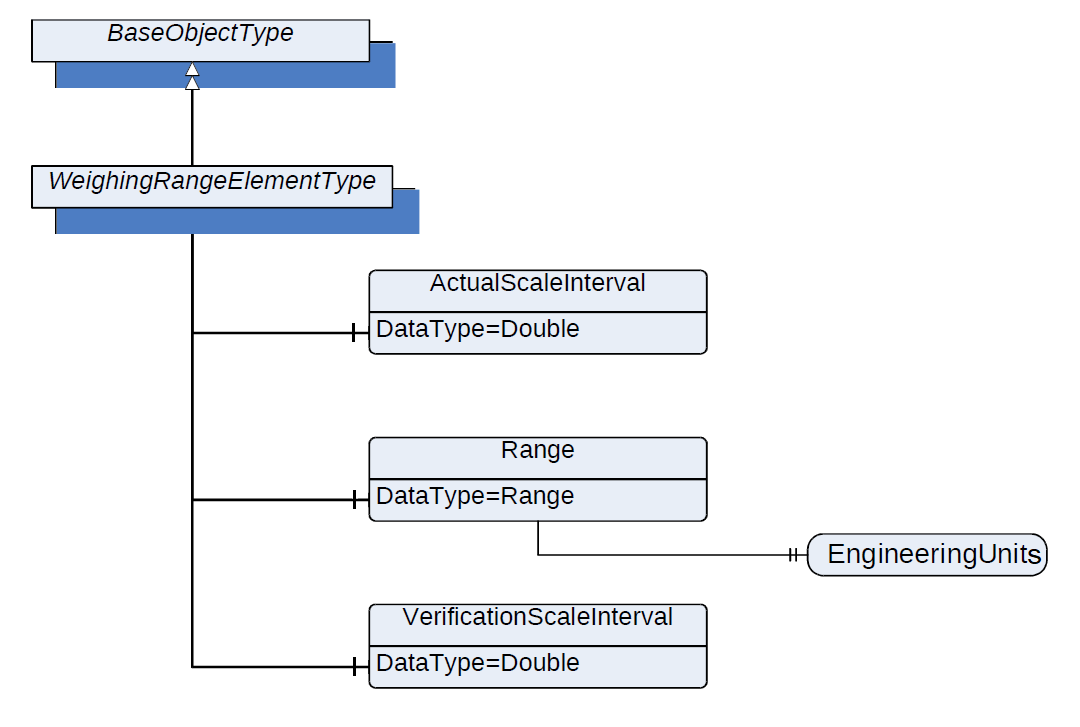
The WeighingRangeElementType defines the structure of an Object of WeighingRangeElementType. Figure 17 shows the hierarchical structure and details of the composition. It is formally defined in Table 25.
7.5.2 ObjectType Definition
| Attribute | Value | ||||
| BrowseName | WeighingRangeElementType | ||||
| IsAbstract | False | ||||
| References | NodeClass | BrowseName | DataType | TypeDefinition | ModellingRule |
|---|---|---|---|---|---|
| Subtype of the BaseObjectType defined in OPC 10000-5 | |||||
| 0:HasComponent | Variable | ActualScaleInterval | 0:Double | AnalogUnitType | Mandatory |
| 0:HasComponent | Variable | Range | 0:Range | BaseDataVariableType | Mandatory |
| 0:HasComponent | Variable | VerificationScaleInterval | 0:Double | AnalogUnitType | Mandatory |
| Conformance Units | |||||
|---|---|---|---|---|---|
| Scales ScaleDeviceType |
7.5.3 ObjectType Description
ActualScaleInterval defines the difference between two consecutive indicated values.
Range defines the range within the scale that may be operated depending on the additional parameters within this type.
Range.EngineeringUnit defines the engineering unit of the range.
VerificationScaleInterval defines the value, expressed in units of mass, used for the classification and verification of an instrument.
The components of the WeighingRangeElementType have additional references which are defined in Table 26
| Source Path | References | NodeClass | BrowseName | DataType | TypeDefinition | Others |
| Range | 0:HasProperty | Variable | 0:EngineeringUnits | 0:EUInformation | 0:PropertyType | Mandatory |
7.6 StatisticType Definition
7.6.1 Overview
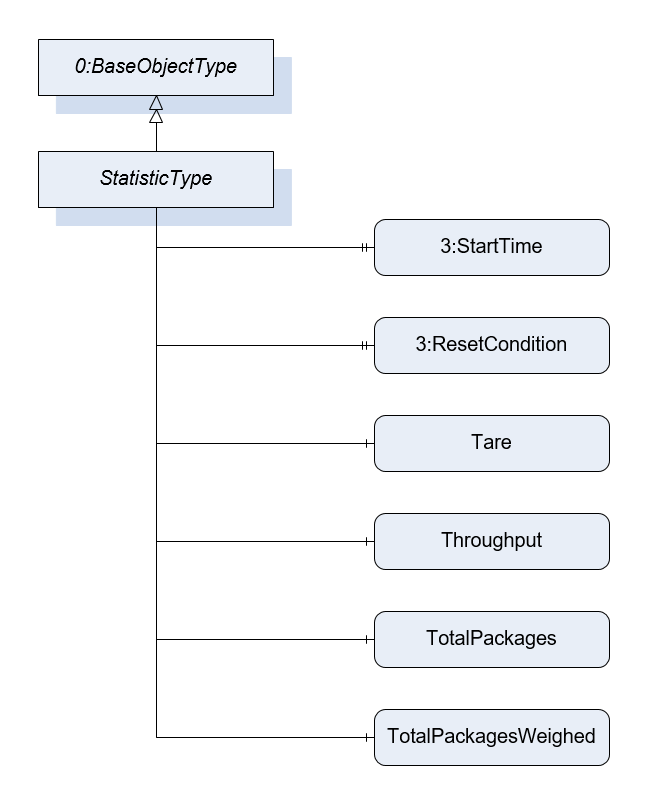
The StatisticType defines the structure of an Object of StatisticType. Figure 18 shows the hierarchical structure and details of the composition. It is formally defined in Table 27.
The StatisticType is a container for the different statistic values. All variables are optional so that the statistics can be instantiated in an application-specific way. The StatisticType can be instantiated with parent nodes (e.g., ScaleDeviceType, …). Parent nodes other than those described in this Companion Specification are possible.
7.6.2 ObjectType Definition
| Attribute | Value | ||||
| BrowseName | StatisticType | ||||
| IsAbstract | False | ||||
| References | NodeClass | BrowseName | DataType | TypeDefinition | ModellingRule |
|---|---|---|---|---|---|
| Subtype of the BaseObjectType defined in OPC 10000-5 | |||||
| 0:HasInterface | ObjectType | 3:IAggregateStatisticsType | |||
| 0:HasProperty | Variable | 3:StartTime | 0:DateTime | 0:PropertyType | Optional |
| 0:HasProperty | Variable | 3:ResetCondition | 0:String | 0:PropertyType | Optional |
| 3:HasStatisticComponent | Variable | Tare | 0:Double | 0:AnalogUnitType | Optional |
| 3:HasStatisticComponent | Variable | Throughput | 0:UInteger | 0:AnalogUnitType | Optional |
| 3:HasStatisticComponent | Object | TotalPackages | StatisticCounterType | Optional | |
| 3:HasStatisticComponent | Object | TotalPackagesWeighed | StatisticCounterType | Optional | |
| 0:HasComponent | Object | LastItem | WeighingItemType | Optional | |
| Conformance Units | |||||
|---|---|---|---|---|---|
| Scales ScaleDeviceType |
7.6.3 ObjectType Description
StartTime defines the point in time at which the system starts acquiring the statistic (e.g., 15:00). This value is relevant for time statistics. For example, it can be used to create statistics for the last 3 hours.
ResetCondition is a vendor-specific, human readable string that describes the reason and context for the reset of the statistics. For example, after 4 hours or after 1000 items. Please note that the subtype FloatingStatisticType is used for floating statistics.
	Examples:
	ResetCondition::= "AFTER 4 HOURS"
	ResetCondition::= "AFTER 1000 ITEMS"
	ResetCondition::= "OPERATOR"
Tare defines the last occurring tare value of the period of time which is used for the statistic.
Throughput defines the number of items registered over the period of the statistic (e.g., packages/min).
TotalPackages defines the totalized number of packages of one cell for weight determination. Contains packages that were sorted out but were physically transported via the scale. This value may be calculated by TotalPackagesAccepted + TotalPackagesRejected.
TotalPackagesWeighed defines the totalized number of packages for which a weight was measured. No reference to acceptance or rejection of the package.
LastItem contains the values of the last item.
7.7 ProductionPresetType Definition
7.7.1 Overview
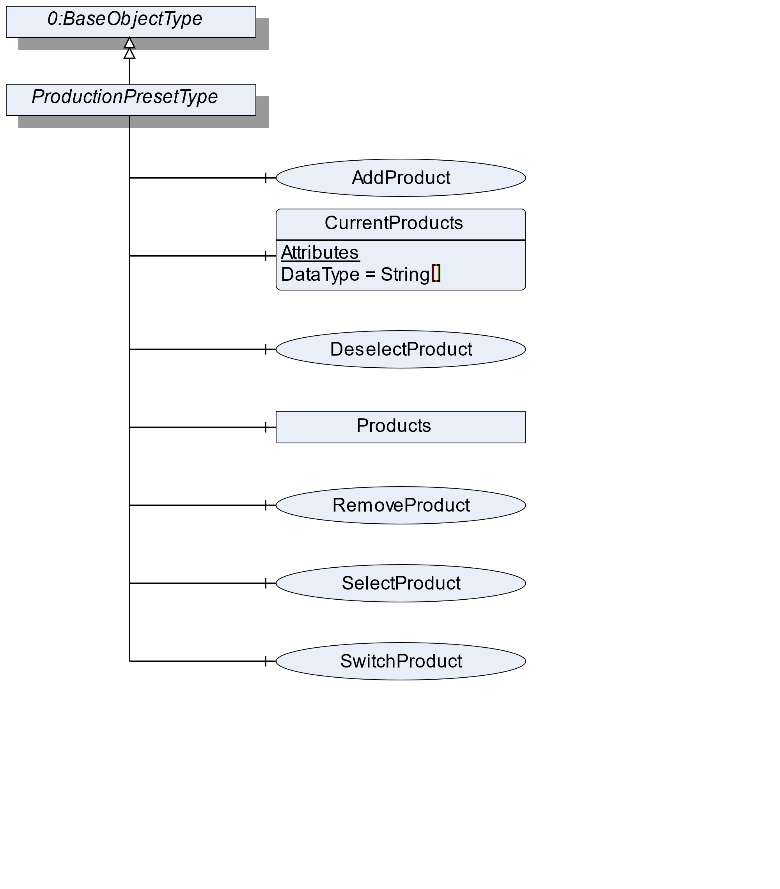
The ProductionPresetType defines the structure of an Object of ProductionPresetType. Figure 19 shows the hierarchical structure and details of the composition. It is formally defined in Table 28.
ProductionPresetType provides methods to manage the production preset.
7.7.2 ObjectType Definition
| Attribute | Value | ||||
| BrowseName | ProductionPresetType | ||||
| IsAbstract | False | ||||
| References | NodeClass | BrowseName | DataType | TypeDefinition | ModellingRule |
|---|---|---|---|---|---|
| Subtype of the BaseObjectType defined in OPC 10000-5 | |||||
| 0:HasComponent | Method | AddProduct | Optional | ||
| 0:HasComponent | Variable | CurrentProducts | 0:String[] | BaseDataVariableType | Optional |
| 0:HasComponent | Method | DeselectProduct | Optional | ||
| 0:HasComponent | Method | RemoveProduct | Optional | ||
| 0:HasComponent | Method | SelectProduct | Optional | ||
| 0:HasComponent | Method | SwitchProduct | Optional | ||
| 0:HasComponent | Object | Products | FolderType | Optional | |
| Conformance Units | |||||
|---|---|---|---|---|---|
| Scales ManageProduct | |||||
| Scales SelectProduct |
7.7.3 ObjectType Description
CurrentProducts is an array containing the Ids of all product objects currently in processing mode. The product process can be started using the SelectProduct method or another interface or an external trigger signal.
Products contains the products used in the scale aggregated in the Products Object. The objects in the folder should have the type ProductType or a subtype of it. The subcomponents of the Products Object are defined in Table 29.
| BrowsePath | References | NodeClass | BrowseName | DataType | TypeDefinition | Others |
| Products | 0:HasComponent | Object | <Product> | ProductType | MandatoryPlaceholder |
7.7.4 Method AddProduct
The method creates an Object with a subtype of ProductType from the address space. The Object needs a reference of the type "0:HasComponent" to the product folder of the scale device. The signature of this Method is specified below. Table 30 and Table 31 specify the Arguments and AddressSpace representation, respectively.
Signature
	AddProduct(
	[in]	String		ProductName
	[in]	String		ProductId
	[in]	NodeId		ProductType
	[out]	NodeId		ProductNodeId
);| Argument | Description |
| ProductName | A user-readable name of this Batch. |
| ProductId | A unique Id of this product |
| ProductType | The NodeId of a subtype of the ProductType or the NodeId of the ProductType itself |
| ProductNodeId | The NodeId of the created Object |
| Attribute | Value | ||||
| BrowseName | AddProduct | ||||
| References | NodeClass | BrowseName | DataType | TypeDefinition | ModellingRule |
|---|---|---|---|---|---|
| 0:HasProperty | Variable | InputArguments | Argument[] | 0:PropertyType | Mandatory |
| 0:HasProperty | Variable | OutputArguments | Argument[] | 0:PropertyType | Mandatory |
7.7.5 Method SelectProduct
Selects the product. The scale is now able to process the product. This includes that the ID is saved in the CurrentProducts array and that the ProductMode switches from "Not processing" to "Processing". Table 32 and Table 33 specify the Arguments and AddressSpace representation, respectively.
Signature
	SelectProduct (
		[in]	String		ProductId
);| Argument | Description |
| ProductId | The ProductId of the product Object that represents the product to be selected |
| Attribute | Value | ||||
| BrowseName | SelectProduct | ||||
| References | NodeClass | BrowseName | DataType | TypeDefinition | ModellingRule |
|---|---|---|---|---|---|
| 0:HasProperty | Variable | InputArguments | Argument[] | 0:PropertyType | Mandatory |
7.7.6 Method DeselectProduct
Deselects the product. The scale should stop to process the product. This includes that the ID is removed in the CurrentProducts array and that the ProductMode switches from "Processing" to "Not processing". The signature of this Method is specified below. Table 34 and Table 35 specify the Arguments and AddressSpace representation, respectively.
Signature
	DeselectProduct (
		[in]	String		ProductId
);| Argument | Description |
| ProductId | The ProductId of the product Object that represents the product to be selected |
| Attribute | Value | ||||
| BrowseName | DeselectProduct | ||||
| References | NodeClass | BrowseName | DataType | TypeDefinition | ModellingRule |
|---|---|---|---|---|---|
| 0:HasProperty | Variable | InputArguments | Argument[] | 0:PropertyType | Mandatory |
7.7.7 Method RemoveProduct
The method removes an Object from the address space with a subtype of the ProductType. The signature of this Method is specified below. Table 36 and Table 37 specify the Arguments and AddressSpace representation, respectively.
Signature
	RemoveProduct (
		[in]	String		ProductId
);| Argument | Description |
| ProductId | The ProductId of the product Object that represents the product to be selected |
| Attribute | Value | ||||
| BrowseName | RemoveProduct | ||||
| References | NodeClass | BrowseName | DataType | TypeDefinition | ModellingRule |
|---|---|---|---|---|---|
| 0:HasProperty | Variable | InputArguments | Argument[] | 0:PropertyType | Mandatory |
7.7.8 Method SwitchProduct
Selects the new product and deselects the old product. The scale is now able to process the new product. This includes that the new ID is saved in the CurrentProducts array and that the ProductMode switches from "Not processing" to "Processing". Additionally, the old ID is removed in the CurrentProducts array and the ProductMode of the old product switches from "Processing" to "Not Processing". This method is only possible if only one product is used. The signature of this Method is specified below. Table 38 and Table 39 specify the Arguments and AddressSpace representation, respectively.
Signature
	SwitchProduct (
		[in]	String		ProductId
);| Argument | Description |
| ProductId | The ID of the product Object that represents the product to be selected |
| Attribute | Value | ||||
| BrowseName | SwitchProduct | ||||
| References | NodeClass | BrowseName | DataType | TypeDefinition | ModellingRule |
|---|---|---|---|---|---|
| 0:HasProperty | Variable | InputArguments | Argument[] | 0:PropertyType | Mandatory |
7.8 ProductType Definition
7.8.1 Overview
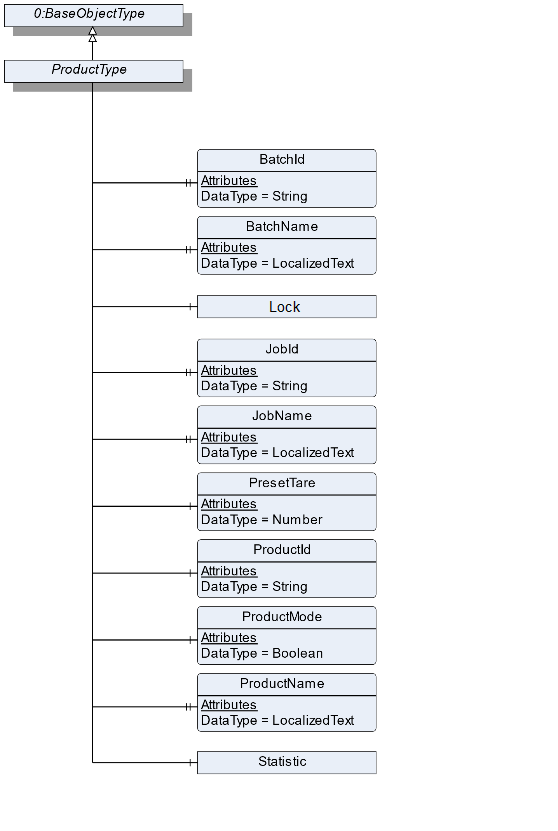
The ProductType is an abstract type that defines the basic structure of all objects that represent a product. Figure 20 shows the hierarchical structure and details of the composition. It is formally defined in Table 40. An Object of the type ProductType represents a product related to the scale.
The different subtypes of the ProductType are described in the following sections. The ProductType only contains the basic information about a product. The scale type-specific information is modeled in the subtypes for the different scale types. The Create Method makes it possible that a vendor can add own Variables and extend the Create Method.
7.8.2 ObjectType Definition
| Attribute | Value | ||||
| BrowseName | ProductType | ||||
| IsAbstract | True | ||||
| References | NodeClass | BrowseName | DataType | TypeDefinition | ModellingRule |
|---|---|---|---|---|---|
| Subtype of the BaseObjectType defined in OPC 10000-5 | |||||
| 0:HasProperty | Variable | BatchId | 0:String | 0:PropertyType | Optional |
| 0:HasProperty | Variable | BatchName | 0:LocalizedText | 0:PropertyType | Optional |
| 0:HasProperty | Variable | JobId | 0:String | 0:PropertyType | Optional |
| 0:HasProperty | Variable | JobName | 0:LocalizedText | 0:PropertyType | Optional |
| 0:HasComponent | Object | Lock | 2:LockingServicesType | Optional | |
| 0:HasComponent | Variable | PresetTare | 0:AnalogUnitType | Optional | |
| 0:HasComponent | Variable | ProductId | 0:String | 0:BaseDataVariableType | Mandatory |
| 0:HasComponent | Variable | ProductMode | 0:Boolean | 0:TwoStateDiscreteType | Optional |
| 0:HasProperty | Variable | ProductName | 0:LocalizedText | 0:PropertyType | Mandatory |
| 0:HasComponent | Object | Statistic | StatisticType | Optional | |
| Conformance Units | |||||
|---|---|---|---|---|---|
| Scales ProductType |
7.8.3 ObjectType Description
BatchId is the ID of the batch to which this product belongs.
BatchName is the human-readable name of the batch to which this product belongs.
JobId is the ID of the job to which this product belongs.
JobName is the human-readable name of the job to which this product belongs.
PresetTare defines the predefined tare weight. The value must be written before the item is measured.
ProductId defines a unique ID of this product.
The ProductMode displays the current mode of the product. The ProductType instance can be in the mode "Processing" or "Not Processing". The mode is independent from the Lock. Thus, it is possible that a product is in the "Processing mode" and writeable. The combination of these both modes should be used with care as the writeable element may be in an inconsistent state. If the ProductMode is true the Object is in "Processing". Otherwise, it is in the mode "Not Processing".
ProductName defines the name of this product.
Lock is used as container for the LockingServicesType Methods and Properties. It is defined in OPC 10000-100 (Locking). In addition to this definition, the server can also lock an object of the ProductType. In this case the property LockingClient contains the ProductUri of the server and LockingUser contains an empty String.
Statistic contains the different statistic values of the product. The statistic can't be reset manually. All measurements that relate to the product of the job will be used in the statistics.
The components of the ProductType have additional Attributes defined in Table 41.
| BrowsePath | Value Attribute | Description Attribute | ||
| Processing | |||
| NotProcessing |
7.9 AutomaticFillingScaleType Definition
7.9.1 Overview
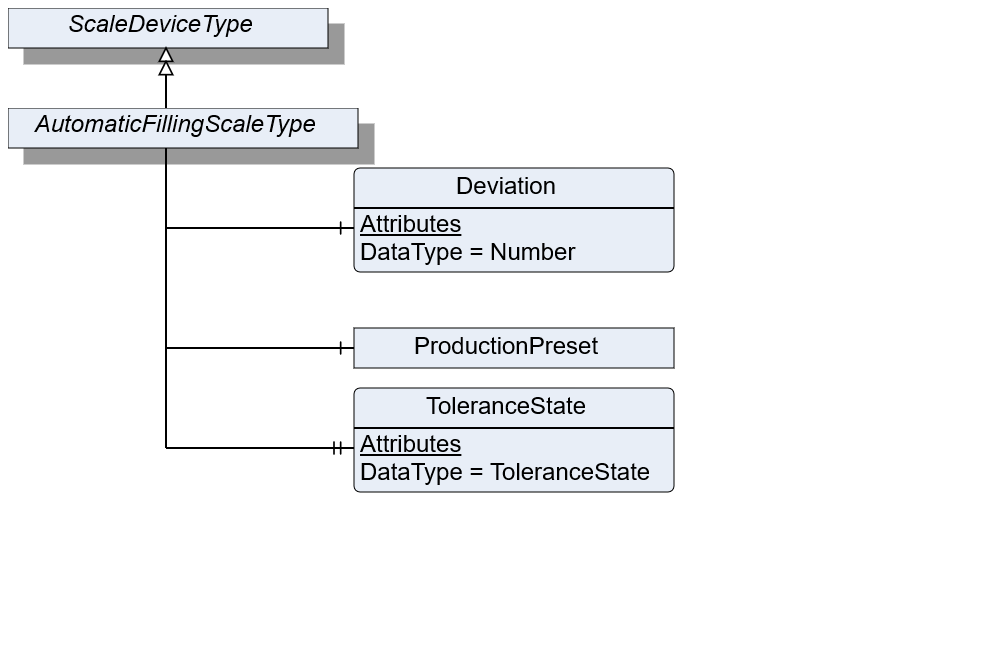
The AutomaticFillingScaleType defines the structure of an Object of the AutomaticFillingScaleType. Figure 21 shows the hierarchical structure and details of the composition. It is formally defined in Table 42.
An Object of AutomaticFillingScaleType represents an automatic filling scale. It defines additional Methods and Properties required for managing automatic filling scales.
7.9.2 ObjectType Definition
| Attribute | Value | ||||
| BrowseName | AutomaticFillingScaleType | ||||
| IsAbstract | False | ||||
| References | NodeClass | BrowseName | DataType | TypeDefinition | ModellingRule |
|---|---|---|---|---|---|
| Subtype of the ScaleDeviceType | |||||
| 0:HasComponent | Variable | Deviation | 0:Number | 0:AnalogUnitType | Optional |
| 0:HasProperty | Variable | ToleranceState | ToleranceState | 0:PropertyType | Optional |
| Conformance Units | |||||
|---|---|---|---|---|---|
| Scales AutomaticFillingScale |
7.9.3 ObjectType Description
Deviation defines the relative amount of over (positive value) or under (negative value) dosed value in relation to the TargetWeight.
ToleranceState describes the state of the tolerance deviation. Under: underneath the lower tolerance value. Over: above the upper tolerance value. In: within the tolerance values. The options "under" and "over" need to be determined via the TargetItemType information of TargetWeight.
ProductionPreset, which is inherited from ScaleDeviceType shall have instances of AutomaticFillingProductType or a subtype in the Products folder.
7.10 AutomaticFillingProductType Definition
7.10.1 Overview
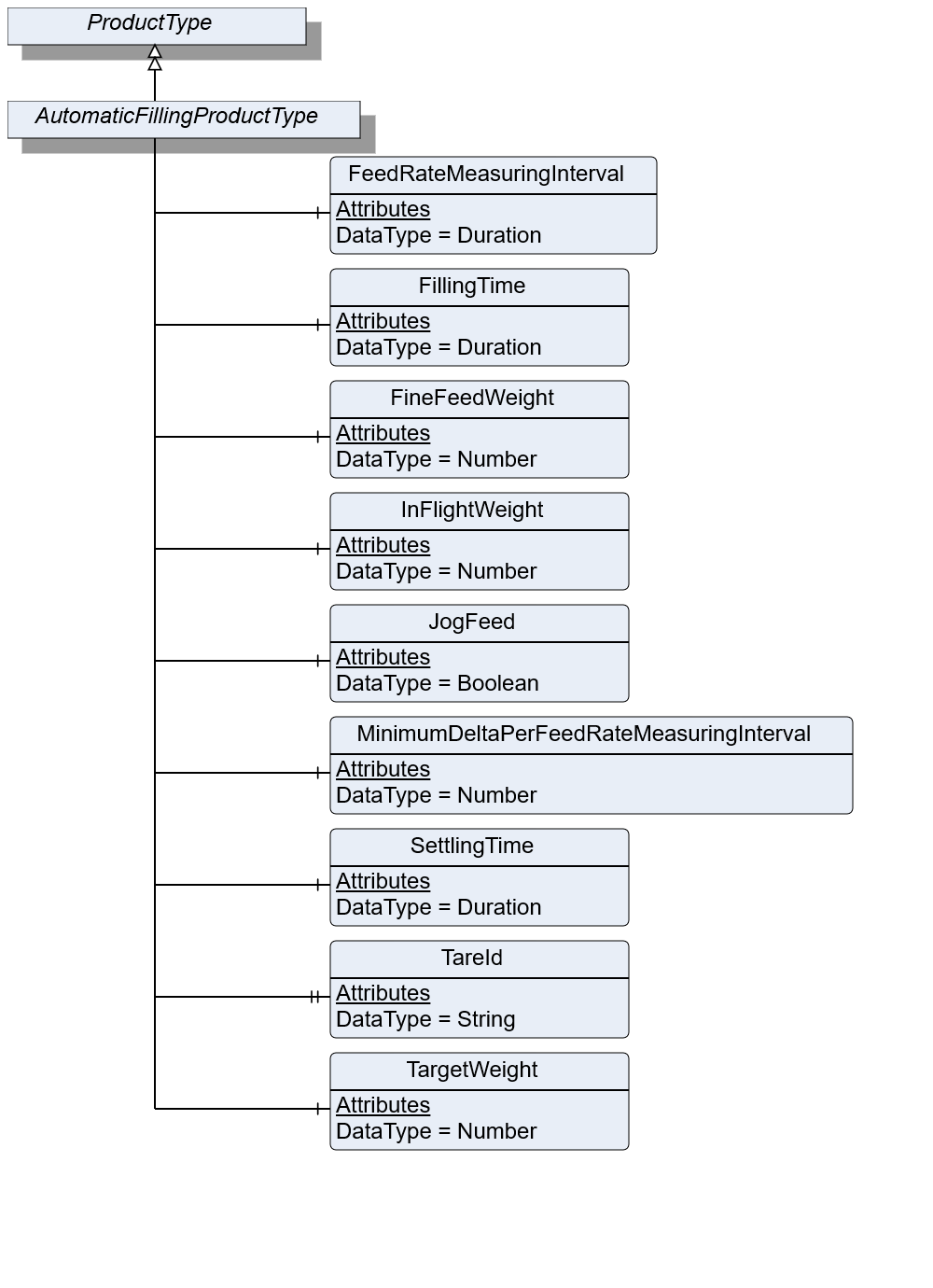
The AutomaticFillingProductType defines the structure of an Object of the AutomaticFillingProductType. Figure 22 shows the hierarchical structure and details of the composition. It is formally defined in Table 43.
An Object of AutomaticFillingProductType represents a product of an automatic filling scale. It defines additional methods and properties required for managing the product.
7.10.2 ObjectType Definition
| Attribute | Value | ||||
| BrowseName | AutomaticFillingProductType | ||||
| IsAbstract | False | ||||
| References | NodeClass | BrowseName | DataType | TypeDefinition | ModellingRule |
|---|---|---|---|---|---|
| Subtype of the ProductType | |||||
| 0:HasComponent | Variable | FeedRateMeasuringInterval | 0:Duration | BaseDataVariableType | Optional |
| 0:HasComponent | Variable | FillingTime | 0:Duration | BaseDataVariableType | Optional |
| 0:HasComponent | Variable | FineFeedWeight | 0:Number | 0:AnalogItemType | Optional |
| 0:HasComponent | Variable | InFlightWeight | 0:Number | 0:AnalogItemType | Mandatory |
| 0:HasComponent | Variable | JogFeed | 0:Boolean | BaseDataVariableType | Optional |
| 0:HasComponent | Variable | MinimumDeltaPerFeedRateMeasuringInterval | 0:Number | 0:AnalogItemType | Optional |
| 0:HasComponent | Variable | SettlingTime | Duration | BaseDataVariableType | Optional |
| 0:HasProperty | Variable | TareId | 0:String | 0:PropertyType | Optional |
| 0:HasComponent | Variable | TargetWeight | 0:Number | TargetItemType | Mandatory |
| Conformance Units | |||||
|---|---|---|---|---|---|
| Scales AutomaticFillingScale |
7.10.3 ObjectType Description
FeedRateMeasuringInterval defines the measuring interval for evaluating the current flowrate.
FillingTime defines the maximum duration for the filling process to take place. Needs to be completed during this period.
FineFeedWeight defines the volume to be dosed in fine flow.
InFlightWeight defines the volume that is behind the valve/in flight after feeding is stopped.
JogFeed defines if an additional dosage is necessary.
MinimumDeltaPerFeedRateMeasuringInterval defines the minimum amount of weight data which needs to change within the FeedRateMeasuringInterval. Otherwise, the filling procedure is not valid.
SettlingTime defines the time that needs to be passed before the measurement process can be triggered.
TareId defines an ID of tare value for the current product or item.
TargetWeight defines the preset of the volume to be processed.
7.11 CatchweigherType Definition
7.11.1 Overview
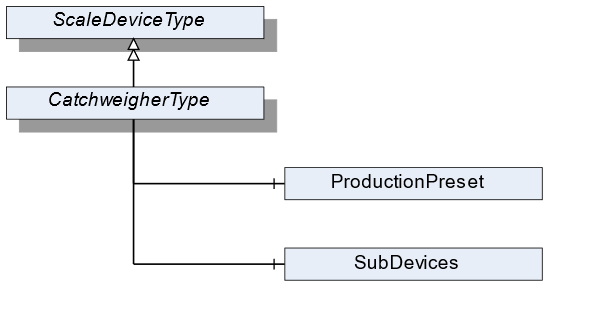
The CatchweigherType defines the structure of an Object of the CatchweigherType. Figure 23 shows the hierarchical structure and details of the composition. It is formally defined in Table 44.
An Object of the CatchweigherType represents a catchweigher. It has no method or properties defined. The CheckweigherType and the AutomaticWeightPriceLablerType inherit from the CatchweigherType.
7.11.2 ObjectType Definition
| Attribute | Value | ||||
| BrowseName | CatchweigherType | ||||
| IsAbstract | False | ||||
| References | NodeClass | BrowseName | DataType | TypeDefinition | ModellingRule |
|---|---|---|---|---|---|
| Subtype of the ScaleDeviceType | |||||
| Conformance Units | |||||
|---|---|---|---|---|---|
| Scales Catchweigher |
7.11.3 ObjectType Description
ProductionPreset, which is inherited from ScaleDeviceType shall have instances of CatchweigherProductType or a subtype in the Products folder.
7.12 CatchweigherProductType Definition
7.12.1 Overview
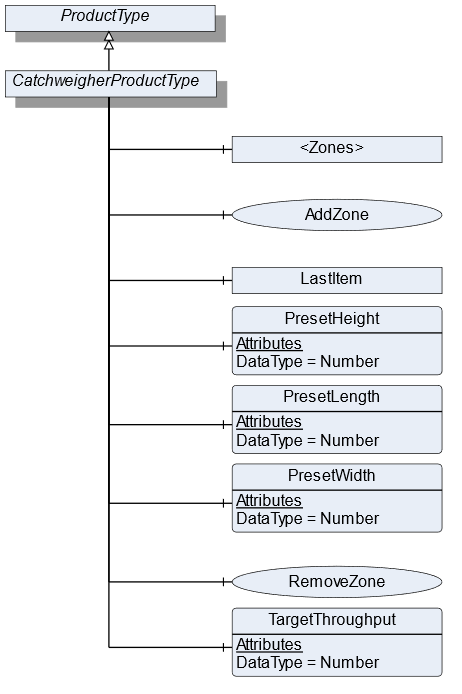
The CatchweigherProductType defines the structure of an Object of the CatchweigherProductType. Figure 24 shows the hierarchical structure and details of the composition. It is formally defined in Table 45.
An Object of the CatchweigherProductType represents a product of a catchweigher. It defines additional methods and properties required for managing the product.
7.12.2 ObjectType Definition
| Attribute | Value | ||||
| BrowseName | CatchweigherProductType | ||||
| IsAbstract | False | ||||
| References | NodeClass | BrowseName | DataType | TypeDefinition | ModellingRule |
|---|---|---|---|---|---|
| Subtype of the ProductType | |||||
| 0:HasComponent | Object | <Zones> | ZoneType | OptionalPlaceholder | |
| 0:HasComponent | Method | AddZone | Optional | ||
| 0:HasComponent | Object | LastItem | WeighingItemType | Optional | |
| 0:HasComponent | Variable | PresetHeight | 0:Number | 0:AnalogUnitType | Optional |
| 0:HasComponent | Variable | PresetLength | 0:Number | 0:AnalogUnitType | Optional |
| 0:HasComponent | Variable | PresetWidth | 0:Number | 0:AnalogUnitType | Optional |
| 0:HasComponent | Method | RemoveZone | Optional | ||
| 0:HasComponent | Variable | TargetThroughput | 0:Number | TargetItemType | Optional |
| Conformance Units | |||||
|---|---|---|---|---|---|
| Scales Catchweigher |
7.12.3 ObjectType Description
<Zones> is an OptionalPlaceholder for the different zones. Each zone defines different weighing ranges a product has to be within.
LastItem contains the measured values of the last item that was processed by the catchweigher.
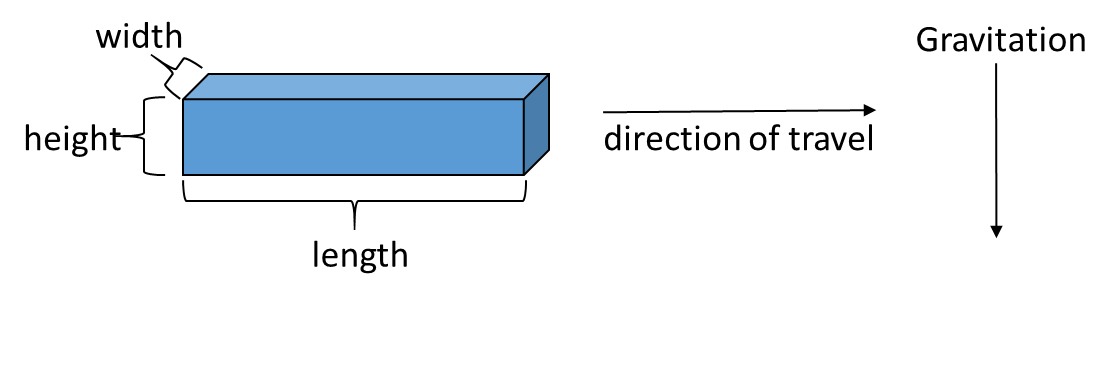
PresetHeight defines the predefined height (in direction of global gravity, see Figure 25) of the measured item. If the PresetHeight value is used, the value must be written before the item is measured.
PresetLength defines the predefined length (in direction of travel, see Figure 25) of the measured item. If the PresetLength value is used, the value must be written before the item is measured.
PresetWidth defines the predefined width (in third possible orthogonal direction to height and length, see Figure 25) of the measured item. If the PresetWidth value is used, the value must be written before the item is measured.
TargetThroughput is the target value for the throughput.
7.12.4 Method AddZone
Adds a zone to the zone array. The signature of this Method is specified below. Table 46 and Table 47 specify the Arguments and AddressSpace representation, respectively.
Signature
	AddZone(
	[in]	LocalizedText		ZoneName
	[in]	Double		LowerLimit
	[in]	Double		UpperLimit
	[in]	EUInformation		EngineeringUnits
[out] NodeId ZoneNodeId);| Argument | Description |
| ZoneName | User-readable name of the zone |
| LowerLimit | Lower weight limit of this zone. The lower limit is prior to the upper limit if two zones are beside each other |
| UpperLimit | Upper weight limit of this zone |
| EngineeringUnits | Unit of the Lower and the UpperLimit. The two Limits must have the same unit |
| ZoneNodeId | NodeId of the created Object |
| Attribute | Value | ||||
| BrowseName | AddZone | ||||
| References | NodeClass | BrowseName | DataType | TypeDefinition | ModellingRule |
|---|---|---|---|---|---|
| 0:HasProperty | Variable | InputArguments | Argument[] | 0:PropertyType | Mandatory |
| 0:HasProperty | Variable | OutputArguments | Argument[] | 0:PropertyType | Mandatory |
7.12.5 Method RemoveZone
Removes a zone from the zone array. The signature of this Method is specified below. Table 48 and Table 49 specify the Arguments and AddressSpace representation, respectively.
Signature
	RemoveZone(
[in] NodeId ZoneNodeId);| Argument | Description |
| ZoneNodeId | NodeId of the Object that should be deleted |
| Attribute | Value | ||||
| BrowseName | RemoveZone | ||||
| References | NodeClass | BrowseName | DataType | TypeDefinition | ModellingRule |
|---|---|---|---|---|---|
| 0:HasProperty | Variable | InputArguments | Argument[] | 0:PropertyType | Mandatory |
7.13 WeighingItemType Definition
7.13.1 Overview
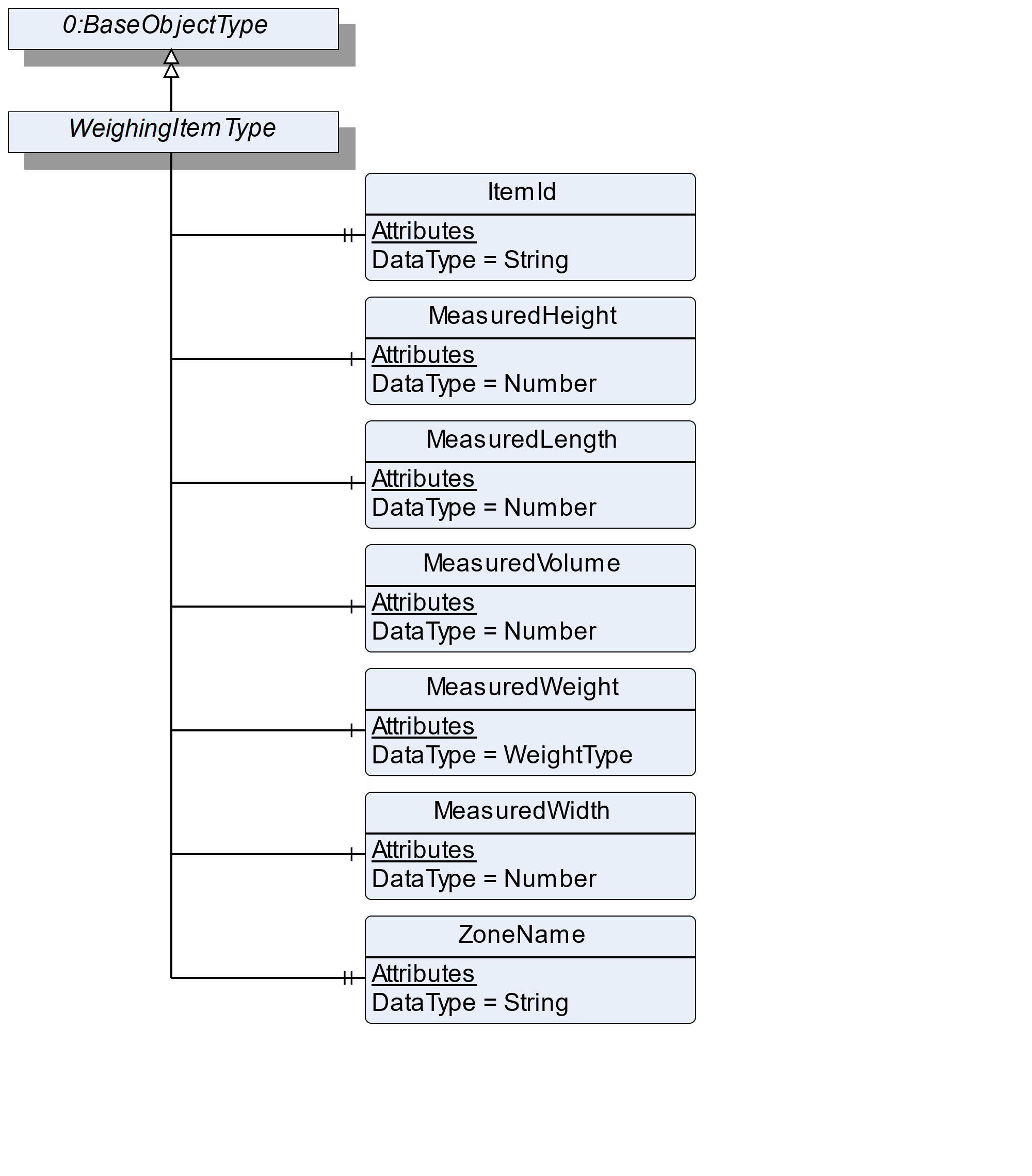
The WeighingItemType defines the structure of an Object of an item. Figure 26 shows the hierarchical structure and details of the composition. It is formally defined in Table 50.
7.13.2 ObjectType Definition
| Attribute | Value | ||||
| BrowseName | WeighingItemType | ||||
| IsAbstract | False | ||||
| References | NodeClass | BrowseName | DataType | TypeDefinition | ModellingRule |
|---|---|---|---|---|---|
| Subtype of the BaseObjectType defined in OPC 10000-5 | |||||
| 0:HasProperty | Variable | ItemId | 0:String | 0:PropertyType | Optional |
| 0:HasComponent | Variable | MeasuredWeight | WeightType | WeightItemType | Mandatory |
| 0:HasComponent | Variable | MeasuredHeight | 0:Number | 0:AnalogUnitType | Optional |
| 0:HasComponent | Variable | MeasuredLength | 0:Number | 0:AnalogUnitType | Optional |
| 0:HasComponent | Variable | MeasuredVolume | 0:Number | 0:AnalogUnitType | Optional |
| 0:HasComponent | Variable | MeasuredWidth | 0:Number | 0:AnalogUnitType | Optional |
| 0:HasProperty | Variable | ZoneName | 0:String | 0:PropertyType | Optional |
| Conformance Units | |||||
|---|---|---|---|---|---|
| Scales Catchweigher |
7.13.3 ObjectType Description
ItemId defines a unique number that is assigned to an item.
MeasuredWeight defines the registered weight that may be unmistakably referenced to one item.
MeasuredHeight defines the maximum measured height (in direction of global gravity, see Figure 25) of the measured item.
MeasuredLength defines the maximum measured length (in direction of travel, see Figure 25) of the measured item
MeasuredWidth defines the maximum measured width (in third possible orthogonal direction to height and length, see Figure 25) of the measured item.
MeasuredVolume defines the volume of the item.
ZoneName defines the name of the zone in which the item was sorted.
7.14 AutomaticWeightPriceLabelerType Definition
7.14.1 Overview
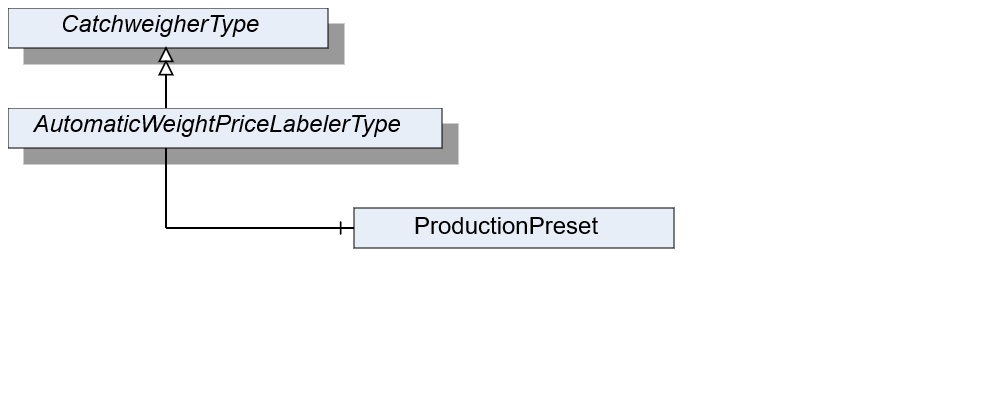
The AutomaticWeightPriceLabelerType defines the structure of an Object of the AutomaticWeightPriceLabelerType. Figure 27 shows the hierarchical structure and details of the composition. It is formally defined in Table 51.
An Object of AutomaticWeightPriceLabelerType represents an automatic weight-price-labeler. It defines additional methods and properties required for managing the automatic weight-price-labeler.
7.14.2 ObjectType Definition
| Attribute | Value | ||||
| BrowseName | AutomaticWeightPriceLabelerType | ||||
| IsAbstract | False | ||||
| References | NodeClass | BrowseName | DataType | TypeDefinition | ModellingRule |
|---|---|---|---|---|---|
| Subtype of the CatchweigherType | |||||
| Conformance Units | |||||
|---|---|---|---|---|---|
| Scales AutomaticWeightPriceLabeler |
7.14.3 ObjectType Description
ProductionPreset, which is inherited from ScaleDeviceType shall have instances of AutomaticWeighPriceLabelerProductType or a subtype in the Products folder.
7.15 AutomaticWeightPriceLabelerProductType Definition
7.15.1 Overview
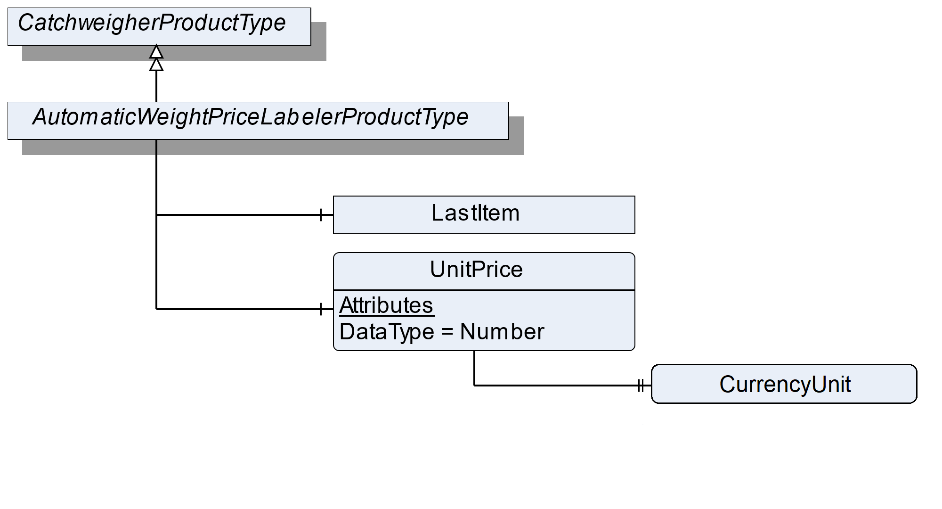
The AutomaticWeightPriceLabelerProductType defines the structure of an Object of the AutomaticWeightPriceLabelerProductType. Figure 28 shows the hierarchical structure and details of the composition. It is formally defined in Table 52.
An object of AutomaticWeightPriceLabelerProductType represents a product of an automatic weight-price-labeler. It defines additional methods and properties required for managing the product.
7.15.2 ObjectType Definition
| Attribute | Value | ||||
| BrowseName | AutomaticWeightPriceLabelerProductType | ||||
| IsAbstract | False | ||||
| References | NodeClass | BrowseName | DataType | TypeDefinition | ModellingRule |
|---|---|---|---|---|---|
| Subtype of the CatchweigherProductType | |||||
| 0:HasComponent | Variable | UnitPrice | 0:Number | BaseDataVariableType | Optional |
| The following nodes are overridden from CatchweigherProductType and the TypeDefinition changed | |||||
| 0:HasComponent | Object | LastItem | PriceItemType | Optional | |
| Conformance Units | |||||
|---|---|---|---|---|---|
| Scales AutomaticWeightPriceLabeler |
7.15.3 ObjectType Description
UnitPrice defines the price per weight unit.
The components of the AutomaticWeightPriceLabelerProductType have additional references which are defined in Table 53.
| Source Path | References | NodeClass | BrowseName | DataType | TypeDefinition | Others |
| UnitPrice | 0: HasProperty | Variable | CurrencyUnit | CurrencyUnitType | 0:PropertyType | Mandatory |
7.16 PriceItemType Definition
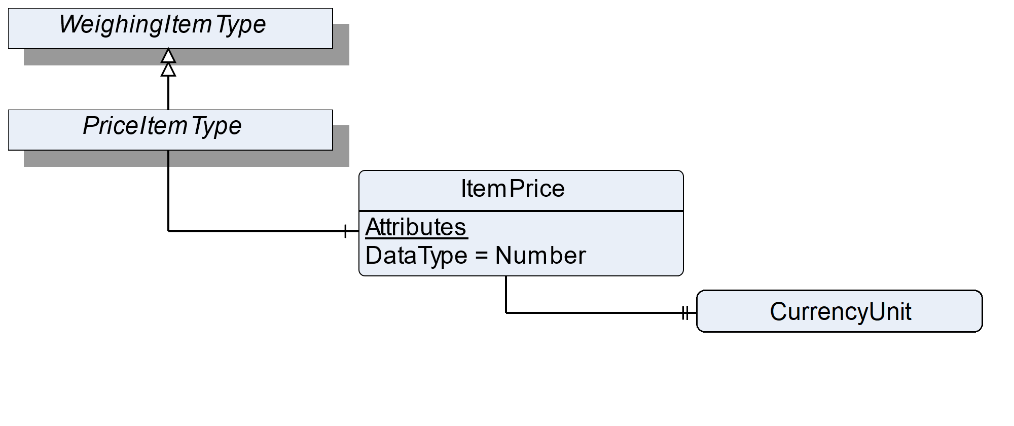
7.16.1 Overview
The PriceItemType defines the structure of an Object of an item that also has a price. Figure 29 shows the hierarchical structure and details of the composition. In the AutomaticWeightPriceLabeler the PriceItemType is used instead of the WeighingItemType for the LastItem Object. It is formally defined in Table 54.
7.16.2 ObjectType Definition
| Attribute | Value | ||||
| BrowseName | PriceItemType | ||||
| IsAbstract | False | ||||
| References | NodeClass | BrowseName | DataType | TypeDefinition | ModellingRule |
|---|---|---|---|---|---|
| Subtype of the WeighingItemType | |||||
| 0:HasComponent | Variable | ItemPrice | 0:Number | BaseDataVariableType | Optional |
| Conformance Units | |||||
|---|---|---|---|---|---|
| Scales AutomaticWeightPriceLabeler |
7.16.3 ObjectType Description
ItemPrice defines the price related to measured weight and UnitPrice.
The components of the PriceItemType have additional references which are defined in Table 55.
| Source Path | References | NodeClass | BrowseName | DataType | TypeDefinition | Others |
| ItemPrice | 0: HasProperty | Variable | CurrencyUnit | CurrencyUnitType | 0:PropertyType | Mandatory |
7.17 CheckweigherType Definition
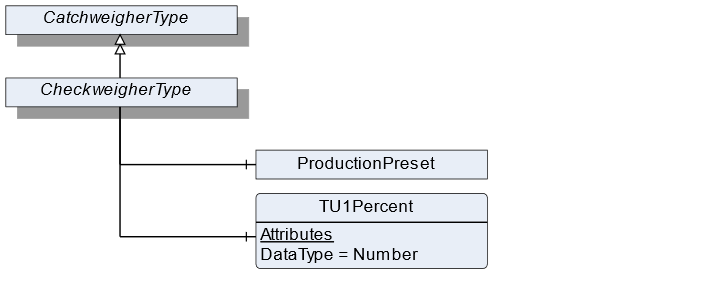
7.17.1 Overview
The CheckweigherType defines the structure of an Object of the CheckweigherType. Figure 30 shows the hierarchical structure and details of the composition. It is formally defined in Table 56.
An Object of the CheckweigherType represents a checkweigher. It defines additional methods and properties required for managing the checkweigher.
7.17.2 ObjectType Definition
| Attribute | Value | ||||
| BrowseName | CheckweigherType | ||||
| IsAbstract | False | ||||
| References | NodeClass | BrowseName | DataType | TypeDefinition | ModellingRule |
|---|---|---|---|---|---|
| Subtype of the CatchweigherType | |||||
| 0:HasComponent | Variable | TU1Percent | 0:Number | DataItemType | Optional |
| Conformance Units | |||||
|---|---|---|---|---|---|
| Scales Checkweigher |
7.17.3 ObjectType Description
TU1Percent is the permitted percentage of items with a weight of less than TU1 and upper TU2.
ProductionPreset, which is inherited from ScaleDeviceType shall have instances of CheckweigherProductType or a subtype in the Products folder.
7.18 CheckweigherProductType Definition
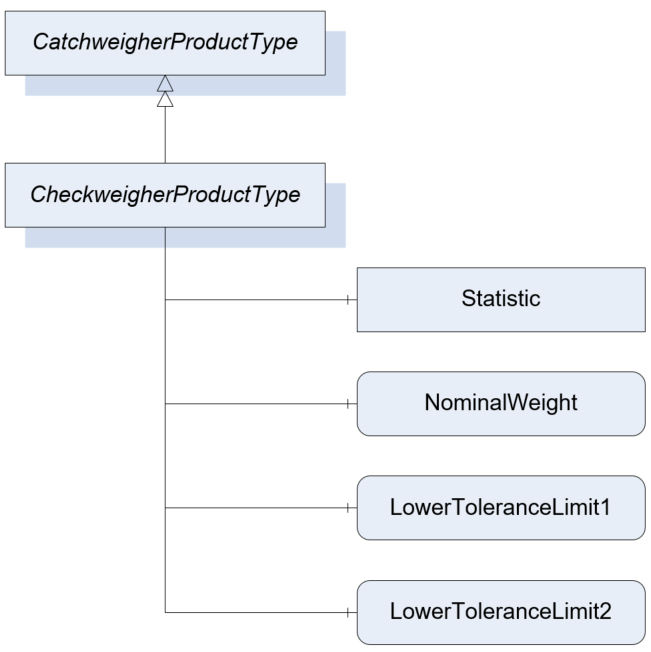
7.18.1 Overview
The CheckweigherProductType defines the structure of an Object of the CheckweigherProductType. Figure 31 shows the hierarchical structure and details of the composition. It is formally defined in Table 57.
An Object of the CheckweigherProductType represents a product of a checkweigher. It defines additional methods and properties required for managing the product.
7.18.2 ObjectType Definition
| Attribute | Value | ||||
| BrowseName | CheckweigherProductType | ||||
| IsAbstract | False | ||||
| References | NodeClass | BrowseName | DataType | TypeDefinition | ModellingRule |
|---|---|---|---|---|---|
| Subtype of the CatchweigherProductType | |||||
| 0:HasComponent | Variable | NominalWeight | 0:Number | TargetItemType | Mandatory |
| 0:HasComponent | Variable | LowerToleranceLimit1 | 0:Number | AnalogUnitType | Optional |
| 0:HasComponent | Variable | LowerToleranceLimit2 | 0:Number | AnalogUnitType | Optional |
| The following nodes are overridden from CatchweigherProductType and the TypeDefinition changed | |||||
| 0:HasComponent | Object | Statistic | CheckweigherStatisticType | Optional | |
| Conformance Units | |||||
|---|---|---|---|---|---|
| Scales Checkweigher |
7.18.3 ObjectType Description
NominalWeight defines the nominal (printed) weight of the product.
For this ObjectType the Statistic is overridden with the specific CheckweigherStatisticType.
LowerToleranceLimit1 defines the first LowerToleranceLimit.
LowerToleranceLimit2 defines the second LowerToleranceLimit.
7.19 CheckweigherStatisticType Definition
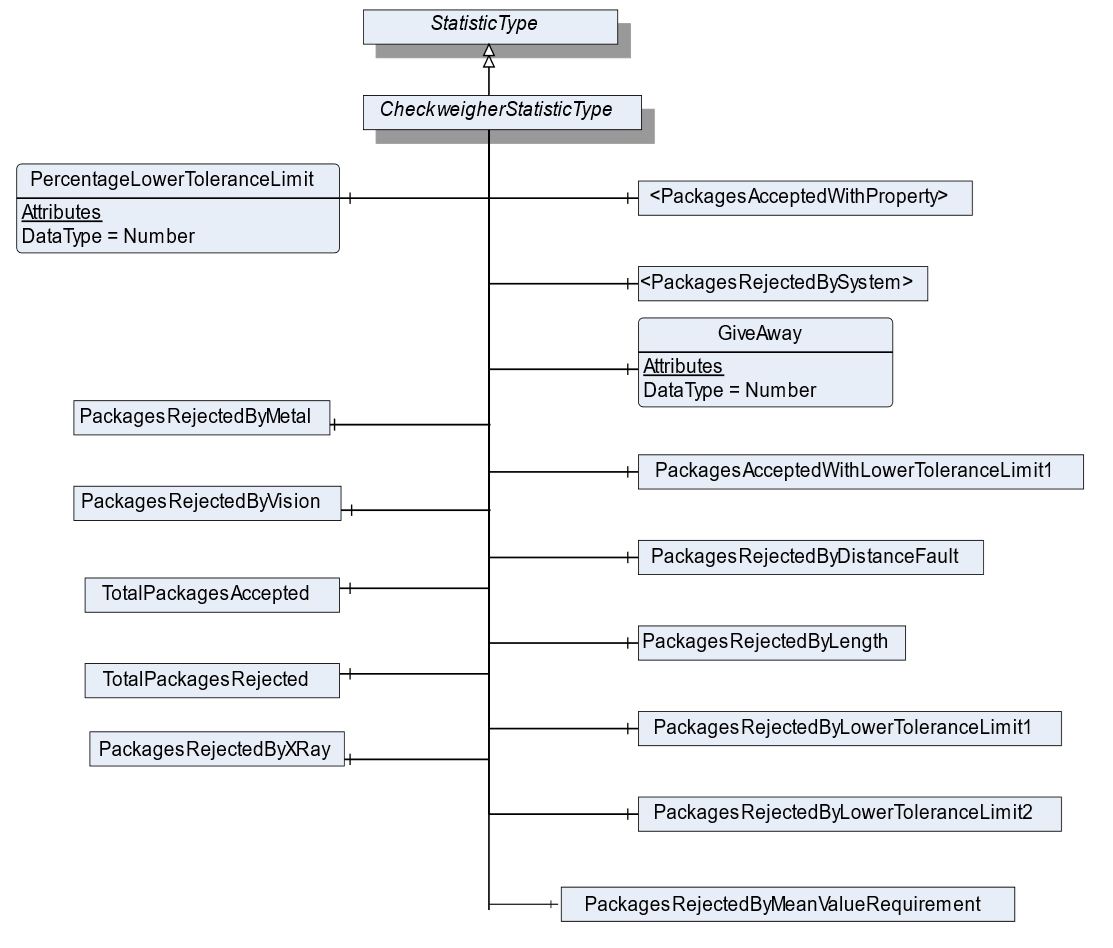
7.19.1 Overview
The CheckweigherStatisticType defines the structure of an Object that represents the statistic for a checkweigher. Figure 32 shows the hierarchical structure and details of the composition. It is formally defined in Table 58.
The CheckweigherStatisticType is a container for the different statistic values needed in a checkweigher.
7.19.2 ObjectType Definition
| Attribute | Value | ||||
| BrowseName | CheckweigherStatisticType | ||||
| IsAbstract | False | ||||
| References | NodeClass | BrowseName | DataType | TypeDefinition | ModellingRule |
|---|---|---|---|---|---|
| Subtype of the StatisticType | |||||
| 3:HasStatisticComponent | Object | <PackagesRejectedBySystem> | RejectedStatisticCounterType | OptionalPlaceholder | |
| 3:HasStatisticComponent | Object | PackagesRejectedByMetal | RejectedStatisticCounterType | Optional | |
| 3:HasStatisticComponent | Object | PackagesRejectedByVision | RejectedStatisticCounterType | Optional | |
| 3:HasStatisticComponent | Object | PackagesRejectedByXRay | RejectedStatisticCounterType | Optional | |
| 3:HasStatisticComponent | Object | PackagesRejectedByDistanceFault | RejectedStatisticCounterType | Optional | |
| 3:HasStatisticComponent | Object | PackagesRejectedByLength | RejectedStatisticCounterType | Optional | |
| 3:HasStatisticComponent | Object | PackagesRejectedByMeanValueRequirement | RejectedStatisticCounterType | Optional | |
| 3:HasStatisticComponent | Object | PackagesRejectedByLowerToleranceLimit1 | RejectedStatisticCounterType | Optional | |
| 3:HasStatisticComponent | Object | PackagesRejectedByLowerToleranceLimit2 | RejectedStatisticCounterType | Optional | |
| 3:HasStatisticComponent | Object | <PackagesAcceptedWithProperty> | AcceptedStatisticCounterType | OptionalPlaceholder | |
| 3:HasStatisticComponent | Object | PackagesAcceptedWithLowerToleranceLimit1 | AcceptedStatisticCounterType | Optional | |
| 3:HasStatisticComponent | Variable | PercentageLowerToleranceLimit | 0:Number | 0:AnalogItemType | Optional |
| 3:HasStatisticComponent | Object | TotalPackagesAccepted | AcceptedStatisticCounterType | Optional | |
| 3:HasStatisticComponent | Object | TotalPackagesRejected | RejectedStatisticCounterType | Optional | |
| 3:HasStatisticComponent | Variable | GiveAway | 0:Number | 0:AnalogUnitType | Optional |
| Conformance Units | |||||
|---|---|---|---|---|---|
| Scales Checkweigher |
7.19.3 ObjectType Description
PackagesRejectedBySystem defines an optional placeholder for additional categories in which rejected packages may be counted in. The Object representing the rejected package should be named like TotalPackagesRejectedBy<SYSTEM>. <SYSTEM> can be an additional system or reason why the packages are rejected. Some reasons could be:
OpenFlap
AskewPackage
UpperToleranceLimit1
UpperToleranceLimit2
Presorting
…
PackagesRejectedByMetal defines a statistic counter for items rejected by a metal detection system.
PackagesRejectedByVision defines a statistic counter for items rejected by a machine vision system.
PackagesRejectedByXRay defines a statistic counter for items rejected by a x ray detection system.
PackagesRejectedByDistanceFault defines a statistic counter for items rejected by a distance fault.
PackagesRejectedByLength defines a statistic counter for items that rejected due to the item length.
PackagesRejectedByMeanValueRequirement defines a statistic counter for items that rejected due to the required mean value.
PackagesRejectedByLowerToleranceLimit1 defines a statistic counter for items that are lower than the ToleranceLimit1
PackagesRejectedByLowerToleranceLimit2 defines a statistic counter for items that are lower than the ToleranceLimit2
PackagesAcceptedWithProperty defines an optional placeholder for additional categories in which accepted packages may be counted in. The AcceptedStatisticCounterType shall be used, and the accepted packages are added to TotalPackagesAccepted. The Object representing the accepted package should be named like TotalPackagesAccepted<PROPERTY>. <PROPERTY> can be an additional system or reason why the package is accepted.
PackagesAcceptedWithLowerToleranceLimit1 defines a statistic counter for items that are lower than TU1 and upper TU2 but accepted to the "The 3 Packers Rules" of the Welmec 6.4
TotalPackagesRejected defines the totalized number of packages, which were rejected during verification, controlling or weighing processes, that may be upstream or downstream of the weighing process itself.
TotalPackagesAccepted defines the totalized number of packages, which successfully completed all verification, controlling and weighing processes.
GiveAway defines the totalized value of volume deviation from NominalWeight. The giveaway is an indicator of overproduction and is calculated as follows:
PercentageLowerToleranceLimit1 defines the current percentage of accepted items which are lower TU1 and upper TU2 as defined in the CheckweigherType.
7.20 StatisticCounterType Definition
7.20.1 Overview
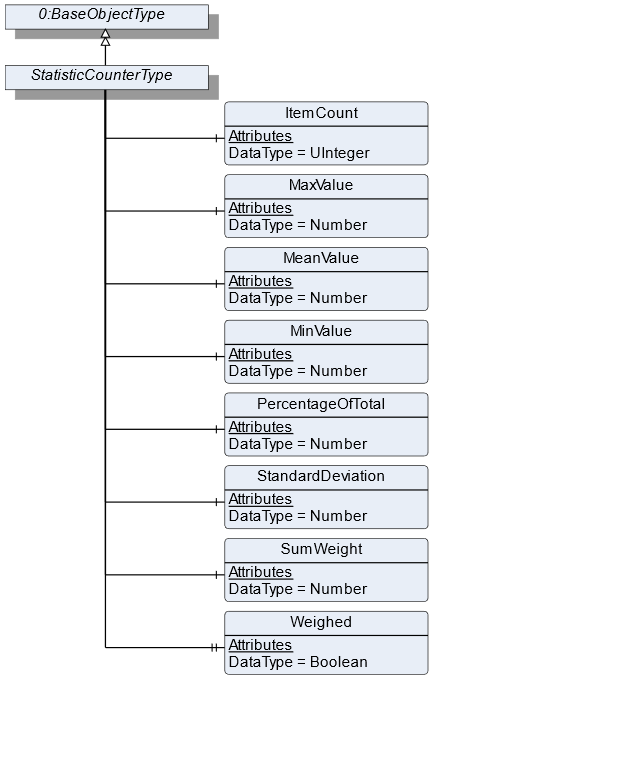
The StatisticCounterType defines the structure of an Object of the StatisticCounterType. Figure 33 shows the hierarchical structure and details of the composition. It is formally defined in Table 59.
The StatisticType is a container for the different statistic values needed in a checkweigher. Each zone has a StatisticCounterType. There are also different total packages counters. The flag Weighed must be set if packages of this statistic should be counted in the counter TotalPackagesWeighed.
7.20.2 ObjectType Definition
| Attribute | Value | ||||
| BrowseName | StatisticCounterType | ||||
| IsAbstract | False | ||||
| References | NodeClass | BrowseName | DataType | TypeDefinition | ModellingRule |
|---|---|---|---|---|---|
| Subtype of the BaseObjectType defined in OPC 10000-5 | |||||
| 3:HasStatisticComponent | Variable | ItemCount | 0:UInteger | BaseDataVariableType | Mandatory |
| 3:HasStatisticComponent | Variable | MaxValue | 0:Number | 0:AnalogUnitType | Optional |
| 3:HasStatisticComponent | Variable | MeanValue | 0:Number | 0:AnalogUnitType | Optional |
| 3:HasStatisticComponent | Variable | MinValue | 0:Number | 0:AnalogUnitType | Optional |
| 3:HasStatisticComponent | Variable | PercentageOfTotal | 0:Number | 0:AnalogUnitType | Optional |
| 3:HasStatisticComponent | Variable | StandardDeviation | 0:Number | 0:AnalogUnitType | Optional |
| 3:HasStatisticComponent | Variable | SumWeight | 0:Number | 0:AnalogUnitType | Optional |
| 0:HasProperty | Variable | Weighed | Boolean | 0:PropertyType | Mandatory |
| Conformance Units | |||||
|---|---|---|---|---|---|
| Scales ScaleDeviceType | |||||
| Scales CheckweigherType |
7.20.3 ObjectType Description
ItemCount is the totalized count of measurements within the scope of this statistic.
SumWeight is the totalized weight of all items in the ItemCount.
PercentageOfTotal is the percentage of this statistic in relation to the total. The total is the count of the overall statistic, just regarding the ItemCount.
MaxValue defines the highest registered weight value.
MeanValue defines the mean value of all registered weight values.
MinValue defines the lowest registered weight value.
StandardDeviation is defined as follows:
| for samples | |
| for 100% check |
Weighed indicates that the element is considered also in the TotalPackageWeighed variable of the StatisticType.
7.21 AcceptedStatisticCounterType Definition
7.21.1 Overview
The AcceptedStatisticCounterType defines the structure of an Object of the AcceptedStatisticCounterType. It is formally defined in Table 60.
The AcceptedStatisticCounterType is subtype of the StatisticCounterType and changes the semantic meaning of the StatisticCounterType. An object with the AcceptedStatisticCounterType is used, if counted items are accepted by the scale.
7.21.2 ObjectType Definition
| Attribute | Value | ||||
| BrowseName | AcceptedStatisticCounterType | ||||
| IsAbstract | False | ||||
| References | NodeClass | BrowseName | DataType | TypeDefinition | ModellingRule |
|---|---|---|---|---|---|
| Subtype of the StatisticCounterType | |||||
| Conformance Units | |||||
|---|---|---|---|---|---|
| Scales CheckweigherType |
7.22 RejectedStatisticCounterType Definition
7.22.1 Overview
The RejectedStatisticCounterType defines the structure of an Object of the RejectedStatisticCounterType. It is formally defined in Table 61.
The RejectedStatisticCounterType is subtype of the StatisticCounterType and changes the semantic meaning of the StatisticCounterType. An object with the RejectedStatisticCounterType is used, if counted items are rejected by the scale.
7.22.2 ObjectType Definition
| Attribute | Value | ||||
| BrowseName | RejectedStatisticCounterType | ||||
| IsAbstract | False | ||||
| References | NodeClass | BrowseName | DataType | TypeDefinition | ModellingRule |
|---|---|---|---|---|---|
| Subtype of the StatisticCounterType | |||||
| Conformance Units | |||||
|---|---|---|---|---|---|
| Scales CheckweigherType |
7.23 ZoneType Definition
7.23.1 Overview
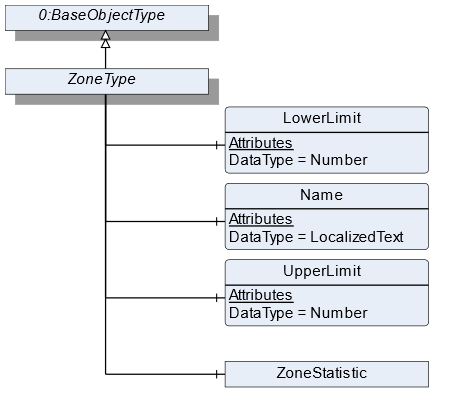
The ZoneType defines the structure of an Object of the ZoneType. Figure 34 shows the hierarchical structure and details of the composition. It is formally defined in Table 62.
The ZoneType is a container for the weighing zones in a checkweigher. It defines additional methods and properties required for managing the different zones and provides a ZoneStatistic.
7.23.2 ObjectType Definition
| Attribute | Value | ||||
| BrowseName | ZoneType | ||||
| IsAbstract | False | ||||
| References | NodeClass | BrowseName | DataType | TypeDefinition | ModellingRule |
|---|---|---|---|---|---|
| Subtype of the BaseObjectType defined in OPC 10000-5 | |||||
| 0:HasComponent | Variable | LowerLimit | 0:Number | 0:AnalogUnitType | Mandatory |
| 0:HasComponent | Variable | Name | 0:LocalizedText | BaseDataVariableType | Mandatory |
| 0:HasComponent | Variable | UpperLimit | 0:Number | 0:AnalogUnitType | Mandatory |
| 0:HasComponent | Object | ZoneStatistic | StatisticCounterType | Optional | |
| Conformance Units | |||||
|---|---|---|---|---|---|
| Scales Catchweigher |
7.23.3 ObjectType Description
LowerLimit defines the lower weight limit of this zone. The lower limit is prior to the upper limit if two zones are next to each other.
Name defines the user-readable name of the zone.
UpperLimit defines the upper weight limit of this zone.
ZoneStatistic contains statistics regarding this zone.
7.24 ContinuousScaleType Definition
7.24.1 Overview
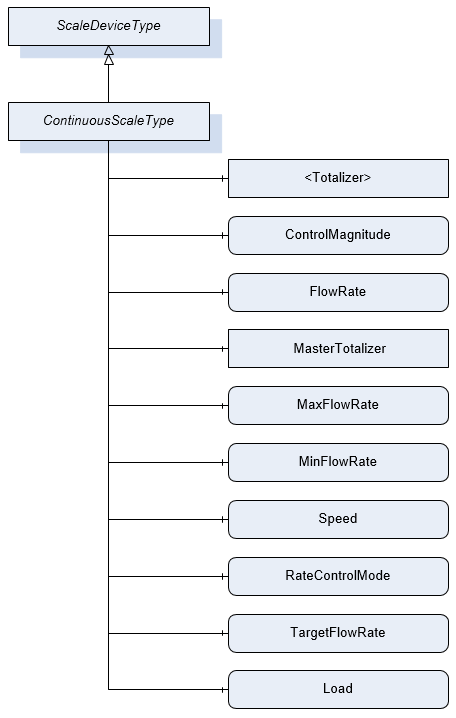
The ContinuousScaleType defines the structure of an Object of the ContinuousScaleType. Figure 35 shows the hierarchical structure and details of the composition. It is formally defined in Table 63.
An Object of the ContinuousScaleType represents a continuous scale. These types of scales control a continuous material output, i.e., the material output at a given flow rate. It defines additional methods and properties required for managing the continuous scale.
7.24.2 ObjectType Definition
| Attribute | Value | ||||
| BrowseName | ContinuousScaleType | ||||
| IsAbstract | False | ||||
| References | NodeClass | BrowseName | DataType | TypeDefinition | ModellingRule |
|---|---|---|---|---|---|
| Subtype of the ScaleDeviceType | |||||
| 0:HasComponent | Object | <Totalizer> | TotalizerType | Optional Placeholder | |
| 0:HasComponent | Variable | ControlMagnitude | 0:Number | 0:AnalogUnitType | Optional |
| 0:HasComponent | Variable | FlowRate | BaseDataType | MeasuredItemType | Mandatory |
| 0:HasComponent | Object | MasterTotalizer | TotalizerType | Optional | |
| 0:HasComponent | Variable | MaxFlowRate | 0:Number | 0:AnalogUnitType | Optional |
| 0:HasComponent | Variable | MinFlowRate | 0:Number | 0:AnalogUnitType | Optional |
| 0:HasComponent | Variable | Speed | 0:Number | 0:AnalogUnitType | Optional |
| 0:HasComponent | Variable | RateControlMode | RateControlMode | 0:BaseDataVariableType | Optional |
| 0:HasComponent | Variable | TargetFlowRate | 0:Number | 0:AnalogUnitType | Optional |
| 0:HasComponent | Variable | Load | 0:Number | 0:AnalogUnitType | Optional |
| Conformance Units | |||||
|---|---|---|---|---|---|
| Scales ContinuousScale |
7.24.3 ObjectType Description
Totalizer defines the overall material quantity (weight) that was conveyed over a defined duration. Multiple objects may be instantiated depending on the use case.
ControlMagnitude is used to run the device using a defined control signal (volumetric mode) e.g., run a motor at a pre-defined speed without taking into account the TargetFlowRate. The value is usually read from the server.
FlowRate defines current measured flow rate in mass per time.
MasterTotalizer defines the overall material quantity (weight) that was conveyed over the lifetime of the scale.
MaxFlowRate set maximum allowed gravimetric flow rate (upper limit).
MinFlowRate set minimum gravimetric flow rate (lower limit).
Speed defines the speed of the volumetric feeding device.
RateControlMode defines the mode in which the controller shall regulate the flow rate. The possible rate control modes are defined by the enumeration.
TargetFlowRate is used to set the desired gravimetric flow rate.
ProductionPreset, which is inherited from ScaleDeviceType shall have instances of ContinuousProductType or a subtype in the Products folder. These elements display specific settings for the production lot.
Load defines the load on the weighing bridge - for a belt weigher it´s typically the belt load.
7.25 ContinuousProductType Definition
7.25.1 Overview
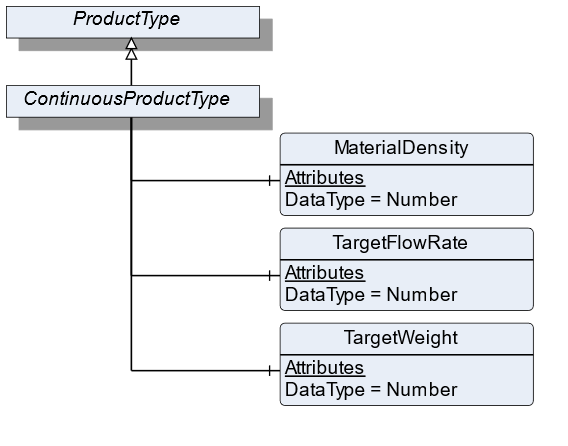
The ContinuousProductType defines the structure of an Object of the ContinuousProductType. Figure 36 shows the hierarchical structure and details of the composition. It is formally defined in Table 64.
An Object of the ContinuousProductType represents a product of a continuous scale. It defines additional methods and properties required for managing the product.
7.25.2 ObjectType Definition
| Attribute | Value | ||||
| BrowseName | ContinuousProductType | ||||
| IsAbstract | False | ||||
| References | NodeClass | BrowseName | DataType | TypeDefinition | ModellingRule |
|---|---|---|---|---|---|
| Subtype of the ProductType | |||||
| 0:HasComponent | Variable | MaterialDensity | 0:Number | 0:AnalogUnitType | Optional |
| 0:HasComponent | Variable | TargetFlowRate | 0:Number | TargetItemType | Optional |
| 0:HasComponent | Variable | TargetWeight | 0:Number | TargetItemType | Optional |
| Conformance Units | |||||
|---|---|---|---|---|---|
| Scales ContinuousScale |
7.25.3 ObjectType Description
MaterialDensity defines the bulk density of the used material.
TargetFlowRate defines a preset of flowrate that needs to be conveyed. This value defines the setpoint for the FlowRate control loop.
TargetWeight defines a preset of the volume to be processed.
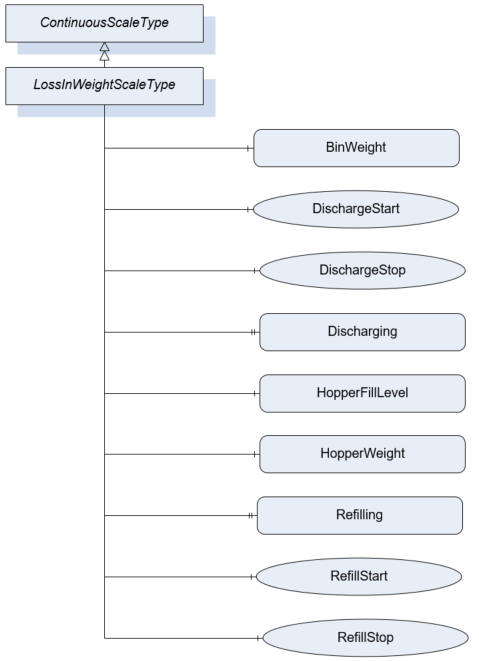
7.26 LossInWeightScaleType Definition
7.26.1 Overview
The LossInWeightScaleDeviceType defines the structure of an Object of the LossInWeightScaleDeviceType. Figure 37 shows the hierarchical structure and details of the composition. It is formally defined in Table 65.
An Object of the LossInWeightScaleDeviceType represents a loss in weight scale. It defines additional methods and properties required for managing the loss in weight scale.
7.26.2 ObjectType Definition
| Attribute | Value | ||||
| BrowseName | LossInWeightScaleType | ||||
| IsAbstract | False | ||||
| References | NodeClass | BrowseName | DataType | TypeDefinition | ModellingRule |
|---|---|---|---|---|---|
| Subtype of the ContinuousScaleType | |||||
| 0:HasComponent | Variable | BinWeight | 0:BaseDataType | MeasuredItemType | Optional |
| 0:HasComponent | Method | DischargeStart | Mandatory | ||
| 0:HasComponent | Method | DischargeStop | Mandatory | ||
| 0:HasProperty | Variable | Discharging | 0:Boolean | 0:PropertyType | Mandatory |
| 0:HasComponent | Variable | HopperFillLevel | 0:Number | 0:AnalogUnitType | Mandatory |
| 0:HasComponent | Variable | HopperWeight | 0:BaseDataType | MeasuredItemType | Mandatory |
| 0:HasProperty | Variable | Refilling | 0:Boolean | 0:PropertyType | Mandatory |
| 0:HasComponent | Method | RefillStart | Mandatory | ||
| 0:HasComponent | Method | RefillStop | Mandatory | ||
| Conformance Units | |||||
|---|---|---|---|---|---|
| Scales Loss In Weight Scale |
7.26.3 ObjectType Description
Discharging indicates that hopper discharge operation is in progress.
BinWeight defines the weight of the filled material in an additional bin.
HopperFillLevel defines the fill weight relative to the maximal fill weight of the hopper (Unit: percentage).
HopperWeight defines the weight of the material within the feed hopper. This excludes the weight of the hopper itself.
Refilling indicates that a refill process into the hopper is taking place.
7.26.4 Method DischargeStart
Command to completely discharge the hopper.
Signature
	DischargeStart(
	);
7.26.5 Method DischargeStop
Command to terminate the complete hopper discharge procedure.
Signature
	DischargeStop(
	);
7.26.6 Method RefillStart
Manually starts a refill process.
Signature
	RefillStart(
	);
7.26.7 Method RefillStop
Manually stops a running refill process.
Signature
	RefillStop(
	);
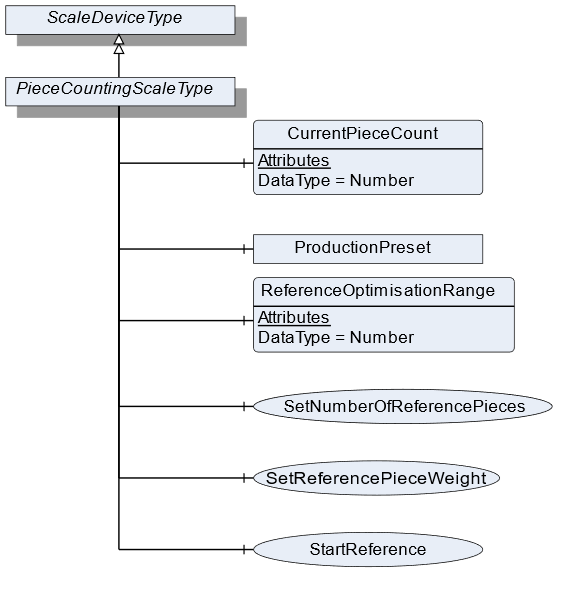
7.27 PieceCountingScaleType Definition
7.27.1 Overview
The PieceCountingScaleType defines the structure of an Object of the PieceCountingScaleType. Figure 38 shows the hierarchical structure and details of the composition. It is formally defined in Table 66.
An Object of the PieceCountingScaleType represents a piece counting scale. It defines additional methods and properties required for managing the piece counting scale.
7.27.2 ObjectType Definition
| Attribute | Value | ||||
| BrowseName | PieceCountingScaleType | ||||
| IsAbstract | False | ||||
| References | NodeClass | BrowseName | DataType | TypeDefinition | ModellingRule |
|---|---|---|---|---|---|
| Subtype of the ScaleDeviceType | |||||
| 0:HasComponent | Variable | CurrentPieceCount | 0:Number | MeasuredItemType | Mandatory |
| 0:HasComponent | Variable | ReferenceOptimisationRange | 0:Number | 0:AnalogItemType | Optional |
| 0:HasComponent | Method | SetReferencePieceWeight | Mandatory | ||
| 0:HasComponent | Method | StartReference | Optional | ||
| 0:HasComponent | Method | SetNumberOfReferencePieces | Mandatory | ||
| Conformance Units | |||||
|---|---|---|---|---|---|
| Scales PieceCountingScale |
7.27.3 ObjectType Description
CurrentPieceCount defines the number of pieces that are currently measured related to the ReferencePieceWeight.
ReferenceOptimisationRange defines the tolerance range within which the scale may optimize the ReferencePieceWeight.
ProductionPreset, which is inherited from ScaleDeviceType shall have instances of PieceCountingProductType or a subtype in the Products folder.
7.27.4 Method SetReferencePieceWeight
Sets the value for the ReferencePieceWeight (product-specific data). The signature of this Method is specified below. Table 67 and Table 68 specify the Arguments and AddressSpace representation, respectively.
Signature
	SetReferencePieceWeight(
	[in]	UInt32		ReferencePieceWeight
[in] EUInformation EngineeringUnits);| Argument | Description |
| ReferencePieceWeight | The reference weight of a piece |
| EngineeringUnits | Unit of the ReferencePieceWeight |
| Attribute | Value | ||||
| BrowseName | SetReferencePieceWeight | ||||
| References | NodeClass | BrowseName | DataType | TypeDefinition | ModellingRule |
|---|---|---|---|---|---|
| 0:HasProperty | Variable | InputArguments | Argument[] | 0:PropertyType | Mandatory |
7.27.5 Method StartReference
Triggers the reference weighing process. The signature of this Method is specified below. Table 69 and Table 70 specify the Arguments and AddressSpace representation, respectively.
Signature
	StartReference(
[in] UInt32 NumberOfReferencePieces);| Argument | Description |
| NumberOfReferencePieces | The number of the references Pieces that should be used by the next references process. |
| Attribute | Value | ||||
| BrowseName | StartReference | ||||
| References | NodeClass | BrowseName | DataType | TypeDefinition | ModellingRule |
|---|---|---|---|---|---|
| 0:HasProperty | Variable | InputArguments | Argument[] | 0:PropertyType | Mandatory |
7.27.6 Method SetNumberOfReferencePieces
Sets the value for NumberOfReferencePieces (product-specific data). The signature of this Method is specified below. Table 71 and Table 72 specify the Arguments and AddressSpace representation, respectively.
Signature
	SetNumberOfReferencePieces(
[in] UInt32 NumberOfReferencePieces);| Argument | Description |
| NumberOfReferencePieces | The number of the references Pieces that should be used by the next references process. |
| Attribute | Value | ||||
| BrowseName | SetNumberOfReferencePieces | ||||
| References | NodeClass | BrowseName | DataType | TypeDefinition | ModellingRule |
|---|---|---|---|---|---|
| 0:HasProperty | Variable | InputArguments | Argument[] | 0:PropertyType | Mandatory |
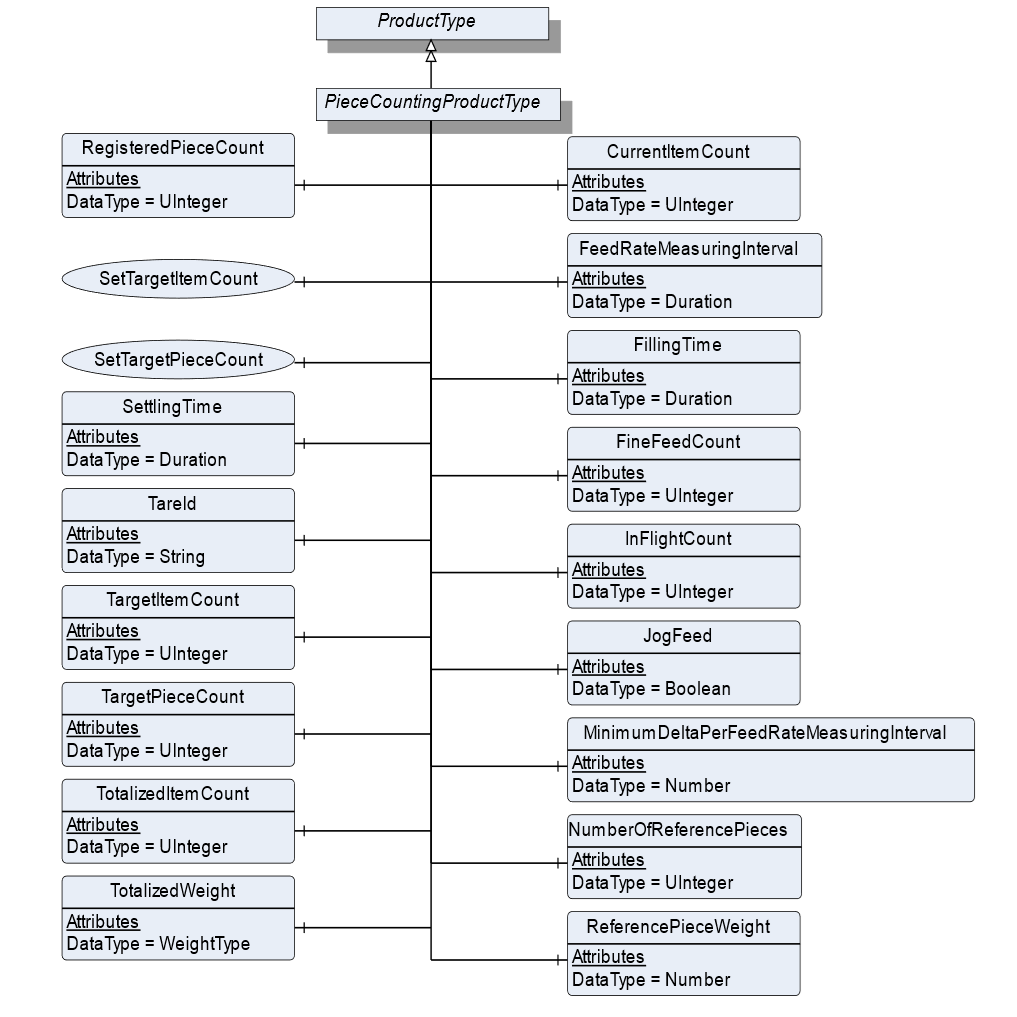
7.28 PieceCountingProductType Definition
7.28.1 Overview
The PieceCountingProductType defines the structure of an Object of the PieceCountingProductType. Figure 39 shows the hierarchical structure and details of the composition. It is formally defined in Table 73.
An Object of the PieceCountingProductType represents a product of a piece counting scale. It defines additional methods and properties required for managing the product.
7.28.2 ObjectType Definition
| Attribute | Value | ||||
| BrowseName | PieceCountingProductType | ||||
| IsAbstract | False | ||||
| References | NodeClass | BrowseName | DataType | TypeDefinition | ModellingRule |
|---|---|---|---|---|---|
| Subtype of the ProductType | |||||
| 0:HasComponent | Variable | CurrentItemCount | 0:UInteger | BaseDataVariableType | Optional |
| 0:HasComponent | Variable | FeedRateMeasuringInterval | Duration | BaseDataVariableType | Optional |
| 0:HasComponent | Variable | FillingTime | Duration | BaseDataVariableType | Optional |
| 0:HasComponent | Variable | InFlightCount | 0:UInteger | BaseDataVariableType | Optional |
| 0:HasComponent | Variable | JogFeed | Boolean | BaseDataVariableType | Optional |
| 0:HasComponent | Variable | MinimumDeltaPerFeedRateMeasuringInterval | 0:Number | 0:AnalogItemType | Optional |
| 0:HasComponent | Variable | NumberOfReferencePieces | 0:UInteger | BaseDataVariableType | Mandatory |
| 0:HasComponent | Variable | ReferencePieceWeight | 0:Number | 0:AnalogItemType | Mandatory |
| 0:HasComponent | Variable | RegisteredPieceCount | 0:UInteger | BaseDataVariableType | Mandatory |
| 0:HasComponent | Method | SetTargetItemCount | Optional | ||
| 0:HasComponent | Method | SetTargetPieceCount | Optional | ||
| 0:HasComponent | Variable | SettlingTime | Duration | BaseDataVariableType | Optional |
| 0:HasComponent | Variable | TareId | 0:String | BaseDataVariableType | Optional |
| 0:HasComponent | Variable | TargetItemCount | 0:UInteger | BaseDataVariableType | Optional |
| 0:HasComponent | Variable | TargetPieceCount | 0:UInteger | TargetItemType | Optional |
| 0:HasComponent | Variable | TotalizedItemCount | 0:UInteger | BaseDataVariableType | Optional |
| 0:HasComponent | Variable | TotalizedWeight | WeightType | WeightItemType | Optional |
| 0:HasComponent | Variable | FineFeedCount | 0:UInteger | BaseDataVariableType | Optional |
| Conformance Units | |||||
|---|---|---|---|---|---|
| Scales PieceCountingScale |
7.28.3 ObjectType Description
CurrentItemCount defines the current number of items that are captured by the scale.
FeedRateMeasuringInterval defines the measurement interval for evaluating the current flowrate.
FillingTime defines the interval during which the filling has to be completed.
InFlightCount defines the number of items that are behind valve/in flight after feeding is stopped.
JogFeed defines if an additional dosage is necessary.
MinimumDeltaPerFeedRateMeasuringInterval defines the minimum amount of weight that needs to change within the FeedRateMeasuringInterval. Otherwise the filling procedure is not valid.
NumberOfReferencePieces defines the number of pieces that need to be used for the reference process.
ReferencePieceWeight defines the reference weight of a piece.
RegisteredPieceCount defines the number of pieces that were actually counted related to the ReferencePieceWeight.
SettlingTime defines the time that needs to be passed before the measurement process can be triggered.
TareId defines the ID of the tare value for the current product or item.
TargetItemCount defines the number of items that are supposed to be counted during the measurement process.
TargetPieceCount defines the number of pieces that need to be counted.
TotalizedItemCount defines the summed-up number of items. It will be reset, which is triggered either by the user or by a different product selection.
TotalizedWeight defines the summed-up number of weights. It will be reset, which is triggered either by the user or a different product selection.
FineFeedCount defines the Items to be dosed in fine flow
7.28.4 Method SetTargetItemCount
Sets the number of the TargetItemCount. See TargetItemCount. The signature of this Method is specified below. Table 74 and Table 75 specify the Arguments and AddressSpace representation, respectively.
Signature
	SetTargetItemCount(
[in] UInt32 TargetItemCount);| Argument | Description |
| TargetItemCount | 0:Number of items that are supposed to be counted during the measurement process. |
| Attribute | Value | ||||
| BrowseName | SetTargetItemCount | ||||
| References | NodeClass | BrowseName | DataType | TypeDefinition | ModellingRule |
|---|---|---|---|---|---|
| 0:HasProperty | Variable | InputArguments | Argument[] | 0:PropertyType | Mandatory |
7.28.5 Method SetTargetPieceCount
Sets the value of the TargetPieceCount. See TargetPieceCount. The signature of this Method is specified below. Table 76 and Table 77 specify the Arguments and AddressSpace representation, respectively.
Signature
	SetTargetPieceCount(
	[in]	UInt32		TargetPieceCount
	[in]	UInt32		PlusTolerance
[in] UInt32 MinusTolerance);| Argument | Description |
| TargetPieceCount | 0:Number of pieces that need to be counted. |
| PlusTolerance | Plus Tolerance of the TargetPieceCount |
| MinusTolerance | Minus Tolerance of the TargetPieceCount |
| Attribute | Value | ||||
| BrowseName | SetTargetPieceCount | ||||
| References | NodeClass | BrowseName | DataType | TypeDefinition | ModellingRule |
|---|---|---|---|---|---|
| 0:HasProperty | Variable | InputArguments | Argument[] | 0:PropertyType | Mandatory |
7.29 RecipeScaleType Definition
7.29.1 Overview
The RecipeScaleType defines the structure of an Object of the RecipeScaleType. Figure 40 shows the hierarchical structure and details of the composition. It is formally defined in Table 78.
An Object of the RecipeScaleType represents a recipe scale. It defines additional methods and properties required for managing the recipe scale.
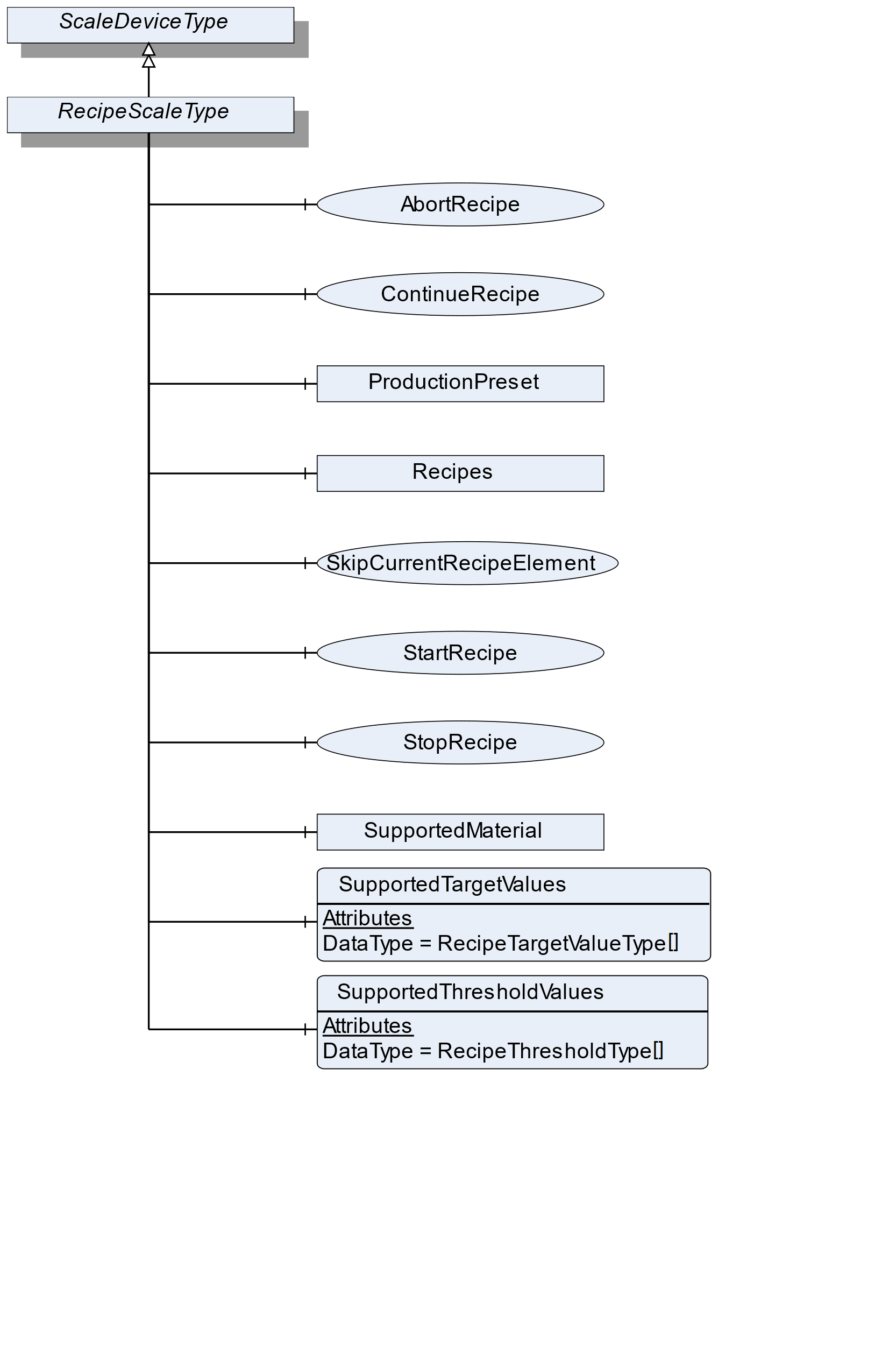
7.29.2 ObjectType Definition
| Attribute | Value | ||||
| BrowseName | RecipeScaleType | ||||
| IsAbstract | False | ||||
| References | NodeClass | BrowseName | DataType | TypeDefinition | ModellingRule |
|---|---|---|---|---|---|
| Subtype of the ScaleDeviceType | |||||
| 0:HasComponent | Object | Recipes | RecipeManagementType | Optional | |
| 0:HasComponent | Variable | SupportedTargetValues | RecipeTargetValueType[] | BaseDataVariableType | Optional |
| 0:HasComponent | Variable | SupportedThresholdValues | RecipeThresholdType[] | BaseDataVariableType | Optional |
| 0:HasComponent | Method | StartRecipe | Optional | ||
| 0:HasComponent | Method | StopRecipe | Optional | ||
| 0:HasComponent | Method | ContinueRecipe | Optional | ||
| 0:HasComponent | Method | SkipCurrentRecipeElement | Optional | ||
| 0:HasComponent | Method | AbortRecipe | Optional | ||
| 0:HasComponent | Object | SupportedMaterial | MaterialType | Optional | |
| Conformance Units | |||||
|---|---|---|---|---|---|
| Scales RecipeScale |
7.29.3 ObjectType Description
Recipes is an object of the Type RecipeManagmentType that contains all recipes. Elements in this folder must have the RecipeType and can be connected to the ReferenceType NextRecipeElementType. It also has some method to add and removes recipes.
SupportedTargetValues defines a list of values that may be set via the recipe.
SupportedThresholdValues defines a list of threshold values that may be used within one recipe.
SupportedMaterial defines the material that is supported.
ProductionPreset, which is inherited from ScaleDeviceType shall have instances of RecipeProductType or a subtype in the Products folder.
7.29.4 Method StartRecipe
Starts the given recipe (input parameter). Precondition: The scale needs to be enabled/released in advance. Table 79 and Table 80 specify the Arguments and AddressSpace representation, respectively.
Signature
	StartRecipe(
	[in]	NodeId	RecipeNodeId
);| Argument | Description |
| RecipeNodeId | NodeId of the recipe to be started |
| Attribute | Value | ||||
| BrowseName | StartRecipe | ||||
| References | NodeClass | BrowseName | DataType | TypeDefinition | ModellingRule |
|---|---|---|---|---|---|
| 0:HasProperty | Variable | InputArguments | Argument[] | 0:PropertyType | Mandatory |
7.29.5 Method StopRecipe
Pauses the current processing of a recipe. ContinueRecipe() continues the processing. AbortRecipe() stops the processing. Table 81 and Table 82 specify the Arguments and AddressSpace representation, respectively.
Signature
	StopRecipe(
	[in]	NodeId	RecipeNodeId
);| Argument | Description |
| RecipeNodeId | NodeId of the recipe to be stopped |
| Attribute | Value | ||||
| BrowseName | StopRecipe | ||||
| References | NodeClass | BrowseName | DataType | TypeDefinition | ModellingRule |
|---|---|---|---|---|---|
| 0:HasProperty | Variable | InputArguments | Argument[] | 0:PropertyType | Mandatory |
7.29.6 Method ContinueRecipe
If the recipe processing is stopped, the process can continue at the same point by means of the method ContinueRecipe. Table 83 and Table 84 specify the Arguments and AddressSpace representation, respectively.
Signature
	ContinueRecipe(
	[in]	NodeId	RecipeNodeId
);| Argument | Description |
| RecipeNodeId | NodeId of the recipe that can continue |
| Attribute | Value | ||||
| BrowseName | ContinueRecipe | ||||
| References | NodeClass | BrowseName | DataType | TypeDefinition | ModellingRule |
|---|---|---|---|---|---|
| 0:HasProperty | Variable | InputArguments | Argument[] | 0:PropertyType | Mandatory |
7.29.7 Method SkipCurrentRecipeElement
The current RecipeElement will be skipped (e.g., manually completed) and the scale continues with the next RecipeElement. Attention: This may result in a different execution of the process. Table 85 and Table 86 specify the Arguments and AddressSpace representation, respectively.
Signature
	SkipCurrentRecipeElement(
	[in]	NodeId	RecipeNodeId
);| Argument | Description |
| RecipeNodeId | NodeId of the recipe that can continue |
| Attribute | Value | ||||
| BrowseName | SkipCurrentRecipeElement | ||||
| References | NodeClass | BrowseName | DataType | TypeDefinition | ModellingRule |
|---|---|---|---|---|---|
| 0:HasProperty | Variable | InputArguments | Argument[] | 0:PropertyType | Mandatory |
7.29.8 Method AbortRecipe
Aborts the current processing of a recipe. Table 87 and Table 88 specify the Arguments and AddressSpace representation, respectively.
Signature
	AbortRecipe(
	[in]	NodeId	RecipeNodeId
);| Argument | Description |
| RecipeNodeId | NodeId of the recipe that can continue |
| Attribute | Value | ||||
| BrowseName | AbortRecipe | ||||
| References | NodeClass | BrowseName | DataType | TypeDefinition | ModellingRule |
|---|---|---|---|---|---|
| 0:HasProperty | Variable | InputArguments | Argument[] | 0:PropertyType | Mandatory |
7.30 RecipeProductType Definition
7.30.1 Overview
The RecipeProductType defines the structure of an Object of the RecipeProductType. Figure 41 shows the hierarchical structure and details of the composition. It is formally defined in Table 89.
An Object of the RecipeProductType represents a product of a recipe scale. It defines additional methods and properties required for managing the product.
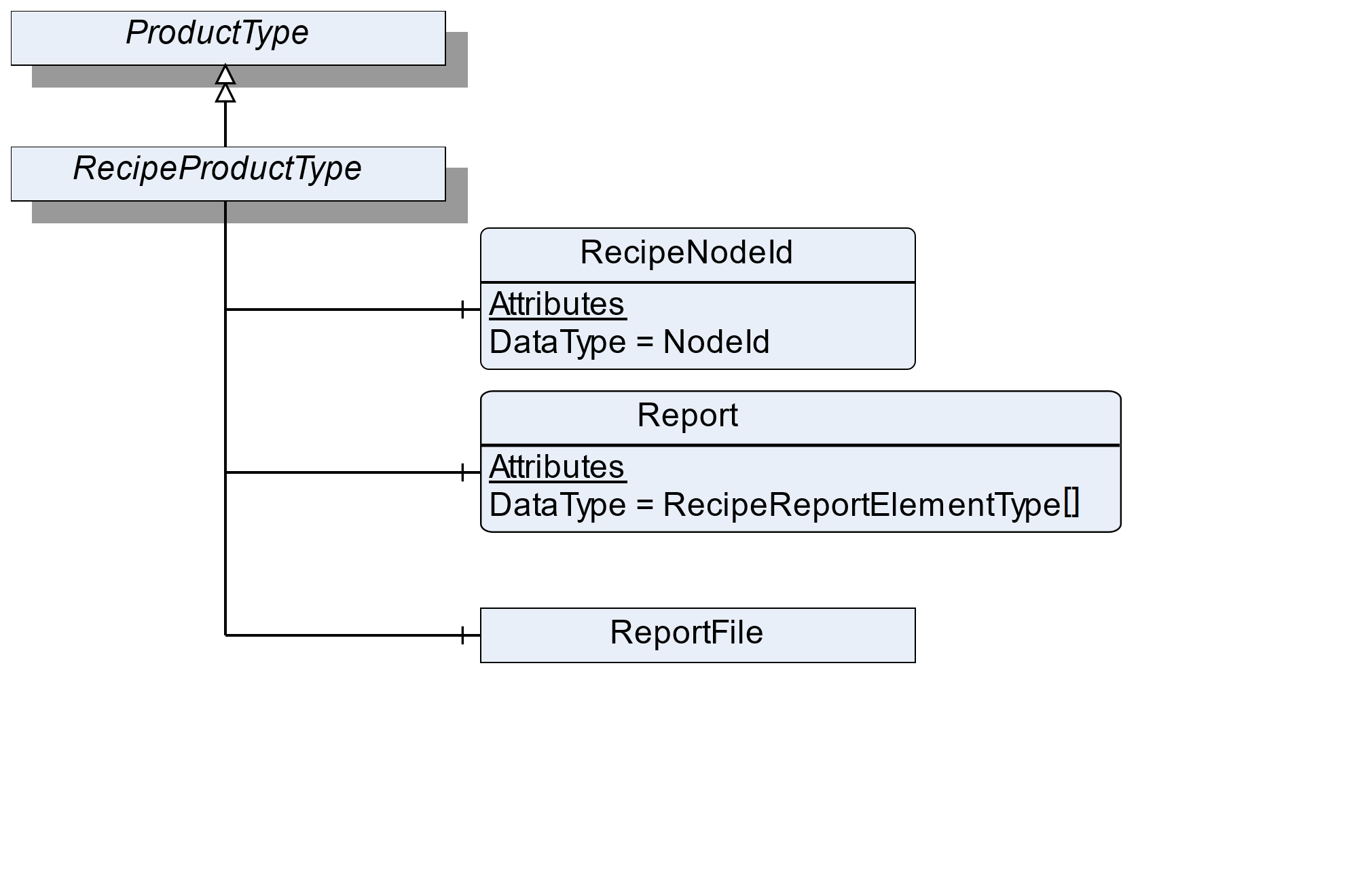
7.30.2 ObjectType Definition
| Attribute | Value | ||||
| BrowseName | RecipeProductType | ||||
| IsAbstract | False | ||||
| References | NodeClass | BrowseName | DataType | TypeDefinition | ModellingRule |
|---|---|---|---|---|---|
| Subtype of the ProductType | |||||
| 0:HasComponent | Variable | RecipeNodeId | NodeId | BaseDataVariableType | Mandatory |
| 0:HasComponent | Variable | Report | RecipeReportElementType[] | BaseDataVariableType | Mandatory |
| 0:HasComponent | Object | ReportFile | FileType | Optional | |
| Conformance Units | |||||
|---|---|---|---|---|---|
| Scales RecipeScale |
7.30.3 ObjectType Description
RecipeNodeId defines the node ID of the recipe that is being produced.
Report defines an array with the various messages from the recipe. Each RecipeElement generates its own report message.
ReportFile defines the file (binary, xml or other) that contains the report of the current process.
7.31 RecipeType Definition
7.31.1 Overview
The RecipeType defines the structure of an Object of the RecipeType. Figure 42 shows the hierarchical structure and details of the composition. It is formally defined in Table 90.
An Object of the RecipeType represents a recipe. It defines additional methods and properties required for managing a recipe. The description and the structure of the recipe can be found in Annex B.
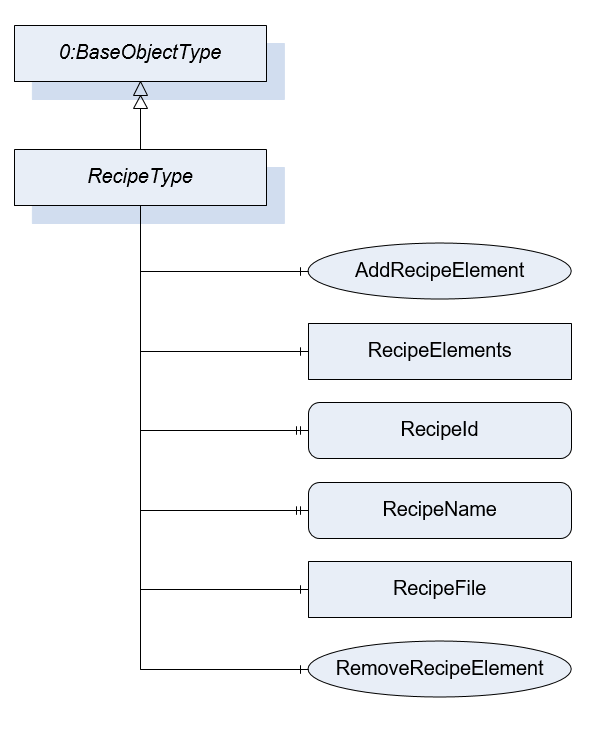
7.31.2 ObjectType Definition
| Attribute | Value | ||||
| BrowseName | RecipeType | ||||
| IsAbstract | False | ||||
| References | NodeClass | BrowseName | DataType | TypeDefinition | ModellingRule |
|---|---|---|---|---|---|
| Subtype of the BaseObjectType defined in OPC 10000-5 | |||||
| 0:HasComponent | Object | RecipeElements | FolderType | Optional | |
| 0:HasProperty | Variable | RecipeId | 0:String | 0:PropertyType | Mandatory |
| 0:HasProperty | Variable | RecipeName | 0:LocalizedText | 0:PropertyType | Mandatory |
| 0:HasComponent | Method | AddRecipeElement | Optional | ||
| 0:HasComponent | Method | RemoveRecipeElement | Optional | ||
| 0:HasComponent | Object | RecipeFile | 0:FileType | Optional | |
| Conformance Units | |||||
|---|---|---|---|---|---|
| Scales RecipeManagement | |||||
| Scales FileRecipeManagement |
7.31.3 ObjectType Description
RecipeElements defines a folder for all RecipeElements that are part of the recipe.
RecipeId defines a unique identifier of a recipe.
RecipeName defines a user-readable name of the recipe.
RecipeFile is a file that contains the recipe in a vendor-specific format. If a client uploads the file, the recipe elements can be also part of the AddressSpace. But the Method AddRecipeElement and RemoveRecipeElement should not be used. So a recipe uploaded via file transfer cannot be modified via AddRecipeElement or RemoveRecipeElement. This avoids that there is another version of the recipe in the file and the server.
7.31.4 Method AddRecipeElement
AddRecipeElement is a method to add an additional RecipeElement to the recipe. Table 91 and Table 92 specify the Arguments and AddressSpace representation, respectively.
Signature
	AddRecipeElement(
	[in]	NodeId	ElementType
	[in]	String	ElementName
	[in]	NodeId[]	PreviousElements
	[out]	NodeId	ElementNodeId
);| Argument | Description |
| ElementType | NodeId of the Object that should be added |
| ElementName | A user-readable name of the element |
| PreviousElements | The NodeIds of the directly previous Elements. If the element is the start Element use the Recipe node. |
| ElementNodeId | The NodeId of the created RecipeElement |
| Attribute | Value | ||||
| BrowseName | AddRecipeElement | ||||
| References | NodeClass | BrowseName | DataType | TypeDefinition | ModellingRule |
|---|---|---|---|---|---|
| 0:HasProperty | Variable | InputArguments | Argument[] | 0:PropertyType | Mandatory |
| 0:HasProperty | Variable | OutputArguments | Argument[] | 0:PropertyType | Mandatory |
7.31.5 Method RemoveRecipeElement
Method to remove a RecipeElement in this recipe with all related references. Table 93 and Table 94 specify the Arguments and AddressSpace representation, respectively.
Signature
	RemoveRecipeElement(
	[in]	NodeId	RecipeElementNodeId
);| Argument | Description |
| RecipeElementNodeId | NodeId of the Object that should be removed |
| Attribute | Value | ||||
| BrowseName | RemoveRecipeElement | ||||
| References | NodeClass | BrowseName | DataType | TypeDefinition | ModellingRule |
|---|---|---|---|---|---|
| 0:HasProperty | Variable | InputArguments | Argument[] | 0:PropertyType | Mandatory |
7.32 RecipeManagementType Definition
7.32.1 Overview
The RecipeManagementType defines the structure of an Object of the RecipeManagementType. Figure 43 shows the hierarchical structure and details of the composition. It is formally defined in Table 95.
An Object of the RecipeManagementType contains methods and properties required for managing recipes. The description and the structure of the recipe can be found in Annex B.
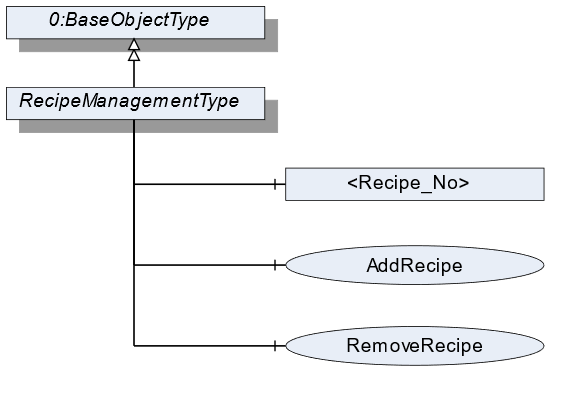
7.32.2 ObjectType Definition
| Attribute | Value | ||||
| BrowseName | RecipeManagementType | ||||
| IsAbstract | False | ||||
| References | NodeClass | BrowseName | DataType | TypeDefinition | ModellingRule |
|---|---|---|---|---|---|
| Subtype of the BaseObjectType defined in OPC 10000-5 | |||||
| 0:HasComponent | Method | AddRecipe | Optional | ||
| 0:HasComponent | Object | <Recipe_No> | RecipeType | OptionalPlaceholder | |
| 0:HasComponent | Method | RemoveRecipe | Optional | ||
| Conformance Units | |||||
|---|---|---|---|---|---|
| Scales RecipeManagment |
7.32.3 ObjectType Description
Recipe_No defines an instance of a recipe with the value "No".
7.32.4 Method AddRecipe
Method to add an additional recipe of the RecipeType. The signature of this Method is specified below. Table 96 and Table 97 specify the Arguments and AddressSpace representation, respectively.
Signature
	AddRecipe(
	[in]	0:String		RecipeId
	[in]	0:LocalizedText		RecipeName
[out] NodeId RecipeNodeId);| Argument | Description |
| RecipeId | Unique identifier of a recipe. |
| RecipeName | User-readable name of the recipe. |
| RecipeNodeId | NodeId of the created Object. |
| Attribute | Value | ||||
| BrowseName | AddRecipe | ||||
| References | NodeClass | BrowseName | DataType | TypeDefinition | ModellingRule |
|---|---|---|---|---|---|
| 0:HasProperty | Variable | InputArguments | Argument[] | 0:PropertyType | Mandatory |
| 0:HasProperty | Variable | OutputArguments | Argument[] | 0:PropertyType | Mandatory |
7.32.5 Method RemoveRecipe
Method to remove a recipe of the RecipeType. The signature of this Method is specified below. Table 98 and Table 99 specify the Arguments and AddressSpace representation, respectively.
Signature
	RemoveRecipe(
	[in]	0:String			RecipeId
);| Argument | Description |
| RecipeId | User-readable name of the recipe. |
| Attribute | Value | ||||
| BrowseName | RemoveRecipe | ||||
| References | NodeClass | BrowseName | DataType | TypeDefinition | ModellingRule |
|---|---|---|---|---|---|
| 0:HasProperty | Variable | InputArguments | Argument[] | 0:PropertyType | Mandatory |
7.33 RecipeElementType Definition
7.33.1 Overview
The RecipeElementType defines the structure of an Object of the RecipeElementType. Figure 44 shows the hierarchical structure and details of the composition. It is formally defined in Table 100.
An Object of the RecipeElementType represents a step, process, or action in a recipe. It defines additional methods and properties required for managing a recipe. The description and the structure of the recipe can be found in Annex B.
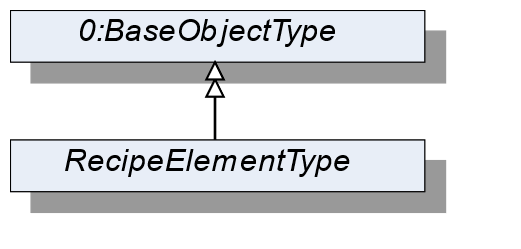
7.33.2 ObjectType Definition
| Attribute | Value | ||||
| BrowseName | RecipeElementType | ||||
| IsAbstract | True | ||||
| References | NodeClass | BrowseName | DataType | TypeDefinition | ModellingRule |
|---|---|---|---|---|---|
| Subtype of the BaseObjectType defined in OPC 10000-5 | |||||
| Conformance Units | |||||
|---|---|---|---|---|---|
| Scales RecipeManagement | |||||
| Scales DynamicRecipeManagement |
7.34 ActivationType Definition
7.34.1 Overview
The ActivationType defines the structure of an Object of the ActivationType. Figure 45 shows the hierarchical structure and details of the composition. It is formally defined in Table 101.
An Object of the ActivationType represents an activation step in a recipe.
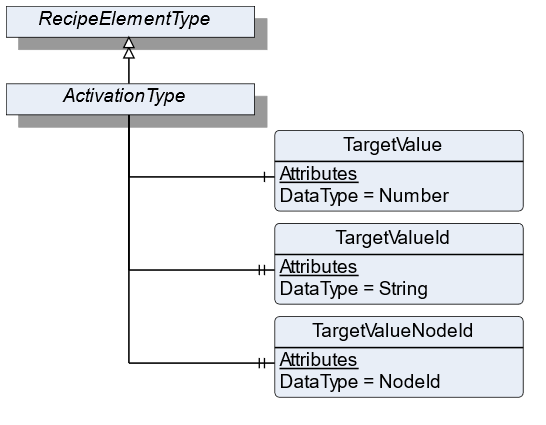
7.34.2 ObjectType Definition
| Attribute | Value | ||||
| BrowseName | ActivationType | ||||
| IsAbstract | False | ||||
| References | NodeClass | BrowseName | DataType | TypeDefinition | ModellingRule |
|---|---|---|---|---|---|
| Subtype of the RecipeElementType | |||||
| 0:HasComponent | Variable | TargetValue | 0:Number | 0:AnalogUnitType | Mandatory |
| 0:HasProperty | Variable | TargetValueId | 0:String | 0:PropertyType | Mandatory |
| 0:HasProperty | Variable | TargetValueNodeId | NodeId | 0:PropertyType | Optional |
| Conformance Units | |||||
|---|---|---|---|---|---|
| Scales RecipeManagement | |||||
| Scales DynamicRecipeManagement |
7.34.3 ObjectType Description
TargetValue defines the value to be reached of an aggregate that is referenced by TargetValueId.
TargetValueId defines a unique ID of the aggregate that is being activated. A list of all possible TargetValueIds is defined in RecipeScaleDeviceType.
TargetValueNodeId defines the NodeId of the aggregate that is being activated. If possible, this value should be used instead of the TargetValueId.
7.35 ConditionSleepType Definition
7.35.1 Overview
The ConditionSleepType defines the structure of an Object of the ConditionSleepType. Figure 46 shows the hierarchical structure and details of the composition. It is formally defined in Table 102.
An Object of ConditionSleepType represents a condition sleep step in a recipe. The recipe waits until the condition is solved.
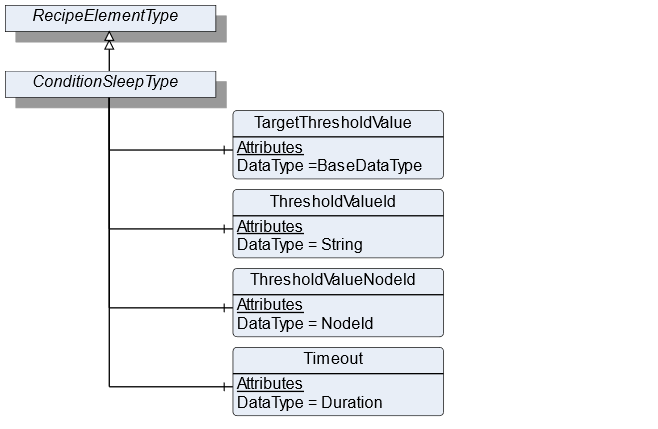
7.35.2 ObjectType Definition
| Attribute | Value | ||||
| BrowseName | ConditionSleepType | ||||
| IsAbstract | True | ||||
| References | NodeClass | BrowseName | DataType | TypeDefinition | ModellingRule |
|---|---|---|---|---|---|
| Subtype of the RecipeElementType | |||||
| 0:HasComponent | Variable | TargetThresholdValue | BaseDataType | DataItemType | Mandatory |
| 0:HasComponent | Variable | ThresholdValueId | 0:String | DataItemType | Mandatory |
| 0:HasComponent | Variable | ThresholdValueNodeId | NodeId | BaseDataVariableType | Optional |
| 0:HasComponent | Variable | Timeout | Duration | DataItemType | Optional |
| Conformance Units | |||||
|---|---|---|---|---|---|
| Scales DynamicRecipeManagement |
7.35.3 ObjectType Description
TargetThresholdValue is the target value with which the threshold value is compared.
ThresholdValueId defines an ID of the process value that needs to be monitored and is element of the SupportedThresholdValues in the RecipeScale.
ThresholdValueNodeId is the NodeId of the process value that needs to be monitored and is element of the SupportedThresholdValues in the RecipeScale. This variable should be used if the value is part of the address space.
Timeout specifies the duration within which the TargetThresholdValue needs to be reached. If Timeout is exceeded an operator intervention is necessary.
7.36 AnalogConditionSleepType Definition
7.36.1 Overview
The AnalogConditionSleepType defines the structure of an Object of the AnalogConditionSleepType. Figure 47 shows the hierarchical structure and details of the composition. It is formally defined in Table 104.
An Object of the AnalogConditionSleepType represents a condition sleep step in a recipe. The recipe waits until the analog condition is solved. The condition depends on the EqualityAndRelationalOperator (see section 10.6). The conditions are listed in Table 103.
| ConditionMode | Condition |
| Equal | ThresholdValue = TargetThresholdValue |
| NotEqual | ThresholdValue != TargetThresholdValue |
| LessThan | ThresholdValue < TargetThresholdValue |
| LessOrEqualThan | ThresholdValue <= TargetThresholdValue |
| GreaterThan | ThresholdValue > TargetThresholdValue |
| GreaterOrEqualThan | ThresholdValue >= TargetThresholdValue |
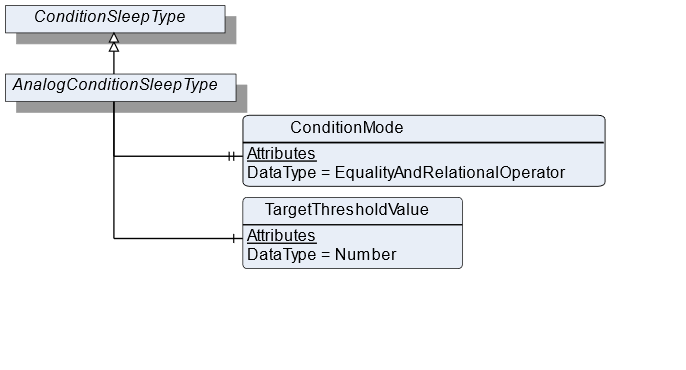
7.36.2 ObjectType Definition
| Attribute | Value | ||||
| BrowseName | AnalogConditionSleepType | ||||
| IsAbstract | False | ||||
| References | NodeClass | BrowseName | DataType | TypeDefinition | ModellingRule |
|---|---|---|---|---|---|
| Subtype of the ConditionSleepType | |||||
| 0:HasProperty | Variable | ConditionMode | EqualityAndRelationalOperator | 0:PropertyType | Mandatory |
| 0:HasComponent | Variable | TargetThresholdValue | 0:Number | TargetItemType | Mandatory |
| Conformance Units | |||||
|---|---|---|---|---|---|
| Scales DynamicRecipeManagement | |||||
| Scales RecipeManagement |
7.36.3 ObjectType Description
ConditionMode defines the type of condition operator that is used.
TargetThresholdValue is the target value with which the threshold value is compared.
7.37 EdgeTriggeredSleepType Definition
7.37.1 Overview
The EdgeTriggeredSleepType defines the structure of an Object of the EdgeTriggeredSleepType. Figure 48 shows the hierarchical structure and details of the composition. It is formally defined in Table 106.
An Object of the EdgeTriggeredSleepType represents a condition sleep step in a recipe. The recipe waits until the binary condition is solved. The condition depends on the EdgeOperator (see section 10.7). The conditions are listed in Table 105.
| ConditionMode | Condition |
| Rising | Is true if after ThresholdValue transition from false to true |
| Falling | Is true if after ThresholdValue transition from true to false |
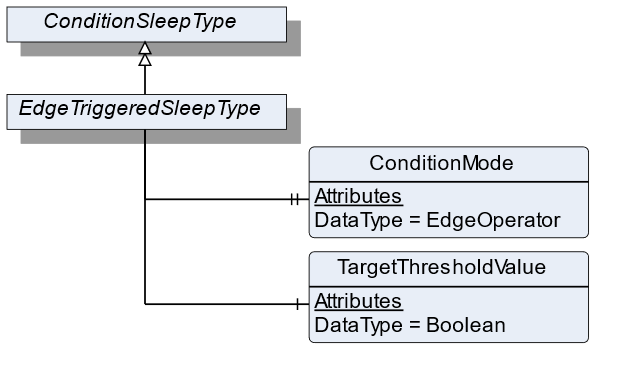
7.37.2 ObjectType Definition
| Attribute | Value | ||||
| BrowseName | EdgeTriggeredSleepType | ||||
| IsAbstract | False | ||||
| References | NodeClass | BrowseName | DataType | TypeDefinition | ModellingRule |
|---|---|---|---|---|---|
| Subtype of the ConditionSleepType | |||||
| 0:HasProperty | Variable | ConditionMode | EdgeOperator | 0:PropertyType | Mandatory |
| 0:HasComponent | Variable | TargetThresholdValue | Boolean | DataItemType | Mandatory |
| Conformance Units | |||||
|---|---|---|---|---|---|
| Scales RecipeManagement | |||||
| Scales DynamicRecipeManagement |
7.37.3 ObjectType Description
ConditionMode defines the type of condition operator that is used.
TargetThresholdValue is the target value with which the threshold value is compared.
7.38 TimerType Definition
7.38.1 Overview
The TimerType defines the structure of an Object of the TimerType. Figure 49 shows the hierarchical structure and details of the composition. It is formally defined in Table 107.
An Object of the TimerType represents a timer step in a recipe. The recipe waits until at least Duration has passed.
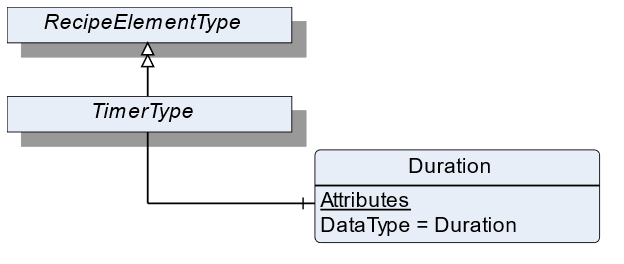
7.38.2 ObjectType Definition
| Attribute | Value | ||||
| BrowseName | TimerType | ||||
| IsAbstract | False | ||||
| References | NodeClass | BrowseName | DataType | TypeDefinition | ModellingRule |
|---|---|---|---|---|---|
| Subtype of the RecipeElementType | |||||
| 0:HasComponent | Variable | Duration | Duration | BaseDataVariableType | Mandatory |
| Conformance Units | |||||
|---|---|---|---|---|---|
| Scales RecipeManagement | |||||
| Scales DynamicRecipeManagement |
7.38.3 ObjectType Description
Duration defines the period of time the processing needs to wait before processing the next RecipeElement.
7.39 UserInstructionType Definition
7.39.1 Overview
The UserInstructionType defines the structure of an Object of the UserInstructionType. Figure 50 shows the hierarchical structure and details of the composition. It is formally defined in Table 108.
An Object of UserInstructionType represents a recipe step that requires user interaction. The recipe scale displays instructions (a text and/or application-specific symbols) on an HMI and waits until the user acknowledges the instructions.
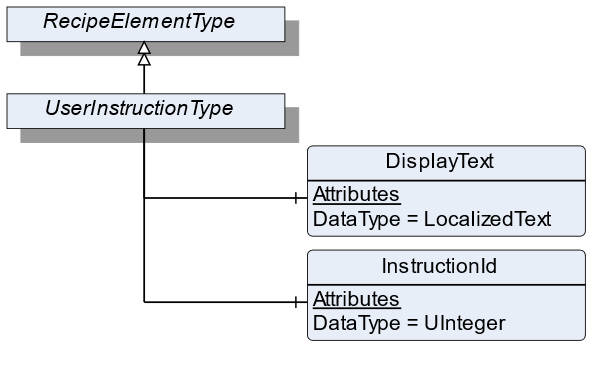
7.39.2 ObjectType Definition
| Attribute | Value | ||||
| BrowseName | UserInstructionType | ||||
| IsAbstract | False | ||||
| References | NodeClass | BrowseName | DataType | TypeDefinition | ModellingRule |
|---|---|---|---|---|---|
| Subtype of the RecipeElementType | |||||
| 0:HasComponent | Variable | DisplayText | 0:LocalizedText | BaseDataVariableType | Mandatory |
| 0:HasComponent | Variable | InstructionId | 0:UInteger | BaseDataVariableType | Optional |
| Conformance Units | |||||
|---|---|---|---|---|---|
| Scales RecipeManagement | |||||
| Scales DynamicRecipeManagement |
7.39.3 ObjectType Description
DisplayText defines instructions for this RecipeElement that will be displayed to the user.
InstructionId defines a unique ID used to identify the instruction that is displayed via DisplayText.
7.40 WeighingType Definition
7.40.1 Overview
The WeighingType defines the structure of an Object of the WeighingType. Figure 51 shows the hierarchical structure and details of the composition. It is formally defined in Table 109.
An Object of the WeighingType represents a weighing process in a recipe. The process can be an automatic or a manual filling process. The WeighingType contains all information needed in the weighing process.
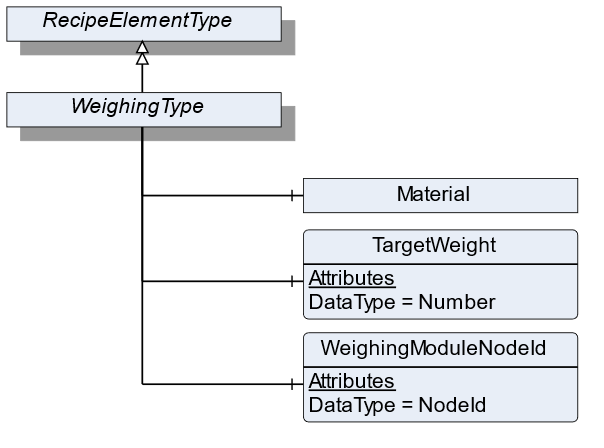
7.40.2 ObjectType Definition
| Attribute | Value | ||||
| BrowseName | WeighingType | ||||
| IsAbstract | False | ||||
| References | NodeClass | BrowseName | DataType | TypeDefinition | ModellingRule |
|---|---|---|---|---|---|
| Subtype of the RecipeElementType | |||||
| 0:HasComponent | Variable | WeighingModuleNodeId | NodeId | BaseDataVariableType | Mandatory |
| 0:HasComponent | Object | Material | MaterialType | Optional | |
| 0:HasComponent | Variable | TargetWeight | 0:Number | TargetItemType | Mandatory |
| Conformance Units | |||||
|---|---|---|---|---|---|
| Scales RecipeManagement | |||||
| Scales DynamicRecipeManagement |
7.40.3 ObjectType Description
WeighingModuleNodeId defines the ID of the load cell which is used for weighing the product.
Material defines the material which needs to be measured. Each material has different characteristics that are defined in MaterialType.
TargetWeight defines the preset of the volume to be processed.
7.41 MaterialAutomaticType Definition
7.41.1 Overview
The MaterialAutomaticType defines the structure of an Object of the MaterialAutomaticType. Figure 52 shows the hierarchical structure and details of the composition. It is formally defined in Table 110.
An Object of MaterialAutomaticType represents a material in a recipe that will be filled automatically.
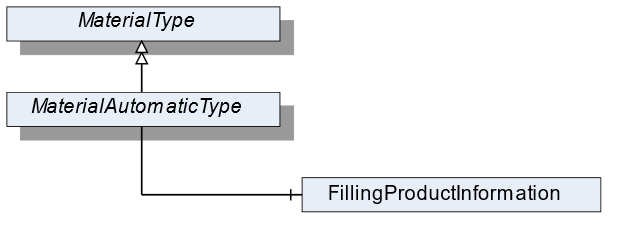
7.41.2 ObjectType Definition
| Attribute | Value | ||||
| BrowseName | MaterialAutomaticType | ||||
| IsAbstract | False | ||||
| References | NodeClass | BrowseName | DataType | TypeDefinition | ModellingRule |
|---|---|---|---|---|---|
| Subtype of the MaterialType | |||||
| 0:HasComponent | Object | FillingProductInformation | AutomaticFillingProductType | Mandatory | |
| Conformance Units | |||||
|---|---|---|---|---|---|
| Scales RecipeScale |
7.41.3 ObjectType Description
FillingProductInformation defines the parameters necessary for the filling of the material. It derives from product-specific information within the AutomaticFillingScaleType.
7.42 TotalizingHopperScaleType Definition
7.42.1 Overview
The TotalizingHopperScaleType defines the structure of an Object of the TotalizingHopperScaleType. Figure 53 shows the hierarchical structure and details of the composition. It is formally defined in Table 111.
An Object of the TotalizingHopperScaleType represents a totalizing hopper scale. It defines additional methods and properties required for managing the totalizing hopper scale.
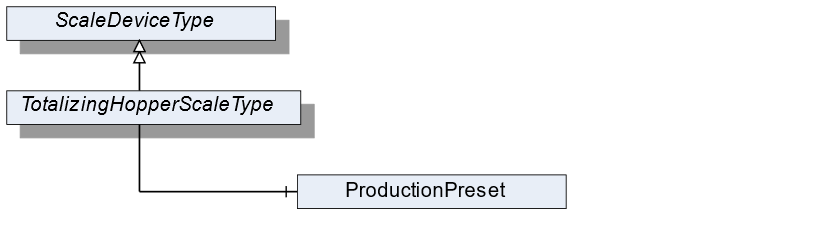
7.42.2 ObjectType Definition
| Attribute | Value | ||||
| BrowseName | TotalizingHopperScaleType | ||||
| IsAbstract | False | ||||
| References | NodeClass | BrowseName | DataType | TypeDefinition | ModellingRule |
|---|---|---|---|---|---|
| Subtype of the ScaleDeviceType | |||||
| Conformance Units | |||||
|---|---|---|---|---|---|
| Scales TotalizingHopperScale |
7.42.3 ObjectType Description
ProductionPreset, which is inherited from ScaleDeviceType shall have instances of TotalizingHopperProductType or a subtype in the Products folder.
7.43 TotalizingHopperProductType Definition
7.43.1 Overview
The TotalizingHopperProductType defines the structure of an Object of the TotalizingHopperProductType. Figure 54 shows the hierarchical structure and details of the composition. It is formally defined in Table 112.
An Object of the TotalizingHopperProductType represents a product of a totalizing hopper scale. It defines additional methods and properties required for managing the product.
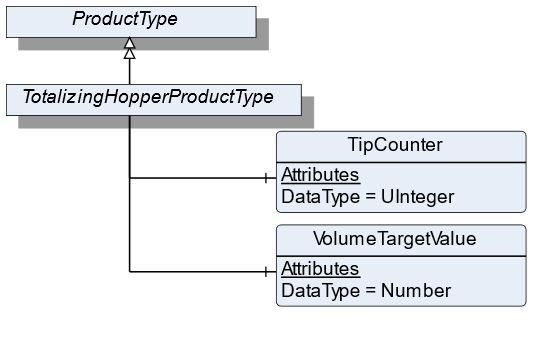
7.43.2 ObjectType Definition
| Attribute | Value | ||||
| BrowseName | TotalizingHopperProductType | ||||
| IsAbstract | False | ||||
| References | NodeClass | BrowseName | DataType | TypeDefinition | ModellingRule |
|---|---|---|---|---|---|
| Subtype of the ProductType | |||||
| 0:HasComponent | Variable | VolumeTargetValue | 0:Number | TargetItemType | Optional |
| 0:HasComponent | Variable | TipCounter | 0:UInteger | BaseDataVariableType | Mandatory |
| Conformance Units | |||||
|---|---|---|---|---|---|
| Scales TotalizingHopperScale |
7.43.3 ObjectType Description
TargetValue defines the preset of the volume to be processed.
TipCounter defines the number of fillings (downpour, bulk produce).
7.44 SimpleScaleType Definition
7.44.1 Overview
The SimpleScaleType defines the structure of an Object of the SimpleScaleType. Figure 55 shows the hierarchical structure and details of the composition. It is formally defined in Table 113.
An Object of the SimpleScaleType represents a simple scale. It defines additional methods and properties required for managing the simple scale.
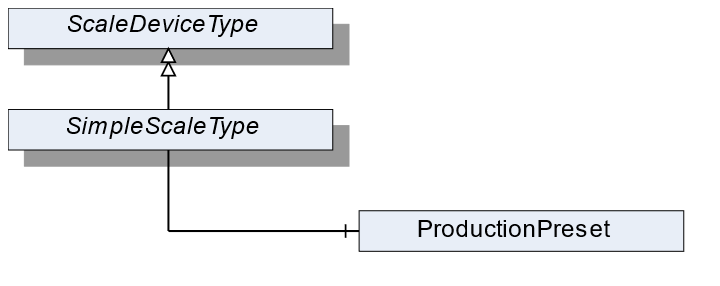
7.44.2 ObjectType Definition
| Attribute | Value | ||||
| BrowseName | SimpleScaleType | ||||
| IsAbstract | False | ||||
| References | NodeClass | BrowseName | DataType | TypeDefinition | ModellingRule |
|---|---|---|---|---|---|
| Subtype of the ScaleDeviceType | |||||
| Conformance Units | |||||
|---|---|---|---|---|---|
| Scales SimpleScale |
7.44.3 ObjectType Description
ProductionPreset, which is inherited from ScaleDeviceType shall have instances of SimpleProductType or a subtype in the Products folder.
7.45 SimpleProductType Definition
7.45.1 Overview
The SimpleProductType defines the structure of an Object of the SimpleProductType. Figure 56 shows the hierarchical structure and details of the composition. It is formally defined in Table 114.
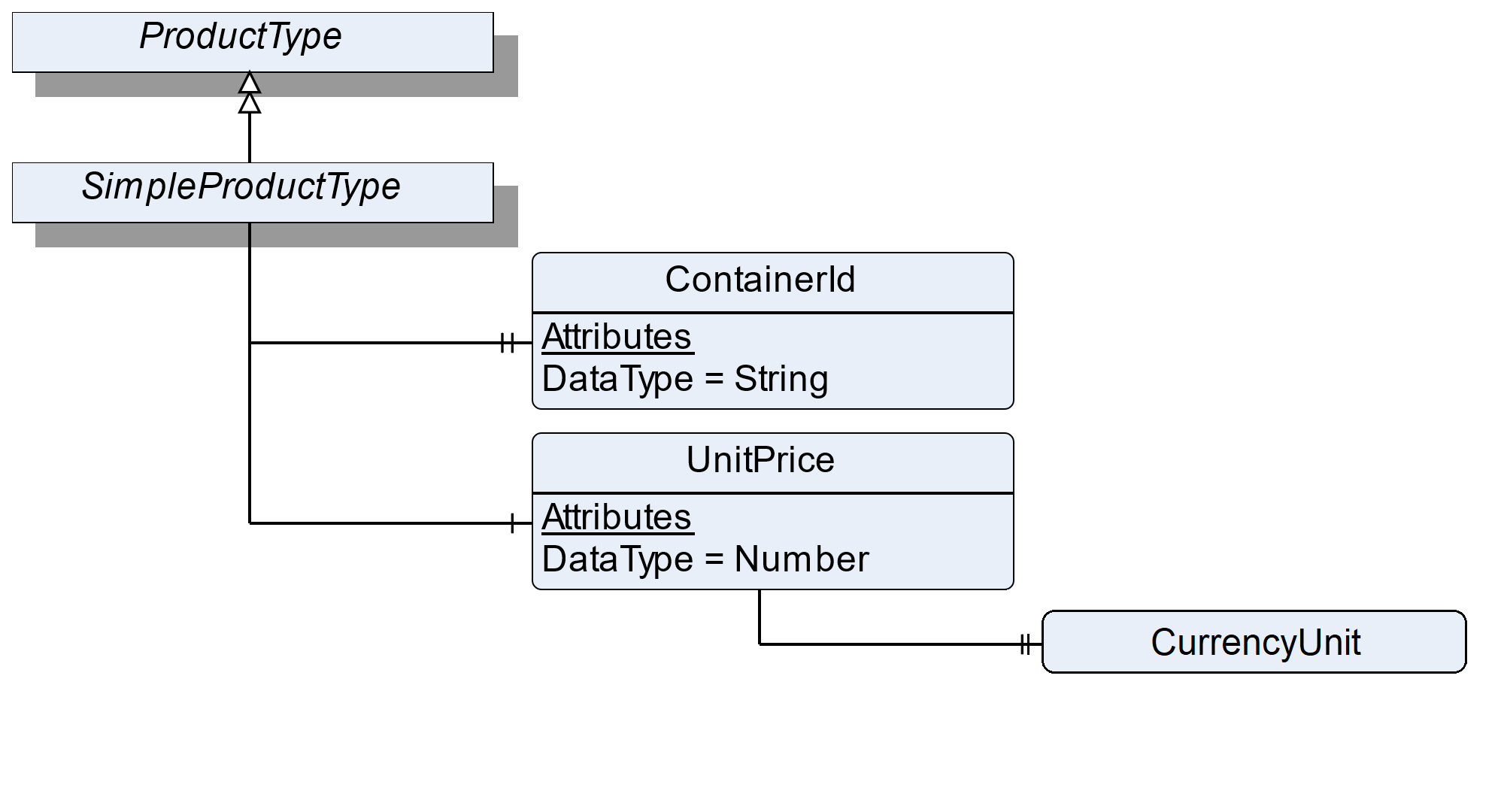
7.45.2 ObjectType Definition
| Attribute | Value | ||||
| BrowseName | SimpleProductType | ||||
| IsAbstract | False | ||||
| References | NodeClass | BrowseName | DataType | TypeDefinition | ModellingRule |
|---|---|---|---|---|---|
| Subtype of the ProductType | |||||
| 0:HasProperty | Variable | ContainerId | 0:String | 0:PropertyType | Optional |
| 0:HasComponent | Variable | UnitPrice | 0:Number | BaseDataVariableType | Optional |
| Conformance Units | |||||
|---|---|---|---|---|---|
| Scales SimpleScale |
7.45.3 ObjectType Description
ContainerId defines the identifier of a container which contains the weighing good (e.g., bottles upon a pallet which will be filled with liquid).
UnitPrice defines the price per weight unit.
The components of the SimpleProductType have additional references which are defined in Table 115.
| Source Path | References | NodeClass | BrowseName | DataType | TypeDefinition | Others |
| UnitPrice | 0: HasProperty | Variable | CurrencyUnit | CurrencyUnitType | 0:PropertyType | M |
7.46 LaboratoryScaleType Definition
7.46.1 Overview
The LaboratoryScaleType defines the structure of an Object of the LaboratoryScaleType. Figure 57 shows the hierarchical structure and details of the composition. It is formally defined in Table 116.
An Object of the LaboratoryScaleType represents a laboratory scale. It defines additional methods and properties required for managing the laboratory scale.
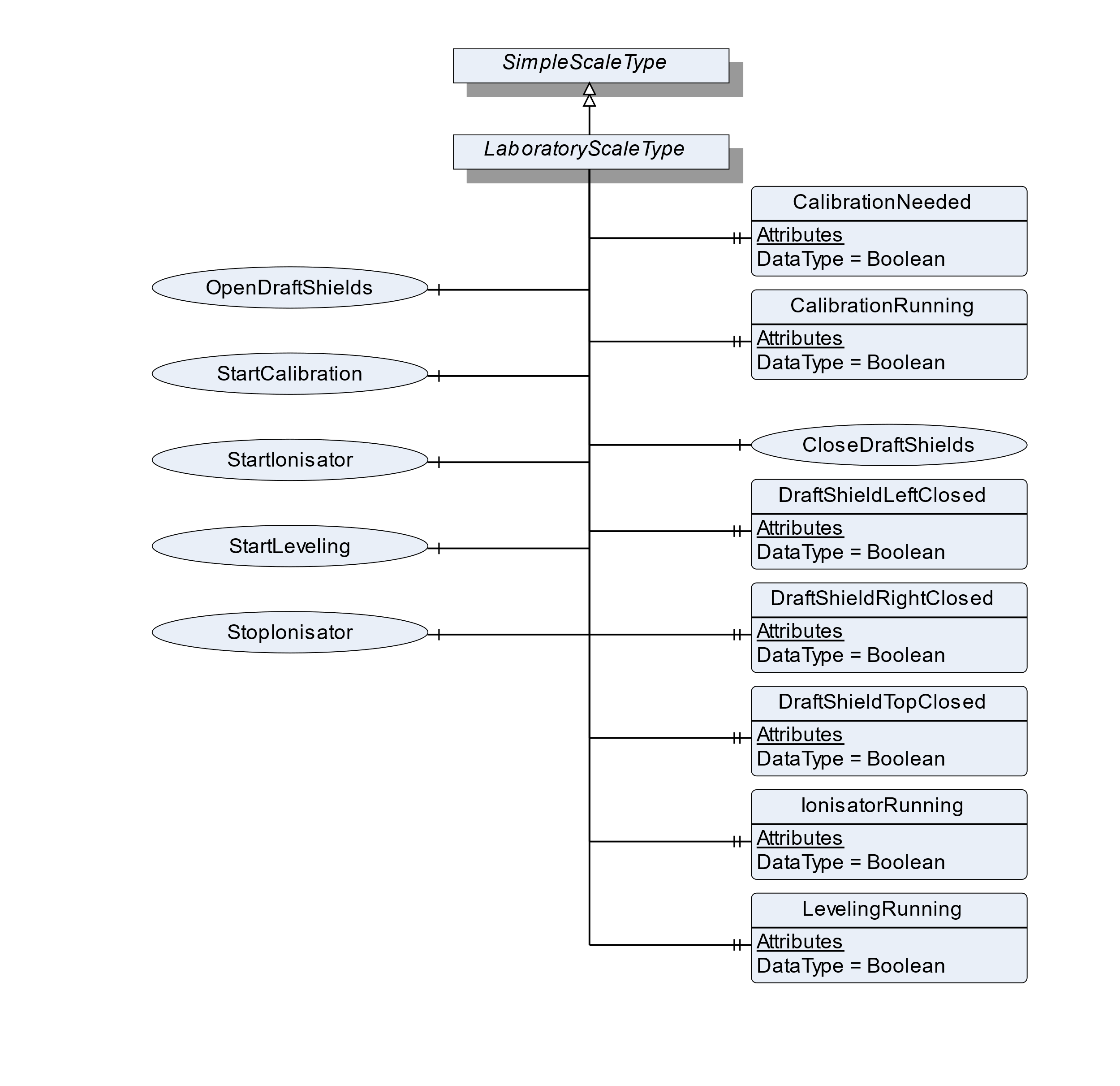
7.46.2 ObjectType Definition
| Attribute | Value | ||||
| BrowseName | LaboratoryScaleType | ||||
| IsAbstract | False | ||||
| References | NodeClass | BrowseName | DataType | TypeDefinition | ModellingRule |
|---|---|---|---|---|---|
| Subtype of the SimpleScaleType | |||||
| 0:HasProperty | Variable | CalibrationNeeded | Boolean | 0:PropertyType | Optional |
| 0:HasProperty | Variable | CalibrationRunning | Boolean | 0:PropertyType | Optional |
| 0:HasComponent | Method | CloseDraftShields | Optional | ||
| 0:HasProperty | Variable | DraftShieldLeftClosed | Boolean | 0:PropertyType | Optional |
| 0:HasProperty | Variable | DraftShieldRightClosed | Boolean | 0:PropertyType | Optional |
| 0:HasProperty | Variable | DraftShieldTopClosed | Boolean | 0:PropertyType | Optional |
| 0:HasProperty | Variable | LevelingRunning | Boolean | 0:PropertyType | Optional |
| 0:HasProperty | Variable | IonisatorRunning | Boolean | 0:PropertyType | Optional |
| 0:HasProperty | Variable | LevelingRunning | Boolean | 0:PropertyType | Optional |
| 0:HasComponent | Method | OpenDraftShields | Optional | ||
| 0:HasComponent | Method | StartLeveling | Optional | ||
| 0:HasComponent | Method | StartCalibration | Optional | ||
| 0:HasComponent | Method | StartIonisator | Optional | ||
| 0:HasComponent | Method | StopIonisator | Optional | ||
| Conformance Units | |||||
|---|---|---|---|---|---|
| Scales LaboratoryScale |
7.46.3 ObjectType Description
CalibrationNeeded defines if a calibration procedure is needed and if the current process should be paused.
CalibrationRunning defines if a calibration procedure is running (e.g., started via method StartCalibration).
DraftShieldLeftClosed defines if the left draft shield is closed.
DraftShieldRightClosed defines if the right draft shield is closed.
DraftShieldTopClosed defines if the top draft shield is closed.
LevelingRunning defines if a leveling process is running (e.g., started via the method StartLeveling).
IonisatorRunning defines if an ionization procedure is running (e.g., started via the method StartIonizer).
7.46.4 Method CloseDraftShields
Method to close a certain draft shield or all draft shields. The signature of this Method is specified below. Table 117 and Table 118 specify the Arguments and AddressSpace representation, respectively.
Signature
	CloseDraftShields(
	[in]	DraftShieldType		Shield
);| Argument | Description |
| Shield | The DraftShield that should be closed. |
| Attribute | Value | ||||
| BrowseName | CloseDraftShields | ||||
| References | NodeClass | BrowseName | DataType | TypeDefinition | ModellingRule |
|---|---|---|---|---|---|
| 0:HasProperty | Variable | InputArguments | Argument[] | 0:PropertyType | Mandatory |
7.46.5 Method OpenDraftShields
Method to open a certain draft shield or all draft shields. The signature of this Method is specified below. Table 119 and Table 120 specify the Arguments and AddressSpace representation, respectively.
Signature
	OpenDraftShields(
		[in]	DraftShieldType	Shield
);| Argument | Description |
| Shield | The DraftShield that should be open. |
| Attribute | Value | ||||
| BrowseName | OpenDraftShields | ||||
| References | NodeClass | BrowseName | DataType | TypeDefinition | ModellingRule |
|---|---|---|---|---|---|
| 0:HasProperty | Variable | InputArguments | Argument[] | 0:PropertyType | Mandatory |
7.46.6 Method StartLeveling
Method to start the automatic leveling procedure of the scale.
Signature
	SartLeveling(
	);
7.46.7 Method StartCalibration
Method to start the automatic calibration procedure.
Signature
	StartCalibration(
	);
7.46.8 Method StartIonisator
Method to start the ionization process.
Signature
	StartIonisator(
	);
7.46.9 Method StopIonisator
Method to stop the ionization process.
Signature
	StopIonisator(
	);
7.47 HopperScaleType Definition
7.47.1 Overview
The HopperScaleType defines the structure of an Object of the HopperScaleType. Figure 58 shows the hierarchical structure and details of the composition. It is formally defined in Table 121.
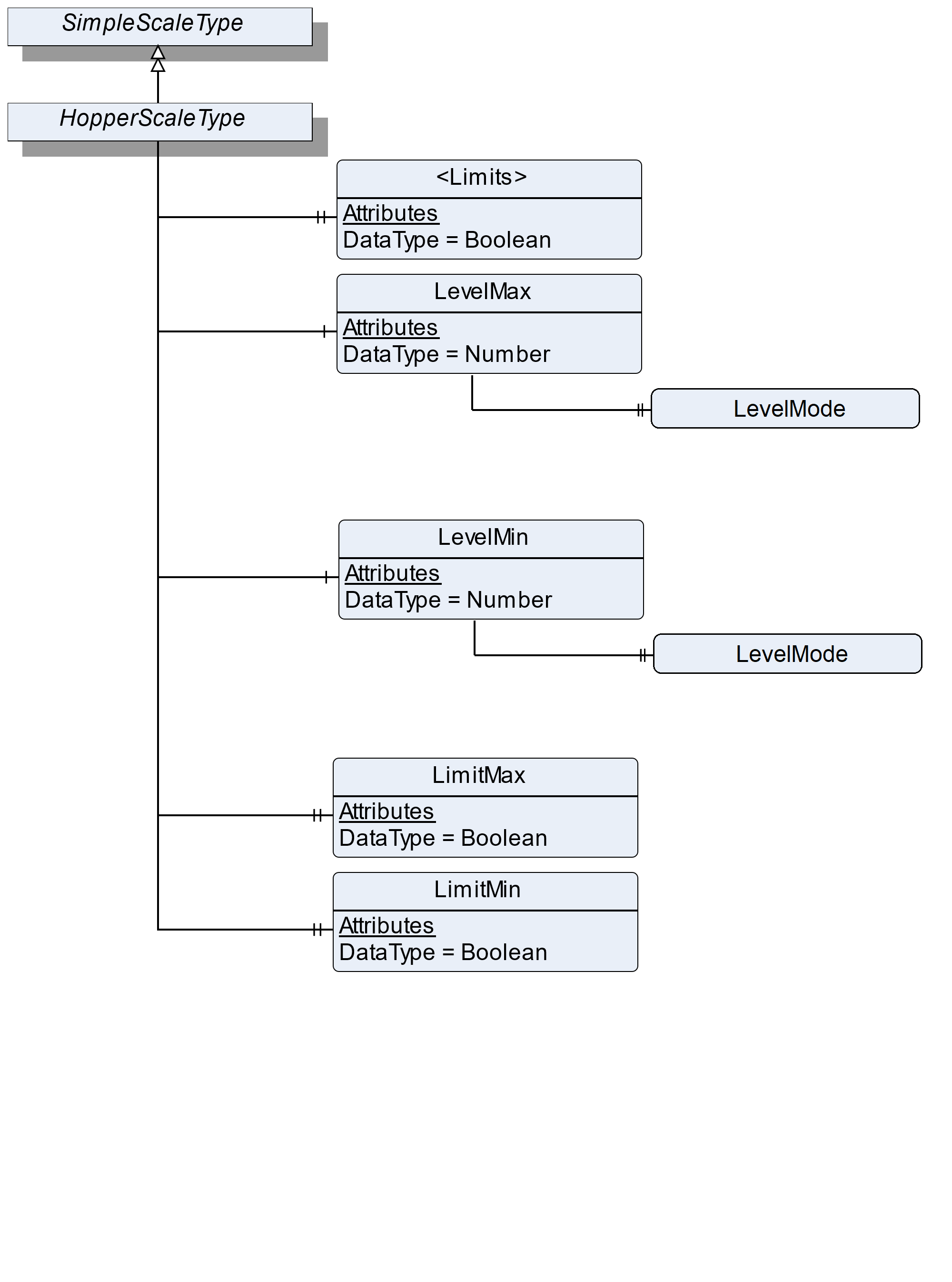
7.47.2 ObjectType Definition
| Attribute | Value | ||||
| BrowseName | HopperScaleType | ||||
| IsAbstract | False | ||||
| References | NodeClass | BrowseName | DataType | TypeDefinition | ModellingRule |
|---|---|---|---|---|---|
| Subtype of the SimpleScaleType | |||||
| 0:HasProperty | Variable | <Limits> | Boolean | 0:PropertyType | OptionalPlaceholder |
| 0:HasComponent | Variable | LevelMax | 0:Number | 0:AnalogUnitType | Optional |
| 0:HasComponent | Variable | LevelMin | 0:Number | 0:AnalogUnitType | Optional |
| 0:HasProperty | Variable | LimitMax | Boolean | 0:PropertyType | Mandatory |
| 0:HasProperty | Variable | LimitMin | Boolean | 0:PropertyType | Mandatory |
| Conformance Units | |||||
|---|---|---|---|---|---|
| Scales HopperScale |
7.47.3 ObjectType Description
<Limits> defines a placeholder for individual additional limits that may be reached.
LimitMin: The current fill level falls below the allowed minimum level.
LimitMax: The current fill level exceeds the allowed maximum level.
LevelMax defines the maximum fill level where an action is necessary.
LevelMin defines the minimum fill level where an action is necessary.
The components of the HopperScaleType have additional references which are defined in Table 122.
The LevelMax/LevelMode defines with which condition the LevelMax and the current fill level (CurrentWeight) are compared.
The LevelMin/LevelMode defines with which condition the LevelMin and the current fill level (CurrentWeight) are compared.
| Source Path | References | NodeClass | BrowseName | DataType | TypeDefinition | Others |
| LevelMax | 0:HasProperty | Variable | LevelMode | EqualityAndRelationalOperator | 0:PropertyType | Optional |
| LevelMin | 0:HasProperty | Variable | LevelMode | EqualityAndRelationalOperator | 0:PropertyType | Optional |
7.48 VehicleScaleType Definition
7.48.1 Overview
The VehicleScaleType defines the structure of an Object of the VehicleScaleType. Figure 61 shows the hierarchical structure and details of the composition. It is formally defined in Table 124.
An Object of the VehicleScaleType represents a vehicle scale. It defines additional methods and properties required for managing the vehicle scale.
The following use cases for a vehicle scale exist:
Checking the weight of the vehicle (e.g., a traffic check or an overload check) (check vehicle weight)
The weight of the vehicle is known and only one measurement is needed to determine the gross weight (one pass weighing)
The weight of the vehicle is unknown, and more than one measurement is needed to determine the gross weight (more pass weighing) (e.g. a vehicle arrives at a gravel plant full/empty and leaves it empty/full)
Table 123 shows the process of the different use cases:
| Checkweighing | One pass weighing | More pass weighing |
| Call the method RegisterWeight to get the current value | Call the method OnePassWeighing to trigger an outbound weighing and use the preset tare to calculate DeltaWeight | Call the method InboundWeighing if the vehicle arrives at the area and call the method OutboundWeighing if the vehicle leaves the area. The results must be saved in the scale. If OutboundWeighing and InboundWeighing are stored in the scale the DeltaWeight (as result) can be calculated |
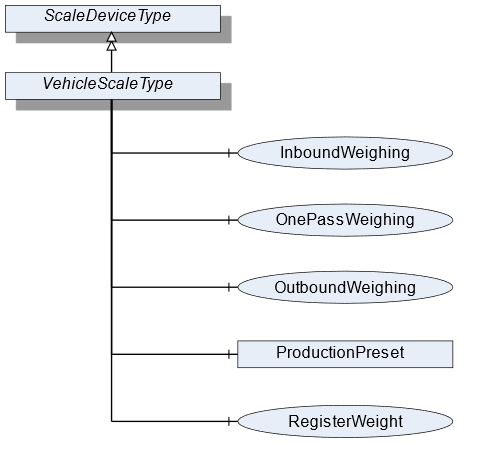
7.48.2 ObjectType Definition
| Attribute | Value | ||||||
| BrowseName | VehicleScaleType | ||||||
| IsAbstract | False | ||||||
| References | NodeClass | BrowseName | DataType | TypeDefinition | ModellingRule | ||
|---|---|---|---|---|---|---|---|
| Subtype of the ScaleDeviceType | |||||||
| 0:HasComponent | Method | InboundWeighing | Optional | ||||
| 0:HasComponent | Method | OutboundWeighing | Optional | ||||
| 0:HasComponent | Method | OnePassWeighing | Optional | ||||
| Conformance Units | |||||||
|---|---|---|---|---|---|---|---|
| Scales VehicleScale |
7.48.3 ObjectType Description
ProductionPreset, which is inherited from ScaleDeviceType shall have instances of VehicleProductType or a subtype in the Products folder.
7.48.4 Method InboundWeighing
The Method triggers an inbound weighing process of a vehicle arriving in an (e.g., filling) area. This is done to determine the present weight of the vehicle. This method may require a vehicle ID to identify the vehicle and to return the measured value. The signature of this Method is specified below. Table 125 and Table 126 specify the Arguments and AddressSpace representation, respectively.
Signature
	InboundWeighing(
		[in]	0:String		VehicleId
);| Argument | Description |
| VehicleId | The ID of the vehicle |
| Attribute | Value | ||||
| BrowseName | InboundWeighing | ||||
| References | NodeClass | BrowseName | DataType | TypeDefinition | ModellingRule |
|---|---|---|---|---|---|
| 0:HasProperty | Variable | InputArguments | Argument[] | 0:PropertyType | Mandatory |
7.48.5 Method OutboundWeighing
Triggers an outbound weighing process of a vehicle leaving an (e.g., filling) area. This is done to determine the total weight of the vehicle. This method may require a vehicle ID to identify the vehicle and to return the measured value. The signature of this Method is specified below. Table 127 and Table 128 specify the Arguments and AddressSpace representation, respectively.
Signature
	OutboundWeighing(
		[in]	0:String	VehicleId
);| Argument | Description |
| VehicleId | The ID of the vehicle |
| Attribute | Value | ||||
| BrowseName | OutboundWeighing | ||||
| References | NodeClass | BrowseName | DataType | TypeDefinition | ModellingRule |
|---|---|---|---|---|---|
| 0:HasProperty | Variable | InputArguments | Argument[] | 0:PropertyType | Mandatory |
7.48.6 Method OnePassWeighing
Triggers an outbound weighing and uses the preset tare to calculate the DeltaWeight (one-pass use case). The signature of this Method is specified below. Table 129 and Table 130 specify the Arguments and AddressSpace representation, respectively.
Signature
	OnePassWeighing(
		[in]	0:String	VehicleId
);| Argument | Description |
| VehicleId | The ID of the vehicle |
| Attribute | Value | ||||
| BrowseName | OnePassWeighing | ||||
| References | NodeClass | BrowseName | DataType | TypeDefinition | ModellingRule |
|---|---|---|---|---|---|
| 0:HasProperty | Variable | InputArguments | Argument[] | 0:PropertyType | Mandatory |
7.49 VehicleProductType Definition
7.49.1 Overview
The VehicleProductType defines the structure of an Object of the VehicleProductType. Figure 60 shows the hierarchical structure and details of the composition. It is formally defined in Table 131.
An Object of the VehicleProductType represents a product of a vehicle product. It defines additional Methods and Properties required for managing the product.
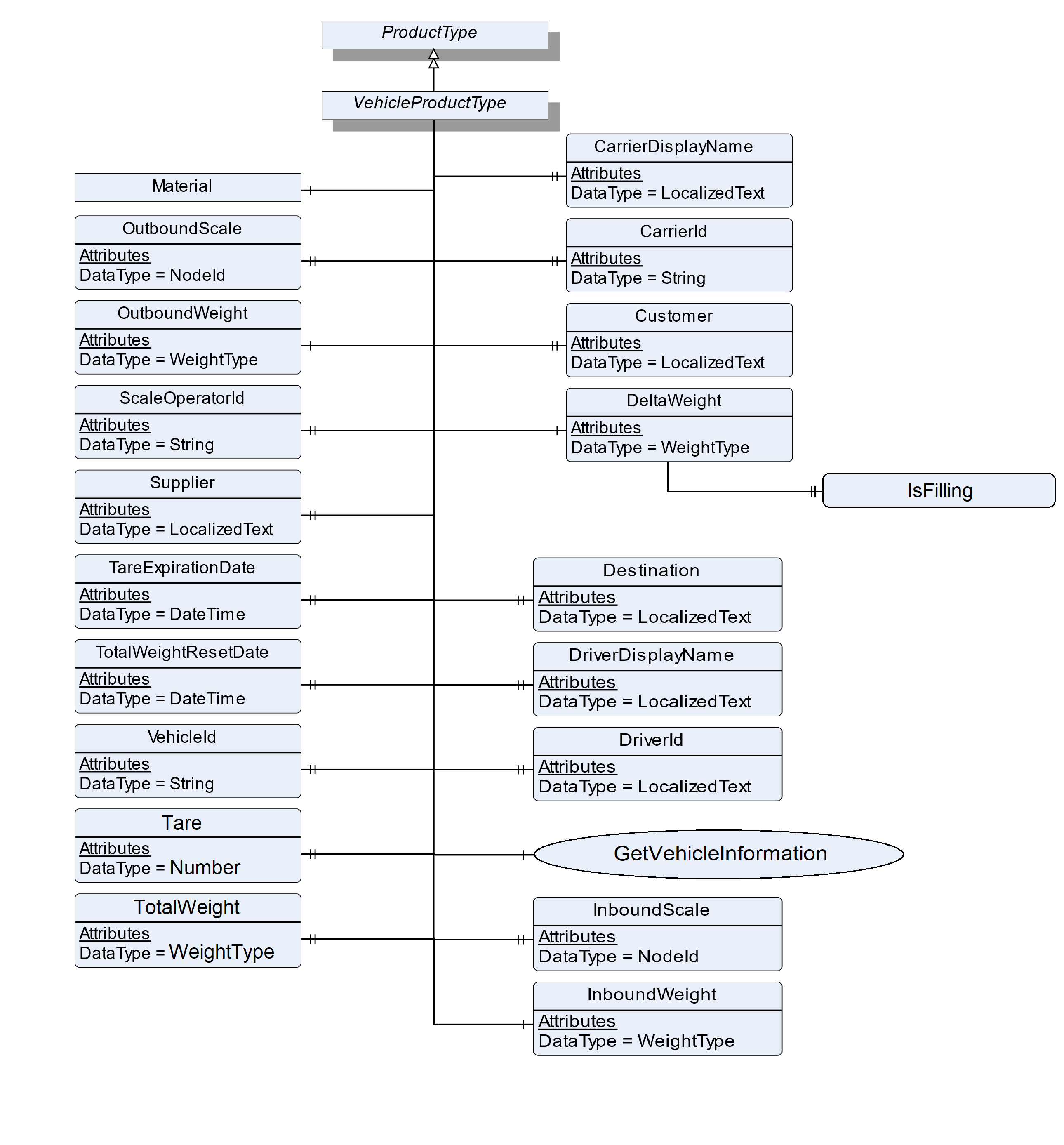
7.49.2 ObjectType Definition
| Attribute | Value | ||||
| BrowseName | VehicleProductType | ||||
| IsAbstract | False | ||||
| References | NodeClass | BrowseName | DataType | TypeDefinition | ModellingRule |
|---|---|---|---|---|---|
| Subtype of the ProductType | |||||
| 0:HasProperty | Variable | CarrierDisplayName | 0:LocalizedText | 0:PropertyType | Optional |
| 0:HasProperty | Variable | CarrierId | 0:String | 0:PropertyType | Optional |
| 0:HasProperty | Variable | Customer | 0:LocalizedText | 0:PropertyType | Optional |
| 0:HasComponent | Variable | DeltaWeight | WeightType | WeightItemType | Mandatory |
| 0:HasProperty | Variable | Destination | 0:LocalizedText | 0:PropertyType | Optional |
| 0:HasProperty | Variable | DriverId | 0:String | 0:PropertyType | Optional |
| 0:HasProperty | Variable | DriverDisplayName | 0:LocalizedText | 0:PropertyType | Optional |
| 0:HasComponent | Method | GetVehicleInformation | Optional | ||
| 0:HasProperty | Variable | InboundScale | NodeId | 0:PropertyType | Optional |
| 0:HasComponent | Variable | InboundWeight | WeightType | WeightItemType | Optional |
| 0:HasComponent | Object | Material | MaterialType | Optional | |
| 0:HasProperty | Variable | OutboundScale | NodeId | 0:PropertyType | Optional |
| 0:HasComponent | Variable | OutboundWeight | WeightType | WeightItemType | Mandatory |
| 0:HasProperty | Variable | ScaleOperatorId | 0:String | 0:PropertyType | Optional |
| 0:HasProperty | Variable | Supplier | 0:LocalizedText | 0:PropertyType | Optional |
| 0:HasProperty | Variable | Tare | 0:Number | 0:PropertyType | Optional |
| 0:HasProperty | Variable | TareExpirationDate | 0:DateTime | 0:PropertyType | Optional |
| 0:HasProperty | Variable | TotalWeight | WeightType | 0:PropertyType | Optional |
| 0:HasProperty | Variable | TotalWeightResetDate | 0:DateTime | 0:PropertyType | Optional |
| 0:HasProperty | Variable | VehicleId | 0:String | 0:PropertyType | Mandatory |
| Conformance Units | |||||
|---|---|---|---|---|---|
| Scales VehicleScale |
7.49.3 ObjectType Description
| InboundWeight | gives the result of the InboundWeighing method in a separate variable. |
InboundScale defines the NodeId of the scale that was used for measuring the InboundWeight in a multi-scale-system
OutboundWeight gives the result of the OutboundWeighing and a CheckWeighing method in a separate variable.
OutboundScale defines the NodeId of the scale that was used for measuring the OutboundWeight in a multi-scale-system.
DeltaWeight gives the loaded or unloaded net weight and is defined by the difference between InboundWeight and OutboundWeight. In case of OutboundWeighing only, the delta is defined by OutboundWeight minus tare.
Tare defines the tare value for the vehicle, used during a one pass transaction. This is different than the tare set on the terminal for regular weighing.
TareExpirationDate is the date on which the tare expires.
TotalWeight is the sum of net weights for the vehicle defined in VehicleId.
TotalWeightResetDate is the date on which the TotalWeight was reset last time.
VehicleId is a unique identifier to determine which vehicle is present (e.g., license plate number or wagon number).
Material is the name of the material.
CarrierDisplayName is the display name of the carrier that is involved in the occurring process.
CarrierId is the number of the carrier that is involved in the occurring process.
DriverDisplayName is the display name of the driver who is involved in the occurring process.
| DriverId | is the number of the driver who is involved in the occurring process. |
Customer is an address of the customer who is involved in the occurring process.
Destination is the address of the destination that is involved in the occurring process.
Supplier is the address of the supplier that is involved in the occurring process.
ScaleOperatorId defines the ID of the operator that is triggering and the operation of the scale.
The components of the VehicleProductType have additional references which are defined in Table 132.
| Source Path | References | NodeClass | BrowseName | DataType | TypeDefinition | Others |
| DeltaWeight | 0:HasProperty | Variable | IsFilling | 0:Boolean | 0:PropertyType | Optional |
DeltaWeight.IsFilling defines if the deltaWeight is a filling weight or an unloading weight.
7.49.4 Method GetVehicleInformation
The Method loads vehicle information of the data store. It requires a unique vehicle ID as input. Table 133 and Table 134 specify the Arguments and AddressSpace representation, respectively.
Signature
	GetVehicleInformation (
		[in]	0:String		VehicleId
);| Argument | Description |
| VehicleId | The ID of the vehicle |
| Attribute | Value | ||||
| BrowseName | SetFeederSpeed | ||||
| References | NodeClass | BrowseName | DataType | TypeDefinition | ModellingRule |
|---|---|---|---|---|---|
| 0:HasProperty | Variable | InputArguments | Argument[] | 0:PropertyType | Mandatory |
7.50 WeighingModuleType Definition
7.50.1 Overview
The WeighingModuleType defines the structure of an Object of the WeighingModuleType. Figure 61 shows the hierarchical structure and details of the composition. It is formally defined in Table 135.
An Object of the WeighingModuleType represents a weighing bridge. It defines additional methods and properties required for managing the weighing bridge. The Object should be a subdevice of another device (e.g., a VehicleScaleDeviceType).
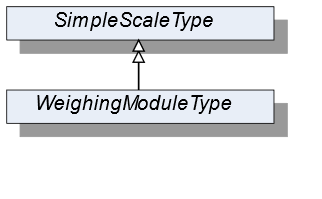
7.50.2 ObjectType Definition
| Attribute | Value | ||||
| BrowseName | WeighingModuleType | ||||
| IsAbstract | False | ||||
| References | NodeClass | BrowseName | DataType | TypeDefinition | ModellingRule |
|---|---|---|---|---|---|
| Subtype of the SimpleScaleType | |||||
| Conformace Units | |||||
|---|---|---|---|---|---|
| Scales WeighingBridge |
7.50.3 ObjectType Description
No additional properties exist.
7.51 MaterialType Definition
7.51.1 Overview
The MaterialType defines the structure of an Object of the MaterialType. Figure 62 shows the hierarchical structure and details of the composition. It is formally defined in Table 136.
An Object of the MaterialType represents a material. It defines additional properties required for managing materials (for example as part of a vehicle product or in a recipe).
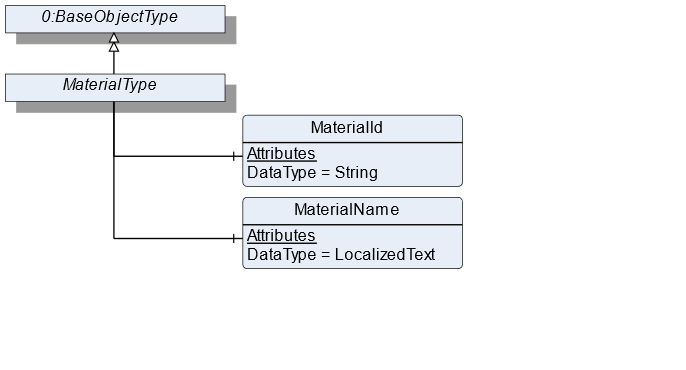
7.51.2 ObjectType Definition
| Attribute | Value | ||||
| BrowseName | MaterialType | ||||
| IsAbstract | False | ||||
| References | NodeClass | BrowseName | DataType | TypeDefinition | ModellingRule |
|---|---|---|---|---|---|
| Subtype of the BaseObjectType defined in OPC 10000-5 | |||||
| 0:HasComponent | Variable | MaterialId | 0:String | BaseDataVariableType | Mandatory |
| 0:HasComponent | Variable | MaterialName | 0:LocalizedText | BaseDataVariableType | Mandatory |
| Conformance Units | |||||
|---|---|---|---|---|---|
| Scales RecipeScale |
7.51.3 ObjectType Description
MaterialId defines a unique identifier for the material.
MaterialName defines a user-readable name of the material.
7.52 FloatingStatisticType Definition
7.52.1 Overview
The FloatingStatisticType defines the structure of an Object of the FloatingStatisticType. Figure 63 shows the hierarchical structure and the details of the composition. It is formally defined in Table 137.
The FloatingStatisticType is a subtype of the StatisticType and also a container for the different statistic values. All Variables are optional so that the statistics can be instantiated in an application-specific way. The FloatingStatisticType is not used directly in the information model but should be used for application-specific statistics. Unlike the StatisticType, the statistic behind the FloatingStatisticType is not time-based, but contains the last NumberOfValues values.
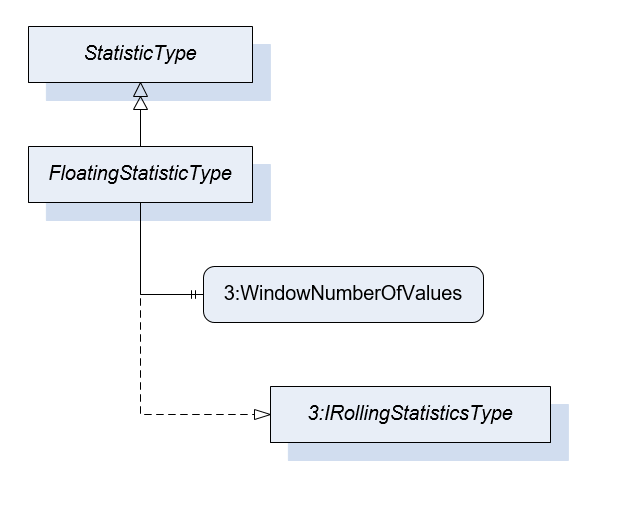
7.52.2 ObjectType Definition
| Attribute | Value | ||||
| BrowseName | FloatingStatisticType | ||||
| IsAbstract | False | ||||
| References | NodeClass | BrowseName | DataType | TypeDefinition | ModellingRule |
|---|---|---|---|---|---|
| Subtype of the StatisticType | |||||
| 0:HasProperty | Variable | 3:WindowNumberOfValues | UInt32 | 0:PropertyType | Mandatory |
| 0:HasInterface | ObjectType | 3:IRollingStatisticsType | |||
| Conformance Units | |||||
|---|---|---|---|---|---|
| Scales ScaleDeviceType |
7.52.3 ObjectType Description
WindowNumberOfValues defines the number of values that are considered for this floating statistic.
7.53 TotalizerType Definition
7.53.1 Overview
The TotalizerType defines the structure of an Object of the TotalizerType. Figure 64 shows the hierarchical structure and details of the composition. It is formally defined in Table 138.
An Object of the TotalizerType contains the sum of the last measurement results (TotalizedValue). Additionally, it defines a Method to reset the totalizer and the addition of the result starts with zero.
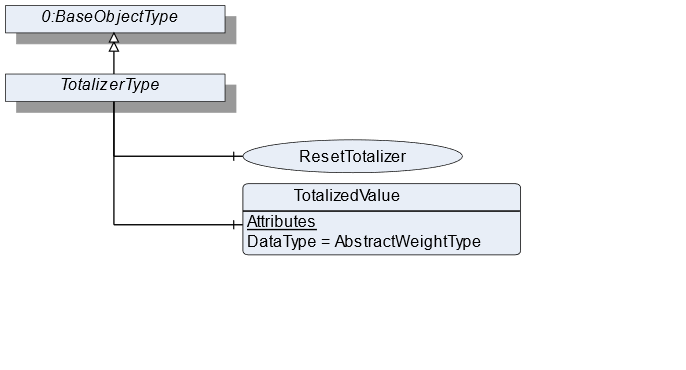
7.53.2 ObjectType Definition
| Attribute | Value | ||||
| BrowseName | TotalizerType | ||||
| IsAbstract | False | ||||
| References | NodeClass | BrowseName | DataType | TypeDefinition | ModellingRule |
|---|---|---|---|---|---|
| Subtype of the BaseObjectType defined in OPC 10000-5 | |||||
| 0:HasComponent | Method | ResetTotalizer | Optional | ||
| 0:HasComponent | Variable | TotalizedValue | AbstractWeightType | MeasuredItemType | Mandatory |
| Conformance Units | |||||
|---|---|---|---|---|---|
| Scales ContinuousScale |
7.53.3 ObjectType Description
TotalizedValue defines a summed up/totalized volume within a period of time.
7.53.4 Method ResetTotalizer
Resets the TotalizedValue of this totalizer Object. Only useful if the reset is not related to a period of time (e.g., over 1h).
Signature
	ResetTotalizer(
	);