
B.3.12 Example 9
The ninth example provides a further illustration for a request in which the AddressSpace is restricted by a Server defined View. This request is similar to the second example except that some of the requested nodes are expressed in terms of a relative path. It is important to note that the ContentFilter is the same, only the View description would be specified as "View1".
Example 9: Get PersonType.LastName, AnimalType.Name where a person has a child or (a pet is of type cat and has a feeding schedule) limited by the AddressSpace in View1.
Table B.35 describes the NodeTypeDescription parameters used in the example.
| Type Definition Node | Include Subtypes | QueryDataDescription | ||||
|---|---|---|---|---|---|---|
| Relative Path | Attribute | Index Range | ||||
| PersonType | FALSE | ".NodeId" | value | N/A | ||
| <12:HasChild>12:PersonType<12:HasAnimal>12:AnimalType.NodeId | value | N/A | ||||
| <12:HasChild> | value | N/A | ||||
<12:HasChild>12:PersonType <12:HasAnimal> | value | N/A | ||||
| PersonType | FALSE | ".12:LastName" | value | N/A | ||
| <12:HasAnimal>12:AnimalType. 12:Name | value | N/A | ||||
| AnimalType | TRUE | ".12:name" | value | N/A | ||
The corresponding ContentFilter is illustrated in Figure B.13
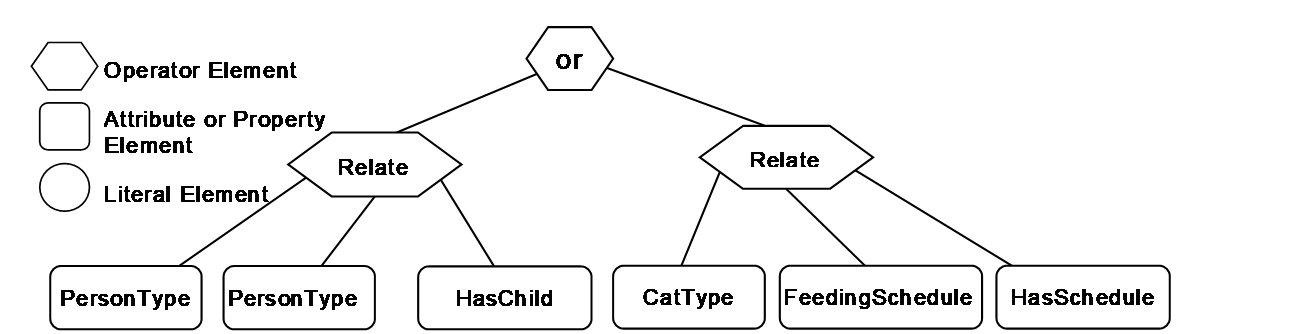
Table B.36 describes the elements, operators and operands used in the example.
| Element[] | Operator | Operand[0] | Operand[1] | Operand[2] | Operand[3] |
|---|---|---|---|---|---|
| 0 | Or | ElementOperand=1 | ElementOperand = 2 | ||
| 1 | RelatedTo | AttributeOperand = NodeId: 12:PersonType, BrowsePath ".", Attribute: NodeId | AttributeOperand = NodeId: 12:PersonType, BrowsePath ".", Attribute: NodeId | AttributeOperand = NodeId: 12:HasChild, BrowsePath ".", Attribute: NodeId | LiteralOperand = '1' |
| 2 | RelatedTo | AttributeOperand = NodeId: 12:CatType, BrowsePath ".", Attribute: NodeId | AttributeOperand = NodeId: 12:FeedingScheduleType, BrowsePath ".", Attribute: NodeId | AttributeOperand = NodeId: 12:HasSchedule, BrowsePath ".", Attribute: NodeId | LiteralOperand = '1' |
The results from this Query would contain the QueryDataSets shown in Table B.37. If this is compared to the result set from example 2, the Pet Nodes are included in the list, even though they are outside of the View. This is possible since the name referenced via the relative path and the root Node is in the View.
| NodeId | TypeDefinition NodeId | RelativePath | Value |
|---|---|---|---|
| 12:30 (Jfamily1) | PersonType | . 12:LastName | Jones |
| <12:HasAnimal>12:AnimalType. 12:Name | Rosemary | ||
| <12:HasAnimal>12:AnimalType. 12:Name | Basil |
______________