
B.3 Complex Examples of Query Filters
B.3.1 Overview
These query examples illustrate complex filters. The following conventions apply to these examples with regard to Attribute operands (for a definition of these operands, see 7.7.4).
AttributeOperand: Refers to a Node, an Attribute of a Node or the Value Attribute of a Property associated with a Node. In the examples character names of ExpandedNodeId are used instead of an actual ExpandedNodeId, this also applies to Attribute Ids.
The string representation of relative paths is used instead of the actual structure.
The NamespaceIndex used in all examples is 12 (it could just as easily have been 4 or 23 or any value). For more information about NamespaceIndex, see OPC 10000-3. The use of the NamespaceIndex illustrates that the information model being used in the examples is not a model defined by this document, but one created for the examples.
B.3.2 Used type model
The following examples use the type model described below. All Property values are assumed to be string unless otherwise noted
New Reference types:
"HasChild" derived from HierarchicalReference.
"HasAnimal" derived from HierarchicalReference.
"HasPet" derived from HasAnimal.
"HasFarmAnimal" derived from HasAnimal.
"HasSchedule" derived from HierarchicalReference.
PersonType derived from BaseObjectType adds:
| HasProperty "LastName". | |
| HasProperty "FirstName". | |
| HasProperty "StreetAddress". | |
| HasProperty "City". | |
| HasProperty "ZipCode". | |
| May have HasChild reference to a node of type PersonType. | |
| May have HasAnimal reference to a node of type AnimalType (or a subtype of this Reference type). |
AnimalType derived from BaseObjectType adds:
| May have HasSchedule reference to a node of type FeedingScheduleType. | |
| HasProperty "Name". |
DogType derived from AnimalType adds:
| HasProperty "NickName". | |
| HasProperty "DogBreed". | |
| HasProperty "License". |
CatType derived from AnimalType adds:
| HasProperty "NickName". | |
| HasProperty "CatBreed". |
PigType derived from AnimalType adds:
| HasProperty "PigBreed". |
ScheduleType derived from BaseObjectType adds:
| HasProperty "Period". |
FeedingScheduleType derived from ScheduleType adds:
| HasProperty "Food". | |
| HasProperty "Amount" (Stored as an Int32). |
AreaType derived from BaseObjectType is just a simple Folder and contains no Properties.
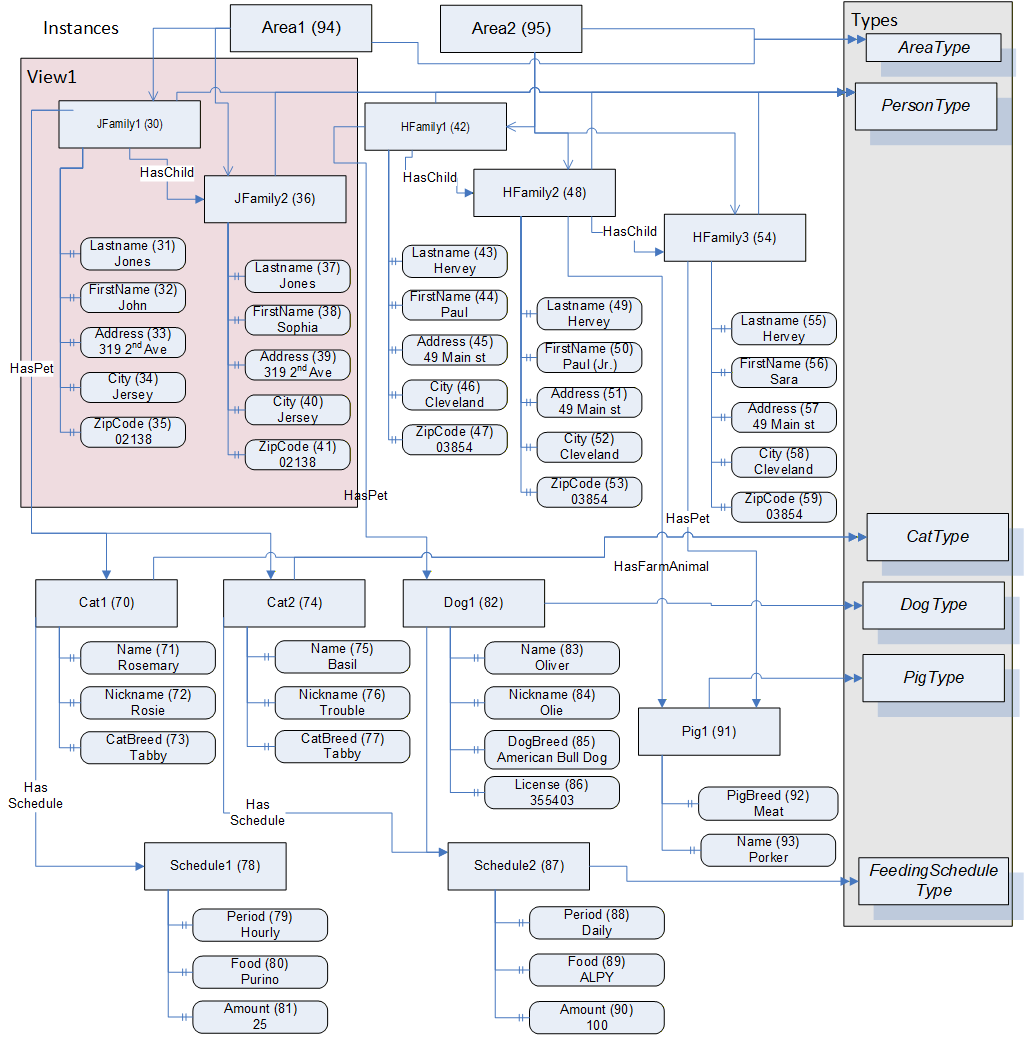
This example type system is shown in Figure B.3. In this Figure, the OPC UA notation is used for all References to ObjectTypes, Variables, Properties and subtypes. Additionally, supported References are contained in an inner box. The actual references only exist in the instances, thus, no connections to other Objects are shown in the Figure and they are subtypes of the listed Reference.
A corresponding example set of instances is shown in Figure B.4. These instances include a type Reference for Objects. Properties also have type References, but the References are omitted for simplicity. The name of the Object is provided in the box and a numeric instance NodeId in brackets. Standard ReferenceTypes use the OPC UA notation, custom ReferenceTypes are listed as a named Reference. For Properties, the BrowseName, NodeId, and Value are shown. The Nodes that are included in a View (View1) are enclosed in the coloured box. Two Area nodes are included for grouping of the existing person nodes. All custom nodes are defined in namespace 12 which is not included in Figure B.4.
B.3.3 Example Notes
For all of the examples in 7.7.4, the type definition Node is listed in its symbolic form, in the actual call it would be the ExpandedNodeId assigned to the Node. The Attribute is the symbolic name of the Attribute, in the actual call they would be translated to the IntegerId of the Attribute. Also in all of the examples the BrowseName is included in the result table for clarity; normally this would not be returned.
All of the examples include the following items:
an English description of the object of the query;
an SQL like description of the query;
a table that has a NodeTypeDescription of the items that are to be returned;
a figure illustrating the query filter;
a table describing the content filter;
a table describing the resulting dataset.
The examples assume namespace 12 is the namespace for all of the custom definitions described for the examples.
B.3.4 Example 1
This example requests a simple layered filter, a person has a pet and the pet has a schedule.
Example 1: Get PersonType.LastName, AnimalType.Name, ScheduleType.Period where the Person Has a Pet and that Pet Has a Schedule.
The NodeTypeDescription parameters used in the example are described in Table B.10.
| Type Definition Node | Include Subtypes | QueryDataDescription | ||
|---|---|---|---|---|
| Relative Path | Attribute | Index Range | ||
| PersonType | FALSE | ".12:LastName" | value | N/A |
| "<12:HasPet>12:AnimalType. 12:Name" | value | N/A | ||
| "<12:HasPet>12:AnimalType<12:HasSchedule> 12:Schedule. 12:Period" | value | N/A | ||
The corresponding ContentFilter is illustrated in Figure B.5.
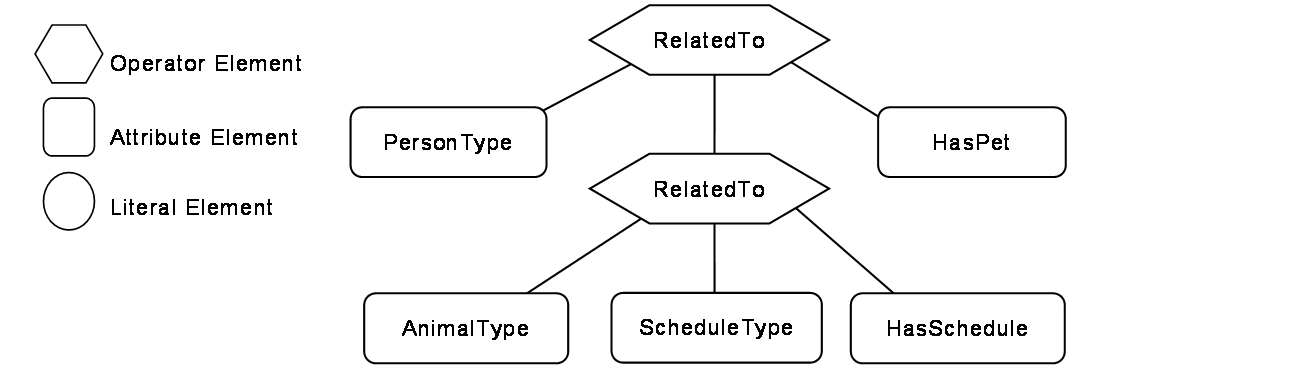
Table B.11 describes the ContentFilter elements, operators and operands used in the example.
| Element[] | Operator | Operand[0] | Operand[1] | Operand[2] | Operand[3] |
|---|---|---|---|---|---|
| 1 | RelatedTo | AttributeOperand = NodeId: PersonType, BrowsePath ".", Attribute: NodeId | ElementOperand = 2 | AttributeOperand = NodeId: HasPet, BrowsePath ".", Attribute: NodeId | LiteralOperand = '1' |
| 2 | RelatedTo | AttributeOperand = NodeId: AnimalType, BrowsePath ".", Attribute: NodeId | AttributeOperand = NodeId: ScheduleType, BrowsePath ".", Attribute: NodeId | AttributeOperand = NodeId: HasSchedule, BrowsePath ".", Attribute: NodeId | LiteralOperand= '1' |
Table B.12 describes the QueryDataSet that results from this query if it were executed against the instances described in Figure B.4
| NodeId | TypeDefinition NodeId | RelativePath | Value |
|---|---|---|---|
| 12:30 (JFamily1) | PersonType | ".12:LastName" | Jones |
| "<12:HasPet>12:AnimalType. 12:Name" | Rosemary | ||
| Basil | |||
| "<12:HasPet>12:AnimalType<12:HasSchedule> 12:Schedule.12:Period" | Hourly | ||
| Daily | |||
| 12:42(HFamily1) | PersonType | ".12:LastName" | Hervey |
| "<12:HasPet>12:AnimalType. 12:Name" | Oliver | ||
| "<12:HasPet>12:AnimalType<12:HasSchedule> 12:Schedule.12:Period" | Daily |
The Value column is returned as an array for each Node description, where the order of the items in the array would correspond to the order of the items that were requested for the given Node Type. In Addition, if a single Attribute has multiple values then it would be returned as an array within the larger array, for example in this table Rosemary and Basil would be returned in a array for the .<HasPet>.AnimalType.Name item. They are show as separate rows for ease of viewing. The actual value array for JFamily1 would be ("Jones", {"RoseMary", "Basil"}, {"Hourly", "Daily"})
B.3.5 Example 2
The second example illustrates receiving a list of disjoint Nodes and also illustrates that an array of results can be received.
Example 2: Get PersonType.LastName, AnimalType.Name where a person has a child or (a pet is of type cat and has a feeding schedule).
The NodeTypeDescription parameters used in the example are described in Table B.13.
| Type Definition Node | Include Subtypes | QueryDataDescription | ||
|---|---|---|---|---|
| Relative Path | Attribute | Index Range | ||
| PersonType | FALSE | ".12:LastName" | Value | N/A |
| AnimalType | TRUE | ".12:Name" | Value | N/A |
The corresponding ContentFilter is illustrated in Figure B.6.
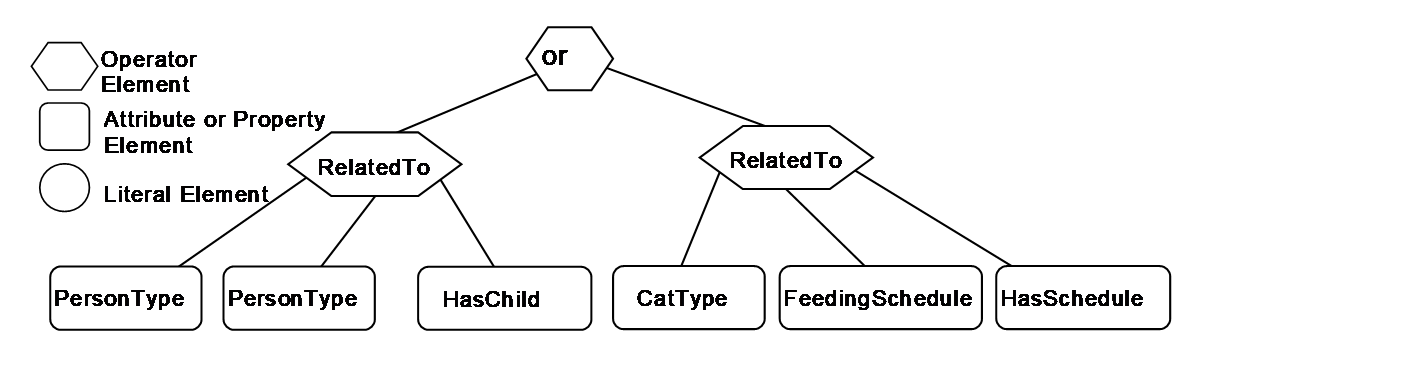
Table B.14 describes the elements, operators and operands used in the example. It is worth noting that a CatType is a subtype of AnimalType.
| Element[] | Operator | Operand[0] | Operand[1] | Operand[2] | Operand[3] |
|---|---|---|---|---|---|
| 0 | Or | ElementOperand=1 | ElementOperand = 2 | ||
| 1 | RelatedTo | AttributeOperand = NodeId: PersonType, BrowsePath ".", Attribute: NodeId | AttributeOperand = NodeId: PersonType, BrowsePath ".", Attribute: NodeId | AttributeOperand = NodeId: HasChild, BrowsePath ".", Attribute: NodeId | LiteralOperand = '1' |
| 2 | RelatedTo | AttributeOperand = NodeId: CatType, BrowsePath ".", Attribute: NodeId | AttributeOperand = NodeId: FeedingScheduleType, BrowsePath ".", Attribute: NodeId | AttributeOperand = NodeId: HasSchedule, BrowsePath ".", Attribute: NodeId | LiteralOperand = '1' |
The results from this query would contain the QueryDataSets shown in Table B.15.
| NodeId | TypeDefinition NodeId | RelativePath | Value |
|---|---|---|---|
| 12:30 (Jfamily1) | PersonType | . 12:LastName | Jones |
| 12:42 (HFamily1) | PersonType | . 12:LastName | Hervey |
| 12:48 (HFamily2) | PersonType | . 12:LastName | Hervey |
| 12:70 (Cat1) | CatType | . 12:Name | Rosemary |
| 12:74 (Cat2) | CatType | . 12:Name | Basil |
B.3.6 Example 3
The third example provides a more complex Query in which the results are filtered on multiple criteria.
Example 3: Get PersonType.LastName, AnimalType.Name, ScheduleType.Period where a person has a pet and the animal has a feeding schedule and the person has a Zipcode = '02138' and (the Schedule.Period is Daily or Hourly) and Amount to feed is > 10.
Table B.16 describes the NodeTypeDescription parameters used in the example.
| Type Definition Node | Include Subtypes | QueryDataDescription | ||
|---|---|---|---|---|
| RelativePath | Attribute | Index Range | ||
| PersonType | FALSE | "12:LastName" | Value | N/A |
| "<12:HasPet>12:AnimalType. 12:Name" | Value | N/A | ||
| "<12:HasPet>12:AnimalType<12:HasSchedule> 12:FeedingSchedule.Period" | Value | N/A | ||
The corresponding ContentFilter is illustrated in Figure B.7.
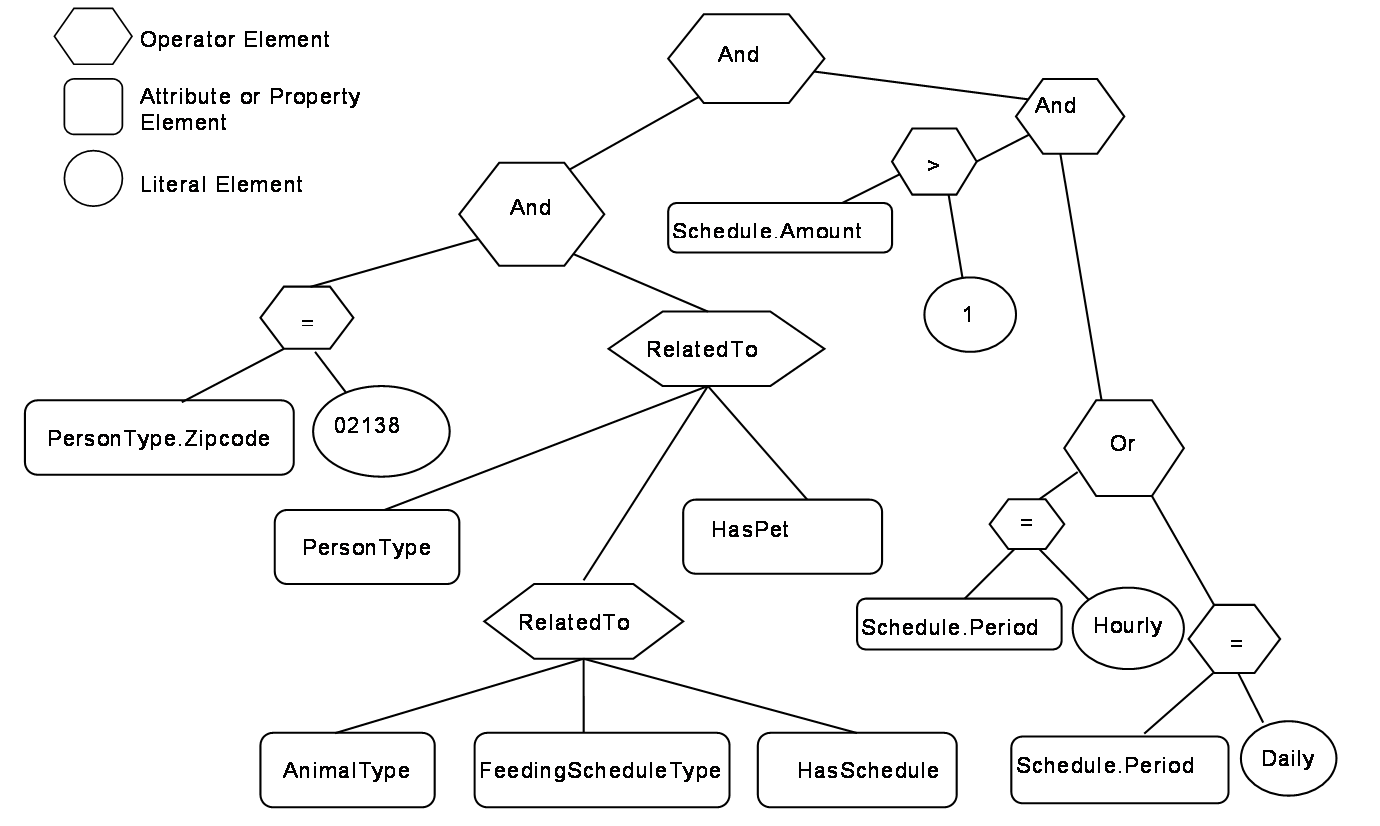
Table B.17 describes the elements, operators and operands used in the example.
| Element[] | Operator | Operand[0] | Operand[1] | Operand[2] | Operand[3] |
|---|---|---|---|---|---|
| 0 | And | Element Operand= 1 | ElementOperand = 2 | ||
| 1 | And | ElementOperand = 4 | ElementOperand = 6 | ||
| 2 | And | ElementOperand = 3 | ElementOperand = 9 | ||
| 3 | Or | ElementOperand = 7 | ElementOperand = 8 | ||
| 4 | RelatedTo | AttributeOperand = NodeId: 12:PersonType, BrowsePath ".", Attribute: NodeId | ElementOperand = 5 | AttributeOperand = NodeId: 12:HasPet, BrowsePath ".", Attribute: NodeId | LiteralOperand = '1' |
| 5 | RelatedTo | AttributeOperand = Node: 12:AnilmalType, BrowsePath ".", Attribute: NodeId Alias: AT | AttributeOperand = NodeId: 12:FeedingScheduleType, BrowsePath ".", Attribute: NodeId Alias: FST | AttributeOperand = NodeId: 12:HasSchedule, BrowsePath ".", Attribute: NodeId | LiteralOperand = '1' |
| 6 | Equals | AttributeOperand = NodeId: 12:PersonType BrowsePath 12:Zipcode ".", Attribute: Value | LiteralOperand = '02138' | ||
| 7 | Equals | AttributeOperand = NodeId: 12:PersonType BrowsePath "12:HasPet>12:AnimalType<12:HasSchedule>12: FeedingSchedule/12:Period", Attribute: Value Alias: FST | LiteralOperand = 'Daily' | ||
| 8 | Equals | AttributeOperand = NodeId: 12:PersonType BrowsePath "12:HasPet>12:AnimalType<12:HasSchedule>12: FeedingSchedule/12:Period", Attribute: Value Alias: FST | LiteralOperand = 'Hourly' | ||
| 9 | Greater Than | AttributeOperand = NodeId: 12:PersonType BrowsePath "12:HasPet>12:AnimalType<12:HasSchedule>12: FeedingSchedule/12:Amount", Attribute: Value Alias: FST | ElementOperand = 10 | ||
| 10 | Cast | LiteralOperand = 10 | AttributeOperand = NodeId: Int32, BrowsePath ".", Attribute: NodeId |
The results from this query would contain the QueryDataSets shown in Table B.18.
| NodeId | TypeDefinition NodeId | RelativePath | Value |
|---|---|---|---|
| 12:30 (JFamily1) | PersonType | ".12:LastName" | Jones |
| "<12:HasPet>12:PersonType. 12:Name" | Rosemary | ||
| Basil | |||
| "<12:HasPet>12:AnimalType<12:HasSchedule>12:FeedingSchedule. 12:Period" | Hourly | ||
| Daily |
B.3.7 Example 4
The fourth example provides an illustration of the Hop parameter that is part of the RelatedTo Operator.
Example 4: Get PersonType.LastName where a person has a child who has a child who has a pet.
Table B.19 describes the NodeTypeDescription parameters used in the example.
| Type Definition Node | Include Subtypes | QueryDataDescription | ||
|---|---|---|---|---|
| Relative Path | Attribute | Index Range | ||
| PersonType | FALSE | ".12:LastName" | value | N/A |
The corresponding ContentFilter is illustrated in Figure B.8.
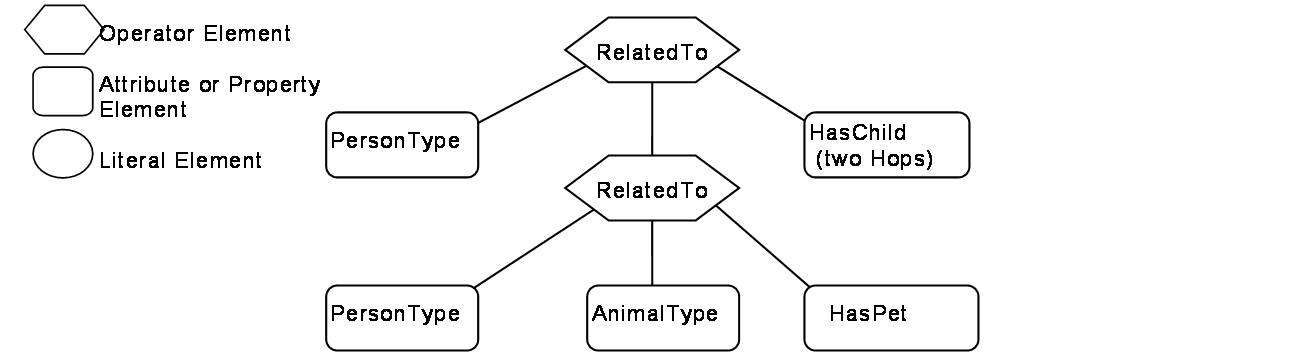
Table B.20 describes the elements, operators and operands used in the example.
| Element[] | Operator | Operand[0] | Operand[1] | Operand[2] | Operand[3] |
|---|---|---|---|---|---|
| 0 | RelatedTo | AttributeOperand = NodeId: 12:PersonType, BrowsePath ".", Attribute: NodeId | Element Operand = 1 | AttributeOperand = NodeId: 12:HasChild, BrowsePath ".", Attribute: NodeId | LiteralOperand = '2' |
| 1 | RelatedTo | AttributeOperand = NodeId: 12:PersonType, BrowsePath ".", Attribute: NodeId | AttributeOperand = NodeId: 12:AnimalType, BrowsePath ".", Attribute: NodeId | AttributeOperand = NodeId: 12:HasPet, BrowsePath ".", Attribute: NodeId | LiteralOperand = '1' |
The results from this query would contain the QueryDataSets shown in Table B.21. It is worth noting that the pig "Pig1" is referenced as a pet by Sara, but is referenced as a farm animal by Sara's parent Paul.
| NodeId | TypeDefinition NodeId | RelativePath | Value |
|---|---|---|---|
| 12:42 (HFamily1) | PersonType | ".12:LastName" | Hervey |
B.3.8 Example 5
The fifth example provides an illustration of the use of alias.
Example 5: Get the last names of children that have the same first name as a parent of theirs
Table B.22 describes the NodeTypeDescription parameters used in the example.
| Type Definition Node | Include Subtypes | QueryDataDescription | ||
| Relative Path | Attribute | Index Range | ||
| PersonType | FALSE | "<12:HasChild>12:PersonType. 12:LastName" | Value | N/A |
The corresponding ContentFilter is illustrated in Figure B.9.
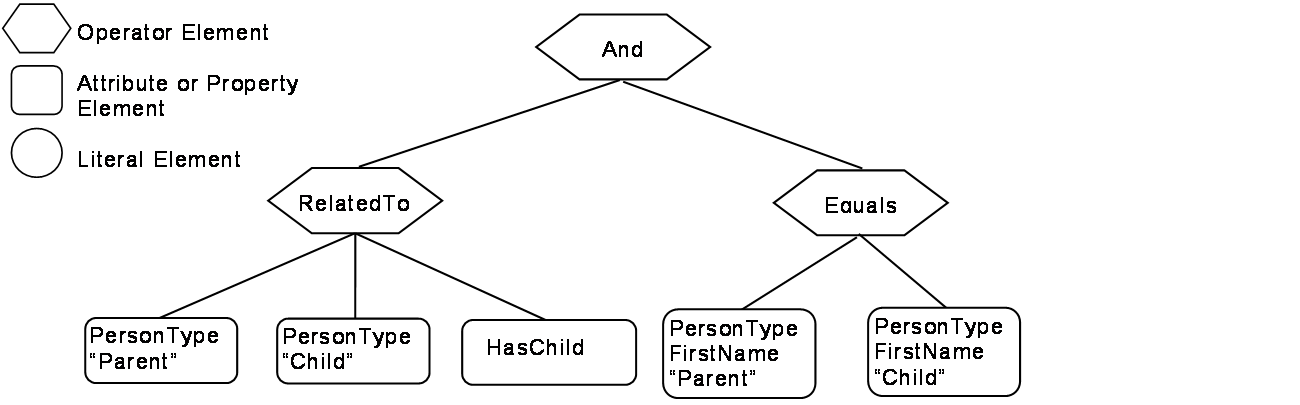
In this example, one Reference to PersonType is aliased to "Parent" and another Reference to PersonType is aliased to "Child". The value of Parent.firstName and Child.firstName are then compared. Table B.23 describes the elements, operators and operands used in the example.
| Element[] | Operator | Operand[0] | Operand[1] | Operand[2] | Operand[3} |
|---|---|---|---|---|---|
| 0 | And | ElementOperand = 1 | ElementOperand = 2 | ||
| 1 | RelatedTo | AttributeOperand = NodeId: 12:PersonType, BrowsePath ".", Attribute: NodeId, Alias: "Parent" | AttributeOperand = NodeId: 12:PersonType, BrowsePath ".", Attribute: NodeId, Alias: "Child" | AttributeOperand = NodeId: 12:HasChild, Attribute: NodeId | LiteralOperand = "1" |
| 2 | Equals | AttributeOperand = NodeId: 12:PersonType, BrowsePath "/12:FirstName", Attribute: Value, Alias: "Parent" | AttributeOperand = NodeId: 12:PersonType, BrowsePath "/12:FirstName", Attribute: Value, Alias: "Child" |
The results from this query would contain the QueryDataSets shown in Table B.24.
| NodeId | TypeDefinition NodeId | RelativePath | Value |
|---|---|---|---|
| 12:42 (HFamily1) | PersonType | "<12:HasChild>12:PersonType.12:LastName" | Hervey |
B.3.9 Example 6
The sixth example provides an illustration a different type of request, one in which the Client is interested in displaying part of the AddressSpace of the Server. This request includes listing a Reference as something that is to be returned.
Example 6: Get PersonType.NodeId, AnimalType.NodeId, PersonType.HasChild Reference, PersonType.HasAnimal Reference where a person has a child who has a Animal.
Table B.25 describes the NodeTypeDescription parameters used in the example.
| Type Definition Node | Include Subtypes | QueryDataDescription | ||
|---|---|---|---|---|
| Relative Path | Attribute | Index Range | ||
| PersonType | FALSE | ".12:NodeId" | value | N/A |
| <12:HasChild>12:PersonType<12:HasAnimal>12:AnimalType.NodeId | value | N/A | ||
| <12:HasChild> | value | N/A | ||
| <12:HasChild>12:PersonType<12:HasAnimal> | value | N/A | ||
The corresponding ContentFilter is illustrated in Figure B.10.
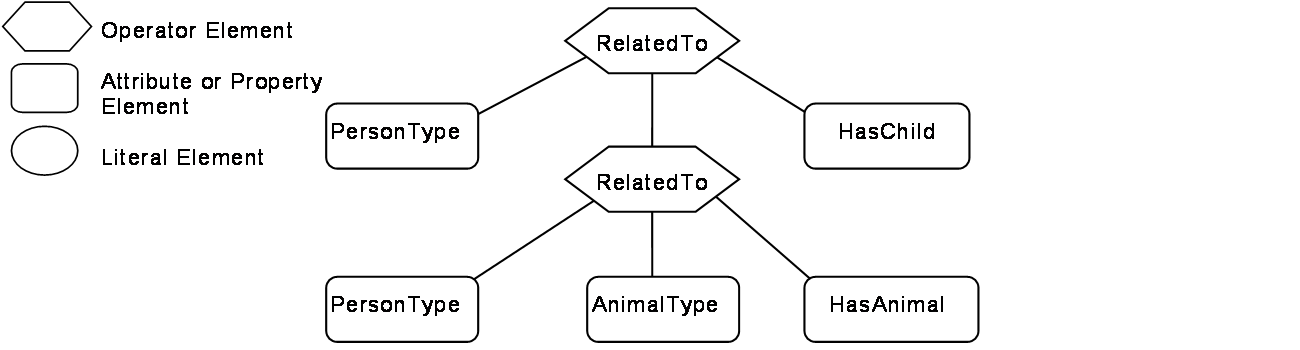
Table B.26 describes the elements, operators and operands used in the example.
| Element[] | Operator | Operand[0] | Operand[1] | Operand[2] | Operand[3] |
|---|---|---|---|---|---|
| 0 | RelatedTo | AttributeOperand = NodeId: 12:PersonType, BrowsePath ".", Attribute: NodeId | ElementOperand = 1 | AttributeOperand = Node: 12:HasChild, BrowsePath ".",Attribute:NodeId | LiteralOperand = '1' |
| 1 | RelatedTo | AttributeOperand = NodeId: 12:PersonType, BrowsePath ".", Attribute: NodeId | AttributeOperand = NodeId: 12:AnimalType, BrowsePath ".", Attribute: NodeId | AttributeOperand = NodeId: 12:HasAnimal, BrowsePath ".", Attribute: NodeId | LiteralOperand = '1' |
The results from this query would contain the QueryDataSets shown in Table B.27.
| NodeId | TypeDefinition NodeId | RelativePath | Value |
|---|---|---|---|
| 12:42 (HFamily1) | PersonType | ".NodeId" | 12:42 (HFamily1) |
<12:HasChild>12:PersonType<12:HasAnimal> 12:AnimalType.NodeId | 12:91 (Pig1) | ||
| <12:HasChild> | HasChild ReferenceDescription | ||
| <12:HasChild>12:PersonType<12:HasAnimal> | HasFarmAnimal ReferenceDescription | ||
| 12:48 (HFamily2) | PersonType | ".NodeId" | 12:48 (HFamily2) |
<12:HasChild>12:PersonType<12:HasAnimal> 12:AnimalType.NodeId | 12:91 (Pig1) | ||
| <12:HasChild> | HasChild ReferenceDescription | ||
| <12:HasChild>12:PersonType<12:HasAnimal> | HasPet ReferenceDescription |
Table B.28 provides an example of the same QueryDataSet as shown in Table B.27 without any additional fields and minimal symbolic Ids. There is an entry for each requested Attribute, in the cases where an Attribute would return multiple entries the entries are separated by comas. If a structure is being returned then the structure is enclosed in square brackets. In the case of a ReferenceDescription the structure contains a structure and DisplayName and BrowseName are assumed to be the same and defined in Figure B.4.
| NodeId | TypeDefinition NodeId | Value |
|---|---|---|
| 12:42 | PersonType | 12:42 |
| 12:91 | ||
| [HasChild,TRUE,[48,HFamily2,HFamily2,PersonType]], | ||
| [HasFarmAnimal,TRUE[91,Pig1,Pig1,PigType] | ||
| 12:48 | PersonType | 12:54 |
| 12:91 | ||
| [HasChild,TRUE,[ 54,HFamily3,HFamily3,PersonType]] | ||
| [HasPet, TRUE,[ 91,Pig1,Pig1,PigType]] |
The PersonType, HasChild, PigType, HasPet, HasFarmAnimal identifiers used in the above table would be translated to actual ExpandedNodeId.
B.3.10 Example 7
The seventh example provides an illustration a request in which a Client wants to display part of the AddressSpace based on a starting point that was obtained via browsing. This request includes listing References as something that is to be returned. In this case the Person Browsed to Area2 and wanted to Query for information below this starting point.
Example 7: Get PersonType.NodeId, AnimalType.NodeId, PersonType.HasChild Reference, PersonType.HasAnimal Reference where the person is in Area2 (Cleveland nodes) and the person has a child.
Table B.29 describes the NodeTypeDescription parameters used in the example.
| Type Definition Node | Include Subtypes | QueryDataDescription | ||
|---|---|---|---|---|
| Relative Path | Attribute | Index Range | ||
| PersonType | FALSE | ".NodeId" | Value | N/A |
| <12:HasChild> | Value | N/A | ||
| <12:HasAnimal>NodeId | Value | N/A | ||
| <12:HasAnimal> | Value | N/A | ||
The corresponding ContentFilter is illustrated in Figure B.11. Note that the Browse call would typically return a NodeId, thus the first filter is for the BaseObjectType with a NodeId of 95 where 95 is the NodeId associated with the Area2 node, all Nodes descend from BaseObjectType, and NodeId is a base Property so this filter will work for all Queries of this nature.
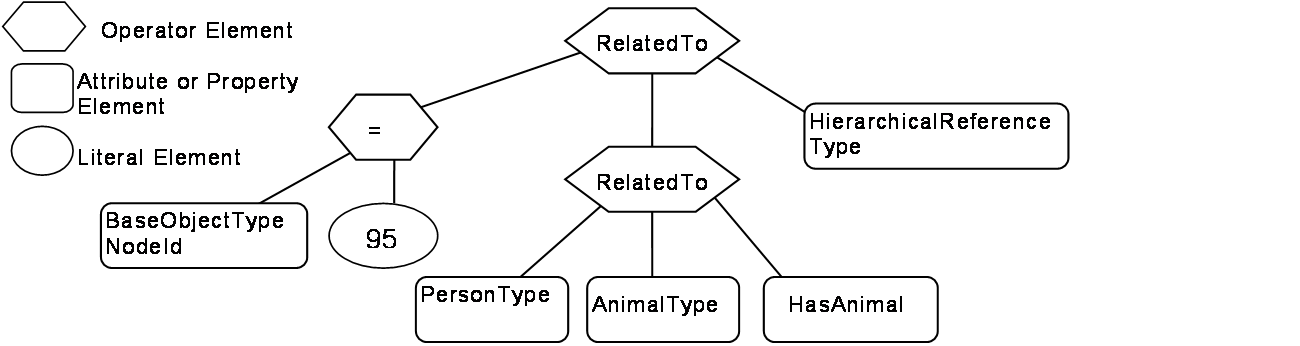
Table B.30 describes the elements, operators and operands used in the example.
| Element[] | Operator | Operand[0] | Operand[1] | Operand[2] | Operand[3] |
|---|---|---|---|---|---|
| 0 | RelatedTo | ElementOperand = 2 | ElementOperand = 1 | AttributeOperand = Node:HierachicalReference, BrowsePath ".", Attribute:NodeId | LiteralOperand = '1' |
| 1 | RelatedTo | AttributeOperand = NodeId: 12:PersonType, BrowsePath ".", Attribute: NodeId | AttributeOperand = NodeId: 12:PersonType, BrowsePath ".", Attribute: NodeId | AttributeOperand = NodeId: 12:HasChild, BrowsePath ".", Attribute: NodeId | LiteralOperand = '1' |
| 2 | Equals | AttributeOperand = NodeId: BaseObjectType, BrowsePath ".", Attribute: NodeId, | LiteralOperand = '95 |
The results from this Query would contain the QueryDataSets shown in Table B.31.
| NodeId | TypeDefinition NodeId | RelativePath | Value |
|---|---|---|---|
| 12:42 (HFamily1) | PersonType | ".NodeId" | 12:42 (HFamily1) |
| <12:HasChild> | HasChild ReferenceDescription | ||
| <12:HasAnimal>12:AnimalType.NodeId | NULL | ||
| <12:HasAnimal> | HasFarmAnimal ReferenceDescription | ||
| 12:48 (HFamily2) | PersonType | ".NodeId" | 12:48 (HFamily2) |
| <12:HasChild> | HasChild ReferenceDescription | ||
| <12:HasAnimal>12:AnimalType.NodeId | 12:91 (Pig1) | ||
| <12:HasAnimal> | HasFarmAnimal ReferenceDescription |
B.3.11 Example 8
The eighth example provides an illustration of a request in which the AddressSpace is restricted by a Server defined View. This request is the same as in the second example which illustrates receiving a list of disjoint Nodes and also illustrates that an array of results can be received. It is important to note that all of the parameters and the ContentFilter are the same, only the View description would be specified as "View1".
Example 8: Get PersonType.LastName, AnimalType.Name where a person has a child or (a pet is of type cat and has a feeding schedule) limited by the AddressSpace in View1.
The NodeTypeDescription parameters used in the example are described in Table B.32
| Type Definition Node | Include Subtypes | QueryDataDescription | ||
|---|---|---|---|---|
| Relative Path | Attribute | Index Range | ||
| PersonType | FALSE | ".12:LastName" | value | N/A |
| AnimalType | TRUE | "12.Name" | value | N/A |
The corresponding ContentFilter is illustrated in Figure B.12.
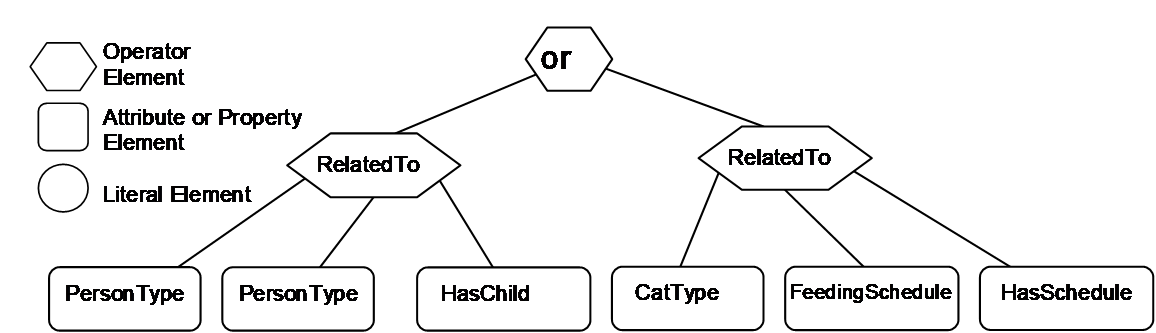
Table B.33 describes the elements, operators and operands used in the example. It is worth noting that a CatType is a subtype of AnimalType.
| Element[] | Operator | Operand[0] | Operand[1] | Operand[2] | Operand[3] |
|---|---|---|---|---|---|
| 0 | Or | ElementOperand=1 | ElementOperand = 2 | ||
| 1 | RelatedTo | AttributeOperand = NodeId: 12:PersonType, BrowsePath ".", Attribute: NodeId | AttributeOperand = NodeId: 12:PersonType, BrowsePath ".", Attribute: NodeId | AttributeOperand = NodeId: 12:HasChild, BrowsePath ".", Attribute: NodeId | LiteralOperand = '1' |
| 2 | RelatedTo | AttributeOperand = NodeId: 12:CatType, BrowsePath ".", Attribute: NodeId | AttributeOperand = NodeId: 12:FeedingScheduleType, BrowsePath ".", Attribute: NodeId | AttributeOperand = NodeId: 12:HasSchedule, BrowsePath ".", Attribute: NodeId | LiteralOperand = '1' |
The results from this query would contain the QueryDataSets shown in Table B.34. If this is compared to the result set from example 2, the only difference is the omission of the Cat Nodes. These Nodes are not in the View and thus are not included in the result set.
| NodeId | TypeDefinition NodeId | RelativePath | Value |
|---|---|---|---|
| 12:30 (Jfamily1) | Persontype | .12:LastName | Jones |
B.3.12 Example 9
The ninth example provides a further illustration for a request in which the AddressSpace is restricted by a Server defined View. This request is similar to the second example except that some of the requested nodes are expressed in terms of a relative path. It is important to note that the ContentFilter is the same, only the View description would be specified as "View1".
Example 9: Get PersonType.LastName, AnimalType.Name where a person has a child or (a pet is of type cat and has a feeding schedule) limited by the AddressSpace in View1.
Table B.35 describes the NodeTypeDescription parameters used in the example.
| Type Definition Node | Include Subtypes | QueryDataDescription | ||||
|---|---|---|---|---|---|---|
| Relative Path | Attribute | Index Range | ||||
| PersonType | FALSE | ".NodeId" | value | N/A | ||
| <12:HasChild>12:PersonType<12:HasAnimal>12:AnimalType.NodeId | value | N/A | ||||
| <12:HasChild> | value | N/A | ||||
<12:HasChild>12:PersonType <12:HasAnimal> | value | N/A | ||||
| PersonType | FALSE | ".12:LastName" | value | N/A | ||
| <12:HasAnimal>12:AnimalType. 12:Name | value | N/A | ||||
| AnimalType | TRUE | ".12:name" | value | N/A | ||
The corresponding ContentFilter is illustrated in Figure B.13
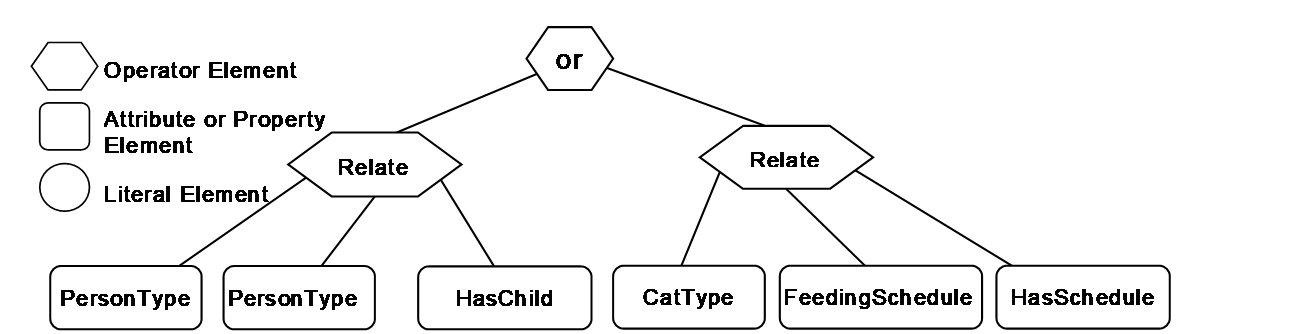
Table B.36 describes the elements, operators and operands used in the example.
| Element[] | Operator | Operand[0] | Operand[1] | Operand[2] | Operand[3] |
|---|---|---|---|---|---|
| 0 | Or | ElementOperand=1 | ElementOperand = 2 | ||
| 1 | RelatedTo | AttributeOperand = NodeId: 12:PersonType, BrowsePath ".", Attribute: NodeId | AttributeOperand = NodeId: 12:PersonType, BrowsePath ".", Attribute: NodeId | AttributeOperand = NodeId: 12:HasChild, BrowsePath ".", Attribute: NodeId | LiteralOperand = '1' |
| 2 | RelatedTo | AttributeOperand = NodeId: 12:CatType, BrowsePath ".", Attribute: NodeId | AttributeOperand = NodeId: 12:FeedingScheduleType, BrowsePath ".", Attribute: NodeId | AttributeOperand = NodeId: 12:HasSchedule, BrowsePath ".", Attribute: NodeId | LiteralOperand = '1' |
The results from this Query would contain the QueryDataSets shown in Table B.37. If this is compared to the result set from example 2, the Pet Nodes are included in the list, even though they are outside of the View. This is possible since the name referenced via the relative path and the root Node is in the View.
| NodeId | TypeDefinition NodeId | RelativePath | Value |
|---|---|---|---|
| 12:30 (Jfamily1) | PersonType | . 12:LastName | Jones |
| <12:HasAnimal>12:AnimalType. 12:Name | Rosemary | ||
| <12:HasAnimal>12:AnimalType. 12:Name | Basil |
______________