D.3.7 ControlGroup examples
D.3.7.1 Overview
ControlGroups can be used for many purposes. They can illustrate related functionality or be used to establish control. Establishing control of a ControlGroup can be done by calling the Method EstablishControl or by using the EstablishControlCmd with the EstablishConnections Method. The following subclauses provide examples of their usage.
D.3.7.2 Example of a simple ControlGroup
Figure D.28 shows the FunctionalEntity for a simple temperature monitor based on the Raspberry Pi Sense HAT (see Figure D.5). The FunctionalEntity provides the output Variable Temperature, indicating the current temperature. It also includes a Variable EngineeringUnits (e.g., °C, °F, °K…). This configuration variable allows the selection of the engineering unit for the Temperature.
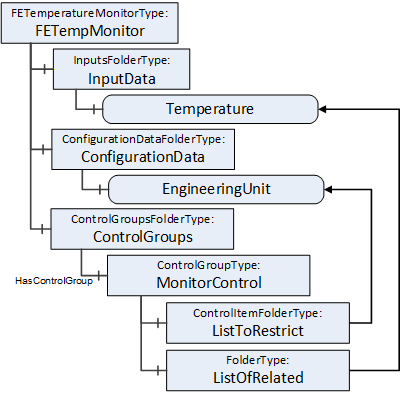
While using the Temperature, the EngineeringUnit for the Temperature should not change. To achieve this behaviour, the ControlGroup MonitorControl is provided. The EngineeringUnit is contained in the ListToRestrict to ensure that changes are restricted to the owner of the ControlGroup. Temperature is contained in the ListOfRelated to indicate that Temperature is part of the ControlGroup.
D.3.7.3 Example of a complex ControlGroup
Assume that the Raspberry Pi (see D.2.2) is used for an automated guided vehicle (AGV) using the Sense HAT and some motors attached through the connectors. Figure D.29 illustrates a sample FunctionalEntity representing this simplified AGV.
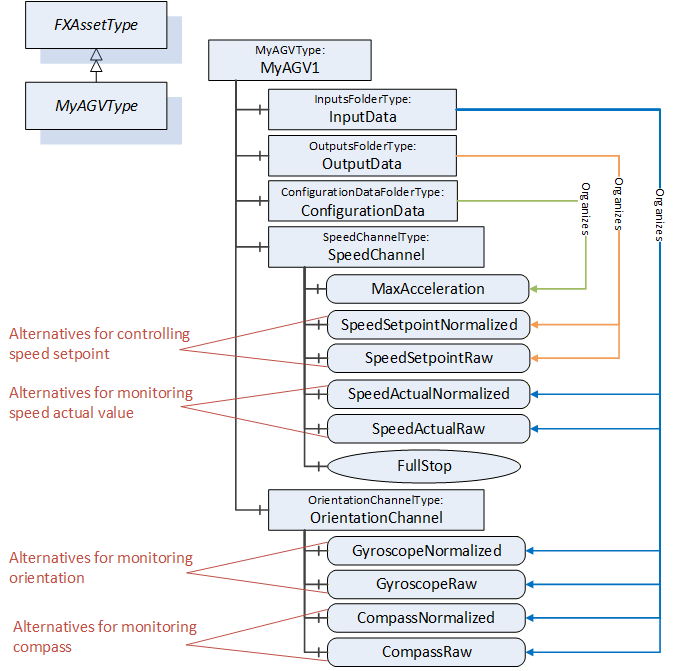
The Information Model offers two alternatives using a normalized value or raw data for controlling SpeedSetpoint and monitoring SpeedActual, Orientation, and Compass. Since both alternatives should not be used at the same time, two ControlGroups, ControlNormalized and ControlRaw, are added to the functional model (see Figure D.30).
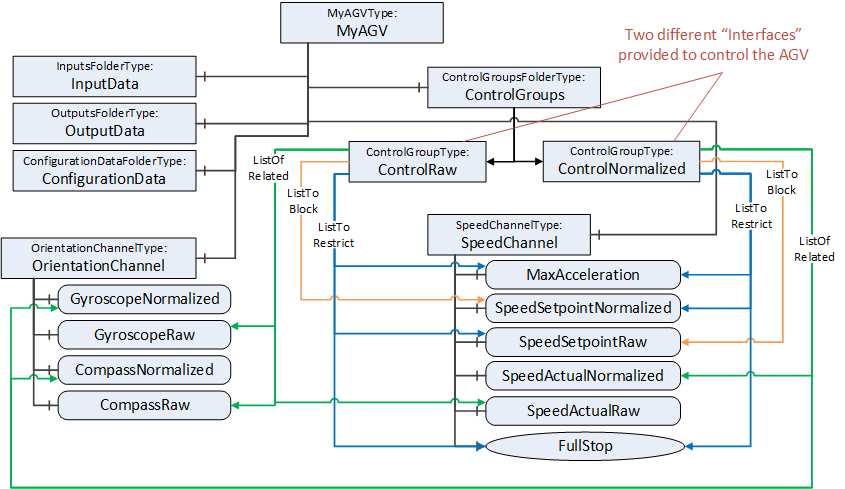
Each of the ControlGroups represents an interface provided by the FunctionalEntity to control and monitor the AGV using normalized or raw data. The interface is represented by the ListToRestrict and ListOfRelated References. By this, the InputData, OutputData, ConfigurationData, and all provided Methods belonging to the interface can be easily determined. The ListToBlock prevents the setting of specific data, for example, SpeedSetpointNormalized, when controlling the AGV with raw data. The ListToRestrict prevents usage of the Method and setting of MaxAcceleration and SpeedSetpoint from anyone except the owner when controlling the AGV.
Since ControlNormalized and ControlRaw share Variables in their ListToRestrict, usage of them at the same time is only possible with the same owner.
D.3.7.4 Using ControlGroups with Connections
ControlGroups can be used with Connections.
This example is an extension of the simple ControlGroup. Assume that the EngineeringUnits of Temperature (see Figure D.28) should not change during the lifetime of a Connection. A connection configuration to achieve this behaviour would establish the control of MonitorControl using the EstablishControlCmd, set the EngineeringUnits with the desired unit (e.g., °F) using the SetConfigurationDataCmd, and reassign control to the ConnectionEndpoint using ReassignControlCmd. Then as long as the connection is established, the EngineeringUnits are locked and cannot be changed.
D.3.7.5 Using ControlGroups to expose functionality.
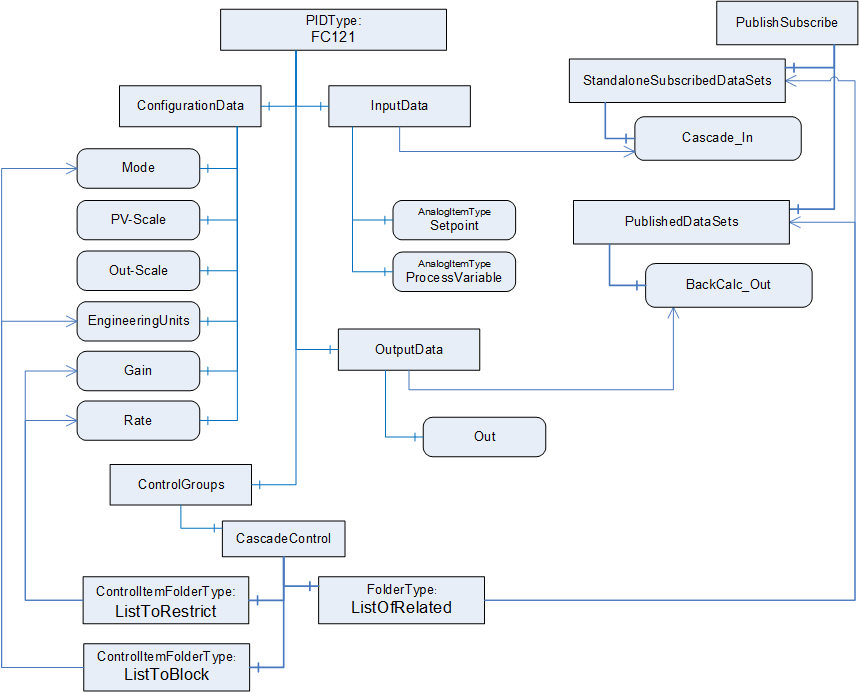
ControlGroups can be used to expose functionality that is required to be used as a group. This example describes a pair of controllers that are part of a cascade control application (see Figure D.31). For a cascade control application, the PID controller is required to get feedback from the other controller as well as providing a setpoint to the other controller. This requires bidirectional communication.
In this example Controller B comes with preconfigured DataSets, one for the publisher and one for the subscriber.
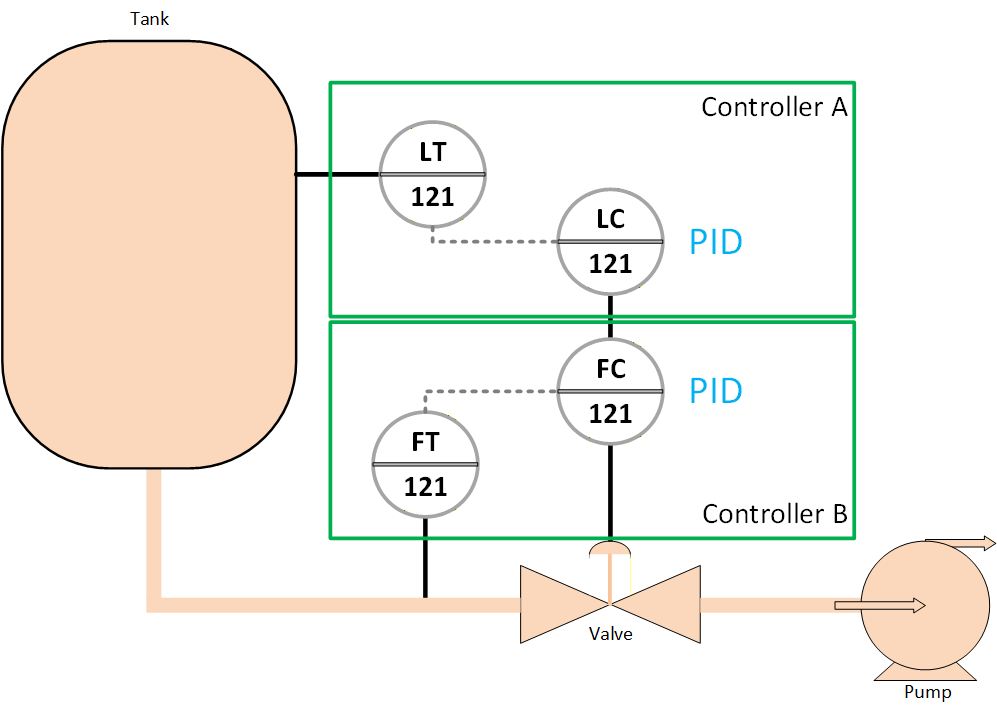
A ControlGroup can be created to indicate that if using the PID in cascade mode then the corresponding input variable and output variable are to be used.
The communication between Controller A and Controller B could be setup by the ConnectionManager in Controller A, it would see the ControlGroup and would utilize the preconfigured Dataset that are described in the ControlGroup.