
6.3 FxAssetType definition
6.3.1 Overview
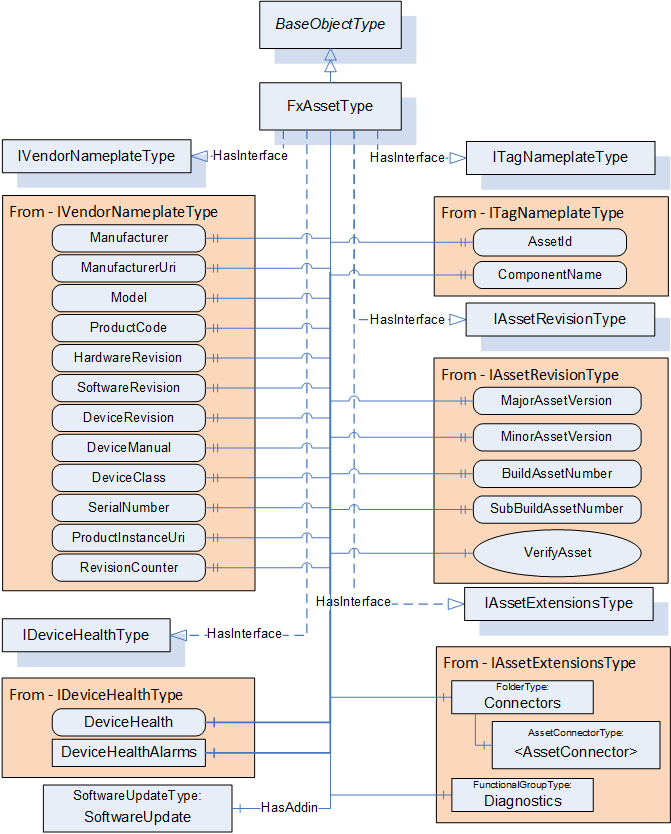
Figure 21 provides an illustration of the FxAssetType model. The figure includes an illustration of the nodes that are added via the Interfaces.
6.3.2 FxAssetType definition
The FxAssetType provides general information as defined in OPC 10000-100. It also includes additional information that is defined as an Interface. Being defined as an Interface allows other device models to include what is required for OPC UA FX Asset modelling without having to implement the FxAssetType Object directly. Conformance testing shall test that the required information, defined by the Interfaces included in the FxAssetType, is available, not that the Object is of FxAssetType. Any Object that implements all of the Interfaces defined in FxAssetType is considered an Asset.
Additional References are defined as part of the model to show relationships between Assets, within Assets, and between Assets and FunctionalEntities and the overall AutomationComponent model (see 11.1).
The FxAssetType is formally defined in Table 29.
| Attribute | Value | ||||
| BrowseName | 3:FxAssetType | ||||
| IsAbstract | False | ||||
| References |
Node
Class | BrowseName | DataType | TypeDefinition | Other |
|---|---|---|---|---|---|
| Subtype of the 0:BaseObjectType defined in OPC 10000-5 | |||||
| 0:HasInterface | ObjectType | 5:IVendorNameplateType | |||
| Applied from IVendorNameplateType (defined in OPC 10000-100 ) | |||||
|---|---|---|---|---|---|
| 0:HasProperty | Variable | 5:Manufacturer | 0:LocalizedText | 0:PropertyType | O |
| 0:HasProperty | Variable | 5:ManufacturerUri | 0:String | 0:PropertyType | O |
| 0:HasProperty | Variable | 5:Model | 0:LocalizedText | 0:PropertyType | O |
| 0:HasProperty | Variable | 5:ProductCode | 0:String | 0:PropertyType | O |
| 0:HasProperty | Variable | 5:HardwareRevision | 0:String | 0:PropertyType | O |
| 0:HasProperty | Variable | 5:SoftwareRevision | 0:String | 0:PropertyType | O |
| 0:HasProperty | Variable | 5:DeviceRevision | 0:String | 0:PropertyType | O |
| 0:HasProperty | Variable | 5:DeviceManual | 0:String | 0:PropertyType | O |
| 0:HasProperty | Variable | 5:DeviceClass | 0:String | 0:PropertyType | O |
| 0:HasProperty | Variable | 5:SerialNumber | 0:String | 0:PropertyType | O |
| 0:HasProperty | Variable | 5:ProductInstanceUri | 0:String | 0:PropertyType | O |
| 0:HasProperty | Variable | 5:RevisionCounter | 0:Int32 | 0:PropertyType | O |
| 0:HasInterface | ObjectType | 5:ITagNameplateType | |||
| Applied from ITagNameplateType (defined in OPC 10000-100 ) | |||||
|---|---|---|---|---|---|
| 0:HasProperty | Variable | 5:AssetId | 0:String | 0:PropertyType | O |
| 0:HasProperty | Variable | 5:ComponentName | 0:LocalizedText | 0:PropertyType | O |
| 0:HasInterface | ObjectType | 3:IAssetRevisionType | |||
| Applied from IAssetRevisionType | |||||
|---|---|---|---|---|---|
| 0:HasProperty | Variable | 3:MajorAssetVersion | 0:UInt16 | 0:PropertyType | O |
| 0:HasProperty | Variable | 3:MinorAssetVersion | 0:UInt16 | 0:PropertyType | O |
| 0:HasProperty | Variable | 3:BuildAssetNumber | 0:UInt16 | 0:PropertyType | O |
| 0:HasProperty | Variable | 3:SubBuildAssetNumber | 0:UInt16 | 0:PropertyType | O |
| 0:HasComponent | Method | 3:VerifyAsset | Defined in 6.3.3 | O | |
| 0:HasInterface | ObjectType | 3:IAssetExtensionsType | |||
| Applied from IAssetExtensionsType | |||||
|---|---|---|---|---|---|
| 0:HasComponent | Object | 3:Connectors | 0:FolderType | O | |
| 0:HasComponent | Object | 5:Diagnostics | 5:FunctionalGroupType | O | |
| 0:HasInterface | ObjectType | 5:IDeviceHealthType | |||
| Applied from IDeviceHealthType (defined in OPC 10000-100) | |||||
|---|---|---|---|---|---|
| 0:HasComponent | Variable | 5:DeviceHealth | 5:DeviceHealthEnumeration | 0:BaseDataVariableType | O |
| 0:HasComponent | Object | 5:DeviceHealthAlarms | 0:FolderType | O | |
| 0:HasAddIn | Object | 5:SoftwareUpdate | 5:SoftwareUpdateType | O | |
| ConformanceUnits | |||||
|---|---|---|---|---|---|
| UAFX FXAsset Type |
The components of the FxAssetType have additional subcomponents, which are defined in Table 30
| BrowsePath | References | NodeClass | BrowseName | DataType | TypeDefinition | Others |
| 5:Diagnostics | 0:HasComponent | Variable | 3:UpTime | 0:Duration | 0:BaseDataVariableType | O |
| 5:Diagnostics | 0:HasComponent | Variable | 3:CurrentCPUUtilization | 0:Float | 0:BaseDataVariableType | O |
| 5:Diagnostics | 0:HasComponent | Variable | 3:MaxCPUUtilization | 0:Float | 0:BaseDataVariableType | O |
| 5:Diagnostics | 0:HasComponent | Variable | 3:CurrentMemoryUtilization | 0:Float | 0:BaseDataVariableType | O |
| 5:Diagnostics | 0:HasComponent | Variable | 3:MaxMemoryUtilization | 0:Float | 0:BaseDataVariableType | O |
The display name of the Asset should be used to provide the name that an operator/engineer would expect for the Asset.
For examples of how to apply the OPC UA FX Information Model to other models, see Annex B. For examples of FxAssetType models, see Annex D.
The following are the definitions associated with the IVendorNameplateType interface; they are enclosed in quotes and included here for clarity. Their formal definition is in OPC 10000-100. Additional notes are provided for recommended usage within this model.
“Manufacturer provides the name of the company that manufactured the item to which this Interface is applied.”
“ManufacturerUri provides a unique identifier for this company. This identifier should be a fully qualified domain name; however, it may be a GUID or similar construct that ensures global uniqueness.”
“Model provides the name of the product.”
“ProductCode provides a unique combination of numbers and letters used to identify the product. It may be the order information displayed on type shields or in ERP systems.”
“HardwareRevision provides the revision level of the hardware of an Asset.”
“SoftwareRevision provides the version or revision level of the software component, the software/firmware of a hardware component, or the software/firmware of the Device.”
“DeviceRevision provides the overall revision level of a hardware component or the Device. As an example, this Property can be used in ERP systems together with the ProductCode Property.”
“DeviceManual allows specifying the address of the user manual for an Asset. It may be a pathname in the file system or a URL (Web address).”
“DeviceClass indicates in which domain or for what purpose a certain ComponentType is used. Examples are “ProgrammableController”, “RemoteIO”, and “TemperatureSensor”. This standard does not predefine any DeviceClass names. More specific standards that utilise this Interface will likely introduce such classifications.”
Within this model, this information is typically used for display purposes only. It is recommended that if this Property is provided, the string should be from some standardised dictionary.
“SerialNumber is a unique production number of the manufacturer of the Asset. This is often stamped on the outside of a physical component and may be used for traceability and warranty purposes.”
“ProductInstanceUri is a globally unique resource identifier provided by the manufacturer. This is often stamped on the outside of a physical component and may be used for traceability and warranty purposes. The maximum length is 255 characters. The syntax of the ProductInstanceUri is: <ManufacturerUri>/<any string>, where <any string> is unique among all instances using the same ManufacturerUri.”
Within this model, ProductInstanceUri, SerialNumber, or both shall be provided for Assets listed directly in the Assets Folder of the AutomationComponent.
“RevisionCounter is an incremental counter indicating the number of times the configuration data within an Asset has been modified.”
Within this model, this configuration data may be one of the items defined in this document, but more likely, it is a configuration item that has been added to the asset model either as part of a companion specification or as part of an instance.
The following two definitions are from the ITagNameplateType interface. They are enclosed in quotes and included here for clarity. Their formal definition is in OPC 10000-100. Additional notes are provided for recommended usage within OPC UA FX.
“AssetId is a user-writable alphanumeric character sequence uniquely identifying a component. The ID is provided by the integrator or user of the device. It typically contains an identifier in a branch use case or a user-specific naming scheme. This could be, for example, a reference to an electric scheme.“
“ComponentName is a user-writable name provided by the integrator or user of the component.”
The following two definitions are from the IDeviceHealthType interface. They are enclosed in quotes and included here for clarity. Their formal definition is in OPC 10000-100. Additional notes are provided for recommended usage within OPC UA FX.
“The DeviceHealthEnumeration DataType is an enumeration that defines the device condition.”
“DeviceHealthAlarms shall be used for instances of the DeviceHealth AlarmTypes specified in OPC 10000-100.” AlarmType instances can also be defined in other specifications, such as OPC 10000-110 or this document.
The IDeviceHealthType Interface shall be implemented on top-level Assets and any other Assets that maintain their own status information. DeviceHealth of the top-level Assets is aggregated into AggregatedDeviceHealth (see 9.1.2). Whether nested Assets aggregate their DeviceHealth into DeviceHealth of their parent Asset is vendor-specific and is further described in OPC 10000-110 (e.g., for redundant nested Assets, one might fail without the parent Asset failing).
SoftwareUpdate is an AddIn (see OPC 10000-100) that defines support for firmware or software updates. This optional AddIn should be included in any Asset that includes firmware or software that can be upgraded or changed. For a definition of the AddIn concept, see OPC 10000-3.
The following definitions are associated with the IAssetRevisionType interface (see 7.3).
The MajorAssetVersion shall be updated for major changes in an Asset that may break compatibility with previous versions.
The MinorAssetVersion shall be updated for minor changes in an Asset that should not change the behaviour of the Asset regarding compatibility. Higher numeric values of MinorAssetVersion should be backwards compatible with lower ones, e.g., behaviour that is present in MinorAssetVersion 12 shall still be supported by MinorAssetVersion 13 or greater. An incremented MinorAssetVersion may add new behaviour which is not present in a lower MinorAssetVersion while retaining existing functionality.
The BuildAssetNumber and SubBuildAssetNumber reflect detailed information about the version of the Asset. Together with the MajorAssetVersion and MinorAssetVersion, they provide the capability to unambiguously identify a specific version of an Asset.
The following definitions are associated with the IAssetExtensionsType interface (see 7.4).
Connectors is a Folder used to group and list physical- or software-based connectors (instances of AssetConnectorType) that can be used to link multiple Assets. A connector provides more information about an Asset connection than a simple Reference can. For a formal definition of the AssetConnectorType, see 6.3.4.
Diagnostics is a FunctionalGroup (Folder) that contains Variables that report diagnostic statistics and counters (see OPC 10000-100 Recommended FunctionalGroup BrowseNames).
The UpTime Variable provides the module's uptime since the last power-on.
The CurrentCPUUtilization Variable provides the current CPU utilisation in percent (the calculation is vendor-specific).
The MaxCPUUtilization Variable provides the maximum CPU utilisation in percent since the last power-on (the calculation is vendor-specific).
The CurrentMemoryUtilization Variable provides the current memory utilisation in percent (the calculation is vendor-specific).
The MaxMemoryUtilization Variable provides the maximum memory utilisation in percent since the last power-on (the calculation is vendor-specific).
6.3.3 VerifyAsset method
The VerifyAsset Method allows a Client to verify whether an Asset’s identity and functionality meet the expectations of system engineering.
Three different modes are available for Asset verification (see VerificationMode). Each mode depends on a set of mandatory and optional Variables (see definition of AssetVerificationModeEnum in 10.4) to be present for verification. The VerifyAsset Method also accepts additional Variables for verification.
An Asset implementing the VerifyAsset Method shall at least support the VerificationMode AssetCompatibility and expose the corresponding mandatory and implemented optional Variables in its Information Model. If at least one of the optional Variables, SerialNumber and/or ProductInstanceUri, is provided, then the VerificationModes AssetIdentity and AssetIdentityAndCompatibility shall be supported.
The signature of this Method is specified below; the arguments are defined in Table 31.
Signature
	VerifyAsset (
	[in] 2:AssetVerificationModeEnum	VerificationMode,
	[in] 0:KeyValuePair[]			ExpectedVerificationVariables,
	[in] 2:NodeIdValuePair[]			ExpectedAdditionalVerificationVariables,
	[out] 2:AssetVerificationResultEnum	VerificationResult,
	[out] 0:StatusCode[]			VerificationVariablesErrors,
	[out] 0:StatusCode[]			VerificationAdditionalVariablesErrors
	);
| Argument | Description |
| VerificationMode | Mode for Asset verification: see 10.4 for a definition of the AssetVerificationModeEnum. |
| ExpectedVerificationVariables | An array of KeyValuePair containing verification Variables. Key shall be the BrowseName of the Variable to verify (relative to the Asset this Method is being called on), and Value is its expected value. A Client shall pass all mandatory and implemented optional Variables depending on VerificationMode: AssetCompatibility: IVendorNameplateType ManufacturerUri (M), IVendorNameplateType ProductCode (M), IAssetRevisionType MajorAssetVersion (M), IAssetRevisionType MinorAssetVersion (M), IAssetRevisionType BuildAssetNumber (O), IAssetRevisionType SubBuildAssetNumber (O), IVendorNameplateType HardwareRevision (O), IVendorNameplateType SoftwareRevision (O) AssetIdentity: IVendorNameplateType ManufacturerUri (M), IVendorNameplateType ProductCode (M), At least one of: IVendorNameplateType SerialNumber, IVendorNameplateType ProductInstanceUri AssetIdentityAndCompatibility: All mandatory Variables of both AssetCompatibility and AssetIdentity are mandatory for top-level Assets (those directly in the Assets Folder in the AutomationComponent). All optional Variables of AssetCompatibility are optional. |
| ExpectedAdditionalVerificationVariables | An array of NodeIdValuePair containing additional verification Variables. NodeId shall be the NodeId of the Variable to verify, and Value shall be its expected value. This array may be null or empty if no additional Variables are to be verified. The following rules shall apply to the usage of NodeIdValuePair: If NodeId refers to variables of type array, it shall be verified that Value is a matching array. If the ArrayIndex is provided, the value shall be checked against the corresponding index. If Value is null, it shall be verified that NodeId exists. The Node may be of any NodeClass, but only the NodeClass of Variable or VariableType can have a non-null value. |
| VerificationResult | The result of Asset verification is determined by the Method implementation; see 10.7 for a definition of the AssetVerificationResultEnum. The following general rule applies to determine VerificationResult: All string-type Variables shall be stripped of leading and trailing whitespaces before processing. The following specific rules apply to determine AssetCompatibility:
NotSet: Shall be returned if verification is not possible due to invalid elements in ExpectedVerificationVariables and/or ExpectedAdditionalVerificationVariables (e.g., a Variable was passed by the Client that does not exist in the Asset’s Information Model). Match: Shall be returned if all Variables in ExpectedVerificationVariables and ExpectedAdditionalVerificationVariables exist in the Information Model of this Asset and their actual values are identical to the expected values. Compatible: Shall be returned if all of the following conditions apply: The actual value of at least one ExpectedVerificationVariables does not match its expected value, but overall, the Asset is still compatible (e.g., expected IAssetRevisionType MinorAssetVersion 1, but the actual value is 2, being backwards compatible to 1). All ExpectedAdditionalVerificationVariables match their expected values. Mismatch: Shall be returned if any of the following conditions apply: The actual value of at least one ExpectedVerificationVariables does not match its expected value, and the Asset overall is not compatible. The actual value of at least one ExpectedAdditionalVerificationVariables does not match its expected value. If this value is set, VerificationVariablesErrors and/or VerificationAdditionalVariablesErrors shall be populated. The following specific rules apply to determine AssetIdentity: NotSet: See description for AssetCompatibility. Match: See description for AssetCompatibility. Compatible: Shall never be returned.
Mismatch: Shall be returned if all Variables in ExpectedVerificationVariables and ExpectedAdditionalVerificationVariables exist and the actual value of at least one does not match its expected value. The following specific rules apply to determine AssetIdentityAndCompatibility: NotSet: Shall be returned if verification of AssetCompatibility or AssetIdentity or both result in NotSet. Match: Shall be returned if both the verification of AssetIdentity and AssetCompatibility result in Match. Compatible: Shall be returned if verification of AssetIdentity results in Match and verification of AssetCompatibility results in Compatible. Mismatch: Shall be returned if verification of AssetCompatibility or AssetIdentity or both results in Mismatch. |
| VerificationVariablesErrors | An array of StatusCode corresponding to the ExpectedVerificationVariables input argument that indicates any errors that occurred during the processing of ExpectedVerificationVariables. If this array is populated, the length of this array shall match the length of ExpectedVerificationVariables. For possible values in this array, see Table 33. |
| VerificationAdditionalVariablesErrors | An array of StatusCode corresponding to the ExpectedAdditionalVerificationVariables input argument that indicates any errors that occurred during the processing of ExpectedAdditionalVerificationVariables. If this array is populated, the length of this array shall match the length of ExpectedAdditionalVerificationVariables. For possible values in this array, see Table 34. |
The possible Method result codes are formally defined in Table 32. The order in which checks are performed is vendor-specific. A bad result code in the Method (an error code in Table 32) shall result in all output arguments listed in the Method signature being empty/null. The check of provided Variables (Bad_InvalidArgument) shall take precedence over the actual checks related to the values of provided Variables.
| Result Code | Description |
| Bad_InvalidArgument | One or more arguments are invalid, or ExpectedVerificationVariables are missing Variables that are mandatory for the chosen VerificationMode (or optional, and the implementation of this Method expects them because they are implemented). |
| Bad_NotSupported | The Client specified a VerificationMode that is not supported by this Method implementation. |
| Uncertain | At least one element in ExpectedVerificationVariables and/or ExpectedAdditionalVerificationVariables is invalid or failed verification. VerificationVariablesErrors and/or VerificationAdditionalVariablesErrors will contain additional information. |
The VerificationVariablesErrors StatusCodes are formally defined in Table 33.
| Result Code | Description |
| Bad_BrowseNameInvalid | The BrowseName for the verification Variable is invalid or was passed more than once. |
| Bad_TypeMismatch | The value supplied for the verification Variable (if non-null) is not of the same type as the implemented verification Variable. |
| Bad_OutOfRange | The value supplied for the Variable is not equal to the actual value of the Variable (if non-null). |
| Good | The verification for this Variable succeeded. |
The VerificationAdditionalVariablesErrors StatusCodes are formally defined in Table 34.
| Result Code | Description |
| Bad_OutOfRange | The value supplied for the Variable is not equal to the actual value of the Variable (if non-null). |
| Bad_TypeMismatch | The value supplied for the verification Variable (if non-null) is not of the same type as the implemented verification variable. |
| Bad_NodeIdInvalid | The NodeIdValuePair contains a NodeId in its key field with an invalid syntax. |
| Bad_NodeIdUnknown | The NodeIdValuePair contains a NodeId in its key field that does not exist in the Server address space. |
| Good | The verification for this Variable succeeded. |
The VerifyAsset Method representation in the AddressSpace is formally defined in Table 35.
| Attribute | Value | ||||
| BrowseName | 3:VerifyAsset | ||||
| References | Node Class | BrowseName | DataType | TypeDefinition | Other |
|---|---|---|---|---|---|
| 0:HasProperty | Variable | 0:InputArguments | 0:Argument[] | 0:PropertyType | M |
| 0:HasProperty | Variable | 0:OutputArguments | 0:Argument[] | 0:PropertyType | M |
| ConformanceUnits | |||||
|---|---|---|---|---|---|
| UAFX IAssetRevision VerifyAsset Base |
6.3.4 AssetConnectorType definition
The AssetConnectorType provides information about physical connections that are part of an Asset. An example of these connections might be slots in which cards can be mounted or sockets to which cables can be connected. For additional examples, see Annex D. It is expected that subtypes of this type that provide or require additional Properties or Variables will be created. Figure 22 provides an illustration of the AssetConnectorType.
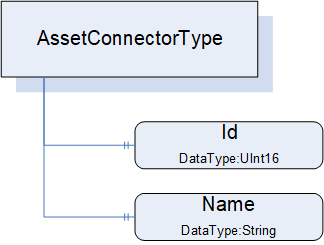
The AssetConnectorType is an abstract type and must be subtyped. It is formally defined in Table 36.
| Attribute | Value | ||||
| BrowseName | 3:AssetConnectorType | ||||
| IsAbstract | True | ||||
| References | Node Class | BrowseName | DataType | TypeDefinition | Other |
|---|---|---|---|---|---|
| Subtype of the 0:BaseObjectType defined in OPC 10000-5 | |||||
| 0:HasProperty | Variable | 3:Id | 0:UInt16 | 0:PropertyType | O |
| 0:HasProperty | Variable | 3:Name | 0:String | 0:PropertyType | O |
| 0:HasSubtype | ObjectType | 3:SlotType | Defined in 6.3.5 | ||
| 0:HasSubtype | ObjectType | 3:SocketType | Defined in 6.3.6 | ||
| 0:HasSubtype | ObjectType | 3:ClampType | Defined in 6.3.7 | ||
| 0:HasSubtype | ObjectType | 3:ClampBlockType | Defined in 6.3.8 | ||
| ConformanceUnits | |||||
|---|---|---|---|---|---|
| UAFX AssetConnector Slot Base | |||||
| UAFX AssetConnector Socket Base | |||||
| UAFX AssetConnector Clamp Base | |||||
| UAFX AssetConnector ClampBlock Base |
Id provides the (physical) ID of the connector, representing the physical location of the connector in the Asset. The use of this ID can be further explained or defined in subtypes.
Name provides the physical label that is associated with this connector. The use of Name can be further explained or defined in subtypes. For example, it might be the name of the target of this connector, the DisplayName would be slot1, and the Name would be Pump1.
Figure 23 provides an illustration of some of the possible subtypes of the AssetConnectorType.
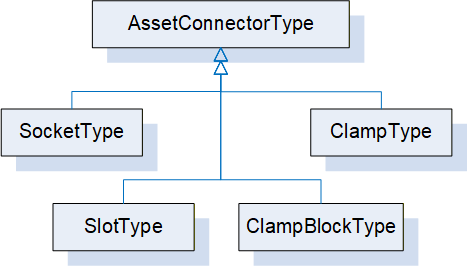
Some connector types are used to link other Assets, while other AssetConnectorTypes might be used to indicate physical connections.
6.3.5 SlotType definition
The SlotType represents a physical slot to which a module can be attached, e.g., in a modular Asset like a PLC backplane or modular IO device.
The SlotType is formally defined in Table 37.
| Attribute | Value | ||||
| BrowseName | 3:SlotType | ||||
| IsAbstract | False | ||||
| References | Node Class | BrowseName | DataType | TypeDefinition | Other |
|---|---|---|---|---|---|
| Subtype of the 3:AssetConnectorType | |||||
| 0:HasProperty | Variable | 3:Id | 0:UInt16 | 0:PropertyType | M |
| 0:HasProperty | Variable | 3:LogicalId | 0:UInt16 | 0:PropertyType | O |
| ConformanceUnits | |||||
|---|---|---|---|---|---|
| UAFX AssetConnector Slot Base |
Id is from AssetConnectorType and is mandatory in SlotType. It shall start at 1 and increment by 1 for each physical slot in a rack or device.
The optional LogicalId represents the “logical slot number” that might be assigned to a physical ID. For example, module 3 is physically plugged into slot 3, but internally it is used as slot 8.
Each Slot that has a module plugged into it shall have a HasPhysicalComponent Reference (see OPC 10000-23) or a subtype of it, or an IsPhysicallyConnectedTo Reference or a subtype of it, indicating the Asset that occupies the Slot.
6.3.6 SocketType definition
The SocketType represents a physical socket where a cable can be connected.
The SocketType is formally defined in Table 38.
| Attribute | Value | ||||
| BrowseName | 3:SocketType | ||||
| IsAbstract | False | ||||
| References | Node Class | BrowseName | DataType | TypeDefinition | Other |
|---|---|---|---|---|---|
| Subtype of the 3:AssetConnectorType | |||||
| 0:HasComponent | Variable | 3:Kind | 0:UInt16 | 0:MultiStateValueDiscreteType | O |
| 0:HasProperty | Variable | 3:Name | 0:String | 0:PropertyType | M |
| ConformanceUnits | |||||
|---|---|---|---|---|---|
| UAFX AssetConnector Socket Base |
Name is from AssetConnectorType and is mandatory in SocketType. It represents the label that would be associated with a Socket.
The optional Kind is a MultiStateValueDiscreteType that describes the type of socket, e.g., RJ-45 or M12. The MultiStateValueDiscreteType has two properties: EnumValues and ValueAsText. An enumeration (SocketKindEnum) is defined (see 10.47) that provides a default list of Kind values. The configured list of EnumValues for a Socket can use the list provided by the default enumeration, extend the default list, or create its own list of EnumValues. A companion specification may define a different or extended list of Kind EnumValues.
6.3.7 ClampType definition
The ClampType represents a wire connection, such as a twisted pair or single wire connection, where the wire needs to be connected to some termination connection.
The ClampType is formally defined in Table 39.
| Attribute | Value | ||||
| BrowseName | 3:ClampType | ||||
| IsAbstract | False | ||||
| References | Node Class | BrowseName | DataType | TypeDefinition | Other |
|---|---|---|---|---|---|
| Subtype of the 3:AssetConnectorType | |||||
| 0:HasProperty | Variable | 3:Name | 0:String | 0:PropertyType | M |
| 0:HasComponent | Variable | 3:Kind | 0:UInt16 | 0:MultiStateValueDiscreteType | O |
| ConformanceUnits | ||||||
|---|---|---|---|---|---|---|
| UAFX AssetConnector Clamp Base | ||||||
| UAFX AssetConnector ClampBlock Base | ||||||
Name is from AssetConnectorType and is mandatory in ClampType.
The optional Kind is a MultiStateValueDiscreteType that describes the type of clamp, e.g., screw connector, thumb connector, etc. The MultiStateValueDiscreteType has two properties: EnumValues and ValueAsText. An enumeration is defined (see 10.8) that provides a default list of Kind EnumValues. The configured list of EnumValues for a Clamp can use the default list, can extend the default list, or can create its own list of EnumValues. A companion specification may define a different or extended list of Kind EnumValues.
6.3.8 ClampBlockType definition
The ClampBlockType represents a wire connection block, where the block contains a number of termination points for twisted pair or single wire connections.
The ClampBlockType is formally defined in Table 40.
| Attribute | Value | ||||
| BrowseName | 3:ClampBlockType | ||||
| IsAbstract | False | ||||
| References | Node Class | BrowseName | DataType | TypeDefinition | Other |
|---|---|---|---|---|---|
| Subtype of the 3:AssetConnectorType | |||||
| 0:HasProperty | Variable | 3:Name | 0:String | 0:PropertyType | M |
| 0:HasProperty | Variable | 3:BlockSize | 0:UInt16 | 0:PropertyType | O |
| 0:HasComponent | Variable | 3:Kind | 0:UInt16 | 0:MultiStateValueDiscreteType | O |
| 0:HasComponent | Object | 3:<Clamp> | 3:ClampType | OP | |
| ConformanceUnits | |||||
|---|---|---|---|---|---|
| UAFX AssetConnector ClampBlock Base |
Name is from AssetConnectorType and is mandatory in ClampBlockType.
The optional BlockSize is the maximum number of clamps that this block can support.
The optional Kind is a MultiStateValueDiscreteType that describes the type of clamp, e.g., screw connector, thumb connector, etc. The MultiStateValueDiscreteType has two properties: EnumValues and ValueAsText. An enumeration is defined (see 10.8) that provides a default list of Kind EnumValues. The configured list of EnumValues for a ClampBlock can use the list provided by the default EnumValues, extend the default list, or create its own list of EnumValues. A companion specification may define a different or extended list of Kind EnumValues.
<Clamp> are entries for each Clamp that is in use with the details of that specific clamp in the block.