
6.4.6 ConfigurationDataFolderType
6.4.6.1 Overview
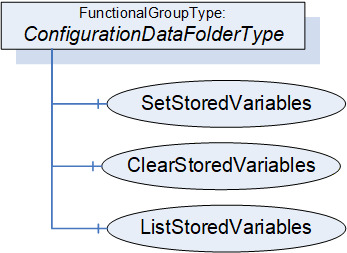
The ConfigurationDataFolderType is used to organise ConfigurationData Variables and provides the Methods for supporting the storage of Variables (see 5.4). A ConfigurationDataFolder may contain sub-Folders derived from FunctionalGroupType.
The ConfigurationDataFolderType is illustrated in Figure 25.
6.4.6.2 ConfigurationDataFolderType definition
The ConfigurationDataFolderType extends the FunctionalGroupType defined in OPC 10000-100.
The ConfigurationDataFolderType is formally defined in Table 49.
| Attribute | Value | ||||
| BrowseName | 3:ConfigurationDataFolderType | ||||
| IsAbstract | False | ||||
| References |
Node
Class | BrowseName | DataType | TypeDefinition | Other |
|---|---|---|---|---|---|
| Subtype of the 5:FunctionalGroupType defined in OPC 10000-100 | |||||
| 0:HierarchicalReferences | Variable | 3:<ConfigurationVariable> | 0:BaseDataType | 0:BaseDataVariableType | OP |
| 0:HasComponent | Method | 3:SetStoredVariables | Defined in 6.4.6.3 | O | |
| 0:HasComponent | Method | 3:ClearStoredVariables | Defined in 6.4.6.4 | O | |
| 0:HasComponent | Method | 3:ListStoredVariables | Defined in 6.4.6.5 | O | |
| ConformanceUnits | |||||
|---|---|---|---|---|---|
| UAFX FunctionalEntity Base |
<ConfigurationVariable> represents the optional configuration data. The Variables in this Folder shall be Organized in this Folder, or the Folder shall reference the Variables via subtypes of the HasChild Reference (HasProperty, HasComponent or other subtypes). The BrowseNames of Variables in this Folder shall be unique within this Folder. All Variables in this folder shall be configuration data.
The FunctionalGroupType, as defined in OPC 10000-100, includes the ability to have nested FunctionalGroups. It is expected that configuration data will often be organised into a tree of FunctionalGroups. This will also assist with the uniqueness requirement for BrowseNames.
The optional Methods SetStoredVariables, ClearStoredVariables, and ListStoredVariables allow for the maintenance of storage for configuration Variables. If storage is supported, SetStoredVariables, ClearStoredVariables, and ListStoredVariables shall be supported.
6.4.6.3 SetStoredVariables method
The optional SetStoredVariables Method allows a Client to store current values of configuration Variables for the FunctionalEntity and its SubFunctionalEntities.
The FunctionalEntity shall apply the stored values to the configuration variables after a power cycle.
The signature of this Method is specified below; the arguments are defined in Table 50.
Signature
	SetStoredVariables (
	  [in] 0:NodeId[]		VariablesToStore,
	  [out] 0:StatusCode[]	Results
);| Argument | Description |
| VariablesToStore | An array of NodeIds containing configuration data variables. NodeId shall be the NodeId of a configuration data variable belonging to ConfigurationData of this FunctionalEntity or one of its SubFunctionalEntities. |
| Results | An array of StatusCode corresponding to the VariablesToStore input argument that indicates any errors that occurred during the processing of VariablesToStore. If this array is populated, it has the same length as the VariablesToStore array. For possible values in this array, see Table 52. |
The possible Method result codes are formally defined in Table 51.
| Result Code | Description |
| Uncertain | There was at least one error while processing the Variables to be stored. Results will contain additional information. |
The Results StatusCodes are formally defined in Table 52.
| Result Code | Description |
| Bad_InvalidArgument | The NodeId is not a ConfigurationData Variable or does not belong to this FunctionalEntity or one of its SubFunctionalEntities. |
| Bad_NotSupported | The NodeId specifies a Variable that is non-volatile. |
| Bad_ResourceUnavailable | There are not enough resources to store this Variable. |
| Good | Storing this Variable succeeded. |
The SetStoredVariables Method representation in the AddressSpace is formally defined in Table 53.
| Attribute | Value | ||||
| BrowseName | 3:SetStoredVariables | ||||
| References | Node Class | BrowseName | DataType | TypeDefinition | Other |
|---|---|---|---|---|---|
| 0:HasProperty | Variable | 0:InputArguments | 0:Argument[] | 0:PropertyType | M |
| 0:HasProperty | Variable | 0:OutputArguments | 0:Argument[] | 0:PropertyType | M |
| ConformanceUnits | |||||
|---|---|---|---|---|---|
| UAFX ConfigurationDataFolder VariableStorage |
6.4.6.4 ClearStoredVariables Method
The optional ClearStoredVariables Method allows a Client to clear the Variable from the list of Variables that are to be restored.
The signature of this Method is specified below; the arguments are defined in Table 54.
Signature
	ClearStoredVariables (
	  [in] 0:NodeId[]		VariablesToClear,
	  [out] 0:StatusCode[]	Results
);| Argument | Description |
| VariablesToClear | An array of NodeId containing configuration data variables. |
| Results | An array of StatusCode corresponding to the VariablesToClear input argument that indicates any errors that occurred during the processing of VariablesToClear. If this array is populated, it has the same length as the VariablesToClear array. For possible values in this array, see Table 56. |
The possible Method result codes are formally defined in Table 55.
| Result Code | Description |
| Uncertain | There was at least one error while processing the Variables to be cleared. Results will contain additional information. |
The Results StatusCodes are formally defined in Table 56.
| Result Code | Description |
| Bad_InvalidArgument | The NodeId is not a ConfigurationData Variable or does not belong to this FunctionalEntity or one of its SubFunctionalEntities. |
| Bad_NotSupported | The NodeId specifies a Variable that is non-volatile or does not have storage for the Variable. |
| Good | Clearing the storage for this Variable succeeded. |
The ClearStoredVariables Method representation in the AddressSpace is formally defined in Table 57.
| Attribute | Value | ||||
| BrowseName | 3:ClearStoredVariables | ||||
| References | Node Class | BrowseName | DataType | TypeDefinition | Other |
|---|---|---|---|---|---|
| 0:HasProperty | Variable | 0:InputArguments | 0:Argument[] | 0:PropertyType | M |
| 0:HasProperty | Variable | 0:OutputArguments | 0:Argument[] | 0:PropertyType | M |
| ConformanceUnits | |||||
|---|---|---|---|---|---|
| UAFX ConfigurationDataFolder VariableStorage |
6.4.6.5 ListStoredVariables
The optional ListStoredVariables Method allows a Client to list the Variables that are currently in storage.
The signature of this Method is specified below; the arguments are defined in Table 58.
Signature
	ListStoredVariables (
	  [out] 2:NodeIdValuePair[]		StoredVariables
);| Argument | Description |
| StoredVariables | An array of NodeIdValuePair. Key indicates a Variable belonging to ConfigurationData of this FunctionalEntity or one of its SubFunctionalEntities. Value indicates the stored value. |
The ListStoredVariables Method representation in the AddressSpace is formally defined in Table 59.
| Attribute | Value | ||||
| BrowseName | 3:ListStoredVariables | ||||
| References | Node Class | BrowseName | DataType | TypeDefinition | Other |
|---|---|---|---|---|---|
| 0:HasProperty | Variable | 0:OutputArguments | 0:Argument[] | 0:PropertyType | M |
| ConformanceUnits | |||||
|---|---|---|---|---|---|
| UAFX ConfigurationDataFolder VariableStorage |