
4.4 FunctionalGroupType
4.4.1 Model
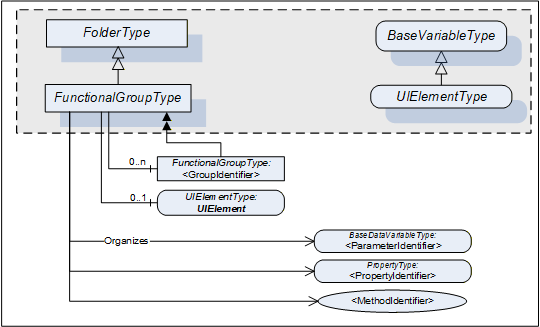
This subtype of the OPC UA FolderType is used to structure Nodes like Properties, Parameters and Methods according to their application (e.g. maintenance, diagnostics, condition monitoring). Organizes References should be used when the elements are components in other parts of the TopologyElement that the FunctionalGroup belongs to. This includes Properties, Variables, and Methods of the TopologyElement or in Objects that are components of the TopologyElement either directly or via a subcomponent. The same Property, Parameter or Method can be useful in different application scenarios and therefore referenced from more than one FunctionalGroup.
FunctionalGroups can be nested.
FunctionalGroups can directly be instantiated. In this case, the BrowseName of a FunctionalGroup should indicate its purpose. A list of well-known BrowseNames is in 4.4.2.
Figure 3 shows the FunctionalGroupType components. It is formally defined in Table 14.
| Attribute | Value | ||||
| BrowseName | 1:FunctionalGroupType | ||||
| IsAbstract | False | ||||
| References | NodeClass | BrowseName | DataType | TypeDefinition | Other |
|---|---|---|---|---|---|
| Subtype of the 0:FolderType defined in OPC 10000-5 | |||||
| 0:HasComponent | Object | 1:<GroupIdentifier> | 1:FunctionalGroupType | OP | |
| 0:HasComponent | Variable | 1:UIElement | 0:BaseDataType | 1:UIElementType | O |
| Conformance Units | |||||
|---|---|---|---|---|---|
| DI Information Model |
All BrowseNames for Nodes referenced by a FunctionalGroup with an Organizes Reference shall be unique.
The Organizes References can be present only at the instance, not the type. Depending on the current state of the TopologyElement the Server can decide to hide or unhide certain FunctionalGroups or (part of) their References. If a FunctionalGroup can be hidden on an instance the TypeDefinition shall use an appropriate ModellingRule like “Optional”.
If desirable, Nodes can be also children of FunctionalGroups. If such Nodes are defined, it is recommended to define a subtype of the FunctionalGroupType.
UIElement is the user interface element for this FunctionalGroup. See 4.4.3 for the definition of UIElements.
Examples in Annex B.1 illustrate the use of FunctionalGroups.
4.4.2 Well-Known FunctionalGroup BrowseNames
Table 15 includes a list of FunctionalGroups with name and purpose. If Servers expose a FunctionalGroup that corresponds to the described purpose, they should use the well-known BrowseName with the Namespace of this specification.
| BrowseName | Purpose |
|---|---|
| Configuration | Parameters representing the configuration items of the TopologyElement. If the CurrentWrite bit is set in the AccessLevel Attribute they can be modified by Clients. |
| Tuning | Parameters and Methods to optimize the behavior of the TopologyElement. |
| Maintenance | Parameters and Methods useful for maintenance operations. |
| Diagnostics | Parameters and Methods for diagnostics. |
| Statistics | Parameters and Methods for statistics. |
| Status | Parameters which describe the general health of the TopologyElement. This can include diagnostic Parameters. |
| Operational | Parameters and Methods useful for during normal operation, like process data. |
| OperationCounters | Parameters representing numbers of interest when managing a TopologyElement while it is operated. Examples are the hours of operation, hours in standby, etc. Those are often the base to calculate KPIs (key performance indicators) like the OEE (overall equipment efficiency).
Parameters are often domain specific. Some common ones are defined in the OperationCounter Interface (see 4.5.5). |
| Identification | The Properties of the VendorNameplate Interface, like Manufacturer, SerialNumber or Properties of the TagNameplate will usually be sufficient as identification. If other Parameters or even Methods are required, all elements required shall be organized in a FunctionalGroup called “Identification”. See Annex B.1 for an example. |
4.4.3 UIElement Type
Servers can expose UIElements providing user interfaces in the context of their FunctionalGroup container. Clients can load such a user interface and display it on the Client side. The hierarchy of FunctionalGroups represents the tree of user interface elements.
The UIElementType is abstract and is mainly used as filter when browsing a FunctionalGroup. Only subtypes can be used for instances. No concrete UIElements are defined in this specification. FDI (Field Device Integration, see IEC 62769) specifies two concrete subtypes
UIDs (UI Descriptions), descriptive user interface elements, and
UIPs (UI Plug-Ins), programmed user interface elements.
The UIElementType is specified in Table 16.
| Attribute | Value | ||||
| BrowseName | 1:UIElementType | ||||
| IsAbstract | True | ||||
| DataType | 0:BaseDataType | ||||
| References | NodeClass | BrowseName | DataType | TypeDefinition | Other |
|---|---|---|---|---|---|
| Subtype of the 0:BaseDataVariableType defined in OPC 10000-5. | |||||
| Conformance Units | |||||
|---|---|---|---|---|---|
| DI Information Model |
The Value attribute of the UIElement contains the user interface element. Subtypes have to define the DataType (e.g., XmlElement or ByteString).