
22 MonitoredParameterType
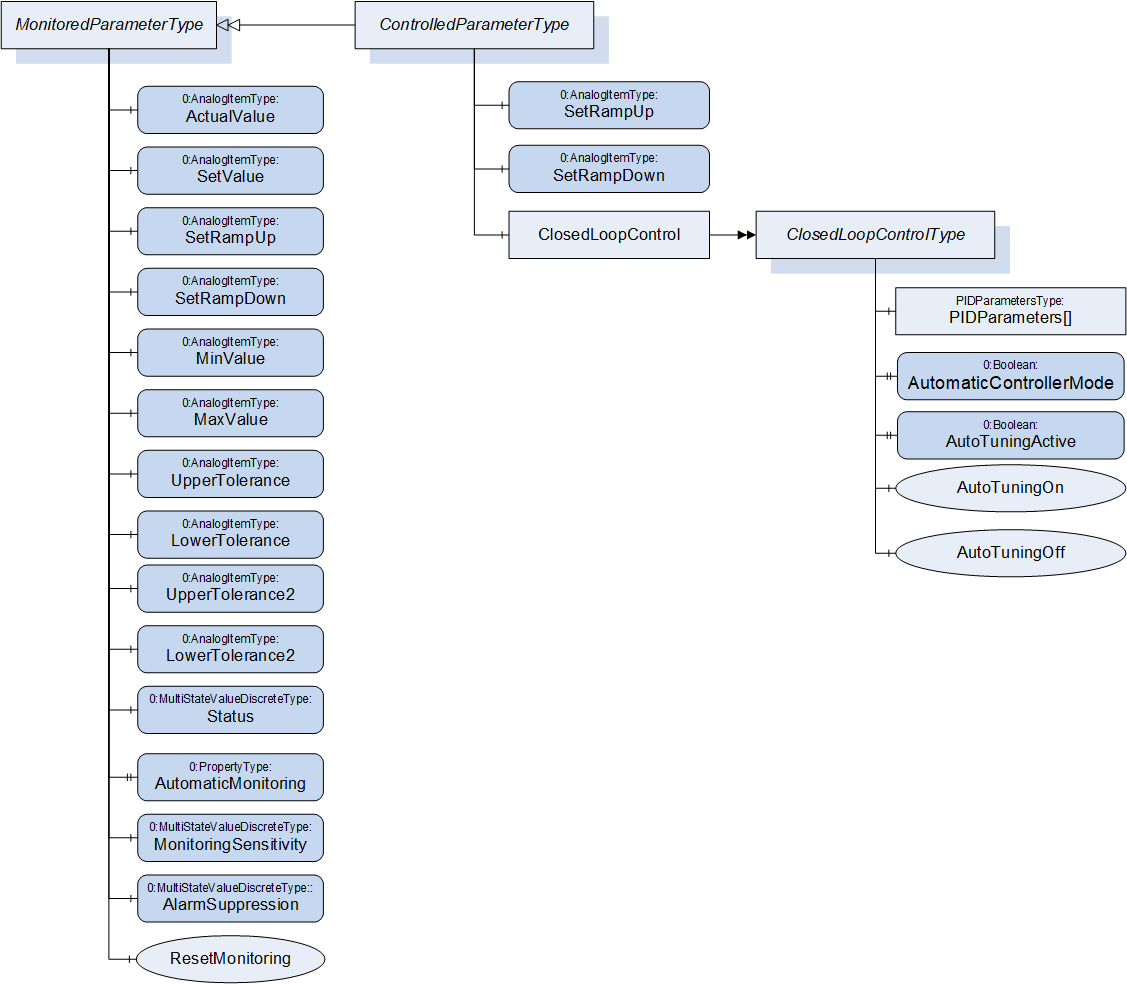
The MonitoredParameterType is used for process parameters that are monitored by the client.
| Attribute | Value | ||||
| BrowseName | MonitoredParameterType | ||||
| IsAbstract | False | ||||
| References | Node Class | BrowseName | DataType | TypeDefinition | Other |
|---|---|---|---|---|---|
| Subtype of 0:BaseObjectType defined in OPC UA Part 5 | |||||
| 0:HasComponent | Variable | ActualValue | 0:Double | 0:AnalogItemType | M, RO |
| 0:HasComponent | Variable | SetValue | 0:Double | 0:AnalogItemType | O, RW |
| 0:HasComponent | Variable | SetRampUp | 0:Double | 0:AnalogItemType | O, RO |
| 0:HasComponent | Variable | SetRampDown | 0:Double | 0:AnalogItemType | O, RO |
| 0:HasComponent | Variable | MinValue | 0:Double | 0:AnalogItemType | O, RW |
| 0:HasComponent | Variable | MaxValue | 0:Double | 0:AnalogItemType | O, RW |
| 0:HasComponent | Variable | UpperTolerance | 0:Double | 0:AnalogItemType | O, RW |
| 0:HasComponent | Variable | LowerTolerance | 0:Double | 0:AnalogItemType | O, RW |
| 0:HasComponent | Variable | UpperTolerance2 | 0:Double | 0:AnalogItemType | O, RW |
| 0:HasComponent | Variable | LowerTolerance2 | 0:Double | 0:AnalogItemType | O, RW |
| 0:HasComponent | Variable | Status | 0:UInt16 | 0:MultiStateValueDiscreteType | O, RO |
| 0:HasProperty | Variable | AutomaticMonitoring | 0:Boolean | 0:PropertyType | O, RW |
| 0:HasComponent | Variable | MonitoringSensitivity | 0:UInt16 | 0:MultiStateValueDiscreteType | O, RW |
| 0:HasComponent | Variable | AlarmSuppression | 0:UInt16 | 0:MultiStateValueDiscreteType | O, RW |
| 0:HasComponent | Method | ResetMonitoring | O | ||
| 0:HasSubtype | ObjectType | ControlledParameterType | Defined in Clause 23 | ||
22.1 ActualValue
Actual value of the monitored parameter (unit given in AnalogItemType).
22.2 SetValue
Set/nominal/target value of the monitored parameter. The value of this variable is writeable by the client. As the MonitoredParameterType is not used to control parameters, this is only for information/Process monitoring and not for changing setting on the device.
22.3 SetRampUp
Indication if a SetValue that is higher than the actual value shall be reached as fast as possible (SetRampUp = 0) or within a given value change per time (e.g. SetRampUp = 2 K/s).
22.4 SetRampDown
Indication if SetValue that is lower than the actual value shall be reached as fast as possible (SetRampDown = 0) or within a given value change per time (e.g. SetRampDown = 2 K/s).
22.5 UpperTolerance, LowerTolerance, UpperTolerance2, LowerTolerance2, MinValue, MaxValue
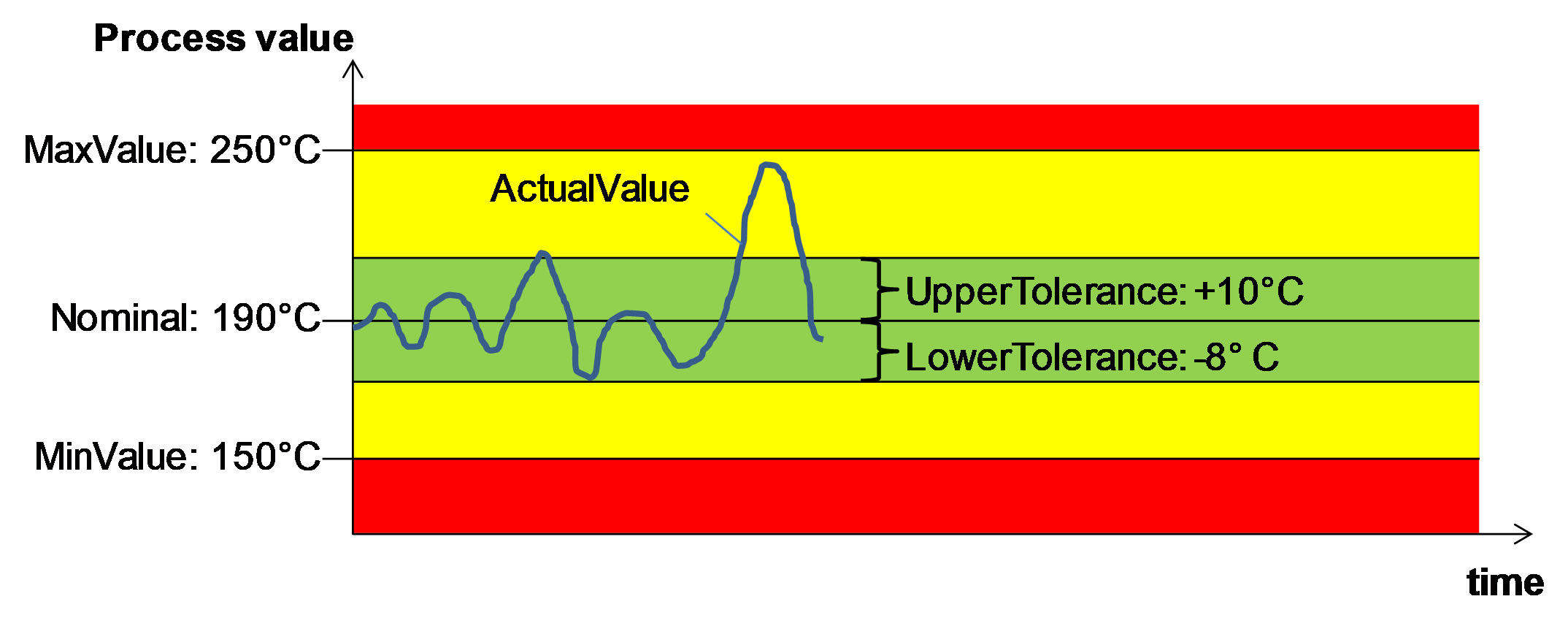
These parameters are used to define limits for the monitored parameter. Exceeding the (relative) tolerance values creates a warning while exceeding the (absolute) Min/MaxValues leads to an alarm from type MonitoredParameterAlarmType and/or perhaps other actions on the machine (e.g. switching off the heating, stopping of movements) as defined by the severity level. With UpperTolerance2 and LowerTolerance2 a second tolerance band can be defined.
22.6 Status
Information if the ActualValue is within the tolerances or has passed a tolerance or min/max value. The TypeDefinition is MultiStateValueDiscreteType, so the Properties EnumValues and ValueAsText shall be filled with the supported values out of Table 127.
| EnumValue | ValueAsText | Description |
| 0 | NONE | No monitoring |
| 1 | UNKNOWN | Status not known, e.g. because of broken sensor |
| 2 | BELOW_MIN_VALUE | ActualValue is below MinValue |
| 3 | BELOW_LOWER_TOLERANCE2 | ActualValue is below LowerTolerance2 |
| 4 | BELOW_LOWER_TOLERANCE | ActualValue is below LowerTolerance |
| 5 | WITHIN_TOLERANCE | ActualValue is between LowerTolerance and UpperTolerance |
| 6 | ABOVE_UPPER_TOLERANCE | ActualValue is above UpperTolerance |
| 7 | ABOVE_UPPER_TOLERANCE2 | ActualValue is above UpperTolerance2 |
| 8 | ABOVE_MAX_VALUE | ActualValue is above MinValue |
22.7 AutomaticMonitoring
Determination if monitoring tolerance parameters are determined by auto-tuning itself (TRUE) or can be manually adjusted (FALSE). If TRUE the monitoring tolerance parameters are determined by auto-tuning regarding the set monitoring sensitivity (if used). In this case, the tolerance parameters shall then be not writeable.
22.8 MonitoringSensitivity
The monitoring sensitivity defines how closely the tolerances are set during the automatic limit setting. The TypeDefinition is MultiStateValueDiscreteType, so the Properties EnumValues and ValueAsText must be filled with the supported values out of Table 128.
| EnumValue | ValueAsText | Description |
| 0 | FINE | tight tolerances |
| 1 | MIDDLE | mean tolerances |
| 2 | ROUGH | large tolerances |
The absolute widths of the set tolerance bands are device dependent.
22.9 AlarmSuppression
The alarm suppression deactivates alarms of a monitored parameter e.g. during start up or a setpoint jump. The TypeDefinition is MultiStateValueDiscreteType, so the Properties EnumValues and ValueAsText must be filled with the supported values out of Table 129.
| EnumValue | ValueAsText | Description |
| 0 | OFF | no alarm suppression |
| 1 | HORN | suppressed only horn |
| 2 | COMPLETE | alarm contact, alarm via interface and horn suppressed |
22.10 ResetMonitoring
| Description: | With this method the tolerance values are set according to the actual value and the set monitoring sensitivity. This can be used e.g. after a process change with new SetValue to adapt the monitoring. |
Signature
ResetMonitoring ();The method has no Input- or OutputArguments.
| Attribute | Value | ||||
| BrowseName | ResetMonitoring | ||||
| References | Node Class | BrowseName | DataType | TypeDefinition | Modelling Rule |
|---|