
14 MachineMESStatusType
14.1 MachineMESStatusType Definition
This ObjectType represents the current status of a machine related to the MES. It is formally defined in Table 43.
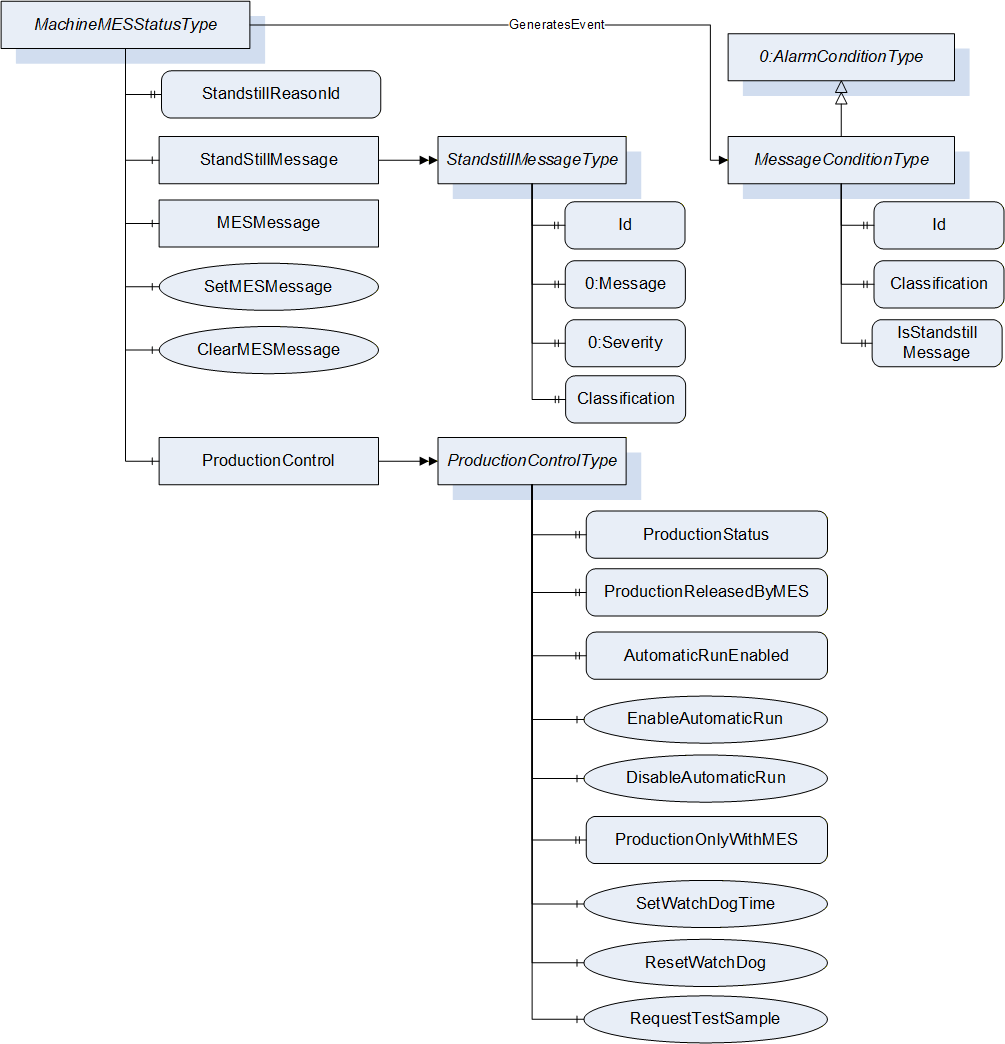
| Attribute | Value | ||||
| BrowseName | MachineMESStatusType | ||||
| IsAbstract | False | ||||
| References | Node Class | BrowseName | DataType | TypeDefinition | Other |
|---|---|---|---|---|---|
| Subtype of 0:BaseObjectType defined in OPC UA Part 5 | |||||
| 0:HasProperty | Variable | StandstillReasonId | 0:String | 0:PropertyType | M, RO |
| 0:HasComponent | Object | StandstillMessage | StandstillMessageType | M | |
| 0:HasComponent | Object | MESMessage | MESMessageType | M | |
| 0:HasComponent | Method | SetMESMessage | M | ||
| 0:HasComponent | Method | ClearMESMessage | M | ||
| 0:HasComponent | Object | ProductionControl | ProductionControlType | M | |
| GeneratesEvent | ObjectType | MessageConditionType | Defined in 14.8 | ||
14.2 StandstillReasonId
The StandstillReasonId Property represents the Id of the StandstillReason (see MachineConfiguration) set by the operator after a standstill occurs.
Default value: empty String (= no active standstill reason).
Set to an empty String by machine with starting of production.
14.3 StandstillMessage
The StandstillMessage Object represents the fault which causes standstill. This is set by machine control.
The StandstillMessageType is formally defined in Table 44.
| Attribute | Value | ||||
| BrowseName | StandstillMessageType | ||||
| IsAbstract | False | ||||
| References | Node Class | BrowseName | DataType | TypeDefinition | Other |
|---|---|---|---|---|---|
| Subtype of 0:BaseObjectType defined in OPC UA Part 5 | |||||
| 0:HasProperty | Variable | Id | 0:String | 0:PropertyType | M, RO |
| 0:HasProperty | Variable | 0:Message | 0:LocalizedText | 0:PropertyType | M, RO |
| 0:HasProperty | Variable | 0:Severity | 0:UInt16 | 0:PropertyType | M, RO |
| 0:HasProperty | Variable | Classification | 0:Enumeration | 0:PropertyType | M, RO |
Classification: Classification of the message. The valid values of the Enumeration are specified in the specific Companion Specification (e.g. IMMMessageClassificationEnumeration in OPC 40077).
If the machine is not in a standstill state, the values of the Properties shall be 0 or empty string.
14.4 MESMessage
The MESMessage Object represents a text message sent from the MES to be shown on the machine. The Properties of this Object shall only be set/changed by the MES OPC UA Client.
| Attribute | Value | |||||
| BrowseName | MESMessageType | |||||
| IsAbstract | False | |||||
| References | Node Class | BrowseName | DataType | TypeDefinition | Other | |
|---|---|---|---|---|---|---|
| Subtype of 0:BaseObjectType defined in OPC UA Part 5 | ||||||
| 0:HasProperty | Variable | Id | 0:String | 0:PropertyType | M, RO | |
| 0:HasProperty | Variable | Message | 0:String | 0:PropertyType | M, RO | |
| 0:HasProperty | Variable | 0:Severity | 0:UInt16 | 0:PropertyType | M, RO | |
14.5 SetMESMessage
Method for setting the MESMessage.
Signature
	SetMESMessage (
		[in]	0:String	Id
		[in]	0:String	Message
[in] 0:UInt16 Severity);| Argument | Description |
| Id | Id of the Message (can e.g. be used for automatic processing of the message) |
| Message | Text of Message |
| Severity | Severity as defined in the BaseEventType (1 = low - 1000 = high) |
| Attribute | Value | ||||
| BrowseName | SetMESMessage | ||||
| References | Node Class | BrowseName | DataType | TypeDefinition | Modelling Rule |
|---|---|---|---|---|---|
| 0:HasProperty | Variable | InputArguments | Argument[] | 0:PropertyType | Mandatory |
14.6 ClearMESMessage
Method for clearing the MESMessage. Calling this method sets the Properties Id and Message in MESMessage to empty string and Severity to 0.
Signature
ClearMESMessage ();The method has no Input- or OutputArguments.
| Attribute | Value | ||||
| BrowseName | ClearMESMessage | ||||
| References | Node Class | BrowseName | DataType | TypeDefinition | Modelling Rule |
|---|
14.7 ProductionControlType
The ProductionControl Object allows the MES to control the production of the machine. It is formally defined in Table 49.
| Attribute | Value | ||||
| BrowseName | ProductionControlType | ||||
| IsAbstract | False | ||||
| References | Node Class | BrowseName | DataType | TypeDefinition | Other |
|---|---|---|---|---|---|
| Subtype of 0:BaseObjectType defined in OPC UA Part 5 | |||||
| 0:HasProperty | Variable | ProductionStatus | ProductionStatusEnumeration | 0:PropertyType | M, RO |
| 0:HasProperty | Variable | ProductionReleasedByMES | 0:Boolean | 0:PropertyType | M, RW |
| 0:HasProperty | Variable | AutomaticRunEnabled | 0:Boolean | 0:PropertyType | M, RO |
| 0:HasComponent | Method | EnableAutomaticRun | M | ||
| 0:HasComponent | Method | DisableAutomaticRun | M | ||
| 0:HasProperty | Variable | ProductionOnlyWithMES | 0:Boolean | 0:PropertyType | O, RW |
| 0:HasComponent | Method | SetWatchDogTime | O | ||
| 0:HasComponent | Method | ResetWatchDog | O | ||
| 0:HasComponent | Method | RequestTestSample | O | ||
14.7.1 ProductionStatus
The ProductionStatus Property of DataType ProductionStatusEnumeration represents the production status when the machine is in automatic or semi-automatic mode. When the machine is in another mode, the value is not relevant (no production). The ProductionStatusEnumeration is formally defined in Table 50.
| Name | Value | Description |
| OTHER | 0 | This state is used if none of the other states below apply. |
| NO_PRODUCTION | 1 | The machine does not produce any parts/products. |
| START_UP | 2 | The machine is producing parts/products in the start-up phase. So the correct settings of the machines are not reached. |
| READY_FOR_PRODUCTION | 3 | The machine is producing parts/products, the correct settings of the machines are reached but the production is not yet released (e.g. waiting for release from quality assurance). |
| PRODUCTION | 4 | The machine is producing parts/products. In semi-automatic mode also during waiting time (e.g. for manual loading/unloading of parts) ProductionStatus remains in this state (time out possible if e.g. cycle time exceeds a pre-defined limit). |
| DRY_RUN | 5 | The machine is moving without material. |
The ProductionStatus is set by the machine/operator. The selection of the value PRODUCTION_4 can be prevented by the MES OPC UA client by setting ProductionReleasedByMES to FALSE.
14.7.2 ProductionReleasedByMES
The ProductionReleasedByMES Property indicates if ProductionStatus may have the value PRODUCTION_4. Default value is TRUE. If ProductionReleased is FALSE it also prevents that JobStatus (see 18.4.1) has the value JOB_IN_PRODUCTION_6.
If ProductionReleased is set from TRUE to FALSE when ProductionStatus has the value PRODUCTION_4, the value shall change to READY_FOR_PRODUCTION_3. If JobStatus has the value JOB_IN_PRODUCTION_6 it shall change to JOB_INTERRUPTED_7.
14.7.3 AutomaticRunEnabled, EnableAutomaticRun, DisableAutomaticRun
The AutomaticRunEnabled Property indicates if semi-automatic and automatic run of the machine is allowed by MES. If FALSE, the machine cannot start in semi-automatic or automatic mode.
The value is set to TRUE by the Method EnableAutomaticRun and to FALSE by the Method DisableAutomaticRun. The default value is TRUE.
Can e.g. be used if wrong mould is installed or to force the operator to enter a StandstillReason after machine stop.
If the machine is running in (semi-)automatic, a call of DisableAutomaticRun will stop the machine (if applicable at the end of the cycle). The machine should show a message to the operator why the machine has stopped.
Signatures
	EnableAutomaticRun ();
	DisableAutomaticRun ();
The methods have no Input- or OutputArguments.
| Attribute | Value | ||||
| BrowseName | EnableAutomaticRun | ||||
| References | Node Class | BrowseName | DataType | TypeDefinition | Modelling Rule |
|---|
| Attribute | Value | ||||
| BrowseName | DisableAutomaticRun | ||||
| References | Node Class | BrowseName | DataType | TypeDefinition | Modelling Rule |
|---|
14.7.4 ProductionOnlyWithMES
The optional Property ProductionOnlyWithMES indicates if production with the machine is only allowed when the MES is active. When ProductionOnlyWithMES is TRUE and the connection to the MES is lost, the machine may not have the ProductionStatus PRODUCTION_4 and not the JobStatus JOB_IN_PRODUCTION_6 (see 18.4.1).
The default value is FALSE.
Only one MES client shall write this Property.
14.7.5 SetWatchDogTime, ResetWatchDog
Some production jobs need 100% documentation of the production parameters. To ensure this, a WatchDog can be used. By setting the WatchDog time with the Method SetWatchDogTime the production is only released for the given time. The Method ResetWatchDog sets the timer to the value set by the last calling of SetWatchDogTime. This indicates to the machine that the MES is still connected and able to store the production parameters.
Only one MES client shall call these Methods to avoid overlapping.
When the defined time is exceeded without reset, the machine may not have the ProductionStatus PRODUCTION_4 and not the JobStatus JOB_IN_PRODUCTION_6 (see 18.4.1).
Signature
	SetWatchDogTime (
[in] 0:Int32 WatchDogTime);| Argument | Description |
| WatchDogTime | Time in seconds for which production is enabled by the watch dog |
Calling the method with WatchDogTime = -1 disables the watch dog and the machine can stay in production.
| Attribute | Value | ||||
| BrowseName | SetWatchDogTime | ||||
| References | Node Class | BrowseName | DataType | TypeDefinition | Modelling Rule |
|---|---|---|---|---|---|
| 0:HasProperty | Variable | InputArguments | Argument[] | 0:PropertyType | Mandatory |
Signature
ResetWatchDog ();The method has no Input- or OutputArguments.
| Attribute | Value | ||||
| BrowseName | ResetWatchDog | ||||
| References | Node Class | BrowseName | DataType | TypeDefinition | Modelling Rule |
|---|
14.7.6 RequestTestSample
The machine shall separate a test sample (e.g. for quality check). The size of the test sample depends on the product/machine configuration.
Signature
RequestTestSample ();The method has no Input- or OutputArguments.
| Attribute | Value | ||||
| BrowseName | RequestTestSample | ||||
| References | Node Class | BrowseName | DataType | TypeDefinition | Modelling Rule |
|---|
14.8 MessageConditionType
The MessageConditions represent text messages (incl. error messages) of the control system currently shown on the screen of the machine. The MessageConditionType is formally defined in Table 57.
| Attribute | Value | ||||
| BrowseName | MessageConditionType | ||||
| IsAbstract | False | ||||
| References | Node Class | BrowseName | DataType | TypeDefinition | Other |
|---|---|---|---|---|---|
| Subtype of 0:AlarmConditionType defined in OPC UA Part 9 | |||||
| 0:HasProperty | Variable | Id | 0:String | 0:PropertyType | M, RO |
| 0:HasProperty | Variable | Classification | 0:Enumeration | 0:PropertyType | M, RO |
| 0:HasProperty | Variable | IsStandstillMessage | 0:Boolean | 0:PropertyType | M, RO |
Id: Id of the message
Classification: Classification of the message. The valid values of the Enumeration are specified in the specific Companion Specification (e.g. IMMMessageClassificationEnumeration in OPC 40077).
IsStandstillMessage: Indication if the message has led to a standstill.