E.3 Result with OverallResultValues, Step Result Values and Value Tags
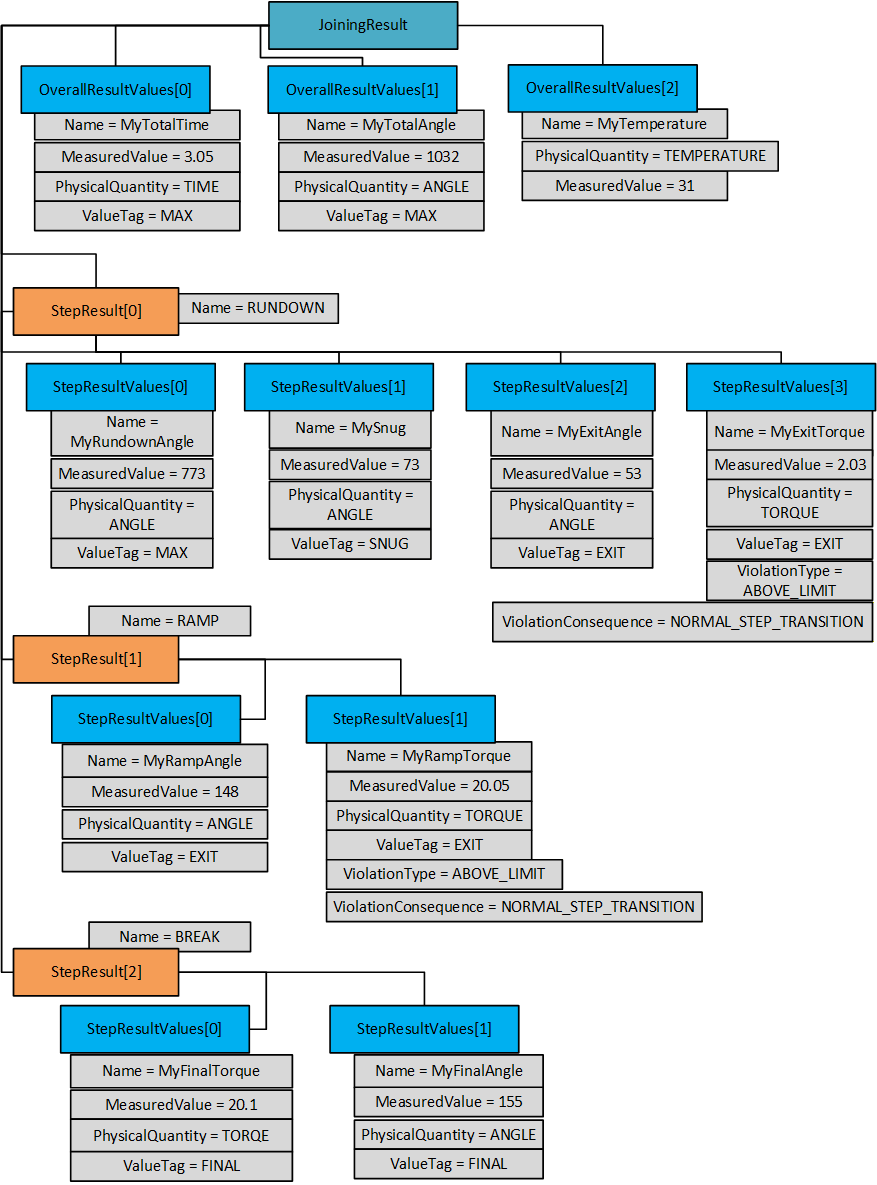
The following figure illustrates an example of OverallResultValues and StepResultValues for a three-step joining. Please note that most other parameters have been omitted to clarify the use of Result Values and Value Tags.
This example has three general values that are not tied to a particular step. These are MyTotalTime (the time from start to finish of the entire joining), MyTotalAngle (the angle from starts of rundown to highest achieved angle), and MyTemperature. The first two values have ValueTag = MAX to make it easier to understand that it is global maximum we are reporting. The temperature is tied to a single sampling, so it is included as a reported value without any ValueTag.
The result contains a rundown step, a simple torque step and a break step.
There are four values which contain an EXIT ValueTag, these represent the values as one step transition into the next. Two of them has a ViolationType value, meaning that they are the cause of the transition.
The last step (the break step) contains the angle and torque of the Final Torque point. Both have the FINAL ValueTag. To get hold of the FINAL values, the result consumer needs to loop through the Steps and the StepResultValues and look for the FINAL ValueTag.