
7.2 OPC UA for RIO Channel Types
There are different RIO Channel types defined for each profile for digital and analog Input as well as for digital and analog Output. Table 29 lists the RIO Channel types defined in this specification for the Common Application Profiles RIOforPA and RIOforFA. All RIO Channel types are subtypes of the RioChannelType defined in chapter 7.2.1.
| Profile | Input Channels | |
| Digital | Analog | |
| RIOforPA | RioPaDigitalInputChannelType | RioPaAnalogInputChannelType |
| RIOforFA | RioFaDigitalInputChannelType | RioFaAnalogInputChannelType |
| Output Channels | ||
|---|---|---|
| Digital | Analog | |
| RIOforPA | RioPaDigitalOutputChannelType | RioPaAnalogOutputChannelType |
| RIOforFA | RioFaDigitalOutputChannelType | RioFaAnalogOutputChannelType |
7.2.1 RioChannelType
The RioChannelType is the base type for all RIO-channel types. The type shall not be used directly. Instead, only the subtypes shall be instantiated.
| Attribute | Value | ||||
| BrowseName | RioChannelType | ||||
| IsAbstract | True | ||||
| References | Node Class | BrowseName | DataType | TypeDefinition | Other |
|---|---|---|---|---|---|
| Subtype of the BaseObjectType defined in OPC 10000-5. | |||||
| 0:HasProperty | Variable | RioChannelNumber | 0:UInt16 | 0:PropertyType | M, RO |
| 0:HasProperty | Variable | ApplicationTag | 0:String | 0:PropertyType | M, RO |
| 0:HasComponent | Method | SetApplicationTag | O | ||
| 0:HasProperty | Variable | LastParameterChange | 0:DateTime | 0:PropertyType | O, RO |
| 0:HasComponent | Object | Lock | 2:LockingServicesType | O | |
| 0:GeneratesEvent | ObjectType | RioChannelDiagnosisEventType | |||
| 0:GeneratesEvent | ObjectType | RioChannelDiagnosisAlarmType | |||
| Conformance Units | |||||
|---|---|---|---|---|---|
| PNRIO Channel Objects |
The RioChannelNumber Property shall contain a unique channel number. Uniqueness shall be guaranteed for all RIO Channel Objects aggregated by a RIO Channel Group. The value range used for the RioChannelNumber Property Values shall be continuous and start with 0.
The ApplicationTag Variable contains information determined by configuration or by applications. The Client can change the content by invoking the SetApplicationTag Method.
7.2.1.1 SetApplicationTag Method
This Method sets the Value of the ApplicationTag Variable. The security constraints defined in chapter 6.7 apply.
Signature
	SetApplicationTag (
		[in] 0:String	 ApplicationTag
		);
| Argument | Description |
| ApplicationTag | String containing the desired content of the ApplicationTag Variable. |
The Method Result Codes (defined in Call Service) are defined in Table 31.
| Result Code | Description |
| Good | The Method execution was successful. |
| Bad_UserAccessDenied | The user has not the right to execute the Method. |
| Bad_InvalidArgument | The Server is not able to apply the name. The ApplicationTag string may be too long or may contain invalid characters. The server may also reject duplicates. |
| Bad_UnexpectedError | The server is not able to execute the function because an unexpected error occurred. The Device might be temporarily unavailable or unreachable due to network failure. |
The Server might provide diagnosis data by sending RioChannelDiagnosisEventType Events and / or RioChannelDiagnosisAlarmType Events. The diagnosis data of the RioChannelGroup Object includes the diagnosis information of all aggregated RIO Channel Objects.
If the SetApplicationTag Method is invoked or if parameterization data provided by the subordinated RioChannelGroupConfigType Object is changed, the value of the LastParameterChange timestamp Variable shall be changed by the Server. This includes the EngineeringUnits and EURange Properties of Process Value Variables and any change of configuration data provided by the “Config” Objects.
The Lock Object ensures exclusive Method call for one Client. The Client locks the channel Object by invoking the InitLock Method of the Lock Object. The Client invokes ExitLock to release the lock.
Before invoking a Method of the channel Object, Clients must gain exclusive access (“lock” the channel Object) using the Lock Object.
7.2.2 Analog Input Channel Types
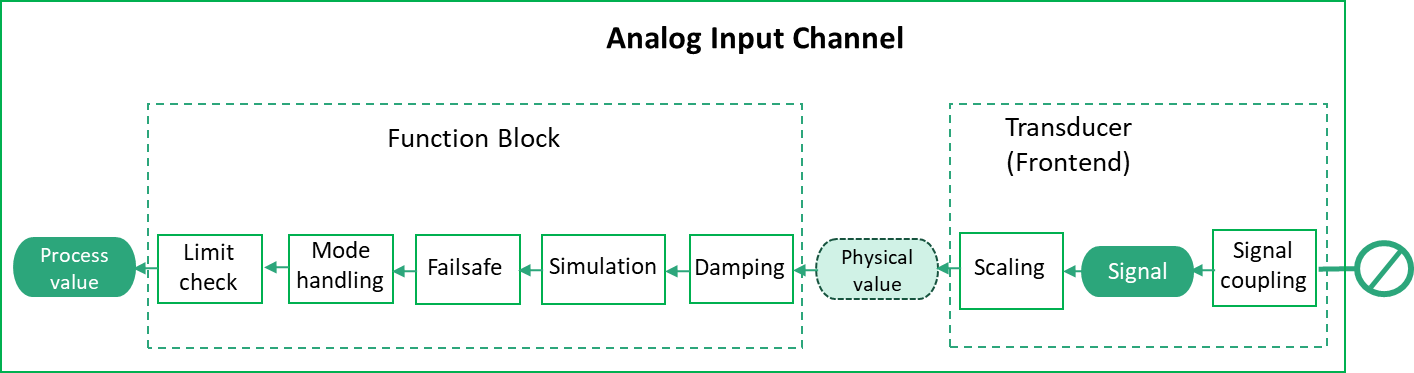
Figure 22 shows the block diagram for an analog Input Channel.
7.2.2.1 RioPaAnalogInputChannelType
The RioPaAnalogInputChannelType provides access to the data of an analog Rio Input Channel according to RIOforPA.
| Attribute | Value | ||||
| BrowseName | RioPaAnalogInputChannelType | ||||
| IsAbstract | False | ||||
| References | Node Class | BrowseName | DataType | TypeDefinition | Other |
|---|---|---|---|---|---|
| Subtype of the RioChannelType. | |||||
| 0:HasComponent | Variable | ProcessValue | RioPaAnalogProcessValueDataType | RioPaAnalogProcessValueVariableType | M, RO |
| 0:HasComponent | Variable | SignalValue | 0:Double | 0:BaseAnalogType | O, RO |
| 0:HasComponent | Variable | Mode | RioChannelModeEnumeration | 0:BaseDataVariableType | M, RO |
| 0:HasComponent | Variable | ManualProcessValue | RioAnalogDataType | 0:BaseDataVariableType | O, RO |
| 0:HasComponent | Variable | SimulationEnabled | 0:Boolean | 0:BaseDataVariableType | M, RO |
| 0:HasComponent | Variable | SimulationValue | RioPaAnalogValueDataType | 0:BaseDataVariableType | O, RO |
| 0:HasComponent | Variable | Config | RioPaAnalogInputConfigDataType | RioPaAnalogInputConfigVariableType | M, RO |
| 0:HasComponent | Method | SetMode | O | ||
| 0:HasComponent | Method | SetManualProcessValue | O | ||
| 0:HasComponent | Method | SetSimulation | O | ||
| 0:HasComponent | Method | SetSimulationValue | O | ||
| Conformance Units | |||||
|---|---|---|---|---|---|
| PNRIO Channel Objects |
The ProcessValue Variable contains the current analog Input value for usage by a Controller.
The SignalValue Variable contains the input signal value obtained by reading the input signal through the signal coupling in the Transducer.
The Mode Variable contains the current mode of operation encoded as RioChannelModeEnumeration. If Mode has the Value MANUAL, the Value of the ManualProcessValue Variable shall be used as Process Value.
The ManualProcessValue Variable contains the value used as Process Value if the Mode Variable of the channel contains the Value MANUAL. The optional Variable is used for Devices according to the PA V3 profile and maps to the “manual out value” property defined by this profile.
The SimulationEnabled Variable contains True if the Value of the SimulationValue Variable shall be used as Process Value, otherwise False.
The SimulationValue Variable contains the value used as Process Value if the SimulationEnabled Variable contains the Value True.
The Config Variable contains the configuration properties available for the RIO Channel. See the definition of the RioPaAnalogInputConfigVariableType (see chapter 9.4.5).
7.2.2.2 SetMode Method
This Method sets the Value of the Mode Variable. The security constraints defined in chapter 6.7 apply.
Signature
	SetMode (
		[in] RioChannelModeEnumeration	 Mode
		);
| Argument | Description |
| Mode | Desired content of the Mode Variable. |
The Method Result Codes (defined in Call Service) are defined in Table 33.
| Result Code | Description |
| Good | The Method execution was successful. |
| Bad_UserAccessDenied | The user has not the right to execute the Method. |
| Bad_NotSupported | The Server is currently not able to perform the demanded mode change. |
| Bad_UnexpectedError | The Server is not able to execute the function because an unexpected error occurred. The Device might be temporarily unavailable or unreachable due to network failure. |
If the Mode Variable has already the same Value as the argument, the Method shall do nothing and return Good as result code.
7.2.2.3 SetManualProcessValue Method
This Method sets the Value of the ManualProcessValue Variable. The security constraints defined in chapter 6.7 apply.
Signature
	SetManualProcessValue (
		[in] RioAnalogDataType		ManualProcessValue
		);
| Argument | Description |
| ManualProcessValue | Desired Value of the ManualProcessValue Variable. |
The Method Result Codes (defined in Call Service) are defined in Table 34.
| Result Code | Description |
| Good | The Method execution was successful. |
| Bad_UserAccessDenied | The user has not the right to execute the Method. |
| Bad_InvalidArgument | The Server is not able to apply the argument value. For instance, the Server might reject manual values not within the channels value bounds. |
| Bad_UnexpectedError | The Server is not able to execute the function because an unexpected error occurred. The Device might be temporarily unavailable or unreachable due to network failure. |
If the ManualProcessValue Variable has already the same Value as the argument, the Method shall do nothing and return Good as result code.
7.2.2.4 SetSimulation Method
This Method sets the Value of the SimulationEnabled Variable to the desired value. The security constraints defined in chapter 6.7 apply.
Signature
	SetSimulation (
		[in] 0:Boolean 	SimulationEnabled
	);
| Argument | Description |
| SimulationEnabled | Desired content of the SimulationEnabled Variable. |
The Method Result Codes (defined in Call Service) are defined in Table 35.
| Result Code | Description |
| Good | The Method execution was successful. |
| Bad_UserAccessDenied | The user has not the right to execute the Method. |
| Bad_NotSupported | The Server is not able to change into target mode. |
| Bad_UnexpectedError | The Server is not able to execute the function because an unexpected error occurred. The Device might be temporarily unavailable or unreachable due to network failure. |
If the SimulationEnabled Variable already has the Value of the argument, the Method shall do nothing and return Good as result code.
7.2.2.5 SetSimulationValue Method
This Method sets the Value of the SimulationValue Variable. The security constraints defined in chapter 6.7 apply.
Signature
	SetSimulationValue (
		[in] RioAnalogDataType		Value
		[in] 0:Byte		Qualifier
		);
| Argument | Description |
| Value | Desired content of the Value struct member of the SimulationValue Variable. |
| Qualifier | Desired content of the Qualifier struct member of the SimulationValue Variable. |
The Method Result Codes (defined in Call Service) are defined in Table 36.
| Result Code | Description |
| Good | The Method execution was successful. |
| Bad_UserAccessDenied | The user has not the right to execute the Method. |
| Bad_InvalidArgument | The Server is not able to apply the argument value. For instance, the Server might reject simulation values not within the channels value bounds. |
| Bad_UnexpectedError | The Server is not able to execute the function because an unexpected error occurred. The Device might be temporarily unavailable or unreachable due to network failure. |
7.2.2.6 RioFaAnalogInputChannelType
The RioFaAnalogInputChannelType provides access to the data of an analog RIO Input Channel according to RIOforFA.
| Attribute | Value | ||||
| BrowseName | RioFaAnalogInputChannelType | ||||
| IsAbstract | False | ||||
| References | Node Class | BrowseName | DataType | TypeDefinition | Other |
|---|---|---|---|---|---|
| Subtype of the RioChannelType. | |||||
| 0:HasComponent | Variable | ProcessValue | RioFaAnalogProcessValueDataType | RioFaAnalogProcessValueVariableType | M, RO |
| 0:HasComponent | Variable | SignalValue | 0:Double | 0:BaseAnalogType | O, RO |
| 0:HasComponent | Variable | Config | RioFaAnalogInputConfigDataType | RioFaAnalogInputConfigVariableType | M, RO |
| Conformance Units | |||||
|---|---|---|---|---|---|
| PNRIO Channel Objects |
The ProcessValue Variable contains the current analog Input value for usage by a Controller.
The SignalValue Variable contains the input signal value obtained by reading the input signal through the signal coupling in the Transducer.
The Config Variable contains the configuration properties available for the RIO Channel. See the definition of the RioFaAnalogInputConfigVariableType (see chapter 9.4.6).
7.2.3 Analog Output Channel Types
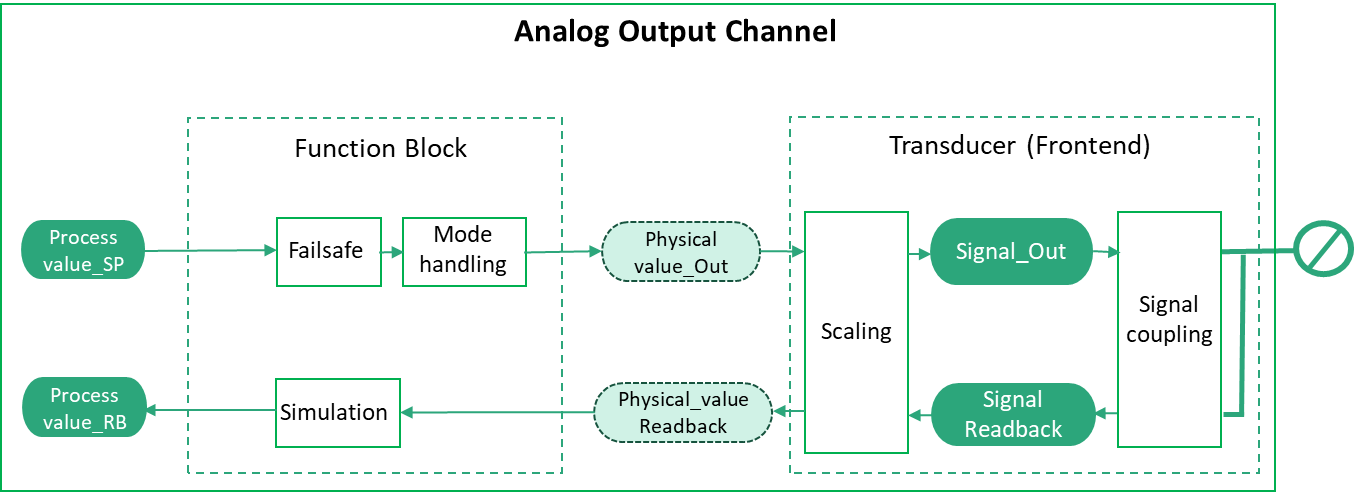
Figure 23 shows the block diagram for an analog Output Channel.
7.2.3.1 RioPaAnalogOutputChannelType
The RioPaAnalogOutputChannelType provides access to the data of an analog RIO Output Channel according to RIOforPA.
| Attribute | Value | ||||
| BrowseName | RioPaAnalogOutputChannelType | ||||
| IsAbstract | False | ||||
| References | Node Class | BrowseName | DataType | TypeDefinition | Other |
|---|---|---|---|---|---|
| Subtype of the RioChannelType. | |||||
| 0:HasComponent | Variable | ProcessValue | RioPaAnalogProcessValueDataType | RioPaAnalogProcessValueVariableType | M, RO |
| 0:HasComponent | Variable | ProcessValueReadback | RioPaAnalogProcessValueDataType | RioPaAnalogProcessValueVariableType | O, RO |
| 0:HasComponent | Variable | SignalValue | 0:Double | 0:BaseAnalogType | O, RO |
| 0:HasComponent | Variable | SignalValueReadback | 0:Double | 0:BaseAnalogType | O, RO |
| 0:HasComponent | Variable | Mode | RioChannelModeEnumeration | 0:BaseDataVariableType | M, RO |
| 0:HasComponent | Variable | ManualOutValue | RioAnalogDataType | 0:BaseDataVariableType | O, RO |
| 0:HasComponent | Variable | SimulationEnabled | 0:Boolean | 0:BaseDataVariableType | M, RO |
| 0:HasComponent | Variable | SimulationValue | RioPaAnalogValueDataType | 0:BaseDataVariableType | O, RO |
| 0:HasComponent | Variable | Config | RioPaAnalogOutputConfigDataType | RioPaAnalogOutputConfigVariableType | M, RO |
| 0:HasComponent | Method | SetMode | O | ||
| 0:HasComponent | Method | SetManualOutValue | O | ||
| 0:HasComponent | Method | SetSimulation | O | ||
| 0:HasComponent | Method | SetSimulationValue | O | ||
| Conformance Units | |||||
|---|---|---|---|---|---|
| PNRIO Channel Objects |
The ProcessValue Variable contains the current analog Output value for an automated process.
The ProcessValueReadback Variable contains the readback value obtained by reading the output signal back through the Transducer and the Function Block.
The SignalValue Variable contains the output signal value fed to the signal coupling in the Transducer.
The SignalValueReadback Variable contains the output signal read back through the signal coupling in the Transducer.
The Mode Variable contains the current mode of operation encoded as RioChannelModeEnumeration. If Mode has the Value MANUAL, the Value of the ManualOutValue Variable shall be used as Output value in place of the Process Value.
The ManualOutValue Variable contains the value used as Output value to an automated process in place of the Process Value if the Mode Variable of the channel contains the Value MANUAL.
The SimulationEnabled Variable contains True if the Value of the SimulationValue Variable shall be used as Output value in place of the Process Value, otherwise False.
The SimulationValue Variable contains the value used as Output value in place of the Process Value if the SimulationEnabled Variable contains True.
The Config Variable contains the configuration properties available for the RIO Channel. See the definition of the RioPaAnalogOutputConfigVariableType (See chapter 9.4.7).
7.2.3.2 SetMode Method
This Method sets the Value of the Mode Variable. The security constraints defined in chapter 6.7 apply.
Signature
	SetMode (
		[in] RioChannelModeEnumeration	Mode
		);
| Argument | Description |
| Mode | Desired content of the Mode Variable. |
The Method Result Codes (defined in Call Service) are defined in Table 39.
| Result Code | Description |
| Good | The Method execution was successful. |
| Bad_UserAccessDenied | The user has not the right to execute the Method. |
| Bad_NotSupported | The Server is currently not able to perform the demanded mode change. |
| Bad_UnexpectedError | The Server is not able to execute the function because an unexpected error occurred. The Device might be temporarily unavailable or unreachable due to network failure. |
If the Mode Variable has already the same Value as the argument, the Method shall do nothing and return Good as result code.
7.2.3.3 SetManualOutValue Method
This Method sets the Value of the ManualOutValue Variable. The security constraints defined in chapter 6.7 apply.
Signature
	SetManualOutValue (
		[in] RioAnalogDataType		ManualOutValue
		);
| Argument | Description |
| ManualOutValue | Desired Value of the ManualOutValue Variable. |
The Method Result Codes (defined in Call Service) are defined in Table 40.
| Result Code | Description |
| Good | The Method execution was successful. |
| Bad_UserAccessDenied | The user has not the right to execute the Method. |
| Bad_InvalidArgument | The Server is not able to apply the argument value. For instance, the Server might reject manual values not within the channels value bounds. |
| Bad_UnexpectedError | The Server is not able to execute the function because an unexpected error occurred. The Device might be temporarily unavailable or unreachable due to network failure. |
If the ManualOutValue Variable has already the same Value as the argument, the Method shall do nothing and return Good as result code.
7.2.3.4 SetSimulation Method
This Method sets the Value of the SimulationEnabled Variable to the desired value. The security constraints defined in chapter 6.7 apply.
Signature
	SetSimulation (
		[in] 0:Boolean	SimulationEnabled
	);
| Argument | Description |
| SimulationEnabled | Desired content of the SimulationEnabled Variable. |
The Method Result Codes (defined in Call Service) are defined in Table 41.
| Result Code | Description |
| Good | The Method execution was successful. |
| Bad_UserAccessDenied | The user has not the right to execute the Method. |
| Bad_NotSupported | The Server is not able to change into target mode. |
| Bad_UnexpectedError | The Server is not able to execute the function because an unexpected error occurred. The Device might be temporarily unavailable or unreachable due to network failure. |
If the SimulationEnabled Variable already has the value of the argument, the Method shall do nothing and return Good as result code.
7.2.3.5 SetSimulationValue Method
This Method sets the Value of the SimulationValue Variable. The security constraints defined in chapter 6.7 apply.
Signature
	SetSimulationValue (
		[in] 0:RioAnalogDataType	Value
		[in] 0:Byte		Qualifier
		);
| Argument | Description |
| Value | Desired content of the Value member of the SimulationValue Variable. |
| Qualifier | Desired content of the Qualifier member of the SimulationValue Variable. |
The Method Result Codes (defined in Call Service) are defined in Table 42.
| Result Code | Description |
| Good | The Method execution was successful. |
| Bad_UserAccessDenied | The user has not the right to execute the Method. |
| Bad_InvalidArgument | The Server is not able to apply the argument value. For instance, the Server might reject simulation values not within the channels value bounds. |
| Bad_UnexpectedError | The Server is not able to execute the function because an unexpected error occurred. The Device might be temporarily unavailable or unreachable due to network failure. |
7.2.3.6 RioFaAnalogOutputChannelType
The RioFaAnalogOutputChannelType provides access to the data of an analog RIO Output Channel according to RIOforFA.
| Attribute | Value | ||||
| BrowseName | RioFaAnalogOutputChannelType | ||||
| IsAbstract | False | ||||
| References | Node Class | BrowseName | DataType | TypeDefinition | Other |
|---|---|---|---|---|---|
| Subtype of the RioChannelType. | |||||
| 0:HasComponent | Variable | ProcessValue | RioFaAnalogProcessValueDataType | RioFaAnalogProcessValueVariableType | M, RO |
| 0:HasComponent | Variable | ProcessValueReadback | RioFaAnalogProcessValueDataType | RioFaAnalogProcessValueVariableType | O, RO |
| 0:HasComponent | Variable | SignalValue | 0:Double | 0:BaseAnalogType | O, RO |
| 0:HasComponent | Variable | SignalValueReadback | 0:Double | 0:BaseAnalogType | O, RO |
| 0:HasComponent | Variable | Config | RioFaAnalogOutputConfigDataType | RioFaAnalogOutputConfigVariableType | M, RO |
| Conformance Units | |||||
|---|---|---|---|---|---|
| PNRIO Channel Objects |
The ProcessValue Variable contains the current analog Output value for an automated process.
The ProcessValueReadback Variable contains the readback value obtained by reading the output signal back through the Transducer and the Function Block.
The SignalValue Variable contains the output signal value fed to the signal coupling in the Transducer.
The SignalValueReadback Variable contains the output signal read back through the signal coupling in the Transducer.
The Config Variable contains the configuration properties available for the RIO Channel. See the definition of the RioFaAnalogOutputConfigVariableType (see chapter 9.4.8).
7.2.4 Digital Input Channel Types
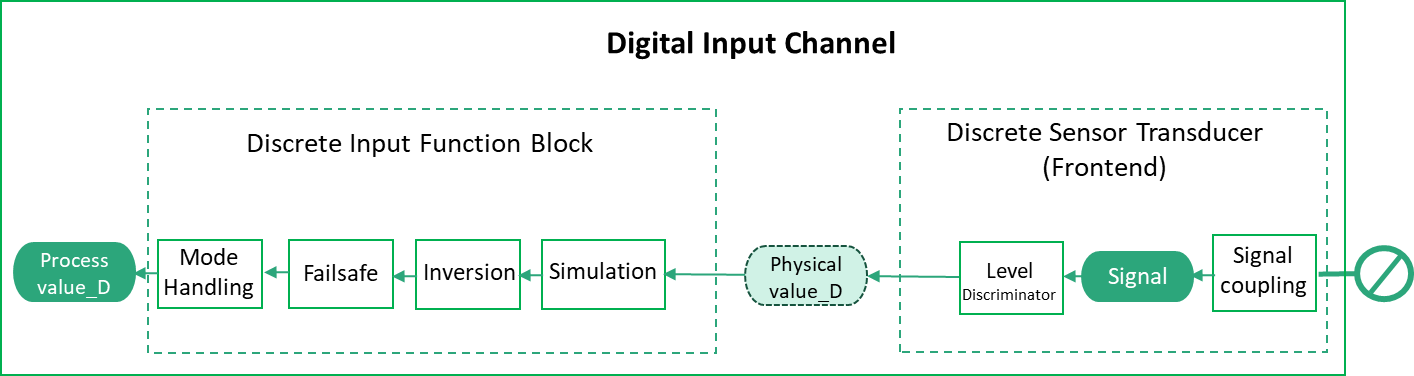
Figure 24 shows the block diagram for a digital Input Channel.
7.2.4.1 RioPaDigitalInputChannelType
The RioPaDigitalInputChannelType provides access to the data of a discrete RIO Input Channel according to RIOforPA.
| Attribute | Value | ||||
| BrowseName | RioPaDigitalInputChannelType | ||||
| IsAbstract | False | ||||
| References | Node Class | BrowseName | DataType | TypeDefinition | Other |
|---|---|---|---|---|---|
| Subtype of the RioChannelType. | |||||
| 0:HasComponent | Variable | ProcessValue | RioPaDigitalProcessValueDataType | RioPaDigitalProcessValueVariableType | M, RO |
| 0:HasComponent | Variable | SignalValue | 0:Double | 0:BaseAnalogType | O, RO |
| 0:HasComponent | Variable | Mode | RioChannelModeEnumeration | 0:BaseDataVariableType | M, RO |
| 0:HasComponent | Variable | ManualProcessValue | 0:Boolean | 0:BaseDataVariableType | O, RO |
| 0:HasComponent | Variable | SimulationEnabled | 0:Boolean | 0:BaseDataVariableType | M, RO |
| 0:HasComponent | Variable | SimulationValue | RioPaDigitalValueDataType | 0:BaseDataVariableType | O, RO |
| 0:HasComponent | Variable | Config | RioPaDigitalInputConfigDataType | RioPaDigitalInputConfigVariableType | M, RO |
| 0:HasComponent | Method | SetMode | O | ||
| 0:HasComponent | Method | SetManualProcessValue | O | ||
| 0:HasComponent | Method | SetSimulation | O | ||
| 0:HasComponent | Method | SetSimulationValue | O | ||
| Conformance Units | |||||
|---|---|---|---|---|---|
| PNRIO Channel Objects |
The ProcessValue Variable contains the digital Input value for a Controller.
The SignalValue Variable contains the input signal value obtained by reading the input signal through the signal coupling in the Transducer.
The Mode Variable contains the current mode of operation encoded as RioChannelModeEnumeration. If Mode has the Value MANUAL, the Value of the ManualProcessValue Variable shall be used as Process Value.
The ManualProcessValue Variable contains the value used as Process Value if the Mode Variable of the channel contains the Value MANUAL. The optional Variable is used for Devices according to the PA V3 profile and maps to the “manual out value” property defined by this profile.
The SimulationEnabled Variable contains True if the Value of the SimulationValue Variable shall be used as Process Value, otherwise False.
The SimulationValue Variable contains the value used as Process Value if the SimulationEnabled Variable contains the Value True.
The Config Variable contains the configuration properties available for the RIO Channel. See the definition of the RioPaDigitalInputConfigVariableType (See 9.4.1)
7.2.4.2 SetMode Method
This Method sets the Value of the Mode Variable. The security constraints defined in chapter 6.7 apply.
Signature
	SetMode (
		[in] RioChannelModeEnumeration	Mode
		);
| Argument | Description |
| Mode | Desired content of the Mode Variable. |
The Method Result Codes (defined in Call Service) are defined in Table 45.
| Result Code | Description |
| Good | The Method execution was successful. |
| Bad_UserAccessDenied | The user has not the right to execute the Method. |
| Bad_NotSupported | The Server is currently not able to perform the demanded mode change. |
| Bad_UnexpectedError | The Server is not able to execute the function because an unexpected error occurred. The Device might be temporarily unavailable or unreachable due to network failure. |
If the Mode Variable has already the same Value as the argument, the Method shall do nothing and return Good as result code.
7.2.4.3 SetManualProcessValue Method
This Method sets the Value of the ManualProcessValue Variable. The security constraints defined in chapter 6.7 apply.
Signature
	SetManualProcessValue (
		[in] 0:Boolean		ManualProcessValue
		);
| Argument | Description |
| ManualProcessValue | Desired Value of the ManualProcessValue Variable. |
The Method Result Codes (defined in Call Service) are defined in Table 46.
| Result Code | Description |
| Good | The Method execution was successful. |
| Bad_UserAccessDenied | The user has not the right to execute the Method. |
| Bad_InvalidArgument | The Server is not able to apply the argument value. |
| Bad_UnexpectedError | The Server is not able to execute the function because an unexpected error occurred. The Device might be temporarily unavailable or unreachable due to network failure. |
If the ManualProcessValue Variable has already the same Value as the argument, the Method shall do nothing and return Good as result code.
7.2.4.4 SetSimulation Method
This Method sets the Value of the SimulationEnabled Variable to the desired value. The security constraints defined in chapter 6.7 apply.
Signature
	SetSimulation (
		[in] 0:Boolean	SimulationEnabled
	);
| Argument | Description |
| SimulationEnabled | Desired content of the SimulationEnabled Variable. |
The Method Result Codes (defined in Call Service) are defined in Table 47.
| Result Code | Description |
| Good | The Method execution was successful. |
| Bad_UserAccessDenied | The user has not the right to execute the Method. |
| Bad_NotSupported | The Server is not able to change into target mode. |
| Bad_UnexpectedError | The Server is not able to execute the function because an unexpected error occurred. The Device might be temporarily unavailable or unreachable due to network failure. |
If the SimulationEnabled Variable already has the value of the argument, the Method shall do nothing and return Good as result code.
7.2.4.5 SetSimulationValue Method
This Method sets the Value of the SimulationValue Variable. The security constraints defined in chapter 6.7 apply.
Signature
	SetSimulationValue (
		[in] 0:Boolean	Value
		[in] 0:Byte		Qualifier
		);
| Argument | Description |
| Value | Desired content of the Value member of the SimulationValue Variable. |
| Qualifier | Desired content of the Qualifier member of the SimulationValue Variable. |
The Method Result Codes (defined in Call Service) are defined in Table 48.
| Result Code | Description |
| Good | The Method execution was successful. |
| Bad_UserAccessDenied | The user has not the right to execute the Method. |
| Bad_InvalidArgument | The Server is not able to apply the argument value. |
| Bad_UnexpectedError | The Server is not able to execute the function because an unexpected error occurred. The Device might be temporarily unavailable or unreachable due to network failure. |
7.2.4.6 RioFaDigitalInputChannelType
The RioFaDigitalInputChannelType provides access to the data of a discrete RIO Input Channel according to RIOforFA.
| Attribute | Value | ||||
| BrowseName | RioFaDigitalInputChannelType | ||||
| IsAbstract | False | ||||
| References | Node Class | BrowseName | DataType | TypeDefinition | Other |
|---|---|---|---|---|---|
| Subtype of the RioChannelType. | |||||
| 0:HasComponent | Variable | ProcessValue | RioFaDigitalProcessValueDataType | RioFaDigitalProcessValueVariableType | M, RO |
| 0:HasComponent | Variable | SignalValue | 0:Double | 0:BaseAnalogType | O, RO |
| 0:HasComponent | Variable | Config | RioFaDigitalInputConfigDataType | RioFaDigitalInputConfigVariableType | M, RO |
| Conformance Units | |||||
|---|---|---|---|---|---|
| PNRIO Channel Objects |
The ProcessValue Variable contains the digital Input value for a Controller.
The SignalValue Variable contains the input signal value obtained by reading the input signal through the signal coupling in the Transducer.
The Config Variable contains the configuration properties available for the RIO Channel. See the definition of the RioFaDigitalInputConfigVariableType (see chapter 9.4.2).
7.2.5 Digital Output Channel Types
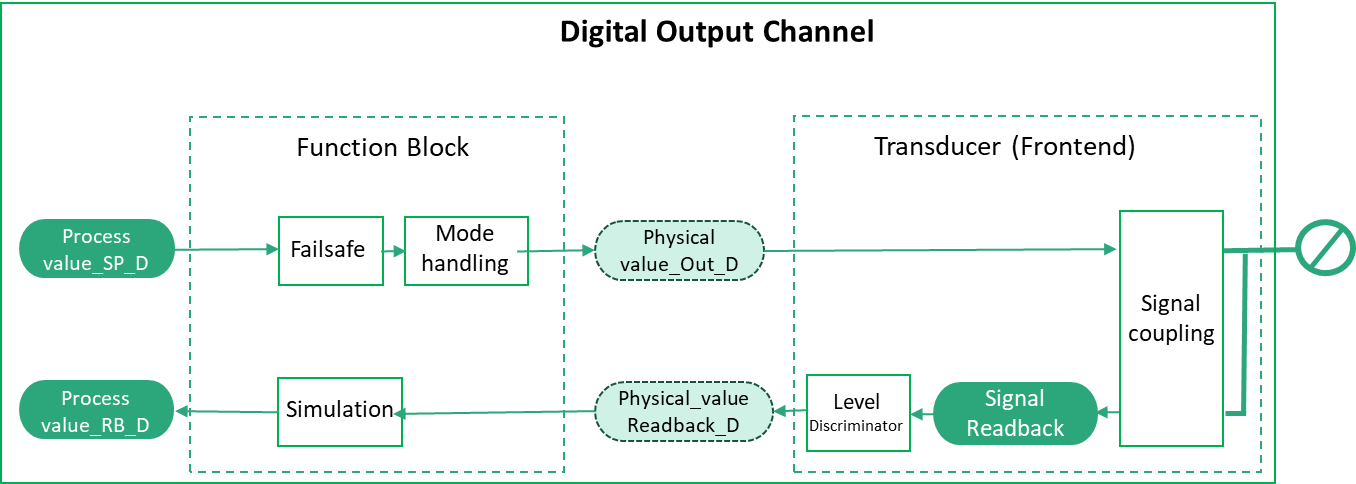
Figure 25 shows the block diagram for a digital Output Channel.
7.2.5.1 RioPaDigitalOutputChannelType
The RioPaDigitalOutputChannelType provides access to the data of a discrete RIO Output Channel according to RIOforPA.
| Attribute | Value | ||||
| BrowseName | RioPaDigitalOutputChannelType | ||||
| IsAbstract | False | ||||
| References | Node Class | BrowseName | DataType | TypeDefinition | Other |
|---|---|---|---|---|---|
| Subtype of the RioChannelType. | |||||
| 0:HasComponent | Variable | ProcessValue | RioPaDigitalProcessValueDataType | RioPaDigitalProcessValueVariableType | M, RO |
| 0:HasComponent | Variable | ProcessValueReadback | RioPaDigitalProcessValueDataType | RioPaDigitalProcessValueVariableType | O, RO |
| 0:HasComponent | Variable | SignalValue | 0:Double | 0:BaseAnalogType | O, RO |
| 0:HasComponent | Variable | SignalValueReadback | 0:Double | 0:BaseAnalogType | O, RO |
| 0:HasComponent | Variable | Mode | RioChannelModeEnumeration | 0:BaseDataVariableType | M, RO |
| 0:HasComponent | Variable | ManualOutValue | 0:Boolean | 0:BaseDataVariableType | O, RO |
| 0:HasComponent | Variable | SimulationEnabled | 0:Boolean | 0:BaseDataVariableType | M, RO |
| 0:HasComponent | Variable | SimulationValue | RioPaDigitalValueDataType | 0:BaseDataVariableType | O, RO |
| 0:HasComponent | Variable | Config | RioPaDigitalOutputConfigDataType | RioPaDigitalOutputConfigVariableType | M, RO |
| 0:HasComponent | Method | SetMode | O | ||
| 0:HasComponent | Method | SetManualOutValue | O | ||
| 0:HasComponent | Method | SetSimulation | O | ||
| 0:HasComponent | Method | SetSimulationValue | O | ||
| Conformance Units | |||||
|---|---|---|---|---|---|
| PNRIO Channel Objects |
The ProcessValue Variable contains a Controller’s output data to an automated process.
The ProcessValueReadback Variable contains the readback value obtained by reading the output signal back through the Transducer and the Function Block.
The SignalValue Variable contains the output signal value fed to the signal coupling in the Transducer.
The SignalValueReadback Variable contains the output signal read back through the signal coupling in the Transducer.
The Mode Variable contains the current mode of operation encoded as RioChannelModeEnumeration. If Mode has the Value MANUAL, the Value of the ManualOutValue Variable shall be used as Output value in place of the Process Value.
The ManualOutValue Variable contains the value used as Output value to an automated process in place of the Process Value if the Mode Variable of the channel contains the Value MANUAL.
The SimulationEnabled Variable contains True if the Value of the SimulationValue Variable shall be used as Process Value, otherwise False.
The SimulationValue Variable contains the value used as Output value in place of the Process Value if the SimulationEnabled Variable contains True.
The Config Variable contains the configuration properties available for the RIO Channel. See the definition of the RioPaDigitalOutputConfigVariableType (see chapter 9.4.3)
7.2.5.2 SetMode Method
This Method sets the Value of the Mode Variable. The security constraints defined in chapter 6.7 apply.
Signature
	SetMode (
		[in] RioChannelModeEnumeration	Mode
		);
| Argument | Description |
| Mode | Desired content of the Mode Variable. |
The Method Result Codes (defined in Call Service) are defined in Table 51.
| Result Code | Description |
| Good | The Method execution was successful. |
| Bad_UserAccessDenied | The user has not the right to execute the Method. |
| Bad_NotSupported | The Server is currently not able to perform the demanded mode change. |
| Bad_UnexpectedError | The Server is not able to execute the function because an unexpected error occurred. The Device might be temporarily unavailable or unreachable due to network failure. |
If the Mode Variable has already the same Value as the argument, the Method shall do nothing and return Good as result code.
7.2.5.3 SetManualOutValue Method
This Method sets the Value of the ManualOutValue Variable. The security constraints defined in chapter 6.7 apply.
Signature
	SetManualOutValue (
		[in] 0:Boolean	ManualOutValue
		);
| Argument | Description |
| ManualOutValue | Desired Value of the ManualOutValue Variable. |
The Method Result Codes (defined in Call Service) are defined in Table 52.
| Result Code | Description |
| Good | The Method execution was successful. |
| Bad_UserAccessDenied | The user has not the right to execute the Method. |
| Bad_InvalidArgument | The Server is not able to apply the argument value. |
| Bad_UnexpectedError | The Server is not able to execute the function because an unexpected error occurred. The Device might be temporarily unavailable or unreachable due to network failure. |
If the ManualOutValue Variable has already the same Value as the argument, the Method shall do nothing and return Good as result code.
7.2.5.4 SetSimulation Method
This Method sets the Value of the SimulationEnabled Variable to the desired value. The security constraints defined in chapter 6.7 apply.
Signature
	SetSimulation (
		[in] 0:Boolean	SimulationEnabled
	);
| Argument | Description |
| SimulationEnabled | Desired content of the SimulationEnabled Variable. |
The Method Result Codes (defined in Call Service) are defined in Table 53.
| Result Code | Description |
| Good | The Method execution was successful. |
| Bad_UserAccessDenied | The user has not the right to execute the Method. |
| Bad_NotSupported | The Server is not able to change into target mode. |
| Bad_UnexpectedError | The Server is not able to execute the function because an unexpected error occurred. The Device might be temporarily unavailable or unreachable due to network failure. |
If the SimulationEnabled Variable already has the Value of the argument, the Method shall do nothing and return Good as result code.
7.2.5.5 SetSimulationValue Method
This Method sets the Value of the SimulationValue Variable. The security constraints defined in chapter 6.7 apply.
Signature
	SetSimulationValue (
		[in] 0:Boolean	Value
		[in] 0:Byte		Qualifier
		);
| Argument | Description |
| Value | Desired content of the Value member of the SimulationValue Variable. |
| Qualifier | Desired content of the Qualifier member of the SimulationValue Variable. |
The Method Result Codes (defined in Call Service) are defined in Table 54.
| Result Code | Description |
| Good | The Method execution was successful. |
| Bad_UserAccessDenied | The user has not the right to execute the Method. |
| Bad_InvalidArgument | The Server is not able to apply the argument value. |
| Bad_UnexpectedError | The Server is not able to execute the function because an unexpected error occurred. The Device might be temporarily unavailable or unreachable due to network failure. |
7.2.5.6 RioFaDigitalOutputChannelType
The RioFaDigitalOutputChannelType provides access to the data of a discrete RIO Output Channel according to RIOforFA.
| Attribute | Value | ||||
| BrowseName | RioFaDigitalOutputChannelType | ||||
| IsAbstract | False | ||||
| References | Node Class | BrowseName | DataType | TypeDefinition | Other |
|---|---|---|---|---|---|
| Subtype of the RioChannelType. | |||||
| 0:HasComponent | Variable | ProcessValue | RioFaDigitalProcessValueDataType | RioFaDigitalProcessValueVariableType | M, RO |
| 0:HasComponent | Variable | ProcessValueReadback | RioFaDigitalProcessValueDataType | RioFaDigitalProcessValueVariableType | O, RO |
| 0:HasComponent | Variable | SignalValue | 0:Double | 0:BaseAnalogType | O, RO |
| 0:HasComponent | Variable | SignalValueReadback | 0:Double | 0:BaseAnalogType | O, RO |
| 0:HasComponent | Variable | Config | RioFaDigitalOutputConfigDataType | RioFaDigitalOutputConfigVariableType | M, RO |
| Conformance Units | |||||
|---|---|---|---|---|---|
| PNRIO Channel Objects |
The ProcessValue Variable contains a Controller’s output data to an automated process.
The ProcessValueReadback Variable contains the readback value obtained by reading the output signal back through the Transducer and the Function Block.
The SignalValue Variable contains the output signal value fed to the signal coupling in the Transducer.
The SignalValueReadback Variable contains the output signal read back through the signal coupling in the Transducer.
The Config Variable contains the configuration properties available for the RIO Channel. See the definition of the RioFaDigitalOutputConfigVariableType (see chapter 9.4.4)