
7.2.5 Digital Output Channel Types
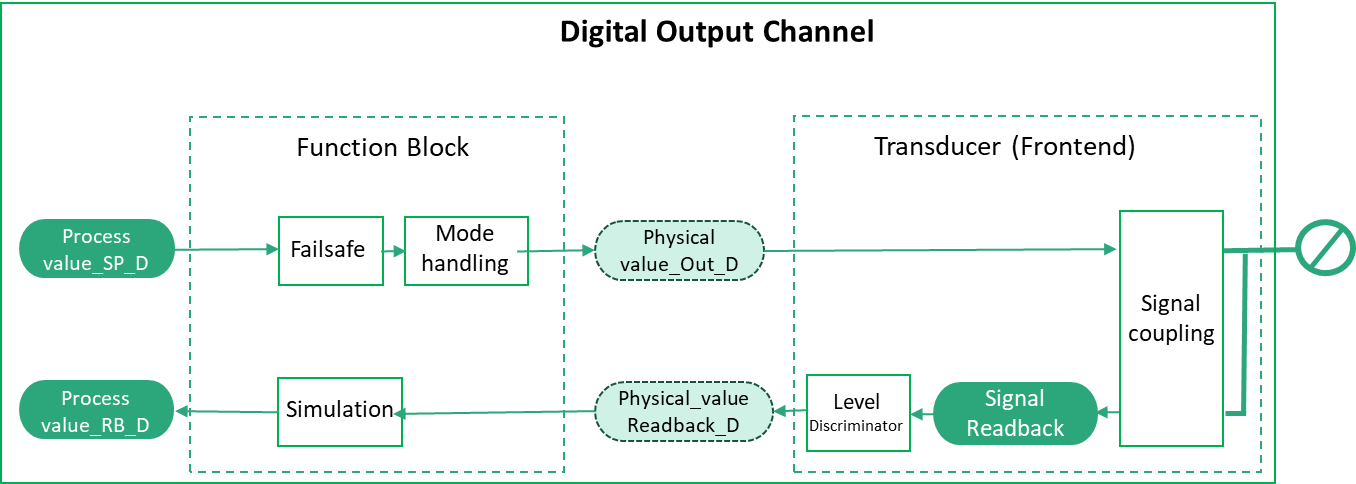
Figure 25 shows the block diagram for a digital Output Channel.
7.2.5.1 RioPaDigitalOutputChannelType
The RioPaDigitalOutputChannelType provides access to the data of a discrete RIO Output Channel according to RIOforPA.
| Attribute | Value | ||||
| BrowseName | RioPaDigitalOutputChannelType | ||||
| IsAbstract | False | ||||
| References | Node Class | BrowseName | DataType | TypeDefinition | Other |
|---|---|---|---|---|---|
| Subtype of the RioChannelType. | |||||
| 0:HasComponent | Variable | ProcessValue | RioPaDigitalProcessValueDataType | RioPaDigitalProcessValueVariableType | M, RO |
| 0:HasComponent | Variable | ProcessValueReadback | RioPaDigitalProcessValueDataType | RioPaDigitalProcessValueVariableType | O, RO |
| 0:HasComponent | Variable | SignalValue | 0:Double | 0:BaseAnalogType | O, RO |
| 0:HasComponent | Variable | SignalValueReadback | 0:Double | 0:BaseAnalogType | O, RO |
| 0:HasComponent | Variable | Mode | RioChannelModeEnumeration | 0:BaseDataVariableType | M, RO |
| 0:HasComponent | Variable | ManualOutValue | 0:Boolean | 0:BaseDataVariableType | O, RO |
| 0:HasComponent | Variable | SimulationEnabled | 0:Boolean | 0:BaseDataVariableType | M, RO |
| 0:HasComponent | Variable | SimulationValue | RioPaDigitalValueDataType | 0:BaseDataVariableType | O, RO |
| 0:HasComponent | Variable | Config | RioPaDigitalOutputConfigDataType | RioPaDigitalOutputConfigVariableType | M, RO |
| 0:HasComponent | Method | SetMode | O | ||
| 0:HasComponent | Method | SetManualOutValue | O | ||
| 0:HasComponent | Method | SetSimulation | O | ||
| 0:HasComponent | Method | SetSimulationValue | O | ||
| Conformance Units | |||||
|---|---|---|---|---|---|
| PNRIO Channel Objects |
The ProcessValue Variable contains a Controller’s output data to an automated process.
The ProcessValueReadback Variable contains the readback value obtained by reading the output signal back through the Transducer and the Function Block.
The SignalValue Variable contains the output signal value fed to the signal coupling in the Transducer.
The SignalValueReadback Variable contains the output signal read back through the signal coupling in the Transducer.
The Mode Variable contains the current mode of operation encoded as RioChannelModeEnumeration. If Mode has the Value MANUAL, the Value of the ManualOutValue Variable shall be used as Output value in place of the Process Value.
The ManualOutValue Variable contains the value used as Output value to an automated process in place of the Process Value if the Mode Variable of the channel contains the Value MANUAL.
The SimulationEnabled Variable contains True if the Value of the SimulationValue Variable shall be used as Process Value, otherwise False.
The SimulationValue Variable contains the value used as Output value in place of the Process Value if the SimulationEnabled Variable contains True.
The Config Variable contains the configuration properties available for the RIO Channel. See the definition of the RioPaDigitalOutputConfigVariableType (see chapter 9.4.3)
7.2.5.2 SetMode Method
This Method sets the Value of the Mode Variable. The security constraints defined in chapter 6.7 apply.
Signature
	SetMode (
		[in] RioChannelModeEnumeration	Mode
		);
| Argument | Description |
| Mode | Desired content of the Mode Variable. |
The Method Result Codes (defined in Call Service) are defined in Table 51.
| Result Code | Description |
| Good | The Method execution was successful. |
| Bad_UserAccessDenied | The user has not the right to execute the Method. |
| Bad_NotSupported | The Server is currently not able to perform the demanded mode change. |
| Bad_UnexpectedError | The Server is not able to execute the function because an unexpected error occurred. The Device might be temporarily unavailable or unreachable due to network failure. |
If the Mode Variable has already the same Value as the argument, the Method shall do nothing and return Good as result code.
7.2.5.3 SetManualOutValue Method
This Method sets the Value of the ManualOutValue Variable. The security constraints defined in chapter 6.7 apply.
Signature
	SetManualOutValue (
		[in] 0:Boolean	ManualOutValue
		);
| Argument | Description |
| ManualOutValue | Desired Value of the ManualOutValue Variable. |
The Method Result Codes (defined in Call Service) are defined in Table 52.
| Result Code | Description |
| Good | The Method execution was successful. |
| Bad_UserAccessDenied | The user has not the right to execute the Method. |
| Bad_InvalidArgument | The Server is not able to apply the argument value. |
| Bad_UnexpectedError | The Server is not able to execute the function because an unexpected error occurred. The Device might be temporarily unavailable or unreachable due to network failure. |
If the ManualOutValue Variable has already the same Value as the argument, the Method shall do nothing and return Good as result code.
7.2.5.4 SetSimulation Method
This Method sets the Value of the SimulationEnabled Variable to the desired value. The security constraints defined in chapter 6.7 apply.
Signature
	SetSimulation (
		[in] 0:Boolean	SimulationEnabled
	);
| Argument | Description |
| SimulationEnabled | Desired content of the SimulationEnabled Variable. |
The Method Result Codes (defined in Call Service) are defined in Table 53.
| Result Code | Description |
| Good | The Method execution was successful. |
| Bad_UserAccessDenied | The user has not the right to execute the Method. |
| Bad_NotSupported | The Server is not able to change into target mode. |
| Bad_UnexpectedError | The Server is not able to execute the function because an unexpected error occurred. The Device might be temporarily unavailable or unreachable due to network failure. |
If the SimulationEnabled Variable already has the Value of the argument, the Method shall do nothing and return Good as result code.
7.2.5.5 SetSimulationValue Method
This Method sets the Value of the SimulationValue Variable. The security constraints defined in chapter 6.7 apply.
Signature
	SetSimulationValue (
		[in] 0:Boolean	Value
		[in] 0:Byte		Qualifier
		);
| Argument | Description |
| Value | Desired content of the Value member of the SimulationValue Variable. |
| Qualifier | Desired content of the Qualifier member of the SimulationValue Variable. |
The Method Result Codes (defined in Call Service) are defined in Table 54.
| Result Code | Description |
| Good | The Method execution was successful. |
| Bad_UserAccessDenied | The user has not the right to execute the Method. |
| Bad_InvalidArgument | The Server is not able to apply the argument value. |
| Bad_UnexpectedError | The Server is not able to execute the function because an unexpected error occurred. The Device might be temporarily unavailable or unreachable due to network failure. |
7.2.5.6 RioFaDigitalOutputChannelType
The RioFaDigitalOutputChannelType provides access to the data of a discrete RIO Output Channel according to RIOforFA.
| Attribute | Value | ||||
| BrowseName | RioFaDigitalOutputChannelType | ||||
| IsAbstract | False | ||||
| References | Node Class | BrowseName | DataType | TypeDefinition | Other |
|---|---|---|---|---|---|
| Subtype of the RioChannelType. | |||||
| 0:HasComponent | Variable | ProcessValue | RioFaDigitalProcessValueDataType | RioFaDigitalProcessValueVariableType | M, RO |
| 0:HasComponent | Variable | ProcessValueReadback | RioFaDigitalProcessValueDataType | RioFaDigitalProcessValueVariableType | O, RO |
| 0:HasComponent | Variable | SignalValue | 0:Double | 0:BaseAnalogType | O, RO |
| 0:HasComponent | Variable | SignalValueReadback | 0:Double | 0:BaseAnalogType | O, RO |
| 0:HasComponent | Variable | Config | RioFaDigitalOutputConfigDataType | RioFaDigitalOutputConfigVariableType | M, RO |
| Conformance Units | |||||
|---|---|---|---|---|---|
| PNRIO Channel Objects |
The ProcessValue Variable contains a Controller’s output data to an automated process.
The ProcessValueReadback Variable contains the readback value obtained by reading the output signal back through the Transducer and the Function Block.
The SignalValue Variable contains the output signal value fed to the signal coupling in the Transducer.
The SignalValueReadback Variable contains the output signal read back through the signal coupling in the Transducer.
The Config Variable contains the configuration properties available for the RIO Channel. See the definition of the RioFaDigitalOutputConfigVariableType (see chapter 9.4.4)