
7 OPC UA for RIO ObjectTypes
7.1 OPC UA for RIO Channel Group Types
The RIO Channel Group ObjectTypes are listed in Table 17. There are Channel Group types defined for digital and analog IO for RIOforFA and RIOforPA. There is no distinction regarding Input and Output, the Channel Group Objects aggregate Input and Output Channel Objects. All Channel Group types are derived from the RioChannelGroupType defined in chapter 7.1.1.
| Profile | Channel Groups | |
| Digital | Analog | |
| RIOforPA | RioPaDigitalChannelGroupType | RioPaAnalogChannelGroupType |
| RIOforFA | RioFaDigitalChannelGroupType | RioFaAnalogChannelGroupType |
7.1.1 RioChannelGroupType
The RioChannelGroupType allows the aggregation of RIO Channels for diagnostic purposes and for asset relations. The RioChannelGroupType contains References to RioChannelType Objects. In addition, the server might provide configuration information common to all aggregated channels.
| Attribute | Value | ||||
| BrowseName | RioChannelGroupType | ||||
| IsAbstract | True | ||||
| References | Node Class | BrowseName | DataType | TypeDefinition | Other |
|---|---|---|---|---|---|
| Subtype of the 0:BaseObjectType defined in OPC 10000-5. | |||||
| 0:HasProperty | Variable | NumberOfChannels | 0:UInt16[5] | 0:PropertyType | M, RO |
| 0:HasProperty | Variable | ApplicationTag | 0:String | 0:PropertyType | O, RO |
| 0:HasComponent | Method | SetApplicationTag | O | ||
| 0:HasProperty | Variable | LastParameterChange | 0:DateTime | 0:PropertyType | O, RO |
| HasRioInputChannel | Object | <RioInputChannel> | RioChannelType | OP | |
| HasRioOutputChannel | Object | <RioOutputChannel> | RioChannelType | OP | |
| HasRioConfiguration | Object | ChannelGroupConfig | RioChannelGroupConfigType | O, RO | |
| 0:GeneratesEvent | ObjectType | RioChannelDiagnosisEventType | |||
| 0:GeneratesEvent | ObjectType | RioChannelDiagnosisAlarmType | |||
| 0:HasComponent | Object | Lock | 2:LockingServicesType | O | |
| Conformance Units | |||||
|---|---|---|---|---|---|
| PNRIO Channel Groups |
The NumberOfChannels array Variable contains the number of channels of each supported type represented by the RIO Channel Group. The following table contains the relationship of array index and the channel number information stored at the respective index:
| Index | Content of NumberOfChannels [Index] |
| 0 | Number of digital input channels |
| 1 | Number of digital output channels |
| 2 | Number of analog input channels |
| 3 | Number of analog output channels |
| 4 | Number of universal channels. |
The ApplicationTag Variable contains application specific data which can be used by Clients to obtain additional semantic information. Clients can modify the content of this Variable by invoking the SetApplicationTag Method.
If no subordinated RIO Channel Objects are provided, the Channel Group level ApplicationTag Variable is the only possibility to store Client specific semantic information. Servers can support tagging on RIO Channel level by providing Channel Objects.
The <RioInputChannel> Reference links one aggregated Input Channel Object. For each aggregated Input Channel Object, one HasRioInputChannel Reference shall be part of the RioChannelGroupType Object.
The <RioOutputChannel> Reference links one aggregated Output Channel Object. For each aggregated Output Channel Object, one HasRioOutputChannel Reference shall be part of the RioChannelGroupType Object.
If provided, the ChannelGroupConfig Object contains an arbitrary subset of read-only configuration properties of the represented RIO Channel Objects.
The Server might provide diagnosis data by sending RioChannelDiagnosisEventType Events and / or RioChannelDiagnosisAlarmType Events. The diagnosis data of the RioChannelGroup Object includes the diagnosis information of all aggregated RIO Channel Objects.
The used cross-aspect ReferenceTypes 0:RepresentsSameFunctionalityAs and 0:RepresentsSameEntityAs (see below) can only exist if the Server provides the PROFINET aspect of the Information Model.
If the PROFINET aspect is provided by the Server, the RIO Channel Group Object shall be linked to the associated PN Submodule using a 0:RepresentsSameFunctionalityAs Reference. The associated submodule addresses the same IO data as the Channel Group Object provides.
The Lock Object ensures exclusive write access and Method call for one Client. The Client locks the Channel Group Object by invoking the InitLock Method of the Lock Object. The Client invokes ExitLock to release the lock.
Before invoking a Method of the Channel Group Object, Clients must gain exclusive write access ("lock" the Channel Group Object) using the Lock Object.
7.1.1.1 SetApplicationTag Method
This Method sets the Value of the ApplicationTag Variable. The security constraints defined in chapter 6.7 apply.
Signature
	SetApplicationTag (
		[in] 0:String	 ApplicationTag
		);
| Argument | Description |
| ApplicationTag | String containing the desired content of the ApplicationTag Variable. |
The Method Result Codes (defined in Call Service) are defined in Table 19.
| Result Code | Description |
| Good | The Method execution was successful. |
| Bad_UserAccessDenied | The Client has not the right to execute the Method. |
| Bad_InvalidArgument | The Server is not able to apply the name. The ApplicationTag string may be too long or may contain invalid characters. The server may also reject duplicates. |
| Bad_UnexpectedError | The server is not able to execute the function because an unexpected error occurred. The Device might be temporarily unavailable or unreachable due to network failure. |
If the SetApplicationTag Method is invoked or if configuration data provided by the subordinated RioChannelGroupConfigType Object is changed, the value of the LastParameterChange timestamp Variable shall be changed by the Server.
7.1.2 RioChannelGroupConfigType
The RioChannelGroupConfigType contains all configuration properties which are common to all RIO Channel configuration types. A Server may support an arbitrary subset of these properties. Each supported property applies to all represented channels of the RIO Channel Group.
The Server may provide only one of the PaDigitalSubstituteValue, FaDigitalSubstituteValue bit fields, as well as the PaAnalogSubstituteValue and FaAnalogSubstituteValue arrays. But these variables shall be provided only if individual RIO Channel Objects are not provided.
| Attribute | Value | ||||
| BrowseName | RioChannelGroupConfigType | ||||
| IsAbstract | False | ||||
| References | Node Class | BrowseName | DataType | TypeDefinition | Other |
|---|---|---|---|---|---|
| Subtype of the 0:BaseObjectType defined in OPC 10000-5. | |||||
| 0:HasProperty | Variable | SignalType | RioSignalTypeEnumeration | 0:PropertyType | O, RO |
| 0:HasProperty | Variable | InversionEnabled | 0:Boolean | 0:PropertyType | O, RO |
| 0:HasProperty | Variable | ShortCircuitCheckEnabled | 0:Boolean | 0:PropertyType | O, RO |
| 0:HasProperty | Variable | WireCheckEnabled | 0:Boolean | 0:PropertyType | O, RO |
| 0:HasProperty | Variable | SupplyVoltageCheckEnabled | 0:Boolean | 0:PropertyType | O, RO |
| 0:HasProperty | Variable | LoadVoltageCheckEnabled | 0:Boolean | 0:PropertyType | O, RO |
| 0:HasProperty | Variable | SubstitutePolicy | RioSubstitutePolicyEnumeration | 0:PropertyType | O, RO |
| 0:HasComponent | Variable | PaDigitalSubstituteValue | RioBitFieldDataType | RioBitFieldVariableType | O, RO |
| 0:HasComponent | Variable | FaDigitalSubstituteValue | RioBitFieldDataType | RioBitFieldVariableType | O, RO |
| 0:HasProperty | Variable | PaAnalogSubstituteValue | RioAnalogDataType[] | 0:PropertyType | O, RO |
| 0:HasProperty | Variable | FaAnalogSubstituteValue | RioAnalogDataType[] | 0:PropertyType | O, RO |
| 0:HasProperty | Variable | SubstituteTime | 0:Float | 0:PropertyType | O, RO |
| 0:HasProperty | Variable | Damping | 0:Float | 0:PropertyType | O, RO |
| 0:HasProperty | Variable | HighLimit | RioAnalogDataType | 0:PropertyType | O, RO |
| 0:HasProperty | Variable | LowLimit | RioAnalogDataType | 0:PropertyType | O, RO |
| Conformance Units | |||||
|---|---|---|---|---|---|
| PNRIO Configuration |
The SignalType Property contains the signal type encoded as RioSignalTypeEnumeration.
The InversionEnabled Property contains True if the digital signal is inverted in the Function Block, otherwise False.
The ShortCircuitCheckEnabled Property contains True if short circuit check is active for the channel, otherwise False.
The WireCheckEnabled Property contains True if wire check is active for the channel, otherwise False.
The SupplyVoltageCheckEnabled Property contains True if supply voltage check is active for the channel, otherwise False.
The LoadVoltageCheckEnabled Property contains True if load voltage check is active for the channel, otherwise False.
The SubstitutePolicy Property contains the substitute value setting of the channel encoded as RioSubstitutePolicyEnumeration.
The PaDigitalSubstituteValue bit field Property contains the substitute values for the Process Value of the represented digital RIOforPA channels which shall be used if a failure is detected. The usage of the substitute value depends on the actual value of the SubstitutePolicy Property.
The FaDigitalSubstituteValue bit field Property contains the substitute values for the Process Value of the represented digital RIOforFA channels which shall be used if a failure is detected. The usage of the substitute value depends on the actual value of the SubstitutePolicy Property.
If the number of RIOforFA Channels the RIO Channel Group represents exceeds the capacity of the RioBitFieldVariableType (which is 32), as many RioBitFieldVariableType Variables shall be part of the RIO Channel Group Object as are needed to represent the substitute values of all RIOforFA Channels. The BrowseNames of the RioBitFieldVariableType Variable shall be extended with a suffix ensuring uniqueness and indicating the section of the bitfield the variable represents in this case, e.g. "FaDigitalSubstituteValue_0_31", "FaDigitalSubstituteValue _32_47", and so on.
The optional Offset Property of the RioBitFieldVariableType Variables shall be provided in this case and contain the start of the range the RioBitFieldVariableType Variable represents. Possible Values for Offset are 0, 32, 64, and so on. The Offset Value added to the bit number shall be used as the RioChannelNumber Property Value of the corresponding RIO Channel Objects if these Objects are provided.
The PaAnalogSubstituteValue array Property contains the substitute values for the Process Value of the represented analog RIOforPA channels which shall be used if a failure is detected. The usage of the substitute value depends on the actual value of the SubstitutePolicy Property.
The FaAnalogSubstituteValue array Property contains the substitute values for the Process Value of the represented analog RIOforFA channels which shall be used if a failure is detected. The usage of the substitute value depends on the actual value of the SubstitutePolicy Property.
The bit numbers and array indexes in the range 0 to <number of Input Channels minus 1> constitute the RioChannelNumbers of the represented Input Channels. The bit numbers and array indexes in the range <number of Input Channels> to <number of Input Channels + number of Output Channels minus 1> constitute the RioChannelNumbers of the represented Output Channels.
The SubstituteTime Property contains the time in seconds from the detection of a failure to a reaction (substitute value is set for the Process Value).
The Damping Property contains the damping time (T63) in seconds applied to an analog signal in the Function Block.
The HighLimit Property contains the upper limit of an analog signal.
The LowLimit Property contains the lower limit of an analog signal.
7.1.3 RioPaAnalogChannelGroupType
The RioPaAnalogChannelGroupType aggregates RioPaAnalogInputChannelType Objects and RioPaAnalogOutputChannelType Objects.
| Attribute | Value | ||||
| BrowseName | RioPaAnalogChannelGroupType | ||||
| IsAbstract | False | ||||
| References | Node Class | BrowseName | DataType | TypeDefinition | Other |
|---|---|---|---|---|---|
| Subtype of the RioChannelGroupType. | |||||
| HasRioProcessVariable | Variable | InputValues | RioPaAnalogValueDataType[] | 0:BaseDataVariableType | O, RO |
| HasRioProcessVariable | Variable | OutputValues | RioPaAnalogValueDataType[] | 0:BaseDataVariableType | O, RO |
| 0:HasProperty | Variable | SimulationValues | RioPaAnalogValueDataType[] | 0:PropertyType | O, RO |
| 0:HasComponent | Variable | SimulationEnabled | 0:Boolean[] | 0:BaseDataVariableType | O, RO |
| 0:HasComponent | Method | SetSimulation | O | ||
| 0:HasComponent | Method | SetSimulationValue | O | ||
| Conformance Units | |||||
|---|---|---|---|---|---|
| PNRIO Channel Groups |
The InputValues array Variable contains the Input Process Values of the Input Channels the RIO Channel Group Object represents. The InputValues Variable is linked to the associated PnIoTelegramType Object using a 0:RepresentsSameEntityAs Reference (see Figure 20).
The array indexes must be equal to the RioChannelNumber of the represented Input Channels. The RioChannelNumbers of the Input Channels shall have the value range 0 to <size of InputValues array> minus 1.
The OutputValues array Variable contains the Output Process Values of the Output Channels the RIO Channel Group Object represents. The OutputValues Variable is linked to the associated PnIoTelegramType Object using a 0:RepresentsSameEntityAs Reference.
The array indexes must be equal to the RioChannelNumber of the represented Output Channels minus <size of the InputValues array>. The RioChannelNumbers of the Output Channels shall have the value range <size of InputValues array> to <size of InputValues array + size of OutputValues array> minus 1.
The type of each array element is RioPaAnalogValueDataType which has two members: Value contains the Process Value and QualifierValue contains the status information associated with each value.
The SimulationValues array of RioPaAnalogValueDataType structures contains the values and qualifiers used as Process Value for each represented analog channel if simulation is active for the channel.
The SimulationEnabled array Variable contains True for each array element if simulation is enabled for the corresponding RIO Channel, otherwise False.
The array indexes of the SimulationValues and the SimulationEnabled arrays must be equal to the RioChannelNumber of the referenced RIO Channels.
7.1.3.1 SetSimulation Method
This Method sets the Value of array elements of the SimulationEnabled array Variable. The security constraints defined in chapter 6.7 apply.
Signature
	SetSimulation (
		[in] 0:Boolean SimulationEnabled
		[in] 0:Int16 Index
		);
| Argument | Description |
| SimulationEnabled | Value used to set the Value of one SimulationEnabled array element. |
| Index | Index of array element to set. If -1, the SimulationEnabled parameter is assigned to all array elements. |
The Method Result Codes (defined in Call Service) are defined in Table 22.
| Result Code | Description |
| Good | The Method execution was successful. |
| Bad_UserAccessDenied | The Client has not the right to execute the Method since the Operator Role is not granted to the Client's Session. |
| Bad_InvalidArgument | The Server is not able to assign the value. Possible reason: Invalid index. |
| Bad_UnexpectedError | The server is not able to execute the function because an unexpected error occurred. The Device might be temporarily unavailable or unreachable due to network failure. |
7.1.3.2 SetSimulationValue Method
This Method sets the Value of array elements of the SimulationValue array Variable. The security constraints defined in chapter 6.7 apply.
Signature
	SetSimulationValue (
		[in] RioAnalogDataType	Value
		[in] 0:Byte Qualifier
		[in] 0:Int16 Index
		);
| Argument | Description |
| Value | Value used to set the Value member of the array element. |
| Qualifier | Value used to set the Qualifier member of the array element. |
| Index | Index of array element to set. If -1, the parameters are assigned to all array elements. |
The Method Result Codes (defined in Call Service) are defined in Table 23.
| Result Code | Description |
| Good | The Method execution was successful. |
| Bad_UserAccessDenied | The Client has not the right to execute the Method since the Operator Role is not granted to the Client's Session |
| Bad_InvalidArgument | The Server is not able to assign the values. Possible reasons: Invalid qualifier value, invalid index. The server might also reject invalid values outside the supported range. |
| Bad_UnexpectedError | The server is not able to execute the function because an unexpected error occurred. The Device might be temporarily unavailable or unreachable due to network failure. |
7.1.4 RioFaAnalogChannelGroupType
The RioFaAnalogChannelGroupType aggregates RioFaAnalogInputChannelType Objects and RioFaAnalogOutputChannelType Objects.
| Attribute | Value | ||||
| BrowseName | RioFaAnalogChannelGroupType | ||||
| IsAbstract | False | ||||
| References | Node Class | BrowseName | DataType | TypeDefinition | Other |
|---|---|---|---|---|---|
| Subtype of the RioChannelGroupType. | |||||
| HasRioProcessVariable | Variable | InputImageValues | RioAnalogDataType[] | 0:BaseDataVariableType | O, RO |
| HasRioProcessVariable | Variable | InputImageQualifiers | RioBitFieldDataType | RioBitFieldVariableType | O, RO |
| HasRioProcessVariable | Variable | OutputImageValues | RioAnalogDataType[] | 0:BaseDataVariableType | O, RO |
| HasRioProcessVariable | Variable | OutputImageQualifiers | RioBitFieldDataType | RioBitFieldVariableType | O, RO |
| Conformance Units | |||||
|---|---|---|---|---|---|
| PNRIO Channel Groups |
The InputImageValues array Variable contains the Input Process Values of the Input Channels the RIO Channel Group Object represents. The InputImageValues Variable is linked to the associated PnIoTelegramType Input Object using a 0:RepresentsSameEntityAs Reference.
The InputImageQualifiers RioBitFieldVariableType Variable contains a bit field representing the qualifier bits associated with each Input Process Value the RIO Channel Group Object represents. The InputImageQualifiers Variable is linked to the associated PnIoSignalType Input Object using a 0:RepresentsSameEntityAs Reference.
The OutputImageValues array Variable contains the Output Process Values of the Output Channels the RIO Channel Group Object represents. The OutputImageValues Variable is linked to the associated PnIoTelegramType Output Object using a 0:RepresentsSameEntityAs Reference.
The OutputImageQualifiers RioBitFieldVariableType Variable contains a bit field representing the qualifier bits associated with each Output Process Value the RIO Channel Group Object represents. The OutputImageQualifiers Variable is linked to the associated PnIoSignalType Input Object using a 0:RepresentsSameEntityAs Reference.
The array index is used as the unambiguous assignment of qualifier bit and value. The array indexes and the bit numbers of the InputImageValues array and the InputImageQualifiers bit field must be equal to the RioChannelNumber Property Values of the corresponding RIO Channel Objects. The OutputImageValues array indexes and OutputImageQualifiers bit numbers must be mapped to the value range of the RioChannelNumbers of the referenced Output Channels by adding the size of the InputImageValues array.
The RioChannelNumbers of the Input Channels shall have the value range 0 to <size of InputImageValues array> minus 1. The RioChannelNumbers of the Output Channels shall have the value range <size of InputImageValues array> to <size of InputImageValues array + size of OutputImageValues array> minus 1.
If the number of RIO Channels the RIO Channel Group represents exceeds the capacity of the RioBitFieldVariableType (which is 32), as many RioBitFieldVariableType Variables shall be part of the RIO Channel Group Object as are needed to represent the qualifiers of all RIO Channels.
The BrowseNames of the RioBitFieldVariableType Variables shall be extended with a suffix ensuring uniqueness and indicating the section of the bitfield the variable represents in this case, e.g. "_0_31", "_32_47", and so on.
The optional Offset Property of the RioBitFieldVariableType shall be provided in this case and contain the start of the range the RioBitFieldVariableType Variable represents. Possible Values for Offset are 0, 32, 64, and so on. The Offset Value added to the bit number is equal to the array index of the corresponding Process Value. For bit fields representing Output Channels the array index must be mapped to the value range of the RioChannelNumbers of the referenced Output Channels by adding the number of Input Channels (see above).
7.1.5 RioPaDigitalChannelGroupType
The RioPaDigitalChannelGroupType aggregates RioPaDigitalInputChannelType Objects and RioPaDigitalOutputChannelType Objects.
| Attribute | Value | ||||
| BrowseName | RioPaDigitalChannelGroupType | ||||
| IsAbstract | False | ||||
| References | Node Class | BrowseName | DataType | TypeDefinition | Other |
|---|---|---|---|---|---|
| Subtype of the RioChannelGroupType. | |||||
| HasRioProcessVariable | Variable | InputImage | RioPaDigitalValueDataType[] | 0:BaseDataVariableType | O, RO |
| HasRioProcessVariable | Variable | OutputImage | RioPaDigitalValueDataType [] | 0:BaseDataVariableType | O, RO |
| 0:HasProperty | Variable | SimulationValues | RioPaDigitalValueDataType[] | 0:PropertyType | O, RO |
| 0:HasComponent | Variable | SimulationEnabled | 0:Boolean[] | 0:BaseDataVariableType | O, RO |
| 0:HasComponent | Method | SetSimulation | O | ||
| 0:HasComponent | Method | SetSimulationValue | O | ||
| Conformance Units | |||||
|---|---|---|---|---|---|
| PNRIO Channel Groups |
The InputImage array Variable contains the Input Process Values of the Input Channels the RIO Channel Group Object represents. The InputImage Variable is linked to the associated PnIoTelegramType Input Object using a 0:RepresentsSameEntityAs Reference.
The array indexes must be equal to the RioChannelNumbers of the represented Input Channels. The RioChannelNumbers of the Input Channels shall have the value range 0 to <size of InputImage array> minus 1.
The OutputImage array Variable contains the Output Process Values of the Output Channels the RIO Channel Group Object represents. The OutputImage Variable is linked to the associated PnIoTelegramType Output Object using a 0:RepresentsSameEntityAs Reference (See Figure 21).
The array indexes must be equal to the RioChannelNumbers of the represented Output Channels minus <size of the InputImage array>. The RioChannelNumbers of the Output Channels shall have the value range <size of InputImage array> to <size of InputImage array + size of OutputImage array> minus 1.
The type of each array element is RioPaDigitalValueDataType which has two members: Value contains the Process Value and QualifierValue contains the status information associated with each value.
The SimulationValues array of RioPaDigitalValueDataType structures contains the values and qualifiers used as Process Value for each represented digital channel if simulation is active for the channel.
The SimulationEnabled array Variable contains True for each array element if simulation is enabled for the corresponding RIO Channel, otherwise False.
The array indexes of the SimulationValues and the SimulationEnabled arrays must be equal to the RioChannelNumber of the referenced RIO Channels.
7.1.5.1 SetSimulation Method
This Method sets the Value of array elements of the SimulationEnabled array Variable. The security constraints defined in chapter 6.7 apply.
Signature
	SetSimulation (
		[in] 0:Boolean SimulationEnabled
		[in] 0:Int16 Index
		);
| Argument | Description |
| SimulationEnabled | Value used to set the Value of one SimulationEnabled array element. |
| Index | Index of array element to set. If -1, the SimulationEnabled parameter is assigned to all array elements. |
The Method Result Codes (defined in Call Service) are defined in Table 26.
| Result Code | Description |
| Good | The Method execution was successful. |
| Bad_UserAccessDenied | The Client has not the right to execute the Method since the Operator Role is not granted to the Client's Session. |
| Bad_InvalidArgument | The Server is not able to assign the value. Possible reason: Invalid index. |
| Bad_UnexpectedError | The server is not able to execute the function because an unexpected error occurred. The Device might be temporarily unavailable or unreachable due to network failure. |
7.1.5.2 SetSimulationValue Method
This Method sets the Value of array elements of the SimulationValue Variable. The security constraints defined in chapter 6.7 apply.
Signature
	SetSimulationValue (
		[in] 0:Boolean Value
		[in] 0:Byte Qualifier
		[in] 0:Int16 Index
		);
| Argument | Description |
| Value | Value used to set the Value member of the array element. |
| Qualifier | Value used to set the Qualifier member of the array element. |
| Index | Index of array element to set. If -1, the parameters are assigned to all array elements. |
The Method Result Codes (defined in Call Service) are defined in Table 27.
| Result Code | Description |
| Good | The Method execution was successful. |
| Bad_UserAccessDenied | The Client has not the right to execute the Method since the Operator Role is not granted to the Client's Session |
| Bad_InvalidArgument | The Server is not able to assign the values. Possible reasons: Invalid qualifier value, invalid index. |
| Bad_UnexpectedError | The server is not able to execute the function because an unexpected error occurred. The Device might be temporarily unavailable or unreachable due to network failure. |
7.1.6 RioFaDigitalChannelGroupType
The RioFaDigitalChannelGroupType aggregates RioFaDigitalInputChannelType Objects and RioFaDigitalOutputChannelType Objects. Alternatively, the server can omit the channel objects and provide Input- and Output image Variables only.
| Attribute | Value | ||||
| BrowseName | RioFaDigitalChannelGroupType | ||||
| IsAbstract | False | ||||
| References | Node Class | BrowseName | DataType | TypeDefinition | Other |
|---|---|---|---|---|---|
| Subtype of the RioChannelGroupType. | |||||
| HasRioProcessVariable | Variable | InputImage | RioBitFieldDataType | RioBitFieldVariableType | O, RO |
| HasRioProcessVariable | Variable | InputImageQualifiers | RioBitFieldDataType | RioBitFieldVariableType | O, RO |
| HasRioProcessVariable | Variable | OutputImage | RioBitFieldDataType | RioBitFieldVariableType | O, RO |
| HasRioProcessVariable | Variable | OutputImageQualifiers | RioBitFieldDataType | RioBitFieldVariableType | O, RO |
| Conformance Units | |||||
|---|---|---|---|---|---|
| PNRIO Channel Groups |
The InputImage Variable contains a bit field. The bit field contains the copy of one Input Telegram's memory image associated with one PnIoSignalType Object. The InputImage Variable is linked to the associated PnIoSignalType Object using a 0:RepresentsSameEntityAs Reference.
The InputImageQualifiers Variable contains a bit field containing the qualifier bits for each bit in the InputImage Variable. The InputImageQualifier Variable is linked to the associated PnIoSignalType Object using a 0:RepresentsSameEntityAs Reference.
The bit numbers must be equal to the RioChannelNumber of the represented Input Channels. The RioChannelNumbers of the Input Channels shall have the value range 0 to <number of Input Channels> minus 1.
The OutputImage Variable contains a bit field. The bit field contains the copy of one Output Telegram's memory image associated with one PnIoSignalType Object. The OutputImage Variable is linked to the associated PnIoSignalType Object using a 0:RepresentsSameEntityAs Reference.
The OutputImageQualifiers Variable contains a bit field containing the qualifier bits for each bit in the OutputImage Variable. The OutputImageQualifier Variable is linked to the associated PnIoSignalType Object using a 0:RepresentsSameEntityAs Reference.
The bit numbers must be equal to the RioChannelNumber of the represented Output Channels minus the number of Input Channels. The RioChannelNumbers of the Output Channels shall have the value range <number of Input Channels> to <number of Input Channels + number of Output Channels > minus 1.
If the number of RIO Channels the RIO Channel Group represents exceeds the capacity of the RioBitFieldVariableType (which is 32), as many RioBitFieldVariableType Variables shall be part of the RIO Channel Group Object as are needed to represent the qualifiers of all RIO Channels.
The BrowseNames of the RioBitFieldVariableType Variables shall be extended with a suffix ensuring uniqueness and indicating the section of the bitfield the variable represents in this case, e.g. "_0_31", "_32_47", and so on.
The optional Offset Property of the RioBitFieldVariableType Variables shall be provided in this case and contain the start of the range the RioBitFieldVariableType Variable represents. Possible Values for Offset are 0, 32, 64, and so on. The Offset Value added to the bit number shall be used as the RioChannelNumber of the corresponding RIO Channels. For bit fields representing Output Channels the number of Input Channels must be added also to obtain the RioChannelNumber of the represented Output Channel (see above).
7.2 OPC UA for RIO Channel Types
There are different RIO Channel types defined for each profile for digital and analog Input as well as for digital and analog Output. Table 29 lists the RIO Channel types defined in this specification for the Common Application Profiles RIOforPA and RIOforFA. All RIO Channel types are subtypes of the RioChannelType defined in chapter 7.2.1.
| Profile | Input Channels | |
| Digital | Analog | |
| RIOforPA | RioPaDigitalInputChannelType | RioPaAnalogInputChannelType |
| RIOforFA | RioFaDigitalInputChannelType | RioFaAnalogInputChannelType |
| Output Channels | ||
|---|---|---|
| Digital | Analog | |
| RIOforPA | RioPaDigitalOutputChannelType | RioPaAnalogOutputChannelType |
| RIOforFA | RioFaDigitalOutputChannelType | RioFaAnalogOutputChannelType |
7.2.1 RioChannelType
The RioChannelType is the base type for all RIO-channel types. The type shall not be used directly. Instead, only the subtypes shall be instantiated.
| Attribute | Value | ||||
| BrowseName | RioChannelType | ||||
| IsAbstract | True | ||||
| References | Node Class | BrowseName | DataType | TypeDefinition | Other |
|---|---|---|---|---|---|
| Subtype of the BaseObjectType defined in OPC 10000-5. | |||||
| 0:HasProperty | Variable | RioChannelNumber | 0:UInt16 | 0:PropertyType | M, RO |
| 0:HasProperty | Variable | ApplicationTag | 0:String | 0:PropertyType | M, RO |
| 0:HasComponent | Method | SetApplicationTag | O | ||
| 0:HasProperty | Variable | LastParameterChange | 0:DateTime | 0:PropertyType | O, RO |
| 0:HasComponent | Object | Lock | 2:LockingServicesType | O | |
| 0:GeneratesEvent | ObjectType | RioChannelDiagnosisEventType | |||
| 0:GeneratesEvent | ObjectType | RioChannelDiagnosisAlarmType | |||
| Conformance Units | |||||
|---|---|---|---|---|---|
| PNRIO Channel Objects |
The RioChannelNumber Property shall contain a unique channel number. Uniqueness shall be guaranteed for all RIO Channel Objects aggregated by a RIO Channel Group. The value range used for the RioChannelNumber Property Values shall be continuous and start with 0.
The ApplicationTag Variable contains information determined by configuration or by applications. The Client can change the content by invoking the SetApplicationTag Method.
7.2.1.1 SetApplicationTag Method
This Method sets the Value of the ApplicationTag Variable. The security constraints defined in chapter 6.7 apply.
Signature
	SetApplicationTag (
		[in] 0:String	 ApplicationTag
		);
| Argument | Description |
| ApplicationTag | String containing the desired content of the ApplicationTag Variable. |
The Method Result Codes (defined in Call Service) are defined in Table 31.
| Result Code | Description |
| Good | The Method execution was successful. |
| Bad_UserAccessDenied | The user has not the right to execute the Method. |
| Bad_InvalidArgument | The Server is not able to apply the name. The ApplicationTag string may be too long or may contain invalid characters. The server may also reject duplicates. |
| Bad_UnexpectedError | The server is not able to execute the function because an unexpected error occurred. The Device might be temporarily unavailable or unreachable due to network failure. |
The Server might provide diagnosis data by sending RioChannelDiagnosisEventType Events and / or RioChannelDiagnosisAlarmType Events. The diagnosis data of the RioChannelGroup Object includes the diagnosis information of all aggregated RIO Channel Objects.
If the SetApplicationTag Method is invoked or if parameterization data provided by the subordinated RioChannelGroupConfigType Object is changed, the value of the LastParameterChange timestamp Variable shall be changed by the Server. This includes the EngineeringUnits and EURange Properties of Process Value Variables and any change of configuration data provided by the "Config" Objects.
The Lock Object ensures exclusive Method call for one Client. The Client locks the channel Object by invoking the InitLock Method of the Lock Object. The Client invokes ExitLock to release the lock.
Before invoking a Method of the channel Object, Clients must gain exclusive access ("lock" the channel Object) using the Lock Object.
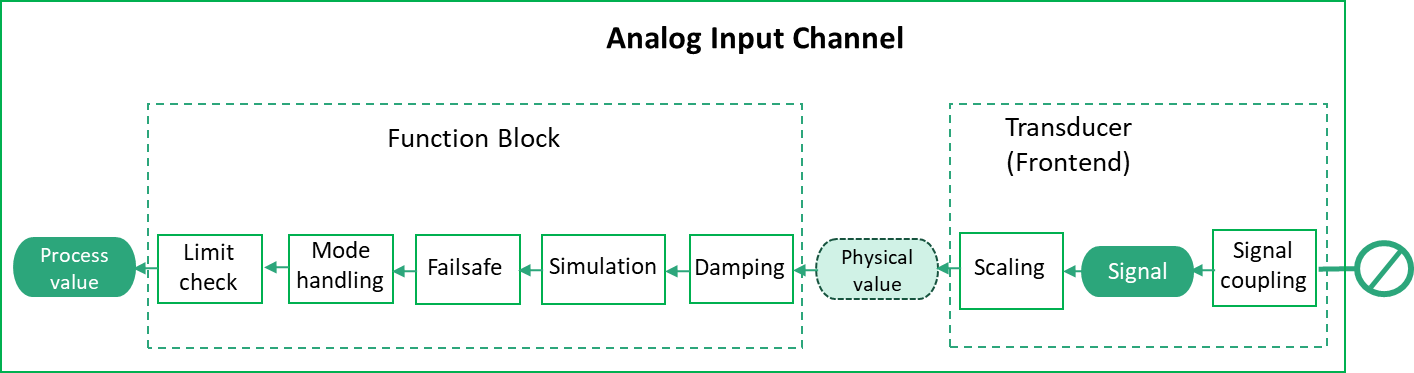
7.2.2 Analog Input Channel Types
Figure 22 shows the block diagram for an analog Input Channel.
7.2.2.1 RioPaAnalogInputChannelType
The RioPaAnalogInputChannelType provides access to the data of an analog Rio Input Channel according to RIOforPA.
| Attribute | Value | ||||
| BrowseName | RioPaAnalogInputChannelType | ||||
| IsAbstract | False | ||||
| References | Node Class | BrowseName | DataType | TypeDefinition | Other |
|---|---|---|---|---|---|
| Subtype of the RioChannelType. | |||||
| 0:HasComponent | Variable | ProcessValue | RioPaAnalogProcessValueDataType | RioPaAnalogProcessValueVariableType | M, RO |
| 0:HasComponent | Variable | SignalValue | 0:Double | 0:BaseAnalogType | O, RO |
| 0:HasComponent | Variable | Mode | RioChannelModeEnumeration | 0:BaseDataVariableType | M, RO |
| 0:HasComponent | Variable | ManualProcessValue | RioAnalogDataType | 0:BaseDataVariableType | O, RO |
| 0:HasComponent | Variable | SimulationEnabled | 0:Boolean | 0:BaseDataVariableType | M, RO |
| 0:HasComponent | Variable | SimulationValue | RioPaAnalogValueDataType | 0:BaseDataVariableType | O, RO |
| 0:HasComponent | Variable | Config | RioPaAnalogInputConfigDataType | RioPaAnalogInputConfigVariableType | M, RO |
| 0:HasComponent | Method | SetMode | O | ||
| 0:HasComponent | Method | SetManualProcessValue | O | ||
| 0:HasComponent | Method | SetSimulation | O | ||
| 0:HasComponent | Method | SetSimulationValue | O | ||
| Conformance Units | |||||
|---|---|---|---|---|---|
| PNRIO Channel Objects |
The ProcessValue Variable contains the current analog Input value for usage by a Controller.
The SignalValue Variable contains the input signal value obtained by reading the input signal through the signal coupling in the Transducer.
The Mode Variable contains the current mode of operation encoded as RioChannelModeEnumeration. If Mode has the Value MANUAL, the Value of the ManualProcessValue Variable shall be used as Process Value.
The ManualProcessValue Variable contains the value used as Process Value if the Mode Variable of the channel contains the Value MANUAL. The optional Variable is used for Devices according to the PA V3 profile and maps to the "manual out value" property defined by this profile.
The SimulationEnabled Variable contains True if the Value of the SimulationValue Variable shall be used as Process Value, otherwise False.
The SimulationValue Variable contains the value used as Process Value if the SimulationEnabled Variable contains the Value True.
The Config Variable contains the configuration properties available for the RIO Channel. See the definition of the RioPaAnalogInputConfigVariableType (see chapter 9.4.5).
7.2.2.2 SetMode Method
This Method sets the Value of the Mode Variable. The security constraints defined in chapter 6.7 apply.
Signature
	SetMode (
		[in] RioChannelModeEnumeration	 Mode
		);
| Argument | Description |
| Mode | Desired content of the Mode Variable. |
The Method Result Codes (defined in Call Service) are defined in Table 33.
| Result Code | Description |
| Good | The Method execution was successful. |
| Bad_UserAccessDenied | The user has not the right to execute the Method. |
| Bad_NotSupported | The Server is currently not able to perform the demanded mode change. |
| Bad_UnexpectedError | The Server is not able to execute the function because an unexpected error occurred. The Device might be temporarily unavailable or unreachable due to network failure. |
If the Mode Variable has already the same Value as the argument, the Method shall do nothing and return Good as result code.
7.2.2.3 SetManualProcessValue Method
This Method sets the Value of the ManualProcessValue Variable. The security constraints defined in chapter 6.7 apply.
Signature
	SetManualProcessValue (
		[in] RioAnalogDataType		ManualProcessValue
		);
| Argument | Description |
| ManualProcessValue | Desired Value of the ManualProcessValue Variable. |
The Method Result Codes (defined in Call Service) are defined in Table 34.
| Result Code | Description |
| Good | The Method execution was successful. |
| Bad_UserAccessDenied | The user has not the right to execute the Method. |
| Bad_InvalidArgument | The Server is not able to apply the argument value. For instance, the Server might reject manual values not within the channels value bounds. |
| Bad_UnexpectedError | The Server is not able to execute the function because an unexpected error occurred. The Device might be temporarily unavailable or unreachable due to network failure. |
If the ManualProcessValue Variable has already the same Value as the argument, the Method shall do nothing and return Good as result code.
7.2.2.4 SetSimulation Method
This Method sets the Value of the SimulationEnabled Variable to the desired value. The security constraints defined in chapter 6.7 apply.
Signature
	SetSimulation (
		[in] 0:Boolean 	SimulationEnabled
	);
| Argument | Description |
| SimulationEnabled | Desired content of the SimulationEnabled Variable. |
The Method Result Codes (defined in Call Service) are defined in Table 35.
| Result Code | Description |
| Good | The Method execution was successful. |
| Bad_UserAccessDenied | The user has not the right to execute the Method. |
| Bad_NotSupported | The Server is not able to change into target mode. |
| Bad_UnexpectedError | The Server is not able to execute the function because an unexpected error occurred. The Device might be temporarily unavailable or unreachable due to network failure. |
If the SimulationEnabled Variable already has the Value of the argument, the Method shall do nothing and return Good as result code.
7.2.2.5 SetSimulationValue Method
This Method sets the Value of the SimulationValue Variable. The security constraints defined in chapter 6.7 apply.
Signature
	SetSimulationValue (
		[in] RioAnalogDataType		Value
		[in] 0:Byte		Qualifier
		);
| Argument | Description |
| Value | Desired content of the Value struct member of the SimulationValue Variable. |
| Qualifier | Desired content of the Qualifier struct member of the SimulationValue Variable. |
The Method Result Codes (defined in Call Service) are defined in Table 36.
| Result Code | Description |
| Good | The Method execution was successful. |
| Bad_UserAccessDenied | The user has not the right to execute the Method. |
| Bad_InvalidArgument | The Server is not able to apply the argument value. For instance, the Server might reject simulation values not within the channels value bounds. |
| Bad_UnexpectedError | The Server is not able to execute the function because an unexpected error occurred. The Device might be temporarily unavailable or unreachable due to network failure. |
7.2.2.6 RioFaAnalogInputChannelType
The RioFaAnalogInputChannelType provides access to the data of an analog RIO Input Channel according to RIOforFA.
| Attribute | Value | ||||
| BrowseName | RioFaAnalogInputChannelType | ||||
| IsAbstract | False | ||||
| References | Node Class | BrowseName | DataType | TypeDefinition | Other |
|---|---|---|---|---|---|
| Subtype of the RioChannelType. | |||||
| 0:HasComponent | Variable | ProcessValue | RioFaAnalogProcessValueDataType | RioFaAnalogProcessValueVariableType | M, RO |
| 0:HasComponent | Variable | SignalValue | 0:Double | 0:BaseAnalogType | O, RO |
| 0:HasComponent | Variable | Config | RioFaAnalogInputConfigDataType | RioFaAnalogInputConfigVariableType | M, RO |
| Conformance Units | |||||
|---|---|---|---|---|---|
| PNRIO Channel Objects |
The ProcessValue Variable contains the current analog Input value for usage by a Controller.
The SignalValue Variable contains the input signal value obtained by reading the input signal through the signal coupling in the Transducer.
The Config Variable contains the configuration properties available for the RIO Channel. See the definition of the RioFaAnalogInputConfigVariableType (see chapter 9.4.6).
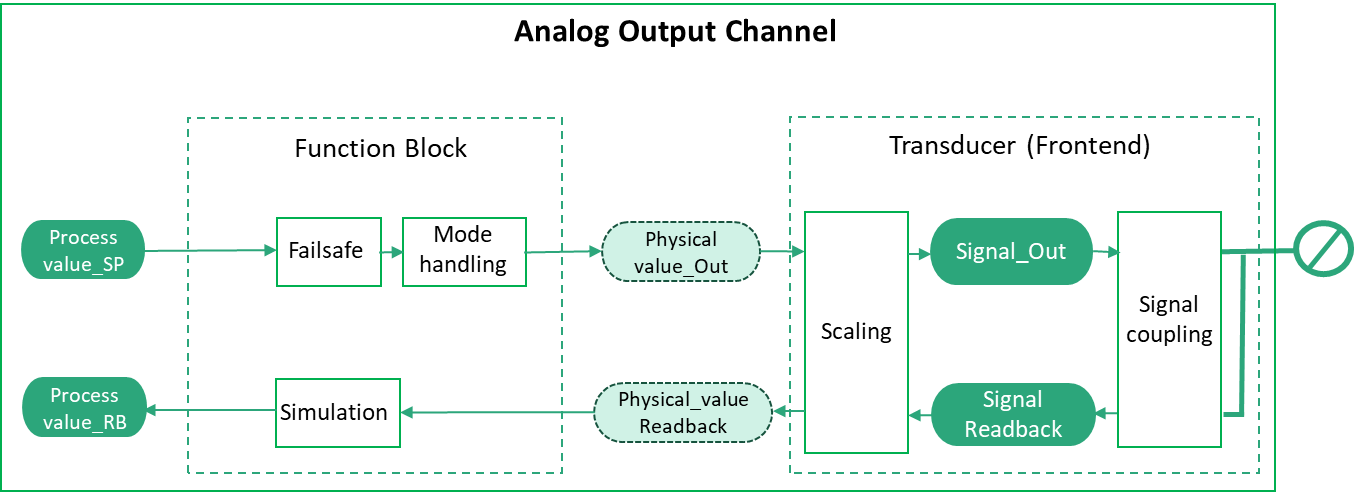
7.2.3 Analog Output Channel Types
Figure 23 shows the block diagram for an analog Output Channel.
7.2.3.1 RioPaAnalogOutputChannelType
The RioPaAnalogOutputChannelType provides access to the data of an analog RIO Output Channel according to RIOforPA.
| Attribute | Value | ||||
| BrowseName | RioPaAnalogOutputChannelType | ||||
| IsAbstract | False | ||||
| References | Node Class | BrowseName | DataType | TypeDefinition | Other |
|---|---|---|---|---|---|
| Subtype of the RioChannelType. | |||||
| 0:HasComponent | Variable | ProcessValue | RioPaAnalogProcessValueDataType | RioPaAnalogProcessValueVariableType | M, RO |
| 0:HasComponent | Variable | ProcessValueReadback | RioPaAnalogProcessValueDataType | RioPaAnalogProcessValueVariableType | O, RO |
| 0:HasComponent | Variable | SignalValue | 0:Double | 0:BaseAnalogType | O, RO |
| 0:HasComponent | Variable | SignalValueReadback | 0:Double | 0:BaseAnalogType | O, RO |
| 0:HasComponent | Variable | Mode | RioChannelModeEnumeration | 0:BaseDataVariableType | M, RO |
| 0:HasComponent | Variable | ManualOutValue | RioAnalogDataType | 0:BaseDataVariableType | O, RO |
| 0:HasComponent | Variable | SimulationEnabled | 0:Boolean | 0:BaseDataVariableType | M, RO |
| 0:HasComponent | Variable | SimulationValue | RioPaAnalogValueDataType | 0:BaseDataVariableType | O, RO |
| 0:HasComponent | Variable | Config | RioPaAnalogOutputConfigDataType | RioPaAnalogOutputConfigVariableType | M, RO |
| 0:HasComponent | Method | SetMode | O | ||
| 0:HasComponent | Method | SetManualOutValue | O | ||
| 0:HasComponent | Method | SetSimulation | O | ||
| 0:HasComponent | Method | SetSimulationValue | O | ||
| Conformance Units | |||||
|---|---|---|---|---|---|
| PNRIO Channel Objects |
The ProcessValue Variable contains the current analog Output value for an automated process.
The ProcessValueReadback Variable contains the readback value obtained by reading the output signal back through the Transducer and the Function Block.
The SignalValue Variable contains the output signal value fed to the signal coupling in the Transducer.
The SignalValueReadback Variable contains the output signal read back through the signal coupling in the Transducer.
The Mode Variable contains the current mode of operation encoded as RioChannelModeEnumeration. If Mode has the Value MANUAL, the Value of the ManualOutValue Variable shall be used as Output value in place of the Process Value.
The ManualOutValue Variable contains the value used as Output value to an automated process in place of the Process Value if the Mode Variable of the channel contains the Value MANUAL.
The SimulationEnabled Variable contains True if the Value of the SimulationValue Variable shall be used as Output value in place of the Process Value, otherwise False.
The SimulationValue Variable contains the value used as Output value in place of the Process Value if the SimulationEnabled Variable contains True.
The Config Variable contains the configuration properties available for the RIO Channel. See the definition of the RioPaAnalogOutputConfigVariableType (See chapter 9.4.7).
7.2.3.2 SetMode Method
This Method sets the Value of the Mode Variable. The security constraints defined in chapter 6.7 apply.
Signature
	SetMode (
		[in] RioChannelModeEnumeration	Mode
		);
| Argument | Description |
| Mode | Desired content of the Mode Variable. |
The Method Result Codes (defined in Call Service) are defined in Table 39.
| Result Code | Description |
| Good | The Method execution was successful. |
| Bad_UserAccessDenied | The user has not the right to execute the Method. |
| Bad_NotSupported | The Server is currently not able to perform the demanded mode change. |
| Bad_UnexpectedError | The Server is not able to execute the function because an unexpected error occurred. The Device might be temporarily unavailable or unreachable due to network failure. |
If the Mode Variable has already the same Value as the argument, the Method shall do nothing and return Good as result code.
7.2.3.3 SetManualOutValue Method
This Method sets the Value of the ManualOutValue Variable. The security constraints defined in chapter 6.7 apply.
Signature
	SetManualOutValue (
		[in] RioAnalogDataType		ManualOutValue
		);
| Argument | Description |
| ManualOutValue | Desired Value of the ManualOutValue Variable. |
The Method Result Codes (defined in Call Service) are defined in Table 40.
| Result Code | Description |
| Good | The Method execution was successful. |
| Bad_UserAccessDenied | The user has not the right to execute the Method. |
| Bad_InvalidArgument | The Server is not able to apply the argument value. For instance, the Server might reject manual values not within the channels value bounds. |
| Bad_UnexpectedError | The Server is not able to execute the function because an unexpected error occurred. The Device might be temporarily unavailable or unreachable due to network failure. |
If the ManualOutValue Variable has already the same Value as the argument, the Method shall do nothing and return Good as result code.
7.2.3.4 SetSimulation Method
This Method sets the Value of the SimulationEnabled Variable to the desired value. The security constraints defined in chapter 6.7 apply.
Signature
	SetSimulation (
		[in] 0:Boolean	SimulationEnabled
	);
| Argument | Description |
| SimulationEnabled | Desired content of the SimulationEnabled Variable. |
The Method Result Codes (defined in Call Service) are defined in Table 41.
| Result Code | Description |
| Good | The Method execution was successful. |
| Bad_UserAccessDenied | The user has not the right to execute the Method. |
| Bad_NotSupported | The Server is not able to change into target mode. |
| Bad_UnexpectedError | The Server is not able to execute the function because an unexpected error occurred. The Device might be temporarily unavailable or unreachable due to network failure. |
If the SimulationEnabled Variable already has the value of the argument, the Method shall do nothing and return Good as result code.
7.2.3.5 SetSimulationValue Method
This Method sets the Value of the SimulationValue Variable. The security constraints defined in chapter 6.7 apply.
Signature
	SetSimulationValue (
		[in] 0:RioAnalogDataType	Value
		[in] 0:Byte		Qualifier
		);
| Argument | Description |
| Value | Desired content of the Value member of the SimulationValue Variable. |
| Qualifier | Desired content of the Qualifier member of the SimulationValue Variable. |
The Method Result Codes (defined in Call Service) are defined in Table 42.
| Result Code | Description |
| Good | The Method execution was successful. |
| Bad_UserAccessDenied | The user has not the right to execute the Method. |
| Bad_InvalidArgument | The Server is not able to apply the argument value. For instance, the Server might reject simulation values not within the channels value bounds. |
| Bad_UnexpectedError | The Server is not able to execute the function because an unexpected error occurred. The Device might be temporarily unavailable or unreachable due to network failure. |
7.2.3.6 RioFaAnalogOutputChannelType
The RioFaAnalogOutputChannelType provides access to the data of an analog RIO Output Channel according to RIOforFA.
| Attribute | Value | ||||
| BrowseName | RioFaAnalogOutputChannelType | ||||
| IsAbstract | False | ||||
| References | Node Class | BrowseName | DataType | TypeDefinition | Other |
|---|---|---|---|---|---|
| Subtype of the RioChannelType. | |||||
| 0:HasComponent | Variable | ProcessValue | RioFaAnalogProcessValueDataType | RioFaAnalogProcessValueVariableType | M, RO |
| 0:HasComponent | Variable | ProcessValueReadback | RioFaAnalogProcessValueDataType | RioFaAnalogProcessValueVariableType | O, RO |
| 0:HasComponent | Variable | SignalValue | 0:Double | 0:BaseAnalogType | O, RO |
| 0:HasComponent | Variable | SignalValueReadback | 0:Double | 0:BaseAnalogType | O, RO |
| 0:HasComponent | Variable | Config | RioFaAnalogOutputConfigDataType | RioFaAnalogOutputConfigVariableType | M, RO |
| Conformance Units | |||||
|---|---|---|---|---|---|
| PNRIO Channel Objects |
The ProcessValue Variable contains the current analog Output value for an automated process.
The ProcessValueReadback Variable contains the readback value obtained by reading the output signal back through the Transducer and the Function Block.
The SignalValue Variable contains the output signal value fed to the signal coupling in the Transducer.
The SignalValueReadback Variable contains the output signal read back through the signal coupling in the Transducer.
The Config Variable contains the configuration properties available for the RIO Channel. See the definition of the RioFaAnalogOutputConfigVariableType (see chapter 9.4.8).
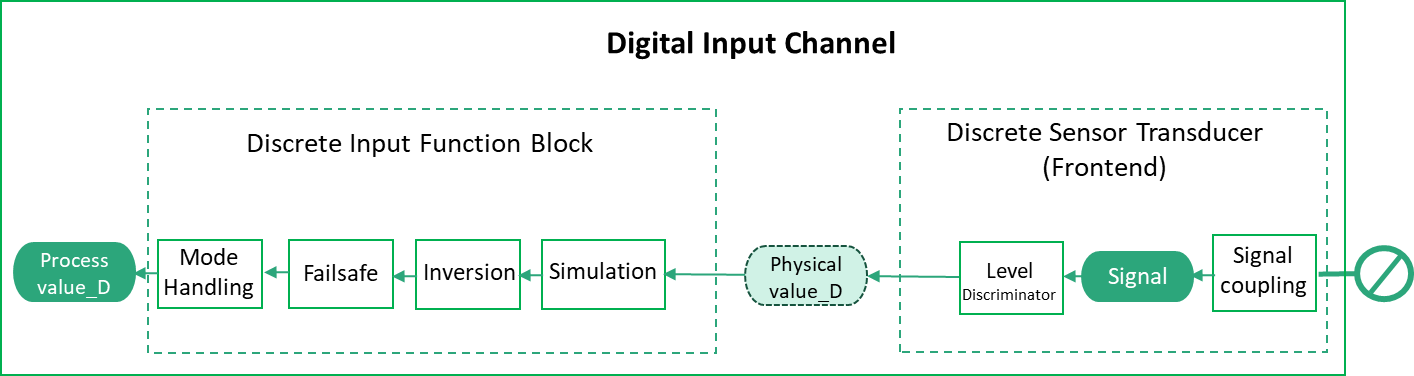
7.2.4 Digital Input Channel Types
Figure 24 shows the block diagram for a digital Input Channel.
7.2.4.1 RioPaDigitalInputChannelType
The RioPaDigitalInputChannelType provides access to the data of a discrete RIO Input Channel according to RIOforPA.
| Attribute | Value | ||||
| BrowseName | RioPaDigitalInputChannelType | ||||
| IsAbstract | False | ||||
| References | Node Class | BrowseName | DataType | TypeDefinition | Other |
|---|---|---|---|---|---|
| Subtype of the RioChannelType. | |||||
| 0:HasComponent | Variable | ProcessValue | RioPaDigitalProcessValueDataType | RioPaDigitalProcessValueVariableType | M, RO |
| 0:HasComponent | Variable | SignalValue | 0:Double | 0:BaseAnalogType | O, RO |
| 0:HasComponent | Variable | Mode | RioChannelModeEnumeration | 0:BaseDataVariableType | M, RO |
| 0:HasComponent | Variable | ManualProcessValue | 0:Boolean | 0:BaseDataVariableType | O, RO |
| 0:HasComponent | Variable | SimulationEnabled | 0:Boolean | 0:BaseDataVariableType | M, RO |
| 0:HasComponent | Variable | SimulationValue | RioPaDigitalValueDataType | 0:BaseDataVariableType | O, RO |
| 0:HasComponent | Variable | Config | RioPaDigitalInputConfigDataType | RioPaDigitalInputConfigVariableType | M, RO |
| 0:HasComponent | Method | SetMode | O | ||
| 0:HasComponent | Method | SetManualProcessValue | O | ||
| 0:HasComponent | Method | SetSimulation | O | ||
| 0:HasComponent | Method | SetSimulationValue | O | ||
| Conformance Units | |||||
|---|---|---|---|---|---|
| PNRIO Channel Objects |
The ProcessValue Variable contains the digital Input value for a Controller.
The SignalValue Variable contains the input signal value obtained by reading the input signal through the signal coupling in the Transducer.
The Mode Variable contains the current mode of operation encoded as RioChannelModeEnumeration. If Mode has the Value MANUAL, the Value of the ManualProcessValue Variable shall be used as Process Value.
The ManualProcessValue Variable contains the value used as Process Value if the Mode Variable of the channel contains the Value MANUAL. The optional Variable is used for Devices according to the PA V3 profile and maps to the "manual out value" property defined by this profile.
The SimulationEnabled Variable contains True if the Value of the SimulationValue Variable shall be used as Process Value, otherwise False.
The SimulationValue Variable contains the value used as Process Value if the SimulationEnabled Variable contains the Value True.
The Config Variable contains the configuration properties available for the RIO Channel. See the definition of the RioPaDigitalInputConfigVariableType (See 9.4.1)
7.2.4.2 SetMode Method
This Method sets the Value of the Mode Variable. The security constraints defined in chapter 6.7 apply.
Signature
	SetMode (
		[in] RioChannelModeEnumeration	Mode
		);
| Argument | Description |
| Mode | Desired content of the Mode Variable. |
The Method Result Codes (defined in Call Service) are defined in Table 45.
| Result Code | Description |
| Good | The Method execution was successful. |
| Bad_UserAccessDenied | The user has not the right to execute the Method. |
| Bad_NotSupported | The Server is currently not able to perform the demanded mode change. |
| Bad_UnexpectedError | The Server is not able to execute the function because an unexpected error occurred. The Device might be temporarily unavailable or unreachable due to network failure. |
If the Mode Variable has already the same Value as the argument, the Method shall do nothing and return Good as result code.
7.2.4.3 SetManualProcessValue Method
This Method sets the Value of the ManualProcessValue Variable. The security constraints defined in chapter 6.7 apply.
Signature
	SetManualProcessValue (
		[in] 0:Boolean		ManualProcessValue
		);
| Argument | Description |
| ManualProcessValue | Desired Value of the ManualProcessValue Variable. |
The Method Result Codes (defined in Call Service) are defined in Table 46.
| Result Code | Description |
| Good | The Method execution was successful. |
| Bad_UserAccessDenied | The user has not the right to execute the Method. |
| Bad_InvalidArgument | The Server is not able to apply the argument value. |
| Bad_UnexpectedError | The Server is not able to execute the function because an unexpected error occurred. The Device might be temporarily unavailable or unreachable due to network failure. |
If the ManualProcessValue Variable has already the same Value as the argument, the Method shall do nothing and return Good as result code.
7.2.4.4 SetSimulation Method
This Method sets the Value of the SimulationEnabled Variable to the desired value. The security constraints defined in chapter 6.7 apply.
Signature
	SetSimulation (
		[in] 0:Boolean	SimulationEnabled
	);
| Argument | Description |
| SimulationEnabled | Desired content of the SimulationEnabled Variable. |
The Method Result Codes (defined in Call Service) are defined in Table 47.
| Result Code | Description |
| Good | The Method execution was successful. |
| Bad_UserAccessDenied | The user has not the right to execute the Method. |
| Bad_NotSupported | The Server is not able to change into target mode. |
| Bad_UnexpectedError | The Server is not able to execute the function because an unexpected error occurred. The Device might be temporarily unavailable or unreachable due to network failure. |
If the SimulationEnabled Variable already has the value of the argument, the Method shall do nothing and return Good as result code.
7.2.4.5 SetSimulationValue Method
This Method sets the Value of the SimulationValue Variable. The security constraints defined in chapter 6.7 apply.
Signature
	SetSimulationValue (
		[in] 0:Boolean	Value
		[in] 0:Byte		Qualifier
		);
| Argument | Description |
| Value | Desired content of the Value member of the SimulationValue Variable. |
| Qualifier | Desired content of the Qualifier member of the SimulationValue Variable. |
The Method Result Codes (defined in Call Service) are defined in Table 48.
| Result Code | Description |
| Good | The Method execution was successful. |
| Bad_UserAccessDenied | The user has not the right to execute the Method. |
| Bad_InvalidArgument | The Server is not able to apply the argument value. |
| Bad_UnexpectedError | The Server is not able to execute the function because an unexpected error occurred. The Device might be temporarily unavailable or unreachable due to network failure. |
7.2.4.6 RioFaDigitalInputChannelType
The RioFaDigitalInputChannelType provides access to the data of a discrete RIO Input Channel according to RIOforFA.
| Attribute | Value | ||||
| BrowseName | RioFaDigitalInputChannelType | ||||
| IsAbstract | False | ||||
| References | Node Class | BrowseName | DataType | TypeDefinition | Other |
|---|---|---|---|---|---|
| Subtype of the RioChannelType. | |||||
| 0:HasComponent | Variable | ProcessValue | RioFaDigitalProcessValueDataType | RioFaDigitalProcessValueVariableType | M, RO |
| 0:HasComponent | Variable | SignalValue | 0:Double | 0:BaseAnalogType | O, RO |
| 0:HasComponent | Variable | Config | RioFaDigitalInputConfigDataType | RioFaDigitalInputConfigVariableType | M, RO |
| Conformance Units | |||||
|---|---|---|---|---|---|
| PNRIO Channel Objects |
The ProcessValue Variable contains the digital Input value for a Controller.
The SignalValue Variable contains the input signal value obtained by reading the input signal through the signal coupling in the Transducer.
The Config Variable contains the configuration properties available for the RIO Channel. See the definition of the RioFaDigitalInputConfigVariableType (see chapter 9.4.2).
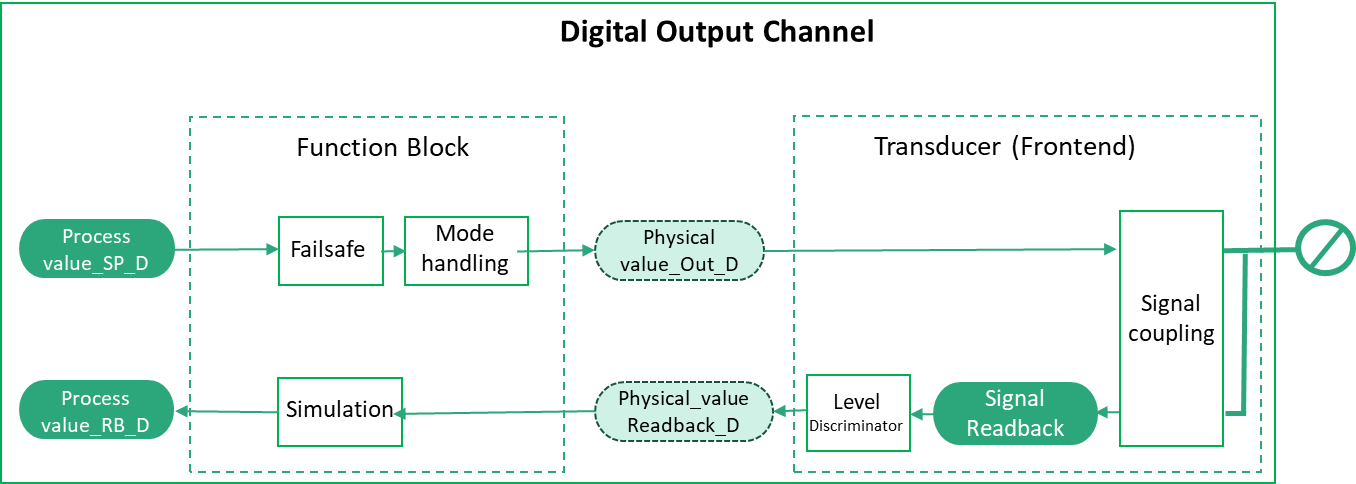
7.2.5 Digital Output Channel Types
Figure 25 shows the block diagram for a digital Output Channel.
7.2.5.1 RioPaDigitalOutputChannelType
The RioPaDigitalOutputChannelType provides access to the data of a discrete RIO Output Channel according to RIOforPA.
| Attribute | Value | ||||
| BrowseName | RioPaDigitalOutputChannelType | ||||
| IsAbstract | False | ||||
| References | Node Class | BrowseName | DataType | TypeDefinition | Other |
|---|---|---|---|---|---|
| Subtype of the RioChannelType. | |||||
| 0:HasComponent | Variable | ProcessValue | RioPaDigitalProcessValueDataType | RioPaDigitalProcessValueVariableType | M, RO |
| 0:HasComponent | Variable | ProcessValueReadback | RioPaDigitalProcessValueDataType | RioPaDigitalProcessValueVariableType | O, RO |
| 0:HasComponent | Variable | SignalValue | 0:Double | 0:BaseAnalogType | O, RO |
| 0:HasComponent | Variable | SignalValueReadback | 0:Double | 0:BaseAnalogType | O, RO |
| 0:HasComponent | Variable | Mode | RioChannelModeEnumeration | 0:BaseDataVariableType | M, RO |
| 0:HasComponent | Variable | ManualOutValue | 0:Boolean | 0:BaseDataVariableType | O, RO |
| 0:HasComponent | Variable | SimulationEnabled | 0:Boolean | 0:BaseDataVariableType | M, RO |
| 0:HasComponent | Variable | SimulationValue | RioPaDigitalValueDataType | 0:BaseDataVariableType | O, RO |
| 0:HasComponent | Variable | Config | RioPaDigitalOutputConfigDataType | RioPaDigitalOutputConfigVariableType | M, RO |
| 0:HasComponent | Method | SetMode | O | ||
| 0:HasComponent | Method | SetManualOutValue | O | ||
| 0:HasComponent | Method | SetSimulation | O | ||
| 0:HasComponent | Method | SetSimulationValue | O | ||
| Conformance Units | |||||
|---|---|---|---|---|---|
| PNRIO Channel Objects |
The ProcessValue Variable contains a Controller's output data to an automated process.
The ProcessValueReadback Variable contains the readback value obtained by reading the output signal back through the Transducer and the Function Block.
The SignalValue Variable contains the output signal value fed to the signal coupling in the Transducer.
The SignalValueReadback Variable contains the output signal read back through the signal coupling in the Transducer.
The Mode Variable contains the current mode of operation encoded as RioChannelModeEnumeration. If Mode has the Value MANUAL, the Value of the ManualOutValue Variable shall be used as Output value in place of the Process Value.
The ManualOutValue Variable contains the value used as Output value to an automated process in place of the Process Value if the Mode Variable of the channel contains the Value MANUAL.
The SimulationEnabled Variable contains True if the Value of the SimulationValue Variable shall be used as Process Value, otherwise False.
The SimulationValue Variable contains the value used as Output value in place of the Process Value if the SimulationEnabled Variable contains True.
The Config Variable contains the configuration properties available for the RIO Channel. See the definition of the RioPaDigitalOutputConfigVariableType (see chapter 9.4.3)
7.2.5.2 SetMode Method
This Method sets the Value of the Mode Variable. The security constraints defined in chapter 6.7 apply.
Signature
	SetMode (
		[in] RioChannelModeEnumeration	Mode
		);
| Argument | Description |
| Mode | Desired content of the Mode Variable. |
The Method Result Codes (defined in Call Service) are defined in Table 51.
| Result Code | Description |
| Good | The Method execution was successful. |
| Bad_UserAccessDenied | The user has not the right to execute the Method. |
| Bad_NotSupported | The Server is currently not able to perform the demanded mode change. |
| Bad_UnexpectedError | The Server is not able to execute the function because an unexpected error occurred. The Device might be temporarily unavailable or unreachable due to network failure. |
If the Mode Variable has already the same Value as the argument, the Method shall do nothing and return Good as result code.
7.2.5.3 SetManualOutValue Method
This Method sets the Value of the ManualOutValue Variable. The security constraints defined in chapter 6.7 apply.
Signature
	SetManualOutValue (
		[in] 0:Boolean	ManualOutValue
		);
| Argument | Description |
| ManualOutValue | Desired Value of the ManualOutValue Variable. |
The Method Result Codes (defined in Call Service) are defined in Table 52.
| Result Code | Description |
| Good | The Method execution was successful. |
| Bad_UserAccessDenied | The user has not the right to execute the Method. |
| Bad_InvalidArgument | The Server is not able to apply the argument value. |
| Bad_UnexpectedError | The Server is not able to execute the function because an unexpected error occurred. The Device might be temporarily unavailable or unreachable due to network failure. |
If the ManualOutValue Variable has already the same Value as the argument, the Method shall do nothing and return Good as result code.
7.2.5.4 SetSimulation Method
This Method sets the Value of the SimulationEnabled Variable to the desired value. The security constraints defined in chapter 6.7 apply.
Signature
	SetSimulation (
		[in] 0:Boolean	SimulationEnabled
	);
| Argument | Description |
| SimulationEnabled | Desired content of the SimulationEnabled Variable. |
The Method Result Codes (defined in Call Service) are defined in Table 53.
| Result Code | Description |
| Good | The Method execution was successful. |
| Bad_UserAccessDenied | The user has not the right to execute the Method. |
| Bad_NotSupported | The Server is not able to change into target mode. |
| Bad_UnexpectedError | The Server is not able to execute the function because an unexpected error occurred. The Device might be temporarily unavailable or unreachable due to network failure. |
If the SimulationEnabled Variable already has the Value of the argument, the Method shall do nothing and return Good as result code.
7.2.5.5 SetSimulationValue Method
This Method sets the Value of the SimulationValue Variable. The security constraints defined in chapter 6.7 apply.
Signature
	SetSimulationValue (
		[in] 0:Boolean	Value
		[in] 0:Byte		Qualifier
		);
| Argument | Description |
| Value | Desired content of the Value member of the SimulationValue Variable. |
| Qualifier | Desired content of the Qualifier member of the SimulationValue Variable. |
The Method Result Codes (defined in Call Service) are defined in Table 54.
| Result Code | Description |
| Good | The Method execution was successful. |
| Bad_UserAccessDenied | The user has not the right to execute the Method. |
| Bad_InvalidArgument | The Server is not able to apply the argument value. |
| Bad_UnexpectedError | The Server is not able to execute the function because an unexpected error occurred. The Device might be temporarily unavailable or unreachable due to network failure. |
7.2.5.6 RioFaDigitalOutputChannelType
The RioFaDigitalOutputChannelType provides access to the data of a discrete RIO Output Channel according to RIOforFA.
| Attribute | Value | ||||
| BrowseName | RioFaDigitalOutputChannelType | ||||
| IsAbstract | False | ||||
| References | Node Class | BrowseName | DataType | TypeDefinition | Other |
|---|---|---|---|---|---|
| Subtype of the RioChannelType. | |||||
| 0:HasComponent | Variable | ProcessValue | RioFaDigitalProcessValueDataType | RioFaDigitalProcessValueVariableType | M, RO |
| 0:HasComponent | Variable | ProcessValueReadback | RioFaDigitalProcessValueDataType | RioFaDigitalProcessValueVariableType | O, RO |
| 0:HasComponent | Variable | SignalValue | 0:Double | 0:BaseAnalogType | O, RO |
| 0:HasComponent | Variable | SignalValueReadback | 0:Double | 0:BaseAnalogType | O, RO |
| 0:HasComponent | Variable | Config | RioFaDigitalOutputConfigDataType | RioFaDigitalOutputConfigVariableType | M, RO |
| Conformance Units | |||||
|---|---|---|---|---|---|
| PNRIO Channel Objects |
The ProcessValue Variable contains a Controller's output data to an automated process.
The ProcessValueReadback Variable contains the readback value obtained by reading the output signal back through the Transducer and the Function Block.
The SignalValue Variable contains the output signal value fed to the signal coupling in the Transducer.
The SignalValueReadback Variable contains the output signal read back through the signal coupling in the Transducer.
The Config Variable contains the configuration properties available for the RIO Channel. See the definition of the RioFaDigitalOutputConfigVariableType (see chapter 9.4.4)
7.3 OPC UA for RIO Cyclic IO Types
7.3.1 PnTelegramType
The PnTelegramType represents a Telegram. The PnTelegramType can at least have one Input Telegram, one Output Telegram or both.
| Attribute | Value | ||||
| BrowseName | PnTelegramType | ||||
| IsAbstract | False | ||||
| References | Node Class | BrowseName | DataType | TypeDefinition | Other |
|---|---|---|---|---|---|
| Subtype of the BaseObjectType defined in OPC 10000-5. | |||||
| 0:HasComponent | Object | Input | PnIoTelegramType | O | |
| 0:HasComponent | Object | Output | PnIoTelegramType | O | |
| Conformance Units | |||||
|---|---|---|---|---|---|
| PNRIO Cyclic Telegrams |
.
The Input Object shall contain the Input component of the Telegram.
The Output Object shall contain the Output component of the Telegram.
7.3.2 PnIoTelegramType
The PnIoTelegramType represents an Input Telegram as well as an Output Telegram and associated status information.
| Attribute | Value | ||||
| BrowseName | PnIoTelegramType | ||||
| IsAbstract | False | ||||
| References | Node Class | BrowseName | DataType | TypeDefinition | Other |
|---|---|---|---|---|---|
| Subtype of the BaseObjectType defined in OPC 10000-5. | |||||
| 0:HasComponent | Object | <Nr_SignalName> | PnIoSignalType | MP | |
| 0:HasProperty | Variable | IoTelegramImage | 0:ByteString | 0:PropertyType | O, RO |
| 0:HasProperty | Variable | Length | 0:UInt16 | 0:PropertyType | M, RO |
| 0:HasProperty | Variable | ProviderStatus | PnIoTelegramStatusEnumeration | 0:PropertyType | M, RO |
| 0:HasProperty | Variable | ConsumerStatus | PnIoTelegramStatusEnumeration | 0:PropertyType | O, RO |
| Conformance Units | |||||
|---|---|---|---|---|---|
| PNRIO Cyclic Telegrams |
The <Nr_SignalName> Object references one Signal associated with an Input- or an Output Telegram (IO Telegram). <Nr> shall reflect the order of the Signal in the IO Telegram, consistent with the Offset property of the PnIoSignalType Object.
There shall exist as many References to as many Signal Objects as are needed to map the content of the IO Telegram.
The IoTelegramImage Property shall contain an octet string representation of the IO Telegram. If consistency of the content cannot be guaranteed, the IoTelegramImage Property shall not be provided.
The Length Variable contains the length (the number of bytes) of the IO Telegram.
The ProviderStatus Variable contains the data provider's Qualifier for the IO Telegram (IOPS according to [PN Service]) encoded as PnIoTelegramStatusEnumeration.
The ConsumerStatus Variable contains the data consumer's Qualifier for the IO Telegram (IOCS according to [PN Service] is not relevant for RIOforFA, therefore ConsumerStatus is optional) encoded as PnIoTelegramStatusEnumeration.
7.3.3 PnIoSignalType
The PnIoSignalType gives access to the Variables containing the data of one Signal.
| Attribute | Value | ||||
| BrowseName | PnIoSignalType | ||||
| IsAbstract | False | ||||
| References | Node Class | BrowseName | DataType | TypeDefinition | Other |
|---|---|---|---|---|---|
| Subtype of the 0:BaseObjectType defined in OPC 10000-5. | |||||
| 0:HasProperty | Variable | SignalId | 0:UInt16 | 0:PropertyType | O, RO |
| 0:HasProperty | Variable | Offset | 0:UInt16 | 0:PropertyType | M, RO |
| Conformance Units | |||||
|---|---|---|---|---|---|
| PNRIO Cyclic Telegrams |
The SignalId Variable contains an optional unique identifier for the IO signal.
The Offset Variable contains the number of the first byte of the IO data in the IO Telegram. The numbering shall start with 0.
A Signal Object shall only be provided if it relates to the functional aspect using a 0:RepresentsSameEntityAs Reference.