
8 Alarm Summary and Objects
8.1 Overview
In a system an Object might have multiple Alarms associated with it. These Alarms might be directly Referenced by an Object or they might have no direct References from the Object to the Alarm. Alarms might also be related to Objects that are nested under the Object. When the Object is represented in a graphic in a plant, it is often important to be able to see if there is an active Alarm associated with it. This indication could just be a flashing value or flashing image or a change in colour of the image.
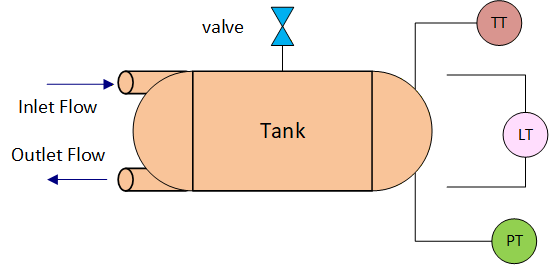
For example, if there is a tank (illustrated in Figure 30). The tank might have a level meter, a temperature gauge and a pressure gauge. It might also have a flow meter on both an inlet and an outlet. The tank might also have a pressure release valve. The information model that might result from this equipment is illustrated in Figure 31
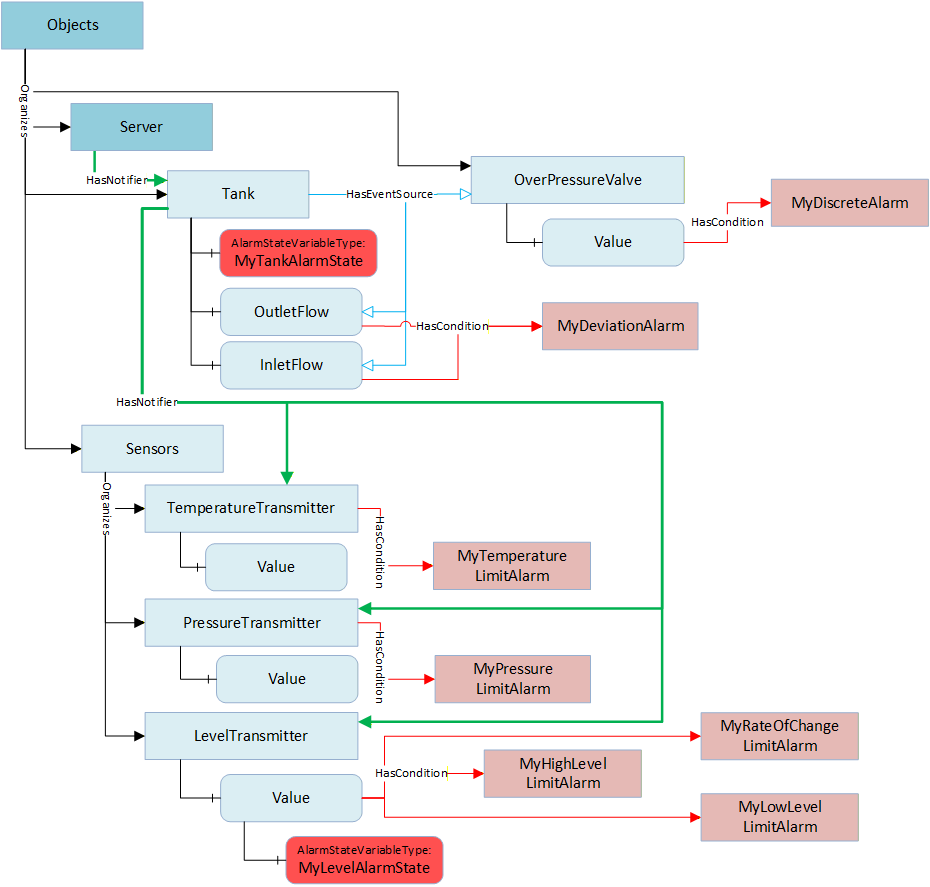
All of these sub-objects might have unique alarms associated with them, such as limit alarms on the temperature and levels, maybe rate of change alarm as well as limit alarms on the pressure. Maybe some advanced Alarms that are associated with the tank for an invalid state (in the inlet flow > 0 and the outlet flow is > 0). Maybe a discrete alarm on the pressure release valve, i.e. when it is open it is an alarm. The overall alarm state of the Tank could be displayed on a graphic or maybe the LevelTransmitter's value is to indicate that there is an alarm associated with the value.
8.2 AlarmState Variable
An instance of AlarmStateVariableType can be assigned to any Object or Variable. The instance will provide a summary of the Alarms associated with the parent Variable or Object (the Source of the HasComponent Reference for this instance)
| Attribute | Value | ||||
| BrowseName | AlarmStateVariableType | ||||
| DataType | AlarmMask | ||||
| ValueRank | -1 (-1 = Scalar) | ||||
| IsAbstract | False | ||||
| References | NodeClass | BrowseName | DataType | TypeDefinition |
Modelling
Rule |
|---|---|---|---|---|---|
| Subtype of the BaseDataVariableType defined in 10000-5. | |||||
| HasProperty | Variable | HighestActiveSeverity | UInt16 | PropertyType | Mandatory |
| HasProperty | Variable | HighestUnackSeverity | UInt16 | PropertyType | Mandatory |
| HasProperty | Variable | ActiveCount | UInt32 | PropertyType | Mandatory |
| HasProperty | Variable | UnacknowledgedCount | UInt32 | PropertyType | Mandatory |
| HasProperty | Variable | UnconfirmedCount | UInt32 | PropertyType | Mandatory |
| HasProperty | Variable | Filter | ContentFilter | PropertyType | Mandatory |
| ConformanceUnits | |||||
|---|---|---|---|---|---|
| A & C Summary |
HighestActiveSeverity - the highest Severity of any active Alarm.
HighestUnackSeverity - the highest Severity of any Unacknowledged Alarm
ActiveCount - a count of the number of active Alarms
UnacknowledgedCount - a count of the number of Unacknowledged Alarms
UnconfirmedCount - a count of the number of Unconfirmed Alarms. If alarm confirmation is not supported this count shall be zero.
Filter - provides a ContentFilter that can be used to restrict what alarms are processed as part of the AlarmStateVariableType. If no filter is required the ContentFilter can be null.
8.3 AlarmMask
This OptionSet defines flags indicating the summary of alarm states.
The AlarmMask values are formally defined in Table 143.
| Value | Bit No. | Description |
| Active | 0 | This bit is set if there are active Alarms |
| Unacknowledged | 1 | This bit is set if there are Unacknowledged Alarms |
| Unconfirmed | 2 | This bit is set if there are Unconfirmed Alarms |
The AlarmMask representation in the AddressSpace is formally defined in Table 144.
| Attribute | Value | |||||
| BrowseName | AlarmMask | |||||
| IsAbstract | False | |||||
| References | NodeClass | BrowseName | DataType | TypeDefinition | Other | |
|---|---|---|---|---|---|---|
| Subtype of the UInt16 type defined in 10000-5 | ||||||
| 0:HasProperty | Variable | 0:OptionSetValues | 0:LocalizedText[] | 0:PropertyType | ||
| ConformanceUnits | ||||||
|---|---|---|---|---|---|---|
| A & C Summary |