
5.8.17 ShelvedStateMachineType
5.8.17.1 Overview
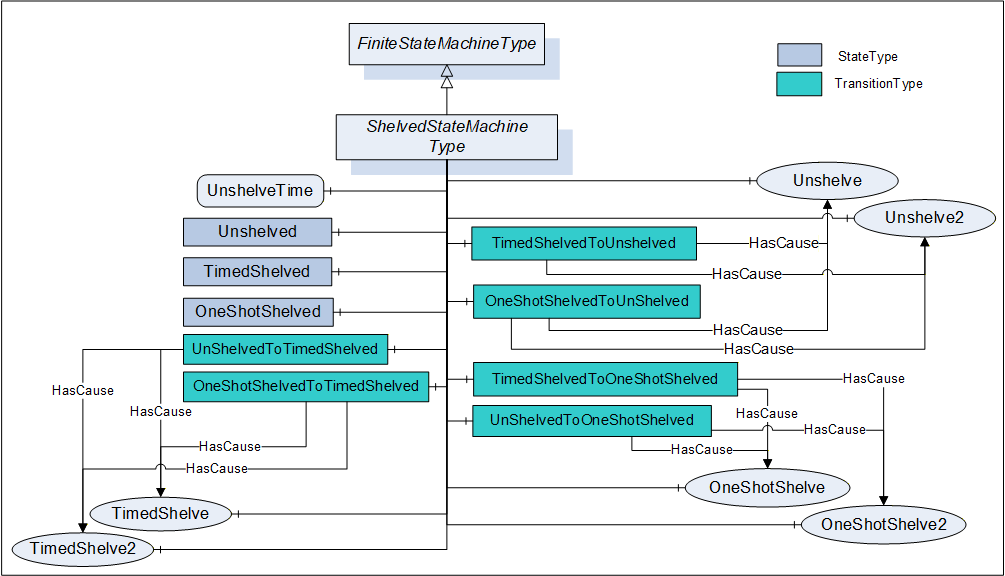
The ShelvedStateMachineType defines a sub-state machine that represents an advanced Alarm filtering model. This model is illustrated in Figure 17.
The state model supports two types of Shelving: OneShotShelving and TimedShelving. They are illustrated in Figure 16. The illustration includes the allowed transitions between the various sub-states. Shelving is an Operator initiated activity.
In OneShotShelving, a user requests that an Alarm be Shelved for its current Active state or if not Active its next Active state. This type of Shelving is typically used when an Alarm is continually occurring on a boundary (i.e. a Condition is jumping between High Alarm and HighHigh Alarm, always in the Active state). The OneShotShelving will automatically clear when an Alarm returns to an inactive state. Another use for this type of Shelving is for a plant area that is shutdown i.e. a long running Alarm such as a low level Alarm for a tank that is not in use. When the tank starts operation again the Shelving state will automatically clear.
In TimedShelving, a user specifies that an Alarm be shelved for a fixed time period. This type of Shelving is quite often used to block nuisance Alarms. For example, an Alarm that occurs more than 10 times in a minute may get shelved for a few minutes. The Alarm is shelved for the time period, no matter how many transitions the Alarm has between Active state and Inactive state.
In all states, the Unshelve can be called to cause a transition to the Unshelve state; this includes Un-shelving an Alarm that is in the TimedShelve state before the time has expired and the OneShotShelve state without a transition to an inactive state. In the event of a restart of an AlarmManager, the AlarmManager should recover the ShelvedStateMachine. If the system cannot determine if the state of the ShelvedStateMachine for a given alarm instance, the ShelvedStateMachine shall be set to Unshelved.
All but two transitions are caused by Method calls as illustrated in Figure 16. The “Time Expired” transition is simply a system generated transition that occurs when the time value defined as part of the “Timed Shelved Call” has expired. The “Any Transition Occurs” transition is also a system generated transition; this transition is generated when the Condition goes to an inactive state.
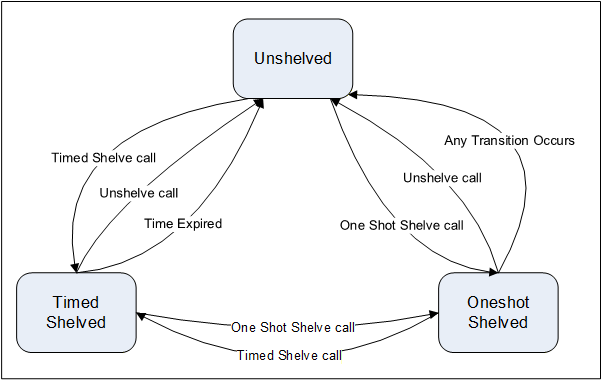
The ShelvedStateMachineType includes a hierarchy of sub-states. It supports all transitions between Unshelved, OneShotShelved and TimedShelved.
The state machine is illustrated in Figure 17 and formally defined in Table 73.
| Attribute | Value | |||||
| BrowseName | ShelvedStateMachineType | |||||
| IsAbstract | False | |||||
| References | NodeClass | BrowseName | DataType | TypeDefinition | ModellingRule | |
|---|---|---|---|---|---|---|
| Subtype of the FiniteStateMachineType defined in 10000-16 | ||||||
| HasProperty | Variable | UnshelveTime | Duration | PropertyType | Mandatory | |
| HasComponent | Object | Unshelved | StateType | |||
| HasComponent | Object | TimedShelved | StateType | |||
| HasComponent | Object | OneShotShelved | StateType | |||
| HasComponent | Object | UnshelvedToTimedShelved | TransitionType | |||
| HasComponent | Object | TimedShelvedToUnshelved | TransitionType | |||
| HasComponent | Object | TimedShelvedToOneShotShelved | TransitionType | |||
| HasComponent | Object | UnshelvedToOneShotShelved | TransitionType | |||
| HasComponent | Object | OneShotShelvedToUnshelved | TransitionType | |||
| HasComponent | Object | OneShotShelvedToTimedShelved | TransitionType | |||
| HasComponent | Method | TimedShelve | Defined in Clause 5.8.17.4 | Mandatory | ||
| HasComponent | Method | OneShotShelve | Defined in Clause 5.8.17.6 | Mandatory | ||
| HasComponent | Method | Unshelve | Defined in Clause 5.8.17.2 | Mandatory | ||
| HasComponent | Method | TimedShelve2 | Defined in Clause 5.8.17.5 | Optional | ||
| HasComponent | Method | OneShotShelve2 | Defined in Clause 5.8.17.7 | Optional | ||
| HasComponent | Method | Unshelve2 | Defined in Clause 5.8.17.3 | Optional | ||
| ConformanceUnits | ||||||
|---|---|---|---|---|---|---|
| A & C Shelving |
UnshelveTime specifies the remaining time in milliseconds until the Alarm automatically transitions into the Un-shelved state. For the TimedShelved state this time is initialised with the ShelvingTime argument of the TimedShelve Method call. For the OneShotShelved state the UnshelveTime will be initialized to the Value of MaxTimeShelved Property if it is present otherwise it is initialized to the maximum Duration.
This FiniteStateMachine supports three Active states; Unshelved, TimedShelved and OneShotShelved. It also supports six transitions. The states and transitions are described in Table 74. This FiniteStateMachine also supports three Methods; TimedShelve, OneShotShelve and Unshelve.
| SourceBrowsePath | References | IsForward | TargetBrowsePath |
| UnshelvedToTimedShelved | FromState | True | Unshelved |
| ToState | True | TimedShelved | |
| HasEffect | True | AlarmConditionType | |
| HasCause | True | TimedShelve | |
| HasCause | True | TimedShelve2 | |
| UnshelvedToOneShotShelved | FromState | True | Unshelved |
| ToState | True | OneShotShelved | |
| HasEffect | True | AlarmConditionType | |
| HasCause | True | OneShotShelve | |
| HasCause | True | OneShotShelve2 | |
| TimedShelvedToUnshelved | FromState | True | TimedShelved |
| ToState | True | Unshelved | |
| HasEffect | True | AlarmConditionType | |
| TimedShelvedToOneShotShelved | FromState | True | TimedShelved |
| ToState | True | OneShotShelved | |
| HasEffect | True | AlarmConditionType | |
| HasCause | True | OneShotShelve | |
| HasCause | True | OneShotShelve2 | |
| OneShotShelvedToUnshelved | FromState | True | OneShotShelved |
| ToState | True | Unshelved | |
| HasEffect | True | AlarmConditionType | |
| OneShotShelvedToTimedShelved | FromState | True | OneShotShelved |
| ToState | True | TimedShelved | |
| HasEffect | True | AlarmConditionType | |
| HasCause | True | TimedShelve | |
| HasCause | True | TimedShelve2 |
The component Variables of the ShelvedStateMachineType have additional Attributes defined in Table 75.
| BrowsePath | Value Attribute |
| 1 | |
| 2 | |
| 3 | |
| 12 | |
| 21 | |
| 23 | |
| 13 | |
| 31 | |
| 32 |
5.8.17.2 Unshelve Method
The Unshelve Method sets the instance of AlarmConditionType to the Unshelved state. Normally, the MethodId found in the Shelving child of the Condition instance and the NodeId of the Shelving object as the ObjectId are passed to the Call Service. However, some Servers do not expose Condition instances in the AddressSpace. Therefore, all Servers shall also allow Clients to call the Unshelve Method by specifying ConditionId as the ObjectId where the ConditionId is the Condition that has Shelving child. The Method cannot be called with an ObjectId of the ShelvedStateMachineType Node.
Signature
Unshelve();Method Result Codes in Table 76 (defined in Call Service)
| Result Code | Description |
| Bad_ConditionNotShelved | See Table 137 for the description of this result code. |
Table 77 specifies the AddressSpace representation for the Unshelve Method.
| Attribute | Value | ||||
| BrowseName | Unshelve | ||||
| References | NodeClass | BrowseName | DataType | TypeDefinition | ModellingRule |
|---|---|---|---|---|---|
| AlwaysGeneratesEvent | ObjectType | AuditConditionShelvingEventType | Defined in 5.10.7 | ||
| ConformanceUnits | |||||
|---|---|---|---|---|---|
| A & C Shelving |
If Auditing is supported, this Method shall generate an Event of AuditConditionShelvingEventType for all invocations of the Method.
5.8.17.3 Unshelve2 Method
The Unshelve2 Method extends the Unshelve Method, by adding an optional Comment. For other functionality see the Unshelve Method definition.
Signature
	Unshelve2(
		[in] LocalizedText	Comment
		);
The parameters are defined in Table 78| Argument | Description |
| Comment | A localized text that shall be applied to the Conditions. |
If the Comment argument is NULL (both locale and text are empty) it shall be ignored and any existing comments will remain unchanged. To reset the comment, an empty text with a locale shall be provided.
Method Result Codes in Table 79 (defined in Call Service)
| Result Code | Description |
| Bad_ConditionNotShelved | See Table 137 for the description of this result code. |
| Bad_InvalidArgument | The Comment string provided exceeds the allowed length for the comment or is invalid in some other manner. |
Table 80 specifies the AddressSpace representation for the Unshelve2 Method.
| Attribute | Value | ||||
| BrowseName | Unshelve2 | ||||
| References | NodeClass | BrowseName | DataType | TypeDefinition | ModellingRule |
|---|---|---|---|---|---|
| HasProperty | Variable | InputArguments | Argument[] | PropertyType | Mandatory |
| AlwaysGeneratesEvent | ObjectType | AuditConditionShelvingEventType | Defined in 5.10.7 | ||
| ConformanceUnits | |||||
|---|---|---|---|---|---|
| A & C Shelving2 |
If Auditing is supported, this Method shall generate an Event of AuditConditionShelvingEventType for all invocations of the Method.
5.8.17.4 TimedShelve Method
The TimedShelve Method sets the instance of AlarmConditionType to the TimedShelved state (parameters are defined in Table 81 and result codes are described in Table 82). Normally, the MethodId found in the Shelving child of the Condition instance and the NodeId of the Shelving object as the ObjectId are passed to the Call Service. However, some Servers do not expose Condition instances in the AddressSpace. Therefore, all Servers shall also allow Clients to call the TimedShelve Method by specifying ConditionId as the ObjectId where the ConditionId is the Condition that has the Shelving child. The Method cannot be called with an ObjectId of the ShelvedStateMachineType Node.
This Method can be called on any ConditionId, even if it is not active. The timer will start on Method invocation. The Alarm may go active and inactive multiple times during this Duration, but it will remain shelved for the Duration, unless it is changed to a different Shelving State.
Signature
	TimedShelve(
		[in] Duration ShelvingTime
		);
The parameters are defined in Table 81| Argument | Description |
| ShelvingTime | Specifies a fixed time for which to shelve the Alarm. The Server may refuse the provided duration. If a MaxTimeShelved Property exist on the Alarm than the Shelving time shall be less than or equal to the value of this Property. |
Method Result Codes (defined in Call Service)
| Result Code | Description |
| Bad_ConditionAlreadyShelved | See Table 137 for the description of this result code. The Alarm is already in TimedShelved state and the system does not allow a reset of the shelved timer. |
| Bad_ShelvingTimeOutOfRange | See Table 137 for the description of this result code. |
Comments
Shelving for some time is quite often used to block nuisance Alarms. For example, an Alarm that occurs more than 10 times in a minute may get shelved for a few minutes.
In some systems the length of time covered by this duration may be limited and the Server may generate an error refusing the provided duration. This limit may be exposed as the MaxTimeShelved Property.
Table 83 specifies the AddressSpace representation for the TimedShelve Method.
| Attribute | Value | ||||
| BrowseName | TimedShelve | ||||
| References | NodeClass | BrowseName | DataType | TypeDefinition | ModellingRule |
|---|---|---|---|---|---|
| HasProperty | Variable | InputArguments | Argument[] | PropertyType | Mandatory |
| AlwaysGeneratesEvent | ObjectType | AuditConditionShelvingEventType | Defined in 5.10.7 | ||
| ConformanceUnits | |||||
|---|---|---|---|---|---|
| A & C Shelving |
If Auditing is supported, this Method shall generate an Event of AuditConditionShelvingEventType for all invocations of the Method.
5.8.17.5 TimedShelve2 Method
The TimedShelve Method extends the TimedShelve Method, by adding an optional Comment. For other functionality see the TimedShelve Method definition.
Signature
	TimedShelve2(
		[in] Duration		ShelvingTime
		[in] LocalizedText	Comment
		);
The parameters are defined in Table 84.
| Argument | Description |
| ShelvingTime | Specifies a fixed time for which to shelve the Alarm. The Server may refuse the provided duration. If a MaxTimeShelved Property exist on the Alarm than the Shelving time shall be less than or equal to the value of this Property. |
| Comment | A localized text that shall be applied to the Condition. |
Method Result Codes in Table 85 (defined in Call Service)
| Result Code | Description |
| Bad_ConditionAlreadyShelved | See Table 137 for the description of this result code. The Alarm is already in TimedShelved state and the system does not allow a reset of the shelved timer. |
| Bad_ShelvingTimeOutOfRange | See Table 137 for the description of this result code. |
| Bad_InvalidArgument | The Comment string provided exceeds the allowed length for the comment or is invalid in some other manner. |
Comments
Shelving for some time is quite often used to block nuisance Alarms. For example, an Alarm that occurs more than 10 times in a minute can get shelved for a few minutes.
In some systems the length of time covered by this duration can be limited and the Server can generate an error refusing the provided duration. This limit can be exposed as the MaxTimeShelved Property.
If the Comment argument is NULL (both locale and text are empty) it shall be ignored and any existing comments will remain unchanged. To reset the Comment an empty text with a locale shall be provided.
Table 86 specifies the AddressSpace representation for the TimedShelve2 Method.
| Attribute | Value | ||||
| BrowseName | TimedShelve2 | ||||
| References | NodeClass | BrowseName | DataType | TypeDefinition | ModellingRule |
|---|---|---|---|---|---|
| HasProperty | Variable | InputArguments | Argument[] | PropertyType | Mandatory |
| AlwaysGeneratesEvent | ObjectType | AuditConditionShelvingEventType | Defined in 5.10.7 | ||
| ConformanceUnits | |||||
|---|---|---|---|---|---|
| A & C Shelving2 |
If Auditing is supported, this Method shall generate an Event of AuditConditionShelvingEventType for all invocations of the Method.
5.8.17.6 OneShotShelve Method
The OneShotShelve Method sets the instance of AlarmConditionType to the OneShotShelved state. Normally, the MethodId found in the Shelving child of the Condition instance and the NodeId of the Shelving object as the ObjectId are passed to the Call Service. However, some Servers do not expose Condition instances in the AddressSpace. Therefore, all Servers shall also allow Clients to call the OneShotShelve Method by specifying ConditionId as the ObjectId where the ConditionId is the Condition that has the Shelving child. The Method cannot be called with an ObjectId of the ShelvedStateMachineType Node. This Method can be called on any ConditionId, even if it is not active.
Signature
OneShotShelve( );Method Result Codes are defined in Table 87 (status code field is defined in Call Service)
| Result Code | Description |
| Bad_ConditionAlreadyShelved | See Table 137 for the description of this result code. The Alarm is already in OneShotShelved state. |
Table 88 specifies the AddressSpace representation for the OneShotShelve Method.
| Attribute | Value | ||||
| BrowseName | OneShotShelve | ||||
| References | NodeClass | BrowseName | DataType | TypeDefinition | ModellingRule |
|---|---|---|---|---|---|
| AlwaysGeneratesEvent | ObjectType | AuditConditionShelvingEventType | Defined in 5.10.7 | ||
| ConformanceUnits | |||||
|---|---|---|---|---|---|
| A & C Shelving |
If Auditing is supported, this Method shall generate an Event of AuditConditionShelvingEventType for all invocations of the Method.
5.8.17.7 OneShotShelve2 Method
The OneShotShelve2 Method
Signature
	OneShotShelve2(
		[in] LocalizedText	Comment
		);
The parameters are defined in Table 89.| Argument | Description |
| Comment | A localized text that shall be applied to the Conditions. |
If the Comment argument is NULL (both locale and text are empty) it shall be ignored and any existing comments will remain unchanged. To reset the comment, an empty text with a locale shall be provided.
Method Result Codes are defined in Table 90 (status code field is defined in Call Service)
| Result Code | Description |
| Bad_ConditionAlreadyShelved | See Table 137 for the description of this result code. The Alarm is already in OneShotShelved state. |
| Bad_InvalidArgument | The Comment string provided exceeds the allowed length for the comment or is invalid in some other manner. |
Table 91 specifies the AddressSpace representation for the OneShotShelve2 Method.
| Attribute | Value | ||||
| BrowseName | OneShotShelve2 | ||||
| References | NodeClass | BrowseName | DataType | TypeDefinition | ModellingRule |
|---|---|---|---|---|---|
| HasProperty | Variable | InputArguments | Argument[] | PropertyType | Mandatory |
| AlwaysGeneratesEvent | ObjectType | AuditConditionShelvingEventType | Defined in 5.10.7 | ||
| ConformanceUnits | |||||
|---|---|---|---|---|---|
| A & C Shelving2 |
If Auditing is supported, this Method shall generate an Event of AuditConditionShelvingEventType for all invocations of the Method.