
5.6 Dialog Model
5.6.1 General
The Dialog Model is an extension of the Condition model used by a Server to request user input. It provides functionality similar to the standard Message dialogs found in most operating systems. The model can easily be customized by providing Server specific response options in the ResponseOptionSet and by adding additional functionality to derived Condition Types.
5.6.2 DialogConditionType
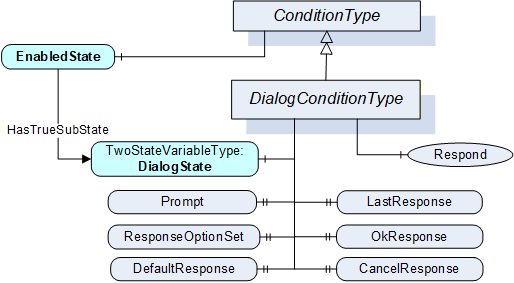
The DialogConditionType is used to represent Conditions as dialogs. It is illustrated in Figure 12 and formally defined in Table 24 and Table 25.
| Attribute | Value | ||||
| BrowseName | DialogConditionType | ||||
| IsAbstract | False | ||||
| References | NodeClass | BrowseName | DataType | TypeDefinition |
Modelling
Rule |
|---|---|---|---|---|---|
| Subtype of the ConditionType defined in clause 5.5.2 | |||||
| HasComponent | Variable | DialogState | LocalizedText | TwoStateVariableType | Mandatory |
| HasProperty | Variable | Prompt | LocalizedText | PropertyType | Mandatory |
| HasProperty | Variable | ResponseOptionSet | LocalizedText [ ] | PropertyType | Mandatory |
| HasProperty | Variable | DefaultResponse | Int32 | PropertyType | Mandatory |
| HasProperty | Variable | LastResponse | Int32 | PropertyType | Mandatory |
| HasProperty | Variable | OkResponse | Int32 | PropertyType | Mandatory |
| HasProperty | Variable | CancelResponse | Int32 | PropertyType | Mandatory |
| HasComponent | Method | Respond | Defined in Clause 5.6.3. | Mandatory | |
| HasComponent | Method | Respond2 | Defined in Clause 5.6.4. | Optional | |
| ConformanceUnits | |||||
|---|---|---|---|---|---|
| A & C Dialog |
| BrowsePath | References | NodeClass | BrowseName | DataType | TypeDefinition | Others |
| DialogState | HasProperty | Variable | TrueState | LocalizedText | PropertyType | |
| DialogState | HasProperty | Variable | FalseState | LocalizedText | PropertyType |
The empty “Others” column indicates that no ModellingRule applies.
The DialogConditionType inherits all Properties of the ConditionType.
DialogState/Id when set to True indicates that the Dialog is active and waiting for a response. Recommended state names are described in A.2.
Prompt is a dialog prompt to be shown to the user.
ResponseOptionSet specifies the desired set of responses as array of LocalizedText. The index in this array is used for the corresponding fields like DefaultResponse, LastResponse and SelectedOption in the Respond Method. The recommended localized names for the common options are described in A.1.
Typical combinations of response options are
OK
OK, Cancel
Yes, No, Cancel
Abort, Retry, Ignore
Retry, Cancel
Yes, No
DefaultResponse identifies the response option that should be shown as default to the user. It is the index in the ResponseOptionSet array. If no response option is the default, the value of the Property is -1.
LastResponse contains the last response provided by a Client in the Respond Method. If no previous response exists, then the value of the Property is -1.
OkResponse provides the index of the OK option in the ResponseOptionSet array. This choice is the response that will allow the system to proceed with the operation described by the prompt. This allows a Client to identify the OK option if a special handling for this option is available. If no OK option is available, the value of this Property is -1.
CancelResponse provides the index of the response in the ResponseOptionSet array that will cause the Dialog to go into the inactive state without proceeding with the operation described by the prompt. This allows a Client to identify the Cancel option if a special handling for this option is available. If no Cancel option is available, the value of this Property is -1.
5.6.3 Respond Method
Respond is used to pass the selected response option and end the dialog. DialogState/Id will return to False.
Signature
	Respond(
		[in] Int32 SelectedResponse
		);
The parameters are defined in Table 26
| Argument | Description |
| SelectedResponse | Selected index of the ResponseOptionSet array. |
Method result codes in Table 27 (defined in Call Service)
| Result Code | Description |
| Bad_DialogNotActive | See Table 137 for the description of this result code. |
| Bad_DialogResponseInvalid | See Table 137 for the description of this result code. |
Table 28 specifies the AddressSpace representation for the Respond Method.
| Attribute | Value | ||||
| BrowseName | Respond | ||||
| References | NodeClass | BrowseName | DataType | TypeDefinition | ModellingRule |
|---|---|---|---|---|---|
| HasProperty | Variable | InputArguments | Argument[] | PropertyType | Mandatory |
| AlwaysGeneratesEvent | ObjectType | AuditConditionRespondEventType | Defined in 5.10.5 | ||
| ConformanceUnits | |||||
|---|---|---|---|---|---|
| A & C Dialog |
If Auditing is supported, this Method shall generate an Event of AuditConditionRespondEventType for all invocations of the Method.
5.6.4 Respond2 Method
Respond2 Method extends the respond method by adding a comment field. For other functionality see the Respond Method definition.
Signature
	Respond2(
		[in] Int32			SelectedResponse
		[in] LocalizedText	Comment
		);
The parameters are defined in Table 29
| Argument | Description |
| SelectedResponse | Selected index of the ResponseOptionSet array. |
| Comment | A localized text that shall be applied to the Dialog. |
If the Comment argument is NULL (both locale and text are empty) it shall be ignored and any existing comments will remain unchanged. To reset the comment, an empty text with a locale shall be provided.
Method result codes in Table 30 (defined in Call Service)
| Result Code | Description |
| Bad_DialogNotActive | See Table 137 for the description of this result code. |
| Bad_DialogResponseInvalid | See Table 137 for the description of this result code. |
| Bad_InvalidArgument | The Comment string provided exceeds the allowed length for the comment or is invalid in some other manner. |
Table 31 specifies the AddressSpace representation for the Respond2 Method.
| Attribute | Value | ||||
| BrowseName | Respond2 | ||||
| References | NodeClass | BrowseName | DataType | TypeDefinition | ModellingRule |
|---|---|---|---|---|---|
| HasProperty | Variable | InputArguments | Argument[] | PropertyType | Mandatory |
| AlwaysGeneratesEvent | ObjectType | AuditConditionRespondEventType | Defined in 5.10.5 | ||
| ConformanceUnits | |||||
|---|---|---|---|---|---|
| A & C Dialog2 |
If Auditing is supported, this Method shall generate an Event of AuditConditionRespondEventType for all invocations of the Method.