
7.7.3 Update TrustList Workflow
The Update TrustList workflow starts if the CertificateManager determines that an update to an existing TrustList is required. This update can be part of another workflow or a standalone workflow. It is shown in Figure 18. The boxes with blue text indicate Method calls.
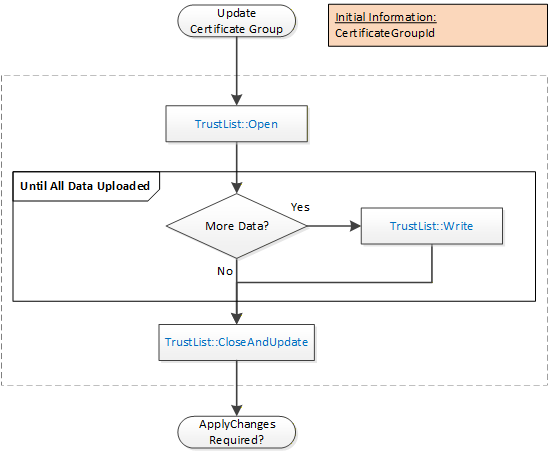
The steps of the PushManagement Update TrustList workflow are described in Table 23.
| Step | Description |
| Initial Conditions | The update is triggered when the CertificateManager needs to update a TrustList as part of a larger workflow. The CertificateGroupId is determined by the containing workflow. |
| TrustList::Open | The TrustList is opened for writing. The new TrustList is serialized into stream of bytes. |
| TrustList::Write | The stream of bytes is written to the Server in one or more blocks. The size of a block shall not exceed the value specified by the MaxByteStringLength Property. |
| TrustList::CloseAndUpdate | The CertificateManager closes the TrustList and tells the Server to apply changes. The Server may set the ApplyChangesRequired=TRUE to indicate that ApplyChanges needs to be called. If required, ApplyChanges is called by the containing workflow. |