
8 Engineering tools
8.1 Engineering tools overview
In order to create, read, write, edit and manage Descriptors, some tooling is required in OfflineEngineering. This clause provides a brief overview of the tooling functions that can be used for this purpose.
8.2 Requirements for engineering tools
Since the Information Model for an AutomationComponent in a Descriptor is modelled as an AML InternalElement within an AML InstanceHierarchy or an AML SystemUnitClass, the tools that work directly with the Information Model shall support the use of AML constructs and the OPC UA FX AML Libraries.
Engineering tools should support the import or export of a Descriptor.
Any tool that exports a Descriptor shall require that the Descriptor be digitally signed at the end of the export cycle. The use of X.509 certificate technology is required to ensure the ability to authenticate the signature for further use by other tools. The tool shall allow the user to select an X.509 certificate to create the digital signature, which can be either self-signed or CA-signed and taken from a file or a certificate store. The tool is required to check the validity of the certificate or certificates.
A tool that allows importing a Descriptor shall validate all digital signatures included in the Descriptor and ask the tool user to trust the certificates used for signing if the signing certificate is not already trusted by the tool. The user is not required to accept this trust and can block the import action.
When a signature cannot be fully validated or if no signature is present, and the tool is operating without a user interface, the import shall fail, and the tool should generate a log message.
When a signature cannot be fully validated or if no signature is present, and the tool operates with a user interface, meaningful warnings and error messages shall be displayed, and the tool should generate a log message. The import shall fail unless the user overrides the validation failure.
8.3 Engineering tool architecture
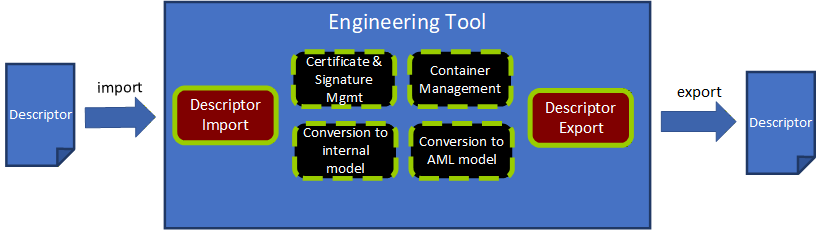
Figure 21 presents the architecture of a hypothetical engineering tool for OPC UA FX OfflineEngineering, which has two main functions: "Descriptor Export" and "Descriptor Import" and four supporting functions for working with a Descriptor. Other functionality of an engineering tool, e.g., managing signal lists, writing control applications, modifying/extending Descriptor content, or designing safety applications, is left out of the figure for simplification.
8.3.1 Descriptor Export
The Descriptor Export function "exports" a Descriptor from an engineering tool.
Use cases for the export of a Descriptor are:
The types of vendor-specific AutomationComponent products are made available in a Descriptor as OPC UA FX AML types for usage in OfflineEngineering projects.
An OPC UA FX Information Model of an AutomationComponent configuration is provided in a Descriptor for further sharing with other engineering tools.
The Descriptor Export function uses the support functions stated in 8.3.3, 8.3.4, and 8.3.6.
Important tasks for Descriptor Export are:
Convert the internal model of the AutomationComponent to an OPC UA FX AML Information Model (8.3.6);
Collect and select the files (AML files, attachment files, embedded Descriptors) and place their files into a file structure. Part of this step is also to decide which files are included in the Descriptor or accessible by external references. (8.3.3);
Select the Root AML files and create the Descriptor manifest (8.3.3);
Create the Common Services files with the relationship references and content types as required by the Open Packaging Conventions (8.2.3);
Create the AML Container with an archiving function in the ZIP format. (8.3.3);
Sign the Descriptor with a valid certificate and add the digital signature to the Descriptor (8.3.4).
8.3.2 Descriptor Import
The Descriptor Import function "imports" a Descriptor to an engineering tool.
The Descriptor Import function uses the support functions stated in 8.3.3, 8.3.5, and 8.3.6
Important tasks for Descriptor Import are:
Open and decompress the Descriptor to a temporary folder or in memory. (8.3.3);
Validate the digital signatures and certificates. (8.3.4);
Parse the Descriptor Manifest and check for the OpcUaFxVersion element (8.3.3);
Build up the file navigation structure by identifying the Root AML files and the relationship references (8.3.3);
Parse the data of the Information Model files and convert the OPC UA FX Information Model to an internal representation of the engineering tool (8.3.5).
The two main use cases for import are the import of an OPC UA FX Information Model of an AutomationComponent product and the import of an AutomationComponent configuration.
Before starting the engineering work, a Controls Engineer must select and procure the product data information for an AutomationComponent. Typically, the selection and procurement of the production data information will be made in one of three different options, as described below.
One option for procurement is to download a Descriptor with product information from the vendor's website.
Another option exists if the Descriptor for a product can be exposed as a file or as a reference to it in the online Information Model of the AutomationComponent. A Controls Engineer who wants to see this information can retrieve this data from the online AutomationComponent by browsing the Descriptors folder and reading the AcDescriptorType instances.
A third option would be the engineering tool that already has the product information for the AutomationComponent available in its database.
Another use case for importing a Descriptor with configuration information arises in the sharing of work between Control Engineers. Engineer A exports a Descriptor with configuration information for Controller A and sends it to Engineer B. Engineer B needs to know what data Controller A is providing or is required for the Connections. After receiving the Descriptor, Engineer B imports it into an engineering tool and uses the Information Model of Controller A to complete the Information Model for Controller B, e.g., defining the complementary FunctionalEntity, InputData and OutputData information for Controller B. The exchange of a Descriptor between Controls Engineers is further described in detail in 8.4.
8.3.3 AML Container management
AML Container management is a support function for handling AML Container and Open Packaging Conventions packages.
An overview of the tasks for container management is given here:
Identification of the Descriptor manifest, AML files, attachment files, embedded Descriptor and Common Services files;
Finding and defining the Root AML files;
Browsing the references of a Descriptor starting from the Root AML files and building a structure for navigating through the content;
Resolving external relationship references;
Creating and managing the file system of a Descriptor;
Adding and removing AML modelling files;
Adding and removing attachment files;
Adding and removing embedded Descriptor;
Updating the [Content_Types].xml file;
Compression method(s) to produce the final output;
Managing relationships, ExternalReferences, and ExternalDataReferences between the files and the content.
8.3.4 Certificate and signature management
Certificate and signature management is a support function for dealing with certificates and signature methods needed for signing a Descriptor and validating digital signatures.
An overview of the tasks for certificate and signature management follows:
Access certificates either on a file system or on a certificate store;
Secure handling of authentication factor(s), e.g., the password that may be needed for accessing a private key associated with a certificate;
Creating digital signatures according to the Open Packaging Conventions standard;
Validating a Descriptor digital signature by checking the validity of all involved certificates as defined in 7.8.2 and checking the signature hash against the hash of the content;
Ability to create a self-signed certificate that can be used if no CA-signed certificate is available;
Warning the user of signature errors (non-valid certificates, non-matching signatures);
Reporting of the scope of each digital signature of a Descriptor (which files are signed with a signature).
8.3.5 Conversion to an internal model
Conversion to an internal model is a support function for parsing the data of the Information Model AML files into the internal representation of the AutomationComponent used by the engineering tool.
An overview of the tasks for conversion to an internal model is below:
AML parser for reading the content of an AML file;
Ability to fetch additional AML libraries from links in the AML file if these libraries are not already present in the engineering tool;
Creating the objects and relationships in the internal model of the engineering tool from the parsed information.
8.3.6 Conversion to an OPC UA FX AML Information Model
Conversion to OPC UA FX AML Information Model is a support function that converts the internal model of an engineering tool to an OPC UA FX AML model, which can be serialized to a Descriptor.
The main steps for conversion are:
Ability to produce OPC UA FX AML content from the configuration done in the internal model of an engineering tool;
Serialize the model into AML files.
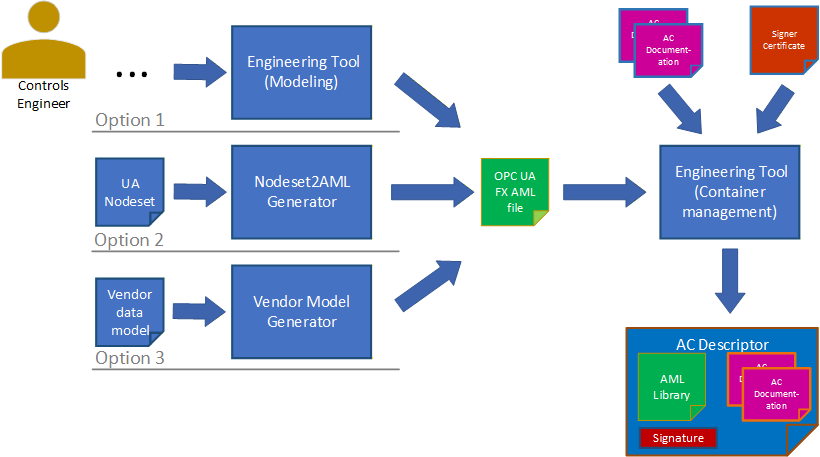
There are three options for producing the OPC UA FX AML content. This is shown in Figure 22.
The Controls Engineer creates the AML model directly using an engineering tool that allows the creation and editing of AML structures using the OPC UA FX AML Libraries. In this case, no conversion to AML is needed, but the serialization step is still needed.
The Control Engineer starts with the OPC UA FX Information Model in NodeSet format and uses a conversion tool to create an OPC UA FX AML file.
An existing Information Model in a vendor-specific format is converted into an OPC UA FX AML file using a vendor-specific conversion tool. For developing vendor-specific conversion tools, a software library for the creation of AML files (AMLEngine) is available from the AML Association.
8.4 Example workflow for sharing a Descriptor in OfflineEngineering
The import of a Descriptor with configuration information arises in the sharing of work between Controls Engineers: one Controls Engineer exports a Descriptor and sends it to another Controls Engineer for further usage.
The import could be for adding or changing the configuration of a Descriptor in a subsequent engineering step for the same AutomationComponent or using the information of the exported Descriptor for the configuration of another AutomationComponent, e.g., for configuring InputData from the OutputData information in a Controller-to-Controller communication scenario.
In both cases, the exported Descriptor with configuration information will be imported into an engineering tool. For the import, the same rules as in 8.3.2 apply.
In the case of subsequent engineering on the same AutomationComponent, data that was configured in a previous step may need to be changed.
The OPC UA FX Connection Configuration workflow for a Controller-to-Controller application is illustrated in Figure 23.
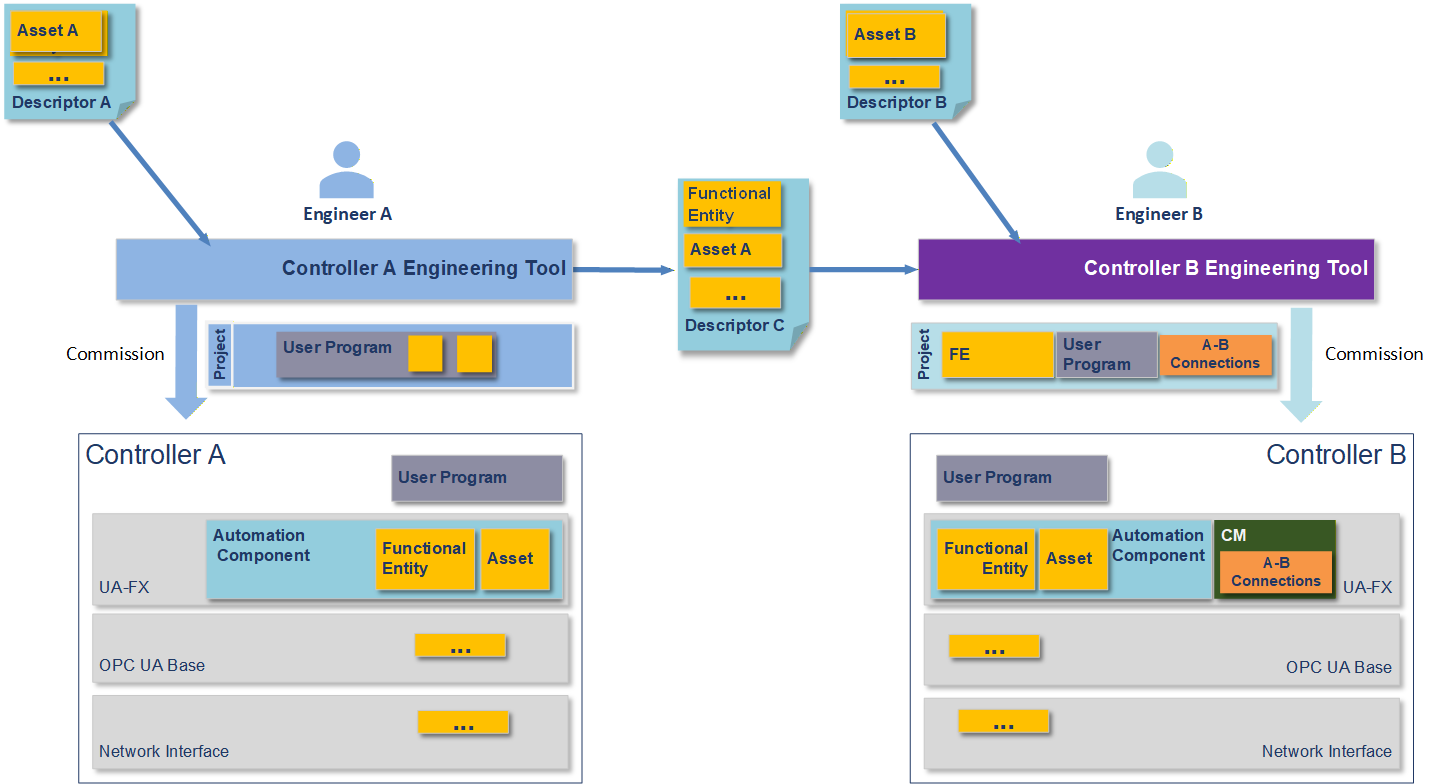
Figure 21 shows an engineering workflow where the task is to create a shared application where data is exchanged between Controller A and Controller B. It is assumed that the Controllers may be from different vendors or the same vendor.
In Figure 23, Descriptors are shared between the engineering tools in an export/import manner. The engineering tools consume the Descriptors. Descriptor C contains configuration information that shares the information it can provide to an AutomationComponent to allow meaningful communication. The yellow and orange boxes represent the information taken from the Descriptors by the engineering tools and downloaded together with the user programs into the Controllers.
The yellow FunctionalEntity and Asset boxes represent the Information Model of the AutomationComponent(s) in the Controllers. The FunctionalEntities contain input groups, output groups, data types, names, capabilities and other information (see OPC 10000-81 for full details). This information could contain the ranges and communication options available in the FunctionalEntities. The data types used in the communication must match between the Controllers.
The yellow boxes with the three dots contain additional information to be shared, e.g., information on network interfaces.
Engineer A creates a Descriptor with configuration information from Controller A's configuration data. This is done to share data with Engineer B to design the exchange of data between the AutomationComponents (e.g., Controller-to-Controller communication). Engineering tools are expected to support the engineer in this task. Engineer B can also share Descriptor information with Engineer A. This can be an iterative step that Controls Engineers can repeat several times as more information is added or changed during the creation process.
8.5 Version compatibility between engineering tools and Descriptors
In handling Descriptors with different OPC UA FxVersions, the following rules apply:
Engineering tools shall document the supported OPC UA FxVersion.
Engineering tools that are able to export or import Descriptors of a specific OPC UA FxVersion shall also be able to export or import Descriptors of a previous OPC UA FxVersion (backward compatibility).
Engineering tools that are able to import Descriptors of a specific OPC UA FxVersion shall be able to import Descriptors of a newer OPC UA FxVersion in a best-effort way, i.e. features that are available in the older OPC UA FxVersion can be imported, while newer features shall be ignored. Ignored features should be logged.