
B.6 Cable Connections
Typically, in real world applications a connector of one device is not plugged directly into the connector of another device. You will find a piece of cable in between.
As cables are often a delicate part of a system and could be worn down if connected to a moving machine part, it can be helpful to get information what kind of cable is used and where it is connected directly from the system. Be aware that a cable can have more than two ends (Y-Cable, Bus Cable, Cable Tree).
Part2 allows you to include information in the model as needed, from basic items to in depth detail.
In the example above we saw a Controls reference between the lighting controller and Lamp1.
Now we will add a cable to the model that provides this control connection.
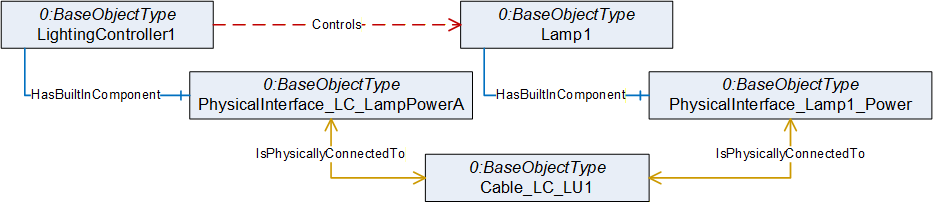
As in the last example we now have two paths from Controller to lamp that stand for the same relation. We again may use a reference refinement to give the information that the Controls reference is provided by that cable connection.
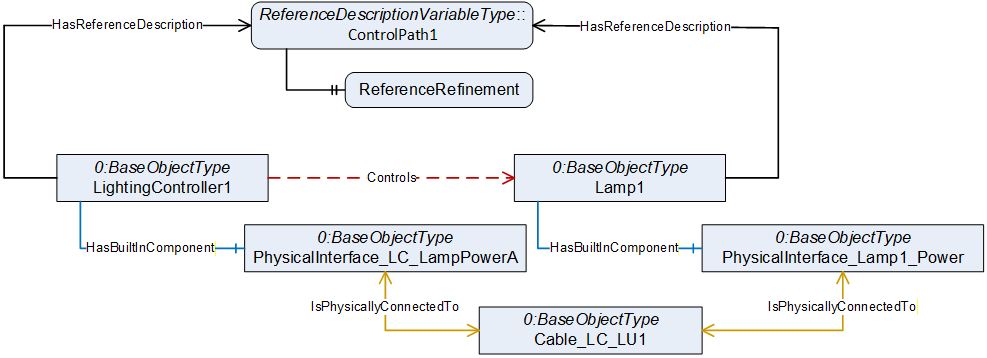
ReferenceDescription Value of ControlPath1
| SourceNode: | LightingController1 |
| ReferenceType: | Controls |
| IsForward: | TRUE |
| TargetNode: | Lamp1 |
ReferenceRefinement of ControlPath1
{
| ReferenceListEntry | |
| ReferenceType: HasContianedComponent | |
| IsForward: TRUE | |
| TargetNode: PhysicalInterface_ LC_LampPowerA |
| ReferenceListEntry | |
| ReferenceType: IsPhysicallyConnectedTo | |
| IsForward: TRUE | |
| TargetNode: Cable_LC_LU1; |
| ReferenceListEntry | |
| ReferenceType: IsPhysicallyConnectedTo | |
| IsForward: TRUE | |
| TargetNode: PhysicalInterface_Lamp1_Power; |
| ReferenceListEntry | |
| ReferenceType: HasContianedComponent | |
| IsForward: FALSE | |
| TargetNode: Lamp1; |
};
Such control flows often include multiple devices which are part of the communication. If the IPC sends a software trigger to the lighting controller via an Ethernet connection, the signal may have to pass an Ethernet switch. Modeling such details gives you the possibility to do sophisticated error analysis later.
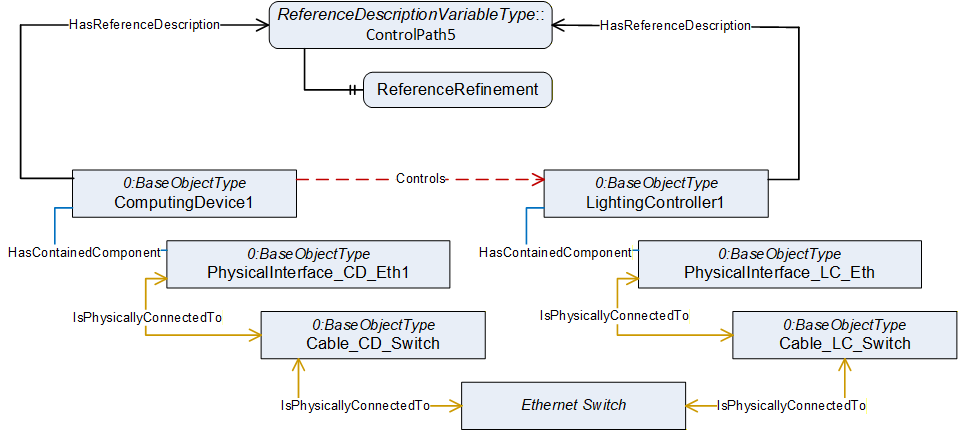
ReferenceDescription Value of ControlPath5
| SourceNode: | ComputingDevice1 |
| ReferenceType: | Controls |
| IsForward: | TRUE |
| TargetNode: | LightingController1 |
ReferenceRefinement of ControlPath5
{
| ReferenceListEntry | |
| ReferenceType: HasContianedComponent | |
| IsForward: TRUE | |
| TargetNode: PhysicalInterface_CD_Eth; | |
| ReferenceListEntry | |
| ReferenceType: IsPhysicallyConnectedTo | |
| IsForward: TRUE | |
| TargetNode: Cable_CD_Switch; | |
| ReferenceListEntry | |
| ReferenceType: IsPhysicallyConnectedTo | |
| IsForward: TRUE | |
| TargetNode: Ethernet Switch; | |
| ReferenceListEntry | |
| ReferenceType: IsPhysicallyConnectedTo | |
| IsForward: TRUE | |
| TargetNode: Cable_LC_Switch; | |
| ReferenceListEntry | |
| ReferenceType: IsPhysicallyConnectedTo | |
| IsForward: TRUE | |
| TargetNode: PhysicalInterface_LC_Eth; | |
| ReferenceListEntry | |
| ReferenceType: HasContianedComponent | |
| IsForward: FALSE | |
| TargetNode: LightingController1; |
};
If the IPC is currently unable to control the lighting controller, the reference refinement provides the information that a service technician not only will have to check the IPC and the controller, but that there are two cables and an Ethernet switch involved that could be causing the problem.