
16 Monitoring
16.1 Overview
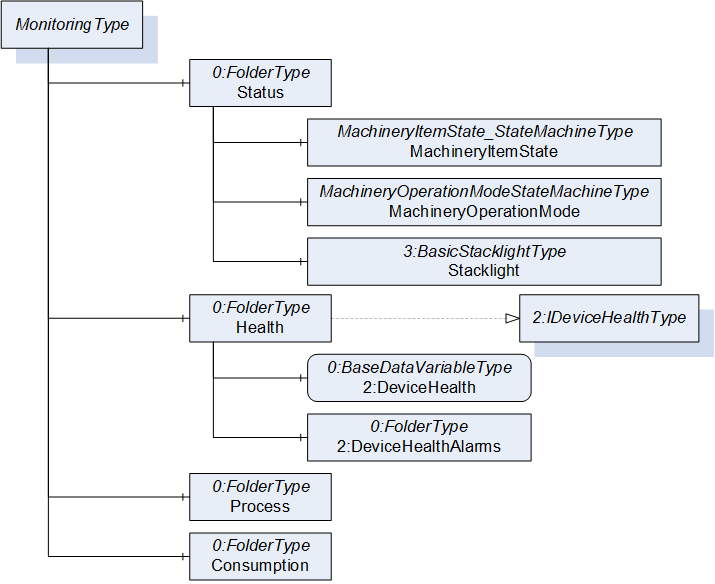
This building block provides a base structure for monitoring information of a MachineryItem. In Figure 24, the MonitoringType is shown. It provides some sub-structures for grouping different monitoring information. Vendors or companion specifications may add additional sub-structures on the different levels of this building block. The Status Object shall reference the MachineryItemState and MachineryOperationMode AddIns, if they are provided by the MachineryItem. The Health of the MachineryItem may be represented by the 2:IDeviceHealthType Interface defined in OPC 10000-100.
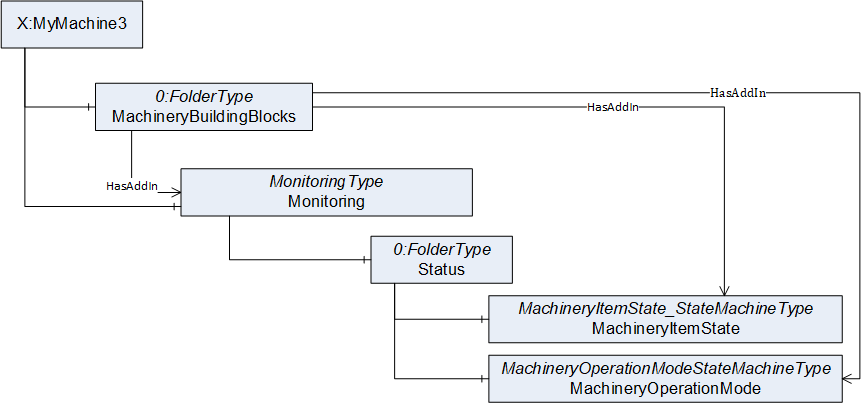
The building block can be used in parallel to other structures of the MachineryItem or as the main structure of the MachineryItem. In Figure 25 three different examples are shown. X:Machine1 only reference the Monitoring Object under MachineryBuildingBlocks, X:Machine2 has some additional structuring referencing the Monitoring Object in addition, and X:Machine3 references the Monitoring Object also directly to provide it as additional top-level entry point. It is recommended to provide this top-level entry point.

When the building block is used in combination with the MachineryItemState (see section 12) or MachineryOperationMode (see section 13), they should be combined as shown in Figure 26. The MachineryItemState and MachineryOperationMode should be referenced as building block from the MachineryBuildingBlocks Object, and in addition, from the Status Object of the Monitoring building block.
In B.4, some more detailed examples are given on how to use this building block.
16.2 MonitoringType
The MonitoringType provides entry points for monitoring a MachineryItem and is formally defined in Table 41.
| Attribute | Value | ||||
| BrowseName | MonitoringType | ||||
| IsAbstract | False | ||||
| Description | Entry point for monitoring information of a MachineryItem. | ||||
| References | Node Class | BrowseName | DataType | TypeDefinition | Other |
|---|---|---|---|---|---|
| Subtype of the 0:FolderType | |||||
| 0:HasProperty | Variable | 0:DefaultInstanceBrowseName | 0:QualifiedName | 0:PropertyType | - |
| HasComponent | Object | Status | FolderType | O | |
| HasComponent | Object | Health | FolderType | O | |
| HasComponent | Object | Process | FolderType | O | |
| HasComponent | Object | Consumption | FolderType | O | |
| Conformance Units | |||||
|---|---|---|---|---|---|
| Machinery Monitoring |
The child Nodes of the MonitoringType have additional Attribute values defined in Table 42.
| BrowsePath | Value Attribute | Description Attribute |
| 0:DefaultInstanceBrowseName | Monitoring | The default BrowseName for instances of the type. |
| Status | - | Entry point for status information of the MachineryItem. If this Object is provided, and the MachineryItemState is provided, it shall be referenced. If this Object is provided and the MachineryOperationMode is provided, it shall be referenced. |
| Health | - | Entry point of health information of the MachineryItem. |
| Process | - | Entry point for process information of the MachineryItem. |
| Consumption | Entry point for consumption information of the MachineryItem. |
The components of the MonitoringType have additional subcomponents which are defined in Table 43.
| Source Path | Reference | Node Class | BrowseName | DataType | TypeDefinition | Others |
| Status | 0:HasComponent | Object | MachineryItemState | MachineryItemState_StateMachineType | O | |
| Status | 0:HasComponent | Object | MachineryOperationMode | MachineryOperationModeStateMachineType | O | |
| Status | 0:HasComponent | Object | Stacklight | 3:BasicStacklightType | O | |
| Health | 0:HasComponent | Object | 2:DeviceHealthAlarms | 0:FolderType | O | |
| Health | 0:HasComponent | Variable | 2:DeviceHealth | 2:DeviceHealthEnumeration | 0:BaseDataVariableType | O |
The components of the MonitoringType have additional References which are defined in Table 44.
| SourceBrowsePath | Reference Type | Is Forward | TargetBrowsePath |
| Health | 0:HasInterface | True | 2:IDeviceHealthType |