
12.2.1 Device Type
12.2.1.1 General
OPC UA for Devices and FDT use different approaches in regard to representation of device type specific data. Some of the data defined in OPC UA for representation of the device type is available only in instance-specific data of the DTMs (see Figure 12).
The data from FDT may be mapped either to Attributes (table header “Attribute”) or to properties and other child Nodes (table header “BrowseName”) of the corresponding OPC UA Node.
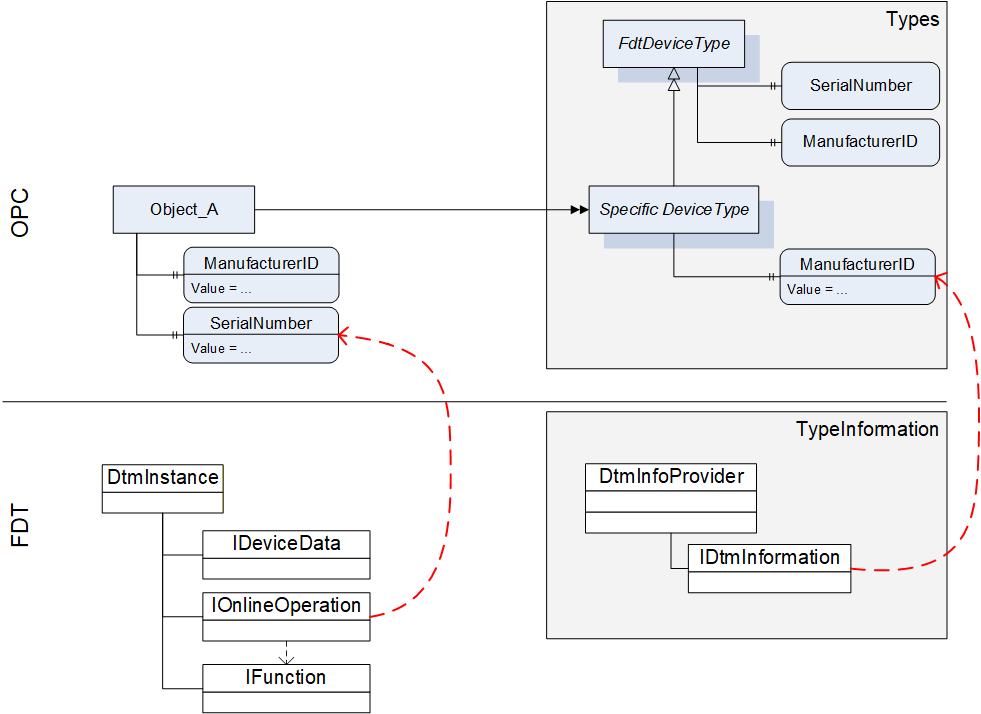
For this reason the device type specific data of OPC is mapped to data on several interfaces of the DTM (see Table 58).
12.2.1.2 Mapping for DeviceType (“Types” standard Object)
All device types provided by DTMs in IDtmInformation shall be represented as subtypes of FdtDeviceType in the “Types” standard Object (see Table 58).
| OPC | FDT | |||
|---|---|---|---|---|
| Attribute | Interface | Method | Data member | Description |
| BrowseName | IDtmInformation | <>GetSupportedTypes | DeviceTypeInfo.Name | |
| DisplayName | IDtmInformation | <>GetSupportedTypes | DeviceTypeInfo.Name | |
| BrowseName | Interface | Method | Data member | Description |
| 2:SerialNumber | Mapping for online device only, see Table 61 | |||
| 2:RevisionCounter | Not supported. Value is always set to -1 | |||
| 2:Manufacturer | IDtmInformation | <>GetSupportedTypes | DeviceTypeInfo.ProductManufacturerName | |
| ManufacturerId | IDtmInformation | GetDeviceIdentInfo | DeviceIdentInfo.ManufacturerId | |
| 2:Model | IDtmInformation | <>GetSupportedTypes | DeviceTypeInfo.ProductName | |
| 2:DeviceManual | All documents will be provided in folder Documentation | |||
| 2:DeviceRevision | IDtmInformation | <>GetSupportedTypes | DeviceTypeInfo.ProductRevision | |
| 2:SoftwareRevision | IDtmInformation | GetDeviceIdentInfo | DeviceIdentInfo.SoftwareRevision | |
| 2:HardwareRevision | IDtmInformation | GetDeviceIdentInfo | DeviceIdentInfo.HardwareRevision | |
| 2:DeviceClass(O) | IDtmInformation | <>GetSupportedTypes | DeviceTypeInfo.DeviceClassifications[0].DomainId + “:” + DeviceTypeInfo.DeviceClassifications[0].Id | The value is a concatenation of the enumeration member names for DomainId and Id. |
| DeviceTypeId | IDtmInformation | <>GetSupportedTypes | DeviceTypeInfo.Id | |
| 2:ManufacturerUri(O) | Not supported. | |||
| 2:ProductCode(O) | Not supported. | |||
| 2:ProductInstanceUri(O) | Not supported. | |||
| <CP_Identifier>(O) | IDtmInformation | <>GetSupportedTypes | TypeInfo.BusCategories[].Category¬Type == required <Identifier> = TypeInfo.BusCategories[].Protocol¬Name | HasComponent-reference of type RequiredProtocol. |
IDtmInformation IChannels | <>GetSupportedTypes IChannels.CommunicationChannels | TypeInfo.BusCategories[].Category¬Type == supported <Identifier> = CommunicationChannelItem.Id | HasComponent-reference of type SupportedProtocol. If one Channel requires multiple protocols, multiple connection points are provided, an additional number is concatenated to the channel id. | |
| 0:Icon | IDtmInformation | GetFdtIcon() | Icon | see explanation below the table |
| Applied from IFdtDeviceHealthType | ||||
| 2:DeviceHealth | Mapping for online device only, see Table 61 | |||
| 2:DeviceHealthAlarms(O) | - | - | - | No mapping defined. |
| OPC | FDT | |||
| BrowseName | Interface | Method | Data member | Description |
| Applied from IFdtSupportInfoType | ||||
| 2:DeviceTypeImage(O) | This folder will contain items as defined in 12.2.8.1. | |||
| 2:Documentation (O) | IDtmInformation | <>GetSupportedTypes | DeviceTypeInfo.Documents | This folder will contain items that represent the shown FDT data member as defined in 7.3 |
| 2:ProtocolSupport (O) | INetworkData | GetNetworkDataInfo | NetworkData. DeviceInformationDocuments | This folder will be provided as defined in 12.2.8.2. |
| 2:ImageSet(O) | Not supported. | |||
A DTM can provide several icons (list of icons). The rule for selection of the icon and extraction of an image (a specific resolution) from the icon is frame application specific. The selection of the image format in general is implementation specific, all types are allowed that are defined in OPC UA 10000-3.
12.2.1.3 Mapping for Offline Device (“Objects” standard Object)
The information for a device (instance) is based on the information provided by a DTM (instance). The mapping for the device node is defined in Table 59.
| OPC | FDT | |||
|---|---|---|---|---|
| Attribute | Interface | Method | Data member | Description |
| TypeReference | - | - | - | NodeId of the DeviceType |
| BrowseName | IDtm | DtmSystemGuiLabel | ||
| DisplayName | IDtm | DtmSystemGuiLabel | ||
The device parameters provide offline identification information based on DTM type information intended for identification. This data may provide values or regular expressions to define ranges of supported values.
In the call to IDtmInformation.GetDeviceIdentInfo() a protocol must be specified. The first entry from the list of INetworkData.ActiveProtocols shall be used.
GetDeviceIdentInfo() may return a list of DeviceIdentInfo where the first entry is used for the parameters as defined below. Exposing the remaining list entries is implementation specific.
| OPC | FDT | |||
|---|---|---|---|---|
| BrowseName | Interface | Method | Data member | Description |
| ManufacturerId | IDtmInformation | GetDeviceIdentInfo() | DeviceIdentInfo[0].GetManufacturerId() | |
| DeviceTypeId | IDtmInformation | GetDeviceIdentInfo() | DeviceIdentInfo[0]. GetDeviceTypeId() | |
| 2:NetworkAddress | INetworkData | GetAddressInfo() | AddressInfo.DeviceAddresses[].Address | string array containing all addresses provided |
| DeviceTag | -/- | -/- | (default value) | |
| 2:Serial Number | -/- | -/- | (default value) | |
| 2:SoftwareRevision | IDtmInformation | GetDeviceIdentInfo() | DeviceIdentInfo[0].GetSoftwareRevision() | |
| 2:HardwareRevision | IDtmInformation | GetDeviceIdentInfo() | DeviceIdentInfo[0].GetHardwareRevision() | |
| Contents of FunctionalGroup “Identification” (see 12.2.5.) | ||||
| ProtocolId | IDtmInformation | GetDeviceIdentInfo() | DeviceIdentInfo[0].GetProtocolId() | |
| ProtocolSpecificIdentification | IDtmInformation | GetDeviceIdentInfo() | DeviceIdentInfo[0]. GetProtocolSpecificProperties() | |
| DeviceSpecific-Identification | IDtmInformation | GetDeviceIdentInfo() | DeviceIdentInfo[0].DeviceSpecificProperties | |
12.2.1.4 Mapping for Online Device (“Objects” standard Object online reference)
Device parameters provide identification information based on data read online from the device. This data may be different from the data provided in the DeviceType.
| OPC | FDT | |||
|---|---|---|---|---|
| BrowseName | Interface | Method | Data member | Description |
| ManufacturerId | IHardwareInformation | <>HardwareScan() | DeviceScanInfo.GetManufacturerId() | |
| DeviceTypeId | IHardwareInformation | <>HardwareScan() | DeviceScanInfo.GetDeviceTypeId() | |
| 2:NetworkAddress | IHardwareInformation | <>HardwareScan() | DeviceScanInfo.GetAddress() | |
| DeviceTag | IHardwareInformation | <>HardwareScan() | DeviceScanInfo.GetTag() | |
| 2:DeviceHealth | IOnlineOperation | <>ReadDevice-Status() | DeviceStatus.StatusFlag | For mapping of the enumeration values see 12.1.1. |
| 2:Serial Number | IHardwareInformation | <>HardwareScan() | DeviceScanInfo.SerialNumber() | |
| 2:SoftwareRevision | IHardwareInformation | <>HardwareScan() | DeviceScanInfo.GetSoftwareRevision() | |
| 2:HardwareRevision | IHardwareInformation | <>HardwareScan() | DeviceScanInfo.GetHardwareRevision() | |
| Contents of FunctionalGroup “Identification” (see 12.2.5.) | ||||
| ProtocolId | IHardwareInformation | <>HardwareScan() | DeviceScanInfo.GetProtocolId() | |
| ProtocolSpecificIdentification | IHardwareInformation | <>HardwareScan() | DeviceScanInfo.GetProtocolSpecificProperties() | |
| DeviceSpecific-Identification | IHardwareInformation | <>HardwareScan() | DeviceScanInfo.DeviceSpecificProperties | |