
6.4 ObjectTypes
6.4.1 QuantityType ObjectType definition
The QuantityType defines a model for physical quantities. These are listed in the Quantites Folder. Each quantity has a ServerUnits Folder in which the units, referenced by EngineeringUnit Properties with HasEngineeringUnitDetails, are listed. Each ServerUnit can have a list of alternative units to which the Variable value can be converted.
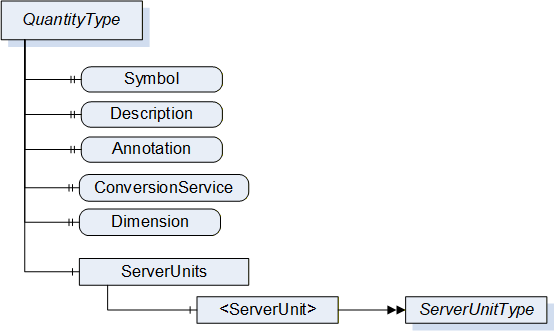
It is illustrated in Figure 9 and formally defined in Table 41.
| Attribute | Value | ||||
| BrowseName | QuantityType | ||||
| IsAbstract | False | ||||
| References | NodeClass | BrowseName | DataType | TypeDefinition | Other |
|---|---|---|---|---|---|
| Subtype of the BaseObjectType defined in OPC 10000-5 | |||||
| HasProperty | Variable | Symbol | LocalizedText | PropertyType | O |
| HasProperty | Variable | Annotation | AnnotationDataType[] | PropertyType | O |
| HasProperty | Variable | ConversionService | UriString | PropertyType | O |
| HasProperty | Variable | Dimension | QuantityDimension | PropertyType | M |
| HasComponent | Object | ServerUnits | BaseObjectType | M | |
| Conformance Units | |||||
|---|---|---|---|---|---|
| Data Access Quantities Base |
The DisplayName Attribute of each instance shall provide the name of the quantity, e.g. “acceleration”, “battery capacity” or “pressure in relation to volume flow rate”.
The Description Attribute should be used to expose a more verbose explanation of the QuantityType instance.
The Symbol Property is used for the symbol of the quantity (e.g. ‘l’ for length, ‘t’ for time, or ‘T’ for temperature).
Annotation allows naming annotations for a physical quantity. These Annotations are explanations of the physical quantity such as "relative" for a relative velocity. The AnnotationDataType is described in chapter 6.6.1.
For example, a VAC RMS measurement is the quadratic mean measurement of an AC voltage. We are using two annotation elements to represent it. Its Instance would contain the following values:
| Annotation | Discipline | uri |
| AC | Electrical Engineering | https://www.britannica.com/science/alternating-current |
| RMS | Electrical Engineering | https://en.wikipedia.org/wiki/Root_mean_square) |
ConversionService allows to name an external conversion service for the unit in which the client can have a conversion to a target unit performed.
Dimension describes the dimension of a physical quantity in power representation. Its DataType is described in chapter 6.6.4.
ServerUnits allows listing ServerUnits for a physical quantity. The ServerUnits are of ServerUnitType which is described in 6.4.2.
Syntax References: Instances of the QuantityType can identify the physical quantity in a specific external reference work using HasDictionaryEntry References – see 6.3.2.
The components of the QuantityType have additional subcomponents which are defined in Table 42.
| BrowsePath | References | NodeClass | BrowseName | DataType | TypeDefinition | Others |
| ServerUnits | HasComponent | Object | <ServerUnit> | ServerUnitType | MP |
6.4.2 UnitType and subtypes
6.4.2.1 General
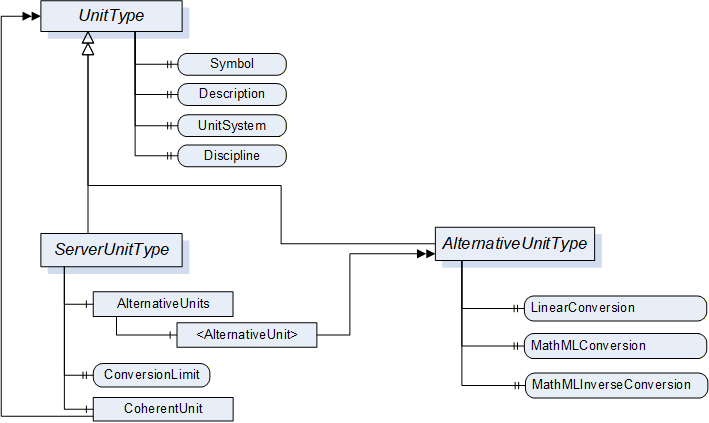
The Units model describes the relations between UnitType, ServerUnitType and AlternativeUnitType.
The UnitType is the base class and defines details that are relevant of all derived types.
6.4.2.2 UnitType ObjectType Definition
It is formally defined in Table 43.
| Attribute | Value | ||||
| BrowseName | UnitType | ||||
| IsAbstract | True | ||||
| References | NodeClass | BrowseName | DataType | TypeDefinition | Other |
|---|---|---|---|---|---|
| Subtype of the BaseObjectType defined in OPC 10000-5 | |||||
| HasProperty | Variable | Symbol | LocalizedText | PropertyType | M |
| HasProperty | Variable | UnitSystem | String | PropertyType | M |
| HasProperty | Variable | Discipline | String | PropertyType | O |
| Conformance Units | |||||
|---|---|---|---|---|---|
| Data Access Quantities Base |
The DisplayName Attribute of each instance shall provide the name of the unit, e.g. “second”, “degree Celsius” or “square metre”. This matches the “description” field of the EUInformation structure (see 5.6.4.3).
The Description Attribute should be used to expose a more verbose explanation of the UnitType instance.
The Symbol Property is used for the symbol of the unit (e.g. "h" for hour or "m/s" for meter per second). If no symbol is defined for the unit, the DisplayName Attribute shall be used as symbol. Symbol matches the “displayName” field of the EUInformation structure (see 5.6.4.3).
The UnitSystem Property describes the system of units (e.g. ISQ) in which the unit is specified. If any of the well-known systems defined in Table 44 is used, the acronym in the column “UnitSystem” shall be used for the value of this Property.
| UnitSystem | System of units |
| ISQ | International System of Quantities (ISO/IEC 80000) Fully covers and thus replaces SI (ISO 1000) |
| USCS | US Customary Unit System |
| ISU | British imperial system of units |
| MSU | Myanmar Units of measurement |
| TROY | Troy units of weight |
| CGS | centimetre–gram–second system of units |
| GAUSS | Gaussian System of units |
| FPS | foot–pound–second system of units |
Syntax References: Instances of the UnitType can identify the unit in a specific external reference work using HasDictionaryEntry References – see 6.3.2.
6.4.2.3 ServerUnitType ObjectType Definition
Instances of ServerUnitType define the units utilizes in the Server. They are assigned to the proper Quantities. EngineeringUnit Properties can refer to it. It is formally defined in Table 45.
| Attribute | Value | ||||
| BrowseName | ServerUnitType | ||||
| IsAbstract | False | ||||
| References | NodeClass | BrowseName | DataType | TypeDefinition | Other |
|---|---|---|---|---|---|
| Subtype of the UnitType | |||||
| HasComponent | Object | AlternativeUnits | BaseObjectType | O | |
| HasProperty | Variable | ConversionLimit | ConversionLimitEnum | PropertyType | M |
| HasComponent | Object | CoherentUnit | UnitType | O | |
| Conformance Units | |||||
|---|---|---|---|---|---|
| Data Access Quantities Base |
The optional Object AlternativeUnits contains Objects of the AlternativeUnitsType. These explicitly specify the units into which the conversion can be made.
The mandatory Property ConversionLimit indicates whether the ServerUnit can be converted. A distinction is made between NO_CONVERSION, LIMITED and UNLIMITED.
UNLIMITED means the client can perform conversions based on the rules defined by the given UnitSystem.
LIMITED conversion means that a conversion can not be performed by simply applying the rules defined by the given UnitSystem. Either only the conversions mentioned in the AlternativeUnits are to be used or the client requires application specific know-how for a conversion on his own.
NO_CONVERSION means that no conversion is allowed (e.g. for statistical values).
The CoherentUnit of a value is a derived unit that, for a given system of quantities and for a chosen set of base units, is a product of powers of base units, with the proportionality factor being one. Therefore it shall share the same UnitSystem as the ServerUnit.
The components of the ServerUnitType have additional subcomponents which are defined in Table 46.
| BrowsePath | References | NodeClass | BrowseName | DataType | TypeDefinition | Other |
| AlternativeUnits | HasComponent | Object | <AlternativeUnit> | AlternativeUnitType | MP |
6.4.2.4 AlternativeUnitType ObjectType Definition
The AlternativeUnitType describes alternative units to a ServerUnit. It is required to specify a conversion method for a value from the ServerUnit to this AlternativeUnit. It is formally defined in Table 47.
The use of conversions enables that a server and a client can work with different units and even in different systems of units. E.g. a server works with imperial units and a client uses metric units.
As a single server can distribute values to a number of clients with different needs the actual conversion has to be performed at client side.
| Attribute | Value | ||||
| BrowseName | AlternativeUnitType | ||||
| IsAbstract | False | ||||
| References | NodeClass | BrowseName | DataType | TypeDefinition | Other |
|---|---|---|---|---|---|
| Subtype of the UnitType | |||||
| HasProperty | Variable | LinearConversion | LinearConversionDataType | PropertyType | O |
| HasProperty | Variable | MathMLConversion | String | PropertyType | O |
| HasProperty | Variable | MathMLInverseConversion | String | PropertyType | O |
| Conformance Units | |||||
|---|---|---|---|---|---|
| Data Access Alternative Units |
The Server shall provide either a LinearConversion or a MathMLConversion together with a corresponding MathMLInverseConversion. It can provide Linear and MathML conversions in parallel.
The optional Property LinearConversion represents a simple conversion according to the following formula. The values (a, b, c, d) are given in a Structure as defined in the LinearConversionDataType in chapter 6.6.2. The value x is published by the Server in the named server unit and y is the value converted into the named alternative unit.

This also defines the inverse conversion to be used if a Client wants to write a value to the Server. The values (a, b, c, d) are given in a Structure as defined in the LinearConversionDataType in chapter 6.6.2. The value y1 is the value that the Client wants to write to the Server in the named alternative unit and x1 is the value the Client actually has to write to the Server instead
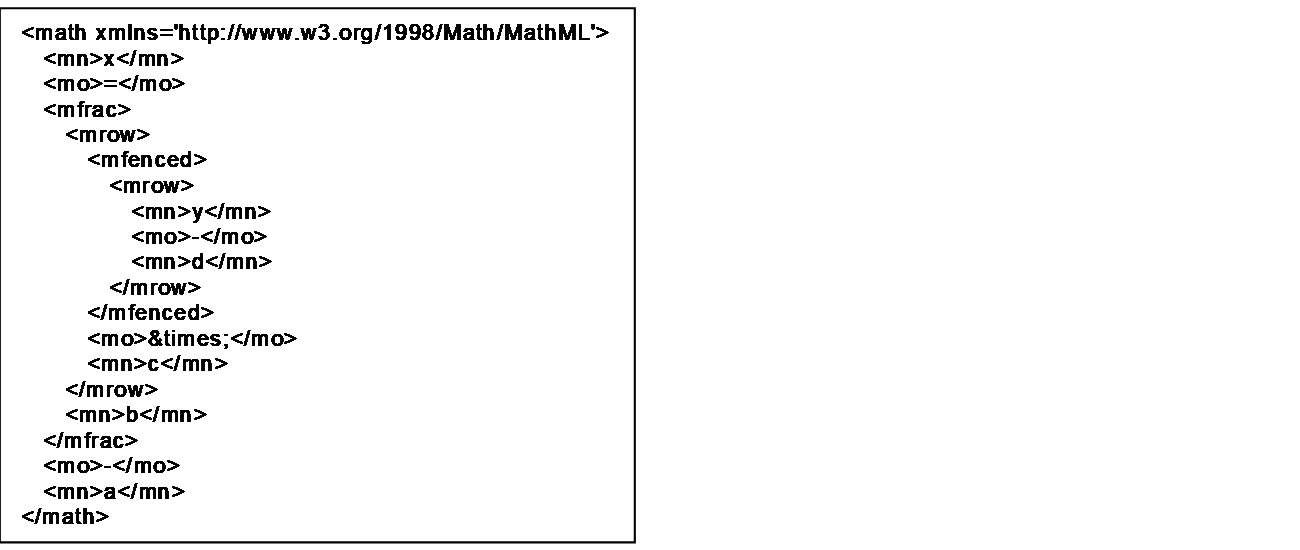
The optional Property MathMLConversion allows the specification of all kinds of conversion methods. The MathML syntax is used for this. Within the MathML expression X always stands for the value at the server side and Y for the value at the client side. An example (formula of the LinearConversion) looks as follows.
6.4.3 SyntaxReferenceEntryType ObjectType definition
The SyntaxReferenceEntryType defined in Table 48 is used to represent Syntax References that use Syntax Reference specific IDs as unique identifiers.
Because of their well-defined NodeIds (see 6.3.2), instances of this type are not required in the AddressSpace.
| Attribute | Value | |||||
| BrowseName | SyntaxReferenceEntryType | |||||
| IsAbstract | False | |||||
| References | NodeClass | BrowseName | DataType | TypeDefinition | Other | |
|---|---|---|---|---|---|---|
| Subtype of the DictionaryEntryType defined in OPC 10000-19 | ||||||
| HasProperty | Variable | CommonName | String | PropertyType | M | |
| Conformance Units | ||||||
|---|---|---|---|---|---|---|
| Data Access Quantity Syntax Reference |
CommonName shall be the corresponding field in Table 38.
The namespace for the NodeId and the BrowseName Attributes of instances of the SyntaxReferenceEntryType shall be the URI of the Syntax Reference as defined in Table 38.