
A.4 COM UA proxy for DA Client
A.4.1 Guidelines
The Data Access COM UA Proxy is a COM Server combined with a UA Client. It maps the Data Access address space of UA Data Access Server into the appropriate COM Data Access objects.
Clauses A.4.1 through A.4.6 identify the design guidelines and constraints used to develop the Data Access COM UA Proxy provided by the OPC Foundation. In order to maintain a high degree of consistency and interoperability, it is strongly recommended that vendors, who choose to implement their own version of the Data Access COM UA Proxy, follow these same guidelines and constraints.
The Data Access COM Client simply chooses how to connect to the UA Data Access Server. Connectivity approaches include the one where Data Access COM Clients connect to a UA Data Access Server with a CLSID just as if the target Server were a Data Access COM Server. However, the CLSID can be considered virtual since it is defined to connect to intermediary components that ultimately connect to the UA Data Access Server. Using this approach, the Data Access COM Client calls co-create instance with a virtual CLSID as described above. This connects to the Data Access COM UA Proxy components. The Data Access COM UA Proxy then establishes a secure channel and session with the UA Data Access Server. As a result, the Data Access COM Client gets a COM Data Access Server interface pointer.
A.4.2 Information Model and Address Space mapping
A.4.2.1 General
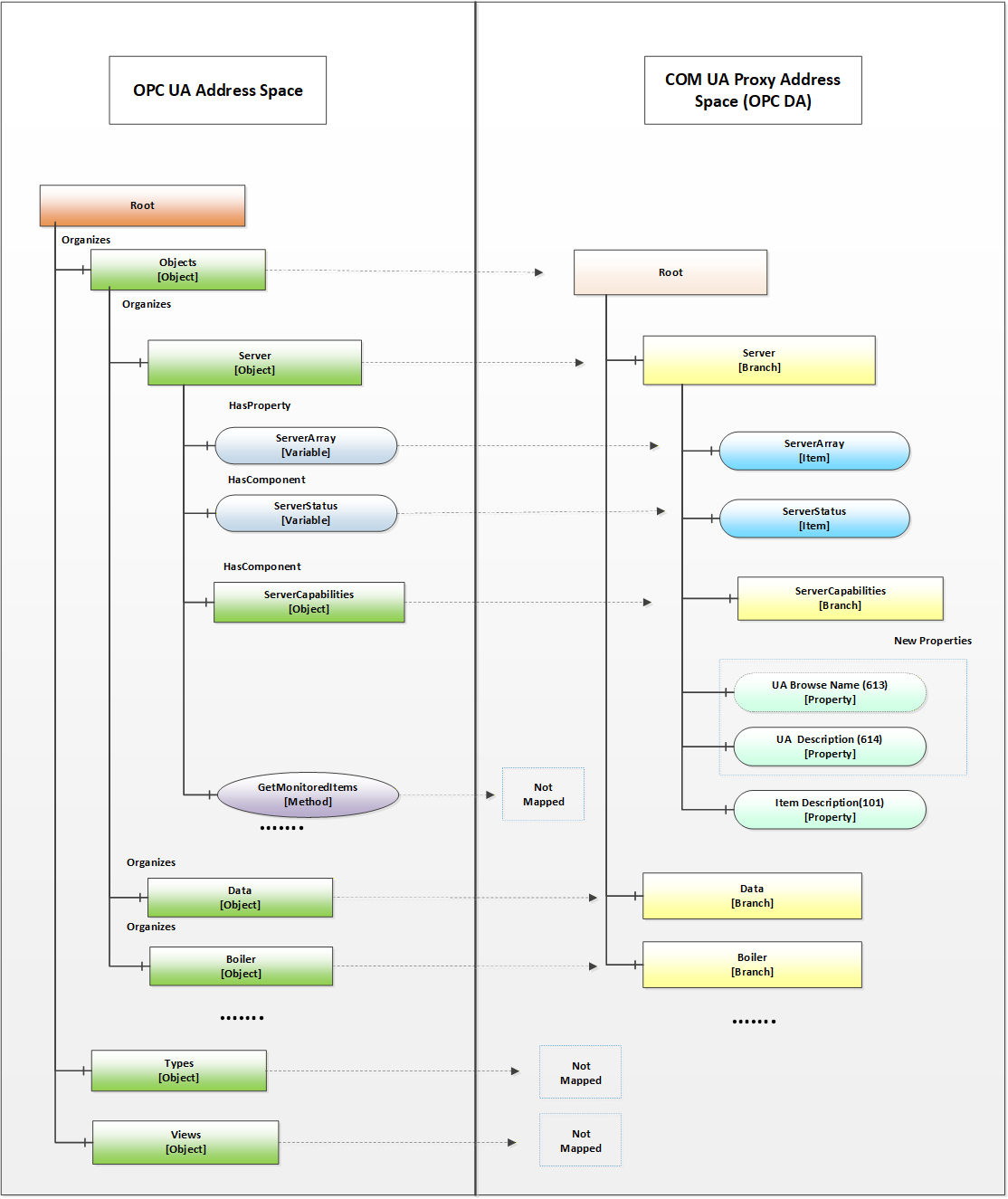
OPC UA defines 8 Node Class types in the address space Object, Variable, Method, ObjectType, VariableType, ReferenceType, DataType, View. The COM UA Proxy maps only the nodes of Node Class types Object, Variable to the OPC DA types as shown in the figure below. Only the nodes under the Objects node are considered for the COM UA Proxy address space and others such as Types, Views are not mapped.
Figure A.16 shows an example mapping of OPC DA to OPC UA information.
A.4.2.2 Object Nodes
A node of Object Node class in the OPC UA server is represented in the Data Access COM UA Proxy as a Branch.
The root of the Data Access COM UA Proxy is the Objects folder of the OPC UA Server.
The OPC UA Address space hierarchy is discovered using the Browse Service for the Objects Node using the following filters:
BrowseDirection as Forward
ReferenceTypeId as Organizes and HasChild.
IncludeSubtypes as True
NodeClassMask as Object and Variable
The DisplayName of the OPC UA node is used as the Name for each Branch in the Data Access COM UA Proxy
Each Branch in the Data Access COM UA Proxy is assigned 3 properties:
UA Browse Name (Property ID: 613): The value of the BrowseName attribute of the node in the OPC UA Server is assigned to this property.
UA Description (Property ID: 614): The value of the Description attribute of the node in the OPC UA Server is assigned to this property, if a Description attribute is provided.
Item Description (Property ID: 101): The value of the DisplayName attribute of the node in the OPC UA Server is assigned to this property.
NOTE COM DA Clients typically display the ItemID and the Item Description. Since the ItemID generated by the UA Proxy can be particularly difficult to read and understand, proxies can use the DisplayName as value for the Item Description Property as it will be easier to understand by a human user.
A.4.2.3 Variable Nodes
A node of Variable Node class in the OPC UA server is represented in the Data Access COM UA Proxy as an Item.
The DisplayName of the OPC UA node is used as the Name for each Item in the Data Access COM UA Proxy.
The NodeId of the OPC UA node is used as the ItemId for each Item in the Data Access COM UA Proxy. But the '=' character is replaced with '-' in the string. E.g. NodeId: ns=4,i=10, ItemID = "ns-4;i-10" or NodeId: ns=4,s=FL102, ItemID = "ns-4,s-FL102"
Each Item in the Data Access COM UA Proxy is assigned the following properties based on the node attributes or its references:
Standard Properties:
Item Canonical Data Type (Property ID: 1): The combined value of the DataType attribute and the ValueRank attribute of the node in the OPC UA Server is assigned to this property (see A.4.3.2).
Item Value (Property ID: 2): The value of the Value attribute of the node in the OPC UA Server is assigned to this property. Details on Value mapping are in A.4.3.2
Item Quality (Property ID: 3): The StatusCode of the Value obtained for the node in the OPC UA Server is assigned to this property. Details on Quality mapping are in A.4.3.3
Item Timestamp (Property ID: 4): The SourceTimestamp or ServerTimestamp of the Value obtained for the node in the OPC UA Server is assigned to this property. Details on Timestamp mapping are in A.4.3.4
Item Access Rights (Property ID: 5): The value of the AccessLevel attribute of the node in the OPC UA Server is assigned to this property based on the following mapping:
CurrentRead -> OPC_READABLE
CurrentWrite -> OPC_WRITABLE
The other AccessLevel provided by OPC are ignored
Server Scan Rate (Property ID: 6): The value of the MinimumSamplingInterval attribute of the node in the OPC UA Server is assigned to this property.
Item EU Type (Property ID: 7): The EU Type value is assigned based on the references of the node in the OPC UA Server:
Analog(1) : if the node in the OPC UA Server references a EURange property node, then it is assigned the Analog EU Type.
Enumerated(2): if the node in the OPC UA Server references a EnumStrings property node, then it is assigned the Enumerated EU Type.
Empty(0): For a node in the OPC UA Server that does not meet above criteria, the type is set as 0 (Empty)
EU Info (Property ID: 8): if the node in the OPC UA Server references an EnumStrings property node, then the enumerated values of the property node is assigned to this property.
EU Units (Property ID: 100): if the node in the OPC UA Server references a EngineeringUnits property node, then the value of the EngineeringUnits property node is assigned the EU Units property.
Item Description (Property ID: 101): The value of the DisplayName attribute of the node in the OPC UA Server is assigned to this property.
High EU (Property ID: 102): if the node in the OPC UA Server references a EURange property node, then the 'High' value of the property node is assigned to this property.
Low EU (Property ID: 103): if the node in the OPC UA Server references a EURange property node, then the 'Low' value of the property node is assigned to this property.
High Instrument Range (Property ID: 104): if the node in the OPC UA Server references an InstrumentRange property node, then the 'High' value of the property node is assigned to this property.
Low Instrument Range (Property ID: 105): if the node in the OPC UA Server references an InstrumentRange property node, then the 'Low' value of the property node is assigned to this property.
Contact Close Label (Property ID: 106): if the node in the OPC UA Server references a FalseState property node, then the value of the property node is assigned to this property.
Contact Open Label (Property ID: 107): if the node in the OPC UA Server references a TrueState property node, then the value of the property node is assigned to this property.
Item Time Zone (Property ID: 108): if the node in the OPC UA Server references a TimeZone property node, then the 'Offset' value of the property node is assigned to this property.
New Properties:
UA BuiltIn Type (Property ID: 610): The identifier value of the DataType node associated with the DataType attribute of the node in the OPC UA Server is assigned to this property.
UA Data Type Id (Property ID: 611): The complete NodeId value (namespace and identifier) of the DataType node associated with the DataType attribute of the node in the OPC UA Server is assigned to this property.
UA Value Rank (Property ID: 612): The value of the ValueRank attribute of the node in the OPC UA Server is assigned to this property.
UA Browse Name (Property ID: 613): The value of the BrowseName attribute of the node in the OPC UA Server is assigned to this property.
UA Description (Property ID: 614): The value of the Description attribute of the node in the OPC UA Server is assigned to this property.
A.4.2.4 Namespace Indices
For generating ItemIDs, the Proxy uses Namespace Indices. To assure that Clients can persist these ItemIDs, the Namespace Indices shall never change. To accomplish this the Proxy has to persist its Namespace Table and only append entries but never change existing ones.
The Proxy also has to provide a translation from the current Namespace Table in the Server to the persisted Namespace Table.
If you move or copy the Proxy to another machine, the Namespace Table has to be copied to this machine as well.
A.4.3 Data and error mapping
A.4.3.1 General
In an OPC UA Server, Automation Data is represented as a Data Value and and status, in addition additional error data can be provided via Diagnostic Info for a tag
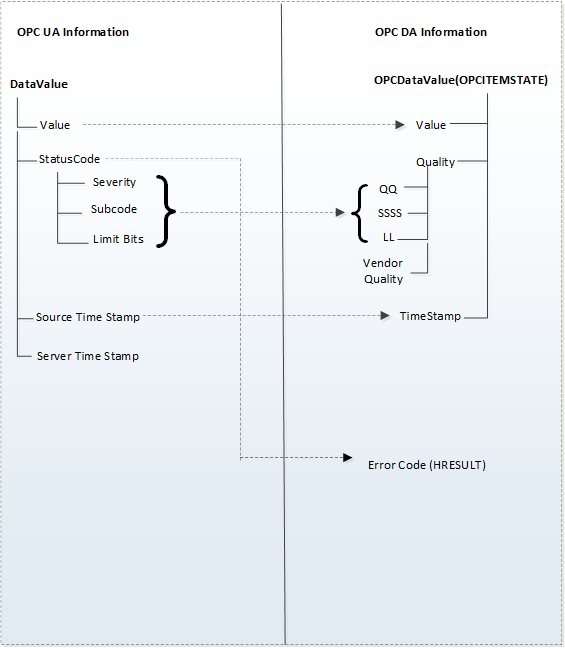
The COM UA Proxy maps the Data Value structure into VQT data and error code.
For successful operations(StatusCode of Good and Uncertain), the COM UA Proxy maps the Status Code of the DataValue to the OPC DA Quality But in case of error(StatusCode of Bad), the Status Code is mapped to the OPC DA Error code.
The StatusCode in the Diagnostic Info returned by the OPC UA Server are mapped to OPC DA Error codes. Figure A.17 illustrates this mapping.
A.4.3.2 Value
The COM UA Proxy converts the OPC UA Data Value to the corresponding OPC DA Variant type. The mapping is shown in Table A.6. For DataTypes that are subtypes of an existing base DataType the conversion for the Base DataType is used.
| OPC UA Data type (In UA Server) | Variant Data Type (In DA server) |
| Int16 | VT_I2 |
| Int32 | VT_I4 |
| Float | VT_R4 |
| Double | VT_R8 |
| Decimal | VT_DECIMAL |
| String | VT_BSTR |
| Boolean | VT_BOOL |
| Byte | VT_UI1 |
| SByte | VT_I1 |
| UInt16 | VT_UI2 |
| UInt32 | VT_UI4 |
| Int64 | VT_I8 |
| UInt64 | VT_UI8 |
| Guid | VT_BSTR |
| DateTime | VT_DATE |
| NodeId | VT_BSTR |
| XmlElement | VT_BSTR |
| ExpandedNodeId | VT_BSTR |
| QualifiedName | VT_BSTR |
| LocalizedText | VT_BSTR |
| StatusCode | VT_UI4 |
| ExtensionObject | Array of VT_UI1 |
| Array of above OPC UA types | Array of corresponding Variant type |
A.4.3.3 Quality
The Quality of a Data Value in the OPC UA Server is represented as a StatusCode.
The COM UA Proxy maps the Severity, Subcode and the limit bits of the OPC UA Status code to the lower 8 bits of the OPC DA Quality structure (of the form QQSSSSLL). Figure A.18 illustrates this mapping.
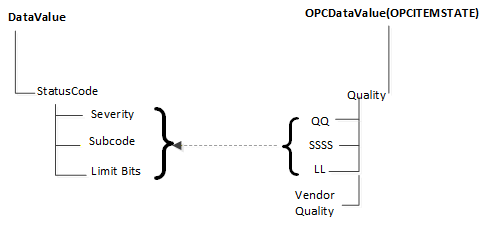
The Severity field of the Status code is mapped to the primary quality. The SubCode is mapped to the Sub Status and the Limit Bits are mapped to the Limit field.
Table A.7 shows a mapping of the OPC UA status code to OPC DA primary quality
| OPC UA Status Code | OPC DA Primary Quality (Quality & Sub status QQSSSS) |
| Good | GOOD |
| Good_LocalOverride | LOCAL_OVERRIDE |
| Uncertain | UNCERTAIN |
| Uncertain_SubNormal | SUB_NORMAL |
| Uncertain_SensorNotAccurate | SENSOR_CAL |
| Uncertain_EngineeringUnitsExceeded | EGU_EXCEEDED |
| Uncertain_LastUsableValue | LAST_USABLE |
| Bad | BAD |
| Bad_ConfigurationError | CONFIG_ERROR |
| Bad_NotConnected | NOT_CONNECTED |
| Bad_NoCommunication | COMM_FAILURE |
| Bad_OutOfService | OUT_OF_SERVICE |
| Bad_DeviceFailure | DEVICE_FAILURE |
| Bad_SensorFailure | SENSOR_FAILURE |
| Bad_WaitingForInitialData | WAITING_FOR_INITIAL_DATA |
A.4.3.4 Timestamp
If available, the SourceTimestamp of the DataValue in the OPC UA Server is assigned to the Timestamp for the value in the COM UA Proxy. If SourceTimestamp is not available, then the ServerTimestamp is used.
A.4.4 Read data
The COM UA Proxy converts all the ItemIds in the Read into valid NodeIds by replacing the '-' with '=' and calls the OPC UA Read Service for the Value Attribute.
If the Read Service call is successful then DataValue for each node is mapped to the VQT for each item as shown in Figure A.17.
If the Read Service call fails or If there are errors for some of the Nodes, then the StatusCodes of these Nodes are mapped to the error code by the COM UA Proxy.
The mapping of the OPC UA Status code to OPC DA Read Error code (in the COM UA Proxy) is shown in Table A.8:
| OPC UA Status Code | OPC DA Error ID |
| Bad_OutOfMemory | E_OUTOFMEMORY |
| Bad_NodeIdInvalid | E_INVALIDITEMID |
| Bad_NodeIdUnknown | E_UNKNOWNITEMID |
| Bad_NotReadable | E_BADRIGHTS |
| Bad_UserAccessDenied | E_ACCESSDENIED |
| Bad_AttributeIdInvalid | E_INVALIDITEMID |
| Bad_UnexpectedError | E_FAIL |
| Bad_InternalError | E_FAIL |
| Bad_SessionClosed | E_FAIL |
| Bad_TypeMismatch | E_BADTYPE |
A.4.5 Write data
The COM UA Proxy converts all the ItemIds in the Write into valid NodeIds by replacing the '-' with '='. It converts the Value, Quality and Timestamp (VQT) to a DataValue structure as per the mapping in Figure A.17. and calls the OPC UA Write Service for the Value Attribute.
If the Write Service call fails or if there are errors for some of the Nodes, then the StatusCodes of these Nodes are mapped to the error code by the COM UA Proxy.
The mapping of the OPC UA Status code to OPC DA Write Error code (in the COM UA Proxy) is shown in Table A.9:
| OPC UA Status Code | OPC DA Error ID |
| Bad_TypeMismatch | E_BADTYPE |
| Bad_OutOfMemory | E_OUTOFMEMORY |
| Bad_NodeIdInvalid | E_INVALIDITEMID |
| Bad_NodeIdUnknown | E_UNKNOWNITEMID |
| Bad_NotWritable | E_BADRIGHTS |
| Bad_UserAccessDenied | E_ACCESSDENIED |
| Bad_AttributeIdInvalid | E_UNKNOWNITEMID |
| Bad_WriteNotSupported | E_NOTSUPPORTED |
| Bad_OutOfRange | E_RANGE |
A.4.6 Subscriptions
The COM UA Proxy creates a Subscription in the OPC UA Server when a Group is created. The Name, Active flag, UpdateRate parameters of the Group are used while creating the subscription.
The COM UA Proxy Creates Monitored Items in the OPC UA Server when items are added to the Group.
Following parameters and filters are used for creating the monitored items:
The ItemIds are converted to valid NodeIds by replacing the '-' with '='.
Data Change Filter is used for Items with EU type as Analog:
Trigger = STATUS_VALUE
If DeadBand value is specified for the Group, the;
DeadbandType = Percent
DeadbandValue = deadband specified for the group.
The COM UA Proxy calls the Publish Service of the OPC UA Server periodically and sends any data changes to the client.