
5 Model
5.1 General
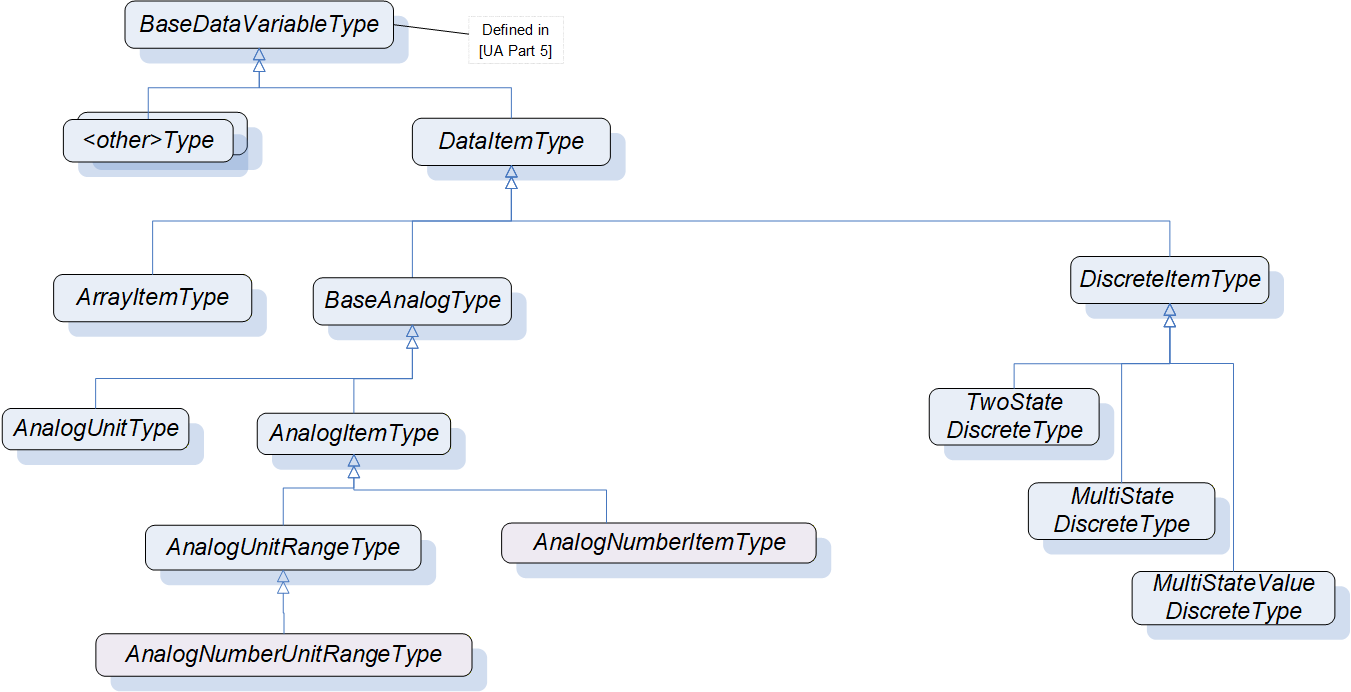
The DataAccess model extends the variable model by defining VariableTypes. The DataItemType is the base type. ArrayItemType, BaseAnalogType and DiscreteItemType are specializations. See Figure 2. Each of these VariableTypes can be further extended to form domain or server specific DataItems.
5.2 SemanticsChanged
The StatusCode also contains an informational bit called SemanticsChanged.
Servers that implement Data Access shall set this Bit in notifications if certain Property values defined in this standard change. The corresponding Properties are specified individually for each VariableType.
Clients that use any of these Properties should re-read them before they process the data value.
5.3 Variable Types
5.3.1 DataItemType
This VariableType defines the general characteristics of a DataItem. All other DataItem Types derive from it. The DataItemType derives from the BaseDataVariableType and therefore shares the variable model as described in OPC 10000-3 and OPC 10000-5. It is formally defined in Table 1.
| Attribute | Value | ||||
| BrowseName | DataItemType | ||||
| IsAbstract | False | ||||
| ValueRank | -2 (-2 = 'Any') | ||||
| DataType | BaseDataType | ||||
| References | NodeClass | BrowseName | DataType | TypeDefinition | ModellingRule |
|---|---|---|---|---|---|
| Subtype of the BaseDataVariableType defined in OPC 10000-5; i.e. the Properties of that type are inherited. | |||||
| HasSubtype | VariableType | BaseAnalogType | Defined in 5.3.2.2 | ||
| HasSubtype | VariableType | DiscreteItemType | Defined in 5.3.3 | ||
| HasSubtype | VariableType | ArrayItemType | Defined in 5.3.4 | ||
| HasProperty | Variable | Definition | String | PropertyType | Optional |
| HasProperty | Variable | ValuePrecision | Double | PropertyType | Optional |
| Conformance Units | |||||
|---|---|---|---|---|---|
| Data Access DataItems |
Definition is a vendor-specific, human readable string that specifies how the value of this DataItem is calculated. Definition is non-localized and will often contain an equation that can be parsed by certain clients.
ValuePrecision specifies the maximum precision that the Server can maintain for the item based on restrictions in the target environment.
ValuePrecision can be used for the following DataTypes:
For Float, Double, and Decimal values it specifies the number of digits after the decimal place when it is a positive number. When it is a negative number, it specifies the number of insignificant digits to the left of the decimal place.
For example a ValuePrecision of -2 specifies that the precision of the Value is to the nearest 100. The ValuePrecision should always be a whole number and it shall always be interpreted as a whole number by rounding it to the nearest whole number.
For DateTime values it shall always be a positive number which indicates the minimum time difference in nanoseconds. For example, a ValuePrecision of 20 000 000 defines a precision of 20 ms. The ValuePrecision should always be a whole number and it shall always be interpreted as a whole number by rounding it to the nearest whole number.
ValuePrecision can also be used for other subtypes of Double (like Duration) and other Number subtypes that can be represented by a Double.
The ValuePrecision Property is an approximation that is intended to provide guidance to a Client. A Server is expected to silently round any value with more precision that it supports. This implies that a Client can encounter cases where the value read back from a Server differs from the value that it wrote to the Server. This difference shall be no more than the difference suggested by this Property.
The algorithm for rounding should follow the so-called "Banker's rounding" (aka Round half to even), in which numbers which are equidistant from the two nearest integers are rounded to the nearest even integer. Thus, 0.5 rounds down to 0; 1.5 rounds up to 2.
Other decimal fractions round as you would expect: 0.4 to 0, 0.6 to 1, 1.4 to 1, 1.6 to 2, etc. Only x.5 numbers get the "special" treatment.
5.3.2 AnalogItem VariableTypes
5.3.2.1 General
The VariableTypes in subclauses 5.3.2.2 to 5.3.2.5 define the characteristics of AnalogItems. The types have identical semantics and Properties but with diverging ModellingRules for individual Properties.
The Properties are only described once - in 5.3.2.2. The descriptions apply to the Properties for the other VariableTypes as well.
5.3.2.2 BaseAnalogType
This VariableType is the base type for analog items. All Properties are optional. Subtypes of this base type will mandate some of the Properties. The BaseAnalogType derives from the DataItemType. It is formally defined in Table 2.
| Attribute | Value | ||||
| BrowseName | BaseAnalogType | ||||
| IsAbstract | False | ||||
| ValueRank | -2 (-2 = 'Any') | ||||
| DataType | Number | ||||
| References | NodeClass | BrowseName | DataType | TypeDefinition | ModellingRule |
|---|---|---|---|---|---|
| Subtype of the DataItemType defined in 5.3.1; i.e. the Properties of that type are inherited. | |||||
| HasSubtype | VariableType | AnalogItemType | Defined in 5.3.2.3 | ||
| HasSubtype | VariableType | AnalogUnitType | Defined in 5.3.2.4 | ||
| HasProperty | Variable | InstrumentRange | Range | PropertyType | Optional |
| HasProperty | Variable | InstrumentNumberRange | NumberRange | PropertyType | Optional |
| HasProperty | Variable | EURange | Range | PropertyType | Optional |
| HasProperty | Variable | EUNumberRange | NumberRange | PropertyType | Optional |
| HasProperty | Variable | EngineeringUnits | EUInformation | PropertyType | Optional |
| Conformance Units | |||||
|---|---|---|---|---|---|
| Data Access BaseAnalogType |
The following paragraphs describe the Properties of this VariableType. If the analog item's Value contains an array, the Properties shall apply to all elements in the array.
InstrumentRange defines the value range that can be returned by the instrument.
Although defined as optional, it is strongly recommended for Servers to support this Property. Without an InstrumentRange being provided, Clients will commonly assume the full range according to the DataType.
The InstrumentRange Property can also be used to restrict a Built-in DataType such as Byte or Int16) to a smaller range of values.
The Range DataType is specified in 5.6.2.
If the InstrumentNumberRange Property is present, the DataType of the "low" and "high" fields of the NumberRange DataType shall match the DataType of the Variable instance.
If InstrumentNumberRange is provided, also InstrumentRange shall be provided and populated with the equivalent value for legacy reasons.
The NumberRange DataType is specified in 5.6.3.
EURange defines the value range likely to be obtained in normal operation. It is intended for such use as automatically scaling a bar graph display.
Sensor or instrument failure or deactivation can result in a returned item value which is actually outside of this range. Client software shall be prepared to deal with this possibility. Similarly, a Client can attempt to write a value that is outside of this range back to the server. The exact behaviour (accept, reject, clamp, etc.) in this case is Server-dependent. However, in general Servers shall be prepared to handle this.
See also 7.2 for a special monitoring filter (PercentDeadband) which is based on the engineering unit range.
If the EUNumberRange Property is present, the DataType of the "low" and "high" fields of the NumberRange DataType shall match the DataType of the Variable instance.
If EUNumberRange is provided, also EURange shall be provided and populated with the equivalent value for legacy reasons.
EngineeringUnits specifies the units for the DataItem's value (e.g., DEGC, hertz, seconds). The EUInformation type is specified in 5.6.4. The NonHierarchical References HasQuantity (see 6.5.2) and HasEngineeringUnitDetail (see 6.5.1) can be used to expose further information for the unit.
It is important to note that understanding the units of a measurement value is essential for a uniform system. In an open system in particular where Servers from different cultures can be used, it is essential to know what the units of measurement are. Based on such knowledge, values can be converted if necessary before being used. Therefore, although defined as optional, support of the EngineeringUnits Property is strongly advised.
OPC UA recommends using the mappings defined in this document.
The StatusCode SemanticsChanged bit shall be set if any of the EURange (could change the behaviour of a Subscription if a PercentDeadband filter is used) or EngineeringUnits (could create problems if the Client uses the value to perform calculations) Properties are changed (see clause 5.2 for additional information).
5.3.2.3 AnalogItemType
This VariableType requires the EURange Property. The AnalogItemType derives from the BaseAnalogType. It is formally defined in Table 3.
| Attribute | Value | ||||
| BrowseName | AnalogItemType | ||||
| IsAbstract | False | ||||
| ValueRank | -2 (-2 = 'Any') | ||||
| DataType | Number | ||||
| References | NodeClass | BrowseName | DataType | TypeDefinition | ModellingRule |
|---|---|---|---|---|---|
| Subtype of the BaseAnalogType defined in 5.3.2.2; i.e. the Properties of that type are inherited. | |||||
| HasSubtype | VariableType | AnalogUnitRangeType | Defined in 5.3.2.5 | ||
| HasSubtype | VariableType | AnalogNumberItemType | Defined in 5.3.2.6 | ||
| HasProperty | Variable | EURange | Range | PropertyType | Mandatory |
| Conformance Units | |||||
|---|---|---|---|---|---|
| Data Access AnalogItemType |
5.3.2.4 AnalogUnitType
This VariableType requires the EngineeringUnits Property. The AnalogUnitType derives from the BaseAnalogType. It is formally defined in Table 4.
| Attribute | Value | ||||
| BrowseName | AnalogUnitType | ||||
| IsAbstract | False | ||||
| ValueRank | -2 (-2 = 'Any') | ||||
| DataType | Number | ||||
| References | NodeClass | BrowseName | DataType | TypeDefinition | ModellingRule |
|---|---|---|---|---|---|
| Subtype of the BaseAnalogType defined in 5.3.2.2; i.e. the Properties of that type are inherited. | |||||
| HasProperty | Variable | EngineeringUnits | EUInformation | PropertyType | Mandatory |
| Conformance Units | |||||
|---|---|---|---|---|---|
| Data Access AnalogUnitType |
5.3.2.5 AnalogUnitRangeType
The AnalogUnitRangeType derives from the AnalogItemType and additionally requires the EngineeringUnits Property. It is formally defined in Table 5.
| Attribute | Value | ||||
| BrowseName | AnalogUnitRangeType | ||||
| IsAbstract | False | ||||
| ValueRank | -2 (-2 = 'Any') | ||||
| DataType | Number | ||||
| References | NodeClass | BrowseName | DataType | TypeDefinition | ModellingRule |
|---|---|---|---|---|---|
| Subtype of the AnalogItemType defined in 5.3.2.3; i.e. the Properties of that type are inherited. | |||||
| HasSubtype | VariableType | AnalogNumberUnitRangeType | Defined in 5.3.2.7 | ||
| HasProperty | Variable | EngineeringUnits | EUInformation | PropertyType | Mandatory |
| Conformance Units | |||||
|---|---|---|---|---|---|
| Data Access AnalogUnitRangeType |
5.3.2.6 AnalogNumberItemType
This VariableType requires the EUNumberRange Property. The AnalogNumberItemType derives from the AnalogItemType. It is formally defined in Table 6.
| Attribute | Value | ||||
| BrowseName | AnalogNumberItemType | ||||
| IsAbstract | False | ||||
| ValueRank | -2 (-2 = 'Any') | ||||
| DataType | Number | ||||
| References | NodeClass | BrowseName | DataType | TypeDefinition | ModellingRule |
|---|---|---|---|---|---|
| Subtype of the AnalogItemType defined in 5.3.2.3; i.e. the Properties of that type are inherited. | |||||
| HasProperty | Variable | EUNumberRange | NumberRange | PropertyType | Mandatory |
| Conformance Units | |||||
|---|---|---|---|---|---|
| Data Access AnalogNumberItemType |
5.3.2.7 AnalogNumberUnitRangeType
The AnalogNumberUnitRangeType derives from the AnalogUnitRangeType and additionally requires the EUNumberRange Property. It is formally defined in Table 7.
| Attribute | Value | ||||
| BrowseName | AnalogNumberUnitRangeType | ||||
| IsAbstract | False | ||||
| ValueRank | -2 (-2 = 'Any') | ||||
| DataType | Number | ||||
| References | NodeClass | BrowseName | DataType | TypeDefinition | ModellingRule |
|---|---|---|---|---|---|
| Subtype of the AnalogUnitRangeType defined in 5.3.2.5; i.e. the Properties of that type are inherited. | |||||
| HasProperty | Variable | EUNumberRange | NumberRange | PropertyType | Mandatory |
| Conformance Units | |||||
|---|---|---|---|---|---|
| Data Access AnalogNumberUnitRangeType |
5.3.3 DiscreteItemType
5.3.3.1 General
This VariableType is an abstract type. That is, no instances of this type can exist. However, it can be used in a filter when browsing or querying. The DiscreteItemType derives from the DataItemType and therefore shares all of its characteristics. It is formally defined in Table 8.
| Attribute | Value | ||||
| BrowseName | DiscreteItemType | ||||
| IsAbstract | True | ||||
| ValueRank | -2 (-2 = 'Any') | ||||
| DataType | BaseDataType | ||||
| References | NodeClass | BrowseName | DataType | TypeDefinition | ModellingRule |
|---|---|---|---|---|---|
| Subtype of the DataItemType defined in 5.2; i.e. the Properties of that type are inherited. | |||||
| HasSubtype | VariableType | TwoStateDiscreteType | Defined in 5.3.3.2 | ||
| HasSubtype | VariableType | MultiStateDiscreteType | Defined in 5.3.3.3 | ||
| HasSubtype | VariableType | MultiStateValueDiscreteType | Defined in 5.3.3.4 | ||
| Conformance Units | |||||
|---|---|---|---|---|---|
| Data Access DiscreteItemType |
5.3.3.2 TwoStateDiscreteType
This VariableType defines the general characteristics of a DiscreteItem that can have two states. The TwoStateDiscreteType derives from the DiscreteItemType. It is formally defined in Table 9.
| Attribute | Value | ||||
| BrowseName | TwoStateDiscreteType | ||||
| IsAbstract | False | ||||
| ValueRank | -2 (-2 = 'Any') | ||||
| DataType | Boolean | ||||
| References | NodeClass | BrowseName | DataType | TypeDefinition | ModellingRule |
|---|---|---|---|---|---|
| Subtype of the DiscreteItemType defined in 5.3.3; i.e. the Properties of that type are inherited. | |||||
| HasProperty | Variable | TrueState | LocalizedText | PropertyType | Mandatory |
| HasProperty | Variable | FalseState | LocalizedText | PropertyType | Mandatory |
| Conformance Units | ||||||
|---|---|---|---|---|---|---|
| Data Access TwoState |
TrueState contains a string to be associated with this DataItem when it is TRUE. This is typically used for a contact when it is in the closed (non-zero) state.
FalseState contains a string to be associated with this DataItem when it is FALSE. This is typically used for a contact when it is in the open (zero) state.
If the item contains an array, then the Properties will apply to all elements in the array.
The StatusCode SemanticsChanged bit shall be set if any of the FalseState or TrueState Properties are changed (see 5.2 for additional information).
5.3.3.3 MultiStateDiscreteType
This VariableType defines the general characteristics of a DiscreteItem that can have more than two states. The MultiStateDiscreteType derives from the DiscreteItemType. It is formally defined in Table 10.
| Attribute | Value | ||||
| BrowseName | MultiStateDiscreteType | ||||
| IsAbstract | False | ||||
| ValueRank | -2 (-2 = 'Any') | ||||
| DataType | UInteger | ||||
| References | NodeClass | BrowseName | DataType | TypeDefinition | ModellingRule |
|---|---|---|---|---|---|
| Subtype of the DiscreteItemType defined in 5.3.3; i.e. the Properties of that type are inherited. | |||||
| HasProperty | Variable | EnumStrings | LocalizedText[] | PropertyType | Mandatory |
| Conformance Units | |||||
|---|---|---|---|---|---|
| Data Access MultiState |
EnumStrings is a string lookup table corresponding to sequential numeric values (0, 1, 2, etc.)
Example:
Here the string "OPEN" corresponds to 0, "CLOSE" to 1 and "IN TRANSIT" to 2.
Clients should be prepared to handle item values outside of the range of the list; and robust Servers should be prepared to handle writes of illegal values, by providing error code "Bad_OutOfRange".
If the item contains an array then this lookup table shall apply to all elements in the array.
The StatusCode SemanticsChanged bit shall be set if the EnumStrings Property is changed (see 5.2 for additional information).
5.3.3.4 MultiStateValueDiscreteType
This VariableType defines the general characteristics of a DiscreteItem that can have more than two states and where the state values (the enumeration) do not consist of consecutive numeric values (can have gaps) or where the enumeration is not zero-based. The MultiStateValueDiscreteType derives from the DiscreteItemType. It is formally defined in Table 11.
| Attribute | Value | |||
| BrowseName | MultiStateValueDiscreteType | |||
| IsAbstract | False | |||
| ValueRank | -2 (-2 = 'Any') | |||
| DataType | Number | |||
| References | NodeClass | BrowseName | DataType TypeDefinition | ModellingRule |
|---|---|---|---|---|
| Subtype of the DiscreteItemType defined in 5.3.3; i.e. the Properties of that type are inherited. | ||||
| HasProperty | Variable | EnumValues | EnumValueType[] PropertyType | Mandatory |
| HasProperty | Variable | ValueAsText | LocalizedText PropertyType | Mandatory |
| Conformance Units | ||||
|---|---|---|---|---|
| Data Access MultiStateValueDiscrete |
EnumValues is an array of EnumValueType. Each entry of the array represents one enumeration value with its integer notation, a human-readable representation, and help information. This represents enumerations with integers that are not zero-based or have gaps (e.g. 1, 2, 4, 8, 16). See OPC 10000-3 for the definition of this type. MultiStateValueDiscrete Variables expose the current integer notation in their Value Attribute. Clients will often read the EnumValues Property in advance and cache it to lookup a name or help whenever they receive the numeric representation.
Only DataTypes that can be represented with EnumValues are allowed for Variables of MultiStateValueDiscreteType. These are Integers up to 64 Bits (signed and unsigned).
Clients should be prepared to handle item values outside of the range of the list; and robust Servers should be prepared to handle writes of illegal values, by providing error code "Bad_OutOfRange".
The numeric representation of the current enumeration value is provided via the Value Attribute of the MultiStateValueDiscrete Variable. If the Value is scalar, the ValueAsText Property provides the localized text representation of the enumeration value. It can be used by Clients only interested in displaying the text to subscribe to the Property instead of the Value Attribute. If the Value is not scalar then ValueAsText should be Null. In that case, Clients can use the EnumValues Property to lookup the display information.
The StatusCode SemanticsChanged bit shall be set if the EnumValues Property value is changed (see clause 5.2 for additional information).
5.3.4 ArrayItemType
5.3.4.1 General
This abstract VariableType defines the general characteristics of an ArrayItem. Values are exposed in an array but the content of the array represents a single entity like an image. Other DataItems can contain arrays that represent for example several values of several temperature sensors of a boiler.
ArrayItemType or its subtype shall only be used when the Title and AxisScaleType Properties can be filled with reasonable values. If this is not the case DataItemType and subtypes like AnalogItemType, which also support arrays, shall be used. The ArrayItemType is formally defined in Table 12.
| Attribute | Value | ||||
| BrowseName | ArrayItemType | ||||
| IsAbstract | True | ||||
| ValueRank | 0 (0 = OneOrMoreDimensions) | ||||
| DataType | BaseDataType | ||||
| References | NodeClass | BrowseName | DataType | TypeDefinition | ModellingRule |
|---|---|---|---|---|---|
| Subtype of the DataItemType defined in 5.3.1; i.e. the Properties of that type are inherited. | |||||
| HasSubtype | VariableType | YArrayItemType | Defined in 5.3.4.2 | ||
| HasSubtype | VariableType | XYArrayItemType | Defined in 5.3.4.3 | ||
| HasSubtype | VariableType | ImageItemType | Defined in 5.3.4.4 | ||
| HasSubtype | VariableType | CubeItemType | Defined in 5.3.4.5 | ||
| HasSubtype | VariableType | NDimensionArrayItemType | Defined in 5.3.4.6 | ||
| HasProperty | Variable | InstrumentRange | Range | PropertyType | Optional |
| HasProperty | Variable | EURange | Range | PropertyType | Mandatory |
| HasProperty | Variable | EngineeringUnits | EUInformation | PropertyType | Mandatory |
| HasProperty | Variable | Title | LocalizedText | PropertyType | Mandatory |
| HasProperty | Variable | AxisScaleType | AxisScaleEnumeration | PropertyType | Mandatory |
| Conformance Units | |||||
|---|---|---|---|---|---|
| Data Access ArrayItem2Type |
InstrumentRange defines the range of the Value of the ArrayItem.
EURange defines the value range of the ArrayItem likely to be obtained in normal operation. It is intended for such use as automatically scaling a bar graph display.
EngineeringUnits holds the information about the engineering units of the Value of the ArrayItem.
For additional information about InstrumentRange, EURange, and EngineeringUnits see the description of BaseAnalogType in 5.3.2.2.
Title holds the user readable title of the Value of the ArrayItem.
AxisScaleType defines the scale to be used for the axis where the Value of the ArrayItem shall be displayed.
The StatusCode SemanticsChanged bit shall be set if any of the InstrumentRange, EURange, EngineeringUnits or Title Properties are changed (see 5.2 for additional information).
5.3.4.2 YArrayItemType
YArrayItemType represents a single-dimensional array of numerical values used to represent spectra or distributions where the x axis intervals are constant. YArrayItemType is formally defined in Table 13.
| Attribute | Value | ||||
| BrowseName | YArrayItemType | ||||
| IsAbstract | False | ||||
| ValueRank | 1 | ||||
| DataType | BaseDataType | ||||
| ArrayDimensions | {0} (0 = UnknownSize) | ||||
| References | NodeClass | BrowseName | DataType | TypeDefinition | ModellingRule |
|---|---|---|---|---|---|
| Subtype of the ArrayItemType defined in 5.3.4.1 | |||||
| HasProperty | Variable | XAxisDefinition | AxisInformation | PropertyType | Mandatory |
| Conformance Units | |||||
|---|---|---|---|---|---|
| Data Access YArrayItemType |
The Value of the YArrayItem contains the numerical values for the Y-Axis. Engineering Units and Range for the Value are defined by corresponding Properties inherited from the ArrayItemType.
The DataType of this VariableType is restricted to SByte, Int16, Int32, Int64, Float, Double, ComplexNumberType and DoubleComplexNumberType.
The XAxisDefinition Property holds the information about the Engineering Units and Range for the X-Axis.
The StatusCode SemanticsChanged bit shall be set if any of the following five Properties are changed: InstrumentRange, EURange, EngineeringUnits, Title or XAxisDefinition (see 5.2 for additional information).
Figure 3 shows an example of how Attributes and Properties can be used in a graphical interface.
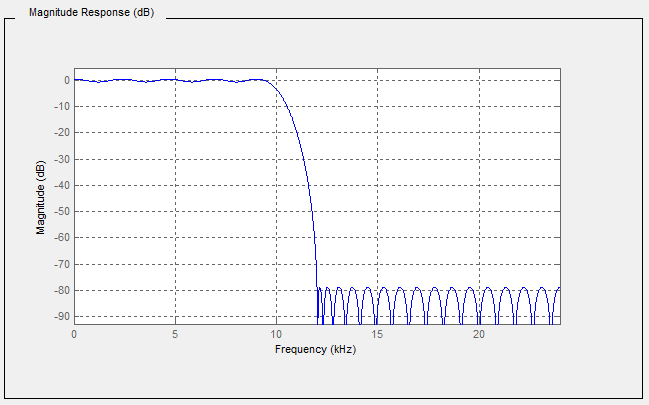
Table 14 describes the values of each element presented in Figure 3.
| Attribute / Property | Item value |
| Description | Magnitude Response (dB) |
| axisScaleType | AxisScaleEnumeration.LINEAR |
| InstrumentRange.low | -90 |
| InstrumentRange.high | 5 |
| EURange.low | -90 |
| EURange.high | 2 |
| EngineeringUnits.namespaceUrl | http://www.opcfoundation.org/UA/units/un/cefact |
| EngineeringUnits.unitId | 12878 |
| EngineeringUnits.displayName | "en-us", "dB" |
| EngineeringUnits.description | "en-us", "decibel" |
| Title | Magnitude |
| XAxisDefinition.EngineeringUnits.namespaceUrl | http://www.opcfoundation.org/UA/units/un/cefact |
| XAxisDefinition.EngineeringUnits.unitId | 4933722 |
| XAxisDefinition.EngineeringUnits.displayName | "en-us", "kHz" |
| XAxisDefinition.EngineeringUnits.description | "en-us", "kilohertz" |
| XAxisDefinition.Range.low | 0 |
| XAxisDefinition.Range.high | 25 |
| XAxisDefinition.title | "en-us", "Frequency" |
| XAxisDefinition.axisScaleType | AxisScaleEnumeration.LINEAR |
| XAxisDefinition.axisSteps | null |
Interpretation notes:
Not all elements of this table are used in the graphic.
The X axis is displayed in reverse order, however, the XAxisDefinition.Range.low shall be lower than XAxisDefinition.Range.high. It is only a graphical representation that reverses the display order.
There is a constant X axis
5.3.4.3 XYArrayItemType
XYArrayItemType represents a vector of XVType values like a list of peaks, where XVType.x is the position of the peak and XVType.value is its intensity. XYArrayItemType is formally defined in Table 15.
| Attribute | Value | ||||
| BrowseName | XYArrayItemType | ||||
| IsAbstract | False | ||||
| ValueRank | 1 | ||||
| DataType | XVType | ||||
| References | NodeClass | BrowseName | DataType | TypeDefinition | ModellingRule |
|---|---|---|---|---|---|
| Subtype of the ArrayItemType defined in 5.3.4.1 | |||||
| HasProperty | Variable | XAxisDefinition | AxisInformation | PropertyType | Mandatory |
| Conformance Units | |||||
|---|---|---|---|---|---|
| Data Access XYArrayItemType |
The Value of the XYArrayItem contains an array of structures (XVType) where each structure specifies the position for the X-Axis (XVType.x) and the value itself (XVType.value), used for the Y-Axis. Engineering units and range for the Value are defined by corresponding Properties inherited from the ArrayItemType.
XAxisDefinition Property holds the information about the Engineering Units and Range for the X-Axis.
The axisSteps of XAxisDefinition shall be set to NULL because it is not used.
The StatusCode SemanticsChanged bit shall be set if any of the InstrumentRange, EURange, EngineeringUnits, Title or XAxisDefinition Properties are changed (see 5.2 for additional information).
5.3.4.4 ImageItemType
ImageItemType defines the general characteristics of an ImageItem which represents a matrix of values like an image, where the pixel position is given by X which is the column and Y the row. The value is the pixel intensity.
ImageItemType is formally defined in Table 16.
| Attribute | Value | ||||
| BrowseName | ImageItemType | ||||
| IsAbstract | False | ||||
| ValueRank | 2 (2 = two dimensional array) | ||||
| DataType | BaseDataType | ||||
| References | NodeClass | BrowseName | DataType | TypeDefinition | ModellingRule |
|---|---|---|---|---|---|
| Subtype of the ArrayItemType defined in 5.3.4.1 | |||||
| HasProperty | Variable | XAxisDefinition | AxisInformation | PropertyType | Mandatory |
| HasProperty | Variable | YAxisDefinition | AxisInformation | PropertyType | Mandatory |
| Conformance Units | |||||
|---|---|---|---|---|---|
| Data Access ImageItemType |
Engineering units and range for the Value are defined by corresponding Properties inherited from the ArrayItemType.
The DataType of this VariableType is restricted to SByte, Int16, Int32, Int64, Float, Double, ComplexNumberType and DoubleComplexNumberType.
The ArrayDimensions Attribute for Variables of this type or subtypes shall use the first entry in the array ([0]) to define the number of columns and the second entry ([1]) to define the number of rows, assuming the size of the matrix is not dynamic.
XAxisDefinition Property holds the information about the engineering units and range for the X-Axis.
YAxisDefinition Property holds the information about the engineering units and range for the Y-Axis.
The StatusCode.SemanticsChanged bit shall be set if any of the InstrumentRange, EURange, EngineeringUnits, Title, XAxisDefinition or YAxisDefinition Properties are changed.
5.3.4.5 CubeItemType
CubeItemType represents a cube of values like a spatial particle distribution, where the particle position is given by X which is the column, Y the row and Z the depth. In the example of a spatial partical distribution, the value is the particle size. CubeItemType is formally defined in Table 17.
| Attribute | Value | ||||
| BrowseName | CubeItemType | ||||
| IsAbstract | False | ||||
| ValueRank | 3 (3 = three dimensional array) | ||||
| DataType | BaseDataType | ||||
| References | NodeClass | BrowseName | DataType | TypeDefinition | ModellingRule |
|---|---|---|---|---|---|
| Subtype of the ArrayItemType defined in 5.3.4.1 | |||||
| HasProperty | Variable | XAxisDefinition | AxisInformation | PropertyType | Mandatory |
| HasProperty | Variable | YAxisDefinition | AxisInformation | PropertyType | Mandatory |
| HasProperty | Variable | ZAxisDefinition | AxisInformation | PropertyType | Mandatory |
| Conformance Units | ||||||
|---|---|---|---|---|---|---|
| Data Access CubeItemType |
Engineering units and range for the Value are defined by corresponding Properties inherited from the ArrayItemType.
The DataType of this VariableType is restricted to SByte, Int16, Int32, Int64, Float, Double, ComplexNumberType and DoubleComplexNumberType.
The ArrayDimensions Attribute for Variables of this type or subtypes should use the first entry in the array ([0]) to define the number of columns, the second entry ([1]) to define the number of rows, and the third entry ([2]) define the number of steps in the Z axis, assuming the size of the matrix is not dynamic.
XAxisDefinition Property holds the information about the engineering units and range for the X-Axis.
YAxisDefinition Property holds the information about the engineering units and range for the Y-Axis.
ZAxisDefinition Property holds the information about the engineering units and range for the Z-Axis.
The StatusCode SemanticsChanged bit shall be set if any of the InstrumentRange, EURange, EngineeringUnits, Title, XAxisDefinition, YAxisDefinition or ZAxisDefinition Properties are changed (see 5.2 for additional information).
5.3.4.6 NDimensionArrayItemType
This VariableType defines a generic multi-dimensional ArrayItem.
This approach minimizes the number of types however it can be proved more difficult to utilize for control system interactions.
NDimensionArrayItemType is formally defined in Table 18.
| Attribute | Value | ||||
| BrowseName | NDimensionArrayItemType | ||||
| IsAbstract | False | ||||
| ValueRank | 0 (0 = OneOrMoreDimensions) | ||||
| DataType | BaseDataType | ||||
| References | NodeClass | BrowseName | DataType | TypeDefinition | ModellingRule |
|---|---|---|---|---|---|
| Subtype of the ArrayItemType defined in 5.3.4.1 | |||||
| HasProperty | Variable | AxisDefinition | AxisInformation [] | PropertyType | Mandatory |
| Conformance Units | |||||
|---|---|---|---|---|---|
| Data Access NDimensionArrayItemType |
The DataType of this VariableType is restricted to SByte, Int16, Int32, Int64, Float, Double, ComplexNumberType and DoubleComplexNumberType.
AxisDefinition Property holds the information about the EngineeringUnits and Range for all axis.
The StatusCode SemanticsChanged bit shall be set if any of the InstrumentRange, EURange, EngineeringUnits, Title or AxisDefinition Properties are changed (see 5.2 for additional information).
5.4 Address Space model
DataItems are always defined as data components of other Nodes in the AddressSpace. They are never defined by themselves. A simple example of a container for DataItems would be a "Folder Object" but it can be an Object of any other type.
Figure 4 illustrates the basic AddressSpace model of a DataItem, in this case an AnalogItem.
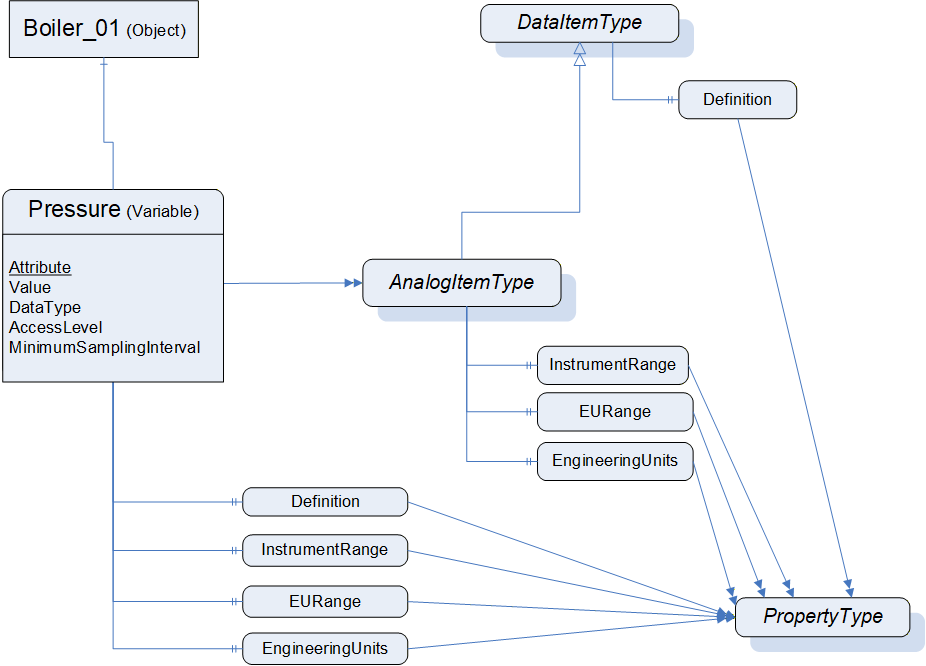
Each DataItem is represented by a DataVariable with a specific set of Attributes. The TypeDefinition reference indicates the type of the DataItem (in this case the AnalogItemType). Additional characteristics of DataItems are defined using Properties. The VariableTypes in 5.2 specify which properties can exist. These Properties have been found to be useful for a wide range of Data Access clients. Servers that want to disclose similar information should use the OPC-defined Property rather than one that is vendor-specific.
The above figure shows only a subset of Attributes and Properties. Other Attributes that are defined for Variables in OPC 10000-3 (e.g., Description) can also be available.
5.5 Attributes of DataItems
The following Attributes of Variables (specified in detail in OPC 10000-3) are particularly important for DataItems:
Value
DataType
AccessLevel
MinimumSamplingInterval
Value is the most recent value of the Variable that the Server has. Its data type is defined by the DataType Attribute. The AccessLevel Attribute defines the Server's basic ability to access current data and MinimumSamplingInterval defines how current the data is.
When a client requests the Value Attribute for reading or monitoring, the Server will always return a StatusCode (the quality and the Server's ability to access/provide the value) and, optionally, a ServerTimestamp and/or a SourceTimestamp - based on the Client's request. See OPC 10000-4 for details on StatusCode and the meaning of the two timestamps. Specific status codes for Data Access are defined in 7.3.
5.6 DataTypes
5.6.1 Overview
Following is a description of the DataTypes defined in this specification.
DataTypes like String, Boolean, Double or LocalizedText are defined in OPC 10000-3. Their representation is specified in OPC 10000-5.
5.6.2 Range
This structure defines the Range for a value. Its elements are defined in Table 19.
| Name | Type | Description |
|---|---|---|
| Range | structure | |
low | Double | Lowest value in the range. |
high | Double | Highest value in the range. |
If a limit is not known a NaN shall be used.
Its representation in the AddressSpace is defined in Table 20.
| Attribute | Value | |||||
| BrowseName | Range | |||||
| IsAbstract | False | |||||
| References | NodeClass | BrowseName | DataType | TypeDefinition | Other | |
|---|---|---|---|---|---|---|
| Subtype of Structure defined in OPC 10000-5. | ||||||
| Conformance Units | ||||||
|---|---|---|---|---|---|---|
| Base Info Range DataType |
5.6.3 NumberRange
This structure defines the NumberRange for a value. Its elements are defined in Table 21.
| Name | Type | Description |
|---|---|---|
| NumberRange | structure | |
low | Number | Lowest value in the range. |
high | Number | Highest value in the range. |
If a limit is not known
In case of Floating-Point DataTypes: a NaN shall be used
In case of Integer DataTypes: minimum or maximum value of the DataType should be used, e.g. Byte: 255
Its representation in the AddressSpace is defined in Table 22.
| Attribute | Value | |||||
| BrowseName | NumberRange | |||||
| IsAbstract | False | |||||
| References | NodeClass | BrowseName | DataType | TypeDefinition | Other | |
|---|---|---|---|---|---|---|
| Subtype of Structure defined in OPC 10000-5. | ||||||
| Conformance Units | ||||||
|---|---|---|---|---|---|---|
| Base Info NumberRange DataType |
5.6.4 EUInformation
5.6.4.1 General
EUInformation contains information about the EngineeringUnits.
The intention of the OPC UA standard is not to define a set of units but a way to expose units based on existing systems. Since there is not a single worldwide set of units used in all industries, the EUInformation structure includes a separate field (the namespaceUri) to identify the system on which the exposed unit is based.
The default OPC UA mapping is based on UN/CEFACT as defined in 5.6.4.4, because it can be programmatically interpreted by generic OPC UA Clients. However, the EUInformation structure has been defined such that other standards bodies can incorporate their engineering unit definitions into OPC UA. If Servers use such an approach, then they shall identify this standards body by using a proper URI in EUInformation.namespaceUri.
5.6.4.2 Extented Unit information and Quantity
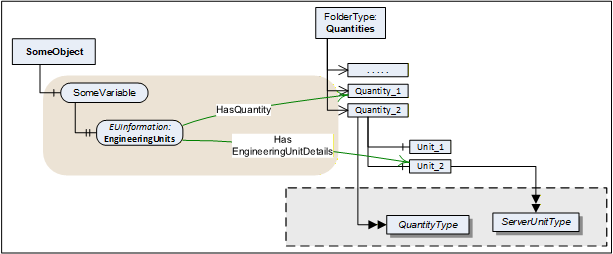
Servers can enhance EUInformation by providing the Quantity and Unit model (see 6) and referencing from EUInformation instances to the appropriate instances for quantity and unit. See Figure 5 for an example.
5.6.4.3 Definition of EUInformation
The EUInformation elements are defined in Table 23.
| Name | Type | Description |
|---|---|---|
| EUInformation | structure | |
namespaceUri | String | Identifies the organization (company, standards organization) that defines the EUInformation. |
unitId | Int32 | Identifier for programmatic lookup. -1 is used if a unitId is not available. |
displayName | LocalizedText | The displayName of the engineering unit is typically the abbreviation of the engineering unit, for example "h" for hour or "m/s" for meter per second. |
description | LocalizedText | Contains the full name of the engineering unit such as "hour" or "meter per second". |
Its representation in the AddressSpace is defined in Table 24.
| Attribute | Value | |||||
| BrowseName | EUInformation | |||||
| IsAbstract | False | |||||
| References | NodeClass | BrowseName | DataType | TypeDefinition | Other | |
|---|---|---|---|---|---|---|
| Subtype of Structure defined in OPC 10000-5. | ||||||
| Conformance Units | ||||||
|---|---|---|---|---|---|---|
| Base Info EUInformation |
5.6.4.4 Mapping of UN/CEFACT to EUInformation
This clause specifies how to apply the "Codes for Units of Measurement" published by the "United Nations Centre for Trade Facilitation and Electronic Business" (see UNECE). This recommendation establishes a single list of code elements to represent units of the International System of Units (SI Units) like units of measure for length, mass (weight), volume and other quantities and in addition covers administration, commerce, transport, science, technology, industry etc. It provides a fixed code that can be used for automated evaluation.
Table 25 contains a small excerpt of the relevant columns in the UNECE recommendation:
| Excerpt from Recommendation N°. 20, Annex 1 | ||
|---|---|---|
| Common Code | Name | Symbol |
| C81 | radian | rad |
| C25 | milliradian | mrad |
| MMT | millimetre | mm |
| HMT | hectometre | hm |
| KMT | kilometre | km |
| KMQ | kilogram per cubic metre | kg/m3 |
| FAH | degree Fahrenheit | °F |
The UNECE recommendation in several cases defines multiple instances of the same unit (same name and symbol) for different quantities. Therefore, the relevant information for EUInformation.unitId, EUInformation.displayName, and EUInformation.description has been extracted by eliminating duplicates. This extract is available here:
https://reference.opcfoundation.org/files/UNECE_to_OPCUA.csv?u=http://opcfoundation.org/UA/
This mapping has been generated as follows:
The namespaceUri shall be http://www.opcfoundation.org/UA/units/un/cefact
The Common Code (represented as an alphanumeric variable length of up to 3 characters) has been converted into a 32 Bit Integer and is used for the unitId. The following pseudo code specifies the conversion algorithm:
		Int32 unitId = 0;		Int32 c;		for (i=0; i<=3;i++)		{
			c = CommonCode[i];		if (c == 0) break;		// end of Common Code		unitId = unitId << 8;		unitId = unitId | c;	}
The Symbol field shall be used as invariant locale for displayName. Servers can configure multiple additional locales for each displayName. However, if none of the LocaleIds specified by the Client for the Session matches these additional locales, the Server shall return the invariant locale.
The Name field shall be used as invariant locale for description. Servers can configure multiple additional locales for each description. However, if none of the LocaleIds specified by the Client for the Session matches these additional locales, the Server shall return the invariant locale.
5.6.4.5 Mapping of IEC 62720 to EUInformation
This clause specifies how to apply the Common Data Dictionary (IEC CDD) published as IEC/TS 62720 by the "International Electrotechnical Commission - IEC" to the EUInformation Structure.
The units and their identifiers, along with their relationships, is maintained in the IEC Common Data Dictionary (CDD): https://cdd.iec.ch/cdd/iec62720/iec62720.nsf/TreeFrameset. Specific units can only be found via search. A '*' as search string will return all units.
Figure 6 specifies the dialog to search for units and optionally export them.

Table 25 contains a small excerpt of the relevant columns in IEC 62720:
| Excerpt of Units from IEC/TS 62720 | ||
|---|---|---|
| Code | Symbol | Name |
| UAA017 | Ω | ohm |
| UAA033 | °C | degree Celsius |
| UAA070 | μN | micronewton |
| UAA172 | J | joule |
| UAA539 | in | inch |
| UAB044 | in/s2 | inch per second squared |
| UAA497 | g/s | gram per second |
All units in the IEC CDD have been extracted and mapped to the EUInformation fields. The list is available here:
https://reference.opcfoundation.org/files/IEC62720_to_OPCUA.csv?u=http://opcfoundation.org/UA/
This mapping has been generated as follows:
The namespaceUri shall be http://www.opcfoundation.org/UA/units/cdd/IEC62720
The Code is the data identifier of the IRDI. It is represented by 3 uppercase characters and 3 digits. This code has been converted into a 32-Bit Integer and is used for the unitId. The following pseudo code specifies the conversion algorithm:
	Int32 unitId = 0;	Int32 c;	for (i=0; i<6;i++)	{
		c = UnitCode[i] 0x1f;	 	unitId = unitId << 5;		unitId = unitId | c;	}
The Short Name field shall be used as invariant locale for displayName. Servers can configure multiple additional locales for each displayName. However, if none of the LocaleIds specified by the Client for the Session matches these additional locales, the Server shall return the invariant locale.
The Preferred Name field shall be used as invariant locale for description. Servers can configure multiple additional locales for each description. However, if none of the LocaleIds specified by the Client for the Session matches these additional locales, the Server shall return the invariant locale.
5.6.5 ComplexNumberType
This structure defines float IEEE 32 bits complex value. Its elements are defined in Table 27.
| Name | Type | Description |
|---|---|---|
| ComplexNumberType | structure | |
real | Float | Value real part |
imaginary | Float | Value imaginary part |
Its representation in the AddressSpace is defined in Table 28
| Attribute | Value | |||||
| BrowseName | ComplexNumberType | |||||
| IsAbstract | False | |||||
| References | NodeClass | BrowseName | DataType | TypeDefinition | Other | |
|---|---|---|---|---|---|---|
| Subtype of Structure defined in OPC 10000-5. | ||||||
| Conformance Units | ||||||
|---|---|---|---|---|---|---|
| Data Access Complex Number |
5.6.6 DoubleComplexNumberType
This structure defines double IEEE 64 bits complex value. Its elements are defined in Table 29.
| Name | Type | Description |
|---|---|---|
| DoubleComplexNumberType | structure | |
real | Double | Value real part |
imaginary | Double | Value imaginary part |
Its representation in the AddressSpace is defined in Table 30.
| Attribute | Value | |||||
| BrowseName | DoubleComplexNumberType | |||||
| IsAbstract | False | |||||
| References | NodeClass | BrowseName | DataType | TypeDefinition | Other | |
|---|---|---|---|---|---|---|
| Subtype of Structure defined in OPC 10000-5. | ||||||
| Conformance Units | ||||||
|---|---|---|---|---|---|---|
| Data Access DoubleComplex Number |
5.6.7 AxisInformation
This structure defines the information for auxiliary axis for ArrayItemType Variables.
There are three typical uses of this structure:
The step between points is constant and can be predicted using the range information and the number of points. In this case, axisSteps can be set to NULL.
The step between points is not constant, but remains the same for a long period of time (from acquisition to acquisition for example). In this case, axisSteps contains the value of each step on the axis.
The step between points is not constant and changes at every update. In this case, a type like XYArrayType shall be used and axisSteps is set to NULL.
Its elements are defined in Table 31.
| Name | Type | Description |
|---|---|---|
| AxisInformation | structure | |
engineeringUnits | EUInformation | Holds the information about the engineering units for a given axis. |
eURange | Range | Limits of the range of the axis |
title | LocalizedText | User readable axis title, useful when the units are %, the Title can be "Particle size distribution" |
axisScaleType | AxisScaleEnumeration | LINEAR, LOG, LN, defined by AxisSteps |
axisSteps | Double[] | Specific value of each axis steps, can be set to "Null" if not used |
Its representation in the AddressSpace is defined in Table 32.
| Attribute | Value | |||||
| BrowseName | AxisInformation | |||||
| IsAbstract | False | |||||
| References | NodeClass | BrowseName | DataType | TypeDefinition | Other | |
|---|---|---|---|---|---|---|
| Subtype of Structure defined in OPC 10000-5. | ||||||
| Conformance Units | ||||||
|---|---|---|---|---|---|---|
| Data Access AxisInformationType |
When the steps in the axis are constant, axisSteps can be set to "Null" and in this case, the Range limits are used to compute the steps. The number of steps in the axis comes from the parent ArrayItem.ArrayDimensions.
5.6.8 AxisScaleEnumeration
This enumeration identifies on which type of axis the data shall be displayed. Its values are defined in Table 33.
| Name | Value | Description |
|---|---|---|
| LINEAR | 0 | Linear scale |
| LOG | 1 | Log base 10 scale |
| LN | 2 | Log base e scale |
Its representation in the AddressSpace is defined in Table 34.
| Attribute | Value | ||||
| BrowseName | AxisScaleEnumeration | ||||
| IsAbstract | False | ||||
| References | NodeClass | BrowseName | DataType | TypeDefinition | ModellingRule |
|---|---|---|---|---|---|
| Subtype of the Enumeration type defined in OPC 10000-5 | |||||
| HasProperty | Variable | EnumStrings | LocalizedText[] | PropertyType | |
| Conformance Units | |||||
|---|---|---|---|---|---|
| Data Access ArrayItem2Type |
5.6.9 XVType
This structure defines a physical value relative to a X axis and it is used as the DataType of the Value of XYArrayItemType. For details see 5.3.4.3.
Many devices can produce values that can perfectly be represented with a float IEEE 32 bits but, they can position them on the X axis with an accuracy that requires double IEEE 64 bits. For example, the peak value in an absorbance spectrum where the amplitude of the peak can be represented by a float IEEE 32 bits, but its frequency position required 10 digits which implies the use of a double IEEE 64 bits.
Its elements are defined in Table 35.
| Name | Type | Description |
|---|---|---|
| XVType | structure | |
x | Double | Position on the X axis of this value |
value | Float | The value itself |
Its representation in the AddressSpace is defined in Table 36.
| Attribute | Value | |||||
| BrowseName | XVType | |||||
| IsAbstract | False | |||||
| References | NodeClass | BrowseName | DataType | TypeDefinition | Other | |
|---|---|---|---|---|---|---|
| Subtype of Structure defined in OPC 10000-5. | ||||||
| Conformance Units | ||||||
|---|---|---|---|---|---|---|
| Data Access XYArrayItemType |