
Annex A OPC COM DA to UA mapping (Normative)
A.1 Introduction
This Annex provides details on mapping OPC COM Data Access (DA) information to OPC UA to help vendors migrate to OPC UA based systems while still being able to access information from existing OPC COM DA systems.
The OPC Foundation provides COM UA Wrapper and Proxy samples that act as a bridge between the OPC DA and the OPC UA systems.
The COM UA Wrapper is an OPC UA Server that wraps an OPC DA Server and with that enables an OPC UA Client to access information from the DA Server. The COM UA Proxy enables an OPC DA Client to access information from an OPC UA Server.
The mappings describe generic DA interoperability components. It is recommended that vendors use this mapping if they develop their own components, however, some applications can benefit from vendor specific mappings.
A.2 Security Considerations
COM DA relies on the Microsoft COM security infrastructure and does not specify any security parameters such as user identity. The developer of UA Wrapper and Proxy therefore has to consider the mapping of security aspects.
The COM UA Wrapper for instance can accept any Username/password and then try to impersonate this user by calling proper Windows services before connecting to the COM DA Server.
A.3 COM UA wrapper for OPC DA Server
A.3.1 Information Model mapping
A.3.1.1 General
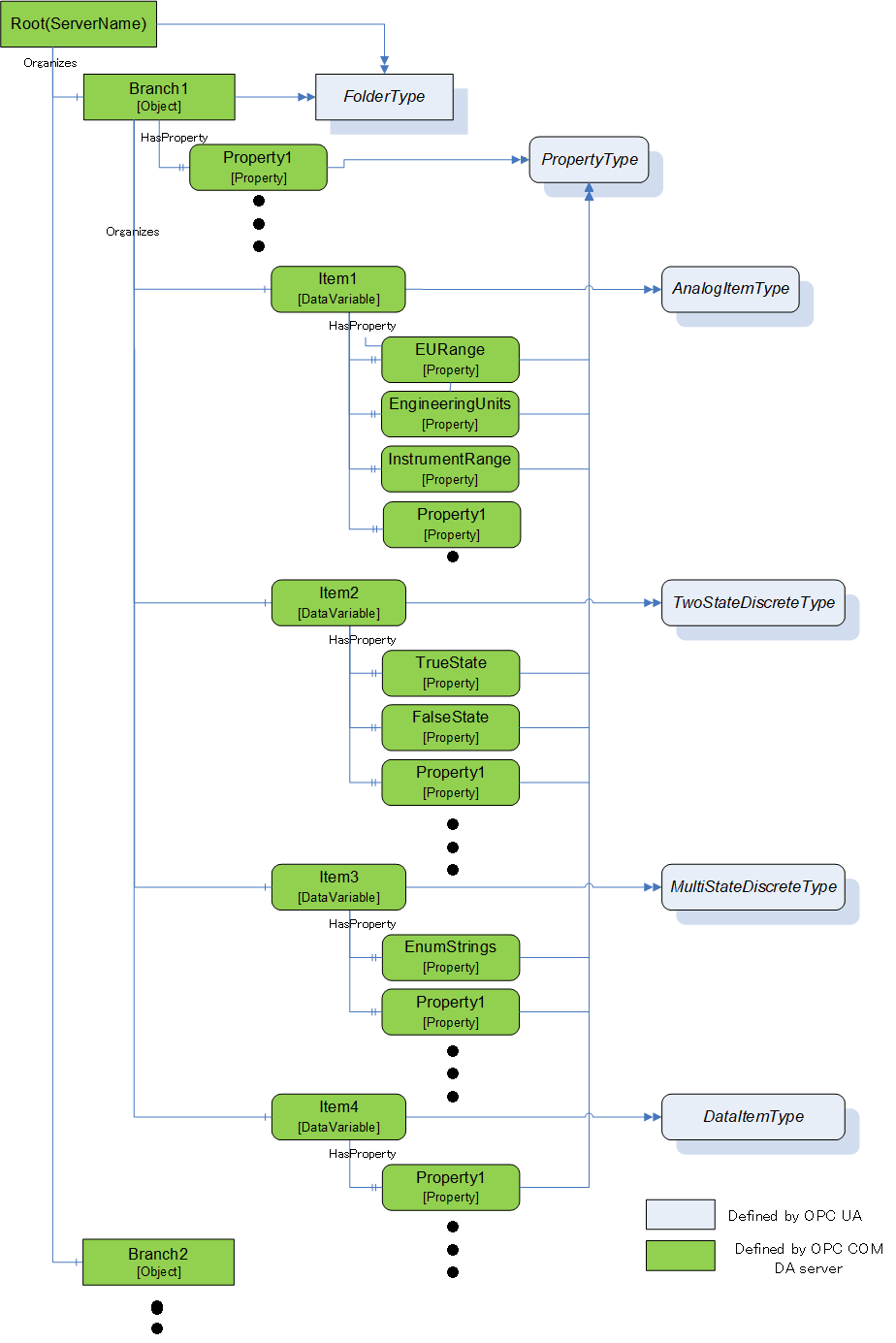
OPC DA defines 3 elements in the address space: Branch, Item and Property. The COM UA Wrapper maps these types to the OPC UA types as described in Subclauses A.4.3.2 to A.4.3.4.
A.3.1.2 Branch
DA Branches are represented in the COM UA Wrapper as Objects of FolderType.
The top-level branch (the root) should be represented by an Object where the BrowseName is the Server ProgId.
The OPC DA Address space hierarchy is discovered using the ChangeBrowsePosition from the Root and BrowseOPCItemIds to get the Branches, Items and Properties.
The name returned from the BrowseOPCItemIds enumString is used as the BrowseName and the DisplayName for each Branch. See also clause A.3.1.5.
The ItemId obtained using the GetItemID is used as a part of the NodeId for each Branch. See also clause A.3.1.5.
An OPC UA Folder representing a DA Branch uses the Organizes References to reference child DA Branches and uses HasComponent References for DA Leafs (Items). It is acceptable for customized wrappers to use a sub-type of these ReferenceTypes.
A.3.1.3 Item
DA items (leafs) are represented in the COM UA Wrapper as Variables. The VariableType depends on the existance of special DA properties as follows:
AnalogItemType: An item in the DA server that has High EU and Low EU properties or its EU Type property is Analog is represented as Variable of AnalogItemType in the COM UA Wrapper. The AnalogItemType has the following Properties:
EURange: The values of the High EU and Low EU properties of the DA Item are assigned to the EURange Property
EngineeringUnits: The value of the Engineering Unit property of the DA Item are assigned to the EngineeringUnits Property.
InstrumentRange: The values of the High IR and Low IR properties of the DA Item are assigned to the InstrumentRange Property
TwoStateDiscreteType: An item in DA server that has Open Label and Close Label properties is represented as Variable of TwoStateDiscreteType in the COM UA Wrapper. The TwoStateDiscreteType has the following Properties
TrueState: The value of the Close Label property of the DA item is assigned to the TrueState Property.
FalseState: The value of the Open Label property of the DA item is assigned to the FalseState Property.
MultiStateDiscreteType : An item in the DA server that has its EU Type property as enumerated is represented as Variable of MultiStateDiscreteType in the COM UA Wrapper. The MultiStateDiscreteType has the following Property:
EnumStrings: The enumerated values of the EUInfo Property of the DA item are assigned to the EnumStrings Property.
DataItemType : An item in the DA Server that is not any of the above types is represented as Variable of DataItemType in the COM UA Wrapper.
Below are mappings that are common for all item types
The name of the item in the DA Server is used as the BrowseName and the DisplayName for the Node in the COM UA Wrapper. See also clause A.3.1.5.
The ItemId in the DA server is used as a part of the NodeId for the Node. See also clause A.3.1.5.
TimeZone property in the DA server is represented by a TimeZone Property.
The Description property value in the DA server is assigned to the Description Attribute.
The DataType property value in the DA server is assigned to the DataType Attribute.
If the item in the DA server is an array, the ValueRank Attribute is set as OneOrMoreDimensions. If not, it is set to Scalar.
The AccessLevel Attribute is set with the AccessRights value in the DA server:
OPC_READABLE -> Readable
OPC_WRITABLE -> Writable
The ScanRate property value in the DA server is assigned to the MinimumSamplingInterval Attribute.
Any Properties added to a Node in the COM UA Wrapper are referenced using the HasProperty ReferenceType.
A.3.1.4 Property
A property in the DA server is represented in the COM UA Wrapper as a Variable with TypeDefinition as PropertyType.
The properties for an item are retrieved using the QueryAvailableProperties call in the DA server.
Below are mappings of the property details to the OPC UA Property:
The description of a property in the DA server is used as the BrowseName and the DisplayName of the Node in the COM UA Wrapper.
The PropertyID and ItemID (if they exist for the property) in the DA server are used as a part of the NodeID for the node in the COM UA Wrapper.
The DataType value in the DA server is used as value for the DataType Attribute of the Property in the COM UA Wrapper.
If the property value in the DA server is an array, the ValueRank Attribute of the Property is set to OneOrMoreDimensions. Otherwise, it is set to Scalar.
If the property has an ItemID in the DA server, then the AccessLevel attribute for the Node is set to ReadableOrWriteable. If not, it is set to Readable.
Table A. shows the mapping between the common OPC COM DA properties to the OPC UA Node attributes/properties.
| Property Name (PropertyID) of OPC COM DA | OPC UA Information Model | OPC UA DataType |
| Access Rights (5) | AccessLevel Attribute | Int32 |
| EU Units (100) | EngineeringUnits Property | String |
| Item Description (101) | Description Attribute | String |
| High EU (102) | EURange Property | Double |
| Low EU (103) | EURange Property | Double |
| High Instrument Range (104) | InstrumentRange Property | Double |
| Low Instrument Range (105) | InstrumentRange Property | Double |
| Close Label (106) | TrueState Property | String |
| Open Label (107) | FalseState Property | String |
| Other Properties (include Vendor specific Properties) | PropertyType | Based on the DataType of the Property |
A.3.1.5 BrowseName and DisplayName Mapping
As described above, both the OPC UA Browsename and Displayname for Nodes representing COM DA Branches and Leafs are derived from the name of the corresponding item in the COM DA Server.
This name can only be acquired by using the COM DA Browse Services. In OPC UA, however, the BrowseName and DisplayName are Attributes that Clients can ask for at any time. There are several options to support this in a Wrapper but all of them have pros and cons. Here are some popular implementation options:
Allow browsing the complete COM DA Address Space and then build and persist an offline copy of it. Resolve the BrowseName by scanning this offline copy.
Pro: The ItemID can be used as is for the OPC UA NodeId.
Con: The initial browse can take a while and can have to be repeated for COM DA Servers with a dynamic Address Space.
Create OPC UA NodeId values that include both the COM DA ItemID and the Item name. When the OPC UA Client passes such a NodeId to read the BrowseName or DisplayName Attribute, the wrapper can easily extract the name from the NodeId value.
Pro: Efficient and reliable.
Con: The NodeId will not represent the ItemId. It becomes difficult for human users to match the two IDs.
A number of COM DA Servers use ItemIDs that consist of a path where the path elements are separated with a delimiter and the last element is the item name. Wrappers can provide ways to configure the delimiter so that they can easily extract the item name.
Pro: Efficient and reliable. The ItemID can be used as is for the OPC UA NodeId.
Con: Not a generic solution. Only works for specific COM-DA Servers.
For wrappers that are custom to a specific Server, knowledge of the COM DA server address space can result in other optimizations or short cuts (i.e. the server will always have a certain schema / naming sequence etc.).
A.3.2 Data and error mapping
A.3.2.1 General
In a DA server, Automation Data is represented by Value, Quality and Time Stamp for a Tag.
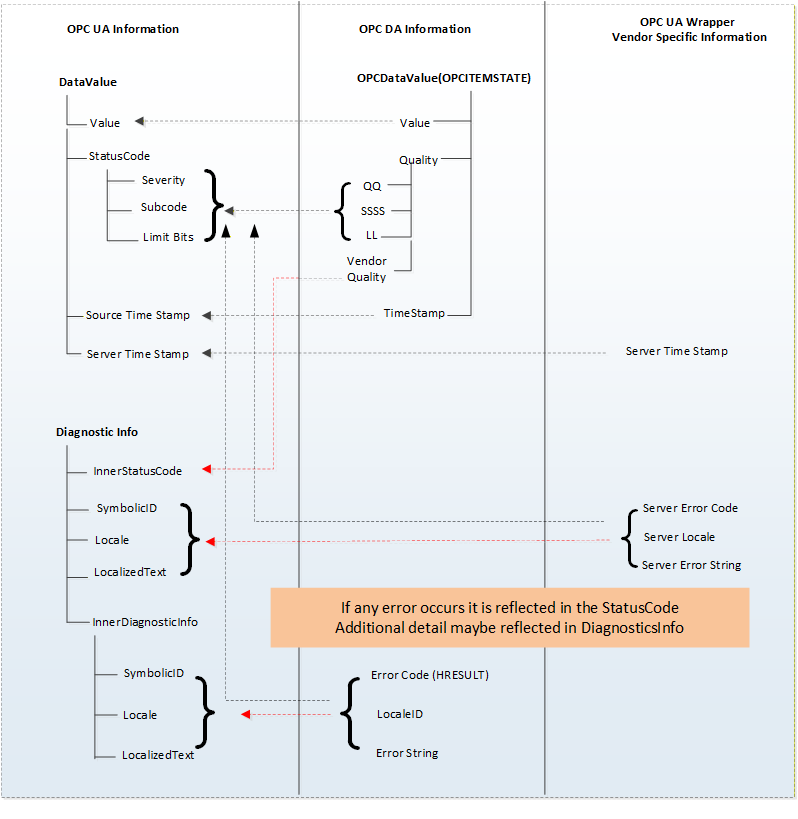
The COM UA Wrapper maps the VQT data to the Data Value and Diagnostic Info structures.
The Error codes returned by the DA server are based on the HRESULT type. The COM UA Wrapper maps this error code to an OPC UA Status Code. Figure A.14 illustrates this mapping.
A.3.2.2 Value
The data values in the DA server are represented as Variant data type. The COM UA Wrapper converts them to the corresponding OPC UA DataType. The mapping is shown in Table A.2:
Variant Data Type (In DA server) | OPC UA Data type Mapping in COM UA Server (DataValue structure) |
| VT_I2 | Int16 |
| VT_I4 | Int32 |
| VT_R4 | Float |
| VT_R8 | Double |
| VT_BSTR | String |
| VT_BOOL | Boolean |
| VT_UI1 | Byte |
| VT_I1 | SByte |
| VT_UI2 | UInt16 |
| VT_UI4 | UInt32 |
| VT_I8 | Int64 |
| VT_UI8 | UInt64 |
| VT_DATE | Double |
| VT_DECIMAL | Decimal |
| VT_ARRAY | Array of OPC UA types |
.
A.3.2.3 Quality
The Quality of a Data Value in the DA server is represented as a 16 bit value where the lower 8 bits is of the form QQSSSSLL (Q: Main Quality, S: Sub Status, L: Limit) and higher 8 bits is vendor specific.
The COM UA Wrapper maps the DA server to the OPC UA Status code as shown in Figure A.15:
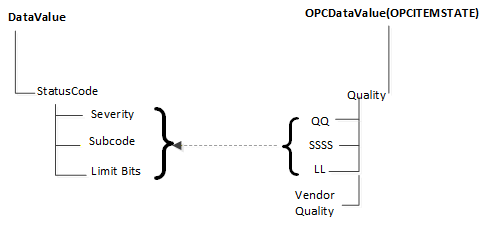
The primary quality is mapped to the Severity field of the Status code. The Sub Status is mapped to the SubCode and the Limit is mapped to the Limit Bits of the Status Code.
Please note that the Vendor quality is currently discarded.
Table A.3 shows a mapping of the OPC COM DA primary quality mapping to OPC UA status code
| OPC DA Primary Quality (Quality & Sub status QQSSSS) | OPC UA Status Code |
| GOOD | Good |
| LOCAL_OVERRIDE | Good_LocalOverride |
| UNCERTAIN | Uncertain |
| SUB_NORMAL | Uncertain_SubNormal |
| SENSOR_CAL | Uncertain_SensorNotAccurate |
| EGU_EXCEEDED | Uncertain_EngineeringUnitsExceeded |
| LAST_USABLE | Uncertain_LastUsableValue |
| BAD | Bad |
| CONFIG_ERROR | Bad_ConfigurationError |
| NOT_CONNECTED | Bad_NotConnected |
| COMM_FAILURE | Bad_NoCommunication |
| DEVICE_FAILURE | Bad_DeviceFailure |
| SENSOR_FAILURE | Bad_SensorFailure |
| LAST_KNOWN | Bad_OutOfService |
| OUT_OF_SERVICE | Bad_OutOfService |
| WAITING_FOR_INITIAL_DATA | Bad_WaitingForInitialData |
A.3.2.4 Timestamp
The Timestamp provided for a value in the DA server is assigned to the SourceTimeStamp of the DataValue in the COM UA Wrapper.
The ServerTimeStamp in the DataValue is set to the current time by the COM UA Wrapper at the start of the Read Operation.
A.3.3 Read data
The COM UA Wrapper supports performing Read operations to DA servers of versions 2.05a and 3.
For version 2.05a, the COM UA wrapper creates a Group using the IOPCServer::AddGroup method and adds the items whose data is to be read to the Group using IOPCItemMgmt::AddItems method. The Data is retrieved for the items using the IOPCSyncIO::Read method. The VQT for each item is mapped to the DataValue structure as shown in Figure A.14. Please note that only Read from Device is supported for this version. The "maxAge" parameter is ignored.
For version 3, the COM UA Wrapper uses the IOPCItemIO::Read to retrieve the data. The VQT for each item is mapped to the DataValue structure as shown in Figure A.14. The Read supports both the Read from Device and Cache and uses the "maxAge" parameter.
If there are errors for the items in the Read from the DA server, then these are mapped to the StatusCode of the DataValue in the COM UA Wrapper.
The mapping of the OPC COM DA Read Errors code to OPC UA Status code (in the COM UA Wrapper) is shown in Table A.4:
| OPC DA Error ID | OPC UA Status Code |
| OPC_E_BADRIGHTS | Bad_NotReadable |
| E_OUTOFMEMORY | Bad_OutOfMemory |
| OPC_E_INVALIDHANDLE | Bad_NodeIdUnknown |
| OPC_E_UNKNOWNITEMID | Bad_NodeIdUnknown |
| E_INVALIDITEMID | Bad_NodeIdInvalid |
| E_INVALID_PID | Bad_AttributeIdInvalid |
| E_ACCESSDENIED | Bad_OutOfService |
| Others | Bad_UnexpectedError |
A.3.4 Write Data
The COM UA Wrapper supports performing Write operations to DA servers of versions 2.05a and 3.
For version 2.05a, the COM UA wrapper creates a Group using the IOPCServer::AddGroup method and adds the items whose data is to be written using IOPCItemMgmt::AddItems method. The value is written for the items using the IOPCSyncIO::Write method. Note that if the StatusCode or TimeStamps (Source or Server) is specified to be written for the item then the COM UA Wrapper returns a BadWriteNotSupported Status code for the item.
For version 3, the COM UA Wrapper uses the IOPCItemIO::WriteVQT data including StatusCode and TimeStamp. If a SourceTimeStamp is provided, this timestamp is used for the Write else the ServerTimeStamp is used.
If there are errors for the items in the Write from the DA server, then these are mapped to the StatusCode for the corresponding item.
The mapping of the OPC COM DA Write Errors code to OPC UA Status code (in the COM UA Wrapper) is shown in Table A.5:
| OPC DA Error ID | OPC UA Status Code |
| E_BADRIGHTS | Bad_NotWritable |
| DISP_E_TYPEMISMATCH | Bad_TypeMismatch |
| E_BADTYPE | Bad_TypeMismatch |
| E_RANGE | Bad_OutOfRange |
| DISP_E_OVERFLOW | Bad_OutOfRange |
| E_OUTOFMEMORY | Bad_OutOfMemory |
| E_INVALIDHANDLE | Bad_NodeIdUnknown |
| E_UNKNOWNITEMID | Bad_NodeIdUnknown |
| E_INVALIDITEMID | Bad_NodeIdInvalid |
| E_INVALID_PID | Bad_NodeIdInvalid |
| E_NOTSUPPORTED | Bad_WriteNotSupported |
| S_CLAMP | Good_Clamped |
| Others | Bad_UnexpectedError |
A.3.5 Subscriptions
A subscription is created in the DA server when a MonitoredItem is created in the COM UA Wrapper.
The SamplingInterval and the Deadband value are used for the subscription to setup a periodic data change call back on the COM UA Wrapper. Note that only the PercentDeadbandType is supported by the COM UA Wrapper.
The VQT for each item is mapped to the DataValue structure as shown in Figure A.14 and published to the client by the COM UA Wrapper periodically.
The mapping of the OPC COM DA Read Errors code to OPC UA Status code (in the COM UA Wrapper) is the same as the Read mapping in Figure A.14.
A.4 COM UA proxy for DA Client
A.4.1 Guidelines
The Data Access COM UA Proxy is a COM Server combined with a UA Client. It maps the Data Access address space of UA Data Access Server into the appropriate COM Data Access objects.
Clauses A.4.1 through A.4.6 identify the design guidelines and constraints used to develop the Data Access COM UA Proxy provided by the OPC Foundation. In order to maintain a high degree of consistency and interoperability, it is strongly recommended that vendors, who choose to implement their own version of the Data Access COM UA Proxy, follow these same guidelines and constraints.
The Data Access COM Client simply chooses how to connect to the UA Data Access Server. Connectivity approaches include the one where Data Access COM Clients connect to a UA Data Access Server with a CLSID just as if the target Server were a Data Access COM Server. However, the CLSID can be considered virtual since it is defined to connect to intermediary components that ultimately connect to the UA Data Access Server. Using this approach, the Data Access COM Client calls co-create instance with a virtual CLSID as described above. This connects to the Data Access COM UA Proxy components. The Data Access COM UA Proxy then establishes a secure channel and session with the UA Data Access Server. As a result, the Data Access COM Client gets a COM Data Access Server interface pointer.
A.4.2 Information Model and Address Space mapping
A.4.2.1 General
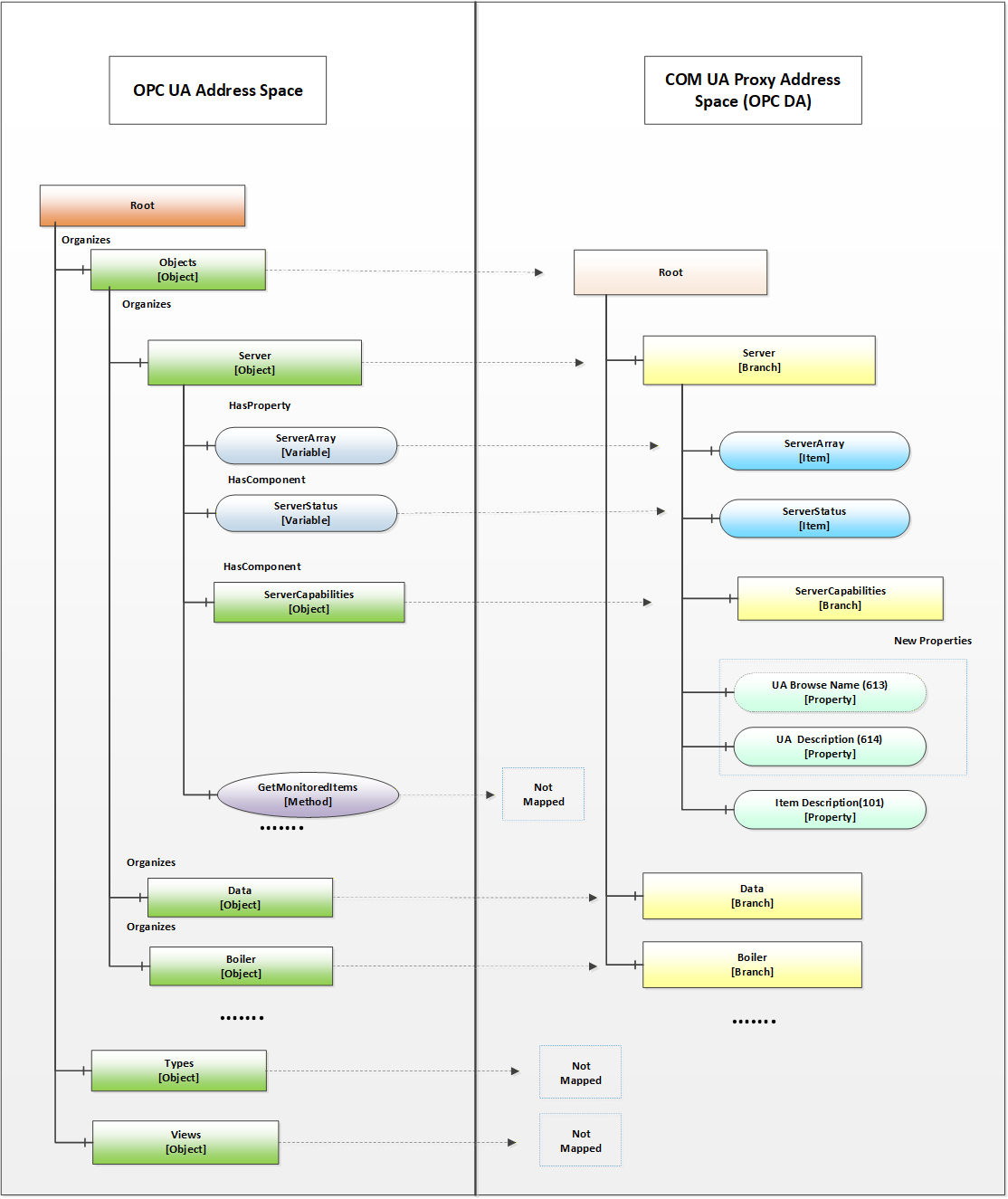
OPC UA defines 8 Node Class types in the address space Object, Variable, Method, ObjectType, VariableType, ReferenceType, DataType, View. The COM UA Proxy maps only the nodes of Node Class types Object, Variable to the OPC DA types as shown in the figure below. Only the nodes under the Objects node are considered for the COM UA Proxy address space and others such as Types, Views are not mapped.
Figure A.16 shows an example mapping of OPC DA to OPC UA information.
A.4.2.2 Object Nodes
A node of Object Node class in the OPC UA server is represented in the Data Access COM UA Proxy as a Branch.
The root of the Data Access COM UA Proxy is the Objects folder of the OPC UA Server.
The OPC UA Address space hierarchy is discovered using the Browse Service for the Objects Node using the following filters:
BrowseDirection as Forward
ReferenceTypeId as Organizes and HasChild.
IncludeSubtypes as True
NodeClassMask as Object and Variable
The DisplayName of the OPC UA node is used as the Name for each Branch in the Data Access COM UA Proxy
Each Branch in the Data Access COM UA Proxy is assigned 3 properties:
UA Browse Name (Property ID: 613): The value of the BrowseName attribute of the node in the OPC UA Server is assigned to this property.
UA Description (Property ID: 614): The value of the Description attribute of the node in the OPC UA Server is assigned to this property, if a Description attribute is provided.
Item Description (Property ID: 101): The value of the DisplayName attribute of the node in the OPC UA Server is assigned to this property.
NOTE COM DA Clients typically display the ItemID and the Item Description. Since the ItemID generated by the UA Proxy can be particularly difficult to read and understand, proxies can use the DisplayName as value for the Item Description Property as it will be easier to understand by a human user.
A.4.2.3 Variable Nodes
A node of Variable Node class in the OPC UA server is represented in the Data Access COM UA Proxy as an Item.
The DisplayName of the OPC UA node is used as the Name for each Item in the Data Access COM UA Proxy.
The NodeId of the OPC UA node is used as the ItemId for each Item in the Data Access COM UA Proxy. But the '=' character is replaced with '-' in the string. E.g. NodeId: ns=4,i=10, ItemID = "ns-4;i-10" or NodeId: ns=4,s=FL102, ItemID = "ns-4,s-FL102"
Each Item in the Data Access COM UA Proxy is assigned the following properties based on the node attributes or its references:
Standard Properties:
Item Canonical Data Type (Property ID: 1): The combined value of the DataType attribute and the ValueRank attribute of the node in the OPC UA Server is assigned to this property (see A.4.3.2).
Item Value (Property ID: 2): The value of the Value attribute of the node in the OPC UA Server is assigned to this property. Details on Value mapping are in A.4.3.2
Item Quality (Property ID: 3): The StatusCode of the Value obtained for the node in the OPC UA Server is assigned to this property. Details on Quality mapping are in A.4.3.3
Item Timestamp (Property ID: 4): The SourceTimestamp or ServerTimestamp of the Value obtained for the node in the OPC UA Server is assigned to this property. Details on Timestamp mapping are in A.4.3.4
Item Access Rights (Property ID: 5): The value of the AccessLevel attribute of the node in the OPC UA Server is assigned to this property based on the following mapping:
CurrentRead -> OPC_READABLE
CurrentWrite -> OPC_WRITABLE
The other AccessLevel provided by OPC are ignored
Server Scan Rate (Property ID: 6): The value of the MinimumSamplingInterval attribute of the node in the OPC UA Server is assigned to this property.
Item EU Type (Property ID: 7): The EU Type value is assigned based on the references of the node in the OPC UA Server:
Analog(1) : if the node in the OPC UA Server references a EURange property node, then it is assigned the Analog EU Type.
Enumerated(2): if the node in the OPC UA Server references a EnumStrings property node, then it is assigned the Enumerated EU Type.
Empty(0): For a node in the OPC UA Server that does not meet above criteria, the type is set as 0 (Empty)
EU Info (Property ID: 8): if the node in the OPC UA Server references an EnumStrings property node, then the enumerated values of the property node is assigned to this property.
EU Units (Property ID: 100): if the node in the OPC UA Server references a EngineeringUnits property node, then the value of the EngineeringUnits property node is assigned the EU Units property.
Item Description (Property ID: 101): The value of the DisplayName attribute of the node in the OPC UA Server is assigned to this property.
High EU (Property ID: 102): if the node in the OPC UA Server references a EURange property node, then the 'High' value of the property node is assigned to this property.
Low EU (Property ID: 103): if the node in the OPC UA Server references a EURange property node, then the 'Low' value of the property node is assigned to this property.
High Instrument Range (Property ID: 104): if the node in the OPC UA Server references an InstrumentRange property node, then the 'High' value of the property node is assigned to this property.
Low Instrument Range (Property ID: 105): if the node in the OPC UA Server references an InstrumentRange property node, then the 'Low' value of the property node is assigned to this property.
Contact Close Label (Property ID: 106): if the node in the OPC UA Server references a FalseState property node, then the value of the property node is assigned to this property.
Contact Open Label (Property ID: 107): if the node in the OPC UA Server references a TrueState property node, then the value of the property node is assigned to this property.
Item Time Zone (Property ID: 108): if the node in the OPC UA Server references a TimeZone property node, then the 'Offset' value of the property node is assigned to this property.
New Properties:
UA BuiltIn Type (Property ID: 610): The identifier value of the DataType node associated with the DataType attribute of the node in the OPC UA Server is assigned to this property.
UA Data Type Id (Property ID: 611): The complete NodeId value (namespace and identifier) of the DataType node associated with the DataType attribute of the node in the OPC UA Server is assigned to this property.
UA Value Rank (Property ID: 612): The value of the ValueRank attribute of the node in the OPC UA Server is assigned to this property.
UA Browse Name (Property ID: 613): The value of the BrowseName attribute of the node in the OPC UA Server is assigned to this property.
UA Description (Property ID: 614): The value of the Description attribute of the node in the OPC UA Server is assigned to this property.
A.4.2.4 Namespace Indices
For generating ItemIDs, the Proxy uses Namespace Indices. To assure that Clients can persist these ItemIDs, the Namespace Indices shall never change. To accomplish this the Proxy has to persist its Namespace Table and only append entries but never change existing ones.
The Proxy also has to provide a translation from the current Namespace Table in the Server to the persisted Namespace Table.
If you move or copy the Proxy to another machine, the Namespace Table has to be copied to this machine as well.
A.4.3 Data and error mapping
A.4.3.1 General
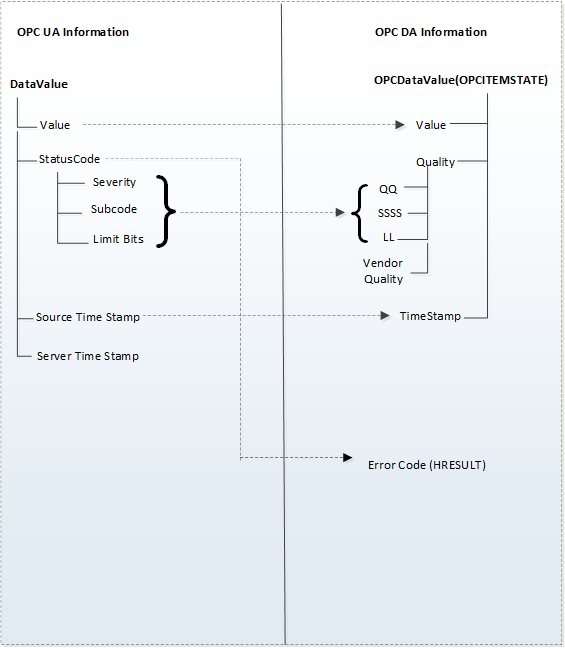
In an OPC UA Server, Automation Data is represented as a Data Value and and status, in addition additional error data can be provided via Diagnostic Info for a tag
The COM UA Proxy maps the Data Value structure into VQT data and error code.
For successful operations(StatusCode of Good and Uncertain), the COM UA Proxy maps the Status Code of the DataValue to the OPC DA Quality But in case of error(StatusCode of Bad), the Status Code is mapped to the OPC DA Error code.
The StatusCode in the Diagnostic Info returned by the OPC UA Server are mapped to OPC DA Error codes. Figure A.17 illustrates this mapping.
A.4.3.2 Value
The COM UA Proxy converts the OPC UA Data Value to the corresponding OPC DA Variant type. The mapping is shown in Table A.6. For DataTypes that are subtypes of an existing base DataType the conversion for the Base DataType is used.
| OPC UA Data type (In UA Server) | Variant Data Type (In DA server) |
| Int16 | VT_I2 |
| Int32 | VT_I4 |
| Float | VT_R4 |
| Double | VT_R8 |
| Decimal | VT_DECIMAL |
| String | VT_BSTR |
| Boolean | VT_BOOL |
| Byte | VT_UI1 |
| SByte | VT_I1 |
| UInt16 | VT_UI2 |
| UInt32 | VT_UI4 |
| Int64 | VT_I8 |
| UInt64 | VT_UI8 |
| Guid | VT_BSTR |
| DateTime | VT_DATE |
| NodeId | VT_BSTR |
| XmlElement | VT_BSTR |
| ExpandedNodeId | VT_BSTR |
| QualifiedName | VT_BSTR |
| LocalizedText | VT_BSTR |
| StatusCode | VT_UI4 |
| ExtensionObject | Array of VT_UI1 |
| Array of above OPC UA types | Array of corresponding Variant type |
A.4.3.3 Quality
The Quality of a Data Value in the OPC UA Server is represented as a StatusCode.
The COM UA Proxy maps the Severity, Subcode and the limit bits of the OPC UA Status code to the lower 8 bits of the OPC DA Quality structure (of the form QQSSSSLL). Figure A.18 illustrates this mapping.
The Severity field of the Status code is mapped to the primary quality. The SubCode is mapped to the Sub Status and the Limit Bits are mapped to the Limit field.
Table A.7 shows a mapping of the OPC UA status code to OPC DA primary quality
| OPC UA Status Code | OPC DA Primary Quality (Quality & Sub status QQSSSS) |
| Good | GOOD |
| Good_LocalOverride | LOCAL_OVERRIDE |
| Uncertain | UNCERTAIN |
| Uncertain_SubNormal | SUB_NORMAL |
| Uncertain_SensorNotAccurate | SENSOR_CAL |
| Uncertain_EngineeringUnitsExceeded | EGU_EXCEEDED |
| Uncertain_LastUsableValue | LAST_USABLE |
| Bad | BAD |
| Bad_ConfigurationError | CONFIG_ERROR |
| Bad_NotConnected | NOT_CONNECTED |
| Bad_NoCommunication | COMM_FAILURE |
| Bad_OutOfService | OUT_OF_SERVICE |
| Bad_DeviceFailure | DEVICE_FAILURE |
| Bad_SensorFailure | SENSOR_FAILURE |
| Bad_WaitingForInitialData | WAITING_FOR_INITIAL_DATA |
A.4.3.4 Timestamp
If available, the SourceTimestamp of the DataValue in the OPC UA Server is assigned to the Timestamp for the value in the COM UA Proxy. If SourceTimestamp is not available, then the ServerTimestamp is used.
A.4.4 Read data
The COM UA Proxy converts all the ItemIds in the Read into valid NodeIds by replacing the '-' with '=' and calls the OPC UA Read Service for the Value Attribute.
If the Read Service call is successful then DataValue for each node is mapped to the VQT for each item as shown in Figure A.17.
If the Read Service call fails or If there are errors for some of the Nodes, then the StatusCodes of these Nodes are mapped to the error code by the COM UA Proxy.
The mapping of the OPC UA Status code to OPC DA Read Error code (in the COM UA Proxy) is shown in Table A.8:
| OPC UA Status Code | OPC DA Error ID |
| Bad_OutOfMemory | E_OUTOFMEMORY |
| Bad_NodeIdInvalid | E_INVALIDITEMID |
| Bad_NodeIdUnknown | E_UNKNOWNITEMID |
| Bad_NotReadable | E_BADRIGHTS |
| Bad_UserAccessDenied | E_ACCESSDENIED |
| Bad_AttributeIdInvalid | E_INVALIDITEMID |
| Bad_UnexpectedError | E_FAIL |
| Bad_InternalError | E_FAIL |
| Bad_SessionClosed | E_FAIL |
| Bad_TypeMismatch | E_BADTYPE |
A.4.5 Write data
The COM UA Proxy converts all the ItemIds in the Write into valid NodeIds by replacing the '-' with '='. It converts the Value, Quality and Timestamp (VQT) to a DataValue structure as per the mapping in Figure A.17. and calls the OPC UA Write Service for the Value Attribute.
If the Write Service call fails or if there are errors for some of the Nodes, then the StatusCodes of these Nodes are mapped to the error code by the COM UA Proxy.
The mapping of the OPC UA Status code to OPC DA Write Error code (in the COM UA Proxy) is shown in Table A.9:
| OPC UA Status Code | OPC DA Error ID |
| Bad_TypeMismatch | E_BADTYPE |
| Bad_OutOfMemory | E_OUTOFMEMORY |
| Bad_NodeIdInvalid | E_INVALIDITEMID |
| Bad_NodeIdUnknown | E_UNKNOWNITEMID |
| Bad_NotWritable | E_BADRIGHTS |
| Bad_UserAccessDenied | E_ACCESSDENIED |
| Bad_AttributeIdInvalid | E_UNKNOWNITEMID |
| Bad_WriteNotSupported | E_NOTSUPPORTED |
| Bad_OutOfRange | E_RANGE |
A.4.6 Subscriptions
The COM UA Proxy creates a Subscription in the OPC UA Server when a Group is created. The Name, Active flag, UpdateRate parameters of the Group are used while creating the subscription.
The COM UA Proxy Creates Monitored Items in the OPC UA Server when items are added to the Group.
Following parameters and filters are used for creating the monitored items:
The ItemIds are converted to valid NodeIds by replacing the '-' with '='.
Data Change Filter is used for Items with EU type as Analog:
Trigger = STATUS_VALUE
If DeadBand value is specified for the Group, the;
DeadbandType = Percent
DeadbandValue = deadband specified for the group.
The COM UA Proxy calls the Publish Service of the OPC UA Server periodically and sends any data changes to the client.