
A.3 COM UA wrapper for OPC DA Server
A.3.1 Information Model mapping
A.3.1.1 General
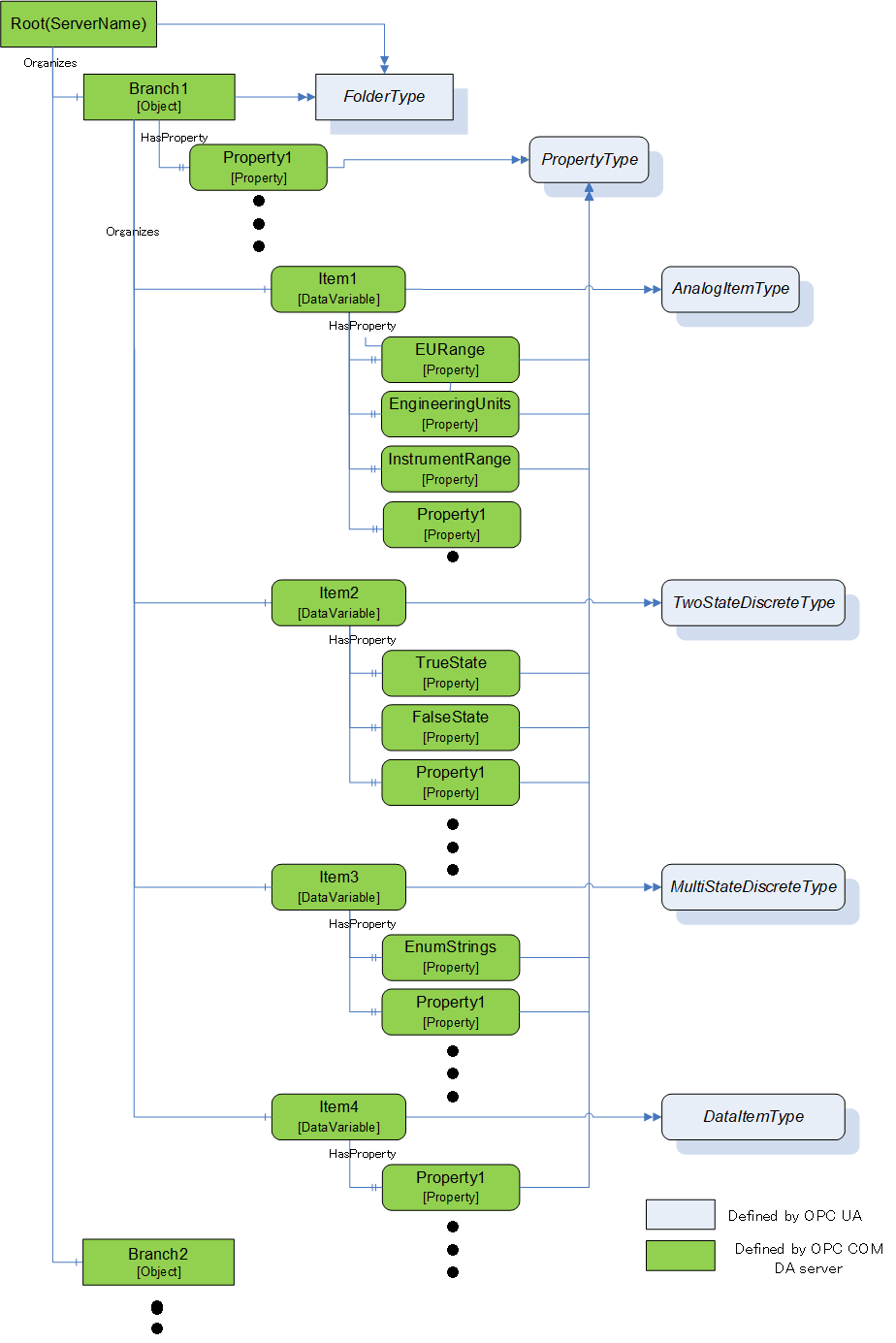
OPC DA defines 3 elements in the address space: Branch, Item and Property. The COM UA Wrapper maps these types to the OPC UA types as described in Subclauses A.4.3.2 to A.4.3.4.
A.3.1.2 Branch
DA Branches are represented in the COM UA Wrapper as Objects of FolderType.
The top-level branch (the root) should be represented by an Object where the BrowseName is the Server ProgId.
The OPC DA Address space hierarchy is discovered using the ChangeBrowsePosition from the Root and BrowseOPCItemIds to get the Branches, Items and Properties.
The name returned from the BrowseOPCItemIds enumString is used as the BrowseName and the DisplayName for each Branch. See also clause A.3.1.5.
The ItemId obtained using the GetItemID is used as a part of the NodeId for each Branch. See also clause A.3.1.5.
An OPC UA Folder representing a DA Branch uses the Organizes References to reference child DA Branches and uses HasComponent References for DA Leafs (Items). It is acceptable for customized wrappers to use a sub-type of these ReferenceTypes.
A.3.1.3 Item
DA items (leafs) are represented in the COM UA Wrapper as Variables. The VariableType depends on the existance of special DA properties as follows:
AnalogItemType: An item in the DA server that has High EU and Low EU properties or its EU Type property is Analog is represented as Variable of AnalogItemType in the COM UA Wrapper. The AnalogItemType has the following Properties:
EURange: The values of the High EU and Low EU properties of the DA Item are assigned to the EURange Property
EngineeringUnits: The value of the Engineering Unit property of the DA Item are assigned to the EngineeringUnits Property.
InstrumentRange: The values of the High IR and Low IR properties of the DA Item are assigned to the InstrumentRange Property
TwoStateDiscreteType: An item in DA server that has Open Label and Close Label properties is represented as Variable of TwoStateDiscreteType in the COM UA Wrapper. The TwoStateDiscreteType has the following Properties
TrueState: The value of the Close Label property of the DA item is assigned to the TrueState Property.
FalseState: The value of the Open Label property of the DA item is assigned to the FalseState Property.
MultiStateDiscreteType : An item in the DA server that has its EU Type property as enumerated is represented as Variable of MultiStateDiscreteType in the COM UA Wrapper. The MultiStateDiscreteType has the following Property:
EnumStrings: The enumerated values of the EUInfo Property of the DA item are assigned to the EnumStrings Property.
DataItemType : An item in the DA Server that is not any of the above types is represented as Variable of DataItemType in the COM UA Wrapper.
Below are mappings that are common for all item types
The name of the item in the DA Server is used as the BrowseName and the DisplayName for the Node in the COM UA Wrapper. See also clause A.3.1.5.
The ItemId in the DA server is used as a part of the NodeId for the Node. See also clause A.3.1.5.
TimeZone property in the DA server is represented by a TimeZone Property.
The Description property value in the DA server is assigned to the Description Attribute.
The DataType property value in the DA server is assigned to the DataType Attribute.
If the item in the DA server is an array, the ValueRank Attribute is set as OneOrMoreDimensions. If not, it is set to Scalar.
The AccessLevel Attribute is set with the AccessRights value in the DA server:
OPC_READABLE -> Readable
OPC_WRITABLE -> Writable
The ScanRate property value in the DA server is assigned to the MinimumSamplingInterval Attribute.
Any Properties added to a Node in the COM UA Wrapper are referenced using the HasProperty ReferenceType.
A.3.1.4 Property
A property in the DA server is represented in the COM UA Wrapper as a Variable with TypeDefinition as PropertyType.
The properties for an item are retrieved using the QueryAvailableProperties call in the DA server.
Below are mappings of the property details to the OPC UA Property:
The description of a property in the DA server is used as the BrowseName and the DisplayName of the Node in the COM UA Wrapper.
The PropertyID and ItemID (if they exist for the property) in the DA server are used as a part of the NodeID for the node in the COM UA Wrapper.
The DataType value in the DA server is used as value for the DataType Attribute of the Property in the COM UA Wrapper.
If the property value in the DA server is an array, the ValueRank Attribute of the Property is set to OneOrMoreDimensions. Otherwise, it is set to Scalar.
If the property has an ItemID in the DA server, then the AccessLevel attribute for the Node is set to ReadableOrWriteable. If not, it is set to Readable.
Table A. shows the mapping between the common OPC COM DA properties to the OPC UA Node attributes/properties.
| Property Name (PropertyID) of OPC COM DA | OPC UA Information Model | OPC UA DataType |
| Access Rights (5) | AccessLevel Attribute | Int32 |
| EU Units (100) | EngineeringUnits Property | String |
| Item Description (101) | Description Attribute | String |
| High EU (102) | EURange Property | Double |
| Low EU (103) | EURange Property | Double |
| High Instrument Range (104) | InstrumentRange Property | Double |
| Low Instrument Range (105) | InstrumentRange Property | Double |
| Close Label (106) | TrueState Property | String |
| Open Label (107) | FalseState Property | String |
| Other Properties (include Vendor specific Properties) | PropertyType | Based on the DataType of the Property |
A.3.1.5 BrowseName and DisplayName Mapping
As described above, both the OPC UA Browsename and Displayname for Nodes representing COM DA Branches and Leafs are derived from the name of the corresponding item in the COM DA Server.
This name can only be acquired by using the COM DA Browse Services. In OPC UA, however, the BrowseName and DisplayName are Attributes that Clients can ask for at any time. There are several options to support this in a Wrapper but all of them have pros and cons. Here are some popular implementation options:
Allow browsing the complete COM DA Address Space and then build and persist an offline copy of it. Resolve the BrowseName by scanning this offline copy.
Pro: The ItemID can be used as is for the OPC UA NodeId.
Con: The initial browse can take a while and can have to be repeated for COM DA Servers with a dynamic Address Space.
Create OPC UA NodeId values that include both the COM DA ItemID and the Item name. When the OPC UA Client passes such a NodeId to read the BrowseName or DisplayName Attribute, the wrapper can easily extract the name from the NodeId value.
Pro: Efficient and reliable.
Con: The NodeId will not represent the ItemId. It becomes difficult for human users to match the two IDs.
A number of COM DA Servers use ItemIDs that consist of a path where the path elements are separated with a delimiter and the last element is the item name. Wrappers can provide ways to configure the delimiter so that they can easily extract the item name.
Pro: Efficient and reliable. The ItemID can be used as is for the OPC UA NodeId.
Con: Not a generic solution. Only works for specific COM-DA Servers.
For wrappers that are custom to a specific Server, knowledge of the COM DA server address space can result in other optimizations or short cuts (i.e. the server will always have a certain schema / naming sequence etc.).
A.3.2 Data and error mapping
A.3.2.1 General
In a DA server, Automation Data is represented by Value, Quality and Time Stamp for a Tag.
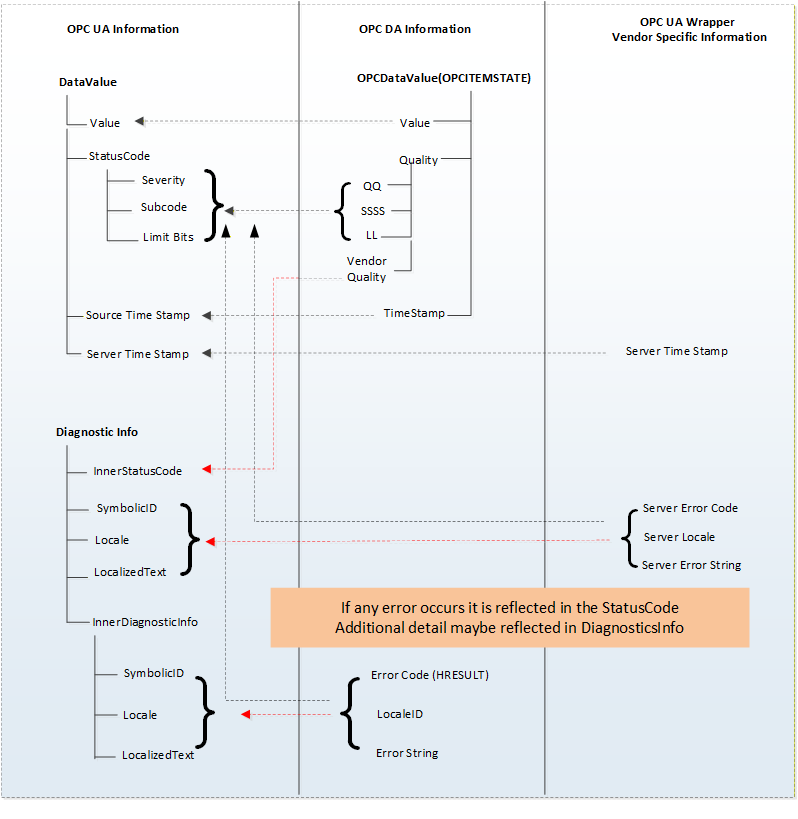
The COM UA Wrapper maps the VQT data to the Data Value and Diagnostic Info structures.
The Error codes returned by the DA server are based on the HRESULT type. The COM UA Wrapper maps this error code to an OPC UA Status Code. Figure A.14 illustrates this mapping.
A.3.2.2 Value
The data values in the DA server are represented as Variant data type. The COM UA Wrapper converts them to the corresponding OPC UA DataType. The mapping is shown in Table A.2:
Variant Data Type (In DA server) | OPC UA Data type Mapping in COM UA Server (DataValue structure) |
| VT_I2 | Int16 |
| VT_I4 | Int32 |
| VT_R4 | Float |
| VT_R8 | Double |
| VT_BSTR | String |
| VT_BOOL | Boolean |
| VT_UI1 | Byte |
| VT_I1 | SByte |
| VT_UI2 | UInt16 |
| VT_UI4 | UInt32 |
| VT_I8 | Int64 |
| VT_UI8 | UInt64 |
| VT_DATE | Double |
| VT_DECIMAL | Decimal |
| VT_ARRAY | Array of OPC UA types |
.
A.3.2.3 Quality
The Quality of a Data Value in the DA server is represented as a 16 bit value where the lower 8 bits is of the form QQSSSSLL (Q: Main Quality, S: Sub Status, L: Limit) and higher 8 bits is vendor specific.
The COM UA Wrapper maps the DA server to the OPC UA Status code as shown in Figure A.15:
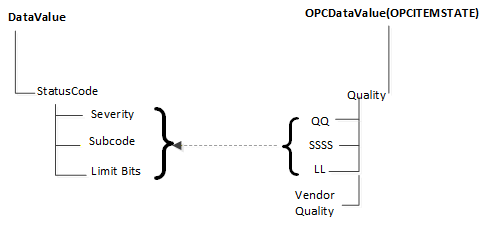
The primary quality is mapped to the Severity field of the Status code. The Sub Status is mapped to the SubCode and the Limit is mapped to the Limit Bits of the Status Code.
Please note that the Vendor quality is currently discarded.
Table A.3 shows a mapping of the OPC COM DA primary quality mapping to OPC UA status code
| OPC DA Primary Quality (Quality & Sub status QQSSSS) | OPC UA Status Code |
| GOOD | Good |
| LOCAL_OVERRIDE | Good_LocalOverride |
| UNCERTAIN | Uncertain |
| SUB_NORMAL | Uncertain_SubNormal |
| SENSOR_CAL | Uncertain_SensorNotAccurate |
| EGU_EXCEEDED | Uncertain_EngineeringUnitsExceeded |
| LAST_USABLE | Uncertain_LastUsableValue |
| BAD | Bad |
| CONFIG_ERROR | Bad_ConfigurationError |
| NOT_CONNECTED | Bad_NotConnected |
| COMM_FAILURE | Bad_NoCommunication |
| DEVICE_FAILURE | Bad_DeviceFailure |
| SENSOR_FAILURE | Bad_SensorFailure |
| LAST_KNOWN | Bad_OutOfService |
| OUT_OF_SERVICE | Bad_OutOfService |
| WAITING_FOR_INITIAL_DATA | Bad_WaitingForInitialData |
A.3.2.4 Timestamp
The Timestamp provided for a value in the DA server is assigned to the SourceTimeStamp of the DataValue in the COM UA Wrapper.
The ServerTimeStamp in the DataValue is set to the current time by the COM UA Wrapper at the start of the Read Operation.
A.3.3 Read data
The COM UA Wrapper supports performing Read operations to DA servers of versions 2.05a and 3.
For version 2.05a, the COM UA wrapper creates a Group using the IOPCServer::AddGroup method and adds the items whose data is to be read to the Group using IOPCItemMgmt::AddItems method. The Data is retrieved for the items using the IOPCSyncIO::Read method. The VQT for each item is mapped to the DataValue structure as shown in Figure A.14. Please note that only Read from Device is supported for this version. The "maxAge" parameter is ignored.
For version 3, the COM UA Wrapper uses the IOPCItemIO::Read to retrieve the data. The VQT for each item is mapped to the DataValue structure as shown in Figure A.14. The Read supports both the Read from Device and Cache and uses the "maxAge" parameter.
If there are errors for the items in the Read from the DA server, then these are mapped to the StatusCode of the DataValue in the COM UA Wrapper.
The mapping of the OPC COM DA Read Errors code to OPC UA Status code (in the COM UA Wrapper) is shown in Table A.4:
| OPC DA Error ID | OPC UA Status Code |
| OPC_E_BADRIGHTS | Bad_NotReadable |
| E_OUTOFMEMORY | Bad_OutOfMemory |
| OPC_E_INVALIDHANDLE | Bad_NodeIdUnknown |
| OPC_E_UNKNOWNITEMID | Bad_NodeIdUnknown |
| E_INVALIDITEMID | Bad_NodeIdInvalid |
| E_INVALID_PID | Bad_AttributeIdInvalid |
| E_ACCESSDENIED | Bad_OutOfService |
| Others | Bad_UnexpectedError |
A.3.4 Write Data
The COM UA Wrapper supports performing Write operations to DA servers of versions 2.05a and 3.
For version 2.05a, the COM UA wrapper creates a Group using the IOPCServer::AddGroup method and adds the items whose data is to be written using IOPCItemMgmt::AddItems method. The value is written for the items using the IOPCSyncIO::Write method. Note that if the StatusCode or TimeStamps (Source or Server) is specified to be written for the item then the COM UA Wrapper returns a BadWriteNotSupported Status code for the item.
For version 3, the COM UA Wrapper uses the IOPCItemIO::WriteVQT data including StatusCode and TimeStamp. If a SourceTimeStamp is provided, this timestamp is used for the Write else the ServerTimeStamp is used.
If there are errors for the items in the Write from the DA server, then these are mapped to the StatusCode for the corresponding item.
The mapping of the OPC COM DA Write Errors code to OPC UA Status code (in the COM UA Wrapper) is shown in Table A.5:
| OPC DA Error ID | OPC UA Status Code |
| E_BADRIGHTS | Bad_NotWritable |
| DISP_E_TYPEMISMATCH | Bad_TypeMismatch |
| E_BADTYPE | Bad_TypeMismatch |
| E_RANGE | Bad_OutOfRange |
| DISP_E_OVERFLOW | Bad_OutOfRange |
| E_OUTOFMEMORY | Bad_OutOfMemory |
| E_INVALIDHANDLE | Bad_NodeIdUnknown |
| E_UNKNOWNITEMID | Bad_NodeIdUnknown |
| E_INVALIDITEMID | Bad_NodeIdInvalid |
| E_INVALID_PID | Bad_NodeIdInvalid |
| E_NOTSUPPORTED | Bad_WriteNotSupported |
| S_CLAMP | Good_Clamped |
| Others | Bad_UnexpectedError |
A.3.5 Subscriptions
A subscription is created in the DA server when a MonitoredItem is created in the COM UA Wrapper.
The SamplingInterval and the Deadband value are used for the subscription to setup a periodic data change call back on the COM UA Wrapper. Note that only the PercentDeadbandType is supported by the COM UA Wrapper.
The VQT for each item is mapped to the DataValue structure as shown in Figure A.14 and published to the client by the COM UA Wrapper periodically.
The mapping of the OPC COM DA Read Errors code to OPC UA Status code (in the COM UA Wrapper) is the same as the Read mapping in Figure A.14.