
6.3 OpticalReaderDeviceType
6.3.1 General
This OPC UA ObjectType represents an optical reader device (1D or 2D codes). It defines additional methods and properties required for managing optical code readers or to get additional information on their scan events.
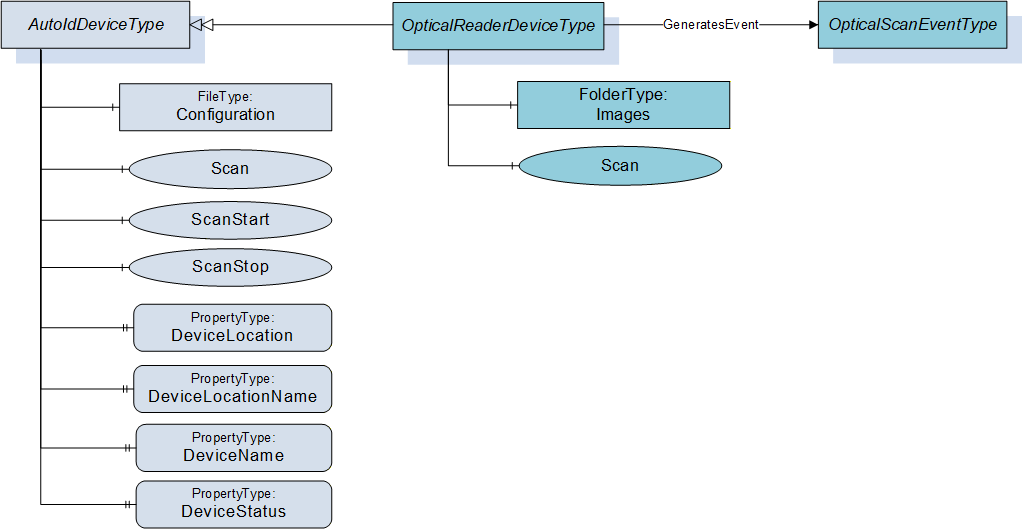
Figure 8 shows an overview for the OpticalReaderDeviceType with its Methods and related ObjectType. It is formally defined in Table 11.
6.3.2 ObjectType definition
The OpticalReaderDeviceType is formally defined in Table 11.
| Attribute | Value | ||||
| BrowseName | OpticalReaderDeviceType | ||||
| IsAbstract | False | ||||
| References | Node Class | BrowseName | DataType | TypeDefinition | Modelling Rule |
|---|---|---|---|---|---|
| Subtype of AutoIdDeviceType defined in 6.1. | |||||
| HasComponent | Object | Images | FolderType | Optional | |
| HasComponent | Method | Scan | Optional | ||
| GeneratesEvent | ObjectType | OpticalScanEventType | Defined in 7.4. | ||
The OpticalReaderDeviceType ObjectType is a concrete type and can be used directly.
| Source Path | References | NodeClass | BrowseName | DataType TypeDefinition | Others |
| RuntimeParameters | HasComponent | Variable | TemplateName | String BaseDataVariableType | O |
| RuntimeParameters | HasComponent | Variable | MatchCode | String BaseDataVariableType | O |
| Images | Organizes | Object | <ImageName> | 0:FileType | OP |
6.3.3 ObjectType Description
6.3.3.1 Object RuntimeParameters
This FunctionalGroup is inherited from the AutoIdDeviceType and described in 6.1. Predefined runtime parameters for the OpticalReaderDeviceType are defined in Table 12.
The parameters TemplateName and MatchCode are described in 6.2.3.1.
6.3.3.2 Object Images
For quality and testing purposes, the actual image taken by the optical reader can be accessed with this object. E.g. the picture might be checked by engineers if the optical decoding does not deliver the expected results.
The Images Object when available shall contain the list of FileType Objects (see Table 12) with the images taken by the optical reader.
The MIME type of an image is provided through the MimeType Property of the FileType.
6.3.3.3 Method Scan
This method starts the scan process of the optical reader device synchronous and returns the scan results. It overwrites the Scan method of the AutoIdDeviceType defined in 6.1.3.4.
Signature
	Scan (
		[in]	ScanSettings				Settings
		[out]	OpticalScanResult []			Results
		[out]	AutoIdOperationStatusEnumeration	Status
		);
| Argument | Description |
| Settings | Configuration settings for the scan execution. The ScanSettings DataType is defined in 9.3.7. |
| Results | Results of the scan execution. The OpticalScanResult DataType is defined in 9.3.10. |
| Status | Returns the status of the scan operation. The AutoIdOperationStatusEnumeration DataType is defined in 9.2.1. |
Method Result Codes
| ResultCode | Description |
| Bad_InvalidState | There is already a scan active |
| Bad_InvalidArgument | The scan setting contained an invalid value like infinite duration. |
| Other OPC UA status codes defined for the Call Service in OPC 10000-4. |