
6 OPC UA ObjectTypes
6.1 AutoIdDeviceType
6.1.1 General
This OPC UA ObjectType represents an AutoID Device. It defines all methods and properties required for any kind of AutoID Device in general, e.g. methods for controlling the scan operation or the mechanism to load a configuration file to the reader. However, the object is an abstract definition in terms of the actual AutoID technology, i.e. there are no properties or methods which rely on specific features or technologies.
Figure 6 shows an overview for the AutoIdDeviceType with its Properties and the base type DeviceType. It is formally defined in Table 7.
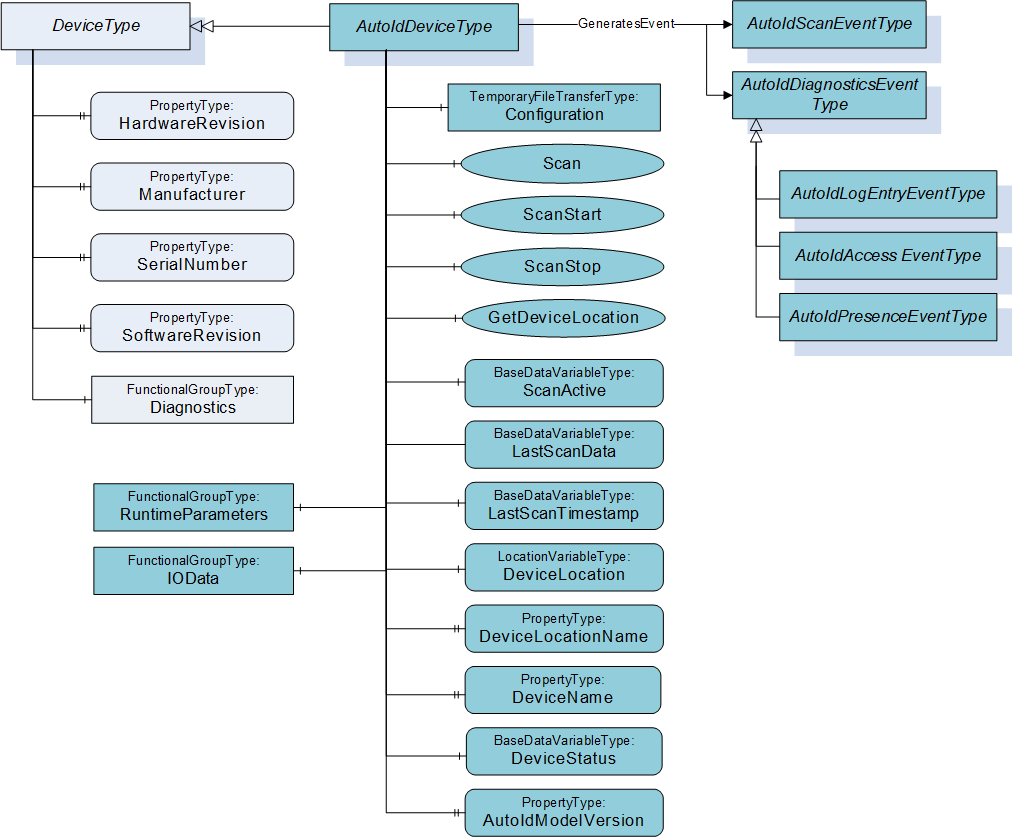
There are several options to start the scanning of AutoID Identifiers like transponders or codes. The access to the different options requires that the OPC UA Client and the user are authorized to access the requested information.
Option 1: The reader starts the scanning when the Client calls the Scan Method. The operation stops according to the termination conditions specified in the Settings parameter of the Method. The scanned data will be the result of the method call. The Settings parameter has the DataType ScanSettings. The DataType is defined in 9.3.7. Only the OPC UA Client calling the Method receives the scanned data.
Option 2: The reader will throw Events at each time a transponder or code has been detected. The scan operation starts when the client calls the ScanStart Method. The operation stops according to the termination conditions specified in the Settings parameter of the Method, or if the client calls the ScanStop Method. The scanned data is delivered through the Events. Every OPC UA Client subscribed for Events will receive the scanned data.
Option 3: The reader will throw Events at each time a transponder or code has been detected. The scan operation is controlled by the reader itself, e.g. by a trigger button. In this case, none of the scan Methods has to be called. The scanned data is delivered through the Events. Every OPC UA Client subscribed for Events will receive the scanned data.
Option 4: The reader starts the scanning when the Client writes True to the Variable ScanActive. The scan result is provided through the Variable LastScanData. The configuration is provided through the parameters in the FunctionalGroup ScanSettings. The simple option has several limitations and is only used with OPC Clients limited to Data Access functionality. Additional Scan result information can be provided via Variables like LastScanTimestamp, LastScanAntenna and LastScanRSSI, where the last two Variables are only offered by the RfidReaderDeviceType. OPC UA does not ensure a consistent delivery of a list of Variable Values. An OPC UA Server shall set all Variable SourceTimestamps and the value of the LastScanTimestamp Variable with a consistent value if the Variables Values are updated. An OPC UA Client must ensure that it has a constent set of Values. The Client can use the DataChangeFilter STATUS_VALUE_TIMESTAMP_2 to receive updates for all Variables to verify if all necessary information is available or a Client can subscribe only for one Variable like LastScanData and then read the related Variables including a verification of the SourceTimestamp.
Depending on the AutoID Device capabilities, the Scan, ScanStart and ScanStop Methods are optional. If none of these methods are implemented, option 3 or 4 has to be supported. See also 10.1 for the definition of the different AutoID Device Profiles.
6.1.2 ObjectType definition
The AutoIdDeviceType is formally defined in Table 7.
| Attribute | Value | ||||
| BrowseName | AutoIdDeviceType | ||||
| IsAbstract | True | ||||
| References | Node Class | BrowseName | DataType | TypeDefinition | Modelling Rule |
|---|---|---|---|---|---|
| Subtype of DeviceType defined in OPC 10000-100. | |||||
| HasComponent | Object | RuntimeParameters | FunctionalGroupType | Optional | |
| HasComponent | Object | IOData | FunctionalGroupType | Optional | |
| HasComponent | Object | Diagnostics | FunctionalGroupType | Optional | |
| HasComponent | Method | Scan | Optional | ||
| HasComponent | Method | ScanStart | Optional | ||
| HasComponent | Method | ScanStop | Optional | ||
| HasComponent | Method | GetDeviceLocation | Optional | ||
| HasComponent | Variable | ScanActive | Boolean | BaseDataVariableType | Optional |
| HasComponent | Variable | LastScanData | BaseDataType | BaseDataVariableType | Optional |
| HasComponent | Variable | LastScanTimestamp | UtcTime | BaseDataVariableType | Optional |
| HasProperty | Variable | DeviceInfo | String | PropertyType | Optional |
| HasComponent | Variable | DeviceLocation | Location | LocationVariableType | Optional |
| HasProperty | Variable | DeviceLocationName | String | PropertyType | Optional |
| HasProperty | Variable | DeviceName | String | PropertyType | Mandatory |
| HasComponent | Variable | DeviceStatus | DeviceStatusEnumeration | BaseDataVariableType | Mandatory |
| HasProperty | Variable | AutoIdModelVersion | String | PropertyType | Mandatory |
| GeneratesEvent | ObjectType | AutoIdScanEventType | Defined in 7.2. | ||
| GeneratesEvent | ObjectType | AutoIdLogEntryEventType | Defined in 7.9. | ||
| GeneratesEvent | ObjectType | AutoIdAccessEventType | Defined in 7.10. | ||
| GeneratesEvent | ObjectType | AutoIdPresenceEventType | Defined in 7.12. | ||
The AutoIdDeviceType ObjectType is an abstract type and cannot be used directly.
| Source Path | References | NodeClass | BrowseName | DataType TypeDefinition | Others | ||
| RuntimeParameters | HasComponent | Variable | CodeTypes | UInt32[] MultiStateDiscreteType | O | ||
| RuntimeParameters | HasComponent | Object | ScanSettings | FunctionalGroupType | O | ||
| HasComponent | Variable | Duration | Duration BaseDataVariableType | O | ||
| HasComponent | Variable | Cycles | Int32 BaseDataVariableType | O | ||
| HasComponent | Variable | DataAvailable | Boolean BaseDataVariableType | O | ||
| HasComponent | Variable | CodeType | CodeTypeDataType BaseDataVariableType | O | ||
| Diagnostics | HasComponent | Object | Logbook | FunctionalGroupType | O | ||
| Diagnostics | HasComponent | Object | LastAccess | FunctionalGroupType | O | ||
| Diagnostics | HasComponent | Variable | Presence | UInt16 BaseDataVariableType | O | ||
| HasComponent | Variable | LogColumns | String BaseDataVariableType | O | ||
| HasComponent | Variable | LastLogEntry | String BaseDataVariableType | O | ||
| HasComponent | Variable | Client | String BaseDataVariableType | O | ||
| HasComponent | Variable | Command | String BaseDataVariableType | O | ||
| HasComponent | Variable | Identifier | BaseDataType BaseDataVariableType | O | ||
| HasComponent | Variable | Timestamp | UtcTime BaseDataVariableType | O | ||
6.1.3 ObjectType Description
6.1.3.1 Object RuntimeParameters
This FunctionalGroup is used to organize runtime configuration parameters and Methods. All standard or vendor specific runtime parameters of AutoID Devices shall be exposed below this FunctionalGroup. FunctionalGroups can be nested. The runtime parameters may be also exposed in other parts of the AutoID Device OPC UA Server Address Space.
The FunctionalGroupType is defined in OPC 10000-100.
Predefined parameters for this FunctionalGroup are defined in Table 8 and described below.
The parameter CodeTypes allows the user to determine the supported and to select the configured code types. It is used to expose the list of supported code types.
The Value of the Variable contains the currently selected types as a number. The assigned code type Strings are defined in 9.1.3.
CodeTypes can contain the predefined values or vendor specific values.
The ScanSettings FunctionalGroup shall be provided if the ScanActive Variable is supported for the control of the scan behaviour. It contains the following parameters (defined in Table 8):
Parameter Duration specifies the duration of the scan operation in milliseconds. The value 0 is infinite. It is one of the termination conditions for the scan operation. The termination conditions are related to each other. If one of the conditions is fulfilled, the scan operation is stopped.
Parameter Cycles specifies the duration of the scan operation in 'number of scan cycles'. The value 0 is infinite. It is one of the termination conditions for the scan operation. The termination conditions are related to each other. If one of the conditions is fulfilled, the scan operation is stopped.
If parameter DataAvailable is True, the scan operation is completed as soon as scan data is available. If DataAvailable is False, only the other termination conditions are used.
Parameter CodeType specifies the format of the LastScanData Variable Value as string. The CodeTypeDataType and the predefined format strings are defined in 9.1.3.
6.1.3.2 Object IOData
This FunctionalGroup is used to organize IO data from sensors and actuators connected to the AutoID Device. All vendor or configuration specific IO data of AutoID Devices shall be exposed below this FunctionalGroup. FunctionalGroups can be nested. The IO data may also be exposed in other parts of the AutoID Device OPC UA Server Address Space.
An IO data point is represented by an OPC UA Variable Value. OPC UA Clients can read and write Variable Values depending on the AccessLevel of the Variable. Values can also be monitored for changes.
The FunctionalGroupType is defined in OPC 10000-100.
6.1.3.3 Object Diagnostics
This FunctionalGroup is used to organize diagnostic data from the AutoID Device. All diagnostics data of AutoID Devices shall be exposed below this FunctionalGroup. FunctionalGroups can be nested. The diagnostics data may also be exposed in other parts of the AutoID Device OPC UA Server Address Space.
A diagnostics point is represented by an OPC UA Variable Value. OPC UA Clients can read the Variable Values. Values can also be monitored for changes.
The FunctionalGroupType is defined in OPC 10000-100.
Predefined parameters for this FunctionalGroup are defined in Table 8 and described below.
Presence identifies if there currently is seen an AutoID Identifier (e.g. a code or a transponder) by the device. If supported by a device, it may show the concrete number of AutoID Identifiers.
The Logbook FunctionalGroup shall be provided if Logging values are supported for diagnostic purposes. Its predefined parameters are defined in Table 8 and described in the following list:
Parameter LogColumns specifies the column headings of the Logbook.
Parameter LastLogEntry specifies the last entry of the Logbook.
The LastAccess FunctionalGroup shall be provided if values for the last AutoID Identifier access are supported for diagnostic purposes. Its predefined parameters are described in the following list:
Parameter Client specifies the client application (interface) which was the originator of the AutoID Identifier access.
Parameter Command specifies executed command, including the Scan command. Dependend on the kind of the client application, the names of the commands may vary. When the client application is an OPC UA Client, the names shall correspond to the command names used within this specification, e.g. "ReadTag" for the execution of the ReadTag command.
Parameter Identifier specifies the AutoID Identifier which was accessed by the command. The DataType can be one of the DataTypes defined in the ScanData Union defined in 9.4.2. Due to the use case for limited OPC UA Clients, the DataType is normally String or ByteString.
Parameter Timestamp specifies the point of time the AutoID identifier (e.g. a transponder) was accessed by the command.
The Last Access Variable Values belong together logically. OPC UA does not ensure a consistent delivery of a list of Variable Values. Thus, there are several limitations and the Last Access Variables should only used with OPC Clients limited to Data Access functionality. It is recommended that complex applications use the AutoIdAccessEvents or RfidAccessEvents.
An OPC UA Server shall set all Variable SourceTimestamps with a consistent value if the Variables Values are updated. An OPC UA Client must ensure that it has a constent set of Values. The Client can use the DataChangeFilter STATUS_VALUE_TIMESTAMP_2 to receive updates for all Variables to verify if all necessary information is available or a Client can subscribe only for one Variable like Timestamp and then read the related Variables including a verification of the SourceTimestamp.
6.1.3.4 Method Scan
This method starts the scan process of the AutoID Device synchronous and returns the scan results.
The duration of the scan process is defined by the termination conditions in the Settings parameter. A Client shall not set all parameters to infinite for the Scan Method. The values for infinite are defined in the ScanSettings DataType definition in 9.3.7. An additional setting to consider is the TimeoutHint used for the Call Service.
Signature
	Scan (
		[in]	ScanSettings				Settings
		[out]	ScanResult []				Results
		[out]	AutoIdOperationStatusEnumeration	Status
		);
| Argument | Description |
| Settings | Configuration settings for the scan execution. The ScanSettings DataType is defined in 9.3.7. |
| Results | Results of the scan execution. The ScanResult DataType is defined in 9.3.8. |
| Status | Returns the status of the scan operation. The AutoIdOperationStatusEnumeration DataType is defined in 9.2.1. |
Method Result Codes
| ResultCode | Description |
| Bad_InvalidState | There is already a scan active |
| Bad_InvalidArgument | The scan setting contained an invalid value like infinite duration. |
| Other OPC UA status codes defined for the Call Service in OPC 10000-4. |
6.1.3.5 Method ScanStart
This method starts the scan process of the AutoID Device asynchronous. The scan results are delivered through Events where the EventType is a subtype of the AutoIdScanEventType defined in 7.2. There is a subtype defined for each concrete AutoID Device types.
The scan process is stopped through the Method ScanStop or if one of the termination conditions in the Settings parameter is fulfilled.
In addition, the scanning stops if the Client closes the Session, or if a new configuration file is stored within the AutoID Device. There might be other conditions depending on technology or device manufacturer.
Signature
	ScanStart (
		[in]	ScanSettings				Settings
		[out]	AutoIdOperationStatusEnumeration	Status
		);
| Argument | Description |
| Settings | Configuration settings for the scan execution. The ScanSettings DataType is defined in 9.3.7. |
| Status | Returns the status of the scan start operation. The AutoIdOperationStatusEnumeration DataType is defined in 9.2.1. |
Method Result Codes
| ResultCode | Description |
| Bad_InvalidState | There is already a scan active |
| Other OPC UA status codes defined for the Call Service in OPC 10000-4. |
6.1.3.6 Method ScanStop
This method stops an active scan process of the AutoID Device.
Signature
ScanStop ( );Method Result Codes
| ResultCode | Description |
| Bad_InvalidState | There is no scan active. |
6.1.3.7 Method GetDeviceLocation
This method returns the location of the AutoID Device.
Signature
	GetDeviceLocation (
		[in]	LocationTypeEnumeration	LocationType
		[out]	Location				Location
		);
| Argument | Description |
| LocationType | The type of location information to return. The LocationTypeEnumeration DataType is defined in 9.2.3. |
| Location | The location of the AutoID Device. The Location DataType is defined in 9.4.1. |
Method Result Codes
| ResultCode | Description |
| Standard OPC UA status codes defined for the Call Service in OPC 10000-4. |
6.1.3.8 Variable ScanActive
This OPC UA Variable allows simple applications to trigger the scan process. Simple appications involve OPC UA Clients that are limited to Data Access functionality.
The scan is triggered by writing True to the Variable Value. The behaviour of the scan is defined by the parameters in the ScanSettings FunctionalGroup defined in 9.3.7. The Value of the Variable is changed back to False by the Server if the scan is stopped according to the ScanSettings. The Client can stop the scan by writing False to the Variable Value.
The write permission can be limited to one Client. OPC 10000-3 and OPC 10000-5 define capabilities to enforce this limit with Roles and RolePermissions. Roles can be limited to a single OPC UA Application.
The scan result is provided through the Variable LastScanData. Further restrictions for this simple mechanism are described for the Variable LastScanData.
6.1.3.9 Variable LastScanData
This OPC UA Variable represents the last scanned AutoID Identifier. The DataType can be one of the DataTypes defined in the ScanData Union defined in 9.4.2. Due to the use case for limited OPC UA Clients, the DataType is normally String or ByteString.
The Variable can be provided for simple applications where OPC UA Clients are limited to Data Access functionality. Such OPC UA Clients are typically limited to built-in DataTypes like String or ByteString too. The use of this Variable implies the following restrictions.
Only one AutoID Identifier can be delivered for a scan.
The frequency of scans is limited to the sampling interval set by the OPC UA Client.
The delivery of scan results depends on the MonitoredItem settings or Read behaviour of the OPC UA Client.
It is recommended that complex applications use scan Methods and Events.
6.1.3.10 Variable LastScanTimestamp
This OPC UA Variable of DataType UtcTime belongs to the Variable LastScanData and represents the point of time the last AutoID Identifier was scanned. The value of this Variable shall be equal to the SourceTimestamp of the Variable LastScanData.
The Variable can be provided for simple applications where OPC UA Clients are limited to Data Access functionality. Such OPC UA Clients are typically limited to built-in DataTypes like UtcTime. The use of this Variable implies the following restrictions.
Only one AutoID Identifier can be delivered for a scan.
The frequency of scans is limited to the sampling interval set by the OPC UA Client.
The delivery of scan results depends on the MonitoredItem settings or Read behaviour of the OPC UA Client.
It is recommended that complex applications use scan Methods and Events.
6.1.3.11 Variable DeviceInfo
This OPC UA Property of DataType String represents an AutoID Device additional information, which can be used freely for device management purposes.
6.1.3.12 Variable DeviceLocation
This OPC UA Variable of DataType Location represents the AutoID Device location as Union of different coordinate systems and the related units. The DataType Location is defined in 9.4.1. The VariableType LocationVariableType is defined in 8.1.
The variable can be set during commissioning for fixed-mounted readers or can be updated automatically for mobile readers. The aim is to give the actual position where a specific scan event has been created.
6.1.3.13 Variable DeviceLocationName
This OPC UA Property of DataType String represents a user defined name of the AutoID Device location.
This variable can be used to assign a real name to the AutoID Device, e.g. "Gate 21". It allows a device-independent event description in higher IT levels.
6.1.3.14 Variable DeviceName
This OPC UA Property of DataType String represents the AutoID Device name, which can be used freely for device management purposes.
6.1.3.15 Variable DeviceStatus
This OPC UA Property of DataType DeviceStatusEnumeration represents the AutoID Device status. The DeviceStatusEnumeration is defined in 9.2.2.
6.1.3.16 Variable AutoIdModelVersion
This OPC UA Property of DataType String represents the AutoID Information Model version. The version string for this specification version is "1.00".
6.2 OcrReaderDeviceType
6.2.1 General
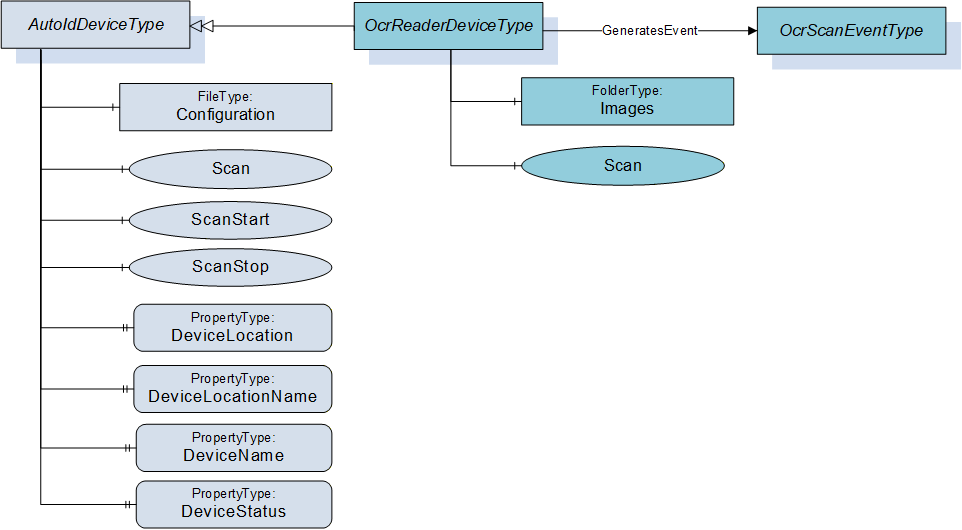
This OPC UA ObjectType represents an OCR reader device. It defines additional methods and properties required for managing OCR readers or to get additional information on the OCR scan events.
Figure 7 shows an overview for the OcrReaderDeviceType with its Object, Methods, Properties and related ObjectType. It is formally defined in Table 9.
6.2.2 ObjectType definition
The OcrReaderDeviceType is formally defined in Table 9.
| Attribute | Value | ||||
| BrowseName | OcrReaderDeviceType | ||||
| IsAbstract | False | ||||
| References | Node Class | BrowseName | DataType | TypeDefinition | Modelling Rule |
|---|---|---|---|---|---|
| Subtype of AutoIdDeviceType defined in 6.1. | |||||
| HasComponent | Object | Images | FolderType | Optional | |
| HasComponent | Method | Scan | Optional | ||
| GeneratesEvent | ObjectType | OcrScanEventType | Defined in 7.3. | ||
The OcrReaderDeviceType ObjectType is a concrete type and can be used directly.
| Source Path | References | NodeClass | BrowseName | DataType TypeDefinition | Others |
| RuntimeParameters | HasComponent | Variable | TemplateName | String BaseDataVariableType | O |
| RuntimeParameters | HasComponent | Variable | MatchCode | String BaseDataVariableType | O |
| Images | Organizes | Object | <ImageName> | 0:FileType | OP |
6.2.3 ObjectType Description
6.2.3.1 Object RuntimeParameters
This FunctionalGroup is inherited from the AutoIdDeviceType and described in 6.1. Predefined runtime parameters for for this FunctionalGroup are defined in Table 10 and described below.
Parameter TemplateName is the activate template which defines a specific identification task. The templates have to be defined during configuration.
Parameter MatchCode defines the target value for 2D and OCR decoding.
6.2.3.2 Object Images
For quality and testing purposes, the actual image taken by the OCR reader can be accessed with this object. E.g. the picture might be checked by engineers if the OCR decoding does not deliver the expected results.
The Images Object when available shall contain the list of FileType Objects (see Table 10) with the images taken by the OCR reader.
The MIME type of an image is provided through the MimeType Property of the FileType.
6.2.3.3 Method Scan
This method starts the scan process of the OCR reader device syncronous and returns the scan results. It overwrites the Scan method of the AutoIdDeviceType defined in 6.1.3.4.
Signature
	Scan (
		[in]	ScanSettings				Settings
		[out]	OcrScanResult []				Results
		[out]	AutoIdOperationStatusEnumeration	Status
		);
| Argument | Description |
| Settings | Configuration settings for the scan execution. The ScanSettings DataType is defined in 9.3.7. |
| Results | Results of the scan execution. The OcrScanResult DataType is defined in 9.3.9. |
| Status | Returns the status of the scan operation. The AutoIdOperationStatusEnumeration DataType is defined in 9.2.1. |
Method Result Codes
| ResultCode | Description |
| Bad_InvalidState | There is already a scan active |
| Bad_InvalidArgument | The scan setting contained an invalid value like infinite duration. |
| Other OPC UA status codes defined for the Call Service in OPC 10000-4. |
6.3 OpticalReaderDeviceType
6.3.1 General
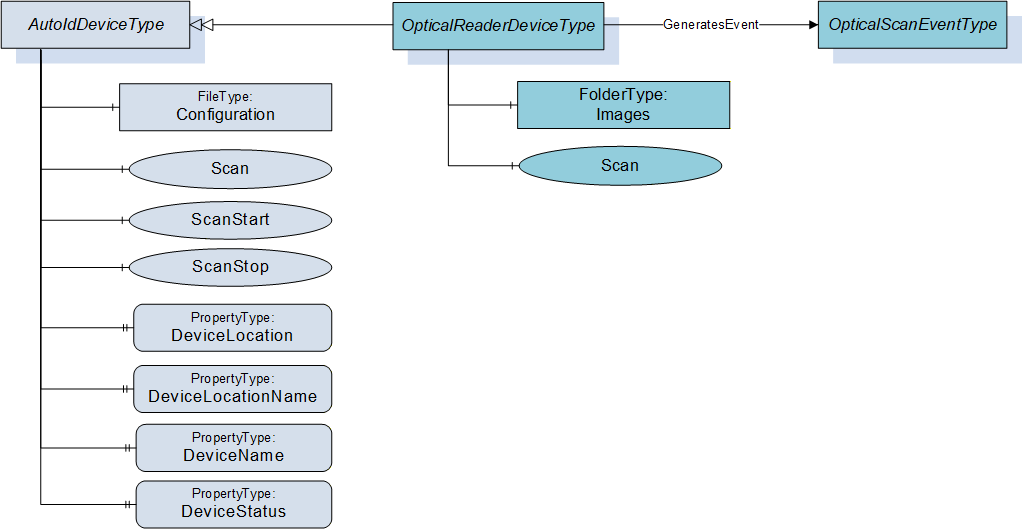
This OPC UA ObjectType represents an optical reader device (1D or 2D codes). It defines additional methods and properties required for managing optical code readers or to get additional information on their scan events.
Figure 8 shows an overview for the OpticalReaderDeviceType with its Methods and related ObjectType. It is formally defined in Table 11.
6.3.2 ObjectType definition
The OpticalReaderDeviceType is formally defined in Table 11.
| Attribute | Value | ||||
| BrowseName | OpticalReaderDeviceType | ||||
| IsAbstract | False | ||||
| References | Node Class | BrowseName | DataType | TypeDefinition | Modelling Rule |
|---|---|---|---|---|---|
| Subtype of AutoIdDeviceType defined in 6.1. | |||||
| HasComponent | Object | Images | FolderType | Optional | |
| HasComponent | Method | Scan | Optional | ||
| GeneratesEvent | ObjectType | OpticalScanEventType | Defined in 7.4. | ||
The OpticalReaderDeviceType ObjectType is a concrete type and can be used directly.
| Source Path | References | NodeClass | BrowseName | DataType TypeDefinition | Others |
| RuntimeParameters | HasComponent | Variable | TemplateName | String BaseDataVariableType | O |
| RuntimeParameters | HasComponent | Variable | MatchCode | String BaseDataVariableType | O |
| Images | Organizes | Object | <ImageName> | 0:FileType | OP |
6.3.3 ObjectType Description
6.3.3.1 Object RuntimeParameters
This FunctionalGroup is inherited from the AutoIdDeviceType and described in 6.1. Predefined runtime parameters for the OpticalReaderDeviceType are defined in Table 12.
The parameters TemplateName and MatchCode are described in 6.2.3.1.
6.3.3.2 Object Images
For quality and testing purposes, the actual image taken by the optical reader can be accessed with this object. E.g. the picture might be checked by engineers if the optical decoding does not deliver the expected results.
The Images Object when available shall contain the list of FileType Objects (see Table 12) with the images taken by the optical reader.
The MIME type of an image is provided through the MimeType Property of the FileType.
6.3.3.3 Method Scan
This method starts the scan process of the optical reader device synchronous and returns the scan results. It overwrites the Scan method of the AutoIdDeviceType defined in 6.1.3.4.
Signature
	Scan (
		[in]	ScanSettings				Settings
		[out]	OpticalScanResult []			Results
		[out]	AutoIdOperationStatusEnumeration	Status
		);
| Argument | Description |
| Settings | Configuration settings for the scan execution. The ScanSettings DataType is defined in 9.3.7. |
| Results | Results of the scan execution. The OpticalScanResult DataType is defined in 9.3.10. |
| Status | Returns the status of the scan operation. The AutoIdOperationStatusEnumeration DataType is defined in 9.2.1. |
Method Result Codes
| ResultCode | Description |
| Bad_InvalidState | There is already a scan active |
| Bad_InvalidArgument | The scan setting contained an invalid value like infinite duration. |
| Other OPC UA status codes defined for the Call Service in OPC 10000-4. |
6.4 OpticalVerifierDevice
6.4.1 General
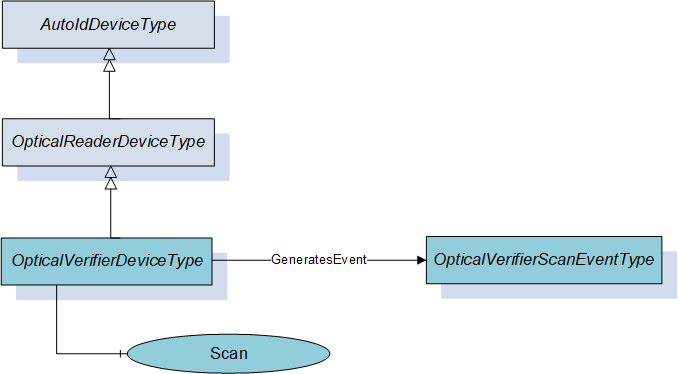
This OPC UA ObjectType represents an optical verifier device (1D or 2D codes). It defines additional methods and properties required for managing optical code verifiers or to get additional information on their scan events.
Figure 9 shows an overview for the OpticalVerifierDeviceType with its Methods and related ObjectType. It is formally defined in Table 13.
6.4.2 ObjectType definition
The OpticalVerifierDeviceType is formally defined in Table 13.
| Attribute | Value | ||||
| BrowseName | OpticalVerifierDeviceType | ||||
| IsAbstract | False | ||||
| References | Node Class | BrowseName | DataType | TypeDefinition | Modelling Rule |
|---|---|---|---|---|---|
| Subtype of OpticalReaderDeviceType defined in 6.3. | |||||
| HasComponent | Method | Scan | Optional | ||
| GeneratesEvent | ObjectType | OpticalVerifierScanEventType | Defined in 7.5. | ||
The OpticalVerifierDeviceType ObjectType is a concrete type and can be used directly.
6.4.3 ObjectType Description
6.4.3.1 Method Scan
This method starts the scan process of the optical verifier device synchronous and returns the scan results. It overwrites the Scan method of the OpticalReaderDeviceType defined in 0.
Signature
	Scan (
		[in]	ScanSettings				Settings
		[out]	OpticalVerifierScanResult []		Results
		[out]	AutoIdOperationStatusEnumeration	Status
		);
| Argument | Description |
| Settings | Configuration settings for the scan execution. The ScanSettings DataType is defined in 9.3.7. |
| Results | Results of the scan execution. The OpticalVerifierScanResult DataType is defined in 9.3.11. |
| Status | Returns the status of the scan operation. The AutoIdOperationStatusEnumeration DataType is defined in 9.2.1. |
Method Result Codes
| ResultCode | Description |
| Bad_InvalidState | There is already a scan active |
| Bad_InvalidArgument | The scan setting contained an invalid value like infinite duration. |
| Other OPC UA status codes defined for the Call Service in OPC 10000-4. |
6.5 RfidReaderDeviceType
6.5.1 General
This OPC UA ObjectType represents an RFID reader device including NFC reader devices. It defines additional methods and properties required for managing RFID readers or to get additional information on their scan events. The object provides also functions for accessing the user memory, writing to a tag, and more. There is no dependency to the actual RFID technology (e.g. HF, UHF).
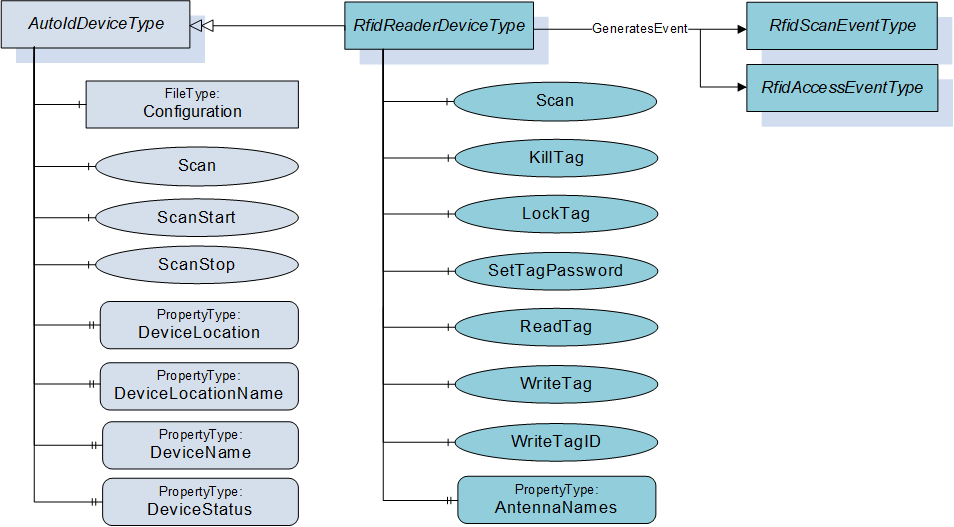
Figure 10 shows an overview for the RfidReaderDeviceType with its Methods, Property and related ObjectType. It is formally defined in Table 14.
6.5.2 ObjectType definition
The RfidReaderDeviceType is formally defined in Table 14.
| Attribute | Value | ||||
| BrowseName | RfidReaderDeviceType | ||||
| IsAbstract | False | ||||
| References | Node Class | BrowseName | DataType | TypeDefinition | Modelling Rule |
|---|---|---|---|---|---|
| Subtype of AutoIdDeviceType defined in 6.1. | |||||
| HasComponent | Method | Scan | Optional | ||
| HasComponent | Method | KillTag | Optional | ||
| HasComponent | Method | LockTag | Optional | ||
| HasComponent | Method | SetTagPassword | Optional | ||
| HasComponent | Method | ReadTag | Optional | ||
| HasComponent | Method | WriteTag | Optional | ||
| HasComponent | Method | WriteTagID | Optional | ||
| HasComponent | Variable | LastScanAntenna | Int32 | BaseDataVariableType | Optional |
| HasComponent | Variable | LastScanRSSI | Int32 | BaseDataVariableType | Optional |
| HasProperty | Variable | AntennaNames | AntennaNameIdPair [ ] | PropertyType | Optional |
| GeneratesEvent | ObjectType | RfidScanEventType | Defined in 7.6. | ||
| GeneratesEvent | ObjectType | RfidAccessEventType | Defined in 7.11. | Optional | |
The RfidReaderDeviceType ObjectType is a concrete type and can be used directly.
| Source Path | References | NodeClass | BrowseName | DataType TypeDefinition | Others | ||
| RuntimeParameters | HasComponent | Variable | CodeTypesRWData | UInt32[] MultiStateDiscreteType | O | ||
| RuntimeParameters | HasComponent | Variable | TagTypes | UInt32[] MultiStateDiscreteType | O | ||
| RuntimeParameters | HasComponent | Variable | RfPower | SByte BaseDataVariableType | O | ||
| RuntimeParameters | HasComponent | Variable | MinRssi | Int32 BaseDataVariableType | O | ||
| RuntimeParameters | HasComponent | Variable | EnableAntennas | UInt32 BaseDataVariableType | O | ||
| HasComponent | Variable | RWData | BaseDataType BaseDataVariableType | O | ||
| HasComponent | Variable | Antenna | Int32 BaseDataVariableType | O | ||
| HasComponent | Variable | CurrentPowerLevel | Int32 BaseDataVariableType | O | ||
| HasComponent | Variable | PC | UInt16 BaseDataVariableType | O | ||
| HasComponent | Variable | Polarization | String BaseDataVariableType | O | ||
| HasComponent | Variable | Strength | Int32 BaseDataVariableType | O | ||
6.5.3 ObjectType Description
6.5.3.1 Object RuntimeParameters
This FunctionalGroup is inherited from the AutoIdDeviceType and described in 6.1. Predefined runtime parameters for for this FunctionalGroup are defined in Table 15 and described below.
Parameter CodeTypesRWData allows the user to determine the supported code types and to select the configured CodeTypes for the diagnostics value RWData (defined in ). This parameter is used to expose the list of supported CodeTypes. This list can contain the predefined values or vendor specific values. The Value of the Variable contains the currently selected types. The code type Strings are defined in 9.1.3.
Parameter TagTypes allows the user to determine the expected tags in a multi-type environment (e.g. ISO 14443 or ISO 15693). This parameter is used to expose the list of supported tag types. This list can contain the predefined values or vendor specific values. The Value of the Variable contains the currently selected types. The following Strings are defined by this specification.
ISO 14443
ISO 15693
ISO 18000-2
ISO 18000-3 Mode1
ISO 18000-3 Mode2
ISO 18000-3 Mode3
ISO 18000-4
ISO 18000-61
ISO 18000-62
ISO 18000-63
ISO 18000-64
EPC Class1 Gen2 V1
EPC Class1 Gen2 V2
Parameter RfPower is used to adjust radio transmission power, per antenna.
Parameter MinRssi is the lowest acceptable RSSI value (see also Strength field in RFIDSighting).
Parameter EnableAntennas determines the antennas that shall be used by the RfidDevice for its operation. The value is a binary selection of the antennas. Each bit represents one antenna, max. 32 antennas can be addressed.
Bit0 corresponds to antenna number 1, Bit1 corresponds to antenna number 2, …
A Bit value of 1 means an activated antenna, a Bit value of 0 a deactivated antenna. E.g.: The value BIN 1101 = DEC 13 enables the antennas 1+3+4
A total value of 0 of EnableAntennas does not have any effect. The general device configuration can just be limited, not extended by EnableAntennas. E.g. if a four-port reader has three antennas activated according to the general configuration, it is not possible to activate the antenna four via EnableAntennas.
6.5.3.2 Object Diagnostics
The Diagnostics FunctionalGroup and its component, the LastAccess FunctionalGroup, are described in clause 6.1.3.3.
Predefined parameters that are specific for the LastAccess FunctionalGroup in the RfidReaderDeviceType are defined in Table 15 and described in the following list:
Parameter RWData specifies the user data which was written to / was read from the Rfid Transponder by the command. The DataType can be one of the DataTypes defined in the ScanData Union defined in 9.4.2. Due to the use case for limited OPC UA Clients, the DataType is normally String or ByteString.
Parameter Antenna specifies the antenna with which the transponder was accessed by the command.
Parameter CurrentPowerLevel specifies the power level with which the transponder was accessed by the command.
Parameter PC specifies the Protocol Control Word of the transponder accessed by the command.
Parameter Polarization specifies the Polarization with which the transponder was accessed by the command.
Parameter Strength specifies the Rssi value with which the transponder was accessed by the command.
6.5.3.3 Method Scan
This method starts the scan process of the RFID reader device synchronous and returns the scan results. It overwrites the Scan method of the AutoIdDeviceType defined in 6.1.3.4.
Signature
	Scan (
		[in]	ScanSettings				Settings
		[out]	RfidScanResult []			Results
		[out]	AutoIdOperationStatusEnumeration	Status
		);
| Argument | Description |
| Settings | Configuration settings for the scan execution. The ScanSettings DataType is defined in 9.3.7. |
| Result | Results of the scan execution. The RfidScanResult DataType is defined in 9.3.12. |
| Status | Returns the status of the scan operation. The AutoIdOperationStatusEnumeration DataType is defined in 9.2.1. |
Method Result Codes
| ResultCode | Description |
| Bad_MethodInvalid | The device does not support this function |
| Bad_InvalidState | There is already a scan active or this command is not available or not allowed e.g. due to special configuration |
| Bad_InvalidArgument | The scan setting contained an invalid value like infinite duration. |
| Other OPC UA status codes defined for the Call Service in OPC 10000-4. | |
6.5.3.4 Method KillTag
This method will process a kill command e.g. like specified in GS1 EPCglobal™, ISO/IEC 18000-63 and ISO/IEC 18000-3. The related standard depends on the RFID technology which is in use. The kill command allows an interrogator to permanently disable a transponder.
See Annex B for technology specific mappings.
Signature
	KillTag (
		[in]	ScanData					Identifier
		[in]	CodeTypeDataType				CodeType
		[in]	ByteString					KillPassword
		[out]	AutoIdOperationStatusEnumeration	Status
		);
| Argument | Description |
| Identifier | AutoID Identifier according to the device configuration as returned as part of a ScanResult in a scan event or scan method. The ScanData DataType is defined in 9.4.2. If the ScanData is used as returned in the ScanResult, the structure may contain information that must be ignored by the AutoID Device. An example is the ScanDataEpc where only the parameter UId is relevant for this Method. If the Identifier is provided from a different source than the ScanResult, a ScanData with a ByteString can be used to pass a UId where the CodeType is set to 'UId'. |
| CodeType | Defines the format of the ScanData in the Identifier as string. The String DataType CodeTypeDataType and the predefined format strings are defined in 9.1.3. |
| KillPassword | Transponder password to get access to the kill operation of this transponder |
| Status | Returns the result of the kill operation. The AutoIdOperationStatusEnumeration DataType is defined in 9.2.1. |
Method Result Codes
| ResultCode | Description |
| Bad_MethodInvalid | The device does not support this function |
| Bad_InvalidState | This command is not available or not allowed e.g. due to special configuration |
6.5.3.5 Method LockTag
This method is used to protect specific areas of the transponder memory against read and/or write access. If a user wants to access such an area, an access password is required.
See Annex B for technology specific mappings.
Signature
	LockTag (
		[in]	ScanData					Identifier
		[in]	CodeTypeDataType				CodeType
		[in]	ByteString					Password
		[in]	RfidLockRegionEnumeration		Region
		[in]	RfidLockOperationEnumeration		Lock
		[in]	UInt32					Offset
		[in]	UInt32					Length
		[out]	AutoIdOperationStatusEnumeration	Status
		);
| Argument | Description |
| Identifier | AutoID Identifier according to the device configuration as returned as part of a ScanResult in a scan event or scan method. The ScanData DataType is defined in 9.4.2. If the ScanData is used as returned in the ScanResult, the structure may contain information that must be ignored by the AutoID Device. An example is the ScanDataEpc where only the parameter UId is relevant for this Method. If the Identifier is provided from a different source than the ScanResult, a ScanData with a ByteString can be used to pass a UId where the CodeType is set to 'UId'. |
| CodeType | Defines the format of the ScanData in the Identifier as string. The String DataType CodeTypeDataType and the predefined format strings are defined in 9.1.3. |
| Password | Transponder (access) password |
| Region | Bank of the memory area to be accessed The RfidLockRegionEnumeration DataType is defined in 9.2.5. |
| Lock | Specifies the lock action like write/read protection, permanently. The RfidLockOperationEnumeration DataType is defined in 9.2.4. |
| Offset | Start address of the memory area [byte counting] |
| Length | Length of the memory area [byte counting] |
| Status | Returns the result of the LOCK operation. The AutoIdOperationStatusEnumeration DataType is defined in 9.2.1. |
Method Result Codes
| ResultCode | Description |
| Bad_MethodInvalid | The device does not support this function |
| Bad_InvalidState | This command is not available or not allowed e.g. due to special configuration |
6.5.3.6 Method SetTagPassword
This method changes the password for a specific transponder.
The Method should only be called via a SecureChannel with encryption enabled.
See Annex B for technology specific mappings.
Signature
	SetTagPassword (
		[in]	ScanData					Identifier
		[in]	CodeTypeDataType				CodeType
		[in]	RfidPasswordTypeEnumeration		PasswordType
		[in]	ByteString					AccessPassword
		[in]	ByteString					NewPassword
		[out]	AutoIdOperationStatusEnumeration	Status
		);
| Argument | Description |
| Identifier | AutoID Identifier according to the device configuration as returned as part of a ScanResult in a scan event or scan method. The ScanData DataType is defined in 9.4.2. If the ScanData is used as returned in the ScanResult, the structure may contain information that must be ignored by the AutoID Device. An example is the ScanDataEpc where only the parameter UId is relevant for this Method. If the Identifier is provided from a different source than the ScanResult, a ScanData with a ByteString can be used to pass a UId where the CodeType is set to 'UId'. |
| CodeType | Defines the format of the ScanData in the Identifier as string. The String DataType CodeTypeDataType and the predefined format strings are defined in 9.1.3. |
| PasswordType | Defines the operations for which the password is valid The RfidPasswordTypeEnumeration DataType is defined in 9.2.6. |
| AccessPassword | The old password |
| NewPassword | Gives the new password to the transponder |
| Status | Returns the result of the TagPassword method. The AutoIdOperationStatusEnumeration DataType is defined in 9.2.1. |
Method Result Codes
| ResultCode | Description |
| Bad_MethodInvalid | The device does not support this function |
| Bad_InvalidState | This command is not available or not allowed e.g. due to special configuration |
6.5.3.7 Method ReadTag
This method reads a specified area from a tag memory.
One Method invocation reads one AutoID Identifier. The Call Service used to invoke the Method can take a list of Methods. Therefore a list of AutoID Identifiers can be read by passing in a list of Methods to the Call Service.
See Annex B for technology specific mappings.
Signature
	ReadTag (
		[in]	ScanData					Identifier
		[in]	CodeTypeDataType				CodeType
		[in]	UInt16					Region
		[in]	UInt32					Offset
		[in]	UInt32					Length
		[in]	ByteString					Password
		[out]	ByteString					ResultData
		[out]	AutoIdOperationStatusEnumeration	Status
		);
| Argument | Description |
| Identifier | AutoID Identifier according to the device configuration as returned as part of a ScanResult in a scan event or scan method. The ScanData DataType is defined in 9.4.2. If the ScanData is used as returned in the ScanResult, the structure may contain information that must be ignored by the AutoID Device. An example is the ScanDataEpc where only the parameter UId is relevant for this Method. If the Identifier is provided from a different source than the ScanResult, a ScanData with a ByteString can be used to pass a UId where the CodeType is set to 'UId'. |
| CodeType | Defines the format of the ScanData in the Identifier as string. The String DataType CodeTypeDataType and the predefined format strings are defined in 9.1.3. |
| Region | Region of the memory area to be accessed. If there is no bank available this value is set to 0. This is the bank for UHF (ISO/IEC 18000-63) or the bank (ISO/IEC 18000-3 Mode 3) or data bank (ISO/IEC 18000-3 Mode 1) for HF or memory area (ISO/IEC 18000-2) for LF. See Annex B for technology specific mappings. |
| Offset | Start address of the memory area [byte counting] |
| Length | Length of the memory area [byte counting] |
| Password | Password for read operation (if required) |
| ResultData | Returns the requested tag data |
| Status | Returns the status of the read operation. The AutoIdOperationStatusEnumeration DataType is defined in 9.2.1. |
Method Result Codes
| ResultCode | Description |
| Bad_MethodInvalid | The device does not support this function |
| Bad_InvalidState | This command is not available or not allowed e.g. due to special configuration |
6.5.3.8 Method WriteTag
This method writes data to a RFID tag.
See Annex B for technology specific mappings.
Signature
	WriteTag (
		[in]	ScanData					Identifier
		[in]	CodeTypeDataType				CodeType
		[in]	UInt16					Region
		[in]	UInt32					Offset
		[in]	ByteString					Data
		[in]	ByteString					Password
		[out]	AutoIdOperationStatusEnumeration	Status
		);
| Argument | Description |
| Identifier | AutoID Identifier according to the device configuration as returned as part of a ScanResult in a scan event or scan method. The ScanData DataType is defined in 9.4.2. If the ScanData is used as returned in the ScanResult, the structure may contain information that must be ignored by the AutoID Device. An example is the ScanDataEpc where only the parameter UId is relevant for this Method. If the Identifier is provided from a different source than the ScanResult, a ScanData with a ByteString can be used to pass a UId where the CodeType is set to 'UId'. |
| CodeType | Defines the format of the ScanData in the Identifier as string. The String DataType CodeTypeDataType and the predefined format strings are defined in 9.1.3. |
| Region | Region of the memory area to be accessed. If there is no bank available this value is set to 0. This is the bank for UHF (ISO/IEC 18000-63) or the bank (ISO/IEC 18000-3 Mode 3) or data bank (ISO/IEC 18000-3 Mode 1) for HF. |
| Offset | Start address of the memory area [byte counting] |
| Data | Data to be written |
| Password | Password for write operation (if required) |
| Status | Returns the status of the write operation. The AutoIdOperationStatusEnumeration DataType is defined in 9.2.1. |
Method Result Codes
| ResultCode | Description |
| Bad_MethodInvalid | The device does not support this function |
| Bad_InvalidState | This command is not available or not allowed e.g. due to special configuration |
6.5.3.9 Method WriteTagID
This method initializes an EPC-ID inclusive the PC of an ISO 18000-63 tag.
See Annex B for technology specific mappings.
Signature
	WriteTagID (
		[in]	ScanData					Identifier
		[in]	CodeTypeDataType				CodeType
		[in]	ByteString					NewUId
		[in]	Byte						AFI
		[in]	Boolean					Toggle
		[in]	ByteString					Password
		[out]	AutoIdOperationStatusEnumeration	Status
		);
| Argument | Description |
| Identifier | AutoID Identifier according to the device configuration as returned as part of a ScanResult in a scan event or scan method. The ScanData DataType is defined in 9.4.2. If the ScanData is used as returned in the ScanResult, the structure may contain information that must be ignored by the AutoID Device. An example is the ScanDataEpc where only the parameter UId is relevant for this Method. If the Identifier is provided from a different source than the ScanResult, a ScanData with a ByteString can be used to pass a UId where the CodeType is set to 'UId'. |
| CodeType | Defines the format of the ScanData in the Identifier as string. The String DataType CodeTypeDataType and the predefined format strings are defined in 9.1.3. |
| NewUId | AutoID Identifier according to ISO/IEC 18000-3 Mode 3, ISO/IEC 18000-63 and GS1 EPCglobal™. Depending on the length of this field, the UID length of the transponder will be adjusted. The byte length shall be an even number otherwise a Status OP_NOT_POSSIBLE_ERROR_6 shall be returned. |
| AFI | Application Family Identifier. According to ISO/IEC 18000-3 Mode 3, ISO/IEC 18000-63 and GS1 EPCglobal™. The default value is 0. |
| Toggle | Numbering system identifier toggle. According to ISO/IEC 18000-3 Mode 3, ISO/IEC 18000-63 and GS1 EPCglobal™. The default value is false. |
| Password | Password for write operation (if required) |
| Status | Returns the status of the write operation. The AutoIdOperationStatusEnumeration DataType is defined in 9.2.1. |
Method Result Codes
| ResultCode | Description |
| Bad_MethodInvalid | The device does not support this function |
| Bad_InvalidState | This command is not available or not allowed e.g. due to special configuration |
6.5.3.10 Variable AntennaNames
This OPC UA Property of DataType AntennaNameIdPair array represents the list of ID and name pairs for the antennas of the RFID reader device. The DataType AntennaNameIdPair is defined in 9.3.3. The Property can be set during commissioning.
6.5.3.11 Variable LastScanAntenna
This OPC UA Variable of DataType Int32 belongs to the Variable LastScanData and represents the ID of the antenna with which the last AutoID Identifier was scanned.
The Variable can be provided for simple applications where OPC UA Clients are limited to Data Access functionality. Such OPC UA Clients are typically limited to built-in DataTypes like UtcTime. The use of this Variable implies the following restrictions.
Only one AutoID Identifier can be delivered for a scan.
The frequency of scans is limited to the sampling interval set by the OPC UA Client.
The delivery of scan results depends on the MonitoredItem settings or Read behaviour of the OPC UA Client.
It is recommended that complex applications use scan Methods and Events.
6.5.3.12 Variable LastScanRSSI
This OPC UA Variable of DataType Int32 belongs to the Variable LastScanData and represents the RSSI Value with which the last AutoID Identifier was scanned.
The Variable can be provided for simple applications where OPC UA Clients are limited to Data Access functionality. Such OPC UA Clients are typically limited to built-in DataTypes like UtcTime. The use of this Variable implies the following restrictions.
Only one AutoID Identifier can be delivered for a scan.
The frequency of scans is limited to the sampling interval set by the OPC UA Client.
The delivery of scan results depends on the MonitoredItem settings or Read behaviour of the OPC UA Client.
It is recommended that complex applications use scan Methods and Events.
6.6 RtlsDeviceType
6.6.1 General
This OPC UA ObjectType represents an RTLS device. It defines additional methods and properties required for managing RTLS sensors or systems, and to retrieve information on located objects, either via a direct method call or returned by location events.
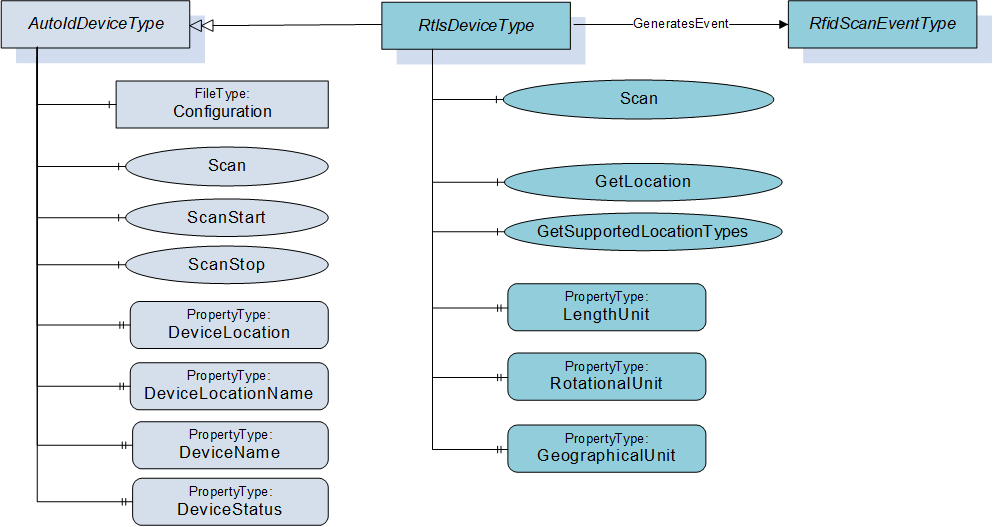
Figure 11 shows an overview for the RtlsDeviceType with its Methods, Property and related ObjectType. It is formally defined in Table 16.
6.6.2 ObjectType definition
The RtlsDeviceType is formally defined in Table 16.
| Attribute | Value | ||||
| BrowseName | RtlsDeviceType | ||||
| IsAbstract | False | ||||
| References | Node Class | BrowseName | DataType | TypeDefinition | Modelling Rule |
|---|---|---|---|---|---|
| Subtype of AutoIdDeviceType defined in 6.1. | |||||
| HasComponent | Method | Scan | Optional | ||
| HasComponent | Method | GetLocation | Optional | ||
| HasComponent | Method | GetUnits | Optional | ||
| HasComponent | Method | GetSupportedLocationTypes | Optional | ||
| HasProperty | Variable | LengthUnit | EUInformation | PropertyType | Mandatory |
| HasProperty | Variable | RotationalUnit | EUInformation | PropertyType | Mandatory |
| HasProperty | Variable | GeographicalUnit | EUInformation | PropertyType | Mandatory |
| HasProperty | Variable | SpeedUnit | EUInformation | PropertyType | Mandatory |
| GeneratesEvent | ObjectType | RtlsLocationEventType | Defined in 7.7. | ||
The RtlsDeviceType ObjectType is a concrete type and can be used directly.
6.6.3 ObjectType Description
6.6.3.1 Method Scan
This method executes the location acquisition process of the RTLS device or system. It overwrites the Scan method of the AutoIdDeviceType defined in 6.1.3.4.
Signature
	Scan (
		[in]	ScanSettings				Settings
		[out]	RtlsLocationResult []			Results
		[out]	AutoIdOperationStatusEnumeration	Status
		);
| Argument | Description |
| Settings | Configuration settings for the scan execution. The ScanSettings DataType is defined in 9.3.7. |
| Result | Results of the scan execution. The RtlsLocationResult DataType is defined in 9.3.15. |
| Status | Returns the status of the scan operation. The AutoIdOperationStatusEnumeration DataType is defined in 9.2.1. |
Method Result Codes
| ResultCode | Description |
| Bad_MethodInvalid | The device does not support this function |
| Bad_InvalidState | This command is not available or not allowed e.g. due to special configuration |
| Other OPC UA status codes defined for the Call Service in OPC 10000-4. |
6.6.3.2 Method GetLocation
This method queries the RTLS device or system synchronous and returns the location of an object. Depending on vendor-specific implementation, it may initiate a location or range acquisition and synchronously return a result, or the RTLS device may return the last known location of the object (the age of the last location acquisition will be apparent from the timestamp returned in the result).
Signature
	GetLocation (
		[in]	ScanData			Identifier
		[in]	CodeTypeDataType		CodeType
		[in]	LocationTypeEnum		LocationType
		[out]	RtlsLocationResult	Result
		);
| Argument | Description |
| Identifier | AutoID Identifier according to the device configuration as returned as part of a ScanResult in a scan event or scan method. The ScanData DataType is defined in 9.4.2. If the ScanData is used as returned in the ScanResult, the structure may contain information that must be ignored by the AutoID Device. An example is the ScanDataEpc where only the parameter UId is relevant for this Method. If the Identifier is provided from a different source than the ScanResult, a ScanData with a ByteString can be used to pass a UId where the CodeType is set to 'UId'. |
| CodeType | Defines the format of the ScanData in the Identifier as string. The String DataType CodeTypeDataType and the predefined format strings are defined in 9.1.3. |
| LocationType | The requestsd type of the location information returned in the scan results. The LocationTypeEnumeration DataType is defined in 9.2.3. |
| Result | Results of the method execution. The RtlsLocationResult DataType is defined in 9.3.15. |
Method Result Codes
| ResultCode | Description |
| Bad_MethodInvalid | The device does not support this function |
| Bad_InvalidState | This command is not available or not allowed e.g. due to special configuration |
6.6.3.3 Method GetSupportedLocationTypes
This method returns the RTLSLocationTypes (as defined in RTLSLocationTypeEnum and in section 8.3) the RTLS device or system supports. At least one Type must be returned. The first type that is returned (first position in the resulting array) is the default type that the RTLS device or system will use.
Signature
	GetSupportedLocationTypes (
		[out]	LocationTypeEnumeration[]	SupportedLocationTypes
		);
| Argument | Description |
| SupportedLocationTypes[] | Array of supported LocationTypeEnumeration values as defined in 9.2.3. At least one Type shall be returned. |
Method Result Codes
| ResultCode | Description |
| Bad_MethodInvalid | The device does not support this function |
| Bad_InvalidState | This command is not available or not allowed e.g. due to special configuration |