
7.2 CtrlResourceType ObjectType Definition
7.2.1 Overview
This ObjectType defines the representation of a Crtl Resources of a programmable Controller system in an OPC UA Address Space. It introduces Objects to group Configuration and Diagnostic capabilities, GlobalVars and Ctrl Programs executed under the control of Tasks. The CtrlResourceType is derived from the DeviceType defined in OPC 10000-100. Figure 16 shows the CtrlResourceType. It is formally defined in Table 11. The dark grey node in the figure is an example and is not part of the ObjectType definition.
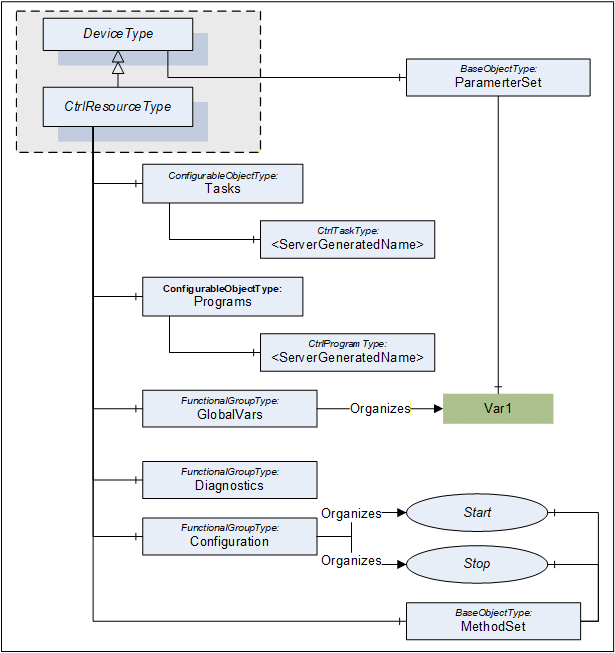
The Ctrl Resource ObjectType is formally defined in Table 11.
| Attribute | Value | ||||
| BrowseName | CtrlResourceType | ||||
| IsAbstract | False | ||||
| References | NodeClass | BrowseName | DataType | TypeDefinition | ModellingRule |
|---|---|---|---|---|---|
| Subtype of the DeviceType defined in OPC 10000-100, i.e. inheriting the InstanceDeclarations of that Node. | |||||
| HasComponent | Object | 2:MethodSet | BaseObjectType | Optional | |
| HasComponent | Object | Tasks | ConfigurableObjectType | Mandatory | |
| HasComponent | Object | Programs | ConfigurableObjectType | Mandatory | |
| HasComponent | Object | GlobalVars | FunctionalGroupType | Optional | |
| HasComponent | Object | Configuration | FunctionalGroupType | Optional | |
| HasComponent | Object | Status | FunctionalGroupType | Optional | |
The CtrlResourceType ObjectType is a concrete type and can be used directly. It is recommended to create subtypes for vendor or user specific resources.
A concrete Ctrl Resource type or instance may have ParameterSet, Parameters and FunctionalGroups as defined for the TopologyElementType in OPC 10000-100.
The MethodSet Object is defined by the TopologyElementType and is overwritten in the CtrlResourceType to add the HasComponent References to the Methods defined for the CtrlResourceType.
The Object Tasks is used to group Ctrl Tasks that are part of the Ctrl Resource. It uses the concept of configurable Objects defined OPC 10000-100. It contains Objects of the type CtrlTaskType representing a Ctrl Resource and a Folder with possible Ctrl Task types that can be instantiated in the Ctrl Resource.
The configurable Object Programms is used to group Ctrl Programs that are part of the Ctrl Resource. It contains Objects of the type CtrlTaskType representing a Ctrl Resource and a Folder with possible Ctrl Program types that can be instantiated in the Ctrl Resource.
The FunctionalGroup GlobalVars contains the corresponding list of GlobalVars that may be accessed in the programmable Controller system within the scope of the Ctrl Resource.
The FunctionalGroup Configuration contains configuration Variables and Methods like start and stop.
The FunctionalGroup Status contains diagnostic and status information like system variables, system events or diagnostic codes.
7.2.2 Tasks components
The configurable Object Tasks of the CtrlResourceType is formally defined in Table 12.
| Attribute | Value | ||||
| BrowseName | Tasks | ||||
| References | NodeClass | BrowseName | TypeDefinition | ModellingRule | |
|---|---|---|---|---|---|
| HasComponent | Object | <TaskName> | CtrlTaskType | OptionalPlaceholder | |
7.2.3 Programs components
The configurable Object Programs of the CtrlResourceType is formally defined in Table 13.
| Attribute | Value | |||
| BrowseName | Programs | |||
| References | NodeClass | BrowseName | TypeDefinition | ModellingRule |
|---|---|---|---|---|
| HasComponent | Object | <ProgramName> | CtrlProgramType | OptionalPlaceholder |
7.2.4 MethodSet components
The Methods available as parts of the CtrlResourceType are formally defined in Table 14.
| Attribute | Value | ||||
| BrowseName | MethodSet | ||||
| References | NodeClass | BrowseName | Description | ModellingRule | |
|---|---|---|---|---|---|
Configuration FunctionalGroup The following components are also referenced from the FunctionalGroup Configuration using Organizes References. | |||||
| HasComponent | Method | Start | This Method is used to start a Ctrl Resource. Only the browse name is defined for this Method. The Method parameters are vendor specific. | Optional | |
| HasComponent | Method | Stop | This Method is used to stop a Ctrl Resource. Only the browse name is defined for this Method. The Method parameters are vendor specific. | Optional | |