
6 PackML Data Representation Model
6.1 General
The OPC UA PackML information model is a representation of the PackML data model in OPC ObjectTypes, VariableTypes, DataTypes and ReferenceTypes.
This model generates standard types. All PackML types will be defined in their own Namespace and will begin with "PackML" A key point is a standard ObjectType representation of the StateMachines defined in PackML. The model also defines some standard instances that are expected as a starting point for this model.
The following conventions apply to ObjectType, VariableType and DataType naming:
All ObjectTypes include "ObjectType" as part of the name
All StateMachines will end in "StateMachine", all States will end in "State", All Transitions will end in "Transition"
All DataTypes that are structures include "DataType" as part of the name, this is to be able to differentiate them from any VariableTypes that will just end in Type.
All enumerations will end in "Enum", to clearly identify that it is an enumeration.
All base DataTypes (int32, float, …) used in the OPC UA server will be those defined in OPC UA, see OPC 10000-6 for more detail on the representation of the datatypes. This specification is typically implemented in a PLC, Annex C provides a non-normative copy of the DataType mapping described in PLC Open
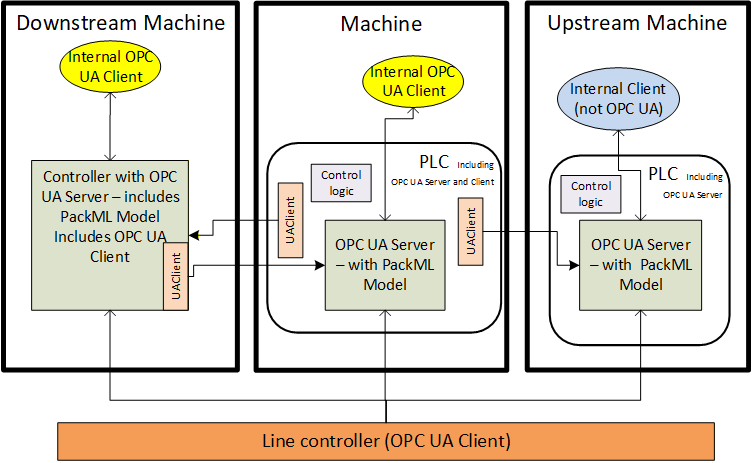
Figure 9 illustrates the scope of PackML in a typical environment, with units acting as OPC UA Servers and a line controller as an OPC UA Client application. It defines a standard set of interfaces to and from a unit/machine, so that it can be controlled as an element of an overall production line. It maps the internal states of the unit into a standard state model, and internal commands into a standard set of commands, hiding the details of the actual implementation of the unit's code.
Figure 9 also illustrates another typical example in which units perform peer-to-peer communication to coordinate the states and modes of an entire line. In this situation, each unit could act as both an OPC UA Server (of their own local state) and an OPC UA Client to communicate to upstream and downstream units.
6.2 Instance AddressSpace
Figure 10 provides an overview of the instance object model for PackML
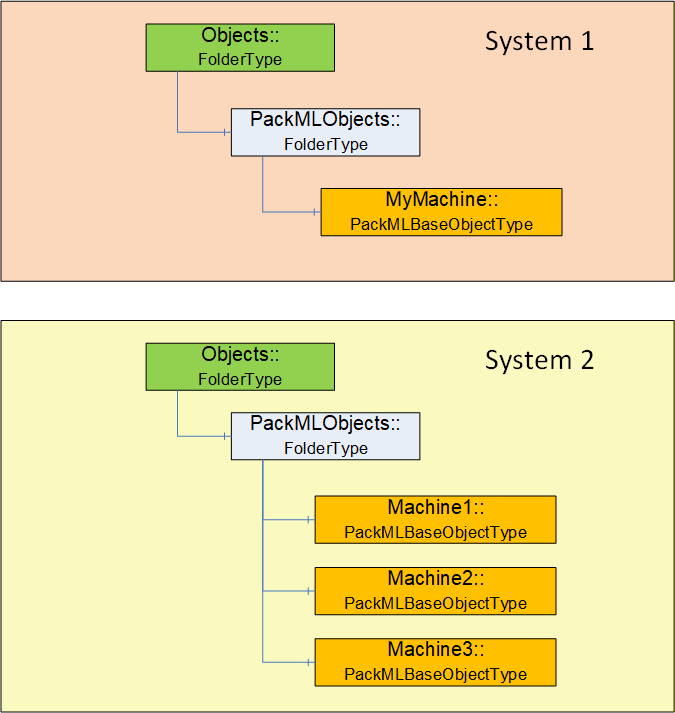
The OPC UA Server shall have a PackMLObjects folder under the OPC defined Objects folder on a UA Server. This folder shall contain one or more instances of PackMLBaseObjectType (see 6.3.2 for definition of PackMLBaseObjectType). A single OPC UA Server might contain a single instance of a PackML system or it might contain multiple PackML systems.
The PackMLObjects node is formally defined in Table 2.
| Attribute | Value | ||
| BrowseName | PackMLObjects | ||
| References | NodeClass | BrowseName | TypeDefinition |
|---|---|---|---|
| Organized by the Objects Folder defined in OPC 10000-5 | |||
| HasTypeDefinition | ObjectType | FolderType | |
6.3 Objects and ObjectTypes
6.3.1 Overview
The PackML model when adapted to OPC UA results in a number of StateMachines (see section 6.3.5 for a definition). Instances of these StateMachines may not expose all states and transitions at all times. The actual list of AvailableStates and AvailableTransitions are configured and each instance would be defined by either the end user or the machine builder. The PackML model also includes other meta data such as available mode, current mode, see section 6.3.2 for a complete list
6.3.2 PackMLBaseObjectType
The PackMLBaseObjectType defines a base type that can be used with any machine or object. This base type provides all required information for a working PackML system.
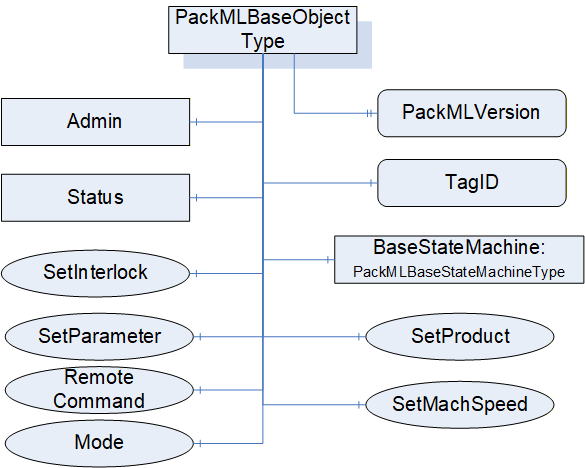
Table 3 formally defines the PackMLBaseObjectType.
| Attribute | Value | |||||||
| BrowseName | PackMLBaseObjectType | |||||||
| IsAbstract | False | |||||||
| Reference | Node Class | BrowseName | DataType | TypeDefinition | ModellingRule | RW | ||
|---|---|---|---|---|---|---|---|---|
| Subtype of the BaseObjectType from OPC 10000-5. | ||||||||
| HasProperty | Variable | TagID | String | PropertyType | Optional | R | ||
| HasProperty | Variable | PackMLVersion | String | PropertyType | Optional | R | ||
| HasComponent | Object | Admin | PackMLAdminObjectType | Mandatory | ||||
| HasComponent | Object | Status | PackMLStatusObjectType | Mandatory | ||||
| HasComponent | Object | BaseStateMachine | PackMLBaseStateMachineType | Mandatory | ||||
| HasComponent | Method | SetUnitMode | Defined in section 6.7.2 | Mandatory | ||||
| HasComponent | Method | SetMachSpeed | Defined in section 6.7.3 | Mandatory | ||||
| HasComponent | Method | SetProduct | Defined in section 6.7.4 | Mandatory | ||||
| HasComponent | Method | SetParameter | Defined in section 6.7.17 | Mandatory | ||||
| HasComponent | Method | RemoteCommand | Defined in section 6.7.15 | Optional | ||||
| HasComponent | Method | SetInterlock | Defined in section 6.7.16 | Optional | ||||
TagID - provide an additional field in which an associated name (third party cross reference or other string) can be stored. It can also be an additional name used to identify this PackML System.
PackMLVersion - provides the version of the supported OMAC PackML
Admin provides administrative functionality required for the PackML OPC UA server. It is defined in section 6.3.4. The administrative functionality exposed by this Object should be restricted to only users with administrative rights.
Status provides the status information required for a PackML OPC UA Server. It is defined in section 6.3.3.
SetUnitMode method allows an OPC UA Client to change the mode of the machine. The available modes are part of the supported Modes and a Client can pass any of the values listed. The Method may return an error if the requested mode is not allowed based on either the current mode of the machine or the state of the machine. For additional details see the definition of the SetUnitMode Method in 6.7.2
SetMachSpeed Method allows a Client to change the machine speed.
SetProduct Method allows a Client to change the product(s) and the ProcessVariables and Ingredients. For additional details see the definition of SetProduct Method in 6.7.4 .
SetParameter Method allows a Client to set the parameters for the machine. For additional details see the definition of SetParameter Method in 6.7.17.
RemoteCommand Method allows a Client to send a command to the UA Server that is to be passed to the PackML Server and or upstream or downstream Servers. Parameters sent to the Remote system are typically used in the EXECUTE and STARTING states for a production task. With the restriction that RemoteCommand Parameter Values are limited to REAL values. For additional details see the definition of the RemoteCommand Method in 6.7.15
SetInterlock method allows a Client to set one of the interlocks associated with the system. For additional details see the definition of the SetInterlock Method in 6.7.16
6.3.3 PackMLStatusObjectType
The PackMLStatusObjectType defines an ObjectType that is used to group all of the status information that is part of the PackML information model. It is illustrated in Figure 12
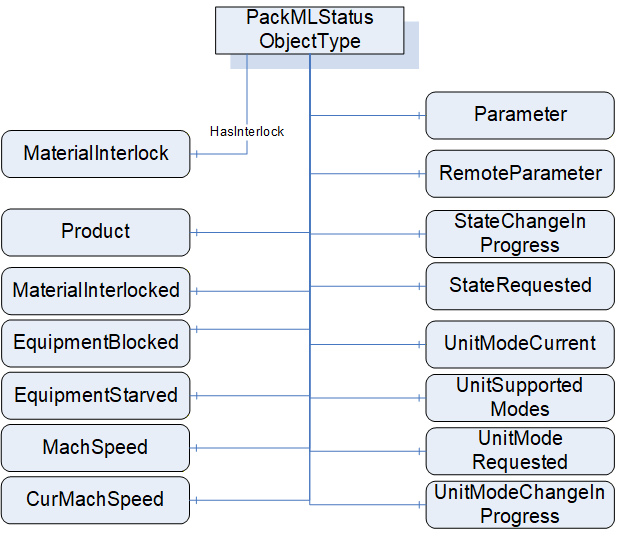
Table 4 formally defines the PackMLStatusObjectType.
| Attribute | Value | |||||
| BrowseName | PackMLStatusObjectType | |||||
| IsAbstract | False | |||||
| Reference | Node Class | BrowseName | DataType | TypeDefinition | ModellingRule | RW |
|---|---|---|---|---|---|---|
| Subtype of the BaseObjectType from OPC 10000-5. | ||||||
| HasComponent | Variable | UnitModeRequested | Boolean | BaseDataVariableType | Optional | R |
| HasProperty | Variable | UnitSupportedModes | NodeId | PropertyType | Mandatory | R |
| HasComponent | Variable | UnitModeCurrent | Enumeration | BaseDataVariableType | Mandatory | R |
| HasComponent | Variable | UnitModeChangeInProcess | Boolean | BaseDataVariableType | Optional | R |
| HasComponent | Variable | StateRequested | Int32 | BaseDataVariableType | Optional | R |
| HasComponent | Variable | StateChangeInProcess | Boolean | BaseDataVariableType | Optional | R |
| HasComponent | Variable | MachSpeed | Float | AnalogItemType | Mandatory | R |
| HasComponent | Variable | CurMachSpeed | Float | AnalogItemType | Mandatory | R |
| HasComponent | Variable | EquipmentBlocked | Boolean | BaseDataVariableType | Mandatory | R |
| HasComponent | Variable | EquipmentStarved | Boolean | BaseDataVariableType | Mandatory | R |
| HasComponent | Variable | MaterialInterlocked | Boolean | BaseDataVariableType | Optional | R |
| HasInterlock | Variable | MaterialInterlock | Boolean[] | BaseDataVariableType | Optional | R |
| HasComponent | Variable | Parameter | PackMLDescriptorDataType[] | BaseDataVariableType | Optional | R |
| HasComponent | Variable | RemoteParameter | PackMLRemoteInterfaceDataType[] | BaseDataVariableType | Optional | R |
| HasComponent | Variable | Product | PackMLProductDataType[] | BaseDataVariableType | Optional | R |
In OPC UA defined StateMachines, a mandatory Variable CurrentState provides the current state of the StateMachine, which is the current state of the PackML device. CurrentState is defined in OPC 10000-5.
UnitModeRequested - If TRUE, indicates that a unit mode change was requested, reflects the status of the Command UnitModeRequested.
UnitSupportedModes - provides the NodeId of the enumeration DataType that describes the available modes for this PackML instance. A Server might have more than one of these instances; each instance might expose a different set of available modes and thus have a different enumeration.
UnitModeCurrent - is used to display the current mode of the instance of this type. The DataType is Enumeration which is abstract, but an instance shall be assigned a concrete enumeration, which corresponds to the enumeration listed in UnitSupportedModes.
UnitModeChangeInProcess - a flag that indicates a unit change has been requested and is in progress
StateRequested - This value is used for state transition checking, to ensure that transitions to a target state can be achieved. The target state, StateRequested, is a numerical value corresponding to a state in the base state model (shown above).
StateChangeInProcess - a flag that indicates that a state change has been requested and is in progress. The StateMachine will report the current state.
MachSpeed - Setpoint speed of the unit.
CurMachSpeed - Current speed of the unit.
EquipmentBlocked - If TRUE, then processing is suspended because downstream equipment is unable to receive material (e.g. downstream buffer is full)
EquipmentStarved - If TRUE, then processing is suspended because upstream equipment is unable to send material.
MaterialInterlocked - a flag that indicates this machine is interlocked. It is a summary of the interlock variable that is associated with this machine.
MaterialInterlock - this is an array and describes the status of the materials that are ready for processing. It is comprised of a series of Boolean with 1 equaling readyor not low, 0 equaling not ready or low. Each bit represents a different user material.
Parameter - Current parameters used in the production job. This reflects the last parameter sent via the SetParameter Method.
RemoteParameter - the last remote parameter that were sent to the machine. This is optional variable is provided only if sending remote parameters are supported, the RemoteCommand Method is provided this variable shall also be provided. For additional details see the RemoteCommand Method definition in 6.7.15.
Product - provides a list of the products supported by this machine. The array is typically needed for machines that run multiple products. It defines the IDs of the products and process & process variables associated with the product. The product data can come from either a local HMI or remote systems and are used to process the product on the unit machine.
6.3.4 PackMLAdminObjectType
The PackMLAdminObjectType defines an ObjectType that is used to group all of the Admin information that is part of the PackML information model. It is illustrated in Figure 13.
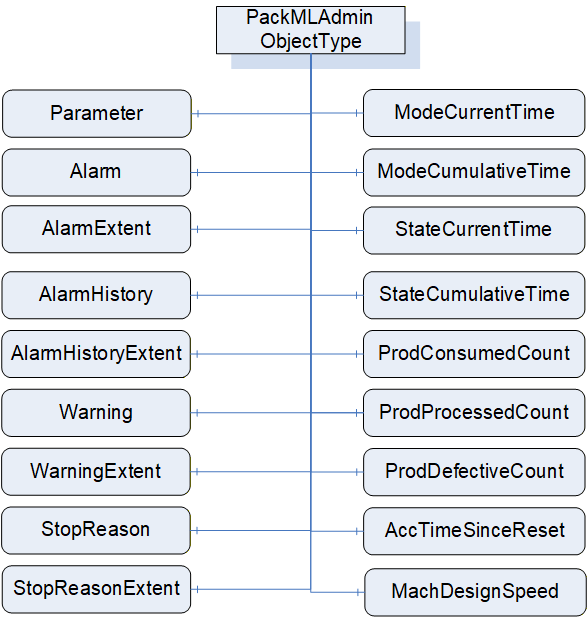
Table 5 formally defines the PackMLAdminObjectType.
| Attribute | Value | |||||
| BrowseName | PackMLAdminObjectType | |||||
| IsAbstract | False | |||||
|
Reference | Node Class | BrowseName | DataType | TypeDefinition | ModelingRule | RW |
|---|---|---|---|---|---|---|
| Subtype of the BaseObjectType from OPC 10000-5. | ||||||
| HasComponent | Variable | Parameter | PackMLDescriptorDataType[] | BaseDataVariableType | Optional | R |
| HasAlarm | Variable | Alarm | PackMLAlarmDataType[] | BaseDataVariableType | Optional | R |
| HasComponent | Variable | AlarmExtent | Int32 | BaseDataVariableType | Optional | R |
| HasAlarmHistory | Variable | AlarmHistory | PackMLAlarmDataType[] | BaseDataVariableType | Optional | R |
| HasComponent | Variable | AlarmHistoryExtent | Int32 | BaseDataVariableType | Optional | R |
| HasWarning | Variable | Warning | PackMLAlarmDataType[] | BaseDataVariableType | Optional | R |
| HasComponent | Variable | WarningExtent | Int32 | BaseDataVariableType | Optional | R |
| HasStopReason | Variable | StopReason | PackMLAlarmDataType | BaseDataVariableType | Optional | R |
| HasComponent | Variable | StopReasonExtent | Int32 | BaseDataVariableType | Optional | R |
| HasComponent | Variable | ModeCurrentTime | Int32[] | BaseDataVariableType | Optional | R |
| HasComponent | Variable | ModeCumulativeTime | Int32[] | BaseDataVariableType | Optional | R |
| HasComponent | Variable | StateCurrentTime | Int32[][] | BaseDataVariableType | Optional | R |
| HasComponent | Variable | StateCumulativeTime | Int32[][] | BaseDataVariableType | Optional | R |
| HasComponent | Variable | ProdConsumedCount | PackMLCountDataType [] | BaseDataVariableType | Optional | R |
| HasComponent | Variable | ProdProcessedCount | PackMLCountDataType [] | BaseDataVariableType | Optional | R |
| HasComponent | Variable | ProdDefectiveCount | PackMLCountDataType [] | BaseDataVariableType | Optional | R |
| HasComponent | Variable | AccTimeSinceReset | Int32 | BaseDataVariableType | Optional | R |
| HasComponent | Variable | MachDesignSpeed | Float | BaseDataVariableType | Optional | R |
Parameter - The parameter tags associated with the local interface are typically used as parameters that are displayed or used on the unit locally, for example from an HMI. These parameters can be used to display any quality, alarm, or machine downtime parameter. The Parameters are typically limited to parameters related the unit. The length of the array is the maximum number of parameters needed.
Alarm - Alarm Events (trigger, value, message, category,…). The alarm tags associated to the local interface are typically used as parameters that are displayed or used on the unit locally, for example from an HMI. These alarm parameters can be used to display any alarm, or machine downtime cause that is currently occurring in the system. The alarms are typically limited to the machine unit. Each machine can define as many alarms as are required for the machine.
AlarmExtent - Defines the maximum number of alarms available, for the machine annunciation or reporting
AlarmHistory - These alarm history parameters can be used to display any alarm history, or machine downtime cause.
AlarmHistoryExtend - associated with the maximum number of alarms needed to be archived or tagged as alarm history for the machine.
Warning - Array of warning information Events. Warnings are general events that do not cause the machine to stop, but may require operator action because a stoppage may be imminent. Warning elements have the same structure as Stop Reason elements.
WarningExtent - Defines the maximum number of warning elements available.
StopReason - A structure for the stop reason Event (similar to Alarms) which define the possible stop reasons (trigger, value, message, category). Stop Reason is typically used for "First Out Fault" Reporting and Other Stoppage Events. The stop reason is the first event captured during an abort, held, suspended or stop event.
StopReasonExtent - Defines the maximum number of stop reason elements or available.
ModeCurrentTime - The current amount of time, in seconds, that the machine has been in each mode. The array index for a mode is the Unit mode value. The values roll over to 0 at 2,147,483,647.
ModeCumulativeTime - The cumulative amount of time, in seconds, that the machine has been in each mode. The array index for a mode is the Unit mode value. The value is the cumulative elapsed time the machine has spent in each mode since its timers and counters were reset. The values roll over to 0 at 2,147,483,647.
StateCurrentTime - The current amount of time, in seconds, that the machine has been in each state for each mode. The first array index for is the Unit mode value, the second array index is the state value.. The values roll over to 0 at 2,147,483,647.
StateCumulativeTime - The cumulative amount of time, in seconds, that the machine has been in each state for each mode. The first array index for is the Unit mode value, the second array index is the state value. The value is the cumulative elapsed time the machine has spent in each mode and state since its timers and counters were reset. The values roll over to 0 at 2,147,483,647
ProdConsumedCount - Represents the material used/consumed in the production machine. An example of tag usage would be the number of bags consumed in a filler, or bagger packaging machine, or the amount of linear length used, or the number caps used. This tag can be used locally or remotely if needed. The extent of the array is typically limited to the number of raw materials needed to be counted. The array is typically used for unit machines that run multiple raw materials.
ProdProcessedCount - Represents the products processed in the production machine. An example of tag usage would be the number of products that were made, including all good and defective products. The structure of the ProdProcessedCount is the same as the ProdConsumedCount. The length of the array is typically limited to the number of products that need to be counted. The number of products processed minus the defective count is the number of non-defective products made by the machine. The array index of # = 0 should be reserved for the count of the number of units from the primary production stream.
ProdDefectiveCount - Represents the products marked as defective in the production machine. The structure of the ProdDefectiveCount is the same as the ProdConsumedCount. The length of the array is typically limited to the number of products that need to be counted. The number of products processed minus the defective count is the number of non-defective products made by the machine. The array index of # = 0 should be reserved for the count of the number of units from the primary production stream.
AccTimeSinceReset - Represents the amount of time, in seconds, since the last reset of all counters as triggered. Counters that are reset are:
•UnitName.Admin.ModeCurrentTime[#]
•UnitName.Admin.ModeCumulativeTime[#]
•UnitName.Admin.StateCurrentTime[#,#]
•UnitName.Admin.StateCumulativeTime[#,#]
•UnitName.Admin.ProdConsumedCount[#].Count
•UnitName.Admin.ProdProcessedCount[#].Count
•UnitName.Admin.ProdDefectiveCount[#].Count
•UnitName.Admin.AccTimeSinceReset
MachDesignSpeed - Represents the maximum design speed of the machine in primary packages per minute for the package configuration being run. This speed is NOT the maximum speed as specified by the manufacturer, but rather the speed of the machine is designed to run in its installed environment.
6.3.5 StateMachines Overview
The Figure 14 provides an overview of the StateMachines that are part of the model.
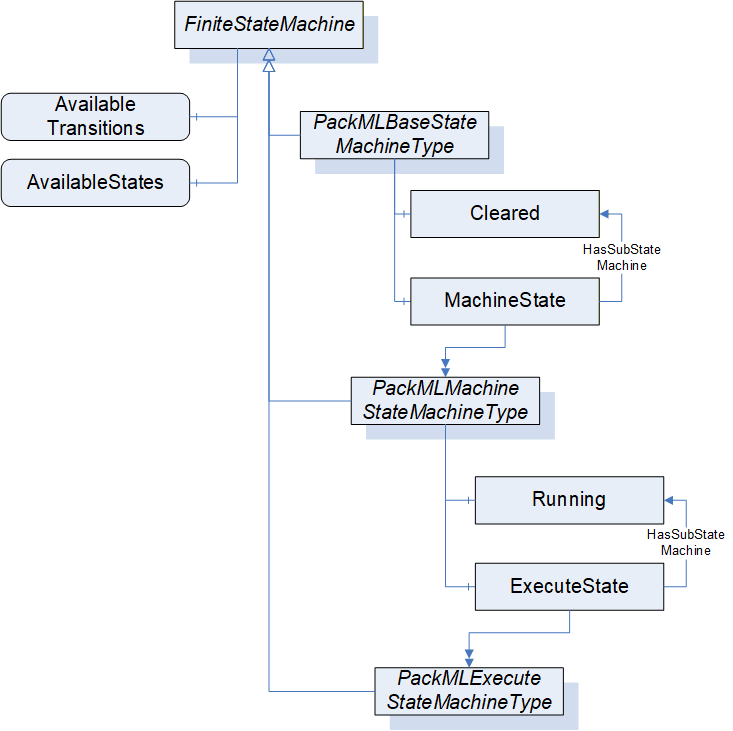
A key point in PackML StateMachines is that all of the StateMachines defined in PackML shall require that the optional AvailableTransitions and AvailableStates component of the FiniteStateMachineType be provided on all instance of the StateMachine. This allows Clients to understand the available States and Transitions for the given instance of the StateMachine. A StateMachine may restrict the States and Transition that are currently available. The following figure provides an overview of the PackML States. The Stopped State is commonly the initial sub-state that will be the starting point for the Cleared parent state. The Running State commonly will use the Resetting State as the initial state, but not all instance of the Running State sub-state model will include Resetting, so no initial state is defined for the Running State. The proposed valid initial States for this model are the Idle or Resetting States. This is Server dependant. The initial state for the system is Aborted. Alternative it could be Cleared as parent state with the proposal of Stopped as initial sub state. Figure 15 - PackML States provide an overview of the states and transitions in the StateMachine. The model refers to the PackML state model Version 2015. The dashed lines for the Hold transitions are optional extensions of the state model
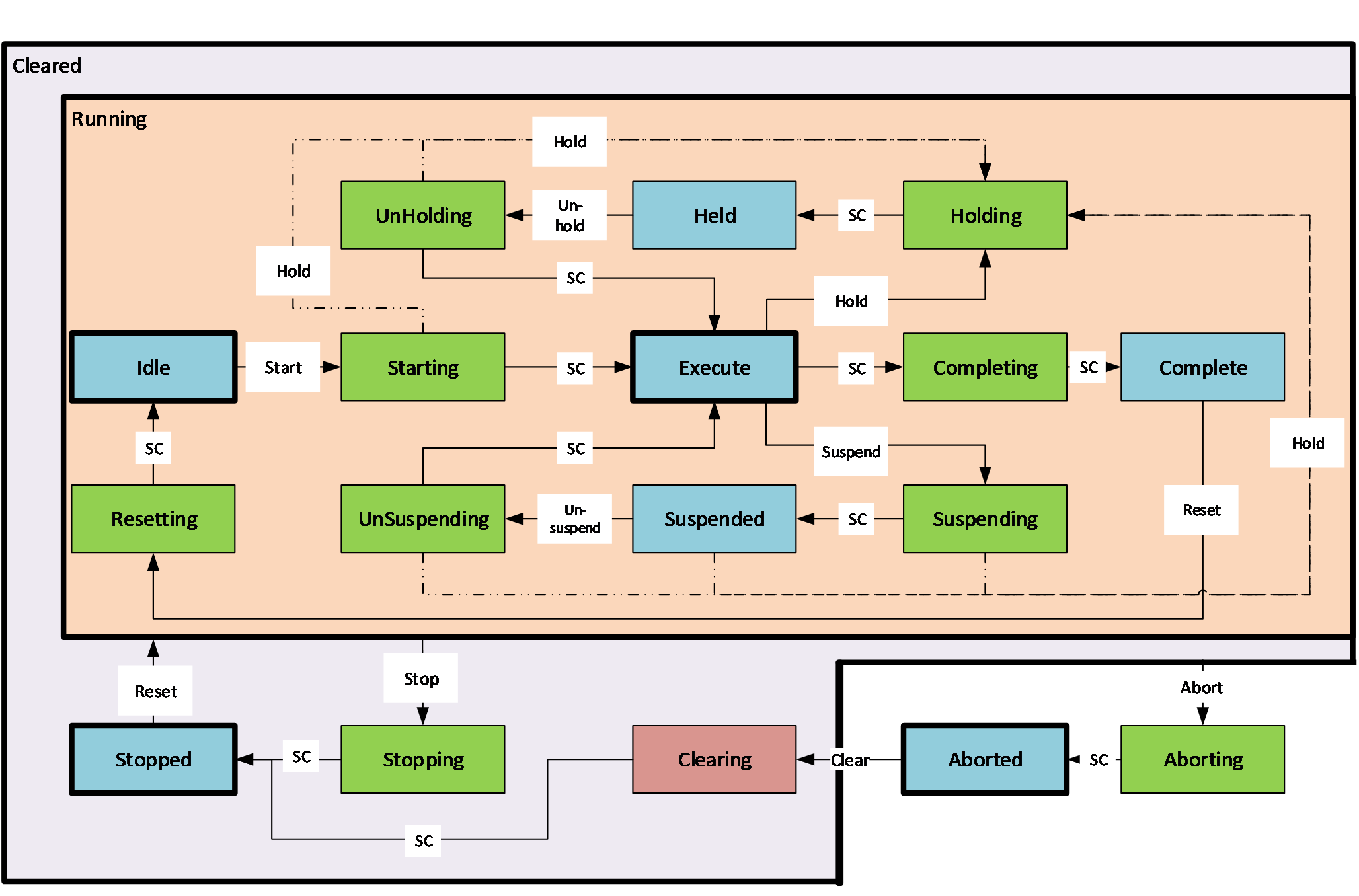
6.3.6 PackMLBaseStateMachineType
The PackMLBaseStateMachineType is the top level StateMachine for PackML. It is illustrated in Figure 16. The TR-88 specification does not define an initial State for this StateMachine, but typically the state machine uses either the Aborted or Stopped State as an initial State. Annex B provide recommended display names for the various states.
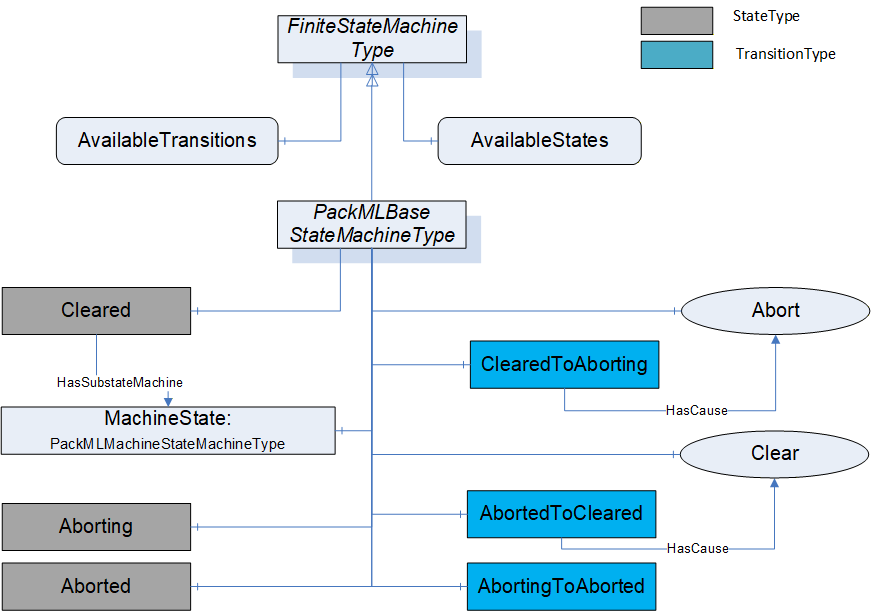
The PackMLBaseStateMachineType defines the available states in a PackML system. The type is defined in Table 6. StateTypes and TransitionTypes only exist in the type system, thus they do not have a modelling rule.
| Attribute | Value | ||||
| BrowseName | PackMLBaseStateMachineType | ||||
| IsAbstract | False | ||||
| References |
Node
Class | BrowseName |
Data
Type | TypeDefinition |
Modelling
Rule |
|---|---|---|---|---|---|
| Subtype of the FiniteStateMachineType defined in OPC 10000-5 | |||||
| HasComponent | Variable | 0:AvailableTransitions | NodeId[] | BaseDataVariableType | Mandatory |
| HasComponent | Variable | 0:AvailableStates | NodeId[] | BaseDataVariableType | Mandatory |
| HasComponent | Object | Aborting | StateType | ||
| HasComponent | Object | Aborted | StateType | ||
| HasComponent | Object | Cleared | StateType | ||
| HasComponent | Object | MachineState | PackMLMachineStateMachineType | Mandatory | |
| HasComponent | Object | AbortedToCleared | TransitionType | ||
| HasComponent | Object | AbortingToAborted | TransitionType | ||
| HasComponent | Object | ClearedToAborting | TransitionType | ||
| HasComponent | Method | Abort | Defined in 6.7.5 | Optional | |
| HasComponent | Method | Clear | Defined in 6.7.6 | Optional | |
The AvailableTransitions and AvailableStates are optional variables in the FiniteStateMachine, but they are overridden in the PackMLBaseStateMachine and are made Mandatory. The PackMLBaseStateMachine does include a sub-state machine that provides sub-states for the Cleared State.
Aborting - The ABORTING state can be entered at any time in response to the Abort command or on the occurrence of a machine fault. The aborting logic will bring the machine to a rapid safe stop. Operation of the emergency stop will cause the machine to be tripped by its safety system. It will also provide a signal to initiate the ABORT State. The value of this StateType is 8.
Aborted - This state maintains machine status information relevant to the Abort condition. The machine can only exit the ABORTED state after an explicit Clear command, subsequently to manual intervention to correct and reset the detected machine faults. The value of this StateType is 9.
Cleared - this state exposes the MachineState sub StateMachine and state associated with this substate machine. The value of this StateType is 19.
MachineState - A PackMLMachineStateMachineType defined in section 6.3.7.
Abort - a Method to trigger a change of state to Aborting. This will affect all sub-states in cleared state. Defined in 6.7.5.
Clear - a Method to trigger a change of state to the Cleared. Defined in 6.7.6.
Table 7 defines the available Transitions in the PackMLBaseStateMachineType.
| Source Path | Reference Type | Is Forward | Target Path |
| ClearedToAborting | ToState | True | Aborting |
| FromState | True | Cleared | |
| HasCause | True | Abort | |
| AbortingToAborted | ToState | True | Aborted |
| FromState | True | Aborting | |
| AbortedToCleared | ToState | True | Cleared |
| FromState | True | Aborted | |
| HasCause | True | Clear | |
6.3.7 PackMLMachineStateMachineType
The PackMLMachineStateMachineType defines the machine level state machine. It is illustrated in Figure 17.
The TR-88 specification does not define an initial State for this StateMachine, but typically the state machine uses Stopped State as an initial State. Annex B provides recommended display names for the various states.
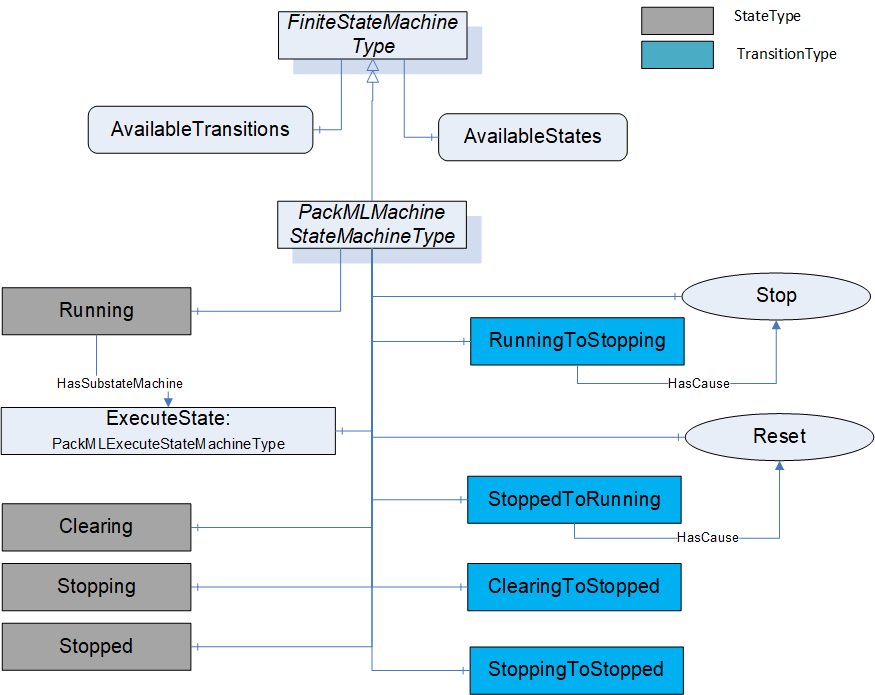
Table 8 defines the PackMLMachineStateMachineType. StateTypes and TransitionTypes only exist in the type system, thus they do not have a modelling rule.
| Attribute | Value | ||||
| BrowseName | PackMLMachineStateMachineType | ||||
| IsAbstract | False | ||||
| Reference | Node Class | BrowseName | DataType | TypeDefinition | ModellingRule |
|---|---|---|---|---|---|
| Subtype of the FiniteStateMachineType from OPC 10000-5. | |||||
| HasComponent | Variable | 0:AvailableTransitions | NodeId[] | BaseDataVariableType | Mandatory |
| HasComponent | Variable | 0:AvailableStates | NodeId[] | BaseDataVariableType | Mandatory |
| HasComponent | Object | Stopped | StateType | ||
| HasComponent | Object | Stopping | StateType | ||
| HasComponent | Object | Clearing | StateType | ||
| HasComponent | Object | Running | StateType | ||
| HasComponent | Object | ExecuteState | PackMLExecuteStateMachineType | Mandatory | |
| HasComponent | Object | StoppingToStopped | TransitionType | ||
| HasComponent | Object | ClearingToStopped | TransitionType | ||
| HasComponent | Object | StoppedToRunning | TransitionType | ||
| HasComponent | Object | RunningToStopping | TransitionType | ||
| HasComponent | Method | Stop | Defined in 6.7.7 | Optional | |
| HasComponent | Method | Reset | Defined in 6.7.8 | Optional | |
The AvailableTransitions and AvailableStates are optional variables in the FiniteStateMachine, but they are overridden in the PackMLMachineStateMachineType and are made Mandatory. The PackMLMachineStateMachineType does include a sub-state machine that provides sub-states for the Run State.
Stopped - The machine is powered and stationary after completing the STOPPING state. All communications with other systems are functioning (if applicable). The value of this StateType is 2
Stopping - This state executes the logic which brings the machine to a controlled stop as reflected by the STOPPED state. The value of this StateType is 7.
Clearing - Initiated by a state command to clear faults that may have occurred when ABORTING, and are present in the ABORTED state. The value of this StateType is 1.
Running - the State that allows the ExecuteState machine to become active, enabling sub-states provided by this StateMachine. The value of this StateType is 18.
ExecuteState - StateMachine that provides additional sub states.
Stop - A Method to trigger a change of state to Stopping. This will affect all sub-states in Run state. Defined in 6.7.7
Reset - A Method to trigger a change of state to Running, enabling all of the sub-states of Running and the respective Methods that they expose. Defined in 6.7.8
The transitions are defined in Table 9.
| Source Path | Reference Type | Is Forward | Target Path |
| StoppedToRunning | FromState | True | Stopped |
| ToState | True | Running | |
| HasCause | True | Reset | |
| StoppingToStopped | FromState | True | Stopping |
| ToState | True | Stopped | |
| ClearingToStopped | FromState | True | Clearing |
| ToState | True | Stopped | |
| RunningToStopping | FromState | True | Running |
| ToState | True | Stopping | |
| HasCause | True | Stop |
6.3.8 PackMLExecuteStateMachineType
The PackMLExecuteStateMachineType provides all of the base states defined in PackML. It is illustrated in Figure 18. The TR-88 specification does not define an initial State for this StateMachine, but typically the state machine use either the Idle or Resetting State as an initial State. Annex B provide recommended display names for the various states.
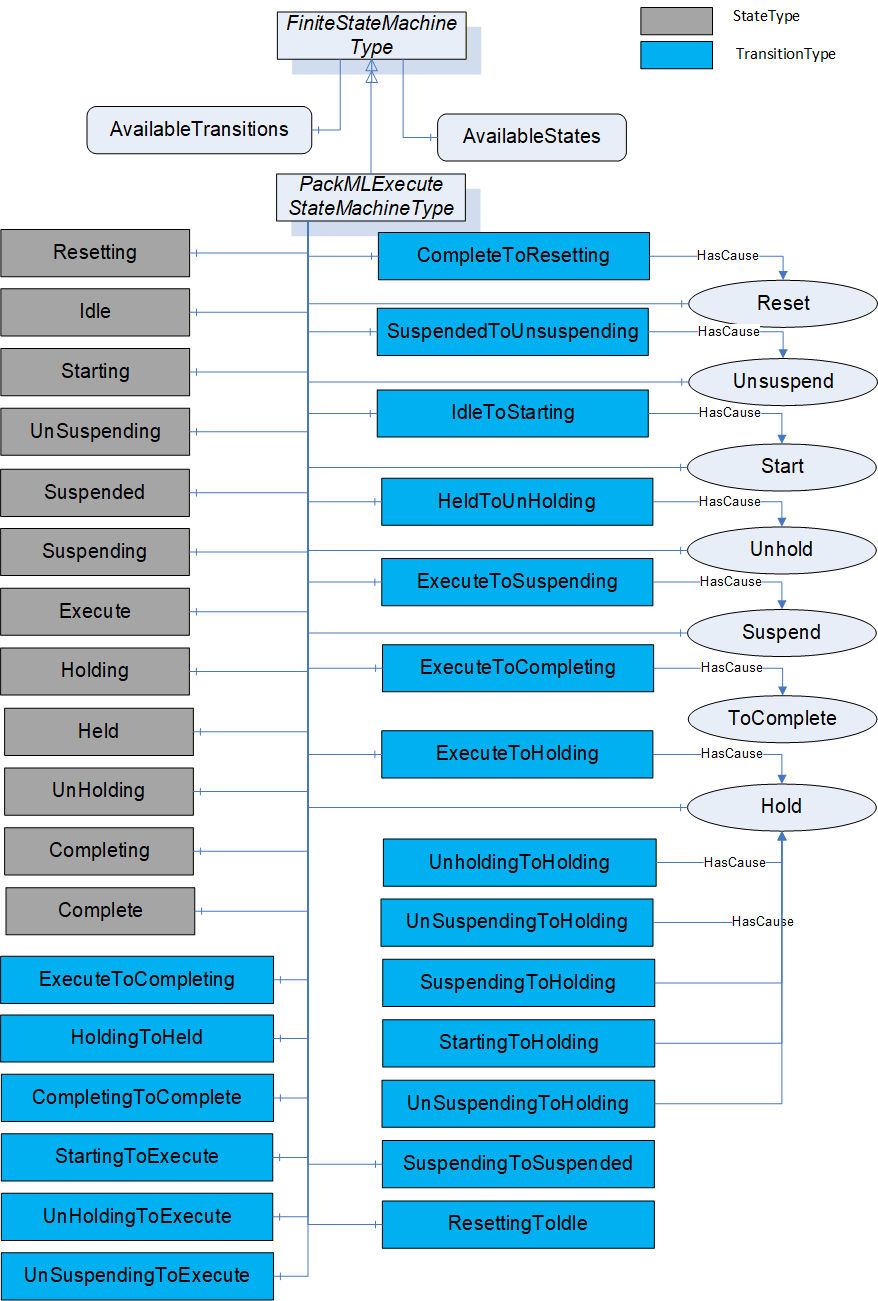
The PackMLExecuteStateMachineType is defined in Table 10. StateTypes and TransitionTypes only exist in the type system, thus they do not have a modelling rule.
| Attribute | Value | ||||
| BrowseName | PackMLExecuteStateMachineType | ||||
| IsAbstract | False | ||||
| References | NodeClass | BrowseName | DataType | TypeDefinition |
Modelling
Rule |
|---|---|---|---|---|---|
| Subtype of the FiniteStateMachineType defined in OPC 10000-5 | |||||
| HasComponent | Variable | 0: AvailableTransitions | NodeId[] | BaseDataVariableType | Mandatory |
| HasComponent | Variable | 0: AvailableStates | NodeId[] | BaseDataVariableType | Mandatory |
| HasComponent | Object | Resetting | StateType | ||
| HasComponent | Object | Idle | StateType | ||
| HasComponent | Object | Starting | StateType | ||
| HasComponent | Object | Suspending | StateType | ||
| HasComponent | Object | Suspended | StateType | ||
| HasComponent | Object | Unsuspending | StateType | ||
| HasComponent | Object | Holding | StateType | ||
| HasComponent | Object | Held | StateType | ||
| HasComponent | Object | Unholding | StateType | ||
| HasComponent | Object | Execute | StateType | ||
| HasComponent | Object | Completing | StateType | ||
| HasComponent | Object | Complete | StateType | ||
| HasComponent | Object | ResettingToIdle | TransitionType | ||
| HasComponent | Object | IdleToStarting | TransitionType | ||
| HasComponent | Object | StartingToExecute | TransitionType | ||
| HasComponent | Object | ExecuteToSuspending | TransitionType | ||
| HasComponent | Object | SuspendingToSuspended | TransitionType | ||
| HasComponent | Object | SuspendedToUnsuspending | TransitionType | ||
| HasComponent | Object | UnsuspendingToExecute | TransitionType | ||
| HasComponent | Object | ExecuteToHolding | TransitionType | ||
| HasComponent | Object | HoldingToHeld | TransitionType | ||
| HasComponent | Object | HeldToUnholding | TransitionType | ||
| HasComponent | Object | UnholdingToExecute | TransitionType | ||
| HasComponent | Object | ExecuteToCompleting | TransitionType | ||
| HasComponent | Object | CompletingToComplete | TransitionType | ||
| HasComponent | Object | CompleteToResetting | TransitionType | ||
| HasComponent | Object | StartingToHolding | TransitionType | ||
| HasComponent | Object | UnsuspendingToHolding | TransitionType | ||
| HasComponent | Object | SuspendedToHolding | TransitionType | ||
| HasComponent | Object | SuspendingToHolding | TransitionType | ||
| HasComponent | Object | UnholdingToHolding | TransitionType | ||
| HasComponent | Method | Reset | Defined in Clause 6.7.8 | Optional | |
| HasComponent | Method | ToComplete | Defined in Clause 6.7.9 | Optional | |
| HasComponent | Method | Start | Defined in Clause 6.7.10 | Optional | |
| HasComponent | Method | Unhold | Defined in Clause 6.7.11 | Optional | |
| HasComponent | Method | Suspend | Defined in Clause 6.7.12 | Optional | |
| HasComponent | Method | Hold | Defined in Clause 6.7.14 | Optional | |
| HasComponent | Method | Unsuspend | Defined in Clause 6.7.13 | Optional | |
*Not all transitions defined in ANSI/ISA - TR88.00.02 - 2015. Following additional transitions in the object prepared for potential future extensions in TR88: StartingToHolding, UnsuspendingToHolding, SuspendedToHolding, SuspendingToHolding, UnholdingToHolding.
This FiniteStateMachine supports multiple Active states. It also supports 19 Transitions and a Method for transition between states.
Resetting: In response to a Reset command, the unit/machine will transition to Resetting from either Stopped or Complete. In this state the unit/machine attempts to clear any standing errors or stop causes. If successful, the unit/machine transitions to Idle. No hazardous motion should happen in this state. The value of this StateType is 15
Idle: The unit/machine is in an error-free state, waiting to start. The unit/machine transitions automatically to Idle after all steps necessary for Resetting have been completed. All conditions achieved during Resetting are maintained. A Start command will transition the unit/machine from Idle to Starting. The value of this StateType is 4.
Starting: The unit/machine completes all steps necessary to begin execution of the active machine mode. A Start command will cause the unit/machine to transition from Idle to Starting. The unit/machine will transition automatically from Starting to Execute once all required steps have been completed. The value of this StateType is 3.
Suspending: The unit/machine will transition from Execute to Suspending if conditions external to the unit/machine require a pause in production. Such conditions include faults to upstream or downstream equipment. The decision to Suspend may be made be a supervisory system monitoring the production line conditions or by unit/machine sensors detecting downstream blockages or upstream product scarcity. (In the former case, the unit/machine is 'blocked"; in the latter case, the unit/machine is "starved") After all steps required to suspend the machine have been completed, the unit/machine will automatically transition to Suspended state. The value of this StateType is 13.
Suspended: The unit/machine is paused, waiting for external process conditions to clear. In this state, the unit/machine shall not produce product, but may, if required, dry-cycle. Once external conditions have returned to normal, the unit/machine will transition to Unsuspending, typically without operator intervention. The value of this StateType is 5.
Unsuspending: After all external process conditions that caused the unit/machine to suspend have cleared, the unit/machine completes all steps required to resume execution of the active machine mode. Once all required actions to unsuspend the unit/machine have been completed, the unit/machine will automatically transition to Execute state. The value of this StateType is 14.
Holding: The unit/machine will transition from Execute to Holding if conditions internal to the unit/machine require a pause in production. Such conditions would include low levels on materials required for production or other minor issues requiring operator service, for example. The decision to hold may be made automatically by the unit/machine itself or by an operator. After all steps required to hold the machine have been completed, the unit/machine will transition automatically to Held state. The value of this StateType is 10.
Held: The unit/machine is paused, waiting for internal process conditions to clear. In this state, the unit/machine shall not produce product, though it may, if required, dry-cycle. A transition to Unholding will occur once internal machine conditions have cleared or if the Unhold command is initiated by an operator. The value of this StateType is 11.
Unholding: After all internal process conditions that caused the unit/machine to hold have cleared, the unit/machine completes all steps required to resume execution of the active machine mode. Once all required actions to unhold the machine have been completed, the unit/machine will transition automatically to Execute state. The value of this StateType is 12.
Execute: If the unit/machine is actively carrying out the behaviour or activity defined by the selected mode, then the machine is in Execute state. If the unit/machine is in production mode, for example, this means that the machine is producing product. The value of this StateType is 6.
Completing: Once the process associated with the current mode has reached a defined threshold (e.g. the required number of products for the current job have been produced), the unit/machine transitions from Execute to Completing. In this state all steps necessary to shut down the current process are carried out. The machine then transitions automatically to Complete state. The value of this StateType is 16.
Complete: Complete indicates the process associated with the active mode has come to its defined end. The unit/machine will wait in this state until a Reset command is issued (in which case it will transition to Resetting), or until the unit/machine is Stopped or Aborted. The value of this StateType is 17.
The Transitions are described in Table 11. This FiniteStateMachine also supports six Methods, for transitioning between states. This StateMachine includes transition to Holding from Unholding, Starting, Unsuspending, Suspended, Suspending, all of which are extension to the ISA-TR88.00.02-2015 specification.
| Source Path | Reference Type | Is Forward | Target Path |
| ResettingToIdle | FromState | True | Resetting |
| ToState | True | Idle | |
| IdleToStarting | FromState | True | Idle |
| ToState | True | Starting | |
| HasCause | True | Start | |
| StartingToExecute | FromState | True | Starting |
| ToState | True | Execute | |
| ExecuteToSuspending | FromState | True | Execute |
| ToState | True | Suspending | |
| HasCause | True | Suspend | |
| SuspendingToSuspended | FromState | True | Suspending |
| ToState | True | Suspended | |
| SuspendedToUnsuspending | FromState | True | Suspended |
| ToState | True | Unsuspending | |
| HasCause | True | Unsuspend | |
| UnsuspendingToExecute | FromState | True | Unsuspending |
| ToState | True | Execute | |
| ExecuteToHolding | FromState | True | Execute |
| ToState | True | Holding | |
| HasCause | True | Hold | |
| StartingToHolding | FromState | True | Starting |
| ToState | True | Holding | |
| HasCause | True | Hold | |
| SuspendingToHolding | FromState | True | Suspending |
| ToState | True | Holding | |
| HasCause | True | Hold | |
| SuspendedToHolding | FromState | True | Suspended |
| ToState | True | Holding | |
| HasCause | True | Hold | |
| UnsuspendingToHolding | FromState | True | Unsuspending |
| ToState | True | Holding | |
| HasCause | True | Hold | |
| UnholdingToHolding | FromState | True | Unholding |
| ToState | True | Holding | |
| HasCause | True | Hold | |
| HoldingToHeld | FromState | True | Holding |
| ToState | True | Held | |
| HeldToUnholding | FromState | True | Held |
| ToState | True | Unholding | |
| HasCause | True | Unhold | |
| UnholdingToExecute | FromState | True | Unholding |
| ToState | True | Execute | |
| ExecuteToCompleting | FromState | True | Execute |
| ToState | True | Completing | |
| HasCause | True | ToComplete | |
| CompletingToComplete | FromState | True | Completing |
| ToState | True | Complete | |
| CompleteToResetting | FromState | True | Complete |
| ToState | True | Resetting | |
| HasCause | True | Reset | |
*Not all transitions defined in ANSI/ISA - TR88.00.02 - 2015. Following additional transitions in the object prepared for potential future extensions in TR88: StartingToHolding, UnsuspendingToHolding, SuspendedToHolding, SuspendingToHolding, UnholdingToHolding.
6.4 Variables and VariableTypes
-
6.5 DataTypes
6.5.1 Overview
This section defines any enumeration or structure that are defined as part of the PackML specification.
6.5.2 ProductionMaintenanceModeEnum
The ProductionMaintenanceModeEnum describes the predefined modes. This is a default mode enumeration. A Server may define additional enumeration that describe the modes they support, but any such enumeration must include "Produce" as enumeration 1 and if Maintenance or Manual are include, they must be 2 and 3 respectively. Any additional mode must start at 4 or greater. If vendor specific or end user specific mode enumerations are included, they shall be defined as a subtype of this enumeration. The ProductionMaintenanceModeEnum is the default enumeration that shall be used if no vendor or end user mode enumeration is defined. The ProductionMaintenanceModeEnum is defined in Table 12.
| Name | Value | Description |
|---|---|---|
| Invalid | 0 | This is an invalid mode |
| Produce | 1 | Machine is in production mode |
| Maintenance | 2 | Machine is in maintenance mode |
| Manual | 3 | Machine is in manual mode |
where the following definition apply:
Produce corresponds to the PackML Production Mode which is routine production.
Maintenance corresponds to the PackML Maintenance Mode which is the ability to run a machine independent of other machine in a production line.
Manual corresponds to the PackML Manual Mode which provides direct control of the individual machine elements.
6.5.3 PackMLCountDataType
The PackMLCountDataType is used to generate summary information about the system. The information depending on the use might be related to produced product, defective materials or any other information that needs to be tracked. It is formally defined in Table 13
| Name | Type | Description |
| PackMLCountDataType | Structure | |
ID | Int32 | A user defined value that represents the consumed (processed or defective) material. Typically, this is an SKU number or a user material master number. |
Name | String | The name is used to literally describe the material ID, and its associated material. |
Unit | EUInformation | The unit tag is used to describe the names associated with a specific material used by the machine. |
Count | Int32 | The amount of consumed (processed or defective) material on the current production job. |
AccCount | Int32 | The cumulative count value of the material produced (or consumed). This counter gives the user a non-resetting counter that may be used for OEE calculations |
6.5.4 PackMLDescriptorDataType
The PackMLDescriptorDataType provides the PackML Parameter structure. The PackMLDescriptorDataType is formally defined in Table 14
| Name | Type | Description |
| PackMLDescriptorDataType | Structure | |
ID | Int32 | A unique number assigned to the parameter. |
Name | String | The name of the parameter |
Unit | EUInformation | OPC UA engineering unit information |
Value | Float | This is the numeric value of the parameter |
| . |
6.5.5 PackMLIngredientsDataType
The PackMLIngredientsDataType provides the PackML Parameter structure. The PackMLIngredientsDataType is formally defined in Table 15.
| Name | Type | Description |
| PackMLIngredientsDataType | Structure | |
IngredientID | Int32 | A unique number assigned to the ingredient. |
Parameter | PackMLDescriptorDataType[] | The array of Parameter that correspond to the ingredient |
6.5.6 PackMLProductDataType
The PackMLProductDataType provides the PackML product information. The PackMLProductDataType is formally defined in Table 16.
| Name | Type | Description |
| PackMLProductDataType | Structure | |
ProductID | Int32 | A unique number assigned to the product. |
ProcessVariables | PackMLDescriptorDataType[] | The array of Process variables associated with this product |
Ingredients | PackMLIngredientsDataType[] | The array of ingredients associated with this product. |
6.5.7 PackMLRemoteInterfaceDataType
The PackMLRemoteInterfaceDataType provides the PackML remote connection information. The PackMLRemoteInterfaceDataType is formally defined in Table 17.
| Name | Type | Description |
| PackMLRemoteInterfaceDataType | Structure | This datatype is used with the RemoteCommand Method defined in 6.7.15.. |
Number | Int32 | This is the unique number for the downstream/upstream unit machine using a common tag structure as the unit machine. The number should correspond to a number on the communication network, such as network ID, or IP address identifier. This number corresponds to the "information sender" that is setting the command data in the RemoteInterface[#] structure of the unit machine. |
ControlCmdNumber | Int32 | A user defined command number associated with coded value from a remote unit. This number is a coded value sent from one node on the network to another. The value can be associated with a unit mode change request, speed change request, a state change request, etc. |
CmdValue | Int32 | This is the command value associated with the ControlCmdNumber above. The command value may be the speed requested, state change, etc. Example:For an upstream machine designated as #2 a control command number of 5 may be related to the speed setting value for the machine. A value of 400 can be used to modify the remote machine setpoint. Command.RemoteInterface[1].Number = 2 Command.RemoteInterface[1].ControlCmdNumber = 5 Command.RemoteInterface[1].CmdValue = 400 |
Parameter | PackMLDescriptorDataType[] | The parameter tags associated to commanded remote interface are typically used for command parameters that are given to the unit machine from remote machines. The parameters are typically needed for coordinating the unit machine or production with other machines. The parameter value may be anything from machine limit parameters to temperatures and counter presets. The parameters are typically limited to machine parameters as product and process parameters are described in later tags. |
6.6 ReferenceTypes
6.6.1 HasInterlock
This reference type is used to point to an Interlock. It is defined in Table 18
| Attributes | Value | ||
| BrowseName | HasInterlock | ||
| InverseName | InterlockFor | ||
| Symmetric | False | ||
| IsAbstract | False | ||
| References | NodeClass | BrowseName | Comment |
|---|---|---|---|
| Subtype of HasComponent defined in OPC 10000-5 | |||
6.6.2 HasAlarm
This reference type is used to point to an Alarm. It is defined in Table 19.
| Attributes | Value | ||
| BrowseName | HasAlarm | ||
| InverseName | AlarmFor | ||
| Symmetric | False | ||
| IsAbstract | False | ||
| References | NodeClass | BrowseName | Comment |
|---|---|---|---|
| Subtype of HasComponent defined in OPC 10000-5 | |||
6.6.3 HasAlarmHistory
This reference type is used to point to an Alarm History. It is defined in Table 20
| Attributes | Value | ||
| BrowseName | HasAlarmHistory | ||
| InverseName | AlarmHistoryFor | ||
| Symmetric | False | ||
| IsAbstract | False | ||
| References | NodeClass | BrowseName | Comment |
|---|---|---|---|
| Subtype of HasComponent defined in OPC 10000-5 | |||
6.6.4 HasWarning
This reference type is used to point to a Warning. It is defined in Table 19.
| Attributes | Value | ||
| BrowseName | HasWarning | ||
| InverseName | WarningFor | ||
| Symmetric | False | ||
| IsAbstract | False | ||
| References | NodeClass | BrowseName | Comment |
|---|---|---|---|
| Subtype of HasComponent defined in OPC 10000-5 | |||
6.6.5 HasStopReason
This reference type is used to point to a StopReason. It is defined in Table 19.
| Attributes | Value | ||
| BrowseName | HasStopReason | ||
| InverseName | StopReasonFor | ||
| Symmetric | False | ||
| IsAbstract | False | ||
| References | NodeClass | BrowseName | Comment |
|---|---|---|---|
| Subtype of HasComponent defined in OPC 10000-5 | |||
6.7 Methods
6.7.1 Overview
This section provides definition of the method used in this specification. These methods are referenced from more than one location or are part of more than one object in some cases. The functionality for the method is the same for all objects
6.7.2 SetUnitMode Method
This Method allows an OPC UA Client to change the mode of the unit. Parameters are defined in Table 23
Signature
	SetUnitMode(
		[in] Int32 RequestedMode
);| Argument | Description |
| RequestedMode | The requested mode from the list of available modes in the enumeration from NodeID "UnitSupportedModes" in PackMLStatusObjectType |
Method result codes are defined in Table 24
| Result Code | Description |
| Bad_MethodInvalid | See OPC 10000-4 - Services for the description of this result code. (The Method id does not refer to a Method for the specified Object.) |
| Bad_NotImplemented | See OPC 10000-4 - Services for the description of this result code. (Requested operation is not implemented.) |
| Bad_NodeIdUnknown | See OPC 10000-4 - Services for the description of this result code. (Used to indicate that the specified Object is not valid) |
| Bad_InvalidState | See OPC 10000-4 - Services for the description of this result code. (The operation cannot be completed because the Object is closed, uninitialized or in some other invalid state.) |
| Bad_ArgumentsMissing | See OPC 10000-4 - Services for the description of this result code (The Client did not specify all of the input arguments for the Method.) |
| Bad_TooManyArguments | See OPC 10000-4 - Services for the description of this result code (The Client specified more input arguments than defined for the Method.) |
| Bad_InvalidArgument | See OPC 10000-4 - Services for the description of this result code. (Used to indicate in the operation level results that one or more of the input arguments are invalid. The inputArgumentResults contain the specific status code for each invalid argument.) |
| Bad_TypeMismatch | See OPC 10000-4 - Services for the description of this result code. (Used to indicate that an input argument does not have the correct data type.) |
Table 25 specifies the AddressSpace representation for the SetUnitMode Method. SetUnitMode includes an InputArgument, where the input argument details are provided in Table 23.
| Attribute | Value | ||||
| BrowseName | SetUnitMode | ||||
| References | NodeClass | BrowseName | DataType | TypeDefinition | ModellingRule |
|---|---|---|---|---|---|
| HasProperty | Variable | InputArguments | Argument[] | PropertyType | Mandatory |
6.7.3 SetMachSpeed Method
This Method allows an OPC UA Client to change the speed of the machine or unit. Parameters are defined in Table 26
Signature
	SetMachSpeed(
		[in] Float RequestedMachineSpeed
);| Argument | Description |
| RequestedMachineSpeed | The target machine speed |
Method result codes are defined in Table 27
| Result Code | Description |
| Bad_MethodInvalid | See OPC 10000-4 - Services for the description of this result code. (The Method id does not refer to a Method for the specified Object.) |
| Bad_NotImplemented | See OPC 10000-4 - Services for the description of this result code. (Requested operation is not implemented.) |
| Bad_NodeIdUnknown | See OPC 10000-4 - Services for the description of this result code. (Used to indicate that the specified Object is not valid) |
| Bad_InvalidState | See OPC 10000-4 - Services for the description of this result code. (The operation cannot be completed because the Object is closed, uninitialized or in some other invalid state.) |
| Bad_ArgumentsMissing | See OPC 10000-4 - Services for the description of this result code (The Client did not specify all of the input arguments for the Method.) |
| Bad_TooManyArguments | See OPC 10000-4 - Services for the description of this result code (The Client specified more input arguments than defined for the Method.) |
| Bad_InvalidArgument | See OPC 10000-4 - Services for the description of this result code. (Used to indicate in the operation level results that one or more of the input arguments are invalid. The inputArgumentResults contain the specific status code for each invalid argument.) |
| Bad_TypeMismatch | See OPC 10000-4 - Services for the description of this result code. (Used to indicate that an input argument does not have the correct data type.) |
Table 28 specifies the AddressSpace representation for the SetMachSpeed Method. SetMachSpeed includes an array of InputArguments, where the input argument details are provided in Table 26.
| Attribute | Value | ||||
| BrowseName | SetMachSpeed | ||||
| References | NodeClass | BrowseName | DataType | TypeDefinition | ModellingRule |
|---|---|---|---|---|---|
| HasProperty | Variable | InputArguments | Argument[] | PropertyType | Mandatory |
6.7.4 SetProduct Method
This Method allows an OPC UA Client to change product associated with this PackML system. Parameters are defined in Table 29.
Signature
	SetProduct(
		[in] PackMLProductDataType[] Product
);| Argument | Description |
| Product | This structure is an array of product definition, which includes the ProductId, ProcessVariables array and Ingredients array. See 6.5.6 for a definition of the DataType. |
Method result codes are defined in Table 30
| Result Code | Description |
| Bad_MethodInvalid | See OPC 10000-4 - Services for the description of this result code. (The Method id does not refer to a Method for the specified Object.) |
| Bad_NotImplemented | See OPC 10000-4 - Services for the description of this result code. (Requested operation is not implemented.) |
| Bad_NodeIdUnknown | See OPC 10000-4 - Services for the description of this result code. (Used to indicate that the specified Object is not valid) |
| Bad_InvalidState | See OPC 10000-4 - Services for the description of this result code. (The operation cannot be completed because the Object is closed, uninitialized or in some other invalid state.) |
| Bad_ArgumentsMissing | See OPC 10000-4 - Services for the description of this result code (The Client did not specify all of the input arguments for the Method.) |
| Bad_TooManyArguments | See OPC 10000-4 - Services for the description of this result code (The Client specified more input arguments than defined for the Method.) |
| Bad_InvalidArgument | See OPC 10000-4 - Services for the description of this result code. (Used to indicate in the operation level results that one or more of the input arguments are invalid. The inputArgumentResults contain the specific status code for each invalid argument.) |
| Bad_TypeMismatch | See OPC 10000-4 - Services for the description of this result code. (Used to indicate that an input argument does not have the correct data type.) |
Table 31 specifies the AddressSpace representation for the SetProduct Method. SetProduct includes an array of InputArguments, where the input argument details are provided in Table 29.
| Attribute | Value | ||||
| BrowseName | SetProduct | ||||
| References | NodeClass | BrowseName | DataType | TypeDefinition | ModellingRule |
|---|---|---|---|---|---|
| HasProperty | Variable | InputArguments | Argument[] | PropertyType | Mandatory |
6.7.5 Abort Method
This Method is used as part of the PackMLBaseStateMachineType. It allows an OPC UA Client to change the state of this state machine to the Aborting state.
Signature
	Abort(
		);
Method result codes are defined in Table 32.
| Result Code | Description |
| Bad_MethodInvalid | See OPC 10000-4 - Services for the description of this result code. (The Method id does not refer to a Method for the specified Object.) |
| Bad_NotImplemented | See OPC 10000-4 - Services for the description of this result code. (Requested operation is not implemented.) |
| Bad_NodeIdUnknown | See OPC 10000-4 - Services for the description of this result code. (Used to indicate that the specified Object is not valid) |
| Bad_InvalidState | See OPC 10000-4 - Services for the description of this result code. (The operation cannot be completed because the Object is closed, uninitialized or in some other invalid state.) |
Table 33 specifies the AddressSpace representation for the Abort Method. Abort has no input or output parameters and has no referenced objects or variables.
| Attribute | Value | ||||
| BrowseName | Abort | ||||
| References | NodeClass | BrowseName | DataType | TypeDefinition | ModellingRule |
|---|---|---|---|---|---|
6.7.6 Clear Method
This Method is used as part of the PackMLBaseStateMachineType. It allows an OPC UA Client to change the state of this state machine to the Cleared state.
Signature
	Clear(
		);
Method result codes are defined in Table 34.
| Result Code | Description |
| Bad_MethodInvalid | See OPC 10000-4 - Services for the description of this result code. (The Method id does not refer to a Method for the specified Object.) |
| Bad_NotImplemented | See OPC 10000-4 - Services for the description of this result code. (Requested operation is not implemented.) |
| Bad_NodeIdUnknown | See OPC 10000-4 - Services for the description of this result code. (Used to indicate that the specified Object is not valid) |
| Bad_InvalidState | See OPC 10000-4 - Services for the description of this result code. (The operation cannot be completed because the Object is closed, uninitialized or in some other invalid state.) |
Table 35 specifies the AddressSpace representation for the Clear Method. Clear has no input or output parameters and has no referenced objects or variables.
| Attribute | Value | ||||
| BrowseName | Clear | ||||
| References | NodeClass | BrowseName | DataType | TypeDefinition | ModellingRule |
|---|---|---|---|---|---|
6.7.7 Stop Method
This Method is used as part of the PackMLMachineStateMachineType. It allows an OPC UA Client to change the state of this state machine to the Stopping state.
Signature
	Stop(
		);
Method result codes are defined in Table 36
| Result Code | Description |
| Bad_MethodInvalid | See OPC 10000-4 - Services for the description of this result code. (The Method id does not refer to a Method for the specified Object.) |
| Bad_NotImplemented | See OPC 10000-4 - Services for the description of this result code. (Requested operation is not implemented.) |
| Bad_NodeIdUnknown | See OPC 10000-4 - Services for the description of this result code. (Used to indicate that the specified Object is not valid) |
| Bad_InvalidState | See OPC 10000-4 - Services for the description of this result code. (The operation cannot be completed because the Object is closed, uninitialized or in some other invalid state.) |
Table 37 specifies the AddressSpace representation for the Stop Method. Stop has no input or output parameters and has no referenced objects or variables.
| Attribute | Value | ||||
| BrowseName | Stop | ||||
| References | NodeClass | BrowseName | DataType | TypeDefinition | ModellingRule |
|---|---|---|---|---|---|
6.7.8 Reset Method
This Method is used as part of the PackMLExecuteStateMachineType. It allows an OPC UA Client to change the state of this state machine to the Resetting state.
Signature
	Reset(
		);
Method result codes are defined in Table 38.
| Result Code | Description |
| Bad_MethodInvalid | See OPC 10000-4 - Services for the description of this result code. (The Method id does not refer to a Method for the specified Object.) |
| Bad_NotImplemented | See OPC 10000-4 - Services for the description of this result code. (Requested operation is not implemented.) |
| Bad_NodeIdUnknown | See OPC 10000-4 - Services for the description of this result code. (Used to indicate that the specified Object is not valid) |
| Bad_InvalidState | See OPC 10000-4 - Services for the description of this result code. (The operation cannot be completed because the Object is closed, uninitialized or in some other invalid state.) |
Table 39 specifies the AddressSpace representation for the Reset Method. Reset has no input or output parameters and has no referenced Objects or Variables.
| Attribute | Value | ||||
| BrowseName | Reset | ||||
| References | NodeClass | BrowseName | DataType | TypeDefinition | ModellingRule |
|---|---|---|---|---|---|
6.7.9 ToComplete Method
This Method is used as part of the PackMLExecuteStateMachineType. It allows an OPC UA Client to change the state of this state machine to the Complete state.
Signature
	ToComplete(
		);
Method result codes are defined in Table 40.
| Result Code | Description |
| Bad_MethodInvalid | See OPC 10000-4 - Services for the description of this result code. (The Method id does not refer to a Method for the specified Object.) |
| Bad_NotImplemented | See OPC 10000-4 - Services for the description of this result code. (Requested operation is not implemented.) |
| Bad_NodeIdUnknown | See OPC 10000-4 - Services for the description of this result code. (Used to indicate that the specified Object is not valid) |
| Bad_InvalidState | See OPC 10000-4 - Services for the description of this result code. (The operation cannot be completed because the Object is closed, uninitialized or in some other invalid state.) |
Table 41 specifies the AddressSpace representation for the ToComplete Method. Complete has no input or output parameters and has no referenced objects or variables.
| Attribute | Value | ||||
| BrowseName | ToComplete | ||||
| References | NodeClass | BrowseName | DataType | TypeDefinition | ModellingRule |
|---|---|---|---|---|---|
6.7.10 Start Method
This Method is used as part of the PackMLExecuteStateMachineType. It allows an OPC UA Client to change the state of this state machine to the Starting State and send parameters at the same time. Which is an extension to the ISA-TR88.00.02-2015 specification. The parameter is defined in Table 42
Signature
	Start(
		[in] PackMLDescriptorDataType[] Parameter
); | Argument | Description |
| Parameter | The array of parameter with Id, Name, Unit and Value can be used by the method. See 6.5.4 for the definition of the DataType. |
Method result codes are defined in Table 43.
| Result Code | Description |
| Bad_MethodInvalid | See OPC 10000-4 - Services for the description of this result code. (The Method id does not refer to a Method for the specified Object.) |
| Bad_NotImplemented | See OPC 10000-4 - Services for the description of this result code. (Requested operation is not implemented.) |
| Bad_NodeIdUnknown | See OPC 10000-4 - Services for the description of this result code. (Used to indicate that the specified Object is not valid) |
| Bad_InvalidState | See OPC 10000-4 - Services for the description of this result code. (The operation cannot be completed because the Object is closed, uninitialized or in some other invalid state.) |
| Bad_ArgumentsMissing | See OPC 10000-4 - Services for the description of this result code (The Client did not specify all of the input arguments for the Method.) |
| Bad_TooManyArguments | See OPC 10000-4 - Services for the description of this result code (The Client specified more input arguments than defined for the Method.) |
| Bad_InvalidArgument | See OPC 10000-4 - Services for the description of this result code. (Used to indicate in the operation level results that one or more of the input arguments are invalid. The inputArgumentResults contain the specific status code for each invalid argument.) |
| Bad_TypeMismatch | See OPC 10000-4 - Services for the description of this result code. (Used to indicate that an input argument does not have the correct data type.) |
Table 44 specifies the AddressSpace representation for the Start Method. Start includes an array of InputArguments, where the input argument details are provided in Table 42.
| Attribute | Value | ||||
| BrowseName | Start | ||||
| References | NodeClass | BrowseName | DataType | TypeDefinition | ModellingRule |
|---|---|---|---|---|---|
| HasProperty | Variable | InputArguments | Argument[] | PropertyType | Mandatory |
6.7.11 Unhold Method
This Method is used as part of the PackMLExecuteStateMachineType. It allows an OPC UA Client to change the state of this state machine to the Unholding state.
Signature
	Unhold(
		);
Method result codes are defined in Table 45
| Result Code | Description |
| Bad_MethodInvalid | See OPC 10000-4 - Services for the description of this result code. (The Method id does not refer to a Method for the specified Object.) |
| Bad_NotImplemented | See OPC 10000-4 - Services for the description of this result code. (Requested operation is not implemented.) |
| Bad_NodeIdUnknown | See OPC 10000-4 - Services for the description of this result code. (Used to indicate that the specified Object is not valid) |
| Bad_InvalidState | See OPC 10000-4 - Services for the description of this result code. (The operation cannot be completed because the Object is closed, uninitialized or in some other invalid state.) |
Table 46 specifies the AddressSpace representation for the Unhold Method. Unhold has no input or output parameters and has no referenced objects or variables.
| Attribute | Value | ||||
| BrowseName | Unhold | ||||
| References | NodeClass | BrowseName | DataType | TypeDefinition | ModellingRule |
|---|---|---|---|---|---|
6.7.12 Suspend Method
This Method is used as part of the PackMLExecuteStateMachineType. It allows an OPC UA Client to change the state of this state machine to the Suspending state.
Signature
	Suspend(
		);
Method result codes are defined in Table 47
| Result Code | Description |
| Bad_MethodInvalid | See OPC 10000-4 - Services for the description of this result code. (The Method id does not refer to a Method for the specified Object.) |
| Bad_NotImplemented | See OPC 10000-4 - Services for the description of this result code. (Requested operation is not implemented.) |
| Bad_NodeIdUnknown | See OPC 10000-4 - Services for the description of this result code. (Used to indicate that the specified Object is not valid) |
| Bad_InvalidState | See OPC 10000-4 - Services for the description of this result code. (The operation cannot be completed because the Object is closed, uninitialized or in some other invalid state.) |
Table 48 specifies the AddressSpace representation for the Suspend Method. Suspend has no input or output parameters and has no referenced objects or variables.
| Attribute | Value | ||||
| BrowseName | Suspend | ||||
| References | NodeClass | BrowseName | DataType | TypeDefinition | ModellingRule |
|---|---|---|---|---|---|
6.7.13 Unsuspend Method
This Method is used as part of the PackMLExecuteStateMachineType. It allows an OPC UA Client to change the state of this state machine to the Unsuspending state.
Signature
	Unsuspend(
		);
Method result codes are defined in Table 49
| Result Code | Description |
| Bad_MethodInvalid | See OPC 10000-4 - Services for the description of this result code. (The Method id does not refer to a Method for the specified Object.) |
| Bad_NotImplemented | See OPC 10000-4 - Services for the description of this result code. (Requested operation is not implemented.) |
| Bad_NodeIdUnknown | See OPC 10000-4 - Services for the description of this result code. (Used to indicate that the specified Object is not valid) |
| Bad_InvalidState | See OPC 10000-4 - Services for the description of this result code. (The operation cannot be completed because the Object is closed, uninitialized or in some other invalid state.) |
Table 50 specifies the AddressSpace representation for the Unsuspend Method. Unsuspend has no input or output parameters and has no referenced Objects or Variables.
| Attribute | Value | ||||
| BrowseName | Unsuspend | ||||
| References | NodeClass | BrowseName | DataType | TypeDefinition | ModellingRule |
|---|---|---|---|---|---|
6.7.14 Hold Method
This Method is used as part of the PackMLExecuteStateMachineType. It allows an OPC UA Client to change the state of this state machine to the Holding state.
Signature
Hold(
| ); |
Method result codes are defined in Table 51
| Result Code | Description |
| Bad_MethodInvalid | See OPC 10000-4 - Services for the description of this result code. (The Method id does not refer to a Method for the specified Object.) |
| Bad_NotImplemented | See OPC 10000-4 - Services for the description of this result code. (Requested operation is not implemented.) |
| Bad_NodeIdUnknown | See OPC 10000-4 - Services for the description of this result code. (Used to indicate that the specified Object is not valid) |
| Bad_InvalidState | See OPC 10000-4 - Services for the description of this result code. (The operation cannot be completed because the Object is closed, uninitialized or in some other invalid state.) |
| Bad_MethodInvalid | See OPC 10000-4 - Services for the description of this result code. (The Method id does not refer to a Method for the specified Object.) |
Table 52 specifies the AddressSpace representation for the Hold Method. Hold has no input or output parameters and has no referenced objects or variables.
| Attribute | Value | ||||
| BrowseName | Hold | ||||
| References | NodeClass | BrowseName | DataType | TypeDefinition | ModellingRule |
|---|---|---|---|---|---|
6.7.15 RemoteCommand Method
This Method is used to issue a command to the UA Server that can then be passed on to any other internal system as illustrated in Figure 19 or it can be used to pass information on to an upstream or downstream system as illustrated in Figure 20. In both cases, it is up to the UA Server and/or the underlying system to determine when the command is passed on.
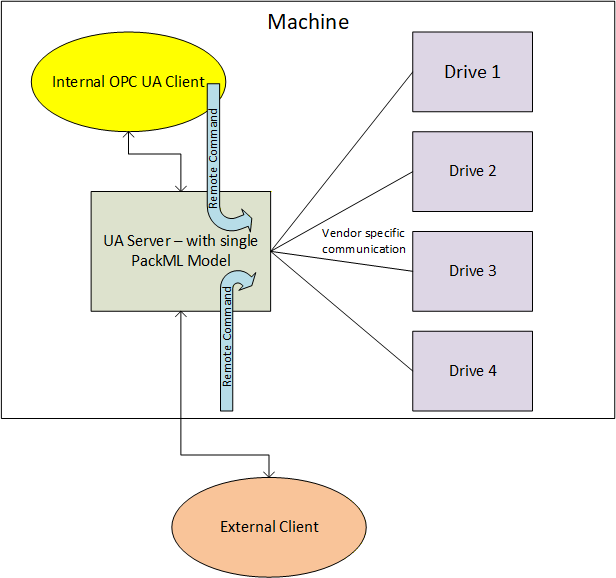
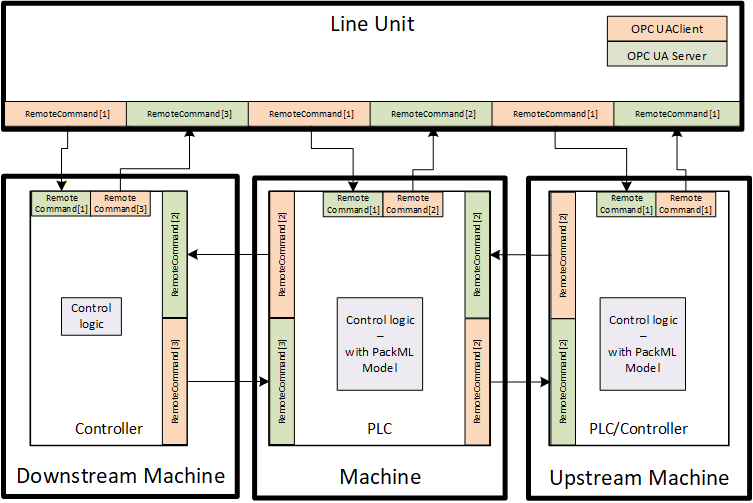
The RemoteCommand Method parameters are defined in Table 53
Signature
	RemoteCommand(
[in] PackMLRemoteInterfaceDataType[] RemoteInterface);| Argument | Description |
| RemoteInterface | This structure is an array of remote interface information which include Number, ControlCmdNumber, CmdValue and Parameter. Parameter itself is a structure formally defined in 6.5.4. The PackMLRemoteInterfaceDataType is formally defined in 6.5.7 |
Method result codes are defined in Table 54.
| Result Code | Description |
| Bad_MethodInvalid | See OPC 10000-4 - Services for the description of this result code. (The Method id does not refer to a Method for the specified Object.) |
| Bad_NotImplemented | See OPC 10000-4 - Services for the description of this result code. (Requested operation is not implemented.) |
| Bad_NodeIdUnknown | See OPC 10000-4 - Services for the description of this result code. (Used to indicate that the specified Object is not valid) |
| Bad_InvalidState | See OPC 10000-4 - Services for the description of this result code. (The operation cannot be completed because the Object is closed, uninitialized or in some other invalid state.) |
| Bad_MethodInvalid | See OPC 10000-4 - Services for the description of this result code. (The Method id does not refer to a Method for the specified Object.) |
| Bad_ArgumentsMissing | See OPC 10000-4 - Services for the description of this result code (The Client did not specify all of the input arguments for the Method.) |
| Bad_TooManyArguments | See OPC 10000-4 - Services for the description of this result code (The Client specified more input arguments than defined for the Method.) |
| Bad_InvalidArgument | See OPC 10000-4 - Services for the description of this result code. (Used to indicate in the operation level results that one or more of the input arguments are invalid. The inputArgumentResults contain the specific status code for each invalid argument.) |
| Bad_TypeMismatch | See OPC 10000-4 - Services for the description of this result code. (Used to indicate that an input argument does not have the correct data type.) |
Table 55 specifies the AddressSpace representation for the RemoteCommand Method. RemoteCommand includes an array of InputArguments, where the input argument details are provided in Table 53.
| Attribute | Value | ||||
| BrowseName | RemoteCommand | ||||
| References | NodeClass | BrowseName | DataType | TypeDefinition | ModellingRule |
|---|---|---|---|---|---|
| HasProperty | Variable | InputArguments | Argument[] | PropertyType | Mandatory |
6.7.16 SetInterlock Method
This Method allows an OPC UA Client to set an interlock associated with this PackML system parameter. The parameters for the SetInterlock Method are defined in Table 56.
Signature
	SetInterlock(
	 	 [in] Int32 InterlockId,
[in] Boolean State);| Argument | Description |
| InterlockId | ID of the target interlock to set or reset. The ID typically refer to the element in the Boolean Array in the MaterialInterlock tag. |
| State | The state that the targeted interlock should be set to. True is set to interlocked, false is not interlocked. |
Method result codes are defined in Table 57
| Result Code | Description |
| Bad_MethodInvalid | See OPC 10000-4 - Services for the description of this result code. (The Method id does not refer to a Method for the specified Object.) |
| Bad_NotImplemented | See OPC 10000-4 - Services for the description of this result code. (Requested operation is not implemented.) |
| Bad_NodeIdUnknown | See OPC 10000-4 - Services for the description of this result code. (Used to indicate that the specified Object is not valid) |
| Bad_InvalidState | See OPC 10000-4 - Services for the description of this result code. (The operation cannot be completed because the Object is closed, uninitialized or in some other invalid state.) |
| Bad_MethodInvalid | See OPC 10000-4 - Services for the description of this result code. (The Method id does not refer to a Method for the specified Object.) |
| Bad_ArgumentsMissing | See OPC 10000-4 - Services for the description of this result code (The Client did not specify all of the input arguments for the Method.) |
| Bad_TooManyArguments | See OPC 10000-4 - Services for the description of this result code (The Client specified more input arguments than defined for the Method.) |
| Bad_InvalidArgument | See OPC 10000-4 - Services for the description of this result code. (Used to indicate in the operation level results that one or more of the input arguments are invalid. The inputArgumentResults contain the specific status code for each invalid argument.) |
| Bad_TypeMismatch | See OPC 10000-4 - Services for the description of this result code. (Used to indicate that an input argument does not have the correct data type.) |
Table 58 specifies the AddressSpace representation for the SetInterlock Method. SetInterlock includes an array of InputArguments, where the input argument details are provided in Table 56.
| Attribute | Value | ||||
| BrowseName | SetInterlock | ||||
| References | NodeClass | BrowseName | DataType | TypeDefinition | ModellingRule |
|---|---|---|---|---|---|
| HasProperty | Variable | InputArguments | Argument[] | PropertyType | Mandatory |
6.7.17 SetParameter Method
This Method allows an OPC UA Client to set the parameters that are by the machine.
Signature
	SetParameter(
		 [in] PackMLDescriptorDataType[] Parameter
); | Argument | Description |
| Parameter | The array of parameter that can be used by the method |
Method result codes are defined in Table 60
| Result Code | Description |
| Bad_MethodInvalid | See OPC 10000-4 - Services for the description of this result code. (The Method id does not refer to a Method for the specified Object.) |
| Bad_NotImplemented | See OPC 10000-4 - Services for the description of this result code. (Requested operation is not implemented.) |
| Bad_NodeIdUnknown | See OPC 10000-4 - Services for the description of this result code. (Used to indicate that the specified Object is not valid) |
| Bad_InvalidState | See OPC 10000-4 - Services for the description of this result code. (The operation cannot be completed because the Object is closed, uninitialized or in some other invalid state.). If a machine determines that it is not in a state that allows parameter changes this error is returned. |
| Bad_MethodInvalid | See OPC 10000-4 - Services for the description of this result code. (The Method id does not refer to a Method for the specified Object.) |
Table 61 specifies the AddressSpace representation for the SetParameter Method. SetParameter includes an array of InputArguments, where the input argument details are provided in Table 59.
| Attribute | Value | ||||
| BrowseName | SetParameter | ||||
| References | NodeClass | BrowseName | DataType | TypeDefinition | ModellingRule |
|---|---|---|---|---|---|
| HasProperty | Variable | InputArguments | Argument[] | PropertyType | Mandatory |
6.8 Alarms
6.8.1 Overview
The section defines alarms. Alarms in PackML are provided via a set of tags. Alarms in OPC UA are provided via events and a full alarming system. This is a preferred method for providing alarms, but it does require some additional overhead. To allow the PackML information model to be implemented in smaller devices it was decided to initially support the existing Tag based representation of Alarm information, and to add the OPC UA Event based definition of alarms in the next release. Servers shall be able to report alarms in both manners, and Clients can use the manner that is most appropriate for them. Some smaller device might find it easier to just access the tags for Alarm information, but display system or other HMIs would probably make use of the OPC UA Event based system for alarming.
6.8.2 Alarm Tags
6.8.2.1 Overview
The following VariableType is used to report alarms in the PackML unit. In addition, the data is also available as a structured datatype, which is much like an event.
6.8.2.2 PackMLAlarmDataType
The PackMLAlarmDataType provides the PackML tag alarm structure. It is formally defined in Table 62.
| Name | Type | Description |
| PackMLAlarmDataType | Structure | |
ID | Int32 | A unique number assigned to each type of alarm, stop or warning. |
Value | Int32 | An alarm, stop or warning message number associated to the ID to allow for user specific detail or to break down the Alarm.ID to greater detail |
Message | String | The actual text of the alarm, stop or warning for those machines capable of providing string information |
Category | Int32 | A user defined value which indicates what type of alarm, stop or warning has occurred. E.g. electrical, mechanical, process limit, … |
DateTime | UtcTime | The date and time that the alarm, stop or warning occurred |
AckDateTime | UtcTime | The date and time that the alarm, stop or warning was Acknowledged, |
Trigger | Boolean | This variable is true when the alarm is active |
6.8.3 Alarm Events
[note: This section will be defined in a future release]