
6 Weihenstephan Standards Information Model
6.1 Overview of the Weihenstephan Standards Information Model
The Weihenstephan Standard Information Model is used to describe the instance of a machine profile within a WS domain. Currently over 150 different machine profiles are defined across all WS domains.
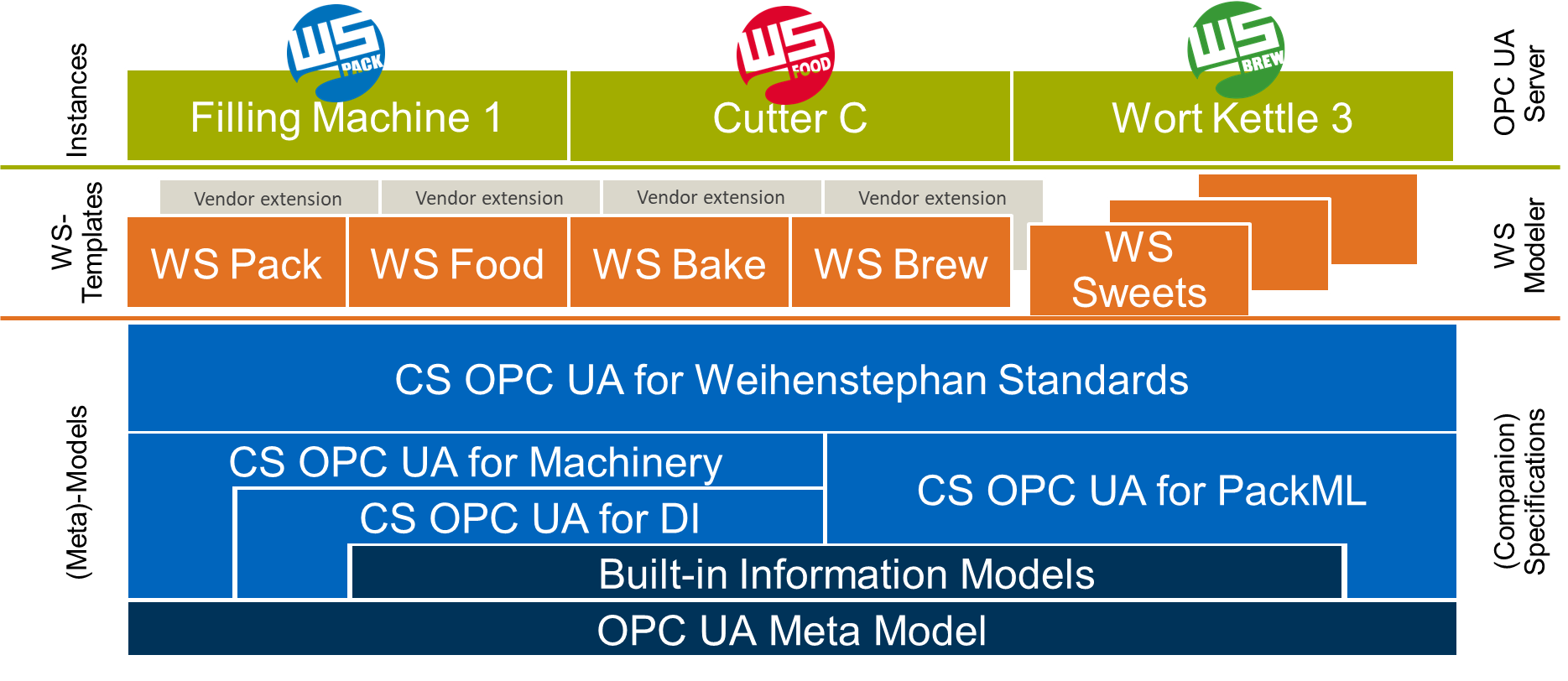
To reduce the complexity resulting from the many machine profiles, this CS describes a generic metamodel for all WS machine profiles. This metamodel is based on the CS OPC UA for Maschinery and PackML (Compare Figure 10).
Which WS machine profile finally contains which WS DataPoints and there definition is defined in the WS Templates which are not part of this specification and are provided by https://weihenstephan-standards.com. Thus, the Weihenstephan Standards can be applied to other domains in the future, without changing the underlying meta model. Modelling tools such as the WS Modeler support the creation of WS Information Models that are based on the instances of concrete machines.
The entry point is an instance of the WSMachineType, which are organized in the Machines folder specified in the CS OPC UA for Machinery in the server instance.
Within the WSMachineType object, information about three areas of a WS machine are provided:
Information about the used WS MachineClass, WS version, WS vendor version, and WS project version
General information about the machine itself, such as manufacturer, serial number, etc. This information is integrated as an AddIn object of CS OPC UA for Machinery.
The actual data points of the Weihenstephan Standards. The WS DataPoints are also included in the information model based on their assignment to categories.
6.2 Deeper understanding of the WS Templates
As this companion specification only defines the framework, further information are required to create an instance of a WS-compliant machine. These required information are contained in the WS Templates (see Figure 10).
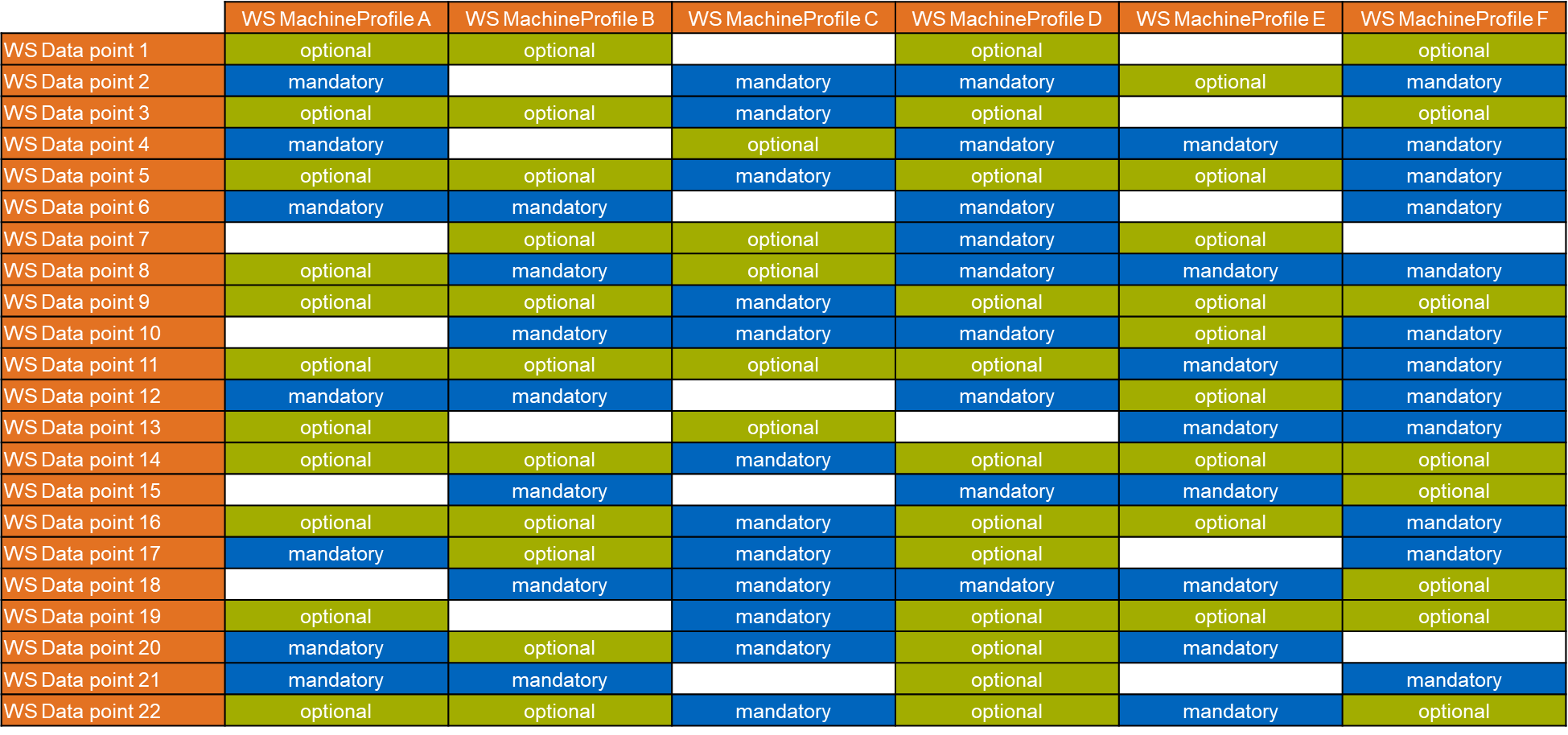
A WS Template contains three domain-specific aspects: The definition of the WS DataPoints (see Table 9), the definition of the machine profiless and the permutation table between the data points and the machine profiles (see Table 12).
A general mapping of the WS Protocol data types to the OPC UA type definition as well as of the OPC UA data types in WS OPC UA is not possible. This is due to the fact that the Weihenstephan Standards with OPC UA have more possibilities to model the information model compared to the already established WS Protocol.
The WS Templates are included in the WS Modeler, a Excel-based modelling tool. The WS Modeler can also be used for creation of NodeSets for the different machine profiles. It can be ordered via the website of the Weihenstephan Standards (https://www.weihenstephan-standards.com).
6.3 Used Types for WS DataPoints and general mapping to WS Protocol data types
Usually, WS DataPoints in the catgeories "measured values" or "counter" are of the type definition WSAnalogUnitType (see chapter 8.1) and are either of the DataType Float or UInt32. The ObjectType WSBaseStateMachineType (see 7.5) is used in the category OperatingStates. Some WS DataPoints in the categories "Alarms" or "Warnings" are instances of the ObjectTypes WSAlarmType (see 7.3) or WSWarningType (see 7.4). The DataType WSOperatingModeEnumerationType (see 9.1) is used for WS DataPoints in the OperatingModes category, the WSProgramEnumerationType (see 9.2) is used for WS DataPoints in the Programs category, respectively. Members of the WS Industrial User Group can define additional vendor-specific data points and machine profiles in addition to the WS DataPoints and integrate them into the WS information model.
A general mapping from WS Protocol data types to WS OPC UA TypeDefinition and DataTypes are listed in Table 13.
| WS Category | WS OPC UA TypeDefinition | WS OPC UA DataType | WS Protocol data type |
| Alarms | WSAlarmType | UNSIGNED32 | |
| Batch and article tracing | WSBaseDataVariableType | String | STRING16 |
| Batch and article tracing | WSAnalogUnitType | UInt32 | UNSIGNED32 |
| Batch and article tracing | WSAnalogUnitType | Float | REAL |
| Counters | WSAnalogUnitType | UInt32 | UNSIGNED32 |
| Counters | WSBaseDataVariableType | Number | Arbitrary |
| Measured values | WSAnalogUnitType | Float | REAL |
| Operating modes | WSBaseDataVariableType | WSOperatingStateEnumerationType | HEX32 or UNSIGNED32 |
| Operating states | WSBaseStateMachineType | HEX32 or UNSIGNED32 | |
| Parameters | WSBaseDataVariableType | LocalizedText | UNSIGNED32 |
| Parameters | WSBaseDataVariableType | UInt32 | UNSIGNED32 |
| Parameters | WSAnalogUnitType | Float | REAL |
| Parameters | WSBaseDataVariableType | String | STRING16 |
| Parameters | WSAnalogUnitType | UInt32 | UNSIGNED32 |
| Programs | WSBaseDataVariableType | WSProgramEnumerationType | HEX32 or UNSIGNED32 |
| Programs | WSBaseDataVariableType | LocalizedText | UNSIGNED32 |
| Warnings | WSWarningType | UNSIGNED32 |
6.4 Namespaces for WS and vendor-specific data points
WS DataPoints are clearly distinguished from vendor- or project-specific data points by their prefixes in the WS BrowseName. For example, all WS DataPoints have the prefix "WS_". This differentiation option is to be supplemented in OPC UA by the introduction of namespaces. For this purpose, all BrowseNames of WS DataPoints will be located in the namespace http://weihenstephan-standards.com/WS/. An example for the BrowseName of a WS DataPoint is "5:WS_Tot_Packages". Vendor-specific data points will get their own namespace following the pattern of the WS namespace.
At this point it should be noted that a WS datapoint is usually associated with three namespaces. Table 14 shows the dependency to the required namespaces for the WS datapoint WS_Tot_Packages.
| Node property | Example | NamespaceURI |
| NodeId | ns=6;i=5003 | http://tum.de/ |
| BrowseName | 5:WS_Tot_Packages | http://weihenstephan-standards.com/WS/ |
| HasTypeDefinition | 1:WSAnalogUnitType | http://opcfoundation.org/UA/Weihenstephan |