
1 Scope
This document specifies the OPC UA Information Model to represent the Objects and services that comprise Remote IO as defined in chapter 6.
OPC Foundation
OPC is the interoperability standard for the secure and reliable exchange of data and information in the industrial automation space and in other industries. It is platform independent and ensures the seamless flow of information among devices from multiple vendors. The OPC Foundation is responsible for the development and maintenance of this standard.
OPC UA is a platform independent service-oriented architecture that integrates all the functionality of the individual OPC Classic specifications into one extensible framework. This multi-layered approach accomplishes the original design specification goals of:
Platform independence: from an embedded microcontroller to cloud-based infrastructure
Secure: encryption, authentication, authorisation and auditing
Extensible: ability to add new features including transports without affecting existing applications
Comprehensive information modelling capabilities: for defining any model from simple to complex
PROFINET Standardization Group (PNO)
The PROFIBUS and PROFINET user organization (PNO: Profibus Nutzerorganisation e. V.) was founded in 1989 and is the largest automation community in the world and responsible for PROFIBUS and PROFINET, the two most important enabling technologies in automation today. The PNO is member of PROFIBUS and PROFINET International (PI).
The common interest of the PNO global network of vendors, developers, system integrators and end users covering all industries lies in promoting, supporting and using PROFINET. Regionally and globally about 1,400 member companies are working closely together to the best automation possible. No other fieldbus organization in the world has the same kind of global influence and reach.
2 Normative references
The following referenced documents are indispensable for the application of this document. For dated references, only the edition cited applies. For undated references, the latest edition of the referenced document (including any amendments and errata) applies.
OPC 10000-1, OPC Unified Architecture - Part 1: Overview and Concepts
OPC 10000-1
OPC 10000-2, OPC Unified Architecture - Part 2: Security Model
OPC 10000-2
OPC 10000-3, OPC Unified Architecture V1.05 - Part 3: Address Space Model
OPC 10000-3
OPC 10000-4, OPC Unified Architecture V1.05 - Part 4: Services
OPC 10000-4
OPC 10000-5, OPC Unified Architecture V1.05 - Part 5: Information Model
OPC 10000-5
OPC 10000-6, OPC Unified Architecture V1.05 - Part 6: Mappings
OPC 10000-6
OPC 10000-7, OPC Unified Architecture - Part 7: Profiles
OPC 10000-7
OPC 10000-18, OPC Unified Architecture - Part 18: Role-Based Security
OPC 10000-18
OPC 10000-23, OPC Unified Architecture V1.05 - Part 23: Common ReferenceTypes
OPC 10000-23
OPC 10000-100, OPC Unified Architecture - Part 100: Devices
OPC 10000-100
OPC RIO, OPC UA for PROFINET Remote IO - Release V1.0 - Date: May 2022
| Order No.: 30142 |
ENCP, Profile Drive Technology - Encoder Profile - Version 4.2 - Date: March 2017 -
Order No.: 3.162
PDP, Profile Drive Technology - PROFIdrive Profile - Version 4.2 - Date: October 2015 -
Order Nr: 3.172
3 Terms, abbreviated terms and conventions
3.1 Overview
It is assumed that basic concepts of OPC UA information modelling and Profile Drive Technology - Encoder Profile [ENCP] are understood in this document. This document will use these concepts to describe the PROFINET Encoder Information Model. For the purposes of this document, the terms and definitions given in OPC 10000-1, OPC 10000-3, OPC 10000-4, OPC 10000-5, OPC 10000-7, OPC 10000-100, … as well as the following apply.
Note that OPC UA terms and terms defined in this document are italicized in the document.
3.2 OPC UA for PROFINET Encoder definitions
Excerpt from [ENCP], chapter 4.1.
3.2.1 Output Data
Data, which a device cyclically receives from the controller and which it outputs to the device application or the peripherals.
3.2.2 Input Data
Data, which a device cyclically sends to the controller.
3.2.3 IO Data
For Devices, all Input and Output Data (cyclic transmission).
3.2.4 DO IO Data
For a Drive Object (PROFIdrive), all Input and Output Data (cyclic transmission).
3.2.5 EO IO Data
For an Encoder Object (encoder), all Input and Output Data (cyclic transmission).
3.2.6 Process Data
For Devices, all data related to the control process (e.g. gain factor, state variables, …). The Process Data typically is mapped on parameters (access is with acyclic transmission).
3.3 OPC UA for PROFINET Encoder terms
3.3.1 Controller
The Controller is a controlling device which is associated with one or more Encoders. Related to the automation system, the Controller is the host for the overall automation (See [ENCP], chapter 5.1.1).
3.3.2 P-Device
The P-Device (peripheral device) is a field device and the host device for the Encoder Unit. The
P-Device typically is associated with one or more Controller devices (See [ENCP], chapter 5.1.1).
3.3.3 Supervisor
The Supervisor typically is an engineering device which manages provisions of configuration data (parameter sets) and collections of diagnosis data from P-Devices and/or Controllers (See [ENCP], chapter 5.1.1).
3.3.4 Encoder Unit
An Encoder Unit is a part of a P-Device containing one or multiple Encoder Objects. (See [ENCP], chapter 5.2.3).
3.3.5 Encoder Object
An Encoder Object is a part of an Encoder Unit and contains the Process Control Task. The Encoder Object shall comprise the mandatory functionality: Parameters, measuring task, IO Data (setpoint values, actual values), support for diagnosis mechanism, clock synchronous operation and fault buffer (See [ENCP], chapter 5.2.4).
3.3.6 Process Control Task
The Process Control Task is part of an Encoder Object and is the task that takes the measurements and calculates the results (See [ENCP], chapter 5.2.4).
3.4 Abbreviated terms
Excerpt from [ENCP], chapter 4.2:
| API | Application Process Identifier |
| EO | Encoder Object |
| DO | Drive Object |
| CO | Communication Object |
| EU | Encoder Unit |
| CR | Communication Relationship |
3.5 Conventions used in this document
3.5.1 Conventions for Node descriptions
3.5.1.1 Node definitions
Node definitions are specified using tables (see Table 2).
Attributes are defined by providing the Attribute name and a value, or a description of the value.
References are defined by providing the ReferenceType name, the BrowseName of the TargetNode and its NodeClass.
If the TargetNode is a component of the Node being defined in the table the Attributes of the composed Node are defined in the same row of the table.
The DataType is only specified for Variables; "[<number>]" indicates a single-dimensional array, for multi-dimensional arrays the expression is repeated for each dimension (e.g. [2][3] for a two-dimensional array). For all arrays the ArrayDimensions is set as identified by <number> values. If no <number> is set, the corresponding dimension is set to 0, indicating an unknown size. If no number is provided at all the ArrayDimensions can be omitted. If no brackets are provided, it identifies a scalar DataType and the ValueRank is set to the corresponding value (see OPC 10000-3). In addition, ArrayDimensions is set to null or is omitted. If it can be Any or ScalarOrOneDimension, the value is put into "{<value>}", so either "{Any}" or "{ScalarOrOneDimension}" and the ValueRank is set to the corresponding value (see OPC 10000-3) and the ArrayDimensions is set to null or is omitted. Examples are given in Table 1.
| Notation | DataType | ValueRank | ArrayDimensions | Description |
| 0:Int32 | 0:Int32 | -1 | omitted or null | A scalar Int32. |
| 0:Int32[] | 0:Int32 | 1 | omitted or {0} | Single-dimensional array of Int32 with an unknown size. |
| 0:Int32[][] | 0:Int32 | 2 | omitted or {0,0} | Two-dimensional array of Int32 with unknown sizes for both dimensions. |
| 0:Int32[3][] | 0:Int32 | 2 | {3,0} | Two-dimensional array of Int32 with a size of 3 for the first dimension and an unknown size for the second dimension. |
| 0:Int32[5][3] | 0:Int32 | 2 | {5,3} | Two-dimensional array of Int32 with a size of 5 for the first dimension and a size of 3 for the second dimension. |
| 0:Int32{Any} | 0:Int32 | -2 | omitted or null | An Int32 where it is unknown if it is scalar or array with any number of dimensions. |
| 0:Int32{ScalarOrOneDimension} | 0:Int32 | -3 | omitted or null | An Int32 where it is either a single-dimensional array or a scalar. |
The TypeDefinition is specified for Objects and Variables.
The TypeDefinition column specifies a symbolic name for a NodeId, i.e. the specified Node points with a HasTypeDefinition Reference to the corresponding Node.
The ModellingRule of the referenced component is provided by specifying the symbolic name of the rule in the ModellingRule column. In the AddressSpace, the Node shall use a HasModellingRule Reference to point to the corresponding ModellingRule Object.
If the NodeId of a DataType is provided, the symbolic name of the Node representing the DataType shall be used.
Note that if a symbolic name of a different namespace is used, it is prefixed by the NamespaceIndex (see 3.5.2.2).
Nodes of all other NodeClasses cannot be defined in the same table; therefore, only the used ReferenceType, their NodeClass and their BrowseName are specified. A reference to another part of this document points to their definition. Table 2 illustrates the table. If no components are provided, the DataType, TypeDefinition and Other columns may be omitted and only a Comment column is introduced to point to the Node definition.
Each Type Node or well-known Instance Node defined shall have one or more ConformanceUnits defined in 11.1 that require the Node to be in the AddressSpace.
The relations between Nodes and ConformanceUnits are defined at the end of the tables defining Nodes, one row per ConformanceUnit. The ConformanceUnits are reflected in the Category element for the Node definition in the UANodeSet (see OPC 10000-6).
The list of ConformanceUnits in the UANodeSet allows Servers to optimize resource consumption by using a list of supported ConformanceUnits to select a subset of the Nodes in an Information Model.
When a Node is selected in this way, all dependencies implied by the References are also selected.
Dependencies exist if the Node is the source of HasTypeDefinition, HasInterface, HasAddIn or any HierarchicalReference. Dependencies also exist if the Node is the target of a HasSubtype Reference. For Variables and VariableTypes, the value of the DataType Attribute is a dependency. For DataType Nodes, any DataTypes referenced in the DataTypeDefinition Attribute are also dependencies.
For additional details see OPC 10000-5.
| Attribute | Value | ||||
| Attribute name | Attribute value. If it is an optional Attribute that is not set "--" is used. | ||||
| References | NodeClass | BrowseName | DataType | TypeDefinition | Other |
|---|---|---|---|---|---|
| ReferenceType name | NodeClass of the target Node. | BrowseName of the target Node. | DataType of the referenced Node, only applicable for Variables. | TypeDefinition of the referenced Node, only applicable for Variables and Objects. | Additional characteristics of the TargetNode such as the ModellingRule or AccessLevel. |
| NOTE Notes referencing footnotes of the table content. | |||||
| Conformance Units | |||||
|---|---|---|---|---|---|
| Name of ConformanceUnit, one row per ConformanceUnit |
Components of Nodes can be complex that is containing components by themselves. The TypeDefinition, NodeClass and DataType can be derived from the type definitions, and the symbolic name can be created as defined in 3.5.3.1. Therefore, those containing components are not explicitly specified; they are implicitly specified by the type definitions.
The Other column defines additional characteristics of the Node. Examples of characteristics that can appear in this column are show in Table 3.
| Name | Short Name | Description |
| 0:Mandatory | M | The Node has the Mandatory ModellingRule. |
| 0:Optional | O | The Node has the Optional ModellingRule. |
| 0:MandatoryPlaceholder | MP | The Node has the MandatoryPlaceholder ModellingRule. |
| 0:OptionalPlaceholder | OP | The Node has the OptionalPlaceholder ModellingRule. |
| ReadOnly | RO | The Node AccessLevel has the CurrentRead bit set but not the CurrentWrite bit. |
| ReadWrite | RW | The Node AccessLevel has the CurrentRead and CurrentWrite bits set. |
| WriteOnly | WO | The Node AccessLevel has the CurrentWrite bit set but not the CurrentRead bit. |
If multiple characteristics are defined they are separated by commas. The name or the short name may be used.
3.5.1.2 Additional References
To provide information about additional References, the format as shown in Table 4 is used.
| SourceBrowsePath | Reference Type | Is Forward | TargetBrowsePath |
| SourceBrowsePath is always relative to the TypeDefinition. Multiple elements are defined as separate rows of a nested table. | ReferenceType name | True = forward Reference. | TargetBrowsePath points to another Node, which can be a well-known instance or a TypeDefinition. You can use BrowsePaths here as well, which is either relative to the TypeDefinition or absolute. If absolute, the first entry needs to refer to a type or well-known instance, uniquely identified within a namespace by the BrowseName. |
References can be to any other Node.
3.5.1.3 Additional sub-components
To provide information about sub-components, the format as shown in Table 5 is used.
| BrowsePath | References | NodeClass | BrowseName | DataType | TypeDefinition | Others |
| BrowsePath is always relative to the TypeDefinition. Multiple elements are defined as separate rows of a nested table | NOTE Same as for Table 2 | |||||
3.5.1.4 Additional Attribute values
The type definition table provides columns to specify the values for required Node Attributes for InstanceDeclarations. To provide information about additional Attributes, the format as shown in Table 6 is used.
| BrowsePath | <Attribute name> Attribute |
| BrowsePath is always relative to the TypeDefinition. Multiple elements are defined as separate rows of a nested table | The values of attributes are converted to text by adapting the reversible JSON encoding rules defined in OPC 10000-6. If the JSON encoding of a value is a JSON string or a JSON number then that value is entered in the value field. Double quotes are not included. If the DataType includes a NamespaceIndex (QualifiedNames, NodeIds or ExpandedNodeIds) then the notation used for BrowseNames is used. If the value is an Enumeration the name of the enumeration value is entered. If the value is a Structure then a sequence of name and value pairs is entered. Each pair is followed by a newline. The name is followed by a colon. The names are the names of the fields in the DataTypeDefinition. If the value is an array of non-structures then a sequence of values is entered where each value is followed by a newline. If the value is an array of Structures or a Structure with fields that are arrays or with nested Structures then the complete JSON array or JSON object is entered. Double quotes are not included. |
There can be multiple columns to define more than one Attribute.
3.5.2 NodeIds and BrowseNames
3.5.2.1 NodeIds
The NodeIds of all Nodes described in this standard are only symbolic names. Annex A defines the actual NodeIds.
The symbolic name of each Node defined in this document is its BrowseName, or, when it is part of another Node, the BrowseName of the other Node, a ".", and the BrowseName of itself. In this case "part of" means that the whole has a HasProperty or HasComponent Reference to its part. Since all Nodes not being part of another Node have a unique name in this document, the symbolic name is unique.
The NamespaceUri for all NodeIds defined in this document is defined in Annex A. The NamespaceIndex for this NamespaceUri is vendor-specific and depends on the position of the NamespaceUri in the server namespace table.
Note that this document not only defines concrete Nodes, but also requires that some Nodes shall be generated, for example one for each Session running on the Server. The NodeIds of those Nodes are Server-specific, including the namespace. But the NamespaceIndex of those Nodes cannot be the NamespaceIndex used for the Nodes defined in this document, because they are not defined by this document but generated by the Server.
3.5.2.2 BrowseNames
The text part of the BrowseNames for all Nodes defined in this document is specified in the tables defining the Nodes. The NamespaceUri for all BrowseNames defined in this document is defined in 12.2.
For InstanceDeclarations of NodeClass Object and Variable that are placeholders (OptionalPlaceholder and MandatoryPlaceholder ModellingRule), the BrowseName and the DisplayName are enclosed in angle brackets (<>) as recommended in OPC 10000-3. If the BrowseName is not defined by this document, a namespace index prefix is added to the BrowseName (e.g., prefix '0' leading to '0:EngineeringUnits' or prefix '2' leading to '2:DeviceRevision'). This is typically necessary if a Property of another specification is overwritten or used in the OPC UA types defined in this document. Table 68 provides a list of namespaces and their indexes as used in this document.
3.5.3 Common Attributes
3.5.3.1 General
The Attributes of Nodes, their DataTypes and descriptions are defined in OPC 10000-3. Attributes not marked as optional are mandatory and shall be provided by a Server. The following tables define if the Attribute value is defined by this document or if it is server-specific.
For all Nodes specified in this document, the Attributes named in Table 7 shall be set as specified in the table.
| Attribute | Value |
| DisplayName | The DisplayName is a LocalizedText. Each Server shall provide the DisplayName identical to the BrowseName of the Node for the LocaleId "en". Whether the server provides translated names for other LocaleIds are server-specific. |
| Description | Optionally a server-specific description is provided. |
| NodeClass | Shall reflect the NodeClass of the Node. |
| NodeId | The NodeId is described by BrowseNames as defined in 3.5.2.1. |
| WriteMask | Optionally the WriteMask Attribute can be provided. If the WriteMask Attribute is provided, it shall set all non-server-specific Attributes to not writable. For example, the Description Attribute may be set to writable since a Server may provide a server-specific description for the Node. The NodeId shall not be writable, because it is defined for each Node in this document. |
| UserWriteMask | Optionally the UserWriteMask Attribute can be provided. The same rules as for the WriteMask Attribute apply. |
| RolePermissions | Optionally server-specific role permissions can be provided. |
| UserRolePermissions | Optionally the role permissions of the current Session can be provided. The value is server-specific and depends on the RolePermissions Attribute (if provided) and the current Session. |
| AccessRestrictions | Optionally server-specific access restrictions can be provided. |
3.5.3.2 Objects
For all Objects specified in this document, the Attributes named in Table 8 shall be set as specified in the Table 8. The definitions for the Attributes can be found in OPC 10000-3.
| Attribute | Value |
| EventNotifier | Whether the Node can be used to subscribe to Events or not is server-specific. |
3.5.3.3 Variables
For all Variables specified in this document, the Attributes named in Table 9 shall be set as specified in the table. The definitions for the Attributes can be found in OPC 10000-3.
| Attribute | Value |
| MinimumSamplingInterval | Optionally, a server-specific minimum sampling interval is provided. |
| AccessLevel | The access level for Variables used for type definitions is server-specific, for all other Variables defined in this document, the access level shall allow reading; other settings are server-specific. |
| UserAccessLevel | The value for the UserAccessLevel Attribute is server-specific. It is assumed that all Variables can be accessed by at least one user. |
| Value | For Variables used as InstanceDeclarations, the value is server-specific; otherwise it shall represent the value described in the text. |
| ArrayDimensions | If the ValueRank does not identify an array of a specific dimension (i.e. ValueRank <= 0) the ArrayDimensions can either be set to null or the Attribute is missing. This behaviour is server-specific. If the ValueRank specifies an array of a specific dimension (i.e. ValueRank > 0) then the ArrayDimensions Attribute shall be specified in the table defining the Variable. |
| Historizing | The value for the Historizing Attribute is server-specific. |
| AccessLevelEx | If the AccessLevelEx Attribute is provided, it shall have the bits 8, 9, and 10 set to 0, meaning that read and write operations on an individual Variable are atomic, and arrays can be partly written. |
3.5.3.4 VariableTypes
For all VariableTypes specified in this document, the Attributes named in Table 10 shall be set as specified in the table. The definitions for the Attributes can be found in OPC 10000-3.
| Attributes | Value |
| Value | Optionally a server-specific default value can be provided. |
| ArrayDimensions | If the ValueRank does not identify an array of a specific dimension (i.e. ValueRank <= 0) the ArrayDimensions can either be set to null or the Attribute is missing. This behaviour is server-specific. If the ValueRank specifies an array of a specific dimension (i.e. ValueRank > 0) then the ArrayDimensions Attribute shall be specified in the table defining the VariableType. |
3.5.3.5 Methods
For all Methods specified in this document, the Attributes named in Table 11 shall be set as specified in the table. The definitions for the Attributes can be found in OPC 10000-3.
| Attributes | Value |
| Executable | All Methods defined in this document shall be executable (Executable Attribute set to "True"), unless it is defined differently in the Method definition. |
| UserExecutable | The value of the UserExecutable Attribute is server-specific. It is assumed that all Methods can be executed by at least one user. |
4 General information to PROFINET Encoder and OPC UA
4.1 Introduction to PROFINET Encoder
4.1.1 Encoder Model
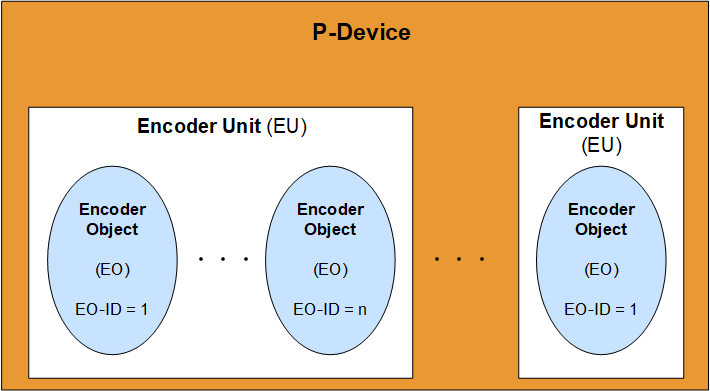
The Encoder Model is derived from the PROFIdrive Drive Model as defined in [PDP]. The Encoder Profile defined in [ENCP] used as basis for this specification defines that a P-Device contains exactly one or multiple Encoder Units containing exactly one or multiple Encoder Objects (See Figure 1).
4.1.2 Encoder Object
The main functions of a PROFINET Encoder are defined by the Encoder Object (EO). The general architecture of an Encoder Object is shown in Figure 2.
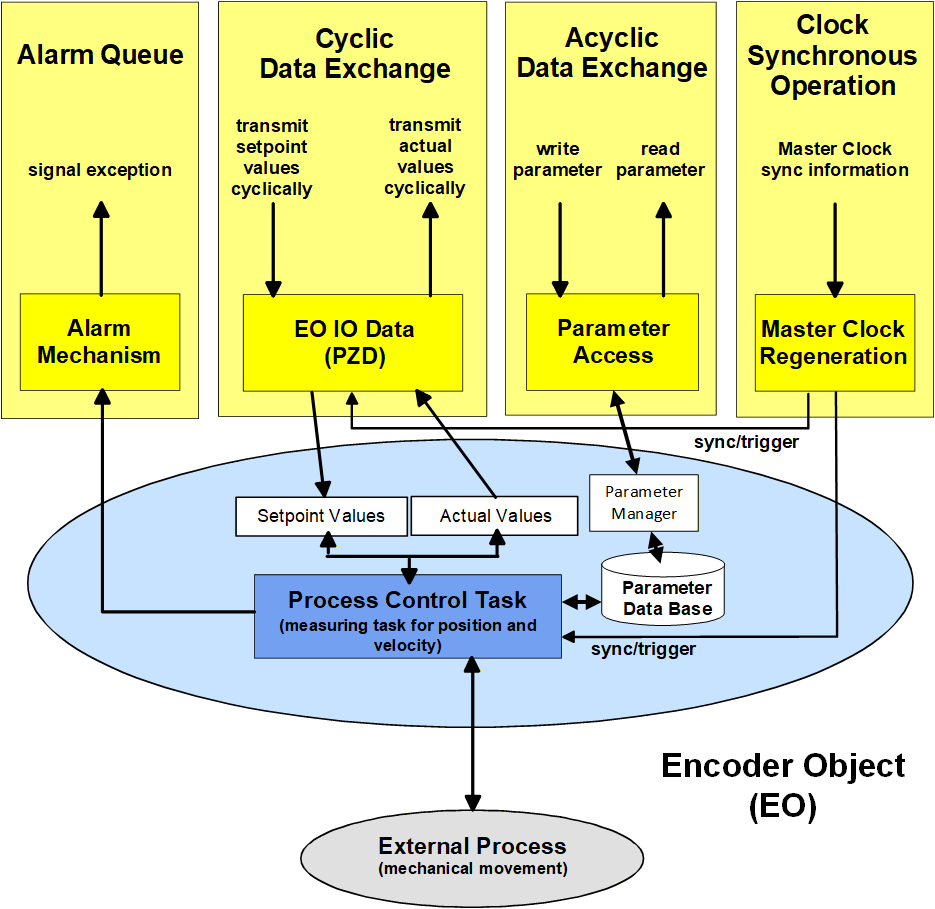
As defined in [ENCP], the EO shall have the following minimum functionality:
Parameters
Measuring task
IO Data (setpoint values, actual values)
Support for diagnosis mechanism
Clock synchronous operation
Fault buffer
The OPC UA for PROFINET Encoder Information Model provides access to parameters, IO Data, diagnosis, and fault buffer information.
4.1.3 Encoder Communication Model
The communication channels available between the P-Device and other Devices are shown in Figure 3.
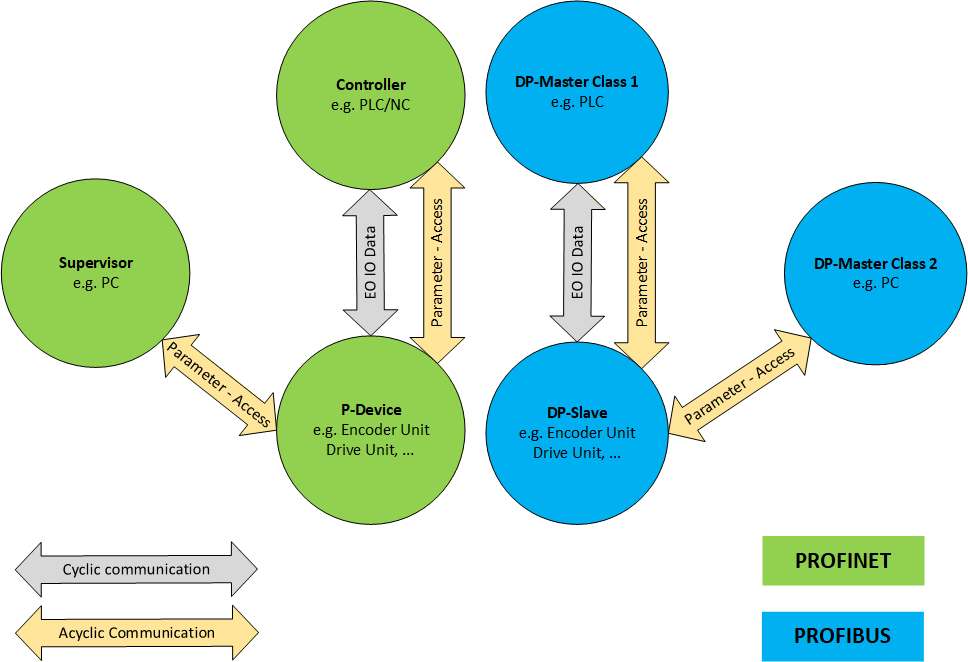
The Encoder Profile defined in [ENCP] allows two communication interfaces for Encoder devices: PROFIBUS or PROFINET. This specification applies to Encoder devices using different communication protocols also. PROFINET specific parts of the Information Model are optional.
4.2 Introduction to OPC Unified Architecture
4.2.1 What is OPC UA?
OPC UA is an open and royalty free set of standards designed as a universal communication protocol. While there are numerous communication solutions available, OPC UA has key advantages:
A state of art security model (see OPC 10000-2).
A fault tolerant communication protocol.
An information modelling framework that allows application developers to represent their data in a way that makes sense to them.
OPC UA has a broad scope which delivers for economies of scale for application developers. This means that a larger number of high-quality applications at a reasonable cost are available. When combined with semantic models such as PROFINET Encoder, OPC UA makes it easier for end users to access data via generic commercial applications.
The OPC UA model is scalable from small devices to ERP systems. OPC UA Servers process information locally and then provide that data in a consistent format to any application requesting data - ERP, MES, PMS, Maintenance Systems, HMI, Smartphone or a standard Browser, for examples. For a more complete overview see OPC 10000-1.
4.2.2 Basics of OPC UA
As an open standard, OPC UA is based on standard internet technologies, like TCP/IP, HTTP, Web Sockets.
As an extensible standard, OPC UA provides a set of Services (see OPC 10000-4) and a basic information model framework. This framework provides an easy manner for creating and exposing vendor defined information in a standard way. More importantly all OPC UA Clients are expected to be able to discover and use vendor-defined information. This means OPC UA users can benefit from the economies of scale that come with generic visualisation and historian applications. This specification is an example of an OPC UA Information Model designed to meet the needs of developers and users.
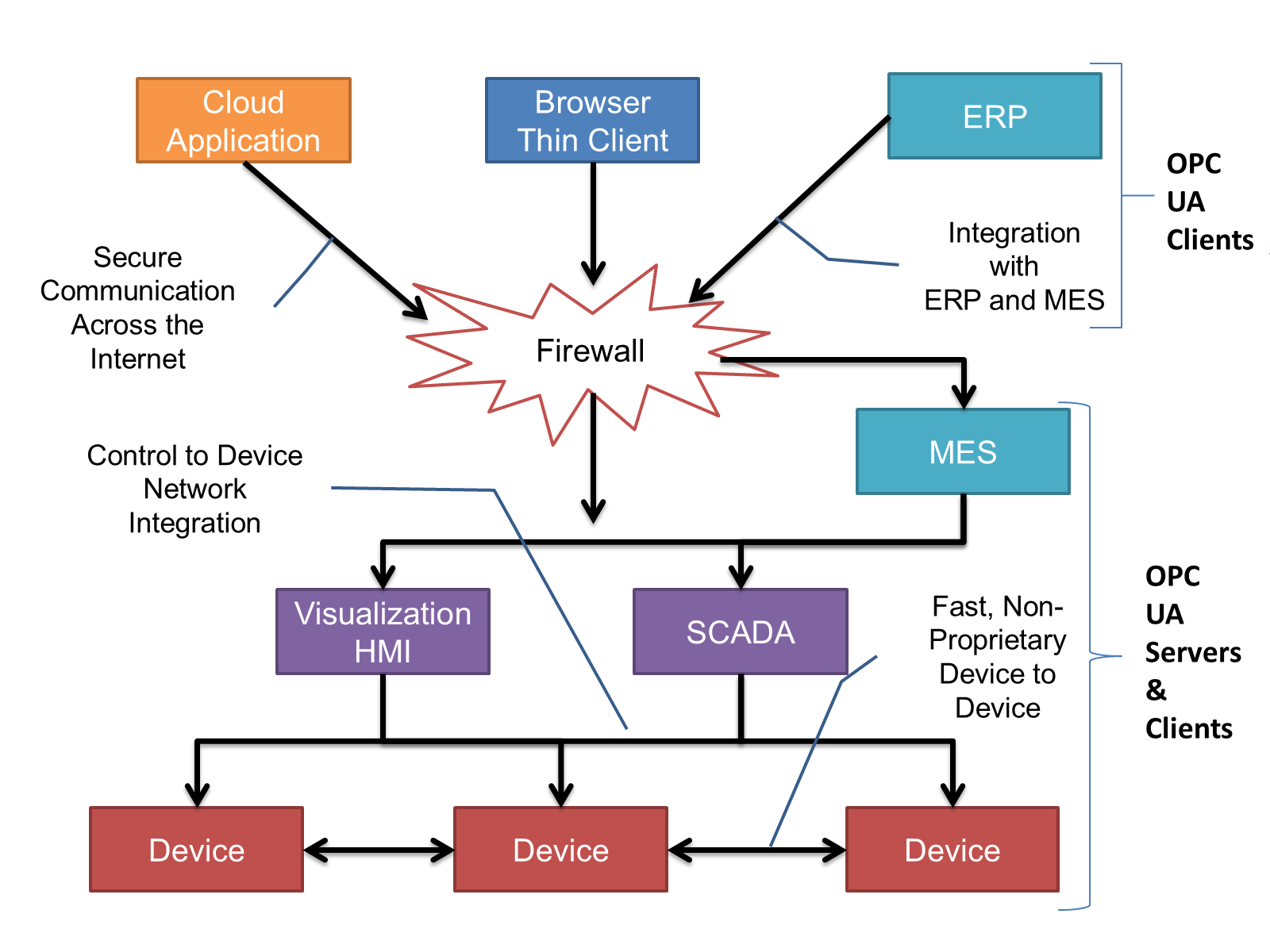
OPC UA Clients can be any consumer of data from another device on the network to browser based thin clients and ERP systems. The full scope of OPC UA applications is shown in Figure 4.
OPC UA provides a robust and reliable communication infrastructure having mechanisms for handling lost messages, failover, heartbeat, etc. With its binary encoded data, it offers a high-performing data exchange solution. Security is built into OPC UA as security requirements become more and more important especially since environments are connected to the office network or the internet and attackers are starting to focus on automation systems.
4.2.3 Information modelling in OPC UA
4.2.3.1 Concepts
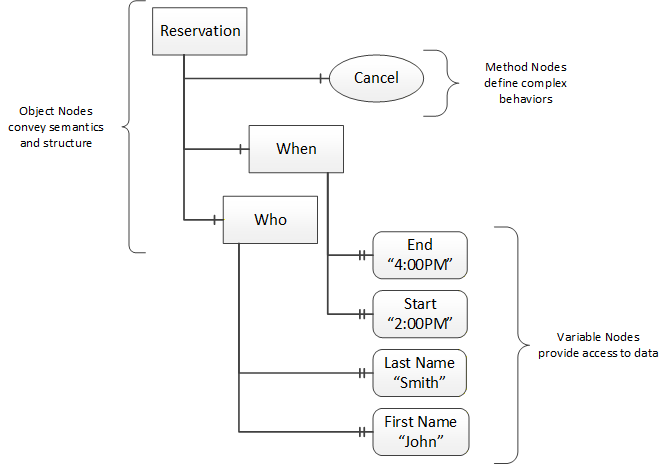
OPC UA provides a framework that can be used to represent complex information as Objects in an AddressSpace which can be accessed with standard services. These Objects consist of Nodes connected by References. Different classes of Nodes convey different semantics. For example, a Variable Node represents a value that can be read or written. The Variable Node has an associated DataType that can define the actual value, such as a string, float, structure etc. It can also describe the Variable value as a variant. A Method Node represents a function that can be called. Every Node has a number of Attributes including a unique identifier called a NodeId and non-localized name called as BrowseName. An Object representing a 'Reservation' is shown in Figure 5.
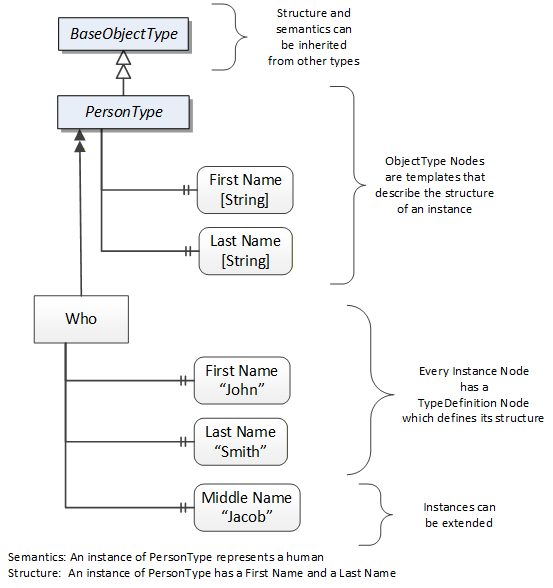
Object and Variable Nodes represent instances and they always reference a TypeDefinition (ObjectType or VariableType) Node which describes their semantics and structure. Figure 6 illustrates the relationship between an instance and its TypeDefinition.
The type Nodes are templates that define all of the children that can be present in an instance of the type. In the example in Figure 6 the PersonType ObjectType defines two children: First Name and Last Name. All instances of PersonType are expected to have the same children with the same BrowseNames. Within a type the BrowseNames uniquely identify the children. This means Client applications can be designed to search for children based on the BrowseNames from the type instead of NodeIds. This eliminates the need for manual reconfiguration of systems if a Client uses types that multiple Servers implement.
OPC UA also supports the concept of sub-typing. This allows a modeller to take an existing type and extend it. There are rules regarding sub-typing defined in OPC 10000-3, but in general they allow the extension of a given type or the restriction of a DataType. For example, the modeller may decide that the existing ObjectType in some cases needs an additional Variable. The modeller can create a subtype of the ObjectType and add the Variable. A Client that is expecting the parent type can treat the new type as if it was of the parent type. Regarding DataTypes, subtypes can only restrict. If a Variable is defined to have a numeric value, a sub type could restrict it to a float.
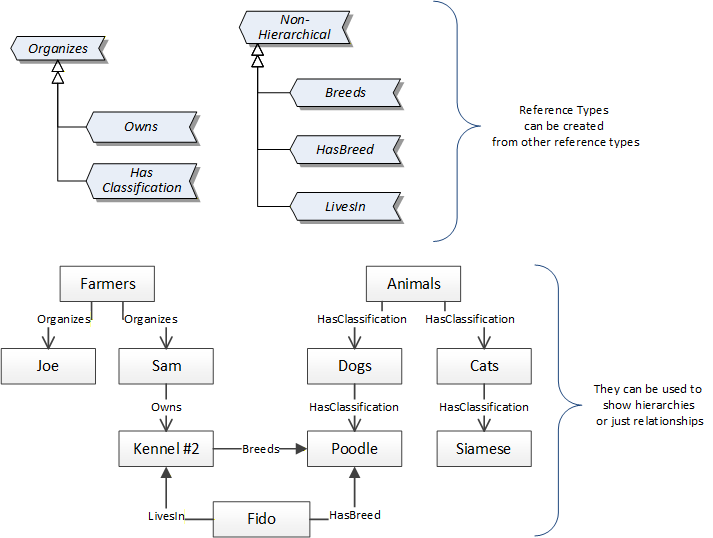
References allow Nodes to be connected in ways that describe their relationships. All References have a ReferenceType that specifies the semantics of the relationship. References can be hierarchical or non-hierarchical. Hierarchical references are used to create the structure of Objects and Variables. Non-hierarchical are used to create arbitrary associations. Applications can define their own ReferenceType by creating subtypes of an existing ReferenceType. Subtypes inherit the semantics of the parent but may add additional restrictions. Figure 7 depicts several References, connecting different Objects.
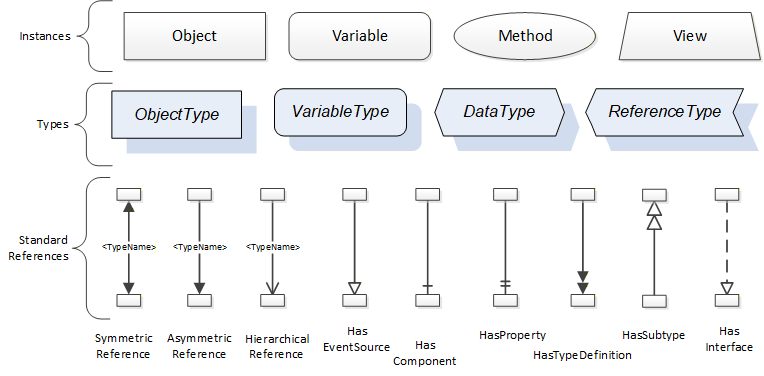
The figures above use a notation that was developed for the OPC UA specification. The notation is summarized in Figure 8. UML representations can also be used; however, the OPC UA notation is less ambiguous because there is a direct mapping from the elements in the figures to Nodes in the AddressSpace of an OPC UA Server.
A complete description of the different types of Nodes and References can be found in OPC 10000-3 and the base structure is described in OPC 10000-5.
OPC UA specification defines a very wide range of functionality in its basic information model. It is not required that all Clients or Servers support all functionality in the OPC UA specifications. OPC UA includes the concept of Profiles, which segment the functionality into testable certifiable units. This allows the definition of functional subsets (that are expected to be implemented) within a companion specification. The Profiles do not restrict functionality, but generate requirements for a minimum set of functionality (see OPC 10000-7)
4.2.3.2 Namespaces
OPC UA allows information from many different sources to be combined into a single coherent AddressSpace. Namespaces are used to make this possible by eliminating naming and id conflicts between information from different sources. Each namespace in OPC UA has a globally unique string called a NamespaceUri which identifies a naming authority and a locally unique integer called a NamespaceIndex, which is an index into the Server's table of NamespaceUris. The NamespaceIndex is unique only within the context of a Session between an OPC UA Client and an OPC UA Server- the NamespaceIndex can change between Sessions and still identify the same item even though the NamespaceUri's location in the table has changed. The Services defined for OPC UA use the NamespaceIndex to specify the Namespace for qualified values.
There are two types of structured values in OPC UA that are qualified with NamespaceIndexes: NodeIds and QualifiedNames. NodeIds are locally unique (and sometimes globally unique) identifiers for Nodes. The same globally unique NodeId can be used as the identifier in a node in many Servers - the node's instance data may vary but its semantic meaning is the same regardless of the Server it appears in. This means Clients can have built-in knowledge of of what the data means in these Nodes. OPC UA Information Models generally define globally unique NodeIds for the TypeDefinitions defined by the Information Model.
QualifiedNames are non-localized names qualified with a Namespace. They are used for the BrowseNames of Nodes and allow the same names to be used by different information models without conflict. TypeDefinitions are not allowed to have children with duplicate BrowseNames; however, instances do not have that restriction.
4.2.3.3 Companion Specifications
An OPC UA companion specification for an industry specific vertical market describes an Information Model by defining ObjectTypes, VariableTypes, DataTypes and ReferenceTypes that represent the concepts used in the vertical market, and potentially also well-defined Objects as entry points into the AddressSpace.
5 Use cases
Table 12 lists possible use cases of interest for OPC UA Clients. Typically, the use case consists of utilization of OPC UA standard mechanisms and data processing at the Client site.
6 OPC UA for PROFINET Encoder Information Model overview
6.1 Introduction to OPC UA for PROFINET Encoder
The PROFINET Encoder Information Model aims to offer Clients Objects and Services based on the Encoder Profile as defined in [ENCP]. The Information Model defined in this specification can also be seen as an extension of the OPC UA for RIO Information Model as defined in [OPC RIO].
OPC UA for PROFINET Encoder consists of all Objects and types provided by an OPC UA Server allowing OPC UA Clients to access data and services of Encoder Objects. As specified in [OPC RIO], the Information Model is divided into a PROFINET aspect and a functional aspect. The PROFINET aspect offers detailed Telegram information (See [OPC RIO]), the functional aspect provides an Information Model for Encoder Objects by providing EncoderChannelType Objects. The Signal Objects (See [OPC RIO]) in the PROFINET aspect are connected with components of the Encoder Objects in the functional aspect by dedicated 0:RepresentsSameEntityAs References.
The EncoderChannelType serves as the root container for modelling of Encoder Objects. The functional aspect with PROFINET Encoder contains as many EncoderChannelType Objects as needed to represent the Encoder Objects of the P-Device. The components of the EncoderChannelType are separated into five different sub-aspects as shown in Figure 9.
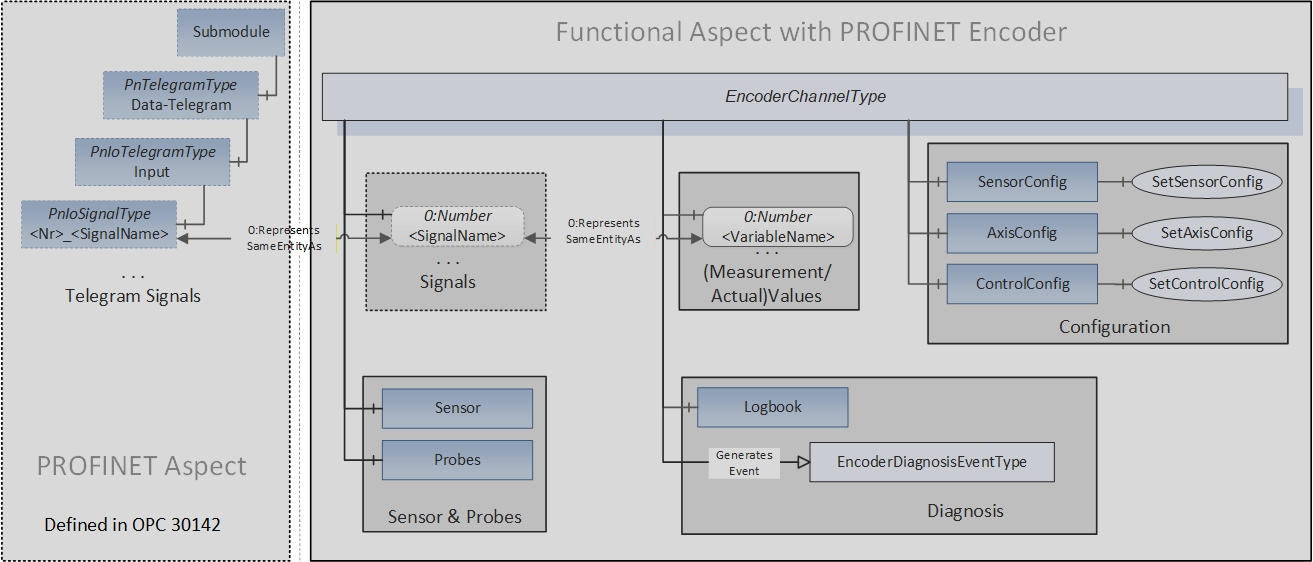
The "Signals" sub-aspect contains the Variables representing the Signal as transmitted in the PROFINET Telegram as Value.
In contrast, the "Measurement/Actual Values" sub-aspect is mainly consisting of Variables which contain the measurement values like position and velocity encoded as numeric data types. If containing information of the same Signal, Variables of these two sub-aspects may also be connected using the 0:RepresentsSameEntityAs Reference type.
The "Configuration" sub-aspect contains Objects holding configuration settings of the Encoder Object. There are also Methods available allowing Clients changing certain settings (See chapters 7.6, 7.7 and 7.8).
The "Sensor & Probes" sub-aspect gives access to sensor and probe data of the Encoder Object by providing the "Sensor" and "Probe" Objects. These Objects offer Variables, Methods, and Events for detailed control and information (See chapters 7.2 and 7.3).
The "Diagnosis" sub-aspect gives Clients access to the content of the Encoder Object's fault buffer. The Logbook ObjectType provides information about present and transient error conditions (See chapter 7.5). The "Diagnosis" sub-aspect also provides the EncoderDiagnosisEventType offering fault and warning information information.
6.2 Encoder Channel Signals and Measurements
Figure 10 shows a reduced Encoder model with the relationship of the Signal Objects in the PROFINET aspect with the Variables providing concrete Values in the functional aspect. The figure shall give a basic understanding by demonstrating the model organization using three Standard Signals transmitted with Standard Telegram 89 (See [ENCP], chapter 5.6.2).
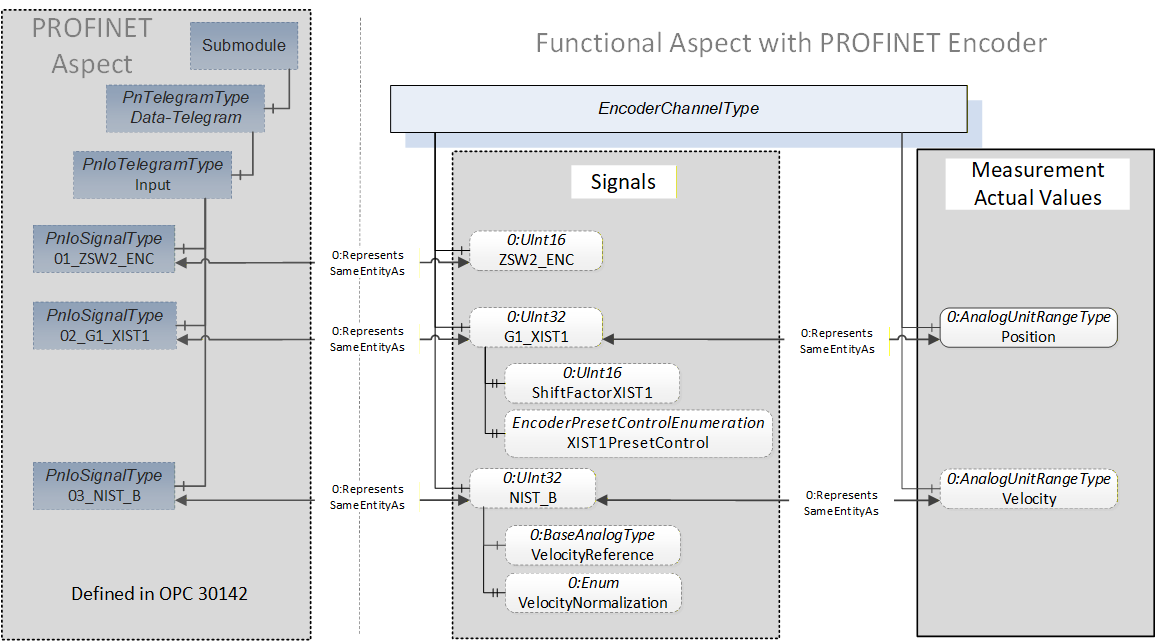
The "Position" and "Velocity" 0:AnalogUnitRangeType Variables in the "Measurement / Actual Values" sub-aspect contain the numeric representation of the "speed" and "position" Standard Signals (See [ENCP] Table 13) allowing Clients easy access to the numeric values of the represented Signals. These Variables are linked to their Signal Variable counterpart in the "Signals" sub-aspect using 0:RepresentsSameEntityAs References.
The "01_ZSW2_ENC", "02_G1_XIST1" and "03_NIST_B" Signal Objects represent Standard Signals provided by an Encoder Object. These Standard Signals are linked to their counterpart Variables in the functional aspect of the Information Model using 0:RepresentsSameEntityAs References.
The "ZSW2_ENC", "G1_XIST1" and "NIST_B" Variables in the "Signals" sub-aspect provide the raw Signal Values encoded as unsigned integer data types. Optional Properties of the G1_XIST1 and "NIST_B" Variables provide further Properties like "ShiftFactorXIST1" enabling Clients to gain additional understanding without dissecting all individual Signal bits.
6.3 Encoder Channel Configuration
Figure 11 shows the structure of the "Configuration" sub-aspect.
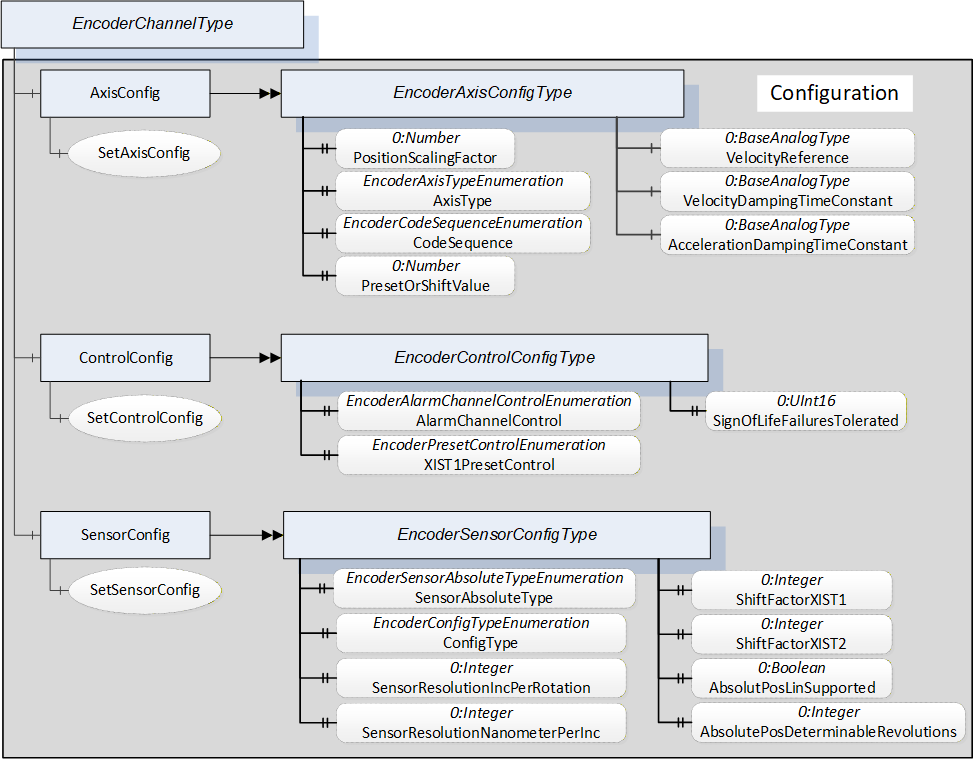
The "Configuration" sub-aspect contains different configuration ObjectTypes and associated Methods for configuration changes.
The AxisConfig EncoderAxisConfigType Object contains configuration Properties belonging to the Encoder's axis and scaling functions. The SetConfigAxis Method allows changes of certain Properties (Server dependent).
The ControlConfig EncoderControlConfigType Object contains Properties for configuring the alarm channel, the effect of preset functions and the tolerated Sign-Of-Life failures. The SetConfigControl Method allows changes of certain Properties (Server dependent).
The SensorConfig EncoderSensorConfigType Object contains configuration Properties related to the Encoder's sensor properties and settings. The SetConfigSensor Method allows changes of certain Properties (Server dependent).
6.4 Encoder Channel Sensor & Probes
Figure 12 shows the structure of the "Sensor & Probes" sub-aspect.
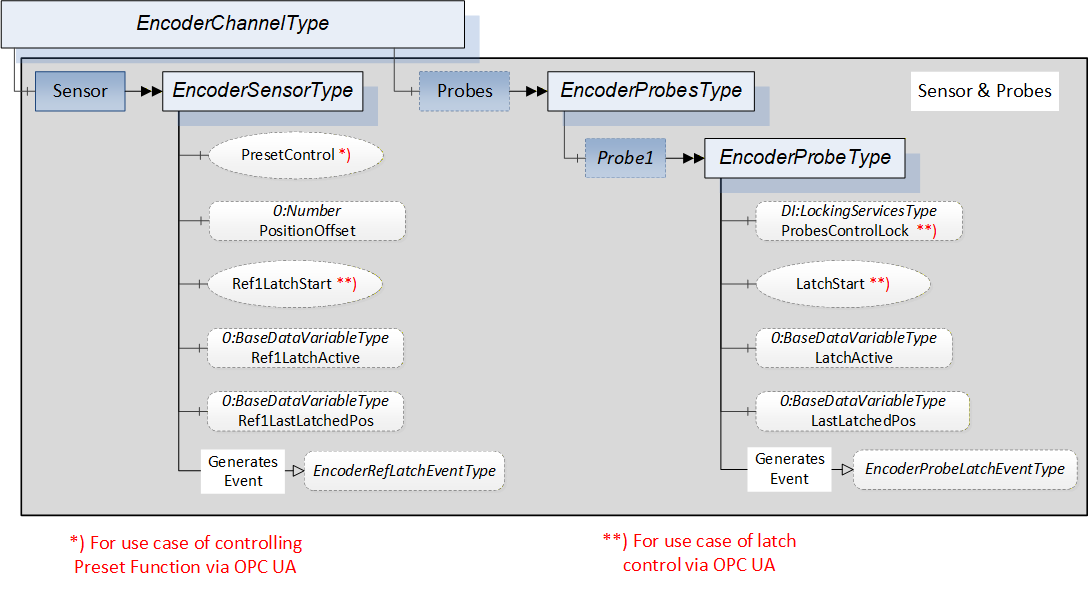
The EncoderSensorType Object offers Encoder sensor related Variables. This component of the EncoderChannelType Object also offers Methods for preset control and latch functionality.
The EncoderProbesType Object allows access to probe related functionality of the Encoder Object. Each probe is represented by an EncoderProbeType Object. The EncoderProbeType offers Variables and Methods allowing Clients to start the latch function and to obtain latch state and latch position values.
The "Sensor" and the "Probe1" Objects also generate EventTypes providing information about latch activity and latch position: EncoderRefLatchEventType and EncoderProbeLatchEventType.
6.5 Encoder Channel Diagnosis
Figure 13 shows the structure of the "Diagnosis" sub-aspect.
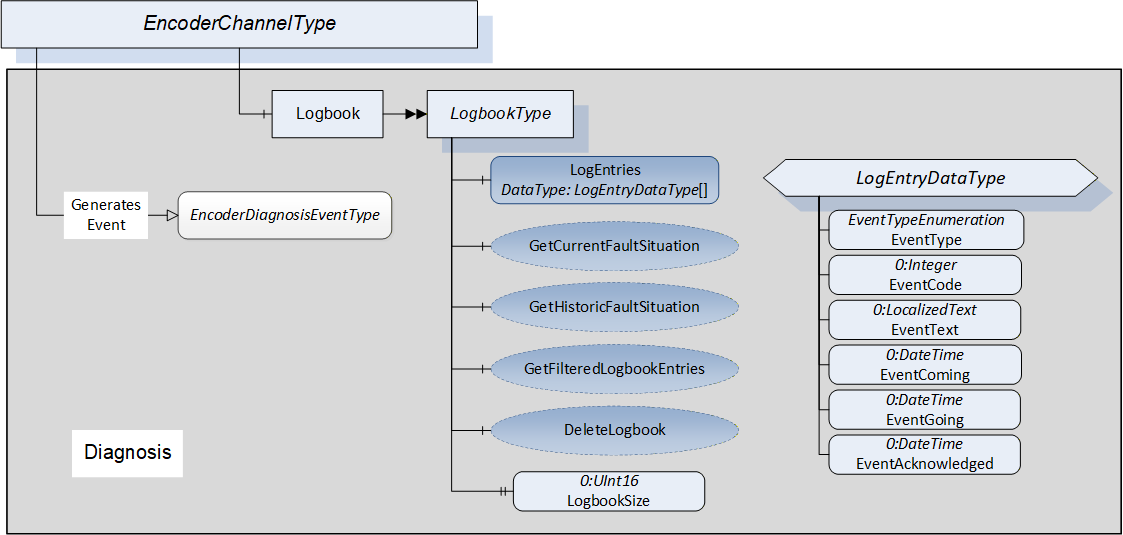
The "Diagnosis" sub-aspect consists of the "Logbook" Object- and EventTypes offering diagnosis related information.
The LogbookType ObjectType mainly consists of an array of LogEntryDataType structures. The size of the array is always given by the LogbookSize Property. There are additional optional Methods for gaining access to filtered subsets of the logbook and clearing the logbook content.
The LogEntryDataType structure has fields for classification of the event. The EventCode field contains an error number (See Table 69 fault codes), the EventType field classifies the error condition into categories like warning or fault. The EventText field contains a brief description of the event. The EventComing and EventGoing time stamp fields indicate the appearance and the disappearance times of the event.
6.6 Encoder Security
Servers shall allow Method invocation only for Sessions using user accounts with the right to invoke the Encoder Methods. There shall exist user accounts with restricted rights (that is, no Method invocation unless explicitly allowed for all users for a specific Method) for Clients performing data acquisition or diagnosis also.
If well-known Roles are supported by the Server, role-based security (see [OPC 10000-18] shall be applied. Method invocation shall only be possible if the well-known "Operator" Role is granted to the Client's Session. This applies to all Methods except for those where the restriction is lifted explicitly.
All Variables are read-only. Modifying the content of Variables shall only be possible by invoking a "Set-" Method.
7 OPC UA ObjectTypes
7.1 EncoderChannelType
The EncoderChannelType is the representation of the Encoder Object. Clients gain access to the Encoder Object's data, properties, error log and configuration settings using an EncoderChannelType Object.
| Attribute | Value | ||||
| BrowseName | EncoderChannelType | ||||
| IsAbstract | False | ||||
| References | Node Class | BrowseName | DataType | TypeDefinition | Other |
|---|---|---|---|---|---|
| Subtype of the 0:BaseObjectType defined in OPC 10000-5. | |||||
| 0:HasProperty | Variable | ApplicationTag | 0:String | 0:PropertyType | O, RO |
| 0:HasComponent | Method | SetApplicationTag | O | ||
| 0:HasProperty | Variable | EncoderProfileVersion | 0:String | 0:PropertyType | O, RO |
| 0:HasComponent | Variable | EncoderChannelState | EncoderChannelStateEnumeration | 0:BaseDataVariableType | O, RO |
| 0:HasComponent | Object | Lock | 2:LockingServicesType | O, RO | |
| 0:HasComponent | Variable | NIST_A | 0:Int16 | 0:BaseDataVariableType | O, RO |
| 0:HasComponent | Variable | NIST_B | 0:Int32 | 0:BaseDataVariableType | O, RO |
| 0:HasComponent | Variable | G1_STW | 0:UInt16 | 0:BaseDataVariableType | O, RO |
| 0:HasComponent | Variable | G1_ZSW | 0:UInt16 | 0:BaseDataVariableType | O, RO |
| 0:HasComponent | Variable | G1_XIST1 | 0:UInt32 | 0:BaseDataVariableType | O, RO |
| 0:HasComponent | Variable | G1_XIST2 | 0:UInt32 | 0:BaseDataVariableType | O, RO |
| 0:HasComponent | Variable | G1_XIST3 | 0:UInt64 | 0:BaseDataVariableType | O, RO |
| 0:HasComponent | Variable | STW2_ENC | 0:UInt16 | 0:BaseDataVariableType | O, RO |
| 0:HasComponent | Variable | ZSW2_ENC | 0:UInt16 | 0:BaseDataVariableType | O, RO |
| 0:HasComponent | Variable | G1_XIST_PRESET_B | 0:UInt32 | 0:BaseDataVariableType | O, RO |
| 0:HasComponent | Variable | G1_XIST_PRESET_C | 0:UInt64 | 0:BaseDataVariableType | O, RO |
| 0:HasComponent | Variable | G1_XIST_PRESET_B1 | 0:UInt32 | 0:BaseDataVariableType | O, RO |
| 0:HasComponent | Variable | Position | 0:Double | 0:AnalogUnitRangeType | O, RO |
| 0:HasComponent | Variable | Velocity | 0:Float | 0:AnalogUnitRangeType | O, RO |
| 0:HasComponent | Variable | Acceleration | 0:Float | 0:AnalogUnitRangeType | O, RO |
| 0:HasComponent | Variable | PositionSensorSignalValue | 0:Number | 0:BaseDataVariableType | O, RO |
| 0:HasComponent | Variable | Temperature | 0:Float | 0:AnalogUnitRangeType | O, RO |
| 0:HasComponent | Object | SensorConfig | EncoderSensorConfigType | O | |
| 0:HasComponent | Object | AxisConfig | EncoderAxisConfigType | O | |
| 0:HasComponent | Object | ControlConfig | EncoderControlConfigType | O | |
| 0:HasComponent | Object | Logbook | LogbookType | O | |
| 0:HasComponent | Object | Sensor | EncoderSensorType | M | |
| 0:HasComponent | Object | Probes | EncoderProbesType | O | |
| 0:GeneratesEvent | ObjectType | EncoderDiagnosisEventType | |||
| Conformance Units | |||||
|---|---|---|---|---|---|
| PNENC Signals | |||||
| PNENC Measurement | |||||
| PNENC Diagnosis Events |
Some components of the EncoderChannelType have additional subcomponents which are defined in Table 14.
| BrowsePath | References | NodeClass | BrowseName | DataType | TypeDefinition | Others |
| Position | 0:HasComponent | Variable | Resolution | 0:Double | 0:BaseAnalogType | O, RO |
| Position | 0:HasProperty | Variable | AbsolutePositionRange | 0:Range | 0:PropertyType | O, RO |
| G1_XIST1 | 0:HasProperty | Variable | ShiftFactorXIST1 | 0:UInt16 | 0:PropertyType | O, RO |
| G1_XIST1 | 0:HasProperty | Variable | XIST1PresetControl | EncoderPresetControlEnumeration | 0:PropertyType | O, RO |
| G1_XIST2 | 0:HasProperty | Variable | ShiftFactorXIST2 | 0:UInt16 | 0:PropertyType | O, RO |
| Velocity | 0:HasComponent | Variable | Damping | 0:Float | 0:BaseAnalogType | O, RO |
| PositionSensorSignalValue | 0:HasProperty | Variable | SignalType | EncoderSignalTypeEnumeration | 0:PropertyType | O, RO |
The Resolution Variable contains the resolution of the Encoder's Position Variable Value.
The AbsolutePositionRange Variable contains the possible range of absolute position values represented as 0:Range Value.
The ShiftFactorXIST1 Variable contains the Encoder's G1_XIST1 Standard Signal shift factor.
The XIST1PresetControl Variable contains the Encoder's configured preset control setting for the G1_XIST1 Signal encoded as EncoderPresetControlEnumeration.
The ShiftFactorXIST2 Variable contains the Encoder's G1_XIST2 Standard Signal shift factor.
The Damping Variable contains the damping constant associated with the Velocity Variable Value.
The SignalType Variable contains the type of the position sensor's signal value encoded as EncoderSignalTypeEnumeration.
General Properties
The ApplicationTag Variable contains information determined by configuration or by applications. The Client can change the Value of this Variable by invoking the SetApplicationTag Method.
Before invoking a Method of the EncoderChannelType Object, Clients must gain exclusive write access ("lock" the EncoderChannelType Object) using the Lock Object.
7.1.1 SetApplicationTag Method
This Method sets the Value of the ApplicationTag Variable. The security constraints defined in chapter 6.6 apply.
Signature
	SetApplicationTag (
		[in] 0:String	 ApplicationTag
		);
| Argument | Description |
| ApplicationTag | String containing the desired content of the ApplicationTag Variable. |
The Method Result Codes (defined in Call Service) are defined in Table 15.
| Result Code | Description |
| Good | The Method execution was successful. |
| Bad_UserAccessDenied | The user has not the right to execute the Method. |
| Bad_InvalidArgument | The Server is not able to apply the name. The ApplicationTag string may be too long or may contain invalid characters. The server may also reject duplicates. |
| Bad_Locked | The EncoderChannelType Object is locked by a different Client's Session. |
| Bad_RequiresLock | The EncoderChannelType Object is not locked. Clients must lock the EncoderChannelType Object before invoking a Method. |
| Bad_UnexpectedError | The server is not able to execute the function because an unexpected error occurred. The Device might be temporarily unavailable or unreachable due to network failure. |
The EncoderProfileVersion Variable contains the encoder profile version of the Encoder Object the EncoderChannelType Object represents.
The EncoderChannelState Variable contains the representation of the G1_ZSW Signal as EncoderStateEnumeration.
The Lock Object ensures exclusive Method call for one Client. The Client locks the EncoderChannelType Object by invoking the InitLock Method of the Lock Object. The Client invokes ExitLock to release the lock.
The scope of the lock comprises all components except the EncoderProbeType Objects providing a LatchStart Method. These "controllable" probes have their own Lock Object and Clients shall be able to lock the EncoderProbeType Object separately and to invoke the LatchStart Method although the parent EncoderChannelType Object is locked.
Signal Variables
The following Variables represent the Standard Signals as defined in [ENCP], chapter 5.6.1. The supported Standard Signals are determined by the configured Standard Telegram. The Server shall provide the Variables representing the Standard Signals of the configured Standard Telegram.
The NIST_A Variable represents the "speed actual value" 16-bit signal encoded as 0:UInt16 (See [ENCP], Table 13, Signal No. 6). Mandatory for Class 4 Encoders.
The NIST_B Variable represents the "speed actual value" 32-bit signal encoded as 0:UInt32 (See [ENCP], Table 13, Signal No. 8). Mandatory for Class 2 Encoders.
The G1_STW Variable represents the "Sensor 1 control word" 16-bit signal encoded as 0:UInt16 (See [ENCP], Table 13, Signal No. 9). Mandatory for Class 3 and Class 4 Encoders.
The G1_ZSW Variable represents the "Sensor 1 status word" 16-bit signal encoded as 0:UInt16 (See [ENCP], Table 13, Signal No. 10). Mandatory for Class 3 and Class 4 Encoders.
The G1_XIST1 Variable represents the "Sensor 1 position actual value 1" 32-bit signal encoded as 0:UInt32 (See [ENCP], Table 13, Signal No. 11). Mandatory for Class 3 and Class 4 Encoders.
The G1_XIST2 Variable represents the "Sensor 1 position actual value 2" 32-bit signal encoded as 0:UInt32 (See [ENCP], Table 13, Signal No. 12). Mandatory for Class 3 and Class 4 Encoders.
The G1_XIST3 Variable represents the "Sensor 1 position actual value 3" 64-bit signal encoded as 0:UInt64 (See [ENCP], Table 13, Signal No. 39).
The STW2_ENC Variable represents the "Encoder control word 2" 16-bit signal encoded as 0:UInt16 (See [ENCP], Table 13, Signal No. 80). Mandatory for Class 1, Class2, Class 3 and Class 4 Encoders.
The ZSW2_ENC Variable represents the "Encoder status word 2" 16-bit signal encoded as 0:UInt16 (See [ENCP], Table 13, Signal No. 81). Mandatory for Class 1, Class2, Class 3 and Class 4 Encoders.
| The G1_XIST_PRESET_B Variable represents the "Encoder preset control word 31 bit with trigger bit included" signal encoded as 0:UInt32 (See [ENCP], Table 13, Signal No. 82). Mandatory for Class 1 and Class2 Encoders. |
The G1_XIST_PRESET_C Variable represents the "Encoder preset control word 64 bit" signal encoded as 0:UInt64 (See [ENCP], Table 13, Signal No. 83).
The G1_XIST_PRESET_B1 Variable represents the "Encoder preset control word 32 bit" signal encoded as 0:UInt32 (See [ENCP], Table 13, Signal No. 84). Mandatory for Class 1 and Class2 Encoders.
Measurement / Actual Values
The Position Variable contains the current Encoder's position encoded as 0:Double data type. The Position Variable shall be linked to the Signal Variables representing the current position (G1_XIST1, G1_XIST2, G1_XIST3) that are part of the configured Standard Telegram using a 0:RepresentsSameEntityAs Reference.
The Velocity Variable contains the current Encoder's velocity encoded as 0:Float data type. If a NIST_A or a NIST_B Signal Variable is part of the Information Model, the Velocity Variable shall be linked to the source Signal Variable using a 0:RepresentsSameEntityAs Reference.
The Acceleration Variable contains the currents Encoder's rate of velocity change encoded as 0:Float data type.
The PositionSensorSignalValue Variable contains the Encoder's position Signal encoded as numeric data type. Dependent on Encoder resolution and configured Standard Telegram number, the data type may be 0:UInt32 or 0:UInt64.
The Temperature Variable contains the Encoder's temperature measurement value encoded as 0:Float data type.
Configuration
The SensorConfig Object contains sensor related configuration settings of the Encoder Object. See section 7.8 for details.
The AxisConfig Object contains Encoder axis related configuration settings of the Encoder Object. See section 7.6 for details.
The ControlConfig Object contains control related configuration settings of the Encoder Object. See section 7.7 for details.
Sensor & Probes
The Sensor Object offers Variables and Methods for sensor related preset- and latch control. See section 7.2 for details.
The Probes Object has References to EncoderProbeType Objects offering Variables and Methods for probes related data and latch control. See section 7.3 for details.
Diagnosis
The Logbook Object contains a representation of the Encoder Object's fault buffer. See section 7.5 for details.
The Server might provide diagnosis data by sending EncoderDiagnosisEventType Events.
7.2 EncoderSensorType
The EncoderSensorType offers Encoder sensor related settings and functions as preset control and latch functionality.
| Attribute | Value | ||||
| BrowseName | EncoderSensorType | ||||
| IsAbstract | False | ||||
| References | Node Class | BrowseName | DataType | TypeDefinition | Other |
|---|---|---|---|---|---|
| Subtype of the 0:BaseObjectType defined in OPC 10000-5. | |||||
| 0:HasComponent | Method | PresetControl | O | ||
| 0:HasComponent | Variable | PositionOffset | 0:Number | 0:BaseDataVariableType | M, RO |
| 0:HasComponent | Method | Ref1LatchStart | O | ||
| 0:HasComponent | Variable | Ref1LatchActive | 0:Boolean | 0:BaseDataVariableType | O, RO |
| 0:HasComponent | Variable | Ref1LastLatchedPos | 0:Number | 0:BaseDataVariableType | O, RO |
| 0:GeneratesEvent | ObjectType | EncoderRefLatchEventType | |||
| Conformance Units | |||||
|---|---|---|---|---|---|
| PNENC Sensor |
Clients must lock the parent EncoderChannelType Object before invoking a Method of the EncoderSensorType Object.
7.2.1 PresetControl Method
This Method sets the preset value of the Encoder. The security constraints defined in chapter 6.6 apply.
Signature
	PresetControl (
		[in] 0:Number	 PresetValue
		);
| Argument | Description |
| PresetValue | The desired preset value to apply. |
The Method Result Codes (defined in Call Service) are defined in Table 15.
| Result Code | Description |
| Good | The Method execution was successful. |
| Bad_UserAccessDenied | The user has not the right to execute the Method. |
| Bad_InvalidArgument | The Server is not able to apply the preset value. The preset value may be outside the permissive value bounds. |
| Bad_Locked | The parent EncoderChannelType Object is locked by a different Client's Session. |
| Bad_RequiresLock | The parent EncoderChannelType Object is not locked. Clients must lock the parent EncoderChannelType Object before invoking a Method. |
| Bad_UnexpectedError | The server is not able to execute the function because an unexpected error occurred. The Device might be temporarily unavailable or unreachable due to network failure. |
The PositionOffset Variable contains the calculated offset belonging to the current preset value of the Encoder.
7.2.2 Ref1LatchStart Method
This Method starts the latch capture function of the Encoder. The security constraints defined in chapter 6.6 apply.
Signature
	Ref1LatchStart (
		);
The Method Result Codes (defined in Call Service) are defined in Table 15.
| Result Code | Description |
| Good | The Method execution was successful. |
| Bad_UserAccessDenied | The user has not the right to execute the Method. |
| Bad_Locked | The parent EncoderChannelType Object is locked by a different Client's Session. |
| Bad_RequiresLock | The parent EncoderChannelType Object is not locked. Clients must lock the parent EncoderChannelType Object before invoking a Method. |
| Bad_UnexpectedError | The server is not able to execute the function because an unexpected error occurred. The Device might be temporarily unavailable or unreachable due to network failure. |
The Ref1LatchActive Variable contains True if the Ref1 latch is active, otherwise False.
The Ref1LastLatchedPos Variable contains the last latched Ref1 position of the Encoder.
The Server might provide the Client with information about changes of the Ref1 latch data by sending EncoderRefLatchEventType Events.
7.3 EncoderProbesType
| Attribute | Value | ||||
| BrowseName | EncoderProbesType | ||||
| IsAbstract | False | ||||
| References | Node Class | BrowseName | DataType | TypeDefinition | Other |
|---|---|---|---|---|---|
| Subtype of the 0:BaseObjectType defined in OPC 10000-5. | |||||
| 0:HasComponent | Object | <Probex> | EncoderProbeType | OP | |
| Conformance Units | |||||
|---|---|---|---|---|---|
| PNENC Probes |
The EncoderProbeType Objects represents the probes provided by the Encoder. There shall be as many EncoderProbeType Objects as are needed to represent all probes provided. The BrowseNames shall be provided as defined by the template string <Probex>, where x is the probe number.
7.4 EncoderProbeType
The EncoderProbeType represents the Encoder's probe functionality.
| Attribute | Value | ||||
| BrowseName | EncoderProbeType | ||||
| IsAbstract | False | ||||
| References | Node Class | BrowseName | DataType | TypeDefinition | Other |
|---|---|---|---|---|---|
| Subtype of the 0:BaseObjectType defined in OPC 10000-5. | |||||
| 0:HasComponent | Object | Lock | 2:LockingServicesType | O | |
| 0:HasComponent | Method | LatchStart | O | ||
| 0:HasComponent | Variable | LatchActive | 0:Boolean | 0:BaseDataVariableType | O, RO |
| 0:HasComponent | Variable | LastLatchedPos | 0:Number | 0:BaseDataVariableType | M, RO |
| 0:GeneratesEvent | ObjectType | EncoderProbeLatchEventType | |||
| Conformance Units | |||||
|---|---|---|---|---|---|
| PNENC Probes |
The Lock Object ensures exclusive call of the LatchStart Method for one Client. The Client locks the EncoderProbeType Object by invoking the InitLock Method of the Lock Object. The Client invokes ExitLock to release the lock.
Clients shall be able to lock the EncoderProbeType Object and to invoke the LatchStart Method although the parent EncoderChannelType Object is locked.
7.4.1 LatchStart Method
This Method starts the latch capture function of the represented probe. The security constraints defined in chapter 6.6 apply.
Signature
	LatchStart (
		);
The Method Result Codes (defined in Call Service) are defined in Table 15.
| Result Code | Description |
| Good | The Method execution was successful. |
| Bad_UserAccessDenied | The user has not the right to execute the Method. |
| Bad_Locked | The EncoderProbeType Object is locked by a different Client's Session. |
| Bad_RequiresLock | The EncoderProbeType Object is not locked. Clients must lock the EncoderProbeType Object before invoking a Method. |
| Bad_UnexpectedError | The server is not able to execute the function because an unexpected error occurred. The Device might be temporarily unavailable or unreachable due to network failure. |
The LatchActive Variable contains True if the represented probe's latch is active, otherwise False.
The LastLatchedPos Variable contains the last latched position of the probe.
The Server might provide the Client with information about changes of the probe's latch data by sending EncoderProbeLatchEventType Events.
7.5 LogbookType
The LogbookType Object provides access to the Encoder's fault buffer.
| Attribute | Value | ||||
| BrowseName | LogbookType | ||||
| IsAbstract | False | ||||
| References | Node Class | BrowseName | DataType | TypeDefinition | Other |
|---|---|---|---|---|---|
| Subtype of the 0:BaseObjectType defined in OPC 10000-5. | |||||
| 0:HasComponent | Variable | LogEntries | LogEntryDataType[] | 0:BaseDataVariableType | M, RO |
| 0:HasProperty | Variable | LogbookSize | 0:UInt16 | 0:PropertyType | M, RO |
| 0:HasComponent | Method | DeleteLogbook | O | ||
| 0:HasComponent | Method | GetFilteredLogbookEntries | O | ||
| 0:HasComponent | Method | GetCurrentFaultSituation | O | ||
| 0:HasComponent | Method | GetActiveDiagnosis | O | ||
| 0:HasComponent | Method | GetHistoricFaultSituation | O | ||
| 0:GeneratesEvent | ObjectType | LogbookEventType | |||
| Conformance Units | |||||
|---|---|---|---|---|---|
| PNENC Logbook |
The LogEntries array Variable consists of LogEntryDataType structure elements. The array is limited to the maximum size specified by the LogbookSize Property. The array contains LogEntryDataType elements for events and starts with the most recent event (the element with the most recent EventComing timestamp). If the Server maintains different fault situations in its fault buffer (see [PDP] 6.3.8.3 Fault Buffer Mechanism), faults (events) which are still present after an acknowledge generate a new entry in the actual fault situation causing more than one entry with the same EventNumber for one event.
The LogbookSize Property contains the maximum length of the LogEntries array. The actual length of the array may be smaller.
Clients must lock the parent EncoderChannelType Object before invoking a Method of the LogbookType Object.
7.5.1 DeleteLogbook Method
The DeleteLogbook Method clears the LogEntries array and resets the fault buffer of the Encoder Object. The security constraints defined in chapter 6.6 apply.
Signature
	DeleteLogbook (
	);
The Method Result Codes (defined in Call Service) are defined in Table 23.
| Result Code | Description |
| Good | The Method execution was successful. |
| Bad_UserAccessDenied | The user has not the right to execute the Method. |
| Bad_Locked | The parent EncoderChannelType Object is locked by a different Client's Session. |
| Bad_RequiresLock | The parent EncoderChannelType Object is not locked. Clients must lock the parent EncoderChannelType Object before invoking a Method. |
| Bad_UnexpectedError | The Server is not able to execute the function because an unexpected error occurred. The Device might be temporarily unavailable or unreachable due to network failure. |
7.5.2 GetFilteredLogbookEntries Method
The GetFilteredLogbookEntries Method returns a LogEntries array matching the filter criteria. Method invocation shall be possible for all users (read-only).
Signature
	GetFilteredLogbookEntries (
		[in] 0:Byte					LogbookFilterOptions,
		[in] 0:Byte					FaultSituationNumber
		[in] EventTypeEnumeration 		EventType,
		[in] 0:Int32					EventCode,
		[in] 0:Duration				EventAppearanceInterval,
	[out] LogEntryDataType[] 		FilteredLogEntries
	);
| Argument | Description |
| LogbookFilterOptions | Parameter allowing to restrict the returned logbook entries to those having valid EventGoing and/or EventAcknowledged timestamps. If set to 1 ("GOING" filter), only logbook entries with valid EventGoing timestamp are returned. If set to 2 ("ACKNOWLEDGED" filter), only entries with valid EventAcknowledged timestamp are returned. If set to 3, the logic applied is "AND": only logbook entries meeting both filter criteria are returned. Set to 0 if no filtering shall be applied. If a value greater than 3 is passed, the Method Result Code shall be set to Bad_InvalidArgument. |
| FaultSituationNumber | Restricts the returned logbook entries to those with the FaultSituationNumber field equal to this parameter. Passing 255 means "don't care". |
| EventType | Restricts the returned logbook entries to those with the EventType field equal to this parameter. Passing "UNSPECIFIED" means "don't care". |
| EventCode | Restricts the returned logbook entries to those with the EventCode field equal to this parameter (See Table 69 fault codes). Passing 0 means "don't care". |
| EventAppearanceInterval | Time interval encoded as 0:Duration defined in [OPC 10000-3]. Restricts the returned logbook entries to those appearing within a timespan from the past up to now. The EventComing field of the logbook entries is used for checking this filter. Passing 0 means "don't care". |
| FilteredLogEntries | Array containing the logbook entries matching all filter criteria passed with the first 5 parameters. An empty array is returned if no logbook entry matches the filter criteria. |
The Method Result Codes (defined in Call Service) are defined in Table 24.
| Result Code | Description |
| Good | The Method execution was successful. |
| Bad_InvalidArgument | The Server is unable to execute the Method due to invalid arguments. For instance, the EventCode passed may be unknown. |
| Bad_Locked | The parent EncoderChannelType Object is locked by a different Client's Session. |
| Bad_RequiresLock | The parent EncoderChannelType Object is not locked. Clients must lock the parent EncoderChannelType Object before invoking a Method. |
| Bad_UnexpectedError | The Server is not able to execute the function because an unexpected error occurred. The Device might be temporarily unavailable or unreachable due to network failure. |
7.5.3 GetCurrentFaultSituation Method
The GetCurrentFaultSituation Method returns all log entries which occurred since the last acknowledge as LogEntries array. Starting with the most recent one, all log entries without valid EventAcknowledged timestamp are returned. Method invocation shall be possible for all users (read-only).
Signature
	GetCurrentFaultSituation (
		[out] LogEntryDataType[] 	CurrentLogEntries
	);
| Argument | Description |
| CurrentLogEntries | Array containing the log entries occurred since the last acknowledge. An empty array is returned if no logbook entry matches the filter criteria. |
The Method Result Codes (defined in Call Service) are defined in Table 25.
| Result Code | Description |
| Good | The Method execution was successful. |
| Bad_Locked | The parent EncoderChannelType Object is locked by a different Client's Session. |
| Bad_RequiresLock | The parent EncoderChannelType Object is not locked. Clients must lock the parent EncoderChannelType Object before invoking a Method. |
| Bad_UnexpectedError | The Server is not able to execute the function because an unexpected error occurred. The Device might be temporarily unavailable or unreachable due to network failure. |
7.5.4 GetHistoricFaultSituation Method
The GetHistoricFaultSituation Method returns a LogEntries array with valid EventGoing field. Method invocation shall be possible for all users (read-only).
Signature
	GetHistoricFaultSituation (
		[in]  0:Byte				FaultSituationNumber,
	[out] LogEntryDataType[] 	HistoricLogEntries
	);
| Argument | Description |
| FaultSituationNumber | Fault situation number the faults belong to. 0 identifies the current situation, 1 the historic situation preceding the current situation, and so on (see explanation below). |
| HistoricLogEntries | Array containing the log entries with valid EventGoing field entry. An empty array is returned if no logbook entry matches the filter criteria. |
The Method Result Codes (defined in Call Service) are defined in Table 26.
| Result Code | Description |
| Good | The Method execution was successful. |
| Bad_InvalidArgument | The fault situation specified by FaultSituationNumber does not exist. |
| Bad_Locked | The parent EncoderChannelType Object is locked by a different Client's Session. |
| Bad_RequiresLock | The parent EncoderChannelType Object is not locked. Clients must lock the parent EncoderChannelType Object before invoking a Method. |
| Bad_UnexpectedError | The Server is not able to execute the function because an unexpected error occurred. The Device might be temporarily unavailable or unreachable due to network failure. |
7.5.5 GetActiveDiagnosis Method
The GetActiveDiagnosis Method returns a LogEntries array containing log entries belonging to the current fault situation (log entries with FaultSituationNumber equal to 0) with valid EventComing timestamp, but with missing EventGoing timestamp. The method returns a subset of the entries returned by the GetCurrentFaultSituation Method. Method invocation shall be possible for all users (read-only).
Signature
	GetActiveDiagnosis (
		[out] LogEntryDataType[] 	ActiveDiagnosis
	);
| Argument | Description |
| ActiveDiagnosis | Array containing the log entries with missing EventGoing field entry. An empty array is returned if no logbook entry matches the filter criteria. |
The Method Result Codes (defined in Call Service) are defined in Table 25.
| Result Code | Description |
| Good | The Method execution was successful. |
| Bad_Locked | The parent EncoderChannelType Object is locked by a different Client's Session. |
| Bad_RequiresLock | The parent EncoderChannelType Object is not locked. Clients must lock the parent EncoderChannelType Object before invoking a Method. |
| Bad_UnexpectedError | The Server is not able to execute the function because an unexpected error occurred. The Device might be temporarily unavailable or unreachable due to network failure. |
The Server might provide the Client with information about new incidents by sending LogbookEventType Events.
7.6 EncoderAxisConfigType
The EncoderAxisConfigType provides configuration Properties and Variables belonging to the Encoder's axis and scaling functions.
| Attribute | Value | ||||
| BrowseName | EncoderAxisConfigType | ||||
| IsAbstract | False | ||||
| References | Node Class | BrowseName | DataType | TypeDefinition | Other |
|---|---|---|---|---|---|
| Subtype of the 0:BaseObjectType defined in OPC 10000-5. | |||||
| 0:HasProperty | Variable | PositionScalingFactor | 0:Float | 0:PropertyType | O, RO |
| 0:HasProperty | Variable | AxisType | EncoderAxisTypeEnumeration | 0:PropertyType | O, RO |
| 0:HasProperty | Variable | CodeSequence | EncoderCodeSequenceEnumeration | 0:PropertyType | O, RO |
| 0:HasProperty | Variable | PresetOrShiftValue | 0:Float | 0:PropertyType | O, RO |
| 0:HasComponent | Variable | VelocityReference | 0:Float | 0:BaseAnalogType | O, RO |
| 0:HasComponent | Variable | VelocityDampingTimeConstant | 0:Float | 0:BaseAnalogType | O, RO |
| 0:HasComponent | Variable | AccelerationDampingTimeConstant | 0:Float | 0:BaseAnalogType | O, RO |
| 0:HasComponent | Method | SetAxisConfig | O | ||
| Conformance Units | |||||
|---|---|---|---|---|---|
| PNENC Config Readable | |||||
| PNENC Config Writable |
The PositionScalingFactor Variable contains the Encoder's position scaling factor.
The AxisType Variable contains the Encoder's axis type encoded as EncoderAxisTypeEnumeration.
The CodeSequence Variable contains the Encoder's code sequence setting encoded as EncoderCodeSequenceEnumeration.
The PresetOrShiftValue Variable contains the Encoder's preset value.
The VelocityReference Variable contains the velocity reference (100% value) for N2/N4 normalised speed actual values (signals NIST_A and NIST_B).
The VelocityDampingTimeConstant Variable contains the Encoder's velocity damping time constant.
The AccelerationDampingTimeConstant Variable contains the Encoder's acceleration damping time constant.
7.6.1 SetAxisConfig Method
This Method sets the Value of components of the AxisConfig Object to the desired value. The security constraints defined in chapter 6.6 apply. Clients must also have locked the parent EncoderChannelType Object before invoking the Method.
Signature
	SetAxisConfig (
		[in]	 0:KeyValuePair[] AxisConfigParameters,
		[out] 0:KeyValuePair[] AxisConfigParametersResult

	);
| Argument | Description |
| AxisConfigParameters | Array of 0:KeyValuePair structures containing the desired settings. The key field of each structure contains the BrowseName of one component of the AxisConfig Object. The value field contains the desired value to set for this component and must have the same DataType. |
| AxisConfigParametersResult | Array of 0:KeyValuePair structures. The array shall be empty if successful. The array shall contain one element for each failed setting and the Result Code shall be Uncertain (See Table 29). The key field of each structure contains the BrowseName of the component of the AxisConfig Object for which the setting failed. The value field is encoded as EncoderConfigParameterResultEnumeration and contains one of the following values: INVALID: The value is rejected by the Server. NOT_SUPPORTED: The component with the specified BrowseName does not exist. READ_ONLY: The value cannot be changed. |
The Method Result Codes (defined in Call Service) are defined in Table 29. The requested changes are applied if a Result Code with severity Good is returned. Otherwise, no Variable is changed.
| Result Code | Description |
| Good | The Method execution was successful. The AxisConfigParametersResult array is empty. |
| Uncertain | The Server is not able to apply the requested changes due to invalid parameters. The AxisConfigParametersResult array is not empty. |
| Bad_ConfigurationError | The set of parameters passed in the AxisConfigParameters array is not consistent. |
| Bad_InvalidArgument | The AxisConfigParameters argument array is empty or there are member type mismatches. |
| Bad_Locked | The parent EncoderChannelType Object is locked by a different Client's Session. |
| Bad_RequiresLock | The parent EncoderChannelType Object is not locked. Clients must lock the parent EncoderChannelType Object before invoking a Method. |
| Bad_UserAccessDenied | The user has not the right to execute the Method. |
| Bad_UnexpectedError | The Server is not able to execute the function because an unexpected error occurred. The Device might be temporarily unavailable or unreachable due to network failure. |
If the desired settings do not deviate from the actual settings, the Method shall do nothing and return Good as result code.
7.7 EncoderControlConfigType
The EncoderControlConfigType Object provides Properties for configuring the alarm channel, the effect of preset functions and the tolerated Sign-Of-Life failures.
| Attribute | Value | ||||
| BrowseName | EncoderControlConfigType | ||||
| IsAbstract | False | ||||
| References | Node Class | BrowseName | DataType | TypeDefinition | Other |
|---|---|---|---|---|---|
| Subtype of the 0:BaseObjectType defined in OPC 10000-5. | |||||
| 0:HasProperty | Variable | AlarmChannelControl | EncoderAlarmChannelControlEnumeration | 0:PropertyType | O, RO |
| 0:HasProperty | Variable | XIST1PresetControl | EncoderPresetControlEnumeration | 0:PropertyType | O, RO |
| 0:HasProperty | Variable | SignOfLifeFailuresTolerated | 0:UInt16 | 0:PropertyType | O, RO |
| 0:HasComponent | Method | SetControlConfig | O | ||
| Conformance Units | |||||
|---|---|---|---|---|---|
| PNENC Config Readable | |||||
| PNENC Config Writable |
The AlarmChannelControl Variable contains the Encoder's configured alarm channel setting encoded as EncoderAlarmChannelControlEnumeration.
The XIST1PresetControl Variable contains the Encoder's configured preset control setting for the G1_XIST1 Signal encoded as EncoderPresetControlEnumeration. If the G1_XIST1 Variable is part of the Information Model, XIST1 preset control setting is always available as Property of the G1_XIST1 Variable.
The SignOfLifeFailuresTolerated contains the Encoder's configured setting for the number of allowed failures of the master's sign of life.
7.7.1 SetControlConfig Method
This Method sets the Value of components of the ControlConfig Object to the desired value. The security constraints defined in chapter 6.6 apply. Clients must also have locked the parent EncoderChannelType Object before invoking the Method.
Signature
	SetControlConfig (
		[in]	 0:KeyValuePair[] ControlConfigParameters,
		[out] 0:KeyValuePair[] ControlConfigParametersResult

	);
| Argument | Description |
| ControlConfigParameters | Array of 0:KeyValuePair structures containing the desired settings. The key field of each structure contains the BrowseName of one component of the ControlConfig Object. The value field contains the desired value to set for this component and must have the same DataType. |
| ControlConfigParametersResult | Array of 0:KeyValuePair structures. The array shall be empty if successful. The array shall contain one element for each failed setting and the Result Code shall be Uncertain (See Table 31). The key field of each structure contains the BrowseName of the component of the ControlConfig Object for which the setting failed. The value field is encoded as EncoderConfigParameterResultEnumeration and contains one of the following values: INVALID: The value is rejected by the Server. NOT_SUPPORTED: The component with the specified BrowseName does not exist. READ_ONLY: The value cannot be changed. |
The Method Result Codes (defined in Call Service) are defined in Table 31. The requested Property changes are applied if a Result Code with severity Good is returned. Otherwise, no Property is changed.
| Result Code | Description |
| Good | The Method execution was successful. The ControlConfigParametersResult array is empty. |
| Uncertain | The Server is not able to apply the requested changes due to invalid parameters. The ControlConfigParametersResult array is not empty. |
| Bad_ConfigurationError | The set of parameters passed in the ControlConfigParameters array is not consistent. |
| Bad_InvalidArgument | The ControlConfigParameters argument array is empty or there are member type mismatches. |
| Bad_Locked | The parent EncoderChannelType Object is locked by a different Client's Session. |
| Bad_RequiresLock | The parent EncoderChannelType Object is not locked. Clients must lock the parent EncoderChannelType Object before invoking a Method. |
| Bad_UserAccessDenied | The user has not the right to execute the Method. |
| Bad_UnexpectedError | The Server is not able to execute the function because an unexpected error occurred. The Device might be temporarily unavailable or unreachable due to network failure. |
If the desired settings do not deviate from the actual settings, the Method shall do nothing and return Good as result code.
7.8 EncoderSensorConfigType
The EncoderSensorConfigType Object provides configuration Properties related to the encoder's sensor properties and settings.
| Attribute | Value | ||||
| BrowseName | EncoderSensorConfigType | ||||
| IsAbstract | False | ||||
| References | Node Class | BrowseName | DataType | TypeDefinition | Other |
|---|---|---|---|---|---|
| Subtype of the 0:BaseObjectType defined in OPC 10000-5. | |||||
| 0:HasProperty | Variable | SensorAbsoluteType | EncoderSensorAbsoluteTypeEnumeration | 0:PropertyType | O, RO |
| 0:HasProperty | Variable | ConfigType | EncoderConfigTypeEnumeration | 0:PropertyType | O, RO |
| 0:HasProperty | Variable | SensorResolutionIncPerRotation | 0:Integer | 0:PropertyType | O, RO |
| 0:HasProperty | Variable | SensorResolutionNanometerPerIncrement | 0:Integer | 0:PropertyType | O, RO |
| 0:HasProperty | Variable | ShiftFactorXIST1 | 0:Integer | 0:PropertyType | O, RO |
| 0:HasProperty | Variable | ShiftFactorXIST2 | 0:Integer | 0:PropertyType | O, RO |
| 0:HasProperty | Variable | AbsolutePosLinSupported | 0:Boolean | 0:PropertyType | O, RO |
| 0:HasProperty | Variable | AbsolutePosDeterminableRevolutions | 0:Integer | 0:PropertyType | O, RO |
| 0:HasComponent | Method | SetSensorConfig | O | ||
| Conformance Units | |||||
|---|---|---|---|---|---|
| PNENC Config Readable | |||||
| PNENC Config Writable |
The SensorAbsoluteType Variable contains the sensor type for absolute Encoders (single-turn or multiturn) encoded as EncoderSensorAbsoluteTypeEnumeration.
The ConfigType Variable contains the configuration type (static or dynamic) of the Encoder encoded as EncoderConfigTypeEnumeration.
The SensorResolutionIncPerRotation Variable contains the number of sensor pulses generated per rotation (rotary Encoders only)
The SensorResolutionNanometerPerIncrement Variable contains the number of nanometers per increment (linear measurement system only).
The ShiftFactorXIST1 Variable contains the Encoder's G1_XIST1 Standard Signal shift factor. Shall not be provided if not changeable. If the G1_XIST1 Variable is part of the Information Model, the shift factor is always available as Property of the G1_XIST1 Variable.
The ShiftFactorXIST2 Variable contains the Encoder's G1_XIST2 Standard Signal shift factor. Shall not be provided if not changeable. If the G1_XIST2 Variable is part of the Information Model, the shift factor is always available as Property of the G1_XIST2 Variable.
The AbsolutePosLinSupported Variable contains True if absolute linear positioning is supported by the Encoder, otherwise False.
The AbsolutePosDeterminableRevolutions Variable specifies which absolute position value may be delivered by the sensor. The following table specifies the meaning of the possible Values of the Variable in dependence of the sensor type (See [PDP] Table 105 Subindex 5: "Determinable revolutions").
| Variable Value | Rotary Sensors | Linear Sensors |
| 0 | The sensor has no absolute information or may only display values less than one absolute revolution. | The sensor has no absolute information (for example standard incremental linear scale). |
| 1 | The sensor may display exactly one absolute revolution (For example a resolver with 1 pole pair) | The sensor delivers absolute position information. |
| >1 | Multi-turn sensor (For example, 4 096 is a commonly used value) | - |
7.8.1 SetSensorConfig Method
This Method sets the Value of Properties of the SensorConfig Object to the desired value. The security constraints defined in chapter 6.6 apply. Clients must also have locked the parent EncoderChannelType Object before invoking the Method.
Signature
	SetSensorConfig (
		[in]	 0:KeyValuePair[] SensorConfigParameters,
		[out] 0:KeyValuePair[] SensorConfigParametersResult
	);
| Argument | Description |
| SensorConfigParameters | Array of 0:KeyValuePair structures containing the desired settings. The key field of each structure contains the BrowseName of one Property of the SensorConfig Object. The value field contains the desired value to set for this Property and must have the same DataType. |
| SensorConfigParametersResult | Array of 0:KeyValuePair structures. The array shall be empty if successful. The array shall contain one element for each failed setting and the Result Code shall be Uncertain (See Table 33). The key field of each structure contains the BrowseName of the Property of the SensorConfig Object for which the setting failed. The value field is encoded as EncoderConfigParameterResultEnumeration and contains one of the following values: INVALID: The value is rejected by the Server. NOT_SUPPORTED: The Property with the specified BrowseName does not exist. READ_ONLY: The value cannot be changed. |
The Method Result Codes (defined in Call Service) are defined in Table 33. The requested Property changes are applied if a Result Code with severity Good is returned. Otherwise, no Property is changed.
| Result Code | Description |
| Good | The Method execution was successful. The SensorConfigParametersResult array is empty. |
| Uncertain | The Server is not able to apply the requested changes due to invalid parameters. The SensorConfigParametersResult array is not empty. |
| Bad_ConfigurationError | The set of parameters passed in the SensorConfigParameters array is not consistent. |
| Bad_InvalidArgument | The SensorConfigParameters argument array is empty or there are member type mismatches. |
| Bad_Locked | The parent EncoderChannelType Object is locked by a different Client's Session. |
| Bad_RequiresLock | The parent EncoderChannelType Object is not locked. Clients must lock the parent EncoderChannelType Object before invoking a Method. |
| Bad_UserAccessDenied | The user has not the right to execute the Method. |
| Bad_UnexpectedError | The Server is not able to execute the function because an unexpected error occurred. The Device might be temporarily unavailable or unreachable due to network failure. |
If the desired settings do not deviate from the actual settings, the Method shall do nothing and return Good as result code.
8 OPC UA EventTypes
8.1 EncoderDiagnosisEventType
| Attribute | Value | ||||
| BrowseName | EncoderDiagnosisEventType | ||||
| IsAbstract | False | ||||
| References | Node Class | BrowseName | DataType | TypeDefinition | Other |
|---|---|---|---|---|---|
| Subtype of 0:BaseEventType defined in [OPC 10000-5]. | |||||
| 0:HasProperty | Variable | EventCode | 0:Integer | 0:PropertyType | M, RO |
| 0:HasProperty | Variable | DiagnosisType | EventTypeEnumeration | 0:PropertyType | M, RO |
| 0:HasProperty | Variable | EventText | 0:String | 0:PropertyType | M, RO |
| 0:HasProperty | Variable | Reason | EncoderDiagnosisReasonEnumeration | 0:PropertyType | M, RO |
| Conformance Units | |||||
|---|---|---|---|---|---|
| PNENC Diagnosis Events |
The EventCode Property contains a fault-code identifying a fault or warning (See Table 69 fault codes).
The DiagnosisType Property classifies the error condition into categories like warning or fault encoded as EventTypeEnumeration.
The EventText Property contains a brief description of the error or warning.
The Reason Property contains information about the persistency of the error or warning encoded as EncoderDiagnosisReasonEnumeration.
8.2 EncoderProbeLatchEventType
| Attribute | Value | ||||
| BrowseName | EncoderProbeLatchEventType | ||||
| IsAbstract | False | ||||
| References | Node Class | BrowseName | DataType | TypeDefinition | Other |
|---|---|---|---|---|---|
| Subtype of 0:BaseEventType defined in [OPC 10000-5]. | |||||
| 0:HasProperty | Variable | ProbeName | 0:String | 0:PropertyType | O, RO |
| 0:HasProperty | Variable | LatchActive | 0:Boolean | 0:PropertyType | M, RO |
| 0:HasProperty | Variable | LastLatchedPos | 0:Number | 0:PropertyType | M, RO |
| Conformance Units | |||||
|---|---|---|---|---|---|
| PNENC Probes Events |
The ProbeName Property contains the BrowseName of the EncoderProbeType Object the Event originates from.
The LatchActive Variable contains True if the latch is active, otherwise False.
The LastLatchedPos Variable contains the last latched position of the Encoder.
8.3 EncoderRefLatchEventType
| Attribute | Value | ||||
| BrowseName | EncoderRefLatchEventType | ||||
| IsAbstract | False | ||||
| References | Node Class | BrowseName | DataType | TypeDefinition | Other |
|---|---|---|---|---|---|
| Subtype of 0:BaseEventType defined in [OPC 10000-5]. | |||||
| 0:HasProperty | Variable | LatchActive | 0:Boolean | 0:PropertyType | M, RO |
| 0:HasProperty | Variable | LastLatchedPos | 0:Number | 0:PropertyType | M, RO |
| Conformance Units | |||||
|---|---|---|---|---|---|
| PNENC Sensor Events |
The LatchActive Variable contains True if the latch is active, otherwise False.
The LastLatchedPos Variable contains the last latched position of the Encoder.
8.4 LogbookEventType
| Attribute | Value | ||||
| BrowseName | LogbookEventType | ||||
| IsAbstract | False | ||||
| References | Node Class | BrowseName | DataType | TypeDefinition | Other |
|---|---|---|---|---|---|
| Subtype of 0:BaseEventType defined in [OPC 10000-5]. | |||||
| 0:HasProperty | Variable | LogEntry | LogEntryDataType | 0:PropertyType | M, RO |
| Conformance Units | |||||
|---|---|---|---|---|---|
| PNENC Logbook Events |
The LogEntry Variable contains a new or a modified log entry. A modification of a log entry usually means that the EventGoing or the EventAcknowledged or both fields of the LogEntryDataType structure are set with a valid time.
9 OPC UA VariableTypes
10 OPC UA DataTypes
10.1 LogEntryDataType
| Name | Type | Description |
|---|---|---|
| LogEntryDataType | structure | |
| FaultSituationNumber | 0:Byte | Identification of fault situation. 0 means current fault situation. Values greater than 0 identify historic fault situations (See [PDP] 6.3.8.3 Fault Buffer Mechanism). |
| EventNumber | 0:UInt32 | Unique number of log entry, analogous to Fault message counter (See [PDP] 6.3.8.3 Fault Buffer Mechanism). |
| EventType | EventTypeEnumeration | Characterization of the event (fault, warning, etc.). Must never have the value "UNSPECIFIED". |
| EventCode | 0:Int32 | Fault-code identifying a fault or warning (See Table 69 fault codes). |
| EventText | 0:LocalizedText | Brief description of the fault or warning. |
| EventComing | 0:UtcTime | Time when the event appears. |
| EventGoing | 0:UtcTime | Time when the event disappears. May not be set when the log entry is created. The field shall be set to "1900-01-01T00:00:00Z" to indicate an "empty" value in this case. Must be set when the event disappears. |
| EventAcknowledged | 0:UtcTime | Time when the event is acknowledged. May not be set when the log entry is created. The field shall be set to "1900-01-01T00:00:00Z" to indicate an "empty" value in this case. Must be set when the event is acknowledged. |
Its representation in the AddressSpace is defined in Table 39
| Attribute | Value | |||||
| BrowseName | LogEntryDataType | |||||
| IsAbstract | False | |||||
| References | NodeClass | BrowseName | DataType | TypeDefinition | Other | |
|---|---|---|---|---|---|---|
| Subtype of the 0:Structure type defined in OPC 10000-3 | ||||||
| Conformance Units | ||||||
|---|---|---|---|---|---|---|
| PNENC Logbook Readable |
10.2 EventTypeEnumeration
| Name | Value | Description |
|---|---|---|
| FAULT | 0 | The log entry indicates a malfunction of the Encoder, e.g. position fault. |
| WARNING | 1 | The log entry is a warning, e.g. for battery status. |
| UNSPECIFIED | 255 | No information about the type of the event is given. The intended purpose for the definition is usage by the GetFilteredLogbookEntries Method to specify "don't care" for the EventType parameter. Must not be used for log entries and Encoder diagnosis events as EncoderDiagnosisEventType and LogbookEventType. |
Its representation in the AddressSpace is defined in Table 43.
| Attribute | Value | |||||
| BrowseName | EventTypeEnumeration | |||||
| IsAbstract | False | |||||
| References | NodeClass | BrowseName | DataType | TypeDefinition | Other | |
|---|---|---|---|---|---|---|
| Subtype of the 0:Enumeration type defined in OPC 10000-5 | ||||||
| 0:HasProperty | Variable | EnumValues | 0:EnumValueType [] | 0:PropertyType | ||
| Conformance Units | ||||||
|---|---|---|---|---|---|---|
| PNENC Logbook Readable | ||||||
| PNENC Logbook Events | ||||||
| PNENC Diagnosis Events |
10.3 EncoderChannelStateEnumeration
| Name | Value | Description |
|---|---|---|
| NORMAL_OPERATION | 0 | The position feedback interface operates normally. |
| ERROR_ACKNOWLEDGEMENT | 1 | Error acknowledgement is being processed. |
| ERROR | 2 | There is an error present. |
| REFERENCE_VALUE_Gx_XIST2 | 3 | The reference value is loaded in Gx_XIST2. |
| WAIT_FOR_REFERENCE_MARKS | 4 | The reference mark is expected. |
| SET_SHIFT_HOME_POSITION | 5 | Gx_XIST1 and Gx_XIST2 are set or shifted by a predefined preset value. |
| WAIT_FOR_MEASURED_VALUE | 6 | Measurement task active, waiting for measurement values. |
| MEASURED_VALUE_IN_XIST2 | 7 | The requested measured value is loaded into Gx_XIST2. |
| PARKING | 8 | The position feedback interface is inactive and does not deliver a valid Gx_XIST1 value. |
| PARKING_ERROR | 9 | There is an error present and Gx_XIST1 is signaled invalid. |
| PARKING_ERROR_ACK | 10 | Error acknowledgement is being processed and Gx_XIST1 is signaled invalid. |
Its representation in the AddressSpace is defined in Table 43.
| Attribute | Value | |||||
| BrowseName | EncoderChannelStateEnumeration | |||||
| IsAbstract | False | |||||
| References | NodeClass | BrowseName | DataType | TypeDefinition | Other | |
|---|---|---|---|---|---|---|
| Subtype of the 0:Enumeration type defined in OPC 10000-5 | ||||||
| 0:HasProperty | Variable | 0:EnumValues | 0:EnumValueType [] | 0:PropertyType | ||
| Conformance Units | ||||||
|---|---|---|---|---|---|---|
| PNENC Measurement |
10.4 EncoderAxisTypeEnumeration
| Name | Value | Description |
|---|---|---|
| ROTARY | 0 | Rotating Axis |
| LINEAR | 1 | Linear Axis |
Its representation in the AddressSpace is defined in Table 45.
| Attribute | Value | |||||
| BrowseName | EncoderAxisTypeEnumeration | |||||
| IsAbstract | False | |||||
| References | NodeClass | BrowseName | DataType | TypeDefinition | Other | |
|---|---|---|---|---|---|---|
| Subtype of the 0:Enumeration type defined in OPC 10000-5 | ||||||
| 0:HasProperty | Variable | 0:EnumValues | 0:EnumValueType [] | 0:PropertyType | ||
| Conformance Units | ||||||
|---|---|---|---|---|---|---|
| PNENC Config Readable | ||||||
| PNENC Config Writable |
10.5 EncoderCodeSequenceEnumeration
| Name | Value | Description |
|---|---|---|
| INCREASING_CLOCKWISE | 0 | Increasing position values with clockwise rotation (viewed from shaft side) |
| INCREASING_COUNTERCLOCKWISE | 1 | Increasing position values with counterclockwise rotation (viewed from shaft side) |
Its representation in the AddressSpace is defined in Table 47.
| Attribute | Value | |||||
| BrowseName | EncoderCodeSequenceEnumeration | |||||
| IsAbstract | False | |||||
| References | NodeClass | BrowseName | DataType | TypeDefinition | Other | |
|---|---|---|---|---|---|---|
| Subtype of the 0:Enumeration type defined in OPC 10000-5 | ||||||
| 0:HasProperty | Variable | 0:EnumValues | 0:EnumValueType [] | 0:PropertyType | ||
| Conformance Units | ||||||
|---|---|---|---|---|---|---|
| PNENC Config Readable | ||||||
| PNENC Config Writable |
10.6 EncoderAlarmChannelControlEnumeration
| Name | Value | Description |
|---|---|---|
| ALARM_CHANNEL_DISABLED | 0 | No Profile specific diagnosis (default) |
| ALARM_CHANNEL_ENABLED | 1 | Profile specific diagnosis is switched-on |
Its representation in the AddressSpace is defined in Table 49.
| Attribute | Value | |||||
| BrowseName | EncoderAlarmChannelControlEnumeration | |||||
| IsAbstract | False | |||||
| References | NodeClass | BrowseName | DataType | TypeDefinition | Other | |
|---|---|---|---|---|---|---|
| Subtype of the 0:Enumeration type defined in OPC 10000-5 | ||||||
| 0:HasProperty | Variable | 0:EnumValues | 0:EnumValueType [] | 0:PropertyType | ||
| Conformance Units | ||||||
|---|---|---|---|---|---|---|
| PNENC Config Readable | ||||||
| PNENC Config Writable |
10.7 EncoderPresetControlEnumeration
| Name | Value | Description |
|---|---|---|
| ENABLE_PRESET_CONTROL | 0 | G1_XIST1 is affected by a Set-/Shift home position function command. |
| DISABLE_PRESET_CONTROL | 1 | Set-/Shift home position function does not affect G1_XIST1. |
Its representation in the AddressSpace is defined in Table 51.
| Attribute | Value | |||||
| BrowseName | EncoderPresetControlEnumeration | |||||
| IsAbstract | False | |||||
| References | NodeClass | BrowseName | DataType | TypeDefinition | Other | |
|---|---|---|---|---|---|---|
| Subtype of the 0:Enumeration type defined in OPC 10000-5 | ||||||
| 0:HasProperty | Variable | 0:EnumValues | 0:EnumValueType [] | 0:PropertyType | ||
| Conformance Units | ||||||
|---|---|---|---|---|---|---|
| PNENC Signals | ||||||
| PNENC Config Readable | ||||||
| PNENC Config Writable |
10.8 EncoderSensorAbsoluteTypeEnumeration
| Name | Value | Description |
|---|---|---|
| SINGLETURN | 0 | Singleturn sensor absolute type |
| MULTITURN | 1 | Multiturn sensor absolute type |
Its representation in the AddressSpace is defined in Table 53.
| Attribute | Value | |||||
| BrowseName | EncoderSensorAbsoluteTypeEnumeration | |||||
| IsAbstract | False | |||||
| References | NodeClass | BrowseName | DataType | TypeDefinition | Other | |
|---|---|---|---|---|---|---|
| Subtype of the 0:Enumeration type defined in OPC 10000-5 | ||||||
| 0:HasProperty | Variable | 0:EnumValues | 0:EnumValueType [] | 0:PropertyType | ||
| Conformance Units | ||||||
|---|---|---|---|---|---|---|
| PNENC Config Readable | ||||||
| PNENC Config Writable |
10.9 EncoderSignalTypeEnumeration
| Name | Value | Description |
|---|---|---|
| OTHER | 0 | Other encoder protocol |
| BISS_C | 1 | BiSS interface continuous mode |
| ENDAT2.1 | 2 | EnDat (Encoder Data), operating mode 2.1 |
| ENDAT2.2 | 3 | EnDat (Encoder Data), operating mode 2.2 |
| HIPERFACE | 4 | Hiperface |
| HIPERFACE_DSL | 5 | Hiperface DSL (Digital Servo Link) |
| SSI_BINARY | 6 | Binary synchronous serial output (SSI) |
| SSI_GRAY_CODE | 7 | Gray code synchronous serial output (SSI) |
| SINCOS_1VSS | 8 | SinCos, 1 Vss output level |
| SCS_OPEN_LINK | 9 | Single cable solution (SCS open link) |
| DRIVECLIQ | 10 | DRIVE-CLiQ |
| BISS_LINE | 11 | BiSS Line |
| FANUC_37BIT_SERIAL_COMM | 12 | Fanuc 37-bit serial interface |
| MITSUBISHI_40BIT_SERIAL_COMM | 13 | Mitsubishi 40-bit serial interface |
| OMRON/PANASONIC_48BIT_SERIAL_COMM | 14 | OMRON/Panasonic 48-bit serial interface |
| YASKAWA_36BIT_SERIAL_COMM | 15 | Yaskawa 36-bit serial interface |
| RS422_5V_TTL | 16 | RS422 (TTL - Transistor Transistor Logic), 5 V signal level |
| RS422_5..30V | 17 | RS422 signal level depend on entry level 5 V to 30 V |
| SINCOS_1VPP | 18 | SinCos, 1 Vss output level |
| RESOLVER | 19 | Resolver signal |
| HTL_PUSH-PULL | 20 | High Threshold Logic (HTL), typically voltage ranges from 5 to 30 VDC |
| RS485 | 21 | RS-485, signal is transmitted over a Sig+ line and a Sig- line |
| RS485_SINCOS | 22 | RS-485, Sin-/Cos-Signal |
| RS485_HTL | 23 | RS-485, High Threshold Logic (HTL) signal |
| RS485_TTL | 24 | RS-485, Transistor Transistor Logic (TTL) signal |
Its representation in the AddressSpace is defined in Table 55.
| Attribute | Value | |||||
| BrowseName | EncoderSignalTypeEnumeration | |||||
| IsAbstract | False | |||||
| References | NodeClass | BrowseName | DataType | TypeDefinition | Other | |
|---|---|---|---|---|---|---|
| Subtype of the 0:Enumeration type defined in OPC 10000-5 | ||||||
| 0:HasProperty | Variable | 0:EnumValues | 0:EnumValueType [] | 0:PropertyType | ||
| Conformance Units | ||||||
|---|---|---|---|---|---|---|
| PNENC Measurement |
10.10 EncoderConfigParameterResultEnumeration
| Name | Value | Description |
|---|---|---|
| INVALID | 0 | The value is not accepted as configuration value. |
| NOT_SUPPORTED | 1 | The configuration value is not supported by the Server. |
| READ_ONLY | 2 | The configuration value is not writable. |
Its representation in the AddressSpace is defined in Table 57.
| Attribute | Value | |||||
| BrowseName | EncoderConfigParameterResultEnumeration | |||||
| IsAbstract | False | |||||
| References | NodeClass | BrowseName | DataType | TypeDefinition | Other | |
|---|---|---|---|---|---|---|
| Subtype of the 0:Enumeration type defined in OPC 10000-5 | ||||||
| 0:HasProperty | Variable | 0:EnumValues | 0:EnumValueType [] | 0:PropertyType | ||
| Conformance Units | ||||||
|---|---|---|---|---|---|---|
| PNENC Config Writable |
10.11 EncoderConfigTypeEnumeration
| Name | Value | Description |
|---|---|---|
| STATIC | 0 | Static configuration type. Passed and verified configuration parameters are made persistent (written to NVRAM) and will be available for next startup. |
| DYNAMIC | 1 | Dynamic configuration type. Passed and verified configuration parameters are not made persistent (not written to NVRAM) and are not available for next startup. |
Its representation in the AddressSpace is defined in Table 59.
| Attribute | Value | |||||
| BrowseName | EncoderConfigTypeEnumeration | |||||
| IsAbstract | False | |||||
| References | NodeClass | BrowseName | DataType | TypeDefinition | Other | |
|---|---|---|---|---|---|---|
| Subtype of the 0:Enumeration type defined in OPC 10000-5 | ||||||
| 0:HasProperty | Variable | 0:EnumValues | 0:EnumValueType [] | 0:PropertyType | ||
| Conformance Units | ||||||
|---|---|---|---|---|---|---|
| PNENC Config Readable | ||||||
| PNENC Config Writable |
10.12 EncoderDiagnosisReasonEnumeration
| Name | Value | Description |
|---|---|---|
| ALL_DISAPPEARS | 0 | No diagnosis condition of any severity is persisting. |
| APPEARS | 1 | The diagnosis condition indicated arises and/or persists. |
| DISAPPEARS | 2 | The diagnosis condition indicated does not longer persist. No diagnosis condition of the same severity is persisting for the affected channel. |
| DISAPPEARS_OTHER_REMAIN | 3 | The diagnosis condition indicated does not longer persist. Other diagnosis conditions of the same severity are persisting. |
Its representation in the AddressSpace is defined in Table 61.
| Attribute | Value | |||||
| BrowseName | EncoderDiagnosisReasonEnumeration | |||||
| IsAbstract | False | |||||
| References | NodeClass | BrowseName | DataType | TypeDefinition | Other | |
|---|---|---|---|---|---|---|
| Subtype of the Enumeration type defined in OPC 10000-5 | ||||||
| 0:HasProperty | Variable | 0:EnumValues | 0:EnumValueType [] | 0:PropertyType | ||
| Conformance Units | ||||||
|---|---|---|---|---|---|---|
| PNENC Diagnosis Events |
11 Profiles and Conformance Units
11.1 Conformance Units
Table 62 defines the corresponding ConformanceUnits for the OPC UA Information Model for PROFINET Encoder.
| Category | Title | Description |
| Server | PNENC Measurement | Supports Variables in the "Measurement/Actual Values" sub-aspect. |
| Server | PNENC Config Readable | Supports the AxisConfig, ControlConfig and SensorConfig Objects in the "Configuration" sub-aspect. |
| Server | PNENC Config Writable | Supports the SetAxisConfig, SetControlConfig and SetSensorConfig Methods. |
| Server | PNENC Sensor Readable | Supports the Object in the "Sensor & Probes" sub-aspect. |
| Server | PNENC Sensor Events | Supports EncoderRefLatchEventType Notifications. This includes support of the OPC UA "Standard Event Subscription Server Facet". |
| Server | PNENC Sensor Controllable | Supports the PresetControl and Ref1LatchStart Methods. |
| Server | PNENC Probes Readable | Supports the Probes Object in the "Sensor & Probes" sub-aspect containing at least one EncoderProbeType Object. |
| Server | PNENC Probes Events | Supports EncoderProbeLatchEventType Notifications. This includes support of the OPC UA "Standard Event Subscription Server Facet". |
| Server | PNENC Probes Controllable | Supports the LatchStart Method. |
| Server | PNENC Logbook Readable | Supports the Logbook Object in the "Diagnosis" sub-aspect. |
| Server | PNENC Logbook Evens | Supports LogbookEventType Notifications. This includes support of the OPC UA "Standard Event Subscription Server Facet". |
| Server | PNENC Diagnosis Events | Supports EncoderDiagnosisEventType Notifications. This includes support of the OPC UA "Standard Event Subscription Server Facet". |
| Server | PNENC Signals | Supports Signal Variables in the "Signals" sub-aspect. |
| Server | PNENC Security Roles | Server supports role-based security and restricts Method invocation to Sessions with granted "Operator" role. This includes support of the OPC UA "Security User Access Control Base Facet". |
11.2 Profiles
11.2.1 Profile list
Table 63 lists all Profiles defined in this document and defines their URIs.
| Profile | URI |
| PNENC Detector Server Profile | http://opcfoundation.org/UA-Profile/PNENC/Server/Detector |
| PNENC Detector Monitor Server Profile | http://opcfoundation.org/UA-Profile/PNENC/Server/DetectorMonitor |
11.2.2 Server Facets
11.2.2.1 Overview
The following sections specify the Facets available for Servers that implement the PROFINET Encoder companion specification. Each section defines and describes a Facet or Profile.
11.2.2.2 PNENC Detector Server Profile
Table 64 defines a Profile containing the minimum OPC UA functionality and PNENC Conformance Units any PROFINET Encoder Server at least shall provide.
| Group | Conformance Unit / Profile Title | Mandatory / Optional |
| Profile | 0:Nano Embedded Device 2017 Server Profile http://opcfoundation.org/UA-Profile/Server/NanoEmbeddedDevice2017 | M |
| Profile | 0:ComplexType 2017 Server Facet http://opcfoundation.org/UA-Profile/Server/ComplexTypes2017 | M |
| Profile | 0:UA-TCP UA-SC UA Binary http://opcfoundation.org/UA-Profile/Transport/uatcp-uasc-uabinary | M |
| Profile | 0:Data Access Server Facet http://opcfoundation.org/UA-Profile/Server/DataAccess | M |
| PNENC | PNENC Measurement | M |
| PNENC | PNENC Config Readable | M |
| PNENC | PNENC Sensor Readable | M |
| PNENC | PNENC Sensor Events | O |
| PNENC | PNENC Logbook Events | O |
| PNENC | PNENC Diagnosis Events | O |
| PNENC | PNENC Logbook Readable | O |
| PNENC | PNENC Config Writable | O |
| PNENC | PNENC Sensor Controllable | O |
| PNENC | PNENC Probes Readable | O |
| PNENC | PNENC Probes Events | O |
| PNENC | PNENC Probes Controllable | O |
| PNENC | PNENC Signals | O |
| PNENC | PNENC Security Roles | O |
11.2.2.3 PNENC Detector Monitor Server Profile
Table 65 defines a Profile that extends the Detector Server Profile by adding Event generation and diagnosis support.
| Group | Conformance Unit / Profile Title | Mandatory / Optional |
| Profile | 0:Nano Embedded Device 2017 Server Profile http://opcfoundation.org/UA-Profile/Server/NanoEmbeddedDevice2017 | M |
| Profile | 0:ComplexType 2017 Server Facet http://opcfoundation.org/UA-Profile/Server/ComplexTypes2017 | M |
| Profile | 0:UA-TCP UA-SC UA Binary http://opcfoundation.org/UA-Profile/Transport/uatcp-uasc-uabinary | M |
| Profile | 0:Data Access Server Facet http://opcfoundation.org/UA-Profile/Server/DataAccess | M |
| PNENC | PNENC Measurement | M |
| PNENC | PNENC Config Readable | M |
| PNENC | PNENC Sensor Readable | M |
| PNENC | PNENC Sensor Events | M |
| PNENC | PNENC Logbook Events | M |
| PNENC | PNENC Diagnosis Events | M |
| PNENC | PNENC Logbook Readable | M |
| PNENC | PNENC Config Writable | O |
| PNENC | PNENC Sensor Controllable | O |
| PNENC | PNENC Probes Readable | O |
| PNENC | PNENC Probes Events | O |
| PNENC | PNENC Probes Controllable | O |
| PNENC | PNENC Signals | O |
| PNENC | PNENC Security Roles | O |
11.2.3 Client Facets
This specification does not define Client Facets.
12 Namespaces
12.1 Namespace Metadata
Table 66 defines the namespace metadata for this document. The Object is used to provide version information for the namespace and an indication about static Nodes. Static Nodes are identical for all Attributes in all Servers, including the Value Attribute. See OPC 10000-5 for more details.
The information is provided as Object of type NamespaceMetadataType. This Object is a component of the Namespaces Object that is part of the Server Object. The NamespaceMetadataType ObjectType and its Properties are defined in OPC 10000-5.
The version information is also provided as part of the ModelTableEntry in the UANodeSet XML file. The UANodeSet XML schema is defined in OPC 10000-6.
| Attribute | Value | ||
| BrowseName | http://opcfoundation.org/UA/PNENC/ | ||
| Property | DataType | Value | |
|---|---|---|---|
| NamespaceUri | String | http://opcfoundation.org/UA/PNENC/ | |
| NamespaceVersion | String | 1.0.0 | |
| NamespacePublicationDate | DateTime | 2022-10-21 | |
| IsNamespaceSubset | Boolean | False | |
| StaticNodeIdTypes | IdType[] | 0 | |
| StaticNumericNodeIdRange | NumericRange [] | ||
| StaticStringNodeIdPattern | String | ||
Note: The IsNamespaceSubset Property is set to False as the UaNodeSet XML file contains the complete Namespace. Servers only exposing a subset of the Namespace need to change the value to True.
12.2 Handling of OPC UA Namespaces
Namespaces are used by OPC UA to create unique identifiers across different naming authorities. The Attributes NodeId and BrowseName are identifiers. A Node in the UA AddressSpace is unambiguously identified using a NodeId. Unlike NodeIds, the BrowseName cannot be used to unambiguously identify a Node. Different Nodes may have the same BrowseName. They are used to build a browse path between two Nodes or to define a standard Property.
Servers may often choose to use the same namespace for the NodeId and the BrowseName. However, if they want to provide a standard Property, its BrowseName shall have the namespace of the standards body although the namespace of the NodeId reflects something else, for example the EngineeringUnits Property. All NodeIds of Nodes not defined in this document shall not use the standard namespaces.
Table 67 provides a list of namespaces typically used in a PROFINET Encoder OPC UA Server.
| NamespaceURI | Description |
| http://opcfoundation.org/UA/ | Namespace for NodeIds and BrowseNames defined in the OPC UA specification. This namespace shall have namespace index 0. |
| Local Server URI | Namespace for nodes defined in the local server. This namespace shall have namespace index 1. |
| http://opcfoundation.org/UA/DI/ | Namespace for NodeIds and BrowseNames defined in OPC 10000-100. The namespace index is Server specific. |
| http://opcfoundation.org/UA/PNENC/ | Namespace for NodeIds and BrowseNames defined in this document. The namespace index is Server specific. |
| Vendor specific types | A Server may provide vendor-specific types like types derived from ObjectTypes defined in this document in a vendor-specific namespace. |
| Vendor specific instances | A Server provides vendor-specific instances of the standard types or vendor-specific instances of vendor-specific types in a vendor-specific namespace. It is recommended to separate vendor specific types and vendor specific instances into two or more namespaces. |
Table 68 provides a list of namespaces and their indices used for BrowseNames in this document. The default namespace of this document is not listed since all BrowseNames without prefix use this default namespace.
| NamespaceURI | Namespace Index | Example |
| http://opcfoundation.org/UA/ | 0 | 0:EngineeringUnits |
| http://opcfoundation.org/UA/DI/ | 2 | 2:LockingServicesType |
Annex A PROFINET Encoder Namespace and mappings (Normative)
A.1 NodeSet and Supplementary Files for PROFINET - Encoder Information Model
The PROFINET-Encoder Information Model is identified by the following URI:
http://opcfoundation.org/UA/Machinery/PNENC/
Documentation for the NamespaceUri can be found "here".
The NodeSet associated with this version of specification can be found here:
https://reference.opcfoundation.org/nodesets/?u=http://opcfoundation.org/UA/PNENC/&v=1.0.0&ns=1
The NodeSet associated with the latest version of the specification can be found here:
https://reference.opcfoundation.org/nodesets/?u=http://opcfoundation.org/UA/PNENC/&ns=1
The supplementary files associated with this version of specification can be found here:
https://reference.opcfoundation.org/nodesets/?u=http://opcfoundation.org/UA/PNENC/&v=1.0.0&i=2
The supplementary files associated with the latest version of the specification can be found here:
https://reference.opcfoundation.org/nodesets/?u=http://opcfoundation.org/UA/PNENC/&i=2
_____________
Annex B (normative)
B.1 Fault code definition
Table 69 contains the fault code definitions as defined in [ENCP], chapter 5.10.4, Table 59.
| Fault class number * | Fault class name | Fault code for fault | Fault code for warning |
| 0 | Position error (hardware and signal quality) | 0x100 | - |
| 1 | Position error (frequency/speed exceeded) | 0x101 | - |
| 2 | Position inconsistent (for incremental encoders only) | 0x102 | - |
| 3 | Safety exception | 0x103 | - |
| 4 | Safety parameterisation | 0x104 | - |
| 5 | Commissioning diagnostics | 0x105 | - |
| 6 | Commissioning invalid scaling | 0x106 | - |
| 7 | Invalid parameter setup in RAM | - | 0x207 |
| 8 | Communication | 0x108 | 0x208 |
| 9 | PROFIsafe | 0x109 | - |
| 10 | Synchronisation fault (isochronous operation only) | 0x10A | 0x20A |
| 11 | Master's sign of life fault | 0x10B | 0x20B |
| 12 | Overspeed | - | 0x20C |
| 13 | Preset failed (speed to high) | - | 0x20D |
| 14 | Preset failed (preset value out of range) | - | 0x20E |
| 15 | Command not supported | - | 0x20F |
| 16 | Undervoltage | 0x110 | 0x210 |
| 17 | Overvoltage | 0x111 | 0x211 |
| 18 | Short circuit | 0x112 | 0x212 |
| 19 | Overtemperature | 0x113 | 0x213 |
| 20 | Excessive Vibration | 0x114 | 0x214 |
| 21 | CPU Watchdog triggered | - | 0x215 |
| 22 | Memory error | 0x116 | - |
| 23 | Operating time limit | 0x117 | 0x217 |
| 24 | Battery voltage | 0x118 | 0x218 |
| 25 | Currently | ||
| … | Not | ||
| 31 | Assigned |
Agreement of Use
COPYRIGHT RESTRICTIONS
This document is provided "as is" by the OPC Foundation and the PROFIBUS Nutzerorganisation e.V..
Right of use for this specification is restricted to this specification and does not grant rights of use for referred documents.
Right of use for this specification will be granted without cost.
This document may be distributed through computer systems, printed or copied as long as the content remains unchanged and the document is not modified.
OPC Foundation and PROFIBUS Nutzerorganisation e.V. do not guarantee usability for any purpose and shall not be made liable for any case using the content of this document.
The user of the document agrees to indemnify OPC Foundation and PROFIBUS Nutzerorganisation e.V. and their officers, directors and agents harmless from all demands, claims, actions, losses, damages (including damages from personal injuries), costs and expenses (including attorneys' fees) which are in any way related to activities associated with its use of content from this specification.
The document shall not be used in conjunction with company advertising, shall not be sold or licensed to any party.
The intellectual property and copyright is solely owned by the OPC Foundation and PROFIBUS Nutzerorganisation e.V..
PATENTS
The attention of adopters is directed to the possibility that compliance with or adoption of OPC or PROFIBUS Nutzerorganisation e.V. specifications may require use of an invention covered by patent rights. OPC Foundation or PROFIBUS Nutzerorganisation e.V. shall not be responsible for identifying patents for which a license may be required by any OPC or PROFIBUS Nutzerorganisation e.V. specification, or for conducting legal inquiries into the legal validity or scope of those patents that are brought to its attention. OPC or PROFIBUS Nutzerorganisation e.V. specifications are prospective and advisory only. Prospective users are responsible for protecting themselves against liability for infringement of patents.
WARRANTY AND LIABILITY DISCLAIMERS
WHILE THIS PUBLICATION IS BELIEVED TO BE ACCURATE, IT IS PROVIDED "AS IS" AND MAY CONTAIN ERRORS OR MISPRINTS. THE OPC FOUDATION NOR PROFIBUS Nutzerorganisation e.V. MAKES NO WARRANTY OF ANY KIND, EXPRESSED OR IMPLIED, WITH REGARD TO THIS PUBLICATION, INCLUDING BUT NOT LIMITED TO ANY WARRANTY OF TITLE OR OWNERSHIP, IMPLIED WARRANTY OF MERCHANTABILITY OR WARRANTY OF FITNESS FOR A PARTICULAR PURPOSE OR USE. IN NO EVENT SHALL THE OPC FOUNDATION NOR PROFIBUS Nutzerorganisation e.V. BE LIABLE FOR ERRORS CONTAINED HEREIN OR FOR DIRECT, INDIRECT, INCIDENTAL, SPECIAL, CONSEQUENTIAL, RELIANCE OR COVER DAMAGES, INCLUDING LOSS OF PROFITS, REVENUE, DATA OR USE, INCURRED BY ANY USER OR ANY THIRD PARTY IN CONNECTION WITH THE FURNISHING, PERFORMANCE, OR USE OF THIS MATERIAL, EVEN IF ADVISED OF THE POSSIBILITY OF SUCH DAMAGES.
The entire risk as to the quality and performance of software developed using this specification is borne by you.
RESTRICTED RIGHTS LEGEND
This Specification is provided with Restricted Rights. Use, duplication or disclosure by the U.S. government is subject to restrictions as set forth in (a) this Agreement pursuant to DFARs 227.7202-3(a); (b) subparagraph (c)(1)(i) of the Rights in Technical Data and Computer Software clause at DFARs 252.227-7013; or (c) the Commercial Computer Software Restricted Rights clause at FAR 52.227-19 subdivision (c)(1) and (2), as applicable. Contractor / manufacturer are the OPC Foundation, 16101 N. 82nd Street, Suite 3B, Scottsdale, AZ, 85260-1830
COMPLIANCE
The combination of PROFIBUS Nutzerorganisation e.V. and OPC Foundation shall at all times be the sole entities that may authorize developers, suppliers and sellers of hardware and software to use certification marks, trademarks or other special designations to indicate compliance with these materials as specified within this document. Products developed using this specification may claim compliance or conformance with this specification if and only if the software satisfactorily meets the certification requirements set by PROFIBUS Nutzerorganisation e.V. or the OPC Foundation. Products that do not meet these requirements may claim only that the product was based on this specification and must not claim compliance or conformance with this specification.
Trademarks
Most computer and software brand names have trademarks or registered trademarks. The individual trademarks have not been listed here.
GENERAL PROVISIONS
Should any provision of this Agreement be held to be void, invalid, unenforceable or illegal by a court, the validity and enforceability of the other provisions shall not be affected thereby.
This Agreement shall be governed by and construed under the laws of Germany.
This Agreement embodies the entire understanding between the parties with respect to, and supersedes any prior understanding or agreement (oral or written) relating to, this specification.
Revision 1.00 Note
For the Methods specified in this specification, the new StatusCode "Bad_RequiresLock" (0x80EC0000) was added to UA Part 4 "Services".
By the time of the release of this specification, the code is not yet available in the StatusCode.csv list of StatusCodes and is also not yet supported by currently available SDK's.
The new code will be available with version 1.05.3, which presumably will be released within a couple of months from now on.