
Introduction
This section specifies the interesting changes to the previous revisions:
| Version | Date | Description |
| 1.0 | 2014-04-03 | Release first specification 1.0 |
| 1.01 | 2016-09-05 | Important changes to V1.0 - Moved these Functionsblocks into new chapter "Phased out Functionsblocks": - Created new Structured Data Type UANodeInformation - UA_HistoryUpdate Added Appendix |
| 1.02 | 2021-06-30 | Defined UABrowseResultMask which was used only. Optional "ErrorID as DWORD" extended where missing: UA_NamespaceGetIndexList UA_ServerGetIndexByUriList UA_NodeGetInformation UA_MethodGetHandleList UA_MethodReleaseHandleList UA_MethodCall Clarification for optional MethodResult UA_EventItemRemoveList Changed members from "STRING" to "Vendor specific" with the description "Shall be STRING or WSTRING. The recommendation for new implementation is to use WSTRING": - UAUserIdentityToken TokenParam1 TokenParam2 - UASessionConnectInfo SessionName ApplicationName CertificateStore ClientCertificateName ServerUri - UANodeID Identifier - UAQualifiedName Name - UALocalizedText Text - UAReferenceDescription BrowseName - UAExpandedNodeID NamespaceURI - UA_Connect ServerEndpointUrl - UA_NamespaceGetIndexList NamespaceUris - UA_ServerGetUriByIndex ServerUri - UA_ServerGetIndexByUriList ServerUris Changed members from "DT" to "Vendor specific" with the description "Shall be DT or LDT. The recommendation for new implementation is to use LDT". - UAHADataValue ServerTimeStamp SourceTimeStamp - UAMonitoredVariables TimeStamps NodeQualityIDs - UA_ReadList TimeStamps - UASecurityPolicy: added values 5..11 - UATransportProfile: added values 5..7 Constants of Array Lengths Unused MAX_ELEMENTS_TIMESTAMPS removed. Error Codes (ErrorID) ErrorType - clarification, especially that it shall be '0' on the wire. ErrorType2 - clarification, especially that it shall be '0' on the wire. |
1 Scope
This specification was created by a joint working group of the OPC Foundation and PLCopen. It defines a set of IEC 61131-3 based function blocks for mapping the OPC UA Client functionalities. With this functionality implemented on a controller it becomes possible to initiate a communication session to any other available OPC UA Server.
The interaction between IT and the world of automation is certainly not revolutionary, but corresponds with the established model of the automation pyramid:
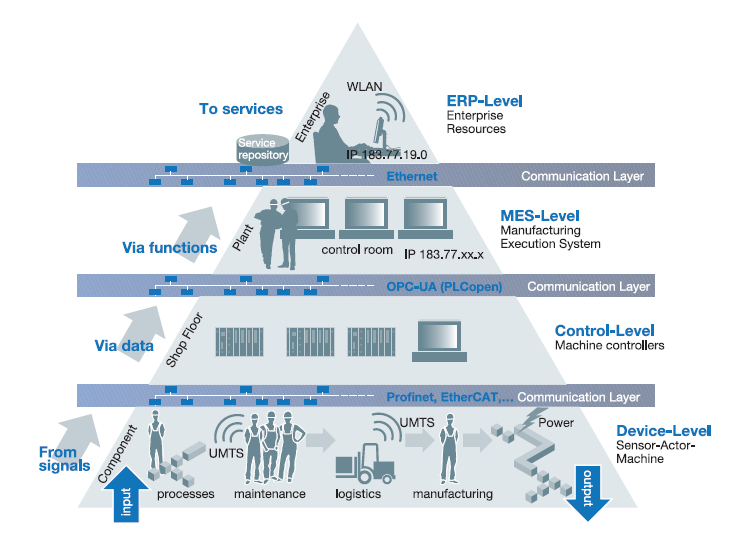
This model is fundamentally based on the assumption that, in terms of communication, a controller as a main component of the automation system is "dumb", and always merely responds to requests "from above". The higher level is always the client and initiates data requests - the lower layer is always the server and courteously responds. In the modern world the strict separation of levels and the top-down approach of the information flow soften and mix. In a smart network, every device or service must be able to initiate independent communication with all other services.
This document is about OPC-UA client functionality out of the IEC 61131-3 controller: A controller can exchange complex data structures horizontally with other controllers independently from fieldbus system or vertically with other devices using an OPC-UA server call in an MES/ERP system in order to collect data or write new production orders to the cloud. It allows a production line to be independently active in combination with integrated OPC UA Security features.
OPC-UA client functionality in a controller does not provide hard deterministic real time and so it's not a deterministic fieldbus - but UA provides fast, secured communication providing modelling mechanism for information models.
Note: The FUNCTION BLOCKS are based on the second Edition of IEC 61131-3.
About the OPC Foundation
The OPC Foundation defines standards for online data exchange between automation systems. They address access to current data (OPC DA), alarms and events (OPC A&E) and historical data (OPC HDA). Those standards are successfully applied in industrial automation.
The new OPC Unified Architecture (OPC-UA) unifies the existing standards and brings them to state-of-the-art technology using service-oriented architecture (SOA). Platform-independent technology allows the deployment of OPC-UA beyond current OPC applications only running on Windows-based PC systems. OPC-UA can also run on embedded systems as well as Linux / UNIX based enterprise systems. The provided information can be generically modelled and therefore arbitrary information models can be provided using OPC-UA.
About PLCopen
PLCopen, as an organization active in industrial control, is creating a higher efficiency in your application software development: in one-off projects as well as in higher volume products. As such it is based on standard available tools to which extensions are and will be defined.
With results like Motion Control Library, Safety, XML specification, Reusability Level and Conformity Level, PLCopen made solid contributions to the community, extending the hardware independence from the software code, as well as reusability of the code and coupling to external software tools. One of the core activities of PLCopen is focused around IEC 61131-3, the only global standard for industrial control programming. It harmonizes the way people design and operate industrial controls by standardizing the programming interface. This allows people with different backgrounds and skills to create different elements of a program during different stages of the software lifecycle: specification, design, implementation, testing, installation and maintenance. Yet all pieces adhere to a common structure and work together harmoniously.
2 Normative references
The following referenced documents are indispensable for the application of this document. For dated references, only the edition cited applies. For undated references, the latest edition of the referenced document (including any amendments and errata) applies.
OPC 10000-1, OPC Unified Architecture - Part 1: Overview and Concepts
OPC 10000-1
OPC 10000-3, OPC Unified Architecture - Part 3: Address Space Model
OPC 10000-3
OPC 10000-4, OPC Unified Architecture - Part 4: Services
OPC 10000-4
OPC 10000-6, OPC Unified Architecture - Part 6: Mappings
OPC 10000-6
OPC 10000-7, OPC Unified Architecture - Part 7: Profiles
OPC 10000-7
3 Terms, abbreviated terms and conventions
3.1 Overview
It is assumed that basic concepts of OPC UA information modelling and IEC 61131-3 are understood in this document. This document will use these concepts to describe the OPC UA Client Function Blocks for IEC 61131-3 Information Model. For the purposes of this document, the terms and definitions given in OPC 10000-1, OPC 10000-3, OPC 10000-4, OPC 10000-7, as well as the following apply.
3.2 Abbreviated terms
| FB | Function Block |
| UA | (OPC) Unified Architecture |
| XML | Extensible Markup Language |
4 The basic sequences for communication
In order to perform an operation like UA_Read, UA_Write, UA_ReadList, UA_WriteList or UA_MethodCall one has to prepare the communication following the sequence of calls as decribed hereunder, after which one has to stop the communication and clean up.
4.1 Read and Write of multiple items
UA_Connect is used to create an (optional secure) transport connection of an OPC UA session. UA_Connect is to be performed once for each connection. The UA_NamespaceGetIndexList is to be performed once for each namespace. The NodeHdl for a specific node is to be retrieved once. Read and write can be performed as frequent as necessary and permitted by the system. Once the communication is done, the node handle is not required anymore and shall be released via the use of UA_NodeReleaseHandleList for all relevant handles. The connection handle shall be released using UA_Disconnect.
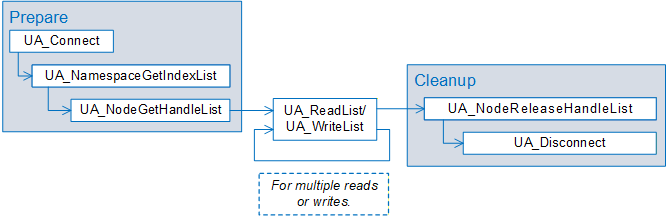
A list is handled as an array of the related base type (e.g. UANodeID or UANodeAdditionalInfo). Additionally, there is a length specified which holds the number of elements in the array. Although several arrays can be connected to the function block (e.g. node handles and variables in case of UA_ReadList) there is only one length because all arrays have the same number of elements to be processed.
The UA_NodeGetHandleList will return an UANodeHdl array. This call will not verify that the given UANodeID is valid. It will just be checked if it is structurally right (e.g. it's not one by UAIdentifierType mentioned values) - otherwise an error in the corresponding error element (NodeErrorIDs) will be returned. The output array of UA_NodeGetHandleList can be used unchanged for subsequent calls to function blocks UA_ReadList, UA_WriteList, but the control implementation shall check always the corresponding error element (NodeErrorIDs). In case of any general error no outputs shall be changed from the underlying implementation.
4.2 Monitored Items
The following function blocks are used to create subscriptions and to add monitored items to this subscription.
To create a subscription, a valid connection handle is required. The connection handle is to be acquired using UA_Connect once. UA_SubscriptionCreate will create a subscription, and needs to be called for every subscription needed. The applicable SubscriptionHdl will be returned on successful execution of the function block UA_SubscriptionCreate. In order to monitor an item, a NodeHdl for that specific node is required. In other words, both the applicable UA_SubscriptionCreate and UA_NodeGetHandleList are to be called before calling the related UA_MonitoredItemAddList. UA_MonitoredItemAddList is used to add items to a subscription identified by a SubscriptionHdl. The items to be monitored are to be assigned to this FB in form of NodeHdl. UA_MonitoredItemModifyList can be used to modify monitoring settings like sampling interval, deadband type, and deadband value and hence it can be called optionally.
Take note to delete the subscription. Release the NodeHdl before you disconnect. Unless UA_SubscriptionDelete is called the Subscription will continue working, even if UA_NodeReleaseHandleList is called.
Monitoring of nodes does invert the communication interaction: The control program is initiating the communication but as a consequence the values will be pushed from the OPC UA Server to the control program.
Like shown in the block diagram above, a subscription and monitored items have to be set up.
There are two modes to actually retrieve latest values within the control program:
Controller-sync:
Using the UA_MonitoredItemAddList function block with UAMonitoringSyncMode "UAMS_ControllerSync" - updated values shall be retrieved after the call UA_MonitoredItemOperateList is finished. This means the control program can decide when values are updated. If this block is not called no updates to the control program will be delivered.
The currently specified handling of monitored items and subscriptions is based on linking one UA node (identified by NodeHdl) to one PLC variable (defined in the PLC program). By calling the function block UA_MonitoredItemOperateList values delivered from the UA server are transfered into the PLC variables.
Please see more detailed explanations in vendor specific documentation in particular in cases of QueueSize > 1.
FW-sync:
The firmware could internally update the values of the memory of the controller.
After adding monitored items, the control program might call UA_SubscriptionProcessed to know that any values have been changed, but it might be that the control program has no control about when updates are deployed to the control program memory.
In general, a QueueSize bigger than the PLC variable array size will return an error shown in the corresponding NodeErrorIDs in UA_MonitoredItemAddList directly after the call returns, an overflow (values lost) will be shown in the corresponding NodeQualityIDs and the minimum lost values will be shown in the corresponding MinLostValueCount.
The vendor has to decide which mode to provide. Vendor documentation should describe the selected behavior. Especially for the FW-sync way a detailed documentation should state when (i.e., beginning of control program cycle) updates are available to the control program.
A vendor may provide both modes (Controller-sync and FW-sync). The parameter QueueSize defined in structure UAMonitoringParameter indicates the mode: With configuration of QueueSize > 1 for the intention not to lose data changes it also becomes the user's responsibility to fetch those values one at a time thus QueueSize is used to determine the mode of operation as follows:
QueueSize > 0 with a sample queue of that size. If '0' the QueueSize '1' will be applied. This means for a monitored item both, locally and on the server side as many as QueueSize data changes can be stored. The server discards data changes if the publish interval is too large. The client discards data changes if the UA_MonitoredItemOperateList cycle is not sufficient. Discard oldest policy is implied.
The mode of operation is configured independently for each monitored item (input parameter SyncMode of FB UA_MonitoredItemAddList).
4.3 Using Method Calls
The appropriate sequence for initiating a method call is shown below. A valid method handle is necessary to call a method. Successful call of UA_MethodGetHandleList will deliver a valid MethodHdls.
One shall release the method handle list before you disconnect.
4.4 Diagnostics
This procedure is to check if the connection is still alive. The function block UA_Connect will deliver the ConnectionHdl. UA_ConnectionGetStatus requires this ConnectionHdl as input to deliver the connection status. In case the connection is lost after receiving the handle and while calling the UA_ConnectionGetStatus, ServerState Unknown will be returned.
NOTE: It is recommended to call UA_ConnectionGetStatus periodically but for performance reasons not in every control program cycle.
4.5 Browsing
Browsing is used by a client to navigate through the Address Space of an OPC UA Server. By passing a starting node the server returns a list of nodes by references.
To be able to browse a valid connection handle is required. Function block UA_Connect will deliver the ConnectionHdl. UA_Browse takes a structure for starting Node description and filter criteria. The result is an array of structures for references and target Nodes.
If the ContinuationPointOut output is connected to the ContinuationPointIn input of a consecutive UA_Browse instance, a browse next service can be performed.
4.6 TranslatePath
This function block is used to request that the Server translates one or more UABrowsePaths to UANodeIDs. Each UA_BrowsePath is constructed of a starting UANodeID and a UARelativePath. The specified starting UANodeID identifies the UANodeID from which the UARelativePath is based. The UARelativePath contains a sequence of UARelativePathElement and UAQualifiedName.
One purpose of this function block is to allow programming against type definitions. Since UAQualifiedName shall be unique in the context of type definitions, a user program may create a UABrowsePath that is valid for a type definition and use this path on instances of the type. For example, an ObjectType "Boiler" may have a "HeatSensor" Variable as InstanceDeclaration. A graphical element programmed against the "Boiler" may need to display the Value of the "HeatSensor". If the graphical element would be called on "Boiler1", an instance of "Boiler", it would need to call this Service specifying the UANodeID of "Boiler1" as starting UANodeID and the UABrowsePaths of the "HeatSensor" as browse path. The function block would return the UANodeID of the "HeatSensor" of "Boiler1" and the graphical element could subscribe to its value.
If an OPC UA Node has multiple targets with the same UABrowsePaths, the underlying server will return a list of UANodeIDs. However, since one of the main purposes of this function block is to support programming against type definitions, the UANodeID of the OPC UA Node based on the type definition of the starting OPC UA Node is returned as the first UANodeID in the list.
4.7 Monitor Events
A typical OPC UA Server can be configured to fire Events to a Client. OPC UA specifies a wide range of different Events. OPC UA Clients can receive Events when subscribing to an Event Notifier.
In order to monitor an item, a NodeHdl for that specific node is required. Both UA_SubscriptionCreate and UA_NodeGetHandle are to be called before calling UA_EventItemAdd. UA_EventItemAdd is used to add an event item to a subscription mentioned by the SubscriptionHdl. The node of which events are monitored is to be assigned to this FB in form of NodeHdl. UA_EventItemOperate can be used to get information about the incoming events occurred.
Take note to delete the subscription. Release the NodeHdl before you disconnect. If UA_NodeReleaseHandle is called before UA_SubscriptionDelete the Subscription will continue working.
5 Types, DataTypes, Constants and Behaviour
5.1 Derived data types used in this specification
Within the specification the following derived data types are defined:
| Derived data types: | Where used | Supported | Which structure |
|---|---|---|---|
| UAUserIdentityToken | UASessionConnectInfo | ||
| UASessionConnectInfo | UA_Connect | ||
| UANodeID | UANodeInformation UABrowseDescription UAReferenceDescription UAExpandedNodeID UA_TranslatePathList UA_NodeGetHandleList UA_NodeGetInformation UA_MethodGetHandleList UA_EventItemAdd | ||
| UAQualifiedName | UARelativePathElement UANodeInformation | ||
| UARelativePathElement | UARelativePath | ||
| UARelativePath | UABrowserPath UA_EventItemAdd | ||
| UABrowsePath | UABrowsePath UA_TranslatePathList | ||
| UAMonitoringParameter | UA_MonitoredItemAddList UA_MonitoredItemOperateList | ||
| UALocalizedText | UANodeInformation UAReferenceDescription | ||
| UANodeInfo (deprecated) | |||
| UANodeInformation | UA_NodeGetInformation | ||
| UAIndexRange | UANodeAdditionalInfo | ||
| UANodeAdditionalInfo | UA_MonitoredItemAddList UA_ReadList UA_WriteList | ||
| UAViewDescription | UA_Browse | ||
| UABrowseDescription | UA_Browse | ||
| UAReferenceDescription | UA_Browse | ||
| UAExpandedNodeID | UAReferenceDescription | ||
| UAHADataValue | UA_HistoryUpdate | ||
| UAMonitoredVariables | UA_MonitoredItemAddList | ||
| UASecurityMsgMode | UASessionConnectInfo | ||
| UASecurityPolicy | UASessionConnectInfo | ||
| UATransportProfile | UASessionConnectInfo | ||
| UAUserIdentityTokenType | UAUserIdentityToken | ||
| UAIdentifierType | UANodeID | ||
| UADeadbandType | UAMonitoringParameter | ||
| UAAttributeID | UANodeAdditionalInfo | ||
| UAConnectionStatus | UA_ConnectionGetStatus | ||
| UAServerState | UA_ConnectionGetStatus | ||
| UAHAUpdateStatusCode | UAHADataValue | ||
| UABrowseDirection | UABrowseDescription | ||
| UAMonitoringSyncMode | UA_MonitoredItemAddList | ||
| UANodeClassMask | UANodeInformation UABrowseDescription UAReferenceDescription | ||
| UABrowseResultMask | UAReferenceDescription |
5.2 Length of names and ways to shorten them
There are systems that only support a limited number of significant characters in the name. For this, rules for shorter names are provided here. These long names are still seen as compliant, although have to be mentioned in the certification document.
Note: The short names are preferred for users and implementers. They should use the short version whenever possible to become more interoperable in future.
| UASecurityMsgMode_ | UASMM_ |
| UASecurityPolicy_ | UASP_ |
| UATransportProfile_ | UATP_ |
| UAUserIdentityTokenType_ | UAUITT_ |
| UAIdentifierType_ | UAIT_ |
| UADeadbandType_ | UADT_ |
| UAAttributeID_ | UAAI_ |
| UAConnectionStatus_ | UACS_ |
| UAServerState_ | UASS_ |
| UAHAUpdateStatusCode_ | UAHAUSC_ |
| UABrowseDirection_ | UABD_ |
| UAMonitoringSyncMode_ | UAMSM_ |
| UANodeClassMask_ | UANCM_ |
| UABrowseResultMask_ | UABRM_ |
5.3 Enumerated Data Types
Enumerations do not have values in IEC 61131-3 - but in third edition, a new feature called "Type with named value" has been introduced. The column "Value" in tables below address this new feature.
Anyhow a vendor should keep the long names, if possible, for existing programs to compile.
5.3.1 UASecurityMsgMode
| Value | Name | Description |
|---|---|---|
| 0 | UASMM_BestAvailable | Best available message security mode to the UA server. The client receives the available message security from the server and selects the best. This could also result in level "none security". |
| 1 | UASMM_None | No security is applied. |
| 2 | UASMM_Sign | All messages are signed but not encrypted. |
| 3 | UASMM_SignEncrypt | All messages are signed and encrypted. |
5.3.2 UASecurityPolicy
5.3.3 UATransportProfile
| Value | Name | Description |
|---|---|---|
| 1 | UATP_UATcp | http://opcfoundation.org/UA-Profile/Transport/uatcp-uasc-uabinary |
| 2 | UATP_WSHttpBinary | http://opcfoundation.org/UA-Profile/Transport/https-uabinary |
| 3 | UATP_WSHttpXmlOrBinary | Profile does not exist and was introduced by mistake |
| 4 | UATP_WSHttpXml | http://opcfoundation.org/UA-Profile/Transport/https-uasoapxml-uabinary |
| 5 | UATP_HttpsUaJson | http://opcfoundation.org/UA-Profile/Transport/https-uajson |
| 6 | UATP_WssUaScUaBinary | http://opcfoundation.org/UA-Profile/Transport/wss-uasc-uabinary |
| 7 | UATP_WssUaJson | http://opcfoundation.org/UA-Profile/Transport/wss-uajson |
5.3.4 UAUserIdentityTokenType
| Value | Name | Description |
|---|---|---|
| 0 | UAUITT_Anonymous | http://opcfoundation.org/UA-Profile/Security/UserToken/Anonymous |
| 1 | UAUITT_Username | http://opcfoundation.org/UA-Profile/Security/UserToken/Client/UserNamePassword |
| 2 | UAUITT_x509 | http://opcfoundation.org/UA-Profile/Security/UserToken/Client/X509Certificate |
| 3 | UAUITT_IssuedToken | http://opcfoundation.org/UA-Profile/Security/UserToken/Client/IssuedToken |
| 4 | UAUITT_IssuedTokenWindows | http://opcfoundation.org/UA-Profile/Security/UserToken/Client/IssuedTokenWindows |
| 5 | UAUITT_JsonWebToken | http://opcfoundation.org/UA-Profile/Security/UserToken/Client/JsonWebToken |
5.3.5 UAIdentifierType
Note: The values changed from V1.0 to V1.1
| Value | Name | Description |
|---|---|---|
| 0 | UAIT_Numeric | see OPC 10000-3 or OPC 10000-6 |
| 1 | UAIT_String | see OPC 10000-3 or OPC 10000-6 |
| 2 | UAIT_GUID | see OPC 10000-3 or OPC 10000-6 |
| 3 | UAIT_Opaque | see OPC 10000-3 or OPC 10000-6 |
5.3.6 UADeadbandType
| Value | Name | Description |
|---|---|---|
| 0 | UADT_None | No Deadband calculation should be applied |
| 1 | UADT_Absolute | AbsoluteDeadband (see OPC 10000-4) |
| 2 | UADT_Percent | PercentDeadband (see OPC 10000-4) |
5.3.7 UAAttributeID
| Value | Name | Description |
|---|---|---|
| 1 | UAAI_NodeID | The canonical identifier for the node. |
| 2 | UAAI_NodeClass | The class of the node. |
| 3 | UAAI_BrowseName | A non-localized, human readable name for the node. |
| 4 | UAAI_DisplayName | A localized, human readable name for the node. |
| 5 | UAAI_Description | A localized description for the node. |
| 6 | UAAI_WriteMask | Indicates which attributes are writable. |
| 7 | UAAI_UserWriteMask | Indicates which attributes are writable by the current user. |
| 8 | UAAI_IsAbstract | Indicates that a type node may not be instantiated. |
| 9 | UAAI_Symmetric | Indicates that forward and inverse references have the same meaning. |
| 10 | UAAI_InverseName | The browse name for an inverse reference. |
| 11 | UAAI_ContainsNoLoops | Indicates that following forward references within a view will not cause a loop. |
| 12 | UAAI_EventNotifier | Indicates that the node can be used to subscribe to events. |
| 13 | UAAI_Value | The value of a variable. |
| 14 | UAAI_DataType | The node id of the data type for the variable value. |
| 15 | UAAI_ValueRank | The number of dimensions in the value. |
| 16 | UAAI_ArrayDimensions | The length for each dimension of an array value. |
| 17 | UAAI_AccessLevel | How a variable may be accessed. |
| 18 | UAAI_UserAccessLevel | How a variable may be accessed after taking the user's access rights into account. |
| 19 | UAAI_MinimumSamplingInterval | Specifies (in milliseconds) how fast the server can reasonably sample the value for changes. |
| 20 | UAAI_Historizing | Specifies whether the server is actively collecting historical data for the variable. |
| 21 | UAAI_Executable | Whether the method can be called. |
| 22 | UAAI_UserExecutable | Whether the method can be called by the current user. |
| 23 | UAAI_DataTypeDefinition | The DataTypeDefinition Attribute is used to provide the meta data and encoding information for custom DataTypes. |
| 24 | UAAI_RolePermission | Permissions that apply to a Node for all Roles which have access to the Node. |
| 25 | UAAI_UserRolePermissions | Permissions that apply to a Node for all Roles granted to current Session. |
| 26 | UAAI_AccessRestriction | AccessRestrictions that apply to a Node. |
| 27 | UAAI_AccessLevelEx | The AccessLevelEx Attribute is used to indicate how the Value of a Variable can be accessed (read/write), if it contains current and/or historic data and its atomicity. |
| 28-32 | Reserved for future use from OPC Foundation |
5.3.8 UAConnectionStatus
| Value | Name | Description |
|---|---|---|
| 0 | UACS_Connected | UA client is connected to UA server. |
| 1 | UACS_ConnectionError | The connection from UA client to UA server has an error. |
| 2 | UACS_Shutdown | The UA client has been disconnected from the UA server. |
5.3.9 UAServerState
| Value | Name | Description |
|---|---|---|
| 0 | UASS_Running | The server is running normally. This is the usual state for a server. |
| 1 | UASS_Failed | A vendor-specific fatal error has occurred within the server. The server is no longer functioning. The recovery procedure from this situation is vendor-specific. Most Service requests should be expected to fail. |
| 2 | UASS_NoConfiguration | The server is running but has no configuration information loaded and therefore does not transfer data. |
| 3 | UASS_Suspended | The server has been temporarily suspended by some vendor-specific method and is not receiving or sending data. |
| 4 | UASS_Shutdown | The server has shut down or is in the process of shutting down. Depending on the implementation, this might or might not be visible to clients. |
| 5 | UASS_Test | The server is in Test Mode. The outputs are disconnected from the real hardware, but the server will otherwise behave normally. Inputs may be real or may be simulated depending on the vendor implementation. StatusCode will generally be returned normally. |
| 6 | UASS_CommunicationFault | The server is running properly, but is having difficulty accessing data from its data sources. This may be due to communication problems or some other problems preventing the underlying device, control system, etc. from returning valid data. It may be a complete failure, meaning that no data is available, or a partial failure, meaning that some data is still available. It is expected that items affected by the fault will individually return with a BAD FAILURE status code indication for the items. |
| 7 | UASS_Unknown | This state is used only to indicate that the OPC UA server does not know the state of underlying servers. |
5.3.10 UAHAUpdateStatusCode
Note: The correct way to shorten would be UAHAUSC_, but for compatibility reasons we did not change
| Value | Name | Description |
|---|---|---|
| 0 | UAHAUpdateStatusCode_HistorianRaw | A raw data value. |
| 1 | UAHAUpdateStatusCode_HistorianCalculated | A data value which was calculated. |
| 2 | UAHAUpdateStatusCode_HistorianInterpolated | A data value which was interpolated. |
| 3 | UAHAUpdateStatusCode_Reserved | Undefined. |
| 4 | UAHAUpdateStatusCode_HistorianPartial | A data value which was calculated with an incomplete interval. |
| 8 | UAHAUpdateStatusCode_HistorianExtraData | A raw data value that hides other data at the same timestamp. |
| 16 | UAHAUpdateStatusCode_HistorianMultiValue | Multiple values match the Aggregate criteria (i.e. multiple minimum values at different timestamps within the same interval). |
5.3.11 UABrowseDirection
Filter the References according to their direction.
| Value | Name | Description |
|---|---|---|
| 0 | UABD_Forward | Select only forward References. |
| 1 | UABD_Inverse | Select only inverse References. |
| 2 | UABD_Both | Select forward and inverse References. |
5.3.12 UAMonitoringSyncMode
Note: The correct way to shorten would be UAMSM_, but for compatibility reasons we did not change.
| Value | Name | Description |
|---|---|---|
| 0 | UAMS_Unknown | Unknown SyncMode - the default and invalid setting |
| 1 | UAMS_ControllerSync | SyncMode is ControllerSync - see chapter 4.2 Monitored Items |
| 2 | UAMS_FwSync | SyncMode is FwSync (FirmwareSync) - see chapter 4.2 Monitored Items |
5.4 Data Types for Bitmask
5.4.1 UANodeClassMask
| Value | Name | Description |
|---|---|---|
| 0 | UANCM_None | No node class (unspecified). |
| 1 | UANCM_Object | See OPC 10000-3 |
| 2 | UANCM_Variable | See OPC 10000-3 |
| 4 | UANCM_Method | See OPC 10000-3 |
| 8 | UANCM_ObjectType | See OPC 10000-3 |
| 16 | UANCM_VariableType | See OPC 10000-3 |
| 32 | UANCM_ReferenceType | See OPC 10000-3 |
| 64 | UANCM_DataType | See OPC 10000-3 |
| 128 | UANCM_View | See OPC 10000-3 |
| 255 | UANCM_All | All node classes combined. |
5.4.2 UABrowseResultMask
| Value | Name | Description |
|---|---|---|
| 0 | UABRM_None | See https://reference.opcfoundation.org/v104/Core/DataTypes/BrowseResultMask/ |
| 1 | UABRM_ReferenceType | See https://reference.opcfoundation.org/v104/Core/DataTypes/BrowseResultMask/ |
| 2 | UABRM_IsForward | See https://reference.opcfoundation.org/v104/Core/DataTypes/BrowseResultMask/ |
| 3 | UABRM_ReferenceTypeInfo | See https://reference.opcfoundation.org/v104/Core/DataTypes/BrowseResultMask/ |
| 4 | UABRM_NodeClass | See https://reference.opcfoundation.org/v104/Core/DataTypes/BrowseResultMask/ |
| 8 | UABRM_BrowseName | See https://reference.opcfoundation.org/v104/Core/DataTypes/BrowseResultMask/ |
| 16 | UABRM_DisplayName | See https://reference.opcfoundation.org/v104/Core/DataTypes/BrowseResultMask/ |
| 32 | UABRM_TypeDefinition | See https://reference.opcfoundation.org/v104/Core/DataTypes/BrowseResultMask/ |
| 60 | UABRM_TargetInfo | See https://reference.opcfoundation.org/v104/Core/DataTypes/BrowseResultMask/ |
| 63 | UABRM_All | See https://reference.opcfoundation.org/v104/Core/DataTypes/BrowseResultMask/ |
5.5 Structured Data Types
5.5.1 UAUserIdentityToken
| UAUserIdentityToken | DataType | Description |
|---|---|---|
| UserIdentityTokenType | UAUserIdentityTokenType | Defines the identity Token to authenticate a user during the creation of a Session. |
| TokenParam1 | Vendor specific | Shall be STRING or WSTRING. The recommendation for new implementation is to use WSTRING. In case of TokenType "Anonymous" the Param1 will not be evaluated. In case of TokenType "Username" the Param1 contains the user name. In case of TokenType "x509" the Param1 contains the location of the certificate store. |
| TokenParam2 | Vendor specific | Shall be STRING or WSTRING. The recommendation for new implementation is to use WSTRING. In case of TokenType "Anonymous" the Param2 will not be evaluated. In case of TokenType "Username" the Param2 contains the user password. In case of TokenType "x509" the Param2 contains the certificate name. |
5.5.2 UASessionConnectInfo
| UASessionConnectInfo | DataType | Description |
|---|---|---|
| SessionName | Vendor specific | Shall be STRING or WSTRING. The recommendation for new implementation is to use WSTRING. Defines the name of the session assigned by the client. The name is shown in the diagnostics information of the server. In case of empty string the server will generate a session name. |
| ApplicationName | Vendor specific | Shall be STRING or WSTRING. The recommendation for new implementation is to use WSTRING. Defines the readable name of the OPC UA client application. The string can be empty. |
| SecurityMsgMode | UASecurityMsgMode | See UASecurityMsgMode. |
| SecurityPolicy | UASecurityPolicy | See UASecurityPolicy. |
| CertificateStore | Vendor specific | Shall be STRING or WSTRING. The recommendation for new implementation is to use WSTRING. Defines the location of the certificate store used for the application certificates and trust lists. The structure of the certificate store is vendor specific. In case of empty string the default certificate store is used. |
| ClientCertificateName | Vendor specific | Shall be STRING or WSTRING. The recommendation for new implementation is to use WSTRING. Defines the name of the client certificate and private key in the certificate store. In case of empty string the default client application certificate is used. Implementation note: The ApplicationURI will be extracted from the certificate. |
| ServerUri | Vendor specific | Shall be STRING or WSTRING. The recommendation for new implementation is to use WSTRING. Defines the URI of the server. |
| CheckServerCertificate | BOOL | Flag indicating if the server certificate should be checked with the trust list of the client application. |
| TransportProfile | UATransportProfile | See UATransportProfile |
| UserIdentityToken | UAUserIdentityToken | See UAUserIdentityToken |
| VendorSpecificParameter | Vendor specific | Vendor may define specific parameters, e.g. in case multiple clients are available, client instance can be defined with this parameter. The VendorSpecificParameter can be empty. |
| SessionTimeout | TIME | Defines how long the session will survive when there is no connection. |
| MonitorConnection | TIME | Defines the interval time to check the connection. The connection monitoring has to be done by the client vendor implementation and is defined in OPC 10000-4 |
| LocaleIDs | ARRAY [1..5] OF STRING[6] | <language>[-<country/region>] where <language> is a two letter ISO 639-1:2002 code for language, <country /region> is the three letter ISO 3166 code for the country/region. Sample: en-US, zh-CHS |
5.5.3 UANodeID
| UANodeID | DataType | Description |
|---|---|---|
| NamespaceIndex | UINT | |
| Identifier | Vendor specific | Shall be STRING or WSTRING. The recommendation for new implementation is to use WSTRING. In case of IdentifierType GUID the format is like 00000316-0000-0000-C000-000001000046 In case of IdentifierType Opaque string has to be base 64 encoded byte string. |
| IdentifierType | UAIdentifierType | See UAIdentifierType |
5.5.4 UAQualifiedName
| UAQualifiedName | DataType | Description |
|---|---|---|
| NamespaceIndex | UINT | The namespace index to which name is associated. |
| Name | Vendor specific | Shall be STRING or WSTRING. The recommendation for new implementation is to use WSTRING. Name of the qualified name. |
5.5.5 UARelativePathElement
| UARelativePathElement | DataType | Description |
|---|---|---|
| ReferenceTypeId | UANodeID | See UANodeID. If the ReferenceTypeId is a NULL-UANodeID the reference type is 33 (HierarchicalReferences) |
| IsInverse | BOOL | If TRUE, the inverse references will be evaluated. Default is FALSE. |
| IncludeSubtypes | BOOL | If TRUE also subtypes from ReferenceTypeId will be evaluated. Default is TRUE. |
| TargetName | UAQualifiedName | See UAQualifiedName |
5.5.6 UARelativePath
| UARelativePath | DataType | Description |
|---|---|---|
| NoOfElements | UINT | Number of Elements. |
| Elements | ARRAY OF UARelativePathElement | See UARelativePathElement. One relative path element. Length of the array is vendor specific MAX_ELEMENTS_RELATIVEPATH |
5.5.7 UABrowsePath
| UABrowsePath | DataType | Description |
|---|---|---|
| StartingNode | UANodeID | See UANodeID. Starting NodeId from where the relative path will be evaluated. |
| RelativePath | UARelativePath | See UARelativePath. The relative path which will be evaluated. |
5.5.8 UAMonitoringParameter
| UAMonitoringParameter | DataType | Description |
|---|---|---|
| SamplingInterval | TIME | The rate in milliseconds the server checks the underlying data source for changes. |
| QueueSize | UINT | The queue size for the monitoring item. See also 4.2 Monitored Items |
| DiscardOldest | BOOL | Determine the discard policy in case of queue overflow: TRUE: Discard the oldest in the sample queue FALSE: Discard the newest in the sample queue |
| DeadbandType | UADeadbandType | UADeadbandType. This parameter indicates if a deadband is applied and if applied, which type of Deadband. |
| Deadband | REAL | e.g. percent 0.1%. |
5.5.9 UALocalizedText
| UALocalizedText | DataType | Description |
|---|---|---|
| Locale | STRING[6] | <language>[-<country/region>] where <language> is a two letter ISO639 code for language, <country /region> is the three letter ISO3166 code for the country/region. Sample: en-US, zh-CHS. |
| Text | Vendor specific | Shall be STRING or WSTRING. The recommendation for new implementation is to use WSTRING. Contains localized text as string. |
5.5.10 UANodeInfo (deprecated)
This UANodeInfo is the first version of declaration - to ease the handling of BrowseName the usage of the second version UANodeInformation is recommended. This also affects
UANodeInformation.
| UANodeInfo | DataType | Description | ||||||||||||||||||||||||||||||
|---|---|---|---|---|---|---|---|---|---|---|---|---|---|---|---|---|---|---|---|---|---|---|---|---|---|---|---|---|---|---|---|---|
| AccessLevel | BYTE | A bit mask indicating whether the current value of the Value Attribute is readable and writable as well as whether the history of the value is readable and changeable.
| ||||||||||||||||||||||||||||||
| ArrayDimension | ARRAY OF UDINT | The length for each dimension of an array value. Length is vendor-specific (MAX_ELEMENTS_ARRAYDIMENSION). See Constants of Array Lengths | ||||||||||||||||||||||||||||||
| BrowseName | STRING | The BrowseName is composed of a namespace index and a name. The String representation is of the format [ns:] BrowseName. The browse name may be prefixed by its namespace index. If the namespace prefix is omitted then namespace index 0 is used. | ||||||||||||||||||||||||||||||
| ContainsNoLoops | BOOL | Indicates that following forward references within a view will not cause a loop. | ||||||||||||||||||||||||||||||
| DataType | UANodeID | See UANodeID. The node id of the data type for the variable value. | ||||||||||||||||||||||||||||||
| Description | UALocalizedText | A localized description for the node. | ||||||||||||||||||||||||||||||
| DisplayName | UALocalizedText | A localized human readable name for the node. | ||||||||||||||||||||||||||||||
| EventNotifier | BYTE | This Attribute represents a bit mask that identifies whether the Object can be used to subscribe to Events and whether the history of Events is accessible and changeable.
| ||||||||||||||||||||||||||||||
| Executable | BOOL | Whether the method can be called. | ||||||||||||||||||||||||||||||
| Historizing | BOOL | Specifies whether the server is actively collecting historical data for the variable. | ||||||||||||||||||||||||||||||
| InverseName | STRING | The browse name for an inverse reference. | ||||||||||||||||||||||||||||||
| IsAbstract | BOOL | Indicates that a type node may not be instantiated. | ||||||||||||||||||||||||||||||
| MinimumSamplingInterval | TIME | Specifies (in ms) how fast the server can reasonably sample the value for changes. | ||||||||||||||||||||||||||||||
| NodeClass | UANodeClassMask | See UANodeClassMask. The base type of the node. An enumeration identifying the NodeClass of a Node such as Object, Variable or Method. | ||||||||||||||||||||||||||||||
| NodeID | UANodeID | See UANodeID. The server unique identifier for the node. | ||||||||||||||||||||||||||||||
| Symmetric | BOOL | Indicates that forward and inverse references have the same meaning. | ||||||||||||||||||||||||||||||
| UserAccessLevel | BYTE | Contains the same information as the AccessLevel but takes user access rights into account.
| ||||||||||||||||||||||||||||||
| UserExecutable | BOOL | Whether the method can be called by the current user. | ||||||||||||||||||||||||||||||
| UserWriteMask | UDINT | Indicates which attributes are writable by the current user. | ||||||||||||||||||||||||||||||
| ValueRank | DINT | The number of dimensions in the value. | ||||||||||||||||||||||||||||||
| WriteMask | UDINT | Indicates which attributes are writable. |
5.5.11 UANodeInformation
Note: Additional added Attributes from OPC UA (like DataTypeDefinition, RolePermissions, etc.) will not be reflected in UANodeInformation. Instead use UA_ReadList for this Attributes. The same is valid for the Attribute "Inverse Name (10)" when it needs to be a WSTRING instead of STRING.
| UANodeInformation | DataType | Description | ||||||||||||||||||||||||||||||
|---|---|---|---|---|---|---|---|---|---|---|---|---|---|---|---|---|---|---|---|---|---|---|---|---|---|---|---|---|---|---|---|---|
| AccessLevel (17) | BYTE | A bit mask indicating whether the current value of the Value Attribute is readable and writable as well as whether the history of the value is readable and changeable.
| ||||||||||||||||||||||||||||||
| ArrayDimension (16) | ARRAY OF UDINT | The length for each dimension of an array value. Length is vendor-specific (MAX_ELEMENTS_ARRAYDIMENSION). See Constants of Array Lengths | ||||||||||||||||||||||||||||||
| BrowseName (3) | UAQualifiedName | See UAQualifiedName. | ||||||||||||||||||||||||||||||
| ContainsNoLoops (11) | BOOL | Indicates that following forward references within a view will not cause a loop. | ||||||||||||||||||||||||||||||
| DataType (14) | UANodeID | See UANodeID. The node id of the data type for the variable value. | ||||||||||||||||||||||||||||||
| Description (5) | UALocalizedText | A localized description for the node. | ||||||||||||||||||||||||||||||
| DisplayName (4) | UALocalizedText | A localized human readable name for the node. | ||||||||||||||||||||||||||||||
| EventNotifier (12) | BYTE | This Attribute represents a bit mask that identifies whether the Object can be used to subscribe to Events and whether the history of Events is accessible and changeable.
| ||||||||||||||||||||||||||||||
| Executable (21) | BOOL | Whether the method can be called. | ||||||||||||||||||||||||||||||
| Historizing (20) | BOOL | Specifies whether the server is actively collecting historical data for the variable. | ||||||||||||||||||||||||||||||
| InverseName (10) | STRING | The browse name for an inverse reference. | ||||||||||||||||||||||||||||||
| IsAbstract (8) | BOOL | Indicates that a type node may not be instantiated. | ||||||||||||||||||||||||||||||
| MinimumSamplingInterval (19) | TIME | Specifies (in ms) how fast the server can reasonably sample the value for changes. | ||||||||||||||||||||||||||||||
| NodeClass (2) | UANodeClassMask | See UANodeClassMask. The base type of the node. An enumeration identifying the NodeClass of a Node such as Object, Variable or Method. | ||||||||||||||||||||||||||||||
| Symmetric (9) | BOOL | Indicates that forward and inverse references have the same meaning. | ||||||||||||||||||||||||||||||
| UserAccessLevel (18) | BYTE | Contains the same information as the AccessLevel but takes user access rights into account.
| ||||||||||||||||||||||||||||||
| UserExecutable (22) | BOOL | Whether the method can be called by the current user. | ||||||||||||||||||||||||||||||
| UserWriteMask (7) | UDINT | Indicates which attributes are writable by the current user. | ||||||||||||||||||||||||||||||
| ValueRank (15) | DINT | The number of dimensions in the value. | ||||||||||||||||||||||||||||||
| WriteMask (6) | UDINT | Indicates which attributes are writable. |
5.5.12 UAIndexRange
| UAIndexRange | DataType | Description |
|---|---|---|
| StartIndex | UINT | Start index. |
| EndIndex | UINT | End index. |
Note: IndexRange can be defined as follows: For each Dimension:
Start and EndIndex are to be assigned.
StartIndex must be smaller than EndIndex.
To access all the elements in a Dimension it's a must to assign StartIndex and EndIndex depending on the number of total Elements in the Dimension.
A single element in a Dimension can be selected by specifying the same StartIndex and EndIndex.
5.5.13 UANodeAdditionalInfo
| UANodeAdditionalInfo | DataType | Description |
|---|---|---|
| AttributeID | UAAttributeID | Selects the attribute to be accessed. The default AttributeID is UAAI_Value (13). UAAttributeID |
| IndexRangeCount | UINT | Count of valid IndexRange specified. Vendorspecific. |
| IndexRange | ARRAY OF UAIndexRange | See UAIndexRange Length is vendor-specific (MAX_ELEMENTS_INDEXRANGE See Constants of Array Lengths |
5.5.14 UAViewDescription
| UAViewDescription | DataType | Description |
|---|---|---|
| ViewID | UANodeID | Node ID of the view to limit the browse. Empty for browsing the entire Address Space See UANodeID |
| TimeStamp | Vendor specific | If '0' - any ViewID which matches should be used. Shall be DT or LDT. The recommendation for new implementation is to use LDT |
| Version | UDINT | If '0' - any ViewID which matches should be used. |
5.5.15 UABrowseDescription
| UABrowseDescription | DataType | Description |
|---|---|---|
| StartingNodeID | UANodeID | Node ID of the starting node to browse. See UANodeID |
| Direction | UABrowseDirection | Browse direction forward, inverse, both.
|
| ReferenceTypeID | UANodeID | Node ID of the Reference Type the server should follow. See UANodeID Default value: HierachicalReferences |
| IncludeSubtypes | BOOL | Indicates if also subtypes of the Reference Type should be retuned Default: TRUE |
| NodeClass | UANodeClassMask | Filter on the Node Class of the retuned Nodes See UANodeClassMask |
| ResultMask | UABrowseResultMask | Selects which fields of the UAReferenceDescription are requested from the server. |
5.5.16 UAReferenceDescription
| UAReferenceDescription | DataType | Description |
|---|---|---|
| ReferenceTypeID | UANodeID | Node ID of the ReferenceType followed from the starting Node to the target Node. See UANodeID |
| IsForward | BOOL | Set if followed a forward Reference |
| NodeID | UAExpandedNodeID | Node ID of the target Node. This could also be a Node in another server. See UAExpandedNodeID |
| BrowseName | Vendor specific | Shall be STRING or WSTRING. The recommendation for new implementation is to use WSTRING. The qualified name of the target Node. |
| DisplayName | UALocalizedText | The localized name of the target Node. See UALocalizedText |
| NodeClass | UANodeClassMask | Node Class of the target Node. See UANodeClassMask |
| TypeDefinition | UAExpandedNodeID | Node ID of the Object or Variable type of the target Node. See UAExpandedNodeID |
5.5.17 UAExpandedNodeID
| UAExpandedNodeID | DataType | Description |
|---|---|---|
| ServerIndex | UDINT | The ServerIndex formatted as a base 10 number. |
| NamespaceURI | Vendor specific | Shall be STRING or WSTRING. The recommendation for new implementation is to use WSTRING. The NamespaceUri formatted as a string. Any reserved characters in the URI shall be replaced with a '%' followed by its 8 bit ANSI value encoded as two hexadecimal digits (case insensitive). For example, the character ';' would be replaced by '%3B'. The reserved characters are ';' and '%'. |
| ID | UANodeID | An identifier for a node in the address space of an OPC UA Server. See UANodeID |
5.5.18 UAHADataValue
| UAHADataValue | DataType | Description |
|---|---|---|
| Value | Vendor specific | Vendor specific |
| StatusCode | UAHAUpdateStatusCode | See UAHAUpdateStatusCode |
| ServerTimeStamp | Vendor specific | Shall be DT or LDT. The recommendation for new implementation is to use LDT |
| SourceTimeStamp | Vendor specific | Shall be DT or LDT. The recommendation for new implementation is to use LDT |
5.5.19 UAMonitoredVariables
| UAMonitoredVariables | DataType | Description |
|---|---|---|
| Values | ARRAY OF Vendor specific | Vendor specific. Array shall have the minimum length as UAMonitoringParameter QueueSize |
| TimeStamps | ARRAY OF Vendor specific | Shall be DT or LDT. The recommendation for new implementation is to use LDT. It is expected, that the SourceTimeStamp from the server is returned. Optional - If exists it shall have the same length as the Values array. |
| NodeQualityIDs | ARRAY OF DWORD | Contains an error code for each element of the Values array. Optional - If exists it shall have the same length as the Values array. In case of "Overflow" Bit '7' will be set if queue size is greater than 1. If this bit is set, not every detected change has been returned since the Server's queue buffer for the MonitoredItem reached its limit and had to purge out data and the MinLostValueCount from UA_MonitoredItemAddList will be incremented by one (1). |
| NewValuesCount | UINT | Count of Values (Vendorspecific) which were updated starting from the lowest element of the Values. |
5.6 Vendor-specific DataTypes
There are some data types used which are vendor-specific. Please check the specification of the vendor for the concrete implementation. The following table lists these data types and their usage:
| Vendor Specific Data Type | Usage at |
|---|---|
| Variable Identification | Parameter 'Variable' of Function Block 'UA_MonitoredItemAdd' Parameter 'Variables' of Function Block 'UA_MonitoredItemAddList' Parameter 'Variable' of Function Block 'UA_Read' Parameter 'Variables' of Function Block 'UA_ReadList' Parameter 'Variable' of Function Block 'UA_Write' Parameter 'Variables' of Function Block 'UA_WriteList' |
| Method Arguments | Parameter 'InputArguments' of Function Block 'UA_MethodCall' Parameter 'OutputArguments' of Function Block 'UA_MethodCall' |
| Event Field Data | Parameter 'EventFields' of Function Block 'UA_EventItemAdd' |
| UAHADataValue | Value |
Additionally, the lengths of some arrays have to be defined by the vendors. These are explained in the following chapter.
5.7 Constants of Array Lengths
The described function blocks make use of arrays.
The length of these arrays is - if not formally limited by the function block - vendor-specific and could be made changeable for resource optimization.
This is a list of arrays and as a naming convention their length-constants.
Every group of arrays should have the same length for ease of use.
All arrays should be defined as [1..CONSTANT-LENGTH], so for instance as ARRAY [1.. MAX_ELEMENTS_NODELIST] OF <<DATATYPE>>
| CONSTANT-LENGTH | Description |
|---|---|
| MAX_ELEMENTS_ARRAYDIMENSION | Used at UANodeInformation. Limits the maximum dimensions of a node, which could be used. |
| MAX_ELEMENTS_INDEXRANGE | Used at UANodeAdditionalInfo. Limits the maximum defined. |
| MAX_ELEMENTS_NODELIST | Limits the number of nodes, which could be used by the List function blocks |
| MAX_ELEMENTS_MONITORLIST | Limits the number of monitored items, which could be used by the monitored items blocks for each connection. |
| MAX_ELEMENTS_BROWSERESULT | Limits the number of browse results, which could be used by the Browse block |
| MAX_ELEMENTS_HISTORYDATA | Limits the number of browse results, which could be used by the HistoryUpdate block and HistoryRead blocks. |
| MAX_ELEMENTS_EVENTITEMOPERATE | Limits the number of event items, which could be used by the event items operate block |
| MAX_ELEMENTS_REGISTER | Limits the number of NodeIDs which can be registered for each connection. |
| MAX_ELEMENTS_RELATIVEPATH | Limits the number of relative path elements in a relative path. |
| MAX_ELEMENTS_NAMESPACES | Limits the number of namespaces (either Uris or Indexes) |
| MAX_ELEMENTS_METHOD | Limits the number of methods |
| MAX_EVENT_FIELD_SELECTIONS | Limit the number of selections |
| MAX_ELEMENTS_EVENTITEMLIST | Limit the number of event items |
6 Error Codes (ErrorID)
Error codes are 4 bytes long, data type being DWORD.
NOTE: Bit 29 in this DWORD value is used to differentiate between error codes defined by OPC Foundation and error codes defined by PLCopen or Vendor.
| Field | Bit Range | Description | ||||||||||||
|---|---|---|---|---|---|---|---|---|---|---|---|---|---|---|
| Severity | 30:31 | Indicates whether the ErrorCode represents a good, bad or uncertain condition. These bits have the following meanings:
| ||||||||||||
| ErrorType | 29 | Value 0 indicates OPC error. Please find these error codes in OPC UA 10000-4 specification. Value 1 indicates PLCopen or vendor specific error signaled by BIT28. NOTE: This bit shall always be zero on the wire. | ||||||||||||
| ErrorType2 | 28 | This flag can be evaluated only if BIT29 is Value 1. Value 0 indicates PLCopen error. Value 1 indicates vendor specific error. NOTE 1): This bit shall always be zero on the wire. NOTE 2): This bit shall only be set if bit 29 has value 1, because it is reserved in OPC 10000-4 for future use. |
ErrorCode (Bits 0..27) | Define | Description |
|---|---|---|
| Category | General | |
| 16#A000_0001 | PLCopenUA_Bad_FW_PermanentError | Internal, permanent error. |
| 16#A000_0002 | PLCopenUA_Bad_FW_TempError | Temp. error; FB could retry to reach FW. |
| Category | Connection | |
| 16#A000_0100 | PLCopenUA_Bad_ConnectionError | Connection could not be established. |
| 16#A000_0101 | PLCopenUA_Bad_HostNotFound | The requested hostname could not be found. |
| 16#A000_0102 | PLCopenUA_Bad_AlreadyConnected | Connection was already established. |
| 16#A000_0103 | PLCopenUA_Bad_SecurityFailed | Connection failed due to security setup. |
| 16#A000_0104 | PLCopenUA_Bad_Suspended | Connection is suspended. |
| 16#A000_0105 | PLCopenUA_Bad_ConnectionInvalidHdl | Provided ConnectionHdl is not known. |
| Category | Namespace | |
| 16#A000_0200 | PLCopenUA_Bad_NSNotFound | A namespace with the requested name cannot be found on server. |
| Category | Node | |
| 16#A000_0300 | PLCopenUA_Bad_ResultTooLong | Target PLC variable is too short for retrieved data. |
| 16#A000_0301 | PLCopenUA_Bad_InvalidType | Invalid or unsupported Type. |
| 16#A000_0302 | PLCopenUA_Bad_NodeInvalidHdl | Provided NodeHdl is not known. |
| 16#A000_0303 | PLCopenUA_Bad_MethodInvalidHdl | Provided MethodHdl is not known. |
| 16#A000_0304 | PLCopenUA_Bad_ReadFailed | Read failed for unknown reason. |
| 16#A000_0305 | PLCopenUA_Bad_WriteFailed | Write failed for unknown reason. |
| 16#A000_0306 | PLCopenUA_Bad_CallFailed | Method Call failed for unknown reason. |
| 16#A000_0307 | PLCopenUA_Bad_InParamFailed | Method Call Input parameter conversion failed. |
| 16#A000_0308 | PLCopenUA_Bad_OutParamFailed | Method Call Output parameter conversion failed. ATTENTION: this means the MethodCall was executed successfully but the returned values could not be converted. |
| Category | Attribute | |
| 16#A000_0400 | PLCopenUA_Bad_AttributeIdUnknown | Used in UA_NodeGetInformation for elements, which are not in this NodeClass existing. |
| 16#A000_0401 | PLCopenUA_Bad_AttributeIdInvalid | Used in UA_NodeGetInformation for elements, which should exist but don't. |
| Category | Monitoring | |
| 16#A000_0500 | PLCopenUA_Bad_SubscriptionInvalidHdl | Provided SubscriptionHdl is not known. |
| 16#A000_0501 | PLCopenUA_Bad_MonitoredItemInvalidHdl | Provided MonitoredItemHdl is not known. |
| 16#A000_0502 | PLCopenUA_Bad_MonitoredItemSyncMismatch | Mixed controller sync and firmware sync in same list |
| 16#A000_0503 | PLCopenUA_Bad_SyncModeInvalid | Sync mode invalid |
7 Functionblocks
Brief description of the used letter's "B", "E" and "V":
| B | Basic | Mandatory VAR_INPUT, VAR_OUTPUT, VAR_IN_OUT. |
| E | Extended | Optional VAR_INPUT, VAR_OUTPUT, VAR_IN_OUT. |
| V | Vendor Specific | Vendor specific VAR_INPUT, VAR_OUTPUT, VAR_IN_OUT. |
The detailed description can be found in Annex A.
VAR_INPUT is shown on the left side of the Function Blocks.
VAR_OUTPUT is shown on the right side of the Function Blocks.
VAR_IN_OUT is shown on the left and right side of the Function Blocks and has a dashed line below.
7.1 UA_Connect
| FB-Name | UA_Connect | ||
| This Function Block is used to create a (optional secure) transport connection and an OPC UA session. The connection shall be terminated by calling the UA_Disconnect after establishing the connection. | |||
| VAR_INPUT | |||
| B | Execute | BOOL | On rising edge connection is started. |
| B | ServerEndpointUrl | Vendor specific | Shall be STRING or WSTRING. The recommendation for new implementation is to use WSTRING. URL |
| B | SessionConnectInfo | STRUCT | See UASessionConnectInfo |
| B | Timeout | TIME | Maximum time to establish the connection. |
| VAR_OUTPUT | |||
| B | Done | BOOL | Signals a connection has been initially established. |
| B | Busy | BOOL | The FB is not finished and new output values are to be expected. |
| B | Error | BOOL | Signals that an error has occurred within the FB. |
| B | ErrorID | DWORD | Error code. |
| B | ConnectionHdl | DWORD | Connection handle - is valid until UA_Disconnect is called. |
| Notes: The connection monitoring and the reconnect handling are to be done by the client vendor implementation. The reconnect sequence is defined in OPC 10000-4. | |||
| UA_Connect | ||||||
| BOOL | Execute | Done | BOOL | |||
| Vendor specific | ServerEndpointUrl | Busy | BOOL | |||
| STRUCT | SessionConnectInfo | Error | BOOL | |||
| TIME | Timeout | ErrorID | DWORD | |||
| ConnectionHdl | DWORD | |||||
7.2 UA_Disconnect
| FB-Name | UA_Disconnect | |||
| This Function Block is used to close a transport connection of an OPC UA session. | ||||
| VAR_INPUT | ||||
| B | Execute | BOOL | On rising edge connection is terminated. | |
| B | ConnectionHdl | DWORD | Connection handle of connection to be closed. | |
| B | Timeout | TIME | Maximum time to close the connection. | |
| VAR_OUTPUT | ||||
| B | Done | BOOL | FB has completed its task. | |
| B | Busy | BOOL | The FB is not finished and new output values are to be expected. | |
| B | Error | BOOL | Signals that an error has occurred within the FB. | |
| B | ErrorID | DWORD | Error code. | |
| Notes: Calling UA_Disconnect (even in case of timeout or error) will release the ConnectionHdl, all node-handles and MonitoredItems. | ||||
| UA_Disconnect | ||||||
| BOOL | Execute | Done | BOOL | |||
| DWORD | ConnectionHdl | Busy | BOOL | |||
| TIME | Timeout | Error | BOOL | |||
| ErrorID | DWORD | |||||
7.3 UA_NamespaceGetIndexList
| FB-Name | UA_NamespaceGetIndexList | |||
| This Function Block is used to get the namespace-indexes of numerous namespace-URIs | ||||
| VAR_INPUT | ||||
| B | Execute | BOOL | FB performs its task on rising edge on this input. | |
| B | ConnectionHdl | DWORD | Connection handle. | |
| B | NamespaceUrisCount | UINT | Number of NamespaceUris in Array of NamespaceUris. | |
| B | NamespaceUris | ARRAY OF Vendor specific | Shall be STRING or WSTRING. The recommendation for new implementation is to use WSTRING. Array of Vendor specific with the NamespaceUris. See Constants of Array Lengths (MAX_ELEMENTS_NAMESPACES) | |
| B | Timeout | TIME | Maximum time to response. | |
| VAR_OUTPUT | ||||
| B | Done | BOOL | FB has completed its task. | |
| B | Busy | BOOL | The FB is not finished and new output values are to be expected. | |
| B | Error | BOOL | Signals that an error has occurred within the FB. | |
| E | ErrorID | DWORD | Error code. | |
| B | ErrorIDs | ARRAY OF DWORD | Error codes. Array shall be the same number of elements as NamespaceUrisCount. See Constants of Array Lengths (MAX_ELEMENTS_NAMESPACES) | |
| B | NamespaceIndexes | ARRAY OF UINT | Namespace Indexes. Array shall be the same number of elements as NamespaceUris. See Constants of Array Lengths (MAX_ELEMENTS_NAMESPACES) | |
Notes: Reads the Server-Object NamespaceArray (NS:0; Id: 2255) and returns the indexes of the requested elements which can be used in subsequent calls where the Namespace-Array-Index is required - e.g., UA_NodeGetHandleList. This is a convenient function block - could also be done with ReadList and the returned unknown array length of the NamespaceArray could be evaluated in the user program. In case the requested NamespaceUri is not found the error PLCopenUA_Bad_NSNotFound will be returned in the corresponding ErrorIDs. | ||||
| UA_NamespaceGetIndexList | ||||||
| BOOL | Execute | Done | BOOL | |||
| DWORD | ConnectionHdl | Busy | BOOL | |||
| UINT | NamespaceUrisCount | Error | BOOL | |||
| ARRAY of Vendor specific | NamespaceUris | ErrorID | DWORD | |||
| TIME | Timeout | ErrorIDs | ARRAY of DWORD | |||
| NamespaceIndexes | ARRAY of UINT | |||||
7.4 UA_ServerGetUriByIndex
| FB-Name | UA_ServerGetUriByIndex | |||
| This Function Block is used to get the server-URI with a given index. | ||||
| VAR_INPUT | ||||
| B | Execute | BOOL | FB performs its task on rising edge on this input. | |
| B | ConnectionHdl | DWORD | Connection handle. | |
| B | ServerIndex | UDINT | ServerArray Index. | |
| B | Timeout | TIME | Maximum time to response. | |
| VAR_OUTPUT | ||||
| B | Done | BOOL | FB has completed its task. | |
| B | Busy | BOOL | The FB is not finished and new output values are to be expected. | |
| B | Error | BOOL | Signals that an error has occurred within the FB. | |
| B | ErrorID | DWORD | Error code. | |
| B | ServerUri | Vendor specific | Shall be STRING or WSTRING. The recommendation for new implementation is to use WSTRING. The URI from the ServerArray with the given ServerIndex. | |
| Notes: - | ||||
| UA_ServerGetUriByIndex | ||||||
| BOOL | Execute | Done | BOOL | |||
| DWORD | ConnectionHdl | Busy | BOOL | |||
| UDINT | ServerIndex | Error | BOOL | |||
| TIME | Timeout | ErrorID | DWORD | |||
| ServerUri | Vendor specific | |||||
7.5 UA_ServerGetIndexByUriList
| FB-Name | UA_ServerGetIndexByUriList | |||
| This Function Block is used to get several server-indexes of server-URIs | ||||
| VAR_INPUT | ||||
| B | Execute | BOOL | FB performs its task on rising edge on this input. | |
| B | ConnectionHdl | DWORD | Connection handle. | |
| B | ServerUrisCount | UINT | Number of ServerUris in Array of ServerUris. | |
| B | ServerUris | ARRAY OF Vendor specific | Shall be STRING or WSTRING. The recommendation for new implementation is to use WSTRING. Array of Vendor specific with the ServerUris. See Constants of Array Lengths (MAX_ELEMENTS_NAMESPACES) | |
| B | Timeout | TIME | Maximum time to response. | |
| VAR_OUTPUT | ||||
| B | Done | BOOL | FB has completed its task. | |
| B | Busy | BOOL | The FB is not finished and new output values are to be expected. | |
| B | Error | BOOL | Signals that an error has occurred within the FB. | |
| E | ErrorID | DWORD | Error code. | |
| B | ErrorIDs | ARRAY OF DWORD | Error codes. Array shall be the same number of elements as ServerUrisCount. See Constants of Array Lengths (MAX_ELEMENTS_NAMESPACES) | |
| B | ServerIndexes | ARRAY OF UDINT | Server Indexes. Array shall be the same number of elements as ServerUris. See Constants of Array Lengths (MAX_ELEMENTS_NAMESPACES) | |
Notes: Reads the Server-Object ServerArray (NS:0; Id: 2254) and returns the indexes of the requested elements which can be used in subsequent calls where the Server-Array-Index is required - e.g. UA_Browse. This is a convenient function call - could also be done with ReadList and the returned unknown array length of the ServerArray could be evaluated in the user program. In case the requested ServerUri is not found the error PLCopenUA_Bad_NSNotFound will be returned in the corresponding ErrorIDs. | ||||
| UA_ServerGetIndexByUriList | ||||||
| BOOL | Execute | Done | BOOL | |||
| DWORD | ConnectionHdl | Busy | BOOL | |||
| UINT | ServerUrisCount | Error | BOOL | |||
| ARRAY of Vendor specific | ServerUris | ErrorID | DWORD | |||
| TIME | Timeout | ErrorIDs | ARRAY of DWORD | |||
| ServerIndexes | ARRAY of UINT | |||||
7.6 UA_TranslatePathList
| FB-Name | UA_TranslatePathList | |||
| This Function Block is used to get the node parameters of a node using paths of the node for multiple nodes. | ||||
| VAR_INPUT | ||||
| B | Execute | BOOL | FB performs its task on rising edge on this input. | |
| B | ConnectionHdl | DWORD | Connection handle. | |
| B | BrowsePathsCount | UINT | Number of UABrowsePath in Array of BrowsePaths. | |
| B | BrowsePaths | ARRAY OF UABrowsePath | An Array of UABrowsePath with node parameters for starting node and relative path. See Constants of Array Lengths (MAX_ELEMENTS_RELATIVEPATH) | |
| B | Timeout | TIME | Time to response. | |
| VAR_OUTPUT | ||||
| B | Done | BOOL | FB has completed its task. | |
| B | Busy | BOOL | The FB is not finished and new output values are to be expected. | |
| B | Error | BOOL | Signals that an error has occurred within the FB. | |
| B | ErrorID | DWORD | Error code. | |
| B | TargetNodeIDs | ARRAY OF STRUCT | See UANodeID. Structure UANodeID with node parameters. For target node mentioned by BrowsePath at the input of this FB. Length is vendor-specific (MAX_ELEMENTS_NODELIST). See Constants of Array Lengths | |
| B | TargetErrorIDs | ARRAY OF DWORD | Array of TargetErrorIDs. Contains an error code for each element of the TargetNodeIDs array. Length is vendor-specific (MAX_ELEMENTS_NODELIST). See Constants of Array Lengths. Shall be same size like the NoOfElements in BrowsePath array length. | |
| Notes: - | ||||
| UA_TranslatePathList | ||||||
| BOOL | Execute | Done | BOOL | |||
| DWORD | ConnectionHdl | Busy | BOOL | |||
| UINT | BrowsePathsCount | Error | BOOL | |||
| ARRAY OF UABrowsePath | BrowsePaths | ErrorID | DWORD | |||
| TIME | Timeout | TargetNodeIDs | ARRAY OF STRUCT | |||
| TargetErrorIDs | ARRAY OF DWORD | |||||
7.7 UA_NodeGetHandleList
| FB-Name | UA_NodeGetHandleList | |||
| This Function Block is used to get node handles for multiple nodes. | ||||
| VAR_INPUT | ||||
| B | Execute | BOOL | FB performs its task on rising edge on this input. | |
| B | ConnectionHdl | DWORD | Connection handle. | |
| B | NodeIDCount | UINT | Number of NodeIDs in Array of NodeIDs. | |
| B | NodeIDs | ARRAY OF UANodeID | See UANodeID. Length is vendor-specific (MAX_ELEMENTS_NODELIST). | |
| B | Timeout | TIME | Time to response. | |
| VAR_OUTPUT | ||||
| B | Done | BOOL | FB has completed its task. | |
| B | Busy | BOOL | The FB is not finished and new output values are to be expected. | |
| B | Error | BOOL | Signals that an error has occurred within the FB. Set to TRUE if either ErrorID or any of the NodeErrorIDs indicates an error. | |
| B | ErrorID | DWORD | Error code. | |
| B | NodeErrorIDs | ARRAY OF DWORD | Array of NodeErrorIDs. Contains an error code for each valid element of the NodeIds array. Length is vendor-specific (MAX_ELEMENTS_NODELIST). | |
| B | NodeHdls | ARRAY OF DWORD | Array of Node Handles. Length is vendor-specific (MAX_ELEMENTS_NODELIST). See Constants of Array Lengths Array length of NodeIDs and NodeHdls must be same. | |
| Notes: The NodeHdl is a reference to the internal management object for the node in the client. However, the internal client implementation shall also register the node at the server ("RegisterNode"). This enables the OPC UA Server to optimize the communication. | ||||
| UA_NodeGetHandleList | ||||||
| BOOL | Execute | Done | BOOL | |||
| DWORD | ConnectionHdl | Busy | BOOL | |||
| UINT | NodeIDCount | Error | BOOL | |||
| ARRAY OF STRUCT | NodeIDs | ErrorID | DWORD | |||
| TIME | Timeout | NodeErrorIDs | ARRAY OF DWORD | |||
| NodeHdls | ARRAY OF DWORD | |||||
7.8 UA_NodeReleaseHandleList
| FB-Name | UA_NodeReleaseHandleList | |||
| This Function Block is used to release a set of node handles. | ||||
| VAR_INPUT | ||||
| B | Execute | BOOL | FB performs its task on rising edge on this input. | |
| B | ConnectionHdl | DWORD | Connection handle. | |
| B | NodeHdlCount | UINT | Number of Nodes in NodeHdls Array. | |
| B | NodeHdls | ARRAY OF DWORD | Array of Node handles to be released. Length is vendor-specific (MAX_ELEMENTS_NODELIST). See Constants of Array Lengths NULL is not a valid handle. | |
| B | Timeout | TIME | Time to response. | |
| VAR_OUTPUT | ||||
| B | Done | BOOL | FB has completed its task. | |
| B | Busy | BOOL | The FB is not finished and new output values are to be expected. | |
| B | Error | BOOL | Signals that an error has occurred within the FB. Set to TRUE if either ErrorID or any of the NodeErrorIDs indicates an error. | |
| B | ErrorID | DWORD | Error code. | |
| B | NodeErrorIDs | ARRAY OF DWORD | Array of DWORD. Contains an error code for each valid element of the NodeHdls array. Length is vendor-specific (MAX_ELEMENTS_NODELIST). See Constants of Array Lengths | |
| Notes: After calling UA_NodeReleaseHandleList the NodeHdls will be invalid. | ||||
| UA_NodeReleaseHandleList | ||||||
| BOOL | Execute | Done | BOOL | |||
| DWORD | ConnectionHdl | Busy | BOOL | |||
| UINT | NodeHdlCount | Error | BOOL | |||
| ARRAY OF DWORD | NodeHdls | ErrorID | DWORD | |||
| TIME | Timeout | NodeErrorIDs | ARRAY OF DWORD | |||
7.9 UA_NodeGetInformation
| FB-Name | UA_NodeGetInformation | ||
| This Function Block is used to get the node information. | |||
| VAR_INPUT | |||
| B | Execute | BOOL | On rising edge node information will be read. |
| B | ConnectionHdl | DWORD | Connection handle. |
| B | NodeID | UANodeID | See UANodeID |
| B | Timeout | TIME | Time to response. |
| VAR_OUTPUT | |||
| B | Done | BOOL | FB has completed its task. |
| B | Busy | BOOL | The FB is not finished and new output values are to be expected. |
| B | Error | BOOL | Signals that an error has occurred within the FB. |
| E | ErrorID | DWORD | Error code. |
| B | NodeGetInfoErrorIDs | ARRAY [0 .. 22] OF DWORD | Array of DWORD. Contains an error code for each valid element of the NodeHdls array. Shall be same size like number of UANodeInformation elements. This struct has 20 elements. |
| B | NodeInfo | UANodeInformation | See UANodeInformation |
Notes: Depending on the responded NodeClass (see UANodeClassMask) the corresponding NodeGetInfoErrorID shall have the following errors. Elements, which are not in this NodeClass existing shall have PLCopenUA_Bad_AttributeIdUnknown. Elements, which should exist but don't, shall have PLCopenUA_Bad_AttributeIdInvalid. Valid elements shall have OpcUa_Good. | |||
| UA_NodeGetInformation | ||||||
| BOOL | Execute | Done | BOOL | |||
| DWORD | ConnectionHdl | Busy | BOOL | |||
| STRUCT | NodeID | Error | BOOL | |||
| TIME | Timeout | ErrorID | DWORD | |||
| NodeGetInfoErrorIDs | ARRAY OF DWORD | |||||
| NodeInfo | UANodeInformation | |||||
7.10 UA_SubscriptionCreate
| FB-Name | UA_SubscriptionCreate | |||
| This Function Block can be used to create a subscription. | ||||
| VAR_INPUT | ||||
| B | Execute | BOOL | On rising edge subscription will be created. | |
| B | ConnectionHdl | DWORD | Connection handle. | |
| B | PublishingEnable | BOOL | Activate the publishing. | |
| B | Priority | BYTE | Priority of the Subscription in the server relative to the other Subscriptions created by this client. See OPC 10000-4. | |
| B | Timeout | TIME | Maximum time to response. | |
| VAR_OUTPUT | ||||
| B | Done | BOOL | FB has completed its task. | |
| B | Busy | BOOL | The FB is not finished and new output values are to be expected. | |
| B | Error | BOOL | Signals that an error has occurred within the FB. | |
| B | ErrorID | DWORD | Error code. | |
| B | SubscriptionHdl | DWORD | Subscription handle. | |
| VAR_IN_OUT | ||||
| B | PublishingInterval | TIME | Publishing interval (can be changed by the Server revised publishing interval). | |
Notes: The connection monitoring and the reconnect handling are to be done by the client vendor implementation. The reconnect sequence is defined in OPC 10000-4. SubscriptionHdl must be unique even if the client is connected to multiple servers. | ||||
| UA_SubscriptionCreate | ||||||
| BOOL | Execute | Done | BOOL | |||
| DWORD | ConnectionHdl | Busy | BOOL | |||
| BOOL | PublishingEnable | Error | BOOL | |||
| BYTE | Priority | ErrorID | BOOL | |||
| TIME | Timeout | SubscriptionHdl | DWORD | |||
| TIME | PublishingInterval | PublishingInterval | TIME | |||
7.11 UA_SubscriptionDelete
| FB-Name | UA_SubscriptionDelete | |||
| This Function Block can be used to delete a subscription. | ||||
| VAR_INPUT | ||||
| B | Execute | BOOL | On rising edge, the subscription mentioned by SubscriptionHdl will be deleted. | |
| B | SubscriptionHdl | DWORD | Subscription handle. | |
| B | Timeout | TIME | Time to response. | |
| VAR_OUTPUT | ||||
| B | Done | BOOL | FB has completed its task. | |
| B | Busy | BOOL | The FB is not finished and new output values are to be expected. | |
| B | Error | BOOL | Signals that an error has occurred within the FB. | |
| B | ErrorID | DWORD | Error code. | |
| Notes: - | ||||
| UA_SubscriptionDelete | ||||||
| BOOL | Execute | Done | BOOL | |||
| DWORD | SubscriptionHdl | Busy | BOOL | |||
| TIME | Timeout | Error | BOOL | |||
| ErrorID | DWORD | |||||
7.12 UA_SubscriptionModify
| FB-Name | UA_SubscriptionModify | |||
| This Function Block is designed to be optionally called to modify publishing parameters (enable / interval). | ||||
| VAR_INPUT | ||||
| B | Execute | BOOL | FB operates on rising edge. | |
| B | SubscriptionHdl | DWORD | Subscription handle. | |
| B | PublishingEnable | BOOL | Activates the publishing. | |
| B | Priority | BYTE | Priority of the Subscription in the server relative to the other Subscriptions created by this client. | |
| B | Timeout | TIME | Time to response. | |
| VAR_OUTPUT | ||||
| B | Done | BOOL | FB has completed its task. | |
| B | Busy | BOOL | The FB is not finished and new output values are to be expected. | |
| B | Error | BOOL | Signals that an error has occurred within the FB. | |
| B | ErrorID | DWORD | Error code. | |
| VAR_IN_OUT | ||||
| B | PublishingInterval | TIME | Publishing interval (can be changed by the Server revised publishing interval). | |
| Notes: - | ||||
| UA_SubscriptionModify | ||||||
| BOOL | Execute | Done | BOOL | |||
| DWORD | SubscriptionHdl | Busy | BOOL | |||
| BOOL | PublishingEnable | Error | BOOL | |||
| BYTE | Priority | ErrorID | DWORD | |||
| TIME | Timeout | |||||
| TIME | PublishingInterval | PublishingInterval | TIME | |||
7.13 UA_SubscriptionProcessed
| FB-Name | UA_SubscriptionProcessed | |||
| This Function Block is designed to be optionally called to check if monitored items have been published. The use of the function block depends on the underlying system - see notes. | ||||
| VAR_INPUT | ||||
| B | Execute | BOOL | FB operates on each call. | |
| B | SubscriptionHdl | DWORD | Subscription handle. | |
| B | Timeout | TIME | Time to response. | |
| VAR_OUTPUT | ||||
| B | Done | BOOL | FB has completed its task. | |
| B | Busy | BOOL | The FB is not finished and new output values are to be expected. | |
| B | Error | BOOL | Signals that an error has occurred within the FB. | |
| B | ErrorID | DWORD | Error code. | |
| B | Published | BOOL | Indicates, that variables have been published since the last call. | |
| Notes: It is expected to use this call, if the underlying system WILL publish the values automatically. Shall not be used together with the function block UA_MonitoredItemOperateList. This call is expected to return with a valid result after it is called. See also 4.2 Monitored Items. | ||||
| UA_SubscriptionProcessed | ||||||
| BOOL | Execute | Done | BOOL | |||
| DWORD | SubscriptionHdl | Busy | BOOL | |||
| TIME | Timeout | Error | BOOL | |||
| ErrorID | BOOL | |||||
| Published | DWORD | |||||
7.14 UA_MonitoredItemAddList
| FB-Name | UA_MonitoredItemAddList | |||
| This Function Block can be used to add handle of multiple nodes using a list of node handles. | ||||
| VAR_INPUT | ||||
| B | Execute | BOOL | On rising edge monitored items will be added to a subscription. | |
| B | SubscriptionHdl | DWORD | Subscription handle. | |
| B | NodeHdlCount | UINT | Number of valid elements in the array to add. | |
| B | NodeHdls | ARRAY OF DWORD | Array of Node handles. Max length of array is to be defined by the vendor and shall be same length thanVariables array length. Shall be the same size as NodeHdlCount. See Constants of Array Lengths (MAX_ELEMENTS_MONITORLIST) | |
| B | SyncMode | UAMonitoringSyncMode |
0 = UAMSync_Unknown 1 = UAMS_ControllerSync 2 = UAMS_FwSync | |
| B | NodeAddInfos | ARRAY OF UANodeAdditionalInfo | See UANodeAdditionalInfo. Specifies the attribute and IndexRange. See Constants of Array Lengths (MAX_ELEMENTS_MONITORLIST) This parameter is optional. If not existing, the UAAI_Value (13) will be taken from internal implementation. | |
| B | Timeout | TIME | Time to response. | |
| VAR_OUTPUT | ||||
| B | Done | BOOL | FB has completed its task. | |
| B | Busy | BOOL | The FB is not finished and new output values are to be expected. | |
| B | Error | BOOL | Signals that an error has occurred within the FB. | |
| B | ErrorID | DWORD | Error code. | |
| B | NodeErrorIDs | ARRAY OF DWORD | Array of DWORD. Contains an error code for each element of the Variables array. Length is vendor-specific (MAX_ELEMENTS_MONITORLIST). See Constants of Array Lengths. Shall be the same length than NodeHdlCount. | |
| B | MonitoredItemHdls | ARRAY OF DWORD | Array of monitored item handles. Length is vendor-specific (MAX_ELEMENTS_MONITORLIST). See Constants of Array Lengths. Shall be the same length than NodeHdlCount. | |
| VAR_IN_OUT | ||||
| B | Variables | ARRAY OF UAMonitoredVariables | See UAMonitoredVariables. Length is vendor-specific (MAX_ELEMENTS_MONITORLIST). See Constants of Array Lengths. Shall be the same length as NodeHdlCount | |
| B | MonitoringParameter | ARRAY OF UAMonitoringParameter | Length is vendor-specific (MAX_ELEMENTS_MONITORLIST). See Constants of Array Lengths. Shall be the same length as NodeHdlCount. | |
| B | ValuesChanged | ARRAY OF BOOL | Indicates that the values of the monitored item have been changed. Length is vendor-specific (MAX_ELEMENTS_MONITORLIST). Shall be the same length as NodeHdlCount. | |
| B | MinLostValueCount | ARRAY OF UINT | Count the minimum lost values if queue size is > 1 - see also UAMonitoredVariables. | |
Notes: VAR_IN_OUT: "Variables" as would provide best type save solution for users: The client firmware is able to map the UA memory layout to the controller layout. The firmware client can receive the type definition from the OPC UA Server. A "Variable" could be the name of the variable so the internal firmware can get address, length, data type of variable. | ||||
| UA_MonitoredItemAddList | ||||||
| BOOL | Execute | Done | BOOL | |||
| DWORD | SubscriptionHdl | Busy | BOOL | |||
| UINT | NodeHdlCount | Error | BOOL | |||
| ARRAY OF DWORD | NodeHdls | ErrorID | DWORD | |||
| UAMonitoringSyncMode | SyncMode | NodeErrorIDs | ARRAY OF DWORD | |||
| ARRAY OF UANodeAdditionalInfo |
NodeAddInfos |
MonitoredItemHdls |
ARRAY OF DWORD | |||
| TIME | Timeout | |||||
| ARRAY OF UAMonitoredVariables |
Variables |
Variables | ARRAY OF UAMonitoredVariables | |||
| ARRAY OF UAMonitoringParameter | MonitoringParameter | MonitoringParameter | ARRAY OF UAMonitoringParameter | |||
| ARRAY OF BOOL | ValuesChanged | ValuesChanged | ARRAY OF BOOL | |||
| ARRAY OF UINT | MinLostValueCount | MinLostValueCount | ARRAY OF UINT | |||
7.15 UA_MonitoredItemRemoveList
| FB-Name | UA_MonitoredItemRemoveList | |||
| This Function Block can be used to remove multiple nodes from a subscription using a list of node handles. | ||||
| VAR_INPUT | ||||
| B | Execute | BOOL | On rising edge monitored items will be removed from the subscription. | |
| B | SubscriptionHdl | DWORD | Subscription handle. | |
| B | MonitoredItemHdlCount | UINT | Number of valid elements in the array to remove. | |
| B | MonitoredItemHdls | ARRAY OF DWORD | Monitored item handles. Length is vendor-specific (MAX_ELEMENTS_MONITORLIST). See Constants of Array Lengths. Shall be the same size than MonitoredItemHdlCount | |
| B | Timeout | TIME | Time to response. | |
| VAR_OUTPUT | ||||
| B | Done | BOOL | FB has completed its task. | |
| B | Busy | BOOL | The FB is not finished and new output values are to be expected. | |
| B | Error | BOOL | Signals that an error has occurred within the FB. | |
| B | ErrorID | DWORD | Error code. | |
| B | NodeErrorIDs | ARRAY OF DWORD | Array of DWORD. Contains an error code for each valid element of the Variables array. Length is vendor-specific (MAX_ELEMENTS_MONITORLIST). See Constants of Array Lengths Shall be the same size than MonitoredItemHdlCount. | |
| Notes: - | ||||
| UA_MonitoredItemRemoveList | ||||||
| BOOL | Execute | Done | BOOL | |||
| DWORD | SubscriptionHdl | Busy | BOOL | |||
| UINT | MonitoredItemHdlCount | Error | BOOL | |||
| ARRAY OF DWORD | MonitoredItemHdls | ErrorID | DWORD | |||
| TIME | Timeout | NodeErrorIDs | ARRAY OF DWORD | |||
7.16 UA_MonitoredItemModifyList
| FB-Name | UA_MonitoredItemModifyList | |||
| This Function Block is designed to be optionally called to modify a list of monitored item parameters. | ||||
| VAR_INPUT | ||||
| B | Execute | BOOL | On rising edge monitored items will be modified. | |
| B | SubscriptionHdl | DWORD | Subscription handle. | |
| B | MonitoredItemHdlCount | UINT | Number of valid elements in the array to modify. | |
| B | MonitoredItemHdls | ARRAY OF DWORD | Array of monitored item handles. Length is vendor-specific (MAX_ELEMENTS_MONITORLIST). See Constants of Array Lengths. Shall be the same size than MonitoredItemHdlCount | |
| B | Timeout | TIME | Time to response. | |
| VAR_OUTPUT | ||||
| B | Done | BOOL | FB has completed its task. | |
| B | Busy | BOOL | The FB is not finished and new output values are to be expected. | |
| B | Error | BOOL | Signals that an error has occurred within the FB. | |
| B | ErrorID | DWORD | Error code. | |
| B | NodeErrorIds | ARRAY OF DWORD | Length is vendor-specific (MAX_ELEMENTS_MONITORLIST). See Constants of Array Lengths - including the "Overflow bit" indication | |
| VAR_IN_OUT | ||||
| B | MonitoringParameters | ARRAY OF UAMonitoringParameter | See UAMonitoringParameter | |
| Notes: - | ||||
| UA_MonitoredItemModifyList | ||||||
| BOOL | Execute | Done | BOOL | |||
| DWORD | SubscriptionHdl | Busy | BOOL | |||
| UINT | MonitoredItemHdlCount | Error | BOOL | |||
| ARRAY OF DWORD | MonitoredItemHdls | ErrorID | DWORD | |||
| TIME | Timeout | NodeErrorIds | ARRAY OF DWORD | |||
| ARRAY OF UAMonitoringParameter |
MonitoringParameters |
MonitoringParameters | ARRAY OF UAMonitoringParameter | |||
7.17 UA_MonitoredItemOperateList
| FB-Name | UA_MonitoredItemOperateList | |||
| This Function Block is designed to be called to update the values of a list of Variables and the corresponding information in the associated lists like ValuesChanged, TimeStamps and NodeQualityIDs of the control program. The use of the function block depends on the underlying system - see notes. | ||||
| VAR_INPUT | ||||
| B | Execute | BOOL | On rising edge monitored items will be modified. | |
| B | SubscriptionHdl | DWORD | Subscription handle. | |
| B | MonitoredItemHdlCount | UINT | Number of valid elements in the array to modify. | |
| B | MonitoredItemHdls | ARRAY OF DWORD | Array of monitored item handles. Length is vendor-specific (MAX_ELEMENTS_MONITORLIST). See Constants of Array Lengths. Shall be the same size than MonitoredItemHdlCount. | |
| VAR_OUTPUT | ||||
| B | Done | BOOL | FB has completed its task. | |
| B | Busy | BOOL | The FB is not finished and new output values are to be expected. | |
| B | Error | BOOL | Signals that an error has occurred within the FB. | |
| B | ErrorID | DWORD | Error code. | |
| B | NodeErrorIDs | ARRAY OF DWORD | Array of DWORD. Contains an error code for each element of the MonitoredItemHdls-Array. Length is vendor-specific (MAX_ELEMENTS_MONITORLIST). See Constants of Array Lengths Shall be the same length than MonitoredItemHdlCount. | |
| B | Published | BOOL | Indicates, that variables have been published since the last call. At least one element of the array of ValuesChanged will be TRUE. | |
| Notes: It is expected to use this call, if the underlying system will NOT update the values automatically. Shall not be used together with the function block UA_SubscriptionProcessed. After the successful execution it is expected, that the values of the Variables and the corresponding information in the associated lists like ValuesChanged, TimeStamps and NodeQualityIDs have been updated. See also 4.2 Monitored Items. | ||||
| UA_MonitoredItemOperateList | ||||||
| BOOL | Execute | Done | BOOL | |||
| DWORD | SubscriptionHdl | Busy | BOOL | |||
| UNIT | MonitoredItemHdlCount | Error | BOOL | |||
| ARRAY OF DWORD | MonitoredItemHdls | ErrorID | DWORD | |||
| NodeErrorIDs | ARRAY OF DWORD | |||||
| Published | BOOL | |||||
7.18 UA_ReadList
| FB-Name | UA_ReadList | |||
| This Function Block is used to read values of multiple nodes using a list of node handles. | ||||
| VAR_INPUT | ||||
| B | Execute | BOOL | On rising edge node information will be read. | |
| B | ConnectionHdl | DWORD | Connection handle. | |
| B | NodeHdlCount | UINT | Number of valid elements in the array to read. | |
| B | NodeHdls | ARRAY OF DWORD | Array of Node Handles. Length is vendor-specific (MAX_ELEMENTS_NODELIST). See Constants of Array Lengths | |
| B | NodeAddInfos | ARRAY OF UANodeAdditionalInfo | See UANodeAdditionalInfo. Array of UANodeAdditionalInfo. Specifies the attribute and IndexRange. Length is vendor-specific (MAX_ELEMENTS_NODELIST). See Constants of Array Lengths This parameter is optional. If not existing the UAAI_Value (13) will be taken from internal implementation. | |
| B | Timeout | TIME | Time to response. | |
| VAR_OUTPUT | ||||
| B | Done | BOOL | FB has completed its task. | |
| B | Busy | BOOL | The FB is not finished and new output values are to be expected | |
| B | Error | BOOL | Signals that an error has occurred within the FB. Set to TRUE if either ErrorID or any of the NodeErrorIDs indicates an error. | |
| B | ErrorID | DWORD | Error code for the OPC UA service call. | |
| B | NodeErrorIDs | ARRAY OF DWORD | Array of DWORD. Contains an error code for each valid element of the Variables array. Length is vendor-specific (MAX_ELEMENTS_NODELIST). See Constants of Array Lengths | |
| B | TimeStamps | ARRAY OF Vendor specific | Shall be DT or LDT. The recommendation for new implementation is to use LDT. Contains a TimeStamp for each valid element of the Variables array. Length is vendor-specific (MAX_ELEMENTS_NODELIST). Constants of Array Lengths Constants of Array Lengths This parameter is optional. If not existing the internal client implementation shall not ask for any timestamp from server side. | |
| VAR_IN_OUT | ||||
| B | Variables | ARRAY OF Vendor specific | Vendor specific. Length is vendor-specific (MAX_ELEMENTS_NODELIST). See Constants of Array Lengths | |
Notes: Vendors can handle "Variables" in a vendor specific way. Independent of the vendor specific solution the mapping of the controller data type and OPC UA data type shall be handled in the function block. VAR_IN_OUT: "Variables" as would provide best type save solution for users: The client firmware is able to map the UA memory layout to the controller layout. The firmware client can receive the type definition from the OPC UA Server. A "Variable" could be the name of the variable so the internal firmware can get address, length, data type of variable. | ||||
| UA_ReadList | ||||||
| BOOL | Execute | Done | BOOL | |||
| DWORD | ConnectionHdl | Busy | BOOL | |||
| UINT | NodeHdlCount | Error | BOOL | |||
| ARRAY OF DWORD | NodeHdls | ErrorID | DWORD | |||
| ARRAY OF STRUCT | NodeAddInfos | NodeErrorIDs | ARRAY OF DWORD | |||
| TIME | Timeout | TimeStamps | ARRAY OF Vendor specific | |||
| ARRAY OF Vendor specific | Variables | Variables | ARRAY OF Vendor specific | |||
7.19 UA_WriteList
| FB-Name | UA_WriteList | |||
| This Function Block is used to write values to multiple nodes using a list of node handles. | ||||
| VAR_INPUT | ||||
| B | Execute | BOOL | On rising edge node values will be written. | |
| B | ConnectionHdl | DWORD | Connection handle. | |
| B | NodeHdlCount | UINT | Number of valid elements in the array to write. | |
| B | NodeHdls | ARRAY OF DWORD | Array of Node Handles. Length is vendor-specific (MAX_ELEMENTS_NODELIST). See Constants of Array Lengths | |
| B | NodeAddInfos | ARRAY OF UANodeAdditionalInfo | See UANodeAdditionalInfo. Array of UANodeAdditionalInfo. Specifies the attribute and IndexRange. Length is vendor-specific (MAX_ELEMENTS_NODELIST). See Constants of Array Lengths This parameter is optional. If not existing, the UAAI_Value (13) will be taken from internal implementation. | |
| B | Timeout | TIME | Time to response. | |
| VAR_OUTPUT | ||||
| B | Done | BOOL | FB has completed its task. | |
| B | Busy | BOOL | The FB is not finished and new output values are to be expected. | |
| B | Error | BOOL | Signals that an error has occurred within the FB. Set to TRUE if either ErrorID or any of the NodeErrorIDs indicates an error. | |
| B | ErrorID | DWORD | Error code for the OPC UA service call. | |
| B | NodeErrorIDs | ARRAY OF DWORD | Array of DWORD. Contains an error code for each valid element of the Variables array. Length is vendor-specific (MAX_ELEMENTS_NODELIST). See Constants of Array Lengths | |
| VAR_IN_OUT | ||||
| B | Variables | ARRAY OF Vendor specific | Vendor specific. Length is vendor-specific (MAX_ELEMENTS_NODELIST). See Constants of Array Lengths. | |
Notes: Vendors can handle "Variables" in a vendor specific way. Independent of the vendor specific solution the mapping of the controller data type and OPC UA data type shall be handled in the function block. VAR_IN_OUT: "Variables" as would provide best type save solution for users: The client firmware is able to map the UA memory layout to the controller layout. The firmware client can receive the type definition from the OPC UA Server. Workaround would be to provide a byte array as "Variables" and the firmware client just provide the blob (UA memory layout - so called "raw data") into that byte array. A "Variable" could be the name of the variable so the internal firmware can get address, length, data type of variable. | ||||
| UA_WriteList | |||||||||
| BOOL | Execute | Done | BOOL | ||||||
| DWORD | ConnectionHdl | Busy | BOOL | ||||||
| UINT | NodeHdlCount | Error | BOOL | ||||||
| ARRAY OF DWORD | NodeHdls | ErrorID | DWORD | ||||||
| ARRAY OF STRUCT | NodeAddInfos | NodeErrorIDs | ARRAY OF DWORD | ||||||
| TIME | Timeout | ||||||||
| ARRAY OF Vendor specific | Variables | Variables | ARRAY OF Vendor specific | ||||||
7.20 UA_MethodGetHandleList
| FB-Name | UA_MethodGetHandleList | |||
| This Function Block is used to get multible method handles for method calls. | ||||
| VAR_INPUT | ||||
| B | Execute | BOOL | FB performs its task on rising edge on this input. | |
| B | ConnectionHdl | DWORD | Connection handle. | |
| B | NodeIDCount | UINT | Number of elements the ObjectNodeIDs and MethodNodeIDs shall have. | |
| B | ObjectNodeIDs | UANodeID | See UANodeID. Array shall have the size of NodeIDCount | |
| B | MethodNodeIDs | UANodeID | See UANodeID. Array shall have the size of NodeIDCount | |
| B | Timeout | TIME | Time to response. | |
| VAR_OUTPUT | ||||
| B | Done | BOOL | FB has completed its task. | |
| B | Busy | BOOL | The FB is not finished and new output values are to be expected. | |
| B | Error | BOOL | Signals that an error has occurred within the FB. | |
| E | ErrorID | DWORD | Error code. | |
| B | ErrorIDs | ARRAY OF DWORD | Error codes. | |
| B | MethodHdls | ARRAY OF DWORD | Method handles. | |
| Notes: - | ||||
| UA_MethodGetHandleList | ||||||
| BOOL | Execute | Done | BOOL | |||
| DWORD | ConnectionHdl | Busy | BOOL | |||
| UINT | NodeIDCount | Error | BOOL | |||
| ARRAY OF UANodeID | ObjectNodeIDs | ErrorID | DWORD | |||
| ARRAY OF UANodeID | MethodNodeIDs | ErrorIDs | ARRAY OF DWORD | |||
| TIME | Timeout | MethodHdls | ARRAY OF DWORD | |||
7.21 UA_MethodReleaseHandleList
| FB-Name | UA_MethodReleaseHandleList | |||
| This Function Block is used to release method handles. | ||||
| VAR_INPUT | ||||
| B | Execute | BOOL | FB performs its task on rising edge on this input. | |
| B | ConnectionHdl | DWORD | Connection handle. | |
| B | MethodHdlCount | UINT | Number of elements the MethodHdls shall have. | |
| B | MethodHdls | ARRAY OF DWORD | Method handles to be released. See Constants of Array Lengths (MAX_ELEMENTS_METHOD) | |
| B | Timeout | TIME | Time to response. | |
| VAR_OUTPUT | ||||
| B | Done | BOOL | FB has completed its task. | |
| B | Busy | BOOL | The FB is not finished and new output values are to be expected. | |
| B | Error | BOOL | Signals that an error has occurred within the FB. | |
| E | ErrorID | DWORD | Error code. | |
| B | ErrorIDs | ARRAY OF DWORD | Error codes. See Constants of Array Lengths (MAX_ELEMENTS_METHOD) | |
| Notes: After calling UA_MethodReleaseHandle or MethodReleaseHandleList the MethodHdl(s) will be invalid. | ||||
| UA_MethodReleaseHandleList | ||||||
| BOOL | Execute | Done | BOOL | |||
| DWORD | ConnectionHdl | Busy | BOOL | |||
| UINT | MethodHdlCount | Error | BOOL | |||
| ARRAY OF DWORD | MethodHdls | ErrorID | DWORD | |||
| TIME | Timeout | ErrorIDs | ARRAY OF DWORD | |||
7.22 UA_MethodCall
| FB-Name | UA_MethodCall | ||
| This Function Block is used to call a method routine. | |||
| VAR_INPUT | |||
| B | Execute | BOOL | FB performs its task on rising edge on this input. |
| B | ConnectionHdl | DWORD | Connection handle. |
| B | MethodHdl | DWORD | Method handle. |
| B | Timeout | TIME | Time to response. |
| VAR_OUTPUT | |||
| B | Done | BOOL | FB has completed its task. |
| B | Busy | BOOL | The FB is not finished and new output values are to be expected. |
| B | Error | BOOL | Signals that an error has occurred within the FB. |
| B | ErrorID | DWORD | Error code. |
| VAR_IN_OUT | |||
| E | MethodResult | DWORD | StatusCode of the Method executed in the Server. If a vendor do not provide this extended output then the operation result should be returned in the ErrorID. |
| B | InputArguments | Vendor specific | Variable containing input parameters. Vendor specific. |
| B | OutputArguments | Vendor specific | Variable containing output parameters. Vendor specific. |
| Notes: - | |||
| UA_MethodCall | ||||||
| BOOL | Execute | Done | BOOL | |||
| DWORD | ConnectionHdl | Busy | BOOL | |||
| DWORD | MethodHdl | Error | BOOL | |||
| TIME | Timeout | ErrorID | DWORD | |||
| DWORD | MethodResult | MethodResult | DWORD | |||
| Vendor specific | InputArguments | InputArguments | Vendor specific | |||
| Vendor specific | OutputArguments | OutputArguments | Vendor specific | |||
7.23 UA_Browse
| FB-Name | UA_Browse | |||
| This Function Block is used to navigate through the Address Space. Passing a starting node, the server retuns a list of nodes by references. The MaxArray size is configured for the controller must be passed as the RequestMaxReferencePerNode in the firmeware service call. | ||||
| VAR_INPUT | ||||
| B | Execute | BOOL | FB performs its task on rising edge on this input. | |
| B | ConnectionHdl | DWORD | Connection handle. | |
| E | ViewDescription | UAViewDescription | Optional: Shall be an empty parameter if NOT browsing a View. | |
| B | BrowseDescription | UABrowseDescription | Starting Node and other information for navigation. Hint: This parameter is ignored if the ContinuationPointIn is not 0 | |
| B | ContinuationPointIn | DWORD | If set to 0 the browse starts with starting node. If set to ContinuationPointOut it can be used for browse next service. | |
| B | Timeout | TIME | Time to response. | |
| VAR_OUTPUT | ||||
| B | Done | BOOL | FB has completed its task. | |
| B | Busy | BOOL | The FB is not finished and new output values are to be expected. | |
| B | Error | BOOL | Signals that an error has occurred within the FB. | |
| B | ErrorID | DWORD | Error code. | |
| B | BrowseResultCount | UINT | The number of entries in the BrowseResult array | |
| B | BrowseResult | ARRAY OF UAReferenceDescription | List of references and target node information for the node passing the filter criteria in the request Length is vendor-specific (MAX_ELEMENTS_BROWSERESULT). See Constants of Array Lengths | |
| B | ContinuationPointOut | DWORD | Set when the server was not able to to deliver all results. Can be used to copy it to ContinuationPointIn for browse next service | |
| Notes: - | ||||
| UA_Browse | ||||||
| BOOL | Execute | Done | BOOL | |||
| DWORD | ConnectionHdl | Busy | BOOL | |||
| UAViewDescription | ViewDescription | Error | BOOL | |||
| UABrowseDescription | BrowseDescription | ErrorID | DWORD | |||
| DWORD | ContinuationPointIn | BrowseResultCount | UINT | |||
|
TIME |
Timeout |
BrowseResult | ARRAY OF UAReferenceDescription | |||
| ContinuationPointOut | DWORD | |||||
7.24 UA_EventItemAdd
| FB-Name | UA_EventItemAdd | |||
| This Function Block is used to add handles for events. | ||||
| VAR_INPUT | ||||
| B | Execute | BOOL | FB performs its task on rising edge on this input. | |
| B | SubscriptionHdl | DWORD | Subscription handle. | |
| B | NodeHdl | DWORD | Handle of the node to monitor for emitted events. Events are only produced by the node classes Object and View. Whether a node is actually producing events or not may be determined by its EventNotifier attribute. | |
| B | EventType | UANodeID | Type of the event to monitor. The EventType will be included as OfType operator in the Where Clause of the event monitored item filter. | |
| B | EventFieldSelectionCount | UINT | Number of elements in EventFieldSelections | |
| B | EventFieldSelections | ARRAY OF UARelativePath | Array of UARelativePath for the event fields to select. The path starts from the event type node. The FieldSelection is used as Select Clause of the event monitored item filter. Examples are 0: Message selects the Message event field 0: ActiveState/0: Id selects the Boolean representation of the Alarm ActiveState. Length is vendor-specific (MAX_EVENT_FIELD_SELECTIONS). See Constants of Array Lengths | |
| B | Timeout | TIME | Time to response. | |
| VAR_OUTPUT | ||||
| B | Done | BOOL | FB has completed its task. | |
| B | Busy | BOOL | The FB is not finished and new output values are to be expected. | |
| B | Error | BOOL | Signals that an error has occurred within the FB. | |
| B | ErrorID | DWORD | Error code | |
| B | EventItemHdl | DWORD | Event Item Handle. The handle can be used to process the published events with UA_EventItemOperate and remove them from the subscription with UA_EventItemRemove. | |
| VAR_IN_OUT | ||||
| B | EventFields | ARRAY OF Vendor specific | Vendor specific list of variables used to receive the events field data for one event occurrence. Vendor specific. | |
| B | EventProcessed | BOOL | Indicates that the values of the event item have been changed. | |
| B | RemainingEventCount | UINT | Number of remaining events available for processing | |
| B | FieldErrorIDs | ARRAY OF DWORD | Contains an error code for each valid element of the EventFieldSelection array. Length is vendor-specific (MAX_EVENT_FIELD_SELECTIONS). See Constants of Array Lengths - including the "Overflow bit" indication. | |
| Notes: - | ||||
| UA_EventItemAdd | ||||||
| BOOL | Execute | Done | BOOL | |||
| DWORD | SubscriptionHdl | Busy | BOOL | |||
| ARRAY OF DWORD | NodeHdl | Error | BOOL | |||
| ARRAY OF UANodeId | EventType | ErrorID | DWORD | |||
| UINT | EventFieldSelectionCount | EventItemHdl | DWORD | |||
| ARRAY OF UARelativePath | EventFieldSelection | |||||
| TIME | Timeout | |||||
| ARRAY OF Vendor specific | EventFields | EventFields | ARRAY OF Vendor specific | |||
| BOOL | EventProcessed | EventProcessed | BOOL | |||
| UINT | RemainingEventCount | RemainingEventCount | UINT | |||
| ARRAY OF DWORD | FieldErrorIDs | FieldErrorIDs | ARRAY OF DWORD | |||
7.25 UA_EventItemOperateList
| FB-Name | UA_EventItemOperateList | |||
| This Function Block is used to get a list of event infomation. | ||||
| VAR_INPUT | ||||
| B | Execute | BOOL | FB performs its task on rising edge on this input. | |
| B | SubscriptionHdl | DWORD | Subscription handle. | |
| B | EventItemHdlCount | UINT | Number of elements the EventItemHdls shall have. | |
| B | EventItemHdls | ARRAY OF DWORD | Event Item Handles Length is vendor-specific (MAX_ELEMENTS_EVENTITEMLIST). See Constants of Array Lengths | |
| B | Timeout | TIME | Time to response. | |
| VAR_OUTPUT | ||||
| B | Done | BOOL | FB has completed its task. | |
| B | Busy | BOOL | The FB is not finished and new output values are to be expected. | |
| B | Error | BOOL | Signals that an error has occurred within the FB. | |
| B | ErrorID | DWORD | Error code. | |
| B | EventProcessed | BOOL | Indicates if a new event was processed. | |
| B | FieldErrorIDs | ARRAY OF DWORD | Contains an error code for each valid element of the EventFieldSelection array. Length is vendor-specific (MAX_ELEMENTS_EVENTITEMOPERATE). See Constants of Array Lengths - including the "Overflow bit" indication. Note: For compatibility reason "FieldErrorIDs" is not renamed, but "EventErrorIDs" is ment therefore instead. | |
| Notes: The EventFields has to be defined what is the best declaration in IEC language for 25 different event type structures. | ||||
| UA_EventItemOperateList | ||||||
| BOOL | Execute | Done | BOOL | |||
| DWORD | SubscriptionHdl | Busy | BOOL | |||
| UINT | EventItemHdlCount | Error | BOOL | |||
| ARRAY OF DWORD | EventItemHdls | ErrorID | DWORD | |||
| TIME | Timeout | EventProcessed | BOOL | |||
| FieldErrorIDs | ARRAY OF DWORD | |||||
7.26 UA_EventItemRemoveList
| FB-Name | UA_EventItemRemoveList | ||
| This Function Block can be used to remove an event item handle from a subscription. | |||
| VAR_INPUT | |||
| B | Execute | BOOL | On rising edge node information will be read. |
| B | SubscriptionHdl | DWORD | Subscription handle. |
| B | EventItemHdlCount | UINT | Number of elements the EventItemHdls shall have. |
| B | EventItemHdls | ARRAY OF DWORD | Event item handles. Length is vendor-specific (MAX_ELEMENTS_EVENTITEMLIST). See Constants of Array Lengths |
| B | Timeout | TIME | Time to response. |
| VAR_OUTPUT | |||
| B | Done | BOOL | FB has completed its task. |
| B | Busy | BOOL | The FB is not finished and new output values are to be expected. |
| B | Error | BOOL | Signals that an error has occurred within the FB. |
| E | ErrorID | DWORD | Error code. |
| B | ErrorIDs | ARRAY OF DWORD | Error codes |
| Notes: - | |||
| UA_EventItemRemoveList | ||||||
| BOOL | Execute | Done | BOOL | |||
| DWORD | SubscriptionHdl | Busy | BOOL | |||
| UINT | EventItemHdlCount | Error | BOOL | |||
| ARRAY OF DWORD | EventItemHdls | ErrorID | DWORD | |||
| TIME | Timeout | ErrorIDs | ARRAY OF DWORD | |||
7.27 UA_HistoryUpdate
| FB-Name | UA_HistoryUpdate | ||||||||||||||
| This Function Block is used to insert or replace or update data in the historical database. | |||||||||||||||
| VAR_INPUT | |||||||||||||||
| B | Execute | BOOL | FB performs its task on rising edge on this input. | ||||||||||||
| B | ConnectionHdl | DWORD | Connection handle. | ||||||||||||
| B | NodeHdl | DWORD | Node handle. | ||||||||||||
| B | PerformInsert | BOOL |
| ||||||||||||
| B | PerformReplace | BOOL | |||||||||||||
| B | DataValueCount | UNIT | Number of values to be inserted, replaced or updates | ||||||||||||
| B | DataValues | ARRAY of UAHADataValue | Array of UAHADataValue See UAHADataValue | ||||||||||||
| B | Timeout | TIME | Time to response. | ||||||||||||
| VAR_OUTPUT | |||||||||||||||
| B | Done | BOOL | FB has completed its task. | ||||||||||||
| B | Busy | BOOL | The FB is not finished and new output values are to be expected | ||||||||||||
| B | Error | BOOL | Signals that an error has occurred within the Function Block. | ||||||||||||
| B | ErrorID | DWORD | Error code. (StatusCode) | ||||||||||||
| B | ValueErrorIDs | ARRAY OF DWORD | Contains an error code for each valid element. | ||||||||||||
| Notes: The idea of this scenario is to have an OPC UA server with HA (Historical Access) functionality available, either local on the same system or remotely in the network. In traditional way the OPC UA Server is responsible to collect data on his own from the underlying process. This FB UA_HistoryUpdate allows the OPC UA-HA Server to stay inactive and wait that an OPC UA client is actively pushing data into OPC UA-HA-Server making use of the Server's HistoryUpdate interface. | |||||||||||||||
| UA_HistoryUpdate | ||||||
| BOOL | Execute | Done | BOOL | |||
| DWORD | ConnectionHdl | Busy | BOOL | |||
| DWORD | NodeHdl | Error | BOOL | |||
| BOOL | PerformInsert | ErrorID | DWORD | |||
| BOOL | PerformReplace | ValueErrorIDs | ARRAY OF DWORD | |||
| UINT | DataValueCount | |||||
| ARRAY OF UAHADataValue | DataValues | |||||
| TIME | Timeout | |||||
8 Diagnosis
8.1 UA_ConnectionGetStatus
| FB-Name | UA_ConnectionGetStatus | |||
| This Function Block is used to get the connection status. | ||||
| VAR_INPUT | ||||
| B | Execute | BOOL | FB performs its task on rising edge on this input. | |
| B | ConnectionHdl | DWORD | Connection handle. | |
| B | Timeout | TIME | Time to response. | |
| VAR_OUTPUT | ||||
| B | Done | BOOL | FB has completed its task. | |
| B | Busy | BOOL | The FB is not finished and new output values are to be expected. | |
| B | Error | BOOL | Signals that an error has occurred within the FB. | |
| B | ErrorID | DWORD | Error code. | |
| B | ConnectionStatus | ENUM | See UAConnectionStatus. The outputs ServerState and ServiceLevel are only valid if the ConnectionStatus is UACS_Connected. | |
| B | ServerState | ENUM | See UAServerState. The ServerState is UASS_Unknown if the ConnectionStatus is not UACS_Connected. | |
| B | ServiceLevel | BYTE | ServiceLevel describes the ability of the Server to provide its data to the client. The value range is from 0 to 255, where 0 indicates the worst and 255 indicates the best. The intent is to provide the clients an indication of availability among redundant Servers. | |
| Notes: - | ||||
| UA_ConnectionGetStatus | ||||||
| BOOL | Execute | Done | BOOL | |||
| DWORD | ConnectionHdl | Busy | BOOL | |||
| TIME | Timeout | Error | BOOL | |||
| ErroID | DWORD | |||||
| ConnectionStatus | ENUM | |||||
| ServerState | ENUM | |||||
| ServiceLevel | BYTE | |||||
9 Phased out structured Data Types
The following structured Data Types have been released with specification v1. For future use it's recommended to work with the new version of these structured Data Types.
9.1 UAMonitoredSettings
| UAMonitoringSettings | DataType | Description |
|---|---|---|
| SamplingInterval | TIME | The rate in milliseconds the server checks the underlying data source for changes. |
| DeadbandType | UADeadbandType | UADeadbandType. This parameter indicates if a deadband is applied and if applied, which type of Deadband. |
| Deadband | REAL | e.g. percent 0.1%. |
10 Phased out Functionblocks
The following Functionblocks have been released with specification v1. For future use it's recommended to work with the new "List" version of these Functionblocks.
Example: Instead of multiple times calling UA_NamespaceGetIndex or UA_Read to handle one node it makes sense to reduce effort and complexity by using once only UA_NamespaceGetIndexList and UA_ReadList.
Customers who implemented their applications based on this set of Functionblocks of v1.0 can continue using this standard - but should think about using the newly specified Functionblocks in the future.
10.1 UA_NamespaceGetIndex
| FB-Name | UA_NamespaceGetIndex | |||
| This Function Block is used to get the namespace-index of a namespace-URI | ||||
| VAR_INPUT | ||||
| B | Execute | BOOL | FB performs its task on rising edge on this input. | |
| B | ConnectionHdl | DWORD | Connection handle. | |
| B | NamespaceUri | STRING | Namespace URI. | |
| B | Timeout | TIME | Maximum time to response. | |
| VAR_OUTPUT | ||||
| B | NamespaceIndex | UINT | Namespace Index. | |
| B | Done | BOOL | FB has completed its task. | |
| B | Busy | BOOL | The FB is not finished and new output values are to be expected. | |
| B | Error | BOOL | Signals that an error has occurred within the FB. | |
| B | ErrorID | DWORD | Error code. | |
| Notes: This FB is deprecated and just for backward compatibility - better use UA_NamespaceGetIndexList | ||||
| UA_NamespaceGetIndex | ||||||
| BOOL | Execute | NamespaceIndex | UINT | |||
| DWORD | ConnectionHdl | Done | BOOL | |||
| STRING | NamespaceUri | Busy | BOOL | |||
| TIME | Timeout | Error | BOOL | |||
| ErrorID | DWORD | |||||
10.2 UA_TranslatePath
| FB-Name | UA_TranslatePath | |||
| This Function Block is used to get the node parameters of a node using path of the node. | ||||
| VAR_INPUT | ||||
| B | Execute | BOOL | FB performs its task on rising edge on this input. | |
| B | ConnectionHdl | DWORD | Connection handle. | |
| B | StartNodeID | STRUCT | See UANodeID. Structure UANodeID with node parameters for starting node. | |
| B | RelativePath | STRING | Path of the Target node; BNF of RelativePath is defined in OPC 10000-4. | |
| B | Timeout | TIME | Time to response. | |
| VAR_OUTPUT | ||||
| B | TargetNodeID | STRUCT | See UANodeID. Structure UANodeID with node parameters. For target node mentioned by RelativePath at the input of this FB. | |
| B | Done | BOOL | FB has completed its task. | |
| B | Busy | BOOL | The FB is not finished and new output values are to be expected. | |
| B | Error | BOOL | Signals that an error has occurred within the FB. | |
| B | ErrorID | DWORD | Error code. | |
| Notes: This FB is deprecated and just for backward compatibility - better use UA_TranslatePathList | ||||
| UA_TranslatePath | ||||||
| BOOL | Execute | TargetNodeID | STRUCT | |||
| DWORD | ConnectionHdl | Done | BOOL | |||
| STRUCT | StartNodeID | Busy | BOOL | |||
| STRING | RelativePath | Error | BOOL | |||
| TIME | Timeout | ErrorID | DWORD | |||
10.3 UA_NodeGetHandle
| FB-Name | UA_NodeGetHandle | |||
| This Function Block is used to get the node handle. | ||||
| VAR_INPUT | ||||
| B | Execute | BOOL | FB performs its task on rising edge on this input. | |
| B | ConnectionHdl | DWORD | Connection handle. | |
| B | NodeID | STRUCT | See UANodeID | |
| B | Timeout | TIME | Time to response. | |
| VAR_OUTPUT | ||||
| B | NodeHdl | DWORD | Node handle. | |
| B | Done | BOOL | FB has completed its task. | |
| B | Busy | BOOL | The FB is not finished and new output values are to be expected. | |
| B | Error | BOOL | Signals that an error has occurred within the FB. | |
| B | ErrorID | DWORD | Error code. | |
Notes: The NodeHdl is a reference to the internal management object for the node in the client. But the client shall also register the node at the server ("RegisterNode"). This enables the OPC UA Server to optimize the communication. The scope of the NodeHdl is the connection. So a NodeHdl is unique for a connection but could be equal to a NodeHdl of another connection. This FB is deprecated and just for backward compatibility - better use UA_NodeGetHandleList | ||||
| UA_NodeGetHandle | ||||||
| BOOL | Execute | NodeHdl | DWORD | |||
| DWORD | ConnectionHdl | Done | BOOL | |||
| STRUCT | NodeID | Busy | BOOL | |||
| TIME | Timeout | Error | BOOL | |||
| ErrorID | DWORD | |||||
10.4 UA_NodeReleaseHandle
| FB-Name | UA_NodeReleaseHandle | |||
| This Function Block is used to release the node handle. | ||||
| VAR_INPUT | ||||
| B | Execute | BOOL | FB performs its task on rising edge on this input. | |
| B | ConnectionHdl | DWORD | Connection handle. | |
| B | NodeHdl | DWORD | Node handle to be released. | |
| B | Timeout | TIME | Time to response. | |
| VAR_OUTPUT | ||||
| B | Done | BOOL | FB has completed its task. | |
| B | Busy | BOOL | The FB is not finished and new output values are to be expected. | |
| B | Error | BOOL | Signals that an error has occurred within the FB. | |
| B | ErrorID | DWORD | Error code. | |
Notes: After calling UA_NodeReleaseHandle the NodeHdl will be invalid. This FB is deprecated and just for backward compatibility - better use UA_NodeReleaseHandleList | ||||
| UA_NodeReleaseHandle | ||||||
| BOOL | Execute | Done | BOOL | |||
| DWORD | ConnectionHdl | Busy | BOOL | |||
| DWORD | NodeHdl | Error | BOOL | |||
| TIME | Timeout | ErrorID | DWORD | |||
10.5 UA_NodeGetInfo
| FB-Name | UA_NodeGetInfo | |||
| This Function Block is used to get the node information. | ||||
| VAR_INPUT | ||||
| B | Execute | BOOL | On rising edge node information will be read. | |
| B | ConnectionHdl | DWORD | Connection handle. | |
| B | NodeID | STRUCT | See UANodeID | |
| B | Timeout | TIME | Time to response. | |
| VAR_OUTPUT | ||||
| B | NodeInfo | STRUCT | See UANodeInfo (deprecated) | |
| B | Done | BOOL | FB has completed its task. | |
| B | Busy | BOOL | The FB is not finished and new output values are to be expected. | |
| B | Error | BOOL | Signals that an error has occurred within the FB. | |
| B | ErrorID | DWORD | Error code. | |
| Notes: This FB is deprecated and just for backward compatibility - better use UA_NodeGetInformation | ||||
| UA_NodeGetInfo | ||||||
| BOOL | Execute | NodeInfo | UANodeInfo | |||
| DWORD | ConnectionHdl | Done | BOOL | |||
| STRUCT | NodeID | Busy | BOOL | |||
| TIME | Timeout | Error | BOOL | |||
| ErrorID | DWORD | |||||
10.6 UA_SubscriptionOperate
| FB-Name | UA_SubscriptionOperate | ||
| This Function Block is designed to be optionally called -even cyclically- to check if the variables have been published and to check and modify publishing parameters (enable / interval). | |||
| VAR_INPUT | |||
| B | Execute | BOOL | FB operates on rising edge. |
| B | SubscriptionHdl | DWORD | Subscription handle. |
| B | PublishingEnable | BOOL | Activates the publishing. |
| B | Priority | BYTE | Priority of the Subscription in the server relative to the other Subscriptions created by this client. |
| B | Timeout | TIME | Time to response. |
| VAR_OUTPUT | |||
| B | Published | BOOL | Indicates, that variables have been published since the previous call. |
| B | Done | BOOL | FB has completed its task. |
| B | Busy | BOOL | The FB is not finished and new output values are to be expected. |
| B | Error | BOOL | Signals that an error has occurred within the FB. |
| B | ErrorID | DWORD | Error code. |
| VAR_IN_OUT | |||
| B | PublishingInterval | TIME | Publishing interval (can be changed by the Server revised publishing interval). |
| Notes: This FB is deprecated and just for backward compatibility - better use UA_NodeGetInformation | |||
| UA_SubscriptionOperate | ||||||
| BOOL | Execute | Published | BOOL | |||
| DWORD | SubscriptionHdl | Done | BOOL | |||
| BOOL | PublishingEnable | Busy | BOOL | |||
| BYTE | Priority | Error | BOOL | |||
| TIME | Timeout | ErrorID | DWORD | |||
| TIME | PublishingInterval | PublishingInterval | TIME | |||
10.7 UA_MonitoredItemAdd
| FB-Name | UA_MonitoredItemAdd | ||||
| This Function Block can be used to add handle that values are updated by subscription. | |||||
| VAR_INPUT | |||||
| B | Execute | BOOL | On rising edge monitored item will be added to a subscription. | ||
| B | SubscriptionHdl | DWORD | Subscription handle. | ||
| B | NodeHdl | DWORD | Node handle. | ||
| B | NodeAddInfo | DWORD | See UANodeAdditionalInfo. Specifies the attribute and IndexRange. | ||
| B | Timeout | TIME | Time to response. | ||
| VAR_OUTPUT | |||||
| B | MonitoredItemHdl | DWORD | Monitored item handle. | ||
| B | Done | BOOL | FB has completed its task. | ||
| B | Busy | BOOL | The FB is not finished and new output values are to be expected. | ||
| B | Error | BOOL | Signals that an error has occurred within the FB. | ||
| B | ErrorID | DWORD | Error code. | ||
| VAR_IN_OUT | |||||
| B | Variable | Vendor specific | To be defined by vendor. | ||
| B | MonitoringSettings | STRUCT | See 9.1 UAMonitoredSettings (phased out structured data types) | ||
Notes: VAR_IN_OUT: "Variable" as would provide best type save solution for users: The client firmware is able to map the UA memory layout to the controller layout. The firmware client can receive the type definition from the OPC UA Server. A "Variable" could be the name of the variable so the internal firmware can get address, length, data type of variable. | |||||
| UA_MonitoredItemAdd | ||||||
| BOOL | Execute | MonitoredItemHdl | DWORD | |||
| DWORD | SubscriptionHdl | Done | BOOL | |||
| DWORD | NodeHdl | Busy | BOOL | |||
| DWORD | NodeAddInfo | Error | BOOL | |||
| TIME | Timeout | ErrorID | DWORD | |||
| Vendor specific | Variable | Variable | Vendor specific | |||
| STRUCT | MonitoringSetting | MonitoringSetting | STRUCT | |||
10.8 UA_MonitoredItemRemove
| FB-Name | UA_MonitoredItemRemove | |||
| This Function Block can be used to remove a handle from a subscription. | ||||
| VAR_INPUT | ||||
| B | Execute | BOOL | On rising edge node information will be read. | |
| B | MonitoredItemHdl | DWORD | Monitored item handle. | |
| B | Timeout | TIME | Time to response. | |
| VAR_OUTPUT | ||||
| B | Done | BOOL | FB has completed its task. | |
| B | Busy | BOOL | The FB is not finished and new output values are to be expected. | |
| B | Error | BOOL | Signals that an error has occurred within the FB. | |
| B | ErrorID | DWORD | Error code. | |
| Notes: - | ||||
| UA_MonitoredItemRemove | ||||||
| BOOL | Execute | Done | BOOL | |||
| DWORD | MonitoredItemHdl | Busy | BOOL | |||
| TIME | Timeout | Error | BOOL | |||
| ErrorID | DWORD | |||||
10.9 UA_MonitoredItemOperate
| FB-Name | UA_MonitoredItemOperate | ||
| This Function Block is designed to be optionally called to check and modify monitored item parameters. | |||
| VAR_INPUT | |||
| B | Execute | BOOL | On rising edge node information will be read. |
| B | MonitoredItemHdl | DWORD | Monitored item handle. |
| B | Timeout | TIME | Time to response. |
| VAR_OUTPUT | |||
| B | ValueChanged | BOOL | Indicates that the value of the monitored item has been changed. |
| B | TimeStamp | DT | TimeStamp |
| B | RemainingValueCount | UINT | Number of remaining value changes available for processing This parameter is for diagnostic purpose and relates to the que size: High numbers indicate that the system is overloaded and should result in reducing the sample rate to faster process incoming MonitoredItems. |
| B | Done | BOOL | FB has completed its task. |
| B | Busy | BOOL | The FB is not finished and new output values are to be expected. |
| B | Error | BOOL | Signals that an error has occurred within the FB. |
| B | ErrorID | DWORD | Error code. |
| VAR_IN_OUT | |||
| B | MonitoringSettings | STRUCT | See 9.1 UAMonitoredSettings (phased out structured data types) |
| Notes: - | |||
| UA_MonitoredItemOperate | ||||||
| BOOL | Execute | ValueChanged | BOOL | |||
| DWORD | MonitoredItemHdl | TimeStamp | DT | |||
| TIME | Timeout | Done | BOOL | |||
| Busy | BOOL | |||||
| Error | BOOL | |||||
| ErrorID | DWORD | |||||
| STRUCT | MonitoringSettings | MonitoringSettings | STRUCT | |||
10.10 UA_Read
| FB-Name | UA_Read | ||||
| This Function Block is used to read the value of a single node. | |||||
| VAR_INPUT | |||||
| B | Execute | BOOL | On rising edge node information will be read. | ||
| B | ConnectionHdl | DWORD | Connection handle. | ||
| B | NodeHdl | DWORD | Node handle. | ||
| B | NodeAddInfo | UANodeAdditionalInfo | See UANodeAdditionalInfo. Specifies the attribute and IndexRange. This parameter is optional. If not existing the UAAI_Value (13) will be taken from internal implementation. | ||
| B | Timeout | TIME | Time to response. | ||
| VAR_OUTPUT | |||||
| B | Done | BOOL | FB has completed its task. | ||
| B | Busy | BOOL | The FB is not finished and new output values are to be expected. | ||
| B | Error | BOOL | Signals that an error has occurred within the FB. | ||
| B | ErrorID | DWORD | Error code. | ||
| B | TimeStamp | DT | TimeStamp. This parameter is optional. If not existing the internal client implementation shall not ask for any timestamp from server side. | ||
| VAR_IN_OUT | |||||
| B | Variable | Vendor specific | Vendor specific | ||
Notes: Vendors can handle "Variable" in a vendor specific way. Independent of the vendor specific solution the mapping of the controller data type and OPC UA data type shall be handled in the function block. VAR_IN_OUT: "Variable" as would provide best type save solution for users: The client firmware is able to map the UA memory layout to the controller layout. The firmware client can receive the type definition from the OPC UA Server. "Variable" could be the name of the variable so the internal firmware can get address, length, data type of variable. This FB is deprecated and just for backward compatibility - better use UA_ReadList | |||||
| UA_Read | ||||||
| BOOL | Execute | Done | BOOL | |||
| DWORD | ConnectionHdl | Busy | BOOL | |||
| DWORD | NodeHdl | Error | BOOL | |||
| STRUCT | NodeAddInfo | ErrorID | DWORD | |||
| TIME | Timeout | TimeStamp | DT | |||
| Vendor specific | Variable | Variable | Vendor specific | |||
10.11 UA_Write
| FB-Name | UA_Write | |||
| This Function Block is used to write a value to a single node. | ||||
| VAR_INPUT | ||||
| B | Execute | BOOL | On rising edge node information will be written. | |
| B | ConnectionHdl | DWORD | Connection handle. | |
| B | NodeHdl | DWORD | Node handle. | |
| B | NodeAddInfo | STRUCT | See UANodeAdditionalInfo. Specifies the attribute and IndexRange. This parameter is optional. If not existing the UAAI_Value (13) will be taken from internal implementation. | |
| B | Timeout | TIME | Time to response. | |
| VAR_OUTPUT | ||||
| B | Done | BOOL | FB has completed its task. | |
| B | Busy | BOOL | The FB is not finished and new output values are to be expected. | |
| B | Error | BOOL | Signals that an error has occurred within the FB. | |
| B | ErrorID | DWORD | Error code. | |
| VAR_IN_OUT | ||||
| B | Variable | Vendor specific | To be defined by vendor. | |
Notes: Vendors can handle "Variable" in a vendor specific way. Independent of the vendor specific solution the mapping of the controller data type and OPC UA data type shall be handled in the function block. VAR_IN_OUT: "Variable" as would provide best type save solution for users: The client firmware is able to map the UA memory layout to the controller layout. The firmware client can receive the type definition from the OPC UA Server. "Variable" could be the name of the variable so the internal firmware can get address, length, data type of variable. This FB is deprecated and just for backward compatibility - better use UA_WriteList | ||||
| UA_Write | ||||||
| BOOL | Execute | Done | BOOL | |||
| DWORD | ConnectionHdl | Busy | BOOL | |||
| DWORD | NodeHdl | Error | BOOL | |||
| STRUCT | NodeAddInfo | ErrorID | DWORD | |||
| TIME | Timeout | |||||
| Vendor specific | Variable | Variable | Vendor specific | |||
10.12 UA_MethodGetHandle
| FB-Name | UA_MethodGetHandle | |||
| This Function Block is used to get the method handle for a method call. | ||||
| VAR_INPUT | ||||
| B | Execute | BOOL | FB performs its task on rising edge on this input. | |
| B | ConnectionHdl | DWORD | Connection handle. | |
| B | ObjectNodeID | STRUCT | See UANodeID | |
| B | MethodNodeID | STRUCT | See UANodeID | |
| B | Timeout | TIME | Time to response. | |
| VAR_OUTPUT | ||||
| B | MethodHdl | DWORD | Method handle. | |
| B | Done | BOOL | FB has completed its task. | |
| B | Busy | BOOL | The FB is not finished and new output values are to be expected. | |
| B | Error | BOOL | Signals that an error has occurred within the FB. | |
| B | ErrorID | DWORD | Error code. | |
| Notes: This FB is deprecated and just for backward compatibility - better use UA_MethodGetHandleList | ||||
| UA_MethodGetHandle | ||||||
| BOOL | Execute | MethodHdl | DWORD | |||
| DWORD | ConnectionHdl | Done | BOOL | |||
| STRUCT | ObjectNodeID | Busy | BOOL | |||
| STRUCT | MethodNodeID | Error | BOOL | |||
| TIME | Timeout | ErrorID | DWORD | |||
10.13 UA_MethodReleaseHandle
| FB-Name | UA_MethodReleaseHandle | |||
| This Function Block is used to release the method handle. | ||||
| VAR_INPUT | ||||
| B | Execute | BOOL | FB performs its task on rising edge on this input. | |
| B | ConnectionHdl | DWORD | Connection handle. | |
| B | MethodHdl | DWORD | Method handle to be released. | |
| B | Timeout | TIME | Time to response. | |
| VAR_OUTPUT | ||||
| B | Done | BOOL | FB has completed its task. | |
| B | Busy | BOOL | The FB is not finished and new output values are to be expected. | |
| B | Error | BOOL | Signals that an error has occurred within the FB. | |
| B | ErrorID | DWORD | Error code. | |
Notes: After calling UA_MethodReleaseHandle the MethodHdl will be invalid. This FB is deprecated and just for backward compatibility - better use UA_MethodReleaseHandleList | ||||
| UA_MethodReleaseHandle | ||||||
| BOOL | Execute | Done | BOOL | |||
| DWORD | ConnectionHdl | Busy | BOOL | |||
| DWORD | MethodHdl | Error | BOOL | |||
| TIME | Timeout | ErrorID | DWORD | |||
Annex A Compliance Procedure and Compliance List (Normative)
Listed in this Annex are the requirements for the compliance statement from the supplier of the PLCopen OPC UA Client for IEC 61131-3. The compliance statement consists of two main groups: supported data types and supported Function Blocks, in combination with the applicable inputs and outputs. The supplier is required to fill out the tables for the used data types and Function Blocks, according to their product, committing their support to the specification.
By submitting these tables to PLCopen, and after approval by PLCopen, the list will be published on the PLCopen website, www.PLCopen.org, as well as a shortform overview, as specified in Appendix A.2 Overview of the Functionblocks and A.2 Overview of the Functionblocks as below.
In addition to this approval, the supplier is granted access and usage rights of the PLCopen OPC UA Client logo, as described in Annex B:
Function Blocks and Inputs and Outputs
An implementation which claims compliance with this PLCopen OPC UA specification shall offer a set of Function Blocks for communication, meaning one or more Function Blocks, with at least the basic input and output variables, marked as "B" in the tables. These inputs and outputs have to be supported to be compliant.
For higher-level systems and future extensions any subset of the extended input and output variables, marked as "E" in the tables can be implemented.
Vendor specific additions are marked with "V", and can be listed as such in the supplier documentation.
| Basic | input/output variables are mandatory Marked in the tables with the letter "B" |
| Extended input /output variables are optional | Marked in the tables with the letter "E" |
| Vendor Specific | additions Marked in the vendor's compliance documentation with "V" |
All the vendor specific items will not be listed in the comparison table on the PLCopen website, but in the detailed vendor specific list, which also is published.
All vendor specific in- and outputs of all FBs must be listed in the certification list of the supplier. With this, the certification listing from a supplier describes all the I/Os of the relevant FBs, including vendor-specific extensions, and thus showing the complete FBs as used by the supplier.
For compliance reason we identify in A.2 the difference of "V1.0" or "V1.1" or "No" (empty field) support.
A.1 Statement of Supplier
| Supplier name | |
| Supplier address | |
| City | |
| Country | |
| Telephone | |
| Fax | |
| Email address | |
| Product Name | |
| Product version | |
| Release date |
I hereby state that the following tables as filled out and submitted do match our product as well as the accompanying user manual, as stated above.
Name of representation (person):
Date of signature (dd/mm/yyyy):
Signature:
A.2 Overview of the Functionblocks
| Chapter | Function Block | Supported V1.0 / V1.1 / V1.2 / No | Comments |
|---|---|---|---|
| 7.1 | UA_Connect | ||
| 0 | UA_Disconnect | ||
| 7.3 | UA_NamespaceGetIndexList | ||
| 7.4 | UA_ServerGetUriByIndex | ||
| 7.5 | UA_ServerGetIndexByUriList | ||
| 7.6 | UA_TranslatePathList | ||
| 7.7 | UA_NodeGetHandleList | ||
| 7.8 | UA_NodeReleaseHandleList | ||
| 7.9 | UA_NodeGetInformation | ||
| 7.10 | UA_SubscriptionCreate | ||
| 7.11 | UA_SubscriptionDelete | ||
| 7.12 | UA_SubscriptionModify | ||
| 0 | UA_SubscriptionProcessed | ||
| 7.14 | UA_MonitoredItemAddList | ||
| 7.15 | UA_MonitoredItemRemoveList | ||
| 7.16 | UA_MonitoredItemModifyList | ||
| 7.17 | UA_MonitoredItemOperateList | ||
| 7.18 | UA_ReadList | ||
| 7.19 | UA_WriteList | ||
| 7.20 | UA_MethodGetHandleList | ||
| 7.21 | UA_MethodReleaseHandleList | ||
| 7.22 | UA_MethodCall | ||
| 7.23 | UA_Browse | ||
| 7.24 | UA_EventItemAdd | ||
| 7.25 | UA_EventItemOperateList | ||
| 7.26 | UA_EventItemRemoveList | ||
| 7.27 | UA_HistoryUpdate | ||
| 8.1 | UA_ConnectionGetStatus | ||
| 10 | Phased out Functionsblocks | ||
| 10.1 | UA_NamespaceGetIndex | ||
| 10.2 | UA_TranslatePath | ||
| 10.3 | UA_NodeGetHandle | ||
| 10.4 | UA_NodeReleaseHandle | ||
| 10.5 | UA_NodeGetInfo | ||
| 10.6 | UA_SubscriptionOperate | ||
| 10.7 | UA_MonitoredItemAdd | ||
| 10.8 | UA_MonitoredItemRemove | ||
| 10.9 | UA_MonitoredItemOperate | ||
| 10.10 | UA_Read | ||
| 10.11 | UA_Write | ||
| 10.12 | UA_MethodGetHandle | ||
| 10.13 | UA_MethodReleaseHandle |
Annex B The "PLCopen OPC UA Client for IEC 61131-3" Logo and Its Usage
For quick identification of compliant products, PLCopen and OPC Foundation have developed a logo for the "PLCopen OPC UA Client for IEC 61131-3" functionality:
This "PLCopen OPC UA client for IEC 61131-3" logo is owned and trademarked by both PLCopen and the OPC Foundation.
In order to use this logo free-of-charge, the relevant company has to fulfill all the following requirements:
the company has to be a voting member of PLCopen or OPC Foundation;
the company has to comply with the existing specification, as specified by the PLCopen OPC Foundation Techncial Committee 4 - Communication, and as published by PLCopen and OPC Foundation, and of which this statement is a part;
this compliance application is provided in written form by the company to PLCopen, clearly stating the applicable software package and the supporting elements of all the specified tables, as specified in the document itself;
in case of non-fulfillment, which has to be decided by PLCopen and / or OPC Foundation, the company will receive a written statement concerning this from PLCopen and / or OPC Foundation. The company will have a one-month period to either adopt their software package in such a way that it complies, represented by the issuing of a new compliance statement, or remove all reference to the specification, including the use of the logo, from all their specification, be it technical or promotional material;
the logo has to be used as is - meaning the full logo. It may be altered in size providing the original scale and color setting is kept.
the logo has to be used in the context of PLCopen OPC UA communication.
Agreement of Use
COPYRIGHT RESTRICTIONS
This document is provided "as is" by the OPC Foundation and the PLCopen.
Right of use for this specification is restricted to this specification and does not grant rights of use for referred documents.
Right of use for this specification will be granted without cost.
This document may be distributed through computer systems, printed or copied as long as the content remains unchanged and the document is not modified.
OPC Foundation and PLCopen do not guarantee usability for any purpose and shall not be made liable for any case using the content of this document.
The user of the document agrees to indemnify OPC Foundation and PLCopen and their officers, directors and agents harmless from all demands, claims, actions, losses, damages (including damages from personal injuries), costs and expenses (including attorneys' fees) which are in any way related to activities associated with its use of content from this specification.
The document shall not be used in conjunction with company advertising, shall not be sold or licensed to any party.
The intellectual property and copyright is solely owned by the OPC Foundation and PLCopen.
Copyright © 2021, OPC Foundation, Inc. and PLCopen.
PATENTS
The attention of adopters is directed to the possibility that compliance with or adoption of OPC or PLCopen specifications may require use of an invention covered by patent rights. OPC Foundation or PLCopen shall not be responsible for identifying patents for which a license may be required by any OPC or PLCopen specification, or for conducting legal inquiries into the legal validity or scope of those patents that are brought to its attention. OPC or PLCopen specifications are prospective and advisory only. Prospective users are responsible for protecting themselves against liability for infringement of patents.
WARRANTY AND LIABILITY DISCLAIMERS
WHILE THIS PUBLICATION IS BELIEVED TO BE ACCURATE, IT IS PROVIDED "AS IS" AND MAY CONTAIN ERRORS OR MISPRINTS. THE OPC FOUDATION NOR PLCOPEN MAKES NO WARRANTY OF ANY KIND, EXPRESSED OR IMPLIED, WITH REGARD TO THIS PUBLICATION, INCLUDING BUT NOT LIMITED TO ANY WARRANTY OF TITLE OR OWNERSHIP, IMPLIED WARRANTY OF MERCHANTABILITY OR WARRANTY OF FITNESS FOR A PARTICULAR PURPOSE OR USE. IN NO EVENT SHALL THE OPC FOUNDATION NOR PLCOPEN BE LIABLE FOR ERRORS CONTAINED HEREIN OR FOR DIRECT, INDIRECT, INCIDENTAL, SPECIAL, CONSEQUENTIAL, RELIANCE OR COVER DAMAGES, INCLUDING LOSS OF PROFITS, REVENUE, DATA OR USE, INCURRED BY ANY USER OR ANY THIRD PARTY IN CONNECTION WITH THE FURNISHING, PERFORMANCE, OR USE OF THIS MATERIAL, EVEN IF ADVISED OF THE POSSIBILITY OF SUCH DAMAGES.
The entire risk as to the quality and performance of software developed using this specification is borne by you.
RESTRICTED RIGHTS LEGEND
This Specification is provided with Restricted Rights. Use, duplication or disclosure by the U.S. government is subject to restrictions as set forth in (a) this Agreement pursuant to DFARs 227.7202-3(a); (b) subparagraph (c)(1)(i) of the Rights in Technical Data and Computer Software clause at DFARs 252.227-7013; or (c) the Commercial Computer Software Restricted Rights clause at FAR 52.227-19 subdivision (c)(1) and (2), as applicable. Contractor / manufacturer are the OPC Foundation, 16101 N. 82nd Street, Suite 3B, Scottsdale, AZ, 85260-1830
COMPLIANCE
The combination of PLCopen and OPC Foundation shall at all times be the sole entities that may authorize developers, suppliers and sellers of hardware and software to use certification marks, trademarks or other special designations to indicate compliance with these materials as specified within this document. Products developed using this specification may claim compliance or conformance with this specification if and only if the software satisfactorily meets the certification requirements set by PLCopen or the OPC Foundation. Products that do not meet these requirements may claim only that the product was based on this specification and must not claim compliance or conformance with this specification.
Trademarks
Most computer and software brand names have trademarks or registered trademarks. The individual trademarks have not been listed here.
GENERAL PROVISIONS
Should any provision of this Agreement be held to be void, invalid, unenforceable or illegal by a court, the validity and enforceability of the other provisions shall not be affected thereby.
This Agreement shall be governed by and construed under the laws of Germany.
This Agreement embodies the entire understanding between the parties with respect to, and supersedes any prior understanding or agreement (oral or written) relating to, this specification.