
1 Scope
OPC 40082-2 describes the interface for hot runner devices (HRD) for data exchange via OPC UA. The target of OPC 40082-2 is to provide a standard interface for hot runner devices from different manufacturers to ensure compatibility.The following functionalities are covered:
General information about the hot runner device
Status information
Process data
Safety related signals like emergency stop are not included.
2 Normative references
The following documents are referred to in the text in such a way that some or all of their content constitutes requirements of this document. For dated references, only the edition cited applies. For undated references, the latest edition of the referenced document (including any amendments) applies
OPC 10000-3, OPC Unified Architecture - Part 3: Address Space Model
OPC 10000-3
OPC 10000-4, OPC Unified Architecture - Part 4: Services
OPC 10000-4
OPC 10000-5, OPC Unified Architecture - Part 5: Information Model
OPC 10000-5
OPC 10000-6, OPC Unified Architecture - Part 6: Mappings
OPC 10000-6
OPC 10000-7, OPC Unified Architecture - Part 7: Profiles
OPC 10000-7
OPC 10000-8, OPC Unified Architecture - Part 8: Data Access
OPC 10000-8
OPC 10000-9, OPC Unified Architecture - Part 9: Alarms and Conditions
OPC 10000-9
OPC 10000-100, OPC Unified Architecture - Part 100: Devices
OPC 10000-100
3 Terms, definitions and conventions
3.1 Overview
It is assumed that basic concepts of OPC UA information modelling are understood in this specification. This specification will use these concepts to describe the OPC 40082-2 Information Model. For the purposes of this document, the terms and definitions given in the documents referenced in Clause 2 apply.
3.2 Conventions used in this document
The conventions described in OPC 40083 apply.
3.3 Abbreviations
| HRD | hot runner device |
4 General information to OPC UA interfaces for plastics and rubber machinery and OPC UA
For general information on OPC UA interfaces for plastics and rubber machinery and OPC UA see OPC 40083.
5 Use cases
OPC 40082-2 covers the following functionalities:
General information about the hot runner device
Status information
Process data
6 HRD_InterfaceType
6.1 HRD_InterfaceType Definition
This OPC UA ObjectType is used for the root Object representing a hot runner device with its subcomponents. It is formally defined inTable 1.
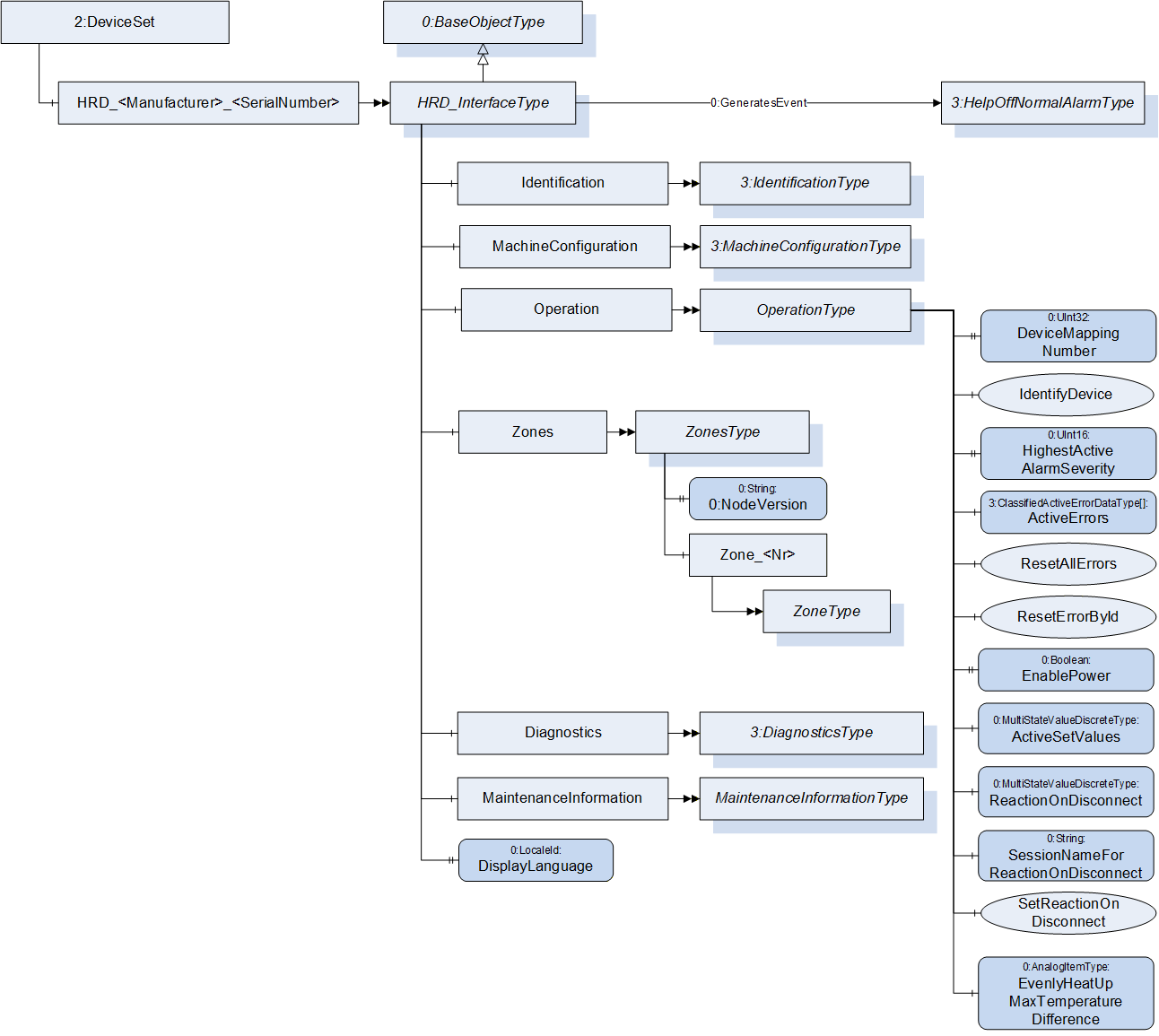
| Attribute | Value | ||||
| BrowseName | HRD_InterfaceType | ||||
| IsAbstract | False | ||||
| References | Node Class | BrowseName | DataType | TypeDefinition | Other |
|---|---|---|---|---|---|
| Subtype of 0:BaseObjectType defined in OPC UA Part 5 | |||||
| 0:HasComponent | Object | Identification | 3:IdentificationType | M | |
| 0:HasComponent | Object | MachineConfiguration | 3:MachineConfigurationType | M | |
| 0:HasComponent | Object | Operation | OperationType | M | |
| 0:HasComponent | Object | Zones | ZonesType | M | |
| 0:HasComponent | Object | Diagnostics | 3:DiagnosticsType | O | |
| 0:HasComponent | Object | MaintenanceInformation | MaintenanceInformationType | O | |
| 0:HasProperty | Variable | DisplayLanguage | 0:LocaleId | 0:PropertyType | O, RW |
| 0:GeneratesEvent | ObjectType | 3:HelpOffNormalAlarmType | Defined in OPC 40083 | ||
The BrowseName of the object instance shall be "HRD_<Manufacturer>_<SerialNumber>"
Example: "HRD_Gammaflux_0123456".
Examples:
| BrowseName | Namespace | Namespace index | Remarks |
| HRD_Inglass_0123456 | Local Server URI or vendor specific namespace | 1 or server specific | OPC 40082-2 only defines the HRD_InterfaceType. The instance is generated in the local server |
| Identification | http://opcfoundation.org/UA/PlasticsRubber/HotRunner/ | server specific | The object Identification is a child of HRD_InterfaceType which is defined in OPC 40082-2 |
| Manufacturer | http://opcfoundation.org/UA/DI/ | server specific | The variable Manufacturer is a child of IdentificationType which is defined in OPC 40083. However, it derives from the ComponentType defined in OPC 10000-100. The Variable Manufacturer is defined there. |
| BrowseName | Namespace | Namespace index | Remarks |
| HRD_Inglass_0123456 | Local Server URI or vendor specific namespace | 1 or server specific | OPC 40082-2 only defines the HRD_InterfaceType. The instance is generated in the local server |
| Zones | http://opcfoundation.org/UA/PlasticsRubber/HotRunner/ | server specific | The object Zones is a child of HRD_InterfaceType which is defined in OPC 40082-2 |
| Zone_1 | Local Server URI or vendor specific namespace | 1 or server specific | The objects for the zones are modelled as OptionalPlaceholder. The instances are server specific |
| Temperature | http://opcfoundation.org/UA/PlasticsRubber/HotRunner/ | server specific | The object Temperature is a child of ZoneType which is defined in OPC 40082-2 |
| ActualValue |
http://opcfoundation.org/UA/
PlasticsRubber/GeneralTypes/ | server specific | The variable ActualValue is a child of Temperature which has the HRDTemperatureType as type definition. This is derived from the ControlledParameterType which is defined in OPC 40083 |
| BrowseName | Namespace | Namespace index | Remarks |
| HRD_Inglass_0123456 | Local Server URI or vendor specific namespace | 1 or server specific | OPC 40082-2 only defines the HRD_InterfaceType. The instance is generated in the local server |
| Zones |
http://opcfoundation.org/UA/
PlasticsRubber/HotRunner/ | server specific | The object Zones is a child of HRD_InterfaceType which is defined in OPC 40082-2 |
| NodeVersion | http://opcfoundation.org/UA/ | 0 | The Property NodeVersion is defined in OPC UA |
6.2 DisplayLanguage
With the DisplayLanguage Property the client can set the desired language on the user interface at the HRD. If the peripheral device does not support the configured language, it can keep the previous setting or use English as the default.
7 Identification
The IdentificationType for the identification of the device is defined in OPC 40083. All mandatory nodes shall be filled with valid values from the server.
The DeviceClass Property in the Identification Object shall have the value "Hot Runner Device".
8 MachineConfiguration
The MachineConfiguration Object represents the current configuration of the hot runner device. The MachineConfigurationType is defined in OPC 40083.
9 OperationType
This ObjectType contains components which are necessary to operate the HRD. It is formally defined in Table 2.
| Attribute | Value | ||||
| BrowseName | OperationType | ||||
| IsAbstract | False | ||||
| References | Node Class | BrowseName | DataType | TypeDefinition | Other |
|---|---|---|---|---|---|
| Subtype of 0:BaseObjectType defined in OPC UA Part 5 | |||||
| 0:HasProperty | Variable | DeviceMappingNumber | 0:UInt32 | 0:PropertyType | M, RW |
| 0:HasComponent | Method | IdentifyDevice | O | ||
| 0:HasProperty | Variable | HighestActiveAlarmSeverity | 0:UInt16 | 0:PropertyType | M, RO |
| 0:HasComponent | Variable | ActiveErrors | 3:Classified ActiveError DataType[] | 0:BaseDataVariableType | M, RO |
| 0:HasComponent | Method | ResetAllErrors | O | ||
| 0:HasComponent | Method | ResetErrorById | O | ||
| 0:HasProperty | Variable | EnablePower | 0:Boolean | 0:PropertyType | M, RW |
| 0:HasComponent | Variable | ActiveSetValues | 0:UInt16 | 0:MultiStateValueDiscreteType | M, RW |
| 0:HasComponent | Variable | ReactionOnDisconnect | 0:UInt16 | 0:MultiStateValueDiscreteType | M, RO |
| 0:HasProperty | Variable | SessionNameFor ReactionOnDisconnect | 0:String | 0:PropertyType | M, RO |
| 0:HasComponent | Method | SetReactionOnDisconnect | M | ||
| 0:HasComponent | Variable | EvenHeatUpMax TemperatureDifference | 0:Double | 0:AnalogItemType | O, RW |
9.1 DeviceMappingNumber
| Description: | Unique identifier/address/number for devices of the same DeviceType within a local network. Several peripheral devices of the same DeviceType can be connected to an client (e.g. injection moulding machine). In most applications, the client must map the connected peripheral devices to internal logical devices and zones in a fixed configuration (e.g. hot runner systems according to the wiring or temperature control devices according to the tubing). The mapping shall be stable after reconnecting the devices and is therefore not possible via IP addresses, which can be assigned dynamically via DHCP. DeviceMappingNumber sets the mapping order of peripheral devices of the same type on the local network and is therefore of type UInt32. |
| Example: | 1 |
9.2 IdentifyDevice
| Description: | The peripheral device on which this method is called shows itself by e.g. activation of a LED. |
Signature:
IdentifyDevice ();The method has no Input- or OutputArguments.
| Attribute | Value | ||||
| BrowseName | IdentifyDevice | ||||
| References | Node Class | BrowseName | DataType | TypeDefinition | Modelling Rule |
|---|
9.3 HighestActiveAlarmSeverity
| Description: | Indication of the severity of the highest active alarm. It provides a minimal error handling for devices without alarm support. However, the variable shall be filled even if alarms are supported. The following levels are defined: |
| Range of Severity | Description |
| 0 | No active message |
| 1 - 333 | Messages of low urgency (Information) |
| 334 - 666 | Messages of medium urgency (Warning) |
| 667 - 1000 | Messages of high urgency (Error) |
| Example: | 400 |
9.4 ActiveErrors
| Description: | List of the active errors of the device. It provides a minimal error handling for devices without alarm support. However, the variable shall be filled even if alarms are supported. The ClassifiedActiveErrorDataType is defined in OPC 40083. If there is no active error, the array is empty. |
9.5 ResetAllErrors
| Description: | Method to reset all errors of the device. |
Signature:
ResetAllErrors();The method has no Input- or OutputArguments.
| Attribute | Value | ||||
| BrowseName | ResetAllErrors | ||||
| References | Node Class | BrowseName | DataType | TypeDefinition | Modelling Rule |
|---|
9.6 ResetErrorById
| Description: | Method to reset one error of the device. |
Signature:
	ResetErrorById(
[in] 0:String Id);| Argument | Description |
| Id | Id of the error, listed in ActiveErrors, that shall be reset. |
| Attribute | Value | ||||
| BrowseName | ResetErrorById | ||||
| References | Node Class | BrowseName | DataType | TypeDefinition | Modelling Rule |
|---|---|---|---|---|---|
| HasProperty | Variable | InputArguments | Argument[] | PropertyType | Mandatory |
9.7 EnablePower
| Description: | The optional property is a global power control switch for all zone controllers. |
EnablePower = false turns off the entire device.
EnablePower = true turns on the device according to the zone-specific settings.
9.8 ActiveSetValues
With the ActiveSetValues Variable the used set temperature for the temperature zones is selected (see 14 HRDTemperatureType).
The TypeDefinition for the Variable is MultiStateValueDiscreteType, so the Properties EnumValues and ValueAsText shall be filled with the supported values out of Table 8.
| EnumValue | ValueAsText | Description |
| 0 | First | Use of value stored as SetValue |
| 1 | Second | Use of value stored as SecondSetValue |
| 2 | Standby | Use of value stored as SetStandbyValue |
| 3 | Boost | Use of value stored as BoostSetValue |
The supported values are related on the provided set temperatures in the HRDTemperatureType. If e.g. value 3 "Boost" is available, all temperature zones shall provide the variable BoostSetValue. If only some zones have a boost, for the others, the value of BoostSetValue is the same as SetValue. A server can provide manufacturer specific values with EnumValues ≥ 100.
This is a central Variable for selection the active set value for all zones. The individual active status of each zone is given inside the ZoneType.Temperature.ActiveSetValue (see definition of HRDTemperatureType in clause 14).
If 3 "Boost" is selected all zones go to boost mode. When all zones have exceeded their BoostTime and changed their individual ActiveSetValue, this central Variable shall also be set back to the value which was active before by the device it-self.
9.9 ReactionOnDisconnect, SessionNameForReactionOnDisconnect, SetReactionOnDisconnect
ReactionOnDisconnect Variable indicated the used set temperature for the temperature zones in case of a disconnection from the OPC UA client specified by SessionNameForReactionOnDisconnect.
The TypeDefinition for the ReactionOnDisconnect is MultiStateValueDiscreteType, so the Properties EnumValues and ValueAsText shall be filled with the supported values out of Table 9.
| EnumValue | ValueAsText | Description |
| 0 | NoReaction | Continue use of value which was active before disconnection (default) |
| 1 | SwitchOff | Switch hot runner off when disconnected |
| 2 | FirstSetValue | Use of value stored as SetValue |
| 3 | SecondSetValue | Use of value stored as SecondSetValue |
| 4 | Standby | Use of value stored as SetStandbyValue |
The supported values are related on the provided set temperatures in the HRDTemperatureType. If e.g. value 2 "SecondSetValue" is available, all temperature zones shall provide the variable SecondSetValue. If only some zones have a boost, for the others, the value of SecondSetValue is the same as SetValue. A server can provide manufacturer specific values with EnumValues ≥ 100.
It is possible, that in addition to the processing machine other clients are connected to the server (e.g. MES/data logger). Their disconnection should not create any reaction. Thus, the Variable SessionNameForReactionOnDisconnect contains the sessionName defined in the CreateSession Service (see OPC 10000-4) of the connection with the relevant client.
The values of ReactionOnDisconnect and SessionNameForReactionOnDisconnect are set by calling the Method SetReactionOnDisconnect:
Signature:
	SetReactionOnDisconnect (
[in] 0:UInt16 ReactionOnDisconnect);| Argument | Description |
| ReactionOnDisconnect | EnumValue from Table 9. |
| Attribute | Value | ||||
| BrowseName | SetReactionOnDisconnect | ||||
| References | Node Class | BrowseName | DataType | TypeDefinition | Modelling Rule |
|---|---|---|---|---|---|
| HasProperty | Variable | InputArguments | Argument[] | PropertyType | Mandatory |
It is highly recommended that only one client calls the Method SetReactionOnDisconnect and that no other client overrides the setting.
The default value (no client has called method SetReactionOnDisconnect) for ReactionOnDisconnect is 0 "NoReaction" and an empty string for SessionNameForReactionOnDisconnect.
When the client identified by SessionNameForReactionOnDisconnect is disconnected, ReactionOnDisconnect and SessionNameForReactionOnDisconnect are set back to the default values. After re-connection, the client needs to call SetReactionOnDisconnect again to set the new session name.
9.10 EvenHeatUpMaxTemperatureDifference
Even heat-up is a process for uniform heating of a mould. Many manufacturers can do this in some form, the exact algorithms differ. "Fast" zones on hot runner nozzles, for example, are slowed down until slower zones follow. The aim is to keep the temperature differences in a mould low in order to protect the material from thermal damage and the mould from damage due to stress. With the Variable EvenHeatUpMaxTemperatureDifference the maximum temperature difference of all zones during heat-up is defined.
Unit: °C or F
The even heat-up process is enabled for the separate zones by the Variable EvenHeatUpEnabled in the HeatUpType (see 16.4).
10 Zones
Zones is a container for zones, in analogy with the container concept in OPC 40083.
The ObjectType is formally defined in Table 12.
| Attribute | Value | ||||
| BrowseName | ZonesType | ||||
| IsAbstract | False | ||||
| References | Node Class | BrowseName | DataType | TypeDefinition | Other |
|---|---|---|---|---|---|
| Subtype of 0:BaseObjectType defined in OPC UA Part 5 | |||||
| 0:HasProperty | Variable | 0:NodeVersion | 0:String | 0:PropertyType | M, RO |
| 0:HasComponent | Object | Zone_<Nr> | ZoneType | MP | |
| 0:GeneratesEvent | ObjectType | 0:GeneralModelChangeEventType | |||
When instances for device zones are created, the BrowseNames shall be "Zone_<Nr>" (starting with 1). Examples: "Zone_1", "Zone_11"
11 Diagnostics
Diagnostics is an optional component.
Some manufacturers offer diagnosis functions to check, for example, the wiring to the heating system or the sensor and heater allocation. Furthermore, it can be checked whether the cartridge heaters are working correctly. DiagnosticsType is defined in OPC 40083.
For zone-related results published by instances of DiagnosisStepEndEventType, InputNode shall contain the NodeId of the corresponding zone instance.
12 MaintenanceInformation
MaintenanceInformation is an optional component that provides information about the maintenance status of various parts of a hot runner device.
| Attribute | Value | ||||
| BrowseName | MaintenanceInformationType | ||||
| IsAbstract | False | ||||
| References | Node Class | BrowseName | DataType | TypeDefinition | Other |
|---|---|---|---|---|---|
| Subtype of 0:BaseObjectType defined in OPC UA Part 5 | |||||
| 0:HasComponent | Object | Heating | 3:MaintenanceType | O | |
| 0:HasComponent | Object | SafetyTest | 3:MaintenanceType | O | |
| 0:HasComponent | Object | CoolingFan | 3:MaintenanceType | O | |
The MaintenanceType is defined in OPC 40083.
13 ZoneType
ZoneType represents all functionalities of a heating zone, such as temperature monitoring, control, heatup and is formally defined in Table 14.
| Attribute | Value | ||||
| BrowseName | ZoneType | ||||
| IsAbstract | False | ||||
| References | Node Class | BrowseName | DataType | TypeDefinition | Other |
|---|---|---|---|---|---|
| Subtype of 0:BaseObjectType defined in OPC UA Part 5 | |||||
| 0:HasProperty | Variable | Name | 0:String | 0:PropertyType | O, RW |
| 0:HasProperty | Variable | HighestActiveAlarmSeverity | 0:UInt16 | 0:PropertyType | M, RO |
| 0: HasComponent | Variable | ThermocoupleType | 0:UInt16 | 0:MultiStateValueDiscreteType | O, RW |
| 0:HasComponent | Variable | CommunicationProtocolType | 0:UInt16 | 0:MultiStateValueDiscreteType | O, RW |
| 0:HasComponent | Object | Temperature | HRDTemperatureType | M | |
| 0:HasComponent | Object | Controller | ControllerType | M | |
| 0:HasComponent | Object | HeatUp | HeatUpType | O | |
| 0:HasComponent | Object | TemperatureRiseMonitoring | TemperatureRiseMonitoringType | O | |
13.1 Name
A user given name of the zone.
13.2 HighestActiveAlarmSeverity
While the HighestActiveAlarmSeverity in the OperationType (see 9.3) indicates the severity of the highest active alarm of the complete HRD, here the Variable indicates the severity of the highest active alarm related to the current zone. Details of the error are listed in ActiveErrors (see 9.4) or via ZoneAlarmType (see 18.2).
13.3 ThermocoupleType and CommunicationProtocolType
This two Variables are used to specify the type of connected external temperature sensor and the used communication protocol between the sensor and the control system of the HRD.
The TypeDefinition for both Variables is MultiStateValueDiscreteType, so the Properties EnumValues and ValueAsText shall be filled with the supported values out of Table 15 and
Table 16.
| EnumValue | ValueAsText | Description |
| 0 | OTHER | Other sensor type |
| 1 | E | Type E sensor: NiCr-CuNi |
| 2 | J | Type J sensor: Fe-CuNi |
| 3 | K | Type K sensor: NiCr-Ni |
| 4 | N | Type N sensor: NiCrSi-NiSi |
| 5 | T | Type T sensor: Cu-CuNi |
| 6 | PT100 | Pt 100-Sensor |
| 7 | L | Type L sensor: Fe-CuNi |
| EnumValue | ValueAsText | Description |
| 0 | OTHER | Other connection type |
| 1 | LOCAL | Communication integrated in the local control system (local input) |
| 2 | PROFIBUS | Values via Profibus |
| 3 | OPC_UA | Values via OPC UA |
| 4 | I2C | Values via I2C |
| 5 | CAN | Values via CAN |
Which sensor types and protocols and combinations are supported is device dependent. Especially when the CommunicationProtocolType has the value 1 (LOCAL), the ThermocoupleType could be set to a fixed value by the HRD. A server can provide manufacturer specific values with EnumValues ≥ 100.
13.4 Temperature
Setting and monitoring of the temperature. The HRDTemperatureType is defined in clause 14.
Unit: °C or F
13.5 Controller
Setting and monitoring of the controller (see 15 ControllerType).
13.6 HeatUp
Setting for heat up procedure. HeatUp is an alternative to the SetRamp functionality of MonitoredParameterType (see 16 HeatUpType).
13.7 TemperatureRiseMonitoring
TemperatureRiseMonitoring is an additional monitoring for the process temperature (see 17 TemperatureRiseMonitoringType).
14 HRDTemperatureType
The ControlledParameterType as defined in OPC 40083 is used for process parameters that are controlled by the client by writing a set value and optional ramps and parameters for closed loop control. For HRD the HRDTemperatureType is derived from the ControlledParameterType.The Variables SecondSetValue, BoostSetValue, BoostTime, StandbySetValue, ActiveSetValue and TimeMethodPIDParameters are added.
The SecondSetValue can be used for various applications (e.g. variotherm process, etc.) in conjunction with Varan or "OPC-UA PubSub" in order to achieve fast switch-over With the StandbySetValue and BoostSetValue additional values for setting the hot runner to standby or boost mode can be provided. BoostTime defines the duration of the boost mode after which the set value which was active before boost is becoming active again. The time is applies each time, the boost mode is activated. If BoostTime = 0, there is no time control and boost time stays active until the Variable ActiveSetValues given in the OperationType is changed.
The provided set temperatures are related on the supported values in ActiveSetValues Variable in the OperationType (see 9.8).
In the OperationType (see 9), ActiveSetValues is writeable to switch des active set value for all zones centrally. The Variable ActiveSetValues in the HRDTemperatureType indicates the current status of the individual zone. This can be differ from the central value, escpacially when boost mode is selected and the zones have different BoostTimes.
| Attribute | Value | ||||
| BrowseName | HRDTemperatureType | ||||
| IsAbstract | False | ||||
| References | Node Class | BrowseName | DataType | TypeDefinition | Other |
|---|---|---|---|---|---|
| Subtype of 3:ControlledParameterType (defined in OPC 40083) | |||||
| 0:HasComponent | Variable | SecondSetValue | 0:Double | 0:AnalogItemType | O, RW |
| 0:HasComponent | Variable | BoostSetValue | 0:Double | 0:AnalogItemType | O, RW |
| 0:HasProperty | Variable | BoostTime | 0:Duration | 0:PropertyType | O, RW |
| 0:HasComponent | Variable | StandbySetValue | 0:Double | 0:AnalogItemType | O, RW |
| 0:HasComponent | Variable | ActiveSetValue | 0:UInt16 | 0:MultiStateValue DiscreteType | M, RO |
| 0:HasProperty | Variable | TimeMethodPIDParameters | TimeMethodPIDParametersDataType[] | 0:PropertyType | O, RW |
In ClosedLoopControlType inside the ControlledParameterType includes the possibilities to set parameters of the PID controller. There, only the method with using the constants for the proportional, integral and derivative term is used (KP, KI, KD). Hot runners often use the method with setting the parameters proportional band, reset time, derivative time are used (Xp, Tn, Tv). For this, also the sample time is needed.
Table 16 - TimeMethodPIDParametersDataType
| Name | Type | Description |
| TimeMethodPIDParametersDataType | structure | Subtype of 0:Structure as defined in OPC UA 10000-3 |
Xp | 0:Double | proportional band |
Tn | 0:Double | reset time |
Tv | 0:Double | derivative time |
Ts | 0:Double | sample time |
15 ControllerType
Configuration and operation of the zone controller.
| Attribute | Value | ||||
| BrowseName | ControllerType | ||||
| IsAbstract | False | ||||
| References | Node Class | BrowseName | DataType | TypeDefinition | Other |
|---|---|---|---|---|---|
| Subtype of 0:BaseObjectType defined in OPC UA Part 5 | |||||
| 0:HasProperty | Variable | SetValueActive | 0:Boolean | 0:PropertyType | M, RW |
| 0:HasProperty | Variable | ActualValueActive | 0:Boolean | 0:PropertyType | M, RO |
| 0:HasComponent | Variable | SetValueType | 0:UInt16 | 0:MultiStateValueDiscrete Type | M, RW |
| 0:HasProperty | Variable | ActualType | ControllerTypeEnumeration | 0:PropertyType | M, RO |
| 0:HasComponent | Variable | UpperOutput | 0:Double | 0:AnalogItemType | O, RW |
| 0:HasComponent | Variable | LowerOutput | 0:Double | 0:AnalogItemType | O, RW |
| 0:HasProperty | Variable | OutputTime | 0:Duration | 0:PropertyType | O, RW |
| 0:HasProperty | Variable | ReferenceZone | 0:UInt32 | 0:PropertyType | O, RW |
| 0:HasProperty | Variable | AutomaticReferenceZoneSelection | 0:Boolean | 0:PropertyType | O, RW |
| 0:HasComponent | Variable | SetValueManualOutput | 0:Double | 0:AnalogItemType | O, RW |
| 0:HasComponent | Variable | ActualOutput | 0:Double | 0:AnalogItemType | O, RO |
| 0:HasComponent | Variable | AverageControllerOutput | 0:Double | 0:AnalogItemType | O, RO |
| 0:HasComponent | Object | LoadCurrent | 0:Double | 3:MonitoredParameterType | O |
| 0:HasComponent | Object | LoadPower | 0:Double | 3:MonitoredParameterType | O |
| 0:HasComponent | Variable | UpperSetValueCascade | 0:Double | 0:AnalogItemType | O, RW |
15.1 SetValueActive
A control zone is switched on and off with this parameter. ActualValueActive shows the current status of the controller. When it is switched on, the power control is realised with the predefined ControlType. When it is switched off, there is no power control and no alarms are generated for this zone. Only the actual temperature value is measured cyclically.
Usually there are various controller types available.
Examle: SetValueActive=false means for a zone with SetValueType=0 that the zone is used as a controlled zone but is currently switched off. It does not mean that the zone is not used and can be hidden in the HMI of the HRD or stop measuring the actual values.
15.2 ActualValueActive
Indicates the current status of the controller. ActualValueActive is true, if the controller is switched on via SetValueActive and EnablePower (see 9.7) is true.
15.3 SetValueType / ActualType
Set value and actual value for the controller type used by the zone.
The Enumeration for the possible Types is defined in Table 19.
| Name | Value | Description |
| CLOSED_LOOP_CONTROL | 0 | Closed loop control is active for the Temperature object of the zone. This is the default control behaviour in which the hot runner system is usually operated. |
| MANUAL | 1 | Open loop control is active. SetValueManualOutput defines the constant required output. The zone is not controlled to the actual temperature value. |
| SYNCHRONOUS_ZONE | 2 | Additional zones can be added to the standard type. This way, various heating elements can be operated with one sensor. The required parameter ReferenceZone (zone of the standard type) can be assigned multiple times. |
| CASCADE | 3 | Two control circuits (zones) are interlinked. There is one nominal temperature, two actual temperature values and one actuator. The first control circuit is the cascade type and the second a standard type. The cascade type has no actuator. The cascade type requires a ReferenceZone with SetValueType=Standard to transfer its controller output internally to the second zone. The standard type uses the parameter UpperSetValueCascadeControllerSlave as the upper limit to prevent overheating. |
| COOL_ZONE | 4 | This zone is assigned to a standard type. The two zones control to the same nominal and actual temperature, but have two separate outputs. The standard type operates the heating circuit and the cool zone the cooling circuit. The cool zone and the standard type are linked via the ReferenceZone parameter. This regulator is specially designed for cooling performance and has the respective control parameters (PiD: Xpk, Tn,Tv). Required parameters: ReferenceZone of the standard type and ControllerOutputTime if required to adapt the actuation cycle to the respective actuator. |
| MEASURING_ZONE | 5 | The zone is only used for monitoring of MonitoredParamters. If SetValueActive is true the monitoring is active and can generate alarms. If SetValueActive=false the monitoring is inactive but the actual values are still measured and displayed. SetValueActive has no effect to the power control of the zone. |
| NOT_USED | 6 | The zone is not used. SetValueActive has no effect on this zone. The behaviour is the same as for any other zone with SetValueActive=false with the only difference that the zone can be hidden in the HMI of the HRD. This setting can be used, for example, if no sensor is connected and the actual values of the zone should therefore not be visible. |
For SetValueType the TypeDefinition is MultiStateValueDiscreteType, so the Properties EnumValues and ValueAsText shall be filled with the supported values. A server can provide manufacturer specific values with EnumValues ≥ 100.
15.4 UpperOutput
Limitation of the maximum output in closed-loop control in %.
15.5 LowerOutput
Limitation of the minimum output in closed-loop control in %.
15.6 OutputTime
Time basis for operating the actuator. The basic cycle of the actuator. It can also be called actuation cycle time and it is used with contactor-controlled power units in order to reduce the switching rate.
15.7 ReferenceZone
If zones are to operate parallel to a control zone, the reference relation can be realised with this parameter. The same applies to the cooling channel and cascade controller.
| Valid range: | 1 - "number of zones" |
| Not used: | 0 |
15.8 AutomaticReferenceZoneSelection
If true, the HRD selects automatically the reference zone. The selected zone is then written into the Variable ReferenceZone by the HRD.
15.9 SetValueManualOutput
Manually given output in percent if SetValueType = MANUAL is selected.
15.10 ActualOutput
Indicates the currently active output in percent.
15.11 AverageControllerOutput
Indicates the average output which can be used when a sensor is broken. The determination is active when the control circuit has reached the nominal value.
15.12 LoadCurrent
Information about the load current in Ampere. The MonitoredParameterType is defined in OPC 40083.
15.13 LoadPower
Information about the load power in Watt. The MonitoredParameterType is defined in OPC 40083.
15.14 UpperSetValueCascade
If the two controllers are cascaded, the master defines to which nominal temperature value the slave is to control to. With this parameter, the upper limit for the slave is defined.
16 HeatUpType
HeatUpType is optional and an alternative to the SetRamp functionality of MonitoredParameterType defined in OPC 40083. With HeatUpType, it can be pre-defined how the control circuit is to be operated when it is switched on for the next time; with or without heat-up process.
There are various terms for heat-up, amongst others softstart. The target is to limit the controller output in order to heat up the heating element slowly, so that the moisture can evaporate without causing damage to the heating element.
| Attribute | Value | ||||
| BrowseName | HeatUpType | ||||
| IsAbstract | False | ||||
| References | Node Class | BrowseName | DataType | TypeDefinition | Other |
|---|---|---|---|---|---|
| Subtype of 0:BaseObjectType defined in OPC UA Part 5 | |||||
| 0:HasProperty | Variable | ManualOutputLimitActive | 0:Boolean | 0:PropertyType | O, RW |
| 0: HasComponent | Variable | SetValueManualOutputLimit | 0:Double | 0:AnalogItemType | O, RW |
| 0: HasComponent | Variable | SetValueTemperature | 0:Double | 0:AnalogItemType | O, RW |
| 0:HasProperty | Variable | EvenHeatUpEnabled | 0:Boolean | 0:PropertyType | O, RW |
| 0:HasProperty | Variable | RelayHeatingGroup | 0:Byte | 0:PropertyType | O, RW |
| 0:HasProperty | Variable | RelayHeatingTime | 0:Duration | 0:PropertyType | O, RW |
16.1 ManualOutputLimitActive
Activates heat-up process with pre-defined SetValueManualOutputLimit until SetValueTemperature is reached.
16.2 SetValueManualOutputLimit
This pre-defined maximum output (in percent) is valid until the SetValueTemperature is reached.
16.3 SetValueTemperature
If ManualOutputLimitActive is set, SetValueManualOutputLimit is active until this nominal temperature value is reached.
Unit: °C or F
16.4 EvenHeatUpEnabled
Enables even heat-up process until nominal SetValue of Temperature of ZoneType is reached. This stands for a process for uniform heating of a mould. Many manufacturers can do this in some form, the exact algorithms differ.
"Fast" zones on hot runner nozzles, for example, are slowed down until slower zones follow.
The aim is to keep the temperature differences in a mould low in order to protect the material from thermal damage and the mould from damage due to stress.
The maximum temperature difference during heat-up of all zones is defined in the OperationType with the Variable EvenHeatUpMaxTemperatureDifference (see 9.10).
16.5 RelayHeatingGroup
In the hot runner controller, a series-connected heating of zones grouped together in so-called relay groups is possible. The number of the group is stored in the Variable RelayHeatingGroup. The follow-up group is enabled when the SetValueTemperature of all zones of a predecessor group is reached or RelayHeatingTime has expired. This allows a gentle heating-up for the plastic located in the hot runner.If the value of the Variable is 0 (or the optional Variable is not used), no heating group is selected.
16.6 RelayHeatingTime
Time for relay heating of the zone. When RelayHeatingTime of all zones of a heating group have expired, the next group starts heating.
17 TemperatureRiseMonitoringType
At maximum controller output, the temperature value must change in a given time by a specified value, otherwise there is an error in the measuring circuit.
| Attribute | Value | |||||
| BrowseName | TemperatureRiseMonitoringType | |||||
| IsAbstract | False | |||||
| References | Node Class | BrowseName | DataType | TypeDefinition | Other | |
|---|---|---|---|---|---|---|
| Subtype of 0:BaseObjectType defined in OPC UA Part 5 | ||||||
| 0:HasProperty | Variable | SetValueActive | 0:Boolean | 0:PropertyType | M, RW | |
| 0:HasProperty | Variable | ErrorDetected | 0:Boolean | 0:PropertyType | M, RO | |
| 0:HasProperty | Variable | SupervisionTime | 0:Duration | 0:PropertyType | O, RW | |
| 0:HasComponent | Variable | SetValueTemperatureChange | 0:Double | 0:AnalogItemType | O, RW | |
17.1 SetValueActive
On / Off for the TemperatureRiseMonitoring.
17.2 ErrorDetected
Result of the TemperatureRiseMonitoring.
17.3 SupervisionTime
Specification of the time within the temperature must have changed.
17.4 SetValueTemperatureChange
Specification of the set value change
Unit: °C or F
18 Alarm management
18.1 General
As defined in OPC 40083, the root node of the specific interface, e.g. an instance of HRD_InterfaceType, set the SubscribeToEvents flag in the EventNotifier attribute.
The client subscribes to events at this root node and receives the events already defined in this specification, such as temperature limit alarms or diagnostic events.
A hot runner may optionally generate additional manufacturer-specific alarms, warnings or information displayed on the user interface of the device and can publish these events via two special AlarmTypes.
Zone-related messages should be represented by instances of ZoneAlarmType, other device information is of type HelpOffNormalAlarmType.
Both are subtypes of OffNormalAlarmType, can be synchronized via ConditionRefresh and contain a Severity for error handling according to OPC 40083.
Messages related to process parameters shall be represented by instances of MonitoredParameterAlarmType (defined in OPC 40083).
18.2 ZoneAlarmType
The ZoneAlarmType represent zone-related text messages (alarms, error messages, warnings, information) of the peripheral device and is a subtype of HelpOffNormalAlarmType as defined in OPC 40083.
| Attribute | Value | ||||
| BrowseName | ZoneAlarmType | ||||
| IsAbstract | False | ||||
| References | Node Class | BrowseName | DataType | TypeDefinition | Other |
|---|---|---|---|---|---|
| Subtype of 3:HelpOffNormalAlarmType defined in OPC 40083 | |||||
The SourceNode (included in BaseEventType) shall contain the NodeId of the related zone. In case of medium or high severity, the client can prevent the use of this zone.
19 Profiles and Conformance Units
This chapter defines the corresponding profiles and conformance units for the OPC UA Information Model for OPC 40082-2. Profiles are named groupings of conformance units. Facets are profiles that will be combined with other Profiles to define the complete functionality of an OPC UA Server or Client. The following tables specify the facets available for Servers that implement the OPC 40082-2 Information Model companion specification.
Table 23 lists all Profiles defined in this document and defines their URIs.
| Profile | URI |
| OPC 40082-2 Basic Server Profile | http://opcfoundation.org/UA-Profile/PlasticsRubber/HotRunner/Server/Basic |
| OPC 40082-2 Alarms Server Facet | http://opcfoundation.org/UA-Profile/PlasticsRubber/HotRunner/Server/Alarms |
| OPC 40082-2 Diagnostics Server Facet | http://opcfoundation.org/UA-Profile/PlasticsRubber/HotRunner/Server/Diagnostics |
| OPC 40082-2 Maintenance Server Facet | http://opcfoundation.org/UA-Profile/PlasticsRubber/HotRunner/Server/Maintenance |
| Conformance Unit | Description | Optional/ Mandatory |
| OPC 40082-2 Basic Server Profile | Support of HRD_lnterfaceType and all mandatory child elements giving information on the hot runner device itself, the current configuration and status. | M |
| Profile | ||
| ComplexType Server Facet (defined in OPC UA Part 7) | M | |
| Method Server Facet (defined in OPC UA Part 7) | M | |
| BaseDevice_Server_Facet (defined in OPC UA Part 100) | M | |
The OPC 40082-2 Basic Server Profile is mandatory for all HRD compliant with this specification. The following Facets are optional.
| Conformance Unit | Description | Optional/ Mandatory |
| OPC 40082-2 Alarms Server Facet | Support of HelpOffNormalAlarmType and ZoneAlarmType providing error information. If this facet is supported and a client subscribes to the events, the server shall provide all errors via alarms in addition to the error variables included in the OperationType | M |
| A & C Alarm Server Facet (defined in OPC UA Part 7) | M | |
| Conformance Unit | Description | Optional/ Mandatory |
| OPC 40082-2 Diagnostics Server Facet | Support of OPC 40082-2 diagnosis functions. Therefore, the component Diagnostics of HRD_InterfaceType is mandatory. | M |
| Conformance Unit | Description | Optional/ Mandatory |
| OPC 40082-2 Maintenance Server Facet | Support of OPC 40082-2 maintance information. Therefore, the component MaintenanceInformation of HRD_InterfaceType is mandatory. | M |
20 Namespaces
20.1 Namespace Metadata
Table 28 defines the namespace metadata for this specification. The Object is used to provide version for the namespace and an indication about static Nodes. Static Nodes are identical for all Attributes in all Servers, including the Value Attribute. See OPC 10000-5 for more details.
The information is provided as Object of type NamespaceMetadataType. This Object is a component of the Namespaces Object that is part of the Server Object. The NamespaceMetadataType ObjectType and its Properties are defined in OPC 10000-5.
The version information is also provided as part of the ModelTableEntry in the UANodeSet XML file. The UANodeSet XML schema is defined in OPC 10000-6.
| Attribute | Value | |||
| BrowseName | http://opcfoundation.org/UA/PlasticsRubber/HotRunner/ | |||
| Property | DataType | Value | ||
| NamespaceUri | String | http://opcfoundation.org/UA/PlasticsRubber/HotRunner/ | ||
| NamespaceVersion | String | 1.00 | ||
| NamespacePublicationDate | DateTime | 2021-05-10 12:00:00 | ||
| IsNamespaceSubset | Boolean | False | ||
| StaticNodeIdTypes | IdType [] | {Numeric} | ||
| StaticNumericNodeIdRange | NumericRange [] | Null | ||
| StaticStringNodeIdPattern | String | Null | ||
20.2 Handling of OPC UA Namespaces
Namespaces are used by OPC UA to create unique identifiers across different naming authorities. The Attributes NodeId and BrowseName are identifiers. A Node in the UA AddressSpace is unambiguously identified using a NodeId. Unlike NodeIds, the BrowseName cannot be used to unambiguously identify a Node. Different Nodes may have the same BrowseName. They are used to build a browse path between two Nodes or to define a standard Property.
Servers may often choose to use the same namespace for the NodeId and the BrowseName. However, if they want to provide a standard Property, its BrowseName shall have the namespace of the standards body although the namespace of the NodeId reflects something else, for example the EngineeringUnits Property. All NodeIds of Nodes not defined in this document shall not use the standard namespaces.
Table 29 provides a list of mandatory and optional namespaces used in an OPC 40082-2 OPC UA Server.
| NamespaceURI | Description | Use |
| http://opcfoundation.org/UA/ | Namespace for NodeIds and BrowseNames defined in the OPC UA specification. This namespace shall have namespace index 0. | Mandatory |
| Local Server URI | Namespace for nodes defined in the local server. This may include types and instances used in a device represented by the server. This namespace shall have namespace index 1. | Mandatory |
| http://opcfoundation.org/UA/DI/ | Namespace for NodeIds and BrowseNames defined in OPC UA Part 100. The namespace index is server specific. | Mandatory |
http://opcfoundation.org/UA/PlasticsRubber/ GeneralTypes/ | Namespace for NodeIds and BrowseNames defined in OPC 40083. The namespace index is server specific. | Mandatory |
http://opcfoundation.org/UA/PlasticsRubber/ HotRunner/ | Namespace for NodeIds and BrowseNames defined in this specification. The namespace index is server specific. | Mandatory |
| Vendor specific types and instances | A server may provide vendor specific types like types derived from MachineType or MachineStatusType or vendor specific instances of devices in a vendor specific namespace. | Optional |
Table 30 provides a list of namespaces and their index used for BrowseNames in this specification. The default namespace of this specification is not listed since all BrowseNames without prefix use this default namespace.
| NamespaceURI | Namespace Index | Example |
| http://opcfoundation.org/UA/ | 0 | 0:NodeVersion |
| http://opcfoundation.org/UA/DI/ | 2 | 2:DeviceClass |
| http://opcfoundation.org/UA/PlasticsRubber/GeneralTypes/ | 3 | 3:MachineInformationType |
Annex A OPC 40082-2 Namespace and mappings (Normative)
A.1 Namespace and identifiers for OPC 40082-2 Information Model
This appendix defines the numeric identifiers for all of the numeric NodeIds defined in this specification. The identifiers are specified in a CSV file with the following syntax:
<SymbolName>, <Identifier>, <NodeClass>Where the SymbolName is either the BrowseName of a Type Node or the BrowsePath for an Instance Node that appears in the specification and the Identifier is the numeric value for the NodeId.
The BrowsePath for an Instance Node is constructed by appending the BrowseName of the instance Node to the BrowseName for the containing instance or type. An underscore character is used to separate each BrowseName in the path. Let's take for example, the MachineInformationType ObjectType Node which has the ControllerName Property. The Name for the ControllerName InstanceDeclaration within the MachineInformationType declaration is: MachineInformationType_ControllerName.
The NamespaceUri for all NodeIds defined here is http://opcfoundation.org/UA/PlasticsRubber/HotRunner/
The CSV released with this version of the specification can be found here:
http://www.opcfoundation.org/UA/schemas/PlasticsRubber/HotRunner/1.00/NodeIds.csv
http://www.opcfoundation.org/UA/schemas/PlasticsRubber/HotRunner/NodeIds.csv
A computer processible version of the complete Information Model defined in this specification is also provided. It follows the XML Information Model schema syntax defined in OPC 10000-6.
The Information Model Schema released with this version of the specification can be found here:
___________
Agreement of Use
COPYRIGHT RESTRICTIONS
This document is provided "as is" by the OPC Foundation and EUROMAP.
Right of use for this specification is restricted to this specification and does not grant rights of use for referred documents.
Right of use for this specification will be granted without cost.
This document may be distributed through computer systems, printed or copied as long as the content remains unchanged and the document is not modified.
OPC Foundation and EUROMAP do not guarantee usability for any purpose and shall not be made liable for any case using the content of this document.
The user of the document agrees to indemnify OPC Foundation and EUROMAP and their officers, directors and agents harmless from all demands, claims, actions, losses, damages (including damages from personal injuries), costs and expenses (including attorneys' fees) which are in any way related to activities associated with its use of content from this specification.
The document shall not be used in conjunction with company advertising, shall not be sold or licensed to any party.
The intellectual property and copyright is solely owned by the OPC Foundation and EUROMAP.
PATENTS
The attention of adopters is directed to the possibility that compliance with or adoption of OPC or EUROMAP specifications may require use of an invention covered by patent rights. OPC Foundation or EUROMAP shall not be responsible for identifying patents for which a license may be required by any OPC or EUROMAP specification, or for conducting legal inquiries into the legal validity or scope of those patents that are brought to its attention. OPC or EUROMAP specifications are prospective and advisory only. Prospective users are responsible for protecting themselves against liability for infringement of patents.
WARRANTY AND LIABILITY DISCLAIMERS
WHILE THIS PUBLICATION IS BELIEVED TO BE ACCURATE, IT IS PROVIDED "AS IS" AND MAY CONTAIN ERRORS OR MISPRINTS. THE OPC FOUDATION NOR EUROMAP MAKES NO WARRANTY OF ANY KIND, EXPRESSED OR IMPLIED, WITH REGARD TO THIS PUBLICATION, INCLUDING BUT NOT LIMITED TO ANY WARRANTY OF TITLE OR OWNERSHIP, IMPLIED WARRANTY OF MERCHANTABILITY OR WARRANTY OF FITNESS FOR A PARTICULAR PURPOSE OR USE. IN NO EVENT SHALL THE OPC FOUNDATION NOR EUROMAP BE LIABLE FOR ERRORS CONTAINED HEREIN OR FOR DIRECT, INDIRECT, INCIDENTAL, SPECIAL, CONSEQUENTIAL, RELIANCE OR COVER DAMAGES, INCLUDING LOSS OF PROFITS, REVENUE, DATA OR USE, INCURRED BY ANY USER OR ANY THIRD PARTY IN CONNECTION WITH THE FURNISHING, PERFORMANCE, OR USE OF THIS MATERIAL, EVEN IF ADVISED OF THE POSSIBILITY OF SUCH DAMAGES.
The entire risk as to the quality and performance of software developed using this specification is borne by you.
RESTRICTED RIGHTS LEGEND
This Specification is provided with Restricted Rights. Use, duplication or disclosure by the U.S. government is subject to restrictions as set forth in (a) this Agreement pursuant to DFARs 227.7202-3(a); (b) subparagraph (c)(1)(i) of the Rights in Technical Data and Computer Software clause at DFARs 252.227-7013; or (c) the Commercial Computer Software Restricted Rights clause at FAR 52.227-19 subdivision (c)(1) and (2), as applicable. Contractor / manufacturer are the OPC Foundation, 16101 N. 82nd Street, Suite 3B, Scottsdale, AZ, 85260-1830
COMPLIANCE
The combination of EUROMAP and OPC Foundation shall at all times be the sole entities that may authorize developers, suppliers and sellers of hardware and software to use certification marks, trademarks or other special designations to indicate compliance with these materials as specified within this document. Products developed using this specification may claim compliance or conformance with this specification if and only if the software satisfactorily meets the certification requirements set by EUROMAP or the OPC Foundation. Products that do not meet these requirements may claim only that the product was based on this specification and must not claim compliance or conformance with this specification.
TRADEMARKS
Most computer and software brand names have trademarks or registered trademarks. The individual trademarks have not been listed here.
GENERAL PROVISIONS
Should any provision of this Agreement be held to be void, invalid, unenforceable or illegal by a court, the validity and enforceability of the other provisions shall not be affected thereby.
This Agreement shall be governed by and construed under the laws of Germany.
This Agreement embodies the entire understanding between the parties with respect to, and supersedes any prior understanding or agreement (oral or written) relating to, this specification.