
6.1 SpatialObjectType ObjectType
6.1.1 Overview
The SpatialObjectType defines an AddIn which can be used to extend objects with a description for relative spatial location.
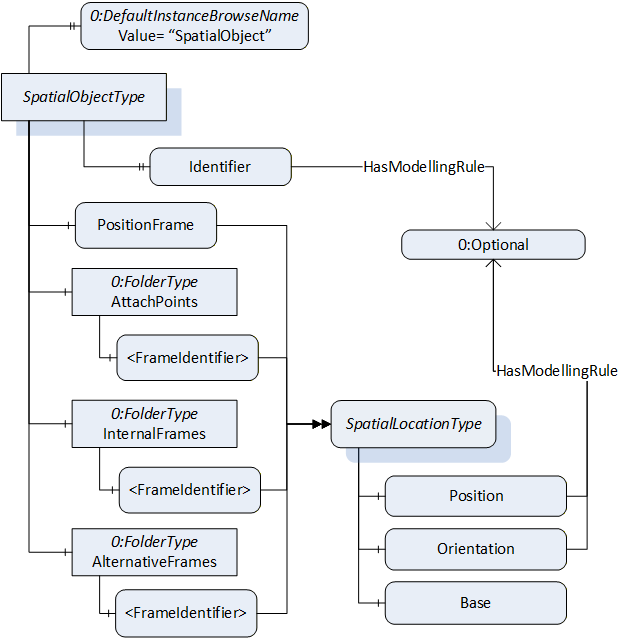
The SpatialObjectType is illustrated in Figure 4 and is formally defined in Table 12.
| Attribute | Value | ||||
| BrowseName | SpatialObjectType | ||||
| IsAbstract | False | ||||
| References | Node Class | BrowseName | DataType | TypeDefinition | Other |
|---|---|---|---|---|---|
| Subtype of the BaseObjectType defined in OPC 10000-5. | |||||
| 0:HasComponent | Variable | PositionFrame | SpatialLocationType | M | |
| 0:HasComponent | Object | AttachPoints | 0:FolderType | O | |
| 0:HasComponent | Object | InternalFrames | 0:FolderType | O | |
| 0:HasComponent | Object | AlternativeFrames | 0:FolderType | O | |
| 0:HasProperty | Variable | Identifier | 0:String | 0:PropertyType | O |
| 0:HasProperty | Variable | 0:DefaultInstanceBrowseName | 0:QualifiedName | 0:PropertyType | |
| ConformanceUnits | |||||
|---|---|---|---|---|---|
| RSL Base | |||||
| RSL SpatialObject Identifier | |||||
| RSL SpatialObject AttachPoints | |||||
| RSL SpatialObject InternalFrames | |||||
| RSL SpatialObject AlternativeFrames |
The Attribute DisplayName of the SpatialObjectType shall be used to add application specific identification.
The mandatory Variable PositionFrame, describes the local displacement of the object related to the location this displacement is based on. The Variable Base of the SpatialLocationType is used to point to the base location via 0:NodeId.
The optional folder AttachPoints is used to define positions on the object, where other objects can be attached.
The optional folder InternalFrames can be used to define positions or frames, which are of interest for the object, but may not be used as attach points. For example, an internal structure of an object can be described in this folder (see example in Annex C.2).
The optional folder AlternativeFrames can be used to provide additional location information with respect to other coordinate systems described within the same SpatialObjectsList. For example, to provide for an application, a location specific to a coordinate system defined by the application (see example Annex C.1.3).
The optional Property Identifier can be used to name the SpatialObject. For multi-server or aggregating scenarios, the Property Identifier is defined as mandatory by a Facet. (Annex C.3 and C.5 describe examples for the use in different scenarios).
The components of the SpatialObjectType have additional subcomponents which are defined in Table 13.
| BrowsePath | References | NodeClass | BrowseName | DataType | TypeDefinition | Others |
| AttachPoints | 0:HasComponent | Variable | <FrameIdentifier> | BaseDataType | SpatialLocationType | MP |
| InternalFrames | 0:HasComponent | Variable | <FrameIdentifier> | BaseDataType | SpatialLocationType | MP |
| AlternativeFrames | 0:HasComponent | Variable | <FrameIdentifier> | BaseDataType | SpatialLocationType | MP |
The component 0:DefaultInstanceBrowseName of the SpatialObjectType have additional Attributes defined in Table 14.
| BrowsePath | Value Attribute | Description Attribute |
| 0:DefaultInstanceBrowseName | SpatialObject | The default BrowseName for instances of the type. |