
1 Scope
This document defines OPC UA interfaces for components of Unattended Retail & Coffee Solutions. By using those standardized interfaces, vendors and system integrators can easily combine components from different suppliers to assemble their Unattended Retail & Coffee Solutions.
This specification is marketed under the name EVA SmartLink. The name has been deliberately chosen to reflect the core ambition of the initiative: to create a smart, secure and future-proof link between all components of Unattended Retail, Vending & Coffee Solutions. "Smart" refers to the intelligent, modular architecture enabled by OPC UA; "Link" highlights interoperability, openness and the seamless connection between machine engines, user interfaces, payment systems, pricing services and audit functionalities.
The EVA SmartLink branding provides the industry with a clear, recognisable identity for this open standard, facilitating communication, market adoption and implementation across Europe and beyond. While the technical foundation remains OPC UA, the name EVA SmartLink emphasises its specific application to the unattended retail and vending ecosystem and underlines its role as an industry-driven, vendor-neutral framework designed to foster innovation, flexibility and fair competition. The logo of EVA SmartLink is shown in Figure 1.

OPC Foundation
OPC is the interoperability standard for the secure and reliable exchange of data and information in the industrial automation space and in other industries. It is platform independent and ensures the seamless flow of information among devices from multiple vendors. The OPC Foundation is responsible for the development and maintenance of this standard.
OPC UA is a platform independent service-oriented architecture that integrates all the functionality of the individual OPC Classic specifications into one extensible framework. This multi-layered approach accomplishes the original design specification goals of:
Platform independence: from an embedded microcontroller to cloud-based infrastructure
Secure: encryption, authentication, authorisation, and auditing
Extensible: ability to add new features including transports without affecting existing applications
Comprehensive information modelling capabilities: for defining any model from simple to complex
EVA
The European Vending & Coffee Service Association (EVA) is a not-for-profit organisation established and situated in Brussels since 1994. It represents the interests of the European coffee service and vending industry vis-à-vis the European Institutions and other relevant authorities or bodies. Its membership is composed of national associations and individual companies across Europe. The EVA represents all segments of the coffee service, water dispenser and vending industry: machine and component manufacturers, suppliers of commodities (coffee, ingredients, snacks, cold drinks, cups etc.), and operators.
2 Normative references
The following referenced documents are indispensable for the application of this document. For dated references, only the edition cited applies. For undated references, the latest edition of the referenced document (including any amendments and errata) applies.
OPC 10000-1, OPC Unified Architecture - Part 1: Overview and Concepts
http://www.opcfoundation.org/documents/10000-1/
OPC 10000-2, OPC Unified Architecture - Part 2: Security Model
http://www.opcfoundation.org/documents/10000-2/
OPC 10000-3, OPC Unified Architecture - Part 3: Address Space Model
http://www.opcfoundation.org/documents/10000-3/
OPC 10000-4, OPC Unified Architecture - Part 4: Services
http://www.opcfoundation.org/documents/10000-4/
OPC 10000-5, OPC Unified Architecture - Part 5: Information Model
http://www.opcfoundation.org/documents/10000-5/
OPC 10000-6, OPC Unified Architecture - Part 6: Mappings
http://www.opcfoundation.org/documents/10000-6/
OPC 10000-7, OPC Unified Architecture - Part 7: Profiles
http://www.opcfoundation.org/documents/10000-7/
OPC 10000-12, OPC Unified Architecture - Part 12: Discovery and Global Services
http://www.opcfoundation.org/documents/10000-12/
OPC 10000-100, OPC Unified Architecture - Part 100: Devices
http://www.opcfoundation.org/documents/10000-100/
EVA DTS, Data Transfer Standard EVA DTS 6.2.2
MDB / ICP: Multi-Drop Bus / Internal Communication Protocol, Version 4.3
https://www.namanow.org/wp-content/uploads/Multi-Drop-Bus-and-Internal-Communication-Protocol.pdf
IEEE 802.3: IEEE Standard for Ethernet
https://standards.ieee.org/ieee/802.3/10422/
3 Terms, abbreviated terms and conventions
3.1 Overview
It is assumed that basic concepts of OPC UA information modelling and Unattended Retail & Coffee Solutions are understood in this document. This document will use these concepts to describe the Unattended Retail & Coffee Solutions Information Model. For the purposes of this document, the terms and definitions given in OPC 10000-1, OPC 10000-3, OPC 10000-4, OPC 10000-5, OPC 10000-7, OPC 10000-100 as well as the following apply.
Note that OPC UA terms and terms defined in this document are italicized in the document.
3.2 OPC UA for Unattended Retail & Coffee Solutions terms
3.2.1 Vending Machine
Unattended Retail & Coffee Solution
3.2.2 Option
any user-selectable parameter which can change product delivery
3.3 Abbreviated terms
| B&B | Bed and Breakfast |
| CRL | Certificate Revocation List |
| ERP | Enterprise Resource Planning |
| EVA | European Vending & Coffee Service Association |
| EVA DTS | EVA Data Transfer Standard |
| GDS | GlobalDiscoveryServer |
| HMI | Human Machine Interface |
| HTTP | Hypertext Transfer Protocol |
| IP | Internet Protocol |
| MDB | Multi-drop Bus |
| MES | Manufacturing Execution System |
| OCS | Office Coffee Service |
| PMS | Production Management System |
| TCP | Transmission Control Protocol |
| UI | User Interface |
| UML | Unified Modelling Language |
| URI | Uniform Resource Identifier |
| XML | Extensible Markup Language |
3.4 Conventions used in this document
3.4.1 Conventions for Node descriptions
3.4.1.1 Node definitions
Node definitions are specified using tables (see Table 2).
Attributes are defined by providing the Attribute name and a value, or a description of the value.
References are defined by providing the ReferenceType name, the BrowseName of the TargetNode and its NodeClass.
If the TargetNode is a component of the Node being defined in the table the Attributes of the composed Node are defined in the same row of the table.
The DataType is only specified for Variables; "[<number>]" indicates a single-dimensional array, for multi-dimensional arrays the expression is repeated for each dimension (e.g. [2][3] for a two-dimensional array). For all arrays the ArrayDimensions is set as identified by <number> values. If no <number> is set, the corresponding dimension is set to 0, indicating an unknown size. If no number is provided at all the ArrayDimensions can be omitted. If no brackets are provided, it identifies a scalar DataType and the ValueRank is set to the corresponding value (see OPC 10000-3). In addition, ArrayDimensions is set to null or is omitted. If it can be Any or ScalarOrOneDimension, the value is put into "{<value>}", so either "{Any}" or "{ScalarOrOneDimension}" and the ValueRank is set to the corresponding value (see OPC 10000-3) and the ArrayDimensions is set to null or is omitted. Examples are given in Table 1.
| Notation | DataType | ValueRank | ArrayDimensions | Description |
| 0:Int32 | 0:Int32 | -1 | omitted or null | A scalar Int32. |
| 0:Int32[] | 0:Int32 | 1 | omitted or {0} | Single-dimensional array of Int32 with an unknown size. |
| 0:Int32[][] | 0:Int32 | 2 | omitted or {0,0} | Two-dimensional array of Int32 with unknown sizes for both dimensions. |
| 0:Int32[3][] | 0:Int32 | 2 | {3,0} | Two-dimensional array of Int32 with a size of 3 for the first dimension and an unknown size for the second dimension. |
| 0:Int32[5][3] | 0:Int32 | 2 | {5,3} | Two-dimensional array of Int32 with a size of 5 for the first dimension and a size of 3 for the second dimension. |
| 0:Int32{Any} | 0:Int32 | -2 | omitted or null | An Int32 where it is unknown if it is scalar or array with any number of dimensions. |
| 0:Int32{ScalarOrOneDimension} | 0:Int32 | -3 | omitted or null | An Int32 where it is either a single-dimensional array or a scalar. |
The TypeDefinition is specified for Objects and Variables.
The TypeDefinition column specifies a symbolic name for a NodeId, i.e., the specified Node points with a HasTypeDefinition Reference to the corresponding Node.
The ModellingRule of the referenced component is provided by specifying the symbolic name of the rule in the ModellingRule column. In the AddressSpace, the Node shall use a HasModellingRule Reference to point to the corresponding ModellingRule Object.
If the NodeId of a DataType is provided, the symbolic name of the Node representing the DataType shall be used.
Note that if a symbolic name of a different namespace is used, it is prefixed by the NamespaceIndex (see 3.4.2.2).
Nodes of all other NodeClasses cannot be defined in the same table; therefore, only the used ReferenceType, their NodeClass and their BrowseName are specified. A reference to another part of this document points to their definition. Table 2 illustrates the table. If no components are provided, the DataType, TypeDefinition and Other columns may be omitted and only a Comment column is introduced to point to the Node definition.
Each Type Node or well-known Instance Node defined shall have one or more ConformanceUnits defined in 0 that require the Node to be in the AddressSpace.
The relations between Nodes and ConformanceUnits are defined at the end of the tables defining Nodes, one row per ConformanceUnit. The ConformanceUnits are reflected in the Category element for the Node definition in the UANodeSet (see OPC 10000-6).
The list of ConformanceUnits in the UANodeSet allows Servers to optimize resource consumption by using a list of supported ConformanceUnits to select a subset of the Nodes in an Information Model.
When a Node is selected in this way, all dependencies implied by the References are also selected.
Dependencies exist if the Node is the source of HasTypeDefinition, HasInterface, HasAddIn or any HierarchicalReference. Dependencies also exist if the Node is the target of a HasSubtype Reference. For Variables and VariableTypes, the value of the DataType Attribute is a dependency. For DataType Nodes, any DataTypes referenced in the DataTypeDefinition Attribute are also dependencies.
For additional details see OPC 10000-5.
| Attribute | Value | ||||
| Attribute name | Attribute value. If it is an optional Attribute that is not set "--" is used. | ||||
| References | NodeClass | BrowseName | DataType | TypeDefinition | Other |
|---|---|---|---|---|---|
| ReferenceType name | NodeClass of the target Node. | BrowseName of the target Node. | DataType of the referenced Node, only applicable for Variables. | TypeDefinition of the referenced Node, only applicable for Variables and Objects. | Additional characteristics of the TargetNode such as the ModellingRule or AccessLevel. |
| NOTE Notes referencing footnotes of the table content. | |||||
| Conformance Units | |||||
|---|---|---|---|---|---|
| Name of ConformanceUnit, one row per ConformanceUnit |
Components of Nodes can be complex that is containing components by themselves. The TypeDefinition, NodeClass and DataType can be derived from the type definitions, and the symbolic name can be created as defined in 3.4.3.1. Therefore, those containing components are not explicitly specified; they are implicitly specified by the type definitions.
The Other column defines additional characteristics of the Node. Examples of characteristics that can appear in this column are show in Table 3.
| Name | Short Name | Description |
| 0:Mandatory | M | The Node has the Mandatory ModellingRule. |
| 0:Optional | O | The Node has the Optional ModellingRule. |
| 0:MandatoryPlaceholder | MP | The Node has the MandatoryPlaceholder ModellingRule. |
| 0:OptionalPlaceholder | OP | The Node has the OptionalPlaceholder ModellingRule. |
| ReadOnly | RO | The Node AccessLevel has the CurrentRead bit set but not the CurrentWrite bit. |
| ReadWrite | RW | The Node AccessLevel has the CurrentRead and CurrentWrite bits set. |
| WriteOnly | WO | The Node AccessLevel has the CurrentWrite bit set but not the CurrentRead bit. |
If multiple characteristics are defined, they are separated by commas. The name or the short name may be used.
3.4.1.2 Additional References
To provide information about additional References, the format as shown in Table 4 is used.
| SourceBrowsePath | Reference Type | Is Forward | TargetBrowsePath |
| SourceBrowsePath is always relative to the TypeDefinition. Multiple elements are defined as separate rows of a nested table. | ReferenceType name | True = forward Reference. | TargetBrowsePath points to another Node, which can be a well-known instance or a TypeDefinition. You can use BrowsePaths here as well, which is either relative to the TypeDefinition or absolute. If absolute, the first entry needs to refer to a type or well-known instance, uniquely identified within a namespace by the BrowseName. |
References can be to any other Node.
3.4.1.3 Additional sub-components
To provide information about sub-components, the format as shown in Table 5 is used.
| BrowsePath | References | NodeClass | BrowseName | DataType | TypeDefinition | Others | |
| BrowsePath is always relative to the TypeDefinition. Multiple elements are defined as separate rows of a nested table | NOTE Same as for Table 2 | ||||||
3.4.1.4 Additional Attribute values
The type definition table provides columns to specify the values for required Node Attributes for InstanceDeclarations. To provide information about additional Attributes, the format as shown in Table 6 is used.
| BrowsePath | <Attribute name> Attribute |
| BrowsePath is always relative to the TypeDefinition. Multiple elements are defined as separate rows of a nested table | The values of attributes are converted to text by adapting the reversible JSON encoding rules defined in OPC 10000-6. If the JSON encoding of a value is a JSON string or a JSON number then that value is entered in the value field. Double quotes are not included. If the DataType includes a NamespaceIndex (QualifiedNames, NodeIds or ExpandedNodeIds) then the notation used for BrowseNames is used. If the value is an Enumeration the name of the enumeration value is entered. If the value is a Structure then a sequence of name and value pairs is entered. Each pair is followed by a newline. The name is followed by a colon. The names are the names of the fields in the DataTypeDefinition. If the value is an array of non-structures then a sequence of values is entered where each value is followed by a newline. If the value is an array of Structures or a Structure with fields that are arrays or with nested Structures then the complete JSON array or JSON object is entered. |
There can be multiple columns to define more than one Attribute.
3.4.2 NodeIds and BrowseNames
3.4.2.1 NodeIds
The NodeIds of all Nodes described in this standard are only symbolic names. Annex A defines the actual NodeIds.
The symbolic name of each Node defined in this document is its BrowseName, or, when it is part of another Node, the BrowseName of the other Node, a ".", and the BrowseName of itself. In this case "part of" means that the whole has a HasProperty or HasComponent Reference to its part. Since all Nodes not being part of another Node have a unique name in this document, the symbolic name is unique.
The NamespaceUri for all NodeIds defined in this document is defined in Annex A. The NamespaceIndex for this NamespaceUri is vendor-specific and depends on the position of the NamespaceUri in the server namespace table.
Note that this document not only defines concrete Nodes, but also requires that some Nodes shall be generated, for example one for each Session running on the Server. The NodeIds of those Nodes are Server-specific, including the namespace. But the NamespaceIndex of those Nodes cannot be the NamespaceIndex used for the Nodes defined in this document, because they are not defined by this document but generated by the Server.
3.4.2.2 BrowseNames
The text part of the BrowseNames for all Nodes defined in this document is specified in the tables defining the Nodes. The NamespaceUri for all BrowseNames defined in this document is defined in 10.2.
For InstanceDeclarations of NodeClass Object and Variable that are placeholders (OptionalPlaceholder and MandatoryPlaceholder ModellingRule), the BrowseName and the DisplayName are enclosed in angle brackets (<>) as recommended in OPC 10000-3.
If a BrowseName is not defined by this document, a namespace index prefix is added to the BrowseName (e.g., prefix '0' leading to '0:EngineeringUnits' or prefix '2' leading to '2:DeviceRevision'). This is typically necessary if a Property of another specification is overwritten or used in the OPC UA types defined in this document. Table 144 provides a list of namespaces and their indexes as used in this document.
3.4.3 Common Attributes
3.4.3.1 General
The Attributes of Nodes, their DataTypes and descriptions are defined in OPC 10000-3. Attributes not marked as optional are mandatory and shall be provided by a Server. The following tables define if the Attribute value is defined by this document or if it is server-specific.
For all Nodes specified in this document, the Attributes named in Table 7 shall be set as specified in the table.
| Attribute | Value |
| DisplayName | The DisplayName is a LocalizedText. Each Server shall provide the DisplayName identical to the BrowseName of the Node for the LocaleId "en" unless specified differently in the specification. Whether the Server provides translated names for other LocaleIds is server-specific. |
| Description | Optionally a server-specific description is provided. |
| NodeClass | Shall reflect the NodeClass of the Node. |
| NodeId | The NodeId is described by BrowseNames as defined in 3.4.2.1. |
| WriteMask | Optionally the WriteMask Attribute can be provided. If the WriteMask Attribute is provided, it shall set all non-server-specific Attributes to not writable. For example, the Description Attribute may be set to writable since a Server may provide a server-specific description for the Node. The NodeId shall not be writable, because it is defined for each Node in this document. |
| UserWriteMask | Optionally the UserWriteMask Attribute can be provided. The same rules as for the WriteMask Attribute apply. |
| RolePermissions | Optionally server-specific role permissions can be provided. |
| UserRolePermissions | Optionally the role permissions of the current Session can be provided. The value is server-specific and depends on the RolePermissions Attribute (if provided) and the current Session. |
| AccessRestrictions | Optionally server-specific access restrictions can be provided. |
3.4.3.2 Objects
For all Objects specified in this document, the Attributes named in Table 8 shall be set as specified in the Table 8. The definitions for the Attributes can be found in OPC 10000-3.
| Attribute | Value |
| EventNotifier | Whether the Node can be used to subscribe to Events or not is server-specific. |
3.4.3.3 Variables
For all Variables specified in this document, the Attributes named in Table 9 shall be set as specified in the table. The definitions for the Attributes can be found in OPC 10000-3.
| Attribute | Value |
| MinimumSamplingInterval | Optionally, a server-specific minimum sampling interval is provided. |
| AccessLevel | The access level for Variables used for type definitions is server-specific, for all other Variables defined in this document, the access level shall allow reading; other settings are server-specific. |
| UserAccessLevel | The value for the UserAccessLevel Attribute is server-specific. It is assumed that all Variables can be accessed by at least one user. |
| Value | For Variables used as InstanceDeclarations, the value is server-specific; otherwise, it shall represent the value described in the text. |
| ArrayDimensions | If the ValueRank does not identify an array of a specific dimension (i.e., ValueRank <= 0) the ArrayDimensions can either be set to null or the Attribute is missing. This behaviour is server-specific. If the ValueRank specifies an array of a specific dimension (i.e., ValueRank > 0) then the ArrayDimensions Attribute shall be specified in the table defining the Variable. |
| Historizing | The value for the Historizing Attribute is server-specific. |
| AccessLevelEx | If the AccessLevelEx Attribute is provided, it shall have the bits 8, 9, and 10 set to 0, meaning that read and write operations on an individual Variable are atomic, and arrays can be partly written. |
3.4.3.4 VariableTypes
For all VariableTypes specified in this document, the Attributes named in Table 10 shall be set as specified in the table. The definitions for the Attributes can be found in OPC 10000-3.
| Attributes | Value |
| Value | Optionally a server-specific default value can be provided. |
| ArrayDimensions | If the ValueRank does not identify an array of a specific dimension (i.e., ValueRank <= 0) the ArrayDimensions can either be set to null or the Attribute is missing. This behaviour is server-specific. If the ValueRank specifies an array of a specific dimension (i.e., ValueRank > 0) then the ArrayDimensions Attribute shall be specified in the table defining the VariableType. |
3.4.3.5 Methods
For all Methods specified in this document, the Attributes named in Table 11 shall be set as specified in the table. The definitions for the Attributes can be found in OPC 10000-3.
| Attributes | Value |
| Executable | All Methods defined in this document shall be executable (Executable Attribute set to "True"), unless it is defined differently in the Method definition. |
| UserExecutable | The value of the UserExecutable Attribute is server-specific. It is assumed that all Methods can be executed by at least one user. |
3.4.4 Structures
OPC 10000-3 differentiates between different kinds of Structures. The following conventions explain, how these Structures shall be defined.
The first kind are Structures without optional fields where none of the fields allows subtype (except fields with abstract DataTypes). Its definition is in Table 12.
| Name | Type | Description |
|---|---|---|
| <someStructure> | structure | Subtype of <someParentStructure> defined in … |
SP1 | 0:Byte[] | Setpoint 1 |
SP2 | 0:Byte[] | Setpoint 2 |
The second kind are Structures with optional fields where none of the fields allows subtypes (except fields with abstract DataTypes). Its definition is in Table 13.
Structures with fields that are optional have an "Optional" column. Fields that are optional have True set, otherwise False.
| Name | Type | Description | Optional |
|---|---|---|---|
| <someStructure> | structure | Subtype of <someParentStructure> defined in … | |
SP1 | 0:Byte[] | Setpoint 1 | False |
Optional Field_1 | 0:String | Some Text | True |
The third kind are Structures without optional fields where one or more of the fields allow subtypes. Its definition is in Table 14.
Structures with fields that allow subtypes have an "Allow Subtypes" column. Fields that allow subtypes have True set, otherwise False. Fields with abstract DataTypes can always be subtyped.
| Name | Type | Description | Allow Subtypes |
|---|---|---|---|
| <someStructure> | structure | Subtype of <someParentStructure> defined in … | |
SP1 | 0:Byte[] | Setpoint 1 | False |
Allow Subtypes | 0:ByteString | Some Bytestring | True |
4 General information to Unattended Retail & Coffee Solutions and OPC UA
4.1 Introduction to Unattended Retail & Coffee Solutions
4.1.1 Overview
The vending industry in key markets globally represents over 14 million machines and an annual estimated revenue of €80 billion.
Despite efforts to create and adopt common standards and protocols, the industry is fragmented and certain markets are more likely use particular vending machine interfaces, for historic and traditional reasons. This fragmentation leads to barriers and costs for machine and peripheral manufacturers, vending operators, as well as leading to integration problems within the machine. As the industry becomes more and more connected and in order to meet increased demand from consumers, the current situation can be considered no longer viable and hence a new specification is deemed to make the industry fit for the future.
4.1.2 Unattended Retail & Coffee Solutions
4.1.2.1 Vending Machine
A Vending Machine (see Figure 2 for examples) is an operational machine located either at a client site or in a public location designed specifically for the sale and dispensing of food, drinks, and other goods and services. The EVA does not include cigarette or gaming machines within this definition.
10,000 operating companies manage the vending machines across Europe, while the industry overall employs more than 85,000 people directly, bringing manufacturing jobs and contributing to the EU's industrial strategy.
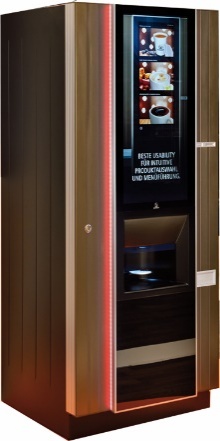
Note that we use the term Vending Machine as synonym for Unattended Retail & Coffee Solutions (see 3.2.1) in later sections for better readability.
4.1.2.2 Office Coffee Service (OCS)
While 64% of the vending industry is made up of hot drinks/coffee machines, OCS is a specific part of this segment and involves a hot drink table-top operation in the office environment, maintained and supplied with ingredients by the operator. OCS machines (for examples see Figure 3), however, are filled by the company where the machines are located, and these systems do not usually have coin/payment systems as a 'free' and quality coffee provision in the office is more and more seen as a necessity for workers and a service provided by companies for their employees.
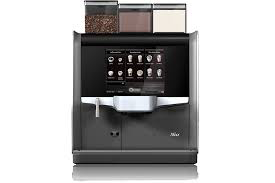
4.1.2.3 Unattended Retail (Micromarkets & Smart Fridges)
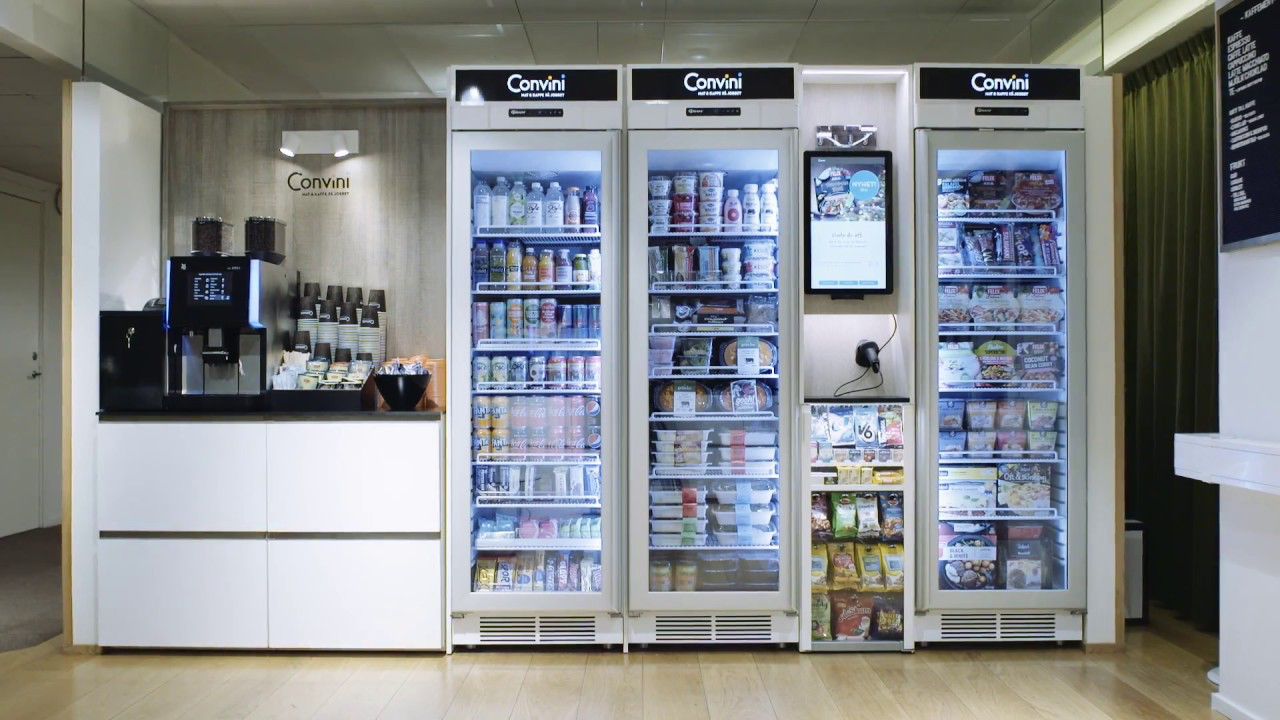
Micromarkets are small, unattended convenience stores in workplaces. A new and growing trend in Europe, with more than 10,000 in operation as of 2023 and typically include the following elements:
Products are on open shelves, or chiller cabinets or fridges so consumers can select them as they would in a store
Selected products are scanned by the consumer either at a central unattended till, or using a smartphone app
Payment is taken either at the central till (usually cashless), or through a smartphone app
Usually includes at least one hot beverage machine
May include a microwave to heat purchased food
May include an area with tables and seating
The EVA estimates the total number of Smart Fridges across Europe to be between 2,500 and 3,500, with more machine operators operating Smart Fridges than Micromarkets in Europe.
In Figure 4, an example of a Micromarket and a Smart Fridge is given.
4.2 Introduction to OPC Unified Architecture
4.2.1 What is OPC UA?
OPC UA is an open and royalty free set of standards designed as a universal communication protocol. While there are numerous communication solutions available, OPC UA has key advantages:
A state of art security model (see OPC 10000-2).
A fault tolerant communication protocol.
An information modelling framework that allows application developers to represent their data in a way that makes sense to them.
OPC UA has a broad scope which delivers for economies of scale for application developers. This means that a larger number of high-quality applications at a reasonable cost are available. When combined with semantic models such as Unattended Retail & Coffee Solutions, OPC UA makes it easier for end users to access data via generic commercial applications.
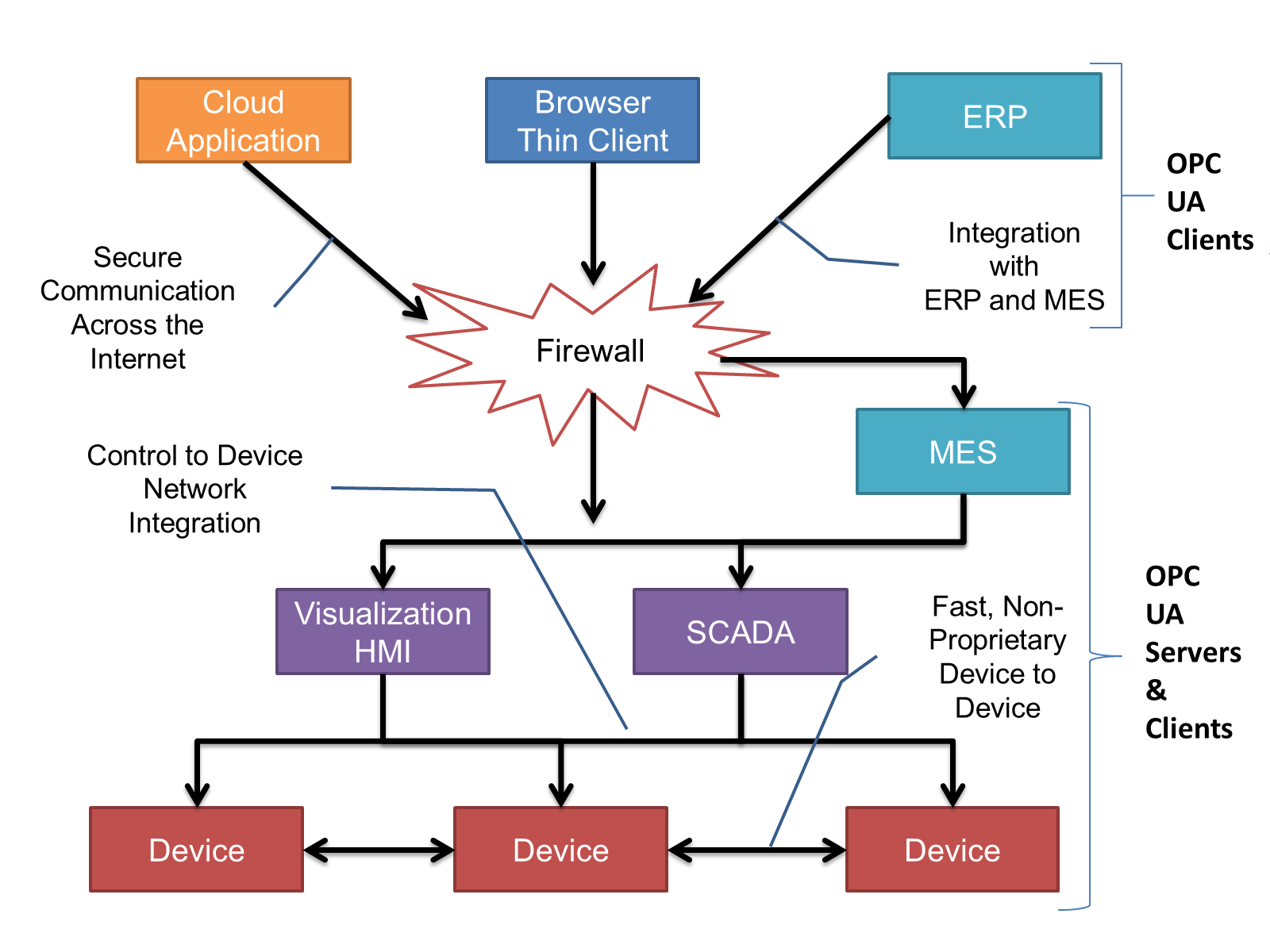
The OPC UA model is scalable from small devices to ERP systems. OPC UA Servers process information locally and then provide that data in a consistent format to any application requesting data - ERP, MES, PMS, Maintenance Systems, HMI, Smartphone, or a standard Browser, for examples. For a more complete overview see OPC 10000-1.
4.2.2 Basics of OPC UA
As an open standard, OPC UA is based on standard internet technologies, like TCP/IP, HTTP, Web Sockets.
As an extensible standard, OPC UA provides a set of Services (see OPC 10000-4) and a basic information model framework. This framework provides an easy manner for creating and exposing vendor defined information in a standard way. More importantly all OPC UA Clients are expected to be able to discover and use vendor-defined information. This means OPC UA users can benefit from the economies of scale that come with generic visualisation and historian applications. This specification is an example of an OPC UA Information Model designed to meet the needs of developers and users.
OPC UA Clients can be any consumer of data from another device on the network to browser based thin clients and ERP systems. The full scope of OPC UA applications is shown in Figure 5.
OPC UA provides a robust and reliable communication infrastructure having mechanisms for handling lost messages, failover, heartbeat, etc. With its binary encoded data, it offers a high-performing data exchange solution. Security is built into OPC UA as security requirements become more and more important especially since environments are connected to the office network or the internet and attackers are starting to focus on automation systems.
4.2.3 Information modelling in OPC UA
4.2.3.1 Concepts
OPC UA provides a framework that can be used to represent complex information as Objects in an AddressSpace which can be accessed with standard services. These Objects consist of Nodes connected by References. Different classes of Nodes convey different semantics. For example, a Variable Node represents a value that can be read or written. The Variable Node has an associated DataType that can define the actual value, such as a string, float, structure etc. It can also describe the Variable value as a variant. A Method Node represents a function that can be called. Every Node has a number of Attributes including a unique identifier called a NodeId and non-localized name called as BrowseName. An Object representing a 'Reservation' is shown in Figure 6.
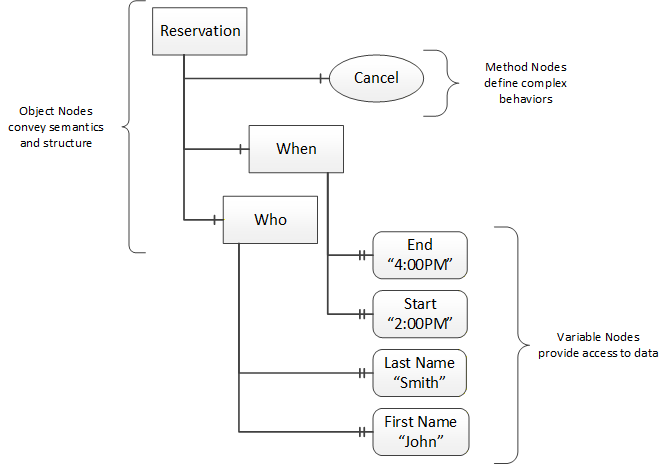
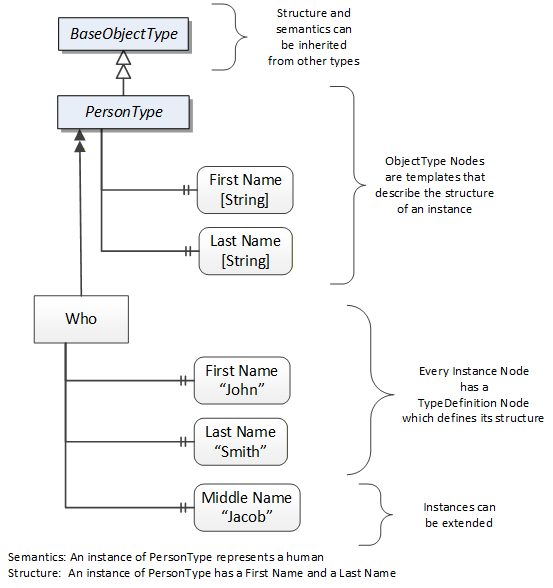
Object and Variable Nodes represent instances and they always reference a TypeDefinition (ObjectType or VariableType) Node which describes their semantics and structure. Figure 7 illustrates the relationship between an instance and its TypeDefinition.
The type Nodes are templates that define all of the children that can be present in an instance of the type. In the example in Figure 8 the PersonType ObjectType defines two children: First Name and Last Name. All instances of PersonType are expected to have the same children with the same BrowseNames. Within a type the BrowseNames uniquely identify the children. This means Client applications can be designed to search for children based on the BrowseNames from the type instead of NodeIds. This eliminates the need for manual reconfiguration of systems if a Client uses types that multiple Servers implement.
OPC UA also supports the concept of sub-typing. This allows a modeller to take an existing type and extend it. There are rules regarding sub-typing defined in OPC 10000-3, but in general they allow the extension of a given type or the restriction of a DataType. For example, the modeller may decide that the existing ObjectType in some cases needs an additional Variable. The modeller can create a subtype of the ObjectType and add the Variable. A Client that is expecting the parent type can treat the new type as if it was of the parent type. Regarding DataTypes, subtypes can only restrict. If a Variable is defined to have a numeric value, a subtype could restrict it to a float.
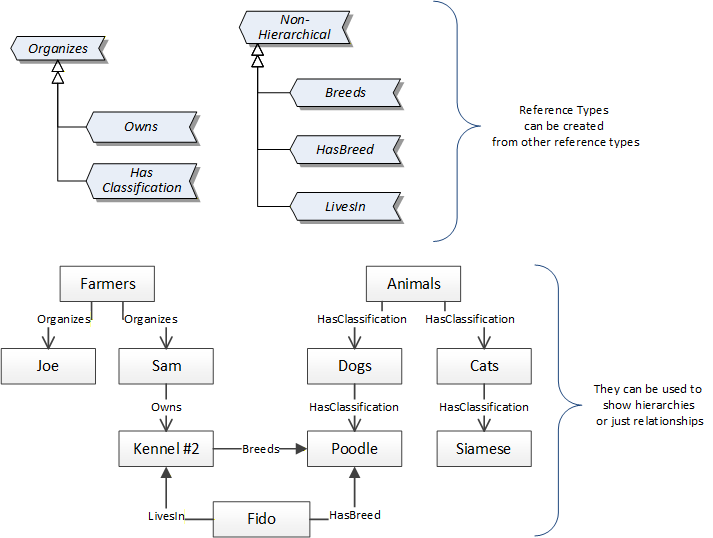
References allow Nodes to be connected in ways that describe their relationships. All References have a ReferenceType that specifies the semantics of the relationship. References can be hierarchical or non-hierarchical. Hierarchical references are used to create the structure of Objects and Variables. Non-hierarchical are used to create arbitrary associations. Applications can define their own ReferenceType by creating subtypes of an existing ReferenceType. Subtypes inherit the semantics of the parent but may add additional restrictions. Figure 8 depicts several References, connecting different Objects.
The figures above use a notation that was developed for the OPC UA specification. The notation is summarized in Figure 9. UML representations can also be used; however, the OPC UA notation is less ambiguous because there is a direct mapping from the elements in the figures to Nodes in the AddressSpace of an OPC UA Server.
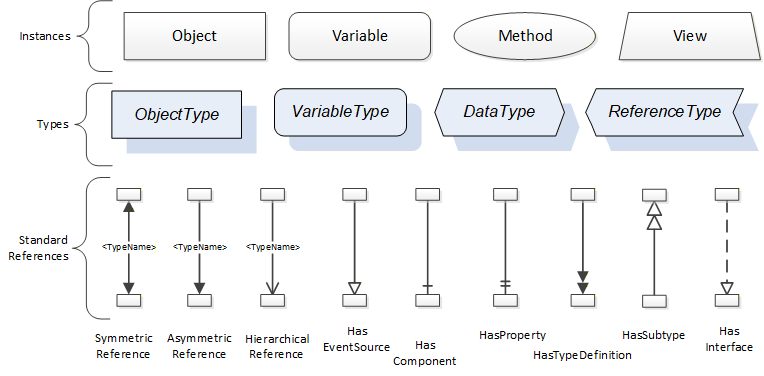
A complete description of the different types of Nodes and References can be found in OPC 10000-3 and the base structure is described in OPC 10000-5.
The OPC UA specification defines a very wide range of functionality in its basic information model. It is not required that all Clients or Servers support all functionality in the OPC UA specifications. OPC UA includes the concept of Profiles, which segment the functionality into testable certifiable units. This allows the definition of functional subsets (that are expected to be implemented) within a companion specification. The Profiles do not restrict functionality, but generate requirements for a minimum set of functionalities (see OPC 10000-7).
4.2.3.2 Namespaces
OPC UA allows information from many different sources to be combined into a single coherent AddressSpace. Namespaces are used to make this possible by eliminating naming and id conflicts between information from different sources. Each namespace in OPC UA has a globally unique string called a NamespaceUri which identifies a naming authority and a locally unique integer called a NamespaceIndex, which is an index into the Server's table of NamespaceUris. The NamespaceIndex is unique only within the context of a Session between an OPC UA Client and an OPC UA Server- the NamespaceIndex can change between Sessions and still identify the same item even though the NamespaceUri's location in the table has changed. The Services defined for OPC UA use the NamespaceIndex to specify the Namespace for qualified values.
There are two types of structured values in OPC UA that are qualified with NamespaceIndexes: NodeIds and QualifiedNames. NodeIds are locally unique (and sometimes globally unique) identifiers for Nodes. The same globally unique NodeId can be used as the identifier in a node in many Servers - the node's instance data may vary but its semantic meaning is the same regardless of the Server it appears in. This means Clients can have built-in knowledge of what the data means in these Nodes. OPC UA Information Models generally define globally unique NodeIds for the TypeDefinitions defined by the Information Model.
QualifiedNames are non-localized names qualified with a Namespace. They are used for the BrowseNames of Nodes and allow the same names to be used by different information models without conflict. TypeDefinitions are not allowed to have children with duplicate BrowseNames; however, instances do not have that restriction.
4.2.3.3 Companion Specifications
An OPC UA companion specification for an industry specific vertical market describes an Information Model by defining ObjectTypes, VariableTypes, DataTypes and ReferenceTypes that represent the concepts used in the vertical market, and potentially also well-defined Objects as entry points into the AddressSpace.
5 Use cases
5.1 Manufacturers of unattended retail components
The unattended retail device which is used to sell a product/service to the user is the combination of the experiences of many different actors, and sometimes also from people coming from outside the unattended retail area.
As in many other areas, the knowledge required to create any device grows over time.
The basic idea of the specification is to be able better insulate the knowledge of each actor providing also simple way to interconnect the components needed.
And the boundaries are basically already the way the manufacturers of vending machines are internally dividing their knowledge: people making good coffee, or reliably delivering pre-packaged product, or making effective method of payments, or finally managing the machine data to best operate the business.
This is not done to make strong separation between company business, but to enable knowledge in each area to be able to grow in independent way; this is why the first people which will take advantage of the specification are the manufacturers.
5.2 Hotel breakfast
Many hotel, B&B, have machine used in morning to prepare and serve hot and cold beverages.
These machines many times do not have payment systems, and selections are free, being paid as an hotel service.
The machines are normally table top, and many of them have a graphical user interface. The user interface is used mainly to select the product to prepare. The machines are typically not connected.
Making these machines modular will enable large ( and small ) hotel chain to handle the use interface independently for the details of the internal operation of the delivery process.
Even if payment is not typically added, the modular approach enables to easily add different payment devices of needed, including the hotel contactless key used by the customer to enter the room. If the machine is also connected, the standardization of the exchanged data ( Audit ) will enable to automatic calculation of customer recipes, if the delivered product must be paid, for example, when product is taken after the morning breakfast time window.
5.3 Closed location vending machines
Many offices have local vending machines, to sell hot, cold beverages, and pre-packaged items: the machine are operated by the office manager, which handles machine filling, product selection.
If the office manager is also the employer, many times, the sold product can be directly accounted to the employee's payroll, or can be part of the company benefit plan.
The machine is bought based on type of product to sell, and the employer can use the machine graphical UI possibly as a company notice board.
Having the machines built by easy integrated component from different sources will enable more freedom in the selection and composition of the final device: the notice-board application must be able to be used on devices providing delivering different product.
Standardized way to connect to the machines, and a known format for the provided data make easy the integration with the company back-end.
5.4 Externally managed location vending machines
Many offices have local vending machines, to sell hot, cold beverages, and pre-packaged items: the machines are operated by an external operating company, which handles machine filling and product selection.
These companies will manage different sets of locations, and have a great variety of product to handle.
Managing a location means also to get information about the device status and operational conditions. The standard audit used today is very limited and mainly provides accounting information. A larger set of data, and a standardized way to get these data make managing widely different device simpler.
Local payment devices are basic elements for these operations: in the past days cash was the only option.
Today cash is important, but a large variety of different other payment types are available. Anything which is not cash is "cashless" but under this definition there is a large variety of different technologies:
standard credit cards,
closed system payment cards,
hotel may require integration in the general customer accounting,
employer can require integration in company payroll,
loyalty cards,
points, and many other.
5.5 Better customer engagement
Any unattended retail finally has as customer interacting with a device able to provide the service or product the customer asks.
These devices can use a graphic display which is normally used only for the selection.
An operator of an unattended retail device is never in physical contact with his customer, but the device display can provide a window: a blackboard for different other type of information, with the final intent the user can come again; but, when the user is in front of the vending device, there is good probability he will buy.
To management of the "user interface" has to be as must as possible independent for the operating details of the product delivery process, and this is the purpose of the standardized interfaces.
The technologies and knowledge used by the user interface designed are evolving and changing very fast. There is need to separate this development from the standard user interface normally embedded in the standard unattended retail devices.
5.6 New machine types
This application will use of a well-known and widely used framework, with an existing large number of devices following the same general environment.
This will enable to buy and integrate components from the market, making the development of new machine types or solving a customer specific requirement faster and more reliably.
Prototyping can be also faster, using standard parts from the market to make a sample before designing the final device.
6 Unattended Retail & Coffee Solutions Information Model overview
6.1 Overview
An Unattended Retail & Coffee Solution (for better readability we use the term Vending Machine in the following text) is built out of various components. This specification focuses on components that may be provided by different vendors and therefore require standardized exchange of information between those components. A component may be used by various Vending Machines and does not necessarily need to be physically connected to a Vending Machine, like for example a user interface (UI) that runs on a smart device of a customer like a smart phone or tablet.
In addition to the interactions of the components of a Vending Machine, this specification also defines information exchange to monitor Vending Machines by applications that cannot be considered to be part of the Vending Machine.
Requirements on the power supply of components of a Vending Machine are described in Annex C, and requirements on the network infrastructure of components of a Vending Machine in Annex D.
6.2 Components of a Vending Machine
6.2.1 Machine engine
The machine engine is the device able to create or deliver or collect a given product. It interacts with the UI, the payment service, and the audit collect. It interacts with the customer by physically providing the product to the customer. It provides information to monitor the Vending Machine. A Vending Machine according to this specification needs to support at least one machine engine, but may have several machine engines as components. A machine engine cannot be assigned to more than one Vending Machine, i.e., it can only be used by one payment service.
The machine engine provides its interface by implementing an instance of the MachineEngineType (shown in Figure 10, defined in 7.1). The machine engine does not require OPC UA Client functionality to access other components of the Vending Machine.
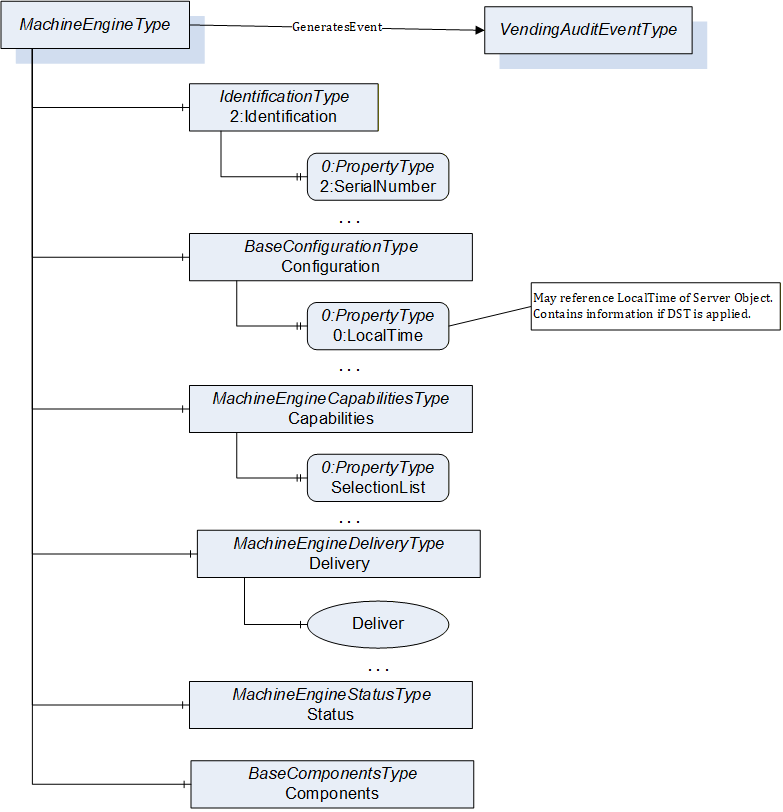
The MachineEngineType provides the identification of the machine engine in the Identification Object, defined in OPC 10000-100. The configuration of the machine engine is provided by the Configuration Object of BaseConfigurationType defined in 7.3. The configuration may be writable via the OPC UA interface to change the configuration of the machine engine. The machine engine provides the configuration for the UI in the Capabilities Object of MachineEngineCapabilitiesType defined in 7.5. The configuration is accessed by the UI and parts may be writable to change the configuration of the UI. The Delivery Object of MachineEngineDeliveryType defined in 7.6 provides functionality to request a delivery (by the payment service) as well as expose the status of the delivery (displayed by the UI). The Status Object of MachineEngineStatusType defined in 7.7 provides the overall status of the machine engine, to be displayed in the UI and consumed by the payment service. The optional Components Object of BaseComponentsType defined in 7.4 can provide information about subcomponents of the machine engine. The machine engine generates Events of VendingBaseAuditEventType to provide audit data.
6.2.2 Payment service
The payment service is responsible to approve product delivery, for example by receiving coins or charging a credit card or any other needed condition for the delivery of a product, like age. It is also responsible of all money movements between the different payment devices, like using cash to revalue a card system, handling change or overpay. It interacts with the UI, the machine engine, the audit collect and the price service. It may interact with the customer, for example by physically collecting coins or bills or scanning a credit card. It provides information to monitor the Vending Machine. A Vending Machine according to this specification supports exactly one payment service.
The payment service provides its interface by implementing an instance of the PaymentServiceType (shown in Figure 11, defined in 7.8). The payment service requires OPC UA Client functionality to access the machine engine(s) and the primary price service of the Vending Machine.
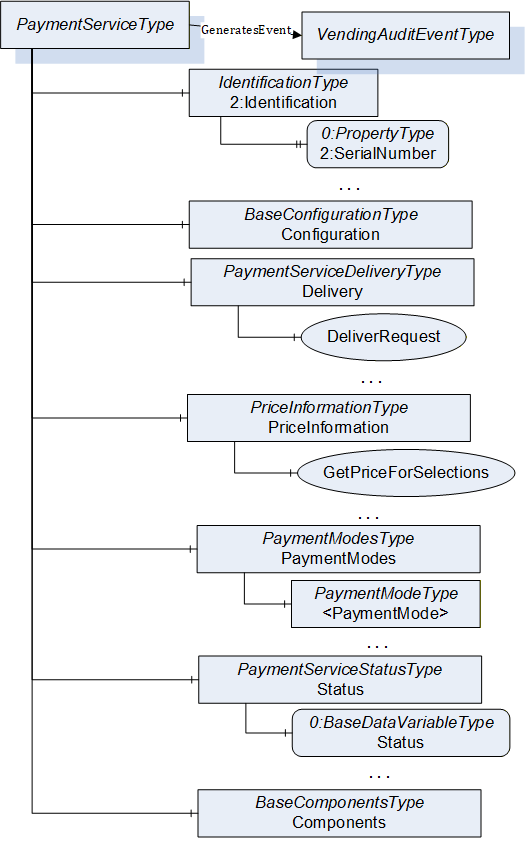
The PaymentServiceType provides the identification of the payment service in the Identification Object, defined in OPC 10000-100. The configuration of the payment service is provided by the Configuration Object of BaseConfigurationType defined in 7.3. The configuration may be writable via the OPC UA interface to change the configuration of the payment service. The Delivery Object of PaymentServiceDeliveryType defined in 7.9 provides functionality to request a delivery (by the UI) as well as expose the status of the payment of the delivery (displayed by the UI). The PriceInformation Object of PriceInformationType defined in 7.11 provides price information for deliverables of products of machine engines manged by the payment service. The PaymentModes Object of PaymentModesType defined in 7.13 provides information about the different payment systems supported by the payment service and their status, having on Object of PaymentModeType defined in 7.14 per payment system. The Status Object provides the overall status of the payment service defined in 7.22. The optional Components Object of BaseComponentsType defined in 7.4 can provide information about subcomponents of the payment service. The payment service generates Events of VendingAuditEventType to provide audit data.
The payment service receives price information from the primary price service of the Vending Machine using the PriceInformation Object of the price service. It is up to the implementation of the payment service whether the requests of the UI about price information is always forwarded to the price service, or cached in the payment service.
The payment service will need to interface to any other device which can affect the delivery, and these devices are payment devices. Payment service will provide the UI with enough information from the payment devices to define the payment, but the detailed implementation of the process is internal to payment service. It is also possible (and for sure will happen in the transition phase before OPC UA compliant payment devices will be available, the payment service will handle internally legacy coin, bills, cashless devices using proprietary protocols. When this happens, payment service has to act relative to audit collect to provide, in a way which is in line with this specification, all the required information.
But, with OPC UA compliant payment devices, the payment service is responsible only for the delivery approval but not for the effective handling of other payment device related data, like audit and configuration. There is a specific configuration Property (IsEmulated) used to expose if the payment service is internally handling the payment device, or if an OPC UA enabled payment device is available, enabling direct access to payment device configuration and audit events.
The IsEmulated Property enable easy switch for the need, today, to handle MDB (and other legacy protocols) before fully switch to OPC UA compliant devices.
The payment service may supervise the audit collect for operation and reject new requests when the audit collect is not operating correctly using the IsCollectingAudit Variable of the AuditCollectType.
6.2.3 Standalone Payment Devices
As stated in 6.2.2, a payment device may be managed in a proprietary manner by the payment service. A standalone payment device is a payment device, that has a standardized OPC UA Server. It is responsible to receive money, either via a physical asset (coin, bill, or token), as a payment cash device, or cashless as a payment cashless device. It provides the information about the received money and mechanisms to payout money. It interacts with the payment service and the audit collect. A Vending Machine according to this specification may have zero to many standalone payment devices.
As there are different types of payment devices, the type hierarchy is shown in Figure 12.
The standalone payment device provides its interface by implementing an instance of a subtype of the StandalonePaymentDeviceType (shown in Figure 12, defined in 7.17), which is an abstract subtype of the PaymentDeviceType used in the payment service. The standalone payment device does not require OPC UA Client functionality.
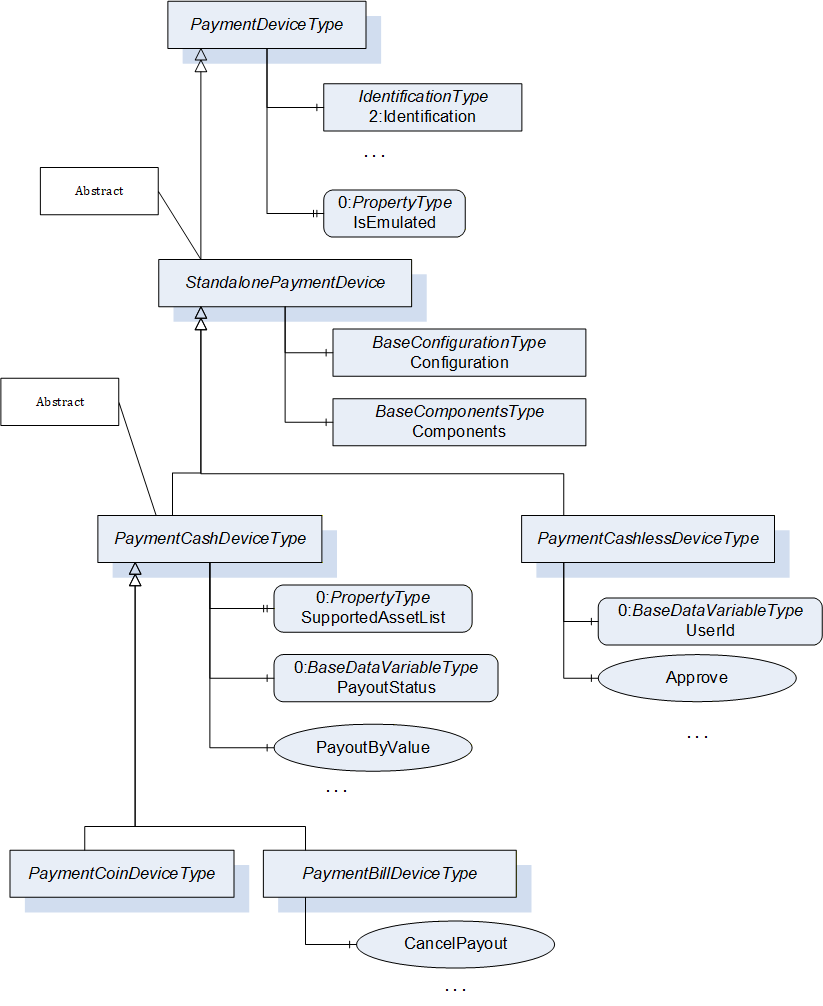
The PaymentDeviceType provides the identification of the payment device in the Identification Object, defined in OPC 10000-100. The configuration of the standalone payment device is provided by the Configuration Object of BaseConfigurationType defined in 7.3. The optional Components Object of BaseComponentsType defined in 7.4 can provide information about subcomponents of the standalone payment device. The payment device generates Events of VendingAuditEventType to provide audit data.
The abstract PaymentCashDeviceType defined in 7.18 defines common functionality for cash-based payment devices like the supported assets and the capability to payout cash. The concrete PaymentCoinDeviceType defined 7.19 represents standalone payment devices handing coins and / or token, with no additional functionality. The concrete PaymentBillDeviceType defined in 7.20 represents standalone payment devices handling bills and / or token, and provides additional functionality like cancelling the payout. The concrete PaymentCashlessDeviceType defined in 7.21 represents standalone payment devices handling cashless money, and provide the corresponding functionality.
6.2.4 UI
The UI (user interface) is the interface between the customer and the system. The UI is only related to the final customer interaction. Technical user interfaces for configuration or maintenance of the machine are not part of this component and not addressed by this specification. A Vending Machine according to this specification needs to have at least one UI, but may have several UIs.
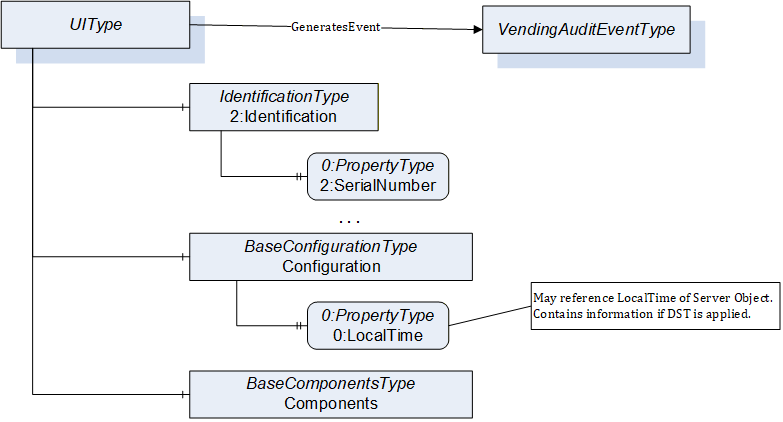
The UI provides its interface by implementing an instance of the UIType (shown in Figure 13, defined in 7.23). The UI requires OPC UA Client functionality to access the payment service and the machine engine(s) of the Vending Machine. The optional Components Object of BaseComponentsType defined in 7.4 can provide information about subcomponents of the UI. The UI generates Events of VendingBaseAuditEventType to provide audit data.
The UI receives the configuration of the Vending Machine by accessing the Machine Engine capabilities specific to a machine engine from the machine engine(s) of the Vending Machine by accessing the Capabilities Object of MachineEngineCapabilitiesType defined in 7.5. This includes the available selections and possible Options per selection. The availability of the selections is provided by the Status Object of MachineEngineStatusType defined in 7.7. The Delivery Object of MachineEngineDeliveryType defined in 7.6 expose the status of a delivery.
The UI receives price information for the selections as well as payment options provided by the payment service of the Vending Machine by accessing the PriceInformation Object of PriceInformationType defined in 7.11. A deliver request is triggered on the Delivery Object of PaymentServiceDeliveryType defined in 7.9.
6.2.5 Price service
The price service calculates the price of a selection of products and considers all discounts. Discounts may be gained on various vendor-specific options, like time of the day, expiry date of the product, availability of product, customer and discount programs, etc. A Vending Machine according to this specification needs to have access to exactly one price service. This price service may internally use other price services (see Annex B).
The price service provides its interface by implementing an instance of the PriceServiceType (shown in Figure 14, defined in 7.24). The price service does not require OPC UA Client functionality to access other components of the Vending Machine.
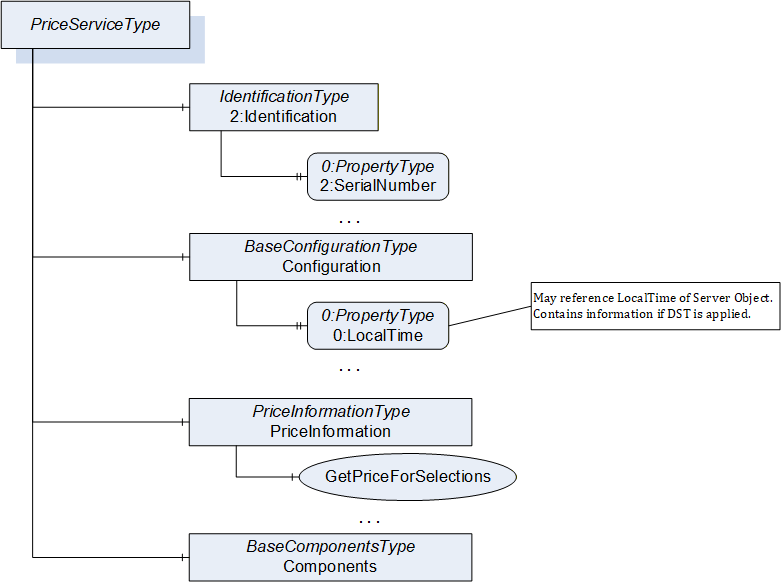
The PriceServiceType provides the identification of the payment service in the Identification Object, defined in OPC 10000-100. The configuration of the payment service is provided by the Configuration Object of BaseConfigurationType defined in 7.3. The configuration may be writable via the OPC UA interface to change the configuration of the payment service. The PriceInformation Object of PriceInformationType defined in 7.11 provides price information for deliverables of products potentially provided by various Vending Machines. The optional Components Object of BaseComponentsType defined in 7.4 can provide information about subcomponents of the payment service.
6.2.6 Audit collect
The audit collect collects audit data from all components providing audit Events and makes them available for external access. A Vending Machine according to this specification supports exactly one audit collect, and in addition optionally one tax audit (see 6.2.7).
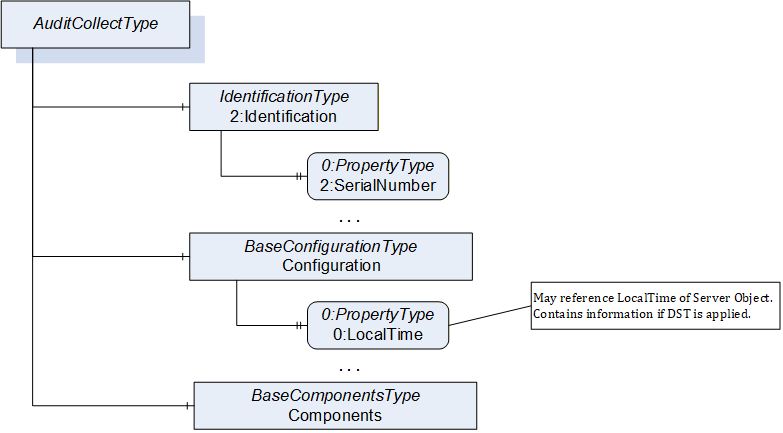
The audit collect provides its interface by implementing an instance of the AuditCollectType (shown in Figure 15, defined in 7.25). The optional Components Object of BaseComponentsType defined in 7.4 can provide information about subcomponents of the audit collect. The audit collect requires OPC UA Client functionality to access audit information of the payment service, the standalone payment devices, the UI(s) and the machine engine(s) of the Vending Machine.
6.2.7 Tax audit
A special case of the audit collect is the TAX audit, which is selecting all tax relevant information of the audit information. This component is implemented according to the tax regulations of the area the Vending Machine is operating, and receives and processes all tax relevant information.
It provides and uses the same interfaces as the audit collect (see 6.2.6), but filters the audit Events to those relevant for the tax regulations. Depending on the tax regulations, different audit Events may be relevant.
In the following sections, the tax audit is included when an audit collect component is referenced.
6.3 Interactions between components
6.3.1 General Considerations on handling method processing
In OPC UA, each service call is executed asynchronously between Client and Server. This is also true for calling an OPC UA Method from a Client. However, a Method call is expected to return a result rather fast (milliseconds or seconds, when provided to a UI it should be milliseconds up to small fractions of a second), not after minutes. Therefore, in cases where the actual execution like creating a product may take longer, the Method is returning a result immediately, before the execution has been done, and the status of the execution is provided by some Variables. This is applied in various places in this specification.
In order to not lose any data, Clients should subscribe to the status Variables to get notified about all changes of the status.
6.3.2 Requesting and Delivering Products
6.3.2.1 Overview
In the following sections, the interactions for providing the main functionality of a Vending Machine, the requesting and delivering of products, is described.
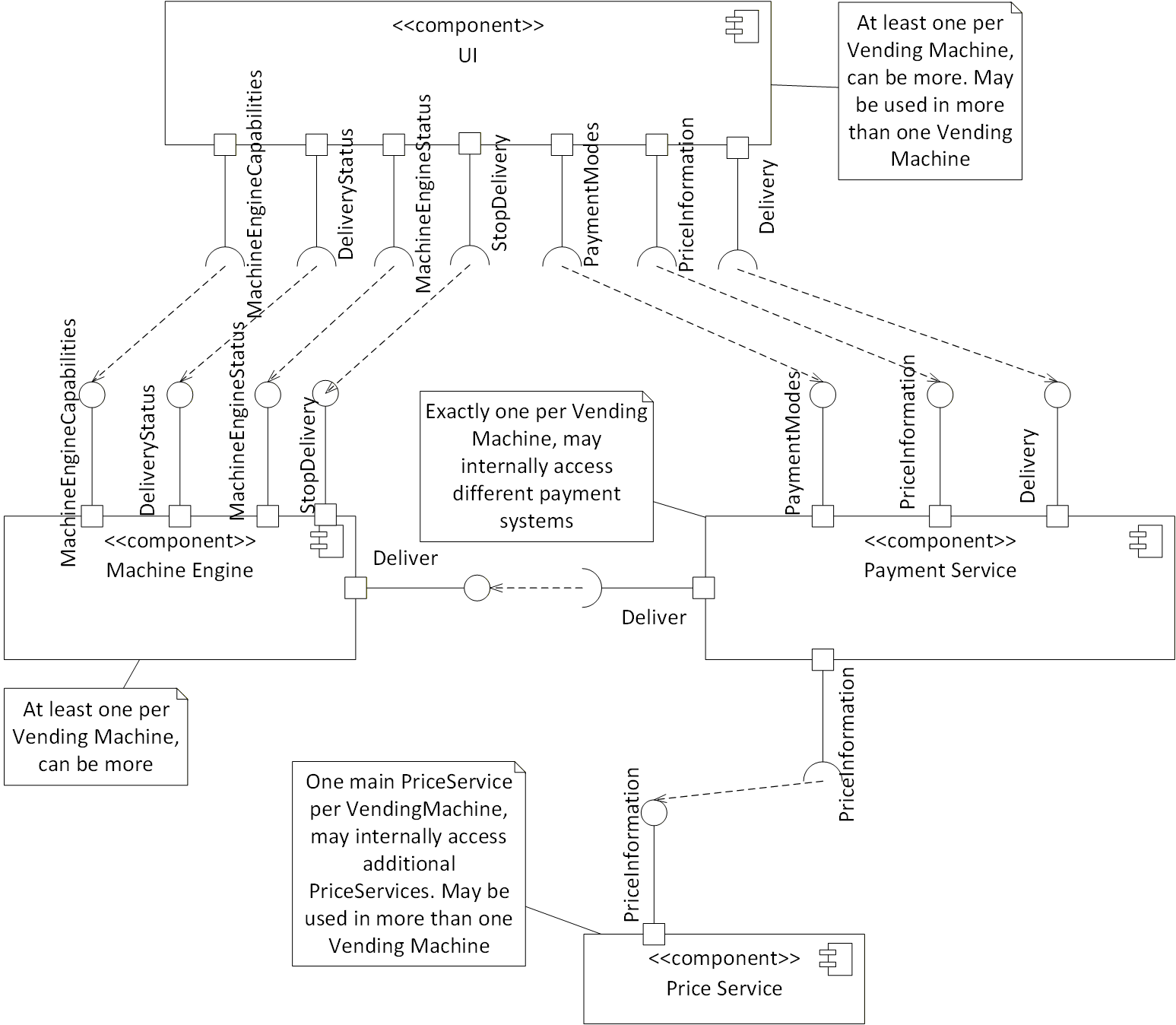
In Figure 16, an overview of the needed components and the interfaces used is given. The interface names reflect the Object names of the corresponding ObjectTypes. To emphasise, that the UI is accessing the status of the Delivery Object of the machine engine, but not calling the Deliver Method, the DeliveryStatus interface was introduced. Same applies for StopDelivery, referencing to the StopDelivery Method of the Delivery Object of the machine engine.
A Vending Machine contains one main price service, which internally may use additional price services (see Annex B).
6.3.2.2 TransactionId
A TransactionId (UInt64) is used to uniquely identify a deliver request. It is generated by the payment service and distributed to other components of the Vending Machine. The uniqueness can only be guaranteed for a certain amount of time in order to identify different deliver requests at the same time, which must be unique at least for the whole time the transaction is active. A reasonable strategy to assign the TransactionId is increasing the number every time by one and roll over to 0 at the maximum of UInt64. However, the strategy of assigning a TransactionId is vendor-specific and other components shall not make assumptions about this.
The TransactionId will not protect against false delivery request; there is protection given using the OPC UA security mechanisms, i.e., only specific Clients can communicate and request deliveries.
6.3.2.3 BasketId
A Vending Machine may support the delivery of many products at once. This can be handled in two ways.
Either by defining selections that consists of various products (e.g., a menu). In that case, it is handled like any other delivery, potentially using different outputs to deliver more than one product.
Or it may support a basket, where the user can select several products into one basket and according to the content the user may get a discount. In that case, a BasketId (UInt64) is used to uniquely identify the basket. It is generated by the payment service and distributed to other components of the Vending Machine. The same assumptions for uniqueness apply as for the TransactionId. In order to support a BasketId, the Delivery Object of the payment service needs to be of type PaymentServiceBasketDeliveryType.
Not all payment services may support basket functionality.
6.3.2.4 Startup of UI
When the UI gets started, it needs to connect to the machine engine(s) it is interested in. Depending on the UI this may be based on user interactions selecting the interesting machine engine(s).
The UI needs to read the information of the Capabilities Object of the machine engine. It may cache the information and just check the SelectionListVersion, if the configuration has changed. The UI needs to subscribe to changes of the status of the machine engine (see 6.3.2.5) to display information like a certain product is not available.
Given the SelectionId and AvailableOptionIds provided by Capabilities are only machine specific and used primarily to provide the needed info for the Deliver method, the UI need to map using separate tables (not part of this specification, typically generated by the back-end software and called plan-o-grams) the SelectionId and AvailableOptionIds to the correct graphic resources in the UI itself.
The UI needs to access the price information of the payment service by accessing the PriceInformation Object of the payment service, and potentially the PaymentModes Object to get information about the available payment modes and their status.
The price for a product is taken by combining the selection parameters (SelectionId, and Options which are machine specific) and the MachineEngineProductInstanceUri to identify the machine engine and the plan-o-gram which defines the final product to be delivered. Typically, this is done in the UI by loading the plan-o-gram into the UI.
If the price service is located on the same hardware of a vending machine, for the vending machine itself the SelectionId and Options have a defined and unique value being connected with the vending machine where they are implemented. Still, given price services can be chained, if chaining is implemented the price search can still be extended.
Any allergens, nutrition values and similar information associated with a product are not provided by mechanisms of this specification, but are typically provided by the plan-o-gram loaded into the UI.
6.3.2.5 Update UI with status of machine engine
While connected to a machine engine, the UI needs to check the status of the machine engine, by subscribing to the corresponding Variables of the Status Object of the machine engine.
In addition, it needs to subscribe to the DeliveryRequests and DeliveryProgress Variables of the Delivery Object of the machine engine. This may be done when connecting to the machine engine and is required once the UI has started a deliver request via the payment service using the DeliverRequest Method of the Delivery Object of the payment service.
6.3.2.6 Update UI with status of payment service
In order to display the price for products the UI needs to get the price information of the products. This is done calling the corresponding Methods of the PriceInformation Object of the payment service. The price may depend on the UserId and PaymentMode, therefore the UI needs to call the Methods each time, this is changing. In addition, the UI should subscribe to Events of the PriceChangeEventType to get the information, when the price information was changed and the Methods need to be called, again.
When the UI has requested a delivery, it needs to subscribe to the TransactionProgress Variable of the Delivery Object to get updates on the progress of the payment.
In case a basket is requested, it needs to subscribe to the overall basket status in the BasketProgress Variable.
In case the user is filling a basket, the UI needs to call the GetPriceForBasket Method of the PriceInformation Object each time the content of the basket is changing (adding or removing items) to get the price for the current basket.
The UI may use the Status Variable of the Status Object to display the overall status of the Vending Machine.
6.3.2.7 Requesting a delivery by the UI
UI calls payment service (DeliverRequest Method)
When a user selects a product to be delivered, the UI calls the DeliverRequest Method of the Delivery Object of the payment service. This includes the last price information recovered by the last PriceInformation Object, the PaymentMode selected, and a generic UserId (the meaning of the variable is custom specific, the effect is to possibly change the price). The payment service generates a TransactionId and returns this to UI.
The payment service may already do some of the following steps before returning the DeliverRequest Method call and potentially return a failure status instead of the TransactionId. This is up to the implementation of the payment service. However, it needs to be considered that the Method call should return rather fast (as fast as possible, not waiting till the end of the delivery, maybe milliseconds), not after minutes (see also 6.3.1).
Payment service checks correct price (internal or via price service)
The payment service checks the correctness of the price provided by the UI. Since the payment service needs to maintain the current price for the UI anyhow, it can check its local data. Alternatively, the payment service may access the primary price service again to validate the price. When the price is not correct, the payment service does not continue the deliver request and provides the corresponding status of the TransactionId in its TransactionProgress Variable.
Payment service collects payment (internal functionality)
The payment service collects the payment from the user. How this is done, is up to the nature of the payment service. It may be collecting coins or bills, charging a credit card, etc. Once successfully collected, the payment service changes the status of the TransactionId in its TransactionProgress Variable. If the payment process gets somehow aborted (implementation specific), the payment service does not continue the deliver request and provides the corresponding status of the TransactionId in its TransactionProgress Variable. The UI may handle this transparent to the user and do another deliver request with a different payment mode.
Payment service triggers delivery in machine engine (Deliver Method)
Once the payment is collected, the payment service triggers the delivery at the machine engine by calling the Deliver Method of the Delivery Object of the machine engine. It provides the TransactionId so that the machine engine can provide the TransactionId in its DeliveryRequests and DeliveryProgress Variables.
Delivery by machine engine (internal functionality)
The machine engine potentially creates the product to be delivered (e.g., coffee) and delivers it to the user. How this is done is vendor-specific. Via the DeliveryProgress Variable it informs the UI and the payment service about the status of the delivery.
Once the delivery was successfully done, the payment service informs the UI about closure of the payment via its TransactionProgress Variable.
When the delivery is aborted, for example due to an error in the machine engine, the machine engine informs both UI and payment service via the DeliveryProgress Variable. In this case, the payment service triggers (if possible) a refund of the payment to the user. How this is done, is specific to the payment service. The payment service informs the UI about this using its TransactionProgress Variable.
In both cases, the successful delivery or the abortion, the payment service and the machine engine will clean up their status Variables and remove the information about the TransactionId. The duration before doing this is vendor-specific.
6.3.2.8 Requesting a delivery stop by the UI
When a delivery has been requested by the UI as described in 6.3.2.7 in step 1, the delivery may be cancelled by the CancelDeliverRequest Method.
When the CancelDeliverRequest Method is called before the payment is collected by the payment service (step 3 in 6.3.2.7), the Method call should be successful. In that case, the payment service does not continue the deliver request and provides the corresponding status of the TransactionId in its TransactionProgress Variable.
When the CancelDeliverRequest Method is called while or after the payment gets collected by the payment service (step 3 in 6.3.2.7), but before requesting the deliver in the machine engine, and the payment service is able to refund the payment, the Method call should be successful. In that case, the payment service triggers a refund, does not continue the deliver request and provides the corresponding status of the TransactionId in its TransactionProgress Variable.
When the CancelDeliverRequest Method is called after the payment service has called the Deliver Method of the machine engine (step 4 in 6.3.2.7), the Method call should fail and no cancellation is possible anymore.
6.3.2.9 Requesting a basket delivery by the UI
In order to support this functionality, the Delivery Object of the payment service needs to be of type PaymentServiceBasketDeliveryType.
UI calls payment service (DeliverBasketRequest Method)
When a user selects the products to be delivered, the UI calls the DeliverBasketRequest Method of the Delivery Object of the payment service. This includes the price information as displayed to the user. The payment service generates a TransactionId per item of the basket and a BasketId and returns this to UI.
The payment service may already do some of the following steps before returning the DeliverBasketRequest Method call and potentially return a failure status instead of the TransactionId. This is up to the implementation of the payment service. However, it needs to be considered that the Method call should return rather fast (milliseconds or seconds), not after minutes.
Payment service checks correct price (internal or via price service)
The payment service checks the correctness of the price provided by the UI. Since the payment service needs to maintain the current price for the UI anyhow, it can check its local data. Alternatively, the payment service may access the primary price service again to validate the price. When the price is not correct, the payment service does not continue the deliver request and provides the corresponding status of the BasketId in its BasketProgress Variable and in addition per item the TransactionIds in its TransactionProgress Variable.
Payment service collects payment (internal functionality)
The payment service collects the payment from the user. How this is done, is up to the nature of the payment service. It may be collecting coins or bills, charging a credit card, etc. Once successfully collected, the payment service changes the status of the TransactionIds in its TransactionProgress Variable and the overall status of the BasketId in its BasketProgress Variable. If the payment of the whole basket is handled at once, that requires that the TransactionProgress of all TransactionIds of the basket shall change at the same time. If the payment process gets somehow aborted (implementation specific), the payment service does not continue the deliver request and provides the corresponding status of the TransactionIds in its TransactionProgress Variable and the overall status of the BasketId in its BasketProgress Variable. The UI may handle this transparent to the user and do another basket deliver request with a different payment mode.
Payment service triggers delivery in machine engine (Deliver Method)
Once the payment is collected, the payment service triggers the delivery per item of the basket at the corresponding machine engines by calling the Deliver Method of the Delivery Object of the machine engine per item. It provides a TransactionId per item of the basket, so that the machine engine can provide the TransactionId for each item in its DeliveryRequests and DeliveryProgress Variables. Whether the payment service calls the Deliver Method for all items in parallel or serializes by some internal logic the requests, is an implementation detail of the payment service.
Delivery by machine engine per item of the basket (internal functionality)
The machine engine potentially creates the product to be delivered (e.g., coffee) and delivers it to the user. How this is done is vendor-specific. Via the DeliveryProgress Variable it informs the UI and the payment service about the status of the delivery.
Once the delivery of all items was successfully done, the payment service informs the UI about closure of the payment via its TransactionProgress Variable.
When the delivery is aborted, for example due to an error in the machine engine, the machine engine informs both UI and payment service via the DeliveryProgress Variable. In this case, the payment service triggers a refund of the payment to the user. How this is done, is specific to the payment service. The payment service informs the UI about this using its TransactionProgress Variable. In addition, it updates the overall status of the basket in the BasketProgress Variable.
In both cases, the successful delivery or the abortion, the payment service and the machine engine will clean up their status Variables and remove the information about the TransactionId. The duration before doing this is vendor-specific.
Clean up of the basket information (internal functionality)
Once the delivery of all items of the basket has been finalized (either successful or not), the payment service updates the BasketProgress Variable. The payment service will clean up this Variable and remove the information about the BasketId. The duration before doing this is vendor-specific.
6.3.2.10 Requesting a basket delivery stop by the UI
When a basket delivery has been requested by the UI as described in 6.3.2.9 in step 1, the delivery may be cancelled by the CancelDeliverBasketRequest Method.
When the CancelDeliverBasketRequest Method is called before the payment is collected by the payment service (step 3 in 6.3.2.9), the Method call should be successful. In that case, the payment service does not continue the deliver request and provides the corresponding status of the TransactionIds in its TransactionProgress Variable and the overall status of the BasketId in its BasketProgress Variable.
When the CancelDeliverBasketRequest Method is called while or after the payment gets collected by the payment service (step 3 in 6.3.2.9), but before requesting any deliver in any machine engine, and the payment service is able to refund the payment, the Method call should be successful. In that case, the payment service triggers a refund, does not continue the deliver request and provides the corresponding status of the TransactionIds in its TransactionProgress Variable and the overall status of the BasketId in its BasketProgress Variable.
When the CancelDeliverBasketRequest Method is called after the payment service has called the Deliver Method of any machine engine (step 4 in 6.3.2.9) for any of the TransactionIds of the basket, the Method call should fail and no cancellation is possible anymore.
6.3.3 Handling Payment Devices
6.3.3.1 Overview
A Vending Machine may have several payment devices responsible to handle money, either received from a customer or provided to the customer. Those devices may be handled in a proprietary way by the payment service, or accessed using a standardized OPC UA information model defined in this specification. The type hierarchy for those devices is introduced in 6.2.3. The following clauses describe the interactions between the payment services and the different types of payment devices.
6.3.3.2 Coin devices
The payment service reads the configuration of the payment device like the SupportedAssetList and the SlotConfigurationList. It may monitor the SupportedAssetListVersion to get notified, when the configuration has changed. It should monitor the Status of the payment device and take appropriate actions if it changes. The AssetConfigurationList defines how to handle specific coins or tokens and can be changed by the payment service using the ChangeAssetConfigurationList Method.
By configuring the AssetConfigurationList to reject all supported assets, the payment service can effectively disable a payment device.
By monitoring the CurrentAvailableValue the payment service knows how much money is currently in the payment device that a customer has already added to the payment device and can be used for a delivery. By calling the ConsumeAvailableValue Method, the payment service can actually consume part of the CurrentAvailableValue.
By monitoring the CurrentSlotContentList the payment service knows the available money currently in the payment device for payout. By monitoring the PayoutStatus the payment service knows about the status of any payout, that can be triggered by the PayoutByValue and PayoutBySupportedAssetList Methods.
A payout does not change the CurrentAvailableValue. If the payment service wants to trigger a logic, that a payout does decrease the CurrentAvailableValue, it needs to call the ConsumeAvailableValue Method in addition to the Method for the payout.
6.3.3.3 Bill devices
The payment devices supporting bills have some additional functionality to that the payment devices for coins support. They allow to cancel a running payout with the CancelPayout Method and provide information about the current bill or token in the escrow. With the HandleBillFromEscrow Method, the payment service can control what the payment device is supposed to do with the current bill in the escrow.
6.3.3.4 Cashless devices
The payment service supervises information from the cashless payment devices, like the UserId, MaxRecharge and CurrentContentOnCard Variables.
The payment service may charge money with the Approve Method. The ApproveStatus Variable provides the result, as the approval may take time. While the approval process is ongoing, the payment service may try to cancel it by calling the CancelApproval Method.
The payment service may add money to the card with the Recharge Method. The RechargeStatus Variable provides the result, as the recharging may take time.
The payment service may refund the last approved charging with the RefundLast Method. The RefundLastStatus Variable provides the result, as the refunding may take time.
The payment service may enable or disable the payment device with the EnableOrDisable Method. The IsEnabled Variable provides the result, as the operation may take time.
6.3.4 Audit
Audit information is provided by OPC UA Events. The VendingBaseAuditEventType defined in 7.26 and its subtypes are used for all audit information. The general audit collect is supposed to subscribe to all Events of VendingBaseAuditEventType from all UIs, all machine engines, the payment service and all payment devices having their own OPC UA Server of the Vending Machine. The optional, specialized tax audit component would only subscribe to Events relevant for the tax regulations.
An audit collect may need identification information of the components its accesses, and as special case for the payment service also the identification of the payment devices. This is provided by the IdentificationType.
For some payment devices, it is required to access configuration information in order to interpret the audit information. Potentially, also the current content of those payment devices needs to be accessed, which in principle could be calculated out of the Events if the initial content is known. This information is provided by Objects of PaymentDeviceType.
As a Vending Machine may be configured not to work when no audit is collected, the audit collect provides a IsCollectingAudit Variable which may be supervised by the payment service, which may reject new requests while the audit is not collected.
In Figure 17, an overview of the needed components and the interfaces used is given.
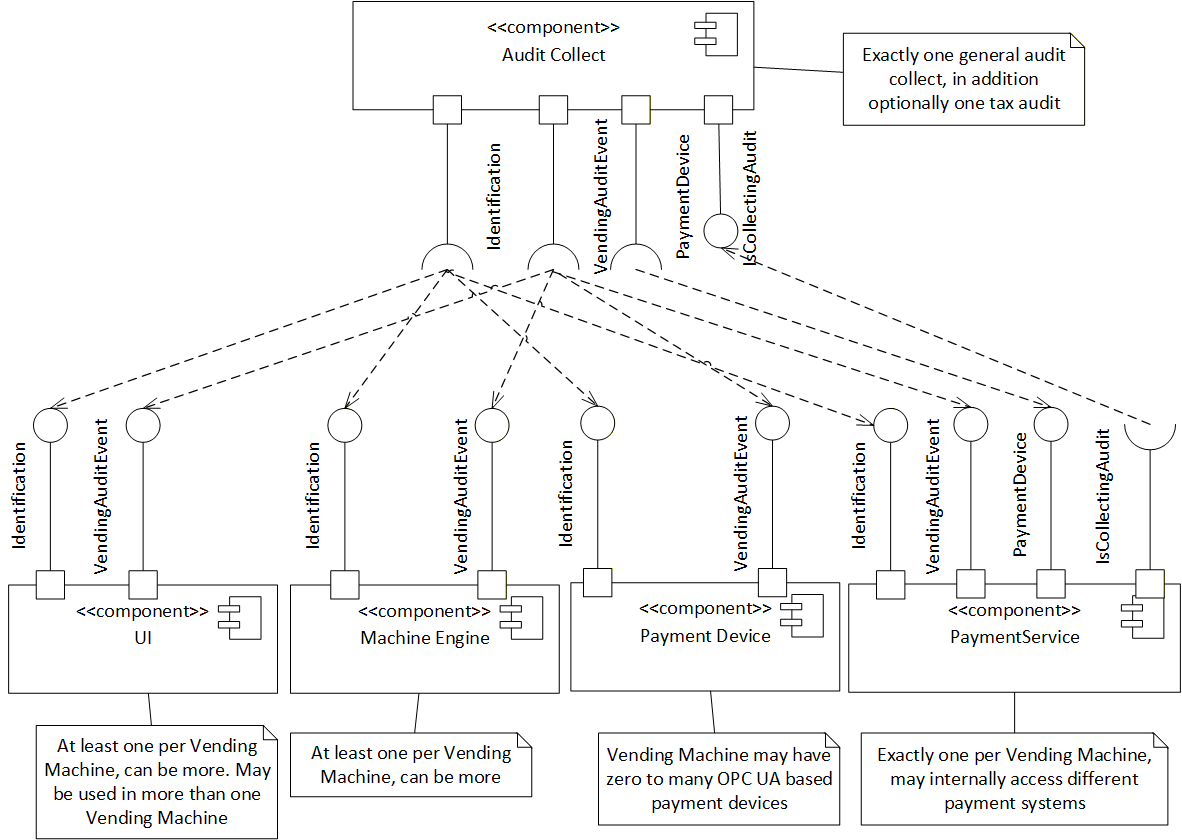
An OPC UA Server may represent several components of a Vending Machine, and as a special case, for the payment service, the payment devices. All those components individually generate Events of VendingBaseAuditEventType, in order to relate the Events to the corresponding component. The audit collect should subscribe to the 0:Server Object and filter for Events of VendingBaseAuditEventType to receive all audit information of the individual components of an OPC UA Server. In Figure 18, an example is given of an OPC UA Server AddressSpace, providing a machine engine and a payment service with two payment devices. X:MyMachineEngine, X:MyPaymentService, X:MyCoins and X:MyBills are all of TypeDefinitions generating Events of VendingBaseAuditEventType. At the bottom of Figure 18 some examples of Events are sketched, showing how the SourceNode and SourceName of the Events are identifying the source of the Events.
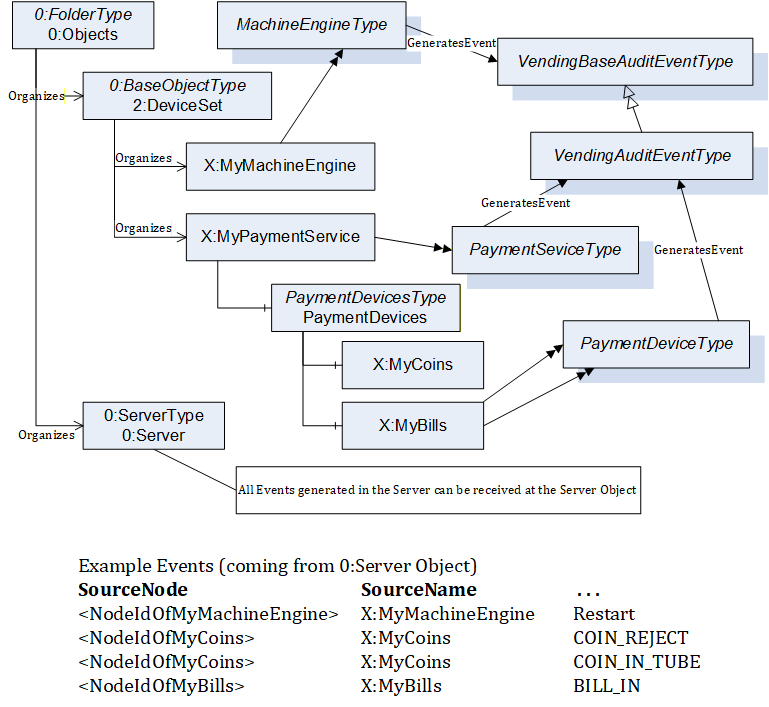
6.3.5 Initial Connection, reconnecting, and ConfigurationChangedEvents
Components like audit collect may want to keep track of information of components of a Vending Machine, and potentially subcomponents. Therefore, when initially connecting to an OPC UA Server representing one or several components of a Vending Machine, those components need to browse and read the required information. For example, audit collect does need some information, to interpret the audit information. Therefore, it may need to browse the PaymentDevices and PaymentModes of the payment service. In order to keep track of changes of the configuration of components of a Vending Machine, the audit collect should subscribe to ConfigurationChangedEvents, and in case it receives such an Event re-browse and reread the information of that component. Although the configuration of a Vending Machine is typically quite static, it may be that at restart some devices like a bill validator take a much longer time to restart, and therefore get added to the configuration while the Vending Machine is already running.
When a component like audit collect is reconnecting to an OPC UA Server representing one or several components of a Vending Machine, there are two scenarios:
The connection could be re-established without loss of data. That means, the subscription is still running and the data indicate no loss of data. In that case, the component does not need to do any specific actions.
The connection could not be re-established or some losses of data have been indicated. In that case, the component needs to reread the information from the OPC UA Server.
6.3.6 Configuration
The configuration of components of a Vending Machine is vendor-specific and not defined in this specification. This specification does define an entry point where vendors are supposed to manage their configuration options, an Object called Configuration of the BaseConfigurationType defined in 7.3.
In Figure 19 an overview of the needed components and the interfaces used is given. The Configuration Client component is vendor-specific and not further described in this specification.
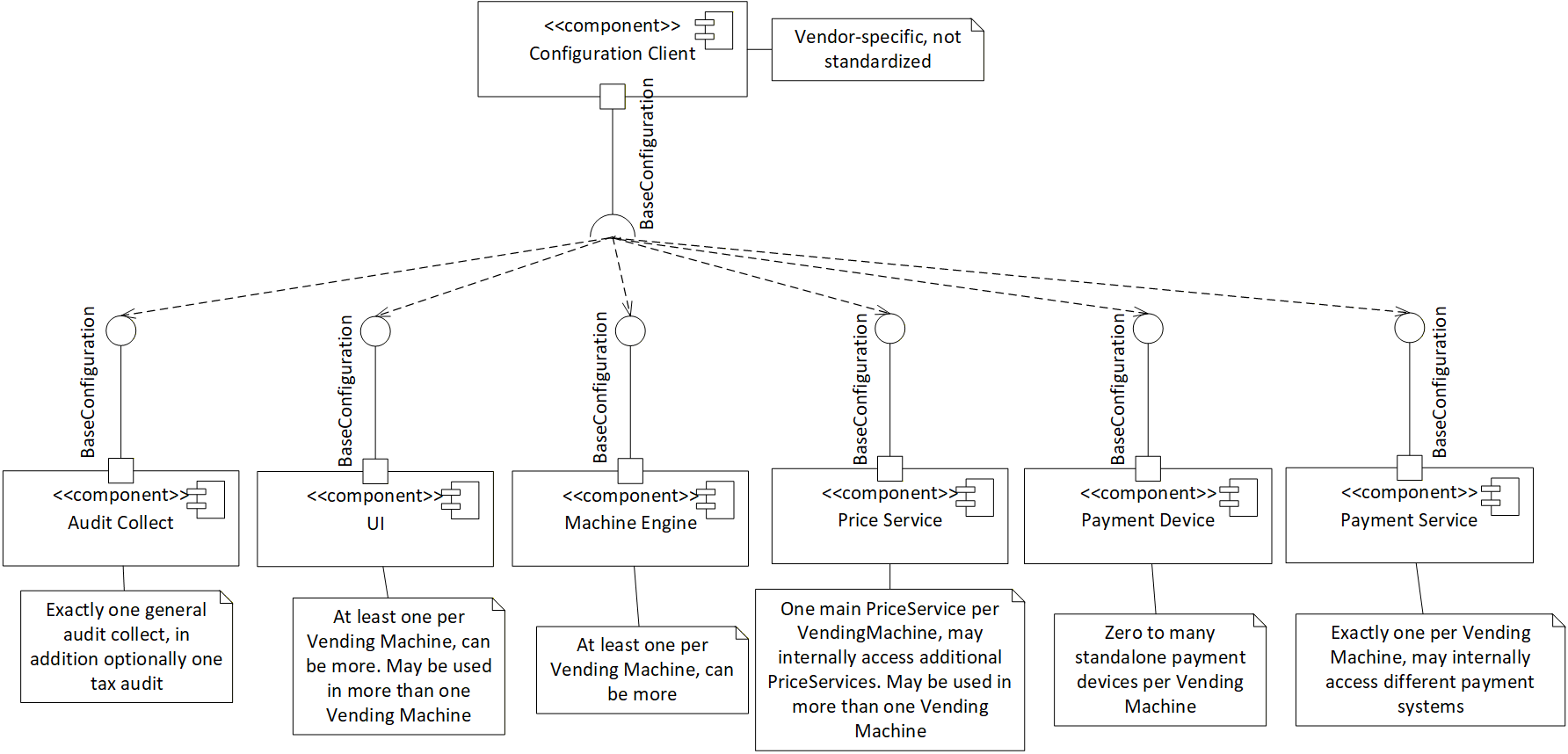
7 OPC UA ObjectTypes
7.1 MachineEngineType definition
7.1.1 Overview
The MachineEngineType provides the interface to access the machine engine. It is used by other components like the UI, the payment service and the audit collect. A more detailed overview is given in 6.2.1. It is formally defined in Table 15.
7.1.2 ObjectType definition
| Attribute | Value | ||||
| BrowseName | MachineEngineType | ||||
| IsAbstract | False | ||||
| References | Node Class | BrowseName | DataType | TypeDefinition | Other |
|---|---|---|---|---|---|
| Subtype of the 0:BaseObjectType | |||||
| 0:HasComponent | Object | 2:Identification | IdentificationType | M | |
| 0:HasComponent | Object | Configuration | BaseConfigurationType | M | |
| 0:HasComponent | Object | Capabilities | MachineEngineCapabilitiesType | M | |
| 0:HasComponent | Object | Delivery | MachineEngineDeliveryType | M | |
| 0:HasComponent | Object | Status | MachineEngineStatusType | M | |
| 0:HasComponent | Object | Components | BaseComponentsType | O | |
| 0:GeneratesEvent | ObjectType | VendingBaseAuditEventType | |||
| 0:GeneratesEvent | ObjectType | ConfigurationChangedEventType | |||
| Conformance Units | |||||
|---|---|---|---|---|---|
| UnattendedRetail MachineEngine | |||||
The 2:Identification Object provides Properties describing the identification of the machine engine (see 7.2 for details).
The Configuration Object provides the configuration information of the machine engine (see 7.3 for details).
The Capabilities Object provides configuration information for the UI (see 7.5 for details).
The Delivery Object provides functionality to request a delivery (by the payment service) as well as expose the status of the delivery (displayed by the UI) (see 7.6 for details).
The Status Object provides the overall status of the machine engine, to be displayed in the UI and consumed by the payment service (see 7.7 for details).
The optional Components Object is the entry point to information about subcomponents of the machine engine (see 7.4 for details).
The GeneratesEvent Reference to the VendingBaseAuditEventType indicates that instances will generate Events of that EventType (see 7.26 for details).
The GeneratesEvent Reference to the ConfigurationChangedEventType indicates that an instance may generate Events of that EventType (see 7.29). Such an Event shall be generated when Objects gets added or removed from the Components Object, or when the values of Variables of the Configuration or Capabilities change. Multiple changes may be reported by a single Event.
7.2 IdentificationType definition
7.2.1 Overview
The IdentificationType provides identification information of components of a Vending Machine. It is formally defined in Table 16.
7.2.2 ObjectType definition
| Attribute | Value | ||||
| BrowseName | IdentificationType | ||||
| IsAbstract | False | ||||
| References | Node Class | BrowseName | DataType | TypeDefinition | Other |
|---|---|---|---|---|---|
| Subtype of the 2:FunctionalGroupType | |||||
| 0:HasProperty | Variable | 2:Manufacturer | 0:LocalizedText | 0:PropertyType | M |
| 0:HasProperty | Variable | 2:ManufacturerUri | 0:String | 0:PropertyType | O |
| 0:HasProperty | Variable | 2:Model | 0:LocalizedText | 0:PropertyType | O |
| 0:HasProperty | Variable | 2:ProductCode | 0:String | 0:PropertyType | M |
| 0:HasProperty | Variable | 2:HardwareRevision | 0:String | 0:PropertyType | O |
| 0:HasProperty | Variable | 2:SoftwareRevision | 0:String | 0:PropertyType | M |
| 0:HasProperty | Variable | 2:DeviceRevision | 0:String | 0:PropertyType | O |
| 0:HasProperty | Variable | 2:DeviceManual | 0:String | 0:PropertyType | O |
| 0:HasProperty | Variable | 2:DeviceClass | 0:String | 0:PropertyType | O |
| 0:HasProperty | Variable | 2:SerialNumber | 0:String | 0:PropertyType | O |
| 0:HasProperty | Variable | 2:ProductInstanceUri | 0:String | 0:PropertyType | M |
| 0:HasProperty | Variable | 2:RevisionCounter | 0:Int32 | 0:PropertyType | O |
| 0:HasProperty | Variable | 2:SoftwareReleaseDate | 0:DateTime | 0:PropertyType | O |
| 0:HasProperty | Variable | 2:PatchIdentifiers | 0:String[] | 0:PropertyType | O |
| 0:HasInterface | ObjectType | 2:IVendorNameplateType | |||
| Conformance Units | |||||
|---|---|---|---|---|---|
| UnattendedRetail MachineEngine | |||||
| UnattendedRetail PaymentService | |||||
| UnattendedRetail UI | |||||
| UnattendedRetail PriceService | |||||
| UnattendedRetail PaymentDevice Coin | |||||
| UnattendedRetail PaymentDevice Bill | |||||
| UnattendedRetail PaymentDevice Cashless | |||||
| UnattendedRetail AuditCollect |
The ObjectType implements the Interface 2:IVendorNameplateType. The Properties of the 2:IVendorNameplateType Interface shall be used as defined in OPC 10000-100.
The 2:Manufacturer Property shall use the three-character manufacturer identification as defined in Annex B of EVA DTS, if the company is represented in that annex. The LocaleId shall be left empty.
The 2:ProductInstanceUri Property identifies the component globally unique, as defined in OPC 10000-100. The maximum length is 255 characters, as defined in OPC 10000-100. It is recommended to use the 2:ManufacturerUri followed by the 2:Model followed by the 2:SerialNumber, for example "https://example.com/Model_ABC/SN12345678".
If the component is delivered with a specific hardware, the 2:HardwareRevision Property shall be provided. If the component is only provided as software, it may be omitted.
7.3 BaseConfigurationType definition
7.3.1 Overview
The BaseConfigurationType provides configuration information of components of a Vending Machine. It is formally defined in Table 17.
7.3.2 ObjectType definition
| Attribute | Value | ||||
| BrowseName | BaseConfigurationType | ||||
| IsAbstract | False | ||||
| References | Node Class | BrowseName | DataType | TypeDefinition | Other |
|---|---|---|---|---|---|
| Subtype of the 0:BaseObjectType | |||||
| 0:HasProperty | Variable | 0:LocalTime | 0:TimeZoneDataType | 0:PropertyType | O |
| 0:HasProperty | Variable | DefaultCurrency | 0:CurrencyUnitType | 0:PropertyType | O |
| Conformance Units | |||||
|---|---|---|---|---|---|
| UnattendedRetail MachineEngine | |||||
| UnattendedRetail PaymentService | |||||
| UnattendedRetail UI | |||||
| UnattendedRetail PriceService | |||||
| UnattendedRetail PaymentDevice Coin | |||||
| UnattendedRetail PaymentDevice Bill | |||||
| UnattendedRetail PaymentDevice Cashless | |||||
| UnattendedRetail AuditCollect |
The optional 0:LocalTime Property provides information about the current difference between the local time and the UTC time of the component. If the OPC UA Server is in the same local time (which typically is the case), the 0:LocalTime Property of the Server Object of the OPC UA Server may be referenced.
The optional DefaultCurrency Property provides the default currency the component uses when sending/receiving values of PriceDataType without a specified currency. When the default currency is provided, any usage of PriceDataType is setting the Currency field to NULL, if the DefaultCurrency is used. Any change of the DefaultCurrency requires a restart of the OPC UA Server. If an OPC UA Server provides several components with a DefaultCurrency (e.g., payment service and payment devices), the DefaultCurrency shall be identical for all those components.
Vendors may add additional configuration information to this Object. Vendors may define subtypes of this ObjectType in their implementations.
The configuration may be writable via the OPC UA interface to change the configuration of the Vending Machine component.
7.4 BaseComponentsType definition
7.4.1 Overview
The BaseComponentsType provides an entry point for subcomponents of components of a Vending Machine. It is formally defined in Table 18.
7.4.2 ObjectType definition
| Attribute | Value | ||||
| BrowseName | BaseComponentsType | ||||
| IsAbstract | False | ||||
| References | Node Class | BrowseName | DataType | TypeDefinition | Other |
|---|---|---|---|---|---|
| Subtype of the 0:FolderType | |||||
| 0:HasComponent | Object | <Component> | 0:BaseObjectType | OP | |
| Conformance Units | |||||
|---|---|---|---|---|---|
| UnattendedRetail MachineEngine | |||||
| UnattendedRetail PaymentService | |||||
| UnattendedRetail UI | |||||
| UnattendedRetail PriceService | |||||
| UnattendedRetail PaymentDevice Coin | |||||
| UnattendedRetail PaymentDevice Bill | |||||
| UnattendedRetail PaymentDevice Cashless | |||||
| UnattendedRetail AuditCollect |
The <Component> Object of optional placeholder is a representative for subcomponents that may be added to the Object. This specification does not define any requirements on how to represent a subcomponent.
Vendors may define subtypes of this ObjectType in their implementations.
7.5 MachineEngineCapabilitiesType definition
7.5.1 Overview
The MachineEngineCapabilitiesType provides configuration information for the UI. It is formally defined in Table 19.
7.5.2 ObjectType definition
| Attribute | Value | ||||
| BrowseName | MachineEngineCapabilitiesType | ||||
| IsAbstract | False | ||||
| References | Node Class | BrowseName | DataType | TypeDefinition | Other |
|---|---|---|---|---|---|
| Subtype of the 0:BaseObjectType | |||||
| 0:HasProperty | Variable | Options | OptionDescriptionDataType[] | 0:PropertyType | M |
| 0:HasProperty | Variable | SelectionList | SelectionDescriptionDataType[] | 0:PropertyType | M |
| 0:HasProperty | Variable | SelectionListVersion | 0:SemanticVersionString | 0:PropertyType | M |
| 0:HasProperty | Variable | OutputIds | 0:UInt16[] | 0:PropertyType | M |
| Conformance Units | |||||
|---|---|---|---|---|---|
| UnattendedRetail MachineEngine | |||||
The Options Variable provides the available options of the machine engine. For each possible selection in the SelectionList, it is defined what options are allowed to be used. The DataType is defined in 8.1. Each OptionId in the array shall be unique.
The SelectionList Variable provides the available selections of the machine engine. The DataType is defined in 8.2. Each entry of AvailableOptionIds shall be unique and shall also be an OptionId in the Options Variable.
The SelectionListVersion provides the current version of the SelectionList. Clients may cache the SelectionList and only access it after reconnect, if the SelectionListVersion has changed. Therefore, each change in the SelectionList shall change the SelectionListVersion. The same SelectionListVersion shall only be used if the new SelectionList is identical to the content of the previous SelectionList using the same SelectionListVersion. As the Options are used from the SelectionList, this also applies to the Options. If the Options are changing, the SelectionListVersion shall change as well.
The OutputIds provide a list of outputs for products the machine engine supports. It shall have at least one entry.
7.6 MachineEngineDeliveryType definition
7.6.1 Overview
The MachineEngineDeliveryType provides functionality to request a delivery (by the payment service) as well as exposes the status of the delivery (displayed by the UI). It is formally defined in Table 20.
7.6.2 ObjectType definition
| Attribute | Value | ||||
| BrowseName | MachineEngineDeliveryType | ||||
| IsAbstract | False | ||||
| References | Node Class | BrowseName | DataType | TypeDefinition | Other |
|---|---|---|---|---|---|
| Subtype of the 0:BaseObjectType | |||||
| 0:HasComponent | Variable | DeliveryRequests | DeliveryRequestDataType[] | 0:BaseDataVariableType | M |
| 0:HasComponent | Variable | DeliveryProgress | DeliveryProgressDataType[] | 0:BaseDataVariableType | M |
| 0:HasComponent | Method | Deliver | M | ||
| 0:HasComponent | Method | StopDelivery | M | ||
| Conformance Units | |||||
|---|---|---|---|---|---|
| UnattendedRetail MachineEngine | |||||
The DeliveryRequests Variable is an array that contains all delivery requests that have recently been added to the machine engine. It shall contain all delivery requests that are currently executing or are queued for execution. It is up to the implementation when the finished delivery requests get removed from the array. The simplest implementation just manages one entry and disallows a new delivery request while there is already one in execution. The DataType is defined in 8.3.
The DeliveryProgress Variable is an array that contains the progress information of delivery requests that are currently in execution or have recently been executed. It shall have one entry for each delivery request entry in the DeliveryRequests Variable. The DataType is defined in 8.5. It is up to the implementation how often to update the ProgressInPercent of a delivery progress entry. When the Status is changing, the entry of a delivery progress shall change.
7.6.3 Deliver Method
The Deliver Method puts a delivery request into the machine engine. When successfully executed, the delivery request shall be added to the DeliveryRequests Variable, and, considering the internal logic of the machine engine with respect to the order of the delivery requests, being executed. The status of the execution shall be reflected in the DeliveryProgress Variable.
If the execution of the Method cannot be done due to some application logic, the Method should return an Uncertain StatusCode and provide details of the failure in the Status output Argument. When the Method returns an Uncertain StatusCode, the Method is considered to be failed, and no entries are added to the DeliveryRequests and DeliveryProgress Variables.
The signature of this Method is specified below. Table 21 and Table 22 specify the Arguments and AddressSpace representation, respectively.
Signature
	Deliver (
	  [in]  0:String                      SelectionId,
	  [in]  OptionSelectionDataType[]     Options,
	  [in]  0:UInt64                      TransactionId,
[out] 0:Int32 Status);| Argument | Description |
| SelectionId | SelectionId of the order. Method execution shall fail, if SelectionId not in the SelectionList of the Capabilities Object. |
| Options | List of selected options for the SelectionId. May be an empty array, if no option is selected. The option shall be allowed for the SelectionId as defined in the SelectionList of the Capabilities Object. |
| TransactionId | A unique identifier given into the machine engine that uniquely identifies the deliver request. It shall be used as the TransactionId in the DeliveryRequests and the DeliveryProgress Variables. The TransactionId shall only be used by the machine engine if the method returns successful (StatusCode is Good and Status is 0). |
| Status | Status of the execution of the method. If issues occurred during execution. 0 = Execution was successful -1 = Invalid SelectionId -2 = Invalid Options -3 = Invalid TransactionId - duplicate -4 = Cannot execute delivery Vendors may return a vendor specific status starting with number -16 or smaller. |
Method Result Codes (defined in Call Service)
| Result Code | Description |
| Bad_UserAccessDenied | See OPC 10000-4 for a general description. |
| Attribute | Value | ||||
| BrowseName | Deliver | ||||
| References | NodeClass | BrowseName | DataType | TypeDefinition | ModellingRule |
|---|---|---|---|---|---|
| 0:HasProperty | Variable | 0:InputArguments | 0:Argument[] | 0:PropertyType | 0:Mandatory |
| 0:HasProperty | Variable | 0:OutputArguments | 0:Argument[] | 0:PropertyType | 0:Mandatory |
7.6.4 StopDelivery Method
The StopDelivery Method stops the physical delivery of a TransactionId, that has already been started. When executed, the delivery is still counted to be successfully delivered. The StopDelivery may be called by the UI, when for example a cup is overflowing with a coffee delivery.
If the execution of the Method cannot be done due to some application logic, the Method should return an Uncertain StatusCode and provide details of the failure in the Status output Argument. When the Method returns an Uncertain StatusCode, the Method is considered to be failed and the delivery was not stopped.
The signature of this Method is specified below. Table 23 and Table 24 specify the Arguments and AddressSpace representation, respectively.
Signature
	StopDelivery (
	  [in]  0:UInt64                      TransactionId,
[out] 0:Int32 Status);| Argument | Description |
| TransactionId | Unique identifier representing a deliver request |
| Status | Status of the execution of the method. If issues occurred during execution. 0 = Execution was successful. -1 = Invalid TransactionId. -2 = Invalid status of TransactionId - delivery already finished -3 = Invalid status of TransactionId - delivery not started -4 = Selection does not support stopping Vendors may return a vendor specific status starting with number -16 or smaller. |
Method Result Codes (defined in Call Service)
| Result Code | Description |
| Bad_UserAccessDenied | See OPC 10000-4 for a general description. |
| Attribute | Value | ||||
| BrowseName | StopDelivery | ||||
| References | NodeClass | BrowseName | DataType | TypeDefinition | ModellingRule |
|---|---|---|---|---|---|
| 0:HasProperty | Variable | 0:InputArguments | 0:Argument[] | 0:PropertyType | 0:Mandatory |
| 0:HasProperty | Variable | 0:OutputArguments | 0:Argument[] | 0:PropertyType | 0:Mandatory |
7.7 MachineEngineStatusType definition
7.7.1 Overview
The MachineEngineStatusType provides status information of the machine engine. It is formally defined in Table 25.
7.7.2 ObjectType definition
| Attribute | Value | ||||
| BrowseName | MachineEngineStatusType | ||||
| IsAbstract | False | ||||
| References | Node Class | BrowseName | DataType | TypeDefinition | Other |
|---|---|---|---|---|---|
| Subtype of the 0:BaseObjectType | |||||
| 0:HasComponent | Variable | WorkingStatus | MachineEngineWorkingStatusEnum | 0:BaseDataVariableType | M |
| 0:HasComponent | Variable | OutputStatus | OutputStatusDataType[] | 0:BaseDataVariableType | M |
| 0:HasComponent | Variable | SelectionIdStatus | AvailabilityStatusDataType[] | 0:BaseDataVariableType | M |
| 0:HasComponent | Variable | OptionIdStatus | AvailabilityStatusDataType[] | 0:BaseDataVariableType | M |
| 0:HasComponent | Variable | <SensorData> | 0:Number | 0:AnalogUnitType | OP |
| 0:HasComponent | Variable | MainColdTemperature | 0:Float | 0:AnalogUnitType | O |
| 0:HasComponent | Variable | MainHotTemperature | 0:Float | 0:AnalogUnitType | O |
| 0:HasComponent | Variable | ActiveEVADTSStatusCodes | 0:String[] | 0:BaseDataVariableType | O |
| Conformance Units | |||||
|---|---|---|---|---|---|
| UnattendedRetail MachineEngine | |||||
The WorkingStatus Variable provides the information about the main status of the machine engine. The DataType is defined in 8.10.
The OutputStatus Variable indicates the status of each output from the machine engine. It shall have one entry per entry of the OutputIds of Capabilities with the same OutputId. The DataType is defined in 8.7.
The SelectionIdStatus Variable is an array and indicates for each selection the status. The UI should use this information to indicate if a selection is currently not available. For each entry in the SelectionList of the Capabilities Object there shall be an entry in the SelectionIdStatus. There shall not be entries in the SelectionIdStatus, that are not also in the SelectionList. The DataType is defined in 8.11.
The OptionIdStatus Variable is an array and indicates for each Option the status. The UI should use this information to indicate if an Option of a selection is currently not available. For each entry in the Options of the Capabilities Object there shall be an entry in the OptionIdStatus. There shall not be entries in the OptionIdStatus, that are not also in the Options. The DataType is defined in 8.11.
The <SensorData> Variable is an optional placeholder indicating that vendors may add additional sensor data to the Status Object. In this case, the AnalogUnitType should be used in order to provide meta data like the EngineeringUnits.
The MainHotTemperature is an optional Variable that should be used in Vending Machines where there is one main hot temperature, like the hot water temperature of a coffee machine.
The MainColdTemperature is an optional Variable that should be used in Vending Machines where there is one main cold temperature, like the cold air temperature in a snack or beverage machine.
The ActiveEVADTSStatusCodes Variable is an array of active status codes according to Annex C of EVA DTS.
7.8 PaymentServiceType definition
7.8.1 Overview
The PaymentServiceType provides the interface to access the payment service. It is used by other components like the UI and the audit collect. A more detailed overview is given in 6.2.2. It is formally defined in Table 26.
7.8.2 ObjectType definition
| Attribute | Value | ||||
| BrowseName | PaymentServiceType | ||||
| IsAbstract | False | ||||
| References | Node Class | BrowseName | DataType | TypeDefinition | Other |
|---|---|---|---|---|---|
| Subtype of the 0:BaseObjectType | |||||
| 0:HasComponent | Object | 2:Identification | IdentificationType | M | |
| 0:HasComponent | Object | Delivery | PaymentServiceDeliveryType | M | |
| 0:HasComponent | Object | Configuration | BaseConfigurationType | M | |
| 0:HasComponent | Object | PriceInformation | PriceInformationType | M | |
| 0:HasComponent | Object | PaymentModes | PaymentModesType | O | |
| 0:HasComponent | Object | PaymentDevices | PaymentDevicesType | O | |
| 0:HasComponent | Object | Status | PaymentServiceStatusType | M | |
| 0:HasComponent | Object | Components | BaseComponentsType | O | |
| 0:GeneratesEvent | ObjectType | VendingAuditEventType | |||
| 0:GeneratesEvent | ObjectType | ConfigurationChangedEventType | |||
| Conformance Units | |||||
|---|---|---|---|---|---|
| UnattendedRetail PaymentService | |||||
The 2:Identification Object provides Properties describing the identification of the payment service (see 7.2 for details).
The Delivery Object provides the functionality to trigger a delivery by the UI (see 7.9 for details). In order to support a BasketId (see 6.3.2.3), the Delivery Object needs to be of type PaymentServiceBasketDeliveryType (see 7.10 for details).
The Configuration Object provides the configuration information of the payment service (see 7.3 for details).
The PriceInformation Object provides the prices for the selections of the machine engines, managed by the payment service (see 7.11 for details).
The optional PaymentModes Object contains one Object of PaymentModeType per payment mode supported by the payment service. It shall reference at least one Object of PaymentModeType (see 7.13 for details).
The optional PaymentDevices Object contains one Object of PaymentDeviceType per payment device provided by the payment service. It shall reference at least one Object of PaymentDeviceType (see 7.15 for details). Several payment devices may support the same payment mode. For example, there may be the payment mode "Cash" and the payment devices "Coin" and "Bill".
The PaymentModes and PaymentDevices Objects are optional and should be included only if the vending machine charges a price for any of the offered products; otherwise, they should be omitted.
The Status Object provides the status of the payment service and thereby of the overall Vending Machine (see 7.22 for details).
The optional Components Object is the entry point to information about subcomponents of the payment service (see 7.4 for details).
The GeneratesEvent Reference to the VendingAuditEventType indicates that instances will generate Events of that EventType (see 7.27 for details).
The GeneratesEvent Reference to the ConfigurationChangedEventType indicates that an instance may generate Events of that EventType (see 7.29). Such an Event shall be generated when Objects gets added or removed from the Components, PaymentModes or PaymentDevices Objects, or when the values of Variables of the Configuration change. Multiple changes may be reported by a single Event.
Note: Changes of Variables of the PaymentModes like AvailableCredit or the PaymentDevices do not trigger the creation of a ConfigurationChangedEvent. Clients interested in changes of those Variables need to subscribe to them.
7.9 PaymentServiceDeliveryType definition
7.9.1 Overview
The PaymentServiceDeliveryType provides the functionality to trigger a delivery by the UI. It is formally defined in Table 27.
7.9.2 ObjectType definition
| Attribute | Value | ||||
| BrowseName | PaymentServiceDeliveryType | ||||
| IsAbstract | False | ||||
| References | Node Class | BrowseName | DataType | TypeDefinition | Other |
|---|---|---|---|---|---|
| Subtype of the 0:BaseObjectType | |||||
| 0:HasComponent | Method | DeliverRequest | M | ||
| 0:HasComponent | Method | CancelDeliverRequest | M | ||
| 0:HasComponent | Variable | TransactionProgress | TransactionProgressDataType[] | 0:BaseDataVariableType | M |
| Conformance Units | |||||
|---|---|---|---|---|---|
| UnattendedRetail PaymentService | |||||
The TransactionProgress Variable is an array that contains the progress information of the payment of the delivery requests that are currently in execution or have recently been executed. The DataType is defined in 8.15. When the Status is changing, the entry of a delivery progress shall change. It is up to the implementation when the finished delivery requests get removed from the array. The simplest implementation just manages one entry and disallows a new delivery request while there is already one in execution and will keep the value there till a new delivery is started.
7.9.3 DeliverRequest Method
The DeliverRequest Method puts a deliver request into the payment service. The payment service checks the correct price, collects the payment and puts the deliver request into the corresponding machine engine (see 6.3.2.7 for details).
If the execution of the Method cannot be done due to some application logic, the Method should return an Uncertain StatusCode and provide details of the failure in the Status output Argument. When the Method returns an Uncertain StatusCode, the Method is considered to be failed, and no deliver request was added to the corresponding machine engine.
The signature of this Method is specified below. Table 28 and Table 29 specify the Arguments and AddressSpace representation, respectively.
If no UserId or PaymentMode is provided, the payment service assumes appropriate values. If the user choses a different UserId or PaymentMode when initiating the payment, that effects the price, the transaction may fail. The entry of the transaction in the TransactionProgress Variable indicates the used UserId and PaymentMode. The UI may use this information to get the price for those, displays it to the user and if the user accepts, automatically triggers a new DeliverRequest.
Signature
	DeliverRequest (
	  [in]  0:String                   UserId,
	  [in]  0:String                   PaymentMode,
	  [in]  SelectionDataType          Selection,
	  [in]  PriceDataType              Price,
	  [out] 0:UInt64                   TransactionId,
[out] 0:Int32 Status);| Argument | Description |
| UserId | Identification of the user. If the UserId is NULL or an empty string, the payment service selects the most appropriate UserId. If during payment a different UserId is used, which effects the price, the transaction may fail, or the price for the selected UserId is used. |
| PaymentMode | Payment mode to be used for the delivery. Supported payment modes of the payment service are defined in the PaymentModes of the PaymentService Object, using the PaymentModeId. If the PaymentMode is NULL or an empty string, the payment service selects the most appropriate payment mode or potentially several payment modes. If during payment a different payment mode is used, which effects the price, the transaction will fail. The special PaymentMode "NoCheck" indicates, that the Price is not checked, and the payment service will use a price depending on the payment mode used in the payment. This supports scenarios, where the user does not choose a payment mode before the deliver request and the UI typically displays the potentially different prices for all payment modes. |
| Selection | Defines what should be delivered, including the corresponding machine engine, the SelectionId, and the requested options. |
| Price | The price expected to be paid for the selection. |
| TransactionId | A unique identifier given into the machine engine that uniquely identifies the deliver request. It shall be used as the TransactionId in the DeliveryRequests and the DeliveryProgress Variables. Shall not be interpreted when the Method returns with an UNCERTAIN StatusCode. |
| Status | Status of the execution of the method. If issues occurred during execution. 0 = Execution was successful. -1 = Machine engine referenced in MachineEngineProductInstanceUri not managed by payment service. -2 = Invalid UserId -3 = Invalid PaymentMode -4 = Invalid Price -5 = Invalid SelectionId -6 = Invalid Option contained in Options -7 = MachineEngine currently not available -8 = PriceService currently not available -9 = Cannot be executing because another payment is running -10 = Invalid SelectionListVersion -11 = Audit not running Vendors may return a vendor specific status starting with number -16 or smaller. |
Method Result Codes (defined in Call Service)
| Result Code | Description |
| Bad_UserAccessDenied | See OPC 10000-4 for a general description. |
| Attribute | Value | ||||
| BrowseName | DeliverRequest | ||||
| References | NodeClass | BrowseName | DataType | TypeDefinition | ModellingRule |
|---|---|---|---|---|---|
| 0:HasProperty | Variable | 0:InputArguments | 0:Argument[] | 0:PropertyType | 0:Mandatory |
| 0:HasProperty | Variable | 0:OutputArguments | 0:Argument[] | 0:PropertyType | 0:Mandatory |
7.9.4 CancelDeliverRequest Method
The CancelDeliverRequest Method requests to cancel a deliver request. The payment service checks if the deliver request can still be cancelled, and if yes, cancels the request, otherwise returns a corresponding Status argument.
If the execution of the Method cannot be done due to some application logic, the Method should return an Uncertain StatusCode and provide details of the failure in the Status output Argument. When the Method returns an Uncertain StatusCode, the Method is considered to be failed, and the TransactionId was not cancelled.
The signature of this Method is specified below. Table 28 and Table 29 specify the Arguments and AddressSpace representation, respectively.
Note: If a TransactionId is used inside a basket (see 7.10), it cannot be cancelled individually. A call of the Method with such a TransactionId should return a -2 Status.
Note: Once a TransactionId has been forwarded to the MachineEngine it is expected that it cannot be cancelled anymore and should return a -2 Status.
Signature
	CancelDeliverRequest (
	  [in] 0:UInt64                    TransactionId,
[out] 0:Int32 Status);| Argument | Description |
| TransactionId | The unique identifier of the deliver request to be cancelled. |
| Status | Status of the execution of the method. If issues occurred during execution. 0 = Execution was successful. -1 = Invalid TransactionId -2 = Cancelling not possible anymore. Vendors may return a vendor specific status starting with number -16 or smaller. |
Method Result Codes (defined in Call Service)
| Result Code | Description |
| Bad_UserAccessDenied | See OPC 10000-4 for a general description. |
| Attribute | Value | ||||
| BrowseName | CancelDeliverRequest | ||||
| References | NodeClass | BrowseName | DataType | TypeDefinition | ModellingRule |
|---|---|---|---|---|---|
| 0:HasProperty | Variable | 0:InputArguments | 0:Argument[] | 0:PropertyType | 0:Mandatory |
| 0:HasProperty | Variable | 0:OutputArguments | 0:Argument[] | 0:PropertyType | 0:Mandatory |
7.10 PaymentServiceBasketDeliveryType definition
7.10.1 Overview
The PaymentServiceBasketDeliveryType provides the functionality to trigger the delivery of a basket by the UI. It is formally defined in Table 32.
7.10.2 ObjectType definition
| Attribute | Value | ||||
| BrowseName | PaymentServiceBasketDeliveryType | ||||
| IsAbstract | False | ||||
| References | Node Class | BrowseName | DataType | TypeDefinition | Other |
|---|---|---|---|---|---|
| Subtype of the PaymentServiceDeliveryType | |||||
| 0:HasComponent | Method | DeliverBasketRequest | M | ||
| 0:HasComponent | Method | CancelDeliverBasketRequest | M | ||
| 0:HasComponent | Variable | BasketProgress | BasketProgressDataType[] | 0:BaseDataVariableType | M |
| Conformance Units | |||||
|---|---|---|---|---|---|
| UnattendedRetail PaymentService BasketDelivery | |||||
The BasketProgress Variable is an array that contains the progress information of the payment of the basket delivery requests that are currently in execution or have recently been executed. The DataType is defined in 8.17. When the Status is changing, the entry of a delivery progress shall change. It is up to the implementation when the finished basket delivery requests get removed from the array. The simplest implementation just manages one entry and disallows a new basket delivery request while there is already one in execution.
Note that in addition to the BasketProgress the TransactionProgress provides the status of the individual entries of the basket.
7.10.3 DeliverBasketRequest Method
The DeliverBasketRequest Method receives a set of deliver requests and puts them into one or several machine engines, after checking the correct price and collecting the (see 6.3.2.9 for details).
If the execution of the Method cannot be done due to some application logic, the Method should return an Uncertain StatusCode and provide details of the failure in the Status output Argument. When the Method returns an Uncertain StatusCode, the Method is considered to be failed, and no basket was created.
The signature of this Method is specified below. Table 33 and Table 34 specify the Arguments and AddressSpace representation, respectively.
If no UserId or PaymentMode is provided, the payment service assumes appropriate values. If the user choses a different UserId or PaymentMode when initiating the payment, that effects the price, the basket delivery may fail. The status of the basket indicates the used UserId and PaymentMode. The UI may use this information to get the price for those, displays it to the user and if the user accepts, automatically triggers a new DeliverRequest.
Signature
	DeliverBasketRequest (
	  [in]  0:String                   UserId,
	  [in]  0:String                   PaymentMode,
	  [in]  SelectionDataType[]        BasketContent,
	  [in]  PriceDataType              Price,
	  [out] 0:UInt64[]                 TransactionIds,
	  [out] 0:UInt64                   BasketId,
[out] 0:Int32 Status);| Argument | Description |
| UserId | Identification of the user. If the UserId is NULL or an empty string, the payment service selects the most appropriate UserId. If during payment a different UserId is used, which effects the price, the basket delivery may fail, or the price for the selected UserId is used. |
| PaymentMode | Payment mode to be used for the delivery. Supported payment modes of the payment service are defined in the PaymentModes of the PaymentService Object, using the PaymentModeId. If the PaymentMode is NULL or an empty string, the payment service selects the most appropriate payment mode or potentially several payment modes. If during payment a different payment mode is used, which effects the price, the basket delivery will fail. The special PaymentMode "NoCheck" indicates, that the Price is not checked, and the payment service will use a price depending on the payment mode used in the payment. This supports scenarios, where the user does not choose a payment mode before the deliver request and the UI typically displays the potentially different prices for all payment modes. |
| BasketContent | Defines an array what should be delivered, each entry including the corresponding machine engine, the SelectionId, and the requested options. Shall have at least one entry. |
| Price | The price expected to be paid for the basket. |
| TransactionIds | An array of unique identifiers given into the machine engine that uniquely identifies each deliver request. It shall be used as the TransactionId in the DeliveryRequests and the DeliveryProgress Variables. The array shall have the same length as the BasketContent and reflects each selection of that array. Shall not be interpreted when the Method returns with an UNCERTAIN StatusCode. |
| BasketId | A unique identifier of the basket. Shall not be interpreted when the Method returns with an UNCERTAIN StatusCode. |
| Status | Status of the execution of the method. If issues occurred during execution. 0 = Execution was successful. -1 = Machine engine referenced in MachineEngineProductInstanceUri not managed by payment service. -2 = Invalid UserId -3 = Invalid PaymentMode -4 = Invalid Price -5 = Invalid SelectionId -6 = Invalid Option contained in Options -7 = MachineEngine currently not available -8 = PriceService currently not available -9 = Cannot be executing because another payment is running -10 = Invalid SelectionListVersion -11 = Audit not running Vendors may return a vendor specific status starting with number -16 or smaller. |
Method Result Codes (defined in Call Service)
| Result Code | Description |
| Bad_UserAccessDenied | See OPC 10000-4 for a general description. |
| Attribute | Value | ||||
| BrowseName | DeliverBasketRequest | ||||
| References | NodeClass | BrowseName | DataType | TypeDefinition | ModellingRule |
|---|---|---|---|---|---|
| 0:HasProperty | Variable | 0:InputArguments | 0:Argument[] | 0:PropertyType | 0:Mandatory |
| 0:HasProperty | Variable | 0:OutputArguments | 0:Argument[] | 0:PropertyType | 0:Mandatory |
7.10.4 CancelDeliverBasketRequest Method
The CancelDeliverBasketRequest Method requests to cancel all deliver requests of a basket. The payment service checks if the basket can still be cancelled, and if yes, cancels all the requests of the basket, otherwise returns a corresponding Status argument.
If the execution of the Method cannot be done due to some application logic, the Method should return an Uncertain StatusCode and provide details of the failure in the Status output Argument. When the Method returns an Uncertain StatusCode, the Method is considered to be failed, and the BasketId was not cancelled.
The signature of this Method is specified below. Table 28 and Table 29 specify the Arguments and AddressSpace representation, respectively.
Signature
	CancelDeliverBasketRequest (
	  [in] 0:UInt64                    BasketId,
[out] 0:Int32 Status);| Argument | Description |
| BasketId | The unique identifier of the basket to be cancelled. |
| Status | Status of the execution of the method. If issues occurred during execution. 0 = Execution was successful. -1 = Invalid BasketId -2 = Cancelling not possible anymore. Vendors may return a vendor specific status starting with number -16 or smaller. |
Method Result Codes (defined in Call Service)
| Result Code | Description |
| Bad_UserAccessDenied | See OPC 10000-4 for a general description. |
| Attribute | Value | ||||
| BrowseName | CancelDeliverBasketRequest | ||||
| References | NodeClass | BrowseName | DataType | TypeDefinition | ModellingRule |
|---|---|---|---|---|---|
| 0:HasProperty | Variable | 0:InputArguments | 0:Argument[] | 0:PropertyType | 0:Mandatory |
| 0:HasProperty | Variable | 0:OutputArguments | 0:Argument[] | 0:PropertyType | 0:Mandatory |
7.11 PriceInformationType definition
7.11.1 Overview
The PriceInformationType provides information on selections with specific Options and baskets. It is provided by the payment service and the price service. It is formally defined in Table 37.
7.11.2 ObjectType definition
| Attribute | Value | ||||
| BrowseName | PriceInformationType | ||||
| IsAbstract | False | ||||
| References | Node Class | BrowseName | DataType | TypeDefinition | Other |
|---|---|---|---|---|---|
| Subtype of the 0:BaseObjectType | |||||
| 0:HasComponent | Method | GetPriceForSelections | M | ||
| 0:HasComponent | Method | GetPriceForOneSelection | M | ||
| 0:HasComponent | Method | GetPriceForBasket | O | ||
| 0:GeneratesEvent | ObjectType | PriceChangeEventType | |||
| Conformance Units | |||||
|---|---|---|---|---|---|
| UnattendedRetail PaymentService | |||||
| UnattendedRetail PriceService |
Instances of the PriceInformationType will generate Events of PriceChangeEventType, when the prices provided with one of the Methods may have changed, for example based on the time, different base prices, etc. Clients currently using the price information (e.g., for display) should subscribe for these Events and call the Methods again, after receiving the Event.
7.11.3 GetPriceForSelections Method
The GetPriceForSelections Method asks for the current price of all selections of a machine engine of the Vending Machine. It takes indications (UserId, PaymentMode) as input that influence the price. The output contains the price information including price information per Option.
If the execution of the Method cannot be done due to some application logic, the Method should return an Uncertain StatusCode and provide details of the failure in the Status output Argument. When the Method returns an Uncertain StatusCode, the Method is considered to be failed, and the returned PriceInformationList shall not be interpreted.
The signature of this Method is specified below. Table 38 and Table 39 specify the Arguments and AddressSpace representation, respectively.
Signature
	GetPriceForSelections (
	  [in]   0:String                   UserId,
	  [in]   0:String                   PaymentMode,
	  [in]   0:UriString                MachineEngineProductInstanceUri,
	  [in]   0:SemanticVersionString    SelectionListVersion,
	  [out]  SelectionPriceDataType[]   PriceInformationList,
[out] 0:Int32 Status);| Argument | Description |
| UserId | The UserId context for which the provided price is valid. |
| PaymentMode | The payment mode that will be used for the payment, which may influence the price. Supported payment modes of the payment service are defined in the PaymentModes of the PaymentService Object, using the PaymentModeId. It is not allowed to provide a NULL or empty string or to use the PaymentMode "NoCheck". |
| MachineEngineProductInstanceUri | The machine engine for which the price information shall be provided. |
| SelectionListVersion | Provides the version of the selections as defined in the Capabilities. Used as context to interpret the Selections and Options correctly. |
| PriceInformationList | The price per selection available for the machine engine. Shall contain exactly one entry for all SelectionIds currently supported by the machine engine. Shall not be interpreted when the Method returns with an UNCERTAIN StatusCode. |
| Status | Status of the execution of the method. If issues occurred during execution. 0 = Execution was successful. -1 = Machine engine referenced in MachineEngineProductInstanceUri not managed by payment service or price service. -2 = Invalid UserId -3 = Invalid PaymentMode -4 = Invalid SelectionListVersion -5 = Price service not available Vendors may return a vendor specific status starting with number -16 or smaller. |
Method Result Codes (defined in Call Service)
| Result Code | Description |
| Bad_UserAccessDenied | See OPC 10000-4 for a general description. |
| Attribute | Value | ||||
| BrowseName | GetPriceForSelections | ||||
| References | NodeClass | BrowseName | DataType | TypeDefinition | ModellingRule |
|---|---|---|---|---|---|
| 0:HasProperty | Variable | 0:InputArguments | 0:Argument[] | 0:PropertyType | 0:Mandatory |
| 0:HasProperty | Variable | 0:OutputArguments | 0:Argument[] | 0:PropertyType | 0:Mandatory |
7.11.4 GetPriceForOneSelection Method
The GetPriceForOneSelection Method asks for the current price of one selection of the Vending Machine. It takes indications as input that influence the price. The output contains the price information.
If the execution of the Method cannot be done due to some application logic, the Method should return an Uncertain StatusCode and provide details of the failure in the Status output Argument. When the Method returns an Uncertain StatusCode, the Method is considered to be failed, and the returned PriceInformation shall not be interpreted.
The signature of this Method is specified below. Table 40 and Table 41 specify the Arguments and AddressSpace representation, respectively.
Signature
	GetPriceForOneSelection (
	  [in]   0:String                   UserId,
	  [in]   0:String                   PaymentMode,
	  [in]   SelectionDataType          Selection,
	  [out]  PriceAndContextDataType    PriceInformation,
[out] 0:Int32 Status);| Argument | Description |
| UserId | The UserId context for which the provided price is valid. |
| PaymentMode | The payment mode that will be used for the payment, which may influence the price. Supported payment modes of the payment service are defined in the PaymentModes of the PaymentService Object, using the PaymentModeId. It is not allowed to provide a NULL or empty string or to use the PaymentMode "NoCheck". |
| Selection | Defines for what selection the price should be provided, including the corresponding machine engine, the SelectionId, and the requested options. |
| PriceInformation | The price for the SelectionId. Shall not be interpreted when the Method returns with an UNCERTAIN StatusCode. |
| Status | Status of the execution of the method. If issues occurred during execution. 0 = Execution was successful. -1 = Machine engine referenced in MachineEngineProductInstanceUri not managed by payment service. -2 = Invalid UserId -3 = Invalid PaymentMode -4 = Invalid SelectionId -5 = Invalid Option contained in Options -6 = Invalid SelectionListVersion -7 = Price service not available Vendors may return a vendor specific status starting with number -16 or smaller. |
Method Result Codes (defined in Call Service)
| Result Code | Description |
| Bad_UserAccessDenied | See OPC 10000-4 for a general description. |
| Attribute | Value | ||||
| BrowseName | GetPriceForOneSelection | ||||
| References | NodeClass | BrowseName | DataType | TypeDefinition | ModellingRule |
|---|---|---|---|---|---|
| 0:HasProperty | Variable | 0:InputArguments | 0:Argument[] | 0:PropertyType | 0:Mandatory |
| 0:HasProperty | Variable | 0:OutputArguments | 0:Argument[] | 0:PropertyType | 0:Mandatory |
7.11.5 GetPriceForBasket Method
The GetPriceForBasket Method asks for the current price of a basket of selections of the Vending Machine. It takes indications as input that influence the price. The output contains the price information.
If the execution of the Method cannot be done due to some application logic, the Method should return an Uncertain StatusCode and provide details of the failure in the Status output Argument. When the Method returns an Uncertain StatusCode, the Method is considered to be failed, and the returned OverallPriceInformation and PriceInformationList shall not be interpreted.
The signature of this Method is specified below. Table 42 and Table 43 specify the Arguments and AddressSpace representation, respectively.
Signature
	GetPriceForBasket (
	  [in]   0:String                   UserId,
	  [in]   0:String                   PaymentMode,
	  [in]   SelectionDataType[]        BasketContent,
	  [out]  PriceDataType              OverallPriceInformation,
	  [out]  PriceAndContextDataType[]  PriceInformationList,
[out] 0:Int32 Status);| Argument | Description |
| UserId | The UserId context for which the provided price is valid. |
| PaymentMode | The payment mode that will be used for the payment, which may influence the price. Supported payment modes of the payment service are defined in the PaymentModes of the PaymentService Object, using the PaymentModeId. It is not allowed to provide a NULL or empty string or to use the PaymentMode "NoCheck". |
| BasketContent | The content of the basket, for which the price is asked for. |
| OverallPriceInformation | The overall price for the BasketContent. Shall not be interpreted when the Method returns with an UNCERTAIN StatusCode. |
| PriceInformationList | The price of each individual content of the basket. The array shall have the same size as the BasketContent array and each entry represents the price for the entry at the same index of the BasketContent. The OverallPriceInformation shall be the sum of each entry of the PriceInformationList. Shall not be interpreted when the Method returns with an UNCERTAIN StatusCode. |
| Status | Status of the execution of the method. If issues occurred during execution. 0 = Execution was successful. -1 = Machine engine referenced in MachineEngineProductInstanceUri not managed by payment service. -2 = Invalid UserId -3 = Invalid PaymentMode -4 = Invalid SelectionId -5 = Invalid Option contained in Options -6 = Invalid SelectionListVersion -6 = Price service not available Vendors may return a vendor specific status starting with number -16 or smaller. |
Method Result Codes (defined in Call Service)
| Result Code | Description |
| Bad_UserAccessDenied | See OPC 10000-4 for a general description. |
| Attribute | Value | ||||
| BrowseName | GetPriceForBasket | ||||
| References | NodeClass | BrowseName | DataType | TypeDefinition | ModellingRule |
|---|---|---|---|---|---|
| 0:HasProperty | Variable | 0:InputArguments | 0:Argument[] | 0:PropertyType | 0:Mandatory |
| 0:HasProperty | Variable | 0:OutputArguments | 0:Argument[] | 0:PropertyType | 0:Mandatory |
7.12 PriceChangeEventType definition
7.12.1 Overview
The PriceChangeEventType describes Events that are fired to indicate a change in prices. It is formally defined in Table 44.
7.12.2 ObjectType definition
| Attribute | Value | ||||
| BrowseName | PriceChangeEventType | ||||
| IsAbstract | True | ||||
| References | Node Class | BrowseName | DataType | TypeDefinition | Other |
|---|---|---|---|---|---|
| Subtype of the 0:BaseEventType | |||||
| 0:HasProperty | Variable | MachineEngineProductInstanceUri | 0:UriString | 0:PropertyType | M |
| Conformance Units | |||||
|---|---|---|---|---|---|
| UnattendedRetail PaymentService | |||||
| UnattendedRetail PriceService |
The Properties of the 0:BaseEventType shall be used according to their definitions. This specification does not define any further restrictions on the usage.
The MachineEngineProductInstanceUri contains the machine engine, for which the prices have changed. Clients should use this to filter only for those price change events they are interested in.
7.13 PaymentModesType definition
7.13.1 Overview
The PaymentModesType provides all payment modes of a payment service. It is formally defined in Table 45.
7.13.2 ObjectType definition
| Attribute | Value | ||||
| BrowseName | PaymentModesType | ||||
| IsAbstract | False | ||||
| References | Node Class | BrowseName | DataType | TypeDefinition | Other |
|---|---|---|---|---|---|
| Subtype of the 0:BaseObjectType | |||||
| 0:HasComponent | Object | <PaymentMode> | PaymentModeType | MP | |
| Conformance Units | |||||
|---|---|---|---|---|---|
| UnattendedRetail PaymentService | |||||
The <PaymentMode> Object indicates that Objects of PaymentModesType shall have one or more Objects of PaymentModeType, each representing one payment mode (see 7.14 for details).
7.14 PaymentModeType definition
7.14.1 Overview
The PaymentModeType provides information on selections with specific Options and baskets. It is provided by the payment service and the price service. It is formally defined in Table 46.
7.14.2 ObjectType definition
| Attribute | Value | ||||
| BrowseName | PaymentModeType | ||||
| IsAbstract | False | ||||
| References | Node Class | BrowseName | DataType | TypeDefinition | Other |
|---|---|---|---|---|---|
| Subtype of the 0:BaseObjectType | |||||
| 0:HasComponent | Variable | Status | PaymentModeOrDeviceStatusEnum | 0:BaseDataVariableType | M |
| 0:HasComponent | Variable | PaymentModeId | 0:String | 0:BaseDataVariableType | M |
| 0:HasComponent | Variable | CurrentlyUsedUserId | 0:String | 0:BaseDataVariableType | O |
| 0:HasComponent | Variable | AvailableCredit | PriceDataType | 0:BaseDataVariableType | M |
| 0:HasComponent | Method | EscrowRefund | O | ||
| Conformance Units | |||||
|---|---|---|---|---|---|
| UnattendedRetail PaymentService | |||||
The Status represents the current status of the payment system supporting the payment mode (see 8.21 for details).
The PaymentModeId represents a unique identification of the payment mode, that is used in the DeliverRequest Method of the Delivery Object. It is recommended, that this string is also used for the text part of the DisplayName Attribute of the Object for the default locale. The PaymentMode "NoCheck" has a special meaning and shall not be used as PaymentModeId. The recommended PaymentModeId values are: "Cash" and "Cashless".
The optional CurrentlyUsedUserId provides information about the UserId currently used in the payment mode (e.g., when a customer card is used).
The optional AvailableCredit Variable contains the currently managed amount (e.g., coins already added to the machine, pre-charged credit card, etc.).
7.14.3 EscrowRefund Method
The optional EscrowRefund Method is provided when the payment mode contains an escrow area (e.g., a special area to keep coins). When called, the escrow gets returned.
The signature of this Method is specified below. Table 47 and Table 48 specify the Arguments and AddressSpace representation, respectively.
Signature
EscrowRefund ();| Argument | Description |
Method Result Codes (defined in Call Service)
| Result Code | Description |
| Bad_UserAccessDenied | See OPC 10000-4 for a general description. |
| Attribute | Value | ||||
| BrowseName | EscrowRefund | ||||
| References | NodeClass | BrowseName | DataType | TypeDefinition | ModellingRule |
|---|---|---|---|---|---|
7.15 PaymentDevicesType definition
7.15.1 Overview
The PaymentDevicesType provides all payment devices of a payment service. It is formally defined in Table 49.
7.15.2 ObjectType definition
| Attribute | Value | ||||
| BrowseName | PaymentDevicesType | ||||
| IsAbstract | False | ||||
| References | Node Class | BrowseName | DataType | TypeDefinition | Other |
|---|---|---|---|---|---|
| Subtype of the 0:BaseObjectType | |||||
| 0:HasComponent | Object | <PaymentDevice> | PaymentDeviceType | MP | |
| Conformance Units | |||||
|---|---|---|---|---|---|
| UnattendedRetail PaymentService | |||||
The <PaymentDevice> Object indicates that Objects of PaymentDevicesType shall have one or more Objects of PaymentDeviceType, each representing one payment device (see 7.16 for details).
7.16 PaymentDeviceType definition
7.16.1 Overview
The PaymentDeviceType provides information about a payment device. It is formally defined in Table 50.
7.16.2 ObjectType definition
| Attribute | Value | ||||
| BrowseName | PaymentDeviceType | ||||
| IsAbstract | False | ||||
| References | Node Class | BrowseName | DataType | TypeDefinition | Other |
|---|---|---|---|---|---|
| Subtype of the 0:BaseObjectType | |||||
| 0:HasComponent | Object | 2:Identification | IdentificationType | M | |
| 0:HasProperty | Variable | IsEmulated | Boolean | 0:PropertyType | M |
| 0:HasComponent | Variable | Status | PaymentModeOrDeviceStatusEnum | 0:BaseDataVariableType | M |
| 0:HasProperty | Variable | SupportedAssetList | PriceDataType[] | 0:PropertyType | O |
| 0:HasProperty | Variable | SupportedAssetListVersion | 0:SemanticVersionString | 0:PropertyType | O |
| 0:HasProperty | Variable | SlotConfigurationList | SlotConfigurationDataType[] | 0:PropertyType | O |
| 0:GeneratesEvent | ObjectType | VendingAuditEventType | |||
| Conformance Units | |||||
|---|---|---|---|---|---|
| UnattendedRetail PaymentService | |||||
| UnattendedRetail PaymentDevice Coin | |||||
| UnattendedRetail PaymentDevice Bill | |||||
| UnattendedRetail PaymentDevice Cashless |
The 2:Identification Object provides Properties describing the identification of the payment device (see 7.2 for details).
The string-part of the DisplayName of Objects of this ObjectType shall be the 2:ProductInstanceUri defined in the 2:Identification Object. This simplifies identifying in the Events of the VendingAuditEventType which payment device has generated the Event, as the 0:SourceName of the Event is the string-part of the DisplayName.
The mandatory Property IsEmulated indicates if the Object is just an emulation. When set to "true", it indicates that the Object of PaymentDeviceType is just an emulation representing the payment device, and the payment device itself provides an OPC UA Server with an instance of PaymentDeviceType. In that case, no Events of VendingAuditEventType are generated, and consumers of those Events need to subscribe to the OPC UA Server of the payment device for those Events. This is used in a payment service providing information about the payment device, but the payment device has its own OPC UA Server. When set to "false", it indicates that this Object is not emulated and generates Events of VendingAuditEventType. This is used in a payment service where the payment device does not have an OPC UA Server and in the payment device if the payment device has an OPC UA Server. In 6.2.2 more descriptive text is given.
The mandatory Status represents the current status of the payment device (see 8.21 for details). A payment device taking physical assets of value (e.g., coins, bills, and tokens) provides the information about the physical assets it supports in the SupportedAssetList Property. The list shall be in ascending order by the Amount, not considering the Currency. If no physical assets of value are taken, the optional SupportedAssetList shall not be provided. For coin changers the SupportedAssetList is the list of accepted coins and tokens, as for bill validators is the list of bills and tokens handled.
Note: Tokens are managed the same way as cash, but the Currency of the PriceDataType shall use 000 as NumericCode and 0 as Exponent.
The SupportedAssetListVersion provides the current version of the SupportedAssetList. Clients may cache the SupportedAssetList and only access it after reconnect, if the SupportedAssetListVersion has changed. Therefore, each change in the SupportedAssetList shall change the SupportedAssetListVersion. The same SupportedAssetListVersion shall only be used if the SupportedAssetList is identical to the content of the previous SupportedAssetList using the same SupportedAssetListVersion.
A payment device taking physical assets of value (e.g., coins, bills, and tokens) may have two places where to store those assets.
The cashbox (coins) or stacker (bills) stores the assets and will be emptied by the technician. Typically, the amount of value in the cashbox or stacker is not known. A VendingAuditEvent (see 7.27) gets generated when a new value is added to the cashbox or stacker. Therefore, no information on the amount of value in the cashbox or stacker is provided by the PaymentDeviceType.
The tube (for coins) or recycler (for bills) buffers the assets, so that they can be returned as change, payback or when the user cancels the order or requests a refund. Those buffers have different slots to store different types of coins, bills, or tokens. The information about the general setup of those slots is provided in the SlotConfigurationList. Each entry of the list of SlotConfigurationDataType (see 8.20) consists of two indexes, the first one identifying the slot and the second the asset going to the slot as an index into the SupportedAssetList. Several entries of the SupportedAssetList may be assigned to the same slot index. In this case, the Amount and Currency shall be identical. Several slot indexes may have the same entries of the SupportedAssetList assigned to them. The slot indexes shall start with 0 and increase without interruptions (0, 1, 2, 3, …). As special index -1 is used in the SlotConfigurationList to indicate that the referenced entry of the SupportedAssetList is directly moved into the cashbox / stacker. The SlotConfigurationList shall have at least one entry for each entry of the SupportedAssetList.
In the following, an example is given.
SupportedAssetList = { (10, € cent), (50, € cent), (50, € cent), (100, € cent), (100, € cent) }
SlotConfigurationList = {(-1,4), (0,0), (1,0), (2,1), (2,2), (3,3), (4,3) }
In the example, the machine accepts coins of 10, 50, and 100 € cent. It distinguishes between two different types of 50 and 100 € cent coins.
The buffer contains 5 slots, the first two (index 0 and 1) taking 10 € cent coins, another one (index 2) taking all 50 € cent coins, and two more taking 100 € cent coins of one type, whereas the second one never goes into the buffer but always directly into the cashbox (index -1, first entry in the SlotConfigurationList).
An Object emulating a payment device (IsEmulated = "true") should not provide the SupportedAssetList, SupportedAssetListVersion, and SlotConfigurationList.
An Object not emulating a payment device (IsEmulated = "false") and taking physical assets of value (e.g., coins, bills, and tokens) shall provide the SupportedAssetList, the SupportedAssetListVersion and the SlotConfigurationList.
Remark: The SupportedAssetList and SlotConfigurationList are needed to interpret Events of VendingAuditEventType having a SlotIndex.
The GeneratesEvent Reference to the VendingAuditEventType indicates that instances may generate Events of that EventType (see 7.27 for details).
7.17 StandalonePaymentDeviceType definition
7.17.1 Overview
The abstract StandalonePaymentDeviceType provides information about a payment device having its own OPC UA Server. It is formally defined in Table 51.
7.17.2 ObjectType definition
| Attribute | Value | ||||
| BrowseName | StandalonePaymentDeviceType | ||||
| IsAbstract | True | ||||
| References | Node Class | BrowseName | DataType | TypeDefinition | Other |
|---|---|---|---|---|---|
| Subtype of the PaymentDeviceType | |||||
| 0:HasComponent | Object | Configuration | BaseConfigurationType | M | |
| 0:HasComponent | Object | Components | BaseComponentsType | O | |
| 0:GeneratesEvent | ObjectType | ConfigurationChangedEventType | |||
| Conformance Units | |||||
|---|---|---|---|---|---|
| UnattendedRetail PaymentDevice Coin | |||||
| UnattendedRetail PaymentDevice Bill | |||||
| UnattendedRetail PaymentDevice Cashless |
The Configuration Object provides the configuration information of the payment device (see 7.3 for details). It may provide the default currency used in the payment device.
The optional Components Object is the entry point to information about subcomponents of the payment device (see 7.4 for details).
The GeneratesEvent Reference to the ConfigurationChangedEventType indicates that an instance may generate Events of that EventType (see 7.29). Such an Event shall be generated when Objects gets added or removed from the Components Object, or when the values of Variables of the Configuration change. Multiple changes may be reported by a single Event.
7.18 PaymentCashDeviceType definition
7.18.1 Overview
The abstract PaymentCashDeviceType provides information about a payment device taking cash. It is formally defined in Table 52.
7.18.2 ObjectType definition
| Attribute | Value | ||||
| BrowseName | PaymentCashDeviceType | ||||
| IsAbstract | True | ||||
| References | Node Class | BrowseName | DataType | TypeDefinition | Other |
|---|---|---|---|---|---|
| Subtype of the StandalonePaymentDeviceType | |||||
| 0:HasProperty | Variable | SupportedAssetList | PriceDataType[] | 0:PropertyType | M |
| 0:HasProperty | Variable | SupportedAssetListVersion | 0:SemanticVersionString | 0:PropertyType | M |
| 0:HasProperty | Variable | SlotConfigurationList | SlotConfigurationDataType[] | 0:PropertyType | M |
| 0:HasComponent | Variable | CurrentSlotContentList | 0:UInt32[] | 0:BaseDataVariableType | O |
| 0:HasComponent | Variable | AssetConfigurationList | AssetConfigurationEnum[] | 0:BaseDataVariableType | M |
| 0:HasComponent | Method | ChangeAssetConfigurationList | M | ||
| 0:HasComponent | Variable | PayoutStatus | PayoutStatusEnum | 0:BaseDataVariableType | O |
| 0:HasComponent | Method | PayoutByValue | O | ||
| 0:HasComponent | Method | PayoutBySupportedAssetList | O | ||
| 0:HasComponent | Variable | CurrentAvailableValue | PriceDataType | 0:BaseDataVariableType | M |
| 0:HasComponent | Method | ConsumeAvailableValue | M | ||
| Conformance Units | |||||
|---|---|---|---|---|---|
| UnattendedRetail PaymentDevice Coin | |||||
| UnattendedRetail PaymentDevice Bill |
The inherited Variables SupportedAssetList, SupportedAssetListVersion, and SlotConfigurationList become mandatory in the PaymentCashDeviceType.
In case of the buffer (see 7.16.2), most payment devices maintain the information about the current amount stored in the buffer. If the payment device supports this information, it shall be provided in the CurrentSlotContentList Property. This list contains for each index representing a slot the number of physical assets currently in the slot. The list shall have the same size as the maximum slot index of the SlotConfigurationList.
In the following, an example is given, extending the example of 7.16.2.
SupportedAssetList = { (10, € cent), (50, € cent), (50, € cent), (100, € cent), (100, € cent) }
SlotConfigurationList = { (-1,4), (0,0), (1,0), (2,1), (2,2), (3,3), (4,3) }
CurrentSlotContentList = { 10, 3, 15, 7, 0 }
An explanation of SupportedAssetList and SlotConfigurationList can be found in 7.16.2.
The CurrentSlotContentList indicates, that there are 10+3 10 € cent coins, 15 50 € cent coins, and 7 100€ cent coins in the buffer.
The CurrentSlotContentList Variable value is the best approximation for the slot content, and may not be the exact number of assets in each slot, the behaviour can be manufacturer depended.
The mandatory AssetConfigurationList Variable is an array of AssetConfigurationEnum. The DataType is defined in 8.24. It shall have the same length as the SupportedAssetList. Each entry of the array defines what the payment device shall do with an asset as defined in the corresponding entry of the SupportedAssetList when inserted into the payment device. The AssetConfigurationList can be changed by the ChangeAssetConfigurationList Method defined in 7.18.3.
The optional PayoutStatus Variable indicates the status of a payout, requested via the PayoutByValue (see 7.18.4) or PayoutBySupportedAssetList (see 7.18.5) Method call. The DataType is defined in 8.25. The CurrentSlotContentList Variable needs to be updated when a payout occurs. If a payout was not successful, checking the CurrentSlotContentList indicates what assets have been paid out. The CurrentSlotContentList Variable can also be monitored to identify in case of a successful payout, what assets have been paid out.
The mandatory CurrentAvailableValue Variable indicates the amount of money currently available in the payment cash device for deliveries. When a user inserts an asset (e.g., a coin) that is accepted by the payment cash device, the CurrentAvailableValue increases. Typically, the CurrentAvailableValue is initialized to 0 when the payment cash device starts. When the ConsumeAvailableValue Method is called (see 7.18.6), the CurrentAvailableValue decreases according to the input parameters of the Method. Any payout operation (PayoutByValue or PayoutBySupportedAssetList Methods) does not affect the CurrentAvailableValue.
7.18.3 ChangeAssetConfigurationList Method
The ChangeAssetConfigurationList Method changes the configuration of the payment device reflected in the AssetConfigurationList.
If the execution of the Method cannot be done due to some application logic, the Method should return an Uncertain StatusCode and provide details of the failure in the Status output Argument. When the Method returns an Uncertain StatusCode, the Method is considered to be failed.
If the Method returns successful, the AssetConfigurationList shall reflect the new configuration.
The signature of this Method is specified below. Table 53 and Table 54 specify the Arguments and AddressSpace representation, respectively.
Signature
	ChangeAssetConfigurationList (
	  [in]   AssetConfigurationEnum[]   NewAssetConfigurationList,
[out] 0:Int32 Status);| Argument | Description |
| NewAssetConfigurationList | Contains the new configuration to be configured. The resulting configuration may not be identical to this input argument as the configuration may be adjusted as described in the AssetConfigurationEnum. |
| Status | Status of the execution of the method. If issues occurred during execution. 0 = Execution was successful. -1 = Invalid length of NewAssetConfigurationList Vendors may return a vendor specific status starting with number -16 or smaller. |
Method Result Codes (defined in Call Service)
| Result Code | Description |
| Bad_UserAccessDenied | See OPC 10000-4 for a general description. |
| Attribute | Value | ||||
| BrowseName | ChangeAssetConfigurationList | ||||
| References | NodeClass | BrowseName | DataType | TypeDefinition | ModellingRule |
|---|---|---|---|---|---|
| 0:HasProperty | Variable | 0:InputArguments | 0:Argument[] | 0:PropertyType | 0:Mandatory |
| 0:HasProperty | Variable | 0:OutputArguments | 0:Argument[] | 0:PropertyType | 0:Mandatory |
7.18.4 PayoutByValue Method
The PayoutByValue Method triggers a payout.
If the execution of the Method cannot be done due to some application logic, the Method should return an Uncertain StatusCode and provide details of the failure in the Status output Argument. When the Method returns an Uncertain StatusCode, the Method is considered to be failed.
If the Method returns successful, it does not indicate, that the payout has been completed successful. Clients need to access the PayoutStatus Variable to get the information, if the payout gets successfully finished.
The signature of this Method is specified below. Table 55 and Table 56 specify the Arguments and AddressSpace representation, respectively.
Signature
	PayoutByValue (
	  [in]   PriceDataType              PayoutValue,
[out] 0:Int32 Status);| Argument | Description |
| PayoutValue | The value to be paid out. |
| Status | Status of the execution of the method. If issues occurred during execution. 0 = Execution was successful. -1 = Cannot trigger payout as another payout is ongoing -2 = Cannot trigger payout, not enough assets left Vendors may return a vendor specific status starting with number -16 or smaller. |
Method Result Codes (defined in Call Service)
| Result Code | Description |
| Bad_UserAccessDenied | See OPC 10000-4 for a general description. |
| Attribute | Value | ||||
| BrowseName | PayoutByValue | ||||
| References | NodeClass | BrowseName | DataType | TypeDefinition | ModellingRule |
|---|---|---|---|---|---|
| 0:HasProperty | Variable | 0:InputArguments | 0:Argument[] | 0:PropertyType | 0:Mandatory |
| 0:HasProperty | Variable | 0:OutputArguments | 0:Argument[] | 0:PropertyType | 0:Mandatory |
7.18.5 PayoutBySupportedAssetList Method
The PayoutBySupportedAssetList Method triggers a payout.
If the execution of the Method cannot be done due to some application logic, the Method should return an Uncertain StatusCode and provide details of the failure in the Status output Argument. When the Method returns an Uncertain StatusCode, the Method is considered to be failed.
If the Method returns successful, it does not indicate, that the payout has been completed successful. Clients need to access the PayoutStatus Variable to get the information, if the payout gets successfully finished.
The signature of this Method is specified below. Table 57 and Table 58 specify the Arguments and AddressSpace representation, respectively.
Signature
	PayoutBySupportedAssetList (
	  [in]   0:UInt32[]             NumberOfAssetsBySupportedAssetList,
[out] 0:Int32 Status);| Argument | Description |
| NumberOfAssetsBySupportedAssetList | For each entry of the SupportedAssetList, the number of assets to be paid out. |
| Status | Status of the execution of the method. If issues occurred during execution. 0 = Execution was successful. -1 = Cannot trigger payout as another payout is ongoing -2 = Cannot trigger payout, not enough assets left -3 = Invalid length of NumberOfAssetsBySupportedAssetList Vendors may return a vendor specific status starting with number -16 or smaller. |
Method Result Codes (defined in Call Service)
| Result Code | Description |
| Bad_UserAccessDenied | See OPC 10000-4 for a general description. |
| Attribute | Value | ||||
| BrowseName | PayoutBySupportedAssetList | ||||
| References | NodeClass | BrowseName | DataType | TypeDefinition | ModellingRule |
|---|---|---|---|---|---|
| 0:HasProperty | Variable | 0:InputArguments | 0:Argument[] | 0:PropertyType | 0:Mandatory |
| 0:HasProperty | Variable | 0:OutputArguments | 0:Argument[] | 0:PropertyType | 0:Mandatory |
7.18.6 ConsumeAvailableValue Method
The ConsumeAvailableValue Method consumes part of the available money provided in the CurrentAvailableValue Variable.
If the execution of the Method cannot be done due to some application logic, the Method should return an Uncertain StatusCode and provide details of the failure in the Status output Argument. When the Method returns an Uncertain StatusCode, the Method is considered to be failed.
If the Method returns successful, it does indicate, that the CurrentAvailableValue Variable has been decreased.
The signature of this Method is specified below. Table 59 and Table 60 specify the Arguments and AddressSpace representation, respectively.
Signature
	ConsumeAvailableValue (
	  [in]   PriceDataType              ValueToConsume,
[out] 0:Int32 Status);| Argument | Description |
| ValueToConsume | For each entry of the SupportedAssetList, the number of assets to be paid out. |
| Status | Status of the execution of the method. If issues occurred during execution. 0 = Execution was successful. -1 = Not enough value to consume available Vendors may return a vendor specific status starting with number -16 or smaller. |
Method Result Codes (defined in Call Service)
| Result Code | Description |
| Bad_UserAccessDenied | See OPC 10000-4 for a general description. |
| Attribute | Value | ||||
| BrowseName | ConsumeAvailableValue | ||||
| References | NodeClass | BrowseName | DataType | TypeDefinition | ModellingRule |
|---|---|---|---|---|---|
| 0:HasProperty | Variable | 0:InputArguments | 0:Argument[] | 0:PropertyType | 0:Mandatory |
| 0:HasProperty | Variable | 0:OutputArguments | 0:Argument[] | 0:PropertyType | 0:Mandatory |
7.19 PaymentBillDeviceType definition
7.19.1 Overview
The PaymentBillDeviceType provides information about a payment device taking bills or token. It is formally defined in Table 61.
7.19.2 ObjectType definition
| Attribute | Value | ||||
| BrowseName | PaymentBillDeviceType | ||||
| IsAbstract | False | ||||
| References | Node Class | BrowseName | DataType | TypeDefinition | Other |
|---|---|---|---|---|---|
| Subtype of the PaymentCashDeviceType | |||||
| 0:HasComponent | Method | CancelPayout | M | ||
| 0:HasComponent | Variable | CurrentValueInEscrow | 0:UInt32 | 0:BaseDataVariableType | M |
| 0:HasComponent | Method | HandleBillFromEscrow | M | ||
| Conformance Units | |||||
|---|---|---|---|---|---|
| UnattendedRetail PaymentDevice Bill | |||||
The CurrentValueInEscrow Variable indicates the asset currently in the escrow by pointing to the index of the SupportedAssetList.
7.19.3 CancelPayout Method
The CancelPayout Method cancels the current payout.
If the execution of the Method cannot be done due to some application logic, the Method should return an Uncertain StatusCode and provide details of the failure in the Status output Argument. When the Method returns an Uncertain StatusCode, the Method is considered to be failed.
If the Method returns successful, it indicates, that the current payout has been cancelled and will not continue.
The signature of this Method is specified below. Table 62 and Table 63 specify the Arguments and AddressSpace representation, respectively.
Signature
	CancelPayout (
[out] 0:Int32 Status);| Argument | Description |
| Status | Status of the execution of the method. If issues occurred during execution. 0 = Execution was successful. -1 = No payout ongoing that can be cancelled Vendors may return a vendor specific status starting with number -16 or smaller. |
Method Result Codes (defined in Call Service)
| Result Code | Description |
| Bad_UserAccessDenied | See OPC 10000-4 for a general description. |
| Attribute | Value | ||||
| BrowseName | CancelPayout | ||||
| References | NodeClass | BrowseName | DataType | TypeDefinition | ModellingRule |
|---|---|---|---|---|---|
| 0:HasProperty | Variable | 0:OutputArguments | 0:Argument[] | 0:PropertyType | 0:Mandatory |
7.19.4 HandleBillFromEscrow Method
The HandleBillFromEscrow Method defines what the payment device shall do with the bill or token currently stored in the escrow.
If the execution of the Method cannot be done due to some application logic, the Method should return an Uncertain StatusCode and provide details of the failure in the Status output Argument. When the Method returns an Uncertain StatusCode, the Method is considered to be failed.
If the Method returns successful, it does not indicate, that the bill or token was already processed completely from the escrow. Clients need to access the CurrentValueInEscrow Variable to get the information, if the bill or token has successfully been moved.
The signature of this Method is specified below. Table 64 and Table 65 specify the Arguments and AddressSpace representation, respectively.
Signature
	HandleBillFromEscrow (
	  [in]   0:Boolean                  AcceptBill,
[out] 0:Int32 Status);| Argument | Description |
| AcceptBill | If true, the current bill or token in escrow (see Variable CurrentValueInEscrow) gets accepted, if false, it gets rejected. The place where the bill or token is moved to in case of it gets accepted is defined in the AssetConfigurationList. |
| Status | Status of the execution of the method. If issues occurred during execution. 0 = Execution was successful. -1 = Currently no bill in escrow Vendors may return a vendor specific status starting with number -16 or smaller. |
Method Result Codes (defined in Call Service)
| Result Code | Description |
| Bad_UserAccessDenied | See OPC 10000-4 for a general description. |
| Attribute | Value | ||||
| BrowseName | HandleBillFromEscrow | ||||
| References | NodeClass | BrowseName | DataType | TypeDefinition | ModellingRule |
|---|---|---|---|---|---|
| 0:HasProperty | Variable | 0:InputArguments | 0:Argument[] | 0:PropertyType | 0:Mandatory |
| 0:HasProperty | Variable | 0:OutputArguments | 0:Argument[] | 0:PropertyType | 0:Mandatory |
7.20 PaymentCoinDeviceType definition
7.20.1 Overview
The PaymentCoinDeviceType provides information about a payment device taking coins or token. It is formally defined in Table 66.
7.20.2 ObjectType definition
| Attribute | Value | ||||
| BrowseName | PaymentCoinDeviceType | ||||
| IsAbstract | False | ||||
| References | Node Class | BrowseName | DataType | TypeDefinition | Other |
|---|---|---|---|---|---|
| Subtype of the PaymentCashDeviceType | |||||
| Conformance Units | |||||
|---|---|---|---|---|---|
| UnattendedRetail PaymentDevice Coin | |||||
This ObjectType does not define any additional InstanceDeclarations.
7.21 PaymentCashlessDeviceType definition
7.21.1 Overview
The PaymentCashlessDeviceType provides information about a cashless payment taking for example credit cards. It is formally defined in Table 67.
7.21.2 ObjectType definition
| Attribute | Value | ||||
| BrowseName | PaymentCashlessDeviceType | ||||
| IsAbstract | False | ||||
| References | Node Class | BrowseName | DataType | TypeDefinition | Other |
|---|---|---|---|---|---|
| Subtype of the StandalonePaymentDeviceType | |||||
| 0:HasComponent | Variable | UserId | 0:String | 0:BaseDataVariableType | M |
| 0:HasProperty | Variable | MaxRecharge | PriceDataType | 0:PropertyType | M |
| 0:HasComponent | Variable | CurrentContentOnCard | PriceDataType | 0:BaseDataVariableType | M |
| 0:HasComponent | Variable | ApproveStatus | OperationStatusEnum | 0:BaseDataVariableType | M |
| 0:HasComponent | Method | Approve | M | ||
| 0:HasComponent | Method | CancelApproval | M | ||
| 0:HasComponent | Variable | RechargeStatus | OperationStatusEnum | 0:BaseDataVariableType | O |
| 0:HasComponent | Method | Recharge | O | ||
| 0:HasComponent | Variable | RefundLastStatus | OperationStatusEnum | 0:BaseDataVariableType | M |
| 0:HasComponent | Method | RefundLast | M | ||
| 0:HasComponent | Variable | IsEnabled | 0:Boolean | 0:BaseDataVariableType | M |
| 0:HasComponent | Method | EnableOrDisable | M | ||
| 7Conformance Units | |||||
|---|---|---|---|---|---|
| UnattendedRetail PaymentDevice Cashless | |||||
The UserId Variable indicates the UserId associated with the card or other identification used for the cashless payment device. If the UserId is null or an empty string, it implies that there is currently nothing associated to the cashless payment device and neither money can be taken nor recharged.
The MaxRecharge Variable indicates how much money can be recharged to the account of the current UserId. Null or an amount of 0 indicates that no recharge functionality is available.
The CurrentContentOnCard Variable indicates how much money can currently be used. This may be the amount on a rechargeable card, or a fixed value already pre-charged from a credit card. A null value indicates that the amount is unknown. When no UserId is available, the CurrentContentOnCard shall be null.
The ApproveStatus Variable indicates the status of the last call of the Approve Method (see 7.21.4). The DataType is defined in 8.26. The CancelApproval Method (see 7.21.5) may be called while the approval is still ongoing to cancel the approval and thereby effecting the ApproveStatus.
The optional RechargeStatus Variable indicates the status of the last call of the optional Recharge Method (see 7.21.6). The DataType is defined in 8.26.
The RefundLastStatus Variable indicates the status of the last call of the RefundLast Method (see 7.21.7). The DataType is defined in 8.26.
The IsEnabled Variable indicates if the cashless payment device is enabled ("true") or disabled ("false"). When the payment device is disabled, the Approve, Recharge and RefundLast Methods will fail. IsEnabled can be changed by calling the EnableOrDisable Method.
7.21.3 Relation to MDB / ICP state for cashless devices
MDB / ICP defines several states for cashless devices. How to receive this information from the PaymentCashlessDeviceType is described in the following.
| MDB / ICP state | Status (Available, Offline, OutOfOrder) | IsEnabled (true, false) | UserId (empty, value) | ApproveStatus (Idle, Ongoing, SuccessfullyFinished, Failed) | RechargeStatus (Idle, Ongoing, SuccessfullyFinished, Failed) | RefundLastStatus (Idle, Ongoing, SuccessfullyFinished, Failed) |
|---|---|---|---|---|---|---|
| Inactive | Offline, OutOfOrder | - | - | - | - | - |
| Disabled | Available | false | - | - | - | - |
| Enabled | Available | true | empty | - | - | - |
| Session Idle | Available | true | value | Not Ongoing | Not Ongoing | Not Ongoing |
| Vend | Available | true | value | Ongoing | Not Ongoing | Not Ongoing |
| Revalue | Available | true | value | Not Ongoing | One of them in Ongoing, the other not Ongoing. | |
| Negative Vend | Not addressed in this version of the specification | |||||
7.21.4 Approve Method
The Approve Method is charging money from an account associated to the current UserId. It may also check if it is allowed to sell the selection to the user (e.g., based on age restrictions).
If the execution of the Method cannot be done due to some application logic, the Method should return an Uncertain StatusCode and provide details of the failure in the Status output Argument. When the Method returns an Uncertain StatusCode, the Method is considered to be failed.
If the Method returns successful, it does not indicate, that the approve has been completed successful. Clients need to access the ApproveStatus Variable to get the information, if the approve successfully finished.
The signature of this Method is specified below. Table 69 and Table 70 specify the Arguments and AddressSpace representation, respectively.
Signature
	Approve (
	  [in]   PriceDataType            Value,
	  [in]   0:String                 UserId,
	  [in]   SelectionDataType        Selection,
[out] 0:Int32 Status);| Argument | Description |
| Value | The value to be approved and charged from the account of the UserId. |
| UserId | The UserId where the Value should be charged from the associated account. |
| Selection | Selection used to be bought. May be needed to check if selling the selection to the user is allowed (e.g., due to age restrictions). |
| Status | Status of the execution of the method. If issues occurred during execution. 0 = Execution was successful. -1 = Invalid UserId - UserId unknown -2 = Invalid UserId - Not the current UserId -3 = Selection unknown Vendors may return a vendor specific status starting with number -16 or smaller. |
Method Result Codes (defined in Call Service)
| Result Code | Description |
| Bad_UserAccessDenied | See OPC 10000-4 for a general description. |
| Attribute | Value | ||||
| BrowseName | Approve | ||||
| References | NodeClass | BrowseName | DataType | TypeDefinition | ModellingRule |
|---|---|---|---|---|---|
| 0:HasProperty | Variable | 0:InputArguments | 0:Argument[] | 0:PropertyType | 0:Mandatory |
| 0:HasProperty | Variable | 0:OutputArguments | 0:Argument[] | 0:PropertyType | 0:Mandatory |
7.21.5 CancelApproval Method
The CancelApproval Method is cancelling the current approval triggered by calling the Approve Method.
If the execution of the Method cannot be done due to some application logic, the Method should return an Uncertain StatusCode and provide details of the failure in the Status output Argument. When the Method returns an Uncertain StatusCode, the Method is considered to be failed.
The Method shall return an Uncertain StatusCode and the Status -1 when the ApproveStatus is not in "Ongoing" while the Method gets executed.
If the Method returns successful, it does not indicate, that the cancelling has been completed successful. Clients need to access the ApproveStatus Variable to get the information, if the cancelling of the approval has successfully finished.
The signature of this Method is specified below. Table 71 and Table 72 specify the Arguments and AddressSpace representation, respectively.
Signature
	CancelApproval (
[out] 0:Int32 Status);| Argument | Description |
| Status | Status of the execution of the method. If issues occurred during execution. 0 = Execution was successful. -1 = Approval in a state that cannot be cancelled anymore Vendors may return a vendor specific status starting with number -16 or smaller. |
Method Result Codes (defined in Call Service)
| Result Code | Description |
| Bad_UserAccessDenied | See OPC 10000-4 for a general description. |
| Attribute | Value | ||||
| BrowseName | CancelApproval | ||||
| References | NodeClass | BrowseName | DataType | TypeDefinition | ModellingRule |
|---|---|---|---|---|---|
| 0:HasProperty | Variable | 0:OutputArguments | 0:Argument[] | 0:PropertyType | 0:Mandatory |
7.21.6 Recharge Method
The Recharge Method is recharging money to an account associated to the current UserId.
If the execution of the Method cannot be done due to some application logic, the Method should return an Uncertain StatusCode and provide details of the failure in the Status output Argument. When the Method returns an Uncertain StatusCode, the Method is considered to be failed.
If the Method returns successful, it does not indicate, that the recharge has been completed successful. Clients need to access the RechargeStatus Variable to get the information, if the recharge successfully finished.
The signature of this Method is specified below. Table 73 and Table 74 specify the Arguments and AddressSpace representation, respectively.
Signature
	Recharge (
	  [in]   PriceDataType              Value,
	  [in]   0:String                   UserId,
[out] 0:Int32 Status);| Argument | Description |
| Value | The value to recharged to the account of the UserId. |
| UserId | The UserId where the Value should be recharged to the associated account. |
| Status | Status of the execution of the method. If issues occurred during execution. 0 = Execution was successful. -1 = Invalid UserId - UserId unknown -2 = Invalid UserId - Not the current UserId -3 = SelectionId unknown Vendors may return a vendor specific status starting with number -16 or smaller. |
Method Result Codes (defined in Call Service)
| Result Code | Description |
| Bad_UserAccessDenied | See OPC 10000-4 for a general description. |
| Attribute | Value | ||||
| BrowseName | Approve | ||||
| References | NodeClass | BrowseName | DataType | TypeDefinition | ModellingRule |
|---|---|---|---|---|---|
| 0:HasProperty | Variable | 0:InputArguments | 0:Argument[] | 0:PropertyType | 0:Mandatory |
| 0:HasProperty | Variable | 0:OutputArguments | 0:Argument[] | 0:PropertyType | 0:Mandatory |
7.21.7 RefundLast Method
The RefundLast Method refunding the last successful operation executed with Approve. This is needed, for example, when a delivery cannot be executed but was already charged.
If the execution of the Method cannot be done due to some application logic, the Method should return an Uncertain StatusCode and provide details of the failure in the Status output Argument. When the Method returns an Uncertain StatusCode, the Method is considered to be failed.
If the Method returns successful, it does not indicate, that the approve has been completed successful. Clients need to access the RefundLastStatus Variable to get the information, if the approve successfully finished.
The signature of this Method is specified below. Table 75 and Table 76 specify the Arguments and AddressSpace representation, respectively.
Signature
	RefundLast (
[out] 0:Int32 Status);| Argument | Description |
| Status | Status of the execution of the method. If issues occurred during execution. 0 = Execution was successful. -1 = There was no previous successful approve execution Vendors may return a vendor specific status starting with number -16 or smaller. |
Method Result Codes (defined in Call Service)
| Result Code | Description |
| Bad_UserAccessDenied | See OPC 10000-4 for a general description. |
| Attribute | Value | ||||
| BrowseName | RefundLast | ||||
| References | NodeClass | BrowseName | DataType | TypeDefinition | ModellingRule |
|---|---|---|---|---|---|
| 0:HasProperty | Variable | 0:OutputArguments | 0:Argument[] | 0:PropertyType | 0:Mandatory |
7.21.8 EnableOrDisable Method
The EnableOrDisable Method changing the state of the payment device either to be disabled or enabled.
If the execution of the Method cannot be done due to some application logic, the Method should return an Uncertain StatusCode and provide details of the failure in the Status output Argument. When the Method returns an Uncertain StatusCode, the Method is considered to be failed.
If the Method returns successful, it does not indicate, that the state change has been completed successful. Clients need to access the IsEnabled Variable to get the information, if the change successfully finished.
The signature of this Method is specified below. Table 77 and Table 78 specify the Arguments and AddressSpace representation, respectively.
Signature
	EnableOrDisable (
	  [in]   0:Boolean                  Enable,
[out] 0:Int32 Status);| Argument | Description |
| Enable | Indicates the new value to be set. False means to disable and true to enable the payment device. |
| Status | Status of the execution of the method. If issues occurred during execution. 0 = Execution was successful. -1 = Already in requested state -2 = Cannot disable, currently internal operation ongoing Vendors may return a vendor specific status starting with number -16 or smaller. |
Method Result Codes (defined in Call Service)
| Result Code | Description |
| Bad_UserAccessDenied | See OPC 10000-4 for a general description. |
| Attribute | Value | ||||
| BrowseName | Approve | ||||
| References | NodeClass | BrowseName | DataType | TypeDefinition | ModellingRule |
|---|---|---|---|---|---|
| 0:HasProperty | Variable | 0:InputArguments | 0:Argument[] | 0:PropertyType | 0:Mandatory |
| 0:HasProperty | Variable | 0:OutputArguments | 0:Argument[] | 0:PropertyType | 0:Mandatory |
7.22 PaymentServiceStatusType definition
7.22.1 Overview
The PaymentServiceStatusType provides status information of the payment service and a mechanism to change the status from an OPC UA Client. It is formally defined in Table 79.
7.22.2 ObjectType definition
| Attribute | Value | ||||
| BrowseName | PaymentServiceStatusType | ||||
| IsAbstract | False | ||||
| References | Node Class | BrowseName | DataType | TypeDefinition | Other |
|---|---|---|---|---|---|
| Subtype of the 0:BaseObjectType | |||||
| 0:HasComponent | Method | RequestStatusChange | M | ||
| 0:HasComponent | Variable | Status | PaymentServiceStatusEnum | 0:BaseDataVariableType | M |
| Conformance Units | |||||
|---|---|---|---|---|---|
| UnattendedRetail PaymentService | |||||
The Status Variable represents the current status of the payment service. Depending on the status, the payment service will not provide its functionality like requesting a delivery. The DataType is defined in 8.22.
7.22.3 RequestStatusChange Method
The RequestStatusChange Method requests a status change of the payment service. The signature of this Method is specified below. Table 80 and Table 81 specify the Arguments and AddressSpace representation, respectively.
Signature
	RequestStatusChange (
[in] PaymentServiceStatusEnum RequestedState);| Argument | Description |
| RequestedState | Defines the state to be switched to. The allowed states are: ExternallyStopped and Available. |
Method Result Codes (defined in Call Service)
| Result Code | Description |
| Bad_UserAccessDenied | See OPC 10000-4 for a general description. |
| Bad_InvalidState | See OPC 10000-4 for a general description. |
| Attribute | Value | ||||
| BrowseName | RequestStatusChange | ||||
| References | NodeClass | BrowseName | DataType | TypeDefinition | ModellingRule |
|---|---|---|---|---|---|
| 0:HasProperty | Variable | 0:InputArguments | 0:Argument[] | 0:PropertyType | 0:Mandatory |
7.23 UIType definition
7.23.1 Overview
The UIType provides the interface to access the UI. It is used by other components like the audit collect. A more detailed overview is given in 6.2.4. It is formally defined in Table 82.
7.23.2 ObjectType definition
| Attribute | Value | ||||
| BrowseName | UIType | ||||
| IsAbstract | False | ||||
| References | Node Class | BrowseName | DataType | TypeDefinition | Other |
|---|---|---|---|---|---|
| Subtype of the 0:BaseObjectType | |||||
| 0:HasComponent | Object | 2:Identification | IdentificationType | M | |
| 0:HasComponent | Object | Configuration | BaseConfigurationType | M | |
| 0:HasComponent | Object | Components | BaseComponentsType | O | |
| 0:GeneratesEvent | ObjectType | VendingBaseAuditEventType | |||
| 0:GeneratesEvent | ObjectType | ConfigurationChangedEventType | |||
| Conformance Units | |||||
|---|---|---|---|---|---|
| UnattendedRetail UI | |||||
The 2:Identification Object provides Properties describing the identification of the UI (see 7.2 for details).
The Configuration Object provides the configuration information of the UI (see 7.3 for details).
The optional Components Object is the entry point to information about subcomponents of the UI (see 7.4 for details).
The GeneratesEvent Reference to the VendingBaseAuditEventType indicates that instances will generate Events of that EventType (see 7.26 for details).
The GeneratesEvent Reference to the ConfigurationChangedEventType indicates that an instance may generate Events of that EventType (see 7.29). Such an Event shall be generated when Objects gets added or removed from the Components Object, or when the values of Variables of the Configuration change. Multiple changes may be reported by a single Event.
7.24 PriceServiceType definition
7.24.1 Overview
The PriceServiceType provides the interface to access the price service. It is used by other components like the payment service. A more detailed overview is given in 6.2.5. It is formally defined in Table 83.
7.24.2 ObjectType definition
| Attribute | Value | ||||
| BrowseName | PriceServiceType | ||||
| IsAbstract | False | ||||
| References | Node Class | BrowseName | DataType | TypeDefinition | Other |
|---|---|---|---|---|---|
| Subtype of the 0:BaseObjectType | |||||
| 0:HasComponent | Object | 2:Identification | IdentificationType | M | |
| 0:HasComponent | Object | Configuration | BaseConfigurationType | M | |
| 0:HasComponent | Object | PriceInformation | PriceInformationType | M | |
| 0:HasComponent | Object | Components | BaseComponentsType | O | |
| 0:GeneratesEvent | ObjectType | ConfigurationChangedEventType | |||
| Conformance Units | |||||
|---|---|---|---|---|---|
| UnattendedRetail PriceService | |||||
The 2:Identification Object provides Properties describing the identification of the price service (see 7.2 for details).
The Configuration Object provides the configuration information of the price service (see 7.3 for details).
The PriceInformation Object provides the prices for the selections of the machine engines, managed by the payment service (see 7.11 for details).
The optional Components Object is the entry point to information about subcomponents of the machine engine (see 7.4 for details).
The GeneratesEvent Reference to the ConfigurationChangedEventType indicates that an instance may generate Events of that EventType (see 7.29). Such an Event shall be generated when Objects gets added or removed from the Components Object, or when the values of Variables of the Configuration change. Multiple changes may be reported by a single Event.
7.25 AuditCollectType definition
7.25.1 Overview
The AuditCollectType provides the interface to access the audit collect. It is not needed by other components of the Vending Machine but may be used by a configuration client (see 6.3.6). A more detailed overview is given in 6.2.6. It is formally defined in Table 84.
7.25.2 ObjectType definition
| Attribute | Value | ||||
| BrowseName | AuditCollectType | ||||
| IsAbstract | False | ||||
| References | Node Class | BrowseName | DataType | TypeDefinition | Other |
|---|---|---|---|---|---|
| Subtype of the 0:BaseObjectType | |||||
| 0:HasComponent | Object | 2:Identification | IdentificationType | M | |
| 0:HasComponent | Object | Configuration | BaseConfigurationType | M | |
| 0:HasComponent | Variable | IsCollectingAudit | 0:Boolean | 0:BaseDataVariableType | M |
| 0:HasComponent | Object | Components | BaseComponentsType | O | |
| 0:GeneratesEvent | ObjectType | ConfigurationChangedEventType | |||
| Conformance Units | |||||
|---|---|---|---|---|---|
| UnattendedRetail AuditCollect | |||||
The 2:Identification Object provides Properties describing the identification of the audit collect (see 7.2 for details).
The Configuration Object provides the configuration information of the audit collect (see 7.3 for details).
The mandatory IsCollectingAudit Variable indicates if the audit collect is configured and running and connected to all relevant parts of the system to collect audit information. True indicates that all relevant audit information is collected, false indicated that not. The payment service may supervise this Variable and reject requests if audit is not running.
The optional Components Object is the entry point to information about subcomponents of the audit collect (see 7.4 for details).
The GeneratesEvent Reference to the ConfigurationChangedEventType indicates that an instance may generate Events of that EventType (see 7.29). Such an Event shall be generated when Objects gets added or removed from the Components Object, or when the values of Variables of the Configuration change. Multiple changes may be reported by a single Event.
7.26 VendingBaseAuditEventType definition
7.26.1 Overview
The VendingBaseAuditEventType provides base audit information to the audit collect. A more detailed overview is given in 6.3.4. It is formally defined in Table 86.
7.26.2 ObjectType definition
| Attribute | Value | ||||
| BrowseName | VendingBaseAuditEventType | ||||
| IsAbstract | True | ||||
| References | Node Class | BrowseName | DataType | TypeDefinition | Other |
|---|---|---|---|---|---|
| Subtype of the 0:BaseEventType | |||||
| 0:HasProperty | Variable | InMaintenanceMode | 0:Boolean | 0:PropertyType | M |
| 0:HasProperty | Variable | Category | 0:String | 0:PropertyType | M |
| 0:HasProperty | Variable | EVADTSStatusCode | 0:String | 0:PropertyType | O |
| 0:HasProperty | Variable | EVADTSStatusIsActive | 0:Boolean | 0:PropertyType | O |
| Conformance Units | |||||
|---|---|---|---|---|---|
| UnattendedRetail MachineEngine | |||||
| UnattendedRetail PaymentService | |||||
| UnattendedRetail UI | |||||
| UnattendedRetail PaymentDevice Coin | |||||
| UnattendedRetail PaymentDevice Bill | |||||
| UnattendedRetail PaymentDevice Cashless |
The Properties defined in the BaseEventType shall be used in the following way:
EventId as defined in OPC 10000-5, uniquely identifying each Event.
EventType as defined in OPC 10000-5, identifying the type of Event.
SourceNode and SourceName as defined in OPC 10000-5, identifying the component of the Vending Machine generating the Event in the Server. This is helpful in environments where the OPC UA Server represents several components of a Vending Machine, e.g., payment service and machine engine. In addition, for Events specific to the payment device, the Object representing the payment device is used as SourceNode and SourceName in order to identify the payment device.
Time and ReceiveTime as defined in OPC 10000-5, indicating the time the Event occurred.
Message as defined in OPC 10000-5, containing a human-readable text of the Event.
Severity as defined in OPC 10000-5. For Events of VendingBaseAuditEventType the Severity shall be in the range of 201 to 400.
The optional Properties LocalTime, ConditionClassId, ConditionClassName, ConditionSubCassId and ConditionSubClassName should be omitted.
The mandatory InMaintenanceMode indicates whether the Event is generated while the component generating the Event is in maintenance mode. Set to true if in maintenance mode, false otherwise.
The mandatory Category defines the category of Event. Details of predefined categories are defined in 7.27.2, in Table 87.
The optional EVADTSStatusCode Variable contains a status code according to Annex C of EVA DTS. For the standardized Categories (see Table 87) it is defined whether this optional Property shall be provided.
The optional EVADTSStatusIsActive Variable shall only be provided in combination with EVADTSStatusCode and provides the information, if the status code has become active (True) or not (False).
7.27 VendingAuditEventType definition
7.27.1 Overview
The VendingAuditEventType provides audit information to the audit collect. A more detailed overview is given in 6.3.4. It is formally defined in Table 86.
7.27.2 ObjectType definition
| Attribute | Value | ||||
| BrowseName | VendingAuditEventType | ||||
| IsAbstract | True | ||||
| References | Node Class | BrowseName | DataType | TypeDefinition | Other |
|---|---|---|---|---|---|
| Subtype of the VendingBaseAuditEventType | |||||
| 0:HasProperty | Variable | Counter | 0:UInt32 | 0:PropertyType | O |
| 0:HasProperty | Variable | MonetaryValue | PriceDataType | 0:PropertyType | O |
| 0:HasProperty | Variable | SlotIndex | 0:Int32 | 0:PropertyType | O |
| 0:HasProperty | Variable | NewSlotContent | 0:UInt32 | 0:PropertyType | O |
| 0:HasProperty | Variable | Selection | SelectionDataType | 0:PropertyType | O |
| 0:HasProperty | Variable | UserId | 0:String | 0:PropertyType | O |
| 0:HasProperty | Variable | PaymentDetails | ActualPaymentDataType[] | 0:PropertyType | O |
| 0:HasProperty | Variable | MonetaryValueWithContext | PriceAndContextDataType | 0:PropertyType | O |
| 0:HasProperty | Variable | PaymentMode | 0:String | 0:PropertyType | O |
| 0:HasProperty | Variable | FailStatus | DeliveryAndPaymentStatusEnum | 0:PropertyType | O |
| 0:HasProperty | Variable | NonRefundedValue | PriceAndContextDataType | 0:PropertyType | O |
| Conformance Units | |||||
|---|---|---|---|---|---|
| UnattendedRetail PaymentService | |||||
| UnattendedRetail PaymentDevice Coin | |||||
| UnattendedRetail PaymentDevice Bill | |||||
| UnattendedRetail PaymentDevice Cashless |
The mandatory Category defines the category of Event. This specification defines a set of categories. Vendors may define additional categories according to their implementations. The categories are defined in Table 87. In addition to the category, it is defined what optional fields of the Event shall be provided.
| Category | Mandatory Fields | ObjectTypes of Objects generating the Event | Description |
| CoinInCashbox | Counter MonetaryValue | PaymentDeviceType | Gets generated when coins get inserted into cashbox. Fields contain information of new inserted coins. The counter is the number of coins, the MonetaryValue the value of one coin. This event only considers coins of the same value. If coins of different values get inserted, several events need to be generated. |
| CoinInTube | Counter MonetaryValue SlotIndex NewSlotContent | PaymentDeviceType | Gets generated when coins get inserted into tube. Fields contain information of new inserted coins. The counter is the number of coins, the MonetaryValue the value of one coin. The SlotIndex indicates in which SlotIndex the coins get stored. This event only considers coins of the same value and the same SlotIndex. If coins of different value and / or SlotIndex get inserted, several events need to be generated. The NewSlotContent is the number of coins in the SlotIndex after the coins have been added. |
| CoinManualFillTube | Counter MonetaryValue SlotIndex NewSlotContent | PaymentDeviceType | Gets generated when coins get manually inserted into tube. Fields contain information of new inserted coins. The counter is the number of coins, the MonetaryValue the value of one coin. The SlotIndex indicates in which SlotIndex the coins get stored. This event only considers coins of the same value and the same SlotIndex. If coins of different value and / or SlotIndex get inserted, several events need to be generated. The NewSlotContent is the number of coins in the SlotIndex after the coins have been added. |
| CoinOut | Counter MonetaryValue SlotIndex NewSlotContent | PaymentDeviceType | Gets generated when coins get dispensed by technician manually. Fields contain information of coins dispensed. The counter is the number of coins, the MonetaryValue the value of one coin. The SlotIndex indicates from which SlotIndex the coins get dispensed. This event only considers coins of the same value and the same SlotIndex. If coins of different value and / or SlotIndex get dispensed, several events need to be generated. The NewSlotContent is the number of coins in the SlotIndex after the coins have been dispensed. |
| CoinPayout | Counter MonetaryValue SlotIndex NewSlotContent | PaymentDeviceType | Gets generated when coins get dispensed as payout. Fields contain information of coins dispensed. The counter is the number of coins, the MonetaryValue the value of one coin. The SlotIndex indicates from which SlotIndex the coins get dispensed. This event only considers coins of the same value and the same SlotIndex. If coins of different value and / or SlotIndex get dispensed, several events need to be generated. The NewSlotContent is the number of coins in the SlotIndex after the coins have been dispensed. |
| CoinReject | - | PaymentDeviceType | Gets generated when coin was inserted into payment service and got rejected. |
| BillInStacker | Counter MonetaryValue | PaymentDeviceType | Gets generated when bill was inserted into payment service and moved into stacker. The counter is the number of bills, the MonetaryValue the value of one bill. |
| BillInRecycle | Counter MonetaryValue SlotIndex NewSlotContent | PaymentDeviceType | Gets generated when bill was inserted into payment service and moved into recycler. The counter is the number of bills, the MonetaryValue the value of one bill. The SlotIndex indicates from which SlotIndex the bills get inserted. This event only considers bills of the same value and the same SlotIndex. If bills of different value and / or SlotIndex get inserted, several events need to be generated. The NewSlotContent is the number of bills in the SlotIndex after the bills have been inserted. |
| BillOut | Counter MonetaryValue SlotIndex NewSlotContent | PaymentDeviceType | Gets generated when bills get manually removed from recycler. The counter is the number of bills, the MonetaryValue the value of one bill. The SlotIndex indicates from which SlotIndex the bills get removed. This event only considers bills of the same value and the same SlotIndex. If bills of different value and / or SlotIndex get removed, several events need to be generated. The NewSlotContent is the number of bills in the SlotIndex after the bills have been removed. |
| BillPayout | Counter MonetaryValue SlotIndex NewSlotContent | PaymentDeviceType | Gets generated when bills get dispensed as payout from recycler. The counter is the number of bills, the MonetaryValue the value of one bill. The SlotIndex indicates from which SlotIndex the bills get dispensed. This event only considers bills of the same value and the same SlotIndex. If bills of different value and / or SlotIndex get dispensed, several events need to be generated. The NewSlotContent is the number of bills in the SlotIndex after the bills have been dispensed. |
| BillManualFillRecycle | Counter MonetaryValue SlotIndex NewSlotContent | PaymentDeviceType | Gets generated when bills get manually inserted into recycler. Fields contain information about the manually inserted bills. The counter is the number of bills, the MonetaryValue the value of one bill. The SlotIndex indicates to which SlotIndex the bills get inserted. This event only considers bills of the same value and the same SlotIndex. If bills of different value and / or SlotIndex get inserted, several events need to be generated. The NewSlotContent is the number of bills in the SlotIndex after the bills have been inserted. |
| BillTransferRecycle | Counter MonetaryValue SlotIndex NewSlotContent | PaymentDeviceType | Gets generated when bills get transferred from the recycler to the stacker. Fields contain information about the transferred bills. The counter is the number of bills, the MonetaryValue the value of one bill. The SlotIndex indicates from which SlotIndex the bills get transferred. This event only considers bills of the same value and the same SlotIndex. If bills of different value and / or SlotIndex get transferred, several events need to be generated. The NewSlotContent is the number of bills in the SlotIndex after the bills have been transferred. |
| BillReject | - | PaymentDeviceType | Gets generated when bill was inserted into payment service and got rejected. |
| CardIn | MonetaryValue UserId | PaymentDeviceType | Gets generated when the cashless payment service is able to start the payment (e.g., when card gets inserted or card or app on a device is contactless read from payment device). The MonetaryValue contains the monetary value, the Vending Machine may consume. Depending on the system, this may be handled differently, e.g., may be the amount on a pre-paid card or some general credit allowed for a credit card. The UserId contains the identification of the user associated with the card. |
| CardRefund | MonetaryValue UserId | PaymentDeviceType | Gets generated when a delivery gets cancelled and a monetary value gets refunded back to the card. The MonetaryValue contains the monetary value refunded, the UserId contains the identification of the user associated with the card. |
| CardRevalue | MonetaryValue UserId | PaymentDeviceType | Gets generated when a monetary value gets recharged to the card, for example from cash. The MonetaryValue contains the monetary value recharged to the card, the UserId contains the identification of the user associated with the card. |
| CardCharge | MonetaryValue UserId | PaymentDeviceType | Gets generated when a monetary value gets charged from the card by requesting a delivery. The MonetaryValue contains the monetary value charged from the card, the UserId contains the identification of the user associated with the card. |
| CardOut | MonetaryValue UserId | PaymentDeviceType | Gets generated when card was removed from payment service. The MonetaryValue is the MonetaryValue of CardIn minus and the amount of value taken from the card plus the value added to the card. The UserId contains the identification of the user associated with the card. |
| DeliverRequestDone | Selection, PaymentDetails, MonetaryValueWithContext | PaymentServiceType | Gets generated when a deliver request was successfully executed. Fields contain information about the effective selection, the effective PaymentDetails (an array of a structure containing the effective PaymentMode, the effective payment device, the effective UserId and the price received in the combination) to support mixed payments, and the overall paid price in the MonetaryValueWithContext, contain additional information like tax. |
| DeliverRequestFailed | Selection, PaymentMode, UserId, FailStatus, NonRefundedValue | PaymentServiceType | Generated when a deliver request fails. The Fields contain information about the requested selection, the PaymentMode and UserId used in the DeliverRequest method, the reason for the failure, and the amount of money that could not be refunded to the customer. |
| DeliverBasketRequestDone | BasketContent, PaymentDetails, MonetaryValuePerBasketContent | PaymentServiceType | Generated when a deliver request is successfully executed. The Fields contain information about the effective BasketContent, the effective PaymentDetails (an array of structures containing the effective PaymentMode, the effective payment device, the effective UserId, and the price received for each combination, to support mixed payments), and the paid price per basket content represented as a MonetaryValuePerBasketContent, which may include additional information such as tax. |
| DeliverBasketRequestFailed | BasketContent, PaymentMode, UserId, FailStatus, NonRefundedValue | PaymentServiceType | Generated when a deliver request of a basket fails. The Fields contain information about the requested basket content, the PaymentMode and UserId used in the DeliverBasketRequest method, the reason for the failure, and the amount of money that could not be refunded to the customer. |
| DeliverBasketRequestPartiallyDone | BasketContent, PaymentDetails, MonetaryValuePerBasketContent, PartialSuccessful, FailStatus, NonRefundedValue | PaymentServiceType | Generated when a deliver request of a basket was partially done. The Fields contain information about the requested basket content, the effective PaymentDetails (an array of structures containing the effective PaymentMode, the effective payment device, the effective UserId, and the price received for each combination, to support mixed payments), and the paid price per basket content represented as a MonetaryValuePerBasketContent, which may include additional information such as tax. In addition, PartialSuccessful indicates what parts of the basket have been delivered, FailStatus the reason for the partial failure, and NonRefundedValue the amount of money that could not be refunded to the customer. |
| Restart | - | PaymentDeviceType PaymentServiceType MachineEngineType UIType | Gets generated when the device gets restarted. The event gets actually generated before the device gets restarted. |
| Overpay | MonetaryValue | PaymentServiceType | Gets generated when the payment service cannot payout all inserted monetary value. That may be because the payment service does not have the possibility to payout enough monetary value or the user has not interacted / left the vending machine. |
| EVADTSStatusCode | EVADTSStatusCode EVADTSStatusIsActive | PaymentServiceType PaymentDeviceType MachineEngineType | Gets generated when a DTSStatus becomes active or inactive. The Fields indicate the status as well as it has become active or inactive. |
Note: When customer cancels the coins, a Vending Machine may create a CoinOut or a CoinPayout Event.
Note: Card as in CardIn, CardCharge, CardOut, can reference to any cashless asset like a credit card, company card, payment apps, etc.
Note: Tokens are managed the same way as cash, but the Currency of the PriceDataType shall use 000 as NumericCode and 0 as Exponent.
The optional Counter indicates the number of assets of value (coins, bills, or tokens) that are affected by the Event. For the standardized Categories (see Table 87) it is defined whether this optional Property shall be provided.
The optional MonetaryValue indicates the monetary value of the asset of value (coins, bills, or tokens) affected by the Event. For the standardized Categories (see Table 87) it is defined whether this optional Property shall be provided.
The optional SlotIndex indicates the slot used for buffering assets of value (coins, bills, or tokens). For the standardized Categories (see Table 87) it is defined whether this optional Property shall be provided.
The optional NewSlotContent indicates the number of assets of value (coins, bills, or tokens) in the SlotIndex after the operation triggering the Event has been done. This field shall only be provided, if the SlotIndex is also provided. For the standardized Categories (see Table 87) it is defined whether this optional Property shall be provided.
The optional Selection identifies the selection that has been delivered or should have been delivered. For the standardized Categories (see Table 87) it is defined whether this optional Property shall be provided.
The optional UserId identifies the user associated with any cashless asset inserted into a payment device, or the UserId of the deliver request. For the standardized Categories (see Table 87) it is defined whether this optional Property shall be provided.
The optional PaymentDetails contains details of the payment done for a specific delivery associated to the Event. It provides an array to be able to represent mixed payments. If no mixed payment is used, the array shall have one entry. For the standardized Categories (see Table 87) it is defined whether this optional Property shall be provided.
The optional MonetaryValueWithContext contains the absolute amount of monetary value paid for a specific delivery associated to the Event. It contains additional information like the tax rate used, the discount or surcharge and the used price list. The monetary value shall be the sum of the monetary value provided in the PaymentDetails, if provided. For the standardized Categories (see Table 87) it is defined whether this optional Property shall be provided.
The optional PaymentMode indicates the PaymentMode of the DeliverRequest method in case the deliver associated to the Event was not successful. For the standardized Categories (see Table 87) it is defined whether this optional Property shall be provided.
The optional FailStatus indicates the failure, when the deliver request associated with the Event was not successful. Only the following values of the DeliveryAndPaymentStatusEnum are allowed: PaymentFailed, PaymentCancelledByUser, PaymentFailedWrongPrice, DeliveryFailRefundSuccess, DeliveryAndRefundFailed, DeliveryMixResultRefundSuccess, DeliveryMixResultRefundFailed. For the standardized Categories (see Table 87) it is defined whether this optional Property shall be provided.
The optional NonRefundedValue indicates, how much money could not be refunded when a delivery (partially) fails and stays in the Vending Machine. It may provide additional information like tax if applicable. For the standardized Categories (see Table 87) it is defined whether this optional Property shall be provided.
7.27.3 Examples of Events of VendingAuditEventType
In the following, Events of VendingAuditEventType are shown, that would occur on a Vending Machine, having as payment devices a coin device COIN1, a bill device BILL1 and a cashless device CARD1.
The user requests a delivery which costs 9 €, inserts a 1 € coin, a token worth 1 €, a 5 € bill, and then inserts a credit card to pay the remaining 2 €. Afterwards the delivery is executed.
Event for 1 € coin:
Event for 1 token:
Event for 5 € bill:
Event for presenting a credit card:
Event for successful delivery:
7.28 VendingBasketAuditEventType definition
7.28.1 Overview
The VendingBasketAuditEventType provides audit information to the audit collect when a basket is involved. A more detailed overview is given in 6.3.4. It is formally defined in Table 86.
7.28.2 ObjectType definition
| Attribute | Value | ||||
| BrowseName | VendingBasketAuditEventType | ||||
| IsAbstract | True | ||||
| References | Node Class | BrowseName | DataType | TypeDefinition | Other |
|---|---|---|---|---|---|
| Subtype of the VendingAuditEventType | |||||
| 0:HasProperty | Variable | BasketContent | SelectionDataType[] | 0:PropertyType | O |
| 0:HasProperty | Variable | MonetaryValuePerBasketContent | PriceAndContextDataType[] | 0:PropertyType | O |
| 0:HasProperty | Variable | PartialSuccessful | 0:Boolean[] | 0:PropertyType | O |
| Conformance Units | |||||
|---|---|---|---|---|---|
| UnattendedRetail PaymentService Basket |
The optional BasketContent identifies the content of a basket that has been delivered or should have been delivered. For the standardized Categories (see Table 87) it is defined whether this optional Property shall be provided.
The optional MonetaryValuePerBasketContent contains the monetary amount paid for each basket entry of a specific basket delivery associated with the Event. It shall be provided only in combination with the BasketContent Field and shall have the same array length as BasketContent. Each entry may include additional information such as the applied tax rate, any discount or surcharge, and the price list used. If PaymentDetails is provided, the sum of all monetary values in MonetaryValuePerBasketContent shall equal the sum of the monetary values specified in PaymentDetails. In the case of a partial basket delivery, the value corresponding to each undelivered entry in BasketContent shall be 0. For the standardized Categories (see Table 87) it is defined whether this optional Property shall be provided.
The optional PartialSuccessful Field is used in the case of a partial basket delivery to indicate which parts of the BasketContent were actually delivered. It shall be provided only in combination with the BasketContent field and shall have the same array length as BasketContent. A value of "True" indicates that the corresponding part of the basket was successfully delivered. For the standardized Categories (see Table 87) it is defined whether this optional Property shall be provided.
7.29 ConfigurationChangedEventType definition
7.29.1 Overview
The ConfigurationChangedEventType provides the information that the configuration of a component of a Vending Machine has changed. Such an Event gets generated when the configuration of a component has changed and indicates to Clients, that they may need to reread the current configuration of the component. It is formally defined in Table 89.
7.29.2 ObjectType definition
| Attribute | Value | ||||
| BrowseName | ConfigurationChangedEventType | ||||
| IsAbstract | True | ||||
| References | Node Class | BrowseName | DataType | TypeDefinition | Other |
|---|---|---|---|---|---|
| Subtype of the 0:BaseEventType | |||||
| Conformance Units | |||||
|---|---|---|---|---|---|
| UnattendedRetail ConfigurationChangedEvents | |||||
The Properties defined in the BaseEventType shall be used in the following way:
EventId as defined in OPC 10000-5, uniquely identifying each Event
EventType as defined in OPC 10000-5, identifying the type of Event
SourceNode and SourceName as defined in OPC 10000-5, identifying the component of the Vending Machine generating the Event in the Server. This is helpful in environments where the OPC UA Server represents several components of a Vending Machine, e.g., payment service and machine engine.
Time and ReceiveTime as defined in OPC 10000-5, indicating the time the Event occurred
Message as defined in OPC 10000-5, containing a human-readable text of the Event
Severity as defined in OPC 10000-5. For Events of ConfigurationChangedEventType the Severity shall be in the range of 401 to 600.
The optional Properties LocalTime, ConditionClassId, ConditionClassName, ConditionSubCassId and ConditionSubClassName should be omitted.
8 OPC UA DataTypes
8.1 OptionDescriptionDataType
This structure describes an option that can be used in a selection to order a delivery. The structure is defined in Table 90.
| Name | Type | Description |
|---|---|---|
| OptionDescriptionDataType | structure | |
OptionId | 0:String | Short string identifying the option. |
Range | 0:Range | The minimum and maximum allowed value for the amount of the option. |
Step | 0:Double | The step size from the minimum that should be used to define the amount of the option. |
Default | 0:Double | The default value of the option. |
EngineeringUnit | 0:EUInformation | The unit of the option. |
Its representation in the AddressSpace is defined in Table 91.
| Attribute | Value | |||||
| BrowseName | OptionDescriptionDataType | |||||
| IsAbstract | False | |||||
| References | NodeClass | BrowseName | DataType | TypeDefinition | Other | |
|---|---|---|---|---|---|---|
| Subtype of the 0:Structure | ||||||
| Conformance Units | ||||||
|---|---|---|---|---|---|---|
| UnattendedRetail MachineEngine |
8.2 SelectionDescriptionDataType
This structure describes a selection that can be used to order a delivery. The structure is defined in Table 92.
| Name | Type | Description |
|---|---|---|
| SelectionDescriptionDataType | structure | |
SelectionId | 0:String | Short string identifying the selection. |
AvailableOptionIds | 0:String[] | OptionIds that may be used when ordering the selection. |
IsStoppable | 0:Boolean | True if the section can be stopped during its delivery, false otherwise. |
Its representation in the AddressSpace is defined in Table 93.
| Attribute | Value | |||||
| BrowseName | SelectionDescriptionDataType | |||||
| IsAbstract | False | |||||
| References | NodeClass | BrowseName | DataType | TypeDefinition | Other | |
|---|---|---|---|---|---|---|
| Subtype of the 0:Structure | ||||||
| Conformance Units | ||||||
|---|---|---|---|---|---|---|
| UnattendedRetail MachineEngine |
8.3 DeliveryRequestDataType
This structure describes a delivery request. The structure is defined in Table 94.
| Name | Type | Description |
|---|---|---|
| DeliveryRequestDataType | structure | |
TransactionId | 0:UInt64 | Unique identification of the delivery request. |
SelectionId | 0:String | Unique identification of the selection of the delivery request. |
Options | OptionSelectionDataType[] | Selected options, including the amount per option. May be an empty array if no option is selected. |
Its representation in the AddressSpace is defined in Table 95.
| Attribute | Value | |||||
| BrowseName | DeliveryRequestDataType | |||||
| IsAbstract | False | |||||
| References | NodeClass | BrowseName | DataType | TypeDefinition | Other | |
|---|---|---|---|---|---|---|
| Subtype of the 0:Structure | ||||||
| Conformance Units | ||||||
|---|---|---|---|---|---|---|
| UnattendedRetail MachineEngine |
8.4 OptionSelectionDataType
This structure describes the selection of an Option, including the amount. The structure is defined in Table 96.
| Name | Type | Description |
|---|---|---|
| OptionSelectionDataType | structure | |
OptionId | 0:String | Unique identification of the selected option. |
Value | 0:Double | The selected amount of the selected option. |
Its representation in the AddressSpace is defined in Table 97.
| Attribute | Value | |||||
| BrowseName | OptionSelectionDataType | |||||
| IsAbstract | False | |||||
| References | NodeClass | BrowseName | DataType | TypeDefinition | Other | |
|---|---|---|---|---|---|---|
| Subtype of the 0:Structure | ||||||
| Conformance Units | ||||||
|---|---|---|---|---|---|---|
| UnattendedRetail MachineEngine | ||||||
| UnattendedRetail PaymentService |
8.5 DeliveryProgressDataType
This structure describes the process of a delivery request. The structure is defined in Table 98.
| Name | Type | Description |
|---|---|---|
| DeliveryProgressDataType | structure | |
ProgressInPercent | 0:Byte | Progress of the delivery request in percent. Shall be 0 if delivery request has not been started to be executed. |
Status | OutputDeliveryStatusDataType[] | The status of the delivery per output. Shall have at least one entry. If the delivery request requires to deliver several products that need to be received from different outputs or id delivers several products in one output that needs to be taken before the delivery continues, it shall have one entry for each of those. |
TransactionId | 0:UInt64 | Unique identification of the delivery request. |
Its representation in the AddressSpace is defined in Table 99.
| Attribute | Value | |||||
| BrowseName | DeliveryProgressDataType | |||||
| IsAbstract | False | |||||
| References | NodeClass | BrowseName | DataType | TypeDefinition | Other | |
|---|---|---|---|---|---|---|
| Subtype of the 0:Structure | ||||||
| Conformance Units | ||||||
|---|---|---|---|---|---|---|
| UnattendedRetail MachineEngine |
8.6 OutputDeliveryStatusDataType
This structure describes the status of a delivery of an individual output of the machine engine. The structure is defined in Table 100.
| Name | Type | Description |
|---|---|---|
| OutputDeliveryStatusDataType | structure | |
Status | DeliveryStatusEnum | The status of the delivery progress. |
OutputId | 0:UInt16 | Unique identification of the output. |
Its representation in the AddressSpace is defined in Table 101.
| Attribute | Value | |||||
| BrowseName | OutputDeliveryStatusDataType | |||||
| IsAbstract | False | |||||
| References | NodeClass | BrowseName | DataType | TypeDefinition | Other | |
|---|---|---|---|---|---|---|
| Subtype of the 0:Structure | ||||||
| Conformance Units | ||||||
|---|---|---|---|---|---|---|
| UnattendedRetail MachineEngine |
8.7 OutputStatusDataType
This structure describes the general status of an individual output of the machine engine. The structure is defined in Table 102.
| Name | Type | Description |
|---|---|---|
| OutputStatusDataType | structure | |
OutputId | 0:UInt16 | Unique identification of the output. |
Status | OutputStatusEnum | Status of the output |
VendorStatus | 0:Int32 | Vendor-specific status- |
Its representation in the AddressSpace is defined in Table 103.
| Attribute | Value | |||||
| BrowseName | OutputStatusDataType | |||||
| IsAbstract | False | |||||
| References | NodeClass | BrowseName | DataType | TypeDefinition | Other | |
|---|---|---|---|---|---|---|
| Subtype of the 0:Structure | ||||||
| Conformance Units | ||||||
|---|---|---|---|---|---|---|
| UnattendedRetail MachineEngine |
8.8 OutputStatusEnum
This enumeration represents the status of an output of a Vending Machine. The enumeration is defined in Table 104.
| Name | Value | Description |
|---|---|---|
| Free | 0 | The output is empty and ready to be used. |
| ProductNotTaken | 1 | A product was delivered to the output and not taken. |
| OutOfOrder | 2 | The output is out of order. |
| Locked | 3 | The output is currently locked. |
| CleaningRequired | 4 | The output requires cleaning. |
| VendorSpecific | 5 | A vendor-specific status is provided. |
Its representation in the AddressSpace is defined in Table 105.
| Attribute | Value | |||||
| BrowseName | OutputStatusEnum | |||||
| IsAbstract | False | |||||
| References | NodeClass | BrowseName | DataType | TypeDefinition | Other | |
|---|---|---|---|---|---|---|
| Subtype of the 0:Enumeration type defined in OPC 10000-5 | ||||||
| 0:HasProperty | Variable | 0:EnumStrings | 0:LocalizedText [] | 0:PropertyType | ||
| Conformance Units | ||||||
|---|---|---|---|---|---|---|
| UnattendedRetail MachineEngine |
8.9 DeliveryStatusEnum
This enumeration represents the status of a delivery request. The enumeration is defined in Table 106.
| Name | Value | Description |
|---|---|---|
| ReadyToDeliver | 0 | The delivery request has not been started to be executed. |
| DeliveryStarted | 1 | Execution of the delivery request is ongoing. |
| DeliveryFinished | 2 | Delivery of the delivery request has successfully ended. |
| DeliveryFailed | 3 | Execution of the delivery request has failed. |
| DeliveryCannotStart | 4 | The delivery cannot start because of a machine engine condition, e.g., the output is not empty |
Its representation in the AddressSpace is defined in Table 107.
| Attribute | Value | |||||
| BrowseName | DeliveryStatusEnum | |||||
| IsAbstract | False | |||||
| References | NodeClass | BrowseName | DataType | TypeDefinition | Other | |
|---|---|---|---|---|---|---|
| Subtype of the 0:Enumeration type defined in OPC 10000-5 | ||||||
| 0:HasProperty | Variable | 0:EnumStrings | 0:LocalizedText [] | 0:PropertyType | ||
| Conformance Units | ||||||
|---|---|---|---|---|---|---|
| UnattendedRetail MachineEngine |
8.10 MachineEngineWorkingStatusEnum
This enumeration represents the status of the machine engine. The enumeration is defined in Table 108.
| Name | Value | Description |
|---|---|---|
| Initializing | 0 | |
| WaitingForTemperature | 1 | |
| Ready | 2 | Ready to take requests |
| Cleaning | 3 | |
| Dispensing | 4 | Currently dispensing something |
| Busy | 5 | |
| OutOfOrder | 6 | |
| EnergySavingMode | 7 |
Its representation in the AddressSpace is defined in Table 109.
| Attribute | Value | |||||
| BrowseName | MachineEngineWorkingStatusEnum | |||||
| IsAbstract | False | |||||
| References | NodeClass | BrowseName | DataType | TypeDefinition | Other | |
|---|---|---|---|---|---|---|
| Subtype of the 0:Enumeration type defined in OPC 10000-5 | ||||||
| 0:HasProperty | Variable | 0:EnumStrings | 0:LocalizedText [] | 0:PropertyType | ||
| Conformance Units | ||||||
|---|---|---|---|---|---|---|
| UnattendedRetail MachineEngine |
8.11 AvailabilityStatusDataType
This structure describes the availability status of a selection or Option by Id. The structure is defined in Table 110.
| Name | Type | Description |
|---|---|---|
| AvailabilityStatusDataType | structure | |
Id | 0:String | Unique identification of a selection or option offered by the machine engine. |
Status | AvailabilityEnum | Current status of the selection in the machine engine. |
EstimatedRemainingStock | 0:UInt32 | Indicates the remaining stock of a selection or option. Shall only be interpreted, if the Status is "Available". The number is only an estimate. If not known, 0 shall be used. For a selection, a positive number indicates, how often the selection is currently available. For an option, a positive number indicates, the amount the option is currently available. The number gets multiplied by step (defined for the option) to get the concrete estimated amount in the engineering unit defined for the option. |
Its representation in the AddressSpace is defined in Table 111.
| Attribute | Value | |||||
| BrowseName | AvailabilityStatusDataType | |||||
| IsAbstract | False | |||||
| References | NodeClass | BrowseName | DataType | TypeDefinition | Other | |
|---|---|---|---|---|---|---|
| Subtype of the 0:Structure | ||||||
| Conformance Units | ||||||
|---|---|---|---|---|---|---|
| UnattendedRetail MachineEngine |
8.12 AvailabilityEnum
This enumeration represents the availability of a selection or Option offered by a machine engine. The enumeration is defined in Table 112.
| Name | Value | Description |
|---|---|---|
| Available | 0 | The selection or option is currently available. |
| OutOfOrder | 1 | The selection or option cannot be provided due to some errors that may take a while to get fixed. |
| TemporaryNotAvailable | 2 | The selection or option is shortly not available, e.g., because some water needs to be heated first. |
| Empty | 3 | Material for the selection or option is currently not available in the machine engine and it needs to be refilled. |
Its representation in the AddressSpace is defined in Table 113.
| Attribute | Value | |||||
| BrowseName | AvailabilityEnum | |||||
| IsAbstract | False | |||||
| References | NodeClass | BrowseName | DataType | TypeDefinition | Other | |
|---|---|---|---|---|---|---|
| Subtype of the 0:Enumeration type defined in OPC 10000-5 | ||||||
| 0:HasProperty | Variable | 0:EnumStrings | 0:LocalizedText [] | 0:PropertyType | ||
| Conformance Units | ||||||
|---|---|---|---|---|---|---|
| UnattendedRetail MachineEngine |
8.13 PriceDataType
This structure describes a price including the currency. The structure is defined in Table 114.
| Name | Type | Description |
|---|---|---|
| PriceDataType | structure | |
Amount | 0:UInt32 | The amount of the price. If the Currency is provided with an exponent, the amount is expressed in the minor currency unit, like cent for USD (US Dollar). |
Currency | 0:CurrencyUnitType | The currency of the price. Based in ISO 4217. Shall be NULL, if the default currency (defined in the BaseConfigurationType) is used and the currency of Amount is the default currency. |
Its representation in the AddressSpace is defined in Table 115.
| Attribute | Value | |||||
| BrowseName | PriceDataType | |||||
| IsAbstract | False | |||||
| References | NodeClass | BrowseName | DataType | TypeDefinition | Other | |
|---|---|---|---|---|---|---|
| Subtype of the 0:Structure | ||||||
| Conformance Units | ||||||
|---|---|---|---|---|---|---|
| UnattendedRetail MachineEngine | ||||||
| UnattendedRetail PaymentService | ||||||
| UnattendedRetail PriceService | ||||||
| UnattendedRetail UI | ||||||
| UnattendedRetail PaymentDevice Coin | ||||||
| UnattendedRetail PaymentDevice Bill | ||||||
| UnattendedRetail PaymentDevice Cashless |
8.14 PriceAndContextDataType
This structure describes a price including the currency and in addition the PriceListId, Tax and DiscountSurcharge to provide additional context. It is a subtype of the PriceDataType. The structure is defined in Table 116.
| Name | Type | Description |
|---|---|---|
| PriceAndContextDataType | structure | |
PriceListId | 0:String | Identifies a price list containing the prices for the individual selections of a Vending Machine. May be null or an empty string if the price service does not identify or exposes its price list. |
Tax | 0:Double | The tax to be paid from the Amount in percentage. Any negative value indicates that the tax is unknown. All applications doing calculations with the Tax field shall check for negative values before doing calculations. |
DiscountSurcharge | 0:Int32 | Informative value of the discount or surcharge received. The Amount is the price where the DiscountSurcharge is already considered. The currency of the DiscountSurcharge is defined in the Currency field. A negative value indicates a surcharge, a positive value a discount. By adding this value to the Amount, you get the assumed default price. |
Its representation in the AddressSpace is defined in Table 117.
| Attribute | Value | |||||
| BrowseName | PriceAndContextDataType | |||||
| IsAbstract | False | |||||
| References | NodeClass | BrowseName | DataType | TypeDefinition | Other | |
|---|---|---|---|---|---|---|
| Subtype of PriceDataType | ||||||
| Conformance Units | ||||||
|---|---|---|---|---|---|---|
| UnattendedRetail MachineEngine | ||||||
| UnattendedRetail PaymentService | ||||||
| UnattendedRetail PriceService | ||||||
| UnattendedRetail UI | ||||||
| UnattendedRetail PaymentDevice Coin | ||||||
| UnattendedRetail PaymentDevice Bill | ||||||
| UnattendedRetail PaymentDevice Cashless |
8.15 TransactionProgressDataType
This structure describes the progress of a TransactionId. The structure is defined in Table 118.
| Name | Type | Description |
|---|---|---|
| TransactionProgressDataType | structure | |
TransactionId | 0:UInt64 | Unique identification of the delivery request. |
Status | DeliveryAndPaymentStatusEnum | The status of the payment of the delivery request. |
TransactionFinished | 0:Boolean | Shall be true, if the TransactionId is finished and the Status is not changing anymore. |
PaymentMode | 0:String | Initially indicates the PaymentMode the transaction is created with. This may contain a "NoCheck" or null or empty string. If the actual used PaymentMode is changing, it provides the actual used PaymentMode. If the transaction is executed in the context of a basket, the PaymentMode may be null or an empty string, since the information is provided in the BasketProgress. |
UserId | 0:String | Initially indicates the UserId the transaction is created with. If the actual used UserId is changing, it provides the actual used UserId. If the transaction is executed in the context of a basket, the UserId may be null or an empty string, since the information is provided in the BasketProgress. |
UsedPrice | PriceAndContextDataType | When the transaction was successfully executed, it provides the actually used price for the transaction. Otherwise, it shall be null. If the transaction is executed in the context of a basket, the UsedPrice may be null, even if the transaction was successfully executed, since the overall price is provided in the BasketProgress. |
Its representation in the AddressSpace is defined in Table 119.
| Attribute | Value | |||||
| BrowseName | TransactionProgressDataType | |||||
| IsAbstract | False | |||||
| References | NodeClass | BrowseName | DataType | TypeDefinition | Other | |
|---|---|---|---|---|---|---|
| Subtype of the 0:Structure | ||||||
| Conformance Units | ||||||
|---|---|---|---|---|---|---|
| UnattendedRetail PaymentService |
8.16 DeliveryAndPaymentStatusEnum
This enumeration represents the status of the payment and delivery of a delivery request. The enumeration is defined in Table 120.
| Name | Value | Description |
|---|---|---|
| DeliveryRequestReceived | 0 | The delivery request has been received and the payment can start. |
| PaymentInExecution | 1 | Execution of the payment is ongoing. |
| PaymentFinished | 2 | Payment of the delivery request has successfully ended. |
| PaymentFailed | 3 | Execution of the payment has failed. No delivery will be triggered. This is an end state of a delivery and afterwards the state is not changing anymore. |
| PaymentCancelledByUser | 4 | The payment has been cancelled by the user, for example by calling the CancelDeliverRequest() method. |
| PaymentFailedWrongPrice | 5 | The price used for requesting the delivery is different from the price that effectively has to be used (e.g., because payment mode or user id have changed). Therefore, execution of the payment does not take place and no delivery will be triggered. This is an end state of a delivery and afterwards the state is not changing anymore. |
| DeliveryInExecution | 6 | The payment has successfully ended and the delivery has started. |
| DeliveryAndPaymentSuccess | 7 | Payment and delivery request have been successful. This is an end state of a delivery and afterwards the state is not changing anymore. |
| DeliveryFailRefundInExecution | 8 | Delivery has failed and refund has started. |
| DeliveryFailRefundSuccess | 9 | Delivery has failed and refund has successfully ended. This is an end state of a delivery and afterwards the state is not changing anymore. |
| DeliveryAndRefundFailed | 10 | Delivery has failed and the refund has failed, as well. This is an end state of a delivery and afterwards the state is not changing anymore. |
| DeliveryMixResultRefundInExecution | 11 | Shall only be applied to basket delivery. Parts of the basket have been delivered and parts have failed, refund has started. |
| DeliveryMixResultRefundSuccess | 12 | Shall only be applied to basket delivery. Parts of the basket have been delivered and parts have failed, refund has successfully ended. This is an end state of a delivery and afterwards the state is not changing anymore. |
| DeliveryMixResultRefundFailed | 13 | Shall only be applied to basket delivery. Parts of the basket have been delivered and parts have failed, refund has failed. This is an end state of a delivery and afterwards the state is not changing anymore. |
| CancelledByUserRefundInExcecution | 14 | The deliver request has been cancelled by the user and the refund operation is in execution. If a basket is cancelled after delivery has started, use the DeliveryMixResultRefundInExecution state. |
| CancelledByUserRefundSuccess | 15 | The deliver request has been cancelled by the user and the refund operation has successfully ended. This is an end state of a delivery and afterwards the state is not changing anymore. |
| CancelledByUserRefundFailed | 16 | The deliver request has been cancelled by the user and the refund has failed. This is an end state of a delivery and afterwards the state is not changing anymore. |
Its representation in the AddressSpace is defined in Table 121.
| Attribute | Value | |||||
| BrowseName | DeliveryAndPaymentStatusEnum | |||||
| IsAbstract | False | |||||
| References | NodeClass | BrowseName | DataType | TypeDefinition | Other | |
|---|---|---|---|---|---|---|
| Subtype of the 0:Enumeration type defined in OPC 10000-5 | ||||||
| 0:HasProperty | Variable | 0:EnumStrings | 0:LocalizedText [] | 0:PropertyType | ||
| Conformance Units | ||||||
|---|---|---|---|---|---|---|
| UnattendedRetail MachineEngine | ||||||
| UnattendedRetail PaymentService | ||||||
| UnattendedRetail UI | ||||||
| UnattendedRetail PaymentDevice Coin | ||||||
| UnattendedRetail PaymentDevice Bill | ||||||
| UnattendedRetail PaymentDevice Cashless |
8.17 BasketProgressDataType
This structure describes the progress of the payment and delivery of a basket delivery request. The structure is defined in Table 122.
| Name | Type | Description |
|---|---|---|
| BasketProgressDataType | structure | |
BasketId | 0:UInt64 | Unique identification of the basket delivery request. |
TransactionIds | 0:UInt64[] | Array of all TransactionIds assigned to the basket. |
Status | DeliveryAndPaymentStatusEnum | The overall status of the payment of the basket delivery request, taking all transactions into account. |
BasketFinished | 0:Boolean | Shall be true, if the BasketId is finished and the Status is not changing anymore. |
PaymentMode | 0:String | Initially indicates the PaymentMode the basket is created with. This may contain a "NoCheck" or null or empty string. If the actual used PaymentMode is changing, it provides the actual used PaymentMode. |
UserId | 0:String | Initially indicates the UserId the basket is created with. If the actual used UserId is changing, it provides the actual used UserId. |
UsedPrice | PriceAndContextDataType | When the basket was successfully executed, or partially executed, it provides the effectively used price for the basket. Otherwise, it shall be null. |
Its representation in the AddressSpace is defined in Table 123.
| Attribute | Value | |||||
| BrowseName | BasketProgressDataType | |||||
| IsAbstract | False | |||||
| References | NodeClass | BrowseName | DataType | TypeDefinition | Other | |
|---|---|---|---|---|---|---|
| Subtype of the 0:Structure | ||||||
| Conformance Units | ||||||
|---|---|---|---|---|---|---|
| UnattendedRetail PaymentService BasketDelivery |
8.18 SelectionPriceDataType
This structure describes the price of a selection. The structure is defined in Table 124.
| Name | Type | Description |
|---|---|---|
| SelectionPriceDataType | structure | |
SelectionId | 0:String | Short string identifying the selection. |
Price | PriceAndContextDataType | The price of the selection if no option is selected effecting the price. |
OptionsThatMayAffectThePrice | 0:String[] | OptionIds of the selection that may affect the price. Shall only contain OptionIds available in the selection. If an option is available in the selection, but not in the OptionsThatMayAffectThePrice, the option is free of additional charge. Clients may use this information to avoid calling GetPriceForOneSelection again when an option has changed, that is not affecting the price. |
Its representation in the AddressSpace is defined in Table 125.
| Attribute | Value | |||||
| BrowseName | SelectionPriceDataType | |||||
| IsAbstract | False | |||||
| References | NodeClass | BrowseName | DataType | TypeDefinition | Other | |
|---|---|---|---|---|---|---|
| Subtype of the 0:Structure | ||||||
| Conformance Units | ||||||
|---|---|---|---|---|---|---|
| UnattendedRetail PaymentService | ||||||
| UnattendedRetail PriceService |
8.19 SelectionDataType
This structure describes one selection of a Vending Machine. The structure is defined in Table 126.
| Name | Type | Description |
|---|---|---|
| SelectionDataType | structure | |
MachineEngineProductInstanceUri | 0:UriString | The unique identification of the machine engine as defined in the ProductInstanceUri of the Identification Object of the MachineEngineType. |
SelectionListVersion | 0:SemanticVersionString | Provides the version of the Selections as defined in the Capabilities. Used as context to interpret the SelectionId and Options correctly. |
SelectionId | 0:String | SelectionId identifying the selection. Method execution shall fail, if SelectionId not in the SelectionList of the Capabilities Object of the MachineEngineProductInstanceUri. |
Options | OptionSelectionDataType[] | List of selected options for the SelectionId. May be an empty array, if no option is selected. The option shall be allowed for the SelectionId as defined in the SelectionList of the Capabilities Object of the MachineEngineProductInstanceUri. |
Its representation in the AddressSpace is defined in Table 127.
| Attribute | Value | |||||
| BrowseName | SelectionDataType | |||||
| IsAbstract | False | |||||
| References | NodeClass | BrowseName | DataType | TypeDefinition | Other | |
|---|---|---|---|---|---|---|
| Subtype of the 0:Structure | ||||||
| Conformance Units | ||||||
|---|---|---|---|---|---|---|
| UnattendedRetail MachineEngine | ||||||
| UnattendedRetail PaymentService | ||||||
| UnattendedRetail PriceService | ||||||
| UnattendedRetail UI | ||||||
| UnattendedRetail PaymentDevice Coin | ||||||
| UnattendedRetail PaymentDevice Bill | ||||||
| UnattendedRetail PaymentDevice Cashless |
8.20 SlotConfigurationDataType
This structure describes one configuration of a payment device. The structure is defined in Table 128.
| Name | Type | Description |
|---|---|---|
| SlotConfigurationDataType | structure | |
SlotIndex | 0:Int32 | Indication of the slot buffering cash or token. -1 indicates that no slot is used. |
SupportedAssetListIndex | 0:UInt32 | Index into the SupportedAssetList identifying what coin, bill or token should go into the slot identified by SlotIndex. |
Its representation in the AddressSpace is defined in Table 129.
| Attribute | Value | |||||
| BrowseName | SlotConfigurationDataType | |||||
| IsAbstract | False | |||||
| References | NodeClass | BrowseName | DataType | TypeDefinition | Other | |
|---|---|---|---|---|---|---|
| Subtype of the 0:Structure | ||||||
| Conformance Units | ||||||
|---|---|---|---|---|---|---|
| UnattendedRetail PaymentService | ||||||
| UnattendedRetail PaymentDevice Coin | ||||||
| UnattendedRetail PaymentDevice Bill |
8.21 PaymentModeOrDeviceStatusEnum
This enumeration represents the status of a payment mode or device of a Vending Machine. The enumeration is defined in Table 130.
| Name | Value | Description |
|---|---|---|
| Available | 0 | The payment mode or device is ready to be used. |
| Offline | 1 | No connection can be established to the payment mode or device. |
| OutOfOrder | 2 | The payment mode or device is out of order. |
Its representation in the AddressSpace is defined in Table 131.
| Attribute | Value | |||||
| BrowseName | PaymentModeOrDeviceStatusEnum | |||||
| IsAbstract | False | |||||
| References | NodeClass | BrowseName | DataType | TypeDefinition | Other | |
|---|---|---|---|---|---|---|
| Subtype of the 0:Enumeration type defined in OPC 10000-5 | ||||||
| 0:HasProperty | Variable | 0:EnumStrings | 0:LocalizedText [] | 0:PropertyType | ||
| Conformance Units | ||||||
|---|---|---|---|---|---|---|
| UnattendedRetail PaymentService | ||||||
| UnattendedRetail PaymentDevice Coin | ||||||
| UnattendedRetail PaymentDevice Bill | ||||||
| UnattendedRetail PaymentDevice Cashless |
8.22 PaymentServiceStatusEnum
This enumeration represents the status of a payment service, and thereby the overall status of a Vending Machine. The enumeration is defined in Table 132.
| Name | Value | Description |
|---|---|---|
| Available | 0 | The payment service is ready to be used. |
| Offline | 1 | No connection can be established to needed components like the price service or machine engines. |
| OutOfOrder | 2 | The payment service is out of order. |
| ExternallyStopped | 3 | The payment service was stopped by calling the RequestStatusChange method. |
Its representation in the AddressSpace is defined in Table 133.
| Attribute | Value | |||||
| BrowseName | PaymentServiceStatusEnum | |||||
| IsAbstract | False | |||||
| References | NodeClass | BrowseName | DataType | TypeDefinition | Other | |
|---|---|---|---|---|---|---|
| Subtype of the 0:Enumeration type defined in OPC 10000-5 | ||||||
| 0:HasProperty | Variable | 0:EnumStrings | 0:LocalizedText [] | 0:PropertyType | ||
| Conformance Units | ||||||
|---|---|---|---|---|---|---|
| UnattendedRetail PaymentService |
8.23 ActualPaymentDataType
This structure describes part of a payment actually done. The structure is defined in Table 134.
| Name | Type | Description |
|---|---|---|
| ActualPaymentDataType | structure | |
PaymentMode | 0:String | Contains the PaymentModeId of the payment mode used for the payment. |
PaymentDevice | 0:String | The ProductInstanceUri of the PaymentDevice receiving the MonetaryValue. May be an empty string or null if the PaymentDevice is of no relevance, for example for cash payment. |
UserId | 0:String | Identifies the user associated with any cashless asset inserted into a payment device. May be null or empty string if no specific UserId is used. |
MonetaryValue | PriceDataType | The money collected by the PaymentMode / PaymentDevice with the given UserId. |
Its representation in the AddressSpace is defined in Table 135.
| Attribute | Value | |||||
| BrowseName | ActualPaymentDataType | |||||
| IsAbstract | False | |||||
| References | NodeClass | BrowseName | DataType | TypeDefinition | Other | |
|---|---|---|---|---|---|---|
| Subtype of the 0:Structure | ||||||
| Conformance Units | ||||||
|---|---|---|---|---|---|---|
| UnattendedRetail MachineEngine | ||||||
| UnattendedRetail PaymentService | ||||||
| UnattendedRetail UI | ||||||
| UnattendedRetail PaymentDevice Coin | ||||||
| UnattendedRetail PaymentDevice Bill | ||||||
| UnattendedRetail PaymentDevice Cashless |
8.24 AssetConfigurationEnum
This enumeration represents the configuration of an asset. The enumeration is defined in Table 136.
| Name | Value | Description |
|---|---|---|
| AcceptToCashboxOrStacker | 0 | Asset shall be accepted and moved into cashbox (coins or token) or stacker (bills or token). If the system does not have a cashbox or stacker, the setting shall change to AcceptToRecyclerOrTube. |
| AcceptToRecyclerOrTube | 1 | Asset shall be accepted and moved into recycler (bills and token) or tube (coins or token). If the system does not have a recycler or tube, the setting shall change to AcceptToCashboxOrStacker. |
| AcceptToEscrowAndStacker | 2 | Asset shall be accepted and kept in the escrow. Can only be applied to bills and tokens. If escrow gets accepted, bill gets moved into stacker. If the system does not have an escrow, the setting shall change to AcceptToCashboxOrStacker. If the system does not have a stacker, the setting shall change to AcceptToEscrowAndRecycler. |
| AcceptToEscrowAndRecycler | 3 | Asset shall be accepted and kept in the escrow. Can only be applied to bills and tokens. If escrow gets accepted, bill gets moved into recycler. If the system does not have an escrow, the setting shall change to AcceptToRecyclerOrTube. If the system does not have a recycler, the setting shall change to AcceptToEscrowAndStacker. |
| Reject | 4 | Asset shall be rejected, when inserted. |
Its representation in the AddressSpace is defined in Table 137.
| Attribute | Value | |||||
| BrowseName | AssetConfigurationEnum | |||||
| IsAbstract | False | |||||
| References | NodeClass | BrowseName | DataType | TypeDefinition | Other | |
|---|---|---|---|---|---|---|
| Subtype of the 0:Enumeration type defined in OPC 10000-5 | ||||||
| 0:HasProperty | Variable | 0:EnumStrings | 0:LocalizedText [] | 0:PropertyType | ||
| Conformance Units | ||||||
|---|---|---|---|---|---|---|
| UnattendedRetail PaymentDevice Coin | ||||||
| UnattendedRetail PaymentDevice Bill |
8.25 PayoutStatusEnum
This enumeration represents the status of a payout. The enumeration is defined in Table 138.
| Name | Value | Description |
|---|---|---|
| Idle | 0 | No payout is currently ongoing. |
| Ongoing | 1 | The payout is currently ongoing. |
| SuccessfullyFinished | 2 | The payout was successfully finished. |
| Failed | 3 | The payout failed. |
Its representation in the AddressSpace is defined in Table 139.
| Attribute | Value | |||||
| BrowseName | PayoutStatusEnum | |||||
| IsAbstract | False | |||||
| References | NodeClass | BrowseName | DataType | TypeDefinition | Other | |
|---|---|---|---|---|---|---|
| Subtype of the 0:Enumeration type defined in OPC 10000-5 | ||||||
| 0:HasProperty | Variable | 0:EnumStrings | 0:LocalizedText [] | 0:PropertyType | ||
| Conformance Units | ||||||
|---|---|---|---|---|---|---|
| UnattendedRetail PaymentDevice Coin | ||||||
| UnattendedRetail PaymentDevice Bill |
8.26 OperationStatusEnum
This enumeration represents the status of an operation. The enumeration is defined in Table 140.
| Name | Value | Description |
|---|---|---|
| Idle | 0 | Currently no operation is ongoing. |
| Ongoing | 1 | The operation is currently ongoing. |
| SuccessfullyFinished | 2 | The operation was successfully finished. |
| Failed | 3 | The operation failed. |
| Failed_NoCommunication | 4 | The operation failed because there was no communication with the backend. |
| Failed_NotEnoughCredit | 5 | The operation failed because the card does not provide enough credit. |
Its representation in the AddressSpace is defined in Table 141.
| Attribute | Value | |||||
| BrowseName | OperationStatusEnum | |||||
| IsAbstract | False | |||||
| References | NodeClass | BrowseName | DataType | TypeDefinition | Other | |
|---|---|---|---|---|---|---|
| Subtype of the 0:Enumeration type defined in OPC 10000-5 | ||||||
| 0:HasProperty | Variable | 0:EnumStrings | 0:LocalizedText [] | 0:PropertyType | ||
| Conformance Units | ||||||
|---|---|---|---|---|---|---|
| UnattendedRetail PaymentDevice Cashless |
9 Profiles and Conformance Units
Meaning and significance of Profiles and ConformanceUnits are described in OPC 10000-7.
The Profiles and ConformanceUnits for this specification are maintained in an online database and accessible via https://profiles.opcfoundation.org/?pg=EVA%201.0.
10 Namespaces
10.1 Namespace Metadata
Table 142 defines the namespace metadata for this document. The Object is used to provide version information for the namespace and an indication about static Nodes. Static Nodes are identical for all Attributes in all Servers, including the Value Attribute. See OPC 10000-5 for more details.
The information is provided as Object of type NamespaceMetadataType. This Object is a component of the Namespaces Object that is part of the Server Object. The NamespaceMetadataType ObjectType and its Properties are defined in OPC 10000-5.
The version information is also provided as part of the ModelTableEntry in the UANodeSet XML file. The UANodeSet XML schema is defined in OPC 10000-6.
| Attribute | Value | ||
| BrowseName | http://opcfoundation.org/UA/UnattendedRetail/ | ||
| Property | DataType | Value | |
|---|---|---|---|
| NamespaceUri | String | http://opcfoundation.org/UA/UnattendedRetail/ | |
| NamespaceVersion | String | 1.0.0 | |
| NamespacePublicationDate | DateTime | 2026-07-15 | |
| IsNamespaceSubset | Boolean | False | |
| StaticNodeIdTypes | IdType[] | 0 | |
| StaticNumericNodeIdRange | NumericRange [] | ||
| StaticStringNodeIdPattern | String | ||
Note: The IsNamespaceSubset Property is set to False as the UANodeSet XML file contains the complete Namespace. Servers only exposing a subset of the Namespace need to change the value to True.
10.2 Handling of OPC UA Namespaces
Namespaces are used by OPC UA to create unique identifiers across different naming authorities. The Attributes NodeId and BrowseName are identifiers. A Node in the UA AddressSpace is unambiguously identified using a NodeId. Unlike NodeIds, the BrowseName cannot be used to unambiguously identify a Node. Different Nodes may have the same BrowseName. They are used to build a browse path between two Nodes or to define a standard Property.
Servers may often choose to use the same namespace for the NodeId and the BrowseName. However, if they want to provide a standard Property, its BrowseName shall have the namespace of the standards body although the namespace of the NodeId reflects something else, for example the EngineeringUnits Property. All NodeIds of Nodes not defined in this document shall not use the standard namespaces.
Table 143 provides a list of namespaces typically used in an Unattended Retail & Coffee Solutions OPC UA Server.
| NamespaceURI | Description |
| http://opcfoundation.org/UA/ | Namespace for NodeIds and BrowseNames defined in the OPC UA specification. This namespace shall have namespace index 0. |
| Local Server URI | Namespace for nodes defined in the local server. This namespace shall have namespace index 1. |
| http://opcfoundation.org/UA/DI/ | Namespace for NodeIds and BrowseNames defined in OPC 10000-100. The namespace index is Server specific. |
| http://opcfoundation.org/UA/UnattendedRetail/ | Namespace for NodeIds and BrowseNames defined in this document. The namespace index is Server specific. |
| Vendor specific types | A Server may provide vendor-specific types like types derived from ObjectTypes defined in this document in a vendor-specific namespace. |
| Vendor specific instances | A Server provides vendor-specific instances of the standard types or vendor-specific instances of vendor-specific types in a vendor-specific namespace. It is recommended to separate vendor specific types and vendor specific instances into two or more namespaces. |
Table 144 provides a list of namespaces and their indices used for BrowseNames in this document. The default namespace of this document is not listed since all BrowseNames without prefix use this default namespace.
| NamespaceURI | Namespace Index | Example |
| http://opcfoundation.org/UA/ | 0 | 0:EngineeringUnits |
| http://opcfoundation.org/UA/DI/ | 2 | 2:DeviceRevision |
Annex A Unattended Retail & Coffee Solutions Namespace and mappings (Normative)
A.1 NodeSet and supplementary files for Unattended Retail & Coffee Solutions Information Model
The Unattended Retail & Coffee Solutions Information Model is identified by the following URI:
http://opcfoundation.org/UA/UnattendedRetail/
Documentation for the NamespaceUri can be found here.
The NodeSet associated with this version of specification can be found here:
The NodeSet associated with the latest version of the specification can be found here:
https://reference.opcfoundation.org/nodesets/?u=http://opcfoundation.org/UA/UnattendedRetail/&i=1
Supplementary files for the Unattended Retail & Coffee Solutions Information Model can be found here:
The files associated with the latest version of the specification can be found here:
https://reference.opcfoundation.org/nodesets/?u=http://opcfoundation.org/UA/UnattendedRetail/&i=2
_____________
Annex B Chaining price services (Informative)
B.1 Overview
According to this specification a Vending Machine accesses one price service. This price service may, internally and transparent to the Vending Machine, access additional price services in order to access different resources for discounts and other price relevant information. In order to communicate in a standardized way between those different price services inside the main price service, the interface for price services defined in this specification may be used. That is, the main price service can implement OPC UA Client functionality to access potentially several price services being an OPC UA Server and providing the PriceServiceType. The logic, in which order those price services have to be accessed and what price to use in the end and provide to the Vending Machine, is an implementation detail of the price service.
B.2 Example
In Figure 20, an example is given. The MainPriceService is the price service accessed by the Vending Machine (not shown in figure). It is accessing PriceServiceDiscountA and PriceServiceDiscountB. As each price service can access additional price services, PriceServiceDiscountB is accessing PriceServiceDiscountC and PriceServiceDiscountD.
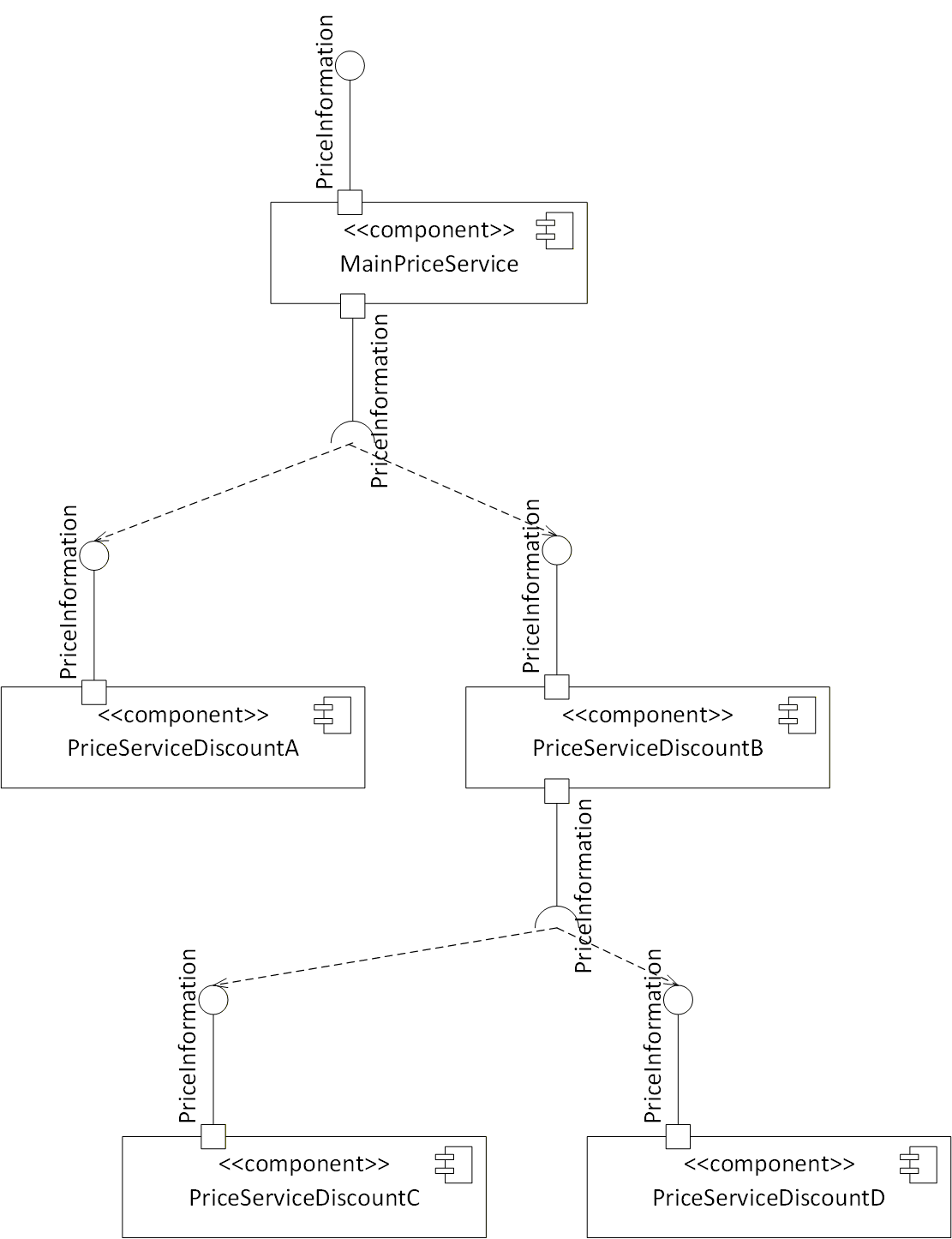
Note that each communication between the price services is potentially a remote operation and may take some time. Therefore, caching information from different price services may be required in order to have a reasonable response time for the main price service. Cashing strategies are vendor-specific.
Annex C Requirements on Power Supply of Components of a Vending Machine (Normative)
Power supply requirement can change by order of magnitude on different machine configurations.
The common configuration for Vending Machines, all components are located inside a single housing, which is built around the Machine Engine; on small Vending Machines the most power is needed by the actuators on the Machine Engine.
On the existing MDB / ICP protocol (but also on previous Vending related protocols), the power supply for the payment devices is provided by the Machine Engine.
The power distribution inside the machine shall follow the specification from chapter 4.1 and 4.3 of MDB / ICP specification version 4.3; the only change shall be a two-pin connector instead of a 6-pin connector.
On the specification there is no minimum requirement for the needed power the Machine Engine has to provide, the Machine Engine manufacture has to provide its own power rating.
If any additional device requires more than the provided power rating, as stated in MDB Chapter 4.1, the device manufacturer shall provide its own power supply solution.
Annex D Requirements on Network Infrastructure of Components of a Vending Machine (Normative)
The communication infrastructure between the different OPC UA components is IP based, which enable all components to be installed as software components on a single hardware able to run the client/server applications using the localhost interface.
The addition of a component which is also a hardware part, require to add ethernet connections between the parts.
The hardware interface used by the Vending Machine components shall be 802.3 (either 10 or 100 (803.3u) or 1000BaseT (802.3ab)), using the standard RJ45 interface connector and the cables specified by IEEE 802.3.
Physically connecting more than two devices requires the addition of a hub or switch device; powered from the main power source inside the machine (see Annex C); to enable easy integration, the space for the Hub must be provided inside the Vending Machine enclosure.
A preferred solution will be each device has a couple of Ethernet ports with switch capabilities between the two ports; in this way adding a cable is the only needed addition to add any number of devices.
Device manufactures which can make their devices as combination of different components can use any way to connect their components, but finally has to provide an Ethernet interface towards with OPC UA protocol to connect to the outside word.
Given the system is IP based, other functions can run on the same interface. A good example is the need for external connectivity: if one the devices connected to the network has external connection capabilities, is can be useful to make these capabilities accessible to all other components: the needed information is the device IP address and a proper configuration of the bridge/router/gateway which enable the sharing of this interface. Even if this is not a requirement for this document, this capability is highly recommended; the major issue to solve is about the data transfer accounting when different actors are using the same communication channel.
_____________
Annex E Initial security setup of components and setting up a Vending Machine (Informative)
E.1 Overview
This informative annex describes how components vendors can distribute their components in some initial configuration and mechanisms system integrators can use to configure those components in order to allow them to communicate via OPC UA.
E.2 Initial configuration of Components
All components defined in this specification contain an OPC UA server part and according to the defined profiles implement the global certificate management server facet that allows a GDS (see OPC 10000-12) to configure the security certificates of the component via the OPC UA server. Those components can be shipped in a provisioning mode (see OPC 10000-12) that allows an initial Client (of the GDS) to connect and do the configuration of the certificates. Typically, a component does not provide its intended functionality while in provisioning mode in order to force a correct configuration of security.
E.3 Initial integration of Components
When setting up a Vending Machine the components of the Vending Machine need to be configured with respect to their security certificates in order to allow them to communicate with each other. The components implement the global certificate management server facet (see E.2) that allows the configuration via an off-the-shelf GDS product or tailored applications to configure a vending machine, using the standardized OPC UA interfaces (see OPC 10000-12). When using this, it is reasonable to use the concept of a CA (certificate authority) to sign certificates instead of using self-signed certificates. That implies, that all components trust the CA and get their certificates signed by the CA, and thereby they trust each other. More precise, an GDS can manage several certificate groups. The scope of such a group can be handled differently. The most restrictive configuration would be to put all components of a Vending Machine into a certificate group. This guarantees that only the components of the Vending Machine can communicate to each other. But other settings are possible, as well. For example, an Operator may choose to put all its components into one certificate group or all components of a specific type of Vending Machine, etc. This is decreasing the security to a certain degree, but simplifies the usage.
All components of a Vending Machine need to be integrated into the same certificate group, and switched from provisioning mode into normal operation mode (that may be done by restarting the component after the certificates have been configured). Afterwards, they will be able to communicate to each other. The Vending Machine can be configured and deployed in its intended destination.
E.4 What needs to be considered during runtime?
A GDS or tailored application is not required to run 24/7 and access the OPC UA servers it manages all the time. When only considering the certificate management, its only tasks after the initial configuration is to renew the certificates before they expire and to update the CRL (certificate revocation list: certificates, that have been signed, have still a valid lifetime but should not be trusted anymore).
The lifetime of a certificate can be configured in the GDS. Typically, this is rather short (1-3 month) in order to avoid that the CRL gets too large. If the scope of a certificate group is a Vending Machine, where typically components are not coming and going, the length of certificates may be made much longer (years), since the CRL will often not have any entries at all.
That implies that a GDS does neither need to run inside a Vending Machine nor have remote access to the Vending Machine under normal operations. It may need to be available when reconfiguring a Vending Machine or replacing components (see E.5). And it needs to be used to renew the certificates before expiring, which depends on the configured lifetime of the certificates and may be executed during normal maintenance operations of a Vending Machine or remotely, if the Vending Machine is connected to the Internet. OPC UA defines an CertificateExpirationAlarmType (see OPC 10000-12) that can be used to warn before the certificate expires.
E.5 Adding / removing / replacing Components into a configured Vending Machine
When a component should be added to an existing Vending Machine it needs to be added to the certificate group by the GDS or specialized application. This does not require access by the GDS to the other components of the Vending Machine, i.e., this could be done on a workbench before the technician travels to the location of the Vending Machine. By signing the certificate, the new component will be accepted as communication partner from the other components of the Vending Machine.
When a component gets removed from the Vending Machine, ideally it should be removed from the certificate group and therefore be added to the CRL, while the lifetime of the signed certificate is still valid. This requires, that the GDS or specialized application has access to all the other components of the Vending Machine. This is the most secure option. Alternatively, the component gets reset and the reset reliably removes the certificate (including the private key) from the component. If this process is trusted, the component can be removed and reset in order to disable it talking to the other components of the Vending Machine. If the component gets removed because it is broken and cannot be reset, the memory section should be physically destroyed in order to avoid security risks.
Replacing a component is combining adding and removing a component, so the above text can be applied.
Annex F Default IP Addresses for components of a Vending Machine (Informative)
This informative annex describes default IP addresses component providers may use when delivering their components (see Table 145). How to change the IP addresses is vendor-specific. The OPC UA servers should, as default, use port 4840.
| Component | IP Address | Network Mask | Gateway |
| Machine Engine | 192.168.101.2 | 255.255.255.0 | 192.168.101.1 |
| Payment Service | 192.168.101.3 | 255.255.255.0 | 192.168.101.1 |
| Price Service | 192.168.101.4 | 255.255.255.0 | 192.168.101.1 |
| UI | 192.168.101.5 | 255.255.255.0 | 192.168.101.1 |
| Audit Collect | 192.168.101.6 | 255.255.255.0 | 192.168.101.1 |
| Tax Audit | 192.168.101.7 | 255.255.255.0 | 192.168.101.1 |
| Bill Payment Device | 192.168.101.8 | 255.255.255.0 | 192.168.101.1 |
| Coin Payment Device | 192.168.101.9 | 255.255.255.0 | 192.168.101.1 |
| Cashless Payment Device | 192.168.101.10 | 255.255.255.0 | 192.168.101.1 |
If a piece of hardware is implementing more than one component, it is vendor-specific which IP address should be used as default. For example, if the machine engine and payment service are implemented in one OPC UA server, the default IP address may either be 192.168.101.2 or 192.168.101.3.
Using dynamic IP resolution, etc. requires a vendor-specific configuration of the components. The default IP addresses are intendent to work in simple environments without configuration of network addresses.
Agreement of Use
COPYRIGHT RESTRICTIONS
This document is provided "as is" by the OPC FOUNDATION and the EUROPEAN VENDING & COFFEE ASSOCIATION.
Right of use for this specification is restricted to this specification and does not grant rights of use for referred documents.
Right of use for this specification will be granted without cost.
This document may be distributed through computer systems, printed or copied as long as the content remains unchanged and the document is not modified.
OPC FOUNDATION and EUROPEAN VENDING & COFFEE ASSOCIATION do not guarantee usability for any purpose and shall not be made liable for any case using the content of this document.
The user of the document agrees to indemnify OPC FOUNDATION and EUROPEAN VENDING & COFFEE ASSOCIATION and their officers, directors and agents harmless from all demands, claims, actions, losses, damages (including damages from personal injuries), costs and expenses (including attorneys' fees) which are in any way related to activities associated with its use of content from this specification.
The document shall not be used in conjunction with company advertising, shall not be sold or licensed to any party.
The intellectual property and copyright is solely owned by the OPC FOUNDATION and the EUROPEAN VENDING & COFFEE ASSOCIATION.
PATENTS
The attention of adopters is directed to the possibility that compliance with or adoption of OPC or EUROPEAN VENDING & COFFEE ASSOCIATION specifications may require use of an invention covered by patent rights. OPC Foundation or EUROPEAN VENDING & COFFEE ASSOCIATION shall not be responsible for identifying patents for which a license may be required by any OPC or EUROPEAN VENDING & COFFEE ASSOCIATION specification, or for conducting legal inquiries into the legal validity or scope of those patents that are brought to its attention. OPC or EUROPEAN VENDING & COFFEE ASSOCIATION specifications are prospective and advisory only. Prospective users are responsible for protecting themselves against liability for infringement of patents.
WARRANTY AND LIABILITY DISCLAIMERS
WHILE THIS PUBLICATION IS BELIEVED TO BE ACCURATE, IT IS PROVIDED "AS IS" AND MAY CONTAIN ERRORS OR MISPRINTS. THE OPC FOUDATION NOR EUROPEAN VENDING & COFFEE ASSOCIATION MAKES NO WARRANTY OF ANY KIND, EXPRESSED OR IMPLIED, WITH REGARD TO THIS PUBLICATION, INCLUDING BUT NOT LIMITED TO ANY WARRANTY OF TITLE OR OWNERSHIP, IMPLIED WARRANTY OF MERCHANTABILITY OR WARRANTY OF FITNESS FOR A PARTICULAR PURPOSE OR USE. IN NO EVENT SHALL THE OPC FOUNDATION NOR EUROPEAN VENDING & COFFEE ASSOCIATION BE LIABLE FOR ERRORS CONTAINED HEREIN OR FOR DIRECT, INDIRECT, INCIDENTAL, SPECIAL, CONSEQUENTIAL, RELIANCE OR COVER DAMAGES, INCLUDING LOSS OF PROFITS, REVENUE, DATA OR USE, INCURRED BY ANY USER OR ANY THIRD PARTY IN CONNECTION WITH THE FURNISHING, PERFORMANCE, OR USE OF THIS MATERIAL, EVEN IF ADVISED OF THE POSSIBILITY OF SUCH DAMAGES.
The entire risk as to the quality and performance of software developed using this specification is borne by you.
RESTRICTED RIGHTS LEGEND
This Specification is provided with Restricted Rights. Use, duplication, or disclosure by the U.S. government is subject to restrictions as set forth in (a) this Agreement pursuant to DFARs 227.7202-3(a); (b) subparagraph (c)(1)(i) of the Rights in Technical Data and Computer Software clause at DFARs 252.227-7013; or (c) the Commercial Computer Software Restricted Rights clause at FAR 52.227-19 subdivision (c)(1) and (2), as applicable. Contractor / manufacturer are the OPC Foundation, 16101 N. 82nd Street, Suite 3B, Scottsdale, AZ, 85260-1830.
COMPLIANCE
The combination of EUROPEAN VENDING & COFFEE ASSOCIATION and OPC Foundation shall at all times be the sole entities that may authorize developers, suppliers and sellers of hardware and software to use certification marks, trademarks, or other special designations to indicate compliance with these materials as specified within this document. Products developed using this specification may claim compliance or conformance with this specification if and only if the software satisfactorily meets the certification requirements set by EUROPEAN VENDING & COFFEE ASSOCIATION or the OPC Foundation. Products that do not meet these requirements may claim only that the product was based on this specification and must not claim compliance or conformance with this specification.
Trademarks
Most computer and software brand names have trademarks or registered trademarks. The individual trademarks have not been listed here.
GENERAL PROVISIONS
Should any provision of this Agreement be held to be void, invalid, unenforceable, or illegal by a court, the validity and enforceability of the other provisions shall not be affected thereby.
This Agreement shall be governed by and construed under the laws of Germany.
This Agreement embodies the entire understanding between the parties with respect to, and supersedes any prior understanding or agreement (oral or written) relating to, this specification.
ISSUE REPORTING
If an error or problem is found in this specification, the UANodeSet, or any associated supplementary files, it should be reported as an issue.
The reporting process can be found here: https://opcfoundation.org/resources/issue-tracking/
The Link to the issue tracking project for this document is here:
https://mantis.opcfoundation.org/set_project.php?project_id=256&make_default=no
Revision 1.0 Highlights
The following table includes the Mantis issues resolved with this revision.
| Mantis ID | Scope | Summary | Resolution |
| - | Feature | Initial Version |