6.3 Interactions between components
6.3.1 General Considerations on handling method processing
In OPC UA, each service call is executed asynchronously between Client and Server. This is also true for calling an OPC UA Method from a Client. However, a Method call is expected to return a result rather fast (milliseconds or seconds, when provided to a UI it should be milliseconds up to small fractions of a second), not after minutes. Therefore, in cases where the actual execution like creating a product may take longer, the Method is returning a result immediately, before the execution has been done, and the status of the execution is provided by some Variables. This is applied in various places in this specification.
In order to not lose any data, Clients should subscribe to the status Variables to get notified about all changes of the status.
6.3.2 Requesting and Delivering Products
6.3.2.1 Overview
In the following sections, the interactions for providing the main functionality of a Vending Machine, the requesting and delivering of products, is described.
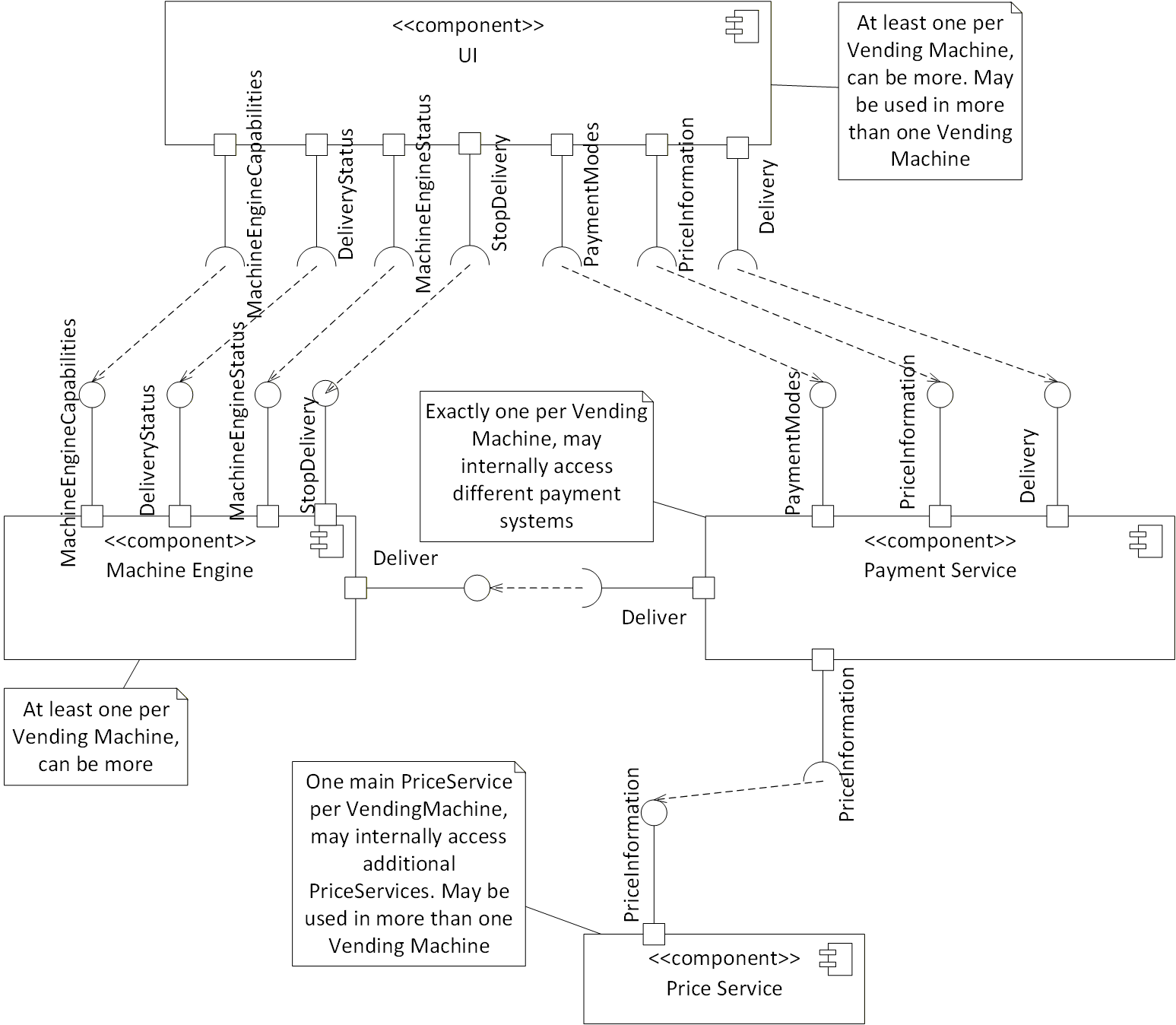
In Figure 16, an overview of the needed components and the interfaces used is given. The interface names reflect the Object names of the corresponding ObjectTypes. To emphasise, that the UI is accessing the status of the Delivery Object of the machine engine, but not calling the Deliver Method, the DeliveryStatus interface was introduced. Same applies for StopDelivery, referencing to the StopDelivery Method of the Delivery Object of the machine engine.
A Vending Machine contains one main price service, which internally may use additional price services (see Annex B).
6.3.2.2 TransactionId
A TransactionId (UInt64) is used to uniquely identify a deliver request. It is generated by the payment service and distributed to other components of the Vending Machine. The uniqueness can only be guaranteed for a certain amount of time in order to identify different deliver requests at the same time, which must be unique at least for the whole time the transaction is active. A reasonable strategy to assign the TransactionId is increasing the number every time by one and roll over to 0 at the maximum of UInt64. However, the strategy of assigning a TransactionId is vendor-specific and other components shall not make assumptions about this.
The TransactionId will not protect against false delivery request; there is protection given using the OPC UA security mechanisms, i.e., only specific Clients can communicate and request deliveries.
6.3.2.3 BasketId
A Vending Machine may support the delivery of many products at once. This can be handled in two ways.
Either by defining selections that consists of various products (e.g., a menu). In that case, it is handled like any other delivery, potentially using different outputs to deliver more than one product.
Or it may support a basket, where the user can select several products into one basket and according to the content the user may get a discount. In that case, a BasketId (UInt64) is used to uniquely identify the basket. It is generated by the payment service and distributed to other components of the Vending Machine. The same assumptions for uniqueness apply as for the TransactionId. In order to support a BasketId, the Delivery Object of the payment service needs to be of type PaymentServiceBasketDeliveryType.
Not all payment services may support basket functionality.
6.3.2.4 Startup of UI
When the UI gets started, it needs to connect to the machine engine(s) it is interested in. Depending on the UI this may be based on user interactions selecting the interesting machine engine(s).
The UI needs to read the information of the Capabilities Object of the machine engine. It may cache the information and just check the SelectionListVersion, if the configuration has changed. The UI needs to subscribe to changes of the status of the machine engine (see 6.3.2.5) to display information like a certain product is not available.
Given the SelectionId and AvailableOptionIds provided by Capabilities are only machine specific and used primarily to provide the needed info for the Deliver method, the UI need to map using separate tables (not part of this specification, typically generated by the back-end software and called plan-o-grams) the SelectionId and AvailableOptionIds to the correct graphic resources in the UI itself.
The UI needs to access the price information of the payment service by accessing the PriceInformation Object of the payment service, and potentially the PaymentModes Object to get information about the available payment modes and their status.
The price for a product is taken by combining the selection parameters (SelectionId, and Options which are machine specific) and the MachineEngineProductInstanceUri to identify the machine engine and the plan-o-gram which defines the final product to be delivered. Typically, this is done in the UI by loading the plan-o-gram into the UI.
If the price service is located on the same hardware of a vending machine, for the vending machine itself the SelectionId and Options have a defined and unique value being connected with the vending machine where they are implemented. Still, given price services can be chained, if chaining is implemented the price search can still be extended.
Any allergens, nutrition values and similar information associated with a product are not provided by mechanisms of this specification, but are typically provided by the plan-o-gram loaded into the UI.
6.3.2.5 Update UI with status of machine engine
While connected to a machine engine, the UI needs to check the status of the machine engine, by subscribing to the corresponding Variables of the Status Object of the machine engine.
In addition, it needs to subscribe to the DeliveryRequests and DeliveryProgress Variables of the Delivery Object of the machine engine. This may be done when connecting to the machine engine and is required once the UI has started a deliver request via the payment service using the DeliverRequest Method of the Delivery Object of the payment service.
6.3.2.6 Update UI with status of payment service
In order to display the price for products the UI needs to get the price information of the products. This is done calling the corresponding Methods of the PriceInformation Object of the payment service. The price may depend on the UserId and PaymentMode, therefore the UI needs to call the Methods each time, this is changing. In addition, the UI should subscribe to Events of the PriceChangeEventType to get the information, when the price information was changed and the Methods need to be called, again.
When the UI has requested a delivery, it needs to subscribe to the TransactionProgress Variable of the Delivery Object to get updates on the progress of the payment.
In case a basket is requested, it needs to subscribe to the overall basket status in the BasketProgress Variable.
In case the user is filling a basket, the UI needs to call the GetPriceForBasket Method of the PriceInformation Object each time the content of the basket is changing (adding or removing items) to get the price for the current basket.
The UI may use the Status Variable of the Status Object to display the overall status of the Vending Machine.
6.3.2.7 Requesting a delivery by the UI
UI calls payment service (DeliverRequest Method)
When a user selects a product to be delivered, the UI calls the DeliverRequest Method of the Delivery Object of the payment service. This includes the last price information recovered by the last PriceInformation Object, the PaymentMode selected, and a generic UserId (the meaning of the variable is custom specific, the effect is to possibly change the price). The payment service generates a TransactionId and returns this to UI.
The payment service may already do some of the following steps before returning the DeliverRequest Method call and potentially return a failure status instead of the TransactionId. This is up to the implementation of the payment service. However, it needs to be considered that the Method call should return rather fast (as fast as possible, not waiting till the end of the delivery, maybe milliseconds), not after minutes (see also 6.3.1).
Payment service checks correct price (internal or via price service)
The payment service checks the correctness of the price provided by the UI. Since the payment service needs to maintain the current price for the UI anyhow, it can check its local data. Alternatively, the payment service may access the primary price service again to validate the price. When the price is not correct, the payment service does not continue the deliver request and provides the corresponding status of the TransactionId in its TransactionProgress Variable.
Payment service collects payment (internal functionality)
The payment service collects the payment from the user. How this is done, is up to the nature of the payment service. It may be collecting coins or bills, charging a credit card, etc. Once successfully collected, the payment service changes the status of the TransactionId in its TransactionProgress Variable. If the payment process gets somehow aborted (implementation specific), the payment service does not continue the deliver request and provides the corresponding status of the TransactionId in its TransactionProgress Variable. The UI may handle this transparent to the user and do another deliver request with a different payment mode.
Payment service triggers delivery in machine engine (Deliver Method)
Once the payment is collected, the payment service triggers the delivery at the machine engine by calling the Deliver Method of the Delivery Object of the machine engine. It provides the TransactionId so that the machine engine can provide the TransactionId in its DeliveryRequests and DeliveryProgress Variables.
Delivery by machine engine (internal functionality)
The machine engine potentially creates the product to be delivered (e.g., coffee) and delivers it to the user. How this is done is vendor-specific. Via the DeliveryProgress Variable it informs the UI and the payment service about the status of the delivery.
Once the delivery was successfully done, the payment service informs the UI about closure of the payment via its TransactionProgress Variable.
When the delivery is aborted, for example due to an error in the machine engine, the machine engine informs both UI and payment service via the DeliveryProgress Variable. In this case, the payment service triggers (if possible) a refund of the payment to the user. How this is done, is specific to the payment service. The payment service informs the UI about this using its TransactionProgress Variable.
In both cases, the successful delivery or the abortion, the payment service and the machine engine will clean up their status Variables and remove the information about the TransactionId. The duration before doing this is vendor-specific.
6.3.2.8 Requesting a delivery stop by the UI
When a delivery has been requested by the UI as described in 6.3.2.7 in step 1, the delivery may be cancelled by the CancelDeliverRequest Method.
When the CancelDeliverRequest Method is called before the payment is collected by the payment service (step 3 in 6.3.2.7), the Method call should be successful. In that case, the payment service does not continue the deliver request and provides the corresponding status of the TransactionId in its TransactionProgress Variable.
When the CancelDeliverRequest Method is called while or after the payment gets collected by the payment service (step 3 in 6.3.2.7), but before requesting the deliver in the machine engine, and the payment service is able to refund the payment, the Method call should be successful. In that case, the payment service triggers a refund, does not continue the deliver request and provides the corresponding status of the TransactionId in its TransactionProgress Variable.
When the CancelDeliverRequest Method is called after the payment service has called the Deliver Method of the machine engine (step 4 in 6.3.2.7), the Method call should fail and no cancellation is possible anymore.
6.3.2.9 Requesting a basket delivery by the UI
In order to support this functionality, the Delivery Object of the payment service needs to be of type PaymentServiceBasketDeliveryType.
UI calls payment service (DeliverBasketRequest Method)
When a user selects the products to be delivered, the UI calls the DeliverBasketRequest Method of the Delivery Object of the payment service. This includes the price information as displayed to the user. The payment service generates a TransactionId per item of the basket and a BasketId and returns this to UI.
The payment service may already do some of the following steps before returning the DeliverBasketRequest Method call and potentially return a failure status instead of the TransactionId. This is up to the implementation of the payment service. However, it needs to be considered that the Method call should return rather fast (milliseconds or seconds), not after minutes.
Payment service checks correct price (internal or via price service)
The payment service checks the correctness of the price provided by the UI. Since the payment service needs to maintain the current price for the UI anyhow, it can check its local data. Alternatively, the payment service may access the primary price service again to validate the price. When the price is not correct, the payment service does not continue the deliver request and provides the corresponding status of the BasketId in its BasketProgress Variable and in addition per item the TransactionIds in its TransactionProgress Variable.
Payment service collects payment (internal functionality)
The payment service collects the payment from the user. How this is done, is up to the nature of the payment service. It may be collecting coins or bills, charging a credit card, etc. Once successfully collected, the payment service changes the status of the TransactionIds in its TransactionProgress Variable and the overall status of the BasketId in its BasketProgress Variable. If the payment of the whole basket is handled at once, that requires that the TransactionProgress of all TransactionIds of the basket shall change at the same time. If the payment process gets somehow aborted (implementation specific), the payment service does not continue the deliver request and provides the corresponding status of the TransactionIds in its TransactionProgress Variable and the overall status of the BasketId in its BasketProgress Variable. The UI may handle this transparent to the user and do another basket deliver request with a different payment mode.
Payment service triggers delivery in machine engine (Deliver Method)
Once the payment is collected, the payment service triggers the delivery per item of the basket at the corresponding machine engines by calling the Deliver Method of the Delivery Object of the machine engine per item. It provides a TransactionId per item of the basket, so that the machine engine can provide the TransactionId for each item in its DeliveryRequests and DeliveryProgress Variables. Whether the payment service calls the Deliver Method for all items in parallel or serializes by some internal logic the requests, is an implementation detail of the payment service.
Delivery by machine engine per item of the basket (internal functionality)
The machine engine potentially creates the product to be delivered (e.g., coffee) and delivers it to the user. How this is done is vendor-specific. Via the DeliveryProgress Variable it informs the UI and the payment service about the status of the delivery.
Once the delivery of all items was successfully done, the payment service informs the UI about closure of the payment via its TransactionProgress Variable.
When the delivery is aborted, for example due to an error in the machine engine, the machine engine informs both UI and payment service via the DeliveryProgress Variable. In this case, the payment service triggers a refund of the payment to the user. How this is done, is specific to the payment service. The payment service informs the UI about this using its TransactionProgress Variable. In addition, it updates the overall status of the basket in the BasketProgress Variable.
In both cases, the successful delivery or the abortion, the payment service and the machine engine will clean up their status Variables and remove the information about the TransactionId. The duration before doing this is vendor-specific.
Clean up of the basket information (internal functionality)
Once the delivery of all items of the basket has been finalized (either successful or not), the payment service updates the BasketProgress Variable. The payment service will clean up this Variable and remove the information about the BasketId. The duration before doing this is vendor-specific.
6.3.2.10 Requesting a basket delivery stop by the UI
When a basket delivery has been requested by the UI as described in 6.3.2.9 in step 1, the delivery may be cancelled by the CancelDeliverBasketRequest Method.
When the CancelDeliverBasketRequest Method is called before the payment is collected by the payment service (step 3 in 6.3.2.9), the Method call should be successful. In that case, the payment service does not continue the deliver request and provides the corresponding status of the TransactionIds in its TransactionProgress Variable and the overall status of the BasketId in its BasketProgress Variable.
When the CancelDeliverBasketRequest Method is called while or after the payment gets collected by the payment service (step 3 in 6.3.2.9), but before requesting any deliver in any machine engine, and the payment service is able to refund the payment, the Method call should be successful. In that case, the payment service triggers a refund, does not continue the deliver request and provides the corresponding status of the TransactionIds in its TransactionProgress Variable and the overall status of the BasketId in its BasketProgress Variable.
When the CancelDeliverBasketRequest Method is called after the payment service has called the Deliver Method of any machine engine (step 4 in 6.3.2.9) for any of the TransactionIds of the basket, the Method call should fail and no cancellation is possible anymore.
6.3.3 Handling Payment Devices
6.3.3.1 Overview
A Vending Machine may have several payment devices responsible to handle money, either received from a customer or provided to the customer. Those devices may be handled in a proprietary way by the payment service, or accessed using a standardized OPC UA information model defined in this specification. The type hierarchy for those devices is introduced in 6.2.3. The following clauses describe the interactions between the payment services and the different types of payment devices.
6.3.3.2 Coin devices
The payment service reads the configuration of the payment device like the SupportedAssetList and the SlotConfigurationList. It may monitor the SupportedAssetListVersion to get notified, when the configuration has changed. It should monitor the Status of the payment device and take appropriate actions if it changes. The AssetConfigurationList defines how to handle specific coins or tokens and can be changed by the payment service using the ChangeAssetConfigurationList Method.
By configuring the AssetConfigurationList to reject all supported assets, the payment service can effectively disable a payment device.
By monitoring the CurrentAvailableValue the payment service knows how much money is currently in the payment device that a customer has already added to the payment device and can be used for a delivery. By calling the ConsumeAvailableValue Method, the payment service can actually consume part of the CurrentAvailableValue.
By monitoring the CurrentSlotContentList the payment service knows the available money currently in the payment device for payout. By monitoring the PayoutStatus the payment service knows about the status of any payout, that can be triggered by the PayoutByValue and PayoutBySupportedAssetList Methods.
A payout does not change the CurrentAvailableValue. If the payment service wants to trigger a logic, that a payout does decrease the CurrentAvailableValue, it needs to call the ConsumeAvailableValue Method in addition to the Method for the payout.
6.3.3.3 Bill devices
The payment devices supporting bills have some additional functionality to that the payment devices for coins support. They allow to cancel a running payout with the CancelPayout Method and provide information about the current bill or token in the escrow. With the HandleBillFromEscrow Method, the payment service can control what the payment device is supposed to do with the current bill in the escrow.
6.3.3.4 Cashless devices
The payment service supervises information from the cashless payment devices, like the UserId, MaxRecharge and CurrentContentOnCard Variables.
The payment service may charge money with the Approve Method. The ApproveStatus Variable provides the result, as the approval may take time. While the approval process is ongoing, the payment service may try to cancel it by calling the CancelApproval Method.
The payment service may add money to the card with the Recharge Method. The RechargeStatus Variable provides the result, as the recharging may take time.
The payment service may refund the last approved charging with the RefundLast Method. The RefundLastStatus Variable provides the result, as the refunding may take time.
The payment service may enable or disable the payment device with the EnableOrDisable Method. The IsEnabled Variable provides the result, as the operation may take time.
6.3.4 Audit
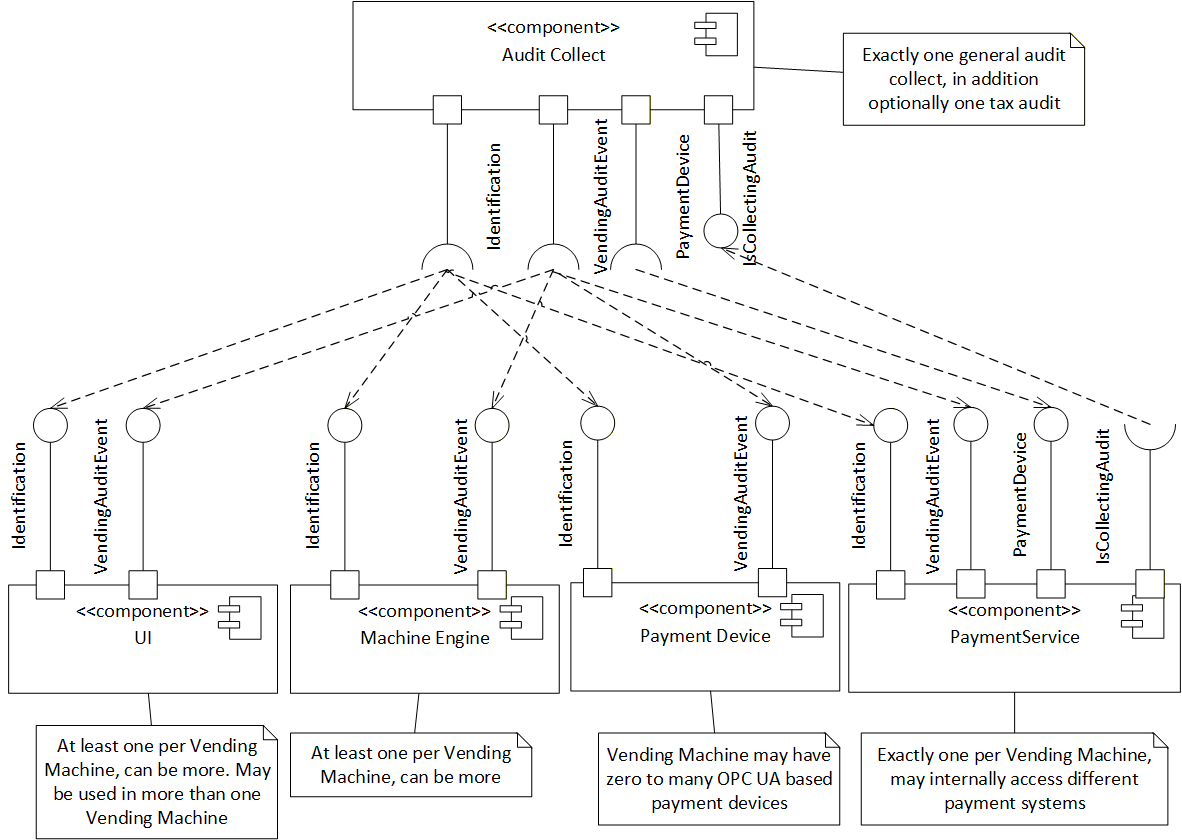
Audit information is provided by OPC UA Events. The VendingBaseAuditEventType defined in 7.26 and its subtypes are used for all audit information. The general audit collect is supposed to subscribe to all Events of VendingBaseAuditEventType from all UIs, all machine engines, the payment service and all payment devices having their own OPC UA Server of the Vending Machine. The optional, specialized tax audit component would only subscribe to Events relevant for the tax regulations.
An audit collect may need identification information of the components its accesses, and as special case for the payment service also the identification of the payment devices. This is provided by the IdentificationType.
For some payment devices, it is required to access configuration information in order to interpret the audit information. Potentially, also the current content of those payment devices needs to be accessed, which in principle could be calculated out of the Events if the initial content is known. This information is provided by Objects of PaymentDeviceType.
As a Vending Machine may be configured not to work when no audit is collected, the audit collect provides a IsCollectingAudit Variable which may be supervised by the payment service, which may reject new requests while the audit is not collected.
In Figure 17, an overview of the needed components and the interfaces used is given.
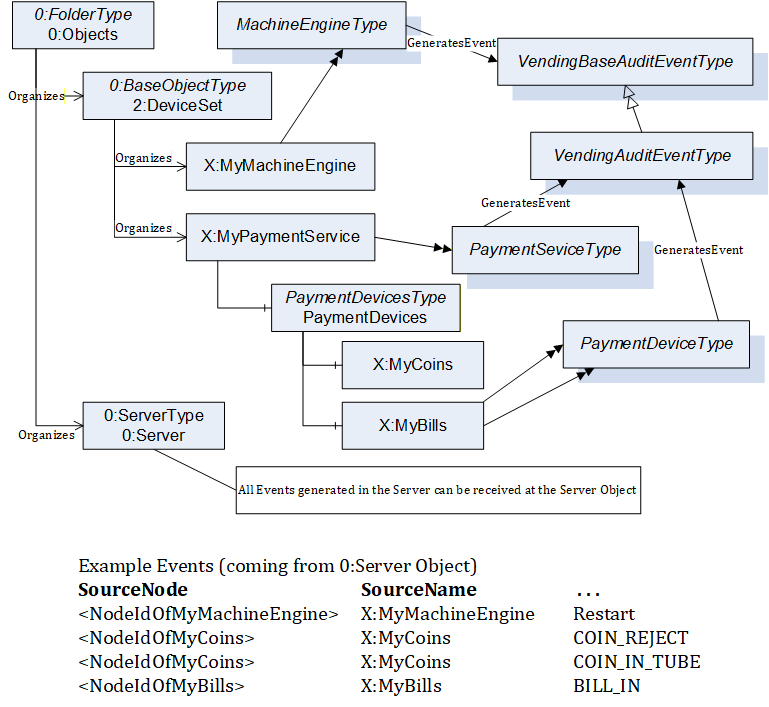
An OPC UA Server may represent several components of a Vending Machine, and as a special case, for the payment service, the payment devices. All those components individually generate Events of VendingBaseAuditEventType, in order to relate the Events to the corresponding component. The audit collect should subscribe to the 0:Server Object and filter for Events of VendingBaseAuditEventType to receive all audit information of the individual components of an OPC UA Server. In Figure 18, an example is given of an OPC UA Server AddressSpace, providing a machine engine and a payment service with two payment devices. X:MyMachineEngine, X:MyPaymentService, X:MyCoins and X:MyBills are all of TypeDefinitions generating Events of VendingBaseAuditEventType. At the bottom of Figure 18 some examples of Events are sketched, showing how the SourceNode and SourceName of the Events are identifying the source of the Events.
6.3.5 Initial Connection, reconnecting, and ConfigurationChangedEvents
Components like audit collect may want to keep track of information of components of a Vending Machine, and potentially subcomponents. Therefore, when initially connecting to an OPC UA Server representing one or several components of a Vending Machine, those components need to browse and read the required information. For example, audit collect does need some information, to interpret the audit information. Therefore, it may need to browse the PaymentDevices and PaymentModes of the payment service. In order to keep track of changes of the configuration of components of a Vending Machine, the audit collect should subscribe to ConfigurationChangedEvents, and in case it receives such an Event re-browse and reread the information of that component. Although the configuration of a Vending Machine is typically quite static, it may be that at restart some devices like a bill validator take a much longer time to restart, and therefore get added to the configuration while the Vending Machine is already running.
When a component like audit collect is reconnecting to an OPC UA Server representing one or several components of a Vending Machine, there are two scenarios:
The connection could be re-established without loss of data. That means, the subscription is still running and the data indicate no loss of data. In that case, the component does not need to do any specific actions.
The connection could not be re-established or some losses of data have been indicated. In that case, the component needs to reread the information from the OPC UA Server.
6.3.6 Configuration
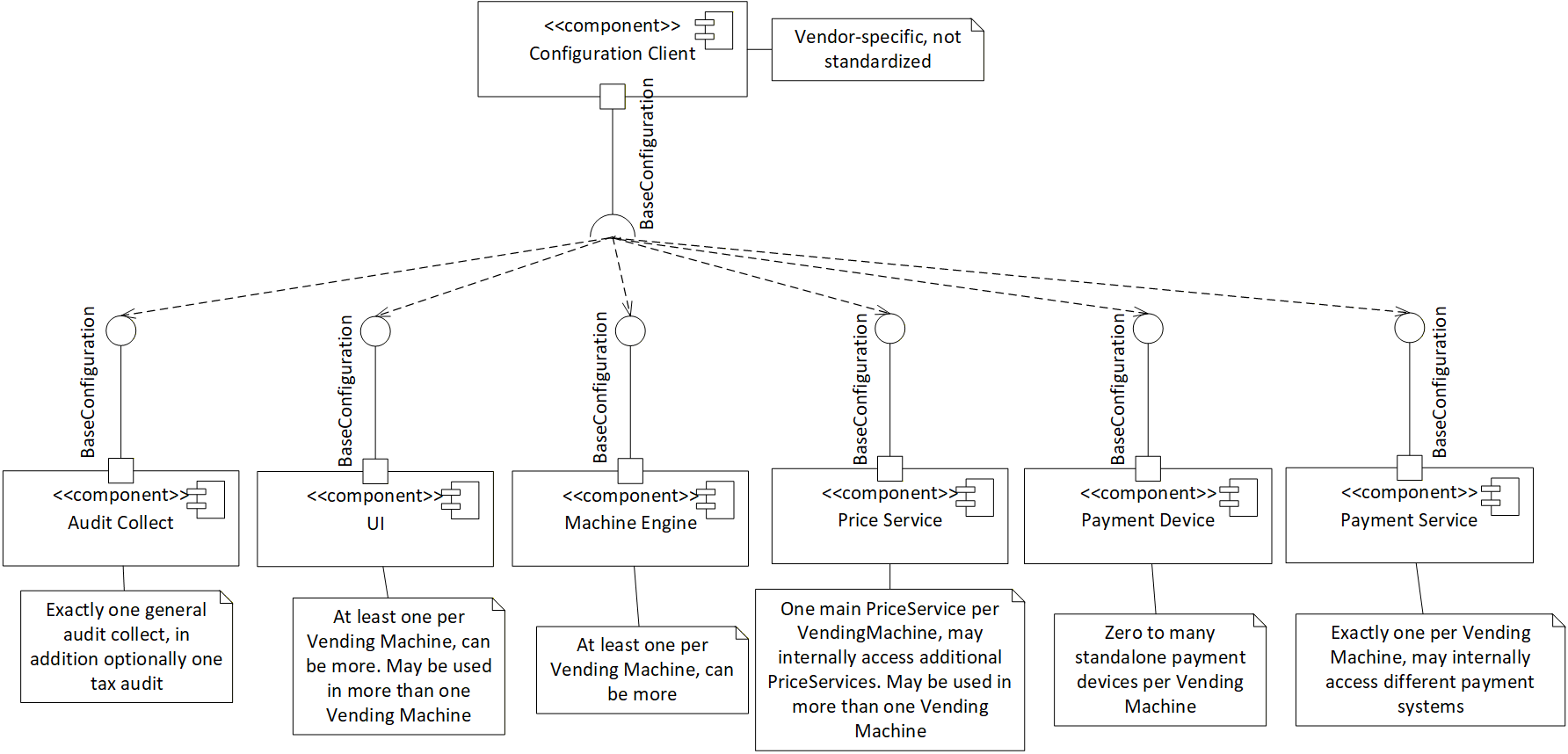
The configuration of components of a Vending Machine is vendor-specific and not defined in this specification. This specification does define an entry point where vendors are supposed to manage their configuration options, an Object called Configuration of the BaseConfigurationType defined in 7.3.
In Figure 19 an overview of the needed components and the interfaces used is given. The Configuration Client component is vendor-specific and not further described in this specification.