
6 WoT Connectivity Information Model overview
6.1 General
The WoT specification defines both a TD and a Protocol Binding.
The WoT TD is defined here:
https://www.w3.org/TR/wot-thing-description/#introduction-td
The WoT Protocol Binding is defined here:
https://www.w3.org/TR/wot-binding-templates/#binding-overview
The goal of this Companion Specification is to create a thin interface for configuring industrial connectivity software in a standardized way. By keeping the interface to a minimum, the chances of adoption by the industry are increased.
{
  "@context": [
    "https://www.w3.org/2022/wot/td/v1.1"
  ],
  "id": "urn:pac4200",
  "securityDefinitions": {
    "nosec_sc": {
      "scheme": "nosec"
    }
  },
  "security": [
    "nosec_sc"
  ],
  "@type": [
    "Thing"
  ],
  "name": "modbus-pac4200-sn324",
  "base": "modbus+tcp://192.168.178.94:502/1",
  "title": "Siemens SENTRON PAC4200",
  "properties": {
    "Voltage": {
      "type": "number",
      "readOnly": true,
      "observable": true,
      "forms": [
        {
          "href": "7?quantity=2",
          "op": [
            "readproperty",
            "observeproperty"
          ],
          "modv:type": "xsd:float",
          "modv:entity": "holdingRegister",
          "modv:pollingTime": 2000
        }
      ]
    }
  }
}
6.2 WoT Connectivity entry point
The entry point of this specification in a Server's object hierarchy is called "WoTAssetConnectionManagement" it is an instance of WoTAssetConnectionManagementType which is defined in 6.3.1
The AddressSpace for the entry point is shown in Figure 6.
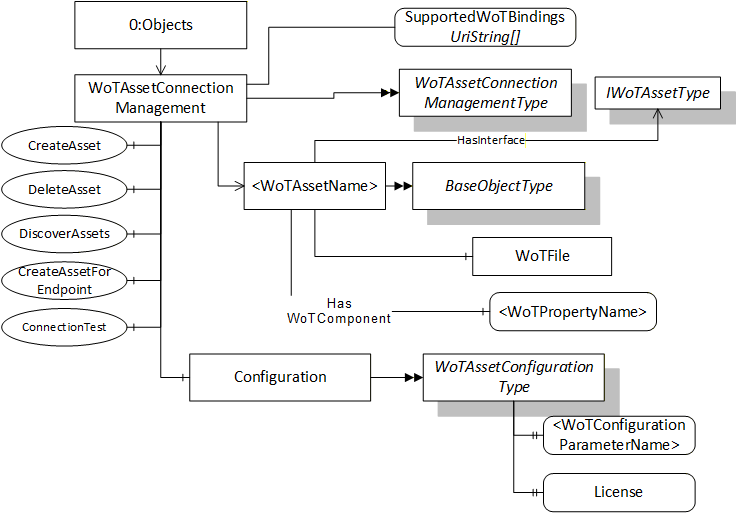
The WoTAssetConnectionManagement Node is formally defined in Table 4.
| Attribute | Value | ||
| BrowseName | WoTAssetConnectionManagement | ||
| References | NodeClass | BrowseName | |
|---|---|---|---|
| OrganizedBy by the 0:Objects Folder defined in OPC 10000-5 | |||
| 0:HasTypeDefinition | ObjectType | WoTAssetConnectionManagementType | |
| Conformance Units | |||
|---|---|---|---|
| WoT Connectivity Base Functionality |
6.3 OPC UA Information Model
6.3.1 WoTAssetConnectionManagementType
6.3.1.1 Definition
The WoTAssetConnectionManagementType ObjectType represents a set of WoTAssets that may be managed by a Server. It is defined in Table 5.
| Attribute | Value | |||||
| BrowseName | WoTAssetConnectionManagementType | |||||
| IsAbstract | False | |||||
| References | NodeClass | BrowseName | DataType | TypeDefinition | Other | |
|---|---|---|---|---|---|---|
| Subtype of the 0:BaseObjectType defined in OPC 10000-5. | ||||||
| 0:Organizes | Object | <WoTAssetName> | 0:BaseObjectType | OP | ||
| 0:HasProperty | Variable | SupportedWoTBindings | 0:UriString[] | 0:PropertyType | O | |
| 0:HasComponent | Method | CreateAsset | Defined in 6.3.2 | M | ||
| 0:HasComponent | Method | DeleteAsset | Defined in 6.3.3. | M | ||
| 0:HasComponent | Method | DiscoverAssets | Defined in 6.3.4. | O | ||
| 0:HasComponent | Method | CreateAssetForEndpoint | Defined in 6.3.5. | O | ||
| 0:HasComponent | Method | ConnectionTest | Defined in 6.3.6. | O | ||
| 0:HasComponent | Object | Configuration | Defined in 6.3.7. | WoTAssetConfigurationType | O | |
| Conformance Units | ||||||
|---|---|---|---|---|---|---|
| WoT Connectivity Base Functionality |
Any instance of the <WoTAssetName> Object shall implement the IWoTAssetType Interface.
The SupportedWoTBindings Property is a UriString Array of supported WoT protocol bindings by the Server. The currently defined WoT protocol bindings are defined in WoT Binding.
The CreateAsset Method creates a new Object that implements the IWoTAssetType Interface organized by the WoTAssetConnectionManagement Object. This method should be used when an existing WoT Thing Description file is available.
The DeleteAsset Method shall remove the Organizes Reference from the WoTAssetConnectionManagement Object and may delete the IWoTAssetType instance.
The DiscoverAssets Method shall auto-discover assets on the network satisfying the search path provided. It returns a list of endpoints to the assets discovered.
The CreateAssetForEndpoint Method browses the specified asset. It then creates a new Object that implements the IWoTAssetType Interface organized by the WoTAssetConnectionManagement Object. In addition, a WoT Thing Description file shall be automatically generated by the connectivity software and made available through the WoTAssetFileType node.
The ConnectionTest Method tests the connection to an asset on the network.
The Configuration Object is used to get or set the configuration of the industrial connectivity software.
The components of the WoTAssetConnectionManagementType have additional references which are defined in Table 6.
The flow of calling the methods to first discover an asset and then download, modify and upload a WoT file for it is the following:
User calls DiscoverAssets Method to enumerate the list of discoverable asset endpoints on the network.
Optional: User calls ConnectionTest Method to check if access to a particular discovered asset is possible at all.
User calls CreateAssetForEndpoint Method to automatically generate a WoT Thing Description (TD) file for a particular discovered asset. A new OPC UA File node is automatically added to the Server's address below the WoTAssetConnectionManagement Node space to allow access to the generated file from a connected OPC UA client.
User calls Open Method on the File node automatically created during the previous step.
User calls Read Method to download the WoT TD file to the connected OPC UA client.
User edits the WoT TD file with additional data that may be available for the asset.
User calls CloseAndUpdate Method to parse the WoT TD file and map the asset's tags into the Server's address space.
User browses the new OPC UA Nodes generated during the mapping process and reads/publishes their data.
| SourceBrowsePath | Reference Type | Is Forward | TargetBrowsePath |
| <WoTAssetName> | 0:HasInterface | True | IWoTAssetType |
6.3.2 CreateAsset Method
CreateAsset creates a new Object that implements the IWoTAssetType Interface that can be used to upload the WoT TD file to the server. Once the upload is complete, the industrial asset becomes reachable via the OPC UA server. The WoT TD file fully defines the endpoint, protocol, and all asset tags to be mapped to OPC UA.
CreateAsset, when successful, returns the NodeId of the newly created Object and adds an Organizes Reference from the WoTAssetConnectionManagement Object.
Signature
	CreateAsset(
	  [in]  0:String AssetName,
[out] 0:NodeId AssetId);| Argument | Description |
| AssetName | A unique name for the asset. |
| AssetId | The NodeId of the WoTAsset Object, if call was successful. |
Method Result Codes
| Result Code Symbolic Id | Description |
| Bad_BrowseNameDuplicated | The AssetName is already used. |
| Bad_UserAccessDenied | The session (including the user) does not have the permissions required. |
6.3.3 DeleteAsset Method
Signature
	DeleteAsset(
[in] 0:NodeId AssetId);| Argument | Description |
| AssetId | The NodeId of the WoTAsset Object. |
Method Result Codes
| Result Code Symbolic Id | Description |
| Bad_NotFound | The asset was not found. |
| Bad_InvalidArgument | The NodeId provided was invalid. |
| Bad_UserAccessDenied | The session (including the user) does not have the permissions required. |
6.3.4 DiscoverAssets Method
Signature
	DiscoverAssets(
[out] 0:String[] AssetEndpoints);| Argument | Description |
| AssetEndpoints | The list of discovered asset endpoints. |
Method Result Codes
| Result Code Symbolic Id | Description |
6.3.5 CreateAssetForEndpoint Method
Signature
	CreateAssetForEndpoint(
	  [in]  0:String AssetName
	  [in]  0:String AssetEndpoint
	  [out] 0:NodeId AssetId);
| Argument | Description |
| AssetName | The name to be assigned to the asset. |
| AssetEndpoint | The endpoint to the asset on the network. |
| AssetId | The NodeId of the WoTAsset Object, if call was successful. |
Method Result Codes
| Result Code Symbolic Id | Description |
6.3.6 ConnectionTest Method
Signature
	ConnectionTest(
	  [in]  0:String AssetEndpoint
	  [out] 0:Boolean Success
[out] 0:String Status);| Argument | Description |
| AssetEndpoint | The endpoint description of the asset to test the connection to. |
| Success | Returns TRUE if a connection could be established to the asset, FALSE otherwise. |
| Status | If a connection was established successfully, an asset-specific status code string describing the current health of the asset is returned. |
Method Result Codes
| Result Code Symbolic Id | Description |
| Bad_UserAccessDenied | The session (including the user) does not have the permissions required. |
| Good | A connection was established successfully. |
6.3.7 WoTAssetConfigurationType
The WoTAssetConfigurationType defines the properties of the industrial connectivity software that can be configured. The children of the WoTAssetConfigurationType are properties that can be of any name and are vendor-specific. One such property is a license string for the product.
| Attribute | Value | ||||
| BrowseName | WoTAssetConfigurationType | ||||
| IsAbstract | False | ||||
| References | NodeClass | BrowseName | DataType | TypeDefinition | Other |
|---|---|---|---|---|---|
| Subtype of the 0:BaseInterfaceType defined in OPC 10000-5. | |||||
| 0:HasProperty | Variable | <WoTConfigurationParameterName> | 0:BaseDataType | 0:PropertyType | OP |
| 0:HasProperty | Variable | License | 0:String | 0:PropertyType | O |
| Conformance Units | |||||
|---|---|---|---|---|---|
| WoT Connectivity Base Functionality |
6.3.8 IWoTAssetType
The IWoTAssetType is an Interface representing the WoT asset functionality. It has a component representing a File Object that can be used to upload the WoT TD file. It is defined in Table 13.
| Attribute | Value | ||||
| BrowseName | IWoTAssetType | ||||
| IsAbstract | True | ||||
| References | NodeClass | BrowseName | DataType | TypeDefinition | Other |
|---|---|---|---|---|---|
| Subtype of the 0:BaseInterfaceType defined in OPC 10000-5. | |||||
| 1:HasWoTComponent | Variable | <WoTPropertyName> | 0:BaseDataType | 0:BaseDataVariableType | OP |
| 0:HasProperty | Variable | AssetEndpoint | 0:String | 0:PropertyType | O |
| 0:HasComponent | Object | WoTFile | WoTAssetFileType | M | |
| Conformance Units | |||||
|---|---|---|---|---|---|
| WoT Connectivity Base Functionality |
When the asset configuration is complete, the Server may update the internal configuration of existing Variable Nodes or it may add new Variable Nodes to represent the asset. Each WoT property in the forms section of the TD shall have exactly one VariableNode associated with it.
The WoTAsset Object must have hierarchical HasWoTComponent references to the newly created Variable Nodes, one for each WoT property. The BrowseName of the Variable Node shall have a name equal to the WoT property name. The namespace used is server-specific.
The AssetEndpoint Property contains the endpoint where the asset can be found on the network. The syntax of the endpoint is vendor-specific.
If a mapping to a WoT property cannot be done (e.g. the data cannot be read from the connected asset), the built-in status code Bad_ConfigurationError will be returned when the Value of the Variable is read.
Each WoT property type is mapped to the corresponding OPC UA built-in DataType using the following mapping table:
| WoT Property Type | OPC UA Data Type |
| Boolean | Boolean |
| Number | Double |
| Integer | Int64 |
| Object | No mapping |
| String | String |
| Null | No mapping |
| array[Items] | Array[of one of above defined types] |
6.3.9 WoT Actions Mapping
WoT Actions are represented as Method Node which is component of an Object that implements IWoTAssetType (see 6.3.8). The Method and its InputArguments and OutputArguments Properties are mapped to a TD as shown in Table 15.
| WoT Field | OPC UA Method Mapping |
| uav:BrowseName | BrowseName |
| Title | DisplayName |
| uav:ComponentOf | ComponentOf Reference Target NodeId |
| Input.Title | InputArguments.Description |
| Input.Properties | InputArguments.Value |
| Output.Title | OutputArguments.Description |
| Output.Properties | OutputArguments.Value |
| Forms.Href | NodeId |
"actions": {
  "setTemperature": {
    "title": "Set Temperature",
    "description": "Sets the desired temperature",
    "input": {
      "type": "object",
	"title": "SetTemperature",
      "properties": {
        "target": {
          "type": "number",
          "minimum": 10,
          "maximum": 30,
          "unit": "degree Celsius"
        }
      }
    }
    "forms": [
      {
        "href": "https://example.com/things/thermostat/actions/setTemperature",
        "contentType": "application/json",
        "htv:methodName": "POST"
      }
    ]
  }
}
{ "target": 22.5 }6.3.10 WoTAssetFileType
6.3.10.1 Definition
The WoTAssetFileType ObjectType represents a TD File that is used to define an WoTAsset. It is defined in Table 16.
All instances shall support a mode of Write + EraseExisting when Open is called. They may support mode of Read. Other modes are not allowed.
When writing, if Close is called the file is discard and nothing changes. If CloseAndUpdate is called the file is parsed and the variables are updated to match the WoT TD file.
| Attribute | Value | ||||
| BrowseName | WoTAssetFileType | ||||
| IsAbstract | False | ||||
| References | NodeClass | BrowseName | DataType | TypeDefinition | Modelling Rule |
|---|---|---|---|---|---|
| Subtype of the 0:FileType defined in OPC 10000-5. | |||||
| 0:HasComponent | Method | CloseAndUpdate | Defined in 6.3.10.2 | Mandatory | |
| Conformance Units | |||||
|---|---|---|---|---|---|
| WoT Connectivity Base Functionality |
The CloseAndUpdate Method parses the TD and creates Variables from the TD properties.
6.3.10.2 CloseAndUpdate Method
Signature
	CloseAndUpdate (
[in] 0:UInt32 FileHandle);| Argument | Description |
| FileHandle | The handle for a file opened for writing. |
Method Result Codes
| Result Code Symbolic Id | Description |
| Bad_InvalidState | The file was not opened for writing. |
| Bad_DecodingError | The WoT Thing Description could not be parsed. |
| Bad_NotSupported | The TD is valid but cannot be mapped to OPC UA. |
| Bad_NotFound | The asset was not found on the network |
| Bad_UserAccessDenied | The session does not have the permissions required. |
6.3.11 HasWoTComponent ReferenceType
The HasWoTComponent is a concrete ReferenceType used to link WoT asset Objects to the WoT properties. The source node shall be an instance of an Object implementing the IWoTAssetType Interface. The target Node shall be an instance or a subtype of a BaseDataVariableType.
The HasWoTComponent representation in the AddressSpace is specified in Table 18.
| Attributes | Value | ||
| BrowseName | HasWoTComponent | ||
| InverseName | WoTComponentOf | ||
| Symmetric | False | ||
| IsAbstract | False | ||
| References | NodeClass | BrowseName | Comment |
|---|---|---|---|
| Subtype of 0:HasComponent ReferenceType defined in OPC 10000-5. | |||
| Conformance Units | |||
| WoT Connectivity Base Functionality | |||