
1 Scope
This document specifies an OPC UA information model to expose information, at what dates and times specific actions are executed by the OPC UA Server. Those schedules can optionally also be manipulated via the information model.
The schedule defines on which dates they are active, and can also reference global calendars representing specific dates, for example public holidays. In addition, the schedule defines times and actions that should be executed at that time. The model defines writing Variables and calling Methods, but can be extended to other actions as well.
2 Normative references
The following referenced documents are indispensable for the application of this document. For dated references, only the edition cited applies. For undated references, the latest edition of the referenced document (including any amendments and errata) applies.
OPC 10000-1, OPC Unified Architecture - Part 1: Overview and Concepts
OPC 10000-1
OPC 10000-3, OPC Unified Architecture - Part 3: Address Space Model
OPC 10000-3
OPC 10000-4, OPC Unified Architecture - Part 4: Services
OPC 10000-4
OPC 10000-5, OPC Unified Architecture - Part 5: Information Model
OPC 10000-5
OPC 10000-6, OPC Unified Architecture - Part 6: Mappings
OPC 10000-6
OPC 10000-7, OPC Unified Architecture - Part 7: Profiles
OPC 10000-7
3 Terms, abbreviated terms and conventions
3.1 Overview
It is assumed that basic concepts of OPC UA information modelling are understood in this document. This document will use these concepts to describe the Scheduler Information Model. For the purposes of this document, the terms and definitions given in OPC 10000-1, OPC 10000-3, OPC 10000-4, OPC 10000-5, OPC 10000-7 as well as the following apply.
Note that OPC UA terms and terms defined in this document are italicized in the document.
3.2 Abbreviated terms
| HTTP | Hypertext Transfer Protocol |
| PMS | Production Management System |
| URI | Uniform Resource Identifier |
| XML | Extensible Markup Language |
4 General information to Scheduler
Schedulers allow to define per day of the week specific times at which specific actions are executed in the OPC UA Server.
In addition, schedulers can define special dates and times at which specific actions are executed in the OPC UA Server. If such a date occurs, the actions of the special date are executed, and the weekly schedule is ignored.
A scheduler can define the special dates by either
defining a concrete date (e.g. 2022-01-17),
defining a range of dates (e.g. 2022-01-17 until 2022-04-13)
defining repeating dates with wildcards (e.g. every 1st January)
or referencing global calendars containing for example all public holidays of a year
Per date an array of times and corresponding actions including parameterization is defined, when the action is executed. Actions can be the writing of Variables or calling Methods, but can also be extended to other actions.
5 Use cases
5.1 UC01: Scheduling actions on specific times on each weekday
The user wants to schedule that at specific times on each individual weekday a specific action is executed, for example the heating is set to a specific setpoint. In Table 1, an example of such a schedule is given. It contains the schedule for the heating of a school building, that is not used over the weekend. It may be needed to disable the schedule, e.g. when it is warm outside during summer.
| Monday | Tuesday | Wednesday | Thursday | Friday | Saturday | Sunday |
| 00:00 Night | 07:00 On | 07:00 On | 07:00 On | 07:00 On | 00:00 Off | 00:00 Off |
| 07:00 On | 16:30 Night | 16:30 Night | 16:30 Night | 16:30 Off | ||
| 16:30 Night |
5.2 UC02: Scheduling actions on special dates
5.2.1 Overview
The user wants to schedule that on special dates or date periods a specific action is executed, for example switching off the heating during public holidays. The user wants to be able to define those dates individual or reference predefined dates that can be used in several schedules. In Table 2, an example is given.
| Date | Time | Value | Priority | |||
| Day | Interval | Recurring | Reference | |||
| Every Saturday of March 2022 | 05:00 | On | 11 (School board) | |||
| 12:00 | Off | |||||
| 2022-04-03 - 2022-04-07 | 05:00 | On | 12 (IT user) | |||
| 16:30 | Off | |||||
| 2022-04-01 | 05:00 | On | 13 (facility manager) | |||
| CAL1 Variable Holidays | 00:00 | Off | 14 | |||
| CAL2 Set Holidays | 00:00 | Off | 15 | |||
| CAL3 School Vacation | 00:00 | Off | 16 | |||
The referenced calendars are defined in Table 3.
| Day | Interval | Recurring | Note |
| CAL1: Variable Holidays | |||
| 2022-04-18 | Easter Monday | ||
| 2022-05-26 | Ascension Day | ||
| CAL2: Set Holidays | |||
| Jan 01. | New Year's | ||
| Jan 06. | Epiphany | ||
| Dec 24. | Christmas Eve | ||
| Dec 25. | Christmas Day | ||
| Dec 26. | Christmas Day | ||
| CAL3: School Vacation | |||
| 2022-02-21 - 2022-02-25 | |||
| 2022-07-25 - 2022-09-02 | |||
| 2022-12-23 - 2023-01-02 | |||
The example shows more detailed use cases, summarized in the following subsections.
5.2.2 UC002.1: Schedule actions at a specific date
As shown in Table 2 in the third entry, a special schedule on a specific date (2022-04-01) shall be applied.
5.2.3 UC002.2: Schedule actions at an interval from a specific date to a specific date
As shown in Table 2 in the second entry, a special schedule on a specific interval (2022-04-03 - 2022-04-07) shall be applied.
5.2.4 UC002.3 Schedule actions at a recurring interval
As shown in Table 2 in the first entry, a special schedule on a recurring interval (every Saturday per of March 2022) shall be applied.
5.2.5 UC002.4 Schedule actions at specific dates defined globally
As shown in Table 2 in the last three entries, a special schedule shall be applied on dates defined globally. The global definition shall support concrete dates (CAL1), recurring dates (CAL2) and concrete ranges (CAL3).
6 Scheduler Information Model overview
6.1 Overview
This specification defines two main ObjectTypes:
an instance of CalendarType represent a globally defined set of dates that can be referenced by schedule Objects;
an instance of ScheduleType represent a schedule, that defines for specific dates or weekdays specific times and actions, that shall be executed at those times.
An overview is given in Figure 1. Instances of ScheduleType can have a WeeklySchedule, defining per weekday specific times and per specific time a list of actions that shall be executed at that time. Optionally, the WeeklySchedule can be configured by OPC UA Clients.
In addition, or as alternative, a schedule Object can have a ExceptionSchedule. This defines special dates (days), either by defining a concrete date, a range of dates, or recurring dates, or by referencing instances of CalendarType. The optional Methods AddExceptionScheduleElements and RemoveExceptionScheduleElements can be used to configure the ExceptionSchedule by an OPC UA Client.
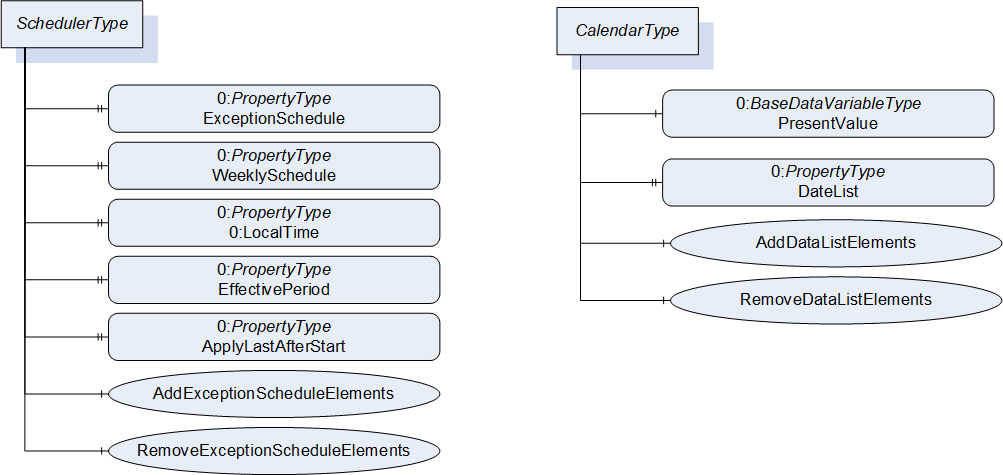
The CalendarType defines a DateList with specific dates. The optional AddDateListElements and RemoveDateListElements Methods can be used to manipulate the DateList Property by OPC UA Clients.
This specification does not define any specific entry points where to find schedule or calendar Objects. It is expected that they are placed reasonable in the AddressSpace, for example as child Object of an Object that is manipulated by actions of the schedule Object.
This specification does not define any specific mechanism how new schedule or calendar Objects are added or removed via OPC UA. Information Models using those Objects might define specific mechanisms like Methods or using the NodeManagement Service Set.
6.2 Scheduling Times and Priorities
A schedule Object can contain a WeeklySchedule with one entry per weekday and / or an ExceptionSchedule. One of both shall be defined. The WeeklySchedule contains for each day actions, that should be taken at specific times. The ExceptionSchedule contains specific dates or ranges of dates, and the corresponding actions that should be taken at specific times. For example, the ExceptionSchedule can contain an entry with all public holidays and another with plant holidays. Since the different entries of the ExceptionSchedule might overlap, each entry contains a priority. If overlapping entries exist, the one with the highest priority is used. If both, WeeklySchedule and ExceptionSchedule exist, the exception schedule has priority over the WeeklySchedule. That is, if the exception schedule has a matching date, the exception schedule is used, otherwise the weekly schedule.
6.3 Start-up of Schedules
When a Server restarts or starts the first time, and when a schedule Object becomes active (by reaching its EffectivePeriod, see 7.2.2) there are two options how a schedule Object shall react.
If the ApplyLastAfterStart Property is set to TRUE, the Server shall find the last set of actions to be executed before the current time and execute those actions. The mechanism to find the last set of actions is to find the last element in the list of TimeActionsType that occurs on or before the current time, and then use that element's actions. If no such element is found, then no action is executed.
If the ApplyLastAfterStart Property is set to FALSE, the Server does not consider any previous actions and starts executing actions according to the defined schedule defined in the future.
7 OPC UA ObjectTypes
7.1 CalendarType
7.1.1 Overview
The CalendarType provides a list of calendar dates. Each entry in the list describes a specific date or date pattern, or range of dates. The CalendarType ObjectType is formally defined in Table 4.
7.1.2 ObjectType definition
| Attribute | Value | |||||
| BrowseName | CalendarType | |||||
| IsAbstract | False | |||||
| Description | Provides a list of calendar dates. Each entry in the list describes a specific date or date pattern, or range of dates | |||||
| References | NodeClass | BrowseName | DataType | TypeDefinition | Other | |
|---|---|---|---|---|---|---|
| Subtype of the 0:BaseObjectType | ||||||
| 0:HasComponent | Variable | PresentValue | 0:Boolean | 0:BaseDataVariableType | M | |
| 0:HasProperty | Variable | DateList | CalendarEntryType[] | 0:PropertyType | M | |
| 0:HasComponent | Method | AddDateListElements | O | |||
| 0:HasComponent | Method | RemoveDateListElements | O | |||
| Conformance Units | ||||||
|---|---|---|---|---|---|---|
| Scheduler Calendar Base |
This PresentValue indicates the current value of the calendar: True if the current date is in the DateList and False if it is not. For the current date that local time of the OPC UA Server shall be considered.
The DateList is an array of elements of which each is either a specific date or date pattern, or range of dates.
The child Nodes of the CalendarType have additional Attribute values defined in Table 5.
| BrowsePath | Description Attribute |
| PresentValue | Indicates if the current date is in the DateList (true) or not (false) |
| DateList | Array of elements each defining either a specific date or date pattern, or range of dates |
| AddDateListElements | Adds elements to the DateList |
| RemoveDateListElements | Removes elements of the DateList |
7.1.3 Method AddDateListElements
This Method adds entries to the DateList Property. Even if one entry cannot be added, the other entries are still processed and added, if possible. The signature of this Method is specified below. Table 6 and Table 7 specify the Arguments and AddressSpace representation, respectively.
Signature
	AddDateListElements (
		[in]		CalendarEntryType[]		CalendarEntries
		[out]	0:Int32[]				EntryResults
);| Argument | Description |
| CalendarEntries | An array of calendar entries to be added to the DateList Property. |
| EntryResults | An array of results, one entry per entry in CalendarEntries, indicating if the individual entry could be added. Each result <> 0 indicates, that adding this calendar entry was not successful. 0 - OK -1 - Duplicate - Entry already in DateList -2 - Invalid Format - The entry contains an invalid format, e.g. an invalid range Values larger 0 can be used for vendor-specific errors. |
Method Result Codes (defined in Call Service)
| Result Code | Description |
| BadNodeIdUnknown | See OPC 10000-4 for a general description. |
| BadNotWritable | See OPC 10000-4 for a general description. |
| BadOutOfMemory | See OPC 10000-4 for a general description. |
| Attribute | Value | ||||
| BrowseName | AddDateListElements | ||||
| References | NodeClass | BrowseName | DataType | TypeDefinition | ModellingRule |
|---|---|---|---|---|---|
| 0:HasProperty | Variable | 0:InputArguments | 0:Argument[] | 0:PropertyType | 0:Mandatory |
| 0:HasProperty | Variable | 0:OutputArguments | 0:Argument[] | 0:PropertyType | 0:Mandatory |
7.1.4 Method RemoveDateListElements
This Method removes entries from the DateList Property. Even if one entry cannot be removed, the other entries are still processed and removed, if possible. The signature of this Method is specified below. Table 8 and Table 9 specify the Arguments and AddressSpace representation, respectively.
Signature
	RemoveDateListElements (
		[in]		CalendarEntryType[]		CalendarEntries
		[out]	0:Int32[]				EntryResults
);| Argument | Description |
| CalendarEntries | An array of calendar entries to be removed from the DateList Property. |
| EntryResults | An array of results, one entry per entry in CalendarEntries, indicating if the individual entry could be removed. Each result <> 0 indicates, that removing this calendar entry was not successful. 0 - OK -1 - Not found - Entry is not in DateList Values larger 0 can be used for vendor-specific errors. |
Method Result Codes (defined in Call Service)
| Result Code | Description |
| BadNodeIdUnknown | See OPC 10000-4 for a general description. |
| BadNotWritable | See OPC 10000-4 for a general description. |
| Attribute | Value | ||||
| BrowseName | RemoveDateListElements | ||||
| References | NodeClass | BrowseName | DataType | TypeDefinition | ModellingRule |
|---|---|---|---|---|---|
| 0:HasProperty | Variable | 0:InputArguments | 0:Argument[] | 0:PropertyType | 0:Mandatory |
| 0:HasProperty | Variable | 0:OutputArguments | 0:Argument[] | 0:PropertyType | 0:Mandatory |
7.2 ScheduleType definition
7.2.1 Overview
The ScheduleType defines a periodic schedule that can recur over a range of dates. The schedule may have optional exceptions at arbitrary times or dates. The basic unit of a schedule is days, which are divided into two types: normal days within a week and exception days. A priority mechanism defines which scheduled event is currently valid. The ScheduleType is formally defined in Table 10.
7.2.2 ObjectType definition
| Attribute | Value | ||||
| BrowseName | ScheduleType | ||||
| IsAbstract | False | ||||
| Description | Defines a periodic schedule that can recur over a range of dates. The schedule may have optional exceptions at arbitrary times or dates. The basic unit of a schedule is days, which are divided into two types: normal days within a week and exception days. A priority mechanism defines which scheduled event is currently valid. The schedule includes a PresentValue Variable whose value describes the current state of the schedule, including a default value when no schedules are in effect. | ||||
| References | Node Class | BrowseName | DataType | TypeDefinition | Other |
|---|---|---|---|---|---|
| Subtype of the 0:BaseObjectType | |||||
| 0:HasProperty | Variable | ExceptionSchedule | SpecialEventType[] | 0:PropertyType | O |
| 0:HasComponent | Method | AddExceptionScheduleElements | O | ||
| 0:HasComponent | Method | RemoveExceptionScheduleElements | O | ||
| 0:HasProperty | Variable | WeeklySchedule | DailyScheduleType[7] | 0:PropertyType | O |
| 0:HasProperty | Variable | 0:LocalTime | 0:TimeZoneDataType | 0:PropertyType | M |
| 0: HasProperty | Variable | EffectivePeriod | DateRangeType | 0:PropertyType | O |
| 0:HasProperty | Variable | ApplyLastAfterStart | 0:Boolean | 0:PropertyType | M |
| Conformance Units | |||||
|---|---|---|---|---|---|
| Scheduler Scheduling Base |
The ExceptionSchedule provides an array of SpecialEventType. If present, each of those special events describes a sequence of schedule actions that take precedence over a normal day's behaviour on a special day or days.
The WeeklySchedule provides an array of seven DailyScheduleType. Each entry represents one day of the week. The first entry in the array represents Monday, the last Sunday. Each element describes a sequence of times and a list of actions that provides a sequence of schedule actions on one day of the week when no ExceptionSchedule is in effect.
At least one of the two Properties ExceptionSchedule and WeeklySchedule shall be present.
To manipulate the ExceptionSchedule, the Methods AddExceptionScheduleElements and RemoveExceptionScheduleElements should be used. This simplifies adding and removing entries of the array. As the WeeklySchedule is a fixed-size array with a length of 7, there are no corresponding Methods. Instead, an individual entry of the array may be written by the Client to change only the schedule of one weekday.
The 0:LocalTime provides information about the local time of the schedule Object. All scheduled times are UTC time. Clients need to consider this Property to calculate the local time of the schedule. If this Property is changed, it is server-specific whether the times of the schedule are adjusted or not. If the Server and the Object the schedule is defined for are in the same local time, the Object may reference the 0:LocalTime Property of the 0:Server Object.
The EffectivePeriod specifies the range of dates within which the schedule Object is active. Upon entering its effective period, the object shall execute the defined actions at the defined times, otherwise it shall not execute any actions.
The ApplyLastAfterStart Property defines if the last set of actions shall be applied when starting the schedule Object (see 6.3 for details).
The child Nodes of the ScheduleType have additional Attribute values defined in Table 11.
| BrowsePath | Description Attribute |
| ExceptionSchedule | An array of special events. If present, each of those special events describes a sequence of schedule actions that take precedence over a normal day's behaviour on a special day or days. |
| AddExceptionScheduleElements | Adds elements to the ExceptionSchedule |
| RemoveExceptionScheduleElements | Removes elements from the ExceptionSchedule |
| WeeklySchedule | Each entry represents one day of the week. The first entry in the array represents Monday, the last Sunday. Each element describes a sequence of times and a list of actions that provides a sequence of schedule actions on one day of the week when no ExceptionSchedule is in effect. |
| 0:LocalTime | Provides information about the local time of the schedule Object. All scheduled times are UTC time. Clients need to consider this Property to calculate the local time of the schedule. If this Property is changed, it is server-specific whether the times of the schedule are adjusted or not. |
| EffectivePeriod | Specifies the range of dates within which the schedule Object is active. Upon entering its effective period, the object shall execute the defined actions at the defined times, otherwise it shall not execute any actions. |
| ApplyLastAfterStart | The ApplyLastAfterStart Property defines if the last set of actions shall be applied when starting the schedule Object |
7.2.3 Method AddExceptionScheduleElements
This Method adds entries to the ExceptionSchedule Property. Even if one entry cannot be added, the other entries are still processed and added, if possible. The signature of this Method is specified below. Table 12 and Table 13 specify the Arguments and AddressSpace representation, respectively.
Signature
	AddExceptionScheduleElements (
		[in]		SpecialEventType[]		SpecialEvents
		[out]	0:Int32[]				EntryResults
);| Argument | Description |
| SpecialEvents | An array of special events to be added to the ExceptionSchedule Property. |
| EntryResults | An array of results, one entry per entry in SpecialEvents, indicating if the individual entry could be added. Each result <> 0 indicates, that adding this special event entry was not successful. 0 - OK -1 - Duplicate - Entry already in ExceptionSchedule -2 - Invalid Format - The entry contains an invalid format, e.g. an invalid range Values larger 0 can be used for vendor-specific errors. |
Method Result Codes (defined in Call Service)
| Result Code | Description |
| BadNodeIdUnknown | See OPC 10000-4 for a general description. |
| BadNotWritable | See OPC 10000-4 for a general description. |
| BadOutOfMemory | See OPC 10000-4 for a general description. |
| Attribute | Value | ||||
| BrowseName | AddExceptionScheduleElements | ||||
| References | NodeClass | BrowseName | DataType | TypeDefinition | ModellingRule |
|---|---|---|---|---|---|
| 0:HasProperty | Variable | 0:InputArguments | 0:Argument[] | 0:PropertyType | 0:Mandatory |
| 0:HasProperty | Variable | 0:OutputArguments | 0:Argument[] | 0:PropertyType | 0:Mandatory |
7.2.4 Method RemoveExceptionScheduleElements
This Method removes entries from the ExceptionSchedule Property. Even if one entry cannot be removed, the other entries are still processed and removed, if possible. The signature of this Method is specified below. Table 14 and Table 15 specify the Arguments and AddressSpace representation, respectively.
Signature
	RemoveExceptionScheduleElements (
		[in]		SpecialEventType[]		SpecialEvents
		[out]	0:Int32[]				EntryResults
);| Argument | Description |
| SpecialEvents | An array of special events to be removed from the ExceptionSchedule Property. |
| EntryResults | An array of results, one entry per entry in SpecialEvents, indicating if the individual entry could be removed. Each result <> 0 indicates, that removing this special event entry was not successful. 0 - OK -1 - Not found - Entry is not in ExceptionSchedule Values larger 0 can be used for vendor-specific errors. |
Method Result Codes (defined in Call Service)
| Result Code | Description |
| BadNodeIdUnknown | See OPC 10000-4 for a general description. |
| BadNotWritable | See OPC 10000-4 for a general description. |
| Attribute | Value | ||||
| BrowseName | RemoveExceptionScheduleElements | ||||
| References | NodeClass | BrowseName | DataType | TypeDefinition | ModellingRule |
|---|---|---|---|---|---|
| 0:HasProperty | Variable | 0:InputArguments | 0:Argument[] | 0:PropertyType | 0:Mandatory |
| 0:HasProperty | Variable | 0:OutputArguments | 0:Argument[] | 0:PropertyType | 0:Mandatory |
8 OPC UA DataTypes
8.1 SpecialEventType
This structure contains a period, a list of time actions, and a priority. It is a means to identify moments in time over one or more days. How the priority is used is defined in section 6.2. The structure is defined in Table 16.
| Name | Type | Description |
|---|---|---|
| SpecialEventType | structure | |
Period | SpecialEventPeriodType | A period where the special event is active |
ListOfTimeActions | TimeActionsType[] | Points in time where the special event occurs and the associated actions |
EventPriority | 0:Byte | Priority of this special event. The lower the number, the higher the priority. |
Its representation in the AddressSpace is defined in Table 17.
| Attribute | Value | |||||
| BrowseName | SpecialEventType | |||||
| IsAbstract | False | |||||
| Description | This structure contains a period, a list of time values, and a priority. It is a means to identify moments in time over one or more days. | |||||
| References | NodeClass | BrowseName | DataType | TypeDefinition | Other | |
|---|---|---|---|---|---|---|
| Subtype of the 0:Structure | ||||||
| Conformance Units | ||||||
|---|---|---|---|---|---|---|
| Scheduler Scheduling Base | ||||||
8.2 SpecialEventPeriodType
This union contains a calendar entry or a reference to a calendar Object. The union is defined in Table 18.
| Name | Type | Description |
| SpecialEventPeriodType | union | |
CalendarEntry | CalendarEntryType | A calendar entry |
CalendarReference | 0:NodeId | Reference to a calendar object |
Its representation in the AddressSpace is defined in Table 19.
| Attributes | Value | |||||
| BrowseName | SpecialEventPeriodType | |||||
| IsAbstract | False | |||||
| Description | This union contains a calendar entry or a reference to a calendar object | |||||
| References | NodeClass | BrowseName | DataType | TypeDefinition | Other | |
|---|---|---|---|---|---|---|
| Subtype of 0:Union | ||||||
| Conformance Units | ||||||
|---|---|---|---|---|---|---|
| Scheduler Scheduling Base | ||||||
8.3 CalendarEntryType
This union that defines various calendar date values. The union is defined in Table 18.
| Name | Type | Description |
| CalendarEntryType | union | |
Date | DateType | A calendar date, potentially partly defined and repeating |
DateRange | DateRangeType | A range of dates |
Its representation in the AddressSpace is defined in Table 19.
| Attributes | Value | |||||
| BrowseName | CalendarEntryType | |||||
| IsAbstract | False | |||||
| Description | This union that defines various calendar date values | |||||
| References | NodeClass | BrowseName | DataType | TypeDefinition | Other | |
|---|---|---|---|---|---|---|
| Subtype of 0:Union | ||||||
| Conformance Units | ||||||
|---|---|---|---|---|---|---|
| Scheduler Scheduling Base | ||||||
| Scheduler Calendar Base |
8.4 DateType
This structure defines a calendar date. It allows to define a concrete date, e.g. 2022-02-12. By using wildcards, it also allows to define repeating dates, like every Wednesday, every odd day of a month, every 24th of December, every last day of a month in 2023, etc. Its composition is formally defined in Table 22.
| Name | Type | Description |
| DateType | structure | |
Year | 0:UInt16 | Years based on the Gregorian calendar, 0 is used as "unspecific". |
Month | Month | A specific Gregorian calendar month or relative (e.g. "odd", "even") |
DayOfMonth | DayOfMonth | A specific day of the month or relative (e.g. "last day"). Shall be "unspecific" if DayOfWeek is not "unspecific". |
DayOfWeek | DayOfWeek | A specific day of the week. Shall be "unspecific" if DayOfMonth is not "unspecific". |
Its representation in the AddressSpace is defined in Table 23.
| Attribute | Value | |||||
| BrowseName | DateType | |||||
| IsAbstract | False | |||||
| Description | This structure defines a calendar date. It allows to define a concrete date, e.g. 2022-02-12. By using wildcards, it also allows to define repeating dates, like every Wednesday, every odd day of a month, every 24th of December, every last day of a month in 2023, etc. | |||||
| References | NodeClass | BrowseName | DataType | TypeDefinition | Other | |
|---|---|---|---|---|---|---|
| Subtype of the 0:Structure | ||||||
| Conformance Units | ||||||
|---|---|---|---|---|---|---|
| Scheduler Scheduling Base | ||||||
| Scheduler Calendar Base |
8.5 Month
This enumeration indicates either a specific Gregorian calendar month, or a relative relationship ("odd", "even", and "unspecified"). The enumeration is defined in Table 24.
| Name | Value | Description |
| Unspecified | 0 | |
| January | 1 | |
| February | 2 | |
| March | 3 | |
| April | 4 | |
| May | 5 | |
| June | 6 | |
| July | 7 | |
| August | 8 | |
| September | 9 | |
| October | 10 | |
| November | 11 | |
| December | 12 | |
| Odd | 13 | |
| Even | 14 |
Its representation in the AddressSpace is defined in Table 25.
| Attribute | Value | |||||
| BrowseName | Month | |||||
| IsAbstract | False | |||||
| Description | This enumeration indicates either a specific Gregorian calendar month, or a relative relationship ("odd", "even", and "unspecified"). | |||||
| References | NodeClass | BrowseName | DataType | TypeDefinition | Other | |
|---|---|---|---|---|---|---|
| Subtype of the 0:Enumeration | ||||||
| 0:HasProperty | Variable | 0:EnumStrings | 0:LocalizedText[] | 0:PropertyType | ||
| Conformance Units | ||||||
|---|---|---|---|---|---|---|
| Scheduler Scheduling Base | ||||||
| Scheduler Calendar Base |
8.6 DayOfMonth
This enumeration indicates specific days of the month by specific date ("1", "22", and so on) or by relative position ("last day of month", "even day of month", and so on). The enumeration is defined in Table 26.
| Name | Value | Description |
| Unspecified | 0 | |
| Day1 | 1 | |
| Day2 | 2 | |
| Day3 | 3 | |
| Day4 | 4 | |
| Day5 | 5 | |
| Day6 | 6 | |
| Day7 | 7 | |
| Day8 | 8 | |
| Day9 | 9 | |
| Day10 | 10 | |
| Day11 | 11 | |
| Day12 | 12 | |
| Day13 | 13 | |
| Day14 | 14 | |
| Day15 | 15 | |
| Day16 | 16 | |
| Day17 | 17 | |
| Day18 | 18 | |
| Day19 | 19 | |
| Day20 | 20 | |
| Day21 | 21 | |
| Day22 | 22 | |
| Day23 | 23 | |
| Day24 | 24 | |
| Day25 | 25 | |
| Day26 | 26 | |
| Day27 | 27 | |
| Day28 | 28 | |
| Day29 | 29 | |
| Day30 | 30 | |
| Day31 | 31 | |
| LastDayOfMonth | 32 | |
| OddDayOfMonth | 33 | |
| EvenDayOfMonth | 34 |
Its representation in the AddressSpace is defined in Table 27.
| Attribute | Value | |||||
| BrowseName | DayOfMonth | |||||
| IsAbstract | False | |||||
| Description | This enumeration indicates specific days of the month by specific date ("1", "22", and so on) or by relative position ("last day of month", "even day of month", and so on). | |||||
| References | NodeClass | BrowseName | DataType | TypeDefinition | Other | |
|---|---|---|---|---|---|---|
| Subtype of the 0:Enumeration | ||||||
| 0:HasProperty | Variable | 0:EnumStrings | 0:LocalizedText[] | 0:PropertyType | ||
| Conformance Units | ||||||
|---|---|---|---|---|---|---|
| Scheduler Scheduling Base | ||||||
| Scheduler Calendar Base |
8.7 DayOfWeek
This enumeration indicates each of the seven days of the week, or "unspecified". The enumeration is defined in Table 28.
| Name | Value | Description |
| Unspecified | 0 | |
| Monday | 1 | |
| Tuesday | 2 | |
| Wednesday | 3 | |
| Thursday | 4 | |
| Friday | 5 | |
| Saturday | 6 | |
| Sunday | 7 |
Its representation in the AddressSpace is defined in Table 29.
| Attribute | Value | |||||
| BrowseName | DayOfWeek | |||||
| IsAbstract | False | |||||
| Description | This enumeration indicates each of the seven days of the week, or "unspecified". | |||||
| References | NodeClass | BrowseName | DataType | TypeDefinition | Other | |
|---|---|---|---|---|---|---|
| Subtype of the 0:Enumeration type defined in OPC 10000-5 | ||||||
| 0:HasProperty | Variable | 0:EnumStrings | 0:LocalizedText[] | 0:PropertyType | ||
| Conformance Units | ||||||
|---|---|---|---|---|---|---|
| Scheduler Scheduling Base | ||||||
| Scheduler Calendar Base |
8.8 DateRangeType
This structure defines a time span, with start and end dates that are either open or absolute. The structure is defined in Table 30.
The StartDate and EndDate are limited to either use specific dates, i.e., wild cards like odd months are not allowed, or unspecified dates, i.e. only use wild cards.
In case a specific date is provided, the Year field shall not be 0; the Month field shall be a value between 1 to 12; the DayOfMonth field shall be between 1 to 31 and the DayOfWeek field shall be "unspecified".
In case an unspecified date is provided, the Year field shall be 0, the Month field shall be "unspecified", the DayOfMonth field shall be "unspecified", and the DayOfWeek field shall be "unspecified".
No other values shall be used for StartDate and EndDate.
| Name | Type | Description |
| DateRangeType | structure | |
StartDate | DateType | The start date of the date range. The start day is included in the range. |
EndDate | DateType | The end date of the date range. The end day is included in the range. |
Its representation in the AddressSpace is defined in Table 31.
| Attribute | Value | |||||
| BrowseName | DateRangeType | |||||
| IsAbstract | False | |||||
| Description | This structure defines a time span, with absolute start and end dates. The StartDate and EndDate are limited to specific values, i.e., wild cards like odd months are not allowed. The Year field shall not be 0; the Month field shall be a value between 1 to 12; the DayOfMonth field shall be between 1 to 31 and the DayOfMonth field shall be "unspecified". | |||||
| References | NodeClass | BrowseName | DataType | TypeDefinition | Other | |
|---|---|---|---|---|---|---|
| Subtype of the 0:Structure | ||||||
| Conformance Units | ||||||
|---|---|---|---|---|---|---|
| Scheduler Scheduling Base | ||||||
| Scheduler Calendar Base |
8.9 TimeActionsType
This structure contains a time and an array of actions. It is used to define which actions shall be executed at a specific point in time. The structure is defined in Table 16.
| Name | Type | Description | Allow Subtypes |
|---|---|---|---|
| TimeActionsType | structure | ||
Time | TimeType | A point in time during a day | |
Actions | BaseActionType[] | A list of actions to be executed at the defined Time Note: Here, subtypes are allowed. The table format will be updated, once a final format is defined. | True |
Its representation in the AddressSpace is defined in Table 17.
| Attribute | Value | |||||
| BrowseName | TimeActionsType | |||||
| IsAbstract | False | |||||
| Description | This structure contains a time and an array of actions. It is used to define actions to be executed at a specific point in time. | |||||
| References | NodeClass | BrowseName | DataType | TypeDefinition | Other | |
|---|---|---|---|---|---|---|
| Subtype of the 0:Structure | ||||||
| Conformance Units | ||||||
|---|---|---|---|---|---|---|
| Scheduler Scheduling Base | ||||||
8.10 BaseActionType
This abstract structure defines the base of an action. The base only contains information, if the last execution of the action was successful. The structure is defined in Table 34.
| Name | Type | Description |
|---|---|---|
| BaseActionType | structure | |
LastActionResult | 0:StatusCode | Contains information, whether the last execution of the action was successful. Shall be Uncertain, if action was never executed or last execution not known by Server anymore, e.g., because of a restart. Shall be a good status code when execution of action was successful, and a bad status code, when execution was not successful. Subtypes might add additional information on execution of action, e.g. output arguments. |
Its representation in the AddressSpace is defined in Table 35.
| Attribute | Value | |||||
| BrowseName | BaseActionType | |||||
| IsAbstract | True | |||||
| Description | This abstract structure defines the base of an action. The base only contains information, if the last execution of the action was successful. | |||||
| References | NodeClass | BrowseName | DataType | TypeDefinition | Other | |
|---|---|---|---|---|---|---|
| Subtype of the 0:Structure | ||||||
| Conformance Units | ||||||
|---|---|---|---|---|---|---|
| Scheduler Scheduling Base | ||||||
8.11 WriteLocalVariableActionType
This structure defines an action to write the value of a Variable managed in the same Server where the action is used. The structure is defined in Table 36.
| Name | Type | Description |
|---|---|---|
| WriteLocalVariableActionType | structure | |
Variable | 0:NodeId | The NodeId of the Variable to be written |
Value | 0:BaseDataType | The value to be written to the Variable |
Its representation in the AddressSpace is defined in Table 37.
| Attribute | Value | |||||
| BrowseName | WriteLocalVariableActionType | |||||
| IsAbstract | False | |||||
| Description | This structure defines an action to write the value of a Variable managed in the same Server where the action is used. | |||||
| References | NodeClass | BrowseName | DataType | TypeDefinition | Other | |
|---|---|---|---|---|---|---|
| Subtype of the BaseActionType | ||||||
| Conformance Units | ||||||
|---|---|---|---|---|---|---|
| Scheduler Scheduling Base | ||||||
8.12 CallLocalMethodActionType
This structure defines an action to call a Method of an Object managed in the same Server where the action is used. The structure is defined in Table 38.
| Name | Type | Description |
|---|---|---|
| CallLocalMethodActionType | structure | |
ObjectId | 0:NodeId | The NodeId of the Object the Method should be called on |
MethodId | 0:NodeId | The NodeId of the Method to be called |
InputValues | 0:BaseDataType[] | An array of input values to be used in the Method call |
LastOutputValues | 0:BaseDataType[] | An array of the output values the last time the Method was called. Shall be an empty array if no outputs arguments, the LastActionResult is a bad status code or the action was never executed or last execution is unknown. |
Its representation in the AddressSpace is defined in Table 39.
| Attribute | Value | |||||
| BrowseName | CallLocalMethodActionType | |||||
| IsAbstract | False | |||||
| Description | This structure defines an action to call a Method of an Object managed in the same Server where the action is used. | |||||
| References | NodeClass | BrowseName | DataType | TypeDefinition | Other | |
|---|---|---|---|---|---|---|
| Subtype of the BaseActionType | ||||||
| Conformance Units | ||||||
|---|---|---|---|---|---|---|
| Scheduler Scheduling Base | ||||||
8.13 TimeType
This structure that represents a point in time during a day. The structure is defined in Table 40.
| Name | Type | Description |
| TimeType | structure | |
Hour | 0:Byte | Allowed values between 0 and 23 - 255 as unspecific |
Minute | 0:Byte | Allowed values between 0 and 59 - 255 as unspecific |
Second | 0:Byte | Allowed values between 0 and 59 - 255 as unspecific |
Its representation in the AddressSpace is defined in Table 41.
| Attribute | Value | |||||
| BrowseName | TimeType | |||||
| IsAbstract | False | |||||
| Description | This structure that represents a point in time during a day | |||||
| References | NodeClass | BrowseName | DataType | TypeDefinition | Other | |
|---|---|---|---|---|---|---|
| Subtype of the 0:Structure | ||||||
| Conformance Units | ||||||
|---|---|---|---|---|---|---|
| Scheduler Scheduling Base | ||||||
8.14 DailyScheduleType
This structure defines a sequence of TimeActionsType structures. Each element in the sequence defines a time and a list of actions that shall be executed at that point in time. The structure is defined in Table 42.
| Name | Type | Description |
| DailyScheduleType | structure | |
DaySchedule | TimeActionsType[] | A sequence of time / value pairs describing the value at a given point in the day. |
Its representation in the AddressSpace is defined in Table 43.
| Attribute | Value | |||||
| BrowseName | DailyScheduleType | |||||
| IsAbstract | False | |||||
| Description | This structure defines a sequence of TimeActionsType structures. Each element in the sequence defines a time/actions pair that describes the actions to be executed at a given point in the day. | |||||
| References | NodeClass | BrowseName | DataType | TypeDefinition | Other | |
|---|---|---|---|---|---|---|
| Subtype of the 0:Structure | ||||||
| Conformance Units | ||||||
|---|---|---|---|---|---|---|
| Scheduler Scheduling Base | ||||||
9 Profiles and Conformance Units
9.1 Conformance Units
Table 44 defines the corresponding ConformanceUnits for the OPC UA Information Model for Scheduler.
| Category | Title | Description |
| Server | Scheduler Scheduling Base | Exposes the ObjectType ScheduleType, the DataTypes SpecialEventType, SpecialEventPeriodType, CalendarEntryType, DateType, Month, DayOfMonth, DayOfWeek, DateRangeType, TimeActionsType, BaseActionType, WriteLocalVariableActionType, CallLocalMethodActionType, TimeType and DailyScheduleType and all their supertypes in the AddressSpace. Supports a configuration with at least two instances of ScheduleType having at least 12 entries of DaySchedule in their WeeklySchedule (overall, not per day), and 6 entries in the ExceptionSchedule each having at least 6 entries of ListOfTimeActions. |
| Server | Scheduler Calendar Base | Exposes the ObjectType CalendarType, the DataTypes CalendarEntryType, DateType, Month, DayOfMonth, DayOfWeek, and DateRangeType and all their supertypes in the AddressSpace. Supports a configuration with at least three instances of CalendarType, each having at least 10 entries in DateList. |
| Server | Scheduler Scheduling Configuration | Supports at least on instance of ScheduleType supporting the Methods AddExceptionScheduleElements and RemoveExceptionScheduleElements to change the ExceptionSchedule Property and allowing writing the WeeklySchedule Property. |
| Server | Scheduler Calendar Configuration | Supports at least on instance of CalendarType supporting the Methods AddDateListElements and RemoveDateListElements to change the DateList Property. |
| Client | Scheduler Client Configuration | The client supports the configuration of instances of ScheduleType and CalendarType, by changing the configuration of existing Objects. |
9.2 Profiles
9.2.1 Profile list
Table 45 lists all Profiles defined in this document and defines their URIs.
| Profile | URI |
| Scheduler Base Server Profile | http://opcfoundation.org/UA-Profile/Scheduler/Server/Base |
| Scheduler Configuration Server Facet | http://opcfoundation.org/UA-Profile/Scheduler/Server/Configuration |
| Scheduler Configuration Client Facet | http://opcfoundation.org/UA-Profile/Scheduler/Client/Configuration |
9.2.2 Server Facets
9.2.2.1 Overview
The following sections specify the Facets available for Servers that implement the Scheduler companion specification. Each section defines and describes a Facet or Profile.
9.2.2.2 Scheduler Base Server Facet
Table 46 defines a Profile that describes the describes the base characteristics for all OPC UA Servers that support exposing schedules.
| Group | Conformance Unit / Profile Title | Mandatory / Optional |
| Profile | 0:Core 2022 Server Facet http://opcfoundation.org/UA-Profile/Server/Core2022Facet | |
| Profile | 0:Method 2021 Server Facet http://opcfoundation.org/UA-Profile/Server/Methods2021 | |
| Scheduler | Scheduler Scheduling Base | M |
| Scheduler | Scheduler Calendar Base | O |
9.2.2.3 Scheduler Configuration Server Facet
Table 47 defines a Facet that describes the base characteristics for all OPC UA Servers that support configuring schedules.
| Group | Conformance Unit / Profile Title | Mandatory / Optional |
| Profile | Scheduler Base Server Facet | M |
| Scheduler | Scheduler Scheduling Configuration | M |
| Scheduler | Scheduler Calendar Configuration | O |
9.2.3 Client Facets
9.2.3.1 Overview
The following tables specify the Facets available for Clients that implement the Scheduler companion specification.
9.2.3.2 Scheduler Configuration Client Facet
Table 48 defines a Facet that describes the base characteristics for all OPC UA Clients that support the configuration of schedules.
| Group | Conformance Unit / Profile Title | Mandatory / Optional |
| Profile | 0:AddressSpace Lookup Client Facet http://opcfoundation.org/UA-Profile/Client/AddressSpaceLookup | |
| Profile | 0:DataAccess Client Facet http://opcfoundation.org/UA-Profile/Client/DataAccess | |
| Scheduler | Scheduler Client Configuration | M |
10 Namespaces
10.1 Namespace Metadata
Table 49 defines the namespace metadata for this document. The Object is used to provide version information for the namespace and an indication about static Nodes. Static Nodes are identical for all Attributes in all Servers, including the Value Attribute. See OPC 10000-5 for more details.
The information is provided as Object of type NamespaceMetadataType. This Object is a component of the Namespaces Object that is part of the Server Object. The NamespaceMetadataType ObjectType and its Properties are defined in OPC 10000-5.
The version information is also provided as part of the ModelTableEntry in the UANodeSet XML file. The UANodeSet XML schema is defined in OPC 10000-6.
| Attribute | Value | ||
| BrowseName | http://opcfoundation.org/UA/Scheduler/ | ||
| Property | DataType | Value | |
|---|---|---|---|
| NamespaceUri | String | http://opcfoundation.org/UA/Scheduler/ | |
| NamespaceVersion | String | 1.05.02 | |
| NamespacePublicationDate | DateTime | 2022-10-01 | |
| IsNamespaceSubset | Boolean | False | |
| StaticNodeIdTypes | IdType[] | 0 | |
| StaticNumericNodeIdRange | NumericRange [] | - | |
| StaticStringNodeIdPattern | String | - | |
Note: The IsNamespaceSubset Property is set to False as the UaNodeSet XML file contains the complete Namespace. Servers only exposing a subset of the Namespace need to change the value to True.
10.2 Handling of OPC UA Namespaces
Namespaces are used by OPC UA to create unique identifiers across different naming authorities. The Attributes NodeId and BrowseName are identifiers. A Node in the UA AddressSpace is unambiguously identified using a NodeId. Unlike NodeIds, the BrowseName cannot be used to unambiguously identify a Node. Different Nodes may have the same BrowseName. They are used to build a browse path between two Nodes or to define a standard Property.
Servers may often choose to use the same namespace for the NodeId and the BrowseName. However, if they want to provide a standard Property, its BrowseName shall have the namespace of the standards body although the namespace of the NodeId reflects something else, for example the EngineeringUnits Property. All NodeIds of Nodes not defined in this document shall not use the standard namespaces.
Table 50 provides a list of namespaces typically used in a Scheduler OPC UA Server.
| NamespaceURI | Description |
| http://opcfoundation.org/UA/ | Namespace for NodeIds and BrowseNames defined in the OPC UA specification. This namespace shall have namespace index 0. |
| Local Server URI | Namespace for nodes defined in the local server. This namespace shall have namespace index 1. |
| http://opcfoundation.org/UA/Scheduler/ | Namespace for NodeIds and BrowseNames defined in this document. The namespace index is Server specific. |
| Vendor specific types | A Server may provide vendor-specific types like types derived from ObjectTypes defined in this document in a vendor-specific namespace. |
| Vendor specific instances | A Server provides vendor-specific instances of the standard types or vendor-specific instances of vendor-specific types in a vendor-specific namespace. It is recommended to separate vendor specific types and vendor specific instances into two or more namespaces. |
Table 51 provides a list of namespaces and their indices used for BrowseNames in this document. The default namespace of this document is not listed since all BrowseNames without prefix use this default namespace.
| NamespaceURI | Namespace Index | Example |
| http://opcfoundation.org/UA/ | 0 | 0:EngineeringUnits |
Annex A Scheduler Namespace and Identifiers (Normative)
A.1 Namespace and Identifiers for the Scheduler Information Model
This appendix defines the numeric identifiers for all of the numeric NodeIds defined in this document. The identifiers are specified in a CSV file with the following syntax:
<SymbolName>, <Identifier>, <NodeClass>Where the SymbolName is either the BrowseName of a Type Node or the BrowsePath for an Instance Node that appears in the specification and the Identifier is the numeric value for the NodeId.
The BrowsePath for an Instance Node is constructed by appending the BrowseName of the instance Node to the BrowseName for the containing instance or type. An underscore character is used to separate each BrowseName in the path. Let's take for example, the ScheduleType ObjectType Node which has the ExceptionSchedule Property. The Name for the ExceptionSchedule InstanceDeclaration within the ScheduleType declaration is: ScheduleType_ExceptionSchedule.
The NamespaceUri for all NodeIds defined here is http://opcfoundation.org/UA/Scheduler/
The CSV released with this version of the specification can be found here:
http://www.opcfoundation.org/UA/schemas/1.05/Opc.Ua.Scheduler.NodeIds.csv
http://www.opcfoundation.org/UA/schemas/Opc.Ua.Scheduler.NodeIds.csv
A computer processible version of the complete Information Model defined in this document is also provided. It follows the XML Information Model schema syntax defined in OPC 10000-6.
The Information Model Schema for this version of the document (including any revisions, amendments or errata) can be found here:
http://www.opcfoundation.org/UA/schemas/1.05/Opc.Ua.Scheduler.NodeSet2.xml
http://www.opcfoundation.org/UA/schemas/Opc.Ua.Scheduler.NodeSet2.xml
_____________
Agreement of Use
COPYRIGHT RESTRICTIONS
Any unauthorized use of this specification may violate copyright laws, trademark laws, and communications regulations and statutes. This document contains information which is protected by copyright. All Rights Reserved. No part of this work covered by copyright herein may be reproduced or used in any form or by any means--graphic, electronic, or mechanical, including photocopying, recording, taping, or information storage and retrieval systems--without permission of the copyright owner.
OPC Foundation members and non-members are prohibited from copying and redistributing this specification. All copies must be obtained on an individual basis, directly from the OPC Foundation Web site
http://www.opcfoundation.org.
PATENTS
The attention of adopters is directed to the possibility that compliance with or adoption of OPC specifications may require use of an invention covered by patent rights. OPC shall not be responsible for identifying patents for which a license may be required by any OPC specification, or for conducting legal inquiries into the legal validity or scope of those patents that are brought to its attention. OPC specifications are prospective and advisory only. Prospective users are responsible for protecting themselves against liability for infringement of patents.
WARRANTY AND LIABILITY DISCLAIMERS
WHILE THIS PUBLICATION IS BELIEVED TO BE ACCURATE, IT IS PROVIDED "AS IS" AND MAY CONTAIN ERRORS OR MISPRINTS. THE OPC FOUDATION MAKES NO WARRANTY OF ANY KIND, EXPRESSED OR IMPLIED, WITH REGARD TO THIS PUBLICATION, INCLUDING BUT NOT LIMITED TO ANY WARRANTY OF TITLE OR OWNERSHIP, IMPLIED WARRANTY OF MERCHANTABILITY OR WARRANTY OF FITNESS FOR A PARTICULAR PURPOSE OR USE. IN NO EVENT SHALL THE OPC FOUNDATION BE LIABLE FOR ERRORS CONTAINED HEREIN OR FOR DIRECT, INDIRECT, INCIDENTAL, SPECIAL, CONSEQUENTIAL, RELIANCE OR COVER DAMAGES, INCLUDING LOSS OF PROFITS, REVENUE, DATA OR USE, INCURRED BY ANY USER OR ANY THIRD PARTY IN CONNECTION WITH THE FURNISHING, PERFORMANCE, OR USE OF THIS MATERIAL, EVEN IF ADVISED OF THE POSSIBILITY OF SUCH DAMAGES.
The entire risk as to the quality and performance of software developed using this specification is borne by you.
RESTRICTED RIGHTS LEGEND
This Specification is provided with Restricted Rights. Use, duplication or disclosure by the U.S. government is subject to restrictions as set forth in (a) this Agreement pursuant to DFARs 227.7202-3(a); (b) subparagraph (c)(1)(i) of the Rights in Technical Data and Computer Software clause at DFARs 252.227-7013; or (c) the Commercial Computer Software Restricted Rights clause at FAR 52.227-19 subdivision (c)(1) and (2), as applicable. Contractor / manufacturer are the OPC Foundation, 16101 N. 82nd Street, Suite 3B, Scottsdale, AZ, 85260-1830
COMPLIANCE
The OPC Foundation shall at all times be the sole entity that may authorize developers, suppliers and sellers of hardware and software to use certification marks, trademarks or other special designations to indicate compliance with these materials. Products developed using this specification may claim compliance or conformance with this specification if and only if the software satisfactorily meets the certification requirements set by the OPC Foundation. Products that do not meet these requirements may claim only that the product was based on this specification and must not claim compliance or conformance with this specification.
Trademarks
Most computer and software brand names have trademarks or registered trademarks. The individual trademarks have not been listed here.
GENERAL PROVISIONS
Should any provision of this Agreement be held to be void, invalid, unenforceable or illegal by a court, the validity and enforceability of the other provisions shall not be affected thereby.
This Agreement shall be governed by and construed under the laws of the State of Minnesota, excluding its choice or law rules.
This Agreement embodies the entire understanding between the parties with respect to, and supersedes any prior understanding or agreement (oral or written) relating to, this specification.
ISSUE REPORTING
The OPC Foundation strives to maintain the highest quality standards for its published specifications; hence they undergo constant review and refinement. Readers are encouraged to report any issues and view any existing errata here: http://www.opcfoundation.org/errata