Transition from a DeviceIdentity personality to DCA personality.
The device onboarding scenarios described in 5.2 makes the following assumptions:
- At least one DeviceIdentity Personality (4.3.3) is present and managed by GTA API that can be used for the onboarding process (5.2.2).
- This is the initial enrolment for the DCA, i.e., the DCA client does not yet have a TrustList
- The registrar has access to a Ticket that identifies the device (https://reference.opcfoundation.org/Onboarding/v105/docs/3.1.19)
- Key generation takes place on device, i.e. the private key is not provided by the Registrar.
For illustration the figures and explanations in sections 5.2.3.1 and 5.2.3.2 assume that the profile used for the DCA Personality is org.opcfoundation.ECC-nistp521 and substitutes examples values where values are to be supplied by the DCA:
- urn:manufacturer.com:2024-10:myproduct:SN51235 for the ProductInstanceUri
- urn:manufacturer.com:2024-10:myproduct:SN51235?cg=DefaultApplicationGroup&ct=EccNistP256 for the base personality name of the DCA Identity Personality
- urn:manufacturer.com:2024-10:myproduct:SN51235?cg=DefaultApplicationGroup for the personality name of the DCA Trustlist Personality
For simplification all personalities are assumed to be created with initial access for access control (cf. ISO/IEC TS 30168 ED 1, 5.6.5.1). Refer to 7.1 for further information on access control.
The first step in the onboarding process is the selection of identities that the DCA offers to the Registrar.
There are different options available to enable the DCA to discover the available GTA API DeviceIdentity personalities (4.3.3).
- Start from a well-known vendor defined personality name. This is the most straight forward approach. Figure 7 illustrates the interaction of DCA with GTA API. A vendor may also provide a list of personality names that can be provided to the Registrar.
- Start from a well-known vendor defined identifier. Multiple DeviceIdentity personalities can be associated with the same identifier, e.g., to support different profiles. Figure 8 illustrates the interaction of DCA with GTA API. It is possible that multiple personalities are eligible for onboarding and are offered to the Registrar.
- Start from a well-known vendor defined application name. Multiple personalities can be assigned the same application name. Figure 9 illustrates the interaction of DCA with GTA API. It is possible that multiple personalities are eligible for onboarding and are offered to the registrar.
- Search for a personality flagged with the dedicated attribute type org.opcfoundation.product_instance_uri. Figure 10 illustrates the interaction of DCA with GTA API. It is possible that multiple personalities are eligible for onboarding and are offered to the Registrar.
The device vendor should advise the implementor of the DCA which options apply for a specific device.
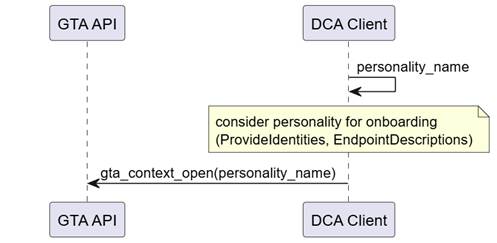
Figure 7 – Discover DeviceIdentity personality using personality name
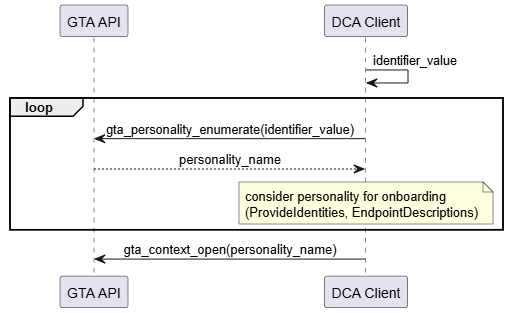
Figure 8 – Discover DeviceIdentity personality using identifier value
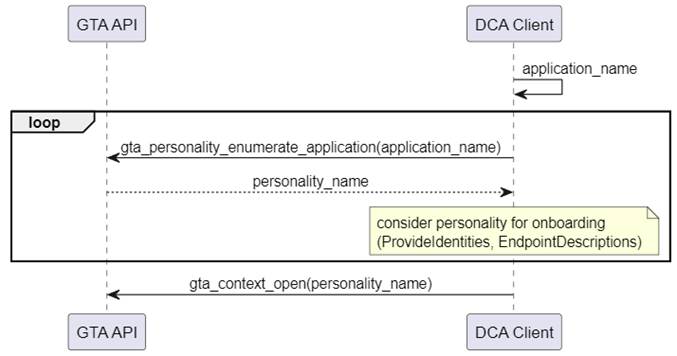
Figure 9 – Discover DeviceIdentity personality using application name
Annex A.1.1 provides a code example for the search and discovery of personalities by the application name.
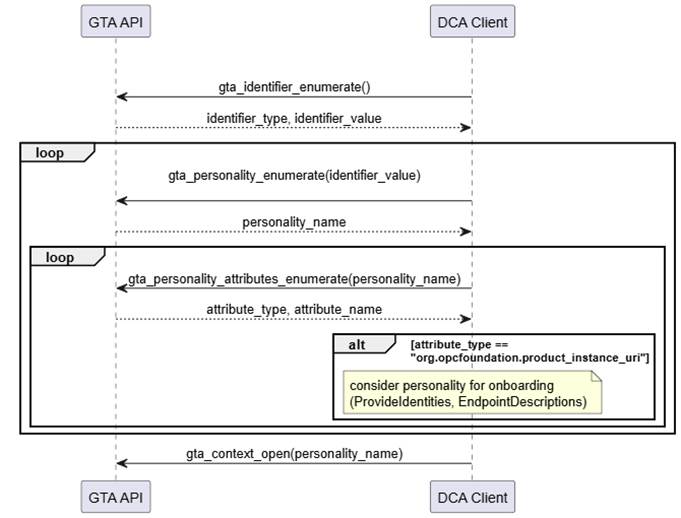
Figure 10 – Discover DeviceIdentity personality using attribute type org.opcfoundation.product_instance_uri
Annex A.1.2 provides a code example for the search and discovery of personalities using attribute type org.opcfoundation.product_instance_uri.
The call to gta_context_open() at the end of each sequence is representative for any further operations the DCA intends to do with the selected personality, e.g., retrieval of the Device Identity Certificate that may be stored as part of the DeviceIdentity personality as shown in Figure 11.
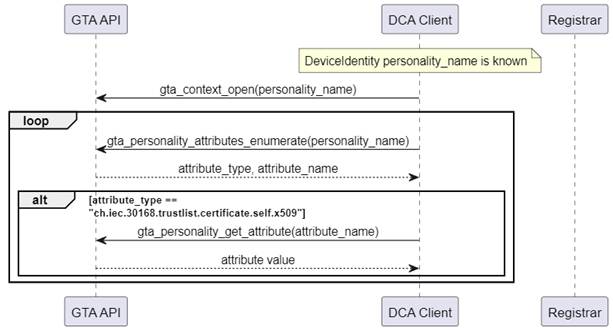
Figure 11 – Get DeviceIdentity Certificate
Annex A.2 gives an example for the retrieval of personality attributes.
This section shows how interaction with GTA API on the local endpoint maps into the overall onboarding process. During the course of the onboarding process a new personality for the DCA is created. The following operations are of interest with respect to the trust anchor:
- Generate a new public/private key pair
- Sign the proof-of-possession
- Optional: Store end-entity certificate chain as part of the personality
- Store the list of trusted certificates belonging to the DCA personality
The examples in this section use the ECC profile org.opcfoundation.ECC-nistP256 (6.1). They can be easily adapted to RSA by simply exchanging the profile name.
Figure 12 illustrates the use of TrustAnchor capabilities integrated in the Pull Management process (See OPC 10000-21).
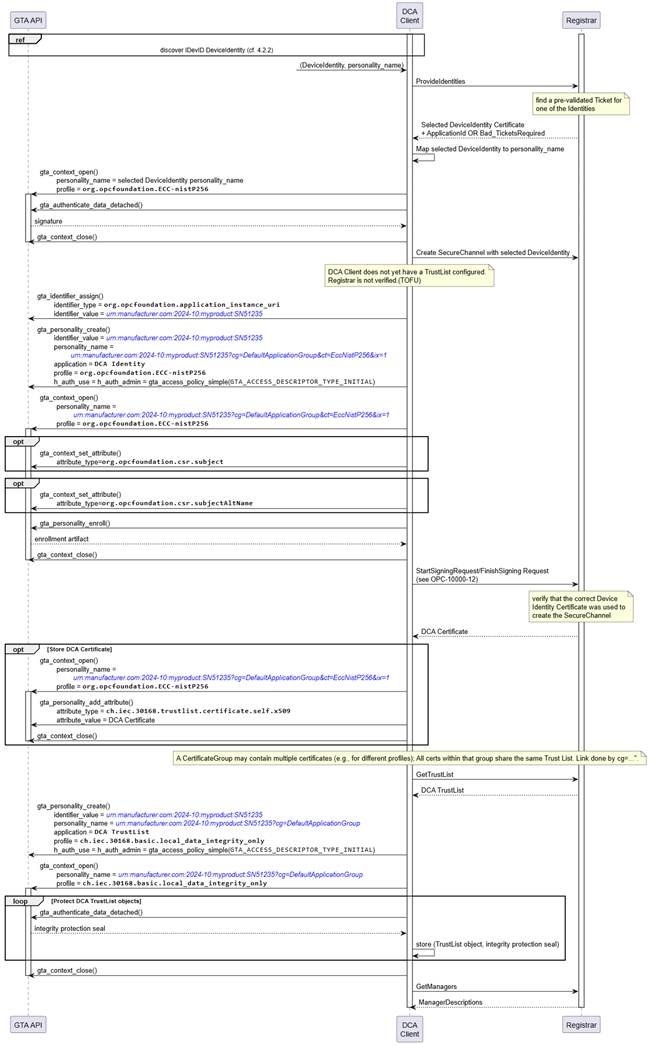
Figure 12 – Onboarding of Device Configuration Application (Pull Management)
The process starts from selecting a DeviceIdentity(s) that are eligible for onboarding (see 5.2.2). The DCA client needs to maintain a mapping between DeviceIdentity certificates and the corresponding Device Identity personality.
The DCA client proposes all available DeviceIdentity to the Registrar which replies with the selected DeviceIdentity certificate.
The DCA client uses the selected DeviceIdentity to create a secure channel to the Registrar. Create SecureChannel involves the computation of a digital signature (gta_authenticate_data_detached()). Further details for establishing a secure channel are explained in 5.5. Since the DCA client did not yet store any trusted certificates there is no authentication of the Registrar.
The DCA client creates a new identifier for the DCA and creates a new DCA Identity Personality for that identifier (gta_identifier_assign(), gta_personality_create()). The identifier value and personality name are set according to 4.3.2.1 and 4.3.4.
After creation of the DCA Identity personality the DCA prepares to file a certificate signing request (CSR) for its own DCA Certificate (cf. OPC 10000-6 6.2, Table 45; https://reference.opcfoundation.org/Core/Part6/v105/docs/6.2). Upfront the device specific information that should be included in the CSR is setup (gta_context_set_attribute()). Finally the proof-of-possession is computed and the completed CSR is returned to the DCA client (gta_pesonality_enroll()) and forwarded to the Registrar.
After the Registrar has processed the certificate signing request it provides the DCA Certificate and the DCA TrustList, i.e., the list of certificates that the DCA shall regard as trustworthy for future communications with OPC UA infrastructure services (e.g., Registrar., Certificate Manager)
Storage of the DCA Certificate within the trust anchor is optional as the certificate is protected by the issuer’s signature.
The integrity of the DCA TrustList shall be protected by the TrustAnchor. The DCA creates a dedicated DCA TrustList personality using the local data protection profile ch.iec.30168.basic.local_data_integrity_only. Storage of the TrustList objects is left to the application. The integrity of the TrustList objects is protected using a seal computed with gta_authenticate_data_detached(). The returned integrity protection seal is to be stored along-side the respective TrustList object by the application.
Figure 13 illustrates the use of TrustAnchor capabilities integrated in the Push Management process (See OPC 10000-21).
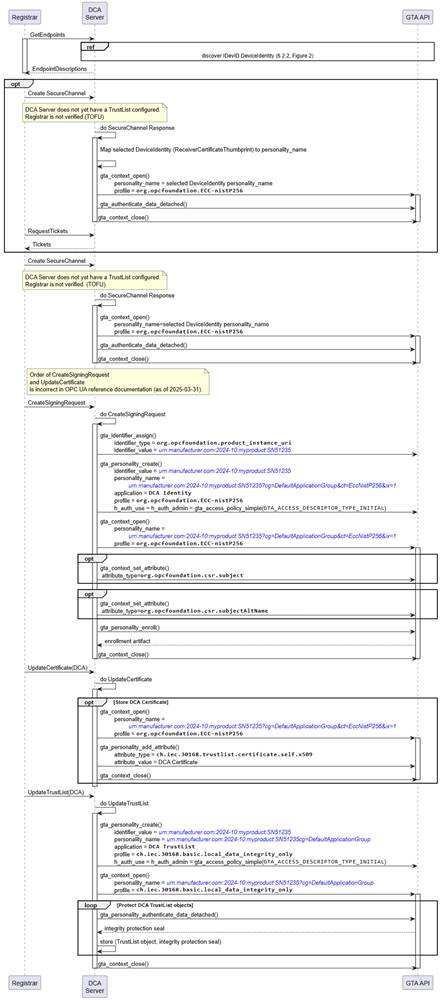
Figure 13 – Onboarding of Device Configuration Application (Push Management)
In response to a GetEndpoints request received from the registrar the DCA server compiles a list of DeviceIdentity(s) that are eligible for onboarding (see 5.2.2). The DCA server needs to maintain a mapping between DeviceIdentity certificates and the corresponding DeviceIdentity personality. The list of EndpointDescriptions created from the available DeviceIdentity certificates is returned to the Registar.
The Registrar selects one DeviceIdentity and starts a create SecureChannel Request. Details for establishing a SecureChannel are explained in 5.5. The DeviceIdentity selected by the Registrar is indicated by the ReceiverCertificateThumbprint contained in the security header (See OPC 10000-6).
The subsequent actions of the DCA server towards the GTA API correspond to Pull Management.
- The sequence following on CreateSigningRequest (Push) corresponds to the sequence used to prepare StartSigningRequest (Pull).
- The sequence following on UpdateCertificate (Push) corresponds to the sequence following the response to StartSigningRequest (Pull)
- The sequence following on UpdateTrustList (Push) corresponds to the sequence following the response to GetTrustList (Pull)