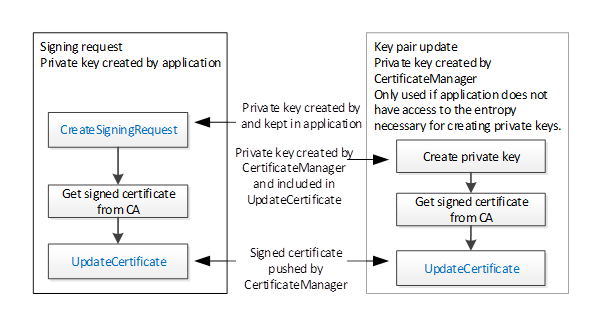
There are a few common workflows that a CertificateManager, as a Client, executes against the ServerConfiguration Object or a BaseApplicationConfiguration Object in the ManagedApplications Folder.
This workflow is started if the CertificateManager determines that an update to one or more Certificates used for an existing Endpoints is required. It is shown in Figure 17. The boxes with blue text indicate Method calls.
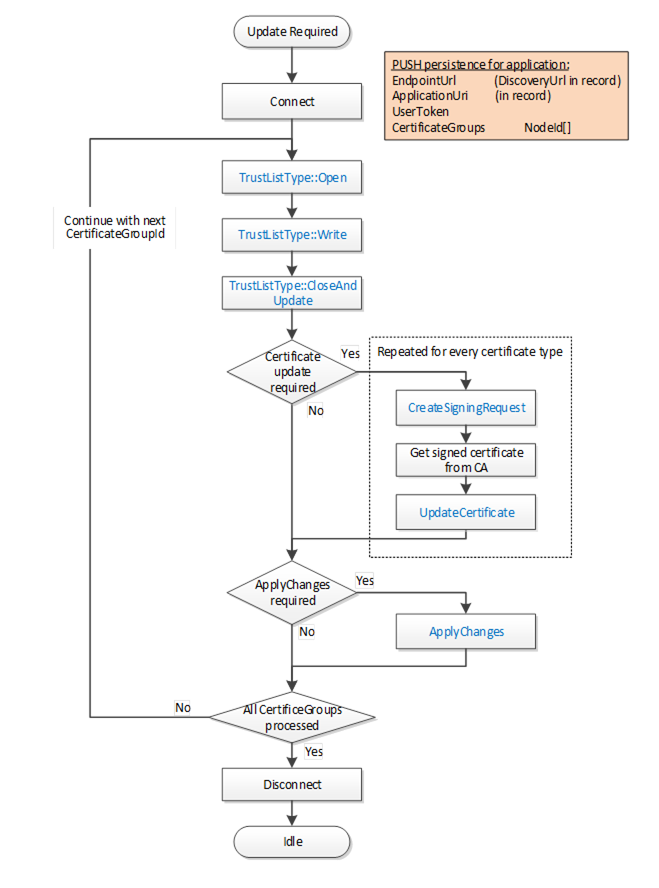
Figure 17 – PushManagement Update Multiple Certificates Workflow
The steps of the workflow are described in Table 22.
Table 22 – PushManagement Update Workflow Steps
|
Step |
Description |
|
Initial Conditions |
The update is triggered when the CertificateManager becomes aware that one or more Certificates need to be updated. Possible trigger mechanisms include:
The CertificateManager needs to have a DiscoveryUrl for the Server and should already trust at least one existing Certificate. It also needs the NodeId of the ApplicationConfigurationType instance being updated or the ApplicationUri for the Application being updated. This is either the well-known ServerConfiguration Object or one of the ApplicationConfigurationType instances in the ManagedApplications Folder. The list of CertificateGroups to update may be specified by an administrator or discovered by browsing a ApplicationConfigurationType instance. Only CertificateGroups with an ApplicationCertificateType Purpose are considered. The CertificateManager needs credentials that will have access to the SecurityAdmin Role on the Server. |
|
Connect |
The CertificateManager creates a secure connection using encryption and a Session with the Server. The Session requires access to the SecurityAdmin Role or equivalent. Possible credentials used to authenticate the CertificateManager are: |
|
Update TrustList Workflow |
The steps involved in updating the Certificate are described in the Update TrustList workflow. For each CertificateGroup the TrustList is updated first. The updates shall include all issuers and CRLs needed to validate new Certificates assigned to the CertificateGroup. If the CertificateManager needs to connect using an Endpoint associated with the CertificateGroup then the TrustList update shall include all Certificates needed to trust the CertificateManager. An application being configured via the ManagedApplications Folder does not need to trust the CertificateManager |
|
Certificate Update Required? |
For each CertificateType in a CertificateGroup the CertificateManager must determine if an update is required. This is usually based on any of the checks that triggered the workflow in the first place. For example, a Certificate close to its expiry date needs to be updated. |
|
Update Single Certificate Workflow |
The steps involved in updating the Certificate are described in the Update Single Certificate workflow. The Certificate update process may take time or require approval by an administrator so the CertificateManager may start multiple updates in parallel. |
|
Apply Changes Required? |
For each CertificateGroup it may be necessary to call ApplyChanges once the Certificate Update workflow completes. ApplyChanges is required if one or more of the Methods calls returns applyChangesRequired=TRUE. This step may cause the Server to close its Endpoints and force all Clients to reconnect. If this happens the CertificateManager may need to use the new Certificate to re-establish a Session with the Server. |
|
Disconnect |
Disconnect from Server. |
The Update TrustList workflow starts if the CertificateManager determines that an update to an existing TrustList is required. This update can be part of another workflow or a standalone workflow. It is shown in Figure 18. The boxes with blue text indicate Method calls.
Figure 18 – PushManagement Update TrustList Workflow
The steps of the PushManagement Update TrustList workflow are described in Table 23.
Table 23 – PushManagement Update TrustList Workflow Steps
|
Step |
Description |
|
Initial Conditions |
The update is triggered when the CertificateManager needs to update a TrustList as part of a larger workflow. The CertificateGroupId is determined by the containing workflow. |
|
TrustList::Open |
The TrustList is opened for writing. The new TrustList is serialized into stream of bytes. |
|
TrustList::Write |
The stream of bytes is written to the Server in one or more blocks. The size of a block shall not exceed the value specified by the MaxByteStringLength Property. |
|
TrustList::CloseAndUpdate |
The CertificateManager closes the TrustList and tells the Server to apply changes. The Server may set the applyChangesRequired =TRUE to indicate that ApplyChanges needs to be called. If required, ApplyChanges is called by the containing workflow. |
The Update Single Certificate workflow is part of the Update Certificates workflow in 7.7.2. It starts when the CertificateManager determines that an update to a Certificate assigned to a CertificateGroup is required. It is shown in Figure 19. The boxes with blue text indicate Method calls.
Figure 19 – PushManagement Update Certificate Workflow
The steps of the workflow are described in Table 24.
Table 24 – PushManagement Update Certificate Workflow Steps
|
Step |
Description |
|
Initial Conditions |
The update is triggered when the CertificateManager needs to update a Certificate as part of a larger workflow. The CertificateGroupId and CertificateTypeId are determined by the containing workflow. |
|
Certificate Exists? |
An existing Certificate may not be assigned to the CertificateType slot or it may not have field values that meet the requirements of the CertificateManager. If a useable Certificate does not exist a new self-signed Certificate is generated. |
|
CreateSelfSignedCertificate |
This Method creates a new self-signed Certificate using field values provided by the CertificateManager. This Method may not be implemented by all Servers. If this Method is available, it allows the CertificateManager to specify all of the key fields, such as the DNS names, in the Certificate. This is important when the CertificateManager configures Endpoints as described in 7.7.5. |
|
CreateSigningRequest |
This Method creates a new CertificateRequest that is signed with a PrivateKey owned by the Server. If requested, the Server generates a new PrivateKey but uses the field values from the existing Certificate. Some Servers may not have the resources to generate PrivateKeys. This step is skipped when this is the case. |
|
Request Certificate from Issuer. |
The CertificateManager requests a new Certificate from the Issuer. The CertificateManager generates a PrivateKey on behalf the Server if the Server cannot generate its own PrivateKeys. |
|
UpdateCertificate |
This Method allows the CertificateManager to upload a new Certificate and PrivateKey (if not generated by the Server) to the Server. The Server may set the applyChangesRequired =TRUE to indicate that ApplyChanges needs to be called. |
The Create Endpoint workflow starts if the CertificateManager determines it needs to create a new Endpoint. This update is always part of another workflow. It is shown in Figure 20. The boxes with blue text indicate Method calls.
Figure 20 – PushManagement Create Endpoint Workflow
The steps of the workflow are described in Table 25.
Table 25 – PushManagement Create Endpoint Workflow Steps
|
Step |
Description |
|
Initial Conditions |
The workflow is triggered when an administrator decides that a new Endpoint needs to be created and instructs the CertificateManager to create it. The CertificateManager needs to have a DiscoveryUrl for the Server and should already trust at least one existing Certificate. It also needs the NodeId of the ApplicationConfigurationType instance being updated or the ApplicationUri for the Application being updated. This is either the well-known ServerConfiguration Object or one of the ApplicationConfigurationType instances in the ManagedApplications Folder. The CertificateManager needs credentials that will have access to the SecurityAdmin Role on the Server. |
|
Connect |
This is described in Table 22. |
|
Read Current Configuration |
The current configuration needs to be read from the ConfigurationFile Object which is a component of the ApplicationConfiguration instance. The ConfigurationVersion is needed when updating the configuration. Existing SecuritySettings, UserTokenSettings and CertificateGroups may be used by the new Endpoint. The current configuration is extended with new records as required. When updating the configuration a list of UpdateTargets is needed. Only records referenced by the UpdateTargets are processed. |
|
New CertificateGroup Required? |
Checks if a new CertificateGroup is required. |
|
Add CertificateGroup |
A new CertificateGroup is added to the configuration. An UpdateTarget with UpdateType=INSERT is created for the new CertificateGroup. The Path is ‘CertificateGroups.[n]’ where n is the index in the list of CertificateGroups currently in the configuration. The Name of the new record can be any value which is unique within the configuration and the CertificateGroups Object on the ApplicationConfiguration instance. It is used to create the BrowseName for the new CertificateGroup Object. |
|
New CertificateType Required? |
Checks if a new CertificateType is required. |
|
Add CertificateType to CertificateGroup. |
A new CertificateType is added to a CertificateGroups. If the CertificateGroup already exists, an UpdateTarget with UpdateType=REPLACE is created for the CertificateGroup. The Path is ‘CertificateGroups.[n]’ where n is the index in the list of CertificateGroups currently in the configuration. No additional UpdateTarget is needed if the CertificateGroup is a new CertificateGroup added in the previous step. |
|
New UserToken Required? |
Checks if a new UserToken is required. |
|
Add UserTokenSettings to Configuration. |
A new UserTokenSettings is added to the configuration. An UpdateTarget with UpdateType= INSERT is created. The Path is ‘UserTokenSettings.[n]’ where n is the index in the list of UserTokenSettings currently in the configuration. A new IssuedTokenType may also require a new AuthorizationServices record to be created as well. The Name of the new record can be any value which is unique within the configuration. It is not saved by the Server. |
|
Add SecuritySettings to Configuration. |
A new SecuritySettings is added to the configuration. An UpdateTarget with UpdateType= INSERT is created. The Path is ‘SecuritySettings.[n]’ where n is the index in the list of SecuritySettings currently in the configuration. The Name of the new record can be any value which is unique within the configuration. It is not saved by the Server. |
|
Add Endpoint to Configuration. |
A new Endpoint is added to the configuration. If the ApplicationConfiguration instance represents a Server then the Endpoint is an instance of ServerEndpointDataType and added to the ServerEndpoints list in the configuration. If the ApplicationConfiguration instance represents a Client then the Endpoint is an instance of EndpointDataType and added to the ClientEndpoints list in the configuration. An UpdateTarget with UpdateType= INSERT is created. The Path is ‘ServerEndpoints.[n]’ or ‘ClientEndpoints.[n]’ where n is the index in the appropriate list currently in the configuration. The Name of the new record can be any value which is unique within the configuration. It is not saved by the Server. |
|
Update Configuration Workflow |
The update configuration is uploaded to the Server. It is described in 7.7.6. |
|
Update Configuration Workflow |
The update configuration is uploaded to the Server. After this step completes the CertificateManager disconnects from the Server. It is described in 7.7.6. |
|
Update Certificates Workflow |
Once new CertificateGroups and CertificateTypes are added to the configuration it is possible to use the Update Certificates workflow to populate the TrustLists and issue Certificates. If this step is skipped, any Endpoints that reference the CertificateGroups missing Certificates will not be enabled. An Endpoint that has a valid Certificate but an empty TrustList will exist but no connections will be possible. The TOFU mode used during Application Setup (see G.2) only applies when a Server is configured for the first time. It is described in 7.7.2. |
The Update Configuration workflow is always part of another workflow. It is shown in Figure 21. The boxes with blue text indicate Method calls.
Figure 21 – PushManagement Update Configuration Workflow
The steps of the workflow are described in Table 26.
Table 26 – PushManagement Update Configuration Workflow Steps
|
Step |
Description |
|
Initial Conditions |
The workflow starts when a CertificateManager has completed updates to a local copy of the ApplicationConfiguration. A Session with SecurityAdmin access rights exists. The ConfigurationFile Object belongs to the ApplicationConfiguration being updated. It may be the Server that the CertificateManager is connected to or another application being managed by the Server. |
|
ConfigurationFileType::Open |
The ConfigurationFile is opened for writing. The new configuration is serialized into stream of bytes. |
|
ConfigurationFileType::Write |
The stream of bytes is written to the Server in one or more blocks. The size of a block shall not exceed the value specified by the MaxByteStringLength Property. |
|
ConfigurationFileType::CloseAndUpdate |
The CertificateManager closes the ConfigurationFile and tells the Server to apply changes. The CertificateManager provides a list of update targets which indicate what records in the configuration have changed. Records that are not referenced by an update target may be omitted. Note that when referencing existing the records the names provided by the Server when the configuration was downloaded shall be used. The names are associated with ConfigurationVersion and may change if the ConfigurationVersion changes. An error occurs if the ConfigurationVersion in the configuration does not match the current ConfigurationVersion known to the Server. The Server may return an UpdateId to indicate that ConfirmUpdate shall be called. |
|
Confirm Required? |
Checks if a new ConfirmUpdate needs to be called. |
|
Disconnect/Reconnect |
The CertificateManager closes the connection and waits at least the RestartDelayTime period but no longer than the RevertAfterTime period. |
|
ConfigurationFileType::ConfirmUpdate |
This Method tells the Server that the changes can be made permanent because the CertificateManager could reconnect. |
|
Disconnect |
Disconnect from Server. This step may be skipped instead of re-connecting when the Update Certificates workflow starts. |